Robots
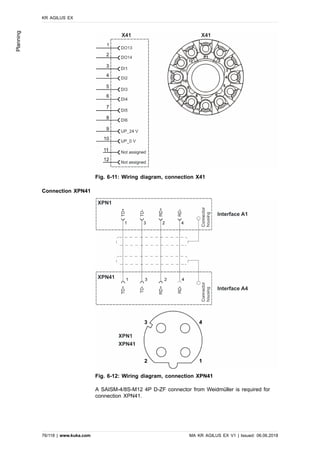
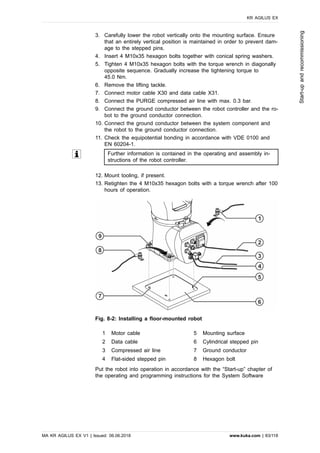
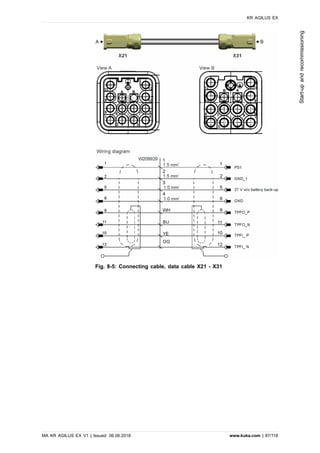
KR AGILUS EX
Assembly and Operating Instructions
Issued: 06.06.2018
MA KR AGILUS EX V1
KUKA Deutschland GmbH
KR AGILUS EX
2/118 | www.kuka.com MA KR AGILUS EX V1 | Issued: 06.06.2018
© Copyright 2018
KUKA Deutschland GmbH
Zugspitzstraße 140
D-86165 Augsburg
Germany
This documentation or excerpts therefrom may not be reproduced or disclosed to third parties
without the express permission of KUKA Deutschland GmbH.
Other functions not described in this documentation may be operable in the controller. The user
has no claims to these functions, however, in the case of a replacement or service work.
We have checked the content of this documentation for conformity with the hardware and soft-
ware described. Nevertheless, discrepancies cannot be precluded, for which reason we are not
able to guarantee total conformity. The information in this documentation is checked on a regu-
lar basis, however, and necessary corrections will be incorporated in the subsequent edition.
Subject to technical alterations without an effect on the function.
KIM-PS5-DOC
Translation of the original documentation
Publication: Pub MA KR AGILUS EX (PDF) en
PB10581
Book structure: MA KR AGILUS EX V1.1
BS9786
Version: MA KR AGILUS EX V1
Contents
1 Introduction.............................................................................................. 6
1.1 Industrial robot documentation.............................................................................. 6
1.2 Representation of warnings and notes................................................................. 6
1.3 Terms used............................................................................................................ 7
2 Purpose..................................................................................................... 8
2.1 Target group.......................................................................................................... 8
2.2 Intended use.......................................................................................................... 8
3 Product description................................................................................. 10
3.1 Overview of the robot system............................................................................... 10
3.2 Description of the manipulator.............................................................................. 11
4 Technical data.......................................................................................... 13
4.1 Basic data.............................................................................................................. 13
4.2 Axis data, KR 6 R900 EX..................................................................................... 16
4.3 Payloads, KR 6 R900 EX..................................................................................... 18
4.4 Foundation loads, KR 6 R900 EX........................................................................ 22
4.5 Plates and labels................................................................................................... 24
4.6 Stopping distances and times............................................................................... 27
4.6.1 General information............................................................................................... 27
4.6.2 Terms used............................................................................................................ 28
4.6.3 Stopping distances and times............................................................................... 29
4.6.3.1 Stopping distances and stopping times for STOP 0, axis 1 to axis 3................ 29
4.6.3.2 Stopping distances and stopping times for STOP 1, axis 1................................ 30
4.6.3.3 Stopping distances and stopping times for STOP 1, axis 2................................ 32
4.6.3.4 Stopping distances and stopping times for STOP 1, axis 3................................ 34
5 Safety......................................................................................................... 35
5.1 General.................................................................................................................. 35
5.1.1 Liability................................................................................................................... 35
5.1.2 Intended use.......................................................................................................... 35
5.1.3 EC declaration of conformity and declaration of incorporation............................ 36
5.1.4 Terms used............................................................................................................ 37
5.2 Personnel............................................................................................................... 39
5.3 Workspace, safety zone and danger zone........................................................... 40
5.3.1 Determining stopping distances............................................................................ 41
5.4 Triggers for stop reactions.................................................................................... 41
5.5 Safety functions..................................................................................................... 42
5.5.1 Overview of the safety functions.......................................................................... 42
5.5.2 Safety controller..................................................................................................... 42
5.5.3 Selecting the operating mode............................................................................... 43
5.5.4 “Operator safety” signal......................................................................................... 44
5.5.5 EMERGENCY STOP device................................................................................. 44
5.5.6 Logging off from the higher-level safety controller............................................... 45
5.5.7 External EMERGENCY STOP device.................................................................. 45
5.5.8 Enabling device..................................................................................................... 46
KR AGILUS EX
MA KR AGILUS EX V1 | Issued: 06.06.2018 www.kuka.com | 3/118
5.5.9 External enabling device....................................................................................... 46
5.5.10 External safe operational stop.............................................................................. 46
5.5.11 External safety stop 1 and external safety stop 2............................................... 46
5.5.12 Velocity monitoring in T1....................................................................................... 47
5.6 Additional protective equipment............................................................................ 47
5.6.1 Jog mode............................................................................................................... 47
5.6.2 Software limit switches.......................................................................................... 47
5.6.3 Mechanical end stops........................................................................................... 47
5.6.4 Mechanical axis limitation (optional)..................................................................... 47
5.6.5 Axis range monitoring (optional)........................................................................... 48
5.6.6 Options for moving the manipulator without drive energy................................... 48
5.6.7 Labeling on the industrial robot............................................................................ 49
5.6.8 External safeguards............................................................................................... 49
5.7 Overview of operating modes and safety functions............................................. 50
5.8 Safety measures.................................................................................................... 50
5.8.1 General safety measures...................................................................................... 50
5.8.2 Transportation........................................................................................................ 53
5.8.3 Start-up and recommissioning.............................................................................. 53
5.8.3.1 Checking machine data and safety configuration................................................ 55
5.8.3.2 Start-up mode........................................................................................................ 57
5.8.4 Manual mode......................................................................................................... 58
5.8.5 Simulation.............................................................................................................. 59
5.8.6 Automatic mode..................................................................................................... 59
5.8.7 Maintenance and repair........................................................................................ 59
5.8.8 Decommissioning, storage and disposal.............................................................. 61
5.8.9 Safety measures for “single point of control”....................................................... 61
5.9 Applied norms and regulations............................................................................. 62
6 Planning.................................................................................................... 65
6.1 Information for planning........................................................................................ 65
6.2 Robot planning...................................................................................................... 65
6.3 Mounting base....................................................................................................... 66
6.4 Machine frame mounting....................................................................................... 68
6.5 Connecting cables and interfaces......................................................................... 70
6.6 Customer interfaces.............................................................................................. 72
7 Transportation.......................................................................................... 77
7.1 Transporting the manipulator................................................................................ 77
8 Start-up and recommissioning............................................................... 80
8.1 Installing the mounting base................................................................................. 80
8.2 Installing the machine frame mounting assembly................................................ 81
8.3 Installing a floor-mounted robot............................................................................ 82
8.4 Description of the connecting cables.................................................................... 84
8.5 Moving the manipulator without drive energy...................................................... 90
9 Maintenance.............................................................................................. 91
9.1 Maintenance overview........................................................................................... 91
9.1.1 Maintenance table................................................................................................. 91
9.2 Greasing the inside of covers A2 and A3............................................................ 93
KR AGILUS EX
4/118 | www.kuka.com MA KR AGILUS EX V1 | Issued: 06.06.2018
9.3 Exchanging the toothed belts............................................................................... 94
9.4 Cleaning the robot................................................................................................. 97
10 Repair........................................................................................................ 98
10.1 Measuring and adjusting the toothed belt tension............................................... 98
11 Decommissioning, storage and disposal............................................. 101
11.1 Decommissioning, floor-mounted robot................................................................ 101
11.2 Storage.................................................................................................................. 102
11.3 Disposal................................................................................................................. 103
12 Options...................................................................................................... 105
12.1 Overpressure monitoring system.......................................................................... 105
13 Appendix................................................................................................... 106
13.1 Tightening torques................................................................................................. 106
13.2 Tightening torque for stainless steel screws........................................................ 107
13.3 Auxiliary and operating materials used................................................................ 107
14 KUKA Service........................................................................................... 108
14.1 Requesting support............................................................................................... 108
14.2 KUKA Customer Support...................................................................................... 108
Index 116
KR AGILUS EX
MA KR AGILUS EX V1 | Issued: 06.06.2018 www.kuka.com | 5/118
1 Introduction
1.1 Industrial robot documentation
The industrial robot documentation consists of the following parts:
• Documentation for the manipulator
• Documentation for the robot controller
• Operating and programming instructions for the System Software
• Instructions for options and accessories
• Parts catalog on storage medium
Each of these sets of instructions is a separate document.
1.2 Representation of warnings and notes
Safety
These warnings are relevant to safety and must be observed.
DANGER
These warnings mean that it is certain or highly probable that death or
severe injuries will occur, if no precautions are taken.
WARNING
These warnings mean that death or severe injuries may occur, if no
precautions are taken.
CAUTION
These warnings mean that minor injuries may occur, if no precautions
are taken.
NOTICE
These warnings mean that damage to property may occur, if no pre-
cautions are taken.
These warnings contain references to safety-relevant information or
general safety measures.
These warnings do not refer to individual hazards or individual precau-
tionary measures.
This warning draws attention to procedures which serve to prevent or rem-
edy emergencies or malfunctions:
SAFETY INSTRUCTION
The following procedure must be followed exactly!
Procedures marked with this warning must be followed exactly.
Notices
These notices serve to make your work easier or contain references to
further information.
Tip to make your work easier or reference to further information.
KR AGILUS EX
6/118 | www.kuka.com MA KR AGILUS EX V1 | Issued: 06.06.2018
Introduction
1.3 Terms used
Term Description
EPL Engine protection level
Explosion zones Special robot variant for use in potentially ex-
plosive environments
Explosion protection
zone 0
Zone 0 is a place in which an explosive at-
mosphere consisting of a mixture with air of
flammable substances in the form of gas, va-
por or mist is present continuously or for long
periods or frequently.
Explosion protection
zone 1
Zone 1 is a place in which an explosive at-
mosphere consisting of a mixture with air of
flammable substances in the form of gas, va-
por or mist is likely to occur in normal opera-
tion occasionally.
Explosion protection
zone 2
Zone 2 is a place in which an explosive at-
mosphere consisting of a mixture with air of
flammable substances in the form of gas, va-
por or mist is not likely to occur in normal op-
eration but, if it does occur, will persist for a
short period only.
Explosion protection
zone 20
Zone 20 is a place in which an explosive at-
mosphere in the form of a cloud of combusti-
ble dust in air is present continuously or for
long periods or frequently.
Explosion protection
zone 21
Zone 21 is a place in which an explosive at-
mosphere in the form of a cloud of combusti-
ble dust in air is likely to occur in normal oper-
ation occasionally.
Explosion protection
zone 22
Zone 22 is a place in which an explosive at-
mosphere in the form of a cloud of combusti-
ble dust in air is not likely to occur in normal
operation but, if it does occur, will persist for a
short period only.
MEMD Micro Electronic Mastering Device
RDC Resolver Digital Converter
smartPAD The smartPAD teach pendant has all the oper-
ator control and display functions required for
operating and programming the industrial ro-
bot.
KR AGILUS EX
MA KR AGILUS EX V1 | Issued: 06.06.2018 www.kuka.com | 7/118
Introduction
2 Purpose
2.1 Target group
This documentation is aimed at users with the following knowledge and
skills:
• Advanced knowledge of mechanical engineering
• Advanced knowledge of electrical and electronic systems
• Knowledge of the robot controller system
For optimal use of our products, we recommend that our customers
take part in a course of training at KUKA College. Information about the
training program can be found at www.kuka.com or can be obtained di-
rectly from our subsidiaries.
2.2 Intended use
Use
• Handling and machining workpieces in explosion protection zone 2 or
22.
In EU countries, the operators of technical systems are required to ana-
lyze, evaluate and label any potential danger of explosion that may occur
or exist according to 1999/92/EC. In non-EU countries, any potential dan-
ger of explosion must be analyzed and evaluated according to country-
specific laws.
Any other or additional use is considered misuse and is not allowed. The
manufacturer cannot be held liable for any resulting damage. The risk lies
entirely with the user.
Operation in accordance with the intended use also requires compliance
with the operating and assembly instructions for the individual compo-
nents, with particular reference to the maintenance specifications.
The machine must be operated in compliance with Directive 1999/92/EC
and with an overpressure monitoring system.
Misuse
Any applications deviating from the intended use are regarded as inadmis-
sible misuse; these include:
• Transportation of persons and animals
• Use as a climbing aid
• Use outside the permissible operating parameters
• Operation without additional safeguards
• Outdoor operation
• Underground operation
• Operation in a more restrictive environment than the permitted explo-
sion protection zone
NOTICE
Changing the structure of the robot, e.g. by drilling holes, can result in
damage to the components. This is considered improper use and leads
to loss of guarantee and liability entitlements.
KR AGILUS EX
8/118 | www.kuka.com MA KR AGILUS EX V1 | Issued: 06.06.2018
Purpose
The robot system is an integral part of a complete system and may on-
ly be operated in a CE-compliant system.
KR AGILUS EX
MA KR AGILUS EX V1 | Issued: 06.06.2018 www.kuka.com | 9/118
Purpose
3 Product description
3.1 Overview of the robot system
A robot system (>>> Fig. 3-1) comprises all the assemblies of an industri-
al robot, including the manipulator (mechanical system and electrical in-
stallations), control cabinet, connecting cables, end effector (tool) and oth-
er equipment. The Product Family KR AGILUS sixx EX consists of the fol-
lowing type:
• KR 6 R900 EX
An industrial robot of this type consists of the following components:
• Manipulator
• Robot controller
• smartPAD teach pendant
• Connecting cables
• Software
• Options, accessories
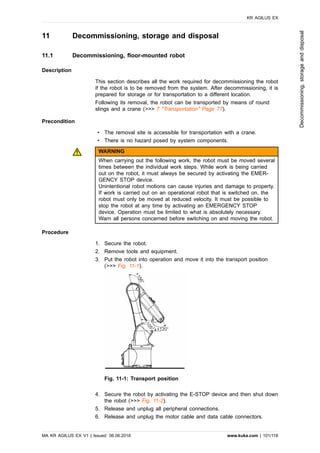
Fig. 3-1: Example of an industrial robot
1 Manipulator
2 smartPAD teach pendant
3 Connecting cable/smartPAD
4 Robot controller
5 Connecting cable/data cable
6 Connecting cable/motor cable
7 Device connection cable
KR AGILUS EX
10/118 | www.kuka.com MA KR AGILUS EX V1 | Issued: 06.06.2018
Productdescription
3.2 Description of the manipulator
Overview
The manipulators are 6-axis jointed-arm manipulators made of cast light
alloy. Each axis is fitted with a brake. Sealed covers protect the inner
components against fouling and water spray.
In order to be able to use the manipulator in potentially explosive environ-
ments, it must be possible to purge the interior of the manipulator with
purge gas (compressed air or inert gas). The robot is equipped with sup-
ply and return lines for this. The required compressed air is supplied via
the connection at interface A1.
The robot consists of the following principal components:
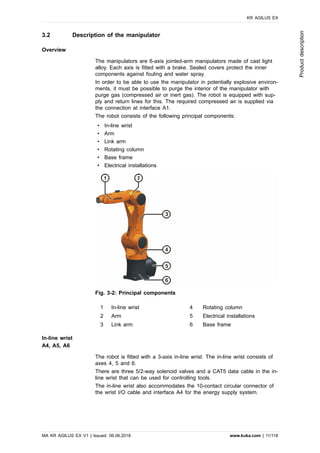
• In-line wrist
• Arm
• Link arm
• Rotating column
• Base frame
• Electrical installations
Fig. 3-2: Principal components
1 In-line wrist 4 Rotating column
2 Arm 5 Electrical installations
3 Link arm 6 Base frame
In-line wrist
A4, A5, A6
The robot is fitted with a 3-axis in-line wrist. The in-line wrist consists of
axes 4, 5 and 6.
There are three 5/2-way solenoid valves and a CAT5 data cable in the in-
line wrist that can be used for controlling tools.
The in-line wrist also accommodates the 10-contact circular connector of
the wrist I/O cable and interface A4 for the energy supply system.
KR AGILUS EX
MA KR AGILUS EX V1 | Issued: 06.06.2018 www.kuka.com | 11/118
Productdescription
Arm
A3
The arm is the link between the in-line wrist and the link arm. The arm is
driven by the motor of axis 3.
Link arm
A2
The link arm is the assembly located between the arm and the rotating
column. It houses the motor and gear unit of axis 2. The supply lines of
the energy supply system and the cable set for axes 2 to 6 are routed
through the link arm.
Rotating column
A1
The rotating column houses the motors of axes 1 and 2. The rotational
motion of axis 1 is performed by the rotating column. This is screwed to
the base frame via the gear unit of axis 1 and is driven by a motor in the
rotating column. The link arm is also mounted in the rotating column.
Base frame
The base frame is the base of the robot. Interface A1 is located at the
rear of the base frame. It constitutes the interface for the connecting ca-
bles between the manipulator and the controller, the energy supply system
and the pressurization unit.
Electrical installations
The electrical installations include all the motor and control cables for the
motors of axes 1 to 6, as well as the connections for the internal energy
supply system and external axes A7 and A8. All connections are plugga-
ble. The electrical installations also include the “RDC cool”, an “EDS cool”
and a “Beckhoff module cool” which are integrated into the robot. The
connectors for the motor and data cables are mounted on the robot base
frame. The connecting cables from the robot controller are connected here
by means of connectors. The electrical installations also include a protec-
tive circuit.
NOTICE
When exchanging the “cool” components, it must be ensured that only
“cool” components are reinstalled. Failure to do so is liable to result in
irregular motion characteristics and malfunctions!
Options
The robot can be fitted and operated with various options, e.g. working
range limitation A1 or brake release device. The option is described in
separate documentation.
An overpressure monitoring system is available as a further option. Fur-
ther information can be found in Section (>>> 12.1 "Overpressure monitor-
ing system" Page 105).
KR AGILUS EX
12/118 | www.kuka.com MA KR AGILUS EX V1 | Issued: 06.06.2018
Productdescription
4 Technical data
4.1 Basic data
Basic data
Designation KR 6 R900 EX
Number of axes 6
Number of controlled axes 6
Volume of working envelope 2.85 m³
Pose repeatability (ISO 9283) ± 0.03 mm
Weight approx. 53 kg
Rated payload 3 kg
Maximum total load 6 kg
Maximum reach 901.5 mm
Protection rating (IEC 60529) IP67
Protection rating, in-line wrist (IEC
60529)
IP67
Sound level < 70 dB (A)
Mounting position Floor
Footprint 320 mm x 320 mm
Hole pattern: mounting surface for
kinematic system
C246
Permissible angle of inclination -
Default color Base frame: black (RAL 9011);
Moving parts: KUKA orange 2567;
Link arm cover: black (RAL 9011)
Controller KR C4 compact
Transformation name KR C4: KR6R900 C4SR WLL
Overpressure in the robot 0.03 MPa (0.3 bar)
Compressed air Oil-free, dry, filtered
in accordance with: ISO 8573.1-1,
1.2 to 16.2
Air consumption 0.1 m3/h
Air line connection Plug-in connection for hose,
standard outside diameter 6 mm
No combustible substances or mixtures of substances are routed through
the interior of the robots.
The motors and gear units of the robot are sufficiently sealed against dust
so that at most an explosive gas atmosphere can arise (i.e. no explosive
dust atmosphere and no hybrid mixture).
In the (asymptotical) limit state, the concentration of combustible gases
and vapors in the interior of the motors and gear units can also, at a max-
imum, only reach that of the outer environment.
All motors of the robot are protected from mechanical and thermal over-
loading:
KR AGILUS EX
MA KR AGILUS EX V1 | Issued: 06.06.2018 www.kuka.com | 13/118
Technicaldata
• In the event of mechanical overloading, the corresponding electric cur-
rent limitation triggers a safety cut-out of the robot.
• In the event of thermal overloading, the corresponding temperature
monitor or temperature limiter triggers a safety cut-out of the robot.
Ambient conditions
Operation 5 °C to 45 °C (278 K to 318 K)
• Atmosphere corresponds to explosion pro-
tection zone 2 (according to 94/9/EC)
• Free from aggressive and corrosive gases
and liquids
• Free from flying parts
• Free from spraying liquids
• Free from electromagnetic loads, e.g. from
welding equipment or high-frequency con-
verters
Storage and transpor-
tation
-40 °C to 60 °C (233 K to 333 K)
Ambient conditions DIN EN 60721-3-3,
Class 3k3, 3Z10, 3B1
The manipulator may not be used under the
following ambient conditions:
• High-pressure component washing systems
• Continuous submersion
• Acidic or alkaline environments
• Use of fluids that cause damage to NBR
NOTICE
If the manipulator is exposed to high-velocity fluids, particles and/or
compressed air, it must be protected against direct exposure to these.
Connecting cables
Cable designation
Connector designation
robot controller -
robot
Interface with
robot
Motor cable X20 - X30 Han Yellock 30
Data cable X21 - X31 Han Q12
CAT5 data cable
(can be ordered as an
option)
X65/X66 - XPN1 M12 connector
Connecting cable, exter-
nal axes A7 and A8
(can be ordered as an
option)
XP7 - XP7.1
XP8 - XP8.1
Connector M17
in each case
Ground conductor, equi-
potential bonding
(can be ordered as an
option)
M4 ring cable
lug
Only resolvers can be connected to the connections XP7.1 and XP8.1.
KR AGILUS EX
14/118 | www.kuka.com MA KR AGILUS EX V1 | Issued: 06.06.2018
Technicaldata
Cable lengths
Standard 4 m
Option 1 m, 7 m, 15 m, 25 m
For detailed specifications of the connecting cables, see (>>> 8.4 "De-
scription of the connecting cables" Page 84).
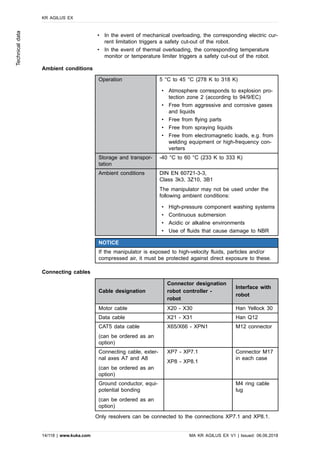
ATEX classification
ATEX classification of the manipulator in accordance with 94/9/EC:
Fig. 4-1: ATEX classification
Ex symbol Symbol for prevention of explosions according
to 94/9/EC.
Device approved for potentially explosive
areas according to marking.
II Device group II specifies that the robot can be
used for all areas (except underground).
III Device group III specifies that the robot can
be used for all areas (except underground).
3 ATEX category: In category 3, potentially ex-
plosive gases are present only occasionally or
for short times (<10 h/year).
Devices of category 3 are required for opera-
tion in explosion protection zone 2.
G The explosion protection refers to explosive
gases and vapors, not to dust.
Ex pzc Type of protection: pressurized enclosure with
increased protection
IIC Explosion class
T4 Temperature class
T80°C Ignition temperature of dusts
Gc EPL Zone 2 (flammable gases/vapors)
Dc EPL Zone 22 (flammable dusts)
CE mark Refers here exclusively to compliance with the
ATEX guidelines.
KR AGILUS EX
MA KR AGILUS EX V1 | Issued: 06.06.2018 www.kuka.com | 15/118
Technicaldata
4.2 Axis data, KR 6 R900 EX
Axis data
Motion range
A1 ±170 °
A2 -190 ° / 45 °
A3 -120 ° / 156 °
A4 ±185 °
A5 ±120 °
A6 ±350 °
Speed with rated payload
A1 -
A2 -
A3 -
A4 -
A5 -
A6 -
The direction of motion and the arrangement of the individual axes may
be noted from the diagram (>>> Fig. 4-2).
Fig. 4-2: Direction of rotation of robot axes
Mastering position
Mastering position
A1 0 °
A2 -90 °
A3 90 °
A4 0 °
A5 0 °
A6 0 °
KR AGILUS EX
16/118 | www.kuka.com MA KR AGILUS EX V1 | Issued: 06.06.2018
Technicaldata
Working envelope
The following diagrams show the shape and size of the working envelope
for these variants of this product family.
The reference point for the working envelope is the intersection of axes 4
and 5.
Fig. 4-3: KR 6 R900 EX, working envelope, side view
Fig. 4-4: KR 6 R900 EX, working envelope, top view
Distance to flange
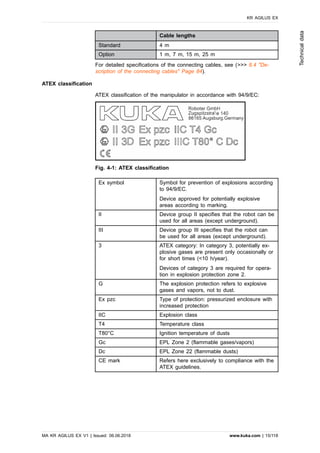
The distance to the flange varies according to the position of the robot.
KR AGILUS EX
MA KR AGILUS EX V1 | Issued: 06.06.2018 www.kuka.com | 17/118
Technicaldata
Fig. 4-5: KR 6 R900 EX, flange distance
4.3 Payloads, KR 6 R900 EX
Payloads
Rated payload 3 kg
Maximum payload 6 kg
Rated mass moment of inertia 0.045 kgm²
Rated supplementary load, base
frame
0 kg
Maximum supplementary load,
base frame
-
Rated supplementary load, rotat-
ing column
0 kg
Maximum supplementary load, ro-
tating column
-
Rated supplementary load, link
arm
0 kg
Maximum supplementary load, link
arm
-
Rated supplementary load, arm 0 kg
Maximum supplementary load,
arm
-
Maximum total load 6 kg
Nominal distance to load center of gravity
Lxy 60 mm
Lz 80 mm
The sum of all loads mounted on the robot must not exceed the maxi-
mum total load.
KR AGILUS EX
18/118 | www.kuka.com MA KR AGILUS EX V1 | Issued: 06.06.2018
Technicaldata
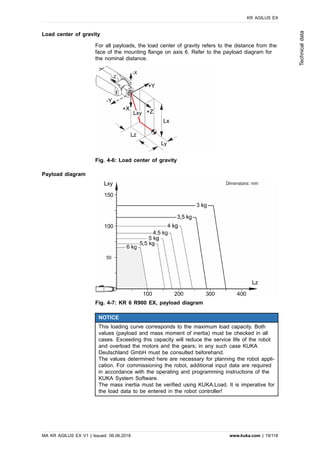
Load center of gravity
For all payloads, the load center of gravity refers to the distance from the
face of the mounting flange on axis 6. Refer to the payload diagram for
the nominal distance.
Fig. 4-6: Load center of gravity
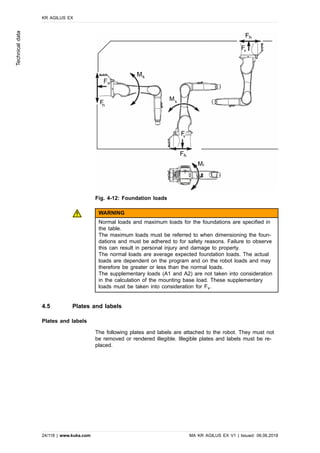
Payload diagram
Fig. 4-7: KR 6 R900 EX, payload diagram
NOTICE
This loading curve corresponds to the maximum load capacity. Both
values (payload and mass moment of inertia) must be checked in all
cases. Exceeding this capacity will reduce the service life of the robot
and overload the motors and the gears; in any such case KUKA
Deutschland GmbH must be consulted beforehand.
The values determined here are necessary for planning the robot appli-
cation. For commissioning the robot, additional input data are required
in accordance with the operating and programming instructions of the
KUKA System Software.
The mass inertia must be verified using KUKA.Load. It is imperative for
the load data to be entered in the robot controller!
KR AGILUS EX
MA KR AGILUS EX V1 | Issued: 06.06.2018 www.kuka.com | 19/118
Technicaldata
Mounting flange
In-line wrist type ZH 6/10 R900 WP
Mounting flange see drawing
Mounting flange (hole circle) 31.5 mm
Screw grade 12.9
Screw size M5
Number of fastening threads 7
Clamping length min. 1.5 x nominal diameter
Depth of engagement min. 5.5 mm, max. 7 mm
Locating element 5 H7
Standard See diagram. (>>> Fig. 4-8)
The mounting flange is depicted with axes 4 and 6 in the zero position.
The symbol Xm indicates the position of the locating element (bushing) in
the zero position.
Fig. 4-8: Mounting flange
Flange loads
Due to the motion of the payload (e.g. tool) mounted on the robot, forces
and torques act on the mounting flange. These forces and torques depend
on the motion profile as well as the mass, load center of gravity and mass
moment of inertia of the payload.
The specified values refer to nominal payloads at the nominal distance
and do not include safety factors. It is imperative for the load data to be
entered in the robot controller. The robot controller takes the payload into
consideration during path planning. A reduced payload does not necessa-
rily result in lower forces and torques.
The values are guide values determined by means of trial and simulation
and refer to the most heavily loaded machine in the robot family. The ac-
tual forces and torques may differ due to internal and external influences
on the mounting flange or a different point of application. It is therefore
KR AGILUS EX
20/118 | www.kuka.com MA KR AGILUS EX V1 | Issued: 06.06.2018
Technicaldata
advisable to determine the exact forces and torques where necessary on
site under the real conditions of the actual robot application.
The operating values may occur permanently in the normal motion profile.
It is advisable to rate the tool for its fatigue strength.
The EMERGENCY STOP values may arise in the event of an Emergency
Stop situation of the robot. As these should only occur very rarely during
the service life of the robot, a static strength verification is usually suffi-
cient.
Fig. 4-9: Flange loads
Flange loads during operation
F(a) 399 N
F(r) 475 N
M(k) 49 Nm
M(g) 45 Nm
Flange loads in the case of EMERGENCY STOP
F(a) 544 N
F(r) 669 N
M(k) 82 Nm
M(g) 113 Nm
Axial force F(a), radial force F(r), tilting torque M(k), torque about mount-
ing flange M(g)
Supplementary load
The robot can carry supplementary loads on the arm, on the in-line wrist,
on the link arm and on the rotating column. The fastening holes on the
arm, link arm and rotating column are used for fastening the covers or ex-
ternal energy supply systems. Parts of the energy supply system (e.g.
holders for compressed air hose) are fastened to the in-line wrist using
the fastening holes. When mounting the supplementary loads, be careful
to observe the maximum permissible total load. The dimensions and posi-
tions of the installation options can be seen in the following diagram.
The sum of all loads mounted on the robot must not exceed the maxi-
mum total load.
The following diagrams (>>> Fig. 4-10) and (>>> Fig. 4-11) show the di-
mensions and position of the installation options on the arm, in-line wrist,
link arm and rotating column.
KR AGILUS EX
MA KR AGILUS EX V1 | Issued: 06.06.2018 www.kuka.com | 21/118
Technicaldata
Fig. 4-10: Supplementary load on arm and in-line wrist
1 Support bracket for supplementary load
Fig. 4-11: Supplementary load on link arm and rotating column
1 Support bracket for supplementary load
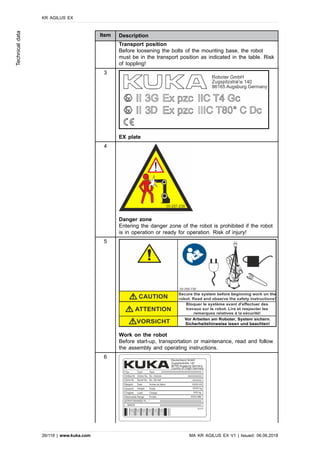
4.4 Foundation loads, KR 6 R900 EX
Foundation loads
The specified forces and moments already include the payload and the in-
ertia force (weight) of the robot.
KR AGILUS EX
22/118 | www.kuka.com MA KR AGILUS EX V1 | Issued: 06.06.2018
Technicaldata
Foundation loads for floor mounting position
F(v normal) 697 N
F(v max) 1297 N
F(h normal) 1223 N
F(h max) 1362 N
M(k normal) 788 Nm
M(k max) 1152 Nm
M(r normal) 367 Nm
M(r max) 880 Nm
Foundation loads for ceiling mounting position
F(v normal) 697 N
F(v max) 1297 N
F(h normal) 1223 N
F(h max) 1362 N
M(k normal) 788 Nm
M(k max) 1152 Nm
M(r normal) 367 Nm
M(r max) 880 Nm
Foundation loads for wall mounting position
F(v normal) 697 N
F(v max) 1297 N
F(h normal) 1223 N
F(h max) 1362 N
M(k normal) 788 Nm
M(k max) 1152 Nm
M(r normal) 367 Nm
M(r max) 880 Nm
Vertical force F(v), horizontal force F(h), tilting torque M(k), torque about
axis 1 M(r)
KR AGILUS EX
MA KR AGILUS EX V1 | Issued: 06.06.2018 www.kuka.com | 23/118
Technicaldata
Fig. 4-12: Foundation loads
WARNING
Normal loads and maximum loads for the foundations are specified in
the table.
The maximum loads must be referred to when dimensioning the foun-
dations and must be adhered to for safety reasons. Failure to observe
this can result in personal injury and damage to property.
The normal loads are average expected foundation loads. The actual
loads are dependent on the program and on the robot loads and may
therefore be greater or less than the normal loads.
The supplementary loads (A1 and A2) are not taken into consideration
in the calculation of the mounting base load. These supplementary
loads must be taken into consideration for Fv.
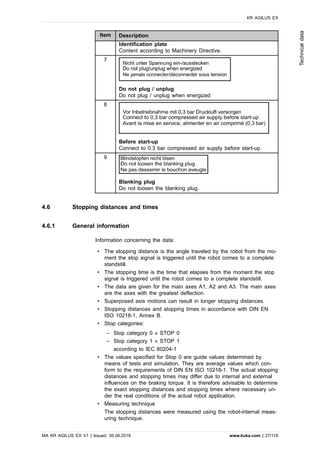
4.5 Plates and labels
Plates and labels
The following plates and labels are attached to the robot. They must not
be removed or rendered illegible. Illegible plates and labels must be re-
placed.
KR AGILUS EX
24/118 | www.kuka.com MA KR AGILUS EX V1 | Issued: 06.06.2018
Technicaldata
Fig. 4-13: Plates and labels
Item Description
1
Secure the axes
Before exchanging any motor, secure the corresponding axis
through safeguarding by suitable means/devices to protect
against possible movement. The axis can move. Risk of crush-
ing!
2
KR AGILUS EX
MA KR AGILUS EX V1 | Issued: 06.06.2018 www.kuka.com | 25/118
Technicaldata
Item Description
Transport position
Before loosening the bolts of the mounting base, the robot
must be in the transport position as indicated in the table. Risk
of toppling!
3
EX plate
4
Danger zone
Entering the danger zone of the robot is prohibited if the robot
is in operation or ready for operation. Risk of injury!
5
Work on the robot
Before start-up, transportation or maintenance, read and follow
the assembly and operating instructions.
6
KR AGILUS EX
26/118 | www.kuka.com MA KR AGILUS EX V1 | Issued: 06.06.2018
Technicaldata
Item Description
Identification plate
Content according to Machinery Directive.
7
Do not plug / unplug
Do not plug / unplug when energized
8
Before start-up
Connect to 0.3 bar compressed air supply before start-up
9
Blanking plug
Do not loosen the blanking plug
4.6 Stopping distances and times
4.6.1 General information
Information concerning the data:
• The stopping distance is the angle traveled by the robot from the mo-
ment the stop signal is triggered until the robot comes to a complete
standstill.
• The stopping time is the time that elapses from the moment the stop
signal is triggered until the robot comes to a complete standstill.
• The data are given for the main axes A1, A2 and A3. The main axes
are the axes with the greatest deflection.
• Superposed axis motions can result in longer stopping distances.
• Stopping distances and stopping times in accordance with DIN EN
ISO 10218-1, Annex B.
• Stop categories:
‒ Stop category 0 » STOP 0
‒ Stop category 1 » STOP 1
according to IEC 60204-1
• The values specified for Stop 0 are guide values determined by
means of tests and simulation. They are average values which con-
form to the requirements of DIN EN ISO 10218-1. The actual stopping
distances and stopping times may differ due to internal and external
influences on the braking torque. It is therefore advisable to determine
the exact stopping distances and stopping times where necessary un-
der the real conditions of the actual robot application.
• Measuring technique
The stopping distances were measured using the robot-internal meas-
uring technique.
KR AGILUS EX
MA KR AGILUS EX V1 | Issued: 06.06.2018 www.kuka.com | 27/118
Technicaldata
• The wear on the brakes varies depending on the operating mode, ro-
bot application and the number of STOP 0 stops triggered. It is there-
fore advisable to check the stopping distance at least once a year.
4.6.2 Terms used
Term Description
m Mass of the rated load and the supplementary load
on the arm.
Phi Angle of rotation (°) about the corresponding axis.
This value can be entered in the controller via the
KCP/smartPAD and can be displayed on the KCP/
smartPAD.
POV Program override (%) = velocity of the robot motion.
This value can be entered in the controller via the
KCP/smartPAD and can be displayed on the KCP/
smartPAD.
Extension Distance (l in %) (>>> Fig. 4-14) between axis 1 and
the intersection of axes 4 and 5. With parallelogram
robots, the distance between axis 1 and the intersec-
tion of axis 6 and the mounting flange.
KCP KUKA Control Panel
Teach pendant for the KR C2/KR C2 edition2005
The KCP has all the operator control and display
functions required for operating and programming the
industrial robot.
smartPAD Teach pendant for the KR C4
The smartPAD has all the operator control and dis-
play functions required for operating and program-
ming the industrial robot.
KR AGILUS EX
28/118 | www.kuka.com MA KR AGILUS EX V1 | Issued: 06.06.2018
Technicaldata
Fig. 4-14: Extension
4.6.3 Stopping distances and times
4.6.3.1 Stopping distances and stopping times for STOP 0, axis 1 to axis 3
The table shows the stopping distances and stopping times after a STOP
0 (category 0 stop) is triggered. The values refer to the following configu-
ration:
• Extension l = 100%
• Program override POV = 100%
• Mass m = maximum load (rated load + supplementary load on arm)
Stopping distance
(°)
Stopping time (s)
Axis 1 113.59 0.507
Axis 2 126.76 0.684
Axis 3 68.10 0.370
KR AGILUS EX
MA KR AGILUS EX V1 | Issued: 06.06.2018 www.kuka.com | 29/118
Technicaldata
4.6.3.2 Stopping distances and stopping times for STOP 1, axis 1
Fig. 4-15: Stopping distances for STOP 1, axis 1
KR AGILUS EX
30/118 | www.kuka.com MA KR AGILUS EX V1 | Issued: 06.06.2018
Technicaldata
Fig. 4-16: Stopping times for STOP 1, axis 1
KR AGILUS EX
MA KR AGILUS EX V1 | Issued: 06.06.2018 www.kuka.com | 31/118
Technicaldata
4.6.3.3 Stopping distances and stopping times for STOP 1, axis 2
Fig. 4-17: Stopping distances for STOP 1, axis 2
KR AGILUS EX
32/118 | www.kuka.com MA KR AGILUS EX V1 | Issued: 06.06.2018
Technicaldata
Fig. 4-18: Stopping times for STOP 1, axis 2
KR AGILUS EX
MA KR AGILUS EX V1 | Issued: 06.06.2018 www.kuka.com | 33/118
Technicaldata
4.6.3.4 Stopping distances and stopping times for STOP 1, axis 3
Fig. 4-19: Stopping distances for STOP 1, axis 3
Fig. 4-20: Stopping times for STOP 1, axis 3
KR AGILUS EX
34/118 | www.kuka.com MA KR AGILUS EX V1 | Issued: 06.06.2018
Technicaldata
5 Safety
5.1 General
5.1.1 Liability
The device described in this document is either an industrial robot or a
component thereof.
Components of the industrial robot:
• Manipulator
• Robot controller
• Teach pendant
• Connecting cables
• External axes (optional)
e.g. linear unit, turn-tilt table, positioner
• Software
• Options, accessories
The industrial robot is built using state-of-the-art technology and in accord-
ance with the recognized safety rules. Nevertheless, misuse of the indus-
trial robot may constitute a risk to life and limb or cause damage to the
industrial robot and to other material property.
The industrial robot may only be used in perfect technical condition in ac-
cordance with its designated use and only by safety-conscious persons
who are fully aware of the risks involved in its operation. Use of the indus-
trial robot is subject to compliance with this document and with the decla-
ration of incorporation supplied together with the industrial robot. Any func-
tional disorders affecting safety must be rectified immediately.
Safety information
Information about safety may not be construed against KUKA Deutschland
GmbH. Even if all safety instructions are followed, this is not a guarantee
that the industrial robot will not cause personal injuries or material dam-
age.
No modifications may be carried out to the industrial robot without the au-
thorization of KUKA Deutschland GmbH. Additional components (tools,
software, etc.), not supplied by KUKA Deutschland GmbH, may be inte-
grated into the industrial robot. The user shall be liable if these compo-
nents violate explosion protection zone 2 or if they cause any damage to
the industrial robot or to other material property.
In addition to the Safety chapter, this document contains further safety in-
structions. These must also be observed.
5.1.2 Intended use
Use
• Handling and machining workpieces in explosion protection zone 2 or
22.
In EU countries, the operators of technical systems are required to ana-
lyze, evaluate and label any potential danger of explosion that may occur
or exist according to 1999/92/EC. In non-EU countries, any potential dan-
KR AGILUS EX
MA KR AGILUS EX V1 | Issued: 06.06.2018 www.kuka.com | 35/118
Safety
ger of explosion must be analyzed and evaluated according to country-
specific laws.
Any other or additional use is considered misuse and is not allowed. The
manufacturer cannot be held liable for any resulting damage. The risk lies
entirely with the user.
Operation in accordance with the intended use also requires compliance
with the operating and assembly instructions for the individual compo-
nents, with particular reference to the maintenance specifications.
The machine must be operated in compliance with Directive 1999/92/EC.
Misuse
Any applications deviating from the intended use are regarded as inadmis-
sible misuse; these include:
• Transportation of persons and animals
• Use as a climbing aid
• Use outside the permissible operating parameters
• Operation without additional safeguards
• Outdoor operation
• Underground operation
• Operation in a more restrictive environment than the permitted explo-
sion protection zone
NOTICE
Changing the structure of the robot, e.g. by drilling holes, can result in
damage to the components. This is considered improper use and leads
to loss of guarantee and liability entitlements.
The robot system is an integral part of a complete system and may on-
ly be operated in a CE-compliant system.
5.1.3 EC declaration of conformity and declaration of incorporation
This industrial robot constitutes partly completed machinery as defined by
the EC Machinery Directive. The industrial robot may only be put into op-
eration if the following preconditions are met:
• The industrial robot is integrated into a complete system.
or: The industrial robot, together with other machinery, constitutes a
complete system.
or: All safety functions and safeguards required for operation in the
complete machine as defined by the EC Machinery Directive have
been added to the industrial robot.
• The system conforms to the EC Machinery Directive for equipment
and protective systems for the intended use in potentially explosive
areas. This has been confirmed by means of an assessment of con-
formity.
Declaration of conformity
The manipulator is also provided with a declaration of conformity accord-
ing to ATEX Directive 94/9/EC.
KR AGILUS EX
36/118 | www.kuka.com MA KR AGILUS EX V1 | Issued: 06.06.2018
Safety
Declaration of incorporation
The robot system is provided with a declaration of incorporation as partly
completed machinery according to 2006/42/EC. In addition, conformity
with 94/9/EC is certified.
5.1.4 Terms used
STOP 0, STOP 1 and STOP 2 are the stop definitions according to
EN 60204-1:2006.
Term Description
Axis range Range of each axis, in degrees or millimeters, within which it may
move. The axis range must be defined for each axis.
Stopping distance Stopping distance = reaction distance + braking distance
The stopping distance is part of the danger zone.
Workspace Area within which the robot may move. The workspace is derived
from the individual axis ranges.
User The user of the industrial robot can be the management, employer or
delegated person responsible for use of the industrial robot.
Danger zone The danger zone consists of the workspace and the stopping distan-
ces of the manipulator and external axes (optional).
Service life The service life of a safety-relevant component begins at the time of
delivery of the component to the customer.
The service life is not affected by whether the component is used or
not, as safety-relevant components are also subject to aging during
storage.
KUKA smartPAD see “smartPAD”
Manipulator The robot arm and the associated electrical installations
Safety zone The safety zone is situated outside the danger zone.
Safe operational stop The safe operational stop is a standstill monitoring function. It does
not stop the robot motion, but monitors whether the robot axes are
stationary. If these are moved during the safe operational stop, a
safety stop STOP 0 is triggered.
The safe operational stop can also be triggered externally.
When a safe operational stop is triggered, the robot controller sets
an output to the field bus. The output is set even if not all the axes
were stationary at the time of triggering, thereby causing a safety
stop STOP 0 to be triggered.
Safety STOP 0 A stop that is triggered and executed by the safety controller. The
safety controller immediately switches off the drives and the power
supply to the brakes.
Note: This stop is called safety STOP 0 in this document.
Safety STOP 1 A stop that is triggered and monitored by the safety controller. The
braking operation is carried out by the non-safety-oriented section of
the robot controller and monitored by the safety controller. As soon
as the manipulator has stopped, the safety controller deactivates the
drives and the power supply of the brakes.
When a safety STOP 1 is triggered, the robot controller sets an out-
put to the field bus.
The safety STOP 1 can also be triggered externally.
KR AGILUS EX
MA KR AGILUS EX V1 | Issued: 06.06.2018 www.kuka.com | 37/118
Safety
Term Description
Note: This stop is called safety STOP 1 in this document.
Safety STOP 2 A stop that is triggered and monitored by the safety controller. The
braking operation is carried out by the non-safety-oriented section of
the robot controller and monitored by the safety controller. The drives
remain activated and the brakes released. As soon as the manipula-
tor is at a standstill, a safe operational stop is triggered.
When a safety STOP 2 is triggered, the robot controller sets an out-
put to the field bus.
The safety STOP 2 can also be triggered externally.
Note: This stop is called safety STOP 2 in this document.
Safety options Generic term for options which make it possible to configure addition-
al safe monitoring functions in addition to the standard safety func-
tions.
Example: SafeOperation
smartPAD Programming device for the robot controller
The smartPAD has all the operator control and display functions re-
quired for operating and programming the industrial robot.
Stop category 0 The drives are deactivated immediately and the brakes are applied.
The manipulator and any external axes (optional) perform path-orien-
ted braking.
Note: This stop category is called STOP 0 in this document.
Stop category 1 The manipulator and any external axes (optional) perform path-main-
taining braking.
• Operating mode T1: The drives are deactivated as soon as the
robot has stopped, but no later than after 680 ms.
• Operating modes T2, AUT (KR C4), AUT EXT (KR C4), EXT
(VKR C4):
The drives are switched off after 1.5 s.
Note: This stop category is called STOP 1 in this document.
Stop category 1 -
Drive Ramp Stop
The manipulator and any external axes (optional) perform path-orien-
ted braking.
• Operating mode T1: The drives are deactivated as soon as the
robot has stopped, but no later than after 680 ms.
• Operating modes T2, AUT (KR C4), AUT EXT (KR C4), EXT
(VKR C4):
The drives are switched off after 1.5 s.
Note: This stop category is called STOP 1 - DRS in this document.
Stop category 2 The drives are not deactivated and the brakes are not applied. The
manipulator and any external axes (optional) are braked with a path-
maintaining braking ramp.
Note: This stop category is called STOP 2 in this document.
System integrator
(plant integrator)
The system integrator is responsible for safely integrating the indus-
trial robot into a complete system and commissioning it.
T1 Test mode, Manual Reduced Velocity (<= 250 mm/s)
T2 Test mode, Manual High Velocity (> 250 mm/s permissible)
KR AGILUS EX
38/118 | www.kuka.com MA KR AGILUS EX V1 | Issued: 06.06.2018
Safety
Term Description
External axis Axis of motion that does not belong to the manipulator, yet is control-
led with the robot controller. e.g. KUKA linear unit, turn-tilt table, Pos-
iflex
5.2 Personnel
The following persons or groups of persons are defined for the industrial
robot:
• User
• Personnel
All persons working with the industrial robot must have read and under-
stood the industrial robot documentation, including the safety chapter.
User
The user must observe the labor laws and regulations. This includes e.g.:
• The user must comply with his monitoring obligations.
• The user must carry out instruction at defined intervals and pass on
information concerning possible dangers in the workplace.
The user is responsible for preparing technical and organizational protec-
tive measures conforming to 1999/92/EC and setting them out in writing,
e.g. a risk analysis and risk assessment.
Personnel
Personnel must be instructed, before any work is commenced, in the type
of work involved and what exactly it entails as well as any hazards which
may exist. Instruction must be carried out regularly. Instruction is also re-
quired after particular incidents or technical modifications.
Personnel includes:
• System integrator
• Operators, subdivided into:
‒ Start-up, maintenance and service personnel
‒ Operating personnel
‒ Cleaning personnel
Installation, exchange, adjustment, operation, maintenance and repair
must be performed only as specified in the operating or assembly in-
structions for the relevant component of the industrial robot and only by
personnel specially trained for this purpose.
System integrator
The industrial robot is safely integrated into a complete system by the sys-
tem integrator.
The system integrator is responsible for the following tasks:
• Installing the industrial robot
• Connecting the industrial robot
• Performing risk assessment
• Implementing the required safety functions and safeguards
KR AGILUS EX
MA KR AGILUS EX V1 | Issued: 06.06.2018 www.kuka.com | 39/118
Safety
• Issuing the EC declaration of conformity
• Attaching the CE mark
• Creating the operating instructions for the system
Operators
The operator must meet the following preconditions:
• The operator must be trained for the work to be carried out.
• Work on the system must only be carried out by qualified personnel.
These are people who, due to their specialist training, knowledge and
experience, and their familiarization with the relevant standards, are
able to assess the work to be carried out and detect any potential
hazards.
Example
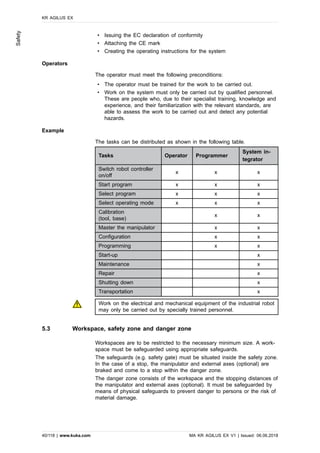
The tasks can be distributed as shown in the following table.
Tasks Operator Programmer
System in-
tegrator
Switch robot controller
on/off
x x x
Start program x x x
Select program x x x
Select operating mode x x x
Calibration
(tool, base)
x x
Master the manipulator x x
Configuration x x
Programming x x
Start-up x
Maintenance x
Repair x
Shutting down x
Transportation x
Work on the electrical and mechanical equipment of the industrial robot
may only be carried out by specially trained personnel.
5.3 Workspace, safety zone and danger zone
Workspaces are to be restricted to the necessary minimum size. A work-
space must be safeguarded using appropriate safeguards.
The safeguards (e.g. safety gate) must be situated inside the safety zone.
In the case of a stop, the manipulator and external axes (optional) are
braked and come to a stop within the danger zone.
The danger zone consists of the workspace and the stopping distances of
the manipulator and external axes (optional). It must be safeguarded by
means of physical safeguards to prevent danger to persons or the risk of
material damage.
KR AGILUS EX
40/118 | www.kuka.com MA KR AGILUS EX V1 | Issued: 06.06.2018
Safety
5.3.1 Determining stopping distances
The system integrator’s risk assessment may indicate that the stopping
distances must be determined for an application. In order to determine the
stopping distances, the system integrator must identify the safety-relevant
points on the programmed path.
When determining the stopping distances, the robot must be moved with
the tool and loads which are also used in the application. The robot must
be at operating temperature. This is the case after approx. 1 h in normal
operation.
During execution of the application, the robot must be stopped at the point
from which the stopping distance is to be calculated. This process must
be repeated several times with a safety stop 0 and a safety stop 1. The
least favorable stopping distance is decisive.
A safety stop 0 can be triggered by a safe operational stop via the safety
interface, for example. If a safety option is installed, it can be triggered,
for instance, by a space violation (e.g. the robot exceeds the limit of an
activated workspace in Automatic mode).
A safety stop 1 can be triggered by pressing the EMERGENCY STOP de-
vice on the smartPAD, for example.
5.4 Triggers for stop reactions
Stop reactions of the industrial robot are triggered in response to operator
actions or as a reaction to monitoring functions and error messages. The
following table shows the different stop reactions according to the operat-
ing mode that has been set.
Trigger T1, T2 AUT, AUT EXT
Start key released STOP 2 -
STOP key pressed STOP 2
Drives OFF STOP 1
$MOVE_ENABLE input
drops out
STOP 2
Power switched off via
main switch or power
failure
STOP 0
Internal error in non-
safety-oriented part of
the robot controller
STOP 0 or STOP 1
(dependent on the cause of the error)
Operating mode
changed during opera-
tion
Safety stop 2
Safety gate opened (op-
erator safety)
- Safety stop 1
Enabling switch released Safety stop 2 -
Enabling switch pressed
fully down or error
Safety stop 1 -
E-STOP pressed Safety stop 1
Error in safety controller
or periphery of the safety
controller
Safety stop 0
KR AGILUS EX
MA KR AGILUS EX V1 | Issued: 06.06.2018 www.kuka.com | 41/118
Safety
5.5 Safety functions
5.5.1 Overview of the safety functions
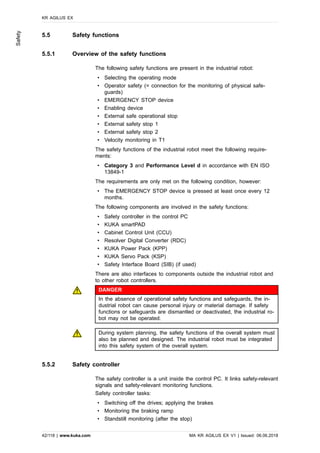
The following safety functions are present in the industrial robot:
• Selecting the operating mode
• Operator safety (= connection for the monitoring of physical safe-
guards)
• EMERGENCY STOP device
• Enabling device
• External safe operational stop
• External safety stop 1
• External safety stop 2
• Velocity monitoring in T1
The safety functions of the industrial robot meet the following require-
ments:
• Category 3 and Performance Level d in accordance with EN ISO
13849-1
The requirements are only met on the following condition, however:
• The EMERGENCY STOP device is pressed at least once every 12
months.
The following components are involved in the safety functions:
• Safety controller in the control PC
• KUKA smartPAD
• Cabinet Control Unit (CCU)
• Resolver Digital Converter (RDC)
• KUKA Power Pack (KPP)
• KUKA Servo Pack (KSP)
• Safety Interface Board (SIB) (if used)
There are also interfaces to components outside the industrial robot and
to other robot controllers.
DANGER
In the absence of operational safety functions and safeguards, the in-
dustrial robot can cause personal injury or material damage. If safety
functions or safeguards are dismantled or deactivated, the industrial ro-
bot may not be operated.
During system planning, the safety functions of the overall system must
also be planned and designed. The industrial robot must be integrated
into this safety system of the overall system.
5.5.2 Safety controller
The safety controller is a unit inside the control PC. It links safety-relevant
signals and safety-relevant monitoring functions.
Safety controller tasks:
• Switching off the drives; applying the brakes
• Monitoring the braking ramp
• Standstill monitoring (after the stop)
KR AGILUS EX
42/118 | www.kuka.com MA KR AGILUS EX V1 | Issued: 06.06.2018
Safety
• Velocity monitoring in T1
• Evaluation of safety-relevant signals
• Setting of safety-oriented outputs
5.5.3 Selecting the operating mode
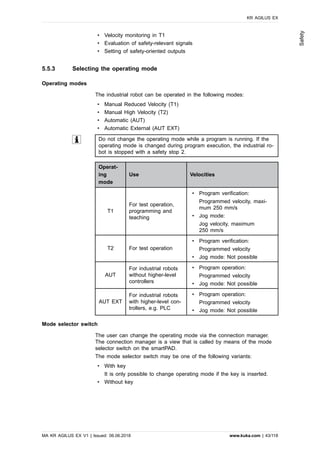
Operating modes
The industrial robot can be operated in the following modes:
• Manual Reduced Velocity (T1)
• Manual High Velocity (T2)
• Automatic (AUT)
• Automatic External (AUT EXT)
Do not change the operating mode while a program is running. If the
operating mode is changed during program execution, the industrial ro-
bot is stopped with a safety stop 2.
Operat-
ing
mode
Use Velocities
T1
For test operation,
programming and
teaching
• Program verification:
Programmed velocity, maxi-
mum 250 mm/s
• Jog mode:
Jog velocity, maximum
250 mm/s
T2 For test operation
• Program verification:
Programmed velocity
• Jog mode: Not possible
AUT
For industrial robots
without higher-level
controllers
• Program operation:
Programmed velocity
• Jog mode: Not possible
AUT EXT
For industrial robots
with higher-level con-
trollers, e.g. PLC
• Program operation:
Programmed velocity
• Jog mode: Not possible
Mode selector switch
The user can change the operating mode via the connection manager.
The connection manager is a view that is called by means of the mode
selector switch on the smartPAD.
The mode selector switch may be one of the following variants:
• With key
It is only possible to change operating mode if the key is inserted.
• Without key
KR AGILUS EX
MA KR AGILUS EX V1 | Issued: 06.06.2018 www.kuka.com | 43/118
Safety
WARNING
If the smartPAD is fitted with a switch without a key:
An additional device must be present to ensure that the relevant func-
tions cannot be executed by all users, but only by a restricted group of
people.
The device itself must not trigger motions of the industrial robot or
other hazards. If this device is missing, death or severe injuries may re-
sult.
The system integrator is responsible for ensuring that such a device is im-
plemented.
5.5.4 “Operator safety” signal
The “operator safety” signal is used for monitoring physical safeguards,
e.g. safety gates. Automatic operation is not possible without this signal.
In the event of a loss of signal during automatic operation (e.g. safety
gate is opened), the manipulator stops with a safety stop 1.
Operator safety is not active in modes T1 (Manual Reduced Velocity) and
T2 (Manual High Velocity).
WARNING
Following a loss of signal, automatic operation may only be resumed
when the safeguard has been closed and when the closing has been
acknowledged. This acknowledgement is to prevent automatic operation
from being resumed inadvertently while there are still persons in the
danger zone, e.g. due to the safety gate closing accidentally.
The acknowledgement must be designed in such a way that an actual
check of the danger zone can be carried out first. Other acknowledge-
ment functions (e.g. an acknowlegement which is automatically trig-
gered by closure of the safeguard) are not permitted.
The system integrator is responsible for ensuring that these criteria are
met. Failure to met them may result in death, severe injuries or consid-
erable damage to property.
5.5.5 EMERGENCY STOP device
The EMERGENCY STOP device for the industrial robot is the EMERGEN-
CY STOP device on the smartPAD. The device must be pressed in the
event of a hazardous situation or emergency.
Reactions of the industrial robot if the EMERGENCY STOP device is
pressed:
• The manipulator and any external axes (optional) are stopped with a
safety stop 1.
Before operation can be resumed, the EMERGENCY STOP device must
be turned to release it.
WARNING
Tools and other equipment connected to the robot must be integrated
into the EMERGENCY STOP circuit on the system side if they could
constitute a potential hazard.
Failure to observe this precaution may result in death, severe injuries
or considerable damage to property.
KR AGILUS EX
44/118 | www.kuka.com MA KR AGILUS EX V1 | Issued: 06.06.2018
Safety
There must always be at least one external EMERGENCY STOP device
installed. This ensures that an EMERGENCY STOP device is available
even when the smartPAD is disconnected.
(>>> 5.5.7 "External EMERGENCY STOP device" Page 45)
5.5.6 Logging off from the higher-level safety controller
If the robot controller is connected to a higher-level safety controller, this
connection will inevitably be terminated in the following cases:
• Switching off the voltage via the main switch of the robot
Or power failure
• Shutdown of the robot controller via the smartHMI
• Activation of a WorkVisual project in WorkVisual or directly on the ro-
bot controller
• Changes to Start-up > Network configuration
• Changes to Configuration > Safety configuration
• I/O drivers > Reconfigure
• Restoration of an archive
Effect of the interruption:
• If a discrete safety interface is used, this triggers an EMERGENCY
STOP for the overall system.
• If the Ethernet interface is used, the KUKA safety controller generates
a signal that prevents the higher-level controller from triggering an
EMERGENCY STOP for the overall system.
If the Ethernet safety interface is used: In his risk assessment, the sys-
tem integrator must take into consideration whether the fact that switch-
ing off the robot controller does not trigger an EMERGENCY STOP of
the overall system could constitute a hazard and, if so, how this hazard
can be countered.
Failure to take this into consideration may result in death, injuries or
damage to property.
WARNING
If a robot controller is switched off, the E-STOP device on the smart-
PAD is no longer functional. The user is responsible for ensuring that
the smartPAD is either covered or removed from the system. This
serves to prevent operational and non-operational EMERGENCY STOP
devices from becoming interchanged.
Failure to observe this precaution may result in death, injuries or dam-
age to property.
5.5.7 External EMERGENCY STOP device
Every operator station that can initiate a robot motion or other potentially
hazardous situation must be equipped with an EMERGENCY STOP de-
vice. The system integrator is responsible for ensuring this.
There must always be at least one external EMERGENCY STOP device
installed. This ensures that an EMERGENCY STOP device is available
even when the smartPAD is disconnected.
External EMERGENCY STOP devices are connected via the customer in-
terface. External EMERGENCY STOP devices are not included in the
scope of supply of the industrial robot.
KR AGILUS EX
MA KR AGILUS EX V1 | Issued: 06.06.2018 www.kuka.com | 45/118
Safety
5.5.8 Enabling device
The enabling devices of the industrial robot are the enabling switches on
the smartPAD.
There are 3 enabling switches installed on the smartPAD. The enabling
switches have 3 positions:
• Not pressed
• Center position
• Panic position
In the test modes, the manipulator can only be moved if one of the ena-
bling switches is held in the central position.
• Releasing the enabling switch triggers a safety stop 2.
• Pressing the enabling switch down fully (panic position) triggers a
safety stop 1.
• It is possible to hold 2 enabling switches in the center position simul-
taneously for up to 15 seconds. This makes it possible to adjust grip
from one enabling switch to another one. If 2 enabling switches are
held simultaneously in the center position for longer than 15 seconds,
this triggers a safety stop 1.
If an enabling switch malfunctions (e.g. jams in the central position), the
industrial robot can be stopped using the following methods:
• Press the enabling switch down fully.
• Actuate the EMERGENCY STOP device.
• Release the Start key.
WARNING
The enabling switches must not be held down by adhesive tape or oth-
er means or tampered with in any other way.
Death, injuries or damage to property may result.
5.5.9 External enabling device
External enabling devices are required if it is necessary for more than one
person to be in the danger zone of the industrial robot.
External enabling devices are not included in the scope of supply of the
industrial robot.
Which interface can be used for connecting external enabling devices
is described in the “Planning” chapter of the robot controller operating
instructions and assembly instructions.
5.5.10 External safe operational stop
The safe operational stop can be triggered via an input on the customer
interface. The state is maintained as long as the external signal is FALSE.
If the external signal is TRUE, the manipulator can be moved again. No
acknowledgement is required.
5.5.11 External safety stop 1 and external safety stop 2
Safety stop 1 and safety stop 2 can be triggered via an input on the cus-
tomer interface. The state is maintained as long as the external signal is
KR AGILUS EX
46/118 | www.kuka.com MA KR AGILUS EX V1 | Issued: 06.06.2018
Safety
FALSE. If the external signal is TRUE, the manipulator can be moved
again. No acknowledgement is required.
If interface X11 is selected as the customer interface, only the signal
Safety stop 2 is available.
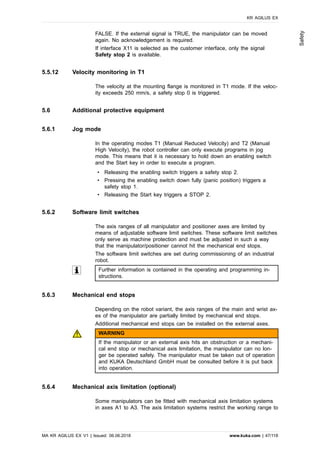
5.5.12 Velocity monitoring in T1
The velocity at the mounting flange is monitored in T1 mode. If the veloc-
ity exceeds 250 mm/s, a safety stop 0 is triggered.
5.6 Additional protective equipment
5.6.1 Jog mode
In the operating modes T1 (Manual Reduced Velocity) and T2 (Manual
High Velocity), the robot controller can only execute programs in jog
mode. This means that it is necessary to hold down an enabling switch
and the Start key in order to execute a program.
• Releasing the enabling switch triggers a safety stop 2.
• Pressing the enabling switch down fully (panic position) triggers a
safety stop 1.
• Releasing the Start key triggers a STOP 2.
5.6.2 Software limit switches
The axis ranges of all manipulator and positioner axes are limited by
means of adjustable software limit switches. These software limit switches
only serve as machine protection and must be adjusted in such a way
that the manipulator/positioner cannot hit the mechanical end stops.
The software limit switches are set during commissioning of an industrial
robot.
Further information is contained in the operating and programming in-
structions.
5.6.3 Mechanical end stops
Depending on the robot variant, the axis ranges of the main and wrist ax-
es of the manipulator are partially limited by mechanical end stops.
Additional mechanical end stops can be installed on the external axes.
WARNING
If the manipulator or an external axis hits an obstruction or a mechani-
cal end stop or mechanical axis limitation, the manipulator can no lon-
ger be operated safely. The manipulator must be taken out of operation
and KUKA Deutschland GmbH must be consulted before it is put back
into operation.
5.6.4 Mechanical axis limitation (optional)
Some manipulators can be fitted with mechanical axis limitation systems
in axes A1 to A3. The axis limitation systems restrict the working range to
KR AGILUS EX
MA KR AGILUS EX V1 | Issued: 06.06.2018 www.kuka.com | 47/118
Safety
the required minimum. This increases personal safety and protection of
the system.
In the case of manipulators that are not designed to be fitted with me-
chanical axis limitation, the workspace must be laid out in such a way that
there is no danger to persons or material property, even in the absence of
mechanical axis limitation.
If this is not possible, the workspace must be limited by means of photo-
electric barriers, photoelectric curtains or obstacles on the system side.
There must be no shearing or crushing hazards at the loading and trans-
fer areas.
This option is not available for all robot models. Information on specific
robot models can be obtained from KUKA Deutschland GmbH.
5.6.5 Axis range monitoring (optional)
Some manipulators can be fitted with dual-channel axis range monitoring
systems in main axes A1 to A3. The positioner axes may be fitted with
additional axis range monitoring systems. The safety zone for an axis can
be adjusted and monitored using an axis range monitoring system. This
increases personal safety and protection of the system.
This option is not available for all robot models. Information on specific
robot models can be obtained from KUKA Deutschland GmbH.
5.6.6 Options for moving the manipulator without drive energy
The system user is responsible for ensuring that the training of person-
nel with regard to the response to emergencies or exceptional situa-
tions also includes how the manipulator can be moved without drive en-
ergy.
Description
The following options are available for moving the manipulator without
drive energy after an accident or malfunction:
• Release device (optional)
The release device can be used for the main axis drive motors and,
depending on the robot variant, also for the wrist axis drive motors.
• Brake release device (option)
The brake release device is designed for robot variants whose motors
are not freely accessible.
• Moving the wrist axes directly by hand
There is no release device available for the wrist axes of variants in
the low payload category. This is not necessary because the wrist ax-
es can be moved directly by hand.
KR AGILUS EX
48/118 | www.kuka.com MA KR AGILUS EX V1 | Issued: 06.06.2018
Safety
Information about the options available for the various robot models
and about how to use them can be found in the assembly and operat-
ing instructions for the robot or requested from KUKA Deutschland
GmbH.
NOTICE
Moving the manipulator without drive energy can damage the motor
brakes of the axes concerned. The motor must be replaced if the brake
has been damaged. The manipulator may therefore be moved without
drive energy only in emergencies, e.g. for rescuing persons.
5.6.7 Labeling on the industrial robot
All plates, labels, symbols and marks constitute safety-relevant parts of
the industrial robot. They must not be modified or removed.
Labeling on the industrial robot consists of:
• Identification plates
• Warning signs
• Safety symbols
• Designation labels
• Cable markings
• Rating plates
Further information is contained in the technical data of the operating
instructions or assembly instructions of the components of the industrial
robot.
5.6.8 External safeguards
The access of persons to the danger zone of the industrial robot must be
prevented by means of safeguards. It is the responsibility of the system
integrator to ensure this.
Physical safeguards must meet the following requirements:
• They meet the requirements of EN ISO 14120.
• They prevent access of persons to the danger zone and cannot be
easily circumvented.
• They are sufficiently fastened and can withstand all forces that are
likely to occur in the course of operation, whether from inside or out-
side the enclosure.
• They do not, themselves, represent a hazard or potential hazard.
• Prescribed clearances, e.g. to danger zones, are adhered to.
Safety gates (maintenance gates) must meet the following requirements:
• They are reduced to an absolute minimum.
• The interlocks (e.g. safety gate switches) are linked to the operator
safety input of the robot controller via safety gate switching devices or
safety PLC.
• Switching devices, switches and the type of switching conform to the
requirements of Performance Level d and category 3 according to
EN ISO 13849-1.
• Depending on the risk situation: the safety gate is additionally safe-
guarded by means of a locking mechanism that only allows the gate
to be opened if the manipulator is safely at a standstill.
KR AGILUS EX
MA KR AGILUS EX V1 | Issued: 06.06.2018 www.kuka.com | 49/118
Safety
• The button for acknowledging the safety gate is located outside the
space limited by the safeguards.
Further information is contained in the corresponding standards and
regulations. These also include EN ISO 14120.
Other safety equipment
Other safety equipment must be integrated into the system in accordance
with the corresponding standards and regulations.
5.7 Overview of operating modes and safety functions
The following table indicates the operating modes in which the safety
functions are active.
Safety functions T1 T2 AUT AUT EXT
Operator safety - - Active Active
EMERGENCY STOP de-
vice
Active Active Active Active
Enabling device Active Active - -
Reduced velocity during
program verification
Active - - -
Jog mode Active Active - -
Software limit switches Active Active Active Active
5.8 Safety measures
5.8.1 General safety measures
The industrial robot may only be used in perfect technical condition in ac-
cordance with its intended use and only by safety-conscious persons.
Flushing with purge gas safeguards the manipulator’s properties of explo-
sion protection. Operator errors can result in personal injury and damage
to property.
When operating the robot in a potentially explosive atmosphere, safety-rel-
evant requirements conforming to 94/9/EC and 1999/92/EC must be ob-
served along with the technical documentation. First and foremost, the
probability of an explosive atmosphere developing or existing at the place
of operation must be kept at a minimum or, if possible, eliminated entirely.
There must be no active ignition sources in the explosion zones that can-
not be avoided. Before installation and start-up, it must be assured that
the planned operation procedures are permissible or acceptable.
It is important to be prepared for possible movements of the industrial ro-
bot even after the robot controller has been switched off and locked out.
Incorrect installation (e.g. overload) or mechanical defects (e.g. brake de-
fect) can cause the manipulator or external axes to sag. If work is to be
carried out on a switched-off industrial robot, the manipulator and external
axes must first be moved into a position in which they are unable to move
on their own, whether the payload is mounted or not. If this is not possi-
ble, the manipulator and external axes must be secured by appropriate
means.
Work on the manipulator (e.g. cleaning, maintenance or repair) may only
be carried out if there is no risk of explosion.
KR AGILUS EX
50/118 | www.kuka.com MA KR AGILUS EX V1 | Issued: 06.06.2018
Safety
The system integrator must ensure that the manipulator is only energized
if the pre-purge phase has been completed and the interior is permanently
pressurized against the atmosphere. Before removal/installation, the over-
pressure monitoring system must be completely deenergized.
DANGER
In the absence of operational safety functions and safeguards, the in-
dustrial robot can cause personal injury or material damage. If safety
functions or safeguards are dismantled or deactivated, the industrial ro-
bot may not be operated.
DANGER
Standing underneath the robot arm can cause death or injuries. For this
reason, standing underneath the robot arm is prohibited!
CAUTION
The motors reach temperatures during operation which can cause
burns to the skin. Contact must be avoided. Appropriate safety precau-
tions must be taken, e.g. protective gloves must be worn.
Protective function
As part of the primary protective measures, the size of the potentially ex-
plosive area must be limited as far as possible at the place of operation
through suitable technical ventilation.
As part of the secondary protective measures, possible ignition sources
within the potentially explosive area must be avoided or deactivated.
The power supply and the associated controller, including the smartPAD,
must be installed and operated outside of the danger zone (explosion
zones).
Releasing, disconnecting and/or replacing electrical cables as well as
pressing the enabling device (for example) is strictly prohibited under the
operating conditions.
1999/92/EC is a mandatory directive for achieving or guaranteeing an ac-
ceptable minimum level of explosion protection for the persons employed
on the business premises.
In the event of unusual process conditions and a significantly higher po-
tential for danger, additional safety measures may be necessary, such as:
• Monitoring of the concentration of combustible substances in the direct
vicinity of the technical system, combined with automatic deactiviation
of the process and all potential ignition sources if the maximum ac-
ceptable concentration is exceeded.
• Installation of an automatic system for suppressing explosions in the
event that not all protective measures against ignition can be imple-
mented with sufficient reliability.
smartPAD
The user must ensure that the industrial robot is only operated with the
smartPAD by authorized persons.
If more than one smartPAD is used in the overall system, it must be en-
sured that it is clearly recognizable which smartPAD is connected to which
industrial robot. They must not be interchanged.
KR AGILUS EX
MA KR AGILUS EX V1 | Issued: 06.06.2018 www.kuka.com | 51/118
Safety
WARNING
The operator must ensure that decoupled smartPADs are immediately
removed from the system and stored out of sight and reach of person-
nel working on the industrial robot. This serves to prevent operational
and non-operational EMERGENCY STOP devices from becoming inter-
changed.
Failure to observe this precaution may result in death, severe injuries
or considerable damage to property.
Compressed air
The system integrator/user must ensure that the manipulator is operated
with an overpressure monitoring system installed outside of the danger
area (explosion zones).
NOTICE
The robot may only be operated with a correctly adjusted pressure reg-
ulator and with the compressed air supply connected. Incorrectly adjus-
ted pressure regulators or operation with no pressure regulator may re-
sult in damage to the robot.
The system integrator must ensure that a suitable overpressure monitoring
system detects a drop of the interior pressure below the specified over-
pressure of 300 mbar and reports this to a downstream device (e.g. light
or horn) via an alarm contact. At the same time, the compressed air sup-
ply line of the robot pressurization must be shut off by this overpressure
monitoring system. This prevents the explosive atmosphere from escaping
outward.
Modifications
After modifications to the industrial robot, checks must be carried out to
ensure the required safety level and the robot’s properties of explosion
protection. The valid national or regional work safety regulations must be
observed for this check. The correct functioning of all safety functions
must also be tested.
New or modified programs must always be tested first in Manual Reduced
Velocity mode (T1).
After modifications to the industrial robot, existing programs must always
be tested first in Manual Reduced Velocity mode (T1). This applies to all
components of the industrial robot and includes modifications to the soft-
ware and configuration settings.
Faults
Faults are reduced through proper operation of the industrial robot and
through the use of preventative safety measures.
The following tasks must be carried out in the case of faults in the indus-
trial robot:
• Switch off the robot controller and secure it (e.g. with a padlock) to
prevent unauthorized persons from switching it on again.
• Indicate the fault by means of a label with a corresponding warning
(tagout).
• Keep a record of the faults.
• Eliminate the fault and carry out a function test if the robot’s properties
of explosion protection are not affected.
KR AGILUS EX
52/118 | www.kuka.com MA KR AGILUS EX V1 | Issued: 06.06.2018
Safety
DANGER
The robot’s properties of explosion protection are no longer assured if
there is a kinematic fault. In such a case, it is no longer permissible to
operate the robot in an explosion protection zone. Elimination of the
fault requires consultation with KUKA Deutschland GmbH.
5.8.2 Transportation
Manipulator
The prescribed transport position of the manipulator must be observed.
Transportation must be carried out in accordance with the operating in-
structions or assembly instructions of the robot.
Avoid vibrations and impacts during transportation in order to prevent
damage to the manipulator.
Robot controller
The prescribed transport position of the robot controller must be observed.
Transportation must be carried out in accordance with the operating in-
structions or assembly instructions of the robot controller.
Avoid vibrations and impacts during transportation in order to prevent
damage to the robot controller.
External axis (optional)
The prescribed transport position of the external axis (e.g. KUKA linear
unit, turn-tilt table, positioner) must be observed. Transportation must be
carried out in accordance with the operating instructions or assembly in-
structions of the external axis.
5.8.3 Start-up and recommissioning
Before starting up systems and devices for the first time, a check must be
carried out to ensure that the systems and devices are complete and op-
erational, that they can be operated safely and that any damage is detec-
ted.
The valid national or regional work safety regulations must be observed
for this check. The correct functioning of all safety functions must also be
tested.
The passwords for the user groups must be changed in the KUKA Sys-
tem Software before start-up. The passwords must only be communica-
ted to authorized personnel.
WARNING
The robot controller is preconfigured for the specific industrial robot. If
cables are interchanged, the manipulator and the external axes (option-
al) may receive incorrect data and can thus cause personal injury or
material damage. If a system consists of more than one manipulator, al-
ways connect the connecting cables to the manipulators and their cor-
responding robot controllers.
KR AGILUS EX
MA KR AGILUS EX V1 | Issued: 06.06.2018 www.kuka.com | 53/118
Safety
If additional components (e.g. cables), which are not part of the scope
of supply of KUKA Deutschland GmbH, are integrated into the industrial
robot, the user is responsible for ensuring that these components do
not adversely affect or disable safety functions.
NOTICE
If the internal cabinet temperature of the robot controller differs greatly
from the ambient temperature, condensation can form, which may
cause damage to the electrical components. Do not put the robot con-
troller into operation until the internal temperature of the cabinet has
adjusted to the ambient temperature.
Function test
The following tests must be carried out before start-up and recommission-
ing:
General test:
It must be ensured that:
• The industrial robot is correctly installed and fastened in accordance
with the specifications in the documentation.
• There is no damage to the robot that could be attributed to external
forces. Examples: Dents or abrasion that could be caused by an im-
pact or collision.
WARNING
In the case of such damage, the affected components must be ex-
changed. In particular, the motor and counterbalancing system must
be checked carefully.
External forces can cause non-visible damage. For example, it can
lead to a gradual loss of drive power from the motor, resulting in
unintended movements of the manipulator. Death, injuries or consid-
erable damage to property may otherwise result.
• There are no foreign bodies or loose parts on the industrial robot.
• All required safety equipment is correctly installed and operational.
• The power supply ratings of the industrial robot correspond to the
local supply voltage and mains type.
• The ground conductor and the equipotential bonding cable are suffi-
ciently rated and correctly connected.
• The connecting cables are correctly connected and the connectors are
locked.
Test of the safety functions:
A function test must be carried out for the following safety functions to en-
sure that they are functioning correctly:
• Local EMERGENCY STOP device
• External EMERGENCY STOP device (input and output)
• Enabling device (in the test modes)
• Operator safety
• All other safety-relevant inputs and outputs used
• Other external safety functions
KR AGILUS EX
54/118 | www.kuka.com MA KR AGILUS EX V1 | Issued: 06.06.2018
Safety
5.8.3.1 Checking machine data and safety configuration
WARNING
The industrial robot must not be moved if incorrect machine data or an
incorrect controller configuration are loaded. Death, severe injuries or
considerable damage to property may otherwise result. The correct da-
ta must be loaded.
• Following the start-up procedure, the practical tests for the machine
data must be carried out. The tool must be calibrated (either via an
actual calibration or through numerical entry of the data).
• Following modifications to the machine data, the safety configuration
must be checked.
• After activation of a WorkVisual project on the robot controller, the
safety configuration must be checked.
• If machine data are adopted when checking the safety configuration
(regardless of the reason for the safety configuration check), the prac-
tical tests for the machine data must be carried out.
• System Software 8.3 or higher: If the checksum of the safety configu-
ration has changed, the safe axis monitoring functions must be
checked.
Information about checking the safety configuration and the safe axis
monitoring functions is contained in the Operating and Programming In-
structions for System Integrators.
If the practical tests are not successfully completed in the initial start-up,
KUKA Deutschland GmbH must be contacted.
If the practical tests are not successfully completed during a different pro-
cedure, the machine data and the safety-relevant controller configuration
must be checked and corrected.
General practical test
If practical tests are required for the machine data, this test must always
be carried out.
For 6-axis robots:
The following methods are available for performing the practical test:
• TCP calibration with the XYZ 4-point method
The practical test is passed if the TCP has been successfully calibra-
ted.
Or:
1. Align the TCP with a freely selected point. The point serves as a ref-
erence point.
• The point must be located so that reorientation is possible.
• The point must not be located on the Z axis of the FLANGE coor-
dinate system.
2. Move the TCP manually at least 45° once in each of the A, B and C
directions.
The movements do not have to be accumulative, i.e. after motion in
one direction it is possible to return to the original position before mov-
ing in the next direction.
The practical test is passed if the TCP does not deviate from the ref-
erence point by more than 2 cm in total.
For palletizing robots:
KR AGILUS EX
MA KR AGILUS EX V1 | Issued: 06.06.2018 www.kuka.com | 55/118
Safety
Palletizing robots, in this case, are either robots that can be used only as
palletizers from the start or robots operated in palletizing mode. The latter
must also be in palletizing mode during the practical test.
First part:
1. Mark the starting position of the TCP.
Also read and note the starting position from the Actual position –
Cartesian display on the smartHMI.
2. Jog the TCP in the X direction. The distance must be at least 20% of
the robot’s maximum reach. Determine the exact length via the Actual
position display.
3. Measure the distance covered and compare it with the distance value
displayed on the smartHMI. The deviation must be < 5%.
4. Repeat steps 1 and 2 for the Y direction and Z direction.
The first part of the practical test is passed if the deviation is < 5% in ev-
ery direction.
Second part:
• Rotate the tool manually about A by 45°: once in the plus direction,
once in the minus direction. At the same time, observe the TCP.
The second part of the practical test is passed if the position of the TCP
in space is not altered during the rotations.
Practical test for axes that are not mathematically coupled
If practical tests are required for the machine data, this test must be car-
ried out when axes are present that are not mathematically coupled.
1. Mark the starting position of the axis that is not mathematically cou-
pled.
Also read and note the start position from the Actual position display
on the smartHMI.
2. Move the axis manually by a freely selected path length. Determine
the path length from the Actual position display.
• Move linear axes a specific distance.
• Move rotational axes through a specific angle.
3. Measure the length of the path covered and compare it with the value
displayed on the smartHMI.
The practical test is passed if the values differ by no more than 5%.
4. Repeat the test for each axis that is not mathematically coupled.
Practical test for robot on KUKA linear unit
If practical tests are required for the machine data, this test must be car-
ried out if the robot and KL are mathematically coupled.
• Move the KL manually in Cartesian mode.
The practical test is passed if the TCP does not move at the same
time.
Practical test for couplable axes
If practical tests are required for the machine data, this test must be car-
ried out when axes are present that can be physically coupled and uncou-
pled, e.g. a servo gun.
1. Physically uncouple the couplable axis.
2. Move all the remaining axes individually.
KR AGILUS EX
56/118 | www.kuka.com MA KR AGILUS EX V1 | Issued: 06.06.2018
Safety
The practical test is passed if it has been possible to move all the re-
maining axes.
5.8.3.2 Start-up mode
Description
The industrial robot can be set to Start-up mode via the smartHMI user in-
terface. In this mode, the manipulator can be moved in T1 without the ex-
ternal safeguards being put into operation.
The safety interface used affects “Start-up” mode:
Discrete safety interface
• System Software 8.2 or earlier:
Start-up mode is always possible if all input signals at the discrete
safety interface have the state “logic zero”. If this is not the case, the
robot controller prevents or terminates Start-up mode.
If an additional discrete safety interface for safety options is used, the
inputs there must also have the state “logic zero”.
• System Software 8.3 or higher:
Start-up mode is always possible. This also means that it is independ-
ent of the state of the inputs at the discrete safety interface.
If an additional discrete safety interface is used for safety options: The
states of these inputs are also irrelevant.
Ethernet safety interface
The robot controller prevents or terminates Start-up mode if a connection
to a higher-level safety system exists or is established.
Effect
When the Start-up mode is activated, all outputs are automatically set to
the state “logic zero”.
If the robot controller has a peripheral contactor (US2), and if the safety
configuration specifies for this to switch in accordance with the motion en-
able, then the same also applies in Start-up mode. This means that if mo-
tion enable is present, the US2 voltage is switched on – even in Start-up
mode.
NOTICE
The maximum number of switching cycles of the peripheral contactors
is 175 per day.
Hazards
Possible hazards and risks involved in using Start-up mode:
• A person walks into the manipulator’s danger zone.
• In a hazardous situation, a disabled external EMERGENCY STOP de-
vice is actuated and the manipulator is not shut down.
Additional measures for avoiding risks in Start-up mode:
• Cover disabled EMERGENCY STOP devices or attach a warning sign
indicating that the EMERGENCY STOP device is out of operation.
• If there is no safety fence, other measures must be taken to prevent
persons from entering the manipulator’s danger zone, e.g. use of
warning tape.
KR AGILUS EX
MA KR AGILUS EX V1 | Issued: 06.06.2018 www.kuka.com | 57/118
Safety
Use
Intended use of Start-up mode:
• Start-up in T1 mode when the external safeguards have not yet been
installed or put into operation. The danger zone must be delimited at
least by means of warning tape.
• Fault localization (periphery fault).
• Use of Start-up mode must be minimized as much as possible.
WARNING
Use of Start-up mode disables all external safeguards. The service per-
sonnel are responsible for ensuring that there is no-one in or near the
danger zone of the manipulator as long as the safeguards are disabled.
Failure to observe this precaution may result in death, injuries or dam-
age to property.
Misuse
Any use or application deviating from the intended use is deemed to be
misuse and is not allowed. KUKA Deutschland GmbH is not liable for any
damage resulting from such misuse. The risk lies entirely with the user.
5.8.4 Manual mode
General
Manual mode is the mode for setup work. Setup work is all the tasks that
have to be carried out on the industrial robot to enable automatic opera-
tion. Setup work includes:
• Jog mode
• Teaching
• Programming
• Program verification
The following must be taken into consideration in manual mode:
• New or modified programs must always be tested first in Manual Re-
duced Velocity mode (T1).
• The manipulator, tooling or external axes (optional) must never touch
or project beyond the safety fence.
• Workpieces, tooling and other objects must not become jammed as a
result of the industrial robot motion, nor must they lead to
short-circuits or be liable to fall off.
• All setup work must be carried out, where possible, from outside the
safeguarded area.
Setup work in T1
If it is necessary to carry out setup work from inside the safeguarded
area, the following must be taken into consideration in the operating mode
Manual Reduced Velocity (T1):
• If it can be avoided, there must be no other persons inside the safe-
guarded area.
• If it is necessary for there to be several persons inside the safeguar-
ded area, the following must be observed:
‒ Each person must have an enabling device.
KR AGILUS EX
58/118 | www.kuka.com MA KR AGILUS EX V1 | Issued: 06.06.2018
Safety
‒ All persons must have an unimpeded view of the industrial robot.
‒ Eye-contact between all persons must be possible at all times.
• The operator must be so positioned that he can see into the danger
area and get out of harm’s way.
• Unexpected motions of the manipulator cannot be ruled out, e.g. in
the event of a fault. For this reason, an appropriate clearance must be
maintained between persons and the manipulator (including tool).
Guide value: 50 cm.
The minimum clearance may vary depending on local circumstances,
the motion program and other factors. The minimum clearance that is
to apply for the specific application must be decided by the user on
the basis of a risk assessment.
Setup work in T2
If it is necessary to carry out setup work from inside the safeguarded
area, the following must be taken into consideration in the operating mode
Manual High Velocity (T2):
• This mode may only be used if the application requires a test at a ve-
locity higher than that possible in T1 mode.
• Teaching and programming are not permissible in this operating mode.
• Before commencing the test, the operator must ensure that the ena-
bling devices are operational.
• The operator must be positioned outside the danger zone.
• There must be no other persons inside the safeguarded area. It is the
responsibility of the operator to ensure this.
5.8.5 Simulation
Simulation programs do not correspond exactly to reality. Robot programs
created in simulation programs must be tested in the system in Manual
Reduced Velocity mode (T1). It may be necessary to modify the pro-
gram.
5.8.6 Automatic mode
Automatic mode is only permissible in compliance with the following safety
measures:
• All safety equipment and safeguards are present and operational.
• There are no persons in the system.
• The defined working procedures are adhered to.
If the manipulator or an external axis (optional) comes to a standstill for
no apparent reason, the danger zone must not be entered until an EMER-
GENCY STOP has been triggered.
5.8.7 Maintenance and repair
After maintenance and repair work, checks must be carried out to ensure
the required safety level. The valid national or regional work safety regula-
tions must be observed for this check. The correct functioning of all safety
functions must also be tested.
The purpose of maintenance and repair work is to ensure that the system
is kept operational or, in the event of a fault, to return the system to an
KR AGILUS EX
MA KR AGILUS EX V1 | Issued: 06.06.2018 www.kuka.com | 59/118
Safety
operational state. Repair work includes troubleshooting in addition to the
actual repair itself.
The following safety measures must be carried out when working on the
industrial robot:
• Carry out work outside the danger zone. If work inside the danger
zone is necessary, the user must define additional safety measures to
ensure the safe protection of personnel.
• Switch off the industrial robot and secure it (e.g. with a padlock) to
prevent it from being switched on again. If it is necessary to carry out
work with the robot controller switched on, the user must define addi-
tional safety measures to ensure the safe protection of personnel.
• If it is necessary to carry out work with the robot controller switched
on, this may only be done in operating mode T1.
• Label the system with a sign indicating that work is in progress. This
sign must remain in place, even during temporary interruptions to the
work.
• The EMERGENCY STOP devices must remain active. If safety func-
tions or safeguards are deactivated during maintenance or repair work,
they must be reactivated immediately after the work is completed.
DANGER
Before work is commenced on live parts of the robot system, the main
switch must be turned off and secured against being switched on
again. The system must then be checked to ensure that it is deener-
gized.
It is not sufficient, before commencing work on live parts, to execute an
EMERGENCY STOP or a safety stop, or to switch off the drives, as
this does not disconnect the robot system from the mains power
supply. Parts remain energized. Death or severe injuries may result.
Faulty components must be replaced using new components with the
same article numbers or equivalent components approved by KUKA
Deutschland GmbH for this purpose.
Cleaning and preventive maintenance work is to be carried out in accord-
ance with the operating instructions.
Robot controller
Even when the robot controller is switched off, parts connected to periph-
eral devices may still carry voltage. The external power sources must
therefore be switched off if work is to be carried out on the robot control-
ler.
The ESD regulations must be adhered to when working on components in
the robot controller.
Voltages in excess of 50 V (up to 780 V) can be present in various com-
ponents for several minutes after the robot controller has been switched
off! To prevent life-threatening injuries, no work may be carried out on the
industrial robot in this time.
Water and dust must be prevented from entering the robot controller.
Counterbalancing system
Some robot variants are equipped with a hydropneumatic, spring or gas
cylinder counterbalancing system.
The hydropneumatic and gas cylinder counterbalancing systems are pres-
sure equipment and, as such, are subject to obligatory equipment monitor-
ing and the provisions of the Pressure Equipment Directive.
KR AGILUS EX
60/118 | www.kuka.com MA KR AGILUS EX V1 | Issued: 06.06.2018
Safety
The user must comply with the applicable national laws, regulations and
standards pertaining to pressure equipment.
Inspection intervals in Germany in accordance with Industrial Safety
Order, Sections 14 and 15. Inspection by the user before commissioning
at the installation site.
The following safety measures must be carried out when working on the
counterbalancing system:
• The manipulator assemblies supported by the counterbalancing sys-
tems must be secured.
• Work on the counterbalancing systems must only be carried out by
qualified personnel.
Hazardous substances
The following safety measures must be carried out when handling hazard-
ous substances:
• Avoid prolonged and repeated intensive contact with the skin.
• Avoid breathing in oil spray or vapors.
• Clean skin and apply skin cream.
To ensure safe use of our products, we recommend regularly request-
ing up-to-date safety data sheets for hazardous substances.
5.8.8 Decommissioning, storage and disposal
The industrial robot must be decommissioned, stored and disposed of in
accordance with the applicable national laws, regulations and standards.
5.8.9 Safety measures for “single point of control”
Overview
If certain components in the industrial robot are operated, safety measures
must be taken to ensure complete implementation of the principle of “sin-
gle point of control” (SPOC).
The relevant components are:
• Submit interpreter
• PLC
• OPC server
• Remote control tools
• Tools for configuration of bus systems with online functionality
• KUKA.RobotSensorInterface
The implementation of additional safety measures may be required.
This must be clarified for each specific application; this is the responsi-
bility of the system integrator, programmer or user of the system.
Since only the system integrator knows the safe states of actuators in the
periphery of the robot controller, it is his task to set these actuators to a
safe state, e.g. in the event of an EMERGENCY STOP.
T1, T2
In modes T1 and T2, the components referred to above may only access
the industrial robot if the following signals have the following states:
KR AGILUS EX
MA KR AGILUS EX V1 | Issued: 06.06.2018 www.kuka.com | 61/118
Safety
Signal State required for SPOC
$USER_SAF TRUE
$SPOC_MOTION_ENABLE TRUE
Submit interpreter, PLC
If motions, (e.g. drives or grippers) are controlled with the submit interpret-
er or the PLC via the I/O system, and if they are not safeguarded by oth-
er means, then this control will take effect even in T1 and T2 modes or
while an EMERGENCY STOP is active.
If variables that affect the robot motion (e.g. override) are modified with
the submit interpreter or the PLC, this takes effect even in T1 and T2
modes or while an EMERGENCY STOP is active.
Safety measures:
• In T1 and T2, the system variable $OV_PRO must not be written to
by the submit interpreter or the PLC.
• Do not modify safety-relevant signals and variables (e.g. operating
mode, EMERGENCY STOP, safety gate contact) via the submit inter-
preter or PLC.
If modifications are nonetheless required, all safety-relevant signals
and variables must be linked in such a way that they cannot be set to
a dangerous state by the submit interpreter or PLC. This is the re-
sponsibility of the system integrator.
OPC server, remote control tools
These components can be used with write access to modify programs,
outputs or other parameters of the robot controller, without this being no-
ticed by any persons located inside the system.
Safety measure:
If these components are used, outputs that could cause a hazard must be
determined in a risk assessment. These outputs must be designed in such
a way that they cannot be set without being enabled. This can be done
using an external enabling device, for example.
Tools for configuration of bus systems
If these components have an online functionality, they can be used with
write access to modify programs, outputs or other parameters of the robot
controller, without this being noticed by any persons located inside the
system.
• WorkVisual from KUKA
• Tools from other manufacturers
Safety measure:
In the test modes, programs, outputs or other parameters of the robot
controller must not be modified using these components.
5.9 Applied norms and regulations
Name/Edition Definition
2006/42/EU:2006 Machinery Directive:
KR AGILUS EX
62/118 | www.kuka.com MA KR AGILUS EX V1 | Issued: 06.06.2018
Safety
Directive 2006/42/EC of the European Parliament and of the Coun-
cil of 17 May 2006 on machinery, and amending Directive 95/16/EC
(recast)
2004/108/EC EMC Directive:
Directive 2004/108/EC of the European Parliament and of
the Council of 15 December 2004 on the approximation of
the laws of the Member States concerning electromagnetic
compatibility
This directive is valid until 19/04/2016.
2004
EN ISO 13850:2015 Safety of machinery:
Emergency stop - Principles for design
EN ISO 13849-1:2015 Safety of machinery:
Safety-related parts of control systems - Part 1: General principles
of design
EN ISO 13849-2:2012 Safety of machinery:
Safety-related parts of control systems - Part 2: Validation
EN ISO 12100:2010 Safety of machinery:
General principles of design, risk assessment and risk reduction
EN ISO 10218-1:2011 Industrial robots – Safety requirements:
Part 1: Robots
Note: Content equivalent to ANSI/RIA R.15.06-2012, Part 1
EN 614-1:2006+A1:2009 Safety of machinery:
Ergonomic design principles - Part 1: Terms and general principles
EN 61000-6-2:2005 Electromagnetic compatibility (EMC):
Part 6-2: Generic standards; Immunity for industrial environments
EN 61000-6-4:2007 +
A1:2011
Electromagnetic compatibility (EMC):
Part 6-4: Generic standards; Emission standard for industrial envi-
ronments
EN 60204-1:2006/
A1:2009
Safety of machinery:
Electrical equipment of machines - Part 1: General requirements
94/9/EC ATEX Directive:
Directive 94/9/EC of the European Parliament and of the
Council of 23 March 1994 on the approximation of the laws
of the Member States concerning equipment and protective
systems intended for use in potentially explosive atmos-
pheres.
This directive is valid until 19/04/2016.
1994
EN
60079-0:2012+A11:2013
Explosive atmospheres:
Part 0: General requirements
EN 60079-2:2014 Explosive atmospheres:
KR AGILUS EX
MA KR AGILUS EX V1 | Issued: 06.06.2018 www.kuka.com | 63/118
Safety
Part 2: Equipment protection by pressurized enclosure “p”
KR AGILUS EX
64/118 | www.kuka.com MA KR AGILUS EX V1 | Issued: 06.06.2018
Safety
6 Planning
6.1 Information for planning
In the planning and design phase, care must be taken regarding the func-
tions or applications to be executed by the kinematic system. The follow-
ing conditions can lead to premature wear. They necessitate shorter main-
tenance intervals and/or earlier exchange of components. In addition, the
operating parameters specified in the technical data must be taken into
account during planning.
• Continuous operation near temperature limits or in abrasive environ-
ments
• Continuous operation in wet and abrasive environments
• Operation in aggressive chemical environments
• Operation in the immediate vicinity of cooling lubricant spray, waterjets
or compressed air
• Continuous operation close to the performance limits, e.g. high rpm of
an axis
• High duty cycle of individual axes
• Monotonous motion profiles, e.g. short, frequently recurring axis mo-
tions
• Static axis positions, e.g. continuous vertical position of a wrist axis
If one or more of these conditions are to apply during operation of the kin-
ematic system, KUKA Deutschland GmbH must be consulted.
6.2 Robot planning
Operating modes
The following operating modes do not correspond to normal operation and
are not permissible in a potentially explosive atmosphere:
• Mastering with MEMD
• Manual mode
• Re-programming and testing
Normal operation corresponds to Automatic mode.
Pre-purge phase
Before the robot is energized, a pre-purge phase of 7 minutes must be
carried out.
Overpressure monitoring system
The pneumatic connection between the manipulator and the overpressure
monitoring system is established using two hoses meeting the following
requirements.
The installation site for the overpressure monitoring system must be ade-
quately illuminated to ensure that any malfunctions can be quickly rem-
edied.
Max. length 5 m
Material • Polyamide PAN-MF
or
• Polyurethane
KR AGILUS EX
MA KR AGILUS EX V1 | Issued: 06.06.2018 www.kuka.com | 65/118
Planning
Inside diameter 4 mm
Outside diameter 6 mm
Max. purge gas flow rate 20 l/min
Accessories
Only authorized accessories may be used. These devices and accessory
components must possess the appropriate declarations of conformity.
Connections
All open connections on the robot must be sealed with gas-tight covers.
6.3 Mounting base
Description
The mounting base with centering is used when the robot is fastened to
the floor, i.e. directly on a concrete foundation.
The mounting base with centering consists of:
• Bedplate
• Resin-bonded anchors (chemical anchors)
• Fastening elements
This mounting variant requires a level and smooth surface on a concrete
foundation with adequate load bearing capacity. The concrete foundation
must be able to accommodate the forces occurring during operation.
There must be no layers of insulation or screed between the bedplate and
the concrete foundation.
The minimum dimensions must be observed.
Fig. 6-1: Mounting base
1 Robot base frame 4 Hexagon bolt
2 Locating pin, cylindrical 5 Bedplate
3 Resin-bonded anchor 6 Locating pin, flat-sided
Grade of concrete for foundations
When producing foundations from concrete, observe the load-bearing ca-
pacity of the ground and the country-specific construction regulations.
There must be no layers of insulation or screed between the bedplate/
KR AGILUS EX
66/118 | www.kuka.com MA KR AGILUS EX V1 | Issued: 06.06.2018
Planning
bedplates and the concrete foundation. The quality of the concrete must
meet the requirements of the following standard:
• C20/25 according to DIN EN 206-1:2001/DIN 1045-2:2008
Dimensioned drawing
The following illustration (>>> Fig. 6-2) provides all the necessary informa-
tion on the mounting base, together with the required foundation data. The
specified foundation dimensions refer to the safe transmission of the foun-
dation loads into the foundation and not to the stability of the foundation.
Fig. 6-2: Mounting base, dimensioned drawing
To ensure that the anchor forces are safely transmitted to the foundation,
observe the dimensions for concrete foundations specified in the following
illustration (>>> Fig. 6-3).
NOTICE
The dimensions specified for the distance to the edge are valid for non-
reinforced or normally reinforced concrete without verification of con-
crete edge failure. For safety against concrete edge failure in accord-
ance with ETAG 001 Annex C, the concrete foundation must be provi-
ded with an appropriate edge reinforcement.
KR AGILUS EX
MA KR AGILUS EX V1 | Issued: 06.06.2018 www.kuka.com | 67/118
Planning
Fig. 6-3: Cross-section of foundations
1 Hexagon bolt 4 Resin-bonded anchor
2 Bedplate 5 Concrete foundation
3 Locating pin
6.4 Machine frame mounting
Description
The machine frame mounting assembly is used when the robot is fas-
tened on a steel structure, a booster frame (pedestal) or a KUKA linear
unit. This assembly is also used if the robot is installed on the wall or ceil-
ing. It must be ensured that the substructure is able to withstand safely
the forces occurring during operation (foundation loads). The following dia-
gram contains all the necessary information that must be observed when
preparing the mounting surface (>>> Fig. 6-4).
The machine frame mounting assembly consists of:
• Locating pin
• Hexagon bolts with conical spring washers
KR AGILUS EX
68/118 | www.kuka.com MA KR AGILUS EX V1 | Issued: 06.06.2018
Planning
Fig. 6-4: Machine frame mounting
1 Hexagon bolt
2 Locating pin, cylindrical
3 Locating pin, flat-sided
Dimensioned drawing
The following illustration (>>> Fig. 6-5) provides all the necessary informa-
tion on machine frame mounting, together with the required foundation da-
ta.
KR AGILUS EX
MA KR AGILUS EX V1 | Issued: 06.06.2018 www.kuka.com | 69/118
Planning
Fig. 6-5: Machine frame mounting, dimensioned drawing
1 Hexagon bolt (4x) 4 Locating pin, flat-sided
2 Locating pin, cylindrical 5 Steel structure
3 Mounting surface
6.5 Connecting cables and interfaces
Connecting cables
The connecting cables comprise all the cables for transferring energy and
signals between the robot and the robot controller. They are connected to
the robot junction boxes with connectors. The set of connecting cables
comprises:
• Motor cable
• Data cable
• CAT5 data cable (optional)
KR AGILUS EX
70/118 | www.kuka.com MA KR AGILUS EX V1 | Issued: 06.06.2018
Planning
• Connecting cable, external axes A7 and A8 (optional)
• Ground conductor (optional)
Depending on the specification of the robot, various connecting cables are
used. The standard cable length is 4 m. Cable lengths of 1 m, 7 m, 15 m
and 25 m are available as an option. The maximum length of the connect-
ing cables must not exceed 25 m. Thus if the robot is operated on a line-
ar unit which has its own energy supply chain these cables must also be
taken into account.
For the connecting cables, a ground conductor is always required to
provide a low-resistance connection between the robot and the control
cabinet in accordance with DIN EN 60204. The ground conductor is not
part of the scope of supply and can be ordered as an option. The con-
nection must be made by the customer. The tapped holes for connect-
ing the ground conductor are located on the base frame of the robot.
The following points must be observed when planning and routing the
connecting cables:
• The bending radius for fixed routing must not be less than 50 mm for
motor cables and 30 mm for control cables.
• Protect cables against exposure to mechanical stress.
• Route the cables without mechanical stress – no tensile forces on the
connectors
• Cables are only to be installed indoors.
• Observe the permissible temperature range (fixed installation) of
263 K (-10 °C) to 343 K (+70 °C).
• Route the motor cables and the data cables separately in metal ducts;
if necessary, additional measures must be taken to ensure electromag-
netic compatibility (EMC).
Interface A1
Interface A1 is located at the rear of the base frame. The connections for
the motor and data cables are shown in the following illustration.
Fig. 6-6: Interface A1
KR AGILUS EX
MA KR AGILUS EX V1 | Issued: 06.06.2018 www.kuka.com | 71/118
Planning
1 Motor cable connection X30
2 Data cable connection X31
6.6 Customer interfaces
Interface A1
Interface A1 is located at the rear of the base frame.
Fig. 6-7: Customer interface A1
1 MEMD connection X32
2 CAT5 data cable connection XPN1
3 Purge gas return line connection AIR2
4 Air line connection AIR1
Outside diameter: 6 mm
5 Purge gas supply line connection PURGE
Max. pressure: 0.3 bar
Air, oil-free, dry, filtered
according to: ISO 8573.1-1, 1.2 to 16.2
6 Connection for external axis A8 (XP8.1)
7 Connection for external axis A7 (XP7.1)
Interface A4
Interface A4 is located on top of the in-line wrist.
KR AGILUS EX
72/118 | www.kuka.com MA KR AGILUS EX V1 | Issued: 06.06.2018
Planning
Fig. 6-8: Interface A4, example
1 Connection X41 3 In-line wrist
2 Connection XPN41 4 Air connections
The optional connector bypack is required for use of the air connections.
This option contains a silencer and several plug-in couplings
(>>> Fig. 6-9).
Fig. 6-9: Connections for connector bypack option
1 Silencer 2 Push-in coupling
The robot has three bistable 5/2-way solenoid valves integrated into the
in-line wrist. The valve unit is activated via the internal energy supply sys-
tem:
Designation Limit values
Valve type 5/2-way solenoid valve
Max. pressure 7 bar
Switching frequency 10 Hz
Operating tempera-
ture
+5 °C to +45 °C (278 K to 318 K)
Threaded union M5
KR AGILUS EX
MA KR AGILUS EX V1 | Issued: 06.06.2018 www.kuka.com | 73/118
Planning
Designation Limit values
Medium Air, oil-free, dry, filtered
according to: ISO 8573.1-1, 1.2 to 16.2
Degree of filtration: max. 5 µm
Operating voltage 24 V DC
Current 25 mA
Fig. 6-10: Valve diagram
Valve activation
Designation Values
Digital outputs (for valve activa-
tion)
6 (DO7 to DO12):
• Valve 1: DO7/DO10
• Valve 2: DO8/DO11
• Valve 3: DO9/DO12
not short-circuit proof
Rated voltage 24 V DC (-15%/+20%)
KR AGILUS EX
74/118 | www.kuka.com MA KR AGILUS EX V1 | Issued: 06.06.2018
Planning
Designation Values
Output current max. 25 mA
The inputs and outputs are not preconfigured and must be configured
in WorkVisual.
Further information about mapping inputs and outputs can be found in
the WorkVisual documentation.
Connection X41
Designation Values
Digital outputs (for customer interface
X41)
2 (DO13, DO14)
short-circuit proof
Rated voltage 24 V DC (-15%/+20%)
Output current max. 0.5 A
Short-circuit current max. 2 A
Load type Ohmic, inductive
Lamp load
Digital inputs (for customer interface X41) 6 (DI1 to DI6)
Signal voltage “0” -3 V … +5 V
EN 61131-2, type 3
Signal voltage “1” 15 V … 30 V
EN 61131-2, type 3
Input current Typically 3 mA
EN 61131-2, type 3
Input filter Typically 0.3 ms
Power supply 24 V / 3 A
A 615springtec® connector, 12-pole EMC enclosure E-part from Intercon-
tec is required for connection X41.
When using the power supply, the customer must protect this against
overload and short-circuit with a 3 A fuse downstream of connector X41.
For the connector bypack option, the pin assignments on the connector in-
sert are to be noted.
KR AGILUS EX
MA KR AGILUS EX V1 | Issued: 06.06.2018 www.kuka.com | 75/118
Planning
Fig. 6-11: Wiring diagram, connection X41
Connection XPN41
Fig. 6-12: Wiring diagram, connection XPN41
A SAISM-4/8S-M12 4P D-ZF connector from Weidmüller is required for
connection XPN41.
KR AGILUS EX
76/118 | www.kuka.com MA KR AGILUS EX V1 | Issued: 06.06.2018
Planning
7 Transportation
7.1 Transporting the manipulator
Description
Move the robot into its transport position each time it is transported. It
must be ensured that the robot is stable while it is being transported. The
robot must remain in its transport position until it has been fastened to the
foundation. Before the robot is lifted, it must be ensured that it is free
from obstructions. Remove all transport safeguards, such as nails and
screws, in advance. First remove any corrosion or glue on contact surfa-
ces.
Transport position
The robot must be in the transport position before it can be transported
(>>> Fig. 7-1). The robot is in the transport position when the axes are in
the following positions:
Axis A1 A2 A3 A4 A5 A6
Angle 0° -105° +156° 0º +120º 0º
Fig. 7-1: Transport position
Transport dimensions
The transport dimensions for the robot can be noted from the following fig-
ures. The position of the center of gravity and the weight vary according
to the specific configuration. The specified dimensions refer to the robot
without equipment.
KR AGILUS EX
MA KR AGILUS EX V1 | Issued: 06.06.2018 www.kuka.com | 77/118
Transportation
Fig. 7-2: Transport dimensions, R900
1 Robot 2 Center of gravity
Transportation using lifting tackle
WARNING
Use of unsuitable handling equipment may result in damage to the ro-
bot or injury to persons. Only use authorized handling equipment with a
sufficient load-bearing capacity. Only transport the robot in the manner
specified here.
The robot is transported using lifting tackle (>>> Fig. 7-3). The robot must
be in the transport position. The loops of the lifting tackle are passed
around the link arm and rotating column. All ropes must be long enough
and must be routed in such a way that the robot is not damaged. Installed
tools and items of equipment can cause undesirable shifts in the center of
gravity.
WARNING
The robot may tip during transportation. Risk of personal injury and
damage to property.
If the robot is being transported using lifting tackle, special care must
be exercised to prevent it from tipping. Additional safeguarding meas-
ures must be taken. It is forbidden to pick up the robot in any other
way using a crane!
KR AGILUS EX
78/118 | www.kuka.com MA KR AGILUS EX V1 | Issued: 06.06.2018
Transportation
Fig. 7-3: Transportation using lifting tackle
1 Crane 3 Link arm
2 Lifting tackle 4 Rotating column
KR AGILUS EX
MA KR AGILUS EX V1 | Issued: 06.06.2018 www.kuka.com | 79/118
Transportation
8 Start-up and recommissioning
CAUTION
For screwed connections, the fastening screws (standard, strength
class 8.8) are to be tightened with the tightening torques specified in
the appendix (>>> 13 "Appendix" Page 106). Tightening torques devi-
ating from these values are specified directly.
The specified screw sizes and strength classes are those valid at the
copy deadline. The specifications contained in the Parts Catalog are,
however, always to be taken as the most up-to-date information.
Screws of strength class 10.9 and higher may only be tightened once
with the rated tightening torque. When the screws are first slackened
they must be replaced with new ones.
8.1 Installing the mounting base
Description
These instructions apply to the variant “mounting base with centering (res-
in cartridge)”. The robot is fastened to an appropriate concrete foundation
using one or more bedplates and resin-bonded anchors.
If the surface of the concrete foundation is not sufficiently smooth and
even, the differences must be evened out with a suitable leveling com-
pound.
When using resin-bonded anchors, use only resin cartridges and anchors
from the same manufacturer. No diamond tools or core drills may be used
for drilling the anchor holes; for preference, drilling tools supplied by the
anchor manufacturer are to be used. The manufacturer’s instructions for
the use of resin-bonded anchors must also be observed.
Precondition
• The concrete foundation must have the required dimensions and
cross-section.
• The surface of the foundation must be smooth and even.
• The mounting base assembly must be complete.
• Have the leveling compound readily at hand.
Special tools
The following special tools are required:
• Drill with a ø 14 mm bit
• Setting tool approved by the anchor manufacturer
Procedure
1. Determine the position of the plate on the foundation in relation to the
working envelope.
KR AGILUS EX
80/118 | www.kuka.com MA KR AGILUS EX V1 | Issued: 06.06.2018
Start-upandrecommissioning
2. Set the bedplate down on the foundation in its installation position.
NOTICE
If the bedplate is not fully seated on the concrete ceiling, this can
cause strain or result in loosening of the mounting base. Fill the
gap with leveling compound. To do this, lift the bedplate again and
apply sufficient leveling compound to the underside (toothed spatu-
la). Then set the bedplate down again and align it, removing any
excess leveling compound. The maximum height of the leveling
compound must not be exceeded.
The area under the hexagon bolt for robot fastening must be kept
free from leveling compound.
Allow the leveling compound to cure for about 3 hours. The curing
time is longer at temperatures below 293 K (20 °C).
3. Check that the bedplate is horizontal. The maximum permissible devi-
ation is 3°.
4. Drill 4 anchor holes in accordance with the manufacturer’s specifica-
tions and fit the anchors as specified in the instructions for use.
The instructions for use are enclosed with the anchors and must be
followed precisely.
5. Allow the resin to cure. See table provided by manufacturer.
8.2 Installing the machine frame mounting assembly
Description
The machine frame mounting is used for installing robots on a steel struc-
ture prepared by the customer.
Precondition
• The mounting surface has been prepared as shown in the diagram
(>>> Fig. 6-5).
• The substructure has been checked for sufficient safety.
• The machine frame mounting assembly is complete.
Procedure
1. Clean the mounting surface of the robot (>>> Fig. 8-1).
2. Check the hole pattern.
3. Insert 2 locating pins into the hole pattern.
4. Prepare 4 M10x35 hexagon bolts together with conical spring washers.
KR AGILUS EX
MA KR AGILUS EX V1 | Issued: 06.06.2018 www.kuka.com | 81/118
Start-upandrecommissioning
Fig. 8-1: Installing the machine frame mounting assembly
1 M10x35-8.8 hexagon bolt (4x)
2 Locating pin, cylindrical
3 Mounting surface
4 Locating pin, flat-sided
The mounting base is now ready for the robot to be installed.
8.3 Installing a floor-mounted robot
Description
This description is valid for the installation of floor-mounted robots.
4 hexagon bolts with conical spring washers are used for fastening to the
bedplate or to a machine frame. A cylindrical stepped pin and a flat-sided
stepped pin are provided to ensure correct positioning.
The installation and start-up of the robot controller, the tools mounted and
the applications are not described here.
NOTICE
The robot may only be operated with a functioning compressed air sup-
ply. The compressed air must be oil-free, dry and filtered. Damage to
property may otherwise result.
Precondition
• The mounting base is installed.
• The installation site is accessible with a crane.
• Any tools or other system components which would hinder the work
have been removed.
• The robot is in the transport position.
• The connecting cables and ground conductors are routed to the robot
and installed.
• There is a compressed air supply to the robot.
Procedure
1. Check that the stepped pins are undamaged and fitted securely.
2. Bring the robot to the installation site with the crane.
KR AGILUS EX
82/118 | www.kuka.com MA KR AGILUS EX V1 | Issued: 06.06.2018
Start-upandrecommissioning
3. Carefully lower the robot vertically onto the mounting surface. Ensure
that an entirely vertical position is maintained in order to prevent dam-
age to the stepped pins.
4. Insert 4 M10x35 hexagon bolts together with conical spring washers.
5. Tighten 4 M10x35 hexagon bolts with the torque wrench in diagonally
opposite sequence. Gradually increase the tightening torque to
45.0 Nm.
6. Remove the lifting tackle.
7. Connect motor cable X30 and data cable X31.
8. Connect the PURGE compressed air line with max. 0.3 bar.
9. Connect the ground conductor between the robot controller and the ro-
bot to the ground conductor connection.
10. Connect the ground conductor between the system component and
the robot to the ground conductor connection.
11. Check the equipotential bonding in accordance with VDE 0100 and
EN 60204-1.
Further information is contained in the operating and assembly in-
structions of the robot controller.
12. Mount tooling, if present.
13. Retighten the 4 M10x35 hexagon bolts with a torque wrench after 100
hours of operation.
Fig. 8-2: Installing a floor-mounted robot
1 Motor cable 5 Mounting surface
2 Data cable 6 Cylindrical stepped pin
3 Compressed air line 7 Ground conductor
4 Flat-sided stepped pin 8 Hexagon bolt
Put the robot into operation in accordance with the “Start-up” chapter of
the operating and programming instructions for the System Software
KR AGILUS EX
MA KR AGILUS EX V1 | Issued: 06.06.2018 www.kuka.com | 83/118
Start-upandrecommissioning
and/or the assembly instructions or operating instructions for the robot
controller.
NOTICE
The robot may only be operated with a correctly adjusted pressure reg-
ulator and with the compressed air supply connected. Incorrectly adjus-
ted pressure regulators or operation with no pressure regulator may re-
sult in damage to the robot.
8.4 Description of the connecting cables
Setup
The connecting cables are used to transfer power and signals between
the robot controller and the robot.
The connecting cables comprise:
• Motor cable
• Data cable
• CAT5 data cable (optional)
• Connecting cable, external axes A7 and A8 (optional)
• Ground conductor (optional)
Interface
For connection of the connecting cables between the robot controller and
the robot, the following connectors are available at the interfaces:
Cable designation
Connector designation
robot controller -
robot
Interface with
robot
Motor cable X20 - X30 Han Yellock 30
Data cable X21 - X31 Han Q12
Data cable CAT5
(can be ordered as an
option)
X65/X66 - XPN1 M12 connector
Connecting cable, exter-
nal axes A7 and A8
(can be ordered as an
option)
XP7 - XP7.1
XP8 - XP8.1
Connector M17
in each case
Ground conductor, equi-
potential bonding
(can be ordered as an
option)
M4 ring cable
lug
Only resolvers can be connected to the connections XP7.1 and XP8.1.
For the connecting cables, a ground conductor is always required to
provide a low-resistance connection between the robot and the control
cabinet in accordance with DIN EN 60204. The ground conductor is not
part of the scope of supply and can be ordered as an option. The con-
nection must be made by the customer. The tapped holes for connect-
ing the ground conductor are located on the base frame of the robot.
KR AGILUS EX
84/118 | www.kuka.com MA KR AGILUS EX V1 | Issued: 06.06.2018
Start-upandrecommissioning
Standard connecting cable
Fig. 8-3: Connecting cables, overview
KR AGILUS EX
MA KR AGILUS EX V1 | Issued: 06.06.2018 www.kuka.com | 85/118
Start-upandrecommissioning
Fig. 8-4: Connecting cable, motor cable, X20 - X30
KR AGILUS EX
86/118 | www.kuka.com MA KR AGILUS EX V1 | Issued: 06.06.2018
Start-upandrecommissioning
Fig. 8-5: Connecting cable, data cable X21 - X31
KR AGILUS EX
MA KR AGILUS EX V1 | Issued: 06.06.2018 www.kuka.com | 87/118
Start-upandrecommissioning
Fig. 8-6: Connecting cable, data cable CAT5 X65/X66 - XPN1
KR AGILUS EX
88/118 | www.kuka.com MA KR AGILUS EX V1 | Issued: 06.06.2018
Start-upandrecommissioning
Fig. 8-7: Connecting cable, external axes A7 and A8
Fig. 8-8: Connecting cable, ground conductor
KR AGILUS EX
MA KR AGILUS EX V1 | Issued: 06.06.2018 www.kuka.com | 89/118
Start-upandrecommissioning
1 Ground conductor 6 Conical spring washer
2 Hexagon nut 7 Robot
3 Conical spring washer 8 Setscrew, M4
4 Plain washer 2x 9 Ground conductor connec-
tion, M4 ring cable lug
5 Hexagon nut 10 Ground sign
8.5 Moving the manipulator without drive energy
Description
The brake release device (optional) an be used for moving the manipula-
tor after an accident or malfunction without drive energy.
This option is only for use in exceptional circumstances and emergencies,
e.g. for freeing people.
Precondition
• The robot controller must be switched off and secured (e.g. with a
padlock) to prevent unauthorized persons from switching it on again.
Procedure
WARNING
Use of the brake release device may result in unexpected robot mo-
tions, especially sagging of the axes. During use of the brake release
device, attention must be paid to motion of this kind in order to be able
to prevent physical injuries or damage to property. Standing under mov-
ing axes is not permitted.
SAFETY INSTRUCTION
The following procedure must be followed exactly!
1. Unplug motor cable X30 on the robot.
2. Plug connector X20 into the brake release device and connector X30
into the robot.
3. Plug connector X1 of the hand-held device into the brake release de-
vice.
4. Select the brakes to be released (main axes, wrist axes) via the selec-
tion switch on the brake release device.
5. Press the button on the hand-held device.
The brakes of the main axes or wrist axes are released and the robot
can be moved manually.
Further information about the brake release device can be found in the
documentation for the brake release device.
KR AGILUS EX
90/118 | www.kuka.com MA KR AGILUS EX V1 | Issued: 06.06.2018
Start-upandrecommissioning
9 Maintenance
CAUTION
For screwed connections, the fastening screws (standard, strength
class 8.8) are to be tightened with the tightening torques specified in
the appendix (>>> 13 "Appendix" Page 106). Tightening torques devi-
ating from these values are specified directly.
The specified screw sizes and strength classes are those valid at the
copy deadline. The specifications contained in the Parts Catalog are,
however, always to be taken as the most up-to-date information.
Screws of strength class 10.9 and higher may only be tightened once
with the rated tightening torque. When the screws are first slackened
they must be replaced with new ones.
9.1 Maintenance overview
Description
The table provides an overview of the maintenance work (maintenance in-
tervals, activities, lubrication work) and required lubricants applicable to
this robot.
The maintenance intervals given in the table are valid for the operating
conditions specified in the technical data. KUKA Deutschland GmbH must
be consulted in the case of discrepancies!
Further information can be found in the section “Information for plan-
ning” (>>> 6.1 "Information for planning" Page 65).
Precondition
• The maintenance points must be freely accessible.
• Remove the tools and any additional items of equipment if they im-
pede maintenance work.
WARNING
Unintentional robot motions can cause injuries and damage to property.
If work is carried out on an operational robot, the robot must be se-
cured by activating the EMERGENCY STOP device.
Warn all persons concerned before starting to put it back into operation.
9.1.1 Maintenance table
Maintenance symbols
The overview may contain maintenance symbols that are not relevant
for the maintenance work on this product. The maintenance illustrations
provide an overview of the relevant maintenance work.
Oil change
Lubricate with grease gun
Lubricate with brush
KR AGILUS EX
MA KR AGILUS EX V1 | Issued: 06.06.2018 www.kuka.com | 91/118
Maintenance
Lubricate with spray grease
Tighten screw/nut
Check component, visual inspection
Clean component
Exchange battery
Exchanging the toothed belt
Check toothed belt tension
Fig. 9-1: Maintenance work
Interval Item Activity Lubricant
100 h* 1 Check the tightening tor-
que of the 4 holding-down
bolts on the mounting
base.
MA = 45 Nm
* Once only, after initial
start-up or recommission-
ing.
-
1 year 1 If using a mounting base,
check the tightening
-
KR AGILUS EX
92/118 | www.kuka.com MA KR AGILUS EX V1 | Issued: 06.06.2018
Maintenance
Interval Item Activity Lubricant
torque of the 4 fastening
screws.
MA = 45 Nm
5,000 h
or 1 year
at the lat-
est
2 Grease the inside of cov-
ers A2 and A3.
(>>> 9.2 "Greasing the in-
side of covers A2 and A3"
Page 93)
Grease RB 2
Art. no. 00-101-456
10 g
5,000 h
or 1 year
at the lat-
est
3 Exchange toothed belts on
A5 and A6.
(>>> 9.3 "Exchanging the
toothed belts" Page 94)
-
9.2 Greasing the inside of covers A2 and A3
Description
The inside of covers must be greased with Optitemp RB 2.
Precondition
• Arm and in-line wrist are horizontal.
WARNING
Unintentional robot motions can cause injuries and damage to property.
If work is carried out on an operational robot, the robot must be se-
cured by activating the EMERGENCY STOP device.
Warn all persons concerned before starting to put it back into operation.
CAUTION
The motors reach temperatures during operation which can cause
burns to the skin. Contact must be avoided. Appropriate safety precau-
tions must be taken, e.g. protective gloves must be worn.
Procedure
1. Remove the following Allen screws from cover A2 and take off cover
A2 together with the seal (>>> Fig. 9-2):
• 3 M4x14-8.8-P2K Allen screws
• 2 M4x25-8.8-P2K Allen screws
• 5 M4x35-8.8-P2K Allen screws
2. Remove 7 M3x10-8.8-P2K Allen screws from cover A3 and take off
cover A3 together with the seal.
KR AGILUS EX
MA KR AGILUS EX V1 | Issued: 06.06.2018 www.kuka.com | 93/118
Maintenance
Fig. 9-2: Removing covers A2 and A3
1 Cover A2
2 M4x35-8.8-P2K Allen screws
3 M4x25-8.8-P2K Allen screws
4 M4x14-8.8-P2K Allen screws
5 Cover A3
6 M3x10-8.8-P2K Allen screws
3. Remove the seals from the covers and dispose of them in accordance
with the pertinent regulations.
4. Clean the sealing surfaces of the cover and housing and check them
for damage. In the case of damage, inform KUKA Service.
5. Grease the inside of both covers with Optitemp RB 2.
6. Mount a new seal in each cover.
In order to ensure that the protection classification is met after
maintenance and repair work, the seal must be functional and the
compressed air supply active.
7. Fit cover A2 and fasten it with the following new Allen screws, observ-
ing the specified tightening torque.
• 3 M4x14-8.8-P2K Allen screws
• 2 M4x25-8.8-P2K Allen screws
• 5 M4x35-8.8-P2K Allen screws
8. Mount cover A3 and fasten it with 7 new M3x10-8.8 Allen screws, ob-
serving the specified tightening torque.
9.3 Exchanging the toothed belts
Description
The toothed belts of axes 5 and 6 may only be removed and installed to-
gether.
Precondition
• The arm is in the horizontal position.
KR AGILUS EX
94/118 | www.kuka.com MA KR AGILUS EX V1 | Issued: 06.06.2018
Maintenance
• The wrist axes are in their zero positions.
• No tools are installed on axis 6.
WARNING
Unintentional robot motions can cause injuries and damage to property.
If work is carried out on an operational robot, the robot must be se-
cured by activating the EMERGENCY STOP device.
Warn all persons concerned before starting to put it back into operation.
CAUTION
If the toothed belt is removed and installed immediately after the robot
has stopped operating, surface temperatures are likely to be high and
could result in burn injuries; there is also a risk of hands and fingers
being pinched or crushed.
Protective gloves must be worn.
Procedure
1. Remove 7 M3x10-8.8 Allen screws from the cover and take off the
cover together with the seal (>>> Fig. 9-3).
Fig. 9-3: Removing the cover from the in-line wrist – example
1 In-line wrist 3 Cover
2 Seal 4 Allen screw
2. Slacken 2 M4x10-8.8 Allen screws on motor A5 and motor A6.
(>>> Fig. 9-4)
3. Take the old toothed belts A5 and A6 off the pulleys.
KR AGILUS EX
MA KR AGILUS EX V1 | Issued: 06.06.2018 www.kuka.com | 95/118
Maintenance
Fig. 9-4: Removing the toothed belt – example
1 Allen screw 3 Toothed belt A5
2 Toothed belt pulley 4 Toothed belt A6
4. Fit new toothed belts A5 and A6 in the in-line wrist. Ensure that the
toothed belts mesh properly with the toothed belt pinions
(>>> Fig. 9-5).
Fig. 9-5: Toothed belt and toothed belt pinion
1 Toothed belt 2 Toothed belt pinion
5. Measure and adjust the toothed belt tension.
(>>> 10.1 "Measuring and adjusting the toothed belt tension"
Page 98)
6. Clean the sealing surfaces of the cover and housing and check them
for damage. In the case of damage, inform KUKA Service.
7. Insert a new seal into the cover.
In order to ensure that the protection classification is met after
maintenance and repair work, the seal must be functional and the
compressed air supply active.
8. Mount the cover and fasten it with 7 new M3x10-8.8 Allen screws, ob-
serving the specified tightening torque.
9. Carry out mastering of axes 5 and 6.
Detailed information about mastering is contained in the operating
and programming instructions for end users or system integrators.
KR AGILUS EX
96/118 | www.kuka.com MA KR AGILUS EX V1 | Issued: 06.06.2018
Maintenance
9.4 Cleaning the robot
Description
The robot must be cleaned in compliance with the instructions given here
in order to prevent damage. These instructions only refer to the robot.
System components, tools and the robot controller must be cleaned in ac-
cordance with the cleaning instructions relevant to them.
The following must be taken into consideration when using cleaning
agents and carrying out cleaning work:
• Only use solvent-free, water-soluble cleaning agents.
• Do not use flammable cleaning agents.
• Do not use aggressive cleaning agents.
• Do not use steam or refrigerants for cleaning.
• Do not use high-pressure cleaners.
• It must be ensured that no cleaning agent enters electrical or mechan-
ical system components.
• Personnel protection measures must be taken.
WARNING
Unintentional robot motions can cause injuries and damage to property.
If work is carried out on an operational robot, the robot must be se-
cured by activating the EMERGENCY STOP device.
Warn all persons concerned before starting to put it back into operation.
Procedure
1. Shut down the robot.
2. If necessary, stop adjacent system components and lock them.
3. Remove enclosures if this is necessary in order to carry out the clean-
ing work.
4. Clean the robot.
5. Fully remove all cleaning agents from the robot.
6. Clean any areas of corrosion and reapply corrosion protection.
7. Remove cleaning agents and equipment from the workspace of the ro-
bot.
8. Dispose of cleaning agents in accordance with the pertinent regula-
tions.
9. Install any safety equipment that has been removed and check that it
is functioning correctly.
10. Replace any damaged or illegible plates and covers.
11. Put back in place any enclosures that have been removed.
12. Only put fully functional robots and systems back into operation.
KR AGILUS EX
MA KR AGILUS EX V1 | Issued: 06.06.2018 www.kuka.com | 97/118
Maintenance
10 Repair
CAUTION
For screwed connections, the fastening screws (standard, strength
class 8.8) are to be tightened with the tightening torques specified in
the appendix (>>> 13 "Appendix" Page 106). Tightening torques devi-
ating from these values are specified directly.
The specified screw sizes and strength classes are those valid at the
copy deadline. The specifications contained in the Parts Catalog are,
however, always to be taken as the most up-to-date information.
Screws of strength class 10.9 and higher may only be tightened once
with the rated tightening torque. When the screws are first slackened
they must be replaced with new ones.
10.1 Measuring and adjusting the toothed belt tension
Description
The toothed belt tension on A5 and A6 is measured and adjusted in the
same way. The following description deals with the toothed belt tension for
A5.
Precondition
• Axis 5 is horizontal.
• No tools are installed on axis 6.
WARNING
Unintentional robot motions can cause injuries and damage to property.
If work is carried out on an operational robot, the robot must be se-
cured by activating the EMERGENCY STOP device.
Warn all persons concerned before starting to put it back into operation.
CAUTION
If the toothed belt tension is measured and adjusted immediately after
the robot has stopped operating, surface temperatures are likely to be
high and could result in burn injuries. Protective gloves must be worn.
Procedure
1. Remove 7 M3x10-8.8 Allen screws from the cover and take off the
cover together with the seal (>>> Fig. 10-1).
KR AGILUS EX
98/118 | www.kuka.com MA KR AGILUS EX V1 | Issued: 06.06.2018
Repair
Fig. 10-1: Removing the cover from the in-line wrist – example
1 In-line wrist 3 Cover
2 Seal 4 Allen screw
2. Slacken 2 M4x10-10.9 fillister head screws on motor A5
(>>> Fig. 10-2).
3. Insert a suitable tool (e.g. screwdriver) into the corresponding aperture
in the motor mount and carefully press motor A5 to the left in order to
tension toothed belt A5.
Fig. 10-2: Tensioning the toothed belt – example
1 Fillister head screw 4 Toothed belt A6
2 Aperture in motor mount A5 5 Aperture in motor mount A6
3 Toothed belt A5
4. Lightly tighten 2 M4x10-10.9 fillister head screws on motor A5.
5. Switch on the belt tension measuring device (>>> Fig. 10-3).
6. Pluck toothed belt A5 and hold the sensor near its center at a dis-
tance of 2 to 3 mm from the vibrating toothed belt. Read the measure-
ment on the belt tension measuring device.
KR AGILUS EX
MA KR AGILUS EX V1 | Issued: 06.06.2018 www.kuka.com | 99/118
Repair
Fig. 10-3: Belt tension measuring device
1 Belt tension measuring device
2 Sensor
Toothed belt tension
In-line wrist Axis Toothed belt Frequency
IW 6
R700 WP
5
AT3/267 305 ±5 Hz
6
IW 6/10
R900 WP
5
AT3/351 205 ±5 Hz
6
IW 10
R1100 WP
5
AT3/351 205 ±5 Hz
6
7. Tighten 2 M4x10-10.9 fillister head screws on motor A5, MA= 1.9 Nm.
8. Put the robot into operation and move A5 in both directions.
9. Secure the robot by pressing the E-STOP device.
10. Measure the tension of the toothed belt again.
If the value obtained does not correspond to the value in the table, re-
peat steps 2 to 10.
11. Carry out steps 2 to 10 for toothed belt A6.
12. Clean the sealing surfaces of the cover and housing and check them
for damage. In the case of damage, inform KUKA Service.
13. Insert a new seal into the cover.
In order to ensure that the protection classification is met after
maintenance and repair work, the seal must be functional and the
compressed air supply active.
14. Mount the cover and fasten it with 7 new M3x10-8.8 Allen screws, ob-
serving the specified tightening torque.
KR AGILUS EX
100/118 | www.kuka.com MA KR AGILUS EX V1 | Issued: 06.06.2018
Repair
11 Decommissioning, storage and disposal
11.1 Decommissioning, floor-mounted robot
Description
This section describes all the work required for decommissioning the robot
if the robot is to be removed from the system. After decommissioning, it is
prepared for storage or for transportation to a different location.
Following its removal, the robot can be transported by means of round
slings and a crane (>>> 7 "Transportation" Page 77).
Precondition
• The removal site is accessible for transportation with a crane.
• There is no hazard posed by system components.
WARNING
When carrying out the following work, the robot must be moved several
times between the individual work steps. While work is being carried
out on the robot, it must always be secured by activating the EMER-
GENCY STOP device.
Unintentional robot motions can cause injuries and damage to property.
If work is carried out on an operational robot that is switched on, the
robot must only be moved at reduced velocity. It must be possible to
stop the robot at any time by activating an EMERGENCY STOP
device. Operation must be limited to what is absolutely necessary.
Warn all persons concerned before switching on and moving the robot.
Procedure
1. Secure the robot.
2. Remove tools and equipment.
3. Put the robot into operation and move it into the transport position
(>>> Fig. 11-1).
Fig. 11-1: Transport position
4. Secure the robot by activating the E-STOP device and then shut down
the robot (>>> Fig. 11-2).
5. Release and unplug all peripheral connections.
6. Release and unplug the motor cable and data cable connectors.
KR AGILUS EX
MA KR AGILUS EX V1 | Issued: 06.06.2018 www.kuka.com | 101/118
Decommissioning,storageanddisposal
7. Release and unplug the ground conductor.
8. Attach the lifting tackle.
9. Unscrew and remove the 4 hexagon bolts and conical spring washers.
10. Lift the robot vertically off the mounting surface and transport it away.
Take care not to damage the two pins when lifting off the robot.
CAUTION
If the robot is caught on the mounting surface, it may come free
abruptly, endangering persons and property.
The robot must stand loosely on the mounting surface; completely
remove all fastening materials and any adhesives.
11. Prepare the robot for storage.
Fig. 11-2: Removing a floor-mounted robot
1 Lifting tackle 5 Hexagon bolt
2 Motor cable 6 Ground conductor
3 Data cable 7 Pin
4 Mounting surface
11.2 Storage
Description
If the robot is to be put into long-term storage, the following points must
be observed:
• The place of storage must be as dry and dust-free as possible.
• Avoid temperature fluctuations.
• Avoid wind and drafts.
• Avoid condensation.
• Use appropriate coverings that cannot detach themselves and which
can withstand the expected environmental conditions.
KR AGILUS EX
102/118 | www.kuka.com MA KR AGILUS EX V1 | Issued: 06.06.2018
Decommissioning,storageanddisposal
• Do not leave any loose parts on the robot, especially ones that might
knock against other parts.
• Do not leave the robot exposed to direct sunlight while in storage.
• Observe and comply with the permissible temperature ranges for stor-
age.
• Select a storage location in which the packaging materials cannot be
damaged.
Procedure
1. Remove tools and equipment.
2. Remove the robot.
3. Clean and dry the robot. No dirt or cleaning agent residue may remain
on or in the robot.
4. Perform a visual inspection of the robot.
5. Remove any foreign bodies.
6. Remove any corrosion.
7. Attach all covers to the robot and check that the seals are correctly in
place.
8. Seal off electrical connections with suitable covers.
9. Seal hose connections by suitable means.
10. Cover the robot with plastic film and seal it at the base frame against
dust.
If necessary, add a desiccant beneath the sheeting.
11.3 Disposal
When the manipulator reaches the end of its useful life, it can be removed
from the system and dismantled, and the materials can be disposed of
properly by type.
The following table provides an overview of the materials used in the ma-
nipulator. All plastic components are marked with a material designation
and must be disposed of accordingly.
Material
Subassembly, com-
ponent
Further information
Metals
Cast aluminum Rotating column, arm,
link arm, wrist, base
frame
Copper Cables, wires
Steel Gear units, screws,
washers
Electrical components
Electronic compo-
nents, such as RDC,
EDS, etc.
Dispose of as electri-
cal scrap without dis-
assembling
Motors Dispose of motors
without dismantling
them.
Plastics
Plastic Panels, covers
KR AGILUS EX
MA KR AGILUS EX V1 | Issued: 06.06.2018 www.kuka.com | 103/118
Decommissioning,storageanddisposal
Material
Subassembly, com-
ponent
Further information
Metals
NBR Shaft seals, O-rings
PU Hoses
PUR Cable sheaths
Auxiliary substances and consumables
Lubricating grease Cabling Optitemp RB 2
Lubricant for Harmon-
ic Drive gear units
Gear unit Flexolub®-A1
Up-to-date safety data sheets must be requested from the manufacturers
of auxiliary and operating materials (>>> 13.3 "Auxiliary and operating ma-
terials used" Page 107).
KR AGILUS EX
104/118 | www.kuka.com MA KR AGILUS EX V1 | Issued: 06.06.2018
Decommissioning,storageanddisposal
12 Options
12.1 Overpressure monitoring system
In order to be able to operate the manipulator in a potentially explosive
area, it must be connected to an overpressure monitoring system. This
pressurizes the arm with compressed air so that the atmosphere outside it
does not enter.
Fig. 12-1: Overpressure monitoring system
1 Purge gas output
2 Compressed air input
3 Pressure reducer
4 Purge gas supply line
5 Purge gas return line
6 3x cable glands
Further information about the overpressure monitoring system is con-
tained in the manufacturer’s documentation.
KR AGILUS EX
MA KR AGILUS EX V1 | Issued: 06.06.2018 www.kuka.com | 105/118
Options
13 Appendix
13.1 Tightening torques
Tightening torques
The following tightening torques (Nm) are valid for screws and nuts where
no other specifications are given.
The specified values apply to lightly oiled black (e.g. phosphated) and
coated (e.g. mech. galv., zinc flake plating) screws and nuts.
Strength class
Thread 8.8 10.9 12.9
M1.6 0.17 Nm 0.24 Nm 0.28 Nm
0.35 Nm 0.48 Nm 0.56 Nm
M2.5 0.68 Nm 0.93 Nm 1.10 Nm
M3 1.2 Nm 1.6 Nm 2.0 Nm
M4 2.8 Nm 3.8 Nm 4.4 Nm
M5 5.6 Nm 7.5 Nm 9.0 Nm
M6 9.5 Nm 12.5 Nm 15.0 Nm
M8 23.0 Nm 31.0 Nm 36.0 Nm
M10 45.0 Nm 60.0 Nm 70.0 Nm
M12 78.0 Nm 104.0 Nm 125.0 Nm
M14 125.0 Nm 165.0 Nm 195.0 Nm
M16 195.0 Nm 250.0 Nm 305.0 Nm
M20 370.0 Nm 500.0 Nm 600.0 Nm
M24 640.0 Nm 860.0 Nm 1030.0 Nm
M30 1330.0 Nm 1700.0 Nm 2000.0 Nm
Strength class
Thread 8.8
ISO7991
Allen screw
10.9
ISO7380,
ISO07381
Fillister head
screw
M3 0.8 Nm 0.8 Nm
M4 1.9 Nm 1.9 Nm
M5 3.8 Nm 3.8 Nm
Strength class
Thread 10.9
DIN7984
pan head screws
M4 2.8 Nm
Tighten M5 domed cap nuts with a torque of 4.2 Nm.
KR AGILUS EX
106/118 | www.kuka.com MA KR AGILUS EX V1 | Issued: 06.06.2018
Appendix
13.2 Tightening torque for stainless steel screws
Tightening torques for stainless steel screws
The tightening torques (Nm) specified here are valid for stainless steel
screws and nuts where no other specifications are given.
The specified values are valid for lightly oiled screws and nuts.
Screw size
Stainless steel
A4-80
Stainless steel
A2-70 and
A4-70
Stainless steel
A2-50
M3 1.0 0.8 0.4
M4 2.4 1.9 0.9
M5 4.8 3.8 1.9
M6 8.0 6.4 3.1
M8 19.5 15.5 7.5
M10 38.5 30.5 15.0
M12 66.0 52.0 25.5
M14 106.0 84.0 41.0
M16 165.0 130.0 64.0
M20 320.0 253.0 125.0
M24 557.0 441.0 217.0
M30 1107.0 876.0 --
13.3 Auxiliary and operating materials used
Product designation Use Manufacturer designation/Address
Optitemp RB 2 Lubricating grease Deutsche BP Aktiengesellschaft - In-
dustrial Lubricants & Services
Erkelenzer Straße 20
D-41179
Mönchengladbach
Germany
Flexolub®-A1 Lubricant for Harmonic
Drive gear units
Harmonic Drive AG
Hoenbergstrasse 14
D-65555
Limburg a. d. Lahn
Germany
To ensure safe use of our products, we recommend regularly request-
ing up-to-date safety data sheets from the manufacturers of auxiliary
and operating materials.
KR AGILUS EX
MA KR AGILUS EX V1 | Issued: 06.06.2018 www.kuka.com | 107/118
Appendix
14 KUKA Service
14.1 Requesting support
Introduction
This documentation provides information on operation and operator con-
trol, and provides assistance with troubleshooting. For further assistance,
please contact your local KUKA subsidiary.
Information
The following information is required for processing a support re-
quest:
• Description of the problem, including information about the duration
and frequency of the fault
• As comprehensive information as possible about the hardware and
software components of the overall system
The following list gives an indication of the information which is rele-
vant in many cases:
‒ Model and serial number of the kinematic system, e.g. the manip-
ulator
‒ Model and serial number of the controller
‒ Model and serial number of the energy supply system
‒ Designation and version of the system software
‒ Designations and versions of other software components or modifi-
cations
‒ Diagnostic package KRCDiag
Additionally for KUKA Sunrise: Existing projects including applica-
tions
For versions of KUKA System Software older than V8: Archive of
the software (KRCDiag is not yet available here.)
‒ Application used
‒ External axes used
14.2 KUKA Customer Support
Availability
KUKA Customer Support is available in many countries. Please do not
hesitate to contact us if you have any questions.
Argentina
Ruben Costantini S.A. (Agency)
Luis Angel Huergo 13 20
Parque Industrial
2400 San Francisco (CBA)
Argentina
Tel. +54 3564 421033
Fax +54 3564 428877
ventas@costantini-sa.com
KR AGILUS EX
108/118 | www.kuka.com MA KR AGILUS EX V1 | Issued: 06.06.2018
KUKAService
Australia
KUKA Robotics Australia Pty Ltd
45 Fennell Street
Port Melbourne VIC 3207
Australia
Tel. +61 3 9939 9656
info@kuka-robotics.com.au
www.kuka-robotics.com.au
Belgium
KUKA Automatisering + Robots N.V.
Centrum Zuid 1031
3530 Houthalen
Belgium
Tel. +32 11 516160
Fax +32 11 526794
info@kuka.be
www.kuka.be
Brazil
KUKA Roboter do Brasil Ltda.
Travessa Claudio Armando, nº 171
Bloco 5 - Galpões 51/52
Bairro Assunção
CEP 09861-7630 São Bernardo do Campo - SP
Brazil
Tel. +55 11 4942-8299
Fax +55 11 2201-7883
info@kuka-roboter.com.br
www.kuka-roboter.com.br
Chile
Robotec S.A. (Agency)
Santiago de Chile
Chile
Tel. +56 2 331-5951
Fax +56 2 331-5952
robotec@robotec.cl
www.robotec.cl
China
KUKA Robotics China Co., Ltd.
No. 889 Kungang Road
Xiaokunshan Town
Songjiang District
201614 Shanghai
P. R. China
Tel. +86 21 5707 2688
Fax +86 21 5707 2603
info@kuka-robotics.cn
www.kuka-robotics.com
KR AGILUS EX
MA KR AGILUS EX V1 | Issued: 06.06.2018 www.kuka.com | 109/118
KUKAService
Germany
KUKA Deutschland GmbH
Zugspitzstr. 140
86165 Augsburg
Germany
Tel. +49 821 797-1926
Fax +49 821 797-41 1926
Hotline.robotics.de@kuka.com
www.kuka.com
France
KUKA Automatisme + Robotique SAS
Techvallée
6, Avenue du Parc
91140 Villebon S/Yvette
France
Tel. +33 1 6931660-0
Fax +33 1 6931660-1
commercial@kuka.fr
www.kuka.fr
India
KUKA India Pvt. Ltd.
Office Number-7, German Centre,
Level 12, Building No. - 9B
DLF Cyber City Phase III
122 002 Gurgaon
Haryana
India
Tel. +91 124 4635774
Fax +91 124 4635773
info@kuka.in
www.kuka.in
Italy
KUKA Roboter Italia S.p.A.
Via Pavia 9/a - int.6
10098 Rivoli (TO)
Italy
Tel. +39 011 959-5013
Fax +39 011 959-5141
kuka@kuka.it
www.kuka.it
KR AGILUS EX
110/118 | www.kuka.com MA KR AGILUS EX V1 | Issued: 06.06.2018
KUKAService
Japan
KUKA Japan K.K.
YBP Technical Center
134 Godo-cho, Hodogaya-ku
Yokohama, Kanagawa
240 0005
Japan
Tel. +81 45 744 7531
Fax +81 45 744 7541
info@kuka.co.jp
Canada
KUKA Robotics Canada Ltd.
6710 Maritz Drive - Unit 4
Mississauga
L5W 0A1
Ontario
Canada
Tel. +1 905 670-8600
Fax +1 905 670-8604
info@kukarobotics.com
www.kuka-robotics.com/canada
Korea
KUKA Robotics Korea Co. Ltd.
RIT Center 306, Gyeonggi Technopark
1271-11 Sa 3-dong, Sangnok-gu
Ansan City, Gyeonggi Do
426-901
Korea
Tel. +82 31 501-1451
Fax +82 31 501-1461
info@kukakorea.com
Malaysia
KUKA Robot Automation (M) Sdn Bhd
South East Asia Regional Office
No. 7, Jalan TPP 6/6
Taman Perindustrian Puchong
47100 Puchong
Selangor
Malaysia
Tel. +60 (03) 8063-1792
Fax +60 (03) 8060-7386
info@kuka.com.my
KR AGILUS EX
MA KR AGILUS EX V1 | Issued: 06.06.2018 www.kuka.com | 111/118
KUKAService
Mexico
KUKA de México S. de R.L. de C.V.
Progreso #8
Col. Centro Industrial Puente de Vigas
Tlalnepantla de Baz
54020 Estado de México
Mexico
Tel. +52 55 5203-8407
Fax +52 55 5203-8148
info@kuka.com.mx
www.kuka-robotics.com/mexico
Norway
KUKA Sveiseanlegg + Roboter
Sentrumsvegen 5
2867 Hov
Norway
Tel. +47 61 18 91 30
Fax +47 61 18 62 00
info@kuka.no
Austria
KUKA Roboter CEE GmbH
Gruberstraße 2-4
4020 Linz
Austria
Tel. +43 7 32 78 47 52
Fax +43 7 32 79 38 80
office@kuka-roboter.at
www.kuka.at
Poland
KUKA Roboter CEE GmbH Poland
Spółka z ograniczoną odpowiedzialnością
Oddział w Polsce
Ul. Porcelanowa 10
40-246 Katowice
Poland
Tel. +48 327 30 32 13 or -14
Fax +48 327 30 32 26
ServicePL@kuka-roboter.de
Portugal
KUKA Robots IBÉRICA, S.A.
Rua do Alto da Guerra n° 50
Armazém 04
2910 011 Setúbal
Portugal
Tel. +351 265 729 780
Fax +351 265 729 782
info.portugal@kukapt.com
www.kuka.com
KR AGILUS EX
112/118 | www.kuka.com MA KR AGILUS EX V1 | Issued: 06.06.2018
KUKAService
Russia
KUKA Russia OOO
1-y Nagatinskiy pr-d, 2
117105 Moskau
Russia
Tel. +7 495 665-6241
support.robotics.ru@kuka.com
Sweden
KUKA Svetsanläggningar + Robotar AB
A. Odhners gata 15
421 30 Västra Frölunda
Sweden
Tel. +46 31 7266-200
Fax +46 31 7266-201
info@kuka.se
Switzerland
KUKA Roboter CEE GmbH
Linz, Zweigniederlassung Schweiz
Heinrich Wehrli-Strasse 27
5033 Buchs
Switzerland
Tel. +41 62 837 43 20
info@kuka-roboter.ch
Slovakia
KUKA Roboter CEE GmbH
organizačná zložka
Bojnická 3
831 04 Bratislava
Slovakia
Tel. +420 226 212 273
support.robotics.cz@kuka.com
Spain
KUKA Iberia, S.A.U.
Pol. Industrial
Torrent de la Pastera
Carrer del Bages s/n
08800 Vilanova i la Geltrú (Barcelona)
Spain
Tel. +34 93 8142-353
comercial@kukarob.es
KR AGILUS EX
MA KR AGILUS EX V1 | Issued: 06.06.2018 www.kuka.com | 113/118
KUKAService
South Africa
Jendamark Automation LTD (Agency)
76a York Road
North End
6000 Port Elizabeth
South Africa
Tel. +27 41 391 4700
Fax +27 41 373 3869
www.jendamark.co.za
Taiwan
KUKA Automation Taiwan Co. Ltd.
1F, No. 298 Yangguang ST.,
Nei Hu Dist., Taipei City, Taiwan 114
Taiwan
Tel. +886 2 8978 1188
Fax +886 2 8797 5118
info@kuka.com.tw
Thailand
KUKA (Thailand) Co. Ltd.
No 22/11-12 H-Cape Biz Sector Onnut
Sukhaphiban 2 road, Prawet
Bangkok 10250
Thailand
Tel. +66 (0) 90-940-8950
HelpdeskTH@kuka.com
Czech Republic
KUKA Roboter CEE GmbH
organizační složka
Pražská 239
25066 Zdiby
Czech Republic
Tel. +420 226 212 273
support.robotics.cz@kuka.com
Hungary
KUKA HUNGÁRIA Kft.
Fö út 140
2335 Taksony
Hungary
Tel. +36 24 501609
Fax +36 24 477031
info@kuka-robotics.hu
KR AGILUS EX
114/118 | www.kuka.com MA KR AGILUS EX V1 | Issued: 06.06.2018
KUKAService
USA
KUKA Robotics Corporation
51870 Shelby Parkway
Shelby Township
48315-1787
Michigan
USA
Tel. +1 866 873-5852
Fax +1 866 329-5852
info@kukarobotics.com
www.kukarobotics.com
UK
KUKA Robotics UK Ltd
Great Western Street
Wednesbury West Midlands
WS10 7LL
UK
Tel. +44 121 505 9970
Fax +44 121 505 6589
service@kuka-robotics.co.uk
www.kuka-robotics.co.uk
KR AGILUS EX
MA KR AGILUS EX V1 | Issued: 06.06.2018 www.kuka.com | 115/118
KUKAService
Index
2004/108/EC...................................................63
2006/42/EU:2006............................................62
94/9/EC...........................................................63
95/16/EC.........................................................63
A
Accessories.............................................. 10, 35
Air consumption..............................................13
Air line connection..........................................13
Ambient conditions......................................... 14
Ambient temperature, operation.................... 14
Ambient temperature, storage........................14
Ambient temperature, transportation............. 14
Angle of rotation.............................................28
ANSI/RIA R.15.06-2012................................. 63
Appendix.......................................................106
Applied norms and regulations......................62
ATEX Directive............................................... 63
Automatic mode..............................................59
Auxiliary materials used............................... 107
Axis data, KR 6 R900 EX..............................16
Axis limitation, mechanical.............................47
Axis range.......................................................37
Axis range monitoring.................................... 48
B
Basic data.......................................................13
Beckhoff module cool.....................................12
Brake defect................................................... 50
Brake release device......................................48
Braking distance.............................................37
C
Changing, toothed belts................................. 94
Cleaning the robot..........................................97
Cleaning work.................................................60
Compressed air.............................................. 13
Connecting cable, standard........................... 85
Connecting cables................ 10, 14, 35, 70, 84
Counterbalancing system...............................60
Cover A2, greasingCover A3, greasing.........93
Customer interfaces....................................... 72
D
Danger zone...................................................37
Declaration of conformity............................... 36
Declaration of incorporation..................... 35–37
Decommissioning................................... 61, 101
Decommissioning, floor-mounted robot....... 101
Description, manipulator.................................11
Disposal..................................................61, 101
Documentation, industrial robot....................... 6
E
EC declaration of conformity......................... 36
EDS cool.........................................................12
Electromagnetic compatibility (EMC):............ 63
EMC Directive.................................................63
EMERGENCY STOP device.............44, 45, 50
EMERGENCY STOP, external................ 45, 54
EMERGENCY STOP, local............................ 54
EN 60079-0:2012+A11:2013.......................... 63
EN 60079-2:2014........................................... 63
EN 60204-1:2006/A1:2009.............................63
EN 61000-6-2:2005........................................ 63
EN 61000-6-4:2007 + A1:2011......................63
EN 614-1:2006+A1:2009................................63
EN ISO 10218-1:2011....................................63
EN ISO 12100:2010.......................................63
EN ISO 13849-1:2015....................................63
EN ISO 13849-2:2012....................................63
EN ISO 13850:2015.......................................63
Enabling device........................................46, 50
Enabling device, external...............................46
Enabling switches...........................................46
EPL................................................................... 7
Exchanging, toothed belts..............................94
Explosion protection zone 0............................ 7
Explosion protection zone 1............................ 7
Explosion protection zone 2............................ 7
Explosion protection zone 20.......................... 7
Explosion protection zone 21.......................... 7
Explosion protection zone 22.......................... 7
Explosion zones............................................... 7
Explosive atmospheres - Equipment protection
by pressurized enclosure “p”......................... 63
Explosive atmospheres - General require-
ments.............................................................. 63
Extension........................................................ 28
External axes........................................... 35, 39
F
Faults.............................................................. 52
Flexolub-A1...................................................107
Floor-mounted robot, installation....................82
Foundation loads, KR 6 R900 EX.................22
Function test...................................................54
G
General information........................................27
General safety measures...............................50
H
Handling equipment........................................78
Hazardous substances...................................61
I
Industrial robot................................................35
KR AGILUS EX
116/118 | www.kuka.com MA KR AGILUS EX V1 | Issued: 06.06.2018
Intended use.............................................. 8, 35
Interface A1.................................................... 71
Interfaces........................................................ 70
Introduction....................................................... 6
J
Jog mode................................................. 47, 50
K
KCP.................................................................28
KUKA Customer Support............................. 108
KUKA Service...............................................108
KUKA smartPAD.............................................37
L
Labeling.......................................................... 49
Liability............................................................35
Linear unit.......................................................35
Lubricants....................................................... 91
Lubrication work............................................. 91
M
Machine data..................................................55
Machine frame mounting................................68
Machine frame mounting, installing............... 81
Machinery Directive........................................62
main axes....................................................... 27
Maintenance.............................................59, 91
Maintenance intervals.....................................91
Maintenance overview....................................91
Maintenance symbols.....................................91
Maintenance table.......................................... 91
Manipulator........................................ 10, 35, 37
Manual mode..................................................58
Material designation..................................... 103
Mechanical end stops.................................... 47
MEMD...............................................................7
Monitoring, physical safeguards.....................44
Monitoring, velocity.........................................47
Mounting base................................................66
Mounting base with centering........................66
Mounting base, installing................................80
Mounting flange..............................................20
Moving the robot, without drive energy.........90
N
NBR................................................................ 14
O
Operating materials used.............................107
Operator safety..................................42, 44, 50
Operators........................................................40
Options.............................................10, 35, 105
Optitemp RB 2..............................................107
Overload......................................................... 50
Overpressure in the robot..............................13
Overpressure monitoring system................. 105
Overview of robot system.............................. 10
P
Panic position................................................. 46
Payload diagram.............................................19
Payloads, KR 6 R900 EX..............................18
Performance Level......................................... 42
Peripheral contactor....................................... 57
Personnel........................................................39
Planning..........................................................65
Planning, robot............................................... 65
Plant integrator............................................... 38
Plates and labels............................................24
Positioner........................................................35
Pressure Equipment Directive........................60
Preventive maintenance work........................60
Product description.........................................10
Program override, motion velocity................. 28
Protective equipment......................................47
Purpose.............................................................8
R
RDC.................................................................. 7
RDC cool........................................................ 12
Reaction distance...........................................37
Recommissioning..................................... 53, 80
Relative air humidity.......................................14
Release device...............................................48
Repair.......................................................59, 98
Robot controller........................................10, 35
S
Safe operational stop...............................37, 46
Safeguards, external...................................... 49
Safety..............................................................35
Safety controller..............................................42
Safety functions........................................42, 50
Safety functions, overview............................. 42
Safety instructions............................................ 6
Safety of machinery....................................... 63
Safety options.................................................38
Safety STOP 0............................................... 37
Safety STOP 1............................................... 37
Safety STOP 2............................................... 38
Safety STOP 0............................................... 37
Safety STOP 1............................................... 38
Safety STOP 2............................................... 38
Safety stop, external................................46, 47
Safety zone.............................................. 37, 40
Safety, general................................................35
Selecting the operating mode................. 42, 43
Service life......................................................37
Simulation....................................................... 59
KR AGILUS EX
MA KR AGILUS EX V1 | Issued: 06.06.2018 www.kuka.com | 117/118
Single point of control....................................61
smartPAD................................ 7, 10, 28, 38, 51
Software................................................... 10, 35
Software limit switches............................ 47, 50
SPOC..............................................................61
Start-up.....................................................53, 80
Start-up mode.................................................57
STOP 0..............................................27, 37, 38
STOP 1..............................................27, 37, 38
STOP 2.................................................... 37, 38
Stop category 0..............................................38
Stop category 1..............................................38
Stop category 2..............................................38
Stop category 1, Drive Ramp Stop............... 38
Stop reactions.................................................41
Stop signal......................................................27
STOP 1 - DRS............................................... 38
Stopping distance..............................27, 37, 41
Stopping distances...................................27, 29
Stopping time..................................................27
Stopping times......................................... 27, 29
Storage...................................................61, 101
Support request............................................108
System integrator.....................................38, 39
T
T1 (operating mode).......................................38
T2 (operating mode).......................................38
Teach pendant......................................... 10, 35
Technical data.................................................13
Terms used.................................................7, 28
Terms used, safety.........................................37
Tightening torques........................................106
Tightening torques, stainless steel screws..107
Toothed belt tension, adjustment...................98
Toothed belt tension, measurement.............. 98
Toothed belts, exchanging............................. 94
Training............................................................. 8
Transport position...........................................77
Transportation.......................................... 53, 77
Turn-tilt table...................................................35
U
US2.................................................................57
Use, contrary to intended use....................... 35
Use, improper.................................................35
User..........................................................37, 39
Users.................................................................8
V
Velocity monitoring......................................... 47
W
Warnings...........................................................6
Workspace................................................37, 40
KR AGILUS EX
118/118 | www.kuka.com MA KR AGILUS EX V1 | Issued: 06.06.2018

00a3e2a4 697a-11e8-91a7-6cae8b4eb554.data

  • 1.
    Robots KR AGILUS EX Assemblyand Operating Instructions Issued: 06.06.2018 MA KR AGILUS EX V1 KUKA Deutschland GmbH
  • 2.
    KR AGILUS EX 2/118| www.kuka.com MA KR AGILUS EX V1 | Issued: 06.06.2018 © Copyright 2018 KUKA Deutschland GmbH Zugspitzstraße 140 D-86165 Augsburg Germany This documentation or excerpts therefrom may not be reproduced or disclosed to third parties without the express permission of KUKA Deutschland GmbH. Other functions not described in this documentation may be operable in the controller. The user has no claims to these functions, however, in the case of a replacement or service work. We have checked the content of this documentation for conformity with the hardware and soft- ware described. Nevertheless, discrepancies cannot be precluded, for which reason we are not able to guarantee total conformity. The information in this documentation is checked on a regu- lar basis, however, and necessary corrections will be incorporated in the subsequent edition. Subject to technical alterations without an effect on the function. KIM-PS5-DOC Translation of the original documentation Publication: Pub MA KR AGILUS EX (PDF) en PB10581 Book structure: MA KR AGILUS EX V1.1 BS9786 Version: MA KR AGILUS EX V1
  • 3.
    Contents 1 Introduction.............................................................................................. 6 1.1Industrial robot documentation.............................................................................. 6 1.2 Representation of warnings and notes................................................................. 6 1.3 Terms used............................................................................................................ 7 2 Purpose..................................................................................................... 8 2.1 Target group.......................................................................................................... 8 2.2 Intended use.......................................................................................................... 8 3 Product description................................................................................. 10 3.1 Overview of the robot system............................................................................... 10 3.2 Description of the manipulator.............................................................................. 11 4 Technical data.......................................................................................... 13 4.1 Basic data.............................................................................................................. 13 4.2 Axis data, KR 6 R900 EX..................................................................................... 16 4.3 Payloads, KR 6 R900 EX..................................................................................... 18 4.4 Foundation loads, KR 6 R900 EX........................................................................ 22 4.5 Plates and labels................................................................................................... 24 4.6 Stopping distances and times............................................................................... 27 4.6.1 General information............................................................................................... 27 4.6.2 Terms used............................................................................................................ 28 4.6.3 Stopping distances and times............................................................................... 29 4.6.3.1 Stopping distances and stopping times for STOP 0, axis 1 to axis 3................ 29 4.6.3.2 Stopping distances and stopping times for STOP 1, axis 1................................ 30 4.6.3.3 Stopping distances and stopping times for STOP 1, axis 2................................ 32 4.6.3.4 Stopping distances and stopping times for STOP 1, axis 3................................ 34 5 Safety......................................................................................................... 35 5.1 General.................................................................................................................. 35 5.1.1 Liability................................................................................................................... 35 5.1.2 Intended use.......................................................................................................... 35 5.1.3 EC declaration of conformity and declaration of incorporation............................ 36 5.1.4 Terms used............................................................................................................ 37 5.2 Personnel............................................................................................................... 39 5.3 Workspace, safety zone and danger zone........................................................... 40 5.3.1 Determining stopping distances............................................................................ 41 5.4 Triggers for stop reactions.................................................................................... 41 5.5 Safety functions..................................................................................................... 42 5.5.1 Overview of the safety functions.......................................................................... 42 5.5.2 Safety controller..................................................................................................... 42 5.5.3 Selecting the operating mode............................................................................... 43 5.5.4 “Operator safety” signal......................................................................................... 44 5.5.5 EMERGENCY STOP device................................................................................. 44 5.5.6 Logging off from the higher-level safety controller............................................... 45 5.5.7 External EMERGENCY STOP device.................................................................. 45 5.5.8 Enabling device..................................................................................................... 46 KR AGILUS EX MA KR AGILUS EX V1 | Issued: 06.06.2018 www.kuka.com | 3/118
  • 4.
    5.5.9 External enablingdevice....................................................................................... 46 5.5.10 External safe operational stop.............................................................................. 46 5.5.11 External safety stop 1 and external safety stop 2............................................... 46 5.5.12 Velocity monitoring in T1....................................................................................... 47 5.6 Additional protective equipment............................................................................ 47 5.6.1 Jog mode............................................................................................................... 47 5.6.2 Software limit switches.......................................................................................... 47 5.6.3 Mechanical end stops........................................................................................... 47 5.6.4 Mechanical axis limitation (optional)..................................................................... 47 5.6.5 Axis range monitoring (optional)........................................................................... 48 5.6.6 Options for moving the manipulator without drive energy................................... 48 5.6.7 Labeling on the industrial robot............................................................................ 49 5.6.8 External safeguards............................................................................................... 49 5.7 Overview of operating modes and safety functions............................................. 50 5.8 Safety measures.................................................................................................... 50 5.8.1 General safety measures...................................................................................... 50 5.8.2 Transportation........................................................................................................ 53 5.8.3 Start-up and recommissioning.............................................................................. 53 5.8.3.1 Checking machine data and safety configuration................................................ 55 5.8.3.2 Start-up mode........................................................................................................ 57 5.8.4 Manual mode......................................................................................................... 58 5.8.5 Simulation.............................................................................................................. 59 5.8.6 Automatic mode..................................................................................................... 59 5.8.7 Maintenance and repair........................................................................................ 59 5.8.8 Decommissioning, storage and disposal.............................................................. 61 5.8.9 Safety measures for “single point of control”....................................................... 61 5.9 Applied norms and regulations............................................................................. 62 6 Planning.................................................................................................... 65 6.1 Information for planning........................................................................................ 65 6.2 Robot planning...................................................................................................... 65 6.3 Mounting base....................................................................................................... 66 6.4 Machine frame mounting....................................................................................... 68 6.5 Connecting cables and interfaces......................................................................... 70 6.6 Customer interfaces.............................................................................................. 72 7 Transportation.......................................................................................... 77 7.1 Transporting the manipulator................................................................................ 77 8 Start-up and recommissioning............................................................... 80 8.1 Installing the mounting base................................................................................. 80 8.2 Installing the machine frame mounting assembly................................................ 81 8.3 Installing a floor-mounted robot............................................................................ 82 8.4 Description of the connecting cables.................................................................... 84 8.5 Moving the manipulator without drive energy...................................................... 90 9 Maintenance.............................................................................................. 91 9.1 Maintenance overview........................................................................................... 91 9.1.1 Maintenance table................................................................................................. 91 9.2 Greasing the inside of covers A2 and A3............................................................ 93 KR AGILUS EX 4/118 | www.kuka.com MA KR AGILUS EX V1 | Issued: 06.06.2018
  • 5.
    9.3 Exchanging thetoothed belts............................................................................... 94 9.4 Cleaning the robot................................................................................................. 97 10 Repair........................................................................................................ 98 10.1 Measuring and adjusting the toothed belt tension............................................... 98 11 Decommissioning, storage and disposal............................................. 101 11.1 Decommissioning, floor-mounted robot................................................................ 101 11.2 Storage.................................................................................................................. 102 11.3 Disposal................................................................................................................. 103 12 Options...................................................................................................... 105 12.1 Overpressure monitoring system.......................................................................... 105 13 Appendix................................................................................................... 106 13.1 Tightening torques................................................................................................. 106 13.2 Tightening torque for stainless steel screws........................................................ 107 13.3 Auxiliary and operating materials used................................................................ 107 14 KUKA Service........................................................................................... 108 14.1 Requesting support............................................................................................... 108 14.2 KUKA Customer Support...................................................................................... 108 Index 116 KR AGILUS EX MA KR AGILUS EX V1 | Issued: 06.06.2018 www.kuka.com | 5/118
  • 6.
    1 Introduction 1.1 Industrialrobot documentation The industrial robot documentation consists of the following parts: • Documentation for the manipulator • Documentation for the robot controller • Operating and programming instructions for the System Software • Instructions for options and accessories • Parts catalog on storage medium Each of these sets of instructions is a separate document. 1.2 Representation of warnings and notes Safety These warnings are relevant to safety and must be observed. DANGER These warnings mean that it is certain or highly probable that death or severe injuries will occur, if no precautions are taken. WARNING These warnings mean that death or severe injuries may occur, if no precautions are taken. CAUTION These warnings mean that minor injuries may occur, if no precautions are taken. NOTICE These warnings mean that damage to property may occur, if no pre- cautions are taken. These warnings contain references to safety-relevant information or general safety measures. These warnings do not refer to individual hazards or individual precau- tionary measures. This warning draws attention to procedures which serve to prevent or rem- edy emergencies or malfunctions: SAFETY INSTRUCTION The following procedure must be followed exactly! Procedures marked with this warning must be followed exactly. Notices These notices serve to make your work easier or contain references to further information. Tip to make your work easier or reference to further information. KR AGILUS EX 6/118 | www.kuka.com MA KR AGILUS EX V1 | Issued: 06.06.2018 Introduction
  • 7.
    1.3 Terms used TermDescription EPL Engine protection level Explosion zones Special robot variant for use in potentially ex- plosive environments Explosion protection zone 0 Zone 0 is a place in which an explosive at- mosphere consisting of a mixture with air of flammable substances in the form of gas, va- por or mist is present continuously or for long periods or frequently. Explosion protection zone 1 Zone 1 is a place in which an explosive at- mosphere consisting of a mixture with air of flammable substances in the form of gas, va- por or mist is likely to occur in normal opera- tion occasionally. Explosion protection zone 2 Zone 2 is a place in which an explosive at- mosphere consisting of a mixture with air of flammable substances in the form of gas, va- por or mist is not likely to occur in normal op- eration but, if it does occur, will persist for a short period only. Explosion protection zone 20 Zone 20 is a place in which an explosive at- mosphere in the form of a cloud of combusti- ble dust in air is present continuously or for long periods or frequently. Explosion protection zone 21 Zone 21 is a place in which an explosive at- mosphere in the form of a cloud of combusti- ble dust in air is likely to occur in normal oper- ation occasionally. Explosion protection zone 22 Zone 22 is a place in which an explosive at- mosphere in the form of a cloud of combusti- ble dust in air is not likely to occur in normal operation but, if it does occur, will persist for a short period only. MEMD Micro Electronic Mastering Device RDC Resolver Digital Converter smartPAD The smartPAD teach pendant has all the oper- ator control and display functions required for operating and programming the industrial ro- bot. KR AGILUS EX MA KR AGILUS EX V1 | Issued: 06.06.2018 www.kuka.com | 7/118 Introduction
  • 8.
    2 Purpose 2.1 Targetgroup This documentation is aimed at users with the following knowledge and skills: • Advanced knowledge of mechanical engineering • Advanced knowledge of electrical and electronic systems • Knowledge of the robot controller system For optimal use of our products, we recommend that our customers take part in a course of training at KUKA College. Information about the training program can be found at www.kuka.com or can be obtained di- rectly from our subsidiaries. 2.2 Intended use Use • Handling and machining workpieces in explosion protection zone 2 or 22. In EU countries, the operators of technical systems are required to ana- lyze, evaluate and label any potential danger of explosion that may occur or exist according to 1999/92/EC. In non-EU countries, any potential dan- ger of explosion must be analyzed and evaluated according to country- specific laws. Any other or additional use is considered misuse and is not allowed. The manufacturer cannot be held liable for any resulting damage. The risk lies entirely with the user. Operation in accordance with the intended use also requires compliance with the operating and assembly instructions for the individual compo- nents, with particular reference to the maintenance specifications. The machine must be operated in compliance with Directive 1999/92/EC and with an overpressure monitoring system. Misuse Any applications deviating from the intended use are regarded as inadmis- sible misuse; these include: • Transportation of persons and animals • Use as a climbing aid • Use outside the permissible operating parameters • Operation without additional safeguards • Outdoor operation • Underground operation • Operation in a more restrictive environment than the permitted explo- sion protection zone NOTICE Changing the structure of the robot, e.g. by drilling holes, can result in damage to the components. This is considered improper use and leads to loss of guarantee and liability entitlements. KR AGILUS EX 8/118 | www.kuka.com MA KR AGILUS EX V1 | Issued: 06.06.2018 Purpose
  • 9.
    The robot systemis an integral part of a complete system and may on- ly be operated in a CE-compliant system. KR AGILUS EX MA KR AGILUS EX V1 | Issued: 06.06.2018 www.kuka.com | 9/118 Purpose
  • 10.
    3 Product description 3.1Overview of the robot system A robot system (>>> Fig. 3-1) comprises all the assemblies of an industri- al robot, including the manipulator (mechanical system and electrical in- stallations), control cabinet, connecting cables, end effector (tool) and oth- er equipment. The Product Family KR AGILUS sixx EX consists of the fol- lowing type: • KR 6 R900 EX An industrial robot of this type consists of the following components: • Manipulator • Robot controller • smartPAD teach pendant • Connecting cables • Software • Options, accessories Fig. 3-1: Example of an industrial robot 1 Manipulator 2 smartPAD teach pendant 3 Connecting cable/smartPAD 4 Robot controller 5 Connecting cable/data cable 6 Connecting cable/motor cable 7 Device connection cable KR AGILUS EX 10/118 | www.kuka.com MA KR AGILUS EX V1 | Issued: 06.06.2018 Productdescription
  • 11.
    3.2 Description ofthe manipulator Overview The manipulators are 6-axis jointed-arm manipulators made of cast light alloy. Each axis is fitted with a brake. Sealed covers protect the inner components against fouling and water spray. In order to be able to use the manipulator in potentially explosive environ- ments, it must be possible to purge the interior of the manipulator with purge gas (compressed air or inert gas). The robot is equipped with sup- ply and return lines for this. The required compressed air is supplied via the connection at interface A1. The robot consists of the following principal components: • In-line wrist • Arm • Link arm • Rotating column • Base frame • Electrical installations Fig. 3-2: Principal components 1 In-line wrist 4 Rotating column 2 Arm 5 Electrical installations 3 Link arm 6 Base frame In-line wrist A4, A5, A6 The robot is fitted with a 3-axis in-line wrist. The in-line wrist consists of axes 4, 5 and 6. There are three 5/2-way solenoid valves and a CAT5 data cable in the in- line wrist that can be used for controlling tools. The in-line wrist also accommodates the 10-contact circular connector of the wrist I/O cable and interface A4 for the energy supply system. KR AGILUS EX MA KR AGILUS EX V1 | Issued: 06.06.2018 www.kuka.com | 11/118 Productdescription
  • 12.
    Arm A3 The arm isthe link between the in-line wrist and the link arm. The arm is driven by the motor of axis 3. Link arm A2 The link arm is the assembly located between the arm and the rotating column. It houses the motor and gear unit of axis 2. The supply lines of the energy supply system and the cable set for axes 2 to 6 are routed through the link arm. Rotating column A1 The rotating column houses the motors of axes 1 and 2. The rotational motion of axis 1 is performed by the rotating column. This is screwed to the base frame via the gear unit of axis 1 and is driven by a motor in the rotating column. The link arm is also mounted in the rotating column. Base frame The base frame is the base of the robot. Interface A1 is located at the rear of the base frame. It constitutes the interface for the connecting ca- bles between the manipulator and the controller, the energy supply system and the pressurization unit. Electrical installations The electrical installations include all the motor and control cables for the motors of axes 1 to 6, as well as the connections for the internal energy supply system and external axes A7 and A8. All connections are plugga- ble. The electrical installations also include the “RDC cool”, an “EDS cool” and a “Beckhoff module cool” which are integrated into the robot. The connectors for the motor and data cables are mounted on the robot base frame. The connecting cables from the robot controller are connected here by means of connectors. The electrical installations also include a protec- tive circuit. NOTICE When exchanging the “cool” components, it must be ensured that only “cool” components are reinstalled. Failure to do so is liable to result in irregular motion characteristics and malfunctions! Options The robot can be fitted and operated with various options, e.g. working range limitation A1 or brake release device. The option is described in separate documentation. An overpressure monitoring system is available as a further option. Fur- ther information can be found in Section (>>> 12.1 "Overpressure monitor- ing system" Page 105). KR AGILUS EX 12/118 | www.kuka.com MA KR AGILUS EX V1 | Issued: 06.06.2018 Productdescription
  • 13.
    4 Technical data 4.1Basic data Basic data Designation KR 6 R900 EX Number of axes 6 Number of controlled axes 6 Volume of working envelope 2.85 m³ Pose repeatability (ISO 9283) ± 0.03 mm Weight approx. 53 kg Rated payload 3 kg Maximum total load 6 kg Maximum reach 901.5 mm Protection rating (IEC 60529) IP67 Protection rating, in-line wrist (IEC 60529) IP67 Sound level < 70 dB (A) Mounting position Floor Footprint 320 mm x 320 mm Hole pattern: mounting surface for kinematic system C246 Permissible angle of inclination - Default color Base frame: black (RAL 9011); Moving parts: KUKA orange 2567; Link arm cover: black (RAL 9011) Controller KR C4 compact Transformation name KR C4: KR6R900 C4SR WLL Overpressure in the robot 0.03 MPa (0.3 bar) Compressed air Oil-free, dry, filtered in accordance with: ISO 8573.1-1, 1.2 to 16.2 Air consumption 0.1 m3/h Air line connection Plug-in connection for hose, standard outside diameter 6 mm No combustible substances or mixtures of substances are routed through the interior of the robots. The motors and gear units of the robot are sufficiently sealed against dust so that at most an explosive gas atmosphere can arise (i.e. no explosive dust atmosphere and no hybrid mixture). In the (asymptotical) limit state, the concentration of combustible gases and vapors in the interior of the motors and gear units can also, at a max- imum, only reach that of the outer environment. All motors of the robot are protected from mechanical and thermal over- loading: KR AGILUS EX MA KR AGILUS EX V1 | Issued: 06.06.2018 www.kuka.com | 13/118 Technicaldata
  • 14.
    • In theevent of mechanical overloading, the corresponding electric cur- rent limitation triggers a safety cut-out of the robot. • In the event of thermal overloading, the corresponding temperature monitor or temperature limiter triggers a safety cut-out of the robot. Ambient conditions Operation 5 °C to 45 °C (278 K to 318 K) • Atmosphere corresponds to explosion pro- tection zone 2 (according to 94/9/EC) • Free from aggressive and corrosive gases and liquids • Free from flying parts • Free from spraying liquids • Free from electromagnetic loads, e.g. from welding equipment or high-frequency con- verters Storage and transpor- tation -40 °C to 60 °C (233 K to 333 K) Ambient conditions DIN EN 60721-3-3, Class 3k3, 3Z10, 3B1 The manipulator may not be used under the following ambient conditions: • High-pressure component washing systems • Continuous submersion • Acidic or alkaline environments • Use of fluids that cause damage to NBR NOTICE If the manipulator is exposed to high-velocity fluids, particles and/or compressed air, it must be protected against direct exposure to these. Connecting cables Cable designation Connector designation robot controller - robot Interface with robot Motor cable X20 - X30 Han Yellock 30 Data cable X21 - X31 Han Q12 CAT5 data cable (can be ordered as an option) X65/X66 - XPN1 M12 connector Connecting cable, exter- nal axes A7 and A8 (can be ordered as an option) XP7 - XP7.1 XP8 - XP8.1 Connector M17 in each case Ground conductor, equi- potential bonding (can be ordered as an option) M4 ring cable lug Only resolvers can be connected to the connections XP7.1 and XP8.1. KR AGILUS EX 14/118 | www.kuka.com MA KR AGILUS EX V1 | Issued: 06.06.2018 Technicaldata
  • 15.
    Cable lengths Standard 4m Option 1 m, 7 m, 15 m, 25 m For detailed specifications of the connecting cables, see (>>> 8.4 "De- scription of the connecting cables" Page 84). ATEX classification ATEX classification of the manipulator in accordance with 94/9/EC: Fig. 4-1: ATEX classification Ex symbol Symbol for prevention of explosions according to 94/9/EC. Device approved for potentially explosive areas according to marking. II Device group II specifies that the robot can be used for all areas (except underground). III Device group III specifies that the robot can be used for all areas (except underground). 3 ATEX category: In category 3, potentially ex- plosive gases are present only occasionally or for short times (<10 h/year). Devices of category 3 are required for opera- tion in explosion protection zone 2. G The explosion protection refers to explosive gases and vapors, not to dust. Ex pzc Type of protection: pressurized enclosure with increased protection IIC Explosion class T4 Temperature class T80°C Ignition temperature of dusts Gc EPL Zone 2 (flammable gases/vapors) Dc EPL Zone 22 (flammable dusts) CE mark Refers here exclusively to compliance with the ATEX guidelines. KR AGILUS EX MA KR AGILUS EX V1 | Issued: 06.06.2018 www.kuka.com | 15/118 Technicaldata
  • 16.
    4.2 Axis data,KR 6 R900 EX Axis data Motion range A1 ±170 ° A2 -190 ° / 45 ° A3 -120 ° / 156 ° A4 ±185 ° A5 ±120 ° A6 ±350 ° Speed with rated payload A1 - A2 - A3 - A4 - A5 - A6 - The direction of motion and the arrangement of the individual axes may be noted from the diagram (>>> Fig. 4-2). Fig. 4-2: Direction of rotation of robot axes Mastering position Mastering position A1 0 ° A2 -90 ° A3 90 ° A4 0 ° A5 0 ° A6 0 ° KR AGILUS EX 16/118 | www.kuka.com MA KR AGILUS EX V1 | Issued: 06.06.2018 Technicaldata
  • 17.
    Working envelope The followingdiagrams show the shape and size of the working envelope for these variants of this product family. The reference point for the working envelope is the intersection of axes 4 and 5. Fig. 4-3: KR 6 R900 EX, working envelope, side view Fig. 4-4: KR 6 R900 EX, working envelope, top view Distance to flange The distance to the flange varies according to the position of the robot. KR AGILUS EX MA KR AGILUS EX V1 | Issued: 06.06.2018 www.kuka.com | 17/118 Technicaldata
  • 18.
    Fig. 4-5: KR6 R900 EX, flange distance 4.3 Payloads, KR 6 R900 EX Payloads Rated payload 3 kg Maximum payload 6 kg Rated mass moment of inertia 0.045 kgm² Rated supplementary load, base frame 0 kg Maximum supplementary load, base frame - Rated supplementary load, rotat- ing column 0 kg Maximum supplementary load, ro- tating column - Rated supplementary load, link arm 0 kg Maximum supplementary load, link arm - Rated supplementary load, arm 0 kg Maximum supplementary load, arm - Maximum total load 6 kg Nominal distance to load center of gravity Lxy 60 mm Lz 80 mm The sum of all loads mounted on the robot must not exceed the maxi- mum total load. KR AGILUS EX 18/118 | www.kuka.com MA KR AGILUS EX V1 | Issued: 06.06.2018 Technicaldata
  • 19.
    Load center ofgravity For all payloads, the load center of gravity refers to the distance from the face of the mounting flange on axis 6. Refer to the payload diagram for the nominal distance. Fig. 4-6: Load center of gravity Payload diagram Fig. 4-7: KR 6 R900 EX, payload diagram NOTICE This loading curve corresponds to the maximum load capacity. Both values (payload and mass moment of inertia) must be checked in all cases. Exceeding this capacity will reduce the service life of the robot and overload the motors and the gears; in any such case KUKA Deutschland GmbH must be consulted beforehand. The values determined here are necessary for planning the robot appli- cation. For commissioning the robot, additional input data are required in accordance with the operating and programming instructions of the KUKA System Software. The mass inertia must be verified using KUKA.Load. It is imperative for the load data to be entered in the robot controller! KR AGILUS EX MA KR AGILUS EX V1 | Issued: 06.06.2018 www.kuka.com | 19/118 Technicaldata
  • 20.
    Mounting flange In-line wristtype ZH 6/10 R900 WP Mounting flange see drawing Mounting flange (hole circle) 31.5 mm Screw grade 12.9 Screw size M5 Number of fastening threads 7 Clamping length min. 1.5 x nominal diameter Depth of engagement min. 5.5 mm, max. 7 mm Locating element 5 H7 Standard See diagram. (>>> Fig. 4-8) The mounting flange is depicted with axes 4 and 6 in the zero position. The symbol Xm indicates the position of the locating element (bushing) in the zero position. Fig. 4-8: Mounting flange Flange loads Due to the motion of the payload (e.g. tool) mounted on the robot, forces and torques act on the mounting flange. These forces and torques depend on the motion profile as well as the mass, load center of gravity and mass moment of inertia of the payload. The specified values refer to nominal payloads at the nominal distance and do not include safety factors. It is imperative for the load data to be entered in the robot controller. The robot controller takes the payload into consideration during path planning. A reduced payload does not necessa- rily result in lower forces and torques. The values are guide values determined by means of trial and simulation and refer to the most heavily loaded machine in the robot family. The ac- tual forces and torques may differ due to internal and external influences on the mounting flange or a different point of application. It is therefore KR AGILUS EX 20/118 | www.kuka.com MA KR AGILUS EX V1 | Issued: 06.06.2018 Technicaldata
  • 21.
    advisable to determinethe exact forces and torques where necessary on site under the real conditions of the actual robot application. The operating values may occur permanently in the normal motion profile. It is advisable to rate the tool for its fatigue strength. The EMERGENCY STOP values may arise in the event of an Emergency Stop situation of the robot. As these should only occur very rarely during the service life of the robot, a static strength verification is usually suffi- cient. Fig. 4-9: Flange loads Flange loads during operation F(a) 399 N F(r) 475 N M(k) 49 Nm M(g) 45 Nm Flange loads in the case of EMERGENCY STOP F(a) 544 N F(r) 669 N M(k) 82 Nm M(g) 113 Nm Axial force F(a), radial force F(r), tilting torque M(k), torque about mount- ing flange M(g) Supplementary load The robot can carry supplementary loads on the arm, on the in-line wrist, on the link arm and on the rotating column. The fastening holes on the arm, link arm and rotating column are used for fastening the covers or ex- ternal energy supply systems. Parts of the energy supply system (e.g. holders for compressed air hose) are fastened to the in-line wrist using the fastening holes. When mounting the supplementary loads, be careful to observe the maximum permissible total load. The dimensions and posi- tions of the installation options can be seen in the following diagram. The sum of all loads mounted on the robot must not exceed the maxi- mum total load. The following diagrams (>>> Fig. 4-10) and (>>> Fig. 4-11) show the di- mensions and position of the installation options on the arm, in-line wrist, link arm and rotating column. KR AGILUS EX MA KR AGILUS EX V1 | Issued: 06.06.2018 www.kuka.com | 21/118 Technicaldata
  • 22.
    Fig. 4-10: Supplementaryload on arm and in-line wrist 1 Support bracket for supplementary load Fig. 4-11: Supplementary load on link arm and rotating column 1 Support bracket for supplementary load 4.4 Foundation loads, KR 6 R900 EX Foundation loads The specified forces and moments already include the payload and the in- ertia force (weight) of the robot. KR AGILUS EX 22/118 | www.kuka.com MA KR AGILUS EX V1 | Issued: 06.06.2018 Technicaldata
  • 23.
    Foundation loads forfloor mounting position F(v normal) 697 N F(v max) 1297 N F(h normal) 1223 N F(h max) 1362 N M(k normal) 788 Nm M(k max) 1152 Nm M(r normal) 367 Nm M(r max) 880 Nm Foundation loads for ceiling mounting position F(v normal) 697 N F(v max) 1297 N F(h normal) 1223 N F(h max) 1362 N M(k normal) 788 Nm M(k max) 1152 Nm M(r normal) 367 Nm M(r max) 880 Nm Foundation loads for wall mounting position F(v normal) 697 N F(v max) 1297 N F(h normal) 1223 N F(h max) 1362 N M(k normal) 788 Nm M(k max) 1152 Nm M(r normal) 367 Nm M(r max) 880 Nm Vertical force F(v), horizontal force F(h), tilting torque M(k), torque about axis 1 M(r) KR AGILUS EX MA KR AGILUS EX V1 | Issued: 06.06.2018 www.kuka.com | 23/118 Technicaldata
  • 24.
    Fig. 4-12: Foundationloads WARNING Normal loads and maximum loads for the foundations are specified in the table. The maximum loads must be referred to when dimensioning the foun- dations and must be adhered to for safety reasons. Failure to observe this can result in personal injury and damage to property. The normal loads are average expected foundation loads. The actual loads are dependent on the program and on the robot loads and may therefore be greater or less than the normal loads. The supplementary loads (A1 and A2) are not taken into consideration in the calculation of the mounting base load. These supplementary loads must be taken into consideration for Fv. 4.5 Plates and labels Plates and labels The following plates and labels are attached to the robot. They must not be removed or rendered illegible. Illegible plates and labels must be re- placed. KR AGILUS EX 24/118 | www.kuka.com MA KR AGILUS EX V1 | Issued: 06.06.2018 Technicaldata
  • 25.
    Fig. 4-13: Platesand labels Item Description 1 Secure the axes Before exchanging any motor, secure the corresponding axis through safeguarding by suitable means/devices to protect against possible movement. The axis can move. Risk of crush- ing! 2 KR AGILUS EX MA KR AGILUS EX V1 | Issued: 06.06.2018 www.kuka.com | 25/118 Technicaldata
  • 26.
    Item Description Transport position Beforeloosening the bolts of the mounting base, the robot must be in the transport position as indicated in the table. Risk of toppling! 3 EX plate 4 Danger zone Entering the danger zone of the robot is prohibited if the robot is in operation or ready for operation. Risk of injury! 5 Work on the robot Before start-up, transportation or maintenance, read and follow the assembly and operating instructions. 6 KR AGILUS EX 26/118 | www.kuka.com MA KR AGILUS EX V1 | Issued: 06.06.2018 Technicaldata
  • 27.
    Item Description Identification plate Contentaccording to Machinery Directive. 7 Do not plug / unplug Do not plug / unplug when energized 8 Before start-up Connect to 0.3 bar compressed air supply before start-up 9 Blanking plug Do not loosen the blanking plug 4.6 Stopping distances and times 4.6.1 General information Information concerning the data: • The stopping distance is the angle traveled by the robot from the mo- ment the stop signal is triggered until the robot comes to a complete standstill. • The stopping time is the time that elapses from the moment the stop signal is triggered until the robot comes to a complete standstill. • The data are given for the main axes A1, A2 and A3. The main axes are the axes with the greatest deflection. • Superposed axis motions can result in longer stopping distances. • Stopping distances and stopping times in accordance with DIN EN ISO 10218-1, Annex B. • Stop categories: ‒ Stop category 0 » STOP 0 ‒ Stop category 1 » STOP 1 according to IEC 60204-1 • The values specified for Stop 0 are guide values determined by means of tests and simulation. They are average values which con- form to the requirements of DIN EN ISO 10218-1. The actual stopping distances and stopping times may differ due to internal and external influences on the braking torque. It is therefore advisable to determine the exact stopping distances and stopping times where necessary un- der the real conditions of the actual robot application. • Measuring technique The stopping distances were measured using the robot-internal meas- uring technique. KR AGILUS EX MA KR AGILUS EX V1 | Issued: 06.06.2018 www.kuka.com | 27/118 Technicaldata
  • 28.
    • The wearon the brakes varies depending on the operating mode, ro- bot application and the number of STOP 0 stops triggered. It is there- fore advisable to check the stopping distance at least once a year. 4.6.2 Terms used Term Description m Mass of the rated load and the supplementary load on the arm. Phi Angle of rotation (°) about the corresponding axis. This value can be entered in the controller via the KCP/smartPAD and can be displayed on the KCP/ smartPAD. POV Program override (%) = velocity of the robot motion. This value can be entered in the controller via the KCP/smartPAD and can be displayed on the KCP/ smartPAD. Extension Distance (l in %) (>>> Fig. 4-14) between axis 1 and the intersection of axes 4 and 5. With parallelogram robots, the distance between axis 1 and the intersec- tion of axis 6 and the mounting flange. KCP KUKA Control Panel Teach pendant for the KR C2/KR C2 edition2005 The KCP has all the operator control and display functions required for operating and programming the industrial robot. smartPAD Teach pendant for the KR C4 The smartPAD has all the operator control and dis- play functions required for operating and program- ming the industrial robot. KR AGILUS EX 28/118 | www.kuka.com MA KR AGILUS EX V1 | Issued: 06.06.2018 Technicaldata
  • 29.
    Fig. 4-14: Extension 4.6.3Stopping distances and times 4.6.3.1 Stopping distances and stopping times for STOP 0, axis 1 to axis 3 The table shows the stopping distances and stopping times after a STOP 0 (category 0 stop) is triggered. The values refer to the following configu- ration: • Extension l = 100% • Program override POV = 100% • Mass m = maximum load (rated load + supplementary load on arm) Stopping distance (°) Stopping time (s) Axis 1 113.59 0.507 Axis 2 126.76 0.684 Axis 3 68.10 0.370 KR AGILUS EX MA KR AGILUS EX V1 | Issued: 06.06.2018 www.kuka.com | 29/118 Technicaldata
  • 30.
    4.6.3.2 Stopping distancesand stopping times for STOP 1, axis 1 Fig. 4-15: Stopping distances for STOP 1, axis 1 KR AGILUS EX 30/118 | www.kuka.com MA KR AGILUS EX V1 | Issued: 06.06.2018 Technicaldata
  • 31.
    Fig. 4-16: Stoppingtimes for STOP 1, axis 1 KR AGILUS EX MA KR AGILUS EX V1 | Issued: 06.06.2018 www.kuka.com | 31/118 Technicaldata
  • 32.
    4.6.3.3 Stopping distancesand stopping times for STOP 1, axis 2 Fig. 4-17: Stopping distances for STOP 1, axis 2 KR AGILUS EX 32/118 | www.kuka.com MA KR AGILUS EX V1 | Issued: 06.06.2018 Technicaldata
  • 33.
    Fig. 4-18: Stoppingtimes for STOP 1, axis 2 KR AGILUS EX MA KR AGILUS EX V1 | Issued: 06.06.2018 www.kuka.com | 33/118 Technicaldata
  • 34.
    4.6.3.4 Stopping distancesand stopping times for STOP 1, axis 3 Fig. 4-19: Stopping distances for STOP 1, axis 3 Fig. 4-20: Stopping times for STOP 1, axis 3 KR AGILUS EX 34/118 | www.kuka.com MA KR AGILUS EX V1 | Issued: 06.06.2018 Technicaldata
  • 35.
    5 Safety 5.1 General 5.1.1Liability The device described in this document is either an industrial robot or a component thereof. Components of the industrial robot: • Manipulator • Robot controller • Teach pendant • Connecting cables • External axes (optional) e.g. linear unit, turn-tilt table, positioner • Software • Options, accessories The industrial robot is built using state-of-the-art technology and in accord- ance with the recognized safety rules. Nevertheless, misuse of the indus- trial robot may constitute a risk to life and limb or cause damage to the industrial robot and to other material property. The industrial robot may only be used in perfect technical condition in ac- cordance with its designated use and only by safety-conscious persons who are fully aware of the risks involved in its operation. Use of the indus- trial robot is subject to compliance with this document and with the decla- ration of incorporation supplied together with the industrial robot. Any func- tional disorders affecting safety must be rectified immediately. Safety information Information about safety may not be construed against KUKA Deutschland GmbH. Even if all safety instructions are followed, this is not a guarantee that the industrial robot will not cause personal injuries or material dam- age. No modifications may be carried out to the industrial robot without the au- thorization of KUKA Deutschland GmbH. Additional components (tools, software, etc.), not supplied by KUKA Deutschland GmbH, may be inte- grated into the industrial robot. The user shall be liable if these compo- nents violate explosion protection zone 2 or if they cause any damage to the industrial robot or to other material property. In addition to the Safety chapter, this document contains further safety in- structions. These must also be observed. 5.1.2 Intended use Use • Handling and machining workpieces in explosion protection zone 2 or 22. In EU countries, the operators of technical systems are required to ana- lyze, evaluate and label any potential danger of explosion that may occur or exist according to 1999/92/EC. In non-EU countries, any potential dan- KR AGILUS EX MA KR AGILUS EX V1 | Issued: 06.06.2018 www.kuka.com | 35/118 Safety
  • 36.
    ger of explosionmust be analyzed and evaluated according to country- specific laws. Any other or additional use is considered misuse and is not allowed. The manufacturer cannot be held liable for any resulting damage. The risk lies entirely with the user. Operation in accordance with the intended use also requires compliance with the operating and assembly instructions for the individual compo- nents, with particular reference to the maintenance specifications. The machine must be operated in compliance with Directive 1999/92/EC. Misuse Any applications deviating from the intended use are regarded as inadmis- sible misuse; these include: • Transportation of persons and animals • Use as a climbing aid • Use outside the permissible operating parameters • Operation without additional safeguards • Outdoor operation • Underground operation • Operation in a more restrictive environment than the permitted explo- sion protection zone NOTICE Changing the structure of the robot, e.g. by drilling holes, can result in damage to the components. This is considered improper use and leads to loss of guarantee and liability entitlements. The robot system is an integral part of a complete system and may on- ly be operated in a CE-compliant system. 5.1.3 EC declaration of conformity and declaration of incorporation This industrial robot constitutes partly completed machinery as defined by the EC Machinery Directive. The industrial robot may only be put into op- eration if the following preconditions are met: • The industrial robot is integrated into a complete system. or: The industrial robot, together with other machinery, constitutes a complete system. or: All safety functions and safeguards required for operation in the complete machine as defined by the EC Machinery Directive have been added to the industrial robot. • The system conforms to the EC Machinery Directive for equipment and protective systems for the intended use in potentially explosive areas. This has been confirmed by means of an assessment of con- formity. Declaration of conformity The manipulator is also provided with a declaration of conformity accord- ing to ATEX Directive 94/9/EC. KR AGILUS EX 36/118 | www.kuka.com MA KR AGILUS EX V1 | Issued: 06.06.2018 Safety
  • 37.
    Declaration of incorporation Therobot system is provided with a declaration of incorporation as partly completed machinery according to 2006/42/EC. In addition, conformity with 94/9/EC is certified. 5.1.4 Terms used STOP 0, STOP 1 and STOP 2 are the stop definitions according to EN 60204-1:2006. Term Description Axis range Range of each axis, in degrees or millimeters, within which it may move. The axis range must be defined for each axis. Stopping distance Stopping distance = reaction distance + braking distance The stopping distance is part of the danger zone. Workspace Area within which the robot may move. The workspace is derived from the individual axis ranges. User The user of the industrial robot can be the management, employer or delegated person responsible for use of the industrial robot. Danger zone The danger zone consists of the workspace and the stopping distan- ces of the manipulator and external axes (optional). Service life The service life of a safety-relevant component begins at the time of delivery of the component to the customer. The service life is not affected by whether the component is used or not, as safety-relevant components are also subject to aging during storage. KUKA smartPAD see “smartPAD” Manipulator The robot arm and the associated electrical installations Safety zone The safety zone is situated outside the danger zone. Safe operational stop The safe operational stop is a standstill monitoring function. It does not stop the robot motion, but monitors whether the robot axes are stationary. If these are moved during the safe operational stop, a safety stop STOP 0 is triggered. The safe operational stop can also be triggered externally. When a safe operational stop is triggered, the robot controller sets an output to the field bus. The output is set even if not all the axes were stationary at the time of triggering, thereby causing a safety stop STOP 0 to be triggered. Safety STOP 0 A stop that is triggered and executed by the safety controller. The safety controller immediately switches off the drives and the power supply to the brakes. Note: This stop is called safety STOP 0 in this document. Safety STOP 1 A stop that is triggered and monitored by the safety controller. The braking operation is carried out by the non-safety-oriented section of the robot controller and monitored by the safety controller. As soon as the manipulator has stopped, the safety controller deactivates the drives and the power supply of the brakes. When a safety STOP 1 is triggered, the robot controller sets an out- put to the field bus. The safety STOP 1 can also be triggered externally. KR AGILUS EX MA KR AGILUS EX V1 | Issued: 06.06.2018 www.kuka.com | 37/118 Safety
  • 38.
    Term Description Note: Thisstop is called safety STOP 1 in this document. Safety STOP 2 A stop that is triggered and monitored by the safety controller. The braking operation is carried out by the non-safety-oriented section of the robot controller and monitored by the safety controller. The drives remain activated and the brakes released. As soon as the manipula- tor is at a standstill, a safe operational stop is triggered. When a safety STOP 2 is triggered, the robot controller sets an out- put to the field bus. The safety STOP 2 can also be triggered externally. Note: This stop is called safety STOP 2 in this document. Safety options Generic term for options which make it possible to configure addition- al safe monitoring functions in addition to the standard safety func- tions. Example: SafeOperation smartPAD Programming device for the robot controller The smartPAD has all the operator control and display functions re- quired for operating and programming the industrial robot. Stop category 0 The drives are deactivated immediately and the brakes are applied. The manipulator and any external axes (optional) perform path-orien- ted braking. Note: This stop category is called STOP 0 in this document. Stop category 1 The manipulator and any external axes (optional) perform path-main- taining braking. • Operating mode T1: The drives are deactivated as soon as the robot has stopped, but no later than after 680 ms. • Operating modes T2, AUT (KR C4), AUT EXT (KR C4), EXT (VKR C4): The drives are switched off after 1.5 s. Note: This stop category is called STOP 1 in this document. Stop category 1 - Drive Ramp Stop The manipulator and any external axes (optional) perform path-orien- ted braking. • Operating mode T1: The drives are deactivated as soon as the robot has stopped, but no later than after 680 ms. • Operating modes T2, AUT (KR C4), AUT EXT (KR C4), EXT (VKR C4): The drives are switched off after 1.5 s. Note: This stop category is called STOP 1 - DRS in this document. Stop category 2 The drives are not deactivated and the brakes are not applied. The manipulator and any external axes (optional) are braked with a path- maintaining braking ramp. Note: This stop category is called STOP 2 in this document. System integrator (plant integrator) The system integrator is responsible for safely integrating the indus- trial robot into a complete system and commissioning it. T1 Test mode, Manual Reduced Velocity (<= 250 mm/s) T2 Test mode, Manual High Velocity (> 250 mm/s permissible) KR AGILUS EX 38/118 | www.kuka.com MA KR AGILUS EX V1 | Issued: 06.06.2018 Safety
  • 39.
    Term Description External axisAxis of motion that does not belong to the manipulator, yet is control- led with the robot controller. e.g. KUKA linear unit, turn-tilt table, Pos- iflex 5.2 Personnel The following persons or groups of persons are defined for the industrial robot: • User • Personnel All persons working with the industrial robot must have read and under- stood the industrial robot documentation, including the safety chapter. User The user must observe the labor laws and regulations. This includes e.g.: • The user must comply with his monitoring obligations. • The user must carry out instruction at defined intervals and pass on information concerning possible dangers in the workplace. The user is responsible for preparing technical and organizational protec- tive measures conforming to 1999/92/EC and setting them out in writing, e.g. a risk analysis and risk assessment. Personnel Personnel must be instructed, before any work is commenced, in the type of work involved and what exactly it entails as well as any hazards which may exist. Instruction must be carried out regularly. Instruction is also re- quired after particular incidents or technical modifications. Personnel includes: • System integrator • Operators, subdivided into: ‒ Start-up, maintenance and service personnel ‒ Operating personnel ‒ Cleaning personnel Installation, exchange, adjustment, operation, maintenance and repair must be performed only as specified in the operating or assembly in- structions for the relevant component of the industrial robot and only by personnel specially trained for this purpose. System integrator The industrial robot is safely integrated into a complete system by the sys- tem integrator. The system integrator is responsible for the following tasks: • Installing the industrial robot • Connecting the industrial robot • Performing risk assessment • Implementing the required safety functions and safeguards KR AGILUS EX MA KR AGILUS EX V1 | Issued: 06.06.2018 www.kuka.com | 39/118 Safety
  • 40.
    • Issuing theEC declaration of conformity • Attaching the CE mark • Creating the operating instructions for the system Operators The operator must meet the following preconditions: • The operator must be trained for the work to be carried out. • Work on the system must only be carried out by qualified personnel. These are people who, due to their specialist training, knowledge and experience, and their familiarization with the relevant standards, are able to assess the work to be carried out and detect any potential hazards. Example The tasks can be distributed as shown in the following table. Tasks Operator Programmer System in- tegrator Switch robot controller on/off x x x Start program x x x Select program x x x Select operating mode x x x Calibration (tool, base) x x Master the manipulator x x Configuration x x Programming x x Start-up x Maintenance x Repair x Shutting down x Transportation x Work on the electrical and mechanical equipment of the industrial robot may only be carried out by specially trained personnel. 5.3 Workspace, safety zone and danger zone Workspaces are to be restricted to the necessary minimum size. A work- space must be safeguarded using appropriate safeguards. The safeguards (e.g. safety gate) must be situated inside the safety zone. In the case of a stop, the manipulator and external axes (optional) are braked and come to a stop within the danger zone. The danger zone consists of the workspace and the stopping distances of the manipulator and external axes (optional). It must be safeguarded by means of physical safeguards to prevent danger to persons or the risk of material damage. KR AGILUS EX 40/118 | www.kuka.com MA KR AGILUS EX V1 | Issued: 06.06.2018 Safety
  • 41.
    5.3.1 Determining stoppingdistances The system integrator’s risk assessment may indicate that the stopping distances must be determined for an application. In order to determine the stopping distances, the system integrator must identify the safety-relevant points on the programmed path. When determining the stopping distances, the robot must be moved with the tool and loads which are also used in the application. The robot must be at operating temperature. This is the case after approx. 1 h in normal operation. During execution of the application, the robot must be stopped at the point from which the stopping distance is to be calculated. This process must be repeated several times with a safety stop 0 and a safety stop 1. The least favorable stopping distance is decisive. A safety stop 0 can be triggered by a safe operational stop via the safety interface, for example. If a safety option is installed, it can be triggered, for instance, by a space violation (e.g. the robot exceeds the limit of an activated workspace in Automatic mode). A safety stop 1 can be triggered by pressing the EMERGENCY STOP de- vice on the smartPAD, for example. 5.4 Triggers for stop reactions Stop reactions of the industrial robot are triggered in response to operator actions or as a reaction to monitoring functions and error messages. The following table shows the different stop reactions according to the operat- ing mode that has been set. Trigger T1, T2 AUT, AUT EXT Start key released STOP 2 - STOP key pressed STOP 2 Drives OFF STOP 1 $MOVE_ENABLE input drops out STOP 2 Power switched off via main switch or power failure STOP 0 Internal error in non- safety-oriented part of the robot controller STOP 0 or STOP 1 (dependent on the cause of the error) Operating mode changed during opera- tion Safety stop 2 Safety gate opened (op- erator safety) - Safety stop 1 Enabling switch released Safety stop 2 - Enabling switch pressed fully down or error Safety stop 1 - E-STOP pressed Safety stop 1 Error in safety controller or periphery of the safety controller Safety stop 0 KR AGILUS EX MA KR AGILUS EX V1 | Issued: 06.06.2018 www.kuka.com | 41/118 Safety
  • 42.
    5.5 Safety functions 5.5.1Overview of the safety functions The following safety functions are present in the industrial robot: • Selecting the operating mode • Operator safety (= connection for the monitoring of physical safe- guards) • EMERGENCY STOP device • Enabling device • External safe operational stop • External safety stop 1 • External safety stop 2 • Velocity monitoring in T1 The safety functions of the industrial robot meet the following require- ments: • Category 3 and Performance Level d in accordance with EN ISO 13849-1 The requirements are only met on the following condition, however: • The EMERGENCY STOP device is pressed at least once every 12 months. The following components are involved in the safety functions: • Safety controller in the control PC • KUKA smartPAD • Cabinet Control Unit (CCU) • Resolver Digital Converter (RDC) • KUKA Power Pack (KPP) • KUKA Servo Pack (KSP) • Safety Interface Board (SIB) (if used) There are also interfaces to components outside the industrial robot and to other robot controllers. DANGER In the absence of operational safety functions and safeguards, the in- dustrial robot can cause personal injury or material damage. If safety functions or safeguards are dismantled or deactivated, the industrial ro- bot may not be operated. During system planning, the safety functions of the overall system must also be planned and designed. The industrial robot must be integrated into this safety system of the overall system. 5.5.2 Safety controller The safety controller is a unit inside the control PC. It links safety-relevant signals and safety-relevant monitoring functions. Safety controller tasks: • Switching off the drives; applying the brakes • Monitoring the braking ramp • Standstill monitoring (after the stop) KR AGILUS EX 42/118 | www.kuka.com MA KR AGILUS EX V1 | Issued: 06.06.2018 Safety
  • 43.
    • Velocity monitoringin T1 • Evaluation of safety-relevant signals • Setting of safety-oriented outputs 5.5.3 Selecting the operating mode Operating modes The industrial robot can be operated in the following modes: • Manual Reduced Velocity (T1) • Manual High Velocity (T2) • Automatic (AUT) • Automatic External (AUT EXT) Do not change the operating mode while a program is running. If the operating mode is changed during program execution, the industrial ro- bot is stopped with a safety stop 2. Operat- ing mode Use Velocities T1 For test operation, programming and teaching • Program verification: Programmed velocity, maxi- mum 250 mm/s • Jog mode: Jog velocity, maximum 250 mm/s T2 For test operation • Program verification: Programmed velocity • Jog mode: Not possible AUT For industrial robots without higher-level controllers • Program operation: Programmed velocity • Jog mode: Not possible AUT EXT For industrial robots with higher-level con- trollers, e.g. PLC • Program operation: Programmed velocity • Jog mode: Not possible Mode selector switch The user can change the operating mode via the connection manager. The connection manager is a view that is called by means of the mode selector switch on the smartPAD. The mode selector switch may be one of the following variants: • With key It is only possible to change operating mode if the key is inserted. • Without key KR AGILUS EX MA KR AGILUS EX V1 | Issued: 06.06.2018 www.kuka.com | 43/118 Safety
  • 44.
    WARNING If the smartPADis fitted with a switch without a key: An additional device must be present to ensure that the relevant func- tions cannot be executed by all users, but only by a restricted group of people. The device itself must not trigger motions of the industrial robot or other hazards. If this device is missing, death or severe injuries may re- sult. The system integrator is responsible for ensuring that such a device is im- plemented. 5.5.4 “Operator safety” signal The “operator safety” signal is used for monitoring physical safeguards, e.g. safety gates. Automatic operation is not possible without this signal. In the event of a loss of signal during automatic operation (e.g. safety gate is opened), the manipulator stops with a safety stop 1. Operator safety is not active in modes T1 (Manual Reduced Velocity) and T2 (Manual High Velocity). WARNING Following a loss of signal, automatic operation may only be resumed when the safeguard has been closed and when the closing has been acknowledged. This acknowledgement is to prevent automatic operation from being resumed inadvertently while there are still persons in the danger zone, e.g. due to the safety gate closing accidentally. The acknowledgement must be designed in such a way that an actual check of the danger zone can be carried out first. Other acknowledge- ment functions (e.g. an acknowlegement which is automatically trig- gered by closure of the safeguard) are not permitted. The system integrator is responsible for ensuring that these criteria are met. Failure to met them may result in death, severe injuries or consid- erable damage to property. 5.5.5 EMERGENCY STOP device The EMERGENCY STOP device for the industrial robot is the EMERGEN- CY STOP device on the smartPAD. The device must be pressed in the event of a hazardous situation or emergency. Reactions of the industrial robot if the EMERGENCY STOP device is pressed: • The manipulator and any external axes (optional) are stopped with a safety stop 1. Before operation can be resumed, the EMERGENCY STOP device must be turned to release it. WARNING Tools and other equipment connected to the robot must be integrated into the EMERGENCY STOP circuit on the system side if they could constitute a potential hazard. Failure to observe this precaution may result in death, severe injuries or considerable damage to property. KR AGILUS EX 44/118 | www.kuka.com MA KR AGILUS EX V1 | Issued: 06.06.2018 Safety
  • 45.
    There must alwaysbe at least one external EMERGENCY STOP device installed. This ensures that an EMERGENCY STOP device is available even when the smartPAD is disconnected. (>>> 5.5.7 "External EMERGENCY STOP device" Page 45) 5.5.6 Logging off from the higher-level safety controller If the robot controller is connected to a higher-level safety controller, this connection will inevitably be terminated in the following cases: • Switching off the voltage via the main switch of the robot Or power failure • Shutdown of the robot controller via the smartHMI • Activation of a WorkVisual project in WorkVisual or directly on the ro- bot controller • Changes to Start-up > Network configuration • Changes to Configuration > Safety configuration • I/O drivers > Reconfigure • Restoration of an archive Effect of the interruption: • If a discrete safety interface is used, this triggers an EMERGENCY STOP for the overall system. • If the Ethernet interface is used, the KUKA safety controller generates a signal that prevents the higher-level controller from triggering an EMERGENCY STOP for the overall system. If the Ethernet safety interface is used: In his risk assessment, the sys- tem integrator must take into consideration whether the fact that switch- ing off the robot controller does not trigger an EMERGENCY STOP of the overall system could constitute a hazard and, if so, how this hazard can be countered. Failure to take this into consideration may result in death, injuries or damage to property. WARNING If a robot controller is switched off, the E-STOP device on the smart- PAD is no longer functional. The user is responsible for ensuring that the smartPAD is either covered or removed from the system. This serves to prevent operational and non-operational EMERGENCY STOP devices from becoming interchanged. Failure to observe this precaution may result in death, injuries or dam- age to property. 5.5.7 External EMERGENCY STOP device Every operator station that can initiate a robot motion or other potentially hazardous situation must be equipped with an EMERGENCY STOP de- vice. The system integrator is responsible for ensuring this. There must always be at least one external EMERGENCY STOP device installed. This ensures that an EMERGENCY STOP device is available even when the smartPAD is disconnected. External EMERGENCY STOP devices are connected via the customer in- terface. External EMERGENCY STOP devices are not included in the scope of supply of the industrial robot. KR AGILUS EX MA KR AGILUS EX V1 | Issued: 06.06.2018 www.kuka.com | 45/118 Safety
  • 46.
    5.5.8 Enabling device Theenabling devices of the industrial robot are the enabling switches on the smartPAD. There are 3 enabling switches installed on the smartPAD. The enabling switches have 3 positions: • Not pressed • Center position • Panic position In the test modes, the manipulator can only be moved if one of the ena- bling switches is held in the central position. • Releasing the enabling switch triggers a safety stop 2. • Pressing the enabling switch down fully (panic position) triggers a safety stop 1. • It is possible to hold 2 enabling switches in the center position simul- taneously for up to 15 seconds. This makes it possible to adjust grip from one enabling switch to another one. If 2 enabling switches are held simultaneously in the center position for longer than 15 seconds, this triggers a safety stop 1. If an enabling switch malfunctions (e.g. jams in the central position), the industrial robot can be stopped using the following methods: • Press the enabling switch down fully. • Actuate the EMERGENCY STOP device. • Release the Start key. WARNING The enabling switches must not be held down by adhesive tape or oth- er means or tampered with in any other way. Death, injuries or damage to property may result. 5.5.9 External enabling device External enabling devices are required if it is necessary for more than one person to be in the danger zone of the industrial robot. External enabling devices are not included in the scope of supply of the industrial robot. Which interface can be used for connecting external enabling devices is described in the “Planning” chapter of the robot controller operating instructions and assembly instructions. 5.5.10 External safe operational stop The safe operational stop can be triggered via an input on the customer interface. The state is maintained as long as the external signal is FALSE. If the external signal is TRUE, the manipulator can be moved again. No acknowledgement is required. 5.5.11 External safety stop 1 and external safety stop 2 Safety stop 1 and safety stop 2 can be triggered via an input on the cus- tomer interface. The state is maintained as long as the external signal is KR AGILUS EX 46/118 | www.kuka.com MA KR AGILUS EX V1 | Issued: 06.06.2018 Safety
  • 47.
    FALSE. If theexternal signal is TRUE, the manipulator can be moved again. No acknowledgement is required. If interface X11 is selected as the customer interface, only the signal Safety stop 2 is available. 5.5.12 Velocity monitoring in T1 The velocity at the mounting flange is monitored in T1 mode. If the veloc- ity exceeds 250 mm/s, a safety stop 0 is triggered. 5.6 Additional protective equipment 5.6.1 Jog mode In the operating modes T1 (Manual Reduced Velocity) and T2 (Manual High Velocity), the robot controller can only execute programs in jog mode. This means that it is necessary to hold down an enabling switch and the Start key in order to execute a program. • Releasing the enabling switch triggers a safety stop 2. • Pressing the enabling switch down fully (panic position) triggers a safety stop 1. • Releasing the Start key triggers a STOP 2. 5.6.2 Software limit switches The axis ranges of all manipulator and positioner axes are limited by means of adjustable software limit switches. These software limit switches only serve as machine protection and must be adjusted in such a way that the manipulator/positioner cannot hit the mechanical end stops. The software limit switches are set during commissioning of an industrial robot. Further information is contained in the operating and programming in- structions. 5.6.3 Mechanical end stops Depending on the robot variant, the axis ranges of the main and wrist ax- es of the manipulator are partially limited by mechanical end stops. Additional mechanical end stops can be installed on the external axes. WARNING If the manipulator or an external axis hits an obstruction or a mechani- cal end stop or mechanical axis limitation, the manipulator can no lon- ger be operated safely. The manipulator must be taken out of operation and KUKA Deutschland GmbH must be consulted before it is put back into operation. 5.6.4 Mechanical axis limitation (optional) Some manipulators can be fitted with mechanical axis limitation systems in axes A1 to A3. The axis limitation systems restrict the working range to KR AGILUS EX MA KR AGILUS EX V1 | Issued: 06.06.2018 www.kuka.com | 47/118 Safety
  • 48.
    the required minimum.This increases personal safety and protection of the system. In the case of manipulators that are not designed to be fitted with me- chanical axis limitation, the workspace must be laid out in such a way that there is no danger to persons or material property, even in the absence of mechanical axis limitation. If this is not possible, the workspace must be limited by means of photo- electric barriers, photoelectric curtains or obstacles on the system side. There must be no shearing or crushing hazards at the loading and trans- fer areas. This option is not available for all robot models. Information on specific robot models can be obtained from KUKA Deutschland GmbH. 5.6.5 Axis range monitoring (optional) Some manipulators can be fitted with dual-channel axis range monitoring systems in main axes A1 to A3. The positioner axes may be fitted with additional axis range monitoring systems. The safety zone for an axis can be adjusted and monitored using an axis range monitoring system. This increases personal safety and protection of the system. This option is not available for all robot models. Information on specific robot models can be obtained from KUKA Deutschland GmbH. 5.6.6 Options for moving the manipulator without drive energy The system user is responsible for ensuring that the training of person- nel with regard to the response to emergencies or exceptional situa- tions also includes how the manipulator can be moved without drive en- ergy. Description The following options are available for moving the manipulator without drive energy after an accident or malfunction: • Release device (optional) The release device can be used for the main axis drive motors and, depending on the robot variant, also for the wrist axis drive motors. • Brake release device (option) The brake release device is designed for robot variants whose motors are not freely accessible. • Moving the wrist axes directly by hand There is no release device available for the wrist axes of variants in the low payload category. This is not necessary because the wrist ax- es can be moved directly by hand. KR AGILUS EX 48/118 | www.kuka.com MA KR AGILUS EX V1 | Issued: 06.06.2018 Safety
  • 49.
    Information about theoptions available for the various robot models and about how to use them can be found in the assembly and operat- ing instructions for the robot or requested from KUKA Deutschland GmbH. NOTICE Moving the manipulator without drive energy can damage the motor brakes of the axes concerned. The motor must be replaced if the brake has been damaged. The manipulator may therefore be moved without drive energy only in emergencies, e.g. for rescuing persons. 5.6.7 Labeling on the industrial robot All plates, labels, symbols and marks constitute safety-relevant parts of the industrial robot. They must not be modified or removed. Labeling on the industrial robot consists of: • Identification plates • Warning signs • Safety symbols • Designation labels • Cable markings • Rating plates Further information is contained in the technical data of the operating instructions or assembly instructions of the components of the industrial robot. 5.6.8 External safeguards The access of persons to the danger zone of the industrial robot must be prevented by means of safeguards. It is the responsibility of the system integrator to ensure this. Physical safeguards must meet the following requirements: • They meet the requirements of EN ISO 14120. • They prevent access of persons to the danger zone and cannot be easily circumvented. • They are sufficiently fastened and can withstand all forces that are likely to occur in the course of operation, whether from inside or out- side the enclosure. • They do not, themselves, represent a hazard or potential hazard. • Prescribed clearances, e.g. to danger zones, are adhered to. Safety gates (maintenance gates) must meet the following requirements: • They are reduced to an absolute minimum. • The interlocks (e.g. safety gate switches) are linked to the operator safety input of the robot controller via safety gate switching devices or safety PLC. • Switching devices, switches and the type of switching conform to the requirements of Performance Level d and category 3 according to EN ISO 13849-1. • Depending on the risk situation: the safety gate is additionally safe- guarded by means of a locking mechanism that only allows the gate to be opened if the manipulator is safely at a standstill. KR AGILUS EX MA KR AGILUS EX V1 | Issued: 06.06.2018 www.kuka.com | 49/118 Safety
  • 50.
    • The buttonfor acknowledging the safety gate is located outside the space limited by the safeguards. Further information is contained in the corresponding standards and regulations. These also include EN ISO 14120. Other safety equipment Other safety equipment must be integrated into the system in accordance with the corresponding standards and regulations. 5.7 Overview of operating modes and safety functions The following table indicates the operating modes in which the safety functions are active. Safety functions T1 T2 AUT AUT EXT Operator safety - - Active Active EMERGENCY STOP de- vice Active Active Active Active Enabling device Active Active - - Reduced velocity during program verification Active - - - Jog mode Active Active - - Software limit switches Active Active Active Active 5.8 Safety measures 5.8.1 General safety measures The industrial robot may only be used in perfect technical condition in ac- cordance with its intended use and only by safety-conscious persons. Flushing with purge gas safeguards the manipulator’s properties of explo- sion protection. Operator errors can result in personal injury and damage to property. When operating the robot in a potentially explosive atmosphere, safety-rel- evant requirements conforming to 94/9/EC and 1999/92/EC must be ob- served along with the technical documentation. First and foremost, the probability of an explosive atmosphere developing or existing at the place of operation must be kept at a minimum or, if possible, eliminated entirely. There must be no active ignition sources in the explosion zones that can- not be avoided. Before installation and start-up, it must be assured that the planned operation procedures are permissible or acceptable. It is important to be prepared for possible movements of the industrial ro- bot even after the robot controller has been switched off and locked out. Incorrect installation (e.g. overload) or mechanical defects (e.g. brake de- fect) can cause the manipulator or external axes to sag. If work is to be carried out on a switched-off industrial robot, the manipulator and external axes must first be moved into a position in which they are unable to move on their own, whether the payload is mounted or not. If this is not possi- ble, the manipulator and external axes must be secured by appropriate means. Work on the manipulator (e.g. cleaning, maintenance or repair) may only be carried out if there is no risk of explosion. KR AGILUS EX 50/118 | www.kuka.com MA KR AGILUS EX V1 | Issued: 06.06.2018 Safety
  • 51.
    The system integratormust ensure that the manipulator is only energized if the pre-purge phase has been completed and the interior is permanently pressurized against the atmosphere. Before removal/installation, the over- pressure monitoring system must be completely deenergized. DANGER In the absence of operational safety functions and safeguards, the in- dustrial robot can cause personal injury or material damage. If safety functions or safeguards are dismantled or deactivated, the industrial ro- bot may not be operated. DANGER Standing underneath the robot arm can cause death or injuries. For this reason, standing underneath the robot arm is prohibited! CAUTION The motors reach temperatures during operation which can cause burns to the skin. Contact must be avoided. Appropriate safety precau- tions must be taken, e.g. protective gloves must be worn. Protective function As part of the primary protective measures, the size of the potentially ex- plosive area must be limited as far as possible at the place of operation through suitable technical ventilation. As part of the secondary protective measures, possible ignition sources within the potentially explosive area must be avoided or deactivated. The power supply and the associated controller, including the smartPAD, must be installed and operated outside of the danger zone (explosion zones). Releasing, disconnecting and/or replacing electrical cables as well as pressing the enabling device (for example) is strictly prohibited under the operating conditions. 1999/92/EC is a mandatory directive for achieving or guaranteeing an ac- ceptable minimum level of explosion protection for the persons employed on the business premises. In the event of unusual process conditions and a significantly higher po- tential for danger, additional safety measures may be necessary, such as: • Monitoring of the concentration of combustible substances in the direct vicinity of the technical system, combined with automatic deactiviation of the process and all potential ignition sources if the maximum ac- ceptable concentration is exceeded. • Installation of an automatic system for suppressing explosions in the event that not all protective measures against ignition can be imple- mented with sufficient reliability. smartPAD The user must ensure that the industrial robot is only operated with the smartPAD by authorized persons. If more than one smartPAD is used in the overall system, it must be en- sured that it is clearly recognizable which smartPAD is connected to which industrial robot. They must not be interchanged. KR AGILUS EX MA KR AGILUS EX V1 | Issued: 06.06.2018 www.kuka.com | 51/118 Safety
  • 52.
    WARNING The operator mustensure that decoupled smartPADs are immediately removed from the system and stored out of sight and reach of person- nel working on the industrial robot. This serves to prevent operational and non-operational EMERGENCY STOP devices from becoming inter- changed. Failure to observe this precaution may result in death, severe injuries or considerable damage to property. Compressed air The system integrator/user must ensure that the manipulator is operated with an overpressure monitoring system installed outside of the danger area (explosion zones). NOTICE The robot may only be operated with a correctly adjusted pressure reg- ulator and with the compressed air supply connected. Incorrectly adjus- ted pressure regulators or operation with no pressure regulator may re- sult in damage to the robot. The system integrator must ensure that a suitable overpressure monitoring system detects a drop of the interior pressure below the specified over- pressure of 300 mbar and reports this to a downstream device (e.g. light or horn) via an alarm contact. At the same time, the compressed air sup- ply line of the robot pressurization must be shut off by this overpressure monitoring system. This prevents the explosive atmosphere from escaping outward. Modifications After modifications to the industrial robot, checks must be carried out to ensure the required safety level and the robot’s properties of explosion protection. The valid national or regional work safety regulations must be observed for this check. The correct functioning of all safety functions must also be tested. New or modified programs must always be tested first in Manual Reduced Velocity mode (T1). After modifications to the industrial robot, existing programs must always be tested first in Manual Reduced Velocity mode (T1). This applies to all components of the industrial robot and includes modifications to the soft- ware and configuration settings. Faults Faults are reduced through proper operation of the industrial robot and through the use of preventative safety measures. The following tasks must be carried out in the case of faults in the indus- trial robot: • Switch off the robot controller and secure it (e.g. with a padlock) to prevent unauthorized persons from switching it on again. • Indicate the fault by means of a label with a corresponding warning (tagout). • Keep a record of the faults. • Eliminate the fault and carry out a function test if the robot’s properties of explosion protection are not affected. KR AGILUS EX 52/118 | www.kuka.com MA KR AGILUS EX V1 | Issued: 06.06.2018 Safety
  • 53.
    DANGER The robot’s propertiesof explosion protection are no longer assured if there is a kinematic fault. In such a case, it is no longer permissible to operate the robot in an explosion protection zone. Elimination of the fault requires consultation with KUKA Deutschland GmbH. 5.8.2 Transportation Manipulator The prescribed transport position of the manipulator must be observed. Transportation must be carried out in accordance with the operating in- structions or assembly instructions of the robot. Avoid vibrations and impacts during transportation in order to prevent damage to the manipulator. Robot controller The prescribed transport position of the robot controller must be observed. Transportation must be carried out in accordance with the operating in- structions or assembly instructions of the robot controller. Avoid vibrations and impacts during transportation in order to prevent damage to the robot controller. External axis (optional) The prescribed transport position of the external axis (e.g. KUKA linear unit, turn-tilt table, positioner) must be observed. Transportation must be carried out in accordance with the operating instructions or assembly in- structions of the external axis. 5.8.3 Start-up and recommissioning Before starting up systems and devices for the first time, a check must be carried out to ensure that the systems and devices are complete and op- erational, that they can be operated safely and that any damage is detec- ted. The valid national or regional work safety regulations must be observed for this check. The correct functioning of all safety functions must also be tested. The passwords for the user groups must be changed in the KUKA Sys- tem Software before start-up. The passwords must only be communica- ted to authorized personnel. WARNING The robot controller is preconfigured for the specific industrial robot. If cables are interchanged, the manipulator and the external axes (option- al) may receive incorrect data and can thus cause personal injury or material damage. If a system consists of more than one manipulator, al- ways connect the connecting cables to the manipulators and their cor- responding robot controllers. KR AGILUS EX MA KR AGILUS EX V1 | Issued: 06.06.2018 www.kuka.com | 53/118 Safety
  • 54.
    If additional components(e.g. cables), which are not part of the scope of supply of KUKA Deutschland GmbH, are integrated into the industrial robot, the user is responsible for ensuring that these components do not adversely affect or disable safety functions. NOTICE If the internal cabinet temperature of the robot controller differs greatly from the ambient temperature, condensation can form, which may cause damage to the electrical components. Do not put the robot con- troller into operation until the internal temperature of the cabinet has adjusted to the ambient temperature. Function test The following tests must be carried out before start-up and recommission- ing: General test: It must be ensured that: • The industrial robot is correctly installed and fastened in accordance with the specifications in the documentation. • There is no damage to the robot that could be attributed to external forces. Examples: Dents or abrasion that could be caused by an im- pact or collision. WARNING In the case of such damage, the affected components must be ex- changed. In particular, the motor and counterbalancing system must be checked carefully. External forces can cause non-visible damage. For example, it can lead to a gradual loss of drive power from the motor, resulting in unintended movements of the manipulator. Death, injuries or consid- erable damage to property may otherwise result. • There are no foreign bodies or loose parts on the industrial robot. • All required safety equipment is correctly installed and operational. • The power supply ratings of the industrial robot correspond to the local supply voltage and mains type. • The ground conductor and the equipotential bonding cable are suffi- ciently rated and correctly connected. • The connecting cables are correctly connected and the connectors are locked. Test of the safety functions: A function test must be carried out for the following safety functions to en- sure that they are functioning correctly: • Local EMERGENCY STOP device • External EMERGENCY STOP device (input and output) • Enabling device (in the test modes) • Operator safety • All other safety-relevant inputs and outputs used • Other external safety functions KR AGILUS EX 54/118 | www.kuka.com MA KR AGILUS EX V1 | Issued: 06.06.2018 Safety
  • 55.
    5.8.3.1 Checking machinedata and safety configuration WARNING The industrial robot must not be moved if incorrect machine data or an incorrect controller configuration are loaded. Death, severe injuries or considerable damage to property may otherwise result. The correct da- ta must be loaded. • Following the start-up procedure, the practical tests for the machine data must be carried out. The tool must be calibrated (either via an actual calibration or through numerical entry of the data). • Following modifications to the machine data, the safety configuration must be checked. • After activation of a WorkVisual project on the robot controller, the safety configuration must be checked. • If machine data are adopted when checking the safety configuration (regardless of the reason for the safety configuration check), the prac- tical tests for the machine data must be carried out. • System Software 8.3 or higher: If the checksum of the safety configu- ration has changed, the safe axis monitoring functions must be checked. Information about checking the safety configuration and the safe axis monitoring functions is contained in the Operating and Programming In- structions for System Integrators. If the practical tests are not successfully completed in the initial start-up, KUKA Deutschland GmbH must be contacted. If the practical tests are not successfully completed during a different pro- cedure, the machine data and the safety-relevant controller configuration must be checked and corrected. General practical test If practical tests are required for the machine data, this test must always be carried out. For 6-axis robots: The following methods are available for performing the practical test: • TCP calibration with the XYZ 4-point method The practical test is passed if the TCP has been successfully calibra- ted. Or: 1. Align the TCP with a freely selected point. The point serves as a ref- erence point. • The point must be located so that reorientation is possible. • The point must not be located on the Z axis of the FLANGE coor- dinate system. 2. Move the TCP manually at least 45° once in each of the A, B and C directions. The movements do not have to be accumulative, i.e. after motion in one direction it is possible to return to the original position before mov- ing in the next direction. The practical test is passed if the TCP does not deviate from the ref- erence point by more than 2 cm in total. For palletizing robots: KR AGILUS EX MA KR AGILUS EX V1 | Issued: 06.06.2018 www.kuka.com | 55/118 Safety
  • 56.
    Palletizing robots, inthis case, are either robots that can be used only as palletizers from the start or robots operated in palletizing mode. The latter must also be in palletizing mode during the practical test. First part: 1. Mark the starting position of the TCP. Also read and note the starting position from the Actual position – Cartesian display on the smartHMI. 2. Jog the TCP in the X direction. The distance must be at least 20% of the robot’s maximum reach. Determine the exact length via the Actual position display. 3. Measure the distance covered and compare it with the distance value displayed on the smartHMI. The deviation must be < 5%. 4. Repeat steps 1 and 2 for the Y direction and Z direction. The first part of the practical test is passed if the deviation is < 5% in ev- ery direction. Second part: • Rotate the tool manually about A by 45°: once in the plus direction, once in the minus direction. At the same time, observe the TCP. The second part of the practical test is passed if the position of the TCP in space is not altered during the rotations. Practical test for axes that are not mathematically coupled If practical tests are required for the machine data, this test must be car- ried out when axes are present that are not mathematically coupled. 1. Mark the starting position of the axis that is not mathematically cou- pled. Also read and note the start position from the Actual position display on the smartHMI. 2. Move the axis manually by a freely selected path length. Determine the path length from the Actual position display. • Move linear axes a specific distance. • Move rotational axes through a specific angle. 3. Measure the length of the path covered and compare it with the value displayed on the smartHMI. The practical test is passed if the values differ by no more than 5%. 4. Repeat the test for each axis that is not mathematically coupled. Practical test for robot on KUKA linear unit If practical tests are required for the machine data, this test must be car- ried out if the robot and KL are mathematically coupled. • Move the KL manually in Cartesian mode. The practical test is passed if the TCP does not move at the same time. Practical test for couplable axes If practical tests are required for the machine data, this test must be car- ried out when axes are present that can be physically coupled and uncou- pled, e.g. a servo gun. 1. Physically uncouple the couplable axis. 2. Move all the remaining axes individually. KR AGILUS EX 56/118 | www.kuka.com MA KR AGILUS EX V1 | Issued: 06.06.2018 Safety
  • 57.
    The practical testis passed if it has been possible to move all the re- maining axes. 5.8.3.2 Start-up mode Description The industrial robot can be set to Start-up mode via the smartHMI user in- terface. In this mode, the manipulator can be moved in T1 without the ex- ternal safeguards being put into operation. The safety interface used affects “Start-up” mode: Discrete safety interface • System Software 8.2 or earlier: Start-up mode is always possible if all input signals at the discrete safety interface have the state “logic zero”. If this is not the case, the robot controller prevents or terminates Start-up mode. If an additional discrete safety interface for safety options is used, the inputs there must also have the state “logic zero”. • System Software 8.3 or higher: Start-up mode is always possible. This also means that it is independ- ent of the state of the inputs at the discrete safety interface. If an additional discrete safety interface is used for safety options: The states of these inputs are also irrelevant. Ethernet safety interface The robot controller prevents or terminates Start-up mode if a connection to a higher-level safety system exists or is established. Effect When the Start-up mode is activated, all outputs are automatically set to the state “logic zero”. If the robot controller has a peripheral contactor (US2), and if the safety configuration specifies for this to switch in accordance with the motion en- able, then the same also applies in Start-up mode. This means that if mo- tion enable is present, the US2 voltage is switched on – even in Start-up mode. NOTICE The maximum number of switching cycles of the peripheral contactors is 175 per day. Hazards Possible hazards and risks involved in using Start-up mode: • A person walks into the manipulator’s danger zone. • In a hazardous situation, a disabled external EMERGENCY STOP de- vice is actuated and the manipulator is not shut down. Additional measures for avoiding risks in Start-up mode: • Cover disabled EMERGENCY STOP devices or attach a warning sign indicating that the EMERGENCY STOP device is out of operation. • If there is no safety fence, other measures must be taken to prevent persons from entering the manipulator’s danger zone, e.g. use of warning tape. KR AGILUS EX MA KR AGILUS EX V1 | Issued: 06.06.2018 www.kuka.com | 57/118 Safety
  • 58.
    Use Intended use ofStart-up mode: • Start-up in T1 mode when the external safeguards have not yet been installed or put into operation. The danger zone must be delimited at least by means of warning tape. • Fault localization (periphery fault). • Use of Start-up mode must be minimized as much as possible. WARNING Use of Start-up mode disables all external safeguards. The service per- sonnel are responsible for ensuring that there is no-one in or near the danger zone of the manipulator as long as the safeguards are disabled. Failure to observe this precaution may result in death, injuries or dam- age to property. Misuse Any use or application deviating from the intended use is deemed to be misuse and is not allowed. KUKA Deutschland GmbH is not liable for any damage resulting from such misuse. The risk lies entirely with the user. 5.8.4 Manual mode General Manual mode is the mode for setup work. Setup work is all the tasks that have to be carried out on the industrial robot to enable automatic opera- tion. Setup work includes: • Jog mode • Teaching • Programming • Program verification The following must be taken into consideration in manual mode: • New or modified programs must always be tested first in Manual Re- duced Velocity mode (T1). • The manipulator, tooling or external axes (optional) must never touch or project beyond the safety fence. • Workpieces, tooling and other objects must not become jammed as a result of the industrial robot motion, nor must they lead to short-circuits or be liable to fall off. • All setup work must be carried out, where possible, from outside the safeguarded area. Setup work in T1 If it is necessary to carry out setup work from inside the safeguarded area, the following must be taken into consideration in the operating mode Manual Reduced Velocity (T1): • If it can be avoided, there must be no other persons inside the safe- guarded area. • If it is necessary for there to be several persons inside the safeguar- ded area, the following must be observed: ‒ Each person must have an enabling device. KR AGILUS EX 58/118 | www.kuka.com MA KR AGILUS EX V1 | Issued: 06.06.2018 Safety
  • 59.
    ‒ All personsmust have an unimpeded view of the industrial robot. ‒ Eye-contact between all persons must be possible at all times. • The operator must be so positioned that he can see into the danger area and get out of harm’s way. • Unexpected motions of the manipulator cannot be ruled out, e.g. in the event of a fault. For this reason, an appropriate clearance must be maintained between persons and the manipulator (including tool). Guide value: 50 cm. The minimum clearance may vary depending on local circumstances, the motion program and other factors. The minimum clearance that is to apply for the specific application must be decided by the user on the basis of a risk assessment. Setup work in T2 If it is necessary to carry out setup work from inside the safeguarded area, the following must be taken into consideration in the operating mode Manual High Velocity (T2): • This mode may only be used if the application requires a test at a ve- locity higher than that possible in T1 mode. • Teaching and programming are not permissible in this operating mode. • Before commencing the test, the operator must ensure that the ena- bling devices are operational. • The operator must be positioned outside the danger zone. • There must be no other persons inside the safeguarded area. It is the responsibility of the operator to ensure this. 5.8.5 Simulation Simulation programs do not correspond exactly to reality. Robot programs created in simulation programs must be tested in the system in Manual Reduced Velocity mode (T1). It may be necessary to modify the pro- gram. 5.8.6 Automatic mode Automatic mode is only permissible in compliance with the following safety measures: • All safety equipment and safeguards are present and operational. • There are no persons in the system. • The defined working procedures are adhered to. If the manipulator or an external axis (optional) comes to a standstill for no apparent reason, the danger zone must not be entered until an EMER- GENCY STOP has been triggered. 5.8.7 Maintenance and repair After maintenance and repair work, checks must be carried out to ensure the required safety level. The valid national or regional work safety regula- tions must be observed for this check. The correct functioning of all safety functions must also be tested. The purpose of maintenance and repair work is to ensure that the system is kept operational or, in the event of a fault, to return the system to an KR AGILUS EX MA KR AGILUS EX V1 | Issued: 06.06.2018 www.kuka.com | 59/118 Safety
  • 60.
    operational state. Repairwork includes troubleshooting in addition to the actual repair itself. The following safety measures must be carried out when working on the industrial robot: • Carry out work outside the danger zone. If work inside the danger zone is necessary, the user must define additional safety measures to ensure the safe protection of personnel. • Switch off the industrial robot and secure it (e.g. with a padlock) to prevent it from being switched on again. If it is necessary to carry out work with the robot controller switched on, the user must define addi- tional safety measures to ensure the safe protection of personnel. • If it is necessary to carry out work with the robot controller switched on, this may only be done in operating mode T1. • Label the system with a sign indicating that work is in progress. This sign must remain in place, even during temporary interruptions to the work. • The EMERGENCY STOP devices must remain active. If safety func- tions or safeguards are deactivated during maintenance or repair work, they must be reactivated immediately after the work is completed. DANGER Before work is commenced on live parts of the robot system, the main switch must be turned off and secured against being switched on again. The system must then be checked to ensure that it is deener- gized. It is not sufficient, before commencing work on live parts, to execute an EMERGENCY STOP or a safety stop, or to switch off the drives, as this does not disconnect the robot system from the mains power supply. Parts remain energized. Death or severe injuries may result. Faulty components must be replaced using new components with the same article numbers or equivalent components approved by KUKA Deutschland GmbH for this purpose. Cleaning and preventive maintenance work is to be carried out in accord- ance with the operating instructions. Robot controller Even when the robot controller is switched off, parts connected to periph- eral devices may still carry voltage. The external power sources must therefore be switched off if work is to be carried out on the robot control- ler. The ESD regulations must be adhered to when working on components in the robot controller. Voltages in excess of 50 V (up to 780 V) can be present in various com- ponents for several minutes after the robot controller has been switched off! To prevent life-threatening injuries, no work may be carried out on the industrial robot in this time. Water and dust must be prevented from entering the robot controller. Counterbalancing system Some robot variants are equipped with a hydropneumatic, spring or gas cylinder counterbalancing system. The hydropneumatic and gas cylinder counterbalancing systems are pres- sure equipment and, as such, are subject to obligatory equipment monitor- ing and the provisions of the Pressure Equipment Directive. KR AGILUS EX 60/118 | www.kuka.com MA KR AGILUS EX V1 | Issued: 06.06.2018 Safety
  • 61.
    The user mustcomply with the applicable national laws, regulations and standards pertaining to pressure equipment. Inspection intervals in Germany in accordance with Industrial Safety Order, Sections 14 and 15. Inspection by the user before commissioning at the installation site. The following safety measures must be carried out when working on the counterbalancing system: • The manipulator assemblies supported by the counterbalancing sys- tems must be secured. • Work on the counterbalancing systems must only be carried out by qualified personnel. Hazardous substances The following safety measures must be carried out when handling hazard- ous substances: • Avoid prolonged and repeated intensive contact with the skin. • Avoid breathing in oil spray or vapors. • Clean skin and apply skin cream. To ensure safe use of our products, we recommend regularly request- ing up-to-date safety data sheets for hazardous substances. 5.8.8 Decommissioning, storage and disposal The industrial robot must be decommissioned, stored and disposed of in accordance with the applicable national laws, regulations and standards. 5.8.9 Safety measures for “single point of control” Overview If certain components in the industrial robot are operated, safety measures must be taken to ensure complete implementation of the principle of “sin- gle point of control” (SPOC). The relevant components are: • Submit interpreter • PLC • OPC server • Remote control tools • Tools for configuration of bus systems with online functionality • KUKA.RobotSensorInterface The implementation of additional safety measures may be required. This must be clarified for each specific application; this is the responsi- bility of the system integrator, programmer or user of the system. Since only the system integrator knows the safe states of actuators in the periphery of the robot controller, it is his task to set these actuators to a safe state, e.g. in the event of an EMERGENCY STOP. T1, T2 In modes T1 and T2, the components referred to above may only access the industrial robot if the following signals have the following states: KR AGILUS EX MA KR AGILUS EX V1 | Issued: 06.06.2018 www.kuka.com | 61/118 Safety
  • 62.
    Signal State requiredfor SPOC $USER_SAF TRUE $SPOC_MOTION_ENABLE TRUE Submit interpreter, PLC If motions, (e.g. drives or grippers) are controlled with the submit interpret- er or the PLC via the I/O system, and if they are not safeguarded by oth- er means, then this control will take effect even in T1 and T2 modes or while an EMERGENCY STOP is active. If variables that affect the robot motion (e.g. override) are modified with the submit interpreter or the PLC, this takes effect even in T1 and T2 modes or while an EMERGENCY STOP is active. Safety measures: • In T1 and T2, the system variable $OV_PRO must not be written to by the submit interpreter or the PLC. • Do not modify safety-relevant signals and variables (e.g. operating mode, EMERGENCY STOP, safety gate contact) via the submit inter- preter or PLC. If modifications are nonetheless required, all safety-relevant signals and variables must be linked in such a way that they cannot be set to a dangerous state by the submit interpreter or PLC. This is the re- sponsibility of the system integrator. OPC server, remote control tools These components can be used with write access to modify programs, outputs or other parameters of the robot controller, without this being no- ticed by any persons located inside the system. Safety measure: If these components are used, outputs that could cause a hazard must be determined in a risk assessment. These outputs must be designed in such a way that they cannot be set without being enabled. This can be done using an external enabling device, for example. Tools for configuration of bus systems If these components have an online functionality, they can be used with write access to modify programs, outputs or other parameters of the robot controller, without this being noticed by any persons located inside the system. • WorkVisual from KUKA • Tools from other manufacturers Safety measure: In the test modes, programs, outputs or other parameters of the robot controller must not be modified using these components. 5.9 Applied norms and regulations Name/Edition Definition 2006/42/EU:2006 Machinery Directive: KR AGILUS EX 62/118 | www.kuka.com MA KR AGILUS EX V1 | Issued: 06.06.2018 Safety
  • 63.
    Directive 2006/42/EC ofthe European Parliament and of the Coun- cil of 17 May 2006 on machinery, and amending Directive 95/16/EC (recast) 2004/108/EC EMC Directive: Directive 2004/108/EC of the European Parliament and of the Council of 15 December 2004 on the approximation of the laws of the Member States concerning electromagnetic compatibility This directive is valid until 19/04/2016. 2004 EN ISO 13850:2015 Safety of machinery: Emergency stop - Principles for design EN ISO 13849-1:2015 Safety of machinery: Safety-related parts of control systems - Part 1: General principles of design EN ISO 13849-2:2012 Safety of machinery: Safety-related parts of control systems - Part 2: Validation EN ISO 12100:2010 Safety of machinery: General principles of design, risk assessment and risk reduction EN ISO 10218-1:2011 Industrial robots – Safety requirements: Part 1: Robots Note: Content equivalent to ANSI/RIA R.15.06-2012, Part 1 EN 614-1:2006+A1:2009 Safety of machinery: Ergonomic design principles - Part 1: Terms and general principles EN 61000-6-2:2005 Electromagnetic compatibility (EMC): Part 6-2: Generic standards; Immunity for industrial environments EN 61000-6-4:2007 + A1:2011 Electromagnetic compatibility (EMC): Part 6-4: Generic standards; Emission standard for industrial envi- ronments EN 60204-1:2006/ A1:2009 Safety of machinery: Electrical equipment of machines - Part 1: General requirements 94/9/EC ATEX Directive: Directive 94/9/EC of the European Parliament and of the Council of 23 March 1994 on the approximation of the laws of the Member States concerning equipment and protective systems intended for use in potentially explosive atmos- pheres. This directive is valid until 19/04/2016. 1994 EN 60079-0:2012+A11:2013 Explosive atmospheres: Part 0: General requirements EN 60079-2:2014 Explosive atmospheres: KR AGILUS EX MA KR AGILUS EX V1 | Issued: 06.06.2018 www.kuka.com | 63/118 Safety
  • 64.
    Part 2: Equipmentprotection by pressurized enclosure “p” KR AGILUS EX 64/118 | www.kuka.com MA KR AGILUS EX V1 | Issued: 06.06.2018 Safety
  • 65.
    6 Planning 6.1 Informationfor planning In the planning and design phase, care must be taken regarding the func- tions or applications to be executed by the kinematic system. The follow- ing conditions can lead to premature wear. They necessitate shorter main- tenance intervals and/or earlier exchange of components. In addition, the operating parameters specified in the technical data must be taken into account during planning. • Continuous operation near temperature limits or in abrasive environ- ments • Continuous operation in wet and abrasive environments • Operation in aggressive chemical environments • Operation in the immediate vicinity of cooling lubricant spray, waterjets or compressed air • Continuous operation close to the performance limits, e.g. high rpm of an axis • High duty cycle of individual axes • Monotonous motion profiles, e.g. short, frequently recurring axis mo- tions • Static axis positions, e.g. continuous vertical position of a wrist axis If one or more of these conditions are to apply during operation of the kin- ematic system, KUKA Deutschland GmbH must be consulted. 6.2 Robot planning Operating modes The following operating modes do not correspond to normal operation and are not permissible in a potentially explosive atmosphere: • Mastering with MEMD • Manual mode • Re-programming and testing Normal operation corresponds to Automatic mode. Pre-purge phase Before the robot is energized, a pre-purge phase of 7 minutes must be carried out. Overpressure monitoring system The pneumatic connection between the manipulator and the overpressure monitoring system is established using two hoses meeting the following requirements. The installation site for the overpressure monitoring system must be ade- quately illuminated to ensure that any malfunctions can be quickly rem- edied. Max. length 5 m Material • Polyamide PAN-MF or • Polyurethane KR AGILUS EX MA KR AGILUS EX V1 | Issued: 06.06.2018 www.kuka.com | 65/118 Planning
  • 66.
    Inside diameter 4mm Outside diameter 6 mm Max. purge gas flow rate 20 l/min Accessories Only authorized accessories may be used. These devices and accessory components must possess the appropriate declarations of conformity. Connections All open connections on the robot must be sealed with gas-tight covers. 6.3 Mounting base Description The mounting base with centering is used when the robot is fastened to the floor, i.e. directly on a concrete foundation. The mounting base with centering consists of: • Bedplate • Resin-bonded anchors (chemical anchors) • Fastening elements This mounting variant requires a level and smooth surface on a concrete foundation with adequate load bearing capacity. The concrete foundation must be able to accommodate the forces occurring during operation. There must be no layers of insulation or screed between the bedplate and the concrete foundation. The minimum dimensions must be observed. Fig. 6-1: Mounting base 1 Robot base frame 4 Hexagon bolt 2 Locating pin, cylindrical 5 Bedplate 3 Resin-bonded anchor 6 Locating pin, flat-sided Grade of concrete for foundations When producing foundations from concrete, observe the load-bearing ca- pacity of the ground and the country-specific construction regulations. There must be no layers of insulation or screed between the bedplate/ KR AGILUS EX 66/118 | www.kuka.com MA KR AGILUS EX V1 | Issued: 06.06.2018 Planning
  • 67.
    bedplates and theconcrete foundation. The quality of the concrete must meet the requirements of the following standard: • C20/25 according to DIN EN 206-1:2001/DIN 1045-2:2008 Dimensioned drawing The following illustration (>>> Fig. 6-2) provides all the necessary informa- tion on the mounting base, together with the required foundation data. The specified foundation dimensions refer to the safe transmission of the foun- dation loads into the foundation and not to the stability of the foundation. Fig. 6-2: Mounting base, dimensioned drawing To ensure that the anchor forces are safely transmitted to the foundation, observe the dimensions for concrete foundations specified in the following illustration (>>> Fig. 6-3). NOTICE The dimensions specified for the distance to the edge are valid for non- reinforced or normally reinforced concrete without verification of con- crete edge failure. For safety against concrete edge failure in accord- ance with ETAG 001 Annex C, the concrete foundation must be provi- ded with an appropriate edge reinforcement. KR AGILUS EX MA KR AGILUS EX V1 | Issued: 06.06.2018 www.kuka.com | 67/118 Planning
  • 68.
    Fig. 6-3: Cross-sectionof foundations 1 Hexagon bolt 4 Resin-bonded anchor 2 Bedplate 5 Concrete foundation 3 Locating pin 6.4 Machine frame mounting Description The machine frame mounting assembly is used when the robot is fas- tened on a steel structure, a booster frame (pedestal) or a KUKA linear unit. This assembly is also used if the robot is installed on the wall or ceil- ing. It must be ensured that the substructure is able to withstand safely the forces occurring during operation (foundation loads). The following dia- gram contains all the necessary information that must be observed when preparing the mounting surface (>>> Fig. 6-4). The machine frame mounting assembly consists of: • Locating pin • Hexagon bolts with conical spring washers KR AGILUS EX 68/118 | www.kuka.com MA KR AGILUS EX V1 | Issued: 06.06.2018 Planning
  • 69.
    Fig. 6-4: Machineframe mounting 1 Hexagon bolt 2 Locating pin, cylindrical 3 Locating pin, flat-sided Dimensioned drawing The following illustration (>>> Fig. 6-5) provides all the necessary informa- tion on machine frame mounting, together with the required foundation da- ta. KR AGILUS EX MA KR AGILUS EX V1 | Issued: 06.06.2018 www.kuka.com | 69/118 Planning
  • 70.
    Fig. 6-5: Machineframe mounting, dimensioned drawing 1 Hexagon bolt (4x) 4 Locating pin, flat-sided 2 Locating pin, cylindrical 5 Steel structure 3 Mounting surface 6.5 Connecting cables and interfaces Connecting cables The connecting cables comprise all the cables for transferring energy and signals between the robot and the robot controller. They are connected to the robot junction boxes with connectors. The set of connecting cables comprises: • Motor cable • Data cable • CAT5 data cable (optional) KR AGILUS EX 70/118 | www.kuka.com MA KR AGILUS EX V1 | Issued: 06.06.2018 Planning
  • 71.
    • Connecting cable,external axes A7 and A8 (optional) • Ground conductor (optional) Depending on the specification of the robot, various connecting cables are used. The standard cable length is 4 m. Cable lengths of 1 m, 7 m, 15 m and 25 m are available as an option. The maximum length of the connect- ing cables must not exceed 25 m. Thus if the robot is operated on a line- ar unit which has its own energy supply chain these cables must also be taken into account. For the connecting cables, a ground conductor is always required to provide a low-resistance connection between the robot and the control cabinet in accordance with DIN EN 60204. The ground conductor is not part of the scope of supply and can be ordered as an option. The con- nection must be made by the customer. The tapped holes for connect- ing the ground conductor are located on the base frame of the robot. The following points must be observed when planning and routing the connecting cables: • The bending radius for fixed routing must not be less than 50 mm for motor cables and 30 mm for control cables. • Protect cables against exposure to mechanical stress. • Route the cables without mechanical stress – no tensile forces on the connectors • Cables are only to be installed indoors. • Observe the permissible temperature range (fixed installation) of 263 K (-10 °C) to 343 K (+70 °C). • Route the motor cables and the data cables separately in metal ducts; if necessary, additional measures must be taken to ensure electromag- netic compatibility (EMC). Interface A1 Interface A1 is located at the rear of the base frame. The connections for the motor and data cables are shown in the following illustration. Fig. 6-6: Interface A1 KR AGILUS EX MA KR AGILUS EX V1 | Issued: 06.06.2018 www.kuka.com | 71/118 Planning
  • 72.
    1 Motor cableconnection X30 2 Data cable connection X31 6.6 Customer interfaces Interface A1 Interface A1 is located at the rear of the base frame. Fig. 6-7: Customer interface A1 1 MEMD connection X32 2 CAT5 data cable connection XPN1 3 Purge gas return line connection AIR2 4 Air line connection AIR1 Outside diameter: 6 mm 5 Purge gas supply line connection PURGE Max. pressure: 0.3 bar Air, oil-free, dry, filtered according to: ISO 8573.1-1, 1.2 to 16.2 6 Connection for external axis A8 (XP8.1) 7 Connection for external axis A7 (XP7.1) Interface A4 Interface A4 is located on top of the in-line wrist. KR AGILUS EX 72/118 | www.kuka.com MA KR AGILUS EX V1 | Issued: 06.06.2018 Planning
  • 73.
    Fig. 6-8: InterfaceA4, example 1 Connection X41 3 In-line wrist 2 Connection XPN41 4 Air connections The optional connector bypack is required for use of the air connections. This option contains a silencer and several plug-in couplings (>>> Fig. 6-9). Fig. 6-9: Connections for connector bypack option 1 Silencer 2 Push-in coupling The robot has three bistable 5/2-way solenoid valves integrated into the in-line wrist. The valve unit is activated via the internal energy supply sys- tem: Designation Limit values Valve type 5/2-way solenoid valve Max. pressure 7 bar Switching frequency 10 Hz Operating tempera- ture +5 °C to +45 °C (278 K to 318 K) Threaded union M5 KR AGILUS EX MA KR AGILUS EX V1 | Issued: 06.06.2018 www.kuka.com | 73/118 Planning
  • 74.
    Designation Limit values MediumAir, oil-free, dry, filtered according to: ISO 8573.1-1, 1.2 to 16.2 Degree of filtration: max. 5 µm Operating voltage 24 V DC Current 25 mA Fig. 6-10: Valve diagram Valve activation Designation Values Digital outputs (for valve activa- tion) 6 (DO7 to DO12): • Valve 1: DO7/DO10 • Valve 2: DO8/DO11 • Valve 3: DO9/DO12 not short-circuit proof Rated voltage 24 V DC (-15%/+20%) KR AGILUS EX 74/118 | www.kuka.com MA KR AGILUS EX V1 | Issued: 06.06.2018 Planning
  • 75.
    Designation Values Output currentmax. 25 mA The inputs and outputs are not preconfigured and must be configured in WorkVisual. Further information about mapping inputs and outputs can be found in the WorkVisual documentation. Connection X41 Designation Values Digital outputs (for customer interface X41) 2 (DO13, DO14) short-circuit proof Rated voltage 24 V DC (-15%/+20%) Output current max. 0.5 A Short-circuit current max. 2 A Load type Ohmic, inductive Lamp load Digital inputs (for customer interface X41) 6 (DI1 to DI6) Signal voltage “0” -3 V … +5 V EN 61131-2, type 3 Signal voltage “1” 15 V … 30 V EN 61131-2, type 3 Input current Typically 3 mA EN 61131-2, type 3 Input filter Typically 0.3 ms Power supply 24 V / 3 A A 615springtec® connector, 12-pole EMC enclosure E-part from Intercon- tec is required for connection X41. When using the power supply, the customer must protect this against overload and short-circuit with a 3 A fuse downstream of connector X41. For the connector bypack option, the pin assignments on the connector in- sert are to be noted. KR AGILUS EX MA KR AGILUS EX V1 | Issued: 06.06.2018 www.kuka.com | 75/118 Planning
  • 76.
    Fig. 6-11: Wiringdiagram, connection X41 Connection XPN41 Fig. 6-12: Wiring diagram, connection XPN41 A SAISM-4/8S-M12 4P D-ZF connector from Weidmüller is required for connection XPN41. KR AGILUS EX 76/118 | www.kuka.com MA KR AGILUS EX V1 | Issued: 06.06.2018 Planning
  • 77.
    7 Transportation 7.1 Transportingthe manipulator Description Move the robot into its transport position each time it is transported. It must be ensured that the robot is stable while it is being transported. The robot must remain in its transport position until it has been fastened to the foundation. Before the robot is lifted, it must be ensured that it is free from obstructions. Remove all transport safeguards, such as nails and screws, in advance. First remove any corrosion or glue on contact surfa- ces. Transport position The robot must be in the transport position before it can be transported (>>> Fig. 7-1). The robot is in the transport position when the axes are in the following positions: Axis A1 A2 A3 A4 A5 A6 Angle 0° -105° +156° 0º +120º 0º Fig. 7-1: Transport position Transport dimensions The transport dimensions for the robot can be noted from the following fig- ures. The position of the center of gravity and the weight vary according to the specific configuration. The specified dimensions refer to the robot without equipment. KR AGILUS EX MA KR AGILUS EX V1 | Issued: 06.06.2018 www.kuka.com | 77/118 Transportation
  • 78.
    Fig. 7-2: Transportdimensions, R900 1 Robot 2 Center of gravity Transportation using lifting tackle WARNING Use of unsuitable handling equipment may result in damage to the ro- bot or injury to persons. Only use authorized handling equipment with a sufficient load-bearing capacity. Only transport the robot in the manner specified here. The robot is transported using lifting tackle (>>> Fig. 7-3). The robot must be in the transport position. The loops of the lifting tackle are passed around the link arm and rotating column. All ropes must be long enough and must be routed in such a way that the robot is not damaged. Installed tools and items of equipment can cause undesirable shifts in the center of gravity. WARNING The robot may tip during transportation. Risk of personal injury and damage to property. If the robot is being transported using lifting tackle, special care must be exercised to prevent it from tipping. Additional safeguarding meas- ures must be taken. It is forbidden to pick up the robot in any other way using a crane! KR AGILUS EX 78/118 | www.kuka.com MA KR AGILUS EX V1 | Issued: 06.06.2018 Transportation
  • 79.
    Fig. 7-3: Transportationusing lifting tackle 1 Crane 3 Link arm 2 Lifting tackle 4 Rotating column KR AGILUS EX MA KR AGILUS EX V1 | Issued: 06.06.2018 www.kuka.com | 79/118 Transportation
  • 80.
    8 Start-up andrecommissioning CAUTION For screwed connections, the fastening screws (standard, strength class 8.8) are to be tightened with the tightening torques specified in the appendix (>>> 13 "Appendix" Page 106). Tightening torques devi- ating from these values are specified directly. The specified screw sizes and strength classes are those valid at the copy deadline. The specifications contained in the Parts Catalog are, however, always to be taken as the most up-to-date information. Screws of strength class 10.9 and higher may only be tightened once with the rated tightening torque. When the screws are first slackened they must be replaced with new ones. 8.1 Installing the mounting base Description These instructions apply to the variant “mounting base with centering (res- in cartridge)”. The robot is fastened to an appropriate concrete foundation using one or more bedplates and resin-bonded anchors. If the surface of the concrete foundation is not sufficiently smooth and even, the differences must be evened out with a suitable leveling com- pound. When using resin-bonded anchors, use only resin cartridges and anchors from the same manufacturer. No diamond tools or core drills may be used for drilling the anchor holes; for preference, drilling tools supplied by the anchor manufacturer are to be used. The manufacturer’s instructions for the use of resin-bonded anchors must also be observed. Precondition • The concrete foundation must have the required dimensions and cross-section. • The surface of the foundation must be smooth and even. • The mounting base assembly must be complete. • Have the leveling compound readily at hand. Special tools The following special tools are required: • Drill with a ø 14 mm bit • Setting tool approved by the anchor manufacturer Procedure 1. Determine the position of the plate on the foundation in relation to the working envelope. KR AGILUS EX 80/118 | www.kuka.com MA KR AGILUS EX V1 | Issued: 06.06.2018 Start-upandrecommissioning
  • 81.
    2. Set thebedplate down on the foundation in its installation position. NOTICE If the bedplate is not fully seated on the concrete ceiling, this can cause strain or result in loosening of the mounting base. Fill the gap with leveling compound. To do this, lift the bedplate again and apply sufficient leveling compound to the underside (toothed spatu- la). Then set the bedplate down again and align it, removing any excess leveling compound. The maximum height of the leveling compound must not be exceeded. The area under the hexagon bolt for robot fastening must be kept free from leveling compound. Allow the leveling compound to cure for about 3 hours. The curing time is longer at temperatures below 293 K (20 °C). 3. Check that the bedplate is horizontal. The maximum permissible devi- ation is 3°. 4. Drill 4 anchor holes in accordance with the manufacturer’s specifica- tions and fit the anchors as specified in the instructions for use. The instructions for use are enclosed with the anchors and must be followed precisely. 5. Allow the resin to cure. See table provided by manufacturer. 8.2 Installing the machine frame mounting assembly Description The machine frame mounting is used for installing robots on a steel struc- ture prepared by the customer. Precondition • The mounting surface has been prepared as shown in the diagram (>>> Fig. 6-5). • The substructure has been checked for sufficient safety. • The machine frame mounting assembly is complete. Procedure 1. Clean the mounting surface of the robot (>>> Fig. 8-1). 2. Check the hole pattern. 3. Insert 2 locating pins into the hole pattern. 4. Prepare 4 M10x35 hexagon bolts together with conical spring washers. KR AGILUS EX MA KR AGILUS EX V1 | Issued: 06.06.2018 www.kuka.com | 81/118 Start-upandrecommissioning
  • 82.
    Fig. 8-1: Installingthe machine frame mounting assembly 1 M10x35-8.8 hexagon bolt (4x) 2 Locating pin, cylindrical 3 Mounting surface 4 Locating pin, flat-sided The mounting base is now ready for the robot to be installed. 8.3 Installing a floor-mounted robot Description This description is valid for the installation of floor-mounted robots. 4 hexagon bolts with conical spring washers are used for fastening to the bedplate or to a machine frame. A cylindrical stepped pin and a flat-sided stepped pin are provided to ensure correct positioning. The installation and start-up of the robot controller, the tools mounted and the applications are not described here. NOTICE The robot may only be operated with a functioning compressed air sup- ply. The compressed air must be oil-free, dry and filtered. Damage to property may otherwise result. Precondition • The mounting base is installed. • The installation site is accessible with a crane. • Any tools or other system components which would hinder the work have been removed. • The robot is in the transport position. • The connecting cables and ground conductors are routed to the robot and installed. • There is a compressed air supply to the robot. Procedure 1. Check that the stepped pins are undamaged and fitted securely. 2. Bring the robot to the installation site with the crane. KR AGILUS EX 82/118 | www.kuka.com MA KR AGILUS EX V1 | Issued: 06.06.2018 Start-upandrecommissioning
  • 83.
    3. Carefully lowerthe robot vertically onto the mounting surface. Ensure that an entirely vertical position is maintained in order to prevent dam- age to the stepped pins. 4. Insert 4 M10x35 hexagon bolts together with conical spring washers. 5. Tighten 4 M10x35 hexagon bolts with the torque wrench in diagonally opposite sequence. Gradually increase the tightening torque to 45.0 Nm. 6. Remove the lifting tackle. 7. Connect motor cable X30 and data cable X31. 8. Connect the PURGE compressed air line with max. 0.3 bar. 9. Connect the ground conductor between the robot controller and the ro- bot to the ground conductor connection. 10. Connect the ground conductor between the system component and the robot to the ground conductor connection. 11. Check the equipotential bonding in accordance with VDE 0100 and EN 60204-1. Further information is contained in the operating and assembly in- structions of the robot controller. 12. Mount tooling, if present. 13. Retighten the 4 M10x35 hexagon bolts with a torque wrench after 100 hours of operation. Fig. 8-2: Installing a floor-mounted robot 1 Motor cable 5 Mounting surface 2 Data cable 6 Cylindrical stepped pin 3 Compressed air line 7 Ground conductor 4 Flat-sided stepped pin 8 Hexagon bolt Put the robot into operation in accordance with the “Start-up” chapter of the operating and programming instructions for the System Software KR AGILUS EX MA KR AGILUS EX V1 | Issued: 06.06.2018 www.kuka.com | 83/118 Start-upandrecommissioning
  • 84.
    and/or the assemblyinstructions or operating instructions for the robot controller. NOTICE The robot may only be operated with a correctly adjusted pressure reg- ulator and with the compressed air supply connected. Incorrectly adjus- ted pressure regulators or operation with no pressure regulator may re- sult in damage to the robot. 8.4 Description of the connecting cables Setup The connecting cables are used to transfer power and signals between the robot controller and the robot. The connecting cables comprise: • Motor cable • Data cable • CAT5 data cable (optional) • Connecting cable, external axes A7 and A8 (optional) • Ground conductor (optional) Interface For connection of the connecting cables between the robot controller and the robot, the following connectors are available at the interfaces: Cable designation Connector designation robot controller - robot Interface with robot Motor cable X20 - X30 Han Yellock 30 Data cable X21 - X31 Han Q12 Data cable CAT5 (can be ordered as an option) X65/X66 - XPN1 M12 connector Connecting cable, exter- nal axes A7 and A8 (can be ordered as an option) XP7 - XP7.1 XP8 - XP8.1 Connector M17 in each case Ground conductor, equi- potential bonding (can be ordered as an option) M4 ring cable lug Only resolvers can be connected to the connections XP7.1 and XP8.1. For the connecting cables, a ground conductor is always required to provide a low-resistance connection between the robot and the control cabinet in accordance with DIN EN 60204. The ground conductor is not part of the scope of supply and can be ordered as an option. The con- nection must be made by the customer. The tapped holes for connect- ing the ground conductor are located on the base frame of the robot. KR AGILUS EX 84/118 | www.kuka.com MA KR AGILUS EX V1 | Issued: 06.06.2018 Start-upandrecommissioning
  • 85.
    Standard connecting cable Fig.8-3: Connecting cables, overview KR AGILUS EX MA KR AGILUS EX V1 | Issued: 06.06.2018 www.kuka.com | 85/118 Start-upandrecommissioning
  • 86.
    Fig. 8-4: Connectingcable, motor cable, X20 - X30 KR AGILUS EX 86/118 | www.kuka.com MA KR AGILUS EX V1 | Issued: 06.06.2018 Start-upandrecommissioning
  • 87.
    Fig. 8-5: Connectingcable, data cable X21 - X31 KR AGILUS EX MA KR AGILUS EX V1 | Issued: 06.06.2018 www.kuka.com | 87/118 Start-upandrecommissioning
  • 88.
    Fig. 8-6: Connectingcable, data cable CAT5 X65/X66 - XPN1 KR AGILUS EX 88/118 | www.kuka.com MA KR AGILUS EX V1 | Issued: 06.06.2018 Start-upandrecommissioning
  • 89.
    Fig. 8-7: Connectingcable, external axes A7 and A8 Fig. 8-8: Connecting cable, ground conductor KR AGILUS EX MA KR AGILUS EX V1 | Issued: 06.06.2018 www.kuka.com | 89/118 Start-upandrecommissioning
  • 90.
    1 Ground conductor6 Conical spring washer 2 Hexagon nut 7 Robot 3 Conical spring washer 8 Setscrew, M4 4 Plain washer 2x 9 Ground conductor connec- tion, M4 ring cable lug 5 Hexagon nut 10 Ground sign 8.5 Moving the manipulator without drive energy Description The brake release device (optional) an be used for moving the manipula- tor after an accident or malfunction without drive energy. This option is only for use in exceptional circumstances and emergencies, e.g. for freeing people. Precondition • The robot controller must be switched off and secured (e.g. with a padlock) to prevent unauthorized persons from switching it on again. Procedure WARNING Use of the brake release device may result in unexpected robot mo- tions, especially sagging of the axes. During use of the brake release device, attention must be paid to motion of this kind in order to be able to prevent physical injuries or damage to property. Standing under mov- ing axes is not permitted. SAFETY INSTRUCTION The following procedure must be followed exactly! 1. Unplug motor cable X30 on the robot. 2. Plug connector X20 into the brake release device and connector X30 into the robot. 3. Plug connector X1 of the hand-held device into the brake release de- vice. 4. Select the brakes to be released (main axes, wrist axes) via the selec- tion switch on the brake release device. 5. Press the button on the hand-held device. The brakes of the main axes or wrist axes are released and the robot can be moved manually. Further information about the brake release device can be found in the documentation for the brake release device. KR AGILUS EX 90/118 | www.kuka.com MA KR AGILUS EX V1 | Issued: 06.06.2018 Start-upandrecommissioning
  • 91.
    9 Maintenance CAUTION For screwedconnections, the fastening screws (standard, strength class 8.8) are to be tightened with the tightening torques specified in the appendix (>>> 13 "Appendix" Page 106). Tightening torques devi- ating from these values are specified directly. The specified screw sizes and strength classes are those valid at the copy deadline. The specifications contained in the Parts Catalog are, however, always to be taken as the most up-to-date information. Screws of strength class 10.9 and higher may only be tightened once with the rated tightening torque. When the screws are first slackened they must be replaced with new ones. 9.1 Maintenance overview Description The table provides an overview of the maintenance work (maintenance in- tervals, activities, lubrication work) and required lubricants applicable to this robot. The maintenance intervals given in the table are valid for the operating conditions specified in the technical data. KUKA Deutschland GmbH must be consulted in the case of discrepancies! Further information can be found in the section “Information for plan- ning” (>>> 6.1 "Information for planning" Page 65). Precondition • The maintenance points must be freely accessible. • Remove the tools and any additional items of equipment if they im- pede maintenance work. WARNING Unintentional robot motions can cause injuries and damage to property. If work is carried out on an operational robot, the robot must be se- cured by activating the EMERGENCY STOP device. Warn all persons concerned before starting to put it back into operation. 9.1.1 Maintenance table Maintenance symbols The overview may contain maintenance symbols that are not relevant for the maintenance work on this product. The maintenance illustrations provide an overview of the relevant maintenance work. Oil change Lubricate with grease gun Lubricate with brush KR AGILUS EX MA KR AGILUS EX V1 | Issued: 06.06.2018 www.kuka.com | 91/118 Maintenance
  • 92.
    Lubricate with spraygrease Tighten screw/nut Check component, visual inspection Clean component Exchange battery Exchanging the toothed belt Check toothed belt tension Fig. 9-1: Maintenance work Interval Item Activity Lubricant 100 h* 1 Check the tightening tor- que of the 4 holding-down bolts on the mounting base. MA = 45 Nm * Once only, after initial start-up or recommission- ing. - 1 year 1 If using a mounting base, check the tightening - KR AGILUS EX 92/118 | www.kuka.com MA KR AGILUS EX V1 | Issued: 06.06.2018 Maintenance
  • 93.
    Interval Item ActivityLubricant torque of the 4 fastening screws. MA = 45 Nm 5,000 h or 1 year at the lat- est 2 Grease the inside of cov- ers A2 and A3. (>>> 9.2 "Greasing the in- side of covers A2 and A3" Page 93) Grease RB 2 Art. no. 00-101-456 10 g 5,000 h or 1 year at the lat- est 3 Exchange toothed belts on A5 and A6. (>>> 9.3 "Exchanging the toothed belts" Page 94) - 9.2 Greasing the inside of covers A2 and A3 Description The inside of covers must be greased with Optitemp RB 2. Precondition • Arm and in-line wrist are horizontal. WARNING Unintentional robot motions can cause injuries and damage to property. If work is carried out on an operational robot, the robot must be se- cured by activating the EMERGENCY STOP device. Warn all persons concerned before starting to put it back into operation. CAUTION The motors reach temperatures during operation which can cause burns to the skin. Contact must be avoided. Appropriate safety precau- tions must be taken, e.g. protective gloves must be worn. Procedure 1. Remove the following Allen screws from cover A2 and take off cover A2 together with the seal (>>> Fig. 9-2): • 3 M4x14-8.8-P2K Allen screws • 2 M4x25-8.8-P2K Allen screws • 5 M4x35-8.8-P2K Allen screws 2. Remove 7 M3x10-8.8-P2K Allen screws from cover A3 and take off cover A3 together with the seal. KR AGILUS EX MA KR AGILUS EX V1 | Issued: 06.06.2018 www.kuka.com | 93/118 Maintenance
  • 94.
    Fig. 9-2: Removingcovers A2 and A3 1 Cover A2 2 M4x35-8.8-P2K Allen screws 3 M4x25-8.8-P2K Allen screws 4 M4x14-8.8-P2K Allen screws 5 Cover A3 6 M3x10-8.8-P2K Allen screws 3. Remove the seals from the covers and dispose of them in accordance with the pertinent regulations. 4. Clean the sealing surfaces of the cover and housing and check them for damage. In the case of damage, inform KUKA Service. 5. Grease the inside of both covers with Optitemp RB 2. 6. Mount a new seal in each cover. In order to ensure that the protection classification is met after maintenance and repair work, the seal must be functional and the compressed air supply active. 7. Fit cover A2 and fasten it with the following new Allen screws, observ- ing the specified tightening torque. • 3 M4x14-8.8-P2K Allen screws • 2 M4x25-8.8-P2K Allen screws • 5 M4x35-8.8-P2K Allen screws 8. Mount cover A3 and fasten it with 7 new M3x10-8.8 Allen screws, ob- serving the specified tightening torque. 9.3 Exchanging the toothed belts Description The toothed belts of axes 5 and 6 may only be removed and installed to- gether. Precondition • The arm is in the horizontal position. KR AGILUS EX 94/118 | www.kuka.com MA KR AGILUS EX V1 | Issued: 06.06.2018 Maintenance
  • 95.
    • The wristaxes are in their zero positions. • No tools are installed on axis 6. WARNING Unintentional robot motions can cause injuries and damage to property. If work is carried out on an operational robot, the robot must be se- cured by activating the EMERGENCY STOP device. Warn all persons concerned before starting to put it back into operation. CAUTION If the toothed belt is removed and installed immediately after the robot has stopped operating, surface temperatures are likely to be high and could result in burn injuries; there is also a risk of hands and fingers being pinched or crushed. Protective gloves must be worn. Procedure 1. Remove 7 M3x10-8.8 Allen screws from the cover and take off the cover together with the seal (>>> Fig. 9-3). Fig. 9-3: Removing the cover from the in-line wrist – example 1 In-line wrist 3 Cover 2 Seal 4 Allen screw 2. Slacken 2 M4x10-8.8 Allen screws on motor A5 and motor A6. (>>> Fig. 9-4) 3. Take the old toothed belts A5 and A6 off the pulleys. KR AGILUS EX MA KR AGILUS EX V1 | Issued: 06.06.2018 www.kuka.com | 95/118 Maintenance
  • 96.
    Fig. 9-4: Removingthe toothed belt – example 1 Allen screw 3 Toothed belt A5 2 Toothed belt pulley 4 Toothed belt A6 4. Fit new toothed belts A5 and A6 in the in-line wrist. Ensure that the toothed belts mesh properly with the toothed belt pinions (>>> Fig. 9-5). Fig. 9-5: Toothed belt and toothed belt pinion 1 Toothed belt 2 Toothed belt pinion 5. Measure and adjust the toothed belt tension. (>>> 10.1 "Measuring and adjusting the toothed belt tension" Page 98) 6. Clean the sealing surfaces of the cover and housing and check them for damage. In the case of damage, inform KUKA Service. 7. Insert a new seal into the cover. In order to ensure that the protection classification is met after maintenance and repair work, the seal must be functional and the compressed air supply active. 8. Mount the cover and fasten it with 7 new M3x10-8.8 Allen screws, ob- serving the specified tightening torque. 9. Carry out mastering of axes 5 and 6. Detailed information about mastering is contained in the operating and programming instructions for end users or system integrators. KR AGILUS EX 96/118 | www.kuka.com MA KR AGILUS EX V1 | Issued: 06.06.2018 Maintenance
  • 97.
    9.4 Cleaning therobot Description The robot must be cleaned in compliance with the instructions given here in order to prevent damage. These instructions only refer to the robot. System components, tools and the robot controller must be cleaned in ac- cordance with the cleaning instructions relevant to them. The following must be taken into consideration when using cleaning agents and carrying out cleaning work: • Only use solvent-free, water-soluble cleaning agents. • Do not use flammable cleaning agents. • Do not use aggressive cleaning agents. • Do not use steam or refrigerants for cleaning. • Do not use high-pressure cleaners. • It must be ensured that no cleaning agent enters electrical or mechan- ical system components. • Personnel protection measures must be taken. WARNING Unintentional robot motions can cause injuries and damage to property. If work is carried out on an operational robot, the robot must be se- cured by activating the EMERGENCY STOP device. Warn all persons concerned before starting to put it back into operation. Procedure 1. Shut down the robot. 2. If necessary, stop adjacent system components and lock them. 3. Remove enclosures if this is necessary in order to carry out the clean- ing work. 4. Clean the robot. 5. Fully remove all cleaning agents from the robot. 6. Clean any areas of corrosion and reapply corrosion protection. 7. Remove cleaning agents and equipment from the workspace of the ro- bot. 8. Dispose of cleaning agents in accordance with the pertinent regula- tions. 9. Install any safety equipment that has been removed and check that it is functioning correctly. 10. Replace any damaged or illegible plates and covers. 11. Put back in place any enclosures that have been removed. 12. Only put fully functional robots and systems back into operation. KR AGILUS EX MA KR AGILUS EX V1 | Issued: 06.06.2018 www.kuka.com | 97/118 Maintenance
  • 98.
    10 Repair CAUTION For screwedconnections, the fastening screws (standard, strength class 8.8) are to be tightened with the tightening torques specified in the appendix (>>> 13 "Appendix" Page 106). Tightening torques devi- ating from these values are specified directly. The specified screw sizes and strength classes are those valid at the copy deadline. The specifications contained in the Parts Catalog are, however, always to be taken as the most up-to-date information. Screws of strength class 10.9 and higher may only be tightened once with the rated tightening torque. When the screws are first slackened they must be replaced with new ones. 10.1 Measuring and adjusting the toothed belt tension Description The toothed belt tension on A5 and A6 is measured and adjusted in the same way. The following description deals with the toothed belt tension for A5. Precondition • Axis 5 is horizontal. • No tools are installed on axis 6. WARNING Unintentional robot motions can cause injuries and damage to property. If work is carried out on an operational robot, the robot must be se- cured by activating the EMERGENCY STOP device. Warn all persons concerned before starting to put it back into operation. CAUTION If the toothed belt tension is measured and adjusted immediately after the robot has stopped operating, surface temperatures are likely to be high and could result in burn injuries. Protective gloves must be worn. Procedure 1. Remove 7 M3x10-8.8 Allen screws from the cover and take off the cover together with the seal (>>> Fig. 10-1). KR AGILUS EX 98/118 | www.kuka.com MA KR AGILUS EX V1 | Issued: 06.06.2018 Repair
  • 99.
    Fig. 10-1: Removingthe cover from the in-line wrist – example 1 In-line wrist 3 Cover 2 Seal 4 Allen screw 2. Slacken 2 M4x10-10.9 fillister head screws on motor A5 (>>> Fig. 10-2). 3. Insert a suitable tool (e.g. screwdriver) into the corresponding aperture in the motor mount and carefully press motor A5 to the left in order to tension toothed belt A5. Fig. 10-2: Tensioning the toothed belt – example 1 Fillister head screw 4 Toothed belt A6 2 Aperture in motor mount A5 5 Aperture in motor mount A6 3 Toothed belt A5 4. Lightly tighten 2 M4x10-10.9 fillister head screws on motor A5. 5. Switch on the belt tension measuring device (>>> Fig. 10-3). 6. Pluck toothed belt A5 and hold the sensor near its center at a dis- tance of 2 to 3 mm from the vibrating toothed belt. Read the measure- ment on the belt tension measuring device. KR AGILUS EX MA KR AGILUS EX V1 | Issued: 06.06.2018 www.kuka.com | 99/118 Repair
  • 100.
    Fig. 10-3: Belttension measuring device 1 Belt tension measuring device 2 Sensor Toothed belt tension In-line wrist Axis Toothed belt Frequency IW 6 R700 WP 5 AT3/267 305 ±5 Hz 6 IW 6/10 R900 WP 5 AT3/351 205 ±5 Hz 6 IW 10 R1100 WP 5 AT3/351 205 ±5 Hz 6 7. Tighten 2 M4x10-10.9 fillister head screws on motor A5, MA= 1.9 Nm. 8. Put the robot into operation and move A5 in both directions. 9. Secure the robot by pressing the E-STOP device. 10. Measure the tension of the toothed belt again. If the value obtained does not correspond to the value in the table, re- peat steps 2 to 10. 11. Carry out steps 2 to 10 for toothed belt A6. 12. Clean the sealing surfaces of the cover and housing and check them for damage. In the case of damage, inform KUKA Service. 13. Insert a new seal into the cover. In order to ensure that the protection classification is met after maintenance and repair work, the seal must be functional and the compressed air supply active. 14. Mount the cover and fasten it with 7 new M3x10-8.8 Allen screws, ob- serving the specified tightening torque. KR AGILUS EX 100/118 | www.kuka.com MA KR AGILUS EX V1 | Issued: 06.06.2018 Repair
  • 101.
    11 Decommissioning, storageand disposal 11.1 Decommissioning, floor-mounted robot Description This section describes all the work required for decommissioning the robot if the robot is to be removed from the system. After decommissioning, it is prepared for storage or for transportation to a different location. Following its removal, the robot can be transported by means of round slings and a crane (>>> 7 "Transportation" Page 77). Precondition • The removal site is accessible for transportation with a crane. • There is no hazard posed by system components. WARNING When carrying out the following work, the robot must be moved several times between the individual work steps. While work is being carried out on the robot, it must always be secured by activating the EMER- GENCY STOP device. Unintentional robot motions can cause injuries and damage to property. If work is carried out on an operational robot that is switched on, the robot must only be moved at reduced velocity. It must be possible to stop the robot at any time by activating an EMERGENCY STOP device. Operation must be limited to what is absolutely necessary. Warn all persons concerned before switching on and moving the robot. Procedure 1. Secure the robot. 2. Remove tools and equipment. 3. Put the robot into operation and move it into the transport position (>>> Fig. 11-1). Fig. 11-1: Transport position 4. Secure the robot by activating the E-STOP device and then shut down the robot (>>> Fig. 11-2). 5. Release and unplug all peripheral connections. 6. Release and unplug the motor cable and data cable connectors. KR AGILUS EX MA KR AGILUS EX V1 | Issued: 06.06.2018 www.kuka.com | 101/118 Decommissioning,storageanddisposal
  • 102.
    7. Release andunplug the ground conductor. 8. Attach the lifting tackle. 9. Unscrew and remove the 4 hexagon bolts and conical spring washers. 10. Lift the robot vertically off the mounting surface and transport it away. Take care not to damage the two pins when lifting off the robot. CAUTION If the robot is caught on the mounting surface, it may come free abruptly, endangering persons and property. The robot must stand loosely on the mounting surface; completely remove all fastening materials and any adhesives. 11. Prepare the robot for storage. Fig. 11-2: Removing a floor-mounted robot 1 Lifting tackle 5 Hexagon bolt 2 Motor cable 6 Ground conductor 3 Data cable 7 Pin 4 Mounting surface 11.2 Storage Description If the robot is to be put into long-term storage, the following points must be observed: • The place of storage must be as dry and dust-free as possible. • Avoid temperature fluctuations. • Avoid wind and drafts. • Avoid condensation. • Use appropriate coverings that cannot detach themselves and which can withstand the expected environmental conditions. KR AGILUS EX 102/118 | www.kuka.com MA KR AGILUS EX V1 | Issued: 06.06.2018 Decommissioning,storageanddisposal
  • 103.
    • Do notleave any loose parts on the robot, especially ones that might knock against other parts. • Do not leave the robot exposed to direct sunlight while in storage. • Observe and comply with the permissible temperature ranges for stor- age. • Select a storage location in which the packaging materials cannot be damaged. Procedure 1. Remove tools and equipment. 2. Remove the robot. 3. Clean and dry the robot. No dirt or cleaning agent residue may remain on or in the robot. 4. Perform a visual inspection of the robot. 5. Remove any foreign bodies. 6. Remove any corrosion. 7. Attach all covers to the robot and check that the seals are correctly in place. 8. Seal off electrical connections with suitable covers. 9. Seal hose connections by suitable means. 10. Cover the robot with plastic film and seal it at the base frame against dust. If necessary, add a desiccant beneath the sheeting. 11.3 Disposal When the manipulator reaches the end of its useful life, it can be removed from the system and dismantled, and the materials can be disposed of properly by type. The following table provides an overview of the materials used in the ma- nipulator. All plastic components are marked with a material designation and must be disposed of accordingly. Material Subassembly, com- ponent Further information Metals Cast aluminum Rotating column, arm, link arm, wrist, base frame Copper Cables, wires Steel Gear units, screws, washers Electrical components Electronic compo- nents, such as RDC, EDS, etc. Dispose of as electri- cal scrap without dis- assembling Motors Dispose of motors without dismantling them. Plastics Plastic Panels, covers KR AGILUS EX MA KR AGILUS EX V1 | Issued: 06.06.2018 www.kuka.com | 103/118 Decommissioning,storageanddisposal
  • 104.
    Material Subassembly, com- ponent Further information Metals NBRShaft seals, O-rings PU Hoses PUR Cable sheaths Auxiliary substances and consumables Lubricating grease Cabling Optitemp RB 2 Lubricant for Harmon- ic Drive gear units Gear unit Flexolub®-A1 Up-to-date safety data sheets must be requested from the manufacturers of auxiliary and operating materials (>>> 13.3 "Auxiliary and operating ma- terials used" Page 107). KR AGILUS EX 104/118 | www.kuka.com MA KR AGILUS EX V1 | Issued: 06.06.2018 Decommissioning,storageanddisposal
  • 105.
    12 Options 12.1 Overpressuremonitoring system In order to be able to operate the manipulator in a potentially explosive area, it must be connected to an overpressure monitoring system. This pressurizes the arm with compressed air so that the atmosphere outside it does not enter. Fig. 12-1: Overpressure monitoring system 1 Purge gas output 2 Compressed air input 3 Pressure reducer 4 Purge gas supply line 5 Purge gas return line 6 3x cable glands Further information about the overpressure monitoring system is con- tained in the manufacturer’s documentation. KR AGILUS EX MA KR AGILUS EX V1 | Issued: 06.06.2018 www.kuka.com | 105/118 Options
  • 106.
    13 Appendix 13.1 Tighteningtorques Tightening torques The following tightening torques (Nm) are valid for screws and nuts where no other specifications are given. The specified values apply to lightly oiled black (e.g. phosphated) and coated (e.g. mech. galv., zinc flake plating) screws and nuts. Strength class Thread 8.8 10.9 12.9 M1.6 0.17 Nm 0.24 Nm 0.28 Nm 0.35 Nm 0.48 Nm 0.56 Nm M2.5 0.68 Nm 0.93 Nm 1.10 Nm M3 1.2 Nm 1.6 Nm 2.0 Nm M4 2.8 Nm 3.8 Nm 4.4 Nm M5 5.6 Nm 7.5 Nm 9.0 Nm M6 9.5 Nm 12.5 Nm 15.0 Nm M8 23.0 Nm 31.0 Nm 36.0 Nm M10 45.0 Nm 60.0 Nm 70.0 Nm M12 78.0 Nm 104.0 Nm 125.0 Nm M14 125.0 Nm 165.0 Nm 195.0 Nm M16 195.0 Nm 250.0 Nm 305.0 Nm M20 370.0 Nm 500.0 Nm 600.0 Nm M24 640.0 Nm 860.0 Nm 1030.0 Nm M30 1330.0 Nm 1700.0 Nm 2000.0 Nm Strength class Thread 8.8 ISO7991 Allen screw 10.9 ISO7380, ISO07381 Fillister head screw M3 0.8 Nm 0.8 Nm M4 1.9 Nm 1.9 Nm M5 3.8 Nm 3.8 Nm Strength class Thread 10.9 DIN7984 pan head screws M4 2.8 Nm Tighten M5 domed cap nuts with a torque of 4.2 Nm. KR AGILUS EX 106/118 | www.kuka.com MA KR AGILUS EX V1 | Issued: 06.06.2018 Appendix
  • 107.
    13.2 Tightening torquefor stainless steel screws Tightening torques for stainless steel screws The tightening torques (Nm) specified here are valid for stainless steel screws and nuts where no other specifications are given. The specified values are valid for lightly oiled screws and nuts. Screw size Stainless steel A4-80 Stainless steel A2-70 and A4-70 Stainless steel A2-50 M3 1.0 0.8 0.4 M4 2.4 1.9 0.9 M5 4.8 3.8 1.9 M6 8.0 6.4 3.1 M8 19.5 15.5 7.5 M10 38.5 30.5 15.0 M12 66.0 52.0 25.5 M14 106.0 84.0 41.0 M16 165.0 130.0 64.0 M20 320.0 253.0 125.0 M24 557.0 441.0 217.0 M30 1107.0 876.0 -- 13.3 Auxiliary and operating materials used Product designation Use Manufacturer designation/Address Optitemp RB 2 Lubricating grease Deutsche BP Aktiengesellschaft - In- dustrial Lubricants & Services Erkelenzer Straße 20 D-41179 Mönchengladbach Germany Flexolub®-A1 Lubricant for Harmonic Drive gear units Harmonic Drive AG Hoenbergstrasse 14 D-65555 Limburg a. d. Lahn Germany To ensure safe use of our products, we recommend regularly request- ing up-to-date safety data sheets from the manufacturers of auxiliary and operating materials. KR AGILUS EX MA KR AGILUS EX V1 | Issued: 06.06.2018 www.kuka.com | 107/118 Appendix
  • 108.
    14 KUKA Service 14.1Requesting support Introduction This documentation provides information on operation and operator con- trol, and provides assistance with troubleshooting. For further assistance, please contact your local KUKA subsidiary. Information The following information is required for processing a support re- quest: • Description of the problem, including information about the duration and frequency of the fault • As comprehensive information as possible about the hardware and software components of the overall system The following list gives an indication of the information which is rele- vant in many cases: ‒ Model and serial number of the kinematic system, e.g. the manip- ulator ‒ Model and serial number of the controller ‒ Model and serial number of the energy supply system ‒ Designation and version of the system software ‒ Designations and versions of other software components or modifi- cations ‒ Diagnostic package KRCDiag Additionally for KUKA Sunrise: Existing projects including applica- tions For versions of KUKA System Software older than V8: Archive of the software (KRCDiag is not yet available here.) ‒ Application used ‒ External axes used 14.2 KUKA Customer Support Availability KUKA Customer Support is available in many countries. Please do not hesitate to contact us if you have any questions. Argentina Ruben Costantini S.A. (Agency) Luis Angel Huergo 13 20 Parque Industrial 2400 San Francisco (CBA) Argentina Tel. +54 3564 421033 Fax +54 3564 428877 ventas@costantini-sa.com KR AGILUS EX 108/118 | www.kuka.com MA KR AGILUS EX V1 | Issued: 06.06.2018 KUKAService
  • 109.
    Australia KUKA Robotics AustraliaPty Ltd 45 Fennell Street Port Melbourne VIC 3207 Australia Tel. +61 3 9939 9656 info@kuka-robotics.com.au www.kuka-robotics.com.au Belgium KUKA Automatisering + Robots N.V. Centrum Zuid 1031 3530 Houthalen Belgium Tel. +32 11 516160 Fax +32 11 526794 info@kuka.be www.kuka.be Brazil KUKA Roboter do Brasil Ltda. Travessa Claudio Armando, nº 171 Bloco 5 - Galpões 51/52 Bairro Assunção CEP 09861-7630 São Bernardo do Campo - SP Brazil Tel. +55 11 4942-8299 Fax +55 11 2201-7883 info@kuka-roboter.com.br www.kuka-roboter.com.br Chile Robotec S.A. (Agency) Santiago de Chile Chile Tel. +56 2 331-5951 Fax +56 2 331-5952 robotec@robotec.cl www.robotec.cl China KUKA Robotics China Co., Ltd. No. 889 Kungang Road Xiaokunshan Town Songjiang District 201614 Shanghai P. R. China Tel. +86 21 5707 2688 Fax +86 21 5707 2603 info@kuka-robotics.cn www.kuka-robotics.com KR AGILUS EX MA KR AGILUS EX V1 | Issued: 06.06.2018 www.kuka.com | 109/118 KUKAService
  • 110.
    Germany KUKA Deutschland GmbH Zugspitzstr.140 86165 Augsburg Germany Tel. +49 821 797-1926 Fax +49 821 797-41 1926 Hotline.robotics.de@kuka.com www.kuka.com France KUKA Automatisme + Robotique SAS Techvallée 6, Avenue du Parc 91140 Villebon S/Yvette France Tel. +33 1 6931660-0 Fax +33 1 6931660-1 commercial@kuka.fr www.kuka.fr India KUKA India Pvt. Ltd. Office Number-7, German Centre, Level 12, Building No. - 9B DLF Cyber City Phase III 122 002 Gurgaon Haryana India Tel. +91 124 4635774 Fax +91 124 4635773 info@kuka.in www.kuka.in Italy KUKA Roboter Italia S.p.A. Via Pavia 9/a - int.6 10098 Rivoli (TO) Italy Tel. +39 011 959-5013 Fax +39 011 959-5141 kuka@kuka.it www.kuka.it KR AGILUS EX 110/118 | www.kuka.com MA KR AGILUS EX V1 | Issued: 06.06.2018 KUKAService
  • 111.
    Japan KUKA Japan K.K. YBPTechnical Center 134 Godo-cho, Hodogaya-ku Yokohama, Kanagawa 240 0005 Japan Tel. +81 45 744 7531 Fax +81 45 744 7541 info@kuka.co.jp Canada KUKA Robotics Canada Ltd. 6710 Maritz Drive - Unit 4 Mississauga L5W 0A1 Ontario Canada Tel. +1 905 670-8600 Fax +1 905 670-8604 info@kukarobotics.com www.kuka-robotics.com/canada Korea KUKA Robotics Korea Co. Ltd. RIT Center 306, Gyeonggi Technopark 1271-11 Sa 3-dong, Sangnok-gu Ansan City, Gyeonggi Do 426-901 Korea Tel. +82 31 501-1451 Fax +82 31 501-1461 info@kukakorea.com Malaysia KUKA Robot Automation (M) Sdn Bhd South East Asia Regional Office No. 7, Jalan TPP 6/6 Taman Perindustrian Puchong 47100 Puchong Selangor Malaysia Tel. +60 (03) 8063-1792 Fax +60 (03) 8060-7386 info@kuka.com.my KR AGILUS EX MA KR AGILUS EX V1 | Issued: 06.06.2018 www.kuka.com | 111/118 KUKAService
  • 112.
    Mexico KUKA de MéxicoS. de R.L. de C.V. Progreso #8 Col. Centro Industrial Puente de Vigas Tlalnepantla de Baz 54020 Estado de México Mexico Tel. +52 55 5203-8407 Fax +52 55 5203-8148 info@kuka.com.mx www.kuka-robotics.com/mexico Norway KUKA Sveiseanlegg + Roboter Sentrumsvegen 5 2867 Hov Norway Tel. +47 61 18 91 30 Fax +47 61 18 62 00 info@kuka.no Austria KUKA Roboter CEE GmbH Gruberstraße 2-4 4020 Linz Austria Tel. +43 7 32 78 47 52 Fax +43 7 32 79 38 80 office@kuka-roboter.at www.kuka.at Poland KUKA Roboter CEE GmbH Poland Spółka z ograniczoną odpowiedzialnością Oddział w Polsce Ul. Porcelanowa 10 40-246 Katowice Poland Tel. +48 327 30 32 13 or -14 Fax +48 327 30 32 26 ServicePL@kuka-roboter.de Portugal KUKA Robots IBÉRICA, S.A. Rua do Alto da Guerra n° 50 Armazém 04 2910 011 Setúbal Portugal Tel. +351 265 729 780 Fax +351 265 729 782 info.portugal@kukapt.com www.kuka.com KR AGILUS EX 112/118 | www.kuka.com MA KR AGILUS EX V1 | Issued: 06.06.2018 KUKAService
  • 113.
    Russia KUKA Russia OOO 1-yNagatinskiy pr-d, 2 117105 Moskau Russia Tel. +7 495 665-6241 support.robotics.ru@kuka.com Sweden KUKA Svetsanläggningar + Robotar AB A. Odhners gata 15 421 30 Västra Frölunda Sweden Tel. +46 31 7266-200 Fax +46 31 7266-201 info@kuka.se Switzerland KUKA Roboter CEE GmbH Linz, Zweigniederlassung Schweiz Heinrich Wehrli-Strasse 27 5033 Buchs Switzerland Tel. +41 62 837 43 20 info@kuka-roboter.ch Slovakia KUKA Roboter CEE GmbH organizačná zložka Bojnická 3 831 04 Bratislava Slovakia Tel. +420 226 212 273 support.robotics.cz@kuka.com Spain KUKA Iberia, S.A.U. Pol. Industrial Torrent de la Pastera Carrer del Bages s/n 08800 Vilanova i la Geltrú (Barcelona) Spain Tel. +34 93 8142-353 comercial@kukarob.es KR AGILUS EX MA KR AGILUS EX V1 | Issued: 06.06.2018 www.kuka.com | 113/118 KUKAService
  • 114.
    South Africa Jendamark AutomationLTD (Agency) 76a York Road North End 6000 Port Elizabeth South Africa Tel. +27 41 391 4700 Fax +27 41 373 3869 www.jendamark.co.za Taiwan KUKA Automation Taiwan Co. Ltd. 1F, No. 298 Yangguang ST., Nei Hu Dist., Taipei City, Taiwan 114 Taiwan Tel. +886 2 8978 1188 Fax +886 2 8797 5118 info@kuka.com.tw Thailand KUKA (Thailand) Co. Ltd. No 22/11-12 H-Cape Biz Sector Onnut Sukhaphiban 2 road, Prawet Bangkok 10250 Thailand Tel. +66 (0) 90-940-8950 HelpdeskTH@kuka.com Czech Republic KUKA Roboter CEE GmbH organizační složka Pražská 239 25066 Zdiby Czech Republic Tel. +420 226 212 273 support.robotics.cz@kuka.com Hungary KUKA HUNGÁRIA Kft. Fö út 140 2335 Taksony Hungary Tel. +36 24 501609 Fax +36 24 477031 info@kuka-robotics.hu KR AGILUS EX 114/118 | www.kuka.com MA KR AGILUS EX V1 | Issued: 06.06.2018 KUKAService
  • 115.
    USA KUKA Robotics Corporation 51870Shelby Parkway Shelby Township 48315-1787 Michigan USA Tel. +1 866 873-5852 Fax +1 866 329-5852 info@kukarobotics.com www.kukarobotics.com UK KUKA Robotics UK Ltd Great Western Street Wednesbury West Midlands WS10 7LL UK Tel. +44 121 505 9970 Fax +44 121 505 6589 service@kuka-robotics.co.uk www.kuka-robotics.co.uk KR AGILUS EX MA KR AGILUS EX V1 | Issued: 06.06.2018 www.kuka.com | 115/118 KUKAService
  • 116.
    Index 2004/108/EC...................................................63 2006/42/EU:2006............................................62 94/9/EC...........................................................63 95/16/EC.........................................................63 A Accessories.............................................. 10, 35 Airconsumption..............................................13 Air line connection..........................................13 Ambient conditions......................................... 14 Ambient temperature, operation.................... 14 Ambient temperature, storage........................14 Ambient temperature, transportation............. 14 Angle of rotation.............................................28 ANSI/RIA R.15.06-2012................................. 63 Appendix.......................................................106 Applied norms and regulations......................62 ATEX Directive............................................... 63 Automatic mode..............................................59 Auxiliary materials used............................... 107 Axis data, KR 6 R900 EX..............................16 Axis limitation, mechanical.............................47 Axis range.......................................................37 Axis range monitoring.................................... 48 B Basic data.......................................................13 Beckhoff module cool.....................................12 Brake defect................................................... 50 Brake release device......................................48 Braking distance.............................................37 C Changing, toothed belts................................. 94 Cleaning the robot..........................................97 Cleaning work.................................................60 Compressed air.............................................. 13 Connecting cable, standard........................... 85 Connecting cables................ 10, 14, 35, 70, 84 Counterbalancing system...............................60 Cover A2, greasingCover A3, greasing.........93 Customer interfaces....................................... 72 D Danger zone...................................................37 Declaration of conformity............................... 36 Declaration of incorporation..................... 35–37 Decommissioning................................... 61, 101 Decommissioning, floor-mounted robot....... 101 Description, manipulator.................................11 Disposal..................................................61, 101 Documentation, industrial robot....................... 6 E EC declaration of conformity......................... 36 EDS cool.........................................................12 Electromagnetic compatibility (EMC):............ 63 EMC Directive.................................................63 EMERGENCY STOP device.............44, 45, 50 EMERGENCY STOP, external................ 45, 54 EMERGENCY STOP, local............................ 54 EN 60079-0:2012+A11:2013.......................... 63 EN 60079-2:2014........................................... 63 EN 60204-1:2006/A1:2009.............................63 EN 61000-6-2:2005........................................ 63 EN 61000-6-4:2007 + A1:2011......................63 EN 614-1:2006+A1:2009................................63 EN ISO 10218-1:2011....................................63 EN ISO 12100:2010.......................................63 EN ISO 13849-1:2015....................................63 EN ISO 13849-2:2012....................................63 EN ISO 13850:2015.......................................63 Enabling device........................................46, 50 Enabling device, external...............................46 Enabling switches...........................................46 EPL................................................................... 7 Exchanging, toothed belts..............................94 Explosion protection zone 0............................ 7 Explosion protection zone 1............................ 7 Explosion protection zone 2............................ 7 Explosion protection zone 20.......................... 7 Explosion protection zone 21.......................... 7 Explosion protection zone 22.......................... 7 Explosion zones............................................... 7 Explosive atmospheres - Equipment protection by pressurized enclosure “p”......................... 63 Explosive atmospheres - General require- ments.............................................................. 63 Extension........................................................ 28 External axes........................................... 35, 39 F Faults.............................................................. 52 Flexolub-A1...................................................107 Floor-mounted robot, installation....................82 Foundation loads, KR 6 R900 EX.................22 Function test...................................................54 G General information........................................27 General safety measures...............................50 H Handling equipment........................................78 Hazardous substances...................................61 I Industrial robot................................................35 KR AGILUS EX 116/118 | www.kuka.com MA KR AGILUS EX V1 | Issued: 06.06.2018
  • 117.
    Intended use.............................................. 8,35 Interface A1.................................................... 71 Interfaces........................................................ 70 Introduction....................................................... 6 J Jog mode................................................. 47, 50 K KCP.................................................................28 KUKA Customer Support............................. 108 KUKA Service...............................................108 KUKA smartPAD.............................................37 L Labeling.......................................................... 49 Liability............................................................35 Linear unit.......................................................35 Lubricants....................................................... 91 Lubrication work............................................. 91 M Machine data..................................................55 Machine frame mounting................................68 Machine frame mounting, installing............... 81 Machinery Directive........................................62 main axes....................................................... 27 Maintenance.............................................59, 91 Maintenance intervals.....................................91 Maintenance overview....................................91 Maintenance symbols.....................................91 Maintenance table.......................................... 91 Manipulator........................................ 10, 35, 37 Manual mode..................................................58 Material designation..................................... 103 Mechanical end stops.................................... 47 MEMD...............................................................7 Monitoring, physical safeguards.....................44 Monitoring, velocity.........................................47 Mounting base................................................66 Mounting base with centering........................66 Mounting base, installing................................80 Mounting flange..............................................20 Moving the robot, without drive energy.........90 N NBR................................................................ 14 O Operating materials used.............................107 Operator safety..................................42, 44, 50 Operators........................................................40 Options.............................................10, 35, 105 Optitemp RB 2..............................................107 Overload......................................................... 50 Overpressure in the robot..............................13 Overpressure monitoring system................. 105 Overview of robot system.............................. 10 P Panic position................................................. 46 Payload diagram.............................................19 Payloads, KR 6 R900 EX..............................18 Performance Level......................................... 42 Peripheral contactor....................................... 57 Personnel........................................................39 Planning..........................................................65 Planning, robot............................................... 65 Plant integrator............................................... 38 Plates and labels............................................24 Positioner........................................................35 Pressure Equipment Directive........................60 Preventive maintenance work........................60 Product description.........................................10 Program override, motion velocity................. 28 Protective equipment......................................47 Purpose.............................................................8 R RDC.................................................................. 7 RDC cool........................................................ 12 Reaction distance...........................................37 Recommissioning..................................... 53, 80 Relative air humidity.......................................14 Release device...............................................48 Repair.......................................................59, 98 Robot controller........................................10, 35 S Safe operational stop...............................37, 46 Safeguards, external...................................... 49 Safety..............................................................35 Safety controller..............................................42 Safety functions........................................42, 50 Safety functions, overview............................. 42 Safety instructions............................................ 6 Safety of machinery....................................... 63 Safety options.................................................38 Safety STOP 0............................................... 37 Safety STOP 1............................................... 37 Safety STOP 2............................................... 38 Safety STOP 0............................................... 37 Safety STOP 1............................................... 38 Safety STOP 2............................................... 38 Safety stop, external................................46, 47 Safety zone.............................................. 37, 40 Safety, general................................................35 Selecting the operating mode................. 42, 43 Service life......................................................37 Simulation....................................................... 59 KR AGILUS EX MA KR AGILUS EX V1 | Issued: 06.06.2018 www.kuka.com | 117/118
  • 118.
    Single point ofcontrol....................................61 smartPAD................................ 7, 10, 28, 38, 51 Software................................................... 10, 35 Software limit switches............................ 47, 50 SPOC..............................................................61 Start-up.....................................................53, 80 Start-up mode.................................................57 STOP 0..............................................27, 37, 38 STOP 1..............................................27, 37, 38 STOP 2.................................................... 37, 38 Stop category 0..............................................38 Stop category 1..............................................38 Stop category 2..............................................38 Stop category 1, Drive Ramp Stop............... 38 Stop reactions.................................................41 Stop signal......................................................27 STOP 1 - DRS............................................... 38 Stopping distance..............................27, 37, 41 Stopping distances...................................27, 29 Stopping time..................................................27 Stopping times......................................... 27, 29 Storage...................................................61, 101 Support request............................................108 System integrator.....................................38, 39 T T1 (operating mode).......................................38 T2 (operating mode).......................................38 Teach pendant......................................... 10, 35 Technical data.................................................13 Terms used.................................................7, 28 Terms used, safety.........................................37 Tightening torques........................................106 Tightening torques, stainless steel screws..107 Toothed belt tension, adjustment...................98 Toothed belt tension, measurement.............. 98 Toothed belts, exchanging............................. 94 Training............................................................. 8 Transport position...........................................77 Transportation.......................................... 53, 77 Turn-tilt table...................................................35 U US2.................................................................57 Use, contrary to intended use....................... 35 Use, improper.................................................35 User..........................................................37, 39 Users.................................................................8 V Velocity monitoring......................................... 47 W Warnings...........................................................6 Workspace................................................37, 40 KR AGILUS EX 118/118 | www.kuka.com MA KR AGILUS EX V1 | Issued: 06.06.2018