



Squeeze Maximum Performance
  from your Hosting Platform

          Tenko Nikolov
      CEO at SiteGround.com
Why I love this car?
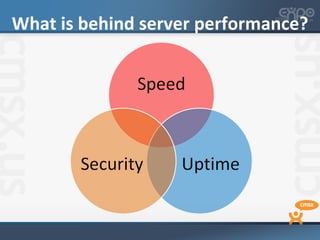
What is behind server performance?
Let’s discuss the speed

• Invest in hardware
Test at least 3 different    hardware
  setups before proceeding.

Always benchmark performance and
  reliability

Add more RAM and use it on
  maximum capacity
Speed – Cont’d

• Install RAM caching mechanisms
   Memcache and APC/Eaccellerator
• Install reverse proxy
   NginX or Varnish
• Virtualization always makes things
  slower
   Resources are shared and at the same time
    are lost for the Virtual OS too!
Speed – Cont’d
• Tweak your software to run faster
   Use fast & secure PHP like FastCGI
   Move PHP binaries into RAM
   Move MySQL to a different hard drive. Use RAID
    or SSD for lightning fast performance.
   If using just one app, tweak MySQL for it!
   Keep log files separate and small in size
   Move TMP to RAM
   Avoid creating unneeded I/O, use CDN if possible
Security & Speed?

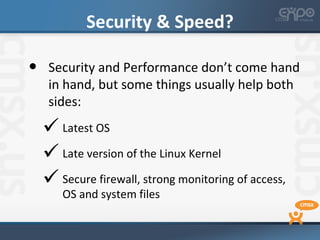
•    Security and Performance don’t come hand
     in hand, but some things usually help both
     sides:
     Latest OS
     Late version of the Linux Kernel
     Secure firewall, strong monitoring of access,
       OS and system files
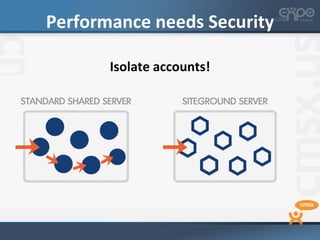
Performance needs Security

       Isolate accounts!
99.9% uptime is achievable!

•   Invest in integrating a monitoring and
    automated reaction system.

•   Keep your server load level at
    minimum at all times.

•   If you start overloading your server, its
    either time to upgrade or to tweak
    further!
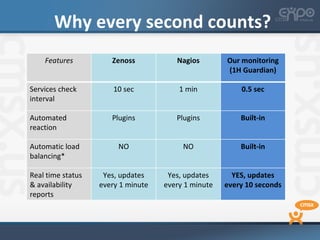
Why every second counts?
    Features          Zenoss           Nagios        Our monitoring
                                                     (1H Guardian)

Services check         10 sec           1 min            0.5 sec
interval

Automated             Plugins          Plugins           Built-in
reaction

Automatic load          NO               NO              Built-in
balancing*

Real time status    Yes, updates     Yes, updates      YES, updates
& availability     every 1 minute   every 1 minute   every 10 seconds
reports
Uptime – Cont’d

•   Spread the server resources wisely
     Never allow a single user to use all of the
       server resources at any given time. Limit
       and throttle if limits are reached and
       prevent overloads.

     Whenever there’s a resource problem,
       react within seconds and not within
       minutes or hours.
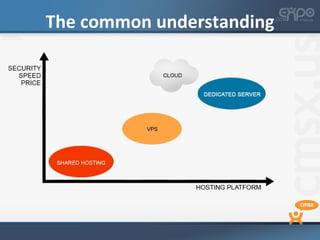
The big Question: which platform?


               SHARED


   DEDICATED                VPS


                    CLOUD
The common understanding
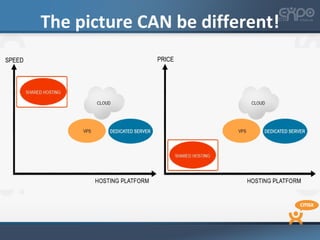
The picture CAN be different!
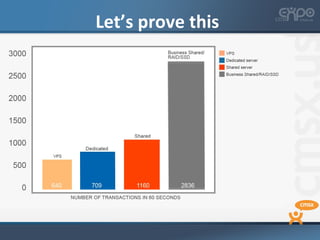
Let’s prove this
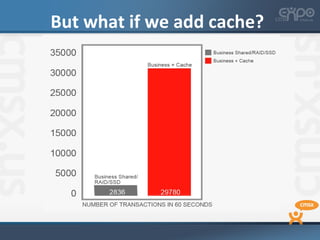
But what if we add cache?
Some key takes
• Shared can be a good platform contrary to the
  common belief, but not always the right one

• If you need custom setup/deep
  customizations & have a big website -> go for
  VPS/dedicated

• Dedicated/VPS & Cloud can perform better for
  you if you KNOW how to tweak them
Your turn to ask 


Image courtesy to Flickr user WingedWolf: http://is.gd/4ycgJq
Thank you!
Tenko Nikolov

SiteGround.com

Email: tenko@siteground.com

Twitter: @tnikolov

Squeeze Maximum Performance from your Hosting Platform

  • 1.
    Squeeze Maximum Performance from your Hosting Platform Tenko Nikolov CEO at SiteGround.com
  • 2.
    Why I lovethis car?
  • 3.
    What is behindserver performance?
  • 4.
    Let’s discuss thespeed • Invest in hardware Test at least 3 different hardware setups before proceeding. Always benchmark performance and reliability Add more RAM and use it on maximum capacity
  • 5.
    Speed – Cont’d •Install RAM caching mechanisms  Memcache and APC/Eaccellerator • Install reverse proxy  NginX or Varnish • Virtualization always makes things slower  Resources are shared and at the same time are lost for the Virtual OS too!
  • 6.
    Speed – Cont’d •Tweak your software to run faster  Use fast & secure PHP like FastCGI  Move PHP binaries into RAM  Move MySQL to a different hard drive. Use RAID or SSD for lightning fast performance.  If using just one app, tweak MySQL for it!  Keep log files separate and small in size  Move TMP to RAM  Avoid creating unneeded I/O, use CDN if possible
  • 7.
    Security & Speed? • Security and Performance don’t come hand in hand, but some things usually help both sides:  Latest OS  Late version of the Linux Kernel  Secure firewall, strong monitoring of access, OS and system files
  • 8.
    Performance needs Security Isolate accounts!
  • 9.
    99.9% uptime isachievable! • Invest in integrating a monitoring and automated reaction system. • Keep your server load level at minimum at all times. • If you start overloading your server, its either time to upgrade or to tweak further!
  • 10.
    Why every secondcounts? Features Zenoss Nagios Our monitoring (1H Guardian) Services check 10 sec 1 min 0.5 sec interval Automated Plugins Plugins Built-in reaction Automatic load NO NO Built-in balancing* Real time status Yes, updates Yes, updates YES, updates & availability every 1 minute every 1 minute every 10 seconds reports
  • 11.
    Uptime – Cont’d • Spread the server resources wisely  Never allow a single user to use all of the server resources at any given time. Limit and throttle if limits are reached and prevent overloads.  Whenever there’s a resource problem, react within seconds and not within minutes or hours.
  • 12.
    The big Question:which platform? SHARED DEDICATED VPS CLOUD
  • 13.
  • 14.
    The picture CANbe different!
  • 15.
  • 16.
    But what ifwe add cache?
  • 17.
    Some key takes •Shared can be a good platform contrary to the common belief, but not always the right one • If you need custom setup/deep customizations & have a big website -> go for VPS/dedicated • Dedicated/VPS & Cloud can perform better for you if you KNOW how to tweak them
  • 18.
    Your turn toask  Image courtesy to Flickr user WingedWolf: http://is.gd/4ycgJq
  • 19.
    Thank you! Tenko Nikolov SiteGround.com Email:tenko@siteground.com Twitter: @tnikolov

Editor's Notes

  • #3 I don’t drive this (though I wish) but this is one of my favorite super cars – f12 berlinetta. Why I love it – because I love speed! Apart from fast and furious cars, I also love fast & furious servers. I’ve been running SiteGround for the last 7 years – we provide web hosting and as you can guess pretty much of my time I spend thinking how to make our servers more powerful, faster and more secure – performing at their best in short. Today, I wanted to share what we’ve learned throughout the years on how to squeeze maximum performance from your servers. Let me ask you this - how many of you need to setup and administer the servers on which your CMS sites are hosted yourself? Raise your hands. Then ask: how many of you rely on other professionals or your hosting provider? Raise your hands, please! No matter if you are administering your hosting yourself or this is something, for which you rely on other professionals, I’ll today try to help you make better choices and achieve maximum performance for your CMS application at a cost.
  • #11 Services check intervala na Guardian според мури е 2 секунди? Да обсъдим тука дали тряя да е 0.5 или 2 секунди На този слайд честно казано мисля, че е ОК да използваме имена и да си споменем даже и Guardian но може да е само в хода на презентацията – примерно ето това са 2 популярни мониторинг системи, ние използваме fully automated monitoring & reaction system called 1H guardian.
  • #13 The big Q is on what platform to achieve all that?