Made by – Sakina Faiz
Branch- Royal civil
CONTENTS
β€’ INTRODUCTION TO STAAD.Pro
β€’ HISTORY OF STAAD.Pro
β€’ STRUCTURE
β€’ TYPES OF STRUCTURE
β€’ STAAD WINDOW
β€’ TOOLS USED
β€’ VARIOUS TYPES OF CURSORS
β€’ PAGE CONTROL IN VARIOUS MODES
β€’ MODEL GENERATION
β€’ WIZARD
β€’ ASSIGNING PROPERTY
β€’ SUPPORTS
β€’ ASSIGNING LOADS
β€’ ANALYSIS
β€’ DESIGN
β€’ ADVANTAGES OF STAAD.Pro
β€’ CONCLUSION
INTRODUCTION TO STAAD.Pro
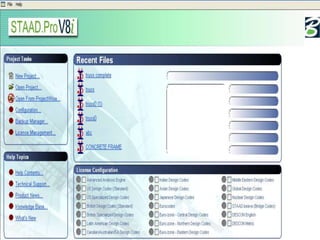
β€’ STAAD.Pro is a structural analysis design program software.
β€’ It includes a state of the art user interface, visualization tools
and international design codes.
β€’ It is used for 3D model generation, analysis and multi-material
design.
β€’ The commercial version of STAAD.Pro supports several steel ,
concrete and timber design codes.
β€’ It is one of the software applications created to help structural
engineers to automate their tasks and to remove the tedious
and long procedures of the manual methods.
HISTORY OF STAAD.Pro
β€’ STAAD.Pro was originally developed by Research Engineers
International in Yorba Linda, CA.
β€’ In late 2005, Research Engineer International was bought
by Bentley Systems.
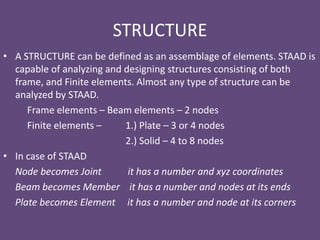
STRUCTURE
β€’ A STRUCTURE can be defined as an assemblage of elements. STAAD is
capable of analyzing and designing structures consisting of both
frame, and Finite elements. Almost any type of structure can be
analyzed by STAAD.
Frame elements – Beam elements – 2 nodes
Finite elements – 1.) Plate – 3 or 4 nodes
2.) Solid – 4 to 8 nodes
β€’ In case of STAAD
Node becomes Joint it has a number and xyz coordinates
Beam becomes Member it has a number and nodes at its ends
Plate becomes Element it has a number and node at its corners
TYPES OF STRUCTURE
β€’ A TRUSS structure consists of truss members which can have only
axial member forces and no bending in the members
β€’ A PLANE structure is bound by a global X-Y coordinate system with
loads in the same plane
β€’ A SPACE structure, which is a three dimensional framed structure
with loads applied in any plane, is the most general.
β€’ A FLOOR structure is a two or three dimensional structure having no
horizontal (global X or Z) movement of the structure [FX, FZ & MY are
restrained at every joint]. The floor framing (in global X-Z plane) of a
building is an ideal example of a FLOOR structure. Columns can also
be modelled with the floor in a FLOOR structure as long as the
structure has no horizontal loading. If there is any horizontal load, it
must be analyzed as a SPACE structure.
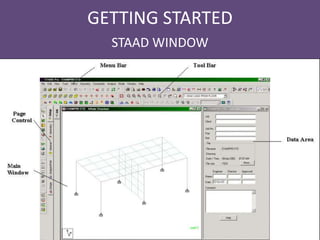
GETTING STARTED
STAAD WINDOW
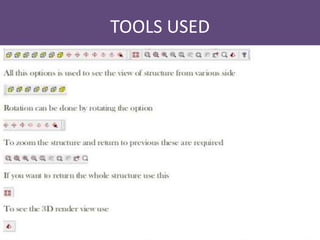
TOOLS USED
VARIOUS TYPES OF CURSORS
Nodes cursor
Beam cursor
Plates cursor
Surface cursor
Solids cursor
Geometry cursor
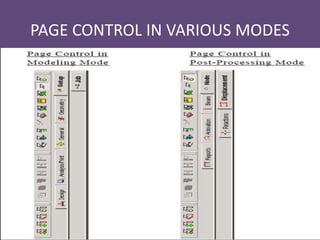
PAGE CONTROL IN VARIOUS MODES
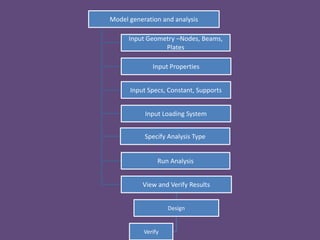
Model generation and analysis
Input Geometry –Nodes, Beams,
Plates
Input Properties
Input Specs, Constant, Supports
Input Loading System
Specify Analysis Type
Run Analysis
View and Verify Results
Design
Verify
MODEL GENERATION
β€’ There are basically 3 methods of generating a model
1. Snap node method
2. Coordinate method
3. Copy paste method
β€’ Out of these three methods most commonly used is copy
paste method
β€’ By using these three methods a structure of any geometry
can be created
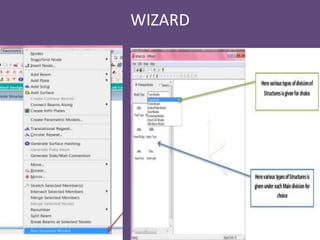
β€’ STAAD.Pro also contains a command wizard which is its
library of structures such as frames , trusses are present
which can be merged with the STAAD.Pro model
WIZARD
ASSIGNING PROPERTY
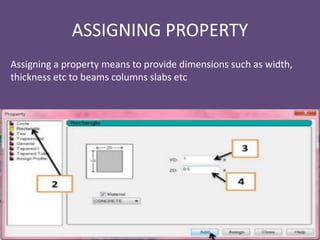
Assigning a property means to provide dimensions such as width,
thickness etc to beams columns slabs etc
SUPPORTS
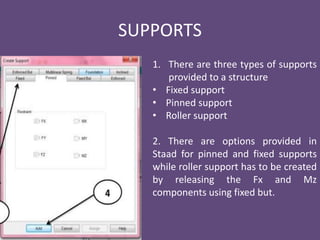
1. There are three types of supports
provided to a structure
β€’ Fixed support
β€’ Pinned support
β€’ Roller support
2. There are options provided in
Staad for pinned and fixed supports
while roller support has to be created
by releasing the Fx and Mz
components using fixed but.
ASSIGNING LOADS
β€’ Any structure is subjected to basically these types of loads-
1. Dead load
2. Live Load
β€’ Dead load includes the self weight of the structure while live
load consists of superimposed load.
β€’ In addition to a structure is also subjected to wind and seismic
or earthquake forces
β€’ While designing a structure subjected to wind and earthquake
forces we also have to provide definitions along with various
load cases
β€’
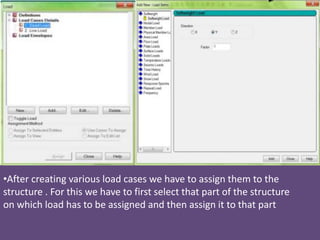
β€’After creating various load cases we have to assign them to the
structure . For this we have to first select that part of the structure
on which load has to be assigned and then assign it to that part
Continued…
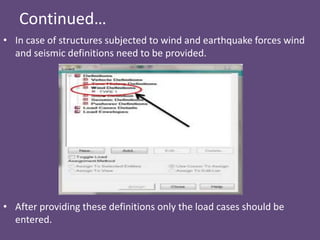
β€’ In case of structures subjected to wind and earthquake forces wind
and seismic definitions need to be provided.
β€’ After providing these definitions only the load cases should be
entered.
ANALYSIS
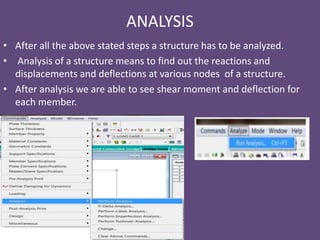
β€’ After all the above stated steps a structure has to be analyzed.
β€’ Analysis of a structure means to find out the reactions and
displacements and deflections at various nodes of a structure.
β€’ After analysis we are able to see shear moment and deflection for
each member.
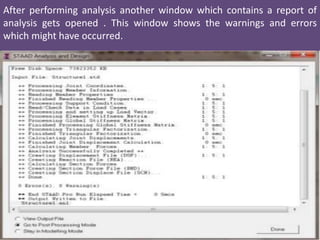
After performing analysis another window which contains a report of
analysis gets opened . This window shows the warnings and errors
which might have occurred.
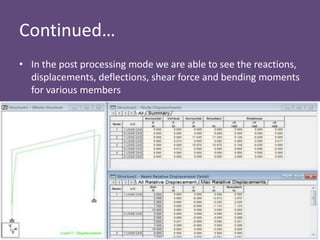
Continued…
β€’ In the post processing mode we are able to see the reactions,
displacements, deflections, shear force and bending moments
for various members
DESIGN
β€’ After analysis a structure has to be designed to carry loads
acting on it considering a certain factor of safety .
β€’ In India structures are designed by using various Indian codes
for both concrete and steel structures.
β€’ The design in STAAD.Pro supports over 70 international codes
and over 20 U.S. codes in 7 languages.
β€’ After designing the structure it is again analyzed and results of
analysis for each beam and column is shown in the output file
ADVANTAGES OF STAAD.Pro
Following are the advantages of STAAD.Pro
1. Covers all aspects of structural engineering
2. Broad spectra of design codes
3. International codes
4. Quality assurance
5. Reports and documentation
CONCLUSION
β€’ Staad pro is widely used by most of the organization for their
construction needs.
β€’ Unfortunately, well skilled staad pro engineers are very hard
to search.
β€’ If we believe in the prediction of the industry experts then
those students who will be getting trained on staad pro in the
current and upcoming two years will have bright and
successful career ahead in the real estate and construction
domain
β€’ By attending this training in STAAD.Pro we were able to learn
various features of STAAD.Pro which will be very helpful in the
near future
Final ppt on staad pro

Final ppt on staad pro

  • 1.
    Made by –Sakina Faiz Branch- Royal civil
  • 2.
    CONTENTS β€’ INTRODUCTION TOSTAAD.Pro β€’ HISTORY OF STAAD.Pro β€’ STRUCTURE β€’ TYPES OF STRUCTURE β€’ STAAD WINDOW β€’ TOOLS USED β€’ VARIOUS TYPES OF CURSORS β€’ PAGE CONTROL IN VARIOUS MODES β€’ MODEL GENERATION β€’ WIZARD β€’ ASSIGNING PROPERTY β€’ SUPPORTS β€’ ASSIGNING LOADS β€’ ANALYSIS β€’ DESIGN β€’ ADVANTAGES OF STAAD.Pro β€’ CONCLUSION
  • 3.
    INTRODUCTION TO STAAD.Pro β€’STAAD.Pro is a structural analysis design program software. β€’ It includes a state of the art user interface, visualization tools and international design codes. β€’ It is used for 3D model generation, analysis and multi-material design. β€’ The commercial version of STAAD.Pro supports several steel , concrete and timber design codes. β€’ It is one of the software applications created to help structural engineers to automate their tasks and to remove the tedious and long procedures of the manual methods.
  • 4.
    HISTORY OF STAAD.Pro β€’STAAD.Pro was originally developed by Research Engineers International in Yorba Linda, CA. β€’ In late 2005, Research Engineer International was bought by Bentley Systems.
  • 5.
    STRUCTURE β€’ A STRUCTUREcan be defined as an assemblage of elements. STAAD is capable of analyzing and designing structures consisting of both frame, and Finite elements. Almost any type of structure can be analyzed by STAAD. Frame elements – Beam elements – 2 nodes Finite elements – 1.) Plate – 3 or 4 nodes 2.) Solid – 4 to 8 nodes β€’ In case of STAAD Node becomes Joint it has a number and xyz coordinates Beam becomes Member it has a number and nodes at its ends Plate becomes Element it has a number and node at its corners
  • 6.
    TYPES OF STRUCTURE β€’A TRUSS structure consists of truss members which can have only axial member forces and no bending in the members β€’ A PLANE structure is bound by a global X-Y coordinate system with loads in the same plane β€’ A SPACE structure, which is a three dimensional framed structure with loads applied in any plane, is the most general. β€’ A FLOOR structure is a two or three dimensional structure having no horizontal (global X or Z) movement of the structure [FX, FZ & MY are restrained at every joint]. The floor framing (in global X-Z plane) of a building is an ideal example of a FLOOR structure. Columns can also be modelled with the floor in a FLOOR structure as long as the structure has no horizontal loading. If there is any horizontal load, it must be analyzed as a SPACE structure.
  • 8.
  • 9.
  • 10.
    VARIOUS TYPES OFCURSORS Nodes cursor Beam cursor Plates cursor Surface cursor Solids cursor Geometry cursor
  • 11.
    PAGE CONTROL INVARIOUS MODES
  • 12.
    Model generation andanalysis Input Geometry –Nodes, Beams, Plates Input Properties Input Specs, Constant, Supports Input Loading System Specify Analysis Type Run Analysis View and Verify Results Design Verify
  • 13.
    MODEL GENERATION β€’ Thereare basically 3 methods of generating a model 1. Snap node method 2. Coordinate method 3. Copy paste method β€’ Out of these three methods most commonly used is copy paste method β€’ By using these three methods a structure of any geometry can be created β€’ STAAD.Pro also contains a command wizard which is its library of structures such as frames , trusses are present which can be merged with the STAAD.Pro model
  • 14.
  • 15.
    ASSIGNING PROPERTY Assigning aproperty means to provide dimensions such as width, thickness etc to beams columns slabs etc
  • 16.
    SUPPORTS 1. There arethree types of supports provided to a structure β€’ Fixed support β€’ Pinned support β€’ Roller support 2. There are options provided in Staad for pinned and fixed supports while roller support has to be created by releasing the Fx and Mz components using fixed but.
  • 17.
    ASSIGNING LOADS β€’ Anystructure is subjected to basically these types of loads- 1. Dead load 2. Live Load β€’ Dead load includes the self weight of the structure while live load consists of superimposed load. β€’ In addition to a structure is also subjected to wind and seismic or earthquake forces β€’ While designing a structure subjected to wind and earthquake forces we also have to provide definitions along with various load cases
  • 18.
    β€’ β€’After creating variousload cases we have to assign them to the structure . For this we have to first select that part of the structure on which load has to be assigned and then assign it to that part
  • 19.
    Continued… β€’ In caseof structures subjected to wind and earthquake forces wind and seismic definitions need to be provided. β€’ After providing these definitions only the load cases should be entered.
  • 20.
    ANALYSIS β€’ After allthe above stated steps a structure has to be analyzed. β€’ Analysis of a structure means to find out the reactions and displacements and deflections at various nodes of a structure. β€’ After analysis we are able to see shear moment and deflection for each member.
  • 21.
    After performing analysisanother window which contains a report of analysis gets opened . This window shows the warnings and errors which might have occurred.
  • 22.
    Continued… β€’ In thepost processing mode we are able to see the reactions, displacements, deflections, shear force and bending moments for various members
  • 23.
    DESIGN β€’ After analysisa structure has to be designed to carry loads acting on it considering a certain factor of safety . β€’ In India structures are designed by using various Indian codes for both concrete and steel structures. β€’ The design in STAAD.Pro supports over 70 international codes and over 20 U.S. codes in 7 languages. β€’ After designing the structure it is again analyzed and results of analysis for each beam and column is shown in the output file
  • 24.
    ADVANTAGES OF STAAD.Pro Followingare the advantages of STAAD.Pro 1. Covers all aspects of structural engineering 2. Broad spectra of design codes 3. International codes 4. Quality assurance 5. Reports and documentation
  • 25.
    CONCLUSION β€’ Staad prois widely used by most of the organization for their construction needs. β€’ Unfortunately, well skilled staad pro engineers are very hard to search. β€’ If we believe in the prediction of the industry experts then those students who will be getting trained on staad pro in the current and upcoming two years will have bright and successful career ahead in the real estate and construction domain β€’ By attending this training in STAAD.Pro we were able to learn various features of STAAD.Pro which will be very helpful in the near future