Certification in Staad Pro
STAAD.Pro(Structural Analysis andDesignProgram) Itisa comprehensive,general-purposeprogram
for designinginfrastructure projects both big and small. It can implement various forms of analysis
and supports several steel, concrete and timber design codes.
Course Objectives
Thiscourse aims to make the participantsproductive bygivingthemthe ability to produce drawings
and redefineimagesof buildings.Also,itwill help you navigate user interface, architectural objects
such as floor,walls,roofs,windows,andstairs. Covering the basic to advance of Revit Architecture,
this course will assist in the creation of schematic design through construction n documentation.
Studentswhoenroll inthiscourse will learn:
1. Structural Analysiscapabilitiesof STAADPro
2. Preprocessing,analysisandpostprocessing
3. Workingmethodologyof general finiteelementbasedanalysissoftware
4. Modelingissues,Idealization
5. Typesof Structural Analyses
6. Typesof staticand dynamicloadings.
7. ReinforcedConcrete andSteel Design.Controllingvisibilityof object.
Whoshould be aiming for this course?
STAAD.PRO isa newtool for Civil EngineeringStudentswhichisinhuge demandnow adays.This is
a structural analysisanddesignprogramwithapplicationsprimarilyinthe buildingandReal-estate
industry- like commercial buildings,bridgesandhighwaystructures,industrialstructures,chemical
plantstructures,dams,Turbine foundations,culverts,otherembeddedstructuresetc.
What is Staad Pro?
STAADor (STAAD.Pro) isastructural analysisanddesign softwareapplicationoriginallydevelopedby
ResearchEngineersInternationalin1997. In late 2005, ResearchEngineersInternational was bought
by Bentley Systems.
STAAD.Pro is one of the most widely used structural analysis and design software products
worldwide. It supports over 90 international steel, concrete, timber & aluminium design codes.
Scope of Staad Pro
Real Estate business is one of the profitable sectors of the market and there are huge no of scopes
and opportunities for BTECH Civil Engineering students who want to pursue their career as a
Structural DesignerorDesign Engineer. Leading builders and colonizers are investing hugely in the
real estate business to get maximum profit.
There isa growingdemandforwell-skilledcivilEngineeringprofessionals and in the near future the
demand will increase more. Already the sector is booming. The companies are looking for
competent,skilledandtechnicallystrongCivil engineeringprofessionalsbutsomehow the skills and
techniquesthatindustries expectfromthe candidatesare eitherlackingornotup to the mark as per
the standardsof the industry.The blame hasto be giventothe course curriculumof the collegesand
institutions that only emphasizes on the theoretical learning and lacks in imparting practical and
technical knowledge to the students.
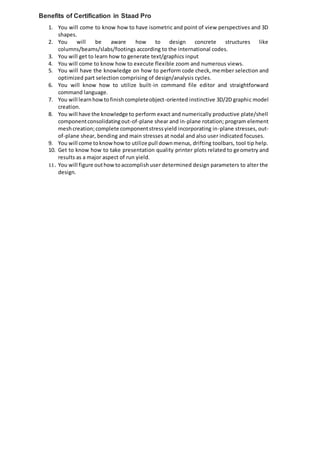
Benefits of Certification in Staad Pro
1. You will come to know how to have isometric and point of view perspectives and 3D
shapes.
2. You will be aware how to design concrete structures like
columns/beams/slabs/footings according to the international codes.
3. You will get to learn how to generate text/graphics input
4. You will come to know how to execute flexible zoom and numerous views.
5. You will have the knowledge on how to perform code check, member selection and
optimized part selection comprising of design/analysis cycles.
6. You will know how to utilize built-in command file editor and straightforward
command language.
7. You will learnhowtofinishcompleteobject-oriented instinctive 3D/2D graphic model
creation.
8. You will have the knowledge to perform exact and numerically productive plate/shell
componentconsolidatingout-of-plane shear and in-plane rotation; program element
meshcreation;complete componentstressyield incorporating in-plane stresses, out-
of-plane shear, bending and main stresses at nodal and also user indicated focuses.
9. You will come toknowhowto utilize pull downmenus, drifting toolbars, tool tip help.
10. Get to know how to take presentation quality printer plots related to geometry and
results as a major aspect of run yield.
11. You will figure outhowtoaccomplishuser determined design parameters to alter the
design.
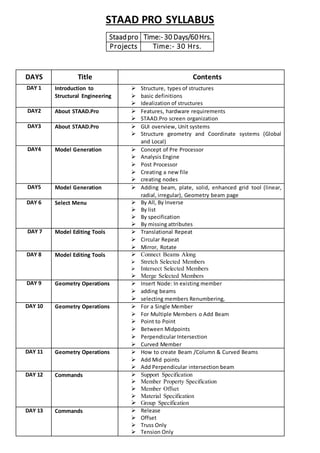
STAAD PRO SYLLABUS
Staadpro Time:- 30 Days/60Hrs.
Projects Time:- 30 Hrs.
DAYS Title Contents
DAY 1 Introduction to
Structural Engineering
 Structure, types of structures
 basic definitions
 Idealization of structures
DAY2 About STAAD.Pro  Features, hardware requirements
 STAAD.Pro screen organization
DAY3 About STAAD.Pro  GUI overview, Unit systems
 Structure geometry and Coordinate systems (Global
and Local)
DAY4 Model Generation  Concept of Pre Processor
 Analysis Engine
 Post Processor
 Creating a new file
 creating nodes
DAY5 Model Generation  Adding beam, plate, solid, enhanced grid tool (linear,
radial, irregular), Geometry beam page
DAY 6 Select Menu  By All, By Inverse
 By list
 By specification
 By missing attributes
DAY 7 Model Editing Tools  Translational Repeat
 Circular Repeat
 Mirror, Rotate
DAY 8 Model Editing Tools  Connect Beams Along
 Stretch Selected Members
 Intersect Selected Members
 Merge Selected Members
DAY 9 Geometry Operations  Insert Node: In existing member
 adding beams
 selecting members Renumbering,
DAY 10 Geometry Operations  For a Single Member
 For Multiple Members o Add Beam
 Point to Point
 Between Midpoints
 Perpendicular Intersection
 Curved Member
DAY 11 Geometry Operations  How to create Beam /Column & Curved Beams
 Add Mid points
 Add Perpendicular intersection beam
DAY 12 Commands  Support Specification
 Member Property Specification
 Member Offset
 Material Specification
 Group Specification
DAY 13 Commands  Release
 Offset
 Truss Only
 Tension Only
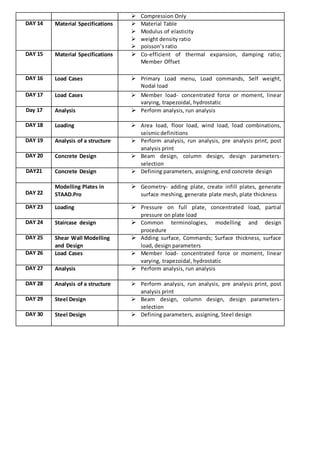
 Compression Only
DAY 14 Material Specifications  Material Table
 Modulus of elasticity
 weight density ratio
 poisson’s ratio
DAY 15 Material Specifications  Co-efficient of thermal expansion, damping ratio;
Member Offset
DAY 16 Load Cases  Primary Load menu, Load commands, Self weight,
Nodal load
DAY 17 Load Cases  Member load- concentrated force or moment, linear
varying, trapezoidal, hydrostatic
Day 17 Analysis  Perform analysis, run analysis
DAY 18 Loading  Area load, floor load, wind load, load combinations,
seismic definitions
DAY 19 Analysis of a structure  Perform analysis, run analysis, pre analysis print, post
analysis print
DAY 20 Concrete Design  Beam design, column design, design parameters-
selection
DAY21 Concrete Design  Defining parameters, assigning, end concrete design
DAY 22
Modelling Plates in
STAAD.Pro
 Geometry- adding plate, create infill plates, generate
surface meshing, generate plate mesh, plate thickness
DAY 23 Loading  Pressure on full plate, concentrated load, partial
pressure on plate load
DAY 24 Staircase design  Common terminologies, modelling and design
procedure
DAY 25 Shear Wall Modelling
and Design
 Adding surface, Commands; Surface thickness, surface
load, design parameters
DAY 26 Load Cases  Member load- concentrated force or moment, linear
varying, trapezoidal, hydrostatic
DAY 27 Analysis  Perform analysis, run analysis
DAY 28 Analysis of a structure  Perform analysis, run analysis, pre analysis print, post
analysis print
DAY 29 Steel Design  Beam design, column design, design parameters-
selection
DAY 30 Steel Design  Defining parameters, assigning, Steel design

Staad pro Syllabus

  • 1.
    Certification in StaadPro STAAD.Pro(Structural Analysis andDesignProgram) Itisa comprehensive,general-purposeprogram for designinginfrastructure projects both big and small. It can implement various forms of analysis and supports several steel, concrete and timber design codes. Course Objectives Thiscourse aims to make the participantsproductive bygivingthemthe ability to produce drawings and redefineimagesof buildings.Also,itwill help you navigate user interface, architectural objects such as floor,walls,roofs,windows,andstairs. Covering the basic to advance of Revit Architecture, this course will assist in the creation of schematic design through construction n documentation. Studentswhoenroll inthiscourse will learn: 1. Structural Analysiscapabilitiesof STAADPro 2. Preprocessing,analysisandpostprocessing 3. Workingmethodologyof general finiteelementbasedanalysissoftware 4. Modelingissues,Idealization 5. Typesof Structural Analyses 6. Typesof staticand dynamicloadings. 7. ReinforcedConcrete andSteel Design.Controllingvisibilityof object. Whoshould be aiming for this course? STAAD.PRO isa newtool for Civil EngineeringStudentswhichisinhuge demandnow adays.This is a structural analysisanddesignprogramwithapplicationsprimarilyinthe buildingandReal-estate industry- like commercial buildings,bridgesandhighwaystructures,industrialstructures,chemical plantstructures,dams,Turbine foundations,culverts,otherembeddedstructuresetc. What is Staad Pro? STAADor (STAAD.Pro) isastructural analysisanddesign softwareapplicationoriginallydevelopedby ResearchEngineersInternationalin1997. In late 2005, ResearchEngineersInternational was bought by Bentley Systems. STAAD.Pro is one of the most widely used structural analysis and design software products worldwide. It supports over 90 international steel, concrete, timber & aluminium design codes. Scope of Staad Pro Real Estate business is one of the profitable sectors of the market and there are huge no of scopes and opportunities for BTECH Civil Engineering students who want to pursue their career as a Structural DesignerorDesign Engineer. Leading builders and colonizers are investing hugely in the real estate business to get maximum profit. There isa growingdemandforwell-skilledcivilEngineeringprofessionals and in the near future the demand will increase more. Already the sector is booming. The companies are looking for competent,skilledandtechnicallystrongCivil engineeringprofessionalsbutsomehow the skills and techniquesthatindustries expectfromthe candidatesare eitherlackingornotup to the mark as per the standardsof the industry.The blame hasto be giventothe course curriculumof the collegesand institutions that only emphasizes on the theoretical learning and lacks in imparting practical and technical knowledge to the students.
  • 2.
    Benefits of Certificationin Staad Pro 1. You will come to know how to have isometric and point of view perspectives and 3D shapes. 2. You will be aware how to design concrete structures like columns/beams/slabs/footings according to the international codes. 3. You will get to learn how to generate text/graphics input 4. You will come to know how to execute flexible zoom and numerous views. 5. You will have the knowledge on how to perform code check, member selection and optimized part selection comprising of design/analysis cycles. 6. You will know how to utilize built-in command file editor and straightforward command language. 7. You will learnhowtofinishcompleteobject-oriented instinctive 3D/2D graphic model creation. 8. You will have the knowledge to perform exact and numerically productive plate/shell componentconsolidatingout-of-plane shear and in-plane rotation; program element meshcreation;complete componentstressyield incorporating in-plane stresses, out- of-plane shear, bending and main stresses at nodal and also user indicated focuses. 9. You will come toknowhowto utilize pull downmenus, drifting toolbars, tool tip help. 10. Get to know how to take presentation quality printer plots related to geometry and results as a major aspect of run yield. 11. You will figure outhowtoaccomplishuser determined design parameters to alter the design.
  • 3.
    STAAD PRO SYLLABUS StaadproTime:- 30 Days/60Hrs. Projects Time:- 30 Hrs. DAYS Title Contents DAY 1 Introduction to Structural Engineering  Structure, types of structures  basic definitions  Idealization of structures DAY2 About STAAD.Pro  Features, hardware requirements  STAAD.Pro screen organization DAY3 About STAAD.Pro  GUI overview, Unit systems  Structure geometry and Coordinate systems (Global and Local) DAY4 Model Generation  Concept of Pre Processor  Analysis Engine  Post Processor  Creating a new file  creating nodes DAY5 Model Generation  Adding beam, plate, solid, enhanced grid tool (linear, radial, irregular), Geometry beam page DAY 6 Select Menu  By All, By Inverse  By list  By specification  By missing attributes DAY 7 Model Editing Tools  Translational Repeat  Circular Repeat  Mirror, Rotate DAY 8 Model Editing Tools  Connect Beams Along  Stretch Selected Members  Intersect Selected Members  Merge Selected Members DAY 9 Geometry Operations  Insert Node: In existing member  adding beams  selecting members Renumbering, DAY 10 Geometry Operations  For a Single Member  For Multiple Members o Add Beam  Point to Point  Between Midpoints  Perpendicular Intersection  Curved Member DAY 11 Geometry Operations  How to create Beam /Column & Curved Beams  Add Mid points  Add Perpendicular intersection beam DAY 12 Commands  Support Specification  Member Property Specification  Member Offset  Material Specification  Group Specification DAY 13 Commands  Release  Offset  Truss Only  Tension Only
  • 4.
     Compression Only DAY14 Material Specifications  Material Table  Modulus of elasticity  weight density ratio  poisson’s ratio DAY 15 Material Specifications  Co-efficient of thermal expansion, damping ratio; Member Offset DAY 16 Load Cases  Primary Load menu, Load commands, Self weight, Nodal load DAY 17 Load Cases  Member load- concentrated force or moment, linear varying, trapezoidal, hydrostatic Day 17 Analysis  Perform analysis, run analysis DAY 18 Loading  Area load, floor load, wind load, load combinations, seismic definitions DAY 19 Analysis of a structure  Perform analysis, run analysis, pre analysis print, post analysis print DAY 20 Concrete Design  Beam design, column design, design parameters- selection DAY21 Concrete Design  Defining parameters, assigning, end concrete design DAY 22 Modelling Plates in STAAD.Pro  Geometry- adding plate, create infill plates, generate surface meshing, generate plate mesh, plate thickness DAY 23 Loading  Pressure on full plate, concentrated load, partial pressure on plate load DAY 24 Staircase design  Common terminologies, modelling and design procedure DAY 25 Shear Wall Modelling and Design  Adding surface, Commands; Surface thickness, surface load, design parameters DAY 26 Load Cases  Member load- concentrated force or moment, linear varying, trapezoidal, hydrostatic DAY 27 Analysis  Perform analysis, run analysis DAY 28 Analysis of a structure  Perform analysis, run analysis, pre analysis print, post analysis print DAY 29 Steel Design  Beam design, column design, design parameters- selection DAY 30 Steel Design  Defining parameters, assigning, Steel design