www.gfi.be


         Profile Types and locking profile features
         IBM Collaboration Solutions
         30/11/2012


             Titre de la présentation                 1
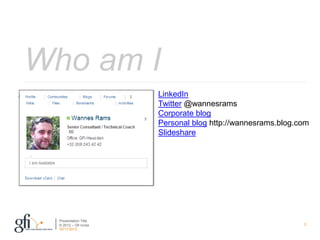
Who am I
                       LinkedIn
                       Twitter @wannesrams
                       Corporate blog
                       Personal blog http://wannesrams.blog.com
                       Slideshare


  Presentation Title
  © 2012 – Gfi nv/sa                                         2
  30/11/2012
Summary
 I.     What are profile types

 II. Why use profile types

 III. How to define profile types

 IV. Disable features based on profile types

 V. Disable Widgets based on profile types

 VI. Change activity stream based on profile types

 Presentation Title
 © 2012 – Gfi nv/sa                                  3
 30/11/2012
What are profile types


> Definition of different types of users
> Allows to change look and feel of the profiles application
> Example: customer, employee, contractor


          Presentation Title
          © 2012 – Gfi nv/sa                                   4
          30/11/2012
Why use profile types


        >    Show different data for different types of users
        >    Block certain features
        >    Block built in widgets
        >    Block custom widgets
        >    Limit information stream
        >    Phase a rollout


        Presentation Title
        © 2012 – Gfi nv/sa                                      5
        30/11/2012
How to define profile types


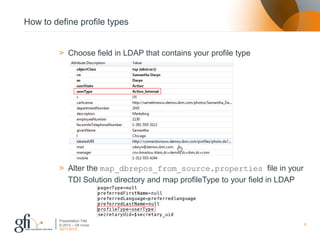
         > Choose field in LDAP that contains your profile type


         > Alter the map_dbrepos_from_source.properties file in your
           TDI Solution directory and map profileType to your field in LDAP


         Presentation Title
         © 2012 – Gfi nv/sa                                                   6
         30/11/2012
How to define profile types


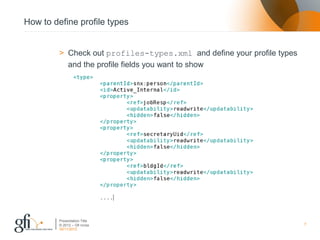
         > Check out profiles-types.xml and define your profile types
           and the profile fields you want to show


         Presentation Title
         © 2012 – Gfi nv/sa                                             7
         30/11/2012
Disable features based on profile types


        > You can disable Profile features based on the profile type.
        > Following Profile features can be configured:
              •   Board
              •   Status updates
              •   Photo
              •   Pronunciation
              •   Network
              •   Reporting structure
              •   Tagging
              •   Following
        > Configured in profiles-policy.xml


        Presentation Title
        © 2012 – Gfi nv/sa                                              8
        30/11/2012
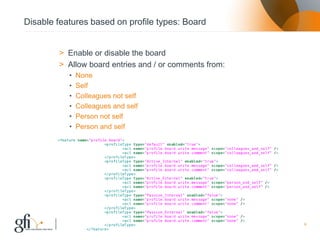
Disable features based on profile types: Board


        > Enable or disable the board
        > Allow board entries and / or comments from:
              •   None
              •   Self
              •   Colleagues not self
              •   Colleagues and self
              •   Person not self
              •   Person and self


        Presentation Title
        © 2012 – Gfi nv/sa                              9
        30/11/2012
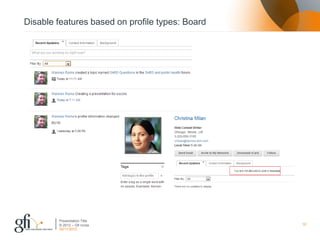
Disable features based on profile types: Board


        Presentation Title
        © 2012 – Gfi nv/sa                       10
        30/11/2012
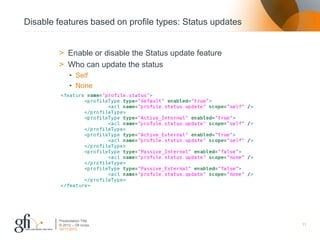
Disable features based on profile types: Status updates


        > Enable or disable the Status update feature
        > Who can update the status
              • Self
              • None


        Presentation Title
        © 2012 – Gfi nv/sa                                11
        30/11/2012
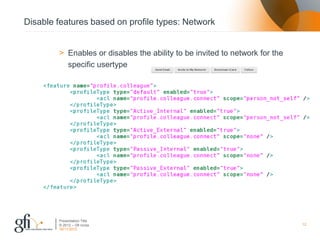
Disable features based on profile types: Network


        > Enables or disables the ability to be invited to network for the
          specific usertype


        Presentation Title
        © 2012 – Gfi nv/sa                                                   12
        30/11/2012
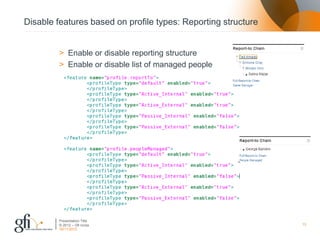
Disable features based on profile types: Reporting structure


         > Enable or disable reporting structure
         > Enable or disable list of managed people


         Presentation Title
         © 2012 – Gfi nv/sa                                    13
         30/11/2012
Disable features based on profile types: Tagging


        > Enable or disable tagging
        > Existing tags are still searchable, but not shown on profile
        > Who can tag:
              • None, colleagues not self, colleagues and self, person not self, person
                and self


        Presentation Title
        © 2012 – Gfi nv/sa                                                                14
        30/11/2012
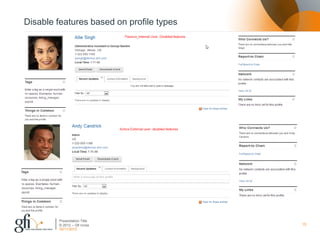
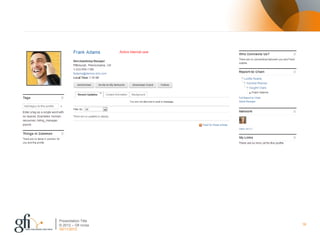
Disable features based on profile types


        Presentation Title
        © 2012 – Gfi nv/sa                15
        30/11/2012
Presentation Title
© 2012 – Gfi nv/sa   16
30/11/2012
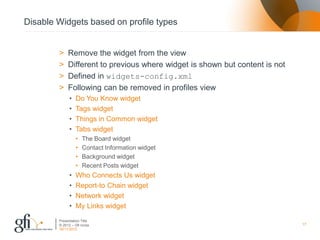
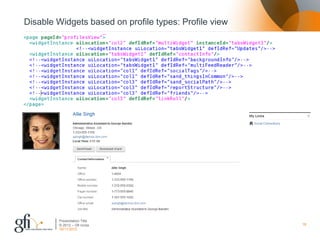
Disable Widgets based on profile types


        >    Remove the widget from the view
        >    Different to previous where widget is shown but content is not
        >    Defined in widgets-config.xml
        >    Following can be removed in profiles view
              •   Do You Know widget
              •   Tags widget
              •   Things in Common widget
              •   Tabs widget
                  •   The Board widget
                  •   Contact Information widget
                  •   Background widget
                  •   Recent Posts widget
              •   Who Connects Us widget
              •   Report-to Chain widget
              •   Network widget
              •   My Links widget
        Presentation Title
        © 2012 – Gfi nv/sa                                                    17
        30/11/2012
Disable Widgets based on profile types: Profile view


        Presentation Title
        © 2012 – Gfi nv/sa                             18
        30/11/2012
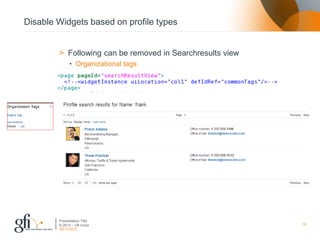
Disable Widgets based on profile types


        > Following can be removed in Searchresults view
              • Organizational tags


        Presentation Title
        © 2012 – Gfi nv/sa                                 19
        30/11/2012
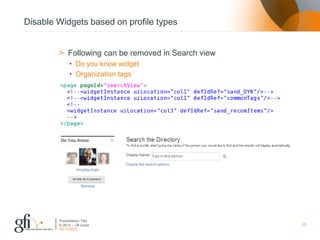
Disable Widgets based on profile types


        > Following can be removed in Search view
              • Do you know widget
              • Organization tags


        Presentation Title
        © 2012 – Gfi nv/sa                          20
        30/11/2012
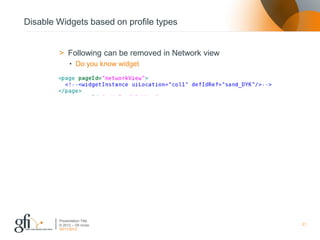
Disable Widgets based on profile types


        > Following can be removed in Network view
              • Do you know widget


        Presentation Title
        © 2012 – Gfi nv/sa                           21
        30/11/2012
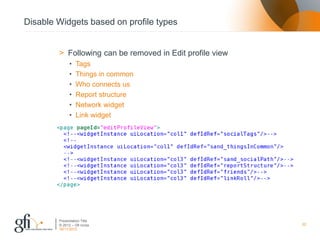
Disable Widgets based on profile types


        > Following can be removed in Edit profile view
              •   Tags
              •   Things in common
              •   Who connects us
              •   Report structure
              •   Network widget
              •   Link widget


        Presentation Title
        © 2012 – Gfi nv/sa                                22
        30/11/2012
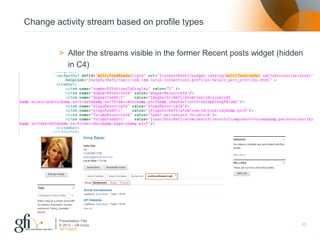
Change activity stream based on profile types


        > Alter the streams visible in the former Recent posts widget (hidden
          in C4)


        Presentation Title
        © 2012 – Gfi nv/sa                                                  23
        30/11/2012
Questions?


       Presentation Title
       © 2012 – Gfi nv/sa   24
       30/11/2012
Links


        > Profile types in the IBM Wiki
        > Phasing an IBM Connections rollout on IBM Social Biz blog


        Presentation Title
        © 2012 – Gfi nv/sa                                            25
        30/11/2012
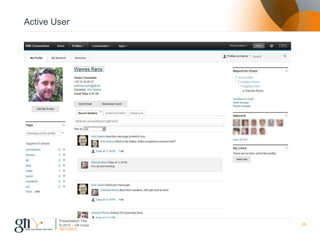
Active User


        Presentation Title
        © 2012 – Gfi nv/sa   26
        30/11/2012
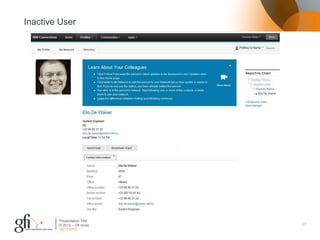
Inactive User


        Presentation Title
        © 2012 – Gfi nv/sa   27
        30/11/2012

Profile types and locking profile features

  • 1.
    www.gfi.be Profile Types and locking profile features IBM Collaboration Solutions 30/11/2012 Titre de la présentation 1
  • 2.
    Who am I LinkedIn Twitter @wannesrams Corporate blog Personal blog http://wannesrams.blog.com Slideshare Presentation Title © 2012 – Gfi nv/sa 2 30/11/2012
  • 3.
    Summary I. What are profile types II. Why use profile types III. How to define profile types IV. Disable features based on profile types V. Disable Widgets based on profile types VI. Change activity stream based on profile types Presentation Title © 2012 – Gfi nv/sa 3 30/11/2012
  • 4.
    What are profiletypes > Definition of different types of users > Allows to change look and feel of the profiles application > Example: customer, employee, contractor Presentation Title © 2012 – Gfi nv/sa 4 30/11/2012
  • 5.
    Why use profiletypes > Show different data for different types of users > Block certain features > Block built in widgets > Block custom widgets > Limit information stream > Phase a rollout Presentation Title © 2012 – Gfi nv/sa 5 30/11/2012
  • 6.
    How to defineprofile types > Choose field in LDAP that contains your profile type > Alter the map_dbrepos_from_source.properties file in your TDI Solution directory and map profileType to your field in LDAP Presentation Title © 2012 – Gfi nv/sa 6 30/11/2012
  • 7.
    How to defineprofile types > Check out profiles-types.xml and define your profile types and the profile fields you want to show Presentation Title © 2012 – Gfi nv/sa 7 30/11/2012
  • 8.
    Disable features basedon profile types > You can disable Profile features based on the profile type. > Following Profile features can be configured: • Board • Status updates • Photo • Pronunciation • Network • Reporting structure • Tagging • Following > Configured in profiles-policy.xml Presentation Title © 2012 – Gfi nv/sa 8 30/11/2012
  • 9.
    Disable features basedon profile types: Board > Enable or disable the board > Allow board entries and / or comments from: • None • Self • Colleagues not self • Colleagues and self • Person not self • Person and self Presentation Title © 2012 – Gfi nv/sa 9 30/11/2012
  • 10.
    Disable features basedon profile types: Board Presentation Title © 2012 – Gfi nv/sa 10 30/11/2012
  • 11.
    Disable features basedon profile types: Status updates > Enable or disable the Status update feature > Who can update the status • Self • None Presentation Title © 2012 – Gfi nv/sa 11 30/11/2012
  • 12.
    Disable features basedon profile types: Network > Enables or disables the ability to be invited to network for the specific usertype Presentation Title © 2012 – Gfi nv/sa 12 30/11/2012
  • 13.
    Disable features basedon profile types: Reporting structure > Enable or disable reporting structure > Enable or disable list of managed people Presentation Title © 2012 – Gfi nv/sa 13 30/11/2012
  • 14.
    Disable features basedon profile types: Tagging > Enable or disable tagging > Existing tags are still searchable, but not shown on profile > Who can tag: • None, colleagues not self, colleagues and self, person not self, person and self Presentation Title © 2012 – Gfi nv/sa 14 30/11/2012
  • 15.
    Disable features basedon profile types Presentation Title © 2012 – Gfi nv/sa 15 30/11/2012
  • 16.
    Presentation Title © 2012– Gfi nv/sa 16 30/11/2012
  • 17.
    Disable Widgets basedon profile types > Remove the widget from the view > Different to previous where widget is shown but content is not > Defined in widgets-config.xml > Following can be removed in profiles view • Do You Know widget • Tags widget • Things in Common widget • Tabs widget • The Board widget • Contact Information widget • Background widget • Recent Posts widget • Who Connects Us widget • Report-to Chain widget • Network widget • My Links widget Presentation Title © 2012 – Gfi nv/sa 17 30/11/2012
  • 18.
    Disable Widgets basedon profile types: Profile view Presentation Title © 2012 – Gfi nv/sa 18 30/11/2012
  • 19.
    Disable Widgets basedon profile types > Following can be removed in Searchresults view • Organizational tags Presentation Title © 2012 – Gfi nv/sa 19 30/11/2012
  • 20.
    Disable Widgets basedon profile types > Following can be removed in Search view • Do you know widget • Organization tags Presentation Title © 2012 – Gfi nv/sa 20 30/11/2012
  • 21.
    Disable Widgets basedon profile types > Following can be removed in Network view • Do you know widget Presentation Title © 2012 – Gfi nv/sa 21 30/11/2012
  • 22.
    Disable Widgets basedon profile types > Following can be removed in Edit profile view • Tags • Things in common • Who connects us • Report structure • Network widget • Link widget Presentation Title © 2012 – Gfi nv/sa 22 30/11/2012
  • 23.
    Change activity streambased on profile types > Alter the streams visible in the former Recent posts widget (hidden in C4) Presentation Title © 2012 – Gfi nv/sa 23 30/11/2012
  • 24.
    Questions? Presentation Title © 2012 – Gfi nv/sa 24 30/11/2012
  • 25.
    Links > Profile types in the IBM Wiki > Phasing an IBM Connections rollout on IBM Social Biz blog Presentation Title © 2012 – Gfi nv/sa 25 30/11/2012
  • 26.
    Active User Presentation Title © 2012 – Gfi nv/sa 26 30/11/2012
  • 27.
    Inactive User Presentation Title © 2012 – Gfi nv/sa 27 30/11/2012