The Edge Wireframes

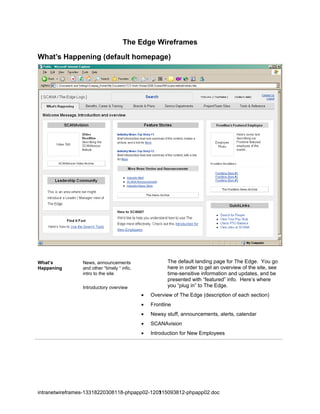
What’s Happening (default homepage)


What’s          News, announcements                    The default landing page for The Edge. You go
Happening       and other “timely “ info,              here in order to get an overview of the site, see
                intro to the site                      time-sensitive information and updates, and be
                                                       presented with “featured” info. Here’s where
                Introductory overview                  you “plug in” to The Edge.
                                            •   Overview of The Edge (description of each section)
                                            •   Frontline
                                            •   Newsy stuff, announcements, alerts, calendar
                                            •   SCANAvision
                                            •   Introduction for New Employees


intranetwireframes-13318220308118-phpapp02-120315093812-phpapp02.doc
                                              1
Benefits, Career & Training


Benefits, Career   HR-oriented Employee                You go here for access to HR-related services.
& Training         Self-service
                                                       As the new title suggests, an emerging feature
                                                       of this section is the “Training” and Educational
                                                       component. This is consistent with the
                                                       feedback from Employee Personas and
                                                       Stakeholders.
                                          •     The Health, Wealth and Careers sections remain pretty
                                                much as is.
                                          •     We emphasize the “training” features: SCANA U,
                                                Accounting Tutorial and New Employee intro tutorial


The Health, Wealth and Careers sections are pretty much as they were in the legacy system. Click on
an item in order to drill down to that page or sub-section.
SCANA University is given greater prominence.
The Introduction for New Employees and Tutorial on Account Basics and Budget Process are both
featured.


intranetwireframes-13318220308118-phpapp02-120315093812-phpapp02.doc
                                              2
Benefits drilldown (detail pages)


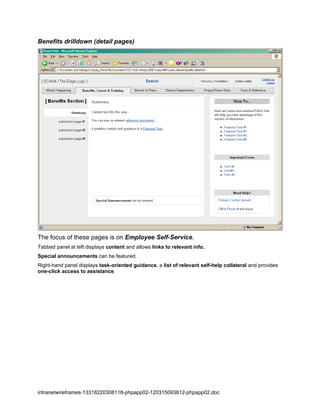
The focus of these pages is on Employee Self-Service.
Tabbed panel at left displays content and allows links to relevant info.
Special announcements can be featured.
Right-hand panel displays task-oriented guidance, a list of relevant self-help collateral and provides
one-click access to assistance.


intranetwireframes-13318220308118-phpapp02-120315093812-phpapp02.doc
                                              3
Brands & Plans


Brands & Plans     Standard corporate                   You go here to get a sense of the structural
                   profile “nuts & bolts”               environment of SCANA: Who’s who, what’s
                   info, plus strategic                 what and where.
                   vision
                                            •   Org Chart, Leadership Bios, Board of Directors,
                                                Territories, Financial Performance, etc.
                                                        You also get “the vision thing” of for SCANA
                                                        Corporate and individual Operating Companies
                                            •   The Strategic View & Investor Perspective


You can view SCANA Corporate information by clicking on the tabs in the left-hand panel.
You can click on any of the SCANA Subsidiaries in the right-hand panel to drill down to pages with
information about them.


intranetwireframes-13318220308118-phpapp02-120315093812-phpapp02.doc
                                              4
Brands & Plans drilldown (detail pages)


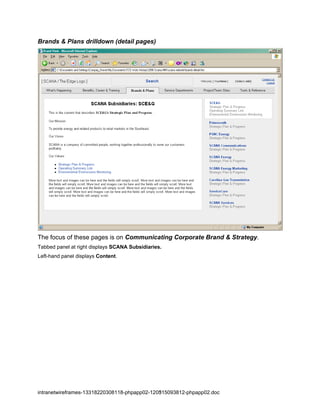
The focus of these pages is on Communicating Corporate Brand & Strategy.
Tabbed panel at right displays SCANA Subsidiaries.
Left-hand panel displays Content.


intranetwireframes-13318220308118-phpapp02-120315093812-phpapp02.doc
                                              5
Service Departments


Service            Standard corporate                    You go here for service support.
Departments        infrastructure services
                                             •   Provide good, consistent design guidelines and
                                                 branding across all Service departmental websites.
                                             •   Help stakeholders to “push” their services out to
                                                 employees.
                                             •   Cross-reference to appropriate Tools and Project/team
                                                 sites


Click on a Service Department title to drill down to that sub-site. The clickable Service Title area at left
offers enough space for a nice watermark identity graphic that can be repeated as a "service brand" when
you drill down into the sub-site.
Column 2 displays a Description of the Service Department, special features, how to use it effectively,
and possibly cross-reference links to relevant Project/Team Sites. Each of these descriptive modules
allows 4 lines of text (about 40 words / enough for a short informative paragraph).


intranetwireframes-13318220308118-phpapp02-120315093812-phpapp02.doc
                                              6
Service Department drilldown (detail pages)


The focus of these pages is to provide a quick and comprehensive Dashboard
Overview of the Departmental Sub-site.
Allows Service Branding and message billboarding
Infocenter provides high level overview and direct access to areas within the site.
News and Announcements are featured front & center.
Calendar shows timely info.
Quicklinks are focused on task-oriented fast-track.
Special announcements can be featured.


intranetwireframes-13318220308118-phpapp02-120315093812-phpapp02.doc
                                              7
Project / Team Sites


Project/Team        Job-oriented                          You go here to get a job-centric view of SCANA
Sites               assistance,                           that is individualized to your team role.
                    collaborative worksites
                                              •   Provide good, consistent design guidelines for Project/
                    The sub-sites are
                                                  Team Site managers.
                    managed by individual
                    stakeholders              •   Cross-reference to relevant Service Departments &
                                                  Tools
                                              •   Permissioned creation of a new teamsite
                                              •   Suggestion: Make “your” particular project/team site(s)
                                                  a default destination for an employee who comes to
                                                  this section


Column 1displays the Title of the Project or Team. Click on it to go to that sub-site.
Column 2 displays the Accessibility of the Site - Whether it is: Public or Private (This might be an icon).
Column 3 provides a Functional Description of the Project or Team: What it does, how it is used, who
works on it, etc.
You can Create a New Site.


intranetwireframes-13318220308118-phpapp02-120315093812-phpapp02.doc
                                              8
You can identify and store your favorite sites under My Team Sites.

Tools & Reference


Tools &             Task-related tools                    You go here to get access to any of the
Reference                                                 functional tools are that are available to you on
                                                          The Edge.
                                              •   Archive knowledge on all tools, forms, docs, training
                                                  and related site links into this repository
                                              •   Display description & usage info for all resources
                                              •   Allow display (sorting) by categories
                                              •   Task-oriented Listing guides you to relevant resources


Column 1displays the Title of the resource. Click on it to go to that page.
Column 2 tells what Type of Resource it is: Tool, App, Doc, Training Material [an icon]
Column 3 tells what Category the Resource falls into (i.e. hat section of the site it sits under - Accounting
HR, Procurement, etc.)
Column 4 provides a Functional Description of the Resource: What it does, how it is used, etc. There
may be a link to where the Resource resides.


intranetwireframes-13318220308118-phpapp02-120315093812-phpapp02.doc
                                              9
Use the buttons at the bottom to sort the Resource list Alphabetically by title, by Type and by Category.


intranetwireframes-13318220308118-phpapp02-120315093812-phpapp02.doc
                                              10

Intranet Wireframes

  • 1.
    The Edge Wireframes What’sHappening (default homepage) What’s News, announcements The default landing page for The Edge. You go Happening and other “timely “ info, here in order to get an overview of the site, see intro to the site time-sensitive information and updates, and be presented with “featured” info. Here’s where Introductory overview you “plug in” to The Edge. • Overview of The Edge (description of each section) • Frontline • Newsy stuff, announcements, alerts, calendar • SCANAvision • Introduction for New Employees intranetwireframes-13318220308118-phpapp02-120315093812-phpapp02.doc 1
  • 2.
    Benefits, Career &Training Benefits, Career HR-oriented Employee You go here for access to HR-related services. & Training Self-service As the new title suggests, an emerging feature of this section is the “Training” and Educational component. This is consistent with the feedback from Employee Personas and Stakeholders. • The Health, Wealth and Careers sections remain pretty much as is. • We emphasize the “training” features: SCANA U, Accounting Tutorial and New Employee intro tutorial The Health, Wealth and Careers sections are pretty much as they were in the legacy system. Click on an item in order to drill down to that page or sub-section. SCANA University is given greater prominence. The Introduction for New Employees and Tutorial on Account Basics and Budget Process are both featured. intranetwireframes-13318220308118-phpapp02-120315093812-phpapp02.doc 2
  • 3.
    Benefits drilldown (detailpages) The focus of these pages is on Employee Self-Service. Tabbed panel at left displays content and allows links to relevant info. Special announcements can be featured. Right-hand panel displays task-oriented guidance, a list of relevant self-help collateral and provides one-click access to assistance. intranetwireframes-13318220308118-phpapp02-120315093812-phpapp02.doc 3
  • 4.
    Brands & Plans Brands& Plans Standard corporate You go here to get a sense of the structural profile “nuts & bolts” environment of SCANA: Who’s who, what’s info, plus strategic what and where. vision • Org Chart, Leadership Bios, Board of Directors, Territories, Financial Performance, etc. You also get “the vision thing” of for SCANA Corporate and individual Operating Companies • The Strategic View & Investor Perspective You can view SCANA Corporate information by clicking on the tabs in the left-hand panel. You can click on any of the SCANA Subsidiaries in the right-hand panel to drill down to pages with information about them. intranetwireframes-13318220308118-phpapp02-120315093812-phpapp02.doc 4
  • 5.
    Brands & Plansdrilldown (detail pages) The focus of these pages is on Communicating Corporate Brand & Strategy. Tabbed panel at right displays SCANA Subsidiaries. Left-hand panel displays Content. intranetwireframes-13318220308118-phpapp02-120315093812-phpapp02.doc 5
  • 6.
    Service Departments Service Standard corporate You go here for service support. Departments infrastructure services • Provide good, consistent design guidelines and branding across all Service departmental websites. • Help stakeholders to “push” their services out to employees. • Cross-reference to appropriate Tools and Project/team sites Click on a Service Department title to drill down to that sub-site. The clickable Service Title area at left offers enough space for a nice watermark identity graphic that can be repeated as a "service brand" when you drill down into the sub-site. Column 2 displays a Description of the Service Department, special features, how to use it effectively, and possibly cross-reference links to relevant Project/Team Sites. Each of these descriptive modules allows 4 lines of text (about 40 words / enough for a short informative paragraph). intranetwireframes-13318220308118-phpapp02-120315093812-phpapp02.doc 6
  • 7.
    Service Department drilldown(detail pages) The focus of these pages is to provide a quick and comprehensive Dashboard Overview of the Departmental Sub-site. Allows Service Branding and message billboarding Infocenter provides high level overview and direct access to areas within the site. News and Announcements are featured front & center. Calendar shows timely info. Quicklinks are focused on task-oriented fast-track. Special announcements can be featured. intranetwireframes-13318220308118-phpapp02-120315093812-phpapp02.doc 7
  • 8.
    Project / TeamSites Project/Team Job-oriented You go here to get a job-centric view of SCANA Sites assistance, that is individualized to your team role. collaborative worksites • Provide good, consistent design guidelines for Project/ The sub-sites are Team Site managers. managed by individual stakeholders • Cross-reference to relevant Service Departments & Tools • Permissioned creation of a new teamsite • Suggestion: Make “your” particular project/team site(s) a default destination for an employee who comes to this section Column 1displays the Title of the Project or Team. Click on it to go to that sub-site. Column 2 displays the Accessibility of the Site - Whether it is: Public or Private (This might be an icon). Column 3 provides a Functional Description of the Project or Team: What it does, how it is used, who works on it, etc. You can Create a New Site. intranetwireframes-13318220308118-phpapp02-120315093812-phpapp02.doc 8
  • 9.
    You can identifyand store your favorite sites under My Team Sites. Tools & Reference Tools & Task-related tools You go here to get access to any of the Reference functional tools are that are available to you on The Edge. • Archive knowledge on all tools, forms, docs, training and related site links into this repository • Display description & usage info for all resources • Allow display (sorting) by categories • Task-oriented Listing guides you to relevant resources Column 1displays the Title of the resource. Click on it to go to that page. Column 2 tells what Type of Resource it is: Tool, App, Doc, Training Material [an icon] Column 3 tells what Category the Resource falls into (i.e. hat section of the site it sits under - Accounting HR, Procurement, etc.) Column 4 provides a Functional Description of the Resource: What it does, how it is used, etc. There may be a link to where the Resource resides. intranetwireframes-13318220308118-phpapp02-120315093812-phpapp02.doc 9
  • 10.
    Use the buttonsat the bottom to sort the Resource list Alphabetically by title, by Type and by Category. intranetwireframes-13318220308118-phpapp02-120315093812-phpapp02.doc 10