Nir ElbazResponsive Web Design
Nir Elbaz
Nir ElbazNIR ELBAZNir Elbaz
Responsive Web Design
var vCard = {
“name”: “Nir Elbaz”,
“company”: “Como (formerly Conduit)”,
“position”: “Senior Software Engineer”,
“email”: “nire0510[at]gmail.com”
};
Nir ElbazNIR ELBAZNir Elbaz
Index
Intro
The Basics
The Principles
UI Frameworks & Libraries
RWD Toolbox
DIY
Nir ElbazNIR ELBAZNir Elbaz
Index
Intro
The Basics
The Principles
UI Frameworks & Libraries
RWD Toolbox
DYI
Nir ElbazNIR ELBAZNir Elbaz
Intro
The only thing we cared for…
90’s
640×480, 800×600
2000’s
800×600, 1024×768
2007
1024×768, 1280×800The iPhone
480 x 320
…… …… ……
Android
How my website
looks like
Nir ElbazNIR ELBAZNir Elbaz
Intro
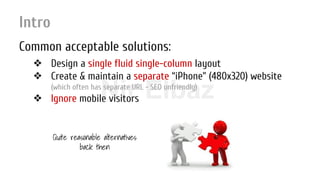
Common acceptable solutions:
❖ Design a single fluid single-column layout
❖ Create & maintain a separate “iPhone” (480x320) website
(which often has separate URL - SEO unfriendly)
❖ Ignore mobile visitors
Quite reasonable alternatives
back then
Nir ElbazNIR ELBAZNir Elbaz
Intro
… But since then:
240×320, 240×400, 320×480, 480×640, 480×800, 540×960, 600×960, 600×1024, 640×960,
768×1024, 720×1280, 1366×768, 800×1280, 1080×1920, 1536×2048, 640×480, 768×576,
800×600, 1024×600, 1024×768, 1152×720, 1280×720, 1280×768, 1280×800, 1152×864,
1280×960, 1280×1024, 1360×768, 1366×768, 1440×900, 1600×900, 1400×1050, 1680×1050,
1600×1200, 1920×1080, 2048×1152, 1920×1200, 1920×1440, 2560×1440, 2560×1600, …
Landscape, Portrait Operating Systems
Watches, Appliances, Smartphones, Phablets, Mini-tablets,
Tablets, Netbooks, PC, Smart TVs, Vehicles...
Nir ElbazNIR ELBAZNir Elbaz
Intro
Review - Common acceptable solutions:
❖ Design a single fluid single-column layout
❖ Create & maintain a separate “iPhone” (480x320) website
❖ Ignore mobile visitors
Nir ElbazNIR ELBAZNir Elbaz
Intro
Review - Common acceptable solutions:
❖ Design a single fluid single-column layout
❖ Create & maintain a separate “iPhone” (480x320) website
❖ Ignore mobile visitors
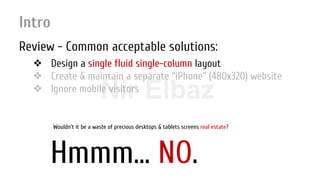
Hmmm… NO.
Wouldn’t it be a waste of precious desktops & tablets screens real estate?
Nir ElbazNIR ELBAZNir Elbaz
Intro
Review - Common acceptable solutions:
❖ Design a single fluid single-column layout
❖ Create & maintain a separate “iPhone” (480x320) website
❖ Ignore mobile visitors
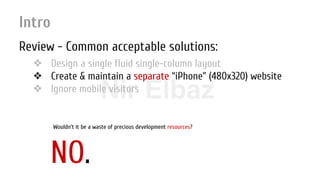
NO.
Wouldn’t it be a waste of precious development resources?
Nir ElbazNIR ELBAZNir Elbaz
Intro
Review - Common acceptable solutions:
❖ Design a single fluid single-column layout
❖ Create & maintain a separate “iPhone” (480x320) website
❖ Ignore mobile visitors
NO!
Wouldn’t it be a waste of precious money?
Nir ElbazNIR ELBAZNir Elbaz
Intro
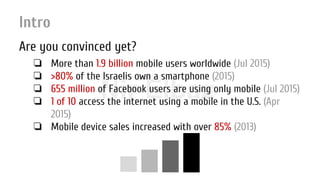
Are you convinced yet?
❏ More than 1.9 billion mobile users worldwide (Jul 2015)
❏ >80% of the Israelis own a smartphone (2015)
❏ 655 million of Facebook users are using only mobile (Jul 2015)
❏ 1 of 10 access the internet using a mobile in the U.S. (Apr
2015)
❏ Mobile device sales increased with over 85% (2013)
Nir ElbazNIR ELBAZNir Elbaz
Intro
Responsive Web Design
is the future
now!
...But... what is it, exactly? :-|
Nir ElbazNIR ELBAZNir Elbaz
Intro
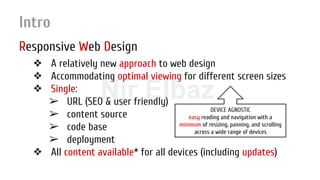
Responsive Web Design
❖ A relatively new approach to web design
❖ Accommodating optimal viewing for different screen sizes
❖ Single:
➢ URL (SEO & user friendly)
➢ content source
➢ code base
➢ deployment
❖ All content available* for all devices (including updates)
DEVICE AGNOSTIC
easy reading and navigation with a
minimum of resizing, panning, and scrolling
across a wide range of devices
Nir ElbazNIR ELBAZNir Elbaz
Intro
Responsive Web Design
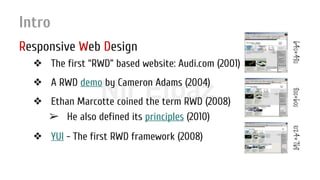
❖ The first “RWD” based website: Audi.com (2001)
❖ A RWD demo by Cameron Adams (2004)
❖ Ethan Marcotte coined the term RWD (2008)
➢ He also defined its principles (2010)
❖ YUI - The first RWD framework (2008)
640×480800×6001024×768
Nir ElbazNIR ELBAZNir Elbaz
Intro
The challenges
❖ Characterization - what to show on each channel?
❖ Design - how to get the best out of my screen?
❖ Image resizing (high CPU, bandwidth, HTTP requests...)
❖ 3rd party content: iframes, videos, ads, social widgets...
❖ Backwards compatibility (media queries*)
❖ Optimization (conditional loading, RESS...)
❖ Devices and browsers bugs & inconsistencies
❖ Touch interaction
Nir ElbazNIR ELBAZNir Elbaz
Intro
The approaches
❖ Build multiple fixed layouts websites (AWD)
Same (Google’s best practice) / different URLs
❖ Load the relevant resources (CSS, JS, HTML) using JS loaders
head.js, yepnope based on browser sniffing feature detection
❖ RESS - Server side controls
and -
❖ Using new HTML 5 & CSS 3 client side techniques
This is (mainly) what we’re going to learn today
deprecated
Nir ElbazNIR ELBAZNir Elbaz
Index
Intro
The Basics
The Principles
UI Frameworks & Libraries
RWD Toolbox
DYI
Nir ElbazNIR ELBAZNir Elbaz
The Basics
Fixed, Fluid & Elastic Layouts
Nir ElbazNIR ELBAZNir Elbaz
The Basics >> Layouts
Why do we need different kinds of layouts?
❏ Dealing with various design parameters:
❏ Screen size
❏ Screen resolution
❏ Browser’s window state (maximized, restored), window /
tab size etc
❏ Device (keyboard, ratio etc)
❏ Etc…
Nir ElbazNIR ELBAZNir Elbaz
The Basics >> Layouts
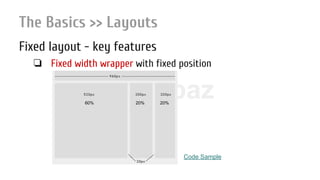
Fixed layout - key features
❏ Fixed width wrapper with fixed position
60% 20% 20%
Code Sample
Nir ElbazNIR ELBAZNir Elbaz
The Basics >> Layouts
Fixed layout - pros
❏ Much easier to use and to customize
❏ Less hassle with fixed-width contents
width === width === width on every device (*)
❏ No need to deal with min/max-width
❏ Good enough even to fit the smallest screen (800x600)
Nir ElbazNIR ELBAZNir Elbaz
The Basics >> Layouts
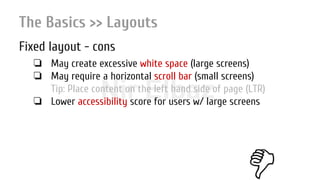
Fixed layout - cons
❏ May create excessive white space (large screens)
❏ May require a horizontal scroll bar (small screens)
Tip: Place content on the left hand side of page (LTR)
❏ Lower accessibility score for users w/ large screens
Nir ElbazNIR ELBAZNir Elbaz
The Basics >> Layouts
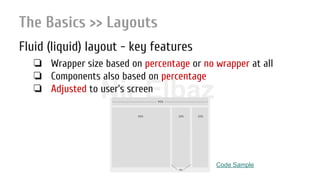
Fluid (liquid) layout - key features
❏ Wrapper size based on percentage or no wrapper at all
❏ Components also based on percentage
❏ Adjusted to user’s screen
Code Sample
Nir ElbazNIR ELBAZNir Elbaz
The Basics >> Layouts
Fluid (liquid) layout - pros
❏ Gets the most out of available screen’s real estate
❏ Extern white space is similar between all browsers / screens
❏ May eliminate horizontal scroll bars
Nir ElbazNIR ELBAZNir Elbaz
The Basics >> Layouts
Fluid (liquid) layout - cons
❏ May create excessive white space inside (large screens)
❏ The designer has less control over what user sees
❏ Content with fixed widths (video, images etc.) may need to be
set at multiple widths
Nir ElbazNIR ELBAZNir Elbaz
The Basics >> Layouts
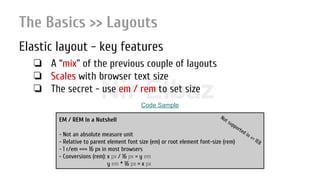
Elastic layout - key features
❏ A “mix” of the previous couple of layouts
❏ Scales with browser text size
❏ The secret - use em / rem to set size
EM / REM In a Nutshell
- Not an absolute measure unit
- Relative to parent element font size (em) or root element font-size (rem)
- 1 r/em === 16 px in most browsers
- Conversions (rem): x px / 16 px = y em
y em * 16 px = x px
Not supported in <= IE8
Code Sample
Nir ElbazNIR ELBAZNir Elbaz
The Basics >> Layouts
Elastic layout - pros
❏ User friendly, if implemented correctly
❏ Everything resizes at the same rate
❏ Great for x-platform x-device web applications
Nir ElbazNIR ELBAZNir Elbaz
The Basics >> Layouts
Elastic layout - cons
❏ More difficult to create than the other two
Can be easier if using CSS pre-processors
❏ Requires a lot of savvy & testing
❏ May require IE hacks to support older versions of IE
❏ Can cause a usability disaster if gets wider w/o a reason
Nir ElbazNIR ELBAZNir Elbaz
The Basics
Viewport
Nir ElbazNIR ELBAZNir Elbaz
The Basics >> Viewport
Intro
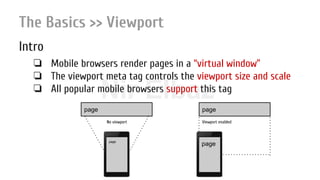
❏ Mobile browsers render pages in a “virtual window”
❏ The viewport meta tag controls the viewport size and scale
❏ All popular mobile browsers support this tag
page
page
page
page
No viewport Viewport enabled
Nir ElbazNIR ELBAZNir Elbaz
The Basics >> Viewport
Settings
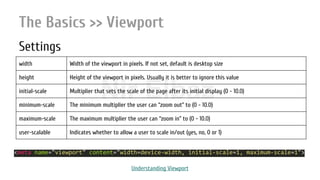
width Width of the viewport in pixels. If not set, default is desktop size
height Height of the viewport in pixels. Usually it is better to ignore this value
initial-scale Multiplier that sets the scale of the page after its initial display (0 - 10.0)
minimum-scale The minimum multiplier the user can “zoom out” to (0 - 10.0)
maximum-scale The maximum multiplier the user can “zoom in” to (0 - 10.0)
user-scalable Indicates whether to allow a user to scale in/out (yes, no, 0 or 1)
<meta name="viewport" content="width=device-width, initial-scale=1, maximum-scale=1">
Understanding Viewport
Nir ElbazNIR ELBAZNir Elbaz
Index
Intro
The Basics
The Principles
UI Frameworks & Libraries
RWD Toolbox
DYI
Nir ElbazNIR ELBAZNir Elbaz
The Principles -or- TL;DR
❏ Fluid grid system (CSS 3 flexbox & grid)
❏ Flexible images and media
❏ Media queries
❏ RESS - Server Side Components
❏ Characterization and design strategies
❏ Unobtrusive JavaScript
Nir ElbazNIR ELBAZNir Elbaz
The Principles >> Fluid Grid System
Intro
❏ Originated from the printed media
❏ Method for aligning elements on a page on screen
❏ Available in all layouts formats (fixed, fluid & elastic)
❏ Great for rapid prototype designs
❏ Page is divided to x equal columns with gutters in between
X = 12, 16 or 24
❏ Each element occupies 1 - max columns
❏ Complex layouts can be achieved using lib methods
push, pull etc
Nir ElbazNIR ELBAZNir Elbaz
The Principles >> Fluid Grid System
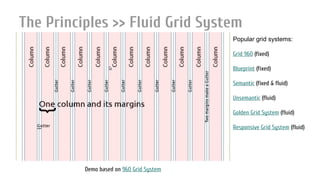
Popular grid systems:
Grid 960 (fixed)
Blueprint (fixed)
Semantic (fixed & fluid)
Unsemantic (fluid)
Golden Grid System (fluid)
Responsive Grid System (fluid)
Demo based on 960 Grid System
Nir ElbazNIR ELBAZNir Elbaz
The Principles >> Fluid Grid System
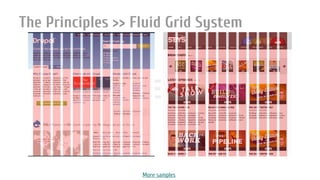
More samples
Nir ElbazNIR ELBAZNir Elbaz
The Principles >> Fluid Grid System
Unsemantic cheat sheet
Viewport: <meta name="viewport" content="width=device-width, initial-scale=1, minimum-scale=1, maximum-scale=1"
/>
Container: grid-container
Columns *: grid-5, grid-10, …, grid-100, grid-33, grid-66
Hidden cols: hide-on-desktop, hide-on-tablet, hide-on-mobile
Nesting: grid-parent
Swapping *: push/pull-5, push/pull-10, …, push/pull-100, push/pull-33, push/pull-66
White space *: prefix/suffix-5, prefix/suffix-10, …, prefix/suffix-100, prefix/suffix-33, prefix/suffix-66
Breaks: clear
*: use with mobile- prefix to target mobile devices (width < 768px)
use with tablet- prefix to target tablet devices (768 <= x <= 1024px)
Download & read more here: Unsemantic demo & documentation
Code Sample
Nir ElbazNIR ELBAZNir Elbaz
The Principles >> Fluid Grid System
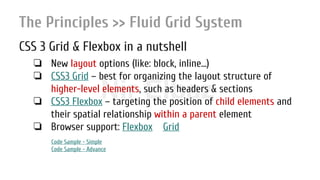
CSS 3 Grid & Flexbox in a nutshell
❏ New layout options (like: block, inline...)
❏ CSS3 Grid – best for organizing the layout structure of
higher-level elements, such as headers & sections
❏ CSS3 Flexbox – targeting the position of child elements and
their spatial relationship within a parent element
❏ Browser support: Flexbox Grid
Code Sample - Simple
Code Sample - Advance
Nir Elbaz
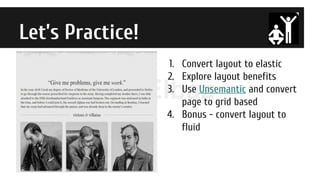
Let’s Practice!
1. Convert layout to elastic
2. Explore layout benefits
3. Use Unsemantic and convert
page to grid based
4. Bonus - convert layout to
fluid
Nir ElbazNIR ELBAZNir Elbaz
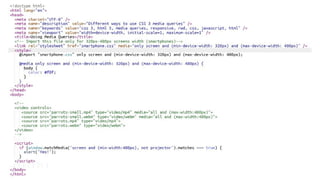
The Principles >> Media Queries
Intro
❏ Supported in all major browsers (IE 9+)
❏ Help us to define set of classes per device target
❏ Can be used inside elements as an attribute, in CSS or JS
❏ Syntax:
@media rule {
class {
/* ruleset */
}
}
@import url(…) rule; <element media=“rule”>
1 2 3
Nir ElbazNIR ELBAZNir Elbaz
The Principles >> Media Queries
Nir ElbazNIR ELBAZNir Elbaz
The Principles >> Media Queries
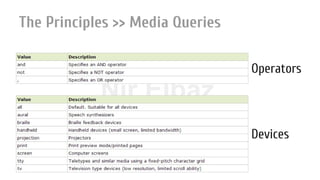
Operators
Devices
Nir ElbazNIR ELBAZNir Elbaz
The Principles >> Media Queries
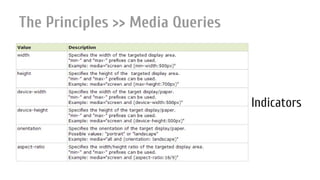
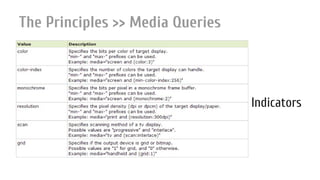
Indicators
Nir ElbazNIR ELBAZNir Elbaz
The Principles >> Media Queries
Indicators
Nir ElbazNIR ELBAZNir Elbaz
The Principles >> Media Queries
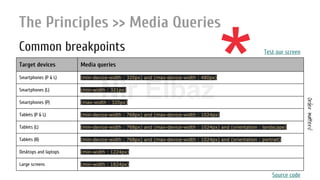
Common breakpoints
Target devices Media queries
Smartphones (P & L) (min-device-width : 320px) and (max-device-width : 480px)
Smartphones (L) (min-width : 321px)
Smartphones (P) (max-width : 320px)
Tablets (P & L) (min-device-width : 768px) and (max-device-width : 1024px)
Tablets (L) (min-device-width : 768px) and (max-device-width : 1024px) and (orientation : landscape)
Tablets (R) (min-device-width : 768px) and (max-device-width : 1024px) and (orientation : portrait)
Desktops and laptops (min-width : 1224px)
Large screens (min-width : 1824px)
Test our screen
Ordermatters!
Source code
*
Nir ElbazNIR ELBAZNir Elbaz
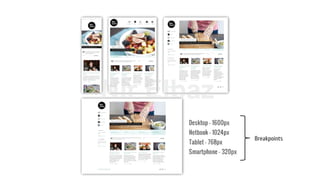
Breakpoints
Nir ElbazNIR ELBAZNir Elbaz
The Principles >> Flexible Images
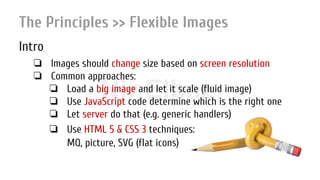
Intro
❏ Images should change size based on screen resolution
❏ Common approaches:
❏ Load a big image and let it scale (fluid image)
❏ Use JavaScript code determine which is the right one
❏ Let server do that (e.g. generic handlers)
❏ Use HTML 5 & CSS 3 techniques:
MQ, picture, SVG (flat icons)
Nir ElbazNIR ELBAZNir Elbaz
The Principles >> Flexible Images
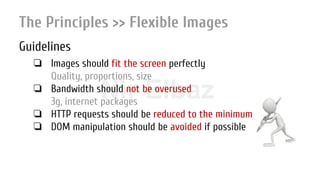
Guidelines
❏ Images should fit the screen perfectly
Quality, proportions, size
❏ Bandwidth should not be overused
3g, internet packages
❏ HTTP requests should be reduced to the minimum
❏ DOM manipulation should be avoided if possible
Nir ElbazNIR ELBAZNir Elbaz
The Principles >> Flexible Images
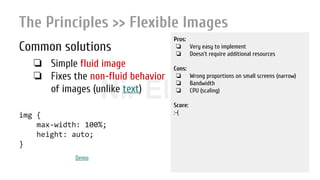
Common solutions
❏ Simple fluid image
❏ Fixes the non-fluid behavior
of images (unlike text)
img {
max-width: 100%;
height: auto;
}
Pros:
❏ Very easy to implement
❏ Doesn’t require additional resources
Cons:
❏ Wrong proportions on small screens (narrow)
❏ Bandwidth
❏ CPU (scaling)
Score:
:-(
Demo
Nir ElbazNIR ELBAZNir Elbaz
The Principles >> Flexible Images
Common solutions
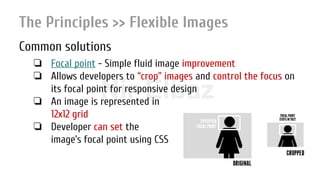
❏ Focal point - Simple fluid image improvement
❏ Allows developers to “crop” images and control the focus on
its focal point for responsive design
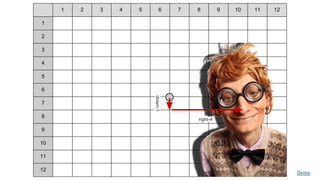
❏ An image is represented in
12x12 grid
❏ Developer can set the
image’s focal point using CSS
Nir ElbazNIR ELBAZNir Elbaz
1 2 3 4 5 6 7 8 9 10 11 12
1
2
3
4
5
6
7
8
9
10
11
12
down-1
right-4
Demo
Nir ElbazNIR ELBAZNir Elbaz
The Principles >> Flexible Images
Common solutions
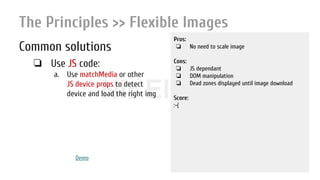
❏ Use JS code:
a. Use matchMedia or other
JS device props to detect
device and load the right img
Pros:
❏ No need to scale image
Cons:
❏ JS dependant
❏ DOM manipulation
❏ Dead zones displayed until image download
Score:
:-(
Demo
Nir ElbazNIR ELBAZNir Elbaz
The Principles >> Flexible Images
Common solutions
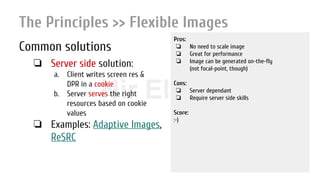
❏ Server side solution:
a. Client writes screen res &
DPR in a cookie
b. Server serves the right
resources based on cookie
values
❏ Examples: Adaptive Images,
ReSRC
Pros:
❏ No need to scale image
❏ Great for performance
❏ Image can be generated on-the-fly
(not focal-point, though)
Cons:
❏ Server dependant
❏ Require server side skills
Score:
:-)
Nir ElbazNIR ELBAZNir Elbaz
The Principles >> Flexible Images
Common solutions
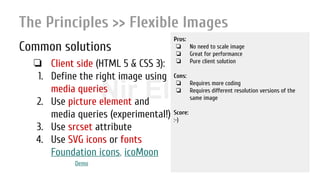
❏ Client side (HTML 5 & CSS 3):
1. Define the right image using
media queries
2. Use picture element and
media queries (experimental!)
3. Use srcset attribute
4. Use SVG icons or fonts
Foundation icons, icoMoon
Pros:
❏ No need to scale image
❏ Great for performance
❏ Pure client solution
Cons:
❏ Requires more coding
❏ Requires different resolution versions of the
same image
Score:
:-)
Demo
Nir ElbazNIR ELBAZNir Elbaz
The Principles >> Flexible Images
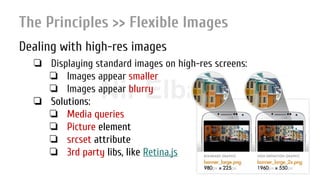
Dealing with high-res images
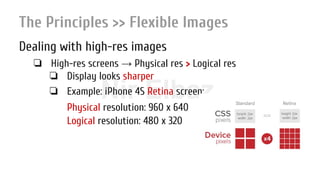
❏ High-res screens → Physical res > Logical res
❏ Display looks sharper
❏ Example: iPhone 4S Retina screen:
Physical resolution: 960 x 640
Logical resolution: 480 x 320
Nir ElbazNIR ELBAZNir Elbaz
The Principles >> Flexible Images
Dealing with high-res images
❏ Displaying standard images on high-res screens:
❏ Images appear smaller
❏ Images appear blurry
❏ Solutions:
❏ Media queries
❏ Picture element
❏ srcset attribute
❏ 3rd party libs, like Retina.js
Nir ElbazNIR ELBAZNir Elbaz
The Principles >> Flexible Images
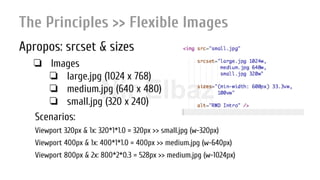
Apropos: srcset & sizes
❏ Images
❏ large.jpg (1024 x 768)
❏ medium.jpg (640 x 480)
❏ small.jpg (320 x 240)
Scenarios:
Viewport 320px & 1x: 320*1*1.0 = 320px >> small.jpg (w-320px)
Viewport 400px & 1x: 400*1*1.0 = 400px >> medium.jpg (w-640px)
Viewport 800px & 2x: 800*2*0.3 = 528px >> medium.jpg (w-1024px)
Nir ElbazNIR ELBAZNir Elbaz
The Principles >> RESS
Intro
❏ The here & now RWD solution
❏ Responsive images haven’t been standardized
❏ Devices still load the CSS behind media queries that they never use
❏ We lack native responsive layout systems (flexbox, templates etc.)
❏ We lack element media queries
DudeGot a wake-up call!!!
Nir ElbazNIR ELBAZNir Elbaz
The Principles >> RESS
Key features
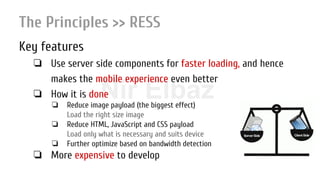
❏ Use server side components for faster loading, and hence
makes the mobile experience even better
❏ How it is done
❏ Reduce image payload (the biggest effect)
Load the right size image
❏ Reduce HTML, JavaScript and CSS payload
Load only what is necessary and suits device
❏ Further optimize based on bandwidth detection
❏ More expensive to develop
Nir ElbazNIR ELBAZNir Elbaz
The Principles >> RESS
Key features
❏ Based heavily on feature detection
ua-parser, modernizr:
a. Client stores relevant info in a cookie
b. Server reads cookie content in every HTTP request
c. Server serves the right resource based on the cookie content
Client Server
Nir ElbazNIR ELBAZNir Elbaz
The Charac..ics >> Characterization & Design
Intro
❏ Mobile First vs. Desktop First
❏ Progressive Enhancement vs. Graceful Degradation
❏ Old times web design process:
Plan → Design → Develop → Optimise
Nowadays:
Plan → Content → UX/IA → Design → Develop → Optimize
Nir ElbazNIR ELBAZNir Elbaz
The Charac..ics >> Characterization & Design
Common techniques & notes
❏ Navigation: Resize and reposition, Horizontal → vertical, Slide-in side menu,
Toggle menu and more
❏ Slide-in “pages” instead of popups
❏ Loading widget
❏ Thumbs (two of them) instead of mouse
❏ On screen keyboard
❏ First impression - app icon
❏ Delights
Nir ElbazNIR ELBAZNir Elbaz
The Charac..ics >> Unobtrusive JavaScript
Principles
❏ Keeping the JS, CSS, and HTML separated
❏ Using JavaScript to progressively enhance your app
❏ Think DRY while maintaining your code
❏ Adhering to web and accessibility standards
Nir ElbazNIR ELBAZNir Elbaz
The Charac..ics >> Unobtrusive JavaScript
Sample
ROI = Visitors * 0.02 * % conversions * Avg Sale * Avg. Profit
Hmmmm… Should I go for it???
Nir ElbazNIR ELBAZNir Elbaz
Index
Intro
The Basics
The Principles
UI Frameworks & Libraries
RWD Toolbox
DYI
Nir ElbazNIR ELBAZNir Elbaz
UI Frameworks & Libraries
What is a framework?
A framework is a real or conceptual structure intended to serve as a
support or guide for the building of something that expands the
structure into something useful.
Nir ElbazNIR ELBAZNir Elbaz
UI Frameworks & Libraries
Why do we need a framework?
❏ Using a matured framework saves precious time
❏ You are good to go in no time
❏ Others maintain & improve it for you
❏ Implementation of best practices (The wisdom of crowds)
❏ Tested & used in hundreds of thousands of websites
❏ Designed to circumvent x-browser compatibility problems
❏ No need to reinvent the wheel
Nir ElbazNIR ELBAZNir Elbaz
UI Frameworks & Libraries
What exactly is a UI / front-end framework?
❏ Collection of tools for composing user interfaces:
❏ Grid system
❏ Typography
❏ Browser incompatibility solutions
❏ Common controls (JS / no JS)
❏ RWD support
Did you know?
The first UI framework was
YUI (2005)
Nir ElbazNIR ELBAZNir Elbaz
UI Frameworks & Libraries
How to choose “the right” one?
❏ Documentation
❏ Popularity
❏ Roadmap
❏ Seniority (DEV)
❏ Maturity (PROD)
❏ Browser compatibility
Randomlyorderedlist
❏ Plays nice with others
❏ Ease of use
❏ License
❏ Special features (RTL...)
❏ Founder / Sponsor
There is no absolute right!
Nir ElbazNIR ELBAZNir Elbaz
UI Frameworks & Libraries
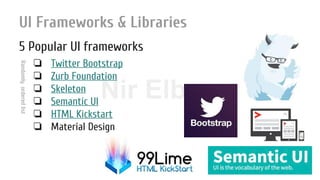
5 Popular UI frameworks
❏ Twitter Bootstrap
❏ Zurb Foundation
❏ Skeleton
❏ Semantic UI
❏ HTML Kickstart
❏ Material Design
Randomlyorderedlist
Nir ElbazNIR ELBAZNir Elbaz
UI Frameworks & Libraries
Bootstrap vs. Foundation
Twitter Bootstrap Foundation Zurb
License MIT MIT
Size (All files) 14 files at 1019 KB 30 files at 936 KB
CDN Yes Yes
Contributors 658 722
Followers 386K 48K
Founder Twitter Zurb
Pre-processor SASS & LESS SASS
Twitter Bootstrap Foundation Zurb
Browser Support IE8+ (8,9 w/ hacks) IE9
Repository Github Github
RTL Support No * Yes
Responsiveness 3 breakpoints (px) Full (rem)
Support No Yes
Seniority Mid 2010 October, 2011
Comprehensive comparison & More frameworks
Nir ElbazNIR ELBAZNir Elbaz
UI Frameworks & Libraries
Getting Started With Foundation
Nir ElbazNIR ELBAZNir Elbaz
UI Frameworks & Libraries >> Foundation
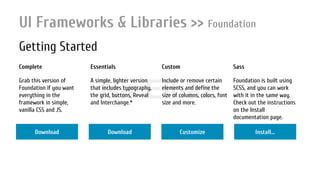
Getting Started
Complete Essentials Custom Sass
Grab this version of
Foundation if you want
everything in the
framework in simple,
vanilla CSS and JS.
A simple, lighter version
that includes typography,
the grid, buttons, Reveal
and Interchange.*
Include or remove certain
elements and define the
size of columns, colors, font
size and more.
Foundation is built using
SCSS, and you can work
with it in the same way.
Check out the instructions
on the Install
documentation page.
Download Download Customize Install...
Nir ElbazNIR ELBAZNir Elbaz
UI Frameworks & Libraries >> Foundation
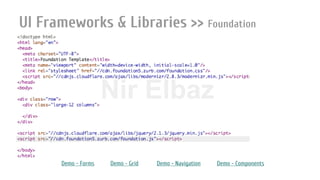
Framework files
index.html
humans.txt
robots.txt
+ css
foundation.css
foundation.min.css
normalize.css
+ js
foundation.min.js
+ foundation
+ vendor
Nir ElbazNIR ELBAZNir Elbaz
UI Frameworks & Libraries >> Foundation
Demo - Forms Demo - Grid Demo - Navigation Demo - Components
Nir ElbazNIR ELBAZNir Elbaz
UI Frameworks & Libraries >> Foundation
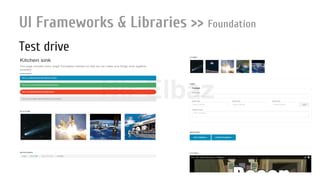
Test drive
Nir ElbazNIR ELBAZNir Elbaz
UI Frameworks & Libraries >> Foundation
Fluid grid system
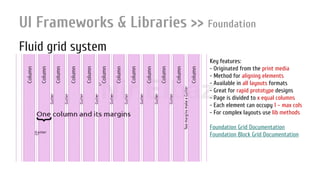
Key features:
- Originated from the print media
- Method for aligning elements
- Available in all layouts formats
- Great for rapid prototype designs
- Page is divided to x equal columns
- Each element can occupy 1 – max cols
- For complex layouts use lib methods
Foundation Grid Documentation
Foundation Block Grid Documentation
Nir ElbazNIR ELBAZNir Elbaz
UI Frameworks & Libraries >> Foundation
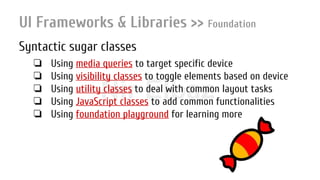
Syntactic sugar classes
❏ Using media queries to target specific device
❏ Using visibility classes to toggle elements based on device
❏ Using utility classes to deal with common layout tasks
❏ Using JavaScript classes to add common functionalities
❏ Using foundation playground for learning more
Nir ElbazNIR ELBAZNir Elbaz
UI Frameworks & Libraries >> Foundation
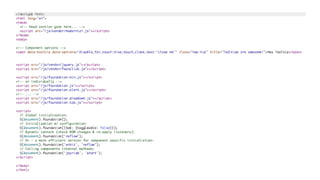
UI controls
❏ Some controls are JS based (topbar) & some aren’t (buttons)
❏ To add a JS based control:
❏ Add script reference to Modernizr
❏ Add script references to Foundation’s dependencies
❏ Add script references to Foundation OR individual plugins script files
❏ Initialize foundation (w/o plugins options)
Nir ElbazNIR ELBAZNir Elbaz
Foundation JavaScript Documentation
Nir ElbazNIR ELBAZNir Elbaz
Index
Intro
The Basics
The Principles
UI Frameworks & Libraries
RWD Toolbox
DYI
Nir ElbazNIR ELBAZNir Elbaz
RWD Toolbox
❏ Get inspired
❏ Responsive patterns
❏ Edge Reflow - Go from static design to responsive comp in just one-click
❏ Responsinator - test RWD on different device resolutions
❏ Screen sizes - A screen specifications DB for popular devices
❏ quirktools - Wireframes & screen simulator
❏ BrowserStack - Live, web-based browser testing
❏ Content generators - Images, content, icons
❏ Interface Sketch - Simple templates for web apps design
❏ Google Chrome ADB plugin
❏ Chrome, IE & Firefox developer tools
❏ Online code editors: Feditor, CodePen etc...
More tools, frameworks and libs can be found in presentation!
Nir ElbazNIR ELBAZNir Elbaz
Index
Intro
The Basics
The Principles
UI Frameworks & Libraries
RWD Toolbox
DYI
Nir ElbazNIR ELBAZNir Elbaz
The Basics
<summary>
Nir ElbazNIR ELBAZNir Elbaz
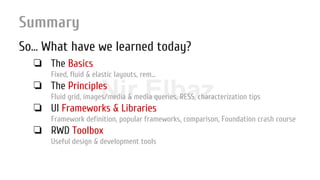
Summary
So… What have we learned today?
❏ The Basics
Fixed, fluid & elastic layouts, rem...
❏ The Principles
Fluid grid, images/media & media queries, RESS, characterization tips
❏ UI Frameworks & Libraries
Framework definition, popular frameworks, comparison, Foundation crash course
❏ RWD Toolbox
Useful design & development tools
Nir ElbazNIR ELBAZNir Elbaz
Summary
Plan first
Plan first
Nir ElbazNIR ELBAZNir Elbaz
Summary
Plan first
Think “Mobile First”
Nir ElbazNIR ELBAZNir Elbaz
Summary
Work together
Work together as a team
Nir ElbazNIR ELBAZNir Elbaz
Mix rich UX & good performance
Nir ElbazNIR ELBAZNir Elbaz
Summary
Test, test & test some more
Always check yourself. Always.
Nir ElbazNIR ELBAZNir Elbaz
Summary
Stay up-to-date
Nir ElbazNIR ELBAZNir Elbaz
Summary
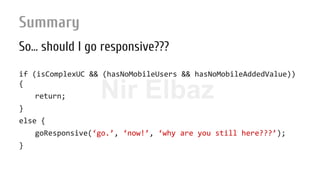
So… should I go responsive???
if (isComplexUC && (hasNoMobileUsers && hasNoMobileAddedValue))
{
return;
}
else {
goResponsive(‘go.’, ‘now!’, ‘why are you still here???’);
}
Nir ElbazNIR ELBAZNir Elbaz
Summary
Resources & useful links
❏ Responsive web design
❏ Multi-screen resources
❏ Responsive websites examples
❏ CSS 3 Flexbox & Grid
❏ Building A Responsive Web Application
❏ Building Smartphone-Optimized Websites
❏ Responsive Design + Server Side Components
❏ Improve Mobile Support With Server-Side-Enhanced Responsive Design
❏ Creating a Mobile-First Responsive Web Design
❏ The Banker Street Inquirer
❏ 10 principles mobile interface design

Responsive Web Design

  • 1.
    Nir ElbazResponsive WebDesign Nir Elbaz
  • 2.
    Nir ElbazNIR ELBAZNirElbaz Responsive Web Design var vCard = { “name”: “Nir Elbaz”, “company”: “Como (formerly Conduit)”, “position”: “Senior Software Engineer”, “email”: “nire0510[at]gmail.com” };
  • 3.
    Nir ElbazNIR ELBAZNirElbaz Index Intro The Basics The Principles UI Frameworks & Libraries RWD Toolbox DIY
  • 4.
    Nir ElbazNIR ELBAZNirElbaz Index Intro The Basics The Principles UI Frameworks & Libraries RWD Toolbox DYI
  • 5.
    Nir ElbazNIR ELBAZNirElbaz Intro The only thing we cared for… 90’s 640×480, 800×600 2000’s 800×600, 1024×768 2007 1024×768, 1280×800The iPhone 480 x 320 …… …… …… Android How my website looks like
  • 6.
    Nir ElbazNIR ELBAZNirElbaz Intro Common acceptable solutions: ❖ Design a single fluid single-column layout ❖ Create & maintain a separate “iPhone” (480x320) website (which often has separate URL - SEO unfriendly) ❖ Ignore mobile visitors Quite reasonable alternatives back then
  • 7.
    Nir ElbazNIR ELBAZNirElbaz Intro … But since then: 240×320, 240×400, 320×480, 480×640, 480×800, 540×960, 600×960, 600×1024, 640×960, 768×1024, 720×1280, 1366×768, 800×1280, 1080×1920, 1536×2048, 640×480, 768×576, 800×600, 1024×600, 1024×768, 1152×720, 1280×720, 1280×768, 1280×800, 1152×864, 1280×960, 1280×1024, 1360×768, 1366×768, 1440×900, 1600×900, 1400×1050, 1680×1050, 1600×1200, 1920×1080, 2048×1152, 1920×1200, 1920×1440, 2560×1440, 2560×1600, … Landscape, Portrait Operating Systems Watches, Appliances, Smartphones, Phablets, Mini-tablets, Tablets, Netbooks, PC, Smart TVs, Vehicles...
  • 8.
    Nir ElbazNIR ELBAZNirElbaz Intro Review - Common acceptable solutions: ❖ Design a single fluid single-column layout ❖ Create & maintain a separate “iPhone” (480x320) website ❖ Ignore mobile visitors
  • 9.
    Nir ElbazNIR ELBAZNirElbaz Intro Review - Common acceptable solutions: ❖ Design a single fluid single-column layout ❖ Create & maintain a separate “iPhone” (480x320) website ❖ Ignore mobile visitors Hmmm… NO. Wouldn’t it be a waste of precious desktops & tablets screens real estate?
  • 10.
    Nir ElbazNIR ELBAZNirElbaz Intro Review - Common acceptable solutions: ❖ Design a single fluid single-column layout ❖ Create & maintain a separate “iPhone” (480x320) website ❖ Ignore mobile visitors NO. Wouldn’t it be a waste of precious development resources?
  • 11.
    Nir ElbazNIR ELBAZNirElbaz Intro Review - Common acceptable solutions: ❖ Design a single fluid single-column layout ❖ Create & maintain a separate “iPhone” (480x320) website ❖ Ignore mobile visitors NO! Wouldn’t it be a waste of precious money?
  • 12.
    Nir ElbazNIR ELBAZNirElbaz Intro Are you convinced yet? ❏ More than 1.9 billion mobile users worldwide (Jul 2015) ❏ >80% of the Israelis own a smartphone (2015) ❏ 655 million of Facebook users are using only mobile (Jul 2015) ❏ 1 of 10 access the internet using a mobile in the U.S. (Apr 2015) ❏ Mobile device sales increased with over 85% (2013)
  • 13.
    Nir ElbazNIR ELBAZNirElbaz Intro Responsive Web Design is the future now! ...But... what is it, exactly? :-|
  • 14.
    Nir ElbazNIR ELBAZNirElbaz Intro Responsive Web Design ❖ A relatively new approach to web design ❖ Accommodating optimal viewing for different screen sizes ❖ Single: ➢ URL (SEO & user friendly) ➢ content source ➢ code base ➢ deployment ❖ All content available* for all devices (including updates) DEVICE AGNOSTIC easy reading and navigation with a minimum of resizing, panning, and scrolling across a wide range of devices
  • 15.
    Nir ElbazNIR ELBAZNirElbaz Intro Responsive Web Design ❖ The first “RWD” based website: Audi.com (2001) ❖ A RWD demo by Cameron Adams (2004) ❖ Ethan Marcotte coined the term RWD (2008) ➢ He also defined its principles (2010) ❖ YUI - The first RWD framework (2008) 640×480800×6001024×768
  • 16.
    Nir ElbazNIR ELBAZNirElbaz Intro The challenges ❖ Characterization - what to show on each channel? ❖ Design - how to get the best out of my screen? ❖ Image resizing (high CPU, bandwidth, HTTP requests...) ❖ 3rd party content: iframes, videos, ads, social widgets... ❖ Backwards compatibility (media queries*) ❖ Optimization (conditional loading, RESS...) ❖ Devices and browsers bugs & inconsistencies ❖ Touch interaction
  • 17.
    Nir ElbazNIR ELBAZNirElbaz Intro The approaches ❖ Build multiple fixed layouts websites (AWD) Same (Google’s best practice) / different URLs ❖ Load the relevant resources (CSS, JS, HTML) using JS loaders head.js, yepnope based on browser sniffing feature detection ❖ RESS - Server side controls and - ❖ Using new HTML 5 & CSS 3 client side techniques This is (mainly) what we’re going to learn today deprecated
  • 18.
    Nir ElbazNIR ELBAZNirElbaz Index Intro The Basics The Principles UI Frameworks & Libraries RWD Toolbox DYI
  • 19.
    Nir ElbazNIR ELBAZNirElbaz The Basics Fixed, Fluid & Elastic Layouts
  • 20.
    Nir ElbazNIR ELBAZNirElbaz The Basics >> Layouts Why do we need different kinds of layouts? ❏ Dealing with various design parameters: ❏ Screen size ❏ Screen resolution ❏ Browser’s window state (maximized, restored), window / tab size etc ❏ Device (keyboard, ratio etc) ❏ Etc…
  • 21.
    Nir ElbazNIR ELBAZNirElbaz The Basics >> Layouts Fixed layout - key features ❏ Fixed width wrapper with fixed position 60% 20% 20% Code Sample
  • 22.
    Nir ElbazNIR ELBAZNirElbaz The Basics >> Layouts Fixed layout - pros ❏ Much easier to use and to customize ❏ Less hassle with fixed-width contents width === width === width on every device (*) ❏ No need to deal with min/max-width ❏ Good enough even to fit the smallest screen (800x600)
  • 23.
    Nir ElbazNIR ELBAZNirElbaz The Basics >> Layouts Fixed layout - cons ❏ May create excessive white space (large screens) ❏ May require a horizontal scroll bar (small screens) Tip: Place content on the left hand side of page (LTR) ❏ Lower accessibility score for users w/ large screens
  • 24.
    Nir ElbazNIR ELBAZNirElbaz The Basics >> Layouts Fluid (liquid) layout - key features ❏ Wrapper size based on percentage or no wrapper at all ❏ Components also based on percentage ❏ Adjusted to user’s screen Code Sample
  • 25.
    Nir ElbazNIR ELBAZNirElbaz The Basics >> Layouts Fluid (liquid) layout - pros ❏ Gets the most out of available screen’s real estate ❏ Extern white space is similar between all browsers / screens ❏ May eliminate horizontal scroll bars
  • 26.
    Nir ElbazNIR ELBAZNirElbaz The Basics >> Layouts Fluid (liquid) layout - cons ❏ May create excessive white space inside (large screens) ❏ The designer has less control over what user sees ❏ Content with fixed widths (video, images etc.) may need to be set at multiple widths
  • 27.
    Nir ElbazNIR ELBAZNirElbaz The Basics >> Layouts Elastic layout - key features ❏ A “mix” of the previous couple of layouts ❏ Scales with browser text size ❏ The secret - use em / rem to set size EM / REM In a Nutshell - Not an absolute measure unit - Relative to parent element font size (em) or root element font-size (rem) - 1 r/em === 16 px in most browsers - Conversions (rem): x px / 16 px = y em y em * 16 px = x px Not supported in <= IE8 Code Sample
  • 28.
    Nir ElbazNIR ELBAZNirElbaz The Basics >> Layouts Elastic layout - pros ❏ User friendly, if implemented correctly ❏ Everything resizes at the same rate ❏ Great for x-platform x-device web applications
  • 29.
    Nir ElbazNIR ELBAZNirElbaz The Basics >> Layouts Elastic layout - cons ❏ More difficult to create than the other two Can be easier if using CSS pre-processors ❏ Requires a lot of savvy & testing ❏ May require IE hacks to support older versions of IE ❏ Can cause a usability disaster if gets wider w/o a reason
  • 30.
    Nir ElbazNIR ELBAZNirElbaz The Basics Viewport
  • 31.
    Nir ElbazNIR ELBAZNirElbaz The Basics >> Viewport Intro ❏ Mobile browsers render pages in a “virtual window” ❏ The viewport meta tag controls the viewport size and scale ❏ All popular mobile browsers support this tag page page page page No viewport Viewport enabled
  • 32.
    Nir ElbazNIR ELBAZNirElbaz The Basics >> Viewport Settings width Width of the viewport in pixels. If not set, default is desktop size height Height of the viewport in pixels. Usually it is better to ignore this value initial-scale Multiplier that sets the scale of the page after its initial display (0 - 10.0) minimum-scale The minimum multiplier the user can “zoom out” to (0 - 10.0) maximum-scale The maximum multiplier the user can “zoom in” to (0 - 10.0) user-scalable Indicates whether to allow a user to scale in/out (yes, no, 0 or 1) <meta name="viewport" content="width=device-width, initial-scale=1, maximum-scale=1"> Understanding Viewport
  • 33.
    Nir ElbazNIR ELBAZNirElbaz Index Intro The Basics The Principles UI Frameworks & Libraries RWD Toolbox DYI
  • 34.
    Nir ElbazNIR ELBAZNirElbaz The Principles -or- TL;DR ❏ Fluid grid system (CSS 3 flexbox & grid) ❏ Flexible images and media ❏ Media queries ❏ RESS - Server Side Components ❏ Characterization and design strategies ❏ Unobtrusive JavaScript
  • 35.
    Nir ElbazNIR ELBAZNirElbaz The Principles >> Fluid Grid System Intro ❏ Originated from the printed media ❏ Method for aligning elements on a page on screen ❏ Available in all layouts formats (fixed, fluid & elastic) ❏ Great for rapid prototype designs ❏ Page is divided to x equal columns with gutters in between X = 12, 16 or 24 ❏ Each element occupies 1 - max columns ❏ Complex layouts can be achieved using lib methods push, pull etc
  • 36.
    Nir ElbazNIR ELBAZNirElbaz The Principles >> Fluid Grid System Popular grid systems: Grid 960 (fixed) Blueprint (fixed) Semantic (fixed & fluid) Unsemantic (fluid) Golden Grid System (fluid) Responsive Grid System (fluid) Demo based on 960 Grid System
  • 37.
    Nir ElbazNIR ELBAZNirElbaz The Principles >> Fluid Grid System More samples
  • 38.
    Nir ElbazNIR ELBAZNirElbaz The Principles >> Fluid Grid System Unsemantic cheat sheet Viewport: <meta name="viewport" content="width=device-width, initial-scale=1, minimum-scale=1, maximum-scale=1" /> Container: grid-container Columns *: grid-5, grid-10, …, grid-100, grid-33, grid-66 Hidden cols: hide-on-desktop, hide-on-tablet, hide-on-mobile Nesting: grid-parent Swapping *: push/pull-5, push/pull-10, …, push/pull-100, push/pull-33, push/pull-66 White space *: prefix/suffix-5, prefix/suffix-10, …, prefix/suffix-100, prefix/suffix-33, prefix/suffix-66 Breaks: clear *: use with mobile- prefix to target mobile devices (width < 768px) use with tablet- prefix to target tablet devices (768 <= x <= 1024px) Download & read more here: Unsemantic demo & documentation Code Sample
  • 39.
    Nir ElbazNIR ELBAZNirElbaz The Principles >> Fluid Grid System CSS 3 Grid & Flexbox in a nutshell ❏ New layout options (like: block, inline...) ❏ CSS3 Grid – best for organizing the layout structure of higher-level elements, such as headers & sections ❏ CSS3 Flexbox – targeting the position of child elements and their spatial relationship within a parent element ❏ Browser support: Flexbox Grid Code Sample - Simple Code Sample - Advance
  • 40.
    Nir Elbaz Let’s Practice! 1.Convert layout to elastic 2. Explore layout benefits 3. Use Unsemantic and convert page to grid based 4. Bonus - convert layout to fluid
  • 41.
    Nir ElbazNIR ELBAZNirElbaz The Principles >> Media Queries Intro ❏ Supported in all major browsers (IE 9+) ❏ Help us to define set of classes per device target ❏ Can be used inside elements as an attribute, in CSS or JS ❏ Syntax: @media rule { class { /* ruleset */ } } @import url(…) rule; <element media=“rule”> 1 2 3
  • 42.
    Nir ElbazNIR ELBAZNirElbaz The Principles >> Media Queries
  • 43.
    Nir ElbazNIR ELBAZNirElbaz The Principles >> Media Queries Operators Devices
  • 44.
    Nir ElbazNIR ELBAZNirElbaz The Principles >> Media Queries Indicators
  • 45.
    Nir ElbazNIR ELBAZNirElbaz The Principles >> Media Queries Indicators
  • 46.
    Nir ElbazNIR ELBAZNirElbaz The Principles >> Media Queries Common breakpoints Target devices Media queries Smartphones (P & L) (min-device-width : 320px) and (max-device-width : 480px) Smartphones (L) (min-width : 321px) Smartphones (P) (max-width : 320px) Tablets (P & L) (min-device-width : 768px) and (max-device-width : 1024px) Tablets (L) (min-device-width : 768px) and (max-device-width : 1024px) and (orientation : landscape) Tablets (R) (min-device-width : 768px) and (max-device-width : 1024px) and (orientation : portrait) Desktops and laptops (min-width : 1224px) Large screens (min-width : 1824px) Test our screen Ordermatters! Source code *
  • 47.
    Nir ElbazNIR ELBAZNirElbaz Breakpoints
  • 48.
    Nir ElbazNIR ELBAZNirElbaz The Principles >> Flexible Images Intro ❏ Images should change size based on screen resolution ❏ Common approaches: ❏ Load a big image and let it scale (fluid image) ❏ Use JavaScript code determine which is the right one ❏ Let server do that (e.g. generic handlers) ❏ Use HTML 5 & CSS 3 techniques: MQ, picture, SVG (flat icons)
  • 49.
    Nir ElbazNIR ELBAZNirElbaz The Principles >> Flexible Images Guidelines ❏ Images should fit the screen perfectly Quality, proportions, size ❏ Bandwidth should not be overused 3g, internet packages ❏ HTTP requests should be reduced to the minimum ❏ DOM manipulation should be avoided if possible
  • 50.
    Nir ElbazNIR ELBAZNirElbaz The Principles >> Flexible Images Common solutions ❏ Simple fluid image ❏ Fixes the non-fluid behavior of images (unlike text) img { max-width: 100%; height: auto; } Pros: ❏ Very easy to implement ❏ Doesn’t require additional resources Cons: ❏ Wrong proportions on small screens (narrow) ❏ Bandwidth ❏ CPU (scaling) Score: :-( Demo
  • 51.
    Nir ElbazNIR ELBAZNirElbaz The Principles >> Flexible Images Common solutions ❏ Focal point - Simple fluid image improvement ❏ Allows developers to “crop” images and control the focus on its focal point for responsive design ❏ An image is represented in 12x12 grid ❏ Developer can set the image’s focal point using CSS
  • 52.
    Nir ElbazNIR ELBAZNirElbaz 1 2 3 4 5 6 7 8 9 10 11 12 1 2 3 4 5 6 7 8 9 10 11 12 down-1 right-4 Demo
  • 53.
    Nir ElbazNIR ELBAZNirElbaz The Principles >> Flexible Images Common solutions ❏ Use JS code: a. Use matchMedia or other JS device props to detect device and load the right img Pros: ❏ No need to scale image Cons: ❏ JS dependant ❏ DOM manipulation ❏ Dead zones displayed until image download Score: :-( Demo
  • 54.
    Nir ElbazNIR ELBAZNirElbaz The Principles >> Flexible Images Common solutions ❏ Server side solution: a. Client writes screen res & DPR in a cookie b. Server serves the right resources based on cookie values ❏ Examples: Adaptive Images, ReSRC Pros: ❏ No need to scale image ❏ Great for performance ❏ Image can be generated on-the-fly (not focal-point, though) Cons: ❏ Server dependant ❏ Require server side skills Score: :-)
  • 55.
    Nir ElbazNIR ELBAZNirElbaz The Principles >> Flexible Images Common solutions ❏ Client side (HTML 5 & CSS 3): 1. Define the right image using media queries 2. Use picture element and media queries (experimental!) 3. Use srcset attribute 4. Use SVG icons or fonts Foundation icons, icoMoon Pros: ❏ No need to scale image ❏ Great for performance ❏ Pure client solution Cons: ❏ Requires more coding ❏ Requires different resolution versions of the same image Score: :-) Demo
  • 56.
    Nir ElbazNIR ELBAZNirElbaz The Principles >> Flexible Images Dealing with high-res images ❏ High-res screens → Physical res > Logical res ❏ Display looks sharper ❏ Example: iPhone 4S Retina screen: Physical resolution: 960 x 640 Logical resolution: 480 x 320
  • 57.
    Nir ElbazNIR ELBAZNirElbaz The Principles >> Flexible Images Dealing with high-res images ❏ Displaying standard images on high-res screens: ❏ Images appear smaller ❏ Images appear blurry ❏ Solutions: ❏ Media queries ❏ Picture element ❏ srcset attribute ❏ 3rd party libs, like Retina.js
  • 58.
    Nir ElbazNIR ELBAZNirElbaz The Principles >> Flexible Images Apropos: srcset & sizes ❏ Images ❏ large.jpg (1024 x 768) ❏ medium.jpg (640 x 480) ❏ small.jpg (320 x 240) Scenarios: Viewport 320px & 1x: 320*1*1.0 = 320px >> small.jpg (w-320px) Viewport 400px & 1x: 400*1*1.0 = 400px >> medium.jpg (w-640px) Viewport 800px & 2x: 800*2*0.3 = 528px >> medium.jpg (w-1024px)
  • 59.
    Nir ElbazNIR ELBAZNirElbaz The Principles >> RESS Intro ❏ The here & now RWD solution ❏ Responsive images haven’t been standardized ❏ Devices still load the CSS behind media queries that they never use ❏ We lack native responsive layout systems (flexbox, templates etc.) ❏ We lack element media queries DudeGot a wake-up call!!!
  • 60.
    Nir ElbazNIR ELBAZNirElbaz The Principles >> RESS Key features ❏ Use server side components for faster loading, and hence makes the mobile experience even better ❏ How it is done ❏ Reduce image payload (the biggest effect) Load the right size image ❏ Reduce HTML, JavaScript and CSS payload Load only what is necessary and suits device ❏ Further optimize based on bandwidth detection ❏ More expensive to develop
  • 61.
    Nir ElbazNIR ELBAZNirElbaz The Principles >> RESS Key features ❏ Based heavily on feature detection ua-parser, modernizr: a. Client stores relevant info in a cookie b. Server reads cookie content in every HTTP request c. Server serves the right resource based on the cookie content Client Server
  • 62.
    Nir ElbazNIR ELBAZNirElbaz The Charac..ics >> Characterization & Design Intro ❏ Mobile First vs. Desktop First ❏ Progressive Enhancement vs. Graceful Degradation ❏ Old times web design process: Plan → Design → Develop → Optimise Nowadays: Plan → Content → UX/IA → Design → Develop → Optimize
  • 63.
    Nir ElbazNIR ELBAZNirElbaz The Charac..ics >> Characterization & Design Common techniques & notes ❏ Navigation: Resize and reposition, Horizontal → vertical, Slide-in side menu, Toggle menu and more ❏ Slide-in “pages” instead of popups ❏ Loading widget ❏ Thumbs (two of them) instead of mouse ❏ On screen keyboard ❏ First impression - app icon ❏ Delights
  • 64.
    Nir ElbazNIR ELBAZNirElbaz The Charac..ics >> Unobtrusive JavaScript Principles ❏ Keeping the JS, CSS, and HTML separated ❏ Using JavaScript to progressively enhance your app ❏ Think DRY while maintaining your code ❏ Adhering to web and accessibility standards
  • 65.
    Nir ElbazNIR ELBAZNirElbaz The Charac..ics >> Unobtrusive JavaScript Sample ROI = Visitors * 0.02 * % conversions * Avg Sale * Avg. Profit Hmmmm… Should I go for it???
  • 66.
    Nir ElbazNIR ELBAZNirElbaz Index Intro The Basics The Principles UI Frameworks & Libraries RWD Toolbox DYI
  • 67.
    Nir ElbazNIR ELBAZNirElbaz UI Frameworks & Libraries What is a framework? A framework is a real or conceptual structure intended to serve as a support or guide for the building of something that expands the structure into something useful.
  • 68.
    Nir ElbazNIR ELBAZNirElbaz UI Frameworks & Libraries Why do we need a framework? ❏ Using a matured framework saves precious time ❏ You are good to go in no time ❏ Others maintain & improve it for you ❏ Implementation of best practices (The wisdom of crowds) ❏ Tested & used in hundreds of thousands of websites ❏ Designed to circumvent x-browser compatibility problems ❏ No need to reinvent the wheel
  • 69.
    Nir ElbazNIR ELBAZNirElbaz UI Frameworks & Libraries What exactly is a UI / front-end framework? ❏ Collection of tools for composing user interfaces: ❏ Grid system ❏ Typography ❏ Browser incompatibility solutions ❏ Common controls (JS / no JS) ❏ RWD support Did you know? The first UI framework was YUI (2005)
  • 70.
    Nir ElbazNIR ELBAZNirElbaz UI Frameworks & Libraries How to choose “the right” one? ❏ Documentation ❏ Popularity ❏ Roadmap ❏ Seniority (DEV) ❏ Maturity (PROD) ❏ Browser compatibility Randomlyorderedlist ❏ Plays nice with others ❏ Ease of use ❏ License ❏ Special features (RTL...) ❏ Founder / Sponsor There is no absolute right!
  • 71.
    Nir ElbazNIR ELBAZNirElbaz UI Frameworks & Libraries 5 Popular UI frameworks ❏ Twitter Bootstrap ❏ Zurb Foundation ❏ Skeleton ❏ Semantic UI ❏ HTML Kickstart ❏ Material Design Randomlyorderedlist
  • 72.
    Nir ElbazNIR ELBAZNirElbaz UI Frameworks & Libraries Bootstrap vs. Foundation Twitter Bootstrap Foundation Zurb License MIT MIT Size (All files) 14 files at 1019 KB 30 files at 936 KB CDN Yes Yes Contributors 658 722 Followers 386K 48K Founder Twitter Zurb Pre-processor SASS & LESS SASS Twitter Bootstrap Foundation Zurb Browser Support IE8+ (8,9 w/ hacks) IE9 Repository Github Github RTL Support No * Yes Responsiveness 3 breakpoints (px) Full (rem) Support No Yes Seniority Mid 2010 October, 2011 Comprehensive comparison & More frameworks
  • 73.
    Nir ElbazNIR ELBAZNirElbaz UI Frameworks & Libraries Getting Started With Foundation
  • 74.
    Nir ElbazNIR ELBAZNirElbaz UI Frameworks & Libraries >> Foundation Getting Started Complete Essentials Custom Sass Grab this version of Foundation if you want everything in the framework in simple, vanilla CSS and JS. A simple, lighter version that includes typography, the grid, buttons, Reveal and Interchange.* Include or remove certain elements and define the size of columns, colors, font size and more. Foundation is built using SCSS, and you can work with it in the same way. Check out the instructions on the Install documentation page. Download Download Customize Install...
  • 75.
    Nir ElbazNIR ELBAZNirElbaz UI Frameworks & Libraries >> Foundation Framework files index.html humans.txt robots.txt + css foundation.css foundation.min.css normalize.css + js foundation.min.js + foundation + vendor
  • 76.
    Nir ElbazNIR ELBAZNirElbaz UI Frameworks & Libraries >> Foundation Demo - Forms Demo - Grid Demo - Navigation Demo - Components
  • 77.
    Nir ElbazNIR ELBAZNirElbaz UI Frameworks & Libraries >> Foundation Test drive
  • 78.
    Nir ElbazNIR ELBAZNirElbaz UI Frameworks & Libraries >> Foundation Fluid grid system Key features: - Originated from the print media - Method for aligning elements - Available in all layouts formats - Great for rapid prototype designs - Page is divided to x equal columns - Each element can occupy 1 – max cols - For complex layouts use lib methods Foundation Grid Documentation Foundation Block Grid Documentation
  • 79.
    Nir ElbazNIR ELBAZNirElbaz UI Frameworks & Libraries >> Foundation Syntactic sugar classes ❏ Using media queries to target specific device ❏ Using visibility classes to toggle elements based on device ❏ Using utility classes to deal with common layout tasks ❏ Using JavaScript classes to add common functionalities ❏ Using foundation playground for learning more
  • 80.
    Nir ElbazNIR ELBAZNirElbaz UI Frameworks & Libraries >> Foundation UI controls ❏ Some controls are JS based (topbar) & some aren’t (buttons) ❏ To add a JS based control: ❏ Add script reference to Modernizr ❏ Add script references to Foundation’s dependencies ❏ Add script references to Foundation OR individual plugins script files ❏ Initialize foundation (w/o plugins options)
  • 81.
    Nir ElbazNIR ELBAZNirElbaz Foundation JavaScript Documentation
  • 82.
    Nir ElbazNIR ELBAZNirElbaz Index Intro The Basics The Principles UI Frameworks & Libraries RWD Toolbox DYI
  • 83.
    Nir ElbazNIR ELBAZNirElbaz RWD Toolbox ❏ Get inspired ❏ Responsive patterns ❏ Edge Reflow - Go from static design to responsive comp in just one-click ❏ Responsinator - test RWD on different device resolutions ❏ Screen sizes - A screen specifications DB for popular devices ❏ quirktools - Wireframes & screen simulator ❏ BrowserStack - Live, web-based browser testing ❏ Content generators - Images, content, icons ❏ Interface Sketch - Simple templates for web apps design ❏ Google Chrome ADB plugin ❏ Chrome, IE & Firefox developer tools ❏ Online code editors: Feditor, CodePen etc... More tools, frameworks and libs can be found in presentation!
  • 84.
    Nir ElbazNIR ELBAZNirElbaz Index Intro The Basics The Principles UI Frameworks & Libraries RWD Toolbox DYI
  • 85.
    Nir ElbazNIR ELBAZNirElbaz The Basics <summary>
  • 86.
    Nir ElbazNIR ELBAZNirElbaz Summary So… What have we learned today? ❏ The Basics Fixed, fluid & elastic layouts, rem... ❏ The Principles Fluid grid, images/media & media queries, RESS, characterization tips ❏ UI Frameworks & Libraries Framework definition, popular frameworks, comparison, Foundation crash course ❏ RWD Toolbox Useful design & development tools
  • 87.
    Nir ElbazNIR ELBAZNirElbaz Summary Plan first Plan first
  • 88.
    Nir ElbazNIR ELBAZNirElbaz Summary Plan first Think “Mobile First”
  • 89.
    Nir ElbazNIR ELBAZNirElbaz Summary Work together Work together as a team
  • 90.
    Nir ElbazNIR ELBAZNirElbaz Mix rich UX & good performance
  • 91.
    Nir ElbazNIR ELBAZNirElbaz Summary Test, test & test some more Always check yourself. Always.
  • 92.
    Nir ElbazNIR ELBAZNirElbaz Summary Stay up-to-date
  • 93.
    Nir ElbazNIR ELBAZNirElbaz Summary So… should I go responsive??? if (isComplexUC && (hasNoMobileUsers && hasNoMobileAddedValue)) { return; } else { goResponsive(‘go.’, ‘now!’, ‘why are you still here???’); }
  • 94.
    Nir ElbazNIR ELBAZNirElbaz Summary Resources & useful links ❏ Responsive web design ❏ Multi-screen resources ❏ Responsive websites examples ❏ CSS 3 Flexbox & Grid ❏ Building A Responsive Web Application ❏ Building Smartphone-Optimized Websites ❏ Responsive Design + Server Side Components ❏ Improve Mobile Support With Server-Side-Enhanced Responsive Design ❏ Creating a Mobile-First Responsive Web Design ❏ The Banker Street Inquirer ❏ 10 principles mobile interface design