HIA-6401 Focus on IBM’s Hybrid
Integration Platform
Rob Nicholson, Distinguished Engineer - Hybrid Integration
Peter Broadhurst, Senior Architect - Hybrid Integration
Please Note:
2
• IBM’s statements regarding its plans, directions, and intent are subject to change or withdrawal without notice at IBM’s sole
discretion.
• Information regarding potential future products is intended to outline our general product direction and it should not be relied on in
making a purchasing decision.
• The information mentioned regarding potential future products is not a commitment, promise, or legal obligation to deliver any
material, code or functionality. Information about potential future products may not be incorporated into any contract.
• The development, release, and timing of any future features or functionality described for our products remains at our sole
discretion.
• Performance is based on measurements and projections using standard IBM benchmarks in a controlled environment. The actual
throughput or performance that any user will experience will vary depending upon many factors, including considerations such as the
amount of multiprogramming in the user’s job stream, the I/O configuration, the storage configuration, and the workload processed.
Therefore, no assurance can be given that an individual user will achieve results similar to those stated here.
Agenda
• Two Axis of Hybrid Integration
– Personas
– Cloud
• Single Hybrid Integration Platform
3
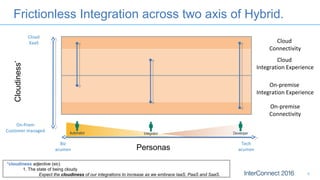
Frictionless Integration across two axis of Hybrid.
4
Tech
acumen
Biz
acumen
Automator Integrator Developer
Personas
On-premise
Connectivity
On-premise
Integration Experience
Cloud
Integration Experience
Cloud
Connectivity
On-Prem
Customer managed
Cloud
XaaS
Cloudiness*
*cloudiness adjective (sic)
1. The state of being cloudy
Expect the cloudiness of our integrations to increase as we embrace IaaS, PaaS and SaaS.
Frictionless Integration across two axis of Hybrid.
5
On-premise
Connectivity
On-premise
Integration Experience
Cloud
Integration Experience
Cloud
Connectivity
On-Prem
Customer managed
Cloud
XaaS
Cloudiness
Tech
acumen
Biz
acumen
Automator Integrator Developer
Personas
Hybrid Integration Personas
6
Automator DeveloperIntegrator
LoB
Professional
Data
Scientist
SaaS Power
User
Biz/System
Analyst
Shadow
Integrator
Integration
Specialist
API
Developer
Full Stack
Developer
Front End
Developer
ETL
Architect
API ConnectAppConnect
DataWorks
Integration BusCast Iron DataStage
Vision
7
Automator DeveloperIntegrator
LoB
Professional
Data
Scientist
SaaS Power
User
Biz/System
Analyst
Shadow
Integrator
Integration
Specialist
API
Developer
Full Stack
Developer
Front End
Developer
ETL
Architect
API Connect
Hybrid Integration
Integration BusCast Iron DataStage
One unified set of capabilities
Built for Hybrid Cloud
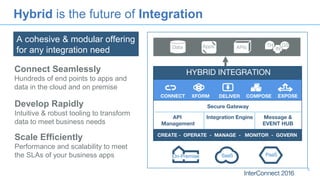
Hybrid is the future of Integration
8
Connect Seamlessly
Hundreds of end points to apps and
data in the cloud and on premise
Develop Rapidly
Intuitive & robust tooling to transform
data to meet business needs
Scale Efficiently
Performance and scalability to meet
the SLAs of your business apps
HYBRID INTEGRATION
SaaS PaaSOn-Premise
CONNECT XFORM DELIVER COMPOSE EXPOSE
API
Management
Secure Gateway
Integration Engine
CREATE - OPERATE - MANAGE - MONITOR - GOVERN
Data APIsApps TH GS
IN
Message &
EVENT HUB
A cohesive & modular offering
for any integration need
IBM AppConnect
99
How do you connect where your
business teams work…
•Where marketers plan campaigns
•Where digital sellers interact with clients
•Where employees collaborate
…with where your core company
data is?
•Your stock control and warehousing
•Your core banking system
•Your Enterprise Resource Planning system
• applications shown are for discussion purposes only
no claim is made of inclusion in product at launch
Sugar CRM
workday
Salesforce.com
MarketoHubspot
Insightly
Island Pacific
SAP ORACLE
Manhattan
Temenos
IBM AppConnect
10
Sugar CRM
workday
Salesforce.com
MarketoHubspot
Insightly
Island Pacific
SAP ORACLE
Manhattan
Temenos
10
 “App awareness” allows you to connect
your apps in minutes
 Automation of manual tasks – notifications,
events & updates
 Connect your applications wherever they
are… cloud or local
 Keep customer and other data in sync
between multiple apps
 Build new connections quickly – tooling for
your tech support team to connect to the
apps you care about in hours
• applications shown are for discussion purposes only
no claim is made of inclusion in product at launch
AppConnect – a new user experience
11
As easy as choosing
your apps…
…and then the events
you care about
G SF
• applications shown are for discussion purposes only
no claim is made of inclusion in product at launch
AppConnect – a new user experience
12
Automated mapping &
Simple, powerful in-line
transformation
G SF
AppConnect Agenda
13
13
Act on simple events
•LoB professional using
events to automate daily
tasks and ensure timely
reaction to changes
•Trigger campaigns in a
marketing automation system
or ensure that new client
appears everywhere
•One record at a time
Data Sync
•Operations or administrator
ensuring that systems of
record are in sync ( eg SFDC,
SAP)
•Supporting changes
happening in one or both
systems
•Data models, selection and
mapping of data important
•Typically on a schedule
Data Copy
•Move a table of data from a
CRM or Marketing platform to
a spread sheet or database
•Pull a segment list from CRM
•Data movement in one
direction – insert into existing
data structure or create new
copy
“When a new contact appears in
App A then update my App B
address book..”
“I need a copy of all the new sales
today dumped into a spreadsheet
for my managers sales report”
“Keep the customer deals info in
Salesforce.com in sync with the
core SAP system…”
SF SF
GS SAPHS
Try at the Lab Under development
14Page© 2016 IBM Corporation
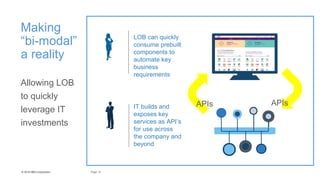
IT builds and
exposes key
services as API’s
for use across
the company and
beyond
LOB can quickly
consume prebuilt
components to
automate key
business
requirements
14
Making
“bi-modal”
a reality
Allowing LOB
to quickly
leverage IT
investments
APIs APIs
15
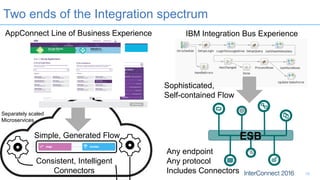
Two ends of the Integration spectrum
Consistent, Intelligent
Connectors
Simple, Generated Flow
Sophisticated,
Self-contained Flow
Any endpoint
Any protocol
Includes Connectors
AppConnect Line of Business Experience IBM Integration Bus Experience
Separately scaled
Microservices
ESB
G SF
Tech
acumen
Biz
acumen
Automator Integrator Developer
Personas
Frictionless Integration across two axis of Hybrid.
16
On-premise
Connectivity
On-premise
Integration Experience
Cloud
Integration Experience
Cloud
Connectivity
On-Prem
Customer managed
Cloud
XaaS
Cloudiness*
*cloudiness adjective (sic)
1. The state of being cloudy
Expect the cloudiness of our integrations to increase as we embrace IaaS, PaaS and SaaS.
Spectrum of Hybrid Cloud Integrations: Privacy
17
Integration
flow and
other
connectors
in shared
cloud
All
Integration
logic
private
Network
connections
to internet
Completely
private
Integration
flow and
other
connectors
private
Intelligent
connectors
in shared
cloud
Flow and
connectors
in private
Flows and
connectors
in shared
cloud
Intelligent
connector in
private
All
Integration
logic in
shared
cloud
VPN-style
connections
to private
Completely
shared
Self-managed
Private
Multi-tenant
Hosted
Spectrum of Hybrid Cloud Integrations: Control
18
Control Speed
Message
Hub
MQ
Light
Tech
acumen
Biz
acumen
Automator Integrator Developer
Personas
Frictionless Integration across two axis of Hybrid.
19
On-premise
Connectivity
On-premise
Integration Experience
Cloud
Integration Experience
Cloud
Connectivity
On-Prem
Customer managed
Cloud
XaaS
Cloudiness
App
Connec
t
Virtual appliance
Secure gateway
Live
Cast Iron
Secure gateway
IIB
IIBoC
PureApplication and
docker
Secure gateway
API Connect
Bluemix
SaaS
Secure gateway
Appconnect/IIB on Cloud: Secure Gateway.
20
Securely connect to
systems inside your
company firewall
IBM Integration Bus on Cloud
• A fully managed Integration Bus service
21
22
IIB Hybrid cloud deployment
2323
IIB Switch
secure connection
On-prem Integration Bus v10
Open Beta
23
DB2
MQ
On-prem systems of record
Under the hood of AppConnect
24
Message Hub
Connectors
Emitting Events
StrongLoop + Bluemix + Cast IronDNA
=
Node.js { } Node.js { }
Java Java
Node.js { }
Connectors
Performing Operations
Compact, scalable
Flow Runtimes
Under the hood of IBM Integration Bus on Cloud
25
Containers
…
Integration A2
…
Integration A1
Customer A
…
Integration B2
…
Integration B1
Customer B
Infrastructure Microservices
supporting UI, APIs, deployment,
security, operations, network routing …
…
Create
BAR file
Applications
REST APIs
Libraries
Services
IBM Integration Bus
Docker Containers
•Single BAR file
•Single Integration Server
•Stateless
•Horizontally scalable
•Disposable
Read config
on container
startup
Stateless
execution of
transactions
until
terminated
Hybrid is the future of Integration
26
Connect Seamlessly
Hundreds of end points to apps and
data in the cloud and on premise
Develop Rapidly
Intuitive & robust tooling to transform
data to meet business needs
Scale Efficiently
Performance and scalability to meet
the SLAs of your business apps
HYBRID INTEGRATION
SaaS PaaSOn-Premise
CONNECT XFORM DELIVER COMPOSE EXPOSE
API
Management
Secure Gateway
Integration Engine
CREATE - OPERATE - MANAGE - MONITOR - GOVERN
Data APIsApps TH GS
IN
Message &
EVENT HUB
A cohesive & modular offering
for any integration need
27
Unlock your data and drive
digital transformation
Build business logic with the highest levels of
productivity via application & cloud integration
features
Integrated tooling to easily publish new
integration flows as APIs
Secure connectivity to hundreds of cloud and on-
premise applications and endpoints
IBM
Application
Integration
Suite
New PID combining
IIB Advanced, API
Connect and Cast Iron
Announced
Feb 16, 2016
Modern Integration Landscape
28
{ }
{ }
NoSQL
{ }
{ }
NoSQL
APIs
API & Event
Composition
Connectors
Data
Synchronization
Gateway (external)
SOR
System of Record
(SOR) DB
Access Layer
SOR
ESB
Connectors
Core
Business
Operations
Empowering
Digital teams
Systems of
Engagement
Business logic
Mobile Partners SaaS
Offerings
API
Economy
IoT
ETL
Messaging
Events
HybridIntegration
platform
XaaS
On-Premise
Cloudaffinity
IIB with APIM
Example: Salesforce node in IIB and App Connect
Node.js
App
callback
thread1 thread2Event Loop
• LoopBack is an extensible open-source Node.js framework
• Create dynamic REST APIs for back-end services with little or no coding
• Built-in access to data from relational databases, MongoDB, SOAP, REST
• Create custom connectors for other services
• A ‘datasource’ json file defines the connectivity to a service
• A ‘model’ json file defines the data to be exchanged with a service
• Each model comes with a predefined REST API for full CRUD operations
• Model discovery API for programmatic model creation
3131
Steps to integrating App Connect with IIB
1. Export YAML description of IIB flow
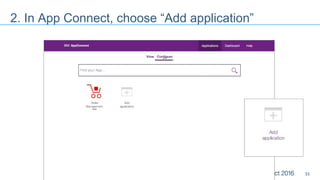
2. In App Connect, choose “Add application”
3. Configure name, desc and import YAML doc
4. Select triggers and actions to expose
5. Configure “business friendly” names
3232
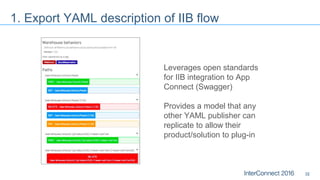
1. Export YAML description of IIB flow
Leverages open standards
for IIB integration to App
Connect (Swagger)
Provides a model that any
other YAML publisher can
replicate to allow their
product/solution to plug-in
3333
2. In App Connect, choose “Add application”
3434
3. Configure name, desc and import YAML doc
3535
4. Select triggers and actions to expose
3636
5. Configure “business friendly” names
Where can I get more information?
IBM Integration developerWorks
https://developer.ibm.com/integration/
IBM Integration YouTube
https://www.youtube.com/user/IBMintegrationMedia
LinkedIn
https://uk.linkedin.com/topic/ibm-integration-bus
Twitter
@IBMIntegration
Notices and Disclaimers
38
Copyright © 2016 by International Business Machines Corporation (IBM). No part of this document may be reproduced or transmitted in any form without written permission
from IBM.
U.S. Government Users Restricted Rights - Use, duplication or disclosure restricted by GSA ADP Schedule Contract with IBM.
Information in these presentations (including information relating to products that have not yet been announced by IBM) has been reviewed for accuracy as of the date of
initial publication and could include unintentional technical or typographical errors. IBM shall have no responsibility to update this information. THIS DOCUMENT IS
DISTRIBUTED "AS IS" WITHOUT ANY WARRANTY, EITHER EXPRESS OR IMPLIED. IN NO EVENT SHALL IBM BE LIABLE FOR ANY DAMAGE ARISING FROM THE
USE OF THIS INFORMATION, INCLUDING BUT NOT LIMITED TO, LOSS OF DATA, BUSINESS INTERRUPTION, LOSS OF PROFIT OR LOSS OF OPPORTUNITY. IBM
products and services are warranted according to the terms and conditions of the agreements under which they are provided.
Any statements regarding IBM's future direction, intent or product plans are subject to change or withdrawal without notice.
Performance data contained herein was generally obtained in a controlled, isolated environments. Customer examples are presented as illustrations of how those
customers have used IBM products and the results they may have achieved. Actual performance, cost, savings or other results in other operating environments may vary.
References in this document to IBM products, programs, or services does not imply that IBM intends to make such products, programs or services available in all countries
in which IBM operates or does business.
Workshops, sessions and associated materials may have been prepared by independent session speakers, and do not necessarily reflect the views of IBM. All materials
and discussions are provided for informational purposes only, and are neither intended to, nor shall constitute legal or other guidance or advice to any individual participant
or their specific situation.
It is the customer’s responsibility to insure its own compliance with legal requirements and to obtain advice of competent legal counsel as to the identification and
interpretation of any relevant laws and regulatory requirements that may affect the customer’s business and any actions the customer may need to take to comply with such
laws. IBM does not provide legal advice or represent or warrant that its services or products will ensure that the customer is in compliance with any law
Notices and Disclaimers Con’t.
39
Information concerning non-IBM products was obtained from the suppliers of those products, their published announcements or other publicly available sources. IBM has not
tested those products in connection with this publication and cannot confirm the accuracy of performance, compatibility or any other claims related to non-IBM products.
Questions on the capabilities of non-IBM products should be addressed to the suppliers of those products. IBM does not warrant the quality of any third-party products, or the
ability of any such third-party products to interoperate with IBM’s products. IBM EXPRESSLY DISCLAIMS ALL WARRANTIES, EXPRESSED OR IMPLIED, INCLUDING BUT
NOT LIMITED TO, THE IMPLIED WARRANTIES OF MERCHANTABILITY AND FITNESS FOR A PARTICULAR PURPOSE.
The provision of the information contained h erein is not intended to, and does not, grant any right or license under any IBM patents, copyrights, trademarks or other
intellectual property right.
IBM, the IBM logo, ibm.com, Aspera®, Bluemix, Blueworks Live, CICS, Clearcase, Cognos®, DOORS®, Emptoris®, Enterprise Document Management System™, FASP®,
FileNet®, Global Business Services ®, Global Technology Services ®, IBM ExperienceOne™, IBM SmartCloud®, IBM Social Business®, Information on Demand, ILOG,
Maximo®, MQIntegrator®, MQSeries®, Netcool®, OMEGAMON, OpenPower, PureAnalytics™, PureApplication®, pureCluster™, PureCoverage®, PureData®,
PureExperience®, PureFlex®, pureQuery®, pureScale®, PureSystems®, QRadar®, Rational®, Rhapsody®, Smarter Commerce®, SoDA, SPSS, Sterling Commerce®,
StoredIQ, Tealeaf®, Tivoli®, Trusteer®, Unica®, urban{code}®, Watson, WebSphere®, Worklight®, X-Force® and System z® Z/OS, are trademarks of International Business
Machines Corporation, registered in many jurisdictions worldwide. Other product and service names might be trademarks of IBM or other companies. A current list of IBM
trademarks is available on the Web at "Copyright and trademark information" at: www.ibm.com/legal/copytrade.shtml.
Thank You
Your Feedback is Important!
Access the InterConnect 2016
Conference Attendee Portal to complete
your session surveys from your
smartphone,
laptop or conference kiosk.

IBM Hybrid Integration Platform

  • 1.
    HIA-6401 Focus onIBM’s Hybrid Integration Platform Rob Nicholson, Distinguished Engineer - Hybrid Integration Peter Broadhurst, Senior Architect - Hybrid Integration
  • 2.
    Please Note: 2 • IBM’sstatements regarding its plans, directions, and intent are subject to change or withdrawal without notice at IBM’s sole discretion. • Information regarding potential future products is intended to outline our general product direction and it should not be relied on in making a purchasing decision. • The information mentioned regarding potential future products is not a commitment, promise, or legal obligation to deliver any material, code or functionality. Information about potential future products may not be incorporated into any contract. • The development, release, and timing of any future features or functionality described for our products remains at our sole discretion. • Performance is based on measurements and projections using standard IBM benchmarks in a controlled environment. The actual throughput or performance that any user will experience will vary depending upon many factors, including considerations such as the amount of multiprogramming in the user’s job stream, the I/O configuration, the storage configuration, and the workload processed. Therefore, no assurance can be given that an individual user will achieve results similar to those stated here.
  • 3.
    Agenda • Two Axisof Hybrid Integration – Personas – Cloud • Single Hybrid Integration Platform 3
  • 4.
    Frictionless Integration acrosstwo axis of Hybrid. 4 Tech acumen Biz acumen Automator Integrator Developer Personas On-premise Connectivity On-premise Integration Experience Cloud Integration Experience Cloud Connectivity On-Prem Customer managed Cloud XaaS Cloudiness* *cloudiness adjective (sic) 1. The state of being cloudy Expect the cloudiness of our integrations to increase as we embrace IaaS, PaaS and SaaS.
  • 5.
    Frictionless Integration acrosstwo axis of Hybrid. 5 On-premise Connectivity On-premise Integration Experience Cloud Integration Experience Cloud Connectivity On-Prem Customer managed Cloud XaaS Cloudiness Tech acumen Biz acumen Automator Integrator Developer Personas
  • 6.
    Hybrid Integration Personas 6 AutomatorDeveloperIntegrator LoB Professional Data Scientist SaaS Power User Biz/System Analyst Shadow Integrator Integration Specialist API Developer Full Stack Developer Front End Developer ETL Architect API ConnectAppConnect DataWorks Integration BusCast Iron DataStage
  • 7.
    Vision 7 Automator DeveloperIntegrator LoB Professional Data Scientist SaaS Power User Biz/System Analyst Shadow Integrator Integration Specialist API Developer FullStack Developer Front End Developer ETL Architect API Connect Hybrid Integration Integration BusCast Iron DataStage One unified set of capabilities Built for Hybrid Cloud
  • 8.
    Hybrid is thefuture of Integration 8 Connect Seamlessly Hundreds of end points to apps and data in the cloud and on premise Develop Rapidly Intuitive & robust tooling to transform data to meet business needs Scale Efficiently Performance and scalability to meet the SLAs of your business apps HYBRID INTEGRATION SaaS PaaSOn-Premise CONNECT XFORM DELIVER COMPOSE EXPOSE API Management Secure Gateway Integration Engine CREATE - OPERATE - MANAGE - MONITOR - GOVERN Data APIsApps TH GS IN Message & EVENT HUB A cohesive & modular offering for any integration need
  • 9.
    IBM AppConnect 99 How doyou connect where your business teams work… •Where marketers plan campaigns •Where digital sellers interact with clients •Where employees collaborate …with where your core company data is? •Your stock control and warehousing •Your core banking system •Your Enterprise Resource Planning system • applications shown are for discussion purposes only no claim is made of inclusion in product at launch Sugar CRM workday Salesforce.com MarketoHubspot Insightly Island Pacific SAP ORACLE Manhattan Temenos
  • 10.
    IBM AppConnect 10 Sugar CRM workday Salesforce.com MarketoHubspot Insightly IslandPacific SAP ORACLE Manhattan Temenos 10  “App awareness” allows you to connect your apps in minutes  Automation of manual tasks – notifications, events & updates  Connect your applications wherever they are… cloud or local  Keep customer and other data in sync between multiple apps  Build new connections quickly – tooling for your tech support team to connect to the apps you care about in hours • applications shown are for discussion purposes only no claim is made of inclusion in product at launch
  • 11.
    AppConnect – anew user experience 11 As easy as choosing your apps… …and then the events you care about G SF • applications shown are for discussion purposes only no claim is made of inclusion in product at launch
  • 12.
    AppConnect – anew user experience 12 Automated mapping & Simple, powerful in-line transformation G SF
  • 13.
    AppConnect Agenda 13 13 Act onsimple events •LoB professional using events to automate daily tasks and ensure timely reaction to changes •Trigger campaigns in a marketing automation system or ensure that new client appears everywhere •One record at a time Data Sync •Operations or administrator ensuring that systems of record are in sync ( eg SFDC, SAP) •Supporting changes happening in one or both systems •Data models, selection and mapping of data important •Typically on a schedule Data Copy •Move a table of data from a CRM or Marketing platform to a spread sheet or database •Pull a segment list from CRM •Data movement in one direction – insert into existing data structure or create new copy “When a new contact appears in App A then update my App B address book..” “I need a copy of all the new sales today dumped into a spreadsheet for my managers sales report” “Keep the customer deals info in Salesforce.com in sync with the core SAP system…” SF SF GS SAPHS Try at the Lab Under development
  • 14.
    14Page© 2016 IBMCorporation IT builds and exposes key services as API’s for use across the company and beyond LOB can quickly consume prebuilt components to automate key business requirements 14 Making “bi-modal” a reality Allowing LOB to quickly leverage IT investments APIs APIs
  • 15.
    15 Two ends ofthe Integration spectrum Consistent, Intelligent Connectors Simple, Generated Flow Sophisticated, Self-contained Flow Any endpoint Any protocol Includes Connectors AppConnect Line of Business Experience IBM Integration Bus Experience Separately scaled Microservices ESB G SF
  • 16.
    Tech acumen Biz acumen Automator Integrator Developer Personas FrictionlessIntegration across two axis of Hybrid. 16 On-premise Connectivity On-premise Integration Experience Cloud Integration Experience Cloud Connectivity On-Prem Customer managed Cloud XaaS Cloudiness* *cloudiness adjective (sic) 1. The state of being cloudy Expect the cloudiness of our integrations to increase as we embrace IaaS, PaaS and SaaS.
  • 17.
    Spectrum of HybridCloud Integrations: Privacy 17 Integration flow and other connectors in shared cloud All Integration logic private Network connections to internet Completely private Integration flow and other connectors private Intelligent connectors in shared cloud Flow and connectors in private Flows and connectors in shared cloud Intelligent connector in private All Integration logic in shared cloud VPN-style connections to private Completely shared Self-managed Private Multi-tenant Hosted
  • 18.
    Spectrum of HybridCloud Integrations: Control 18 Control Speed Message Hub MQ Light
  • 19.
    Tech acumen Biz acumen Automator Integrator Developer Personas FrictionlessIntegration across two axis of Hybrid. 19 On-premise Connectivity On-premise Integration Experience Cloud Integration Experience Cloud Connectivity On-Prem Customer managed Cloud XaaS Cloudiness App Connec t Virtual appliance Secure gateway Live Cast Iron Secure gateway IIB IIBoC PureApplication and docker Secure gateway API Connect Bluemix SaaS Secure gateway
  • 20.
    Appconnect/IIB on Cloud:Secure Gateway. 20 Securely connect to systems inside your company firewall
  • 21.
    IBM Integration Buson Cloud • A fully managed Integration Bus service 21
  • 22.
  • 23.
    IIB Hybrid clouddeployment 2323 IIB Switch secure connection On-prem Integration Bus v10 Open Beta 23 DB2 MQ On-prem systems of record
  • 24.
    Under the hoodof AppConnect 24 Message Hub Connectors Emitting Events StrongLoop + Bluemix + Cast IronDNA = Node.js { } Node.js { } Java Java Node.js { } Connectors Performing Operations Compact, scalable Flow Runtimes
  • 25.
    Under the hoodof IBM Integration Bus on Cloud 25 Containers … Integration A2 … Integration A1 Customer A … Integration B2 … Integration B1 Customer B Infrastructure Microservices supporting UI, APIs, deployment, security, operations, network routing … … Create BAR file Applications REST APIs Libraries Services IBM Integration Bus Docker Containers •Single BAR file •Single Integration Server •Stateless •Horizontally scalable •Disposable Read config on container startup Stateless execution of transactions until terminated
  • 26.
    Hybrid is thefuture of Integration 26 Connect Seamlessly Hundreds of end points to apps and data in the cloud and on premise Develop Rapidly Intuitive & robust tooling to transform data to meet business needs Scale Efficiently Performance and scalability to meet the SLAs of your business apps HYBRID INTEGRATION SaaS PaaSOn-Premise CONNECT XFORM DELIVER COMPOSE EXPOSE API Management Secure Gateway Integration Engine CREATE - OPERATE - MANAGE - MONITOR - GOVERN Data APIsApps TH GS IN Message & EVENT HUB A cohesive & modular offering for any integration need
  • 27.
    27 Unlock your dataand drive digital transformation Build business logic with the highest levels of productivity via application & cloud integration features Integrated tooling to easily publish new integration flows as APIs Secure connectivity to hundreds of cloud and on- premise applications and endpoints IBM Application Integration Suite New PID combining IIB Advanced, API Connect and Cast Iron Announced Feb 16, 2016
  • 28.
    Modern Integration Landscape 28 {} { } NoSQL { } { } NoSQL APIs API & Event Composition Connectors Data Synchronization Gateway (external) SOR System of Record (SOR) DB Access Layer SOR ESB Connectors Core Business Operations Empowering Digital teams Systems of Engagement Business logic Mobile Partners SaaS Offerings API Economy IoT ETL Messaging Events HybridIntegration platform XaaS On-Premise Cloudaffinity
  • 29.
  • 30.
    Example: Salesforce nodein IIB and App Connect Node.js App callback thread1 thread2Event Loop • LoopBack is an extensible open-source Node.js framework • Create dynamic REST APIs for back-end services with little or no coding • Built-in access to data from relational databases, MongoDB, SOAP, REST • Create custom connectors for other services • A ‘datasource’ json file defines the connectivity to a service • A ‘model’ json file defines the data to be exchanged with a service • Each model comes with a predefined REST API for full CRUD operations • Model discovery API for programmatic model creation
  • 31.
    3131 Steps to integratingApp Connect with IIB 1. Export YAML description of IIB flow 2. In App Connect, choose “Add application” 3. Configure name, desc and import YAML doc 4. Select triggers and actions to expose 5. Configure “business friendly” names
  • 32.
    3232 1. Export YAMLdescription of IIB flow Leverages open standards for IIB integration to App Connect (Swagger) Provides a model that any other YAML publisher can replicate to allow their product/solution to plug-in
  • 33.
    3333 2. In AppConnect, choose “Add application”
  • 34.
    3434 3. Configure name,desc and import YAML doc
  • 35.
    3535 4. Select triggersand actions to expose
  • 36.
  • 37.
    Where can Iget more information? IBM Integration developerWorks https://developer.ibm.com/integration/ IBM Integration YouTube https://www.youtube.com/user/IBMintegrationMedia LinkedIn https://uk.linkedin.com/topic/ibm-integration-bus Twitter @IBMIntegration
  • 38.
    Notices and Disclaimers 38 Copyright© 2016 by International Business Machines Corporation (IBM). No part of this document may be reproduced or transmitted in any form without written permission from IBM. U.S. Government Users Restricted Rights - Use, duplication or disclosure restricted by GSA ADP Schedule Contract with IBM. Information in these presentations (including information relating to products that have not yet been announced by IBM) has been reviewed for accuracy as of the date of initial publication and could include unintentional technical or typographical errors. IBM shall have no responsibility to update this information. THIS DOCUMENT IS DISTRIBUTED "AS IS" WITHOUT ANY WARRANTY, EITHER EXPRESS OR IMPLIED. IN NO EVENT SHALL IBM BE LIABLE FOR ANY DAMAGE ARISING FROM THE USE OF THIS INFORMATION, INCLUDING BUT NOT LIMITED TO, LOSS OF DATA, BUSINESS INTERRUPTION, LOSS OF PROFIT OR LOSS OF OPPORTUNITY. IBM products and services are warranted according to the terms and conditions of the agreements under which they are provided. Any statements regarding IBM's future direction, intent or product plans are subject to change or withdrawal without notice. Performance data contained herein was generally obtained in a controlled, isolated environments. Customer examples are presented as illustrations of how those customers have used IBM products and the results they may have achieved. Actual performance, cost, savings or other results in other operating environments may vary. References in this document to IBM products, programs, or services does not imply that IBM intends to make such products, programs or services available in all countries in which IBM operates or does business. Workshops, sessions and associated materials may have been prepared by independent session speakers, and do not necessarily reflect the views of IBM. All materials and discussions are provided for informational purposes only, and are neither intended to, nor shall constitute legal or other guidance or advice to any individual participant or their specific situation. It is the customer’s responsibility to insure its own compliance with legal requirements and to obtain advice of competent legal counsel as to the identification and interpretation of any relevant laws and regulatory requirements that may affect the customer’s business and any actions the customer may need to take to comply with such laws. IBM does not provide legal advice or represent or warrant that its services or products will ensure that the customer is in compliance with any law
  • 39.
    Notices and DisclaimersCon’t. 39 Information concerning non-IBM products was obtained from the suppliers of those products, their published announcements or other publicly available sources. IBM has not tested those products in connection with this publication and cannot confirm the accuracy of performance, compatibility or any other claims related to non-IBM products. Questions on the capabilities of non-IBM products should be addressed to the suppliers of those products. IBM does not warrant the quality of any third-party products, or the ability of any such third-party products to interoperate with IBM’s products. IBM EXPRESSLY DISCLAIMS ALL WARRANTIES, EXPRESSED OR IMPLIED, INCLUDING BUT NOT LIMITED TO, THE IMPLIED WARRANTIES OF MERCHANTABILITY AND FITNESS FOR A PARTICULAR PURPOSE. The provision of the information contained h erein is not intended to, and does not, grant any right or license under any IBM patents, copyrights, trademarks or other intellectual property right. IBM, the IBM logo, ibm.com, Aspera®, Bluemix, Blueworks Live, CICS, Clearcase, Cognos®, DOORS®, Emptoris®, Enterprise Document Management System™, FASP®, FileNet®, Global Business Services ®, Global Technology Services ®, IBM ExperienceOne™, IBM SmartCloud®, IBM Social Business®, Information on Demand, ILOG, Maximo®, MQIntegrator®, MQSeries®, Netcool®, OMEGAMON, OpenPower, PureAnalytics™, PureApplication®, pureCluster™, PureCoverage®, PureData®, PureExperience®, PureFlex®, pureQuery®, pureScale®, PureSystems®, QRadar®, Rational®, Rhapsody®, Smarter Commerce®, SoDA, SPSS, Sterling Commerce®, StoredIQ, Tealeaf®, Tivoli®, Trusteer®, Unica®, urban{code}®, Watson, WebSphere®, Worklight®, X-Force® and System z® Z/OS, are trademarks of International Business Machines Corporation, registered in many jurisdictions worldwide. Other product and service names might be trademarks of IBM or other companies. A current list of IBM trademarks is available on the Web at "Copyright and trademark information" at: www.ibm.com/legal/copytrade.shtml.
  • 40.
    Thank You Your Feedbackis Important! Access the InterConnect 2016 Conference Attendee Portal to complete your session surveys from your smartphone, laptop or conference kiosk.

Editor's Notes

  • #4 Rob
  • #5 rob
  • #6 rob
  • #7 rob
  • #8 rob
  • #9 rob
  • #10 peter
  • #11 peter
  • #12 peter
  • #13 Peter
  • #14 peter
  • #15 peter
  • #16 rob On the left hand end, the intelligence is in the end points. On the other end, you asre in full control.
  • #17 rob
  • #18 peter IN a hybrid cloud envirinment you never do integration in just one place. We recognise a need for hybrid deployments. For each of these give an example.
  • #19 peter We have IIB in all these places.
  • #20 rob
  • #21 peter
  • #22 peter
  • #23 peter
  • #24 peter
  • #25 peter
  • #26 peter
  • #27 rob
  • #28 Rob
  • #29 Rob
  • #30 Peter This slide starts by showing a web browser view of the new product API Connect, which is the latest incarnation of the API Management product. <CLICK TO REVEAL> Once you’ve logged in, this particular view shows the composition area of the tool, where draft APIs can be created and edited. The links at the top of the page allow a user to toggle between a view of APIs and a view of Products. <CLICK TO REVEAL> A user can also navigate using the menu on the left side of the screen to be taken to a Catalog view of their APIs, which might typically include Swagger definitions for APIs which are “hosted” elsewhere but invoked/composed/monitored/analysed/rate limited etc. by API Connect. <CLICK TO REVEAL> On this particular system, we haven’t defined any other environment at present, so you are just seeing the default Sandbox environment. There are currently no Products which have been promoted into the “Staged” state from the draft workspace. We’ll return to these screens once we’ve executed a Push to API Connect from IIB. <CLICK TO REVEAL> We’re now looking at the IIB Toolkit, and the first thing we’ll do here is invoke a feature which first became available in IIB10.0.0.2 which was released in Q3 2015. The idea of this feature is aimed at the IIB developer, who is iterating over a REST API definition, deploying it to his IIB runtime and testing it out. When reasonably happy with its definition, the developer can choose the option to “Push to API Management” which takes the IIB Swagger definition for the REST API and pushes it into the drafts workspace of API Management / Connect. <CLICK TO REVEAL> The wizard shows the values which you must specify in order to locate the API Connect server. We’ll go more into these options in a moment when we repeat the exercise from both a command line and the IIB Web UI. <CLICK TO REVEAL> The second panel of the wizard gives you the opportunity to select an API Connect Organization should you be a member of more than one. <CLICK TO REVEAL> Once the Push is complete, a success message is shown. <CLICK TO REVEAL> On returning to the API Connect web browser, we can now see that the REST API definition is available in API Connect in the draft workspace. mqsipushapiconnect TESTNODE_10005 -e demo -w 4418 -n apimdev0056.hursley.ibm.com -p 443 -u bthomps@uk.ibm.com -a 1NT3RN3T! -x productIIB
  • #31 peter
  • #32 rob
  • #33 Rob
  • #34 Rob
  • #35 Rob
  • #36 Rob
  • #37 Rob
  • #38 Rob