Connecting Mobile Things to
Global Sensor Network
Middleware using
System-generated Wrappers
Charith Perera (ANU), Arkady Zaslavsky (CSIRO), Peter Christen
(ANU), Ali Salehi (CSIRO), Dimitrios Georgakopoulos (CSIRO)
System-generated Wrappers
MobiDE’2012, Phoenix, AZ, 20 May, 2012
Outline
1. Introduction
2. Internet of Things and OpenIoT
3. ASCM4GSN
4. Related work
5. Conclusion and future work5. Conclusion and future work
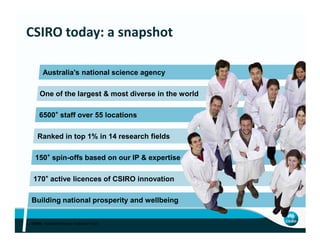
6500+
staff over 55 locations
CSIRO today: a snapshot
One of the largest & most diverse in the world
Australia’s national science agency
3 | CSIRO. Australian Science, Australia's Future
170+
active licences of CSIRO innovation
150+
spin-offs based on our IP & expertise
Ranked in top 1% in 14 research fields
Building national prosperity and wellbeing
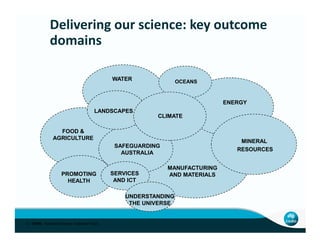
Delivering our science: key outcome
domains
ENERGY
OCEANSWATER
LANDSCAPES
CLIMATE
4 | CSIRO. Australian Science, Australia's Future
FOOD &
AGRICULTURE
PROMOTING
HEALTH
MANUFACTURING
AND MATERIALS
UNDERSTANDING
THE UNIVERSE
SERVICES
AND ICT
SAFEGUARDING
AUSTRALIA
MINERAL
RESOURCES
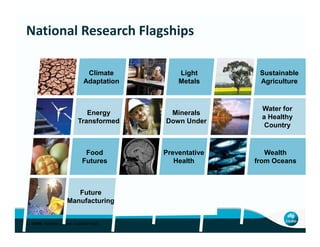
Light
Metals
Minerals
Down Under
Sustainable
Agriculture
Water for
a Healthy
Country
Climate
Adaptation
Energy
Transformed
National Research Flagships
5 | CSIRO. Australian Science, Australia's Future
Future
Manufacturing
Down Under
Country
Preventative
Health
Wealth
from Oceans
Food
Futures
Transformed
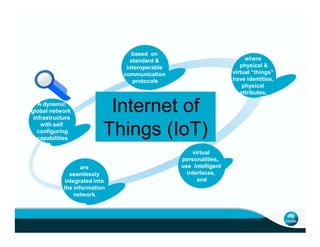
based on
standard &
interoperable
communication
protocols
A dynamic
global network
infrastructure
with self
where
physical &
virtual “things”
have identities,
physical
attributes,
Internet of
Things (IoT)with self
configuring
capabilities
are
seamlessly
integrated into
the information
network.
virtual
personalities,
use intelligent
interfaces,
and
Things (IoT)
Origin of IoT in 1998
“The IoT allows people and things to be connected Anytime,
Anyplace, with Anything and Anyone, ideally using Any network and
Any service"
Global market for sensors was around $56.3 billion in 2010, around
$62.8 billion in 2011. It is expected to increase up to $91.5 billion by
2016.
Introduction
2016.
Compound annual growth rate of 7.8%.
Increasing trend of developing middleware solutions in order to
connect sensors and actuators to the Internet.(E.g: GSN, Hourglass,
HiFi, IrisNet, EdgeServers)
These middleware solutions support fast and simple deployment of
sensor networks.
Sensor networks are the major enabler of the IoT
A sensor network comprises one or more sensor nodes which
communicate between each other using wired and wireless
means.
Applications of IoT and Sensor Networks
Mobile phones as mobile sensors
Sensor Networks and IoT
Mobile phones as mobile sensors
Sensor network deployment has been considered as a difficult
task in early days due to the heterogeneity of sensors.
Global Sensor Network (GSN) is a middleware solution that
enables zero-configuration deployment.
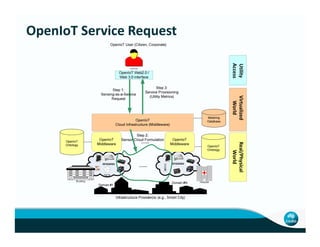
OpenIoT Service Request
+
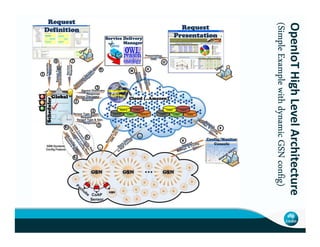
OpenIoTHighLevelArchitecture
(SimpleExamplewithdynamicGSN(SimpleExamplewithdynamicGSN(SimpleExamplewithdynamicGSN(SimpleExamplewithdynamicGSN
HighLevelArchitecture
(SimpleExamplewithdynamicGSN(SimpleExamplewithdynamicGSN(SimpleExamplewithdynamicGSN(SimpleExamplewithdynamicGSNconfigconfigconfigconfig))))
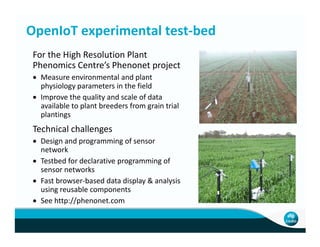
OpenIoT experimental test-bed
For the High Resolution Plant
Phenomics Centre’s Phenonet project
• Measure environmental and plant
physiology parameters in the field
• Improve the quality and scale of data
available to plant breeders from grain trial
plantings
Technical challengesTechnical challenges
• Design and programming of sensor
network
• Testbed for declarative programming of
sensor networks
• Fast browser-based data display & analysis
using reusable components
• See http://phenonet.com
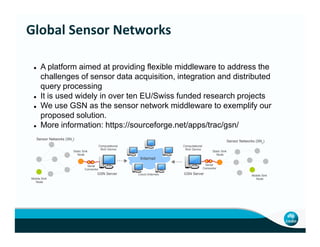
A platform aimed at providing flexible middleware to address the
challenges of sensor data acquisition, integration and distributed
query processing
It is used widely in over ten EU/Swiss funded research projects
We use GSN as the sensor network middleware to exemplify our
proposed solution.
More information: https://sourceforge.net/apps/trac/gsn/
Global Sensor Networks
More information: https://sourceforge.net/apps/trac/gsn/
Internet
Cloud (Internet)
Computational
Rich Device
Static Sink
Node
Computational
Rich Device
Static Sink
Node
Sensor Networks (SN1
)
Sensor Networks (SN2
)
Mobile Sink
Node
Mobile Sink
Node
GSN Server GSN Server
Serial
Connector
Serial
Connector
Connectivity and configurability
Sensors come with APIs that provide software interfaces to retrieve
sensor data to the middleware solutions or applications
If we want to retrieve sensor readings, we need to access the sensor
hardware through these provided third party libraries.
Different middleware solutions use different mechanisms to retrieve data
from sensors.(e.g: wrappers, gateways, handlers, proxies, mediators, etc.)
The Challenge
from sensors.(e.g: wrappers, gateways, handlers, proxies, mediators, etc.)
GSN has wrappers
Two Problems:
First problem is that these wrappers need to be developed
manually by the programmers. Each sensor has to have a matching
wrapper attached to GSN middleware such as;
SunSPOT sensor → SunSPOTWrapper. (Time, Cost, Effort)
Second problem is lack of code sharing
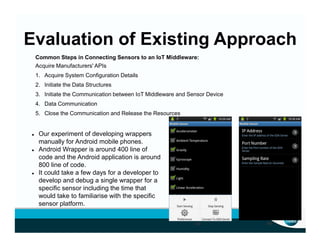
Evaluation of Existing Approach
Common Steps in Connecting Sensors to an IoT Middleware:
Acquire Manufacturers' APIs
1. Acquire System Configuration Details
2. Initiate the Data Structures
3. Initiate the Communication between IoT Middleware and Sensor Device
4. Data Communication
5. Close the Communication and Release the Resources
(a) (b)
Our experiment of developing wrappers
manually for Android mobile phones.
Android Wrapper is around 400 line of
code and the Android application is around
800 line of code.
It could take a few days for a developer to
develop and debug a single wrapper for a
specific sensor including the time that
would take to familiarise with the specific
sensor platform.
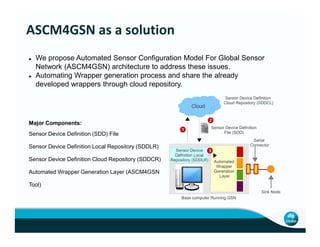
We propose Automated Sensor Configuration Model For Global Sensor
Network (ASCM4GSN) architecture to address these issues.
Automating Wrapper generation process and share the already
developed wrappers through cloud repository.
Sensor Device Definition
Cloud Repository (SDDCL)
Cloud
2
Major Components:
ASCM4GSN as a solution
Automated
Wrapper
Generation
Layer
Serial
Connector
Sink Node
Base computer Running GSN
Sensor Device
Definition Local
Repository (SDDLR)
1 Sensor Device Definition
File (SDD)
3
Major Components:
Sensor Device Definition (SDD) File
Sensor Device Definition Local Repository (SDDLR)
Sensor Device Definition Cloud Repository (SDDCR)
Automated Wrapper Generation Layer (ASCM4GSN
Tool)
Common Steps in Connecting Sensors to an IoT Middleware:
1. Acquire Manufacturers' APIs
2. Acquire System Configuration Details
3. Initiate the Data Structures
4. Initiate the Communication between IoT Middleware and Sensor Device
5. Data Communication
6. Close the Communication and Release the Resources
ASCM4GSN as a solution
<libraries-collection>
<library package-name="com.sun.spot.io.j2me.radiogram.*"
source="http://gsncloud.com/libraries/spotlib_common.jar"
platform="java" />
<library package-name="om.sun.spot.peripheral.ota.OTACommandServer"
source="http://gsncloud.com/libraries/spotlib_device.jar"
platform="java" />
</libraries-collection>
<data-structure>
<data-field field-name="light" type="int"
description="Presents the light sensor."/>
<data-field field-name="temperature" type="int"
description="Presents the temperature sensor."/>
</data-structure>
<system-configuration class="System" method="setProperty" >
<property name="SERIAL_PORT">/dev/ttyACM1</property>
<system-configuration>
<connection>
<prerequisites builder-class="OTACommandServer" method="start" >
<parameters>null</parameters>
</prerequisites>
<connection-initiation builder-class="Connector" method="open">
<parameters name="scheme">radiogram</parameters>
<parameters name="HOST_PORT">65</parameters>
</connection-initiation>
<data-interface class="RadiogramConnection" method="newDatagram">
<parameters name="size" class="RadiogramConnection"
method="getMaximumLength">10</parameters>
</data-interface>
</connection>
<data-transformation>
<data-retrieval class="RadiogramConnection" method="receive">
<parameters name="packet">Datagram</parameters>
</data-retrieval>
<data-field field-name="light" class="Datagram" method="readInt"/>
<data-field field-name="temperature" class="Datagram" method="readInt"/>
</data-transformation>
import com.sun.spot.io.j2me.radiogram.*;
import com.sun.spot.peripheral.ota.OTACommandServer;
import javax.microedition.io.*;
public class SunSpotsWrapper extends AbstractWrapper {
private DataField[] collection = new DataField[] {
new DataField("light", "int", "Presents the light sensor."),
new DataField("temperature", "int", "Presents the temperature sensor."),
new DataField("packet_type", "int", "packet type")};
public boolean initialize() {
System.setProperty("SERIAL_PORT", "/dev/ttyACM1");
OTACommandServer.start();
rCon = (RadiogramConnection) Connector.open("radiogram://:"+HOST_PORT);
dg = rCon.newDatagram(rCon.getMaximumLength());
}
public void run() {
rCon.receive(dg);
light = dg.readInt();
temperature = dg.readInt()
}
}
Sensor Device Definition File System-generated SunSPOT Wrapper
1
2
3
4
5
We defined the above
steps in XML file called
Sensor Device Definition
(SDD) file
The information attached
to this files were used to
develop the wrapper
automatically.
<libraries-collection>
<library package-name="com.sun.spot.io.j2me.radiogram.*"
source="http://gsncloud.com/libraries/spotlib_common.jar"
platform="java" />
<library package-name="om.sun.spot.peripheral.ota.OTACommandServer"
source="http://gsncloud.com/libraries/spotlib_device.jar"
platform="java" />
</libraries-collection>
<data-structure>
<data-field field-name="light" type="int"
description="Presents the light sensor."/>
<data-field field-name="temperature" type="int"
description="Presents the temperature sensor."/>
</data-structure>
<system-configuration class="System" method="setProperty" >
<property name="SERIAL_PORT">/dev/ttyACM1</property>
<system-configuration>
<connection>
<prerequisites builder-class="OTACommandServer" method="start" >
<parameters>null</parameters>
</prerequisites>
<connection-initiation builder-class="Connector" method="open">
package gsn.wrappers;
import gsn.beans.DataField;
import gsn.beans.StreamElement;
public class XXXXXXXXXXXX extends AbstractWrapper {
private DataField[] collection = new DataField[] {….........};
public boolean initialize() {
setName("TestWrapperMockObject-Thread" + (++threadCounter));
System.setProperty(..............);
return true;
}
public void run() {
}
package gsn.wrappers;
import gsn.beans.DataField;
import gsn.beans.StreamElement;
import com.sun.spot.io.j2me.radiogram.*;
import com.sun.spot.peripheral.ota.OTACommandServer;
import javax.microedition.io.*;
public class SunSpotsWrapper extends AbstractWrapper {
private DataField[] collection = new DataField[] {
new DataField("light", "int", "Presents the light sensor."),
new DataField("temperature", "int", "Presents temperature sensor"),
new DataField("packet_type", "int", "packet type")};
public boolean initialize() {
System.setProperty("SERIAL_PORT", "/dev/ttyACM1");
OTACommandServer.start();
rCon = (RadiogramConnection)
Connector.open("radiogram://:"+HOST_PORT);
dg = rCon.newDatagram(rCon.getMaximumLength());
How Automation Works
<connection-initiation builder-class="Connector" method="open">
<parameters name="scheme">radiogram</parameters>
<parameters name="HOST_PORT">65</parameters>
</connection-initiation>
<data-interface class="RadiogramConnection" method="newDatagram">
<parameters name="size" class="RadiogramConnection"
method="getMaximumLength">10</parameters>
</data-interface>
</connection>
<data-transformation>
<data-retrieval class="RadiogramConnection" method="receive">
<parameters name="packet">Datagram</parameters>
</data-retrieval>
<data-field field-name="light" class="Datagram" method="readInt"/>
<data-field field-name="temperature" class="Datagram" method="readInt"/>
</data-transformation>
}
public DataField[] getOutputFormat() {
return outputFormat;
}
public boolean publishStreamElement(StreamElement se) {
return postStreamElement(se);
}
public void dispose() {
threadCounter--;
}
public String getWrapperName() {
return "TestWrapperMock";
}
}
}
public void run() {
rCon.receive(dg);
light = dg.readInt();
temperature = dg.readInt()
}
public DataField[] getOutputFormat() {
return outputFormat;
}
public boolean publishStreamElement(StreamElement se) {
return postStreamElement(se);
}
public void dispose() {
threadCounter--;
}
public String getWrapperName() {
return "SunSPOTWrapper";
}
}
Sensor Device Definition(SDD)
File for a Specific Sensor
(e.g: SunSPOT Sensor)
Wrapper Template for
Global Sensor Network
Middleware System Generated Wrapper
(e.g: SunSPOTWrapper)
IEEE 1451 standards and SensorML
Californium (Cf) CoAP framework
Web Services Gateways
InterX
Related Work
InterX
Hydra
uMiddle
We have demonstrated that automating the process of
developing sensor drivers/wrappers will improve efficiency and
productivity.
Our future work aims at efficient and effective automation of
connecting things to IoT middleware as well as incorporating
generated extended functionality
Conclusion and Future Work
generated extended functionality
We will combine context capturing and semantic data
technologies with processing of sensor data inside the wrapper
itself.
Reasoner on top of ASCM4GSN to include context discovery,
semantic enrichment while generating wrappers
Thank you !Thank you !
Dr Arkady Zaslavsky, Professor
Science Leader in Semantic
Data Management
Phone: 02 6216 7132
Email: arkady.zaslavsky@csiro.au

MobiDE’2012, Phoenix, AZ, United States, 20 May, 2012

  • 1.
    Connecting Mobile Thingsto Global Sensor Network Middleware using System-generated Wrappers Charith Perera (ANU), Arkady Zaslavsky (CSIRO), Peter Christen (ANU), Ali Salehi (CSIRO), Dimitrios Georgakopoulos (CSIRO) System-generated Wrappers MobiDE’2012, Phoenix, AZ, 20 May, 2012
  • 2.
    Outline 1. Introduction 2. Internetof Things and OpenIoT 3. ASCM4GSN 4. Related work 5. Conclusion and future work5. Conclusion and future work
  • 3.
    6500+ staff over 55locations CSIRO today: a snapshot One of the largest & most diverse in the world Australia’s national science agency 3 | CSIRO. Australian Science, Australia's Future 170+ active licences of CSIRO innovation 150+ spin-offs based on our IP & expertise Ranked in top 1% in 14 research fields Building national prosperity and wellbeing
  • 4.
    Delivering our science:key outcome domains ENERGY OCEANSWATER LANDSCAPES CLIMATE 4 | CSIRO. Australian Science, Australia's Future FOOD & AGRICULTURE PROMOTING HEALTH MANUFACTURING AND MATERIALS UNDERSTANDING THE UNIVERSE SERVICES AND ICT SAFEGUARDING AUSTRALIA MINERAL RESOURCES
  • 5.
    Light Metals Minerals Down Under Sustainable Agriculture Water for aHealthy Country Climate Adaptation Energy Transformed National Research Flagships 5 | CSIRO. Australian Science, Australia's Future Future Manufacturing Down Under Country Preventative Health Wealth from Oceans Food Futures Transformed
  • 6.
    based on standard & interoperable communication protocols Adynamic global network infrastructure with self where physical & virtual “things” have identities, physical attributes, Internet of Things (IoT)with self configuring capabilities are seamlessly integrated into the information network. virtual personalities, use intelligent interfaces, and Things (IoT)
  • 7.
    Origin of IoTin 1998 “The IoT allows people and things to be connected Anytime, Anyplace, with Anything and Anyone, ideally using Any network and Any service" Global market for sensors was around $56.3 billion in 2010, around $62.8 billion in 2011. It is expected to increase up to $91.5 billion by 2016. Introduction 2016. Compound annual growth rate of 7.8%. Increasing trend of developing middleware solutions in order to connect sensors and actuators to the Internet.(E.g: GSN, Hourglass, HiFi, IrisNet, EdgeServers) These middleware solutions support fast and simple deployment of sensor networks.
  • 8.
    Sensor networks arethe major enabler of the IoT A sensor network comprises one or more sensor nodes which communicate between each other using wired and wireless means. Applications of IoT and Sensor Networks Mobile phones as mobile sensors Sensor Networks and IoT Mobile phones as mobile sensors Sensor network deployment has been considered as a difficult task in early days due to the heterogeneity of sensors. Global Sensor Network (GSN) is a middleware solution that enables zero-configuration deployment.
  • 9.
  • 10.
  • 11.
    OpenIoT experimental test-bed Forthe High Resolution Plant Phenomics Centre’s Phenonet project • Measure environmental and plant physiology parameters in the field • Improve the quality and scale of data available to plant breeders from grain trial plantings Technical challengesTechnical challenges • Design and programming of sensor network • Testbed for declarative programming of sensor networks • Fast browser-based data display & analysis using reusable components • See http://phenonet.com
  • 12.
    A platform aimedat providing flexible middleware to address the challenges of sensor data acquisition, integration and distributed query processing It is used widely in over ten EU/Swiss funded research projects We use GSN as the sensor network middleware to exemplify our proposed solution. More information: https://sourceforge.net/apps/trac/gsn/ Global Sensor Networks More information: https://sourceforge.net/apps/trac/gsn/ Internet Cloud (Internet) Computational Rich Device Static Sink Node Computational Rich Device Static Sink Node Sensor Networks (SN1 ) Sensor Networks (SN2 ) Mobile Sink Node Mobile Sink Node GSN Server GSN Server Serial Connector Serial Connector
  • 13.
    Connectivity and configurability Sensorscome with APIs that provide software interfaces to retrieve sensor data to the middleware solutions or applications If we want to retrieve sensor readings, we need to access the sensor hardware through these provided third party libraries. Different middleware solutions use different mechanisms to retrieve data from sensors.(e.g: wrappers, gateways, handlers, proxies, mediators, etc.) The Challenge from sensors.(e.g: wrappers, gateways, handlers, proxies, mediators, etc.) GSN has wrappers Two Problems: First problem is that these wrappers need to be developed manually by the programmers. Each sensor has to have a matching wrapper attached to GSN middleware such as; SunSPOT sensor → SunSPOTWrapper. (Time, Cost, Effort) Second problem is lack of code sharing
  • 14.
    Evaluation of ExistingApproach Common Steps in Connecting Sensors to an IoT Middleware: Acquire Manufacturers' APIs 1. Acquire System Configuration Details 2. Initiate the Data Structures 3. Initiate the Communication between IoT Middleware and Sensor Device 4. Data Communication 5. Close the Communication and Release the Resources (a) (b) Our experiment of developing wrappers manually for Android mobile phones. Android Wrapper is around 400 line of code and the Android application is around 800 line of code. It could take a few days for a developer to develop and debug a single wrapper for a specific sensor including the time that would take to familiarise with the specific sensor platform.
  • 15.
    We propose AutomatedSensor Configuration Model For Global Sensor Network (ASCM4GSN) architecture to address these issues. Automating Wrapper generation process and share the already developed wrappers through cloud repository. Sensor Device Definition Cloud Repository (SDDCL) Cloud 2 Major Components: ASCM4GSN as a solution Automated Wrapper Generation Layer Serial Connector Sink Node Base computer Running GSN Sensor Device Definition Local Repository (SDDLR) 1 Sensor Device Definition File (SDD) 3 Major Components: Sensor Device Definition (SDD) File Sensor Device Definition Local Repository (SDDLR) Sensor Device Definition Cloud Repository (SDDCR) Automated Wrapper Generation Layer (ASCM4GSN Tool)
  • 16.
    Common Steps inConnecting Sensors to an IoT Middleware: 1. Acquire Manufacturers' APIs 2. Acquire System Configuration Details 3. Initiate the Data Structures 4. Initiate the Communication between IoT Middleware and Sensor Device 5. Data Communication 6. Close the Communication and Release the Resources ASCM4GSN as a solution <libraries-collection> <library package-name="com.sun.spot.io.j2me.radiogram.*" source="http://gsncloud.com/libraries/spotlib_common.jar" platform="java" /> <library package-name="om.sun.spot.peripheral.ota.OTACommandServer" source="http://gsncloud.com/libraries/spotlib_device.jar" platform="java" /> </libraries-collection> <data-structure> <data-field field-name="light" type="int" description="Presents the light sensor."/> <data-field field-name="temperature" type="int" description="Presents the temperature sensor."/> </data-structure> <system-configuration class="System" method="setProperty" > <property name="SERIAL_PORT">/dev/ttyACM1</property> <system-configuration> <connection> <prerequisites builder-class="OTACommandServer" method="start" > <parameters>null</parameters> </prerequisites> <connection-initiation builder-class="Connector" method="open"> <parameters name="scheme">radiogram</parameters> <parameters name="HOST_PORT">65</parameters> </connection-initiation> <data-interface class="RadiogramConnection" method="newDatagram"> <parameters name="size" class="RadiogramConnection" method="getMaximumLength">10</parameters> </data-interface> </connection> <data-transformation> <data-retrieval class="RadiogramConnection" method="receive"> <parameters name="packet">Datagram</parameters> </data-retrieval> <data-field field-name="light" class="Datagram" method="readInt"/> <data-field field-name="temperature" class="Datagram" method="readInt"/> </data-transformation> import com.sun.spot.io.j2me.radiogram.*; import com.sun.spot.peripheral.ota.OTACommandServer; import javax.microedition.io.*; public class SunSpotsWrapper extends AbstractWrapper { private DataField[] collection = new DataField[] { new DataField("light", "int", "Presents the light sensor."), new DataField("temperature", "int", "Presents the temperature sensor."), new DataField("packet_type", "int", "packet type")}; public boolean initialize() { System.setProperty("SERIAL_PORT", "/dev/ttyACM1"); OTACommandServer.start(); rCon = (RadiogramConnection) Connector.open("radiogram://:"+HOST_PORT); dg = rCon.newDatagram(rCon.getMaximumLength()); } public void run() { rCon.receive(dg); light = dg.readInt(); temperature = dg.readInt() } } Sensor Device Definition File System-generated SunSPOT Wrapper 1 2 3 4 5 We defined the above steps in XML file called Sensor Device Definition (SDD) file The information attached to this files were used to develop the wrapper automatically.
  • 17.
    <libraries-collection> <library package-name="com.sun.spot.io.j2me.radiogram.*" source="http://gsncloud.com/libraries/spotlib_common.jar" platform="java" /> <librarypackage-name="om.sun.spot.peripheral.ota.OTACommandServer" source="http://gsncloud.com/libraries/spotlib_device.jar" platform="java" /> </libraries-collection> <data-structure> <data-field field-name="light" type="int" description="Presents the light sensor."/> <data-field field-name="temperature" type="int" description="Presents the temperature sensor."/> </data-structure> <system-configuration class="System" method="setProperty" > <property name="SERIAL_PORT">/dev/ttyACM1</property> <system-configuration> <connection> <prerequisites builder-class="OTACommandServer" method="start" > <parameters>null</parameters> </prerequisites> <connection-initiation builder-class="Connector" method="open"> package gsn.wrappers; import gsn.beans.DataField; import gsn.beans.StreamElement; public class XXXXXXXXXXXX extends AbstractWrapper { private DataField[] collection = new DataField[] {….........}; public boolean initialize() { setName("TestWrapperMockObject-Thread" + (++threadCounter)); System.setProperty(..............); return true; } public void run() { } package gsn.wrappers; import gsn.beans.DataField; import gsn.beans.StreamElement; import com.sun.spot.io.j2me.radiogram.*; import com.sun.spot.peripheral.ota.OTACommandServer; import javax.microedition.io.*; public class SunSpotsWrapper extends AbstractWrapper { private DataField[] collection = new DataField[] { new DataField("light", "int", "Presents the light sensor."), new DataField("temperature", "int", "Presents temperature sensor"), new DataField("packet_type", "int", "packet type")}; public boolean initialize() { System.setProperty("SERIAL_PORT", "/dev/ttyACM1"); OTACommandServer.start(); rCon = (RadiogramConnection) Connector.open("radiogram://:"+HOST_PORT); dg = rCon.newDatagram(rCon.getMaximumLength()); How Automation Works <connection-initiation builder-class="Connector" method="open"> <parameters name="scheme">radiogram</parameters> <parameters name="HOST_PORT">65</parameters> </connection-initiation> <data-interface class="RadiogramConnection" method="newDatagram"> <parameters name="size" class="RadiogramConnection" method="getMaximumLength">10</parameters> </data-interface> </connection> <data-transformation> <data-retrieval class="RadiogramConnection" method="receive"> <parameters name="packet">Datagram</parameters> </data-retrieval> <data-field field-name="light" class="Datagram" method="readInt"/> <data-field field-name="temperature" class="Datagram" method="readInt"/> </data-transformation> } public DataField[] getOutputFormat() { return outputFormat; } public boolean publishStreamElement(StreamElement se) { return postStreamElement(se); } public void dispose() { threadCounter--; } public String getWrapperName() { return "TestWrapperMock"; } } } public void run() { rCon.receive(dg); light = dg.readInt(); temperature = dg.readInt() } public DataField[] getOutputFormat() { return outputFormat; } public boolean publishStreamElement(StreamElement se) { return postStreamElement(se); } public void dispose() { threadCounter--; } public String getWrapperName() { return "SunSPOTWrapper"; } } Sensor Device Definition(SDD) File for a Specific Sensor (e.g: SunSPOT Sensor) Wrapper Template for Global Sensor Network Middleware System Generated Wrapper (e.g: SunSPOTWrapper)
  • 18.
    IEEE 1451 standardsand SensorML Californium (Cf) CoAP framework Web Services Gateways InterX Related Work InterX Hydra uMiddle
  • 19.
    We have demonstratedthat automating the process of developing sensor drivers/wrappers will improve efficiency and productivity. Our future work aims at efficient and effective automation of connecting things to IoT middleware as well as incorporating generated extended functionality Conclusion and Future Work generated extended functionality We will combine context capturing and semantic data technologies with processing of sensor data inside the wrapper itself. Reasoner on top of ASCM4GSN to include context discovery, semantic enrichment while generating wrappers
  • 20.
    Thank you !Thankyou ! Dr Arkady Zaslavsky, Professor Science Leader in Semantic Data Management Phone: 02 6216 7132 Email: arkady.zaslavsky@csiro.au