TNT’s Favorite Tools
and Trends of 2013
December 6, 2014
Beth Bernhardt, Beth Filar Williams, Kathy Shields
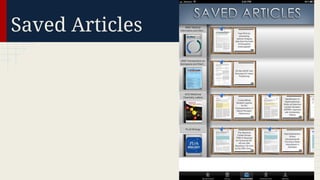
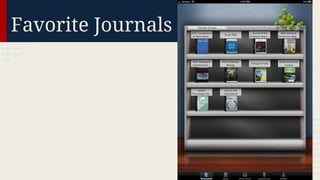
BrowZine
An easy and familiar way to browse, read
and monitor scholarly journals across the
disciplines. http://thirdiron.com/browzine/
● Optimized for tablet devices
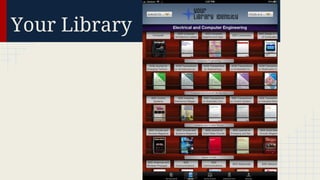
● Personal bookshelf of favorite journals
● Alerts when new editions are available
Your Library
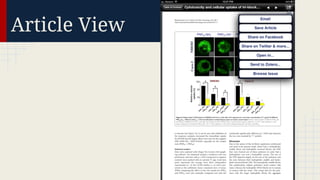
Article View
Saved Articles
Favorite Journals
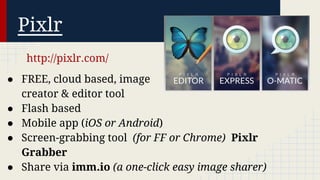
Pixlr
http://pixlr.com/
● FREE, cloud based, image
creator & editor tool
● Flash based
● Mobile app (iOS or Android)
● Screen-grabbing tool (for FF or Chrome) Pixlr
Grabber
● Share via imm.io (a one-click easy image sharer)
htt
p

://p

ixl

r.c

om

/

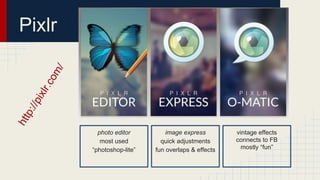
Pixlr

photo editor
most used
“photoshop-lite”

image express
quick adjustments
fun overlaps & effects

vintage effects
connects to FB
mostly “fun”
Pixlr

Quick Demo!
Feedly
Google Reader is dead. Now what do I do?
Use Feedly!
Feedly is a news aggregator that
is available as a mobile app for iOS and
Android, and via web browsers such as
Chrome and Firefox.
Feedly: Key features
● Free; pro version available for $35/year
● Minimalist design
● Easily add URLs and RSS feeds and group
them into categories
● Highly customizable - change the layout,
color scheme, organization of posts, etc.
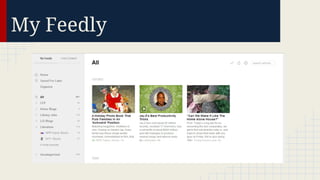
My Feedly
Google Hangout
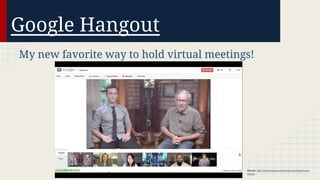
My new favorite way to hold virtual meetings!

Source: http://inthecrowds.wordpress.com/tag/lincolnmovie/
Google Hangout
Things to know:
● Need a Gmail/Google+ account
● Need to activate Google Hangouts
● Can be chat only, or can incorporate
video (up to 10 video participants)
● Can embed other apps into your hangout,
such as Google Drive and SlideShare
How do you usually schedule
meetings with your colleagues or
your patrons?
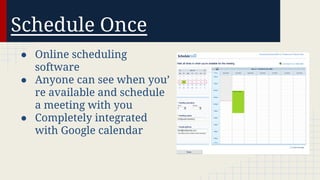
Schedule Once
● Online scheduling
software
● Anyone can see when you’
re available and schedule
a meeting with you
● Completely integrated
with Google calendar
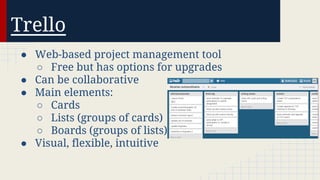
Trello
● Web-based project management tool
○ Free but has options for upgrades
● Can be collaborative
● Main elements:
○ Cards
○ Lists (groups of cards)
○ Boards (groups of lists)
● Visual, flexible, intuitive
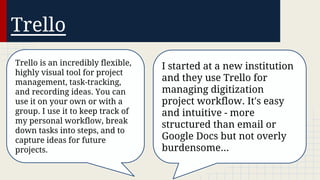
Trello
Trello is an incredibly flexible,
highly visual tool for project
management, task-tracking,
and recording ideas. You can
use it on your own or with a
group. I use it to keep track of
my personal workflow, break
down tasks into steps, and to
capture ideas for future
projects.

I started at a new institution
and they use Trello for
managing digitization
project workflow. It's easy
and intuitive - more
structured than email or
Google Docs but not overly
burdensome...
To-Do List Tools
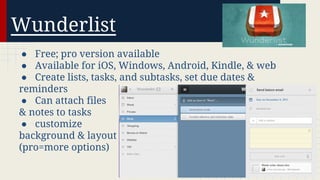
Wunderlist
● Free; pro version available
● Available for iOS, Windows, Android, Kindle, & web
● Create lists, tasks, and subtasks, set due dates &
reminders
● Can attach files
& notes to tasks
● customize
background & layout
(pro=more options)
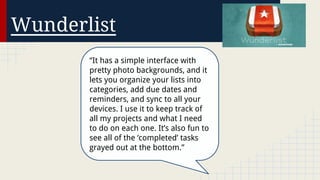
Wunderlist
“It has a simple interface with
pretty photo backgrounds, and it
lets you organize your lists into
categories, add due dates and
reminders, and sync to all your
devices. I use it to keep track of
all my projects and what I need
to do on each one. It’s also fun to
see all of the ‘completed’ tasks
grayed out at the bottom.”
Todo.ly
● Available as an iPad/iPhone app, Android app,
Chrome web app, and
via web browser
● Create projects and
subprojects, add due dates;
cross things off when
you’re done
● Simple, easy to use
interface
Todo.ly
“I like the color coding system
for prioritizing the to do list. It
also allows you to do projects
on the side bar, which helps
me track all the individual
projects that I am doing with
faculty. It also tracks the stuff
once it is checked off, so I use it
for my reports to the library to
keep track of what I have
done.”

“I like todo.ly because I can
easily pull it up on my phone
or any computer. At my job
I'm constantly moving around
and I can pull it up from any
location...including my iPhone.
I can also keep separate lists
for work and my personal life
(movie to-sees, grocery,
presents).”
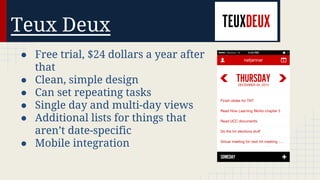
Teux Deux
● Free trial, $24 dollars a year after
that
● Clean, simple design
● Can set repeating tasks
● Single day and multi-day views
● Additional lists for things that
aren’t date-specific
● Mobile integration
Your turn!
What’s your favorite to-do list or task management
tool?
Trend: All things mobile!
● More Americans own
mobile devices than
ever before (91% own cell
phones; 56% own
smartphones).
● 34% of adult cell
users now go online mostly
on their phones, and not
on a laptop or desktop.
Source: Pew Internet and American Life Project (2013, Sept 18). Pew Internet: Mobile.
Retrieved from http://pewinternet.org/Commentary/2012/February/Pew-Internet-Mobile.aspx
Trend: All things mobile!
● Libraries are responding in a number of ways:
○ providing materials, such as ebooks and
magazines, through mobile platforms (ex.
Overdrive & Zinio)
○ providing training on how to use devices to
access library materials
○ upgrading library websites to more mobilefriendly platforms (ex. Bootstrap)
Trend: All things mobile!
What are some ways that your library has
adapted to the mobile device trend?
Trend: 3D printing!
● Have you ever used a 3D printer?
Trend: 3D printing!
● Does your library have a 3D printer?
Trend: 3D printing!
● But what place does a 3D printer have in a library?
○ Access to technology
○ Community space

● Things to consider
○
○
○
○

Will my users use a 3D printer?
What will they use it for?
How much money am I willing to spend?
Who will support 3D printing?
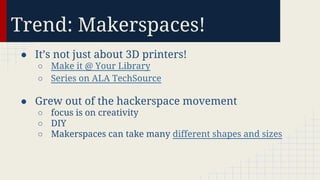
Trend: Makerspaces!
● It’s not just about 3D printers!
○ Make it @ Your Library
○ Series on ALA TechSource

● Grew out of the hackerspace movement
○ focus is on creativity
○ DIY
○ Makerspaces can take many different shapes and sizes
Thank you!
We’ll be sharing the recording and slides on our blog:

http://nclatechandtrends.wordpress.com/

Toptools2013

  • 1.
    TNT’s Favorite Tools andTrends of 2013 December 6, 2014 Beth Bernhardt, Beth Filar Williams, Kathy Shields
  • 2.
    BrowZine An easy andfamiliar way to browse, read and monitor scholarly journals across the disciplines. http://thirdiron.com/browzine/ ● Optimized for tablet devices ● Personal bookshelf of favorite journals ● Alerts when new editions are available
  • 3.
  • 4.
  • 5.
  • 6.
  • 7.
    Pixlr http://pixlr.com/ ● FREE, cloudbased, image creator & editor tool ● Flash based ● Mobile app (iOS or Android) ● Screen-grabbing tool (for FF or Chrome) Pixlr Grabber ● Share via imm.io (a one-click easy image sharer)
  • 8.
    htt p ://p ixl r.c om / Pixlr photo editor most used “photoshop-lite” imageexpress quick adjustments fun overlaps & effects vintage effects connects to FB mostly “fun”
  • 9.
  • 10.
    Feedly Google Reader isdead. Now what do I do? Use Feedly! Feedly is a news aggregator that is available as a mobile app for iOS and Android, and via web browsers such as Chrome and Firefox.
  • 11.
    Feedly: Key features ●Free; pro version available for $35/year ● Minimalist design ● Easily add URLs and RSS feeds and group them into categories ● Highly customizable - change the layout, color scheme, organization of posts, etc.
  • 12.
  • 13.
    Google Hangout My newfavorite way to hold virtual meetings! Source: http://inthecrowds.wordpress.com/tag/lincolnmovie/
  • 14.
    Google Hangout Things toknow: ● Need a Gmail/Google+ account ● Need to activate Google Hangouts ● Can be chat only, or can incorporate video (up to 10 video participants) ● Can embed other apps into your hangout, such as Google Drive and SlideShare
  • 15.
    How do youusually schedule meetings with your colleagues or your patrons?
  • 16.
    Schedule Once ● Onlinescheduling software ● Anyone can see when you’ re available and schedule a meeting with you ● Completely integrated with Google calendar
  • 17.
    Trello ● Web-based projectmanagement tool ○ Free but has options for upgrades ● Can be collaborative ● Main elements: ○ Cards ○ Lists (groups of cards) ○ Boards (groups of lists) ● Visual, flexible, intuitive
  • 18.
    Trello Trello is anincredibly flexible, highly visual tool for project management, task-tracking, and recording ideas. You can use it on your own or with a group. I use it to keep track of my personal workflow, break down tasks into steps, and to capture ideas for future projects. I started at a new institution and they use Trello for managing digitization project workflow. It's easy and intuitive - more structured than email or Google Docs but not overly burdensome...
  • 19.
  • 20.
    Wunderlist ● Free; proversion available ● Available for iOS, Windows, Android, Kindle, & web ● Create lists, tasks, and subtasks, set due dates & reminders ● Can attach files & notes to tasks ● customize background & layout (pro=more options)
  • 21.
    Wunderlist “It has asimple interface with pretty photo backgrounds, and it lets you organize your lists into categories, add due dates and reminders, and sync to all your devices. I use it to keep track of all my projects and what I need to do on each one. It’s also fun to see all of the ‘completed’ tasks grayed out at the bottom.”
  • 22.
    Todo.ly ● Available asan iPad/iPhone app, Android app, Chrome web app, and via web browser ● Create projects and subprojects, add due dates; cross things off when you’re done ● Simple, easy to use interface
  • 23.
    Todo.ly “I like thecolor coding system for prioritizing the to do list. It also allows you to do projects on the side bar, which helps me track all the individual projects that I am doing with faculty. It also tracks the stuff once it is checked off, so I use it for my reports to the library to keep track of what I have done.” “I like todo.ly because I can easily pull it up on my phone or any computer. At my job I'm constantly moving around and I can pull it up from any location...including my iPhone. I can also keep separate lists for work and my personal life (movie to-sees, grocery, presents).”
  • 24.
    Teux Deux ● Freetrial, $24 dollars a year after that ● Clean, simple design ● Can set repeating tasks ● Single day and multi-day views ● Additional lists for things that aren’t date-specific ● Mobile integration
  • 25.
    Your turn! What’s yourfavorite to-do list or task management tool?
  • 26.
    Trend: All thingsmobile! ● More Americans own mobile devices than ever before (91% own cell phones; 56% own smartphones). ● 34% of adult cell users now go online mostly on their phones, and not on a laptop or desktop. Source: Pew Internet and American Life Project (2013, Sept 18). Pew Internet: Mobile. Retrieved from http://pewinternet.org/Commentary/2012/February/Pew-Internet-Mobile.aspx
  • 27.
    Trend: All thingsmobile! ● Libraries are responding in a number of ways: ○ providing materials, such as ebooks and magazines, through mobile platforms (ex. Overdrive & Zinio) ○ providing training on how to use devices to access library materials ○ upgrading library websites to more mobilefriendly platforms (ex. Bootstrap)
  • 28.
    Trend: All thingsmobile! What are some ways that your library has adapted to the mobile device trend?
  • 29.
    Trend: 3D printing! ●Have you ever used a 3D printer?
  • 30.
    Trend: 3D printing! ●Does your library have a 3D printer?
  • 31.
    Trend: 3D printing! ●But what place does a 3D printer have in a library? ○ Access to technology ○ Community space ● Things to consider ○ ○ ○ ○ Will my users use a 3D printer? What will they use it for? How much money am I willing to spend? Who will support 3D printing?
  • 32.
    Trend: Makerspaces! ● It’snot just about 3D printers! ○ Make it @ Your Library ○ Series on ALA TechSource ● Grew out of the hackerspace movement ○ focus is on creativity ○ DIY ○ Makerspaces can take many different shapes and sizes
  • 33.
    Thank you! We’ll besharing the recording and slides on our blog: http://nclatechandtrends.wordpress.com/