Mark D. Puterbaugh
Information Services Librarian
Eastern University
Warner Memorial Library
St. Davids, PA
Desktop
Apache OpenOffice - http://www.openoffice.org
LibreOffice– http://www.libreoffice.org
KingstonSoft Office - http://www.kingsoftstore.com
Apache OpenOffice
This office suite is completely
free of any license fees.
Use on as many desktop systems
as desired.

Wide community support
through mailing lists and
forums.

Available for Windows, Macintosh and Linux.
What’s Inside!
•
•
•

•
•
•

Writer a word processor you can use for anything from writing a
quick letter to producing an entire book.
Calc a powerful spreadsheet with all the tools you need to
calculate, analyze, and present your data in numerical reports or
sizzling graphics.
Impress the fastest, most powerful way to create effective
multimedia presentations.
Draw lets you produce everything from simple diagrams to dynamic
3D illustrations.
Base lets you manipulate databases seamlessly. Create and modify
tables, forms, queries, and reports, all from within Apache
OpenOffice.
Math lets you create mathematical equations with a graphic user
interface or by directly typing your formulas into the equation
editor.

We’ll look at the basic suite of Writer, Calc and Impress.
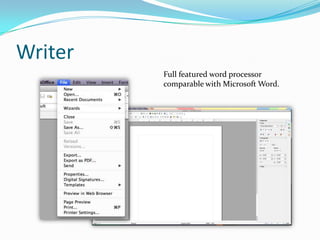
Writer
Full featured word processor
comparable with Microsoft Word.
Familiar Menus

Much like MS Office 2010!
Toolbars and Sidebars

Manipulate text as needed.
Drop Downs

Open save and export files in a wide variety of formats.
LibreOffice
The same but different.
LibreOffice was developed
from the same source code as
Open Office.
Versions are available cross
platform for
Windows, Macintosh and
Linux

Available for Windows, Macintosh and Linux.
Differences
 CMIS
 Firefox themes
 Improved compatibility
 Visio
 Microsoft Publisher
 Frequent updates
Suite Applications
Features the same applications as
OpenOffice, but with a slightly
different look and feel.
Boasts a slightly better
compatibility with MS Office.
Presentation Comparison

LibreOffice

Microsoft PowerPoint

OpenOffice
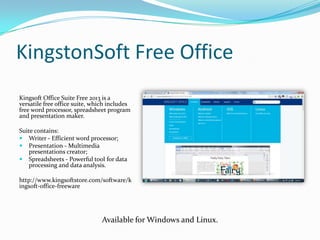
KingstonSoft Free Office
Kingsoft Office Suite Free 2013 is a
versatile free office suite, which includes
free word processor, spreadsheet program
and presentation maker.
Suite contains:
 Writer - Efficient word processor;
 Presentation - Multimedia
presentations creator;
 Spreadsheets - Powerful tool for data
processing and data analysis.
http://www.kingsoftstore.com/software/k
ingsoft-office-freeware

Available for Windows and Linux.
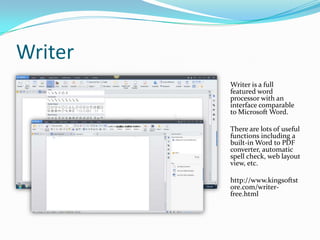
Writer
Writer is a full
featured word
processor with an
interface comparable
to Microsoft Word.
There are lots of useful
functions including a
built-in Word to PDF
converter, automatic
spell check, web layout
view, etc.
http://www.kingsoftst
ore.com/writerfree.html
Interoperability
Work with data, text
and graphics across
applications
Presentation

 The free presentation software allows you to quickly and

easily create professional and dynamic slide shows.
 It offers a wide range of easy to use features with simple
navigation, clearly set-out toolbar and user friendly interface.
Features
 Wide choice of
 Templates
 Editing
 Transitions
Interface
Top a side menus
provide access to all the
features.
Compatibility
Compared with other alternatives
there is very little loss in
compatibility.

KingstonSoft Free Office

Microsoft PowerPoint
Spreadsheets
This is a feature rich
application for creating any
type of spreadsheet.
Tool Bar Options

All the basic toolbars and functions for creating a spreadsheet.
Configurable Interface
Options to access tools
in different
configurations.
Graphs and Charts

Spreadsheets offers a wide variety of graphical options.
Save and Export
Save or Export in
an array of
formats
including:
 .xls
 .odf
 .pdf
 Many more!
Pros and Cons
 Pros
 Cost (These are free!)
 Fulfills the needs of most users.
 Transportable to other platforms.
 Cons
 Compatibility Issues
 Updates
 Some advanced features may carry a cost.

MS Office Alternatives - Lesson 2 (Desktop)

  • 1.
    Mark D. Puterbaugh InformationServices Librarian Eastern University Warner Memorial Library St. Davids, PA
  • 2.
    Desktop Apache OpenOffice -http://www.openoffice.org LibreOffice– http://www.libreoffice.org KingstonSoft Office - http://www.kingsoftstore.com
  • 3.
    Apache OpenOffice This officesuite is completely free of any license fees. Use on as many desktop systems as desired. Wide community support through mailing lists and forums. Available for Windows, Macintosh and Linux.
  • 4.
    What’s Inside! • • • • • • Writer aword processor you can use for anything from writing a quick letter to producing an entire book. Calc a powerful spreadsheet with all the tools you need to calculate, analyze, and present your data in numerical reports or sizzling graphics. Impress the fastest, most powerful way to create effective multimedia presentations. Draw lets you produce everything from simple diagrams to dynamic 3D illustrations. Base lets you manipulate databases seamlessly. Create and modify tables, forms, queries, and reports, all from within Apache OpenOffice. Math lets you create mathematical equations with a graphic user interface or by directly typing your formulas into the equation editor. We’ll look at the basic suite of Writer, Calc and Impress.
  • 5.
    Writer Full featured wordprocessor comparable with Microsoft Word.
  • 6.
    Familiar Menus Much likeMS Office 2010!
  • 7.
  • 8.
    Drop Downs Open saveand export files in a wide variety of formats.
  • 9.
    LibreOffice The same butdifferent. LibreOffice was developed from the same source code as Open Office. Versions are available cross platform for Windows, Macintosh and Linux Available for Windows, Macintosh and Linux.
  • 10.
    Differences  CMIS  Firefoxthemes  Improved compatibility  Visio  Microsoft Publisher  Frequent updates
  • 11.
    Suite Applications Features thesame applications as OpenOffice, but with a slightly different look and feel. Boasts a slightly better compatibility with MS Office.
  • 12.
  • 13.
    KingstonSoft Free Office KingsoftOffice Suite Free 2013 is a versatile free office suite, which includes free word processor, spreadsheet program and presentation maker. Suite contains:  Writer - Efficient word processor;  Presentation - Multimedia presentations creator;  Spreadsheets - Powerful tool for data processing and data analysis. http://www.kingsoftstore.com/software/k ingsoft-office-freeware Available for Windows and Linux.
  • 14.
    Writer Writer is afull featured word processor with an interface comparable to Microsoft Word. There are lots of useful functions including a built-in Word to PDF converter, automatic spell check, web layout view, etc. http://www.kingsoftst ore.com/writerfree.html
  • 15.
    Interoperability Work with data,text and graphics across applications
  • 16.
    Presentation  The freepresentation software allows you to quickly and easily create professional and dynamic slide shows.  It offers a wide range of easy to use features with simple navigation, clearly set-out toolbar and user friendly interface.
  • 17.
    Features  Wide choiceof  Templates  Editing  Transitions
  • 18.
    Interface Top a sidemenus provide access to all the features.
  • 19.
    Compatibility Compared with otheralternatives there is very little loss in compatibility. KingstonSoft Free Office Microsoft PowerPoint
  • 20.
    Spreadsheets This is afeature rich application for creating any type of spreadsheet.
  • 21.
    Tool Bar Options Allthe basic toolbars and functions for creating a spreadsheet.
  • 22.
    Configurable Interface Options toaccess tools in different configurations.
  • 23.
    Graphs and Charts Spreadsheetsoffers a wide variety of graphical options.
  • 24.
    Save and Export Saveor Export in an array of formats including:  .xls  .odf  .pdf  Many more!
  • 25.
    Pros and Cons Pros  Cost (These are free!)  Fulfills the needs of most users.  Transportable to other platforms.  Cons  Compatibility Issues  Updates  Some advanced features may carry a cost.