Introduction to Libre Office
Corrections, suggestions, contributions are welcome
KIRAN A R
(9633771462)
What is Microsoft 365…?
• Microsoft 365 (formerly Office 365) is a Microsoft Cloud subscription
service that includes Microsoft Office products (Word, Excel,
PowerPoint, OneNote, Outlook, Publisher, and Access). The software
can be installed across multiple devices and ensures that users
always have the most up-to-date…
WHAT IS LIBRE OFFICE ..?
LibreOffice is a freely available, fully-featured
office productivity suite.
Its native file format is Open Document
Format (ODF), an open standard format that
is being adopted by governments worldwide
as a required file format for publishing and
accepting documents.
LibreOffice can also open and save
documents in many other formats, including
those used by several versions of Microsoft
Office.
LIBRE Office Vs Office 365
Writer – Word processing program
Calc – Spreadsheet program
Impress – Presentation program
MS Word
MS Excel
MS PowerPoint
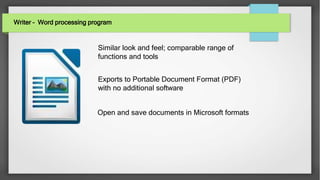
Writer – Word processing program
Open and save documents in Microsoft formats
Similar look and feel; comparable range of
functions and tools
Exports to Portable Document Format (PDF)
with no additional software
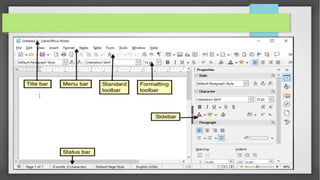
LIBRE OFFICE WRITER (WORD PROCESSOR)
• Writer (MS Word equivalent) → Writer is a feature-rich tool for creating
• Letters
• Books
• Reports
• Newsletters
• Brochures and other documents.
• Writer can export files to HTML, XHTML, XML, Adobe Portable Document Format (PDF),
and several versions of Microsoft Word files. It also connects to your email client.
• You can do mail merge ,insert tables, graphics and objects from other components into
Writer documents.
Calc – Spreadsheet program
Similar look and feel; comparable range of
functions and tools
Support for advanced VBA macros
Exports to PDF; open and saves documents in
Microsoft formats
LIBRE OFFICE CALC (CREATES SPREADSHEET)
Calc (MS Excel) → Calc has all of the advanced analysis, charting, and decision making features
expected from a high-end spreadsheet. It includes over 300 functions for financial, statistical, and
mathematical operations, among others.
Piviot Tables
2D & 3D Charts which can be integrated into other LibreOffice documents
Graph
Formulas
Macros
Scenario Manager providing “what if” analysis.
Multiple Sheets etc.
We can also open and work with Microsoft Excel workbooks and save them in Excel format. Calc
can also export spreadsheets in several formats, including for example Comma Separated
Value (CSV), Adobe PDF and HTML formats.
Impress – Presentation program
Export presentations to Adobe Flash (SWF)
files
Exports to PDF; opens and save presentations
in Microsoft formats
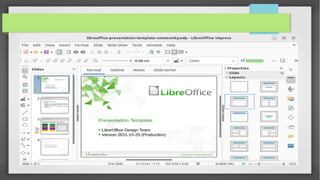
LIBRE OFFICE IMPRESS (CREATE PRESENTATIONS)
• Impress(MS Powerpoint) → provides all the common multimedia presentation tools, such as
special effects, animation, and drawing tools. It is integrated with the advanced graphics
capabilities of LibreOffice Draw and Math components. Slideshows can be further enhanced
using Fontwork special effects text, as well as sound and video clips.
• Graphics Tables
• Media Objects
• Notes Handouts
• Impress is compatible with Microsoft PowerPoint file format and can also save your work
in numerous graphics formats, including Macromedia Flash (SWF) and not to forget
PDF
Base – Database program
Draw – Drawing program
Math – Creating and editing mathematical
formula
LIBRE OFFICE BASE (CREATE DATABASES)
• Base(MS Access) → provides tools for day-to-day database work within a simple interface.
• create and edit forms reports,
queries
• tables, views, and relations
• managing a relational database is much the same as in other popular database applications ability to
analyze and edit relationships from a diagram view
• Base incorporates HSQLDB as its default relational database engine.
• It can also use dBASE, Microsoft Access, MySQL, or Oracle, or any ODBC compliant or
JDBC compliant database. Base also provides support for a subset of ANSI-92 SQL.
LIBRE OFFICE DRAW (VECTOR GRAPHICS)
Draw → is a vector drawing tool that can produce
• simple diagrams Flowcharts
• 3D artwork
• Its Smart Connectors feature allows you to define your own connection points can use Draw to
create drawings for use in any of the LibreOffice components can create your own clip art then
add it to the Gallery
• Draw can import graphics from many common formats and save them in over 20
formats, including PNG, HTML, PDF, and Flash.
LIBRE OFFICE MATH (FORMULA EDITOR)
● Math → is the LibreOffice formula or equation editor. You can use it to create complex equations
that include symbols or characters not available in standard font sets. While it is most commonly
used to create formulae in other documents, such as Writer and Impress files, Math can also work
as a standalone tool.
●
You can save formulae in the standard Mathematical Markup Language (MathML) format for
inclusion in web pages and other documents not created by LibreOffice.
ADVANTAGES OF LIBRE OFFICE OVER OTHER OFFICE SUITES
No licensing fees → LibreOffice is free for anyone to use and distribute at no cost. Many features
that are available as extra cost add-ins in other office suites (like PDF export) are free with
LibreOffice. There are no hidden charges now or in the future.
Open source → You can distribute, copy, and modify the software as much as you wish, in
accordance with either of the LibreOffice Open Source licenses.
Cross-platform → LibreOffice runs on several hardware architectures and under multiple
operating systems, such as Microsoft Windows, Mac OS X and Linux.
Extensive language support → available in over 40 languages and the LibreOffice project
provides spelling, hyphenation, and thesaurus dictionaries in over 70 languages and dialects.
Complex Text Layout (CTL) and Right to Left (RTL) layout languages (such as Urdu, Hebrew, and
Arabic).
Consistent user interface → All the components have a similar “look and feel,” making them easy
to use and master.
ADVANTAGES OF LIBRE OFFICE OVER OTHER OFFICE SUITES
File compatibility → In addition to its native OpenDocument formats, LibreOffice includes PDF,
and Flash export capabilities, as well as support for opening and saving files in many common
formats including Microsoft Office, HTML, XML, WordPerfect, and Lotus 1-2-3 formats. An
extension (included) provides the ability to import and edit some PDF files.
No vendor lock-in → LibreOffice uses OpenDocument, an XML (eXtensible Markup Language)
file format developed as an industry standard by OASIS (Organization for the Advancement
of Structured Information Standards).
You have a voice → Enhancements, software fixes, and release dates are community-driven. You
can join the community and affect the course of the product you use.
Bundled with most of the Linux Distribution by Default
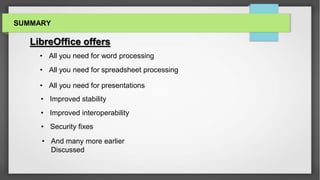
SUMMARY
LibreOffice offers
• And many more earlier
Discussed
• All you need for spreadsheet processing
• All you need for word processing
• All you need for presentations
• Improved stability
• Improved interoperability
• Security fixes
THANKS FOR YOU TIME.........!

introduction to linux libre office.pptx

  • 1.
    Introduction to LibreOffice Corrections, suggestions, contributions are welcome KIRAN A R (9633771462)
  • 2.
    What is Microsoft365…? • Microsoft 365 (formerly Office 365) is a Microsoft Cloud subscription service that includes Microsoft Office products (Word, Excel, PowerPoint, OneNote, Outlook, Publisher, and Access). The software can be installed across multiple devices and ensures that users always have the most up-to-date…
  • 3.
    WHAT IS LIBREOFFICE ..? LibreOffice is a freely available, fully-featured office productivity suite. Its native file format is Open Document Format (ODF), an open standard format that is being adopted by governments worldwide as a required file format for publishing and accepting documents. LibreOffice can also open and save documents in many other formats, including those used by several versions of Microsoft Office.
  • 4.
    LIBRE Office VsOffice 365 Writer – Word processing program Calc – Spreadsheet program Impress – Presentation program MS Word MS Excel MS PowerPoint
  • 5.
    Writer – Wordprocessing program Open and save documents in Microsoft formats Similar look and feel; comparable range of functions and tools Exports to Portable Document Format (PDF) with no additional software
  • 6.
    LIBRE OFFICE WRITER(WORD PROCESSOR) • Writer (MS Word equivalent) → Writer is a feature-rich tool for creating • Letters • Books • Reports • Newsletters • Brochures and other documents. • Writer can export files to HTML, XHTML, XML, Adobe Portable Document Format (PDF), and several versions of Microsoft Word files. It also connects to your email client. • You can do mail merge ,insert tables, graphics and objects from other components into Writer documents.
  • 8.
    Calc – Spreadsheetprogram Similar look and feel; comparable range of functions and tools Support for advanced VBA macros Exports to PDF; open and saves documents in Microsoft formats
  • 9.
    LIBRE OFFICE CALC(CREATES SPREADSHEET) Calc (MS Excel) → Calc has all of the advanced analysis, charting, and decision making features expected from a high-end spreadsheet. It includes over 300 functions for financial, statistical, and mathematical operations, among others. Piviot Tables 2D & 3D Charts which can be integrated into other LibreOffice documents Graph Formulas Macros Scenario Manager providing “what if” analysis. Multiple Sheets etc. We can also open and work with Microsoft Excel workbooks and save them in Excel format. Calc can also export spreadsheets in several formats, including for example Comma Separated Value (CSV), Adobe PDF and HTML formats.
  • 11.
    Impress – Presentationprogram Export presentations to Adobe Flash (SWF) files Exports to PDF; opens and save presentations in Microsoft formats
  • 12.
    LIBRE OFFICE IMPRESS(CREATE PRESENTATIONS) • Impress(MS Powerpoint) → provides all the common multimedia presentation tools, such as special effects, animation, and drawing tools. It is integrated with the advanced graphics capabilities of LibreOffice Draw and Math components. Slideshows can be further enhanced using Fontwork special effects text, as well as sound and video clips. • Graphics Tables • Media Objects • Notes Handouts • Impress is compatible with Microsoft PowerPoint file format and can also save your work in numerous graphics formats, including Macromedia Flash (SWF) and not to forget PDF
  • 14.
    Base – Databaseprogram Draw – Drawing program Math – Creating and editing mathematical formula
  • 15.
    LIBRE OFFICE BASE(CREATE DATABASES) • Base(MS Access) → provides tools for day-to-day database work within a simple interface. • create and edit forms reports, queries • tables, views, and relations • managing a relational database is much the same as in other popular database applications ability to analyze and edit relationships from a diagram view • Base incorporates HSQLDB as its default relational database engine. • It can also use dBASE, Microsoft Access, MySQL, or Oracle, or any ODBC compliant or JDBC compliant database. Base also provides support for a subset of ANSI-92 SQL.
  • 16.
    LIBRE OFFICE DRAW(VECTOR GRAPHICS) Draw → is a vector drawing tool that can produce • simple diagrams Flowcharts • 3D artwork • Its Smart Connectors feature allows you to define your own connection points can use Draw to create drawings for use in any of the LibreOffice components can create your own clip art then add it to the Gallery • Draw can import graphics from many common formats and save them in over 20 formats, including PNG, HTML, PDF, and Flash.
  • 17.
    LIBRE OFFICE MATH(FORMULA EDITOR) ● Math → is the LibreOffice formula or equation editor. You can use it to create complex equations that include symbols or characters not available in standard font sets. While it is most commonly used to create formulae in other documents, such as Writer and Impress files, Math can also work as a standalone tool. ● You can save formulae in the standard Mathematical Markup Language (MathML) format for inclusion in web pages and other documents not created by LibreOffice.
  • 18.
    ADVANTAGES OF LIBREOFFICE OVER OTHER OFFICE SUITES No licensing fees → LibreOffice is free for anyone to use and distribute at no cost. Many features that are available as extra cost add-ins in other office suites (like PDF export) are free with LibreOffice. There are no hidden charges now or in the future. Open source → You can distribute, copy, and modify the software as much as you wish, in accordance with either of the LibreOffice Open Source licenses. Cross-platform → LibreOffice runs on several hardware architectures and under multiple operating systems, such as Microsoft Windows, Mac OS X and Linux. Extensive language support → available in over 40 languages and the LibreOffice project provides spelling, hyphenation, and thesaurus dictionaries in over 70 languages and dialects. Complex Text Layout (CTL) and Right to Left (RTL) layout languages (such as Urdu, Hebrew, and Arabic). Consistent user interface → All the components have a similar “look and feel,” making them easy to use and master.
  • 19.
    ADVANTAGES OF LIBREOFFICE OVER OTHER OFFICE SUITES File compatibility → In addition to its native OpenDocument formats, LibreOffice includes PDF, and Flash export capabilities, as well as support for opening and saving files in many common formats including Microsoft Office, HTML, XML, WordPerfect, and Lotus 1-2-3 formats. An extension (included) provides the ability to import and edit some PDF files. No vendor lock-in → LibreOffice uses OpenDocument, an XML (eXtensible Markup Language) file format developed as an industry standard by OASIS (Organization for the Advancement of Structured Information Standards). You have a voice → Enhancements, software fixes, and release dates are community-driven. You can join the community and affect the course of the product you use. Bundled with most of the Linux Distribution by Default
  • 20.
    SUMMARY LibreOffice offers • Andmany more earlier Discussed • All you need for spreadsheet processing • All you need for word processing • All you need for presentations • Improved stability • Improved interoperability • Security fixes
  • 21.
    THANKS FOR YOUTIME.........!