
ASSIGNMENT 6 | Affinity Diagram
I 543 Interaction Design Method | Zan Morris, Melissa Tang
CONTENTS
CONTENTS Page
Summary of Insights 1 - 3
Design Concepts 4 - 8
Critiques of Affinity Diagram 9 - 11
1
INSIGHTS
Summary of
Date: March 2, 2014
To analyze the data collected from contextual inquiry
for “everyday design“ problem space, we use Affinity
Diagram to help us capture research-backed insights,
observations, concerns, or requirements on individual
post-it notes, so that the design implication of each can
be fully considered on its own. Here is the summary of
insights that we generated from Affinity Diagram:
SUMMARY:
From our initial pass, we discovered a grouping of
Constraints, Motivations, Aesthetics and Process all
which tie directly into their understanding (or mental
model) of the DIY projects. All of these concerns must
be carefully weighed and acted upon for a project to
be successful. In addition, we found their actions to be
grounded in a very caring and human love for family,
animals, and guests. These are clearly very welcoming
and friendly people who go a long way to make their environment cozy and inviting. Their relationships with family
as well as each other have directly shaped their goals and values, and remain an integral part of their daily lives.
Affinity DiagramI 543 Interaction Design Method | | Zan Morris, Melissa Tang
2
INSIGHTS
Summary of
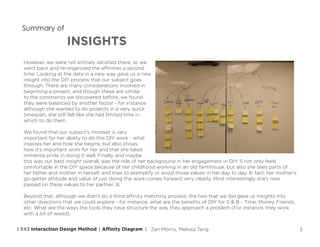
However, we were not entirely satisfied there, so we
went back and re-organized the affinities a second
time. Looking at the data in a new way gave us a new
insight into the DIY process that our subject goes
through. There are many considerations involved in
beginning a project, and though these are similar
to the constraints we discovered before, we found
they were balanced by another factor - for instance
although she wanted to do projects in a very quick
timespan, she still felt like she had limited time in
which to do them.
We found that our subject’s mindset is very
important for her ability to do this DIY work - what
inspires her and how she begins, but also shows
how it’s important work for her and that she takes
immense pride in doing it well. Finally, and maybe
this was our best insight overall, was the role of her background in her engagement in DIY. S not only feels
comfortable in the DIY space because of her childhood working in an old farmhouse, but also she sees parts of
her father and mother in herself, and tries to exemplify or avoid those values in her day to day. In fact, her mother’s
go-getter attitude and value of just doing the work comes forward very clearly. Most interestingly she’s now
passed on these values to her partner, B.
Beyond that, although we didn’t do a third affinity matching process, the two that we did gave us insights into
other directions that we could explore - for instance, what are the benefits of DIY for S & B - Time, Money, Friends,
etc. What are the ways the tools they have structure the way they approach a problem (For instance, they work
with a lot of wood).
Affinity DiagramI 543 Interaction Design Method | | Zan Morris, Melissa Tang
3
INSIGHTS
Summary of
Insights:
1. People need courage to start the first step in a process.
2. Plan before collecting material and doing projects.
3. Everyday design needs understanding and support from family and friends.
4. People’s history plays directly into who they are and what they can teach us.
5. Perfectionism is the enemy of starting a big project.
6. Ideas come from everywhere, and can be placed in any location in our lives
7. DIY spirit is usually passed from family to family.
Affinity DiagramI 543 Interaction Design Method | | Zan Morris, Melissa Tang
4
CONCEPTS
Design
1. DIY Scanner
Device/Phone app that allows you
to scan a physical object, and then
apply DIY-esque changes to it.
This could be in the form of paints,
textures, adding or subtracting
surfaces, combining, etc. This tool
would allow users to quickly and
easily see what potential edits might
look like - and it could give them the
read-out of necessary supplies for
the process. Also, user can choose
to record their hacking process and
make it a tutorial for others to learn.
Affinity DiagramI 543 Interaction Design Method | | Zan Morris, Melissa Tang
5
CONCEPTS
Design
2. Genealogy of Skills
Something like Ancestry.com but
for skills? We pass down our skills
and knowledge from one person
to the next, and over time this can
been seen as a kind of “Tree of
Knowledge”. Clearly it’d be hard to
go back in time and figure out who
learned what from whom in the past,
but if people were to list skills and
abilities by those who helped them
gain it, we could map the spread of
knowledge across the world.
Affinity DiagramI 543 Interaction Design Method | | Zan Morris, Melissa Tang
DIY Genealogy
6
CONCEPTS
Design
3. In Context Reminders
With the power of the internet of
things and a simple schedule system,
we can create a powerful way to
remind ourselves to do simple
tasks - in the current setting, we
have a nice schedule, but are only
reminded when we are looking at
our calendars. What if each thing
had an LED, or Buzzer, or even
displayed a full message reminding
you of what you needed to do while
you were looking at it? Your fence
could remind you to shovel the snow
because guests were coming over, or
your chest could blink at you when
the catbox inside became too dirty.
Affinity DiagramI 543 Interaction Design Method | | Zan Morris, Melissa Tang
7
CONCEPTS
Design
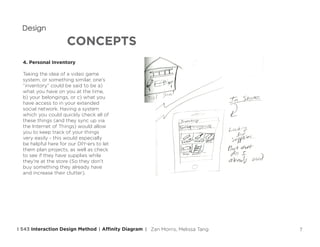
4. Personal Inventory
Taking the idea of a video game
system, or something similar, one’s
“inventory” could be said to be a)
what you have on you at the time,
b) your belongings, or c) what you
have access to in your extended
social network. Having a system
which you could quickly check all of
these things (and they sync up via
the Internet of Things) would allow
you to keep track of your things
very easily - this would especially
be helpful here for our DIY-ers to let
them plan projects, as well as check
to see if they have supplies while
they’re at the store (So they don’t
buy something they already have
and increase their clutter).
Affinity DiagramI 543 Interaction Design Method | | Zan Morris, Melissa Tang
8
CONCEPTS
Design
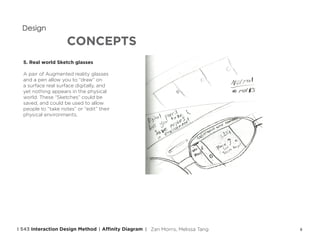
5. Real world Sketch glasses
A pair of Augmented reality glasses
and a pen allow you to “draw” on
a surface real surface digitally, and
yet nothing appears in the physical
world. These “Sketches” could be
saved, and could be used to allow
people to “take notes” or “edit” their
physical environments.
Affinity DiagramI 543 Interaction Design Method | | Zan Morris, Melissa Tang
9
AFFINITY DIAGRAM
Critiques of
What works? What doesn’t?
Affinity diagram helps us to organize our thinking and
communicate with teammates about our observations.
We wrote post-it notes separately without discussion.
By leveraging our independent observations, when we
come back together and discuss, the differing viewpoints
will lead to new insights. The form of doing it on post-
it notes is very useful since it allows for quick changes
and movement of the ideas - but it’s also a fun process!
Hunting through and trying new combinations is exciting,
and throughout the entire process new patterns are
always emerging. It was especially neat to go back
through a second time to find a completely different
reading of the data.
Its use clearly depends on the type and amount of data generated - we feel that if the data was very small it
would be hard to play much with it and find those new connections. However, if the data was too large, you
couldn’t reasonably sort it in a meaningful way (Although you could break it up into pieces, perhaps).
Affinity DiagramI 543 Interaction Design Method | | Zan Morris, Melissa Tang
10
AFFINITY DIAGRAM
Critiques of
Also, we understand the affinity diagram to be
done to use all of the post-it note insights to
generate a full overview - but we found this to be a
bit awkward. Single notes would emerge that didn’t
really have a place, and though the idea is to find the
hidden connections, it made more sense to complete
the “tree” we were working on, and then re-do the
data completely in another tree. In this manner our
observations have been used multiple times and
interpreted in different ways, but without somehow
forcing them to fit into categories to which they don’t
really belong.
Because one of the best strengths of the affinity diagram
is the combination of viewpoints and re-structuring of
insights within a team, it seems like it would be less useful for a single designer to do. Not impossible or useless,
certainly, as you can still play with the pieces of data and find new connections - but we feel that the methods
thrives in a team setting.
It can be hard to gauge the relative value of each of the steps for the participants. While we may have five or
six large important looking groups, some of the deeper insights that the team discovered may actually be less
important to people than the surface level problems.
Finally, compared to the Elito method, we feel like we gained a deeper understanding of the space and of the
subjects - but we also found it harder to concept compared to the linear brute force method. Perhaps a synthesis
of both methods could be very useful!
Affinity DiagramI 543 Interaction Design Method | | Zan Morris, Melissa Tang
11
AFFINITY DIAGRAM
Critiques of
o What kind of insights can be generated?
Affinity Diagram is a bottom-up technique. Comparing to top-down technique, it’s more objective. Because the
insights are generated from observations. The patterns and themes are derived from raw data. Affinity Diagram
can provide more voices of participants in our design.
o What kind of insights does this technique fail to provide?
Since affinity diagram relies on data. The insights we can gain depend entirely on our research, what we’re
studying, and what kind of notes we take when doing our affinity diagram. So if we miss some important
information, we would fail to generate insights from the diagram.
Affinity DiagramI 543 Interaction Design Method | | Zan Morris, Melissa Tang

Interaction Design Method - Affinity Diagram

  • 1.
    ASSIGNMENT 6 |Affinity Diagram I 543 Interaction Design Method | Zan Morris, Melissa Tang
  • 2.
    CONTENTS CONTENTS Page Summary ofInsights 1 - 3 Design Concepts 4 - 8 Critiques of Affinity Diagram 9 - 11
  • 3.
    1 INSIGHTS Summary of Date: March2, 2014 To analyze the data collected from contextual inquiry for “everyday design“ problem space, we use Affinity Diagram to help us capture research-backed insights, observations, concerns, or requirements on individual post-it notes, so that the design implication of each can be fully considered on its own. Here is the summary of insights that we generated from Affinity Diagram: SUMMARY: From our initial pass, we discovered a grouping of Constraints, Motivations, Aesthetics and Process all which tie directly into their understanding (or mental model) of the DIY projects. All of these concerns must be carefully weighed and acted upon for a project to be successful. In addition, we found their actions to be grounded in a very caring and human love for family, animals, and guests. These are clearly very welcoming and friendly people who go a long way to make their environment cozy and inviting. Their relationships with family as well as each other have directly shaped their goals and values, and remain an integral part of their daily lives. Affinity DiagramI 543 Interaction Design Method | | Zan Morris, Melissa Tang
  • 4.
    2 INSIGHTS Summary of However, wewere not entirely satisfied there, so we went back and re-organized the affinities a second time. Looking at the data in a new way gave us a new insight into the DIY process that our subject goes through. There are many considerations involved in beginning a project, and though these are similar to the constraints we discovered before, we found they were balanced by another factor - for instance although she wanted to do projects in a very quick timespan, she still felt like she had limited time in which to do them. We found that our subject’s mindset is very important for her ability to do this DIY work - what inspires her and how she begins, but also shows how it’s important work for her and that she takes immense pride in doing it well. Finally, and maybe this was our best insight overall, was the role of her background in her engagement in DIY. S not only feels comfortable in the DIY space because of her childhood working in an old farmhouse, but also she sees parts of her father and mother in herself, and tries to exemplify or avoid those values in her day to day. In fact, her mother’s go-getter attitude and value of just doing the work comes forward very clearly. Most interestingly she’s now passed on these values to her partner, B. Beyond that, although we didn’t do a third affinity matching process, the two that we did gave us insights into other directions that we could explore - for instance, what are the benefits of DIY for S & B - Time, Money, Friends, etc. What are the ways the tools they have structure the way they approach a problem (For instance, they work with a lot of wood). Affinity DiagramI 543 Interaction Design Method | | Zan Morris, Melissa Tang
  • 5.
    3 INSIGHTS Summary of Insights: 1. Peopleneed courage to start the first step in a process. 2. Plan before collecting material and doing projects. 3. Everyday design needs understanding and support from family and friends. 4. People’s history plays directly into who they are and what they can teach us. 5. Perfectionism is the enemy of starting a big project. 6. Ideas come from everywhere, and can be placed in any location in our lives 7. DIY spirit is usually passed from family to family. Affinity DiagramI 543 Interaction Design Method | | Zan Morris, Melissa Tang
  • 6.
    4 CONCEPTS Design 1. DIY Scanner Device/Phoneapp that allows you to scan a physical object, and then apply DIY-esque changes to it. This could be in the form of paints, textures, adding or subtracting surfaces, combining, etc. This tool would allow users to quickly and easily see what potential edits might look like - and it could give them the read-out of necessary supplies for the process. Also, user can choose to record their hacking process and make it a tutorial for others to learn. Affinity DiagramI 543 Interaction Design Method | | Zan Morris, Melissa Tang
  • 7.
    5 CONCEPTS Design 2. Genealogy ofSkills Something like Ancestry.com but for skills? We pass down our skills and knowledge from one person to the next, and over time this can been seen as a kind of “Tree of Knowledge”. Clearly it’d be hard to go back in time and figure out who learned what from whom in the past, but if people were to list skills and abilities by those who helped them gain it, we could map the spread of knowledge across the world. Affinity DiagramI 543 Interaction Design Method | | Zan Morris, Melissa Tang DIY Genealogy
  • 8.
    6 CONCEPTS Design 3. In ContextReminders With the power of the internet of things and a simple schedule system, we can create a powerful way to remind ourselves to do simple tasks - in the current setting, we have a nice schedule, but are only reminded when we are looking at our calendars. What if each thing had an LED, or Buzzer, or even displayed a full message reminding you of what you needed to do while you were looking at it? Your fence could remind you to shovel the snow because guests were coming over, or your chest could blink at you when the catbox inside became too dirty. Affinity DiagramI 543 Interaction Design Method | | Zan Morris, Melissa Tang
  • 9.
    7 CONCEPTS Design 4. Personal Inventory Takingthe idea of a video game system, or something similar, one’s “inventory” could be said to be a) what you have on you at the time, b) your belongings, or c) what you have access to in your extended social network. Having a system which you could quickly check all of these things (and they sync up via the Internet of Things) would allow you to keep track of your things very easily - this would especially be helpful here for our DIY-ers to let them plan projects, as well as check to see if they have supplies while they’re at the store (So they don’t buy something they already have and increase their clutter). Affinity DiagramI 543 Interaction Design Method | | Zan Morris, Melissa Tang
  • 10.
    8 CONCEPTS Design 5. Real worldSketch glasses A pair of Augmented reality glasses and a pen allow you to “draw” on a surface real surface digitally, and yet nothing appears in the physical world. These “Sketches” could be saved, and could be used to allow people to “take notes” or “edit” their physical environments. Affinity DiagramI 543 Interaction Design Method | | Zan Morris, Melissa Tang
  • 11.
    9 AFFINITY DIAGRAM Critiques of Whatworks? What doesn’t? Affinity diagram helps us to organize our thinking and communicate with teammates about our observations. We wrote post-it notes separately without discussion. By leveraging our independent observations, when we come back together and discuss, the differing viewpoints will lead to new insights. The form of doing it on post- it notes is very useful since it allows for quick changes and movement of the ideas - but it’s also a fun process! Hunting through and trying new combinations is exciting, and throughout the entire process new patterns are always emerging. It was especially neat to go back through a second time to find a completely different reading of the data. Its use clearly depends on the type and amount of data generated - we feel that if the data was very small it would be hard to play much with it and find those new connections. However, if the data was too large, you couldn’t reasonably sort it in a meaningful way (Although you could break it up into pieces, perhaps). Affinity DiagramI 543 Interaction Design Method | | Zan Morris, Melissa Tang
  • 12.
    10 AFFINITY DIAGRAM Critiques of Also,we understand the affinity diagram to be done to use all of the post-it note insights to generate a full overview - but we found this to be a bit awkward. Single notes would emerge that didn’t really have a place, and though the idea is to find the hidden connections, it made more sense to complete the “tree” we were working on, and then re-do the data completely in another tree. In this manner our observations have been used multiple times and interpreted in different ways, but without somehow forcing them to fit into categories to which they don’t really belong. Because one of the best strengths of the affinity diagram is the combination of viewpoints and re-structuring of insights within a team, it seems like it would be less useful for a single designer to do. Not impossible or useless, certainly, as you can still play with the pieces of data and find new connections - but we feel that the methods thrives in a team setting. It can be hard to gauge the relative value of each of the steps for the participants. While we may have five or six large important looking groups, some of the deeper insights that the team discovered may actually be less important to people than the surface level problems. Finally, compared to the Elito method, we feel like we gained a deeper understanding of the space and of the subjects - but we also found it harder to concept compared to the linear brute force method. Perhaps a synthesis of both methods could be very useful! Affinity DiagramI 543 Interaction Design Method | | Zan Morris, Melissa Tang
  • 13.
    11 AFFINITY DIAGRAM Critiques of oWhat kind of insights can be generated? Affinity Diagram is a bottom-up technique. Comparing to top-down technique, it’s more objective. Because the insights are generated from observations. The patterns and themes are derived from raw data. Affinity Diagram can provide more voices of participants in our design. o What kind of insights does this technique fail to provide? Since affinity diagram relies on data. The insights we can gain depend entirely on our research, what we’re studying, and what kind of notes we take when doing our affinity diagram. So if we miss some important information, we would fail to generate insights from the diagram. Affinity DiagramI 543 Interaction Design Method | | Zan Morris, Melissa Tang