Data weave
Data weave
• The DataWeave Language is a powerful template engine that allows
you to transform data to and from any kind of format (XML, CSV,
JSON, Pojos, Maps, etc).
Data weave Structure
DataWeave files are divided into two main sections:
• The Header, which defines directives (optional)
• The Body, which describes the output structure
Header
The DataWeave header contains the directives, which define high level
information about your transformation. The structure of the Header is a
sequence of lines, each with its own Directives. The Header is terminated
with '---'.
Through directives you can define:
• DataWeave version
• Input types and sources
• Output type
• Namespaces to import into your transform
• Constants that can be referenced throughout the body
• Functions that can be called throughout the body
Body
• The body contains the expression that generates the output
structure. Regardless of the types of the input and output, the data
model for the output is always described in the standard DataWeave
language, and this model that the transform executes.
• The data model of the produced output can consist of three different
types of data:
• Objects: Represented as collection of key value pairs
• Arrays: Represented as a sequence of comma separated values
• Simple literals
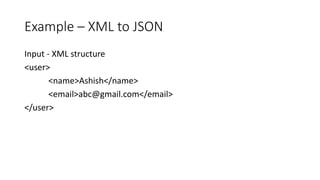
Example – XML to JSON
Input - XML structure
<user>
<name>Ashish</name>
<email>abc@gmail.com</email>
</user>
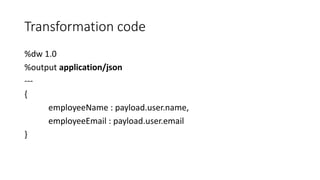
Transformation code
%dw 1.0
%output application/json
---
{
employeeName : payload.user.name,
employeeEmail : payload.user.email
}
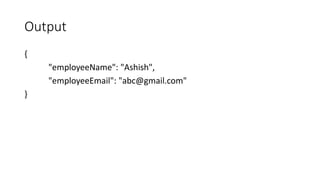
Output
{
"employeeName": "Ashish",
"employeeEmail": "abc@gmail.com"
}
Thanks

Dataweave

  • 1.
  • 2.
    Data weave • TheDataWeave Language is a powerful template engine that allows you to transform data to and from any kind of format (XML, CSV, JSON, Pojos, Maps, etc).
  • 3.
    Data weave Structure DataWeavefiles are divided into two main sections: • The Header, which defines directives (optional) • The Body, which describes the output structure
  • 4.
    Header The DataWeave headercontains the directives, which define high level information about your transformation. The structure of the Header is a sequence of lines, each with its own Directives. The Header is terminated with '---'. Through directives you can define: • DataWeave version • Input types and sources • Output type • Namespaces to import into your transform • Constants that can be referenced throughout the body • Functions that can be called throughout the body
  • 5.
    Body • The bodycontains the expression that generates the output structure. Regardless of the types of the input and output, the data model for the output is always described in the standard DataWeave language, and this model that the transform executes. • The data model of the produced output can consist of three different types of data: • Objects: Represented as collection of key value pairs • Arrays: Represented as a sequence of comma separated values • Simple literals
  • 6.
    Example – XMLto JSON Input - XML structure <user> <name>Ashish</name> <email>abc@gmail.com</email> </user>
  • 7.
    Transformation code %dw 1.0 %outputapplication/json --- { employeeName : payload.user.name, employeeEmail : payload.user.email }
  • 8.
  • 9.