
Keith Brooks @LotusEvangelist Keith@vanessabrooks.comKeith Brooks @LotusEvangelist Keith@vanessabrooks.com
ADM09
Pointing Fingers?
DDM to the Rescue!
Keith Brooks
@Lotusevangelist
Wednesday, May 23 | 09:00 - 10:00 | B. Guadaloupe
Keith Brooks @LotusEvangelist Keith@vanessabrooks.comKeith Brooks @LotusEvangelist Keith@vanessabrooks.com
2
Keith Brooks
• Twitter: @lotusevangelist
• Skype: lotusevangelist
• Email/WW: keith@vanessabrooks.com
• Blog: https://blog.vanessabrooks.com
• Linkedin: https://linkedin.com/in/keithbrooks
• Slides: https://Slideshare.net/kbmsg
2& Scotch!
2012 – Present
Keith Brooks @LotusEvangelist Keith@vanessabrooks.comKeith Brooks @LotusEvangelist Keith@vanessabrooks.com
3
Best Practices
Tip #57: Domino Domain monitor keeps you safe
 Enable DDM
 Have DDM tell you when anonymous gets added
to a database over a certain level
 Have DDM tell you not only that there is a
problem, but suggests how to fix it!
 Have DDM bring you directly to the problem
 Monitoring software makes your life easier
(From LS10 Paul Mooney’s Session)
Keith Brooks @LotusEvangelist Keith@vanessabrooks.comKeith Brooks @LotusEvangelist Keith@vanessabrooks.com
4
History of DDM
Probes and Listeners inside DDM
Console Commands for DDM
Monitoring Non-Domino Items
DDM Can Tweet Now!
Salesforce Integration
ServiceNow Integration
Review and References
Today’s Topics:
Keith Brooks @LotusEvangelist Keith@vanessabrooks.comKeith Brooks @LotusEvangelist Keith@vanessabrooks.com
Why Domino Domain Monitoring (DDM)
• At the time, there was no tool that provided a single
view of the overall status of multiple servers across
one or more DOMINO Domains
• Administrators can spend way too much time to find
out the cause when a server problem occurs
• The analysis and fix of the problems depends on the
experience and skill of the Administrator
5
Keith Brooks @LotusEvangelist Keith@vanessabrooks.comKeith Brooks @LotusEvangelist Keith@vanessabrooks.com
Background of DDM
6
• In R7 it emerged from the old Stats and Events
databases
• DDM (ddm.nsf) itself is a reporting database
 It reports based on details that the Monitoring
Configuration (events4.nsf) db has defined
• Events (events4.nsf) is the real information
wrapped around by the ddm.nsf
• It is installed with every Domino Server …
Keith Brooks @LotusEvangelist Keith@vanessabrooks.comKeith Brooks @LotusEvangelist Keith@vanessabrooks.com
Story Time, Sound Familiar?
7
Everyone’s first time
with DDM
is ALWAYS the same
Keith Brooks @LotusEvangelist Keith@vanessabrooks.comKeith Brooks @LotusEvangelist Keith@vanessabrooks.com
8
DDM — Making Everyone Accountable
• Inside DDM you can:
• See issues and reporting of what is okay
• See who closed which items and issues
• Delegate problems to someone else
• Provide management with a dashboard
• Change severity of error messages
• Monitor ACLs, security, SMTP, and on and on as
long as it’s a Domino item*
• * There are ways to do this for non-Domino too, sort of, hang on, will get to that soon.
Keith Brooks @LotusEvangelist Keith@vanessabrooks.comKeith Brooks @LotusEvangelist Keith@vanessabrooks.com
More Key Benefits
• Active monitoring capability: Probes with highly-
configurable schedules, content and targets
• Data aggregation with collection hierarchies
• Automatic problem determination and
determination of probable cause in multiple feature
areas, and provide possible solution.
• Automation of corrective actions
• Auto-closing for resolved problems
9
Keith Brooks @LotusEvangelist Keith@vanessabrooks.comKeith Brooks @LotusEvangelist Keith@vanessabrooks.com
History of DDM
Probes and Listeners inside DDM
Console Commands for DDM
Monitoring Non-Domino Items
DDM Can Tweet Now!
Salesforce Integration
Service Now Integration
Review and References
10
Today’s Topics:
Keith Brooks @LotusEvangelist Keith@vanessabrooks.comKeith Brooks @LotusEvangelist Keith@vanessabrooks.com
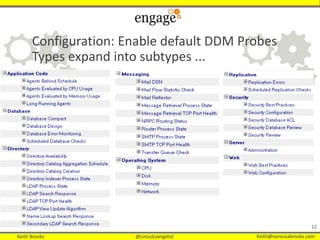
Default DDM Probes
Three types of probes:
• Scheduled probes - run according to a configurable
schedule - defaults are supplied
• Embedded probes - watch the feature area and catch
problems/issues as they occur
• Listening probes - run when particular error codes are
logged
11
Keith Brooks @LotusEvangelist Keith@vanessabrooks.comKeith Brooks @LotusEvangelist Keith@vanessabrooks.com
Configuration: Enable default DDM Probes
Types expand into subtypes ...
12
Keith Brooks @LotusEvangelist Keith@vanessabrooks.comKeith Brooks @LotusEvangelist Keith@vanessabrooks.com
Common Probe Examples
• Monitor for any errors encountered when compacting
database on Domino servers. (Database/Database
Compact)
• Monitor the configured database(s) to ensure that
replication occurs on the target servers within the
configured time interval. (Replication/Scheduled
Replication Checks)
• Monitor which documents are not replicating in the
Domino Directory. (Replication/Replication Errors)
13
Keith Brooks @LotusEvangelist Keith@vanessabrooks.comKeith Brooks @LotusEvangelist Keith@vanessabrooks.com
More Common Probes
• Monitor if name lookups are taking too long.
(Directory/Name Lookup/Search Response)
• Monitor CPU (55%: fatal) /Disk (30%: fatal) /Memory
(98%) Utilization on your Domino Servers. (Operating
System/CPU; Memory)
• Monitor the availability of all directories on the Domino
servers. (Directory/Directory Availability)
• Monitor and fix a corrupt database by the corrective
action code.
14
Keith Brooks @LotusEvangelist Keith@vanessabrooks.comKeith Brooks @LotusEvangelist Keith@vanessabrooks.com
Application Probes
• Monitor whether an agent (or Web agents) run by Agent
Manager took longer than X minutes to complete.
(Application Code/Long running agents)
• Monitor database(s) for unused space, generate an
event when the percent of 30% unused space is
exceeded then automatically compact the database(s) if
an event is generated. (Database/Scheduled Checks)
• Monitor a specific Notes DB for no access by any user
for one month.
15
Keith Brooks @LotusEvangelist Keith@vanessabrooks.comKeith Brooks @LotusEvangelist Keith@vanessabrooks.com
• Monitor mail routing to Domino and/or non-Domino mail
systems.(Messaging/Mail Reflector)
• Monitors the amount of mail on a Domino server and
whether the number of mail messages in the MAIL.BOX
file exceeds the number of mail messages that the router
can process. (Messaging/Mail Flow Statistic)
• Monitor whether your SMTP servers are listening on the
appropriate ports. (Messaging/SMTP process state)
16
Monitor What?
Keith Brooks @LotusEvangelist Keith@vanessabrooks.comKeith Brooks @LotusEvangelist Keith@vanessabrooks.com
• Monitor whether NRPC mail routing is occurring on
the Mail Servers. (Messaging/NRPC Routing Status)
• Monitor which AdminP requests are being generated,
and whether they are being processed.
(Server/Administration)
• Monitor any ACL changes for a specific database.
17
More Monitor What?
Keith Brooks @LotusEvangelist Keith@vanessabrooks.comKeith Brooks @LotusEvangelist Keith@vanessabrooks.com
Questions We Asked IBM/HCL
• Why is there no task probe for Traveler, for that matter why
not for Sametime?
• Traveler and Sametime are not with Domino out of the box and
when DDM was created it was focused on only out of the box
tasks.
• Can we get DDM to Tweet?
• DDM only creates events, so it can’t directly tweet. However,
events can have event handlers act upon them including run a
program. So in theory you could setup an event handler to do
this, but DDM doesn't do this out of the box.
• Domino 10 has no planned updates at this time per
Barry Rosen.
18
Keith Brooks @LotusEvangelist Keith@vanessabrooks.comKeith Brooks @LotusEvangelist Keith@vanessabrooks.com
Questions We Asked IBM/HCL #2
• Can DDM probe for HTTP when it is not port 80 and
if so, how do we tell it to use port 8088 as an
example?
• DDM uses what's configured for HTTP. So either they both use
8080 or 80. It would be looking in the server doc for the
configuration.
• Can DDM probe that a website is up and running?
Seems we can open a db, but not a web app. Is this
true?
• The HTTP probe can just probe the port or GET a URL, but it
will only check for the successful fetching of that URL, the
HTTP return code.
19
Keith Brooks @LotusEvangelist Keith@vanessabrooks.comKeith Brooks @LotusEvangelist Keith@vanessabrooks.com
Questions We Asked IBM/HCL #3
• I have not seen how I configure DDM to verify an
HTTP website, it seems we can only verify if HTTP is
running as a service.
• Correct, the DDM HTTP only probes the service, but the Event
Generator -> TCP Server probe has the web page option
20
Keith Brooks @LotusEvangelist Keith@vanessabrooks.comKeith Brooks @LotusEvangelist Keith@vanessabrooks.com
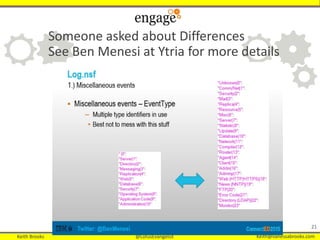
Someone asked about Differences
See Ben Menesi at Ytria for more details
21
Keith Brooks @LotusEvangelist Keith@vanessabrooks.comKeith Brooks @LotusEvangelist Keith@vanessabrooks.com
22
History of DDM
Probes and Listeners inside DDM
Console Commands for DDM
Monitoring Non-Domino Items
DDM Can Tweet Now!
Salesforce Integration
ServiceNow Integration
Review and References
Today’s Topics:
Keith Brooks @LotusEvangelist Keith@vanessabrooks.comKeith Brooks @LotusEvangelist Keith@vanessabrooks.com
Console Commands
• View DDM probe schedule
• show sch –ddm
• Shows a table of enabled probes and next scheduled run time
Probe
• View enabled probes
• tell event dumpprobes
• Shows a list of enabled DDM probes by note ID
• Run probes manually
• tell event runprobe ?????
• Run a probe with note ID ????? immediately (designed to be used
with the dumpprobes command)
23
Keith Brooks @LotusEvangelist Keith@vanessabrooks.comKeith Brooks @LotusEvangelist Keith@vanessabrooks.com
History of DDM
Probes and Listeners inside DDM
Console Commands for DDM
Time Out for Crazy Messages
24
Keith Brooks @LotusEvangelist Keith@vanessabrooks.comKeith Brooks @LotusEvangelist Keith@vanessabrooks.com
Attack of the Ambiguous Error Messages
• Cannot process Full Text Index (FTI)
• Admin Process: Gone Fishing/Org does not appear in design
elements of any database designating Server/Demo as their
Administration Server
• SMTP Failed to Connect to us.ibm.com
• Gone Fishing/Org attempted to login to Server/Demo
• SSL Error: Keyring File access error
• Unable to replicate or route mail
• Calendar profile error
• Events database missing documents or duplicated
• Unable to compact compact no such file exists (program doc
added compact twice?)
Keith Brooks @LotusEvangelist Keith@vanessabrooks.comKeith Brooks @LotusEvangelist Keith@vanessabrooks.com
Troubleshooting Ambiguous Error Messages
 DDM does not always provide any details
 Check your server console
 The answer may be staring you in the face, if not, search
your log.nsf file for the text of the error
 Check that you are running enough debug level in your log to
show these errors
 Dig deeper within the system from the Administrator monitoring
and analysis tools to the DCT
 Google, Planetlotus.org, Bloggers, IBM Support
Keith Brooks @LotusEvangelist Keith@vanessabrooks.comKeith Brooks @LotusEvangelist Keith@vanessabrooks.com
History of DDM
Probes and Listeners inside DDM
Console Commands for DDM
Monitoring Non-Domino Items
DDM Can Tweet Now!
Salesforce Integration
Service Now Integration
References and Review
27
Today’s Topics:
Keith Brooks @LotusEvangelist Keith@vanessabrooks.comKeith Brooks @LotusEvangelist Keith@vanessabrooks.com
28
DDM
Making Admins Lives Easier
….
While Teaching Exchange
Admins What a Real Server
Can Do
Keith Brooks @LotusEvangelist Keith@vanessabrooks.comKeith Brooks @LotusEvangelist Keith@vanessabrooks.com
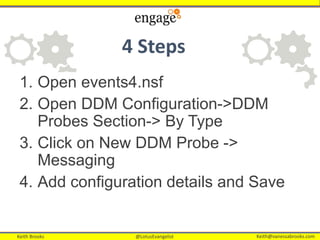
4 Steps
1. Open events4.nsf
2. Open DDM Configuration->DDM
Probes Section-> By Type
3. Click on New DDM Probe ->
Messaging
4. Add configuration details and Save
Keith Brooks @LotusEvangelist Keith@vanessabrooks.comKeith Brooks @LotusEvangelist Keith@vanessabrooks.com
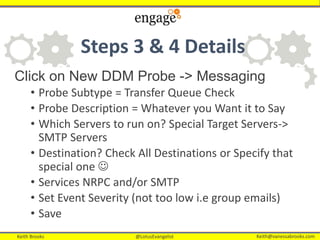
Steps 3 & 4 Details
Click on New DDM Probe -> Messaging
• Probe Subtype = Transfer Queue Check
• Probe Description = Whatever you Want it to Say
• Which Servers to run on? Special Target Servers->
SMTP Servers
• Destination? Check All Destinations or Specify that
special one 
• Services NRPC and/or SMTP
• Set Event Severity (not too low i.e group emails)
• Save
Keith Brooks @LotusEvangelist Keith@vanessabrooks.comKeith Brooks @LotusEvangelist Keith@vanessabrooks.com
Over? Nothing is Over Until…
The Probe will be enabled on Save
So how do you get notified?
Glad you asked….
Keith Brooks @LotusEvangelist Keith@vanessabrooks.comKeith Brooks @LotusEvangelist Keith@vanessabrooks.com
1. DDM Configuration->Event Handlers Section-> By
Author
2. Click on New Event Handler from the Db menu
3. Event Tab (can be any type)
• Events must be one of these severities: FATAL! And/or
Failure, Send them all of them 
• Events can have ANY message
4. Action Tab
• Method = Mail
• Mailing Address = Domino Email and Personal Email
of the MS ADMINS!
• Enablement = Enable this notification
You Don’t! You send it to the MS Admins
Keith Brooks @LotusEvangelist Keith@vanessabrooks.comKeith Brooks @LotusEvangelist Keith@vanessabrooks.com
Keep in Mind
1. If Exchange is down, how would they get this? That’s
why we use personal emails
2. Include the CIO/CEO or whomever needs to know
Exchange fails
3. Set up a Mail Rule in your mail file to collect them all
and publish a monthly outage report
4. If you have the skills, add a view into the DDM to
ONLY show the Exchange outages to your executives
Keith Brooks @LotusEvangelist Keith@vanessabrooks.comKeith Brooks @LotusEvangelist Keith@vanessabrooks.com
History of DDM
Probes and Listeners inside DDM
Console Commands for DDM
Monitoring Non-Domino Items
DDM Can Tweet Now!
Salesforce Integration
Service Now Integration
References and Review
34
Today’s Topics:
Keith Brooks @LotusEvangelist Keith@vanessabrooks.comKeith Brooks @LotusEvangelist Keith@vanessabrooks.com
35
Keith Brooks @LotusEvangelist Keith@vanessabrooks.comKeith Brooks @LotusEvangelist Keith@vanessabrooks.com
36
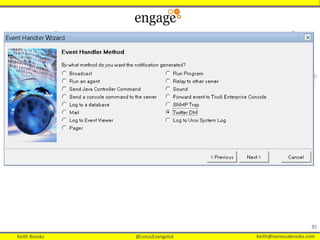
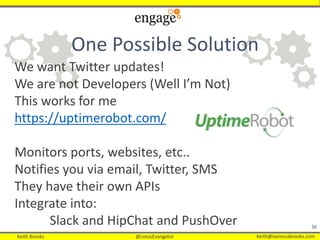
We want Twitter updates!
We are not Developers (Well I’m Not)
This works for me
https://uptimerobot.com/
Monitors ports, websites, etc..
Notifies you via email, Twitter, SMS
They have their own APIs
Integrate into:
Slack and HipChat and PushOver
One Possible Solution
Keith Brooks @LotusEvangelist Keith@vanessabrooks.comKeith Brooks @LotusEvangelist Keith@vanessabrooks.com
37
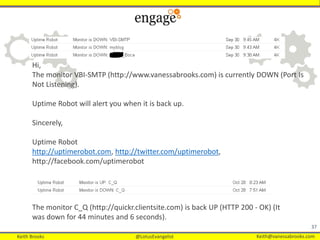
Hi,
The monitor VBI-SMTP (http://www.vanessabrooks.com) is currently DOWN (Port Is
Not Listening).
Uptime Robot will alert you when it is back up.
Sincerely,
Uptime Robot
http://uptimerobot.com, http://twitter.com/uptimerobot,
http://facebook.com/uptimerobot
The monitor C_Q (http://quickr.clientsite.com) is back UP (HTTP 200 - OK) (It
was down for 44 minutes and 6 seconds).
Keith Brooks @LotusEvangelist Keith@vanessabrooks.comKeith Brooks @LotusEvangelist Keith@vanessabrooks.com
History of DDM
Probes and Listeners inside DDM
Console Commands for DDM
Monitoring Non-Domino Items
DDM Can Tweet Now!
Salesforce Integration
ServiceNow Integration
References and Review
38
Today’s Topics:
Keith Brooks @LotusEvangelist Keith@vanessabrooks.comKeith Brooks @LotusEvangelist Keith@vanessabrooks.com
Integration Part 1
• Email-to-Case requires downloading the Email-to-Case
Agent (contact your Salesforce Customer Support).
• The Agent allows you to keep all email traffic within your
network’s firewall and to accept emails larger than 25 MB
from customers.
• Install the Agent behind your network’s firewall.
• Enable Email-to-Case and configure the settings.
• Configure your routing address settings to customize the
way Salesforce handles your customer emails.
• https://help.salesforce.com/articleView?id=setting_up_email-to-case.htm&type=5
39
Keith Brooks @LotusEvangelist Keith@vanessabrooks.comKeith Brooks @LotusEvangelist Keith@vanessabrooks.com
Integration Part 2
• Test your email routing addresses by manually sending
emails to them and verify that these emails convert to
cases based on their routing address settings.
• Add the email address that you configured to your
company's support website. Customers can use this
email address to submit cases to your support team.
• Add the Email Quick Actions to the Cases page layout.
• Optionally, create email templates agents can use when
replying to email. These templates can include merge
fields that display information from the original email in
the reply.
Keith Brooks @LotusEvangelist Keith@vanessabrooks.comKeith Brooks @LotusEvangelist Keith@vanessabrooks.com
History of DDM
Probes and Listeners inside DDM
Console Commands for DDM
Monitoring Non-Domino Items
DDM Can Tweet Now!
Salesforce Integration
ServiceNow Integration
References and Review
41
Today’s Topics:
Keith Brooks @LotusEvangelist Keith@vanessabrooks.comKeith Brooks @LotusEvangelist Keith@vanessabrooks.com
Integration Part 1
• Users can continue to use email to request help
from IT after you begin using Express incident
management.
• Before you begin, determine your instance email
address. Identify how to train users to compose
email and create incidents.
• Your company was issued an email address for
your instance, typically:
instancename@service-now.com
• When users send email to this address,
the Express platform inserts an Incident record.
42
Keith Brooks @LotusEvangelist Keith@vanessabrooks.comKeith Brooks @LotusEvangelist Keith@vanessabrooks.com
Integration Part 2
• Create an email message addressed to
your Express instance,
typically instancename@service-now.com.
• Compose the email, and note the following
considerations.
• The email subject contains the incident Short Description.
• The email body is added as an incident comment.
• The incident category is Inquiry/Help.
• The incident state is New.
• Send the email message.
• Note: If you want all incidents to come through your service desk,
deactivate the service catalog incident record producer and the
email inbound action for new incidents.
43
Keith Brooks @LotusEvangelist Keith@vanessabrooks.comKeith Brooks @LotusEvangelist Keith@vanessabrooks.com
History of DDM
Probes and Listeners inside DDM
Console Commands for DDM
Monitoring Non-Domino Items
DDM Can Tweet Now!
Salesforce Integration
ServiceNow Integration
Review and References
44
Today’s Topics:
Keith Brooks @LotusEvangelist Keith@vanessabrooks.comKeith Brooks @LotusEvangelist Keith@vanessabrooks.com
45
 DDM is free and running ... use it
 YOU decide what to monitor and YOU should be
monitoring!
 Be Proactive, not just Reactive
 Edit common issues that are unique to your
organization so the next admin has it easier
 Careful not to flood your inbox with warnings
 Management can have a dashboard with colors, give it
to them!
 Ambiguous error messages are a thing of the past
7 Key Points to Take Home
Keith Brooks @LotusEvangelist Keith@vanessabrooks.comKeith Brooks @LotusEvangelist Keith@vanessabrooks.com
46
• Planetlotus.org – 150+ Lotus/ICS Bloggers
• DDM: If You Only Knew What Your Server Was Saying by Keith Brooks
• IBM Wiki Domino 9.0.1
 http://www-
01.ibm.com/support/knowledgecenter/SSKTMJ_9.0.1/admin/admn_dominodo
mainmonitoring_c.dita
 Philip Monson, Thomas Gumz, Frank Nostrame, Leah Busque, “Lotus
Domino Domain Monitoring” (IBM Redbook, 2005).
 http://www.redbooks.ibm.com/abstracts/redp4089.html
 https://www.redbooks.ibm.com/redpapers/pdfs/redp4089.pdf See page 48
about how to work with tcp ports
Resources
Keith Brooks @LotusEvangelist Keith@vanessabrooks.comKeith Brooks @LotusEvangelist Keith@vanessabrooks.com
47
• This workshop introduces you to DDM ...Lotus Education on
Demand: Domino Domain Monitoring
http://www.ibm.com/support/docview.wss?uid=swg27007060
• Notes/Domino Best Practices: Domino Domain Monitoring
• http://www.ibm.com/support/docview.wss?uid=swg27009312
• IBM Open Mic on DDM – For Administrators pdf
• Server Console in a Notes Client http://www.preemptive.com.au/node/44
More Resources
Keith Brooks @LotusEvangelist Keith@vanessabrooks.comKeith Brooks @LotusEvangelist Keith@vanessabrooks.com
48
Keith Brooks
@lotusevangelist
keith@vanessabrooks.com
Thank You

Pointing Fingers? DDM to the Rescue

  • 1.
    Keith Brooks @LotusEvangelistKeith@vanessabrooks.comKeith Brooks @LotusEvangelist Keith@vanessabrooks.com ADM09 Pointing Fingers? DDM to the Rescue! Keith Brooks @Lotusevangelist Wednesday, May 23 | 09:00 - 10:00 | B. Guadaloupe
  • 2.
    Keith Brooks @LotusEvangelistKeith@vanessabrooks.comKeith Brooks @LotusEvangelist Keith@vanessabrooks.com 2 Keith Brooks • Twitter: @lotusevangelist • Skype: lotusevangelist • Email/WW: keith@vanessabrooks.com • Blog: https://blog.vanessabrooks.com • Linkedin: https://linkedin.com/in/keithbrooks • Slides: https://Slideshare.net/kbmsg 2& Scotch! 2012 – Present
  • 3.
    Keith Brooks @LotusEvangelistKeith@vanessabrooks.comKeith Brooks @LotusEvangelist Keith@vanessabrooks.com 3 Best Practices Tip #57: Domino Domain monitor keeps you safe  Enable DDM  Have DDM tell you when anonymous gets added to a database over a certain level  Have DDM tell you not only that there is a problem, but suggests how to fix it!  Have DDM bring you directly to the problem  Monitoring software makes your life easier (From LS10 Paul Mooney’s Session)
  • 4.
    Keith Brooks @LotusEvangelistKeith@vanessabrooks.comKeith Brooks @LotusEvangelist Keith@vanessabrooks.com 4 History of DDM Probes and Listeners inside DDM Console Commands for DDM Monitoring Non-Domino Items DDM Can Tweet Now! Salesforce Integration ServiceNow Integration Review and References Today’s Topics:
  • 5.
    Keith Brooks @LotusEvangelistKeith@vanessabrooks.comKeith Brooks @LotusEvangelist Keith@vanessabrooks.com Why Domino Domain Monitoring (DDM) • At the time, there was no tool that provided a single view of the overall status of multiple servers across one or more DOMINO Domains • Administrators can spend way too much time to find out the cause when a server problem occurs • The analysis and fix of the problems depends on the experience and skill of the Administrator 5
  • 6.
    Keith Brooks @LotusEvangelistKeith@vanessabrooks.comKeith Brooks @LotusEvangelist Keith@vanessabrooks.com Background of DDM 6 • In R7 it emerged from the old Stats and Events databases • DDM (ddm.nsf) itself is a reporting database  It reports based on details that the Monitoring Configuration (events4.nsf) db has defined • Events (events4.nsf) is the real information wrapped around by the ddm.nsf • It is installed with every Domino Server …
  • 7.
    Keith Brooks @LotusEvangelistKeith@vanessabrooks.comKeith Brooks @LotusEvangelist Keith@vanessabrooks.com Story Time, Sound Familiar? 7 Everyone’s first time with DDM is ALWAYS the same
  • 8.
    Keith Brooks @LotusEvangelistKeith@vanessabrooks.comKeith Brooks @LotusEvangelist Keith@vanessabrooks.com 8 DDM — Making Everyone Accountable • Inside DDM you can: • See issues and reporting of what is okay • See who closed which items and issues • Delegate problems to someone else • Provide management with a dashboard • Change severity of error messages • Monitor ACLs, security, SMTP, and on and on as long as it’s a Domino item* • * There are ways to do this for non-Domino too, sort of, hang on, will get to that soon.
  • 9.
    Keith Brooks @LotusEvangelistKeith@vanessabrooks.comKeith Brooks @LotusEvangelist Keith@vanessabrooks.com More Key Benefits • Active monitoring capability: Probes with highly- configurable schedules, content and targets • Data aggregation with collection hierarchies • Automatic problem determination and determination of probable cause in multiple feature areas, and provide possible solution. • Automation of corrective actions • Auto-closing for resolved problems 9
  • 10.
    Keith Brooks @LotusEvangelistKeith@vanessabrooks.comKeith Brooks @LotusEvangelist Keith@vanessabrooks.com History of DDM Probes and Listeners inside DDM Console Commands for DDM Monitoring Non-Domino Items DDM Can Tweet Now! Salesforce Integration Service Now Integration Review and References 10 Today’s Topics:
  • 11.
    Keith Brooks @LotusEvangelistKeith@vanessabrooks.comKeith Brooks @LotusEvangelist Keith@vanessabrooks.com Default DDM Probes Three types of probes: • Scheduled probes - run according to a configurable schedule - defaults are supplied • Embedded probes - watch the feature area and catch problems/issues as they occur • Listening probes - run when particular error codes are logged 11
  • 12.
    Keith Brooks @LotusEvangelistKeith@vanessabrooks.comKeith Brooks @LotusEvangelist Keith@vanessabrooks.com Configuration: Enable default DDM Probes Types expand into subtypes ... 12
  • 13.
    Keith Brooks @LotusEvangelistKeith@vanessabrooks.comKeith Brooks @LotusEvangelist Keith@vanessabrooks.com Common Probe Examples • Monitor for any errors encountered when compacting database on Domino servers. (Database/Database Compact) • Monitor the configured database(s) to ensure that replication occurs on the target servers within the configured time interval. (Replication/Scheduled Replication Checks) • Monitor which documents are not replicating in the Domino Directory. (Replication/Replication Errors) 13
  • 14.
    Keith Brooks @LotusEvangelistKeith@vanessabrooks.comKeith Brooks @LotusEvangelist Keith@vanessabrooks.com More Common Probes • Monitor if name lookups are taking too long. (Directory/Name Lookup/Search Response) • Monitor CPU (55%: fatal) /Disk (30%: fatal) /Memory (98%) Utilization on your Domino Servers. (Operating System/CPU; Memory) • Monitor the availability of all directories on the Domino servers. (Directory/Directory Availability) • Monitor and fix a corrupt database by the corrective action code. 14
  • 15.
    Keith Brooks @LotusEvangelistKeith@vanessabrooks.comKeith Brooks @LotusEvangelist Keith@vanessabrooks.com Application Probes • Monitor whether an agent (or Web agents) run by Agent Manager took longer than X minutes to complete. (Application Code/Long running agents) • Monitor database(s) for unused space, generate an event when the percent of 30% unused space is exceeded then automatically compact the database(s) if an event is generated. (Database/Scheduled Checks) • Monitor a specific Notes DB for no access by any user for one month. 15
  • 16.
    Keith Brooks @LotusEvangelistKeith@vanessabrooks.comKeith Brooks @LotusEvangelist Keith@vanessabrooks.com • Monitor mail routing to Domino and/or non-Domino mail systems.(Messaging/Mail Reflector) • Monitors the amount of mail on a Domino server and whether the number of mail messages in the MAIL.BOX file exceeds the number of mail messages that the router can process. (Messaging/Mail Flow Statistic) • Monitor whether your SMTP servers are listening on the appropriate ports. (Messaging/SMTP process state) 16 Monitor What?
  • 17.
    Keith Brooks @LotusEvangelistKeith@vanessabrooks.comKeith Brooks @LotusEvangelist Keith@vanessabrooks.com • Monitor whether NRPC mail routing is occurring on the Mail Servers. (Messaging/NRPC Routing Status) • Monitor which AdminP requests are being generated, and whether they are being processed. (Server/Administration) • Monitor any ACL changes for a specific database. 17 More Monitor What?
  • 18.
    Keith Brooks @LotusEvangelistKeith@vanessabrooks.comKeith Brooks @LotusEvangelist Keith@vanessabrooks.com Questions We Asked IBM/HCL • Why is there no task probe for Traveler, for that matter why not for Sametime? • Traveler and Sametime are not with Domino out of the box and when DDM was created it was focused on only out of the box tasks. • Can we get DDM to Tweet? • DDM only creates events, so it can’t directly tweet. However, events can have event handlers act upon them including run a program. So in theory you could setup an event handler to do this, but DDM doesn't do this out of the box. • Domino 10 has no planned updates at this time per Barry Rosen. 18
  • 19.
    Keith Brooks @LotusEvangelistKeith@vanessabrooks.comKeith Brooks @LotusEvangelist Keith@vanessabrooks.com Questions We Asked IBM/HCL #2 • Can DDM probe for HTTP when it is not port 80 and if so, how do we tell it to use port 8088 as an example? • DDM uses what's configured for HTTP. So either they both use 8080 or 80. It would be looking in the server doc for the configuration. • Can DDM probe that a website is up and running? Seems we can open a db, but not a web app. Is this true? • The HTTP probe can just probe the port or GET a URL, but it will only check for the successful fetching of that URL, the HTTP return code. 19
  • 20.
    Keith Brooks @LotusEvangelistKeith@vanessabrooks.comKeith Brooks @LotusEvangelist Keith@vanessabrooks.com Questions We Asked IBM/HCL #3 • I have not seen how I configure DDM to verify an HTTP website, it seems we can only verify if HTTP is running as a service. • Correct, the DDM HTTP only probes the service, but the Event Generator -> TCP Server probe has the web page option 20
  • 21.
    Keith Brooks @LotusEvangelistKeith@vanessabrooks.comKeith Brooks @LotusEvangelist Keith@vanessabrooks.com Someone asked about Differences See Ben Menesi at Ytria for more details 21
  • 22.
    Keith Brooks @LotusEvangelistKeith@vanessabrooks.comKeith Brooks @LotusEvangelist Keith@vanessabrooks.com 22 History of DDM Probes and Listeners inside DDM Console Commands for DDM Monitoring Non-Domino Items DDM Can Tweet Now! Salesforce Integration ServiceNow Integration Review and References Today’s Topics:
  • 23.
    Keith Brooks @LotusEvangelistKeith@vanessabrooks.comKeith Brooks @LotusEvangelist Keith@vanessabrooks.com Console Commands • View DDM probe schedule • show sch –ddm • Shows a table of enabled probes and next scheduled run time Probe • View enabled probes • tell event dumpprobes • Shows a list of enabled DDM probes by note ID • Run probes manually • tell event runprobe ????? • Run a probe with note ID ????? immediately (designed to be used with the dumpprobes command) 23
  • 24.
    Keith Brooks @LotusEvangelistKeith@vanessabrooks.comKeith Brooks @LotusEvangelist Keith@vanessabrooks.com History of DDM Probes and Listeners inside DDM Console Commands for DDM Time Out for Crazy Messages 24
  • 25.
    Keith Brooks @LotusEvangelistKeith@vanessabrooks.comKeith Brooks @LotusEvangelist Keith@vanessabrooks.com Attack of the Ambiguous Error Messages • Cannot process Full Text Index (FTI) • Admin Process: Gone Fishing/Org does not appear in design elements of any database designating Server/Demo as their Administration Server • SMTP Failed to Connect to us.ibm.com • Gone Fishing/Org attempted to login to Server/Demo • SSL Error: Keyring File access error • Unable to replicate or route mail • Calendar profile error • Events database missing documents or duplicated • Unable to compact compact no such file exists (program doc added compact twice?)
  • 26.
    Keith Brooks @LotusEvangelistKeith@vanessabrooks.comKeith Brooks @LotusEvangelist Keith@vanessabrooks.com Troubleshooting Ambiguous Error Messages  DDM does not always provide any details  Check your server console  The answer may be staring you in the face, if not, search your log.nsf file for the text of the error  Check that you are running enough debug level in your log to show these errors  Dig deeper within the system from the Administrator monitoring and analysis tools to the DCT  Google, Planetlotus.org, Bloggers, IBM Support
  • 27.
    Keith Brooks @LotusEvangelistKeith@vanessabrooks.comKeith Brooks @LotusEvangelist Keith@vanessabrooks.com History of DDM Probes and Listeners inside DDM Console Commands for DDM Monitoring Non-Domino Items DDM Can Tweet Now! Salesforce Integration Service Now Integration References and Review 27 Today’s Topics:
  • 28.
    Keith Brooks @LotusEvangelistKeith@vanessabrooks.comKeith Brooks @LotusEvangelist Keith@vanessabrooks.com 28 DDM Making Admins Lives Easier …. While Teaching Exchange Admins What a Real Server Can Do
  • 29.
    Keith Brooks @LotusEvangelistKeith@vanessabrooks.comKeith Brooks @LotusEvangelist Keith@vanessabrooks.com 4 Steps 1. Open events4.nsf 2. Open DDM Configuration->DDM Probes Section-> By Type 3. Click on New DDM Probe -> Messaging 4. Add configuration details and Save
  • 30.
    Keith Brooks @LotusEvangelistKeith@vanessabrooks.comKeith Brooks @LotusEvangelist Keith@vanessabrooks.com Steps 3 & 4 Details Click on New DDM Probe -> Messaging • Probe Subtype = Transfer Queue Check • Probe Description = Whatever you Want it to Say • Which Servers to run on? Special Target Servers-> SMTP Servers • Destination? Check All Destinations or Specify that special one  • Services NRPC and/or SMTP • Set Event Severity (not too low i.e group emails) • Save
  • 31.
    Keith Brooks @LotusEvangelistKeith@vanessabrooks.comKeith Brooks @LotusEvangelist Keith@vanessabrooks.com Over? Nothing is Over Until… The Probe will be enabled on Save So how do you get notified? Glad you asked….
  • 32.
    Keith Brooks @LotusEvangelistKeith@vanessabrooks.comKeith Brooks @LotusEvangelist Keith@vanessabrooks.com 1. DDM Configuration->Event Handlers Section-> By Author 2. Click on New Event Handler from the Db menu 3. Event Tab (can be any type) • Events must be one of these severities: FATAL! And/or Failure, Send them all of them  • Events can have ANY message 4. Action Tab • Method = Mail • Mailing Address = Domino Email and Personal Email of the MS ADMINS! • Enablement = Enable this notification You Don’t! You send it to the MS Admins
  • 33.
    Keith Brooks @LotusEvangelistKeith@vanessabrooks.comKeith Brooks @LotusEvangelist Keith@vanessabrooks.com Keep in Mind 1. If Exchange is down, how would they get this? That’s why we use personal emails 2. Include the CIO/CEO or whomever needs to know Exchange fails 3. Set up a Mail Rule in your mail file to collect them all and publish a monthly outage report 4. If you have the skills, add a view into the DDM to ONLY show the Exchange outages to your executives
  • 34.
    Keith Brooks @LotusEvangelistKeith@vanessabrooks.comKeith Brooks @LotusEvangelist Keith@vanessabrooks.com History of DDM Probes and Listeners inside DDM Console Commands for DDM Monitoring Non-Domino Items DDM Can Tweet Now! Salesforce Integration Service Now Integration References and Review 34 Today’s Topics:
  • 35.
    Keith Brooks @LotusEvangelistKeith@vanessabrooks.comKeith Brooks @LotusEvangelist Keith@vanessabrooks.com 35
  • 36.
    Keith Brooks @LotusEvangelistKeith@vanessabrooks.comKeith Brooks @LotusEvangelist Keith@vanessabrooks.com 36 We want Twitter updates! We are not Developers (Well I’m Not) This works for me https://uptimerobot.com/ Monitors ports, websites, etc.. Notifies you via email, Twitter, SMS They have their own APIs Integrate into: Slack and HipChat and PushOver One Possible Solution
  • 37.
    Keith Brooks @LotusEvangelistKeith@vanessabrooks.comKeith Brooks @LotusEvangelist Keith@vanessabrooks.com 37 Hi, The monitor VBI-SMTP (http://www.vanessabrooks.com) is currently DOWN (Port Is Not Listening). Uptime Robot will alert you when it is back up. Sincerely, Uptime Robot http://uptimerobot.com, http://twitter.com/uptimerobot, http://facebook.com/uptimerobot The monitor C_Q (http://quickr.clientsite.com) is back UP (HTTP 200 - OK) (It was down for 44 minutes and 6 seconds).
  • 38.
    Keith Brooks @LotusEvangelistKeith@vanessabrooks.comKeith Brooks @LotusEvangelist Keith@vanessabrooks.com History of DDM Probes and Listeners inside DDM Console Commands for DDM Monitoring Non-Domino Items DDM Can Tweet Now! Salesforce Integration ServiceNow Integration References and Review 38 Today’s Topics:
  • 39.
    Keith Brooks @LotusEvangelistKeith@vanessabrooks.comKeith Brooks @LotusEvangelist Keith@vanessabrooks.com Integration Part 1 • Email-to-Case requires downloading the Email-to-Case Agent (contact your Salesforce Customer Support). • The Agent allows you to keep all email traffic within your network’s firewall and to accept emails larger than 25 MB from customers. • Install the Agent behind your network’s firewall. • Enable Email-to-Case and configure the settings. • Configure your routing address settings to customize the way Salesforce handles your customer emails. • https://help.salesforce.com/articleView?id=setting_up_email-to-case.htm&type=5 39
  • 40.
    Keith Brooks @LotusEvangelistKeith@vanessabrooks.comKeith Brooks @LotusEvangelist Keith@vanessabrooks.com Integration Part 2 • Test your email routing addresses by manually sending emails to them and verify that these emails convert to cases based on their routing address settings. • Add the email address that you configured to your company's support website. Customers can use this email address to submit cases to your support team. • Add the Email Quick Actions to the Cases page layout. • Optionally, create email templates agents can use when replying to email. These templates can include merge fields that display information from the original email in the reply.
  • 41.
    Keith Brooks @LotusEvangelistKeith@vanessabrooks.comKeith Brooks @LotusEvangelist Keith@vanessabrooks.com History of DDM Probes and Listeners inside DDM Console Commands for DDM Monitoring Non-Domino Items DDM Can Tweet Now! Salesforce Integration ServiceNow Integration References and Review 41 Today’s Topics:
  • 42.
    Keith Brooks @LotusEvangelistKeith@vanessabrooks.comKeith Brooks @LotusEvangelist Keith@vanessabrooks.com Integration Part 1 • Users can continue to use email to request help from IT after you begin using Express incident management. • Before you begin, determine your instance email address. Identify how to train users to compose email and create incidents. • Your company was issued an email address for your instance, typically: instancename@service-now.com • When users send email to this address, the Express platform inserts an Incident record. 42
  • 43.
    Keith Brooks @LotusEvangelistKeith@vanessabrooks.comKeith Brooks @LotusEvangelist Keith@vanessabrooks.com Integration Part 2 • Create an email message addressed to your Express instance, typically instancename@service-now.com. • Compose the email, and note the following considerations. • The email subject contains the incident Short Description. • The email body is added as an incident comment. • The incident category is Inquiry/Help. • The incident state is New. • Send the email message. • Note: If you want all incidents to come through your service desk, deactivate the service catalog incident record producer and the email inbound action for new incidents. 43
  • 44.
    Keith Brooks @LotusEvangelistKeith@vanessabrooks.comKeith Brooks @LotusEvangelist Keith@vanessabrooks.com History of DDM Probes and Listeners inside DDM Console Commands for DDM Monitoring Non-Domino Items DDM Can Tweet Now! Salesforce Integration ServiceNow Integration Review and References 44 Today’s Topics:
  • 45.
    Keith Brooks @LotusEvangelistKeith@vanessabrooks.comKeith Brooks @LotusEvangelist Keith@vanessabrooks.com 45  DDM is free and running ... use it  YOU decide what to monitor and YOU should be monitoring!  Be Proactive, not just Reactive  Edit common issues that are unique to your organization so the next admin has it easier  Careful not to flood your inbox with warnings  Management can have a dashboard with colors, give it to them!  Ambiguous error messages are a thing of the past 7 Key Points to Take Home
  • 46.
    Keith Brooks @LotusEvangelistKeith@vanessabrooks.comKeith Brooks @LotusEvangelist Keith@vanessabrooks.com 46 • Planetlotus.org – 150+ Lotus/ICS Bloggers • DDM: If You Only Knew What Your Server Was Saying by Keith Brooks • IBM Wiki Domino 9.0.1  http://www- 01.ibm.com/support/knowledgecenter/SSKTMJ_9.0.1/admin/admn_dominodo mainmonitoring_c.dita  Philip Monson, Thomas Gumz, Frank Nostrame, Leah Busque, “Lotus Domino Domain Monitoring” (IBM Redbook, 2005).  http://www.redbooks.ibm.com/abstracts/redp4089.html  https://www.redbooks.ibm.com/redpapers/pdfs/redp4089.pdf See page 48 about how to work with tcp ports Resources
  • 47.
    Keith Brooks @LotusEvangelistKeith@vanessabrooks.comKeith Brooks @LotusEvangelist Keith@vanessabrooks.com 47 • This workshop introduces you to DDM ...Lotus Education on Demand: Domino Domain Monitoring http://www.ibm.com/support/docview.wss?uid=swg27007060 • Notes/Domino Best Practices: Domino Domain Monitoring • http://www.ibm.com/support/docview.wss?uid=swg27009312 • IBM Open Mic on DDM – For Administrators pdf • Server Console in a Notes Client http://www.preemptive.com.au/node/44 More Resources
  • 48.
    Keith Brooks @LotusEvangelistKeith@vanessabrooks.comKeith Brooks @LotusEvangelist Keith@vanessabrooks.com 48 Keith Brooks @lotusevangelist keith@vanessabrooks.com Thank You

Editor's Notes