
"WHY DIDN'T ANYONE TELL ME
NOTES COULD DO THAT!“
IBM NOTES CLIENT SUGGESTED CONFIGURATION ENHANCEMENTS
TO
A DEFAULT CUSTOMER BUILD/INSTALL
Keith Brooks CEO, B2BWhisperer
@lotusevangelist keith@b2bwhisperer.com
Blog: Http://blog.vanessabrooks.comJune 11, 2019
Keith Brooks @lotusevangelist keith@b2bwhisperer.com
KEITH BROOKS
 Ex Lotus EMEA
 IBM Champion for 7 years
 IBM RedbooksThought Leader
 Lazy Administrator that has
presented at Social
Connections, Lotusphere,Think,
Connect, Connected, Engage,
SUTOL,TheView Admin and
now ISBG
2
Keith Brooks @lotusevangelist keith@b2bwhisperer.com
PURPOSE
Provide an end user experience that:
Lowers Help Desk tickets related to some common issues
Increases productivity by enabling default functionality
Reduces their frustrations with IT, Notes, their PCs
Costs zero to implement because it is all built in to the product
or available tools
June 11, 2019 3
Keith Brooks @lotusevangelist keith@b2bwhisperer.com
5 AREAS OF RECOMMENDED ENHANCEMENTS
The Notes Client Location Document
The Notes Client Preferences, set via IBM Domino Policy Settings
The Notes Client Preferences, ChangesVia Client Side Settings
The Notes Client ReplicatorTab
The Notes Client User Interface Enhancements
June 11, 2019 4
Keith Brooks @lotusevangelist keith@b2bwhisperer.com
THE NOTES CLIENT
LOCATION DOCUMENT
June 11, 2019 5
Keith Brooks @lotusevangelist keith@b2bwhisperer.com
DOMINO DIRECTORY SERVER FIELD – NEW AND
OLD
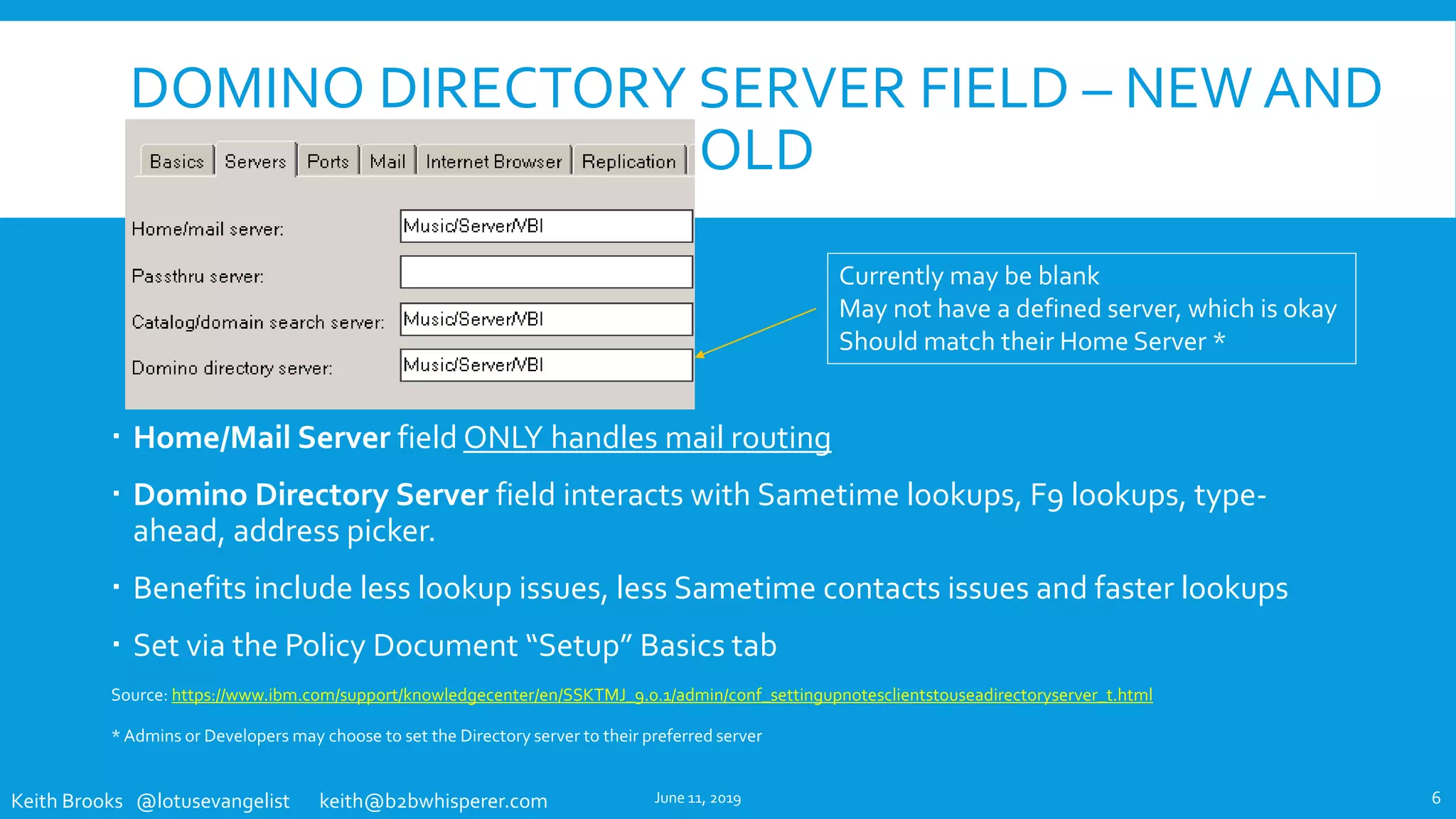
 Home/Mail Server field ONLY handles mail routing
 Domino Directory Server field interacts with Sametime lookups, F9 lookups, type-
ahead, address picker.
 Benefits include less lookup issues, less Sametime contacts issues and faster lookups
 Set via the Policy Document “Setup” Basics tab
Source: https://www.ibm.com/support/knowledgecenter/en/SSKTMJ_9.0.1/admin/conf_settingupnotesclientstouseadirectoryserver_t.html
* Admins or Developers may choose to set the Directory server to their preferred server
June 11, 2019 6
Currently may be blank
May not have a defined server, which is okay
Should match their Home Server *
Keith Brooks @lotusevangelist keith@b2bwhisperer.com
LOCATION DOCUMENT CHANGES - EXISTING USERS
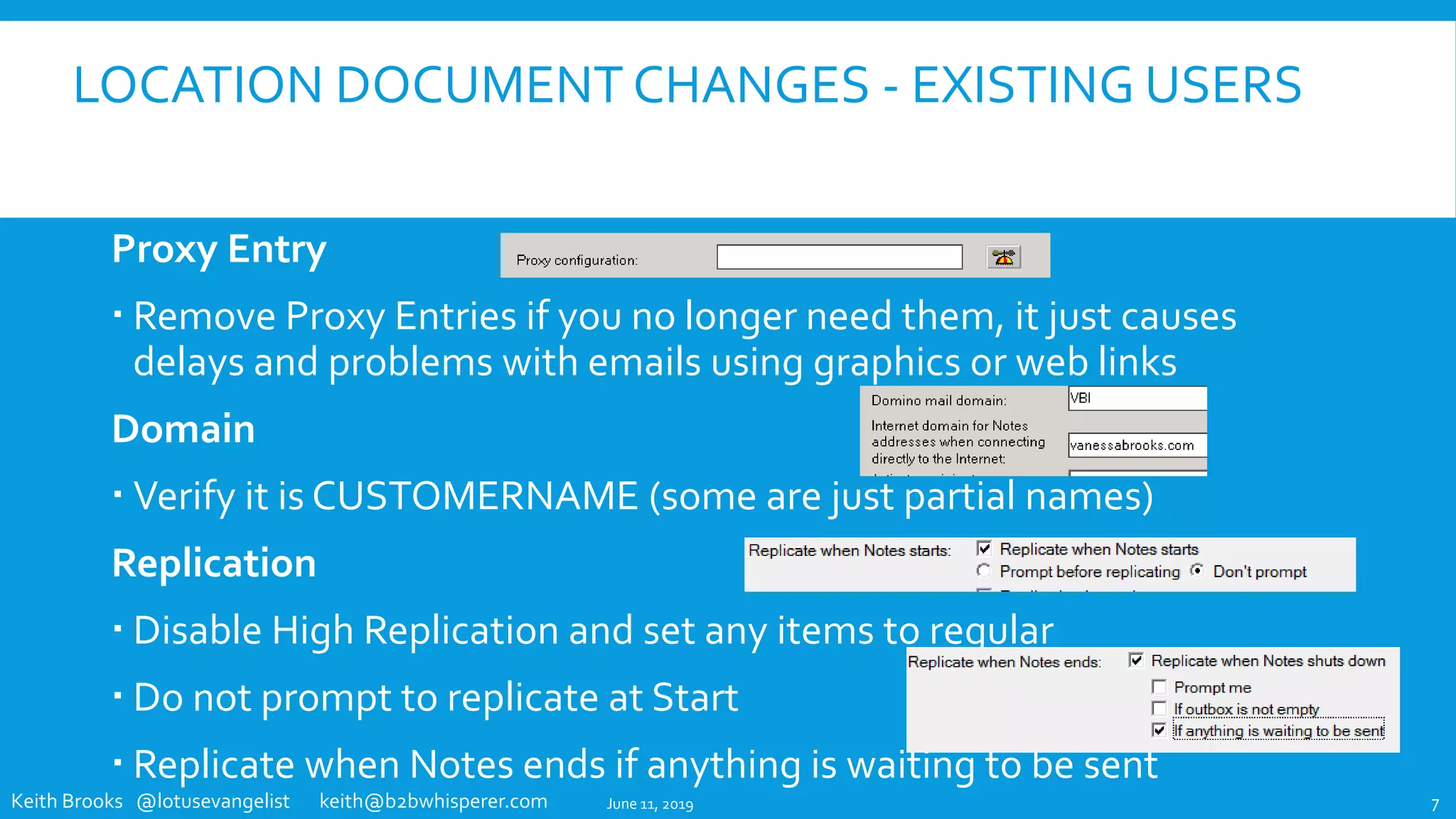
Proxy Entry
 Remove Proxy Entries if you no longer need them, it just causes
delays and problems with emails using graphics or web links
Domain
 Verify it is CUSTOMERNAME (some are just partial names)
Replication
 Disable High Replication and set any items to regular
 Do not prompt to replicate at Start
 Replicate when Notes ends if anything is waiting to be sent
June 11, 2019 7
Keith Brooks @lotusevangelist keith@b2bwhisperer.com
IBM NOTES CLIENT PREFERENCES
SETVIA
IBM DOMINO POLICY SETTINGS
June 11, 2019 8
Keith Brooks @lotusevangelist keith@b2bwhisperer.com
SETTHEWEB BROWSER OPTION
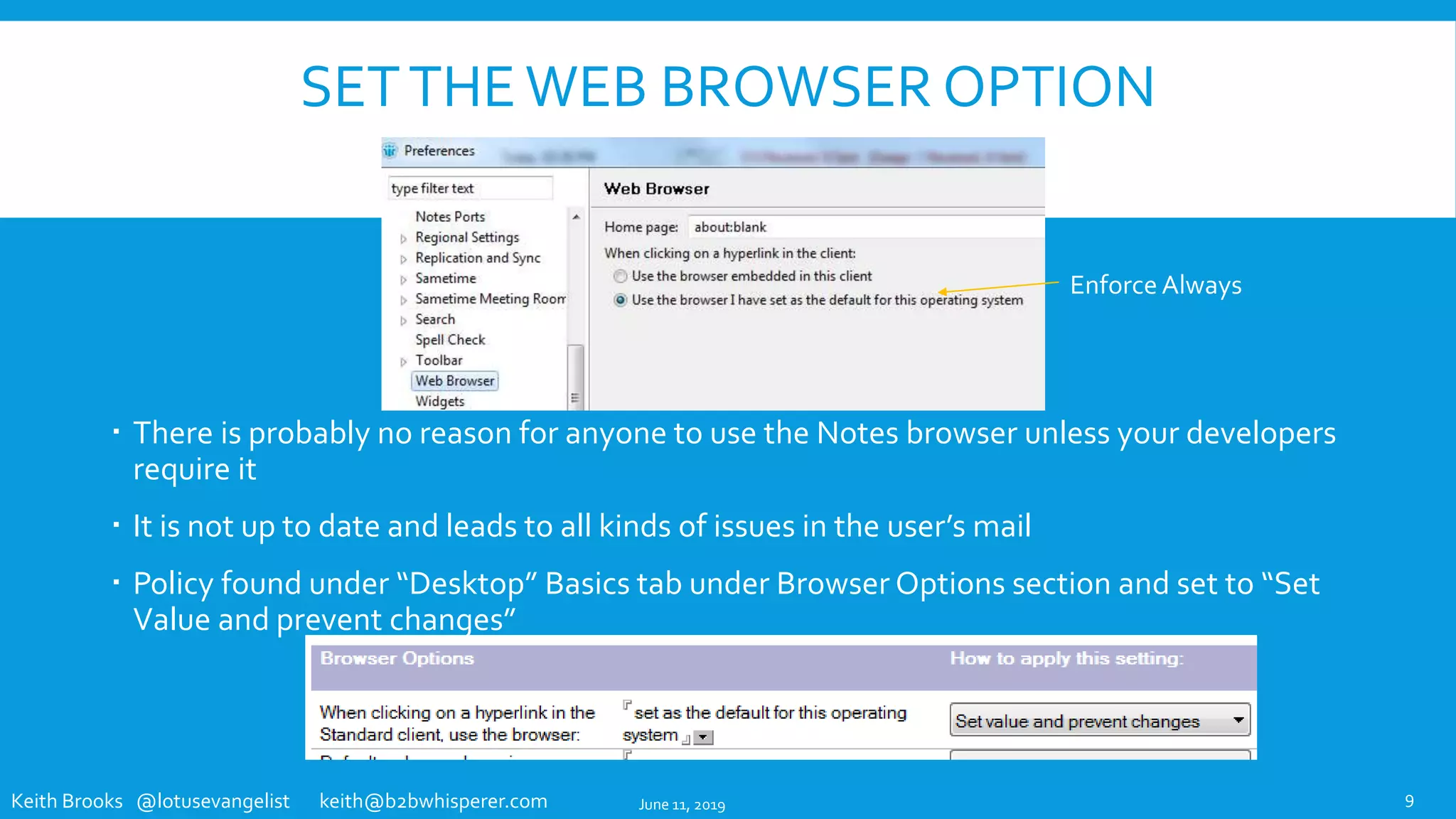
 There is probably no reason for anyone to use the Notes browser unless your developers
require it
 It is not up to date and leads to all kinds of issues in the user’s mail
 Policy found under “Desktop” Basics tab under Browser Options section and set to “Set
Value and prevent changes”
9
Enforce Always
June 11, 2019
Keith Brooks @lotusevangelist keith@b2bwhisperer.com
CREATING A NOTES.INI SETTING USING DOMINO
DESIGNER
 You can use IBM® Lotus® Domino® Designer to add a new field to the desktop policy settings document to
assign a NOTES.INI value.The new field must be named $PrefVariableName, whereVariableName is the
name of the NOTES.INI variable you want to set. In the new field on the desktop policy settings document,
enter the value you want assigned to that NOTES.INI variable.That is the value that is set in the NOTES.INI
for the assigned Notes users.
 Note:You can use the procedure described here to assign NOTES.INI settings to Notes client users and
groups or you can use the desktop policy settings document - Custom Settings - Notes.ini tab.
 For example, assume that you want to use a policy settings document to add a font size setting of 5 to your
NOTES.INI file.To change the font setting, do the following:
 1. From the Domino Designer, open the desktop policy settings document form.
 2. Create a new field named $PrefDisplay_font_adjustment.
 3. Assign a value of 5 to the field $PrefDisplay_font_adjustment.
 4. Save and exit.
 These new values are set on the assigned users clients the next time they authenticate with their home server.
 Note: Some settings require the Notes client be restarted for the settings to work.
June 11, 2019 10
Keith Brooks @lotusevangelist keith@b2bwhisperer.com
CREATING A LOCATION DOCUMENT SETTING
USING DOMINO DESIGNER
 Note:You can use the procedure described here to assign Location settings to
Notes client users and groups or you can use the desktop policy settings
document - Custom Settings - Locations tab.
 To set a Location document setting using a policy document, add a new field to
the desktop policy settings document.The new field must be named
LocAllVariableName, whereVariableName is the name of the fields you are
setting in the Location documents. In the new field on the policy settings
document, enter the value you want assigned to that Location document field.
That is the value that is then assigned to all of the users' Location documents.
 These new values are set on the assigned users' clients the next time they
authenticate with their home server.
 Note Some settings require the Notes client be restarted for the settings to work.
June 11, 2019 11
Keith Brooks @lotusevangelist keith@b2bwhisperer.com
IBM NOTES CLIENT PREFERENCES
CHANGESVIA
CLIENT SIDE SETTINGS
June 11, 2019 12
Keith Brooks @lotusevangelist keith@b2bwhisperer.com
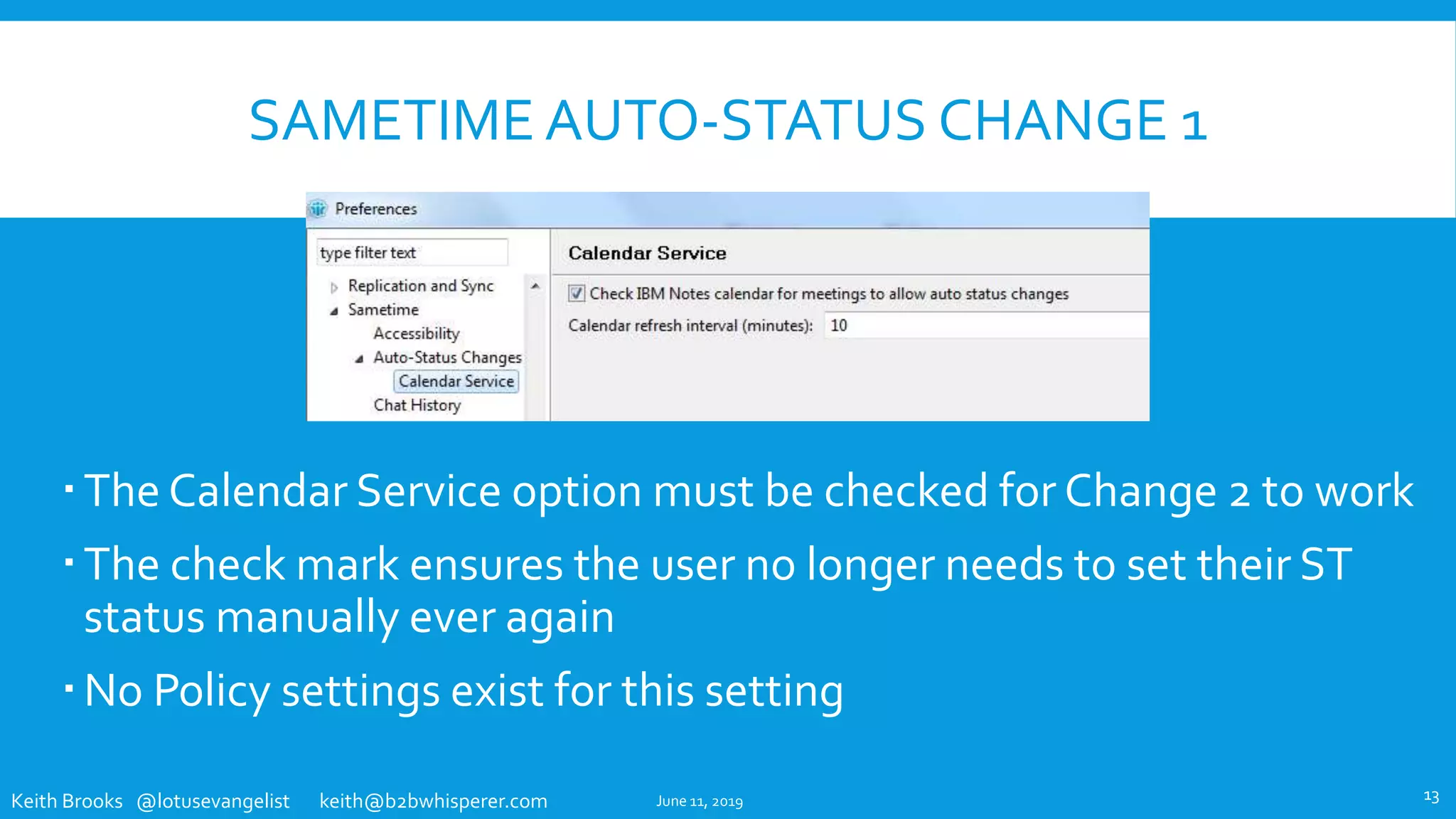
SAMETIME AUTO-STATUS CHANGE 1
The Calendar Service option must be checked for Change 2 to work
The check mark ensures the user no longer needs to set their ST
status manually ever again
No Policy settings exist for this setting
June 11, 2019 13
Keith Brooks @lotusevangelist keith@b2bwhisperer.com
SAMETIME AUTO-STATUS CHANGE 2
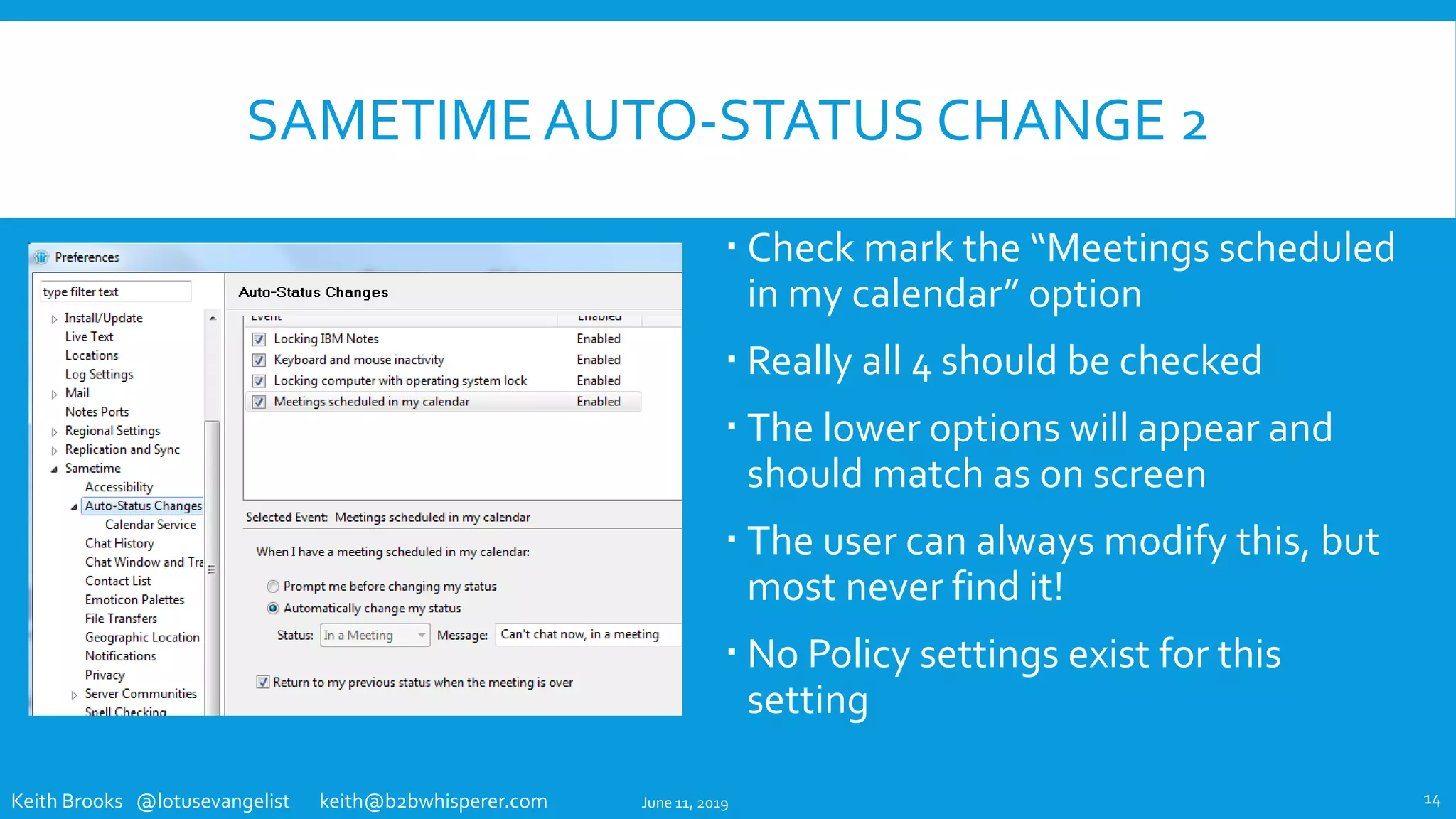
 Check mark the “Meetings scheduled
in my calendar” option
 Really all 4 should be checked
 The lower options will appear and
should match as on screen
 The user can always modify this, but
most never find it!
 No Policy settings exist for this
setting
June 11, 2019 14
Keith Brooks @lotusevangelist keith@b2bwhisperer.com
THE NOTES CLIENT REPLICATORTAB
June 11, 2019 15
Keith Brooks @lotusevangelist keith@b2bwhisperer.com
REPLICATIONTAB - LOCAL FREETIME INFO
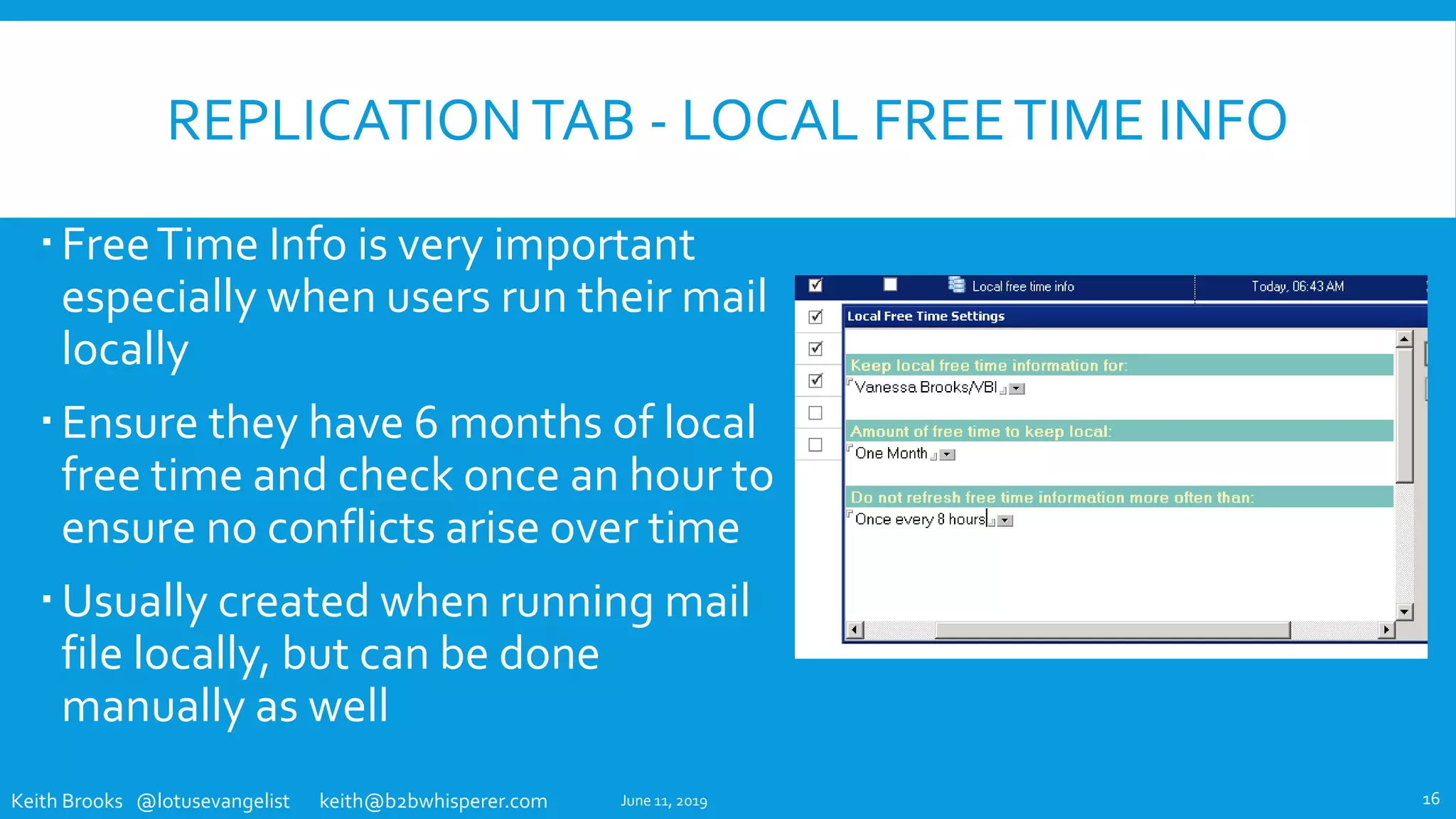
FreeTime Info is very important
especially when users run their mail
locally
Ensure they have 6 months of local
free time and check once an hour to
ensure no conflicts arise over time
Usually created when running mail
file locally, but can be done
manually as well
June 11, 2019 16
Keith Brooks @lotusevangelist keith@b2bwhisperer.com
REPLICATIONTAB – DISABLE HIGH PRIORITY
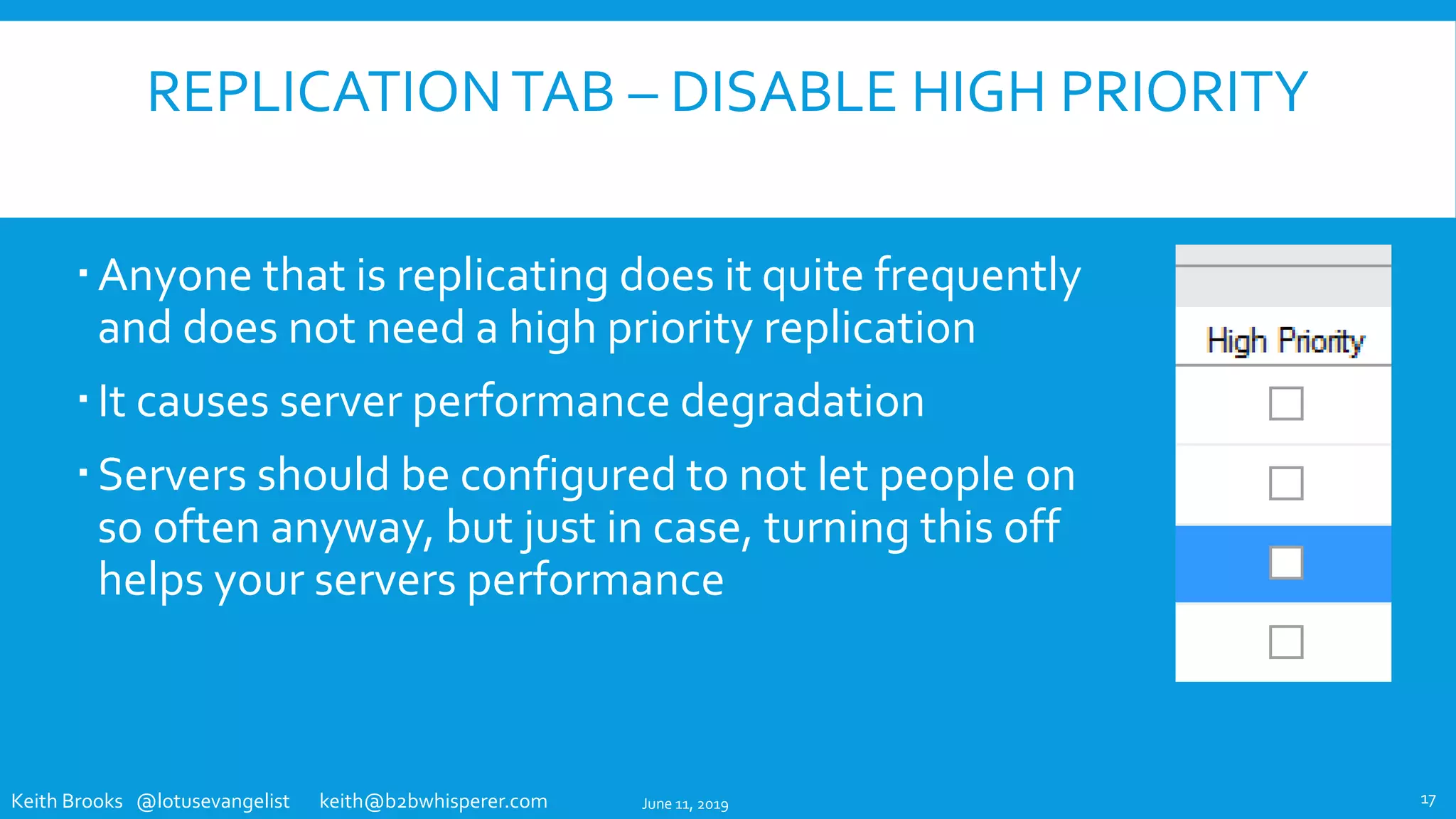
Anyone that is replicating does it quite frequently
and does not need a high priority replication
It causes server performance degradation
Servers should be configured to not let people on
so often anyway, but just in case, turning this off
helps your servers performance
June 11, 2019 17
Keith Brooks @lotusevangelist keith@b2bwhisperer.com
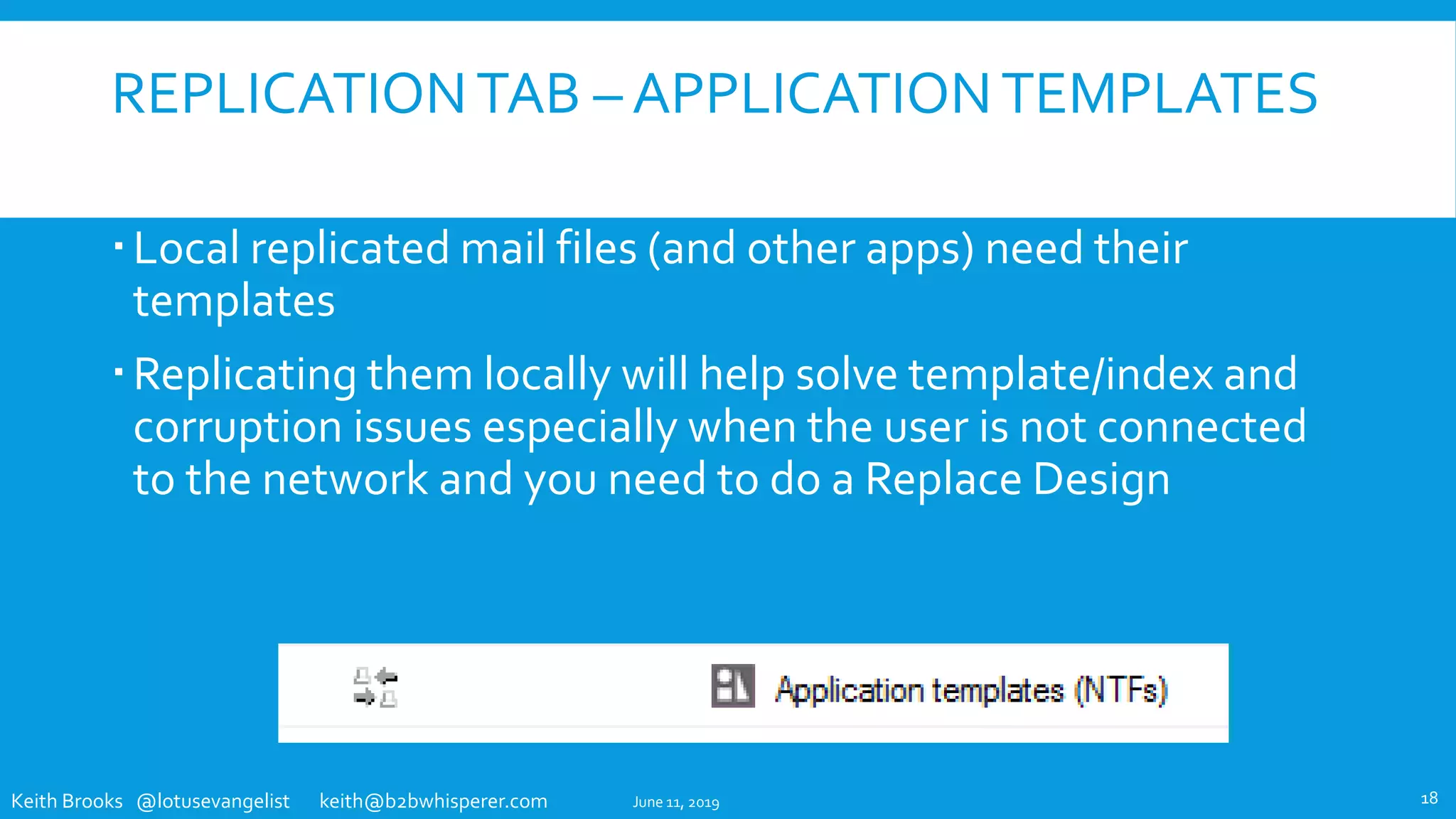
REPLICATIONTAB – APPLICATIONTEMPLATES
Local replicated mail files (and other apps) need their
templates
Replicating them locally will help solve template/index and
corruption issues especially when the user is not connected
to the network and you need to do a Replace Design
June 11, 2019 18
Keith Brooks @lotusevangelist keith@b2bwhisperer.com
THE IBM NOTES CLIENT
USER INTERFACE ENHANCEMENTS
June 11, 2019 19
Keith Brooks @lotusevangelist keith@b2bwhisperer.com
DOCKTHE OPEN LIST
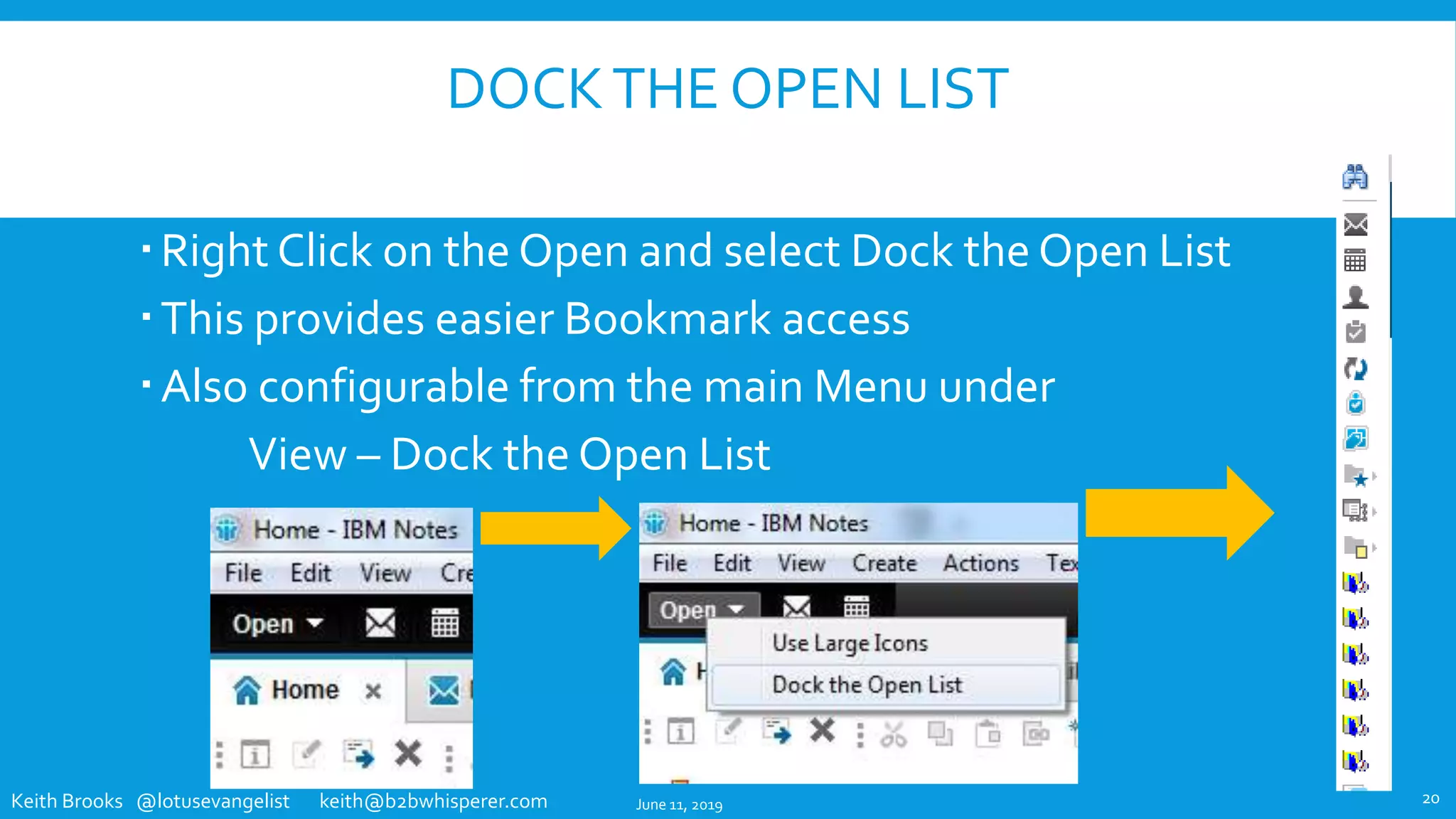
Right Click on the Open and select Dock the Open List
This provides easier Bookmark access
Also configurable from the main Menu under
View – Dock the Open List
June 11, 2019 20
Keith Brooks @lotusevangelist keith@b2bwhisperer.com
FILE-PREFERENCES SETTINGS – BASIC
NOTES CLIENT CONFIGURATION
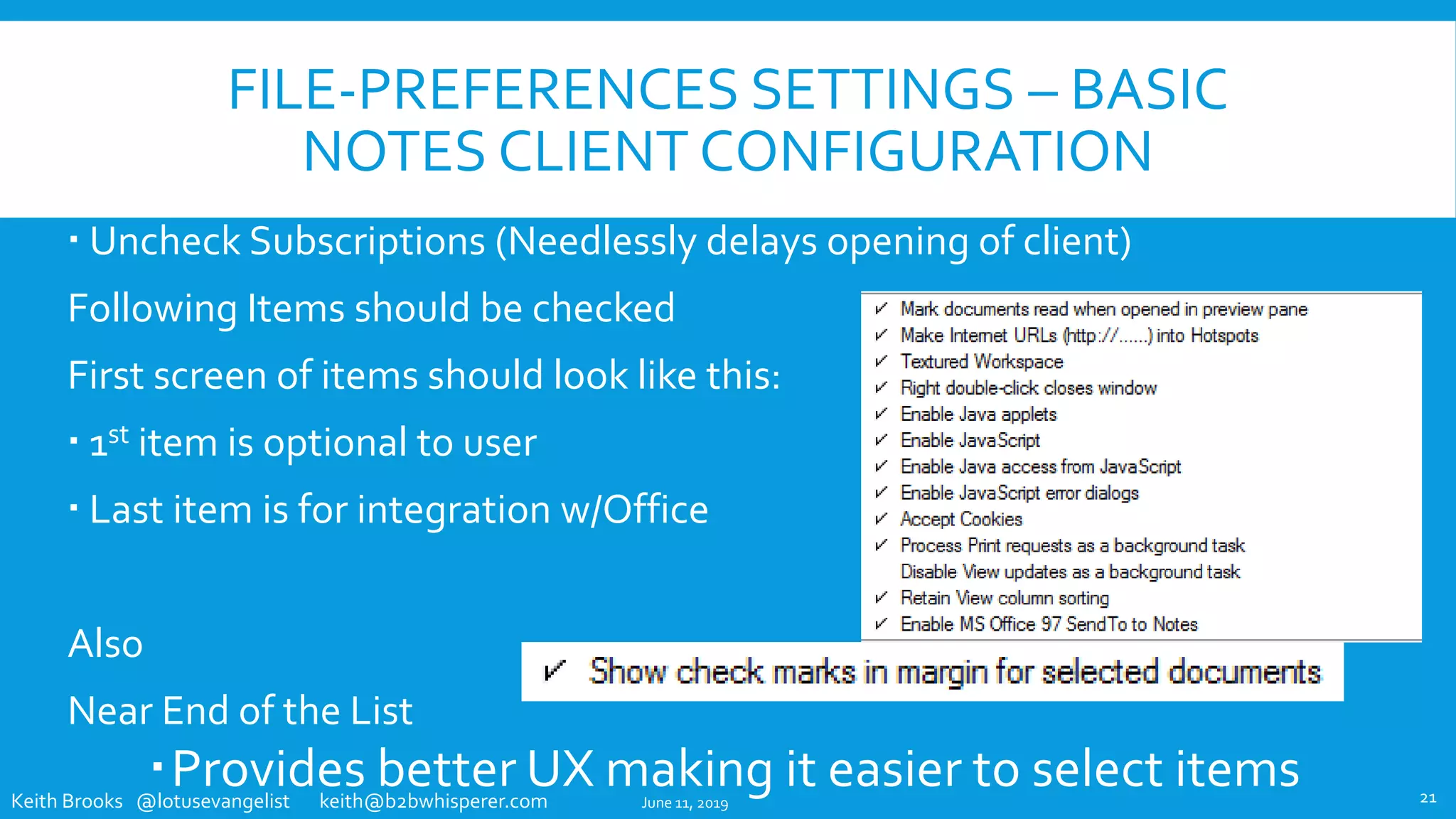
 Uncheck Subscriptions (Needlessly delays opening of client)
Following Items should be checked
First screen of items should look like this:
 1st item is optional to user
 Last item is for integration w/Office
Also
Near End of the List
Provides better UX making it easier to select itemsJune 11, 2019 21
Keith Brooks @lotusevangelist keith@b2bwhisperer.com
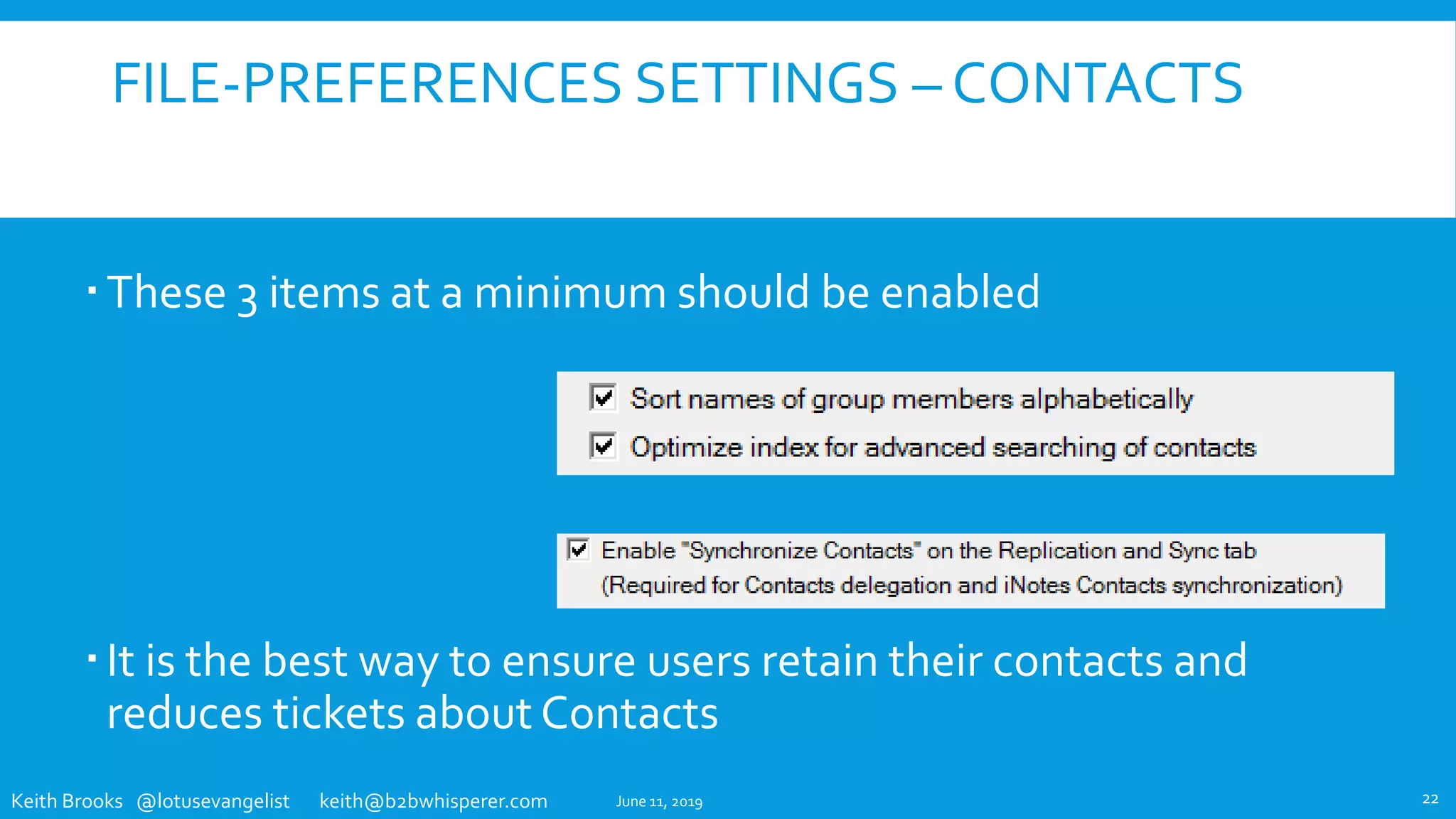
FILE-PREFERENCES SETTINGS – CONTACTS
These 3 items at a minimum should be enabled
It is the best way to ensure users retain their contacts and
reduces tickets about Contacts
June 11, 2019 22
Keith Brooks @lotusevangelist keith@b2bwhisperer.com
REVIEW
The Notes Client Location Document
The Notes Client Preferences, set via IBM Domino Policy Settings
The Notes Client Preferences, ChangesVia Client Side Settings
The Notes Client ReplicatorTab
The Notes Client User Interface Enhancements
June 11, 2019 23
Keith Brooks @lotusevangelist keith@b2bwhisperer.com
THANKYOU
The employees and partners of
your Company or Customer
appreciate you making their
day to day tasks easier and more efficient
June 11, 2019 24
Keith Brooks CEO, B2B Whisperer
@lotusevangelist keith@b2bwhisperer.com
Blog: Http://blog.vanessabrooks.com

ISBG / NCUG Why Didn't Anyone Tell Me Notes Could Do That

  • 1.
    "WHY DIDN'T ANYONETELL ME NOTES COULD DO THAT!“ IBM NOTES CLIENT SUGGESTED CONFIGURATION ENHANCEMENTS TO A DEFAULT CUSTOMER BUILD/INSTALL Keith Brooks CEO, B2BWhisperer @lotusevangelist keith@b2bwhisperer.com Blog: Http://blog.vanessabrooks.comJune 11, 2019
  • 2.
    Keith Brooks @lotusevangelistkeith@b2bwhisperer.com KEITH BROOKS  Ex Lotus EMEA  IBM Champion for 7 years  IBM RedbooksThought Leader  Lazy Administrator that has presented at Social Connections, Lotusphere,Think, Connect, Connected, Engage, SUTOL,TheView Admin and now ISBG 2
  • 3.
    Keith Brooks @lotusevangelistkeith@b2bwhisperer.com PURPOSE Provide an end user experience that: Lowers Help Desk tickets related to some common issues Increases productivity by enabling default functionality Reduces their frustrations with IT, Notes, their PCs Costs zero to implement because it is all built in to the product or available tools June 11, 2019 3
  • 4.
    Keith Brooks @lotusevangelistkeith@b2bwhisperer.com 5 AREAS OF RECOMMENDED ENHANCEMENTS The Notes Client Location Document The Notes Client Preferences, set via IBM Domino Policy Settings The Notes Client Preferences, ChangesVia Client Side Settings The Notes Client ReplicatorTab The Notes Client User Interface Enhancements June 11, 2019 4
  • 5.
    Keith Brooks @lotusevangelistkeith@b2bwhisperer.com THE NOTES CLIENT LOCATION DOCUMENT June 11, 2019 5
  • 6.
    Keith Brooks @lotusevangelistkeith@b2bwhisperer.com DOMINO DIRECTORY SERVER FIELD – NEW AND OLD  Home/Mail Server field ONLY handles mail routing  Domino Directory Server field interacts with Sametime lookups, F9 lookups, type- ahead, address picker.  Benefits include less lookup issues, less Sametime contacts issues and faster lookups  Set via the Policy Document “Setup” Basics tab Source: https://www.ibm.com/support/knowledgecenter/en/SSKTMJ_9.0.1/admin/conf_settingupnotesclientstouseadirectoryserver_t.html * Admins or Developers may choose to set the Directory server to their preferred server June 11, 2019 6 Currently may be blank May not have a defined server, which is okay Should match their Home Server *
  • 7.
    Keith Brooks @lotusevangelistkeith@b2bwhisperer.com LOCATION DOCUMENT CHANGES - EXISTING USERS Proxy Entry  Remove Proxy Entries if you no longer need them, it just causes delays and problems with emails using graphics or web links Domain  Verify it is CUSTOMERNAME (some are just partial names) Replication  Disable High Replication and set any items to regular  Do not prompt to replicate at Start  Replicate when Notes ends if anything is waiting to be sent June 11, 2019 7
  • 8.
    Keith Brooks @lotusevangelistkeith@b2bwhisperer.com IBM NOTES CLIENT PREFERENCES SETVIA IBM DOMINO POLICY SETTINGS June 11, 2019 8
  • 9.
    Keith Brooks @lotusevangelistkeith@b2bwhisperer.com SETTHEWEB BROWSER OPTION  There is probably no reason for anyone to use the Notes browser unless your developers require it  It is not up to date and leads to all kinds of issues in the user’s mail  Policy found under “Desktop” Basics tab under Browser Options section and set to “Set Value and prevent changes” 9 Enforce Always June 11, 2019
  • 10.
    Keith Brooks @lotusevangelistkeith@b2bwhisperer.com CREATING A NOTES.INI SETTING USING DOMINO DESIGNER  You can use IBM® Lotus® Domino® Designer to add a new field to the desktop policy settings document to assign a NOTES.INI value.The new field must be named $PrefVariableName, whereVariableName is the name of the NOTES.INI variable you want to set. In the new field on the desktop policy settings document, enter the value you want assigned to that NOTES.INI variable.That is the value that is set in the NOTES.INI for the assigned Notes users.  Note:You can use the procedure described here to assign NOTES.INI settings to Notes client users and groups or you can use the desktop policy settings document - Custom Settings - Notes.ini tab.  For example, assume that you want to use a policy settings document to add a font size setting of 5 to your NOTES.INI file.To change the font setting, do the following:  1. From the Domino Designer, open the desktop policy settings document form.  2. Create a new field named $PrefDisplay_font_adjustment.  3. Assign a value of 5 to the field $PrefDisplay_font_adjustment.  4. Save and exit.  These new values are set on the assigned users clients the next time they authenticate with their home server.  Note: Some settings require the Notes client be restarted for the settings to work. June 11, 2019 10
  • 11.
    Keith Brooks @lotusevangelistkeith@b2bwhisperer.com CREATING A LOCATION DOCUMENT SETTING USING DOMINO DESIGNER  Note:You can use the procedure described here to assign Location settings to Notes client users and groups or you can use the desktop policy settings document - Custom Settings - Locations tab.  To set a Location document setting using a policy document, add a new field to the desktop policy settings document.The new field must be named LocAllVariableName, whereVariableName is the name of the fields you are setting in the Location documents. In the new field on the policy settings document, enter the value you want assigned to that Location document field. That is the value that is then assigned to all of the users' Location documents.  These new values are set on the assigned users' clients the next time they authenticate with their home server.  Note Some settings require the Notes client be restarted for the settings to work. June 11, 2019 11
  • 12.
    Keith Brooks @lotusevangelistkeith@b2bwhisperer.com IBM NOTES CLIENT PREFERENCES CHANGESVIA CLIENT SIDE SETTINGS June 11, 2019 12
  • 13.
    Keith Brooks @lotusevangelistkeith@b2bwhisperer.com SAMETIME AUTO-STATUS CHANGE 1 The Calendar Service option must be checked for Change 2 to work The check mark ensures the user no longer needs to set their ST status manually ever again No Policy settings exist for this setting June 11, 2019 13
  • 14.
    Keith Brooks @lotusevangelistkeith@b2bwhisperer.com SAMETIME AUTO-STATUS CHANGE 2  Check mark the “Meetings scheduled in my calendar” option  Really all 4 should be checked  The lower options will appear and should match as on screen  The user can always modify this, but most never find it!  No Policy settings exist for this setting June 11, 2019 14
  • 15.
    Keith Brooks @lotusevangelistkeith@b2bwhisperer.com THE NOTES CLIENT REPLICATORTAB June 11, 2019 15
  • 16.
    Keith Brooks @lotusevangelistkeith@b2bwhisperer.com REPLICATIONTAB - LOCAL FREETIME INFO FreeTime Info is very important especially when users run their mail locally Ensure they have 6 months of local free time and check once an hour to ensure no conflicts arise over time Usually created when running mail file locally, but can be done manually as well June 11, 2019 16
  • 17.
    Keith Brooks @lotusevangelistkeith@b2bwhisperer.com REPLICATIONTAB – DISABLE HIGH PRIORITY Anyone that is replicating does it quite frequently and does not need a high priority replication It causes server performance degradation Servers should be configured to not let people on so often anyway, but just in case, turning this off helps your servers performance June 11, 2019 17
  • 18.
    Keith Brooks @lotusevangelistkeith@b2bwhisperer.com REPLICATIONTAB – APPLICATIONTEMPLATES Local replicated mail files (and other apps) need their templates Replicating them locally will help solve template/index and corruption issues especially when the user is not connected to the network and you need to do a Replace Design June 11, 2019 18
  • 19.
    Keith Brooks @lotusevangelistkeith@b2bwhisperer.com THE IBM NOTES CLIENT USER INTERFACE ENHANCEMENTS June 11, 2019 19
  • 20.
    Keith Brooks @lotusevangelistkeith@b2bwhisperer.com DOCKTHE OPEN LIST Right Click on the Open and select Dock the Open List This provides easier Bookmark access Also configurable from the main Menu under View – Dock the Open List June 11, 2019 20
  • 21.
    Keith Brooks @lotusevangelistkeith@b2bwhisperer.com FILE-PREFERENCES SETTINGS – BASIC NOTES CLIENT CONFIGURATION  Uncheck Subscriptions (Needlessly delays opening of client) Following Items should be checked First screen of items should look like this:  1st item is optional to user  Last item is for integration w/Office Also Near End of the List Provides better UX making it easier to select itemsJune 11, 2019 21
  • 22.
    Keith Brooks @lotusevangelistkeith@b2bwhisperer.com FILE-PREFERENCES SETTINGS – CONTACTS These 3 items at a minimum should be enabled It is the best way to ensure users retain their contacts and reduces tickets about Contacts June 11, 2019 22
  • 23.
    Keith Brooks @lotusevangelistkeith@b2bwhisperer.com REVIEW The Notes Client Location Document The Notes Client Preferences, set via IBM Domino Policy Settings The Notes Client Preferences, ChangesVia Client Side Settings The Notes Client ReplicatorTab The Notes Client User Interface Enhancements June 11, 2019 23
  • 24.
    Keith Brooks @lotusevangelistkeith@b2bwhisperer.com THANKYOU The employees and partners of your Company or Customer appreciate you making their day to day tasks easier and more efficient June 11, 2019 24 Keith Brooks CEO, B2B Whisperer @lotusevangelist keith@b2bwhisperer.com Blog: Http://blog.vanessabrooks.com