Locating Sources and  Search Techniques   Ask an ipl2 Librarian   Digital Reference Student and Volunteer Training Created July 17, 2010
LOCATING SOURCES Part 1
A Diversity of Sources The  Ask an ipl2 Librarian  digital reference service focuses on the provision of free Internet resources to answer users’ questions.  You should not exclude print or subscription sources. However, using freely-available sources when possible ensures that all ipl2 users will have access to the information. Remember, some of our users have  no library access  or have  limited  library resources .  We will review the following source types: Free, Web-based  Print and Licensed Electronic Sources
Source Types Free, Web-based Sources Print and Licensed Electronic Sources (a.k.a., Subscription Databases) A licensed electronic source (database) is any source that is only available to you because you or someone else (your employer, your university) pays for access to it. Grolier's Encyclopedia Americana, Bowker's Books in Print, GaleNet's databases ( Contemporary Authors, BGMI, Discovering Biography , etc.), and OCLC's FirstSearch databases are all examples of licensed electronic sources.  Use print or licensed electronic resources when:  Useful free sources are not available or provide insufficient information,  You need to verify information found on the Internet,  The user has specifically requested sources that are print or subscription based.
Recommending a Print and/or Licensed Electronic Source Identify the user’s local library (if the user reported their location). Visit the library's website to search its catalog and review the books and licensed electronic sources available. In this way, you can direct the user to sources that are local to them! If you do not know the user’s location or you find that the user’s local library is not helpful, you can also use whatever tools you have available to you. If more than just a fact is needed, more limitations are placed on what you can provide.  Please refrain from :  Copying and pasting the whole text of the article into the e-mail and sending it to the user (ipl2 does not legally have access to that content), or  Giving the user the URL and telling them to register for a free trial to access it (out of concern for those users who will not be savvy enough negotiate free trials without getting stuck with a bill).  Instead,  either summarize the information from the licensed resource for the user and/or extract  up to 3 sentences  from it for them, and it must be cited fully.  More common, though, would be using the subscription source to find citations of articles. In that case, you can list citations you find in their entirety, though no full texts of articles.  If you recommend a licensed print or electronic source, you  must  provide the appropriate [script – insert the link to the script once online].
Finding Sources There are many channels to use to locate sources of information to answer a user’s question.  Referrals Human-created directories, like ipl2 Search engines  The Deep Web
Referrals Libraries Often a library is the only source for more information or the kind of help the user needs, and by successfully connecting the user with local resources you can provide more effective service.  Also look for statewide, regional, or even local electronic services.  Many library systems and groups have services such as live chat reference service or online database access. For instance, the State of Michigan has the  Michigan e-Library  ("MeL"), which offers Michigan residents a wide range of subscription databases.  You can find a list of State libraries as well as statewide/regional digital services in the ipl2's  State Libraries  collection. If you know your user’s location, direct them to their local library website, provide specific contact information, and/or point out relevant tools or services (e.g., Interlibrary Loan, microfilm readers).  Avoid using library jargon without explanation (such as " ILL", "OPAC").  If you don't know the user’s location, refer users to this resource called  LibWeb  to locate a library near them. If you do know the user’s general location (e.g., state in the United States, but not city or town), provide the user with the link that will permit them to view the libraries at the nearest geographic level (e.g., state listings if the user provided their state).  Helpful organizations and institutions Refer users to local history societies, professional associations, listservs/message boards, or other groups in that subject area.
Directories Directories provide access to resources organized by broad subject-based hierarchies.  Librarian-created directories are good places to start research, as they contain sites that have been carefully reviewed by information professionals.  Site searches are often available but you may find that browsing through the hierarchies to be more fruitful as site searches vary in effectiveness.  Use of directories will help broaden your knowledge of available sites in a way that search engines cannot.  The ipl2 has a collection of Web Directories in its  Reference  section.
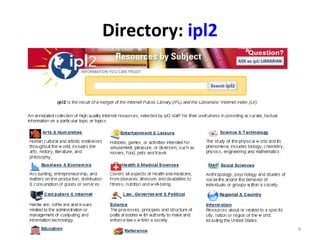
Directory:  ipl2
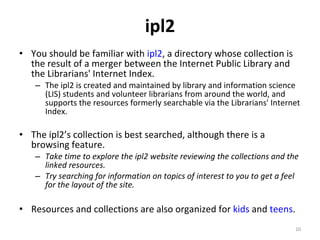
ipl2 You should be familiar with  ipl2 , a directory whose collection is the result of a merger between the Internet Public Library and the Librarians' Internet Index. The ipl2 is created and maintained by library and information science (LIS) students and volunteer librarians from around the world, and supports the resources formerly searchable via the Librarians' Internet Index.  The ipl2’s collection is best searched, although there is a browsing feature.  Take time to explore the ipl2 website reviewing the collections and the linked resources.  Try searching for information on topics of interest to you to get a feel for the layout of the site. Resources and collections are also organized for  kids  and  teens .
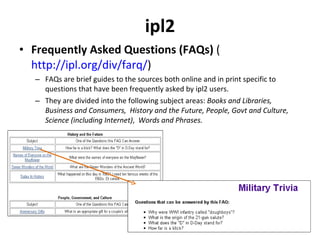
ipl2 Frequently Asked Questions (FAQs)  ( http://ipl.org/div/farq/ ) FAQs are brief guides to the sources both online and in print specific to questions that have been frequently asked by ipl2 users.  They are divided into the following subject areas:  Books and Libraries,  Business and Consumers,  History and the Future,   People, Govt and Culture, Science (including Internet) ,  Words and Phrases.
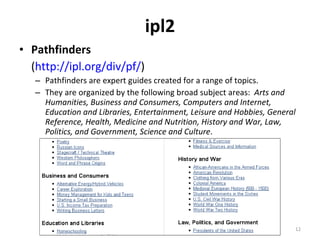
ipl2 Pathfinders ( http://ipl.org/div/pf/ )  Pathfinders are expert guides created for a range of topics. They are organized by the following broad subject areas:  Arts and Humanities, Business and Consumers, Computers and Internet, Education and Libraries, Entertainment, Leisure and Hobbies, General Reference, Health, Medicine and Nutrition, History and War, Law, Politics, and Government, Science and Culture .
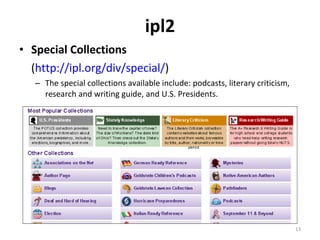
ipl2 Special Collections ( http://ipl.org/div/special/ )  The special collections available include: podcasts, literary criticism, research and writing guide, and U.S. Presidents.
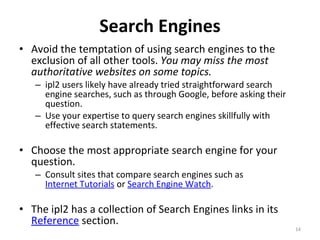
Search Engines Avoid the temptation of using search engines to the exclusion of all other tools.  You may miss the most authoritative websites on some topics.  ipl2 users likely have already tried straightforward search engine searches, such as through Google, before asking their question. Use your expertise to query search engines skillfully with effective search statements.  Choose the most appropriate search engine for your question.  Consult sites that compare search engines such as  Internet Tutorials  or  Search Engine Watch .  The ipl2 has a collection of Search Engines links in its  Reference  section.
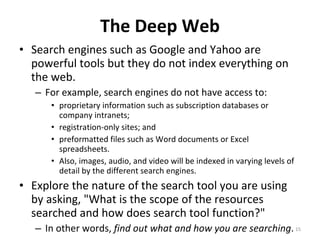
The Deep Web Search engines such as Google and Yahoo are powerful tools but they do not index everything on the web.  For example, search engines do not have access to: proprietary information such as subscription databases or company intranets;  registration-only sites; and  preformatted files such as Word documents or Excel spreadsheets. Also, images, audio, and video will be indexed in varying levels of detail by the different search engines.  Explore the nature of the search tool you are using by asking, "What is the scope of the resources searched and how does search tool function?"  In other words,  find out what and how you are searching .
SEARCH TECHNIQUES Part 2
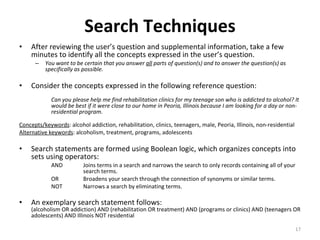
Search Techniques After reviewing the user’s question and supplemental information, take a few minutes to identify all the concepts expressed in the user’s question.  You want to be certain that you answer  all  parts of question(s) and to answer the question(s) as specifically as possible.  Consider the concepts expressed in the following reference question:  Can you please help me find rehabilitation clinics for my teenage son who is addicted to alcohol? It  would be best if it were close to our home in Peoria, Illinois because I am looking for a day or non- residential program.  Concepts/keywords : alcohol addiction, rehabilitation, clinics, teenagers, male, Peoria, Illinois, non-residential  Alternative keywords : alcoholism, treatment, programs, adolescents  Search statements are formed using Boolean logic, which organizes concepts into sets using operators:  AND Joins terms in a search and narrows the search to only records containing all of your  search terms.  OR      Broadens your search through the connection of synonyms or similar terms.  NOT    Narrows a search by eliminating terms.  An exemplary search statement follows:  (alcoholism OR addiction) AND (rehabilitation OR treatment) AND (programs or clinics) AND (teenagers OR adolescents) AND Illinois NOT residential
Any questions? Contact the ipl2 Administrative Team with your questions about locating sources or search techniques:  [email_address]

Locating sources and search techniques

  • 1.
    Locating Sources and Search Techniques Ask an ipl2 Librarian Digital Reference Student and Volunteer Training Created July 17, 2010
  • 2.
  • 3.
    A Diversity ofSources The Ask an ipl2 Librarian digital reference service focuses on the provision of free Internet resources to answer users’ questions. You should not exclude print or subscription sources. However, using freely-available sources when possible ensures that all ipl2 users will have access to the information. Remember, some of our users have no library access or have limited library resources . We will review the following source types: Free, Web-based Print and Licensed Electronic Sources
  • 4.
    Source Types Free,Web-based Sources Print and Licensed Electronic Sources (a.k.a., Subscription Databases) A licensed electronic source (database) is any source that is only available to you because you or someone else (your employer, your university) pays for access to it. Grolier's Encyclopedia Americana, Bowker's Books in Print, GaleNet's databases ( Contemporary Authors, BGMI, Discovering Biography , etc.), and OCLC's FirstSearch databases are all examples of licensed electronic sources. Use print or licensed electronic resources when: Useful free sources are not available or provide insufficient information, You need to verify information found on the Internet, The user has specifically requested sources that are print or subscription based.
  • 5.
    Recommending a Printand/or Licensed Electronic Source Identify the user’s local library (if the user reported their location). Visit the library's website to search its catalog and review the books and licensed electronic sources available. In this way, you can direct the user to sources that are local to them! If you do not know the user’s location or you find that the user’s local library is not helpful, you can also use whatever tools you have available to you. If more than just a fact is needed, more limitations are placed on what you can provide. Please refrain from : Copying and pasting the whole text of the article into the e-mail and sending it to the user (ipl2 does not legally have access to that content), or Giving the user the URL and telling them to register for a free trial to access it (out of concern for those users who will not be savvy enough negotiate free trials without getting stuck with a bill). Instead, either summarize the information from the licensed resource for the user and/or extract up to 3 sentences from it for them, and it must be cited fully. More common, though, would be using the subscription source to find citations of articles. In that case, you can list citations you find in their entirety, though no full texts of articles. If you recommend a licensed print or electronic source, you must provide the appropriate [script – insert the link to the script once online].
  • 6.
    Finding Sources Thereare many channels to use to locate sources of information to answer a user’s question. Referrals Human-created directories, like ipl2 Search engines The Deep Web
  • 7.
    Referrals Libraries Oftena library is the only source for more information or the kind of help the user needs, and by successfully connecting the user with local resources you can provide more effective service. Also look for statewide, regional, or even local electronic services. Many library systems and groups have services such as live chat reference service or online database access. For instance, the State of Michigan has the Michigan e-Library ("MeL"), which offers Michigan residents a wide range of subscription databases. You can find a list of State libraries as well as statewide/regional digital services in the ipl2's State Libraries collection. If you know your user’s location, direct them to their local library website, provide specific contact information, and/or point out relevant tools or services (e.g., Interlibrary Loan, microfilm readers). Avoid using library jargon without explanation (such as " ILL", "OPAC"). If you don't know the user’s location, refer users to this resource called LibWeb to locate a library near them. If you do know the user’s general location (e.g., state in the United States, but not city or town), provide the user with the link that will permit them to view the libraries at the nearest geographic level (e.g., state listings if the user provided their state). Helpful organizations and institutions Refer users to local history societies, professional associations, listservs/message boards, or other groups in that subject area.
  • 8.
    Directories Directories provideaccess to resources organized by broad subject-based hierarchies. Librarian-created directories are good places to start research, as they contain sites that have been carefully reviewed by information professionals. Site searches are often available but you may find that browsing through the hierarchies to be more fruitful as site searches vary in effectiveness. Use of directories will help broaden your knowledge of available sites in a way that search engines cannot. The ipl2 has a collection of Web Directories in its Reference section.
  • 9.
  • 10.
    ipl2 You shouldbe familiar with ipl2 , a directory whose collection is the result of a merger between the Internet Public Library and the Librarians' Internet Index. The ipl2 is created and maintained by library and information science (LIS) students and volunteer librarians from around the world, and supports the resources formerly searchable via the Librarians' Internet Index. The ipl2’s collection is best searched, although there is a browsing feature. Take time to explore the ipl2 website reviewing the collections and the linked resources. Try searching for information on topics of interest to you to get a feel for the layout of the site. Resources and collections are also organized for kids and teens .
  • 11.
    ipl2 Frequently AskedQuestions (FAQs) ( http://ipl.org/div/farq/ ) FAQs are brief guides to the sources both online and in print specific to questions that have been frequently asked by ipl2 users. They are divided into the following subject areas: Books and Libraries, Business and Consumers, History and the Future, People, Govt and Culture, Science (including Internet) , Words and Phrases.
  • 12.
    ipl2 Pathfinders (http://ipl.org/div/pf/ ) Pathfinders are expert guides created for a range of topics. They are organized by the following broad subject areas: Arts and Humanities, Business and Consumers, Computers and Internet, Education and Libraries, Entertainment, Leisure and Hobbies, General Reference, Health, Medicine and Nutrition, History and War, Law, Politics, and Government, Science and Culture .
  • 13.
    ipl2 Special Collections( http://ipl.org/div/special/ ) The special collections available include: podcasts, literary criticism, research and writing guide, and U.S. Presidents.
  • 14.
    Search Engines Avoidthe temptation of using search engines to the exclusion of all other tools. You may miss the most authoritative websites on some topics. ipl2 users likely have already tried straightforward search engine searches, such as through Google, before asking their question. Use your expertise to query search engines skillfully with effective search statements. Choose the most appropriate search engine for your question. Consult sites that compare search engines such as Internet Tutorials or Search Engine Watch . The ipl2 has a collection of Search Engines links in its Reference section.
  • 15.
    The Deep WebSearch engines such as Google and Yahoo are powerful tools but they do not index everything on the web. For example, search engines do not have access to: proprietary information such as subscription databases or company intranets; registration-only sites; and preformatted files such as Word documents or Excel spreadsheets. Also, images, audio, and video will be indexed in varying levels of detail by the different search engines. Explore the nature of the search tool you are using by asking, "What is the scope of the resources searched and how does search tool function?" In other words, find out what and how you are searching .
  • 16.
  • 17.
    Search Techniques Afterreviewing the user’s question and supplemental information, take a few minutes to identify all the concepts expressed in the user’s question. You want to be certain that you answer all parts of question(s) and to answer the question(s) as specifically as possible. Consider the concepts expressed in the following reference question: Can you please help me find rehabilitation clinics for my teenage son who is addicted to alcohol? It would be best if it were close to our home in Peoria, Illinois because I am looking for a day or non- residential program. Concepts/keywords : alcohol addiction, rehabilitation, clinics, teenagers, male, Peoria, Illinois, non-residential Alternative keywords : alcoholism, treatment, programs, adolescents Search statements are formed using Boolean logic, which organizes concepts into sets using operators: AND Joins terms in a search and narrows the search to only records containing all of your search terms. OR     Broadens your search through the connection of synonyms or similar terms. NOT    Narrows a search by eliminating terms. An exemplary search statement follows: (alcoholism OR addiction) AND (rehabilitation OR treatment) AND (programs or clinics) AND (teenagers OR adolescents) AND Illinois NOT residential
  • 18.
    Any questions? Contactthe ipl2 Administrative Team with your questions about locating sources or search techniques: [email_address]