Shifter: Containers in HPC environments
HPC Advisory Council Switzerland
Miguel Gila, CSCS
March 21, 2016
Docker
What is Docker and how does it work?
§ “Docker containers wrap up a piece of software in a complete filesystem that
contains everything it needs to run: code, runtime, system tools, system libraries
– anything you can install on a server. This guarantees that it will always run the
same, regardless of the environment it is running in.” [*]
Shifter: Containers in HPC environments 3
Virtual Machines Containers
[*] https://www.docker.com/what-docker
[*]
[*]
What is Docker and how does it work?
§ A Docker image is a file that contains a filesystem within it. It can be a full
filesystem (i.e. CentOS) or partial (i.e. python3.4-slim). Images are stored either
on a public registry (Docker hub) or private
§ Docker leverages the namespaces feature of the kernel to isolate processes
§ On its simplest form, Docker basically
1. Pulls an image to the local system
2. Creates a chrooted environment with the image (=container)
3. Runs our application in the container (’isolated’ from the host thanks to kernel namespaces)
§ However, it can also do other things:
§ Isolate network by creating NAT or bridge devices
§ Can use a nice GUI
Shifter: Containers in HPC environments 4
Docker in HPC environments
§ Docker is a nice tool, but it’s not built for HPC environments, because:
§ Does not integrate well with workload managers
§ Does not isolate users on shared filesystems
§ Requires running a daemon on all nodes
§ Not designed to run on diskless clients
§ Network is, by default, ‘NATed’
§ Building Docker is done within a Docker container. It can be done outside, but is a complex
task (Go language, seriously??)
§ But after all, a sysadmin can make anything to work on a cluster, right?
§ We can create (and hopefully maintain) monstrous wrappers to run Docker containers…
Shifter: Containers in HPC environments 5
Shifter
What is Shifter and how does it work?
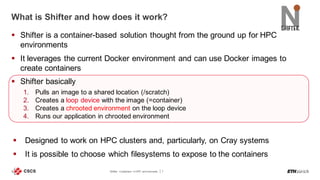
§ Shifter is a container-based solution thought from the ground up for HPC
environments
§ It leverages the current Docker environment and can use Docker images to
create containers
§ Shifter basically
1. Pulls an image to a shared location (/scratch)
2. Creates a loop device with the image (=container)
3. Creates a chrooted environment on the loop device
4. Runs our application in chrooted environment
§ Designed to work on HPC clusters and, particularly, on Cray systems
§ It is possible to choose which filesystems to expose to the containers
Shifter: Containers in HPC environments 7
External nodeCompute node
Architecture of Shifter
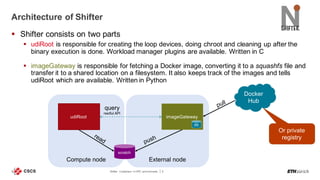
§ Shifter consists on two parts
§ udiRoot is responsible for creating the loop devices, doing chroot and cleaning up after the
binary execution is done. Workload manager plugins are available. Written in C
§ imageGateway is responsible for fetching a Docker image, converting it to a squashfs file and
transfer it to a shared location on a filesystem. It also keeps track of the images and tells
udiRoot which are available. Written in Python
Shifter: Containers in HPC environments 8
scratch
udiRoot imageGateway
query
restful API
db
Docker
Hub
Or private
registry
Workflow
1. User creates an image on his/her computer and pushes it to Docker Hub
Shifter: Containers in HPC environments 9
Docker
image
1 2
$ docker build .
Uploading context 10240 bytes
Step 1 : FROM busybox
Pulling repository busybox
---> e9aa60c60128MB/2.284 MB (100%) endpoint: https://cdn-registry-
1.docker.io/v1/
Step 2 : RUN ls -lh /
---> Running in 9c9e81692ae9
total 24
drwxr-xr-x 2 root root 4.0K Mar 12 2013 bin
drwxr-xr-x 5 root root 4.0K Oct 19 00:19 dev
drwxr-xr-x 2 root root 4.0K Oct 19 00:19 etc
drwxr-xr-x 2 root root 4.0K Nov 15 23:34 lib
lrwxrwxrwx 1 root root 3 Mar 12 2013 lib64 -> lib
dr-xr-xr-x 116 root root 0 Nov 15 23:34 proc
lrwxrwxrwx 1 root root 3 Mar 12 2013 sbin -> bin
dr-xr-xr-x 13 root root 0 Nov 15 23:34 sys
drwxr-xr-x 2 root root 4.0K Mar 12 2013 tmp
drwxr-xr-x 2 root root 4.0K Nov 15 23:34 usr
---> b35f4035db3f
Step 3 : CMD echo Hello world
---> Running in 02071fceb21b
---> f52f38b7823e
Successfully built f52f38b7823e
Removing intermediate container 9c9e81692ae9
Removing intermediate container 02071fceb21b
docker build docker push
$ docker push miguelgila/wlcg_wn:20161212
Docker
Hub
Or private
registry
Workflow
1. User creates an image on his/her computer and pushes it to Docker Hub
2. User tells imageGateway to pull his image and make it available
Shifter: Containers in HPC environments 10
$ ssh santis01
$ module load shifter
$ shifterimg pull docker:ubuntu:14.04
$ sleep 300 # :-)
$ shifterimg images
santis docker READY 2934337e50 2015-12-10T09:03:38 python:2.7-slim
santis docker READY a4f04f71be 2015-12-10T09:47:17 python:3.5-slim
santis docker READY b0197931ac 2015-12-10T09:53:54 python:3.2-slim
santis docker READY 0bb6b50d84 2015-12-10T10:34:24 python:3.3-slim
santis docker READY cd86406b32 2015-12-10T10:36:55 python:3.5.1
santis docker READY 48bc52cc28 2015-12-10T10:47:35 python:3.4.3
santis docker READY 0b92f1735f 2015-12-10T11:17:26 python:3.4-slim
santis docker READY 3fba104814 2015-12-10T11:31:23 centos:6.7
santis docker READY 12c9d795d8 2015-12-10T11:37:35 centos:6.6
santis docker READY 3e0c71ada2 2015-12-10T15:19:24 ubuntu:15.10
santis docker READY e751d10964 2015-12-10T13:38:05 miguelgila/wlcg_wn:20151125v2
santis docker READY d55e68e6cc 2015-12-10T15:52:09 ubuntu:14.04
shifterimg pull
/scratch/
santis
imageGateway
1
2
3 4
Docker
image
Shifter
image
Shifter
image
Docker
Hub
Or private
registry
Compute node
Workflow
1. User creates an image on his/her computer and pushes it to Docker Hub
2. User tells imageGateway to pull his image and make it available
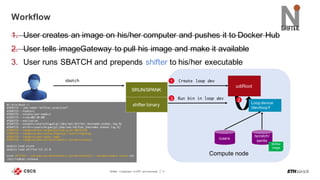
3. User runs SBATCH and prepends shifter to his/her executable
Shifter: Containers in HPC environments 11
#!/bin/bash –l
#SBATCH --job-name="shifter_osversion”
#SBATCH --nodes=1
#SBATCH --ntasks-per-node=1
#SBATCH --time=00:30:00
#SBATCH --exclusive
#SBATCH --output=/users/miguelgi/jobs/out/shifter_hostname.stdout.log.%j
#SBATCH --error=/users/miguelgi/jobs/out/shifter_hostname.stdout.log.%j
#SBATCH --image=docker:miguelgila/wlcg_wn:20151218
#SBATCH --imagevolume=/users/miguelgi:/users/miguelgi
#SBATCH --imagevolume=/apps:/apps
#SBATCH --imagevolume=/scratch/santis:/scratch/santis
module load slurm
module load shifter/15.12.0
srun shifter --volume=/scratch/santis:/scratch/santis --volume=/users:/users cat
/etc/redhat-release
sbatch
/scratch/
santis
SRUN/SPANK
1
3
udiRoot
Loop device
/dev/loopY
Shifter
image
Create loop dev
shifter binary
Run bin in loop dev
/users
2
Use cases
Full OS containers
§ Cray compute nodes run CLE (a version of SLES 11)
§ With Shifter it is possible to run applications built for specific OS:
Shifter: Containers in HPC environments 13
[miguelgi@santis01]-[11:34:45]-[~/examples]:-($ salloc -t 00:15:00 -N1 --image=docker:centos:6.7
salloc: Granted job allocation 16313
salloc: Waiting for resource configuration
salloc: Nodes nid00012 are ready for job
[miguelgi@santis01]-[11:34:50]-[~/examples]:-)$ srun shifter cat /etc/redhat-release
CentOS release 6.7 (Final)
[miguelgi@santis01]-[11:35:03]-[~/examples]:-)$ srun shifter yum --version |head -4
3.2.29
Installed: rpm-4.8.0-47.el6.x86_64 at 2015-08-19 18:25
Built : CentOS BuildSystem <http://bugs.centos.org> at 2015-07-24 11:28
Committed: Lubos Kardos <lkardos@redhat.com> at 2015-06-15
CentOS 6 – non-interactive session
[miguelgi@santis01]-[10:52:40]-[~/examples]:-)$ salloc -t 00:15:00 -N1 --image=docker:debian:7.9
salloc: Granted job allocation 16294
salloc: Waiting for resource configuration
salloc: Nodes nid00012 are ready for job
[miguelgi@santis01]-[10:58:29]-[~/examples]:-($ srun --pty shifter /bin/bash
[miguelgi@nid00012]-[10:58:31]-[~/examples]:-)$ cat /etc/debian_version
7.9
[miguelgi@nid00012]-[10:58:33]-[~/examples]:-)$ uname –a
Linux nid00012 3.0.101-0.46.1_1.0502.8871-cray_ari_c #1 SMP Tue Aug 25 21:41:26 UTC 2015 x86_64 GNU/Linux
[miguelgi@nid00012]-[10:59:46]-[~/examples]:-)$ apt-get --version |head -n1
apt 0.9.7.9 for amd64 compiled on Oct 17 2014 09:15:56
Debian 7.9 – interactive session
Application containers: Python/Ruby
Shifter: Containers in HPC environments 14
[miguelgi@santis01]-[09:57:23]-[~]:-)$ salloc -t 01:00:00 -n1 --image=docker:python:3.5.1
salloc: Granted job allocation 16274
salloc: Waiting for resource configuration
salloc: Nodes nid00012 are ready for job
[miguelgi@santis01]-[10:00:51]-[~]:-)$ srun --pty shifter /bin/bash
[miguelgi@nid00012]-[09:01:04]-[~]:-)$ python –V
Python 3.5.1
[miguelgi@nid00012]-[09:01:08]-[~]:-)$ which python
/usr/local/bin/python
Python 3.5.1 – interactive session
[miguelgi@santis01]-[10:16:35]-[~]:-)$ salloc -t 01:00:00 -n1 --image=docker:python:3.2-slim
salloc: Granted job allocation 16278
salloc: Waiting for resource configuration
salloc: Nodes nid00012 are ready for job
[miguelgi@santis01]-[10:19:34]-[~/tmp]:-)$ srun shifter ./myscript.py
3.2.6
Python 3.2 – non-interactive session
$ cat myscript.py
#! /usr/bin/env python
import platformprint(platform.python_version())
myscript.py
[miguelgi@santis01]-[09:57:23]-[~]:-)$ salloc -t 01:00:00 -n1 --image=docker:ruby:2.1.8
salloc: Granted job allocation 16280
salloc: Waiting for resource configuration
salloc: Nodes nid00012 are ready for job
[miguelgi@santis01]-[10:22:14]-[~]:-)$ srun --pty shifter /bin/bash
miguelgi@nid00012]-[09:22:28]-[~]:-)$ ruby –v
ruby 2.1.8p440 (2015-12-16 revision 53160) [x86_64-linux
Ruby 2.1.8 – interactive session
[miguelgi@santis01]-[10:22:05]-[~]:-)$ salloc -t 01:00:00 -n1 --image=docker:ruby:2.1.8
salloc: Granted job allocation 16280
salloc: Waiting for resource configuration
salloc: Nodes nid00012 are ready for job
[miguelgi@santis01]-[10:22:08]-[~/tmp]:-)$ srun shifter ./myscript.rb
2.1.8
Ruby 2.1.8 – non-interactive session
$ cat myscript.rb
#!/usr/bin/env ruby
puts RUBY_VERSION
myscript.rb
§ Can run application specific containers:
Multi-node containers
§ It is possible to run the same container across multiple nodes:
§ Working on getting MPI across nodes to function
§ Working on getting GPUs to be accessible to containers with good results so far (native
performance!)
Shifter: Containers in HPC environments 15
lucasbe@santis01 ~/shifter-gpu> sbatch ./nvidia-docker/samples/cuda-stream/benchmark.sbatch
Submitted batch job 496
lucasbe@santis01 /scratch/santis/lucasbe/jobs> cat shifter-gpu.out.log
Launching GPU stream benchmark on nid00012 ...
STREAM Benchmark implementation in CUDA
Array size (double precision) = 1073.74 MB
using 192 threads per block, 699051 blocks
Function Rate (GB/s) Avg time(s) Min time(s) Max time(s)
Copy: 184.3169 0.01167758 0.01165104 0.01170397
Scale: 183.1849 0.01175387 0.01172304 0.01178598
Add: 180.3075 0.01790012 0.01786518 0.01792288
Triad: 180.1056 0.01790700 0.01788521 0.01794291
GPU
#! /usr/bin/env python
import platform
import socket
print(platform.python_version())
print(socket.gethostname())
hostname.py
[miguelgi@santis01]-[10:39:43]-[~/examples]:-)$ salloc -t 00:15:00 -N2 -w nid00013,nid00014 --image=docker:python:3.2-slim
salloc: Granted job allocation 16285
salloc: Waiting for resource configuration
salloc: Nodes nid000[13-14] are ready for job
[miguelgi@santis01]-[10:41:21]-[~/examples]:-)$ srun shifter ./hostname.py
3.2.6
nid00013
3.2.6
nid00014
Python 3.2 – non-interactive session
Practical use case: WLCG Swiss Tier-2
§ CSCS operates the cluster Phoenix on behalf of CHIPP, the Swiss Institute of
Particle Physics
§ Phoenix runs Tier-2 jobs for ATLAS, CMS and LHCb, 3 experiments of the LHC
at CERN and part of WLCG (Worldwide LHC Computing Grid)
§ WLCG jobs need and expect RHEL-compatible OS. All software is precompiled
and exposed in a cvmfs[*] filesystem
§ But Cray XC compute nodes run CLE, a modified version of SLES 11 SP3
§ So, how do we get these jobs to run on a Cray?
Shifter: Containers in HPC environments 16 [*] https://cernvm.cern.ch/portal/filesystem
Practical use case: WLCG Swiss Tier-2
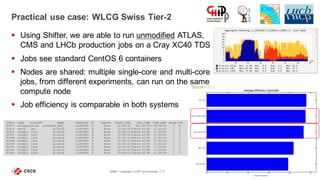
§ Using Shifter, we are able to run unmodified ATLAS,
CMS and LHCb production jobs on a Cray XC40 TDS
§ Jobs see standard CentOS 6 containers
§ Nodes are shared: multiple single-core and multi-core
jobs, from different experiments, can run on the same
compute node
§ Job efficiency is comparable in both systems
Shifter: Containers in HPC environments 17
JOBID USER ACCOUNT NAME NODELIST ST REASON START_TIME END_TIME TIME_LEFT NODES CPU
82471 atlasprd atlas a53eb5f8_34f0_ nid00043 R None 15:03:33 Thu 15:03 1-23:54:18 1 8
82476 cms04 cms gridjob nid00043 R None 15:08:39 Tomorr 03:08 11:59:24 1 2
82451 lhcbplt lhcb gridjob nid00043 R None 15:00:10 Tomorr 03:00 11:50:55 1 2
82447 lhcbplt lhcb gridjob nid00043 R None 14:59:31 Tomorr 02:59 11:50:16 1 2
82448 lhcbplt lhcb gridjob nid00043 R None 14:59:31 Tomorr 02:59 11:50:16 1 2
82449 lhcbplt lhcb gridjob nid00043 R None 14:59:31 Tomorr 02:59 11:50:16 1 2
82450 lhcbplt lhcb gridjob nid00043 R None 14:59:31 Tomorr 02:59 11:50:16 1 2
82446 lhcbplt lhcb gridjob nid00043 R None 14:49:01 Tomorr 02:49 11:39:46 1 2
82444 lhcbplt lhcb gridjob nid00043 R None 14:48:01 Tomorr 02:48 11:38:46 1 2
82445 lhcbplt lhcb gridjob nid00043 R None 14:48:01 Tomorr 02:48 11:38:46 1 2
Wrap-up
§ Can isolate network by creating NAT or
bridge devices. What about IB?
§ Users can write as root on exposed RW
filesystems
§ Needs a local daemon running
§ Isn’t SLURM-friendly
§ Can run on multiple nodes with own tool
(Swarm)
§ Can use GPUs?
§ MPI?
§ Can run images on private registry
§ It shows all /dev, /sys and /proc to the
container environment. Easy
§ Users can write as their $USER on any
exposed RW filesystem
§ Does not need a local daemon on CN
§ Is SLURM-friendly (SPANK plugin)
§ Can run on multiple nodes with WLM
integration
§ Can use GPUs. Working on it!
§ MPI on its way!
§ Can run images on private registry
Shifter: Containers in HPC environments 19
Docker vs. Shifter
Docker
Conclusion
§ Shifter works very well on our HPC environment
§ It’s being constantly developed and new features are appearing on a weekly
basis
§ It’s open source and developed by the HPC community
§ It needs some additional work to cover basic HPC use cases (MPI)
§ Interacting with some parts of Shifter is not very user-friendly:
§ The process of pulling images is easy, but has no visual feedback
§ At times, error messages are difficult to understand
§ No ACLs yet
Shifter: Containers in HPC environments 20
Reference links
§ NERSC info: http://www.nersc.gov/research-and-development/user-defined-images/
§ The code: https://github.com/NERSC/shifter
Shifter: Containers in HPC environments 21
Questions?
Thank you for your attention.

Shifter: Containers in HPC Environments

  • 1.
    Shifter: Containers inHPC environments HPC Advisory Council Switzerland Miguel Gila, CSCS March 21, 2016
  • 2.
  • 3.
    What is Dockerand how does it work? § “Docker containers wrap up a piece of software in a complete filesystem that contains everything it needs to run: code, runtime, system tools, system libraries – anything you can install on a server. This guarantees that it will always run the same, regardless of the environment it is running in.” [*] Shifter: Containers in HPC environments 3 Virtual Machines Containers [*] https://www.docker.com/what-docker [*] [*]
  • 4.
    What is Dockerand how does it work? § A Docker image is a file that contains a filesystem within it. It can be a full filesystem (i.e. CentOS) or partial (i.e. python3.4-slim). Images are stored either on a public registry (Docker hub) or private § Docker leverages the namespaces feature of the kernel to isolate processes § On its simplest form, Docker basically 1. Pulls an image to the local system 2. Creates a chrooted environment with the image (=container) 3. Runs our application in the container (’isolated’ from the host thanks to kernel namespaces) § However, it can also do other things: § Isolate network by creating NAT or bridge devices § Can use a nice GUI Shifter: Containers in HPC environments 4
  • 5.
    Docker in HPCenvironments § Docker is a nice tool, but it’s not built for HPC environments, because: § Does not integrate well with workload managers § Does not isolate users on shared filesystems § Requires running a daemon on all nodes § Not designed to run on diskless clients § Network is, by default, ‘NATed’ § Building Docker is done within a Docker container. It can be done outside, but is a complex task (Go language, seriously??) § But after all, a sysadmin can make anything to work on a cluster, right? § We can create (and hopefully maintain) monstrous wrappers to run Docker containers… Shifter: Containers in HPC environments 5
  • 6.
  • 7.
    What is Shifterand how does it work? § Shifter is a container-based solution thought from the ground up for HPC environments § It leverages the current Docker environment and can use Docker images to create containers § Shifter basically 1. Pulls an image to a shared location (/scratch) 2. Creates a loop device with the image (=container) 3. Creates a chrooted environment on the loop device 4. Runs our application in chrooted environment § Designed to work on HPC clusters and, particularly, on Cray systems § It is possible to choose which filesystems to expose to the containers Shifter: Containers in HPC environments 7
  • 8.
    External nodeCompute node Architectureof Shifter § Shifter consists on two parts § udiRoot is responsible for creating the loop devices, doing chroot and cleaning up after the binary execution is done. Workload manager plugins are available. Written in C § imageGateway is responsible for fetching a Docker image, converting it to a squashfs file and transfer it to a shared location on a filesystem. It also keeps track of the images and tells udiRoot which are available. Written in Python Shifter: Containers in HPC environments 8 scratch udiRoot imageGateway query restful API db Docker Hub Or private registry
  • 9.
    Workflow 1. User createsan image on his/her computer and pushes it to Docker Hub Shifter: Containers in HPC environments 9 Docker image 1 2 $ docker build . Uploading context 10240 bytes Step 1 : FROM busybox Pulling repository busybox ---> e9aa60c60128MB/2.284 MB (100%) endpoint: https://cdn-registry- 1.docker.io/v1/ Step 2 : RUN ls -lh / ---> Running in 9c9e81692ae9 total 24 drwxr-xr-x 2 root root 4.0K Mar 12 2013 bin drwxr-xr-x 5 root root 4.0K Oct 19 00:19 dev drwxr-xr-x 2 root root 4.0K Oct 19 00:19 etc drwxr-xr-x 2 root root 4.0K Nov 15 23:34 lib lrwxrwxrwx 1 root root 3 Mar 12 2013 lib64 -> lib dr-xr-xr-x 116 root root 0 Nov 15 23:34 proc lrwxrwxrwx 1 root root 3 Mar 12 2013 sbin -> bin dr-xr-xr-x 13 root root 0 Nov 15 23:34 sys drwxr-xr-x 2 root root 4.0K Mar 12 2013 tmp drwxr-xr-x 2 root root 4.0K Nov 15 23:34 usr ---> b35f4035db3f Step 3 : CMD echo Hello world ---> Running in 02071fceb21b ---> f52f38b7823e Successfully built f52f38b7823e Removing intermediate container 9c9e81692ae9 Removing intermediate container 02071fceb21b docker build docker push $ docker push miguelgila/wlcg_wn:20161212 Docker Hub Or private registry
  • 10.
    Workflow 1. User createsan image on his/her computer and pushes it to Docker Hub 2. User tells imageGateway to pull his image and make it available Shifter: Containers in HPC environments 10 $ ssh santis01 $ module load shifter $ shifterimg pull docker:ubuntu:14.04 $ sleep 300 # :-) $ shifterimg images santis docker READY 2934337e50 2015-12-10T09:03:38 python:2.7-slim santis docker READY a4f04f71be 2015-12-10T09:47:17 python:3.5-slim santis docker READY b0197931ac 2015-12-10T09:53:54 python:3.2-slim santis docker READY 0bb6b50d84 2015-12-10T10:34:24 python:3.3-slim santis docker READY cd86406b32 2015-12-10T10:36:55 python:3.5.1 santis docker READY 48bc52cc28 2015-12-10T10:47:35 python:3.4.3 santis docker READY 0b92f1735f 2015-12-10T11:17:26 python:3.4-slim santis docker READY 3fba104814 2015-12-10T11:31:23 centos:6.7 santis docker READY 12c9d795d8 2015-12-10T11:37:35 centos:6.6 santis docker READY 3e0c71ada2 2015-12-10T15:19:24 ubuntu:15.10 santis docker READY e751d10964 2015-12-10T13:38:05 miguelgila/wlcg_wn:20151125v2 santis docker READY d55e68e6cc 2015-12-10T15:52:09 ubuntu:14.04 shifterimg pull /scratch/ santis imageGateway 1 2 3 4 Docker image Shifter image Shifter image Docker Hub Or private registry
  • 11.
    Compute node Workflow 1. Usercreates an image on his/her computer and pushes it to Docker Hub 2. User tells imageGateway to pull his image and make it available 3. User runs SBATCH and prepends shifter to his/her executable Shifter: Containers in HPC environments 11 #!/bin/bash –l #SBATCH --job-name="shifter_osversion” #SBATCH --nodes=1 #SBATCH --ntasks-per-node=1 #SBATCH --time=00:30:00 #SBATCH --exclusive #SBATCH --output=/users/miguelgi/jobs/out/shifter_hostname.stdout.log.%j #SBATCH --error=/users/miguelgi/jobs/out/shifter_hostname.stdout.log.%j #SBATCH --image=docker:miguelgila/wlcg_wn:20151218 #SBATCH --imagevolume=/users/miguelgi:/users/miguelgi #SBATCH --imagevolume=/apps:/apps #SBATCH --imagevolume=/scratch/santis:/scratch/santis module load slurm module load shifter/15.12.0 srun shifter --volume=/scratch/santis:/scratch/santis --volume=/users:/users cat /etc/redhat-release sbatch /scratch/ santis SRUN/SPANK 1 3 udiRoot Loop device /dev/loopY Shifter image Create loop dev shifter binary Run bin in loop dev /users 2
  • 12.
  • 13.
    Full OS containers §Cray compute nodes run CLE (a version of SLES 11) § With Shifter it is possible to run applications built for specific OS: Shifter: Containers in HPC environments 13 [miguelgi@santis01]-[11:34:45]-[~/examples]:-($ salloc -t 00:15:00 -N1 --image=docker:centos:6.7 salloc: Granted job allocation 16313 salloc: Waiting for resource configuration salloc: Nodes nid00012 are ready for job [miguelgi@santis01]-[11:34:50]-[~/examples]:-)$ srun shifter cat /etc/redhat-release CentOS release 6.7 (Final) [miguelgi@santis01]-[11:35:03]-[~/examples]:-)$ srun shifter yum --version |head -4 3.2.29 Installed: rpm-4.8.0-47.el6.x86_64 at 2015-08-19 18:25 Built : CentOS BuildSystem <http://bugs.centos.org> at 2015-07-24 11:28 Committed: Lubos Kardos <lkardos@redhat.com> at 2015-06-15 CentOS 6 – non-interactive session [miguelgi@santis01]-[10:52:40]-[~/examples]:-)$ salloc -t 00:15:00 -N1 --image=docker:debian:7.9 salloc: Granted job allocation 16294 salloc: Waiting for resource configuration salloc: Nodes nid00012 are ready for job [miguelgi@santis01]-[10:58:29]-[~/examples]:-($ srun --pty shifter /bin/bash [miguelgi@nid00012]-[10:58:31]-[~/examples]:-)$ cat /etc/debian_version 7.9 [miguelgi@nid00012]-[10:58:33]-[~/examples]:-)$ uname –a Linux nid00012 3.0.101-0.46.1_1.0502.8871-cray_ari_c #1 SMP Tue Aug 25 21:41:26 UTC 2015 x86_64 GNU/Linux [miguelgi@nid00012]-[10:59:46]-[~/examples]:-)$ apt-get --version |head -n1 apt 0.9.7.9 for amd64 compiled on Oct 17 2014 09:15:56 Debian 7.9 – interactive session
  • 14.
    Application containers: Python/Ruby Shifter:Containers in HPC environments 14 [miguelgi@santis01]-[09:57:23]-[~]:-)$ salloc -t 01:00:00 -n1 --image=docker:python:3.5.1 salloc: Granted job allocation 16274 salloc: Waiting for resource configuration salloc: Nodes nid00012 are ready for job [miguelgi@santis01]-[10:00:51]-[~]:-)$ srun --pty shifter /bin/bash [miguelgi@nid00012]-[09:01:04]-[~]:-)$ python –V Python 3.5.1 [miguelgi@nid00012]-[09:01:08]-[~]:-)$ which python /usr/local/bin/python Python 3.5.1 – interactive session [miguelgi@santis01]-[10:16:35]-[~]:-)$ salloc -t 01:00:00 -n1 --image=docker:python:3.2-slim salloc: Granted job allocation 16278 salloc: Waiting for resource configuration salloc: Nodes nid00012 are ready for job [miguelgi@santis01]-[10:19:34]-[~/tmp]:-)$ srun shifter ./myscript.py 3.2.6 Python 3.2 – non-interactive session $ cat myscript.py #! /usr/bin/env python import platformprint(platform.python_version()) myscript.py [miguelgi@santis01]-[09:57:23]-[~]:-)$ salloc -t 01:00:00 -n1 --image=docker:ruby:2.1.8 salloc: Granted job allocation 16280 salloc: Waiting for resource configuration salloc: Nodes nid00012 are ready for job [miguelgi@santis01]-[10:22:14]-[~]:-)$ srun --pty shifter /bin/bash miguelgi@nid00012]-[09:22:28]-[~]:-)$ ruby –v ruby 2.1.8p440 (2015-12-16 revision 53160) [x86_64-linux Ruby 2.1.8 – interactive session [miguelgi@santis01]-[10:22:05]-[~]:-)$ salloc -t 01:00:00 -n1 --image=docker:ruby:2.1.8 salloc: Granted job allocation 16280 salloc: Waiting for resource configuration salloc: Nodes nid00012 are ready for job [miguelgi@santis01]-[10:22:08]-[~/tmp]:-)$ srun shifter ./myscript.rb 2.1.8 Ruby 2.1.8 – non-interactive session $ cat myscript.rb #!/usr/bin/env ruby puts RUBY_VERSION myscript.rb § Can run application specific containers:
  • 15.
    Multi-node containers § Itis possible to run the same container across multiple nodes: § Working on getting MPI across nodes to function § Working on getting GPUs to be accessible to containers with good results so far (native performance!) Shifter: Containers in HPC environments 15 lucasbe@santis01 ~/shifter-gpu> sbatch ./nvidia-docker/samples/cuda-stream/benchmark.sbatch Submitted batch job 496 lucasbe@santis01 /scratch/santis/lucasbe/jobs> cat shifter-gpu.out.log Launching GPU stream benchmark on nid00012 ... STREAM Benchmark implementation in CUDA Array size (double precision) = 1073.74 MB using 192 threads per block, 699051 blocks Function Rate (GB/s) Avg time(s) Min time(s) Max time(s) Copy: 184.3169 0.01167758 0.01165104 0.01170397 Scale: 183.1849 0.01175387 0.01172304 0.01178598 Add: 180.3075 0.01790012 0.01786518 0.01792288 Triad: 180.1056 0.01790700 0.01788521 0.01794291 GPU #! /usr/bin/env python import platform import socket print(platform.python_version()) print(socket.gethostname()) hostname.py [miguelgi@santis01]-[10:39:43]-[~/examples]:-)$ salloc -t 00:15:00 -N2 -w nid00013,nid00014 --image=docker:python:3.2-slim salloc: Granted job allocation 16285 salloc: Waiting for resource configuration salloc: Nodes nid000[13-14] are ready for job [miguelgi@santis01]-[10:41:21]-[~/examples]:-)$ srun shifter ./hostname.py 3.2.6 nid00013 3.2.6 nid00014 Python 3.2 – non-interactive session
  • 16.
    Practical use case:WLCG Swiss Tier-2 § CSCS operates the cluster Phoenix on behalf of CHIPP, the Swiss Institute of Particle Physics § Phoenix runs Tier-2 jobs for ATLAS, CMS and LHCb, 3 experiments of the LHC at CERN and part of WLCG (Worldwide LHC Computing Grid) § WLCG jobs need and expect RHEL-compatible OS. All software is precompiled and exposed in a cvmfs[*] filesystem § But Cray XC compute nodes run CLE, a modified version of SLES 11 SP3 § So, how do we get these jobs to run on a Cray? Shifter: Containers in HPC environments 16 [*] https://cernvm.cern.ch/portal/filesystem
  • 17.
    Practical use case:WLCG Swiss Tier-2 § Using Shifter, we are able to run unmodified ATLAS, CMS and LHCb production jobs on a Cray XC40 TDS § Jobs see standard CentOS 6 containers § Nodes are shared: multiple single-core and multi-core jobs, from different experiments, can run on the same compute node § Job efficiency is comparable in both systems Shifter: Containers in HPC environments 17 JOBID USER ACCOUNT NAME NODELIST ST REASON START_TIME END_TIME TIME_LEFT NODES CPU 82471 atlasprd atlas a53eb5f8_34f0_ nid00043 R None 15:03:33 Thu 15:03 1-23:54:18 1 8 82476 cms04 cms gridjob nid00043 R None 15:08:39 Tomorr 03:08 11:59:24 1 2 82451 lhcbplt lhcb gridjob nid00043 R None 15:00:10 Tomorr 03:00 11:50:55 1 2 82447 lhcbplt lhcb gridjob nid00043 R None 14:59:31 Tomorr 02:59 11:50:16 1 2 82448 lhcbplt lhcb gridjob nid00043 R None 14:59:31 Tomorr 02:59 11:50:16 1 2 82449 lhcbplt lhcb gridjob nid00043 R None 14:59:31 Tomorr 02:59 11:50:16 1 2 82450 lhcbplt lhcb gridjob nid00043 R None 14:59:31 Tomorr 02:59 11:50:16 1 2 82446 lhcbplt lhcb gridjob nid00043 R None 14:49:01 Tomorr 02:49 11:39:46 1 2 82444 lhcbplt lhcb gridjob nid00043 R None 14:48:01 Tomorr 02:48 11:38:46 1 2 82445 lhcbplt lhcb gridjob nid00043 R None 14:48:01 Tomorr 02:48 11:38:46 1 2
  • 18.
  • 19.
    § Can isolatenetwork by creating NAT or bridge devices. What about IB? § Users can write as root on exposed RW filesystems § Needs a local daemon running § Isn’t SLURM-friendly § Can run on multiple nodes with own tool (Swarm) § Can use GPUs? § MPI? § Can run images on private registry § It shows all /dev, /sys and /proc to the container environment. Easy § Users can write as their $USER on any exposed RW filesystem § Does not need a local daemon on CN § Is SLURM-friendly (SPANK plugin) § Can run on multiple nodes with WLM integration § Can use GPUs. Working on it! § MPI on its way! § Can run images on private registry Shifter: Containers in HPC environments 19 Docker vs. Shifter Docker
  • 20.
    Conclusion § Shifter worksvery well on our HPC environment § It’s being constantly developed and new features are appearing on a weekly basis § It’s open source and developed by the HPC community § It needs some additional work to cover basic HPC use cases (MPI) § Interacting with some parts of Shifter is not very user-friendly: § The process of pulling images is easy, but has no visual feedback § At times, error messages are difficult to understand § No ACLs yet Shifter: Containers in HPC environments 20
  • 21.
    Reference links § NERSCinfo: http://www.nersc.gov/research-and-development/user-defined-images/ § The code: https://github.com/NERSC/shifter Shifter: Containers in HPC environments 21
  • 22.
  • 23.
    Thank you foryour attention.