Android Graphics
Architecture Overview
2015.08.20
Android graphics stack overview
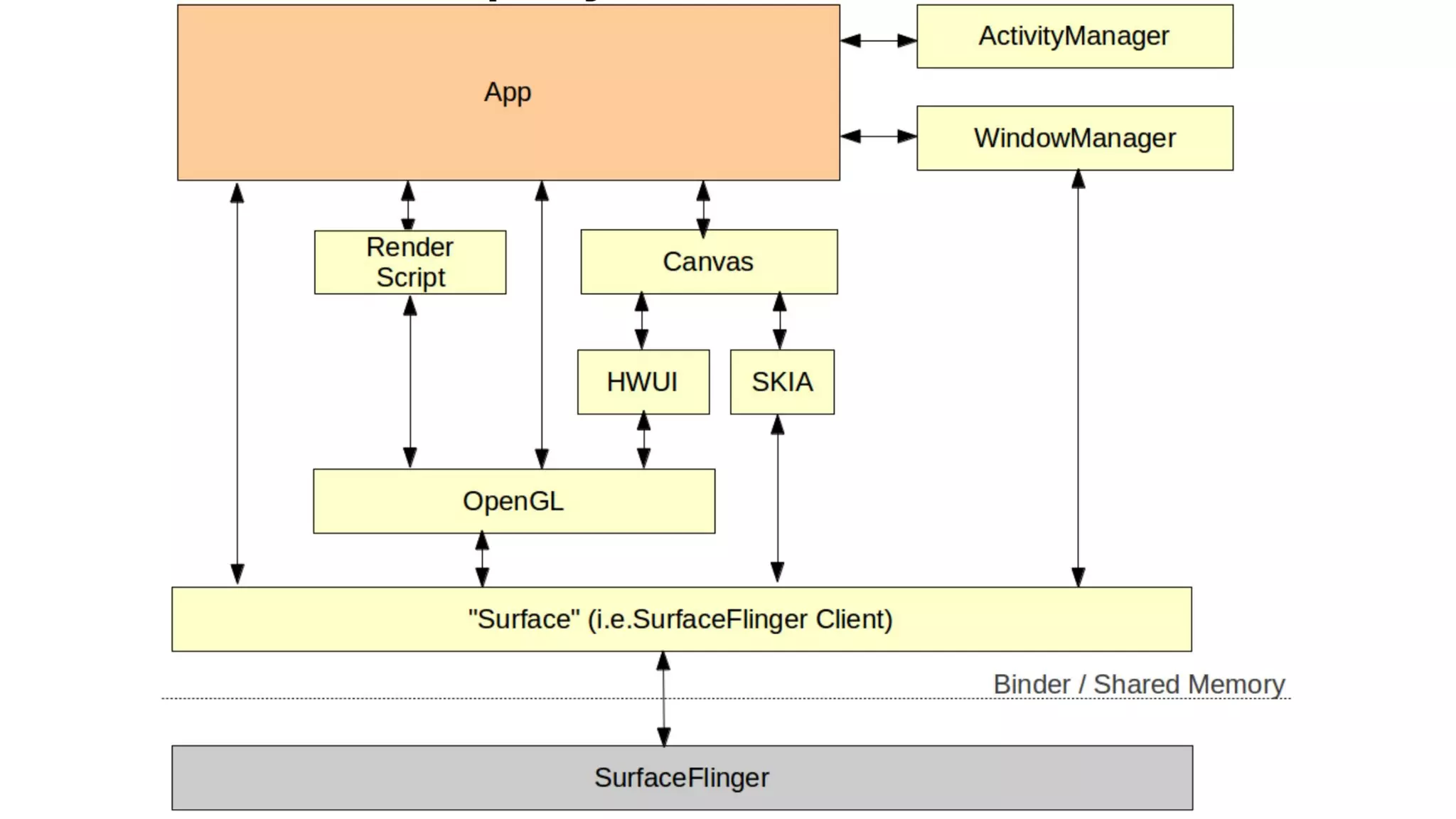
● App acquires its own Surface(s) from SurfaceFlinger
○ comes with a Canvas and a graphics buffer
● App uses Canvas to draw the screen
○ underlying implementations may use OpenGL or
software render engine (e.g. SKIA)
● SurfaceFlinger composes final screen from Surfaces
○ get Activity status from ActivityManager
○ get z-order information from WindowManager
● Gralloc maps to the framebuffer device (fb0)
Android View component
● Button, TextView… are all Views
● A page layout is composed of a tree of Views
● Actual drawing behavior implemented in onDraw()
method of each View
○ Display List: a set of graphic commands
○ commands can be mapped to OpenGL commands
● Create DeferredDisplayList in order to optimize the
rendering order
○ analyze the overlapping… relationships
○ minimize GPU usage
Android View component
● An example of Display List (button)
○ Save 3
○ DrawPatch
○ Save 3
○ ClipRect 20.00, 4.00, 99.00, 44.00, 1
○ Translate 20.00, 12.00
○ DrawText 9, 18, 9, 0.00, 19.00, 0x17e898
○ Restore
○ RestoreToCount 0
● Can be mapped to gl-prefix OpenGL commands
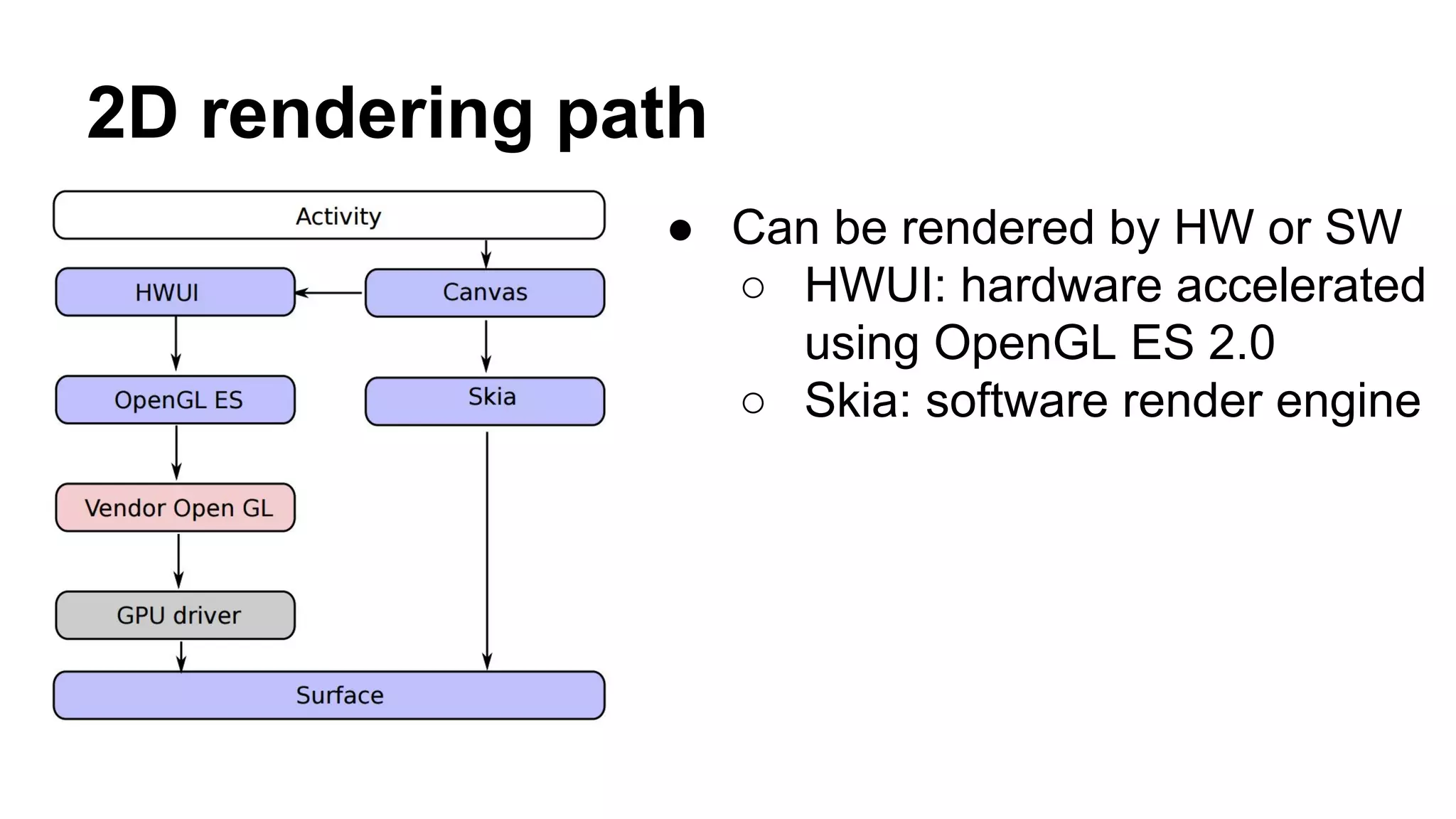
2D rendering path
● Can be rendered by HW or SW
○ HWUI: hardware accelerated
using OpenGL ES 2.0
○ Skia: software render engine
3D rendering path
● App can instead create
GLSurfaceView
● Use OpenGL ES bindings for
Java
● Either use vendor GPU driver or
software-based PixelFlinger to
render the drawing to Surface
SurfaceFlinger
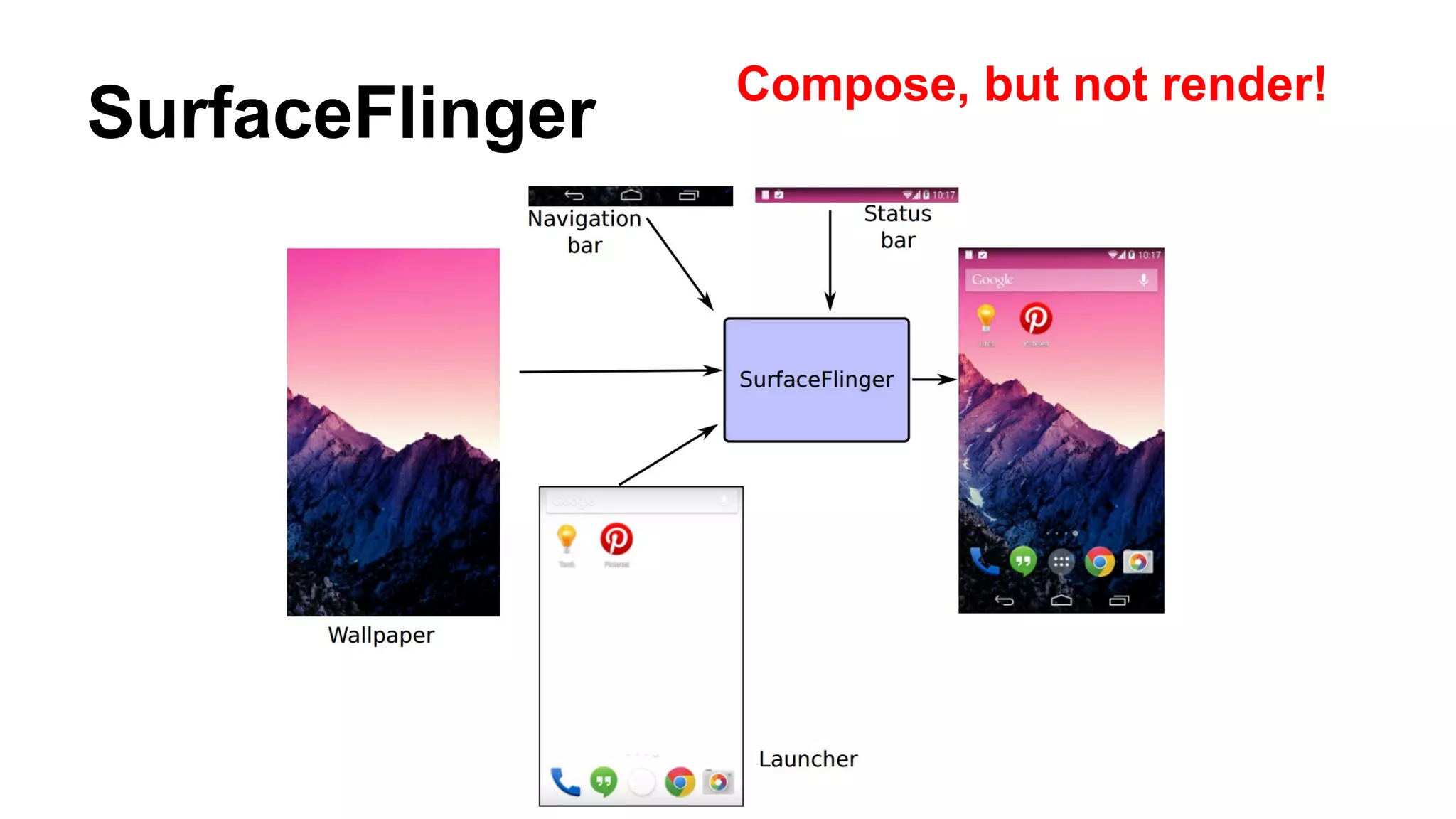
Compose, but not render!
SurfaceFlinger
● Services connections from activities (client) via Binder
interface ISurfaceComposer (server)
● Activity acquires Surface from SurfaceFlinger
○ created by ISurfaceComposer
● Receives activity status from ActivityManager
● Receives window status (visibility, z-order) from
WindowManager
● Composes multiple Surfaces into a single image
○ by HWComposer: also generates VSYNC
SurfaceFlinger
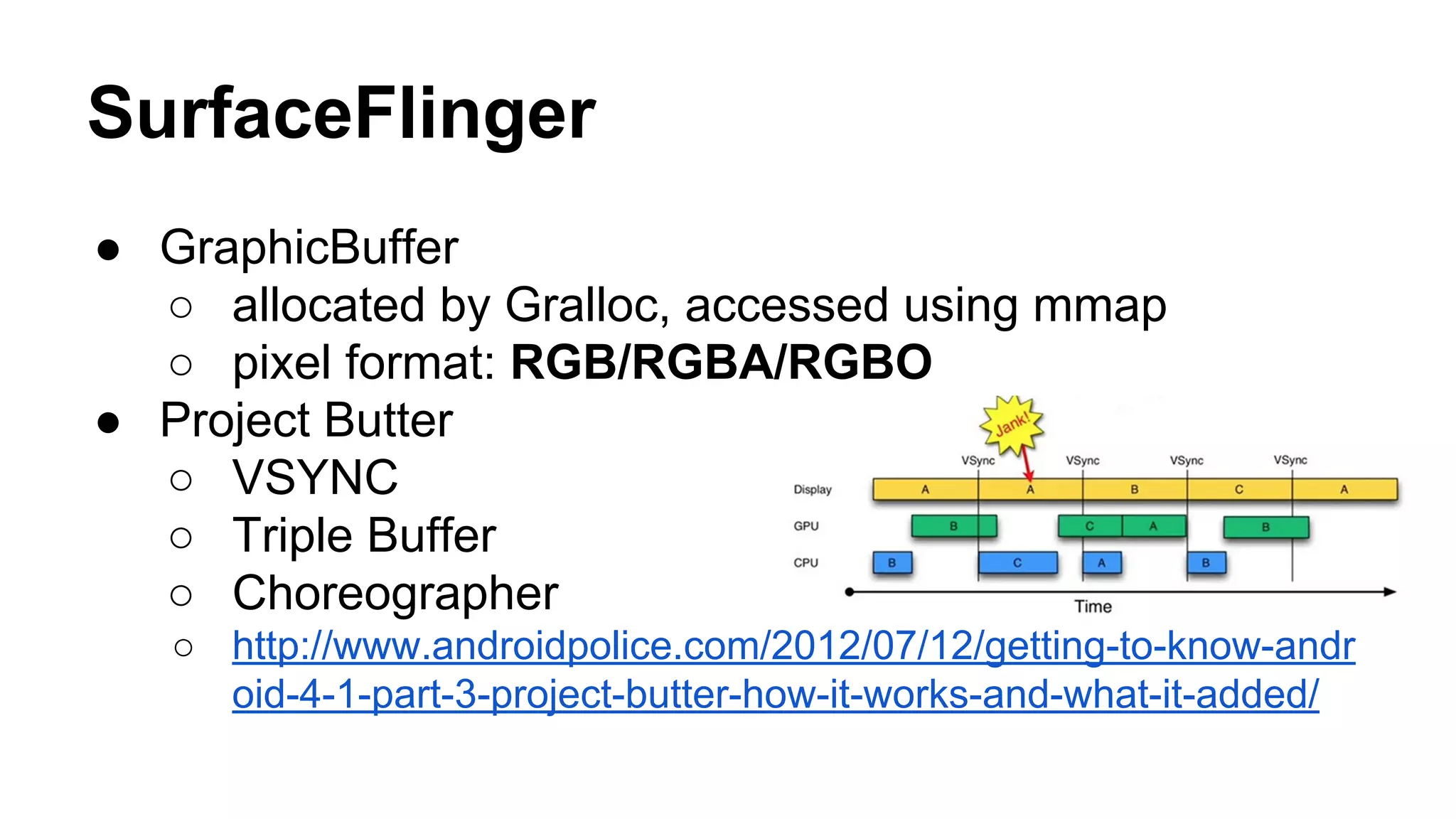
● GraphicBuffer
○ allocated by Gralloc, accessed using mmap
○ pixel format: RGB/RGBA/RGBO
● Project Butter
○ VSYNC
○ Triple Buffer
○ Choreographer
○ http://www.androidpolice.com/2012/07/12/getting-to-know-andr
oid-4-1-part-3-project-butter-how-it-works-and-what-it-added/
VSYNC Signal
● Generated by HWComposer
○ HW source: register callback of HAL
○ or SW source: VSyncThread
● Distributed by SurfaceFlinger
○ Client can create an event connection to SurfaceFlinger’s
MessageQueue to receive the VSync event
○ SurfaceFlinger inherits HWComposer::EventHandler to handle
onVSyncRecieved() and notify listeners
Application
● Each page has its View Tree
● Need to traverse the tree when
○ App or page being launched
○ External event: touch, key press
○ Internal event: UI control change, View.Visibility
● How to traverse
○ Post a request to Choreographer (if no request left)
○ Choreograpger calls perfromTraversals() when VSYNC signal
triggered
Application
● Inside performTraversals()
○ performMeasure(): calculate size of UI controls
○ performLayout(): calculate UI layout
○ performDraw()
● Inside performDraw()
○ High level: draw to Canvas (based on Surface in Java level)
○ Low level
■ Lock Surface (native level) to dequeue a buffer from
BufferQueue
■ Render to buffer by OpenGL ES or SKIA
■ Unlock Surface to enqueue the buffer
Surface (native level)
● Each app/page can acquire one or more Surface/Layer
● Done by using ISurfaceComposerClient to connect to
SurfaceFlinger’s Binder service
● ISurfaceComposerClient will return a SurfaceControl, then use it to
create Surface
● One of two native windows in Android graphic systems (another
one is for SurfaceFlinger)
● OpenGL ES render to the buffer and enqueue to BufferQueue of
Surface, act as a “producer”
BufferQueue
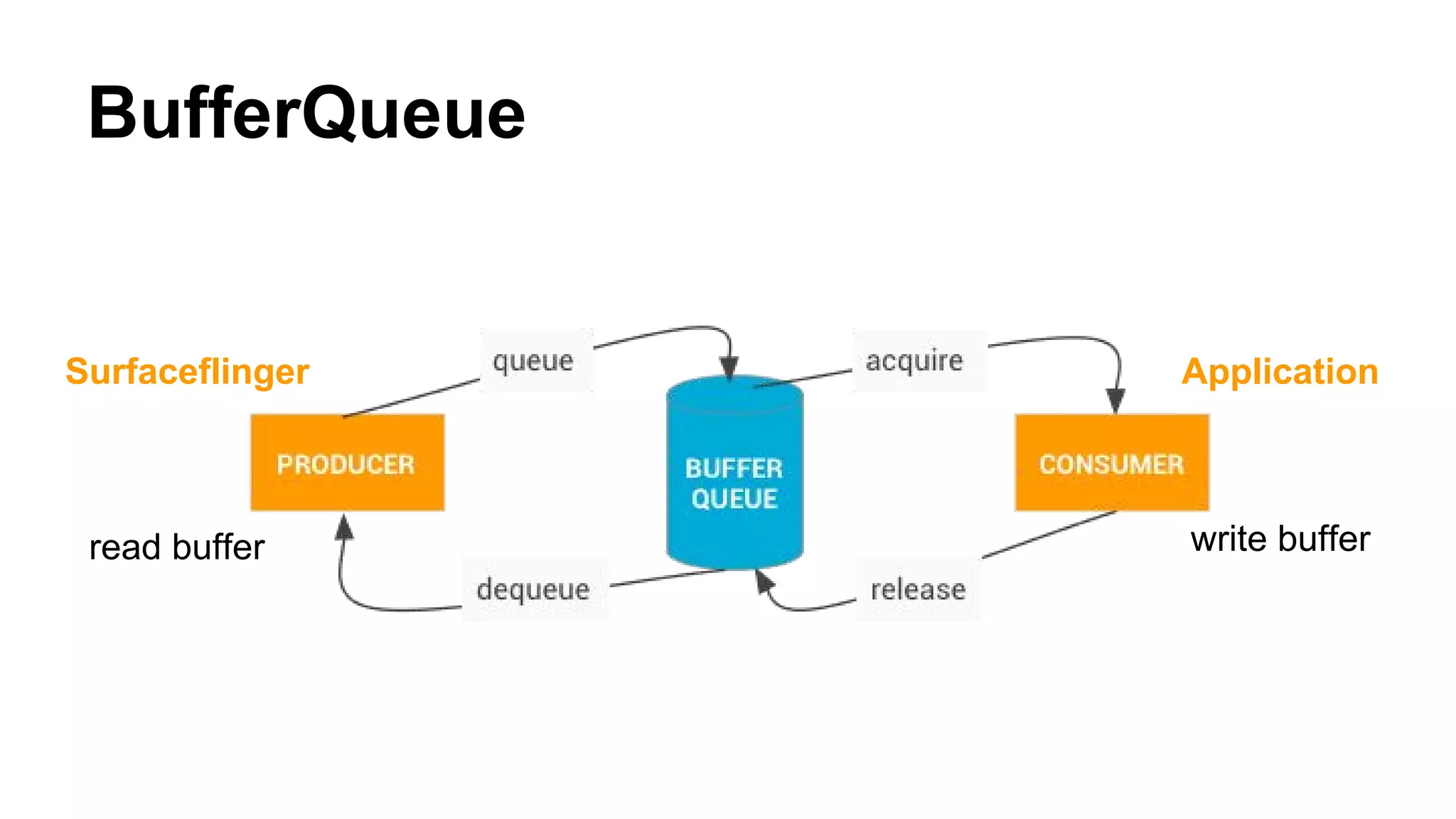
● A producer/consumer pattern
○ Producer: Application (Surface)
○ Consumer: SurfaceFlinger
● Buffer operation
○ Application: dequeue()->write buffer->enqueue()
○ SurfaceFlinger: acquire()->read buffer->release()
● When a buffer being queued
○ Layer listens to onFrameAvailable() callback
○ Call Layer’s onFrameQueued() to increment counter variable:
mQueuedFrames
BufferQueue
read buffer write buffer
ApplicationSurfaceflinger
SurfaceFlinger
● When VSYNC signal triggered
○ handleMessageTransaction(): detect Layers’ changes
(including size, z-order, alpha, add/removal…), save as
mDrawingState
○ handleMessageInvalidate(): acquire a buffer from BufferQueue
if available
○ signalRefresh() ---> call handleMessageRefresh()
SurfaceFlinger
● handleMessageRefresh()
○ preComposition(): check if there is any layer with available
buffers (mQueuedFrames > 0), signal invalidate if true
○ rebuildLayerStacks(): by calculating opaque region, visible
region, covered region and transparent region
○ ……
○ doComposition(): done by HWComposer or OpenGL ES
○ Swap buffers (front/back buffer)

Project meeting: Android Graphics Architecture Overview

  • 1.
  • 3.
    Android graphics stackoverview ● App acquires its own Surface(s) from SurfaceFlinger ○ comes with a Canvas and a graphics buffer ● App uses Canvas to draw the screen ○ underlying implementations may use OpenGL or software render engine (e.g. SKIA) ● SurfaceFlinger composes final screen from Surfaces ○ get Activity status from ActivityManager ○ get z-order information from WindowManager ● Gralloc maps to the framebuffer device (fb0)
  • 4.
    Android View component ●Button, TextView… are all Views ● A page layout is composed of a tree of Views ● Actual drawing behavior implemented in onDraw() method of each View ○ Display List: a set of graphic commands ○ commands can be mapped to OpenGL commands ● Create DeferredDisplayList in order to optimize the rendering order ○ analyze the overlapping… relationships ○ minimize GPU usage
  • 5.
    Android View component ●An example of Display List (button) ○ Save 3 ○ DrawPatch ○ Save 3 ○ ClipRect 20.00, 4.00, 99.00, 44.00, 1 ○ Translate 20.00, 12.00 ○ DrawText 9, 18, 9, 0.00, 19.00, 0x17e898 ○ Restore ○ RestoreToCount 0 ● Can be mapped to gl-prefix OpenGL commands
  • 6.
    2D rendering path ●Can be rendered by HW or SW ○ HWUI: hardware accelerated using OpenGL ES 2.0 ○ Skia: software render engine
  • 7.
    3D rendering path ●App can instead create GLSurfaceView ● Use OpenGL ES bindings for Java ● Either use vendor GPU driver or software-based PixelFlinger to render the drawing to Surface
  • 8.
  • 9.
    SurfaceFlinger ● Services connectionsfrom activities (client) via Binder interface ISurfaceComposer (server) ● Activity acquires Surface from SurfaceFlinger ○ created by ISurfaceComposer ● Receives activity status from ActivityManager ● Receives window status (visibility, z-order) from WindowManager ● Composes multiple Surfaces into a single image ○ by HWComposer: also generates VSYNC
  • 10.
    SurfaceFlinger ● GraphicBuffer ○ allocatedby Gralloc, accessed using mmap ○ pixel format: RGB/RGBA/RGBO ● Project Butter ○ VSYNC ○ Triple Buffer ○ Choreographer ○ http://www.androidpolice.com/2012/07/12/getting-to-know-andr oid-4-1-part-3-project-butter-how-it-works-and-what-it-added/
  • 11.
    VSYNC Signal ● Generatedby HWComposer ○ HW source: register callback of HAL ○ or SW source: VSyncThread ● Distributed by SurfaceFlinger ○ Client can create an event connection to SurfaceFlinger’s MessageQueue to receive the VSync event ○ SurfaceFlinger inherits HWComposer::EventHandler to handle onVSyncRecieved() and notify listeners
  • 12.
    Application ● Each pagehas its View Tree ● Need to traverse the tree when ○ App or page being launched ○ External event: touch, key press ○ Internal event: UI control change, View.Visibility ● How to traverse ○ Post a request to Choreographer (if no request left) ○ Choreograpger calls perfromTraversals() when VSYNC signal triggered
  • 13.
    Application ● Inside performTraversals() ○performMeasure(): calculate size of UI controls ○ performLayout(): calculate UI layout ○ performDraw() ● Inside performDraw() ○ High level: draw to Canvas (based on Surface in Java level) ○ Low level ■ Lock Surface (native level) to dequeue a buffer from BufferQueue ■ Render to buffer by OpenGL ES or SKIA ■ Unlock Surface to enqueue the buffer
  • 14.
    Surface (native level) ●Each app/page can acquire one or more Surface/Layer ● Done by using ISurfaceComposerClient to connect to SurfaceFlinger’s Binder service ● ISurfaceComposerClient will return a SurfaceControl, then use it to create Surface ● One of two native windows in Android graphic systems (another one is for SurfaceFlinger) ● OpenGL ES render to the buffer and enqueue to BufferQueue of Surface, act as a “producer”
  • 15.
    BufferQueue ● A producer/consumerpattern ○ Producer: Application (Surface) ○ Consumer: SurfaceFlinger ● Buffer operation ○ Application: dequeue()->write buffer->enqueue() ○ SurfaceFlinger: acquire()->read buffer->release() ● When a buffer being queued ○ Layer listens to onFrameAvailable() callback ○ Call Layer’s onFrameQueued() to increment counter variable: mQueuedFrames
  • 16.
    BufferQueue read buffer writebuffer ApplicationSurfaceflinger
  • 17.
    SurfaceFlinger ● When VSYNCsignal triggered ○ handleMessageTransaction(): detect Layers’ changes (including size, z-order, alpha, add/removal…), save as mDrawingState ○ handleMessageInvalidate(): acquire a buffer from BufferQueue if available ○ signalRefresh() ---> call handleMessageRefresh()
  • 18.
    SurfaceFlinger ● handleMessageRefresh() ○ preComposition():check if there is any layer with available buffers (mQueuedFrames > 0), signal invalidate if true ○ rebuildLayerStacks(): by calculating opaque region, visible region, covered region and transparent region ○ …… ○ doComposition(): done by HWComposer or OpenGL ES ○ Swap buffers (front/back buffer)