“ONLINE TRANSACTION”
Presented By-

Gourav Harvande.
INTRODUCTION
 Online transaction covers both computer and

mobile transaction.
 Allows to view recent transactions,print out
statements,transfer funds between account
and to make payments.
 Provides 24 hours access to bank account.
 Also known as online banking or internet
banking.
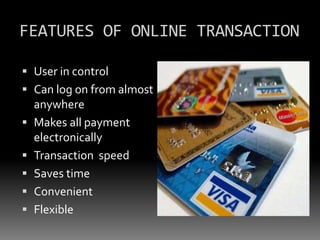
FEATURES OF ONLINE TRANSACTION
 User in control
 Can log on from almost
anywhere
 Makes all payment
electronically

 Transaction speed
 Saves time
 Convenient

 Flexible
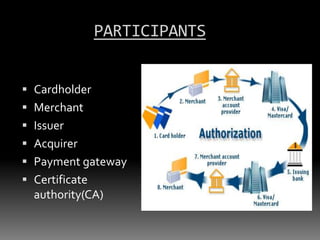
PARTICIPANTS
 Cardholder
 Merchant
 Issuer
 Acquirer
 Payment gateway
 Certificate
authority(CA)
STEPS IN ONLINE TRANSACTION
How it works??
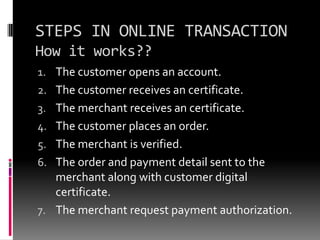
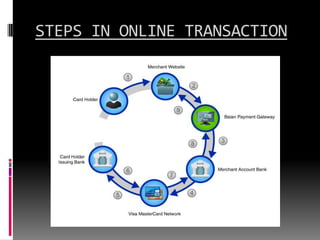
1. The customer opens an account.
2. The customer receives an certificate.

3. The merchant receives an certificate.
4. The customer places an order.
5. The merchant is verified.

6. The order and payment detail sent to the
merchant along with customer digital
certificate.
7. The merchant request payment authorization.
STEPS IN ONLINE TRANSACTION
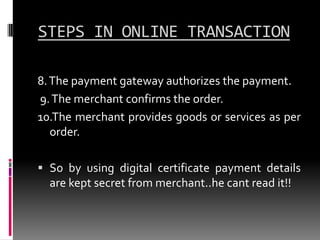
8. The payment gateway authorizes the payment.
9. The merchant confirms the order.
10.The merchant provides goods or services as per
order.
 So by using digital certificate payment details
are kept secret from merchant..he cant read it!!
STEPS IN ONLINE TRANSACTION
E-MONEY
 E-money is another
way of making

payments on internet.
 Its nothing but money
represented in
computer files(binary
form).
 Also known as
electronic cash or
digital cash.
HOW TO OBTAIN E-MONEY
 Customer opens account .
 When he need e-money he sends encrypted email to bank.
 The bank authenticates mail n debits same
amount in the form of computer files in
customer account which is also encrypted.
 When customer wants to purchase he sends

same encrypted files to merchant.
 The merchant sends same files to the bank. the
bank verifies them and credits merchants
account with same amount.
SECURITY TIPS FOR TRANSACTION
1.Do:
 Make sure that you are






on correct web site.
Choose password that
will not be easily
decoded.
Delete browser settings,
history and cookies after
log out.
Be sure of log out.
Monthly checking and
check credit card
statements carefully.
SECURITY TIPS FOR TRANSACTION
2.Do not:
 Disclosure of personal
information such as

credit card no.
 Having other browser
open.
 Download or open files
from strangers.
 Telling id and password
in e-mail.
DISADVENTAGES
 Transaction can be impacted if the database







is unavailable.
System failure or network availability.
Also requires offline maintenance.
Can be complex for beginners.
Online transaction can be complete success
or complete failure.
“THANK YOU…!!!!”

Online transaction

  • 1.
  • 2.
    INTRODUCTION  Online transactioncovers both computer and mobile transaction.  Allows to view recent transactions,print out statements,transfer funds between account and to make payments.  Provides 24 hours access to bank account.  Also known as online banking or internet banking.
  • 3.
    FEATURES OF ONLINETRANSACTION  User in control  Can log on from almost anywhere  Makes all payment electronically  Transaction speed  Saves time  Convenient  Flexible
  • 4.
    PARTICIPANTS  Cardholder  Merchant Issuer  Acquirer  Payment gateway  Certificate authority(CA)
  • 5.
    STEPS IN ONLINETRANSACTION How it works?? 1. The customer opens an account. 2. The customer receives an certificate. 3. The merchant receives an certificate. 4. The customer places an order. 5. The merchant is verified. 6. The order and payment detail sent to the merchant along with customer digital certificate. 7. The merchant request payment authorization.
  • 6.
    STEPS IN ONLINETRANSACTION 8. The payment gateway authorizes the payment. 9. The merchant confirms the order. 10.The merchant provides goods or services as per order.  So by using digital certificate payment details are kept secret from merchant..he cant read it!!
  • 7.
    STEPS IN ONLINETRANSACTION
  • 8.
    E-MONEY  E-money isanother way of making payments on internet.  Its nothing but money represented in computer files(binary form).  Also known as electronic cash or digital cash.
  • 9.
    HOW TO OBTAINE-MONEY  Customer opens account .  When he need e-money he sends encrypted email to bank.  The bank authenticates mail n debits same amount in the form of computer files in customer account which is also encrypted.  When customer wants to purchase he sends same encrypted files to merchant.  The merchant sends same files to the bank. the bank verifies them and credits merchants account with same amount.
  • 10.
    SECURITY TIPS FORTRANSACTION 1.Do:  Make sure that you are     on correct web site. Choose password that will not be easily decoded. Delete browser settings, history and cookies after log out. Be sure of log out. Monthly checking and check credit card statements carefully.
  • 11.
    SECURITY TIPS FORTRANSACTION 2.Do not:  Disclosure of personal information such as credit card no.  Having other browser open.  Download or open files from strangers.  Telling id and password in e-mail.
  • 12.
    DISADVENTAGES  Transaction canbe impacted if the database     is unavailable. System failure or network availability. Also requires offline maintenance. Can be complex for beginners. Online transaction can be complete success or complete failure.
  • 13.