Speaker notes
Hey PDF reader! My speaker notes are VERY sparse, point form notes, so I'm going to use this space to try to tell you a bit of what my talk was about. This first slide was about 8 different title screens that all said "Variations on a
Theme" in different art styles, rotating one at a time every 2 seconds. This 90s one, then an art deco one, then a hipster one, etc., etc. I worked way too hard on it.
INTRODUCTIONINTRODUCTION
See these bullet points on the left? They're from my speaker notes. Acrobat makes it really hard to delete them. So just ignore them when you see them. I introduced myself. I'm Paul Grant, from Ottawa, Canada where I live with my wife and
kids. I like Ottawa. Hit me up on Twitter if you're ever coming out my way!
When FITC asked me what I wanted to talk about, I knew right away. I wanted to talk about... (next slide)
Speaker notes
DESIGN SYSTEMS 101DESIGN SYSTEMS 101
DESIGN SYSTEMS! At first this was going to be fine, but I saw some of the other speakers' topics and felt like there might be a little too much overlap, so I changed to theming websites and web applications. How do we make our CSS
scalable and allow for theming at the same time? And as I was developing the material for this presentation, I realized how important *good* CSS is for this topic. So I'll talk about Theming for much of this presentation, but I'm going to
give a brief overview on writing good CSS for the beginners that are checking this out.
Speaker notes
DESIGN SYSTEMS 101DESIGN SYSTEMS 101
NAMING CONVENTIONNAMING CONVENTION
CSS PRE-PROCESSORCSS PRE-PROCESSOR
This stuff is especially for people who ever use !important declarations or the id attribute as your selector (#headline). The reason we find ourselves using !important a lot is because we're battling specificity. Specificity is a huge reason people
think CSS sucks. We can battle specificity if we use these two things. A naming convention and a CSS pre-processor.
Speaker notes
BEMBEM
OOCSSOOCSS
ITCSSITCSS
SMACSSSMACSS
These are some examples of naming conventions. They're all a bit different, so research them all. But the folks who wrote these things would all agree with each other - using ANY of these is better than using NONE of these. All of
them endeavour to make CSS more readable and more specific. We're going to look at BEM here, for no other reason than "it's what I'm using at work right now". But I've used SMACSS as well, and looked at OOCSS and ITCSS.
They all look great, so do your research and figure out what works best for you.
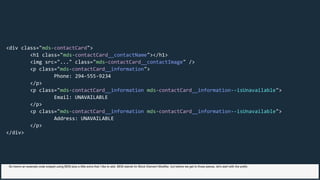
<div class="mds-contactCard">
<h1 class="mds-contactCard__contactName"></h1>
<img src="..." class="mds-contactCard__contactImage" />
<p class="mds-contactCard__information">
Phone: 294-555-9234
</p>
<p class="mds-contactCard__information mds-contactCard__information--isUnavailable">
Email: UNAVAILABLE
</p>
<p class="mds-contactCard__information mds-contactCard__information--isUnavailable">
Address: UNAVAILABLE
</p>
</div>
So here's an example code snippet using BEM plus a little extra that I like to add. BEM stands for Block Element Modifier, but before we get to those pieces, let's start with the prefix
mds-
mds-
mds-
mds-
mds- mds-
mds- mds-
<div class=" contactCard">
<h1 class=" contactCard__contactName"></h1>
<img src="..." class=" contactCard__contactImage" />
<p class=" contactCard__information">
Phone: 294-555-9234
</p>
<p class=" contactCard__information contactCard__information--isUnavailable">
Email: UNAVAILABLE
</p>
<p class=" contactCard__information contactCard__information--isUnavailable">
Address: UNAVAILABLE
</p>
</div>
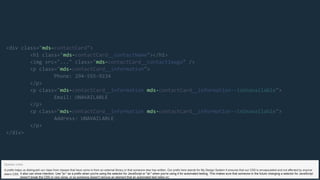
A prefix helps us distinguish our class from classes that have come in from an external library or that someone else has written. Our prefix here stands for My Design System It ensures that our CSS is encapsulated and not affected by anyone
else’s CSS.
Speaker notes
It also can show intention. Use "js-" as a prefix when you're using the selector for JavaScript or "at-" when you're using it for automated testing. This makes sure that someone in the future changing a selector for JavaScript
doesn't break the CSS or vice versa, or so someone doesn't remove an element that an automated test relies on.
contactCard
contactCard
contactCard
contactCard
contactCard contactCard
<div class="mds- ">
<h1 class="mds- __contactName"></h1>
<img src="..." class="mds- __contactImage" />
<p class="mds- __information">
Phone: 294-555-9234
</p>
<p class="mds- __information mds- __information--isUnavailable">
Email: UNAVAILABLE
</p>
<p class="mds- __information mds- __information--isUnavailable">
Address: UNAVAILABLE
</p>
</div>
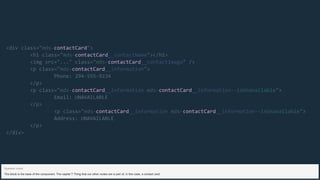
The block is the base of the component. The capital T Thing that our other nodes are a part of, in this case, a contact card.
Speaker notes
__contactName
__contactImage
__information
__information __information
<div class="mds-contactCard">
<h1 class="mds-contactCard "></h1>
<img src="..." class="mds-contactCard " />
<p class="mds-contactCard ">
Phone: 294-555-9234
</p>
<p class="mds-contactCard mds-contactCard --isUnavailable">
Email: UNAVAILABLE
</p>
<p class="mds-contactCard mds-contactCard --isUnavailable">
Address: UNAVAILABLE
</p>
</div>
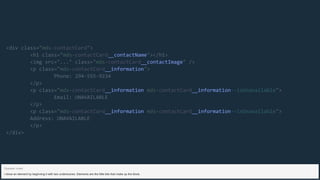
I show an element by beginning it with two underscores. Elements are the little bits that make up the block.
Speaker notes
--isUnavailable
--isUnavailable
<div class="mds-contactCard">
<h1 class="mds-contactCard__contactName"></h1>
<img src="..." class="mds-contactCard__contactImage" />
<p class="mds-contactCard__information">
Phone: 294-555-9234
</p>
<p class="mds-contactCard__information mds-contactCard__information ">
Email: UNAVAILABLE
</p>
<p class="mds-contactCard__information mds-contactCard__information ">
Address: UNAVAILABLE
</p>
</div>
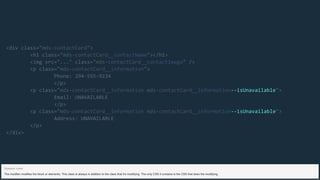
The modifier modifies the block or elements. This class is always in addition to the class that it’s modifying. The only CSS it contains is the CSS that does the modifying.
Speaker notes
<div class="mds-contactCard">
<h1 class="mds-contactCard__contactName"></h1>
<img src="..." class="mds-contactCard__contactImage" />
<p class="mds-contactCard__information">
Phone: 294-555-9234
</p>
<p class="mds-contactCard__information mds-contactCard__information--isUnavailable">
Email: UNAVAILABLE
</p>
<p class="mds-contactCard__information mds-contactCard__information--isUnavailable">
Address: UNAVAILABLE
</p>
</div>
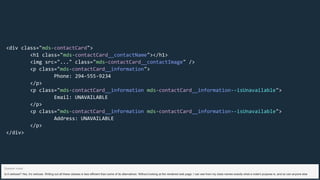
Is it verbose? Yes, it’s verbose. Writing out all these classes is less efficient than some of its alternatives. Without looking at the rendered web page, I can see from my class names exactly what a node’s purpose is, and so can anyone else
Speaker notes
SCSSSCSS
LESSLESS
STYLUSSTYLUS
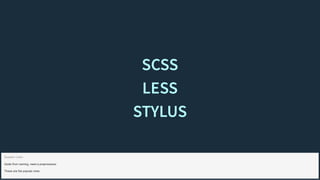
Aside from naming, need a preprocessor
These are the popular ones
Speaker notes
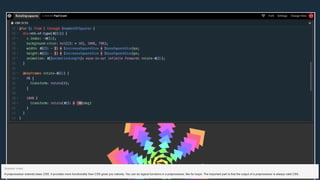
A preprocessor extends basic CSS. It provides more functionality than CSS gives you natively. You can do logical functions in a preprocessor, like for loops. The important part is that the output of a preprocessor is always valid CSS.
Speaker notes
Logic loops are neat and all, but for design systems, the important part of a preprocessor's functionality is the partials.
Speaker notes
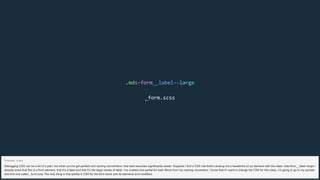
.mds-form__label--large
_form.scss
Debugging CSS can be a bit of a pain, but when you’ve got partials and naming conventions, that task becomes significantly easier. Suppose I find a CSS rule that’s causing me a headache on an element with the class .mds-form__label--large I
already know that this is a form element, that it’s a label and that it’s the large variety of label. I’ve created one partial for each Block from my naming convention. I know that if I want to change the CSS for this class, I’m going to go to my partials
and find one called _form.scss The only thing in that partial is CSS for the form block and its elements and modifiers.
Speaker notes
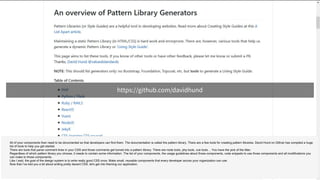
https://github.com/davidhund
All of your components then need to be documented so that developers can find them. The documentation is called the pattern library. There are a few tools for creating pattern libraries. David Hund on Github has compiled a huge
list of tools to help you get started.
There are tools that parse comment lines in your CSS and those comments get turned into a pattern library. There are node tools, php tools, vue tools… You have the pick of the litter.
Regardless of which pattern library you choose, it needs to contain some information. The list of your components, the usage guidelines about those components, code snippets to use those components and all modifications you
can make to those components.
Like I said, the goal of the design system is to write really good CSS once. Make small, reusable components that every developer across your organization can use.
Now that I’ve told you a bit about writing pretty decent CSS, let's get into theming our application.
INTRODUCTIONINTRODUCTION
See what I did there? I pretended that that was one talk done, and this is another one starting all over again from the beginning. Pretty funny, yeah? Geez, tough crowd. Just... Just pretend it was funnier in person okay?
So I work for a company called Martello Technologies, and I'm the design systems guy. Just me. The design system had to be applied to a few different products. And at the beginning of the year, we acquired a second company called
Elfiq technologies with their own software products. So I have lots of software to strip out old markup and CSS and apply our design system.
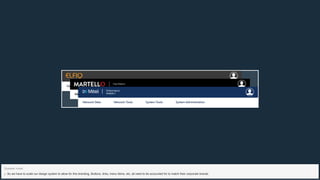
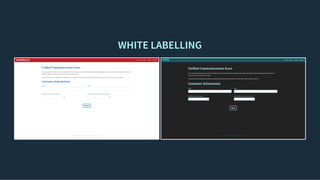
On top of that, we realized that some customers needed different faces on their software. For example, Elfiq customers know and trust Elfiq already, so we wanted the software to be Elfiq branded. Additionally, telecom giant, Mitel,
licenses one of our products to its users and wants it Mitel branded.
So we have to scale our design system to allow for this branding. Buttons, links, menu items, etc, all need to be accounted for to match their corporate brands.
Speaker notes
SERVICE PROVIDERSSERVICE PROVIDERS
In addition to that, many of our customers are service providers. Resellers of Mitel technology, that have their own customers. When they want to export reports from our software for their customers, they want THEIR logo and header color.
We don't let them change button and link colors. We give them a limited set of user-defined theming options.
Speaker notes
WHY THEME?WHY THEME?
WHITE LABELLINGWHITE LABELLING
ACCESSIBILITYACCESSIBILITY
NumberofEmployees
Installation
Manufacturing
Other
Solar Employment Growth by Sector, 2010-2016
Source: thesolarfoundation.com
Installation
Manufacturing
Sales & Distribution
Project Development
Other
2010 2012 2014 2016
0
50k
100k
150k
200k
Highcharts.com
NumberofEmployees
Installation
Manufacturing
Other
Solar Employment Growth by Sector, 2010-2016
Source: thesolarfoundation.com
Installation
Manufacturing
Sales & Distribution
Project Development
Other
2010 2012 2014 2016
0
50k
100k
150k
200k
Highcharts.com
Percent
Asia
Africa
Europe
America
Historic and Estimated Worldwide Population Distribution by
Region
Source: Wikipedia.org
Asia Africa Europe America Oceania
1750 1800 1850 1900 1950 1999 2050
0
25
50
75
100
Highcharts.com
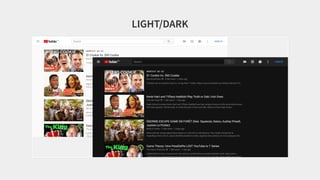
LIGHT/DARKLIGHT/DARK
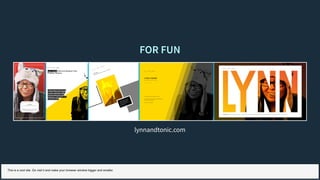
FOR FUNFOR FUN
lynnandtonic.com
This is a cool site. Go visit it and make your browser window bigger and smaller.
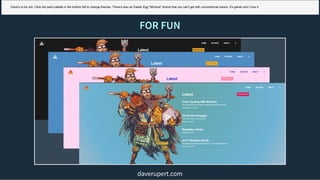
FOR FUNFOR FUN
daverupert.com
Dave's is fun too. Click the paint palette in the bottom left to change themes. There's also an Easter Egg "Minions" theme that you can't get with conventional means. It's garish and I love it.
HOW DO WE DO IT?HOW DO WE DO IT?
So how do we make a theme? What methods do we have available to use to switch out all the things we need to switch out to make a font?
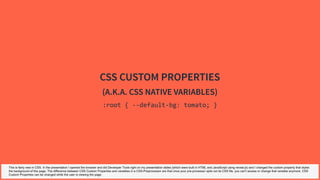
CSS CUSTOM PROPERTIESCSS CUSTOM PROPERTIES
(A.K.A. CSS NATIVE VARIABLES)(A.K.A. CSS NATIVE VARIABLES)
:root { --default-bg: tomato; }
This is fairly new in CSS. In the presentation I opened the browser and did Developer Tools right on my presentation slides (which were built in HTML and JavaScript using reveal.js) and I changed the custom property that styles
the background of this page. The difference between CSS Custom Properties and variables in a CSS-Preprocessor are that once your pre-processor spits out its CSS file, you can't access or change that variable anymore. CSS
Custom Properties can be changed while the user is viewing the page.
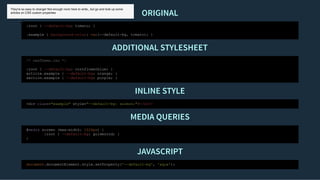
REASONS CUSTOM PROPERTIES ARE THE BEST SOLUTIONREASONS CUSTOM PROPERTIES ARE THE BEST SOLUTION
ORIGINALORIGINAL
ADDITIONAL STYLESHEETADDITIONAL STYLESHEET
INLINE STYLEINLINE STYLE
MEDIA QUERIESMEDIA QUERIES
JAVASCRIPTJAVASCRIPT
:root { --default-bg: tomato; }
.example { background-color: var(--default-bg, tomato); }
/* newTheme.css */
:root { --default-bg: cornflowerblue; }
article.example { --default-bg: orange; }
section.example { --default-bg: purple; }
<div class="example" style="--default-bg: salmon;"></div>
@media screen (max-width: 1024px) {
:root { --default-bg: goldenrod; }
}
document.documentElement.style.setProperty('--default-bg', 'aqua');
They're so easy to change! Not enough room here to write,, but go and look up some
articles on CSS custom properties
REASONS CUSTOM PROPERTIES AREN'T THE BEST SOLUTIONREASONS CUSTOM PROPERTIES AREN'T THE BEST SOLUTION
Not supported in older browsers. We use CSS custom properties for those user-defined branding options that I talked about before. We just tell those users "this feature doesn't work in IE. Use a modern browser if you want to use this
feature."
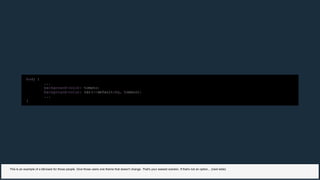
body {
...
background-color: tomato;
background-color: var(--default-bg, tomato);
...
}
This is an example of a fall-back for those people. Give those users one theme that doesn't change. That's your easiest solution. If that's not an option... (next slide)
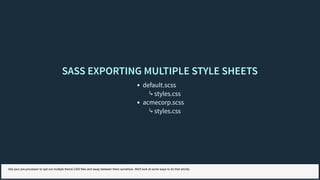
SASS EXPORTING MULTIPLE STYLE SHEETSSASS EXPORTING MULTIPLE STYLE SHEETS
default.scss
⤷ styles.css
acmecorp.scss
⤷ styles.css
Get your pre-processor to spit out multiple theme CSS files and swap between them somehow. We'll look at some ways to do that shortly.
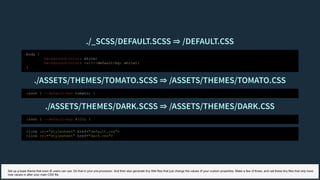
./_SCSS/DEFAULT.SCSS ⇒ /DEFAULT.CSS./_SCSS/DEFAULT.SCSS ⇒ /DEFAULT.CSS
./ASSETS/THEMES/TOMATO.SCSS ⇒ /ASSETS/THEMES/TOMATO.CSS./ASSETS/THEMES/TOMATO.SCSS ⇒ /ASSETS/THEMES/TOMATO.CSS
./ASSETS/THEMES/DARK.SCSS ⇒ /ASSETS/THEMES/DARK.CSS./ASSETS/THEMES/DARK.SCSS ⇒ /ASSETS/THEMES/DARK.CSS
body {
background-color: white;
background-color: var(--default-bg: white);
}
:root { --default-bg: tomato; }
:root { --default-bg: #333; }
<link rel="stylesheet" href="default.css">
<link rel="stylesheet" href="dark.css">
Set up a base theme that even IE users can use. Do that in your pre-processor. And then also generate tiny little files that just change the values of your custom properties. Make a few of those, and call these tiny files that only have
new values in after your main CSS file.
WRITING THE CSSWRITING THE CSS
What do we need to consider? What parts will be changed? Keep it simple!
Speaker notes
The more things you decide need to change , the more complex things will get.
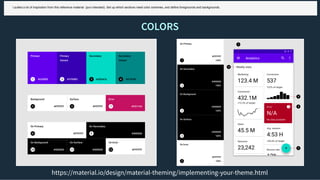
COLORSCOLORS
https://material.io/design/material-theming/implementing-your-theme.html
I pulled a lot of inspiration from this reference material (pun intended). Set up which sections need color schemes, and define foregrounds and backgrounds.
FONTSFONTS
LOGOLOGO
WRITTEN NAME IN THE PRODUCTWRITTEN NAME IN THE PRODUCT
DEMODEMO
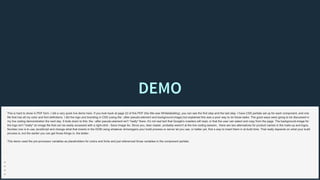
This is hard to show in PDF form. I did a very quick live demo here. If you look back at page 22 of this PDF (the title was Whitelabelling), you can see the first step and the last step. I have CSS partials set up for each component, and one
file that has all my color and font definitions. I did the logo and branding in CSS (using the ::after pseudo-element and background-image) but explained this was a poor way to do those tasks. The good ways were going to be discussed in
my live coding demonstration the next day. It boils down to this: the ::after pseudo-element isn't *really* there. It's not real text that Google's crawlers will read, or that the user can select and copy from the page. The background-image for
the logo isn't *really* an image file that can be easily accessed with a right-click - Save Image As. Since you, dear reader, probably weren't at the live coding session, there are two alternatives for product names in the mark-up and logos.
Number one is to use JavaScript and change what that inserts in the DOM using whatever shinanigans your build process or server let you use, or better yet, find a way to insert them in at build time. That really depends on what your build
process is, but the earlier you can get those things in, the better.
This demo used the pre-processor variables as placeholders for colors and fonts and just referenced those variables in the component partials.
HOW DO WE SERVE IT?HOW DO WE SERVE IT?
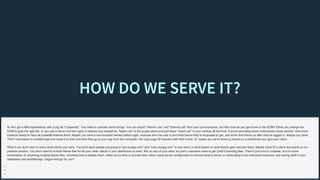
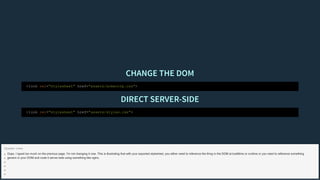
So this got a little hypothetical, with a big fat "it depends". You need to consider some things. You can export "theme1.css" and "theme2.css" from your pre-processor, but then how do you get those in the DOM? Either you change the
DOM to grab the right file, or you use a server tool like nginx to redirect any request for "styles.css" to the proper place and just leave "styles.css" in your markup all the time. If you're providing some multi-tentant cloud solution, that cloud
instance needs to have all available themes there. Maybe you have a non-branded version before login, evaluate who the user is and what theme they're supposed to get, and serve that theme up after they've logged in. Maybe you store
THAT information in localStorage and recall it so that next time they go to your app from this computer, the login page IS branded with their brand. Or maybe you serve them up based on a subdomain you give your client.
What if you don't want to show what clients you have. You don't want people just going to "gm.myapp.com" and "coke.myapp.com" to see who's a client based on what theme gets returned there. Maybe Coke IS a client and wants an on-
premise solution. You don't need to include theme files for all your other clients in your distribution to them. Nor do any of your other on-prem customers need to get Coke's branding files. There's just a lot to consider, but it's some
combination of: exporting multiple theme files, choosing how to display them, either at run time or at build time, either using server configuration to choose what to share, or hardcoding it into individual instances, and storing stuff in your
databases and localStorage. Vague enough for you?
CHANGE THE DOMCHANGE THE DOM
DIRECT SERVER-SIDEDIRECT SERVER-SIDE
<link rel="stylesheet" href="assets/acmecorp.css">
<link rel="stylesheet" href="assets/styles.css">
Oops. I typed too much on the previous page. I'm not changing it now. This is illustrating that with your exported stylesheet, you either need to reference the thing in the DOM at buildtime or runtime or you need to reference something
generic in your DOM and route it server-side using something like nginx.
Speaker notes
OTHER IDEAS AND INSPIRATIONOTHER IDEAS AND INSPIRATION
So just a few other ideas, expanding on what came two slides ago. Imagine you serve up a light and dark theme on your blog, and a user makes a choice about which they prefer. Store that in localStorage so they get the same theme when
they come back next time. Or do something crazy like get their IP address, do a geolocation on that, find the nearest city, and the nearest weather station in that city and use an open weather API to get their current weather and theme your
website based on what the weather is like outside for that user. It's silly, but it's possible. Get creative.
These speaker notes just made me realize I need to go add another slide after this one before I do this presentation live for the first time two days from the time I'm writing this. Just something showing again that my name is Paul Grant, and
you can find me on Twitter at @cssinate
Thanks for reading!

X-TREME THEMES

  • 1.
    Speaker notes Hey PDFreader! My speaker notes are VERY sparse, point form notes, so I'm going to use this space to try to tell you a bit of what my talk was about. This first slide was about 8 different title screens that all said "Variations on a Theme" in different art styles, rotating one at a time every 2 seconds. This 90s one, then an art deco one, then a hipster one, etc., etc. I worked way too hard on it.
  • 2.
    INTRODUCTIONINTRODUCTION See these bulletpoints on the left? They're from my speaker notes. Acrobat makes it really hard to delete them. So just ignore them when you see them. I introduced myself. I'm Paul Grant, from Ottawa, Canada where I live with my wife and kids. I like Ottawa. Hit me up on Twitter if you're ever coming out my way! When FITC asked me what I wanted to talk about, I knew right away. I wanted to talk about... (next slide) Speaker notes
  • 3.
    DESIGN SYSTEMS 101DESIGNSYSTEMS 101 DESIGN SYSTEMS! At first this was going to be fine, but I saw some of the other speakers' topics and felt like there might be a little too much overlap, so I changed to theming websites and web applications. How do we make our CSS scalable and allow for theming at the same time? And as I was developing the material for this presentation, I realized how important *good* CSS is for this topic. So I'll talk about Theming for much of this presentation, but I'm going to give a brief overview on writing good CSS for the beginners that are checking this out. Speaker notes
  • 4.
    DESIGN SYSTEMS 101DESIGNSYSTEMS 101 NAMING CONVENTIONNAMING CONVENTION CSS PRE-PROCESSORCSS PRE-PROCESSOR This stuff is especially for people who ever use !important declarations or the id attribute as your selector (#headline). The reason we find ourselves using !important a lot is because we're battling specificity. Specificity is a huge reason people think CSS sucks. We can battle specificity if we use these two things. A naming convention and a CSS pre-processor. Speaker notes
  • 5.
    BEMBEM OOCSSOOCSS ITCSSITCSS SMACSSSMACSS These are someexamples of naming conventions. They're all a bit different, so research them all. But the folks who wrote these things would all agree with each other - using ANY of these is better than using NONE of these. All of them endeavour to make CSS more readable and more specific. We're going to look at BEM here, for no other reason than "it's what I'm using at work right now". But I've used SMACSS as well, and looked at OOCSS and ITCSS. They all look great, so do your research and figure out what works best for you.
  • 6.
    <div class="mds-contactCard"> <h1 class="mds-contactCard__contactName"></h1> <imgsrc="..." class="mds-contactCard__contactImage" /> <p class="mds-contactCard__information"> Phone: 294-555-9234 </p> <p class="mds-contactCard__information mds-contactCard__information--isUnavailable"> Email: UNAVAILABLE </p> <p class="mds-contactCard__information mds-contactCard__information--isUnavailable"> Address: UNAVAILABLE </p> </div> So here's an example code snippet using BEM plus a little extra that I like to add. BEM stands for Block Element Modifier, but before we get to those pieces, let's start with the prefix
  • 7.
    mds- mds- mds- mds- mds- mds- mds- mds- <divclass=" contactCard"> <h1 class=" contactCard__contactName"></h1> <img src="..." class=" contactCard__contactImage" /> <p class=" contactCard__information"> Phone: 294-555-9234 </p> <p class=" contactCard__information contactCard__information--isUnavailable"> Email: UNAVAILABLE </p> <p class=" contactCard__information contactCard__information--isUnavailable"> Address: UNAVAILABLE </p> </div> A prefix helps us distinguish our class from classes that have come in from an external library or that someone else has written. Our prefix here stands for My Design System It ensures that our CSS is encapsulated and not affected by anyone else’s CSS. Speaker notes It also can show intention. Use "js-" as a prefix when you're using the selector for JavaScript or "at-" when you're using it for automated testing. This makes sure that someone in the future changing a selector for JavaScript doesn't break the CSS or vice versa, or so someone doesn't remove an element that an automated test relies on.
  • 8.
    contactCard contactCard contactCard contactCard contactCard contactCard contactCard contactCard <divclass="mds- "> <h1 class="mds- __contactName"></h1> <img src="..." class="mds- __contactImage" /> <p class="mds- __information"> Phone: 294-555-9234 </p> <p class="mds- __information mds- __information--isUnavailable"> Email: UNAVAILABLE </p> <p class="mds- __information mds- __information--isUnavailable"> Address: UNAVAILABLE </p> </div> The block is the base of the component. The capital T Thing that our other nodes are a part of, in this case, a contact card. Speaker notes
  • 9.
    __contactName __contactImage __information __information __information __information __information <divclass="mds-contactCard"> <h1 class="mds-contactCard "></h1> <img src="..." class="mds-contactCard " /> <p class="mds-contactCard "> Phone: 294-555-9234 </p> <p class="mds-contactCard mds-contactCard --isUnavailable"> Email: UNAVAILABLE </p> <p class="mds-contactCard mds-contactCard --isUnavailable"> Address: UNAVAILABLE </p> </div> I show an element by beginning it with two underscores. Elements are the little bits that make up the block. Speaker notes
  • 10.
    --isUnavailable --isUnavailable <div class="mds-contactCard"> <h1 class="mds-contactCard__contactName"></h1> <imgsrc="..." class="mds-contactCard__contactImage" /> <p class="mds-contactCard__information"> Phone: 294-555-9234 </p> <p class="mds-contactCard__information mds-contactCard__information "> Email: UNAVAILABLE </p> <p class="mds-contactCard__information mds-contactCard__information "> Address: UNAVAILABLE </p> </div> The modifier modifies the block or elements. This class is always in addition to the class that it’s modifying. The only CSS it contains is the CSS that does the modifying. Speaker notes
  • 11.
    <div class="mds-contactCard"> <h1 class="mds-contactCard__contactName"></h1> <imgsrc="..." class="mds-contactCard__contactImage" /> <p class="mds-contactCard__information"> Phone: 294-555-9234 </p> <p class="mds-contactCard__information mds-contactCard__information--isUnavailable"> Email: UNAVAILABLE </p> <p class="mds-contactCard__information mds-contactCard__information--isUnavailable"> Address: UNAVAILABLE </p> </div> Is it verbose? Yes, it’s verbose. Writing out all these classes is less efficient than some of its alternatives. Without looking at the rendered web page, I can see from my class names exactly what a node’s purpose is, and so can anyone else Speaker notes
  • 12.
    SCSSSCSS LESSLESS STYLUSSTYLUS Aside from naming,need a preprocessor These are the popular ones Speaker notes
  • 13.
    A preprocessor extendsbasic CSS. It provides more functionality than CSS gives you natively. You can do logical functions in a preprocessor, like for loops. The important part is that the output of a preprocessor is always valid CSS. Speaker notes
  • 14.
    Logic loops areneat and all, but for design systems, the important part of a preprocessor's functionality is the partials. Speaker notes
  • 15.
    .mds-form__label--large _form.scss Debugging CSS canbe a bit of a pain, but when you’ve got partials and naming conventions, that task becomes significantly easier. Suppose I find a CSS rule that’s causing me a headache on an element with the class .mds-form__label--large I already know that this is a form element, that it’s a label and that it’s the large variety of label. I’ve created one partial for each Block from my naming convention. I know that if I want to change the CSS for this class, I’m going to go to my partials and find one called _form.scss The only thing in that partial is CSS for the form block and its elements and modifiers. Speaker notes
  • 16.
    https://github.com/davidhund All of yourcomponents then need to be documented so that developers can find them. The documentation is called the pattern library. There are a few tools for creating pattern libraries. David Hund on Github has compiled a huge list of tools to help you get started. There are tools that parse comment lines in your CSS and those comments get turned into a pattern library. There are node tools, php tools, vue tools… You have the pick of the litter. Regardless of which pattern library you choose, it needs to contain some information. The list of your components, the usage guidelines about those components, code snippets to use those components and all modifications you can make to those components. Like I said, the goal of the design system is to write really good CSS once. Make small, reusable components that every developer across your organization can use. Now that I’ve told you a bit about writing pretty decent CSS, let's get into theming our application.
  • 18.
    INTRODUCTIONINTRODUCTION See what Idid there? I pretended that that was one talk done, and this is another one starting all over again from the beginning. Pretty funny, yeah? Geez, tough crowd. Just... Just pretend it was funnier in person okay? So I work for a company called Martello Technologies, and I'm the design systems guy. Just me. The design system had to be applied to a few different products. And at the beginning of the year, we acquired a second company called Elfiq technologies with their own software products. So I have lots of software to strip out old markup and CSS and apply our design system. On top of that, we realized that some customers needed different faces on their software. For example, Elfiq customers know and trust Elfiq already, so we wanted the software to be Elfiq branded. Additionally, telecom giant, Mitel, licenses one of our products to its users and wants it Mitel branded.
  • 19.
    So we haveto scale our design system to allow for this branding. Buttons, links, menu items, etc, all need to be accounted for to match their corporate brands. Speaker notes
  • 20.
    SERVICE PROVIDERSSERVICE PROVIDERS Inaddition to that, many of our customers are service providers. Resellers of Mitel technology, that have their own customers. When they want to export reports from our software for their customers, they want THEIR logo and header color. We don't let them change button and link colors. We give them a limited set of user-defined theming options. Speaker notes
  • 21.
  • 22.
  • 23.
    ACCESSIBILITYACCESSIBILITY NumberofEmployees Installation Manufacturing Other Solar Employment Growthby Sector, 2010-2016 Source: thesolarfoundation.com Installation Manufacturing Sales & Distribution Project Development Other 2010 2012 2014 2016 0 50k 100k 150k 200k Highcharts.com NumberofEmployees Installation Manufacturing Other Solar Employment Growth by Sector, 2010-2016 Source: thesolarfoundation.com Installation Manufacturing Sales & Distribution Project Development Other 2010 2012 2014 2016 0 50k 100k 150k 200k Highcharts.com Percent Asia Africa Europe America Historic and Estimated Worldwide Population Distribution by Region Source: Wikipedia.org Asia Africa Europe America Oceania 1750 1800 1850 1900 1950 1999 2050 0 25 50 75 100 Highcharts.com
  • 24.
  • 25.
    FOR FUNFOR FUN lynnandtonic.com Thisis a cool site. Go visit it and make your browser window bigger and smaller.
  • 26.
    FOR FUNFOR FUN daverupert.com Dave'sis fun too. Click the paint palette in the bottom left to change themes. There's also an Easter Egg "Minions" theme that you can't get with conventional means. It's garish and I love it.
  • 27.
    HOW DO WEDO IT?HOW DO WE DO IT? So how do we make a theme? What methods do we have available to use to switch out all the things we need to switch out to make a font?
  • 28.
    CSS CUSTOM PROPERTIESCSSCUSTOM PROPERTIES (A.K.A. CSS NATIVE VARIABLES)(A.K.A. CSS NATIVE VARIABLES) :root { --default-bg: tomato; } This is fairly new in CSS. In the presentation I opened the browser and did Developer Tools right on my presentation slides (which were built in HTML and JavaScript using reveal.js) and I changed the custom property that styles the background of this page. The difference between CSS Custom Properties and variables in a CSS-Preprocessor are that once your pre-processor spits out its CSS file, you can't access or change that variable anymore. CSS Custom Properties can be changed while the user is viewing the page.
  • 29.
    REASONS CUSTOM PROPERTIESARE THE BEST SOLUTIONREASONS CUSTOM PROPERTIES ARE THE BEST SOLUTION
  • 30.
    ORIGINALORIGINAL ADDITIONAL STYLESHEETADDITIONAL STYLESHEET INLINESTYLEINLINE STYLE MEDIA QUERIESMEDIA QUERIES JAVASCRIPTJAVASCRIPT :root { --default-bg: tomato; } .example { background-color: var(--default-bg, tomato); } /* newTheme.css */ :root { --default-bg: cornflowerblue; } article.example { --default-bg: orange; } section.example { --default-bg: purple; } <div class="example" style="--default-bg: salmon;"></div> @media screen (max-width: 1024px) { :root { --default-bg: goldenrod; } } document.documentElement.style.setProperty('--default-bg', 'aqua'); They're so easy to change! Not enough room here to write,, but go and look up some articles on CSS custom properties
  • 31.
    REASONS CUSTOM PROPERTIESAREN'T THE BEST SOLUTIONREASONS CUSTOM PROPERTIES AREN'T THE BEST SOLUTION
  • 32.
    Not supported inolder browsers. We use CSS custom properties for those user-defined branding options that I talked about before. We just tell those users "this feature doesn't work in IE. Use a modern browser if you want to use this feature."
  • 33.
    body { ... background-color: tomato; background-color:var(--default-bg, tomato); ... } This is an example of a fall-back for those people. Give those users one theme that doesn't change. That's your easiest solution. If that's not an option... (next slide)
  • 34.
    SASS EXPORTING MULTIPLESTYLE SHEETSSASS EXPORTING MULTIPLE STYLE SHEETS default.scss ⤷ styles.css acmecorp.scss ⤷ styles.css Get your pre-processor to spit out multiple theme CSS files and swap between them somehow. We'll look at some ways to do that shortly.
  • 35.
    ./_SCSS/DEFAULT.SCSS ⇒ /DEFAULT.CSS./_SCSS/DEFAULT.SCSS⇒ /DEFAULT.CSS ./ASSETS/THEMES/TOMATO.SCSS ⇒ /ASSETS/THEMES/TOMATO.CSS./ASSETS/THEMES/TOMATO.SCSS ⇒ /ASSETS/THEMES/TOMATO.CSS ./ASSETS/THEMES/DARK.SCSS ⇒ /ASSETS/THEMES/DARK.CSS./ASSETS/THEMES/DARK.SCSS ⇒ /ASSETS/THEMES/DARK.CSS body { background-color: white; background-color: var(--default-bg: white); } :root { --default-bg: tomato; } :root { --default-bg: #333; } <link rel="stylesheet" href="default.css"> <link rel="stylesheet" href="dark.css"> Set up a base theme that even IE users can use. Do that in your pre-processor. And then also generate tiny little files that just change the values of your custom properties. Make a few of those, and call these tiny files that only have new values in after your main CSS file.
  • 36.
    WRITING THE CSSWRITINGTHE CSS What do we need to consider? What parts will be changed? Keep it simple! Speaker notes The more things you decide need to change , the more complex things will get.
  • 37.
    COLORSCOLORS https://material.io/design/material-theming/implementing-your-theme.html I pulled alot of inspiration from this reference material (pun intended). Set up which sections need color schemes, and define foregrounds and backgrounds.
  • 38.
  • 39.
    LOGOLOGO WRITTEN NAME INTHE PRODUCTWRITTEN NAME IN THE PRODUCT
  • 40.
    DEMODEMO This is hardto show in PDF form. I did a very quick live demo here. If you look back at page 22 of this PDF (the title was Whitelabelling), you can see the first step and the last step. I have CSS partials set up for each component, and one file that has all my color and font definitions. I did the logo and branding in CSS (using the ::after pseudo-element and background-image) but explained this was a poor way to do those tasks. The good ways were going to be discussed in my live coding demonstration the next day. It boils down to this: the ::after pseudo-element isn't *really* there. It's not real text that Google's crawlers will read, or that the user can select and copy from the page. The background-image for the logo isn't *really* an image file that can be easily accessed with a right-click - Save Image As. Since you, dear reader, probably weren't at the live coding session, there are two alternatives for product names in the mark-up and logos. Number one is to use JavaScript and change what that inserts in the DOM using whatever shinanigans your build process or server let you use, or better yet, find a way to insert them in at build time. That really depends on what your build process is, but the earlier you can get those things in, the better. This demo used the pre-processor variables as placeholders for colors and fonts and just referenced those variables in the component partials.
  • 41.
    HOW DO WESERVE IT?HOW DO WE SERVE IT? So this got a little hypothetical, with a big fat "it depends". You need to consider some things. You can export "theme1.css" and "theme2.css" from your pre-processor, but then how do you get those in the DOM? Either you change the DOM to grab the right file, or you use a server tool like nginx to redirect any request for "styles.css" to the proper place and just leave "styles.css" in your markup all the time. If you're providing some multi-tentant cloud solution, that cloud instance needs to have all available themes there. Maybe you have a non-branded version before login, evaluate who the user is and what theme they're supposed to get, and serve that theme up after they've logged in. Maybe you store THAT information in localStorage and recall it so that next time they go to your app from this computer, the login page IS branded with their brand. Or maybe you serve them up based on a subdomain you give your client. What if you don't want to show what clients you have. You don't want people just going to "gm.myapp.com" and "coke.myapp.com" to see who's a client based on what theme gets returned there. Maybe Coke IS a client and wants an on- premise solution. You don't need to include theme files for all your other clients in your distribution to them. Nor do any of your other on-prem customers need to get Coke's branding files. There's just a lot to consider, but it's some combination of: exporting multiple theme files, choosing how to display them, either at run time or at build time, either using server configuration to choose what to share, or hardcoding it into individual instances, and storing stuff in your databases and localStorage. Vague enough for you?
  • 42.
    CHANGE THE DOMCHANGETHE DOM DIRECT SERVER-SIDEDIRECT SERVER-SIDE <link rel="stylesheet" href="assets/acmecorp.css"> <link rel="stylesheet" href="assets/styles.css"> Oops. I typed too much on the previous page. I'm not changing it now. This is illustrating that with your exported stylesheet, you either need to reference the thing in the DOM at buildtime or runtime or you need to reference something generic in your DOM and route it server-side using something like nginx. Speaker notes
  • 43.
    OTHER IDEAS ANDINSPIRATIONOTHER IDEAS AND INSPIRATION So just a few other ideas, expanding on what came two slides ago. Imagine you serve up a light and dark theme on your blog, and a user makes a choice about which they prefer. Store that in localStorage so they get the same theme when they come back next time. Or do something crazy like get their IP address, do a geolocation on that, find the nearest city, and the nearest weather station in that city and use an open weather API to get their current weather and theme your website based on what the weather is like outside for that user. It's silly, but it's possible. Get creative. These speaker notes just made me realize I need to go add another slide after this one before I do this presentation live for the first time two days from the time I'm writing this. Just something showing again that my name is Paul Grant, and you can find me on Twitter at @cssinate Thanks for reading!