SCALING YOUR
LOGGING INFRASTRUCTURE
WITH SYSLOG-NG
All Things Open 2016
Peter Czanik / Balabit
2
ABOUT ME
 Peter Czanik from Hungary
 Community Manager at Balabit: syslog-ng
upstream
 syslog-ng packaging, support, advocacy
Balabit is an IT security company with development
HQ in Budapest, Hungary
Over 200 employees: the majority are engineers
3
syslog-ng
Logging
Recording events, such as:
Jan 14 11:38:48 linux-0jbu sshd[7716]: Accepted publickey for root
from 127.0.0.1 port 48806 ssh2
syslog-ng
Enhanced logging daemon with a focus on high-performance
central log collection.
4
WHY CENTRAL LOGGING?
EASE OF USE
one place to check
instead of many
AVAILABILITY
even if the sender
machine is down
SECURITY
logs are available even
if sender machine
is compromised
5
MAIN SYSLOG-NG ROLES
collector processor filter storage
(or forwarder)
6
ROLE: DATA COLLECTOR
Collect system and application logs together:
contextual data for either side
A wide variety of platform-specific sources:
 /dev/log & co
 Journal, Sun streams
Receive syslog messages over the network:
 Legacy or RFC5424, UDP/TCP/TLS
Logs or any kind of data from applications:
 Through files, sockets, pipes, etc.
 Application output
7
ROLE: PROCESSING
Classify, normalize and structure logs with built-in parsers:
 CSV-parser, DB-parser (PatternDB), JSON parser, key=value
parser and more to come
Rewrite messages:
 For example anonymization
Reformatting messages using templates:
 Destination might need a specific format (ISO date, JSON, etc.)
Enrich data:
 GeoIP
 Additional fields based on message content
8
ROLE: DATA FILTERING
Main uses:
 Discarding surplus logs (not storing debug level messages)
 Message routing (login events to SIEM)
Many possibilities:
 Based on message content, parameters or macros
 Using comparisons, wildcards, regular expressions and
functions
 Combining all of these with Boolean operators
9
ROLE: DESTINATIONS
“TRADITIONAL”
● File, network, TLS, SQL, etc.
“BIG DATA”
● Distributed file systems:
● Hadoop
● NoSQL databases:
● MongoDB
● Elasticsearch
● Messaging systems:
● Kafka
10
WHICH SYSLOG-NG
VERSION IS THE FASTEST?
 Project started in 1998
 Version 3.3 added multi-threading in 2011
 Latest stable version is 3.8, released two
months ago
11
Kindle e-book reader
on a plane :)
Version 1.6
BMW i3 all electric car
Version 3.4
12
FREE-FORM LOG MESSAGES
Most log messages are: date + hostname + text
Mar 11 13:37:56 linux-6965 sshd[4547]: Accepted
keyboard-interactive/pam for root from 127.0.0.1 port
46048 ssh2
 Text = English sentence with some variable parts
 Easy to read by a human
 Difficult to process them with scripts
13
SOLUTION: STRUCTURED LOGGING
 Events represented as name-value pairs
 Example: an ssh login:
app=sshd user=root source_ip=192.168.123.45
 syslog-ng: name-value pairs inside
 Date, facility, priority, program name, pid, etc.
 Parsers in syslog-ng can turn unstructured and some structured data (CSV,
JSON) into name-value pairs
14
JSON PARSER
Turns JSON-based log messages into name-value pairs
{"PROGRAM":"prg00000","PRIORITY":"info","PID":"1234","MESSAGE":"seq:
0000000000, thread: 0000, runid: 1374490607, stamp: 2013-07-22T12:56:47
MESSAGE... ","HOST":"localhost","FACILITY":"auth","DATE":"Jul 22 12:56:47"}
15
CSV PARSER
Parses columnar data into fields
parser p_apache {
csv-parser(columns("APACHE.CLIENT_IP", "APACHE.IDENT_NAME", "APACHE.USER_NAME",
"APACHE.TIMESTAMP", "APACHE.REQUEST_URL", "APACHE.REQUEST_STATUS",
"APACHE.CONTENT_LENGTH", "APACHE.REFERER", "APACHE.USER_AGENT",
"APACHE.PROCESS_TIME", "APACHE.SERVER_NAME")
flags(escape-double-char,strip-whitespace) delimiters(" ") quote-pairs('""[]')
);
};
destination d_file { file("/var/log/messages-${APACHE.USER_NAME:-nouser}"); };
log { source(s_local); parser(p_apache); destination(d_file);};
16
KEY=VALUE PARSER
Finds key=value pairs in messages
Introduced in version 3.7.
Typical in firewalls, like:
2016-03-04T07:10:19-05:00 127.0.0.1 zorp/http[3486]: core.summary(4):
(svc/http#0/http/intraPLUGinter:267346): Connection summary; rule_id='51',
session_start='1451980783', session_end='1451980784', client_proto='TCP',
client_address='172.168.65.4', client_port='56084', client_zone='office',
server_proto='TCP', server_address='173.252.120.68', server_port='443',
server_zone='internet', client_local='173.252.120.68', client_local_port='443',
server_local='91.120.23.97', server_local_port='46472', verdict='ACCEPTED', info=''
17
PATTERNDB PARSER
PatternDB message parser
Can extract useful information from unstructured messages into name-value pairs
 Add status fields based on message text
 Message classification (like LogCheck)
Needs XML describing log messages
Example: an ssh login failure:
 Parsed: app=sshd, user=root, source_ip=192.168.123.45
 Added: action=login, status=failure
 Classified as “violation”
18
PARSERS WRITTEN IN RUST
Rust parsers
 Rust: https://www.rust-lang.org/
 Supported from 3.8
Example modules in separate repository: https://github.com/balabit/syslog-ng-rust-modules/
 Regexp parser
 Actiondb parser (similar to, but easier to use than patterndb)
 Correlation parser
19
ANONYMIZING MESSAGES
Many regulations about what can be logged
 PCI-DSS: credit card numbers
 Europe: IP addresses, user names
Locating sensitive information:
 Regular expression: slow, works also in unknown logs
 Patterndb: fast, works only in known log messages
Anonymizing:
 Overwrite it with a constant
 Overwrite it with a hash of the original
20
CONFIGURATION
 “Don't Panic”
 Simple and logical, even if it looks difficult at first
 Pipeline model:
 Many different building blocks (sources, destinations,
filters, parsers, etc.)
 Connected into a pipeline using “log” statements
21
syslog-ng.conf: global options
@version:3.7
@include "scl.conf"
# this is a comment :)
options {
flush_lines (0);
# [...]
keep_hostname (yes);
};
22
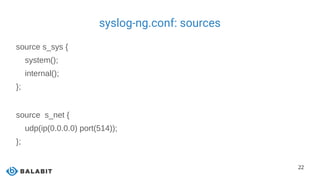
syslog-ng.conf: sources
source s_sys {
system();
internal();
};
source s_net {
udp(ip(0.0.0.0) port(514));
};
23
syslog-ng.conf: destinations
destination d_mesg { file("/var/log/messages"); };
destination d_es {
elasticsearch(
index("syslog-ng_${YEAR}.${MONTH}.${DAY}")
type("test")
cluster("syslog-ng")
template("$(format-json --scope rfc3164 --scope nv-pairs --exclude R_DATE --key ISODATE)n");
);
};
24
syslog-ng.conf: filters, parsers
filter f_nodebug { level(info..emerg); };
filter f_messages { level(info..emerg) and
not (facility(mail)
or facility(authpriv)
or facility(cron)); };
parser pattern_db {
db-parser(file("/opt/syslog-ng/etc/patterndb.xml") );
};
25
syslog-ng.conf: logpath
log { source(s_sys); filter(f_messages); destination(d_mesg); };
log {
source(s_net);
source(s_sys);
filter(f_nodebug);
parser(pattern_db);
destination(d_es);
flags(flow-control);
};
26
Patterndb & ElasticSearch & Kibana
27
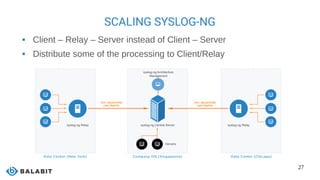
SCALING SYSLOG-NG
 Client – Relay – Server instead of Client – Server
 Distribute some of the processing to Client/Relay
28
LOG ROUTING
 Based on filtering
 Send the right logs to the right places
 Message parsing can increase accuracy
 E-mail on root logins
 Can optimize SIEM / log analyzer tools
 Only relevant messages: cheaper licensing
 Throttling: evening out peaks
29
WHAT IS NEW IN SYSLOG-NG 3.8
 Disk-based buffering
 Grouping-by(): correlation independent
of patterndb
 Parsers written in Rust
 Elasticsearch 2.x support
 Curl (HTTP) destination
 Performance improvements
 Many more :-)
30
SYSLOG-NG BENEFITS
FOR LARGE ENVIRONMENTS
High-performance
reliable log collection
Simplified
architecture
Single application for both
syslog and application data
Easier-to-use data
Parsed and presented in a
ready-to-use format
Lower load on
destinations
Efficient message filtering
and routing
31
JOINING THE COMMUNITY
 syslog-ng: http://syslog-ng.org/
 Source on GitHub: https://github.com/balabit/syslog-ng
 Mailing list: https://lists.balabit.hu/pipermail/syslog-ng/
 IRC: #syslog-ng on freenode
32
QUESTIONS?
My blog: http://czanik.blogs.balabit.com/
My e-mail: peter.czanik@balabit.com
Twitter: https://twitter.com/PCzanik
33
SAMPLE XML
● <?xml version='1.0' encoding='UTF-8'?>
● <patterndb version='3' pub_date='2010-07-13'>
● <ruleset name='opensshd' id='2448293e-6d1c-412c-a418-a80025639511'>
● <pattern>sshd</pattern>
● <rules>
● <rule provider="patterndb" id="4dd5a329-da83-4876-a431-ddcb59c2858c" class="system">
● <patterns>
● <pattern>Accepted @ESTRING:usracct.authmethod: @for @ESTRING:usracct.username: @from @ESTRING:usracct.device: @port @ESTRING::
@@ANYSTRING:usracct.service@</pattern>
● </patterns>
● <examples>
● <example>
● <test_message program="sshd">Accepted password for bazsi from 127.0.0.1 port 48650 ssh2</test_message>
● <test_values>
● <test_value name="usracct.username">bazsi</test_value>
● <test_value name="usracct.authmethod">password</test_value>
● <test_value name="usracct.device">127.0.0.1</test_value>
● <test_value name="usracct.service">ssh2</test_value>
● </test_values>
● </example>
● </examples>
● <values>
● <value name="usracct.type">login</value>
● <value name="usracct.sessionid">$PID</value>
● <value name="usracct.application">$PROGRAM</value>
● <value name="secevt.verdict">ACCEPT</value>
● </values>
● </rule>

Scaling your logging infrastructure using syslog-ng

  • 1.
    SCALING YOUR LOGGING INFRASTRUCTURE WITHSYSLOG-NG All Things Open 2016 Peter Czanik / Balabit
  • 2.
    2 ABOUT ME  PeterCzanik from Hungary  Community Manager at Balabit: syslog-ng upstream  syslog-ng packaging, support, advocacy Balabit is an IT security company with development HQ in Budapest, Hungary Over 200 employees: the majority are engineers
  • 3.
    3 syslog-ng Logging Recording events, suchas: Jan 14 11:38:48 linux-0jbu sshd[7716]: Accepted publickey for root from 127.0.0.1 port 48806 ssh2 syslog-ng Enhanced logging daemon with a focus on high-performance central log collection.
  • 4.
    4 WHY CENTRAL LOGGING? EASEOF USE one place to check instead of many AVAILABILITY even if the sender machine is down SECURITY logs are available even if sender machine is compromised
  • 5.
    5 MAIN SYSLOG-NG ROLES collectorprocessor filter storage (or forwarder)
  • 6.
    6 ROLE: DATA COLLECTOR Collectsystem and application logs together: contextual data for either side A wide variety of platform-specific sources:  /dev/log & co  Journal, Sun streams Receive syslog messages over the network:  Legacy or RFC5424, UDP/TCP/TLS Logs or any kind of data from applications:  Through files, sockets, pipes, etc.  Application output
  • 7.
    7 ROLE: PROCESSING Classify, normalizeand structure logs with built-in parsers:  CSV-parser, DB-parser (PatternDB), JSON parser, key=value parser and more to come Rewrite messages:  For example anonymization Reformatting messages using templates:  Destination might need a specific format (ISO date, JSON, etc.) Enrich data:  GeoIP  Additional fields based on message content
  • 8.
    8 ROLE: DATA FILTERING Mainuses:  Discarding surplus logs (not storing debug level messages)  Message routing (login events to SIEM) Many possibilities:  Based on message content, parameters or macros  Using comparisons, wildcards, regular expressions and functions  Combining all of these with Boolean operators
  • 9.
    9 ROLE: DESTINATIONS “TRADITIONAL” ● File,network, TLS, SQL, etc. “BIG DATA” ● Distributed file systems: ● Hadoop ● NoSQL databases: ● MongoDB ● Elasticsearch ● Messaging systems: ● Kafka
  • 10.
    10 WHICH SYSLOG-NG VERSION ISTHE FASTEST?  Project started in 1998  Version 3.3 added multi-threading in 2011  Latest stable version is 3.8, released two months ago
  • 11.
    11 Kindle e-book reader ona plane :) Version 1.6 BMW i3 all electric car Version 3.4
  • 12.
    12 FREE-FORM LOG MESSAGES Mostlog messages are: date + hostname + text Mar 11 13:37:56 linux-6965 sshd[4547]: Accepted keyboard-interactive/pam for root from 127.0.0.1 port 46048 ssh2  Text = English sentence with some variable parts  Easy to read by a human  Difficult to process them with scripts
  • 13.
    13 SOLUTION: STRUCTURED LOGGING Events represented as name-value pairs  Example: an ssh login: app=sshd user=root source_ip=192.168.123.45  syslog-ng: name-value pairs inside  Date, facility, priority, program name, pid, etc.  Parsers in syslog-ng can turn unstructured and some structured data (CSV, JSON) into name-value pairs
  • 14.
    14 JSON PARSER Turns JSON-basedlog messages into name-value pairs {"PROGRAM":"prg00000","PRIORITY":"info","PID":"1234","MESSAGE":"seq: 0000000000, thread: 0000, runid: 1374490607, stamp: 2013-07-22T12:56:47 MESSAGE... ","HOST":"localhost","FACILITY":"auth","DATE":"Jul 22 12:56:47"}
  • 15.
    15 CSV PARSER Parses columnardata into fields parser p_apache { csv-parser(columns("APACHE.CLIENT_IP", "APACHE.IDENT_NAME", "APACHE.USER_NAME", "APACHE.TIMESTAMP", "APACHE.REQUEST_URL", "APACHE.REQUEST_STATUS", "APACHE.CONTENT_LENGTH", "APACHE.REFERER", "APACHE.USER_AGENT", "APACHE.PROCESS_TIME", "APACHE.SERVER_NAME") flags(escape-double-char,strip-whitespace) delimiters(" ") quote-pairs('""[]') ); }; destination d_file { file("/var/log/messages-${APACHE.USER_NAME:-nouser}"); }; log { source(s_local); parser(p_apache); destination(d_file);};
  • 16.
    16 KEY=VALUE PARSER Finds key=valuepairs in messages Introduced in version 3.7. Typical in firewalls, like: 2016-03-04T07:10:19-05:00 127.0.0.1 zorp/http[3486]: core.summary(4): (svc/http#0/http/intraPLUGinter:267346): Connection summary; rule_id='51', session_start='1451980783', session_end='1451980784', client_proto='TCP', client_address='172.168.65.4', client_port='56084', client_zone='office', server_proto='TCP', server_address='173.252.120.68', server_port='443', server_zone='internet', client_local='173.252.120.68', client_local_port='443', server_local='91.120.23.97', server_local_port='46472', verdict='ACCEPTED', info=''
  • 17.
    17 PATTERNDB PARSER PatternDB messageparser Can extract useful information from unstructured messages into name-value pairs  Add status fields based on message text  Message classification (like LogCheck) Needs XML describing log messages Example: an ssh login failure:  Parsed: app=sshd, user=root, source_ip=192.168.123.45  Added: action=login, status=failure  Classified as “violation”
  • 18.
    18 PARSERS WRITTEN INRUST Rust parsers  Rust: https://www.rust-lang.org/  Supported from 3.8 Example modules in separate repository: https://github.com/balabit/syslog-ng-rust-modules/  Regexp parser  Actiondb parser (similar to, but easier to use than patterndb)  Correlation parser
  • 19.
    19 ANONYMIZING MESSAGES Many regulationsabout what can be logged  PCI-DSS: credit card numbers  Europe: IP addresses, user names Locating sensitive information:  Regular expression: slow, works also in unknown logs  Patterndb: fast, works only in known log messages Anonymizing:  Overwrite it with a constant  Overwrite it with a hash of the original
  • 20.
    20 CONFIGURATION  “Don't Panic” Simple and logical, even if it looks difficult at first  Pipeline model:  Many different building blocks (sources, destinations, filters, parsers, etc.)  Connected into a pipeline using “log” statements
  • 21.
    21 syslog-ng.conf: global options @version:3.7 @include"scl.conf" # this is a comment :) options { flush_lines (0); # [...] keep_hostname (yes); };
  • 22.
    22 syslog-ng.conf: sources source s_sys{ system(); internal(); }; source s_net { udp(ip(0.0.0.0) port(514)); };
  • 23.
    23 syslog-ng.conf: destinations destination d_mesg{ file("/var/log/messages"); }; destination d_es { elasticsearch( index("syslog-ng_${YEAR}.${MONTH}.${DAY}") type("test") cluster("syslog-ng") template("$(format-json --scope rfc3164 --scope nv-pairs --exclude R_DATE --key ISODATE)n"); ); };
  • 24.
    24 syslog-ng.conf: filters, parsers filterf_nodebug { level(info..emerg); }; filter f_messages { level(info..emerg) and not (facility(mail) or facility(authpriv) or facility(cron)); }; parser pattern_db { db-parser(file("/opt/syslog-ng/etc/patterndb.xml") ); };
  • 25.
    25 syslog-ng.conf: logpath log {source(s_sys); filter(f_messages); destination(d_mesg); }; log { source(s_net); source(s_sys); filter(f_nodebug); parser(pattern_db); destination(d_es); flags(flow-control); };
  • 26.
  • 27.
    27 SCALING SYSLOG-NG  Client– Relay – Server instead of Client – Server  Distribute some of the processing to Client/Relay
  • 28.
    28 LOG ROUTING  Basedon filtering  Send the right logs to the right places  Message parsing can increase accuracy  E-mail on root logins  Can optimize SIEM / log analyzer tools  Only relevant messages: cheaper licensing  Throttling: evening out peaks
  • 29.
    29 WHAT IS NEWIN SYSLOG-NG 3.8  Disk-based buffering  Grouping-by(): correlation independent of patterndb  Parsers written in Rust  Elasticsearch 2.x support  Curl (HTTP) destination  Performance improvements  Many more :-)
  • 30.
    30 SYSLOG-NG BENEFITS FOR LARGEENVIRONMENTS High-performance reliable log collection Simplified architecture Single application for both syslog and application data Easier-to-use data Parsed and presented in a ready-to-use format Lower load on destinations Efficient message filtering and routing
  • 31.
    31 JOINING THE COMMUNITY syslog-ng: http://syslog-ng.org/  Source on GitHub: https://github.com/balabit/syslog-ng  Mailing list: https://lists.balabit.hu/pipermail/syslog-ng/  IRC: #syslog-ng on freenode
  • 32.
    32 QUESTIONS? My blog: http://czanik.blogs.balabit.com/ Mye-mail: peter.czanik@balabit.com Twitter: https://twitter.com/PCzanik
  • 33.
    33 SAMPLE XML ● <?xmlversion='1.0' encoding='UTF-8'?> ● <patterndb version='3' pub_date='2010-07-13'> ● <ruleset name='opensshd' id='2448293e-6d1c-412c-a418-a80025639511'> ● <pattern>sshd</pattern> ● <rules> ● <rule provider="patterndb" id="4dd5a329-da83-4876-a431-ddcb59c2858c" class="system"> ● <patterns> ● <pattern>Accepted @ESTRING:usracct.authmethod: @for @ESTRING:usracct.username: @from @ESTRING:usracct.device: @port @ESTRING:: @@ANYSTRING:usracct.service@</pattern> ● </patterns> ● <examples> ● <example> ● <test_message program="sshd">Accepted password for bazsi from 127.0.0.1 port 48650 ssh2</test_message> ● <test_values> ● <test_value name="usracct.username">bazsi</test_value> ● <test_value name="usracct.authmethod">password</test_value> ● <test_value name="usracct.device">127.0.0.1</test_value> ● <test_value name="usracct.service">ssh2</test_value> ● </test_values> ● </example> ● </examples> ● <values> ● <value name="usracct.type">login</value> ● <value name="usracct.sessionid">$PID</value> ● <value name="usracct.application">$PROGRAM</value> ● <value name="secevt.verdict">ACCEPT</value> ● </values> ● </rule>