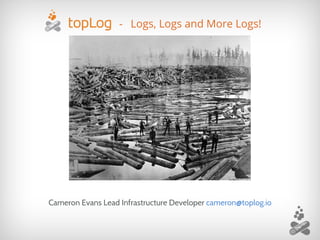
- Logs, Logs and More Logs!
Cameron Evans Lead Infrastructure Developer cameron@toplog.io
● NSCC IT grad
● Backend Dev at
● Log Management Company
● Log Shipper/Receiver
● Going to say “Logs” a lot
About
● Why are logs so important?
● What can we learn from logs?
● Processing logs efficiently
○ Logstash & Elasticsearch
● Searching & Visualization
● Log analysis demo
Outline
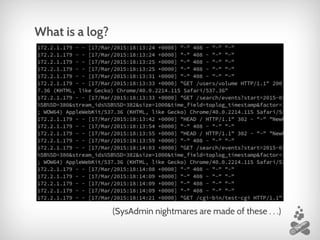
What is a log?
(SysAdmin nightmares are made of these . . .)
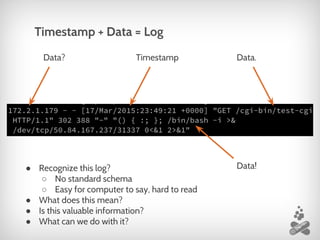
Timestamp + Data = Log
Data? Data.
Data!
Timestamp
● Recognize this log?
○ No standard schema
○ Easy for computer to say, hard to read
● What does this mean?
● Is this valuable information?
● What can we do with it?
● TopLog cares.
○ We understand the pain
○ Server diaries
● Troubleshooting Developers
○ “Its broken”
● Your infrastructure
○ Down-time
■ Network
■ Application
Who cares?
Typical Security Company, inc.
● Network captures, firewalls and netflow
Not only network logs
● Firewall, switches, TCP/IP traces, NetFlow
○ Can catch intrusions
○ But how was your infrastructure affected?
● Application level logs
○ See the effects
Security and Logs
Syslog, web server logs, database logs, application logs
● What do we do with them?
○ Corral
○ Analyze
● Which tools to use?
○ “Wait, why should I do this again?” — The Audience
○ BFF: Logstash & Elasticsearch
Application Logs
● Boss: “It’s broken”
● Developer
○ Log into server
○ Figure out the issue (skim through logs)
○ Fix the problem (hopefully)
or
○ Just get it working again
Storytime: “Its broken . . . ”
● Digging through individual servers logs
○ Time consuming
○ Missing the big picture
● Every log tells a story
● “How can we manage x servers sending x/sec
events?”
“There’s got to be a better way!”
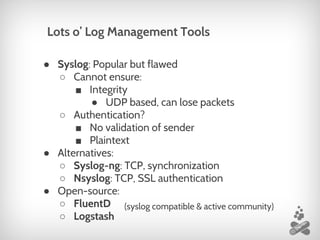
● Syslog: Popular but flawed
○ Cannot ensure:
■ Integrity
● UDP based, can lose packets
○ Authentication?
■ No validation of sender
■ Plaintext
● Alternatives:
○ Syslog-ng: TCP, synchronization
○ Nsyslog: TCP, SSL authentication
● Open-source:
○ FluentD
○ Logstash
Lots o’ Log Management Tools
(syslog compatible & active community)
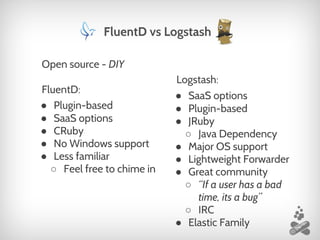
Open source - DIY
FluentD:
● Plugin-based
● SaaS options
● CRuby
● No Windows support
● Less familiar
○ Feel free to chime in
FluentD vs Logstash
Logstash:
● SaaS options
● Plugin-based
● JRuby
○ Java Dependency
● Major OS support
● Lightweight Forwarder
● Great community
○ “If a user has a bad
time, its a bug”
○ IRC
● Elastic Family
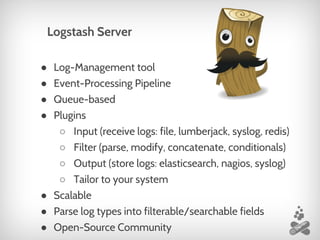
● Log-Management tool
● Event-Processing Pipeline
● Queue-based
● Plugins
○ Input (receive logs: file, lumberjack, syslog, redis)
○ Filter (parse, modify, concatenate, conditionals)
○ Output (store logs: elasticsearch, nagios, syslog)
○ Tailor to your system
● Scalable
● Parse log types into filterable/searchable fields
● Open-Source Community
Logstash Server
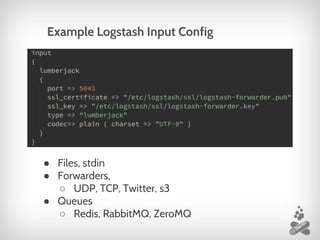
Example Logstash Input Config
● Files, stdin
● Forwarders,
○ UDP, TCP, Twitter, s3
● Queues
○ Redis, RabbitMQ, ZeroMQ
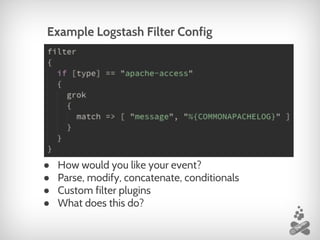
Example Logstash Filter Config
● How would you like your event?
● Parse, modify, concatenate, conditionals
● Custom filter plugins
● What does this do?
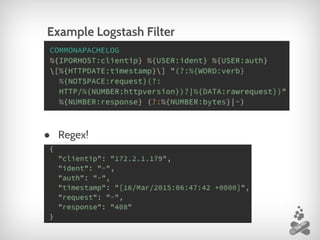
Example Logstash Filter
● Regex!
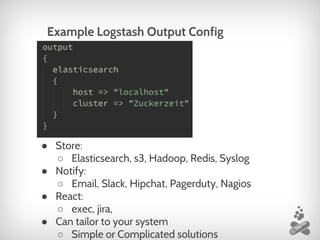
● Store:
○ Elasticsearch, s3, Hadoop, Redis, Syslog
● Notify:
○ Email, Slack, Hipchat, Pagerduty, Nagios
● React:
○ exec, jira,
● Can tailor to your system
○ Simple or Complicated solutions
Example Logstash Output Config
● Distributed search engine
● Document-based data store
● Open-Source
● Runs on Apache Lucene
● Super-fast full-text filtering & searching
● Visualization
● Aggregations
● Horizontally scalable
● Communicate using HTTP JSON requests
Elastic Search
● Can be compiled anywhere with Go installed
○ Linux, OSX, Windows, etc
● Lightweight footprint
● Own proprietary ‘Lumberjack’ protocol
○ SSL communication channel to server
○ Encrypted & authenticated
● Handles multiple files, stdin
● Reliable & Resilient
○ No data-loss
○ Persistent connection
Logstash Forwarder
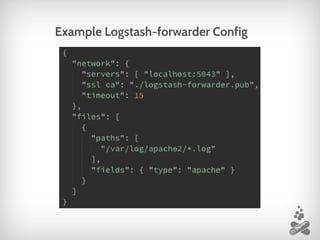
Example Logstash-forwarder Config
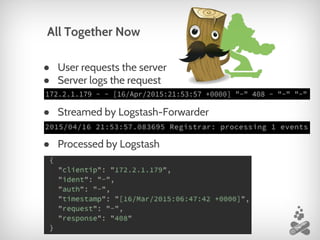
● User requests the server
● Server logs the request
● Streamed by Logstash-Forwarder
● Processed by Logstash
All Together Now
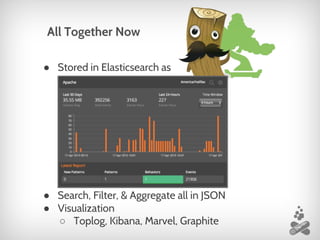
● Stored in Elasticsearch as
● Search, Filter, & Aggregate all in JSON
● Visualization
○ Toplog, Kibana, Marvel, Graphite
All Together Now
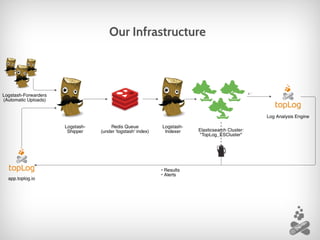
Our Infrastructure
We aren’t the only ones:
Hands on walk through
● Take a peek behind the curtain
● Please ask questions!
Two VMs:
● LEMH web server:
○ Logstash-Forwarder
● Log storage Server:
○ Logstash server
○ Elastic search
Visualizing and interacting
● Can’t just rely on raw HTTP requests
● Interface tools: Kibana, Marvel, Graphite
○ Visualize
○ Filter, Search & Aggregate
○ How do you know what to look for?
● Moving forward:
○ “Meta-meta-data”
○ Knowledge base of patterns & behaviours
○ Predictive Analysis
Let’s talk about us ba-by
● Automated pattern-extraction
● Pattern correlation
● Behaviour detection
● Anomaly detection
More info
● Presentation slides @ https://blog.toplog.io
● FFFound: https://www.found.
no/foundation/elasticsearch-from-the-bottom-
up/
● Logstash IRC
● Think of a question later?
cameron@toplog.io
● More on what we do?
https://toplog.io team@toplog.io

Log Management: AtlSecCon2015

  • 1.
    - Logs, Logsand More Logs! Cameron Evans Lead Infrastructure Developer cameron@toplog.io
  • 2.
    ● NSCC ITgrad ● Backend Dev at ● Log Management Company ● Log Shipper/Receiver ● Going to say “Logs” a lot About
  • 3.
    ● Why arelogs so important? ● What can we learn from logs? ● Processing logs efficiently ○ Logstash & Elasticsearch ● Searching & Visualization ● Log analysis demo Outline
  • 4.
    What is alog? (SysAdmin nightmares are made of these . . .)
  • 5.
    Timestamp + Data= Log Data? Data. Data! Timestamp ● Recognize this log? ○ No standard schema ○ Easy for computer to say, hard to read ● What does this mean? ● Is this valuable information? ● What can we do with it?
  • 6.
    ● TopLog cares. ○We understand the pain ○ Server diaries ● Troubleshooting Developers ○ “Its broken” ● Your infrastructure ○ Down-time ■ Network ■ Application Who cares?
  • 7.
    Typical Security Company,inc. ● Network captures, firewalls and netflow Not only network logs ● Firewall, switches, TCP/IP traces, NetFlow ○ Can catch intrusions ○ But how was your infrastructure affected? ● Application level logs ○ See the effects Security and Logs
  • 8.
    Syslog, web serverlogs, database logs, application logs ● What do we do with them? ○ Corral ○ Analyze ● Which tools to use? ○ “Wait, why should I do this again?” — The Audience ○ BFF: Logstash & Elasticsearch Application Logs
  • 9.
    ● Boss: “It’sbroken” ● Developer ○ Log into server ○ Figure out the issue (skim through logs) ○ Fix the problem (hopefully) or ○ Just get it working again Storytime: “Its broken . . . ”
  • 10.
    ● Digging throughindividual servers logs ○ Time consuming ○ Missing the big picture ● Every log tells a story ● “How can we manage x servers sending x/sec events?” “There’s got to be a better way!”
  • 11.
    ● Syslog: Popularbut flawed ○ Cannot ensure: ■ Integrity ● UDP based, can lose packets ○ Authentication? ■ No validation of sender ■ Plaintext ● Alternatives: ○ Syslog-ng: TCP, synchronization ○ Nsyslog: TCP, SSL authentication ● Open-source: ○ FluentD ○ Logstash Lots o’ Log Management Tools (syslog compatible & active community)
  • 12.
    Open source -DIY FluentD: ● Plugin-based ● SaaS options ● CRuby ● No Windows support ● Less familiar ○ Feel free to chime in FluentD vs Logstash Logstash: ● SaaS options ● Plugin-based ● JRuby ○ Java Dependency ● Major OS support ● Lightweight Forwarder ● Great community ○ “If a user has a bad time, its a bug” ○ IRC ● Elastic Family
  • 13.
    ● Log-Management tool ●Event-Processing Pipeline ● Queue-based ● Plugins ○ Input (receive logs: file, lumberjack, syslog, redis) ○ Filter (parse, modify, concatenate, conditionals) ○ Output (store logs: elasticsearch, nagios, syslog) ○ Tailor to your system ● Scalable ● Parse log types into filterable/searchable fields ● Open-Source Community Logstash Server
  • 14.
    Example Logstash InputConfig ● Files, stdin ● Forwarders, ○ UDP, TCP, Twitter, s3 ● Queues ○ Redis, RabbitMQ, ZeroMQ
  • 15.
    Example Logstash FilterConfig ● How would you like your event? ● Parse, modify, concatenate, conditionals ● Custom filter plugins ● What does this do?
  • 16.
  • 17.
    ● Store: ○ Elasticsearch,s3, Hadoop, Redis, Syslog ● Notify: ○ Email, Slack, Hipchat, Pagerduty, Nagios ● React: ○ exec, jira, ● Can tailor to your system ○ Simple or Complicated solutions Example Logstash Output Config
  • 18.
    ● Distributed searchengine ● Document-based data store ● Open-Source ● Runs on Apache Lucene ● Super-fast full-text filtering & searching ● Visualization ● Aggregations ● Horizontally scalable ● Communicate using HTTP JSON requests Elastic Search
  • 19.
    ● Can becompiled anywhere with Go installed ○ Linux, OSX, Windows, etc ● Lightweight footprint ● Own proprietary ‘Lumberjack’ protocol ○ SSL communication channel to server ○ Encrypted & authenticated ● Handles multiple files, stdin ● Reliable & Resilient ○ No data-loss ○ Persistent connection Logstash Forwarder
  • 20.
  • 21.
    ● User requeststhe server ● Server logs the request ● Streamed by Logstash-Forwarder ● Processed by Logstash All Together Now
  • 22.
    ● Stored inElasticsearch as ● Search, Filter, & Aggregate all in JSON ● Visualization ○ Toplog, Kibana, Marvel, Graphite All Together Now
  • 23.
  • 24.
    We aren’t theonly ones:
  • 25.
    Hands on walkthrough ● Take a peek behind the curtain ● Please ask questions! Two VMs: ● LEMH web server: ○ Logstash-Forwarder ● Log storage Server: ○ Logstash server ○ Elastic search
  • 26.
    Visualizing and interacting ●Can’t just rely on raw HTTP requests ● Interface tools: Kibana, Marvel, Graphite ○ Visualize ○ Filter, Search & Aggregate ○ How do you know what to look for? ● Moving forward: ○ “Meta-meta-data” ○ Knowledge base of patterns & behaviours ○ Predictive Analysis
  • 27.
    Let’s talk aboutus ba-by ● Automated pattern-extraction ● Pattern correlation ● Behaviour detection ● Anomaly detection
  • 28.
    More info ● Presentationslides @ https://blog.toplog.io ● FFFound: https://www.found. no/foundation/elasticsearch-from-the-bottom- up/ ● Logstash IRC ● Think of a question later? cameron@toplog.io ● More on what we do? https://toplog.io team@toplog.io