Unethical Access to Website’s
                Databases
                  Hacking Using SQL Injection


January 9, 2012               Satyajit Mukherjee
                        Website-http://satyajit.page4.me
Overview
• Introduction

• Why database security?

• How databases are hacked?

• More on SQL Injection

• How to protect against attacks?

• Conclusions

• References
Introduction
• By one estimate, 53 million people have had data
about themselves exposed over the past 13 months.
(InformationWeek, 03/20/2006)
– This is old news, right now the number is > 100 million !!!

• Data theft is becoming a major threat.

• Criminals have identified where the gold is.

• In the last year many databases from fortune 500
companies were compromised.

• As we will see compromising databases is not big
deal if they haven't been properly secured.
Introduction
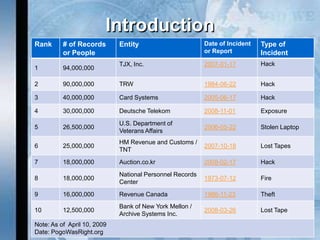
Rank      # of Records       Entity                       Date of Incident   Type of
          or People                                       or Report          Incident
                             TJX, Inc.                    2007-01-17         Hack
1         94,000,000

2         90,000,000         TRW                          1984-06-22         Hack

3         40,000,000         Card Systems                 2005-06-17         Hack

4         30,000,000         Deutsche Telekom             2008-11-01         Exposure
                             U.S. Department of
5         26,500,000                                      2006-05-22         Stolen Laptop
                             Veterans Affairs
                             HM Revenue and Customs /
6         25,000,000                                      2007-10-18         Lost Tapes
                             TNT
7         18,000,000         Auction.co.kr                2008-02-17         Hack
                             National Personnel Records
8         18,000,000                                      1973-07-12         Fire
                             Center
9         16,000,000         Revenue Canada               1986-11-23         Theft
                             Bank of New York Mellon /
10        12,500,000                                      2008-03-26         Lost Tape
                             Archive Systems Inc.
Note: As of April 10, 2009
Date: PogoWasRight.org
Introduction
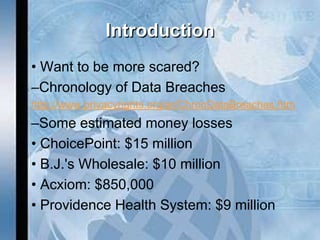
• • Want to be more scared?
• –Chronology of Data Breaches
• http://www.privacyrights.org/ar/ChronDataBreaches.htm
•   –Some estimated money losses
•   • ChoicePoint: $15 million
•   • B.J.'s Wholesale: $10 million
•   • Acxiom: $850,000
•   • Providence Health System: $9 million
Why Database security?
• Databases are were your most valuable data rest
     – Corporate data.
     – Customer data.
     – Financial data.
     – etc.
• If your databases don't work then your company won't
    work
     – Try to do a quick estimation of how much money
       you will
• lose if your databases don't work for a couple of
    hours, a day, etc.
• If your databases are hacked then your company can
• run out of business or you can lose millions.
Why Database security?
• You must comply with regulations, laws,
  etc.
– Sarbanes Oxley (SOX).
– Payment Card Industry (PCI) Data
  Security Standard.
– Healthcare Services (HIPAA) .
– Financial Services (GLBA) .
– California Senate Bill No. 1386 .
– Data Accountability and Trust Act (DATA).
– Etc.
Why Database security?
• Database vulnerabilities affect all
  database vendors
  – Some vendors (like Oracle) are more affected
    than others.
• On 2006 Oracle released 4 Critical Patch
  Updates related to database servers
  – Fixed more than 20 remote vulnerabilities!!!
• On 2007 there are still > 50 unpatched
  vulnerabilities on Oracle Database Server
  – No matter if your server is up to date with
    patches, it still can be easily hacked.
Why Database security?
• Perimeter defense is not enough
   – Databases have many entry points
       • Web applications
       • Internal networks
       • Partners networks
       • Etc.
• If the OSs and the networks are properly secured,
  databases still could be:
   – Misconfigured.
   – Have weak passwords.
   – Vulnerable to known/unknown vulnerabilities.
   – etc.
How Databases are hacked?
• Password guessing/bruteforcing
   – If passwords are blank or not strong they can be
     easily guessed/bruteforced.
   – After a valid user account is found is easy to complete
     compromise the database, especially if the database
     is Oracle.
• Passwords and data sniffed over the network
   – If encryption is not used, passwords and data can be
     sniffed
• Exploiting misconfigurations
   – Some database servers are open by default
       • Lots of functionality enabled and sometimes

         insecurely configured.
How Databases are hacked?
• Delivering a Trojan
  – By email, p2p, IM, CD, DVD, pen drive, etc.
  – Once executed
     • Get database servers and login info
         – ODBC, OLEDB, JDBC configured connections, Sniffing,
           etc.
     • Connect to database servers (try default accounts if
       necessary).
     • Steal data (run 0day and install rootkit if necessary).
     • Find next target
         – Looking at linked servers/databases.
         – Looking at connections.
         – Sniffing.
     • Send encrypted data back to attacker by email, HTTPS,
       covert channel, etc.
How Databases are hacked?
• Exploiting known/unknown vulnerabilities
  – Buffer overflows.
  – SQL Injection.
  – Etc.
• Exploiting SQL Injection on web applications
  – Databases can be hacked from Internet.
  – Firewalls are complete bypassed.
  – This is one of the easiest and preferred
    method that criminals use to steal sensitive
    information such as credit cards, social
    security numbers, customer information, etc.
How Databases are hacked?
• Stealing disks and backup tapes
  – If data files and backed up data are not encrypted,
    once stolen data can be compromised.
• Insiders are a major threat
  – If they can log in then they can hack the
    database.
• Installing a rootkit/backdoor
  – Actions and database objects can be hidden.
  – Designed to steal data and send it to attacker
    and/or to give the attacker stealth and
    unrestricted access at any given time.
More on SQL Injection

• What is SQL Injection?

• SQL Injection Attack

• SQL Injection Prevention

• Cross-Site Scripting
What is SQL Injection?
• SQL injection is a basic attack used to either gain
  unauthorized access to a database or to retrieve
  information directly from the database.

• SQL injection can occur when an application uses input to
  construct dynamic SQL statements. Successful SQL
  injection attacks enable malicious users to execute
  commands in an application's database.

• Many web applications take user input from a form. Often
  this user input is used literally in the construction of a SQL
  query submitted to a database. A SQL injection attack
  involves placing SQL statements in the user input.

• Almost all existing databases are subject to SQL injection
  attacks to varying degrees.
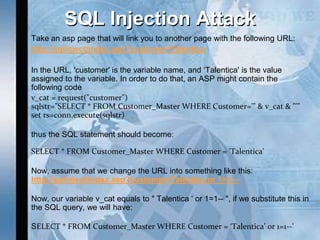
SQL Injection Attack
•   Take an asp page that will link you to another page with the following URL:
•   http://sqlinject/index.asp?customer=Talentica

•   In the URL, 'customer' is the variable name, and ‘Talentica' is the value
    assigned to the variable. In order to do that, an ASP might contain the
    following code
•   v_cat = request("customer")
    sqlstr="SELECT * FROM Customer_Master WHERE Customer='" & v_cat & "'"
    set rs=conn.execute(sqlstr)

•   thus the SQL statement should become:

    SELECT * FROM Customer_Master WHERE Customer = 'Talentica'

•   Now, assume that we change the URL into something like this:
    http://sqlinject/index.asp?customer=Talentica or 1=1—
•
    Now, our variable v_cat equals to " Talentica ' or 1=1-- ", if we substitute this in
    the SQL query, we will have:

•   SELECT * FROM Customer_Master WHERE Customer = ‘Talentica’ or 1=1--'
SQL Injection Attack (Contd)
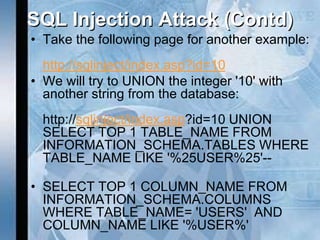
• Take the following page for another example:
  http://sqlinject/index.asp?id=10
• We will try to UNION the integer '10' with
  another string from the database:
  http://sqlinject/index.asp?id=10 UNION
  SELECT TOP 1 TABLE_NAME FROM
  INFORMATION_SCHEMA.TABLES WHERE
  TABLE_NAME LIKE '%25USER%25'--

• SELECT TOP 1 COLUMN_NAME FROM
  INFORMATION_SCHEMA.COLUMNS
  WHERE TABLE_NAME= 'USERS' AND
  COLUMN_NAME LIKE '%USER%'
SQL Injection Attack(Contd)
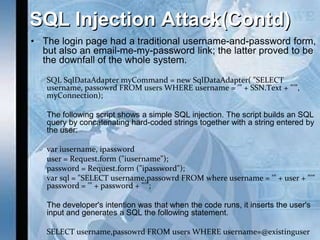
• The login page had a traditional username-and-password form,
  but also an email-me-my-password link; the latter proved to be
  the downfall of the whole system.

   SQL SqlDataAdapter myCommand = new SqlDataAdapter( "SELECT
   username, passowrd FROM users WHERE username = '" + SSN.Text + "'",
   myConnection);

   The following script shows a simple SQL injection. The script builds an SQL
   query by concatenating hard-coded strings together with a string entered by
   the user:

   var iusername, ipassword
   user = Request.form ("iusername");
   password = Request.form ("ipassword");
   var sql = "SELECT username,passowrd FROM where username = '" + user + "'"
   password = '" + password + "'";

   The developer's intention was that when the code runs, it inserts the user's
   input and generates a SQL the following statement.

   SELECT username,passowrd FROM users WHERE username=@existinguser
SQL Injection Attack(Contd)
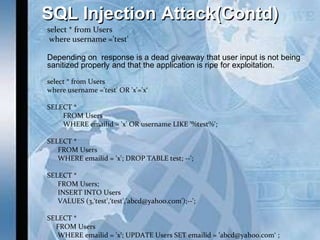
select * from Users
 where username ='test'

Depending on response is a dead giveaway that user input is not being
sanitized properly and that the application is ripe for exploitation.

select * from Users
where username ='test' OR 'x'='x‘

SELECT *
    FROM Users
    WHERE emailid = 'x' OR username LIKE '%test%';

SELECT *
   FROM Users
   WHERE emailid = 'x'; DROP TABLE test; --';

SELECT *
   FROM Users;
   INSERT INTO Users
   VALUES (3,‘test',‘test','abcd@yahoo.com');--';

SELECT *
  FROM Users
   WHERE emailid = 'x'; UPDATE Users SET emailid = 'abcd@yahoo.com‘ ;
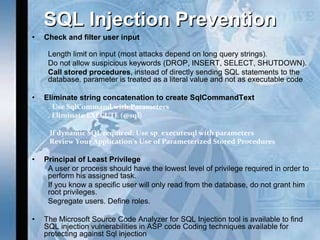
SQL Injection Prevention
•   Check and filter user input

     Length limit on input (most attacks depend on long query strings).
     Do not allow suspicious keywords (DROP, INSERT, SELECT, SHUTDOWN).
     Call stored procedures, instead of directly sending SQL statements to the
     database. parameter is treated as a literal value and not as executable code

•   Eliminate string concatenation to create SqlCommandText
     . Use SqlCommand with Parameters
     . Eliminate EXECUTE (@sql)

     If dynamic SQL required: Use sp_executesql with parameters
     Review Your Application's Use of Parameterized Stored Procedures

•   Principal of Least Privilege
     A user or process should have the lowest level of privilege required in order to
     perform his assigned task.
     If you know a specific user will only read from the database, do not grant him
     root privileges.
     Segregate users. Define roles.

•   The Microsoft Source Code Analyzer for SQL Injection tool is available to find
    SQL injection vulnerabilities in ASP code Coding techniques available for
    protecting against Sql injection
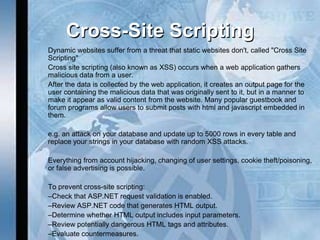
Cross-Site Scripting
Dynamic websites suffer from a threat that static websites don't, called "Cross Site
Scripting"
Cross site scripting (also known as XSS) occurs when a web application gathers
malicious data from a user.
After the data is collected by the web application, it creates an output page for the
user containing the malicious data that was originally sent to it, but in a manner to
make it appear as valid content from the website. Many popular guestbook and
forum programs allow users to submit posts with html and javascript embedded in
them.

e.g. an attack on your database and update up to 5000 rows in every table and
replace your strings in your database with random XSS attacks.

Everything from account hijacking, changing of user settings, cookie theft/poisoning,
or false advertising is possible.

To prevent cross-site scripting:
–Check that ASP.NET request validation is enabled.
–Review ASP.NET code that generates HTML output.
–Determine whether HTML output includes input parameters.
–Review potentially dangerous HTML tags and attributes.
–Evaluate countermeasures.
How to Protect Against Attacks?
• Set a good password policy
  – Strong passwords.
• Educate users to use passphrases.
  – No password reuse.
  – Login lockdown after x failed logins attempts.
• Keep up to date with security patches
  – Always test them for some time on non production
    servers first and monitor for patch problems on
    mailing lists
     • Sometimes they could open holes instead of fixing them.
How to Protect Against Attacks?
• At firewall level
  – Allow connections only from trusted hosts.
  – Block all non used ports.
  – Block all outbound connections
     • Why the database would need to connect to a host
       or Internet?
     • Set exceptions for replication, linked databases,
       etc.
• Disable all non used functionality
  – Use hardening guides from trusted parties.
  – Remember to test on non production servers
    first.
How to Protect Against Attacks?
• Use encryption
  – At network level
     • SSL, database proprietary protocols.
  – At file level
     • File and File System encryption
        – Backups, Data files, etc.

– At database level
  – Column level encryption.
  – Databases encryption API.
  – Third party solutions.
How to Protect Against Attacks?
• Periodically check for object and system permissions
   – Check views, stored procedures, tables, etc.
      permissions.
   – Check file, folder, registry, etc. permissions.
• Periodically check for new database installations
   – Third party products can install database servers
       • New servers could be installed with blank or weak
         passwords.
• Periodically check for users with database
  administration privileges
– This helps to detect intrusions, elevation of privileges, etc.
• Periodically check for database configuration and settings.
How to Protect Against Attacks?
• Periodically check database system objects against
  changes
   – Helps to detect rootkits.
• Periodically audit your web applications
   – SQL Injection.
   – Misconfigurations.
   – Permissions.
   – etc.
• On web applications use low privileged users to
  connect to database servers
   – If vulnerable to SQL Injection, attacks could be
     limited.
How to Protect Against Attacks?
• Run database services under low privileged
  accounts
   – If database services are compromised then OS
     compromise could be a bit difficult.
• Log as much as possible
   – Periodically check logs for events such as:
       • Failed logins.
       • Incorrect SQL syntax.
       • Permissions errors.
       • Etc.
• Monitor user activities.
• Monitor user accesses.
How to Protect Against Attacks?
• Build a database server honeypot
  – Helps to detect and prevent internal and external
    attacks.
  – Usually attackers will go first for the low hanging fruit.
  – Set up an isolated server
     •   All outbound connections should be blocked.
     •   Set it to log everything, run traces and set alerts.
     •   Set up other services to create a realistic environment.
     •   Set blank or easily guessable passwords.
     •   Make the server looks interesting
           – You can link it from production servers.
           – Set it an interesting name like CreditCardServer, SalaryServer, etc.
           – Create databases with names like CreditCards, CustomersInfo, etc.
           – Create tables with fake data that seems real.
How to Protect Against Attacks?
• Build a home made IDS/IPS
  – On sensitive Database Servers depending on
    available functionality you can set alerts to get
    notifications or to perform some actions when
    some errors occur:
     •   Failed login attempts.
     •   Incorrect SQL syntax.
     •   UNION statement errors.
     •   Permissions errors.
How to Protect Against Attacks?
• As we just saw Data Theft threat is real and
  database security is very important.
• One simple mistake can lead to database
  compromise.
• Perimeter defense is not enough.
• You must protect your databases and you have
  to invest on database protection.
• If you don't protect your databases sooner or
  later you will get hacked
  – This means lot of money loses.
  – In worst case running out of business.
Conclusions
• Protect your data as you protect your
  money!!!!!!!
   – Think about it, if you lose data you lose
     money.
• Use third party tools for
   – Encryption.
   – Vulnerability assessment.
   – Auditing.
   – Monitoring, Intrusion prevention, etc.
• Train IT staff on database security.
• Ask us for professional services :).
References
• A Chronology of Data Breaches Reported Since
  the ChoicePoint Incident
  http://www.privacyrights.org/ar/ChronDataBreaches.htm
• The high cost of data loss
  http://www.informationweek.com/security/showArticle.jhtml?articleID
     =183700367&pgno=1
• Swipe toolkit calculator
  http://www.turbulence.org/Works/swipe/calculator.html
• How much are your personal details worth?
  http://www.bankrate.com/brm/news/pf/20060221b1.asp
References
• Security & Privacy - Made Simpler
  http://bbb.org/securityandprivacy/SecurityPrivacyMadeSimpler.pdf
• NTLM unsafe
  http://www.isecpartners.com/documents/NTLM_Unsafe.pdf
• Manipulating MS SQL Server using SQL
  Injection
  http://www.appsecinc.com/presentations/Manipulating_SQL_Server
     _Using_SQL_Injection.pdf
• Papers, advisories and exploits
  http://www.argeniss.com/research.html
● Questions?
● Thanks.
● Contact: satyajit.mukherjee@gmail.com

Unethical access to website’s databases hacking using sql injection

  • 1.
    Unethical Access toWebsite’s Databases Hacking Using SQL Injection January 9, 2012 Satyajit Mukherjee Website-http://satyajit.page4.me
  • 2.
    Overview • Introduction • Whydatabase security? • How databases are hacked? • More on SQL Injection • How to protect against attacks? • Conclusions • References
  • 3.
    Introduction • By oneestimate, 53 million people have had data about themselves exposed over the past 13 months. (InformationWeek, 03/20/2006) – This is old news, right now the number is > 100 million !!! • Data theft is becoming a major threat. • Criminals have identified where the gold is. • In the last year many databases from fortune 500 companies were compromised. • As we will see compromising databases is not big deal if they haven't been properly secured.
  • 4.
    Introduction Rank # of Records Entity Date of Incident Type of or People or Report Incident TJX, Inc. 2007-01-17 Hack 1 94,000,000 2 90,000,000 TRW 1984-06-22 Hack 3 40,000,000 Card Systems 2005-06-17 Hack 4 30,000,000 Deutsche Telekom 2008-11-01 Exposure U.S. Department of 5 26,500,000 2006-05-22 Stolen Laptop Veterans Affairs HM Revenue and Customs / 6 25,000,000 2007-10-18 Lost Tapes TNT 7 18,000,000 Auction.co.kr 2008-02-17 Hack National Personnel Records 8 18,000,000 1973-07-12 Fire Center 9 16,000,000 Revenue Canada 1986-11-23 Theft Bank of New York Mellon / 10 12,500,000 2008-03-26 Lost Tape Archive Systems Inc. Note: As of April 10, 2009 Date: PogoWasRight.org
  • 5.
    Introduction • • Wantto be more scared? • –Chronology of Data Breaches • http://www.privacyrights.org/ar/ChronDataBreaches.htm • –Some estimated money losses • • ChoicePoint: $15 million • • B.J.'s Wholesale: $10 million • • Acxiom: $850,000 • • Providence Health System: $9 million
  • 6.
    Why Database security? •Databases are were your most valuable data rest – Corporate data. – Customer data. – Financial data. – etc. • If your databases don't work then your company won't work – Try to do a quick estimation of how much money you will • lose if your databases don't work for a couple of hours, a day, etc. • If your databases are hacked then your company can • run out of business or you can lose millions.
  • 7.
    Why Database security? •You must comply with regulations, laws, etc. – Sarbanes Oxley (SOX). – Payment Card Industry (PCI) Data Security Standard. – Healthcare Services (HIPAA) . – Financial Services (GLBA) . – California Senate Bill No. 1386 . – Data Accountability and Trust Act (DATA). – Etc.
  • 8.
    Why Database security? •Database vulnerabilities affect all database vendors – Some vendors (like Oracle) are more affected than others. • On 2006 Oracle released 4 Critical Patch Updates related to database servers – Fixed more than 20 remote vulnerabilities!!! • On 2007 there are still > 50 unpatched vulnerabilities on Oracle Database Server – No matter if your server is up to date with patches, it still can be easily hacked.
  • 9.
    Why Database security? •Perimeter defense is not enough – Databases have many entry points • Web applications • Internal networks • Partners networks • Etc. • If the OSs and the networks are properly secured, databases still could be: – Misconfigured. – Have weak passwords. – Vulnerable to known/unknown vulnerabilities. – etc.
  • 10.
    How Databases arehacked? • Password guessing/bruteforcing – If passwords are blank or not strong they can be easily guessed/bruteforced. – After a valid user account is found is easy to complete compromise the database, especially if the database is Oracle. • Passwords and data sniffed over the network – If encryption is not used, passwords and data can be sniffed • Exploiting misconfigurations – Some database servers are open by default • Lots of functionality enabled and sometimes insecurely configured.
  • 11.
    How Databases arehacked? • Delivering a Trojan – By email, p2p, IM, CD, DVD, pen drive, etc. – Once executed • Get database servers and login info – ODBC, OLEDB, JDBC configured connections, Sniffing, etc. • Connect to database servers (try default accounts if necessary). • Steal data (run 0day and install rootkit if necessary). • Find next target – Looking at linked servers/databases. – Looking at connections. – Sniffing. • Send encrypted data back to attacker by email, HTTPS, covert channel, etc.
  • 12.
    How Databases arehacked? • Exploiting known/unknown vulnerabilities – Buffer overflows. – SQL Injection. – Etc. • Exploiting SQL Injection on web applications – Databases can be hacked from Internet. – Firewalls are complete bypassed. – This is one of the easiest and preferred method that criminals use to steal sensitive information such as credit cards, social security numbers, customer information, etc.
  • 13.
    How Databases arehacked? • Stealing disks and backup tapes – If data files and backed up data are not encrypted, once stolen data can be compromised. • Insiders are a major threat – If they can log in then they can hack the database. • Installing a rootkit/backdoor – Actions and database objects can be hidden. – Designed to steal data and send it to attacker and/or to give the attacker stealth and unrestricted access at any given time.
  • 14.
    More on SQLInjection • What is SQL Injection? • SQL Injection Attack • SQL Injection Prevention • Cross-Site Scripting
  • 15.
    What is SQLInjection? • SQL injection is a basic attack used to either gain unauthorized access to a database or to retrieve information directly from the database. • SQL injection can occur when an application uses input to construct dynamic SQL statements. Successful SQL injection attacks enable malicious users to execute commands in an application's database. • Many web applications take user input from a form. Often this user input is used literally in the construction of a SQL query submitted to a database. A SQL injection attack involves placing SQL statements in the user input. • Almost all existing databases are subject to SQL injection attacks to varying degrees.
  • 16.
    SQL Injection Attack • Take an asp page that will link you to another page with the following URL: • http://sqlinject/index.asp?customer=Talentica • In the URL, 'customer' is the variable name, and ‘Talentica' is the value assigned to the variable. In order to do that, an ASP might contain the following code • v_cat = request("customer") sqlstr="SELECT * FROM Customer_Master WHERE Customer='" & v_cat & "'" set rs=conn.execute(sqlstr) • thus the SQL statement should become: SELECT * FROM Customer_Master WHERE Customer = 'Talentica' • Now, assume that we change the URL into something like this: http://sqlinject/index.asp?customer=Talentica or 1=1— • Now, our variable v_cat equals to " Talentica ' or 1=1-- ", if we substitute this in the SQL query, we will have: • SELECT * FROM Customer_Master WHERE Customer = ‘Talentica’ or 1=1--'
  • 17.
    SQL Injection Attack(Contd) • Take the following page for another example: http://sqlinject/index.asp?id=10 • We will try to UNION the integer '10' with another string from the database: http://sqlinject/index.asp?id=10 UNION SELECT TOP 1 TABLE_NAME FROM INFORMATION_SCHEMA.TABLES WHERE TABLE_NAME LIKE '%25USER%25'-- • SELECT TOP 1 COLUMN_NAME FROM INFORMATION_SCHEMA.COLUMNS WHERE TABLE_NAME= 'USERS' AND COLUMN_NAME LIKE '%USER%'
  • 18.
    SQL Injection Attack(Contd) •The login page had a traditional username-and-password form, but also an email-me-my-password link; the latter proved to be the downfall of the whole system. SQL SqlDataAdapter myCommand = new SqlDataAdapter( "SELECT username, passowrd FROM users WHERE username = '" + SSN.Text + "'", myConnection); The following script shows a simple SQL injection. The script builds an SQL query by concatenating hard-coded strings together with a string entered by the user: var iusername, ipassword user = Request.form ("iusername"); password = Request.form ("ipassword"); var sql = "SELECT username,passowrd FROM where username = '" + user + "'" password = '" + password + "'"; The developer's intention was that when the code runs, it inserts the user's input and generates a SQL the following statement. SELECT username,passowrd FROM users WHERE username=@existinguser
  • 19.
    SQL Injection Attack(Contd) select* from Users where username ='test' Depending on response is a dead giveaway that user input is not being sanitized properly and that the application is ripe for exploitation. select * from Users where username ='test' OR 'x'='x‘ SELECT * FROM Users WHERE emailid = 'x' OR username LIKE '%test%'; SELECT * FROM Users WHERE emailid = 'x'; DROP TABLE test; --'; SELECT * FROM Users; INSERT INTO Users VALUES (3,‘test',‘test','abcd@yahoo.com');--'; SELECT * FROM Users WHERE emailid = 'x'; UPDATE Users SET emailid = 'abcd@yahoo.com‘ ;
  • 20.
    SQL Injection Prevention • Check and filter user input Length limit on input (most attacks depend on long query strings). Do not allow suspicious keywords (DROP, INSERT, SELECT, SHUTDOWN). Call stored procedures, instead of directly sending SQL statements to the database. parameter is treated as a literal value and not as executable code • Eliminate string concatenation to create SqlCommandText . Use SqlCommand with Parameters . Eliminate EXECUTE (@sql) If dynamic SQL required: Use sp_executesql with parameters Review Your Application's Use of Parameterized Stored Procedures • Principal of Least Privilege A user or process should have the lowest level of privilege required in order to perform his assigned task. If you know a specific user will only read from the database, do not grant him root privileges. Segregate users. Define roles. • The Microsoft Source Code Analyzer for SQL Injection tool is available to find SQL injection vulnerabilities in ASP code Coding techniques available for protecting against Sql injection
  • 21.
    Cross-Site Scripting Dynamic websitessuffer from a threat that static websites don't, called "Cross Site Scripting" Cross site scripting (also known as XSS) occurs when a web application gathers malicious data from a user. After the data is collected by the web application, it creates an output page for the user containing the malicious data that was originally sent to it, but in a manner to make it appear as valid content from the website. Many popular guestbook and forum programs allow users to submit posts with html and javascript embedded in them. e.g. an attack on your database and update up to 5000 rows in every table and replace your strings in your database with random XSS attacks. Everything from account hijacking, changing of user settings, cookie theft/poisoning, or false advertising is possible. To prevent cross-site scripting: –Check that ASP.NET request validation is enabled. –Review ASP.NET code that generates HTML output. –Determine whether HTML output includes input parameters. –Review potentially dangerous HTML tags and attributes. –Evaluate countermeasures.
  • 22.
    How to ProtectAgainst Attacks? • Set a good password policy – Strong passwords. • Educate users to use passphrases. – No password reuse. – Login lockdown after x failed logins attempts. • Keep up to date with security patches – Always test them for some time on non production servers first and monitor for patch problems on mailing lists • Sometimes they could open holes instead of fixing them.
  • 23.
    How to ProtectAgainst Attacks? • At firewall level – Allow connections only from trusted hosts. – Block all non used ports. – Block all outbound connections • Why the database would need to connect to a host or Internet? • Set exceptions for replication, linked databases, etc. • Disable all non used functionality – Use hardening guides from trusted parties. – Remember to test on non production servers first.
  • 24.
    How to ProtectAgainst Attacks? • Use encryption – At network level • SSL, database proprietary protocols. – At file level • File and File System encryption – Backups, Data files, etc. – At database level – Column level encryption. – Databases encryption API. – Third party solutions.
  • 25.
    How to ProtectAgainst Attacks? • Periodically check for object and system permissions – Check views, stored procedures, tables, etc. permissions. – Check file, folder, registry, etc. permissions. • Periodically check for new database installations – Third party products can install database servers • New servers could be installed with blank or weak passwords. • Periodically check for users with database administration privileges – This helps to detect intrusions, elevation of privileges, etc. • Periodically check for database configuration and settings.
  • 26.
    How to ProtectAgainst Attacks? • Periodically check database system objects against changes – Helps to detect rootkits. • Periodically audit your web applications – SQL Injection. – Misconfigurations. – Permissions. – etc. • On web applications use low privileged users to connect to database servers – If vulnerable to SQL Injection, attacks could be limited.
  • 27.
    How to ProtectAgainst Attacks? • Run database services under low privileged accounts – If database services are compromised then OS compromise could be a bit difficult. • Log as much as possible – Periodically check logs for events such as: • Failed logins. • Incorrect SQL syntax. • Permissions errors. • Etc. • Monitor user activities. • Monitor user accesses.
  • 28.
    How to ProtectAgainst Attacks? • Build a database server honeypot – Helps to detect and prevent internal and external attacks. – Usually attackers will go first for the low hanging fruit. – Set up an isolated server • All outbound connections should be blocked. • Set it to log everything, run traces and set alerts. • Set up other services to create a realistic environment. • Set blank or easily guessable passwords. • Make the server looks interesting – You can link it from production servers. – Set it an interesting name like CreditCardServer, SalaryServer, etc. – Create databases with names like CreditCards, CustomersInfo, etc. – Create tables with fake data that seems real.
  • 29.
    How to ProtectAgainst Attacks? • Build a home made IDS/IPS – On sensitive Database Servers depending on available functionality you can set alerts to get notifications or to perform some actions when some errors occur: • Failed login attempts. • Incorrect SQL syntax. • UNION statement errors. • Permissions errors.
  • 30.
    How to ProtectAgainst Attacks? • As we just saw Data Theft threat is real and database security is very important. • One simple mistake can lead to database compromise. • Perimeter defense is not enough. • You must protect your databases and you have to invest on database protection. • If you don't protect your databases sooner or later you will get hacked – This means lot of money loses. – In worst case running out of business.
  • 31.
    Conclusions • Protect yourdata as you protect your money!!!!!!! – Think about it, if you lose data you lose money. • Use third party tools for – Encryption. – Vulnerability assessment. – Auditing. – Monitoring, Intrusion prevention, etc. • Train IT staff on database security. • Ask us for professional services :).
  • 32.
    References • A Chronologyof Data Breaches Reported Since the ChoicePoint Incident http://www.privacyrights.org/ar/ChronDataBreaches.htm • The high cost of data loss http://www.informationweek.com/security/showArticle.jhtml?articleID =183700367&pgno=1 • Swipe toolkit calculator http://www.turbulence.org/Works/swipe/calculator.html • How much are your personal details worth? http://www.bankrate.com/brm/news/pf/20060221b1.asp
  • 33.
    References • Security &Privacy - Made Simpler http://bbb.org/securityandprivacy/SecurityPrivacyMadeSimpler.pdf • NTLM unsafe http://www.isecpartners.com/documents/NTLM_Unsafe.pdf • Manipulating MS SQL Server using SQL Injection http://www.appsecinc.com/presentations/Manipulating_SQL_Server _Using_SQL_Injection.pdf • Papers, advisories and exploits http://www.argeniss.com/research.html
  • 34.
    ● Questions? ● Thanks. ●Contact: satyajit.mukherjee@gmail.com