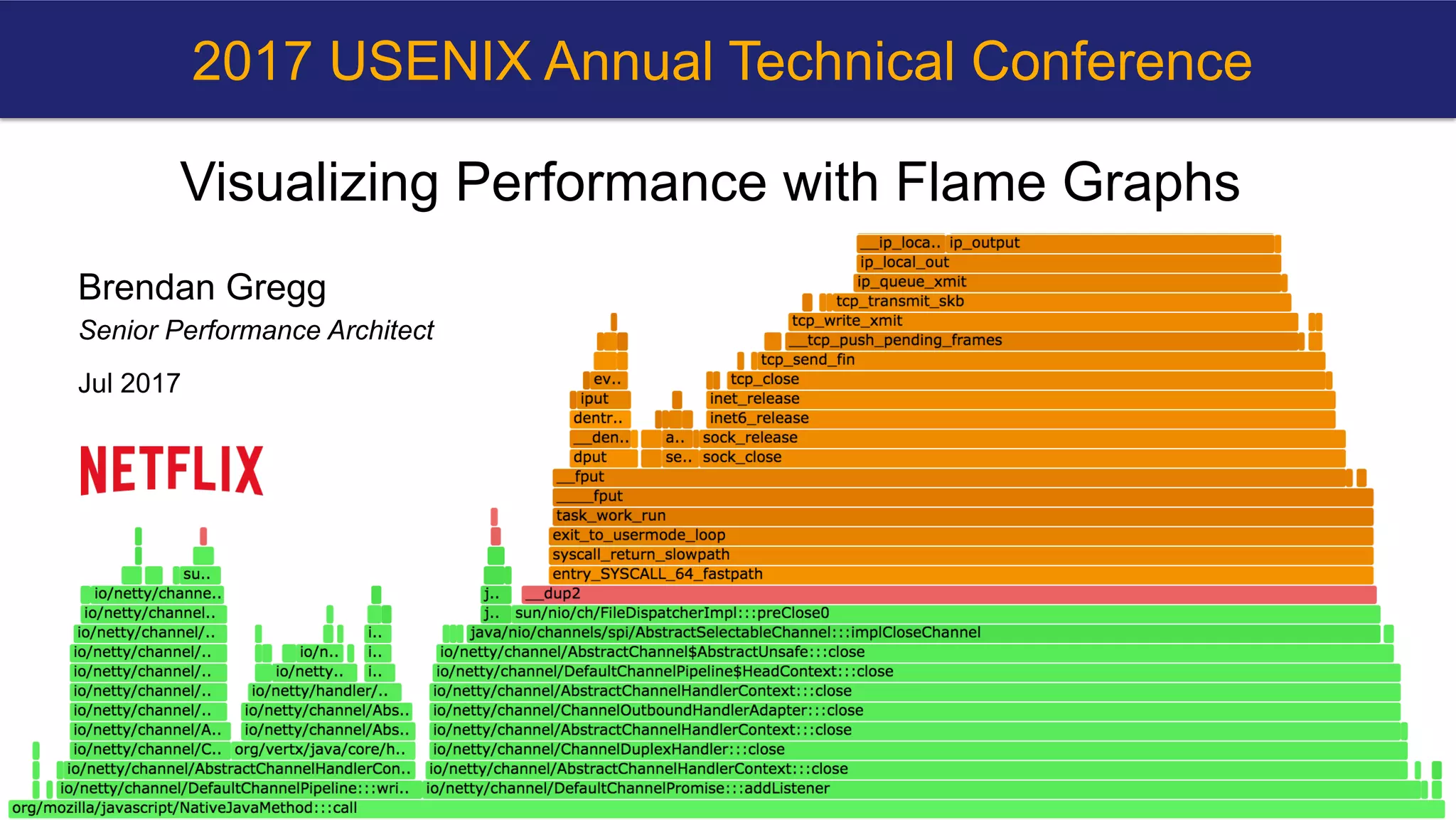
Visualizing Performance with Flame Graphs
Brendan Gregg
Senior Performance Architect
Jul 2017
2017 USENIX Annual Technical Conference
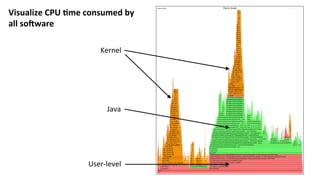
Visualize	CPU	-me	consumed	by	
all	so5ware	
Kernel	
Java	
User-level
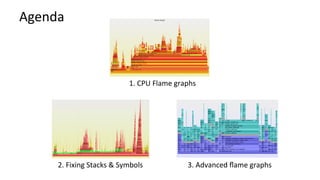
Agenda	
1.	CPU	Flame	graphs	
2.	Fixing	Stacks	&	Symbols	 3.	Advanced	flame	graphs
Take	aways	
1.  Interpret	CPU	flame	graphs	
2.  Understand	piHalls	with	stack	traces	and	symbols	
3.  Discover	opportuniKes	for	future	development
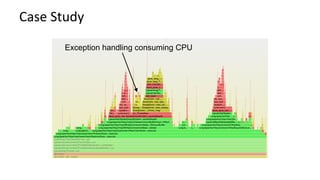
Case	Study	
Exception handling consuming CPU
CPU	PROFILING	
Summary
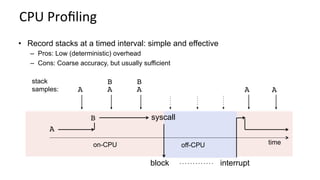
CPU	Profiling	
A
B
block interrupt
on-CPU off-CPU
A
B
A A
B
A
syscall
time
•  Record stacks at a timed interval: simple and effective
–  Pros: Low (deterministic) overhead
–  Cons: Coarse accuracy, but usually sufficient
stack
samples: A
Stack	Traces	
•  A	code	path	snapshot.	e.g.,	from	jstack(1):	
$ jstack 1819
[…]
"main" prio=10 tid=0x00007ff304009000 nid=0x7361
runnable [0x00007ff30d4f9000]
java.lang.Thread.State: RUNNABLE
at Func_abc.func_c(Func_abc.java:6)
at Func_abc.func_b(Func_abc.java:16)
at Func_abc.func_a(Func_abc.java:23)
at Func_abc.main(Func_abc.java:27)
running
parent
g.parent
g.g.parent
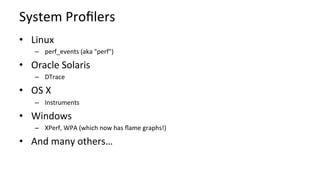
System	Profilers	
•  Linux	
–  perf_events	(aka	"perf")	
•  Oracle	Solaris	
–  DTrace	
•  OS	X	
–  Instruments	
•  Windows	
–  XPerf,	WPA	(which	now	has	flame	graphs!)	
•  And	many	others…
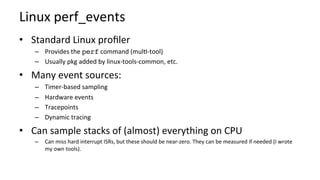
Linux	perf_events	
•  Standard	Linux	profiler	
–  Provides	the	perf	command	(mulK-tool)	
–  Usually	pkg	added	by	linux-tools-common,	etc.	
•  Many	event	sources:	
–  Timer-based	sampling	
–  Hardware	events	
–  Tracepoints	
–  Dynamic	tracing	
•  Can	sample	stacks	of	(almost)	everything	on	CPU	
–  Can	miss	hard	interrupt	ISRs,	but	these	should	be	near-zero.	They	can	be	measured	if	needed	(I	wrote	
my	own	tools).
perf	Profiling	
# perf record -F 99 -ag -- sleep 30
[ perf record: Woken up 9 times to write data ]
[ perf record: Captured and wrote 2.745 MB perf.data (~119930 samples) ]
# perf report -n -stdio
[…]
# Overhead Samples Command Shared Object Symbol
# ........ ............ ....... ................. .............................
#
20.42% 605 bash [kernel.kallsyms] [k] xen_hypercall_xen_version
|
--- xen_hypercall_xen_version
check_events
|
|--44.13%-- syscall_trace_enter
| tracesys
| |
| |--35.58%-- __GI___libc_fcntl
| | |
| | |--65.26%-- do_redirection_internal
| | | do_redirections
| | | execute_builtin_or_function
| | | execute_simple_command
[… ~13,000 lines truncated …]
call tree
summary
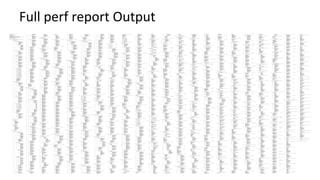
Full	perf	report	Output
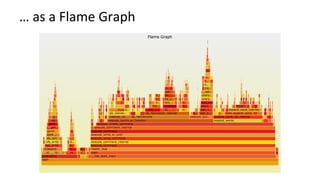
…	as	a	Flame	Graph
Flame	Graph	Summary	
•  Visualizes	a	collecKon	of	stack	traces	
–  x-axis:	alphabeKcal	stack	sort,	to	maximize	merging	
–  y-axis:	stack	depth	
–  color:	random	(default),	or	a	dimension	
•  Currently	made	from	Perl	+	SVG	+	JavaScript	
–  hBps://github.com/brendangregg/FlameGraph	
–  Takes	input	from	many	different	profilers	
–  MulKple	d3	versions	are	being	developed	
•  References:	
–  hcp://www.brendangregg.com/FlameGraphs/cpuflamegraphs.html		
–  hcp://queue.acm.org/detail.cfm?id=2927301	
–  "The	Flame	Graph"	CACM,	June	2016
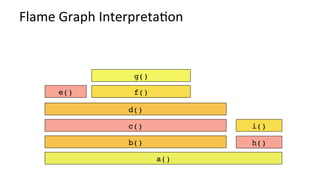
Flame	Graph	InterpretaKon	
a()
b() h()
c()
d()
e() f()
g()
i()
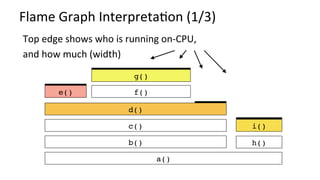
Flame	Graph	InterpretaKon	(1/3)	
Top	edge	shows	who	is	running	on-CPU,	
and	how	much	(width)	
a()
b() h()
c()
d()
e() f()
g()
i()
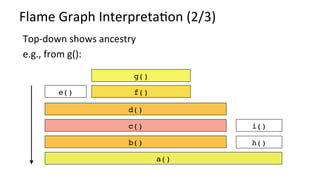
Flame	Graph	InterpretaKon	(2/3)	
h()
d()
e()
i()
a()
b()
c()
f()
g()
Top-down	shows	ancestry	
e.g.,	from	g():
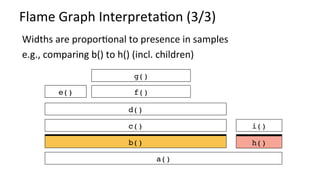
Flame	Graph	InterpretaKon	(3/3)	
a()
b() h()
c()
d()
e() f()
g()
i()
Widths	are	proporKonal	to	presence	in	samples	
e.g.,	comparing	b()	to	h()	(incl.	children)
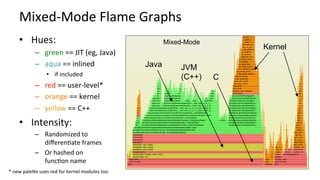
Mixed-Mode	Flame	Graphs	
•  Hues:	
–  green	==	JIT	(eg,	Java)	
–  aqua	==	inlined	
•  if	included	
–  red	==	user-level*	
–  orange	==	kernel	
–  yellow	==	C++	
•  Intensity:	
–  Randomized	to	
differenKate	frames	
–  Or	hashed	on	
funcKon	name	
Java JVM
(C++)
Kernel
Mixed-Mode
C
*	new	palece	uses	red	for	kernel	modules	too
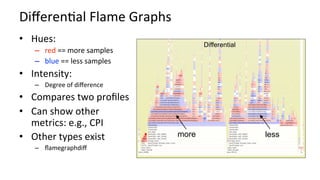
DifferenKal	Flame	Graphs	
•  Hues:	
–  red	==	more	samples	
–  blue	==	less	samples	
•  Intensity:	
–  Degree	of	difference	
•  Compares	two	profiles	
•  Can	show	other	
metrics:	e.g.,	CPI	
•  Other	types	exist	
–  flamegraphdiff	
Differential
more less
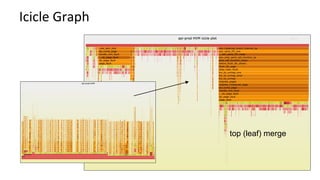
Icicle	Graph	
top (leaf) merge
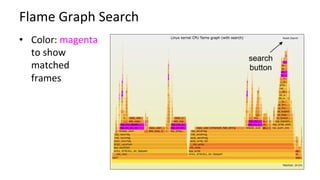
Flame	Graph	Search	
•  Color:	magenta	
to	show	
matched	
frames	
search
button
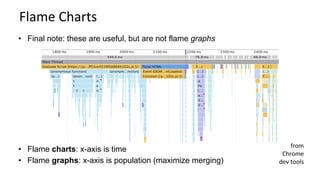
Flame	Charts	
•  Flame charts: x-axis is time
•  Flame graphs: x-axis is population (maximize merging)
•  Final note: these are useful, but are not flame graphs
from	
Chrome	
dev	tools
STACK	TRACING	
PiHalls	and	fixes
Broken	Stack	Traces	are	Common	
Because:	
A.  Profilers	use	frame	pointer	walking	by	default	
B.  Compilers	reuse	the	frame	pointer	register	as	a	general	purpose	register:	a	
(usually	very	small)	performance	opKmizaKon.	
	 # perf record –F 99 –a –g – sleep 30
# perf script
[…]
java 4579 cpu-clock:
7f417908c10b [unknown] (/tmp/perf-4458.map)
java 4579 cpu-clock:
7f41792fc65f [unknown] (/tmp/perf-4458.map)
a2d53351ff7da603 [unknown] ([unknown])
[…]
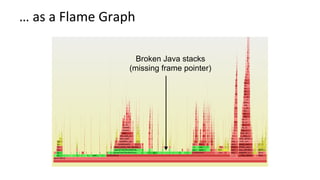
…	as	a	Flame	Graph	
Broken Java stacks
(missing frame pointer)
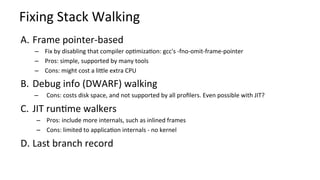
Fixing	Stack	Walking	
A.  Frame	pointer-based	
–  Fix	by	disabling	that	compiler	opKmizaKon:	gcc's	-fno-omit-frame-pointer	
–  Pros:	simple,	supported	by	many	tools	
–  Cons:	might	cost	a	licle	extra	CPU	
B.  Debug	info	(DWARF)	walking	
–  Cons:	costs	disk	space,	and	not	supported	by	all	profilers.	Even	possible	with	JIT?	
C.  JIT	runKme	walkers	
–  Pros:	include	more	internals,	such	as	inlined	frames	
–  Cons:	limited	to	applicaKon	internals	-	no	kernel	
D. Last	branch	record
Fixing	Java	Stack	Traces	
# perf script
[…]
java 8131 cpu-clock:
7fff76f2dce1 [unknown] ([vdso])
7fd3173f7a93 os::javaTimeMillis() (/usr/lib/jvm…
7fd301861e46 [unknown] (/tmp/perf-8131.map)
7fd30184def8 [unknown] (/tmp/perf-8131.map)
7fd30174f544 [unknown] (/tmp/perf-8131.map)
7fd30175d3a8 [unknown] (/tmp/perf-8131.map)
7fd30166d51c [unknown] (/tmp/perf-8131.map)
7fd301750f34 [unknown] (/tmp/perf-8131.map)
7fd3016c2280 [unknown] (/tmp/perf-8131.map)
7fd301b02ec0 [unknown] (/tmp/perf-8131.map)
7fd3016f9888 [unknown] (/tmp/perf-8131.map)
7fd3016ece04 [unknown] (/tmp/perf-8131.map)
7fd30177783c [unknown] (/tmp/perf-8131.map)
7fd301600aa8 [unknown] (/tmp/perf-8131.map)
7fd301a4484c [unknown] (/tmp/perf-8131.map)
7fd3010072e0 [unknown] (/tmp/perf-8131.map)
7fd301007325 [unknown] (/tmp/perf-8131.map)
7fd3010004e7 [unknown] (/tmp/perf-8131.map)
7fd3171df76a JavaCalls::call_helper(JavaValue*,…
7fd3171dce44 JavaCalls::call_virtual(JavaValue*…
7fd3171dd43a JavaCalls::call_virtual(JavaValue*…
7fd31721b6ce thread_entry(JavaThread*, Thread*)…
7fd3175389e0 JavaThread::thread_main_inner() (/…
7fd317538cb2 JavaThread::run() (/usr/lib/jvm/nf…
7fd3173f6f52 java_start(Thread*) (/usr/lib/jvm/…
7fd317a7e182 start_thread (/lib/x86_64-linux-gn…
# perf script
[…]
java 4579 cpu-clock:
7f417908c10b [unknown] (/tmp/…
java 4579 cpu-clock:
7f41792fc65f [unknown] (/tmp/…
a2d53351ff7da603 [unknown] ([unkn…
[…]
I	prototyped	JVM	frame	
pointers.	Oracle	rewrote	it	
and	added	it	to	Java	as	
-XX:+PreserveFramePointer	
(JDK	8	u60b19)
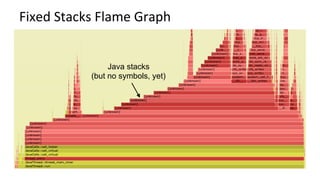
Fixed	Stacks	Flame	Graph	
Java stacks
(but no symbols, yet)
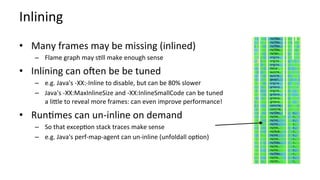
Inlining	
•  Many	frames	may	be	missing	(inlined)	
–  Flame	graph	may	sKll	make	enough	sense	
•  Inlining	can	oqen	be	be	tuned	
–  e.g.	Java's	-XX:-Inline	to	disable,	but	can	be	80%	slower	
–  Java's	-XX:MaxInlineSize	and	-XX:InlineSmallCode	can	be	tuned	
a	licle	to	reveal	more	frames:	can	even	improve	performance!	
•  RunKmes	can	un-inline	on	demand	
–  So	that	excepKon	stack	traces	make	sense	
–  e.g.	Java's	perf-map-agent	can	un-inline	(unfoldall	opKon)
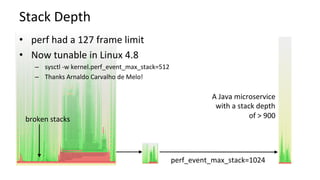
Stack	Depth	
•  perf	had	a	127	frame	limit	
•  Now	tunable	in	Linux	4.8	
–  sysctl	-w	kernel.perf_event_max_stack=512	
–  Thanks	Arnaldo	Carvalho	de	Melo!	
A	Java	microservice	
with	a	stack	depth	
of	>	900	broken	stacks	
perf_event_max_stack=1024
SYMBOLS	
Fixing
Fixing	NaKve	Symbols	
A.  Add	a	-dbgsym	package,	if	available	
B.  Recompile	from	source
Fixing	JIT	Symbols	(Java,	Node.js,	…)	
•  Just-in-Kme	runKmes	don't	have	a	pre-compiled	symbol	table	
•  So	Linux	perf	looks	for	an	externally	provided	JIT	symbol	
file:	/tmp/perf-PID.map	
	
	
•  This	can	be	created	by	runKmes;	eg,	Java's	perf-map-agent	
# perf script
Failed to open /tmp/perf-8131.map, continuing without symbols
[…]
java 8131 cpu-clock:
7fff76f2dce1 [unknown] ([vdso])
7fd3173f7a93 os::javaTimeMillis() (/usr/lib/jvm…
7fd301861e46 [unknown] (/tmp/perf-8131.map)
[…]
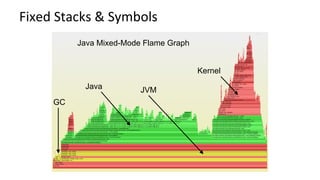
Java Mixed-Mode Flame Graph
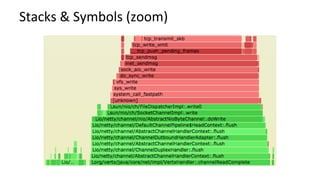
Fixed	Stacks	&	Symbols	
Java JVM
Kernel
GC
Stacks	&	Symbols	(zoom)
Symbol	Churn	
•  For	JIT	runKmes,	symbols	can	change	during	a	profile	
•  Symbols	may	be	mistranslated	by	perf's	map	snapshot	
•  SoluKons:	
A.  Take	a	before	&	aqer	snapshot,	and	compare	
B.  perf's	new	support	for	Kmestamped	symbol	logs
Containers	
•  perf	can't	find	any	symbol	sources	
–  Unless	you	copy	them	into	the	host	
•  I'm	tesKng	Krister	Johansen's	fix,	hopefully	for	Linux	4.13	
–  lkml:	"[PATCH	Kp/perf/core	0/7]	namespace	tracing	improvements"
INSTRUCTIONS	
For	Linux
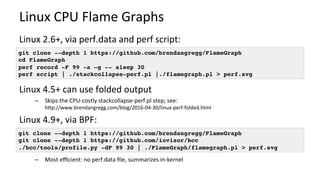
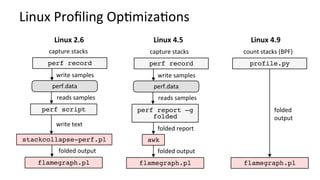
Linux	CPU	Flame	Graphs	
Linux	2.6+,	via	perf.data	and	perf	script:	
	
Linux	4.5+	can	use	folded	output	
–  Skips	the	CPU-costly	stackcollapse-perf.pl	step;	see:	
hcp://www.brendangregg.com/blog/2016-04-30/linux-perf-folded.html	
Linux	4.9+,	via	BPF:	
–  Most	efficient:	no	perf.data	file,	summarizes	in-kernel	
git clone --depth 1 https://github.com/brendangregg/FlameGraph
cd FlameGraph
perf record -F 99 -a –g -- sleep 30
perf script | ./stackcollapse-perf.pl |./flamegraph.pl > perf.svg
git clone --depth 1 https://github.com/brendangregg/FlameGraph
git clone --depth 1 https://github.com/iovisor/bcc
./bcc/tools/profile.py -dF 99 30 | ./FlameGraph/flamegraph.pl > perf.svg
perf record
perf script
capture	stacks	
write	text	
stackcollapse-perf.pl
flamegraph.pl
perf.data	
write	samples	
reads	samples	
folded	output	
perf record
perf report –g
folded
capture	stacks	
folded	report	
awk
flamegraph.pl
perf.data	
write	samples	
reads	samples	
folded	output	
Linux	4.5	
count	stacks	(BPF)	
folded	
output	
flamegraph.pl
profile.py
Linux	4.9	
Linux	Profiling	OpKmizaKons	
Linux	2.6
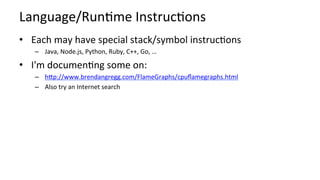
Language/RunKme	InstrucKons	
•  Each	may	have	special	stack/symbol	instrucKons	
–  Java,	Node.js,	Python,	Ruby,	C++,	Go,	…	
•  I'm	documenKng	some	on:	
–  hcp://www.brendangregg.com/FlameGraphs/cpuflamegraphs.html		
–  Also	try	an	Internet	search
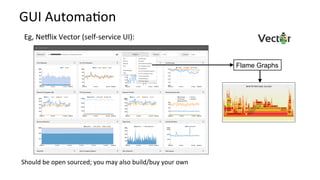
GUI	AutomaKon	
Flame Graphs
Eg,	NeHlix	Vector	(self-service	UI):	
Should	be	open	sourced;	you	may	also	build/buy	your	own
ADVANCED	FLAME	GRAPHS	
Future	Work
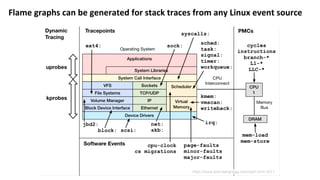
Flame	graphs	can	be	generated	for	stack	traces	from	any	Linux	event	source
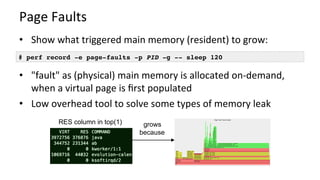
Page	Faults	
•  Show	what	triggered	main	memory	(resident)	to	grow:	
•  "fault"	as	(physical)	main	memory	is	allocated	on-demand,	
when	a	virtual	page	is	first	populated	
•  Low	overhead	tool	to	solve	some	types	of	memory	leak	
# perf record -e page-faults -p PID -g -- sleep 120
RES column in top(1) grows
because
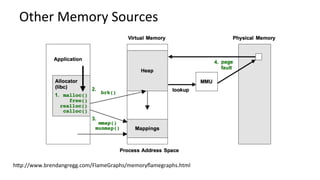
Other	Memory	Sources	
hcp://www.brendangregg.com/FlameGraphs/memoryflamegraphs.html
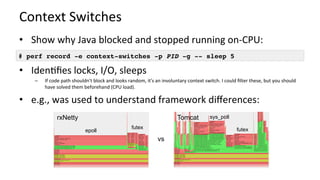
Context	Switches	
•  Show	why	Java	blocked	and	stopped	running	on-CPU:	
•  IdenKfies	locks,	I/O,	sleeps	
–  If	code	path	shouldn't	block	and	looks	random,	it's	an	involuntary	context	switch.	I	could	filter	these,	but	you	should	
have	solved	them	beforehand	(CPU	load).	
•  e.g.,	was	used	to	understand	framework	differences:	
# perf record -e context-switches -p PID -g -- sleep 5
vs
rxNetty Tomcat
futex
sys_poll
epoll
futex
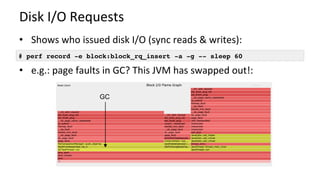
Disk	I/O	Requests	
•  Shows	who	issued	disk	I/O	(sync	reads	&	writes):	
•  e.g.:	page	faults	in	GC?	This	JVM	has	swapped	out!:	
# perf record -e block:block_rq_insert -a -g -- sleep 60
GC
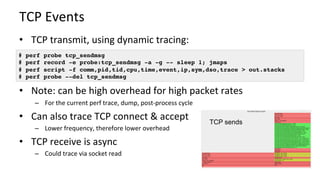
TCP	Events	
•  TCP	transmit,	using	dynamic	tracing:	
•  Note:	can	be	high	overhead	for	high	packet	rates	
–  For	the	current	perf	trace,	dump,	post-process	cycle	
•  Can	also	trace	TCP	connect	&	accept	
–  Lower	frequency,	therefore	lower	overhead	
•  TCP	receive	is	async	
–  Could	trace	via	socket	read	
# perf probe tcp_sendmsg
# perf record -e probe:tcp_sendmsg -a -g -- sleep 1; jmaps
# perf script -f comm,pid,tid,cpu,time,event,ip,sym,dso,trace > out.stacks
# perf probe --del tcp_sendmsg
TCP sends
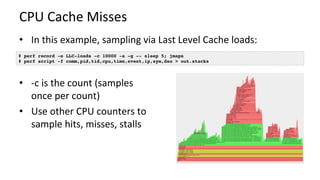
CPU	Cache	Misses	
•  In	this	example,	sampling	via	Last	Level	Cache	loads:	
	
	
•  -c	is	the	count	(samples	
once	per	count)	
•  Use	other	CPU	counters	to	
sample	hits,	misses,	stalls	
	
# perf record -e LLC-loads -c 10000 -a -g -- sleep 5; jmaps
# perf script -f comm,pid,tid,cpu,time,event,ip,sym,dso > out.stacks
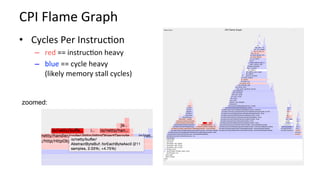
CPI	Flame	Graph	
•  Cycles	Per	InstrucKon	
–  red	==	instrucKon	heavy	
–  blue	==	cycle	heavy	
(likely	memory	stall	cycles)	
zoomed:
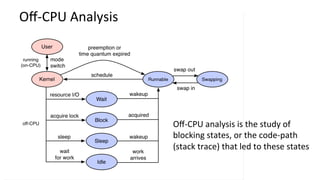
Off-CPU	Analysis	
Off-CPU	analysis	is	the	study	of	
blocking	states,	or	the	code-path	
(stack	trace)	that	led	to	these	states
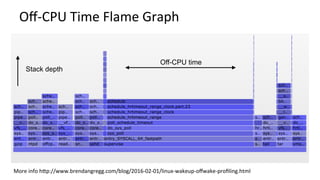
Off-CPU	Time	Flame	Graph	
More	info	hcp://www.brendangregg.com/blog/2016-02-01/linux-wakeup-offwake-profiling.html	
Stack depth
Off-CPU time
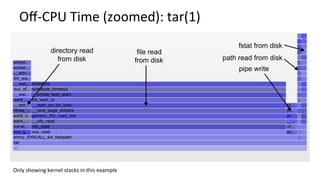
Off-CPU	Time	(zoomed):	tar(1)	
file read
from disk
directory read
from disk
Only	showing	kernel	stacks	in	this	example	
pipe write
path read from disk
fstat from disk
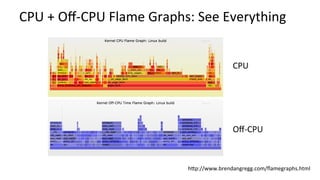
CPU	+	Off-CPU	Flame	Graphs:	See	Everything	
hcp://www.brendangregg.com/flamegraphs.html	
CPU	
Off-CPU
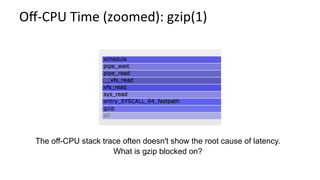
Off-CPU	Time	(zoomed):	gzip(1)	
The off-CPU stack trace often doesn't show the root cause of latency.
What is gzip blocked on?
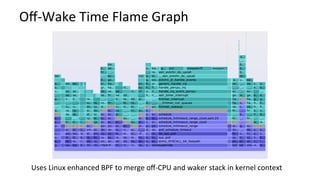
Off-Wake	Time	Flame	Graph	
Uses	Linux	enhanced	BPF	to	merge	off-CPU	and	waker	stack	in	kernel	context
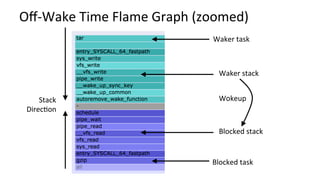
Off-Wake	Time	Flame	Graph	(zoomed)	
Waker	task	
Waker	stack	
Blocked	stack	
Blocked	task	
Stack	
DirecKon	
Wokeup
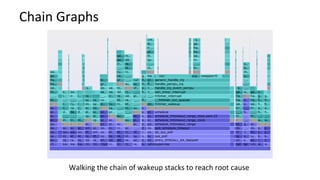
Chain	Graphs	
Walking	the	chain	of	wakeup	stacks	to	reach	root	cause
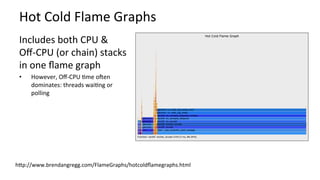
Hot	Cold	Flame	Graphs	
Includes	both	CPU	&	
Off-CPU	(or	chain)	stacks	
in	one	flame	graph	
•  However,	Off-CPU	Kme	oqen	
dominates:	threads	waiKng	or	
polling	
hcp://www.brendangregg.com/FlameGraphs/hotcoldflamegraphs.html
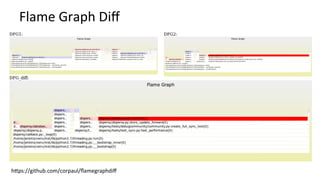
Flame	Graph	Diff	
hcps://github.com/corpaul/flamegraphdiff
Take	aways	
1.  Interpret	CPU	flame	graphs	
2.  Understand	piHalls	with	stack	traces	and	symbols	
3.  Discover	opportuniKes	for	future	development
Links	&	References	
•  Flame	Graphs	
–  "The	Flame	Graph"	Communica-ons	of	the	ACM,	Vol.	56,	No.	6	(June	2016)	
–  hcp://queue.acm.org/detail.cfm?id=2927301		
–  hcp://www.brendangregg.com/flamegraphs.html	->	hBp://www.brendangregg.com/flamegraphs.html#Updates		
–  hcp://www.brendangregg.com/FlameGraphs/cpuflamegraphs.html		
–  hcp://www.brendangregg.com/FlameGraphs/memoryflamegraphs.html		
–  hcp://www.brendangregg.com/FlameGraphs/offcpuflamegraphs.html		
–  hcp://techblog.neHlix.com/2015/07/java-in-flames.html		
–  hcp://techblog.neHlix.com/2016/04/saving-13-million-computaKonal-minutes.html		
–  hcp://techblog.neHlix.com/2014/11/nodejs-in-flames.html	
–  hcp://www.brendangregg.com/blog/2014-11-09/differenKal-flame-graphs.html		
–  hcp://www.brendangregg.com/blog/2016-01-20/ebpf-offcpu-flame-graph.html		
–  hcp://www.brendangregg.com/blog/2016-02-01/linux-wakeup-offwake-profiling.html		
–  hcp://www.brendangregg.com/blog/2016-02-05/ebpf-chaingraph-prototype.html				
–  hcp://corpaul.github.io/flamegraphdiff/		
•  Linux	perf_events	
–  hcps://perf.wiki.kernel.org/index.php/Main_Page		
–  hcp://www.brendangregg.com/perf.html		
•  NeHlix	Vector	
–  hcps://github.com/neHlix/vector	
–  hcp://techblog.neHlix.com/2015/04/introducing-vector-neHlixs-on-host.html
Thank You
–  QuesKons?	
–  hcp://www.brendangregg.com	
–  hcp://slideshare.net/brendangregg		
–  bgregg@neHlix.com	
–  @brendangregg	


Next	topic:	Performance	Superpowers	with	Enhanced	BPF	
2017 USENIX Annual Technical Conference

USENIX ATC 2017: Visualizing Performance with Flame Graphs