












Bastian Grimm, Peak Ace AG | @basgr
Why web performance optimisation should be more than AMP!
AMP ≠ Silver Bullet
… and feel free to disagree, but please think about it for a minute.
First things first…
AMP certainly helps to push people to take the need
for fast loading sites more seriously.
#1 Drives discussion/innovation
Suddenly, different teams/stakeholders (have to) care
about performance and it becomes an “agenda topic”.
#2 Enables collaboration
Converting existing sites to AMP almost never works, you need to rebuild
the entire HTML & CSS from scratch (which takes time & resources).
#3 Additional effort
Extending CMS capabilities to manage AMP content is expensive,
additional maintenance (IT, editorial, etc.) increases costs further.
#4 Maintenance & costs
Currently, the lack of proper branding possibilities is killing brand
recognition as well as decreasing customer loyalty.
#5 Lack of branding
8 @peakaceag pa.ag
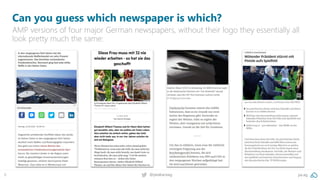
Can you guess which newspaper is which?
AMP versions of four major German newspapers, without their logo they essentially all
look pretty much the same:
9 @peakaceag pa.ag
Can you guess which newspaper is which?
Due to massive limitations, their “look and feel” is totally different from regular branding;
Complex monetisation & marketing automation is hampered due to JS restrictions.
10 @peakaceag pa.ag
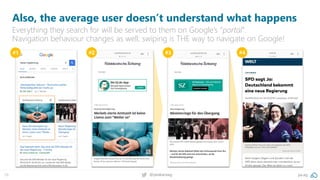
Also, the average user doesn’t understand what happens
Everything they search for will be served to them on Google’s “portal”.
Navigation behaviour changes as well; swiping is THE way to navigate on Google!
#1 #2 #3 #4
Seriously, just putting it on GitHub doesn’t make it less controlled!
#6 Not really open source
They “use” you to make it easy for them (same structure) and even hosted
on Google. Also, consider changed crawl behaviour (another URL).
#7 Crawling
… because we are talking web performance!
Maybe all this shouldn’t matter…
Actually, AMP is not really *that* fast…
#8 Google is cheating with speed
15 @peakaceag pa.ag
AMP magic: pre-fetching, pre-rendering (and caching)
There is ~1 second avg. difference from the pre-
rendering vs. direct load of any AMP. That’s speed
you can’t make up and the perceived load time for
a user is even greater.
16 @peakaceag pa.ag
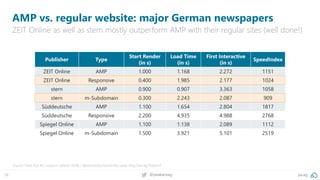
AMP vs. regular website: major German newspapers
ZEIT Online as well as stern mostly outperform AMP with their regular sites (well done!)
Source: Peak Ace AG research (March 2018) / @patrickstox found the same: http://pa.ag/2Iz6em7
Publisher Type
Start Render
(in s)
Load Time
(in s)
First Interactive
(in s)
SpeedIndex
ZEIT Online AMP 1.000 1.168 2.272 1151
ZEIT Online Responsive 0.400 1.985 2.177 1024
stern AMP 0.900 0.907 3.363 1058
stern m-Subdomain 0.300 2.243 2.087 909
Süddeutsche AMP 1.100 1.654 2.804 1817
Süddeutsche Responsive 2.200 4.935 4.988 2768
Spiegel Online AMP 1.100 1.138 2.089 1112
Spiegel Online m-Subdomain 1.500 3.921 5.101 2519
17 @peakaceag pa.ag
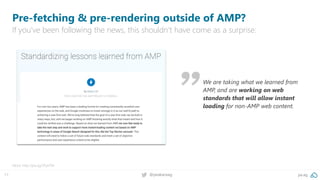
We are taking what we learned from
AMP, and are working on web
standards that will allow instant
loading for non-AMP web content.
Pre-fetching & pre-rendering outside of AMP?
If you‘ve been following the news, this shouldn‘t have come as a surprise:
More: http://pa.ag/2FyeT6h
Only if you go full PWAMP (Progressive Web App + AMP)
secondary - and following – clicks/interactions will be fast as well.
#9 Only the 1st request is fast
19 @peakaceag pa.ag
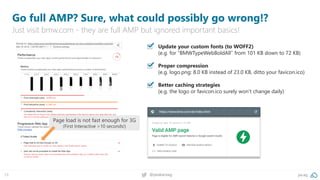
Go full AMP? Sure, what could possibly go wrong!?
Just visit bmw.com - they are full AMP but ignored important basics!
▪ Update your custom fonts (to WOFF2)
(e.g. for “BMWTypeWebBoldAll” from 101 KB down to 72 KB)
Proper compression
(e.g. logo.png: 8.0 KB instead of 23.0 KB, ditto your favicon.ico)
Better caching strategies
(e.g. the logo or favicon.ico surely won’t change daily)
Page load is not fast enough for 3G
(First Interactive >10 seconds!)
So, what should you do?
21 @peakaceag pa.ag
Please take care of your website first:
(no matter if you like AMP or not)
Using AMP must NOT be an excuse for having a
slow-loading website. Invest in your property to
become best-in-class first, before even considering
using AMP, if at all.”
Because the PageSpeed Insights score is not enough!
#1 Better measurement
23 @peakaceag pa.ag
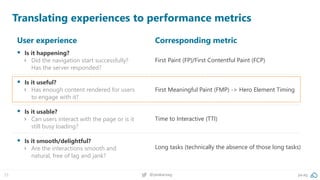
Translating experiences to performance metrics
User experience
▪ Is it happening?
› Did the navigation start successfully?
Has the server responded?
▪ Is it useful?
› Has enough content rendered for users
to engage with it?
▪ Is it usable?
› Can users interact with the page or is it
still busy loading?
▪ Is it smooth/delightful?
› Are the interactions smooth and
natural, free of lag and jank?
Corresponding metric
First Paint (FP)/First Contentful Paint (FCP)
First Meaningful Paint (FMP) -> Hero Element Timing
Time to Interactive (TTI)
Long tasks (technically the absence of those long tasks)
24 @peakaceag pa.ag
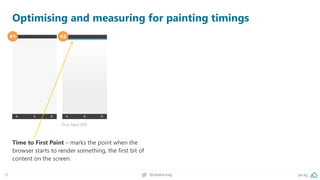
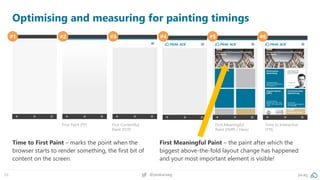
Optimising and measuring for painting timings
#1 #2
First Paint (FP)
Time to First Paint – marks the point when the
browser starts to render something, the first bit of
content on the screen.
25 @peakaceag pa.ag
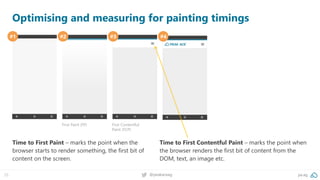
Optimising and measuring for painting timings
#1 #2 #3 #4
First Paint (FP) First Contentful
Paint (FCP)
Time to First Paint – marks the point when the
browser starts to render something, the first bit of
content on the screen.
Time to First Contentful Paint – marks the point when
the browser renders the first bit of content from the
DOM, text, an image etc.
26 @peakaceag pa.ag
Optimising and measuring for painting timings
#1 #2 #3 #4 #5 #6
First Paint (FP) First Contentful
Paint (FCP)
First Meaningful
Paint (FMP) / Hero!
Time to Interactive
(TTI)
Time to First Paint – marks the point when the
browser starts to render something, the first bit of
content on the screen.
First Meaningful Paint – the paint after which the
biggest above-the-fold layout change has happened
and your most important element is visible!
27 @peakaceag pa.ag
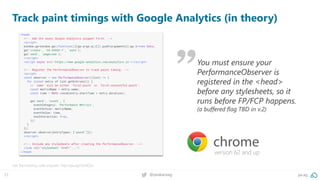
Track paint timings with Google Analytics (in theory)
Get the tracking code snippets: http://pa.ag/2viHQSz
version 62 and up
You must ensure your
PerformanceObserver is
registered in the <head>
before any stylesheets, so it
runs before FP/FCP happens.
(a buffered flag TBD in v.2)
28 @peakaceag pa.ag
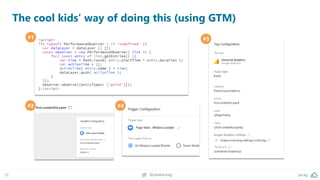
The cool kids’ way of doing this (using GTM)
#1 #3
#2 #4
29 @peakaceag pa.ag
This is how it looks like in Google Analytics/Data Studio
GA: Behaviour > events > pages: performance metrics [first-contentful-paint]
Source: Google Analytics
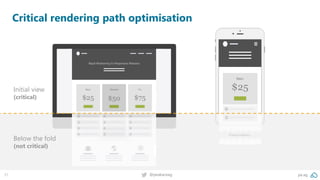
The code and resources required to render the initial view of a web page
#2 Critical rendering path
31 @peakaceag pa.ag
Critical rendering path optimisation
Initial view
(critical)
Below the fold
(not critical)
Some (technical) background:
33 @peakaceag pa.ag
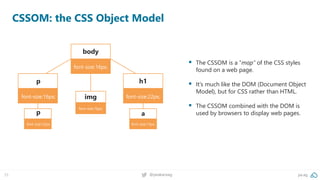
CSSOM: the CSS Object Model
▪ The CSSOM is a “map” of the CSS styles
found on a web page.
▪ It’s much like the DOM (Document Object
Model), but for CSS rather than HTML.
▪ The CSSOM combined with the DOM is
used by browsers to display web pages.
body
font-size:16px;
h1
font-size:22px;
p
font-size:16px;
p
font-size:12px;
a
font-size:12px;
img
font-size:16px;
34 @peakaceag pa.ag
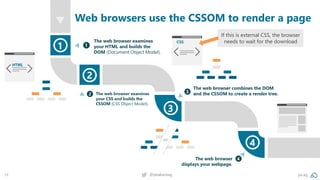
Web browsers use the CSSOM to render a page
If this is external CSS, the browser
needs to wait for the download
35 @peakaceag pa.ag
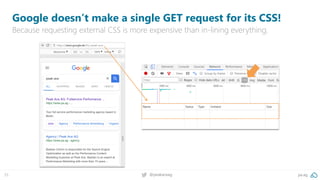
Google doesn’t make a single GET request for its CSS!
Because requesting external CSS is more expensive than in-lining everything.
36 @peakaceag pa.ag
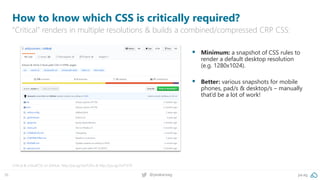
How to know which CSS is critically required?
“Critical” renders in multiple resolutions & builds a combined/compressed CRP CSS:
Critical & criticalCSS on GitHub: http://pa.ag/2wJTZAu & http://pa.ag/2wT1ST9
▪ Minimum: a snapshot of CSS rules to
render a default desktop resolution
(e.g. 1280x1024).
▪ Better: various snapshots for mobile
phones, pad/s & desktop/s – manually
that’d be a lot of work!
37 @peakaceag pa.ag
<!DOCTYPE html>
<html>
<head>
<meta charset="utf-8">
<meta name="viewport" content="width=device-width">
<title>CRP loading demo</title>
<!-- critical CSS goes here -->
<style> h1 { colour: green; } </style>
<!-- use async preload // no IE, Edge & some other unimportant ones (http://caniuse.com/#search=preload) -->
<link rel="preload" href="non-critical.css" as="style" onload="this.rel='stylesheet'" />
<!--noscript for req. without JS -->
<noscript><link rel="stylesheet" href="non-critical.css"></noscript>
<!-- include polyfill for shitty browsers -->
<script>
*! loadCSS. [c]2017 Filament Group, Inc. MIT License */
(function(){ ... } ());
/*! loadCSS rel=preload polyfill. [c] 2017 Filament Group, Inc. MIT License */
(function(){ ... } ());
</script>
</head>
<body>
</body>
</html>
<!-- use async preload // no IE, Edge & some other unimportant ones
(http://caniuse.com/#search=preload) -->
<link rel="preload" href="non-critical.css" as="style" onload="this.rel='stylesheet'" />
<!-- critical CSS goes here -->
<style> h1 { colour: green; } </style>
<!-- use async preload // no IE, Edge & some other unimportant ones
(http://caniuse.com/#search=preload) -->
<link rel="preload" href="non-critical.css" as="style" onload="this.rel='stylesheet'" />
<!--noscript for req. without JS -->
<noscript><link rel="stylesheet" href="non-critical.css"></noscript>
*! loadCSS. [c]2017 Filament Group, Inc. MIT License */
(function(){ ... } ());
/*! loadCSS rel=preload polyfill. [c] 2017 Filament Group, Inc. MIT License */
(function(){ ... } ());
Putting it all together
Fit the HTML, CSS & JS that’s necessary for “Start Render” into that first 14 kB round trip!
Inline your critical CSS.
1
Loading non-critical CSS
async using rel=“preload“.
2
Apply the CSS once it has
finished loading via “onload“.
3
Fallback for non-JS requests.
4
Implement loadCSS script for
older browsers.
5
Highest quality, (more) efficient data compression & smaller files.
#3 New image formats
39 @peakaceag pa.ag
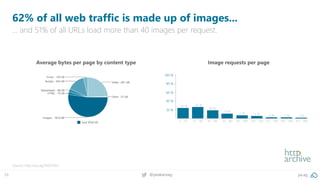
62% of all web traffic is made up of images...
… and 51% of all URLs load more than 40 images per request.
Source: http://pa.ag/1SGDOEo
Average bytes per page by content type Image requests per page
40 @peakaceag pa.ag
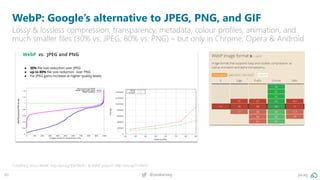
WebP: Google’s alternative to JPEG, PNG, and GIF
Lossy & lossless compression, transparency, metadata, colour profiles, animation, and
much smaller files (30% vs. JPEG, 80% vs. PNG) – but only in Chrome, Opera & Android
Everything about WebP: http://pa.ag/1EpFWeN / & WebP support: http://pa.ag/2FZK4XS
41 @peakaceag pa.ag
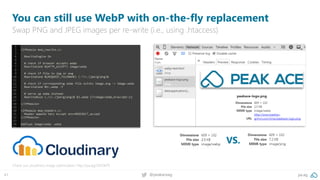
You can still use WebP with on-the-fly replacement
Swap PNG and JPEG images per re-write (i.e., using .htaccess)
Check out cloudinary image optimisation: http://pa.ag/2IDOkP9
VS.
42 @peakaceag pa.ag
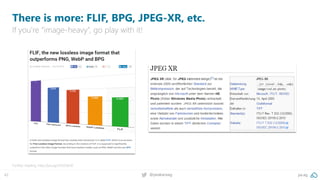
There is more: FLIF, BPG, JPEG-XR, etc.
If you’re “image-heavy”, go play with it!
Further reading: http://pa.ag/1S5OQmX
Pretty, varied, colourful, and slow!
#3 Custom web fonts
44 @peakaceag pa.ag
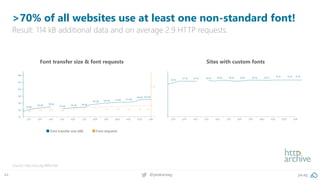
>70% of all websites use at least one non-standard font!
Result: 114 kB additional data and on average 2.9 HTTP requests.
Source: http://pa.ag/1BRUnbe
Font transfer size & font requests Sites with custom fonts
Font transfer size (kB) Font requests
45 @peakaceag pa.ag
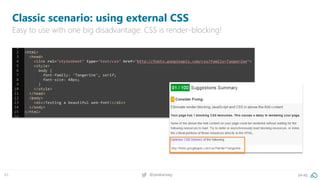
Classic scenario: using external CSS
Easy to use with one big disadvantage: CSS is render-blocking!
46 @peakaceag pa.ag
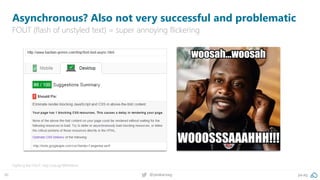
Asynchronous? Also not very successful and problematic
FOUT (flash of unstyled text) = super annoying flickering
Fighting the FOUT: http://pa.ag/1BRWMmu
47 @peakaceag pa.ag
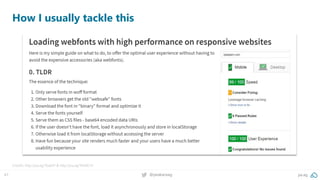
How I usually tackle this
Credits: http://pa.ag/1GakitY & http://pa.ag/1NDXCVi
48 @peakaceag pa.ag
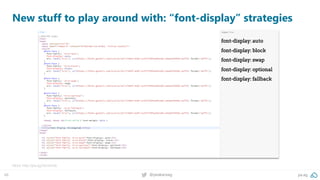
New stuff to play around with: “font-display” strategies
More: http://pa.ag/2eUwVob
… more?
50 pa.ag@peakaceag
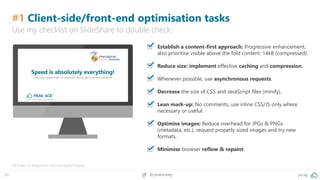
#1 Client-side/front-end optimisation tasks
▪ Establish a content-first approach: Progressive enhancement,
also prioritise visible above the fold content: 14kB (compressed).
▪ Reduce size: implement effective caching and compression.
▪ Whenever possible, use asynchronous requests.
▪ Decrease the size of CSS and JavaScript files (minify).
▪ Lean mark-up: No comments, use inline CSS/JS only where
necessary or useful.
▪ Optimise images: Reduce overhead for JPGs & PNGs
(metadata, etc.), request properly sized images and try new
formats.
▪ Minimise browser reflow & repaint.
All slides on SlideShare: http://pa.ag/iss17speed
Use my checklist on SlideShare to double check:
51 pa.ag@peakaceag
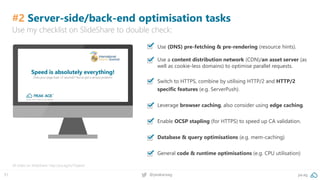
#2 Server-side/back-end optimisation tasks
▪ Use (DNS) pre-fetching & pre-rendering (resource hints).
▪ Use a content distribution network (CDN)/an asset server (as
well as cookie-less domains) to optimise parallel requests.
▪ Switch to HTTPS, combine by utilising HTTP/2 and HTTP/2
specific features (e.g. ServerPush).
▪ Leverage browser caching, also consider using edge caching.
▪ Enable OCSP stapling (for HTTPS) to speed up CA validation.
▪ Database & query optimisations (e.g. mem-caching)
▪ General code & runtime optimisations (e.g. CPU utilisation)
All slides on SlideShare: http://pa.ag/iss17speed
Use my checklist on SlideShare to double check:
52 pa.ag@peakaceag
We’re hiring! 25+ Performance Marketing jobs in Berlin!
Come and say “hello” or apply via jobs.pa.ag. Looking forward to speaking to you!
Always looking for talent!
Check out jobs.pa.ag
53 @peakaceag pa.ag
http://pa.ag/smx18amp
Always looking for talent! Check out jobs.pa.ag
Bastian Grimm
bg@pa.ag
twitter.com/peakaceag
facebook.com/peakaceag
www.pa.ag
Liked the deck? Here you go:

AMP - SMX München 2018

  • 1.
    Bastian Grimm, PeakAce AG | @basgr Why web performance optimisation should be more than AMP! AMP ≠ Silver Bullet
  • 2.
    … and feelfree to disagree, but please think about it for a minute. First things first…
  • 3.
    AMP certainly helpsto push people to take the need for fast loading sites more seriously. #1 Drives discussion/innovation
  • 4.
    Suddenly, different teams/stakeholders(have to) care about performance and it becomes an “agenda topic”. #2 Enables collaboration
  • 5.
    Converting existing sitesto AMP almost never works, you need to rebuild the entire HTML & CSS from scratch (which takes time & resources). #3 Additional effort
  • 6.
    Extending CMS capabilitiesto manage AMP content is expensive, additional maintenance (IT, editorial, etc.) increases costs further. #4 Maintenance & costs
  • 7.
    Currently, the lackof proper branding possibilities is killing brand recognition as well as decreasing customer loyalty. #5 Lack of branding
  • 8.
    8 @peakaceag pa.ag Canyou guess which newspaper is which? AMP versions of four major German newspapers, without their logo they essentially all look pretty much the same:
  • 9.
    9 @peakaceag pa.ag Canyou guess which newspaper is which? Due to massive limitations, their “look and feel” is totally different from regular branding; Complex monetisation & marketing automation is hampered due to JS restrictions.
  • 10.
    10 @peakaceag pa.ag Also,the average user doesn’t understand what happens Everything they search for will be served to them on Google’s “portal”. Navigation behaviour changes as well; swiping is THE way to navigate on Google! #1 #2 #3 #4
  • 11.
    Seriously, just puttingit on GitHub doesn’t make it less controlled! #6 Not really open source
  • 12.
    They “use” youto make it easy for them (same structure) and even hosted on Google. Also, consider changed crawl behaviour (another URL). #7 Crawling
  • 13.
    … because weare talking web performance! Maybe all this shouldn’t matter…
  • 14.
    Actually, AMP isnot really *that* fast… #8 Google is cheating with speed
  • 15.
    15 @peakaceag pa.ag AMPmagic: pre-fetching, pre-rendering (and caching) There is ~1 second avg. difference from the pre- rendering vs. direct load of any AMP. That’s speed you can’t make up and the perceived load time for a user is even greater.
  • 16.
    16 @peakaceag pa.ag AMPvs. regular website: major German newspapers ZEIT Online as well as stern mostly outperform AMP with their regular sites (well done!) Source: Peak Ace AG research (March 2018) / @patrickstox found the same: http://pa.ag/2Iz6em7 Publisher Type Start Render (in s) Load Time (in s) First Interactive (in s) SpeedIndex ZEIT Online AMP 1.000 1.168 2.272 1151 ZEIT Online Responsive 0.400 1.985 2.177 1024 stern AMP 0.900 0.907 3.363 1058 stern m-Subdomain 0.300 2.243 2.087 909 Süddeutsche AMP 1.100 1.654 2.804 1817 Süddeutsche Responsive 2.200 4.935 4.988 2768 Spiegel Online AMP 1.100 1.138 2.089 1112 Spiegel Online m-Subdomain 1.500 3.921 5.101 2519
  • 17.
    17 @peakaceag pa.ag Weare taking what we learned from AMP, and are working on web standards that will allow instant loading for non-AMP web content. Pre-fetching & pre-rendering outside of AMP? If you‘ve been following the news, this shouldn‘t have come as a surprise: More: http://pa.ag/2FyeT6h
  • 18.
    Only if yougo full PWAMP (Progressive Web App + AMP) secondary - and following – clicks/interactions will be fast as well. #9 Only the 1st request is fast
  • 19.
    19 @peakaceag pa.ag Gofull AMP? Sure, what could possibly go wrong!? Just visit bmw.com - they are full AMP but ignored important basics! ▪ Update your custom fonts (to WOFF2) (e.g. for “BMWTypeWebBoldAll” from 101 KB down to 72 KB) Proper compression (e.g. logo.png: 8.0 KB instead of 23.0 KB, ditto your favicon.ico) Better caching strategies (e.g. the logo or favicon.ico surely won’t change daily) Page load is not fast enough for 3G (First Interactive >10 seconds!)
  • 20.
  • 21.
    21 @peakaceag pa.ag Pleasetake care of your website first: (no matter if you like AMP or not) Using AMP must NOT be an excuse for having a slow-loading website. Invest in your property to become best-in-class first, before even considering using AMP, if at all.”
  • 22.
    Because the PageSpeedInsights score is not enough! #1 Better measurement
  • 23.
    23 @peakaceag pa.ag Translatingexperiences to performance metrics User experience ▪ Is it happening? › Did the navigation start successfully? Has the server responded? ▪ Is it useful? › Has enough content rendered for users to engage with it? ▪ Is it usable? › Can users interact with the page or is it still busy loading? ▪ Is it smooth/delightful? › Are the interactions smooth and natural, free of lag and jank? Corresponding metric First Paint (FP)/First Contentful Paint (FCP) First Meaningful Paint (FMP) -> Hero Element Timing Time to Interactive (TTI) Long tasks (technically the absence of those long tasks)
  • 24.
    24 @peakaceag pa.ag Optimisingand measuring for painting timings #1 #2 First Paint (FP) Time to First Paint – marks the point when the browser starts to render something, the first bit of content on the screen.
  • 25.
    25 @peakaceag pa.ag Optimisingand measuring for painting timings #1 #2 #3 #4 First Paint (FP) First Contentful Paint (FCP) Time to First Paint – marks the point when the browser starts to render something, the first bit of content on the screen. Time to First Contentful Paint – marks the point when the browser renders the first bit of content from the DOM, text, an image etc.
  • 26.
    26 @peakaceag pa.ag Optimisingand measuring for painting timings #1 #2 #3 #4 #5 #6 First Paint (FP) First Contentful Paint (FCP) First Meaningful Paint (FMP) / Hero! Time to Interactive (TTI) Time to First Paint – marks the point when the browser starts to render something, the first bit of content on the screen. First Meaningful Paint – the paint after which the biggest above-the-fold layout change has happened and your most important element is visible!
  • 27.
    27 @peakaceag pa.ag Trackpaint timings with Google Analytics (in theory) Get the tracking code snippets: http://pa.ag/2viHQSz version 62 and up You must ensure your PerformanceObserver is registered in the <head> before any stylesheets, so it runs before FP/FCP happens. (a buffered flag TBD in v.2)
  • 28.
    28 @peakaceag pa.ag Thecool kids’ way of doing this (using GTM) #1 #3 #2 #4
  • 29.
    29 @peakaceag pa.ag Thisis how it looks like in Google Analytics/Data Studio GA: Behaviour > events > pages: performance metrics [first-contentful-paint] Source: Google Analytics
  • 30.
    The code andresources required to render the initial view of a web page #2 Critical rendering path
  • 31.
    31 @peakaceag pa.ag Criticalrendering path optimisation Initial view (critical) Below the fold (not critical)
  • 32.
  • 33.
    33 @peakaceag pa.ag CSSOM:the CSS Object Model ▪ The CSSOM is a “map” of the CSS styles found on a web page. ▪ It’s much like the DOM (Document Object Model), but for CSS rather than HTML. ▪ The CSSOM combined with the DOM is used by browsers to display web pages. body font-size:16px; h1 font-size:22px; p font-size:16px; p font-size:12px; a font-size:12px; img font-size:16px;
  • 34.
    34 @peakaceag pa.ag Webbrowsers use the CSSOM to render a page If this is external CSS, the browser needs to wait for the download
  • 35.
    35 @peakaceag pa.ag Googledoesn’t make a single GET request for its CSS! Because requesting external CSS is more expensive than in-lining everything.
  • 36.
    36 @peakaceag pa.ag Howto know which CSS is critically required? “Critical” renders in multiple resolutions & builds a combined/compressed CRP CSS: Critical & criticalCSS on GitHub: http://pa.ag/2wJTZAu & http://pa.ag/2wT1ST9 ▪ Minimum: a snapshot of CSS rules to render a default desktop resolution (e.g. 1280x1024). ▪ Better: various snapshots for mobile phones, pad/s & desktop/s – manually that’d be a lot of work!
  • 37.
    37 @peakaceag pa.ag <!DOCTYPEhtml> <html> <head> <meta charset="utf-8"> <meta name="viewport" content="width=device-width"> <title>CRP loading demo</title> <!-- critical CSS goes here --> <style> h1 { colour: green; } </style> <!-- use async preload // no IE, Edge & some other unimportant ones (http://caniuse.com/#search=preload) --> <link rel="preload" href="non-critical.css" as="style" onload="this.rel='stylesheet'" /> <!--noscript for req. without JS --> <noscript><link rel="stylesheet" href="non-critical.css"></noscript> <!-- include polyfill for shitty browsers --> <script> *! loadCSS. [c]2017 Filament Group, Inc. MIT License */ (function(){ ... } ()); /*! loadCSS rel=preload polyfill. [c] 2017 Filament Group, Inc. MIT License */ (function(){ ... } ()); </script> </head> <body> </body> </html> <!-- use async preload // no IE, Edge & some other unimportant ones (http://caniuse.com/#search=preload) --> <link rel="preload" href="non-critical.css" as="style" onload="this.rel='stylesheet'" /> <!-- critical CSS goes here --> <style> h1 { colour: green; } </style> <!-- use async preload // no IE, Edge & some other unimportant ones (http://caniuse.com/#search=preload) --> <link rel="preload" href="non-critical.css" as="style" onload="this.rel='stylesheet'" /> <!--noscript for req. without JS --> <noscript><link rel="stylesheet" href="non-critical.css"></noscript> *! loadCSS. [c]2017 Filament Group, Inc. MIT License */ (function(){ ... } ()); /*! loadCSS rel=preload polyfill. [c] 2017 Filament Group, Inc. MIT License */ (function(){ ... } ()); Putting it all together Fit the HTML, CSS & JS that’s necessary for “Start Render” into that first 14 kB round trip! Inline your critical CSS. 1 Loading non-critical CSS async using rel=“preload“. 2 Apply the CSS once it has finished loading via “onload“. 3 Fallback for non-JS requests. 4 Implement loadCSS script for older browsers. 5
  • 38.
    Highest quality, (more)efficient data compression & smaller files. #3 New image formats
  • 39.
    39 @peakaceag pa.ag 62%of all web traffic is made up of images... … and 51% of all URLs load more than 40 images per request. Source: http://pa.ag/1SGDOEo Average bytes per page by content type Image requests per page
  • 40.
    40 @peakaceag pa.ag WebP:Google’s alternative to JPEG, PNG, and GIF Lossy & lossless compression, transparency, metadata, colour profiles, animation, and much smaller files (30% vs. JPEG, 80% vs. PNG) – but only in Chrome, Opera & Android Everything about WebP: http://pa.ag/1EpFWeN / & WebP support: http://pa.ag/2FZK4XS
  • 41.
    41 @peakaceag pa.ag Youcan still use WebP with on-the-fly replacement Swap PNG and JPEG images per re-write (i.e., using .htaccess) Check out cloudinary image optimisation: http://pa.ag/2IDOkP9 VS.
  • 42.
    42 @peakaceag pa.ag Thereis more: FLIF, BPG, JPEG-XR, etc. If you’re “image-heavy”, go play with it! Further reading: http://pa.ag/1S5OQmX
  • 43.
    Pretty, varied, colourful,and slow! #3 Custom web fonts
  • 44.
    44 @peakaceag pa.ag >70%of all websites use at least one non-standard font! Result: 114 kB additional data and on average 2.9 HTTP requests. Source: http://pa.ag/1BRUnbe Font transfer size & font requests Sites with custom fonts Font transfer size (kB) Font requests
  • 45.
    45 @peakaceag pa.ag Classicscenario: using external CSS Easy to use with one big disadvantage: CSS is render-blocking!
  • 46.
    46 @peakaceag pa.ag Asynchronous?Also not very successful and problematic FOUT (flash of unstyled text) = super annoying flickering Fighting the FOUT: http://pa.ag/1BRWMmu
  • 47.
    47 @peakaceag pa.ag HowI usually tackle this Credits: http://pa.ag/1GakitY & http://pa.ag/1NDXCVi
  • 48.
    48 @peakaceag pa.ag Newstuff to play around with: “font-display” strategies More: http://pa.ag/2eUwVob
  • 49.
  • 50.
    50 pa.ag@peakaceag #1 Client-side/front-endoptimisation tasks ▪ Establish a content-first approach: Progressive enhancement, also prioritise visible above the fold content: 14kB (compressed). ▪ Reduce size: implement effective caching and compression. ▪ Whenever possible, use asynchronous requests. ▪ Decrease the size of CSS and JavaScript files (minify). ▪ Lean mark-up: No comments, use inline CSS/JS only where necessary or useful. ▪ Optimise images: Reduce overhead for JPGs & PNGs (metadata, etc.), request properly sized images and try new formats. ▪ Minimise browser reflow & repaint. All slides on SlideShare: http://pa.ag/iss17speed Use my checklist on SlideShare to double check:
  • 51.
    51 pa.ag@peakaceag #2 Server-side/back-endoptimisation tasks ▪ Use (DNS) pre-fetching & pre-rendering (resource hints). ▪ Use a content distribution network (CDN)/an asset server (as well as cookie-less domains) to optimise parallel requests. ▪ Switch to HTTPS, combine by utilising HTTP/2 and HTTP/2 specific features (e.g. ServerPush). ▪ Leverage browser caching, also consider using edge caching. ▪ Enable OCSP stapling (for HTTPS) to speed up CA validation. ▪ Database & query optimisations (e.g. mem-caching) ▪ General code & runtime optimisations (e.g. CPU utilisation) All slides on SlideShare: http://pa.ag/iss17speed Use my checklist on SlideShare to double check:
  • 52.
    52 pa.ag@peakaceag We’re hiring!25+ Performance Marketing jobs in Berlin! Come and say “hello” or apply via jobs.pa.ag. Looking forward to speaking to you! Always looking for talent! Check out jobs.pa.ag
  • 53.
    53 @peakaceag pa.ag http://pa.ag/smx18amp Alwayslooking for talent! Check out jobs.pa.ag Bastian Grimm bg@pa.ag twitter.com/peakaceag facebook.com/peakaceag www.pa.ag Liked the deck? Here you go: