Lightning Layout Tricks
5 Easy Ways to Transform User
Experiences
Practice Lead
SparkOrange
@AccidentalAdmin,
tom@sparkorange.net
Tom Hoffman
Forward Looking Statement
Statement under the Private Securities Litigation Reform Act of 1995:
This presentation contains forward-looking statements about the company’s financial and operating results, which may include expected GAAP and non-GAAP financial and other operating
and non-operating results, including revenue, net income, diluted earnings per share, operating cash flow growth, operating margin improvement, expected revenue growth, expected
current remaining performance obligation growth, expected tax rates, the one-time accounting non-cash charge that was incurred in connection with the Salesforce.org combination; stock-
based compensation expenses, amortization of purchased intangibles, shares outstanding, market growth and sustainability goals. The achievement or success of the matters covered by such
forward-looking statements involves risks, uncertainties and assumptions. If any such risks or uncertainties materialize or if any of the assumptions prove incorrect, the company’s results
could differ materially from the results expressed or implied by the forward-looking statements we make.
The risks and uncertainties referred to above include -- but are not limited to -- risks associated with the effect of general economic and market conditions; the impact of geopolitical events;
the impact of foreign currency exchange rate and interest rate fluctuations on our results; our business strategy and our plan to build our business, including our strategy to be the leading
provider of enterprise cloud computing applications and platforms; the pace of change and innovation in enterprise cloud computing services; the seasonal nature of our sales cycles; the
competitive nature of the market in which we participate; our international expansion strategy; the demands on our personnel and infrastructure resulting from significant growth in our
customer base and operations, including as a result of acquisitions; our service performance and security, including the resources and costs required to avoid unanticipated downtime and
prevent, detect and remediate potential security breaches; the expenses associated with new data centers and third-party infrastructure providers; additional data center capacity; real estate
and office facilities space; our operating results and cash flows; new services and product features, including any efforts to expand our services beyond the CRM market; our strategy of
acquiring or making investments in complementary businesses, joint ventures, services, technologies and intellectual property rights; the performance and fair value of our investments in
complementary businesses through our strategic investment portfolio; our ability to realize the benefits from strategic partnerships, joint ventures and investments; the impact of future gains
or losses from our strategic investment portfolio, including gains or losses from overall market conditions that may affect the publicly traded companies within the company's strategic
investment portfolio; our ability to execute our business plans; our ability to successfully integrate acquired businesses and technologies, including delays related to the integration of Tableau
due to regulatory review by the United Kingdom Competition and Markets Authority; our ability to continue to grow unearned revenue and remaining performance obligation; our ability to
protect our intellectual property rights; our ability to develop our brands; our reliance on third-party hardware, software and platform providers; our dependency on the development and
maintenance of the infrastructure of the Internet; the effect of evolving domestic and foreign government regulations, including those related to the provision of services on the Internet,
those related to accessing the Internet, and those addressing data privacy, cross-border data transfers and import and export controls; the valuation of our deferred tax assets and the release
of related valuation allowances; the potential availability of additional tax assets in the future; the impact of new accounting pronouncements and tax laws; uncertainties affecting our ability
to estimate our tax rate; the impact of expensing stock options and other equity awards; the sufficiency of our capital resources; factors related to our outstanding debt, revolving credit
facility, term loan and loan associated with 50 Fremont; compliance with our debt covenants and lease obligations; current and potential litigation involving us; and the impact of climate
change.
Further information on these and other factors that could affect the company’s financial results is included in the reports on Forms 10-K, 10-Q and 8-K and in other filings it makes with the
Securities and Exchange Commission from time to time. These documents are available on the SEC Filings section of the Investor Information section of the company’s website at
www.salesforce.com/investor.
Salesforce.com, inc. assumes no obligation and does not intend to update these forward-looking statements, except as required by law.
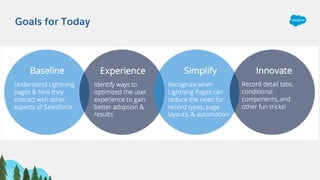
Goals for Today
Forward-Looking Common Sense Statement
• It’s ok to experiment, but Practice Safe UX – use a sandbox
• Identify potential use cases, build, gather feedback & iterate
• Roll out to small group of test users
• If it makes tasks easier and/or users happier = good
• If it makes you look really smart = great (as long as ^ is true too)
Make sure it makes sense – just because you can, does not mean you should.
Why is Lightning so special?
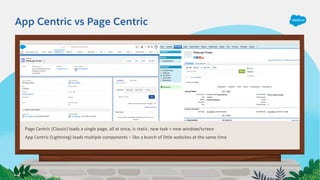
App Centric vs Page Centric
Page Centric (Classic) loads a single page, all at once, is static, new task = new window/screen
App Centric (Lightning) loads multiple components – like a bunch of little websites at the same time
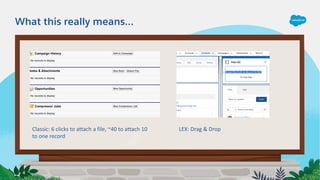
What this really means…
Classic: 6 clicks to attach a file, ~40 to attach 10
to one record
LEX: Drag & Drop
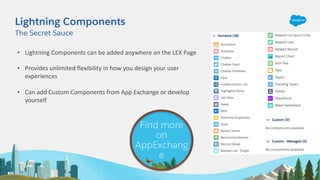
Lightning Components
• Lightning Components can be added anywhere on the LEX Page
• Provides unlimited flexibility in how you design your user
experiences
• Can add Custom Components from App Exchange or develop
yourself
The Secret Sauce
Find more
on
AppExchang
e
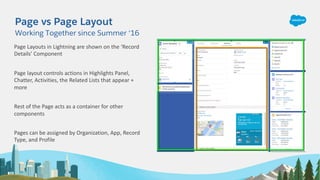
Page vs Page Layout
Working Together since Summer ‘16
Page Layouts in Lightning are shown on the ‘Record
Details’ Component
Page layout controls actions in Highlights Panel,
Chatter, Activities, the Related Lists that appear +
more
Rest of the Page acts as a container for other
components
Pages can be assigned by Organization, App, Record
Type, and Profile
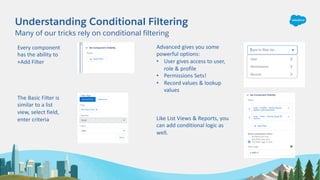
Understanding Conditional Filtering
Many of our tricks rely on conditional filtering
Every component
has the ability to
+Add Filter
The Basic Filter is
similar to a list
view, select field,
enter criteria
Advanced gives you some
powerful options:
• User gives access to user,
role & profile
• Permissions Sets!
• Record values & lookup
values
Like List Views & Reports, you
can add conditional logic as
well.
Let’s Get Tricky
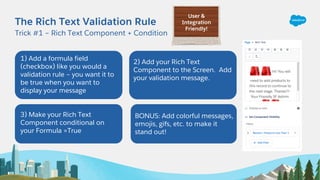
The Rich Text Validation Rule
Trick #1 – Rich Text Component + Condition
1) Add a formula field
(checkbox) like you would a
validation rule – you want it to
be true when you want to
display your message
2) Add your Rich Text
Component to the Screen. Add
your validation message.
3) Make your Rich Text
Component conditional on
your Formula =True
BONUS: Add colorful messages,
emojis, gifs, etc. to make it
stand out!
User &
Integration
Friendly!
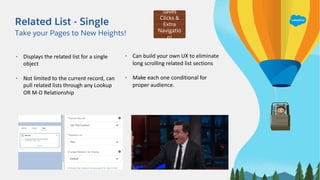
Related List - Single
Take your Pages to New Heights!
• Displays the related list for a single
object
• Not limited to the current record, can
pull related lists through any Lookup
OR M-D Relationship
• Can build your own UX to eliminate
long scrolling related list sections
• Make each one conditional for
proper audience.
Saves
Clicks &
Extra
Navigatio
n!
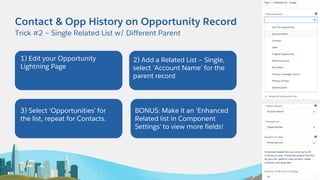
Contact & Opp History on Opportunity Record
Trick #2 – Single Related List w/ Different Parent
1) Edit your Opportunity
Lightning Page
2) Add a Related List – Single,
select ‘Account Name’ for the
parent record
3) Select ‘Opportunities’ for
the list, repeat for Contacts.
BONUS: Make it an ‘Enhanced
Related list in Component
Settings’ to view more fields!
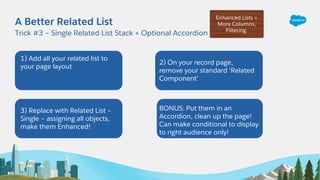
A Better Related List
Trick #3 – Single Related List Stack + Optional Accordion
1) Add all your related list to
your page layout
2) On your record page,
remove your standard ‘Related
Component’
3) Replace with Related List –
Single – assigning all objects,
make them Enhanced!
BONUS: Put them in an
Accordion, clean up the page!
Can make conditional to display
to right audience only!
Enhanced Lists =
More Columns,
Filtering.
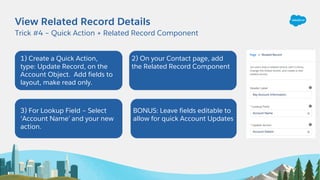
View Related Record Details
Trick #4 – Quick Action + Related Record Component
1) Create a Quick Action,
type: Update Record, on the
Account Object. Add fields to
layout, make read only.
2) On your Contact page, add
the Related Record Component
3) For Lookup Field – Select
‘Account Name’ and your new
action.
BONUS: Leave fields editable to
allow for quick Account Updates
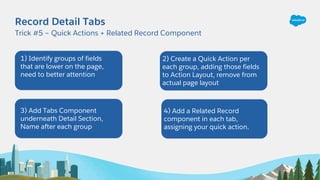
Record Detail Tabs
Trick #5 – Quick Actions + Related Record Component
1) Identify groups of fields
that are lower on the page,
need to better attention
2) Create a Quick Action per
each group, adding those fields
to Action Layout, remove from
actual page layout
3) Add Tabs Component
underneath Detail Section,
Name after each group
4) Add a Related Record
component in each tab,
assigning your quick action.
Remember…Just Because You Can,
Does Not Mean you Should!
WT19: Lightning Layout Tricks

WT19: Lightning Layout Tricks

  • 1.
    Lightning Layout Tricks 5Easy Ways to Transform User Experiences Practice Lead SparkOrange @AccidentalAdmin, tom@sparkorange.net Tom Hoffman
  • 2.
    Forward Looking Statement Statementunder the Private Securities Litigation Reform Act of 1995: This presentation contains forward-looking statements about the company’s financial and operating results, which may include expected GAAP and non-GAAP financial and other operating and non-operating results, including revenue, net income, diluted earnings per share, operating cash flow growth, operating margin improvement, expected revenue growth, expected current remaining performance obligation growth, expected tax rates, the one-time accounting non-cash charge that was incurred in connection with the Salesforce.org combination; stock- based compensation expenses, amortization of purchased intangibles, shares outstanding, market growth and sustainability goals. The achievement or success of the matters covered by such forward-looking statements involves risks, uncertainties and assumptions. If any such risks or uncertainties materialize or if any of the assumptions prove incorrect, the company’s results could differ materially from the results expressed or implied by the forward-looking statements we make. The risks and uncertainties referred to above include -- but are not limited to -- risks associated with the effect of general economic and market conditions; the impact of geopolitical events; the impact of foreign currency exchange rate and interest rate fluctuations on our results; our business strategy and our plan to build our business, including our strategy to be the leading provider of enterprise cloud computing applications and platforms; the pace of change and innovation in enterprise cloud computing services; the seasonal nature of our sales cycles; the competitive nature of the market in which we participate; our international expansion strategy; the demands on our personnel and infrastructure resulting from significant growth in our customer base and operations, including as a result of acquisitions; our service performance and security, including the resources and costs required to avoid unanticipated downtime and prevent, detect and remediate potential security breaches; the expenses associated with new data centers and third-party infrastructure providers; additional data center capacity; real estate and office facilities space; our operating results and cash flows; new services and product features, including any efforts to expand our services beyond the CRM market; our strategy of acquiring or making investments in complementary businesses, joint ventures, services, technologies and intellectual property rights; the performance and fair value of our investments in complementary businesses through our strategic investment portfolio; our ability to realize the benefits from strategic partnerships, joint ventures and investments; the impact of future gains or losses from our strategic investment portfolio, including gains or losses from overall market conditions that may affect the publicly traded companies within the company's strategic investment portfolio; our ability to execute our business plans; our ability to successfully integrate acquired businesses and technologies, including delays related to the integration of Tableau due to regulatory review by the United Kingdom Competition and Markets Authority; our ability to continue to grow unearned revenue and remaining performance obligation; our ability to protect our intellectual property rights; our ability to develop our brands; our reliance on third-party hardware, software and platform providers; our dependency on the development and maintenance of the infrastructure of the Internet; the effect of evolving domestic and foreign government regulations, including those related to the provision of services on the Internet, those related to accessing the Internet, and those addressing data privacy, cross-border data transfers and import and export controls; the valuation of our deferred tax assets and the release of related valuation allowances; the potential availability of additional tax assets in the future; the impact of new accounting pronouncements and tax laws; uncertainties affecting our ability to estimate our tax rate; the impact of expensing stock options and other equity awards; the sufficiency of our capital resources; factors related to our outstanding debt, revolving credit facility, term loan and loan associated with 50 Fremont; compliance with our debt covenants and lease obligations; current and potential litigation involving us; and the impact of climate change. Further information on these and other factors that could affect the company’s financial results is included in the reports on Forms 10-K, 10-Q and 8-K and in other filings it makes with the Securities and Exchange Commission from time to time. These documents are available on the SEC Filings section of the Investor Information section of the company’s website at www.salesforce.com/investor. Salesforce.com, inc. assumes no obligation and does not intend to update these forward-looking statements, except as required by law.
  • 3.
  • 4.
    Forward-Looking Common SenseStatement • It’s ok to experiment, but Practice Safe UX – use a sandbox • Identify potential use cases, build, gather feedback & iterate • Roll out to small group of test users • If it makes tasks easier and/or users happier = good • If it makes you look really smart = great (as long as ^ is true too) Make sure it makes sense – just because you can, does not mean you should.
  • 5.
    Why is Lightningso special?
  • 6.
    App Centric vsPage Centric Page Centric (Classic) loads a single page, all at once, is static, new task = new window/screen App Centric (Lightning) loads multiple components – like a bunch of little websites at the same time
  • 7.
    What this reallymeans… Classic: 6 clicks to attach a file, ~40 to attach 10 to one record LEX: Drag & Drop
  • 8.
    Lightning Components • LightningComponents can be added anywhere on the LEX Page • Provides unlimited flexibility in how you design your user experiences • Can add Custom Components from App Exchange or develop yourself The Secret Sauce Find more on AppExchang e
  • 9.
    Page vs PageLayout Working Together since Summer ‘16 Page Layouts in Lightning are shown on the ‘Record Details’ Component Page layout controls actions in Highlights Panel, Chatter, Activities, the Related Lists that appear + more Rest of the Page acts as a container for other components Pages can be assigned by Organization, App, Record Type, and Profile
  • 10.
    Understanding Conditional Filtering Manyof our tricks rely on conditional filtering Every component has the ability to +Add Filter The Basic Filter is similar to a list view, select field, enter criteria Advanced gives you some powerful options: • User gives access to user, role & profile • Permissions Sets! • Record values & lookup values Like List Views & Reports, you can add conditional logic as well.
  • 11.
  • 12.
    The Rich TextValidation Rule Trick #1 – Rich Text Component + Condition 1) Add a formula field (checkbox) like you would a validation rule – you want it to be true when you want to display your message 2) Add your Rich Text Component to the Screen. Add your validation message. 3) Make your Rich Text Component conditional on your Formula =True BONUS: Add colorful messages, emojis, gifs, etc. to make it stand out! User & Integration Friendly!
  • 13.
    Related List -Single Take your Pages to New Heights! • Displays the related list for a single object • Not limited to the current record, can pull related lists through any Lookup OR M-D Relationship • Can build your own UX to eliminate long scrolling related list sections • Make each one conditional for proper audience. Saves Clicks & Extra Navigatio n!
  • 14.
    Contact & OppHistory on Opportunity Record Trick #2 – Single Related List w/ Different Parent 1) Edit your Opportunity Lightning Page 2) Add a Related List – Single, select ‘Account Name’ for the parent record 3) Select ‘Opportunities’ for the list, repeat for Contacts. BONUS: Make it an ‘Enhanced Related list in Component Settings’ to view more fields!
  • 15.
    A Better RelatedList Trick #3 – Single Related List Stack + Optional Accordion 1) Add all your related list to your page layout 2) On your record page, remove your standard ‘Related Component’ 3) Replace with Related List – Single – assigning all objects, make them Enhanced! BONUS: Put them in an Accordion, clean up the page! Can make conditional to display to right audience only! Enhanced Lists = More Columns, Filtering.
  • 16.
    View Related RecordDetails Trick #4 – Quick Action + Related Record Component 1) Create a Quick Action, type: Update Record, on the Account Object. Add fields to layout, make read only. 2) On your Contact page, add the Related Record Component 3) For Lookup Field – Select ‘Account Name’ and your new action. BONUS: Leave fields editable to allow for quick Account Updates
  • 17.
    Record Detail Tabs Trick#5 – Quick Actions + Related Record Component 1) Identify groups of fields that are lower on the page, need to better attention 2) Create a Quick Action per each group, adding those fields to Action Layout, remove from actual page layout 3) Add Tabs Component underneath Detail Section, Name after each group 4) Add a Related Record component in each tab, assigning your quick action.
  • 18.
    Remember…Just Because YouCan, Does Not Mean you Should!