By Anita Ofori


I have learnt that Timetoast is a very effective
form of technology when constructing my
media product because, Timetoast helps me
to plan and organise tasks according to
specific dates and deadlines. Without
Timetoast, my schedules and dates will be
very unorganised resulting in me being at an
disadvantage because work would not be
uploaded on time.
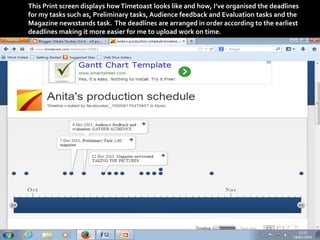
This Print screen displays how Timetoast looks like and how, I’ve organised the deadlines
for my tasks such as, Preliminary tasks, Audience feedback and Evaluation tasks and the
Magazine newsstands task. The deadlines are arranged in order according to the earliest
deadlines making it more easier for me to upload work on time.


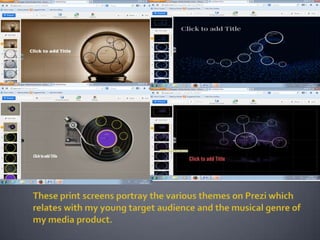
I have also learnt that Prezi is a very effective
form of technology when producing advanced
presentations as, Prezi consists of various
themes and templates to choose from than
Microsoft PowerPoint such as, Music themes,
The Stepping stone themes and the Prophecy
themes. In addition to, with Prezi you can also
select a theme that relates to your musical
genre. My theme for instance is R&B, and
through the help of Prezi I could change the
layout to a Vinyl recorder which is suitable
towards my theme.


Moreover, I have also learnt that when uploading
media work Blogger is an extremely effective form of
technology to use because, through the post settings
Blogger enables its users to change the dates on
specific work so that users can keep up to date with
the deadlines posted on Timetoast. Blogger is also
very beneficial when constructing my media product
as while I edit my media work I can exploit pictures,
links and videos to display a visual outlook on my
media product making it appear more clearer and
creative towards my viewers.
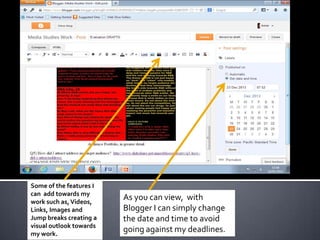
These are some of the
features I can add towards
my work such as, Videos,
Links, Images and Jump
breaks creating a visual
outlook towards my work.

As you can view, with Bl0gger I
can simply change the date and
time via Post settings to avoid
going against my deadlines.


I have also learnt that, Indesign and Photoshop are
very useful forms of technologies when creating
publications. This is because, with Photoshop through
selecting the image file I can edit images and texts in a
highly professional and advanced standard than
Microsoft word making my media product appear
more realistic. In addition to, with Indesign my media
product can appear less amateur as I can alter the
layout of my publication through clicking on the
Interactive feature within the Window setting
according to whether I am creating a double page
spread, a front cover or a contents page.
Liquid layouts
are also very
popular
amongst
Music
magazines
such as, XXL,
Vibe and
NME.

Liquid layouts on
Indesign are
extremely beneficial
specifically when
creating a double
page spread
because, it gives
you the agility to
proficiently create
and manage
multiple page sizes,
direction and
rotation.
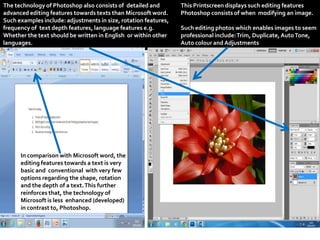
The technology of Photoshop also consists of detailed
and advanced editing features towards texts than
Microsoft word. Such examples include: adjustments in
size, rotation features, frequency of text depth features,
language features e.g. Whether the text should be written
in English or within other languages.

In comparison with Photoshop, the
editing features towards a text in
Microsoft word is very basic and
conventional with very few options
regarding the shape, rotation and the
depth of a text. This further reinforces
that, the technology of Microsoft is less
enhanced (developed) in contrast to,
Photoshop.

This Printscreen displays such editing features
Photoshop consists of when modifying an image.
Such editing photos which enables images to seem
professional include: Trim, Duplicate, Auto Tone, Auto
colour and Adjustments.
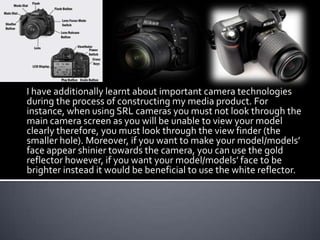
I have additionally learnt about important camera technologies during the process of constructing my
media product. For instance, when using SRL cameras you must not look through the main camera
screen as you will be unable to view your model clearly therefore, you must look through the view
finder (the smaller hole) in order to visibly view your model well. Furthermore, through the White
Balance settings I can make white objects appear white in my images, reducing the effect of any flash
by any light sources. Such features on the White Balance settings which help reinforce this result
include: Flash, Incandescent, Fluorescent and Direct sunlight. To further include, I have learned that
in terms of achieving the 3 point lightening effect it would be useful to adjust the Key Light, the Rim
Light and the Fill Light. The Key Light defines the most visible lightning and shadows whereas, the
Fill Light softens the light emitted from the Key Light and the Rim Light on the other hand, helps to
visually separate my model from the objects surrounding it.
By Anita Ofori

Media studies: Question 3) What have you learnt about technologies?

  • 1.
  • 2.
     I have learntthat Timetoast is a very effective form of technology when constructing my media product because, Timetoast helps me to plan and organise tasks according to specific dates and deadlines. Without Timetoast, my schedules and dates will be very unorganised resulting in me being at an disadvantage because work would not be uploaded on time.
  • 3.
    This Print screendisplays how Timetoast looks like and how, I’ve organised the deadlines for my tasks such as, Preliminary tasks, Audience feedback and Evaluation tasks and the Magazine newsstands task. The deadlines are arranged in order according to the earliest deadlines making it more easier for me to upload work on time.
  • 4.
     I have alsolearnt that Prezi is a very effective form of technology when producing advanced presentations as, Prezi consists of various themes and templates to choose from than Microsoft PowerPoint such as, Music themes, The Stepping stone themes and the Prophecy themes. In addition to, with Prezi you can also select a theme that relates to your musical genre. My theme for instance is R&B, and through the help of Prezi I could change the layout to a Vinyl recorder which is suitable towards my theme.
  • 6.
     Moreover, I havealso learnt that when uploading media work Blogger is an extremely effective form of technology to use because, through the post settings Blogger enables its users to change the dates on specific work so that users can keep up to date with the deadlines posted on Timetoast. Blogger is also very beneficial when constructing my media product as while I edit my media work I can exploit pictures, links and videos to display a visual outlook on my media product making it appear more clearer and creative towards my viewers.
  • 7.
    These are someof the features I can add towards my work such as, Videos, Links, Images and Jump breaks creating a visual outlook towards my work. As you can view, with Bl0gger I can simply change the date and time via Post settings to avoid going against my deadlines.
  • 8.
     I have alsolearnt that, Indesign and Photoshop are very useful forms of technologies when creating publications. This is because, with Photoshop through selecting the image file I can edit images and texts in a highly professional and advanced standard than Microsoft word making my media product appear more realistic. In addition to, with Indesign my media product can appear less amateur as I can alter the layout of my publication through clicking on the Interactive feature within the Window setting according to whether I am creating a double page spread, a front cover or a contents page.
  • 9.
    Liquid layouts are alsovery popular amongst Music magazines such as, XXL, Vibe and NME. Liquid layouts on Indesign are extremely beneficial specifically when creating a double page spread because, it gives you the agility to proficiently create and manage multiple page sizes, direction and rotation.
  • 10.
    The technology ofPhotoshop also consists of detailed and advanced editing features towards texts than Microsoft word. Such examples include: adjustments in size, rotation features, frequency of text depth features, language features e.g. Whether the text should be written in English or within other languages. In comparison with Photoshop, the editing features towards a text in Microsoft word is very basic and conventional with very few options regarding the shape, rotation and the depth of a text. This further reinforces that, the technology of Microsoft is less enhanced (developed) in contrast to, Photoshop. This Printscreen displays such editing features Photoshop consists of when modifying an image. Such editing photos which enables images to seem professional include: Trim, Duplicate, Auto Tone, Auto colour and Adjustments.
  • 11.
    I have additionallylearnt about important camera technologies during the process of constructing my media product. For instance, when using SRL cameras you must not look through the main camera screen as you will be unable to view your model clearly therefore, you must look through the view finder (the smaller hole) in order to visibly view your model well. Furthermore, through the White Balance settings I can make white objects appear white in my images, reducing the effect of any flash by any light sources. Such features on the White Balance settings which help reinforce this result include: Flash, Incandescent, Fluorescent and Direct sunlight. To further include, I have learned that in terms of achieving the 3 point lightening effect it would be useful to adjust the Key Light, the Rim Light and the Fill Light. The Key Light defines the most visible lightning and shadows whereas, the Fill Light softens the light emitted from the Key Light and the Rim Light on the other hand, helps to visually separate my model from the objects surrounding it.
  • 12.