A TRAVELLER'S
GUIDE TO MAPPING
TECHNOLOGIES IN
DJANGO
Anthony I. Joseph
DjangoConAU 2018
24 August 2018
anthony.djangoconau@fastmail.com
linkedin.com/in/anthony-joseph/
This work is licensed under a Creative Commons
Attribution-NonCommercial-NoDerivs 3.0
Australia License.
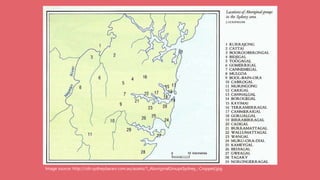
Image source: http://cdn.sydneybarani.com.au/assets/1_AboriginalGroupsSydney_-Cropped.jpg
TALK OVERVIEW
1. Mapping Fundamentals
2. Storing Geospatial Data
3. Querying Geospatial Data
4. Displaying Geospatial Data
5. Future Directions
6. Q&A
1. MAPPING FUNDAMENTALS
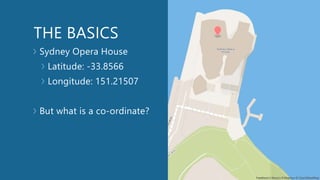
THE BASICS
Sydney Opera House
Latitude: -33.8566
Longitude: 151.21507
But what is a co-ordinate?
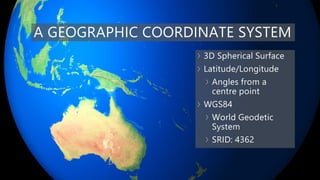
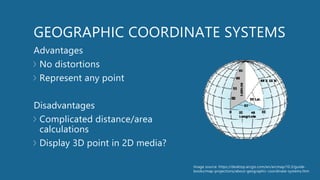
A GEOGRAPHIC COORDINATE SYSTEM
3D Spherical Surface
Latitude/Longitude
Angles from a
centre point
WGS84
World Geodetic
System
SRID: 4362
GEOGRAPHIC COORDINATE SYSTEMS
Advantages
No distortions
Represent any point
Disadvantages
Complicated distance/area
calculations
Display 3D point in 2D media?
Image source: https://desktop.arcgis.com/en/arcmap/10.3/guide-
books/map-projections/about-geographic-coordinate-systems.htm
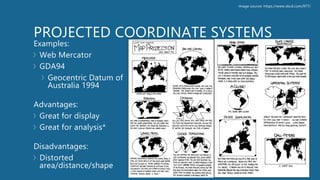
PROJECTED COORDINATE SYSTEMS
Examples:
Web Mercator
GDA94
Geocentric Datum of
Australia 1994
Advantages:
Great for display
Great for analysis*
Disadvantages:
Distorted
area/distance/shape
Image source: https://www.xkcd.com/977/
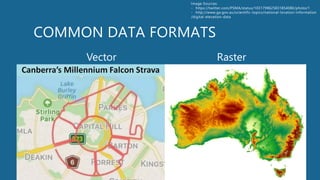
COMMON DATA FORMATS
Vector Raster
Image Sources:
- https://twitter.com/PSMA/status/1031799625831854080/photo/1
- http://www.ga.gov.au/scientific-topics/national-location-information
/digital-elevation-data
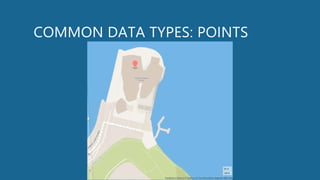
COMMON DATA TYPES: POINTS
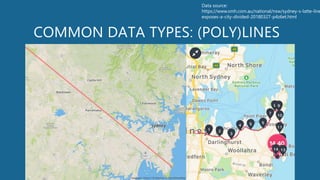
COMMON DATA TYPES: (POLY)LINES
Data source:
https://www.smh.com.au/national/nsw/sydney-s-latte-line
exposes-a-city-divided-20180327-p4z6et.html
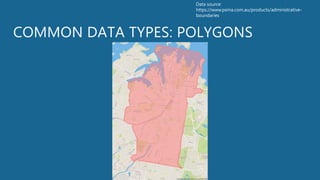
COMMON DATA TYPES: POLYGONS
Data source:
https://www.psma.com.au/products/administrative-
boundaries
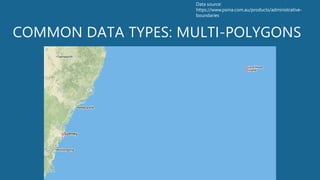
COMMON DATA TYPES: MULTI-POLYGONS
Data source:
https://www.psma.com.au/products/administrative-
boundaries
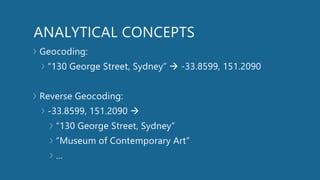
ANALYTICAL CONCEPTS
Geocoding:
“130 George Street, Sydney”  -33.8599, 151.2090
Reverse Geocoding:
-33.8599, 151.2090 
“130 George Street, Sydney”
“Museum of Contemporary Art”
…
ANALYTICAL CONCEPTS
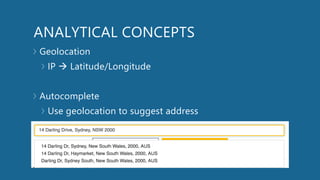
Geolocation
IP  Latitude/Longitude
Autocomplete
Use geolocation to suggest address
ANALYTICAL CONCEPTS
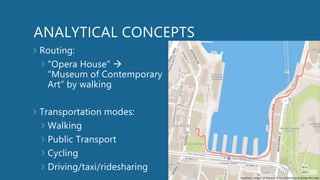
Routing:
“Opera House” 
“Museum of Contemporary
Art” by walking
Transportation modes:
Walking
Public Transport
Cycling
Driving/taxi/ridesharing
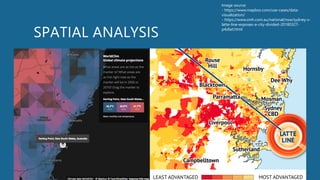
SPATIAL ANALYSIS
Image source:
- https://www.mapbox.com/use-cases/data-
visualization/
- https://www.smh.com.au/national/nsw/sydney-s-
latte-line-exposes-a-city-divided-20180327-
p4z6et.html
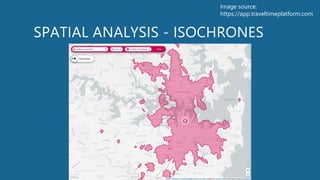
SPATIAL ANALYSIS - ISOCHRONES
Image source:
https://app.traveltimeplatform.com
2. STORING GEOSPATIAL DATA
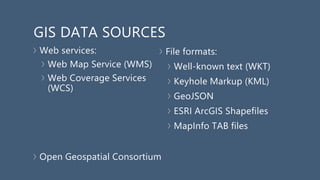
GIS DATA SOURCES
Web services:
Web Map Service (WMS)
Web Coverage Services
(WCS)
Open Geospatial Consortium
File formats:
Well-known text (WKT)
Keyhole Markup (KML)
GeoJSON
ESRI ArcGIS Shapefiles
MapInfo TAB files
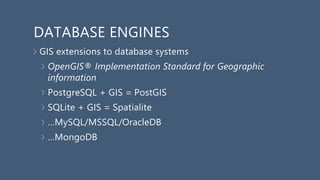
DATABASE ENGINES
GIS extensions to database systems
OpenGIS® Implementation Standard for Geographic
information
PostgreSQL + GIS = PostGIS
SQLite + GIS = Spatialite
…MySQL/MSSQL/OracleDB
…MongoDB
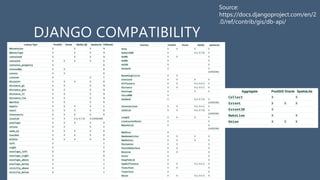
DJANGO COMPATIBILITY
Source:
https://docs.djangoproject.com/en/2
.0/ref/contrib/gis/db-api/
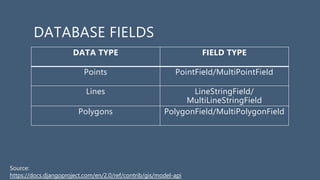
DATABASE FIELDS
DATA TYPE FIELD TYPE
Points PointField/MultiPointField
Lines LineStringField/
MultiLineStringField
Polygons PolygonField/MultiPolygonField
Source:
https://docs.djangoproject.com/en/2.0/ref/contrib/gis/model-api
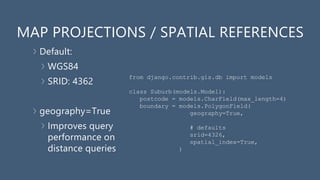
MAP PROJECTIONS / SPATIAL REFERENCES
Default:
WGS84
SRID: 4362
geography=True
Improves query
performance on
distance queries
from django.contrib.gis.db import models
class Suburb(models.Model):
postcode = models.CharField(max_length=4)
boundary = models.PolygonField(
geography=True,
# defaults
srid=4326,
spatial_index=True,
)
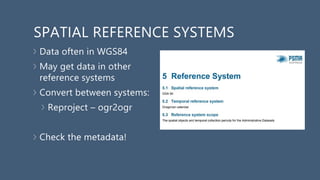
SPATIAL REFERENCE SYSTEMS
Data often in WGS84
May get data in other
reference systems
Convert between systems:
Reproject – ogr2ogr
Check the metadata!
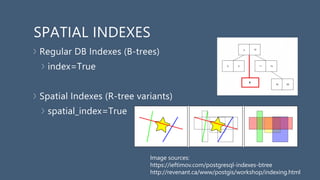
SPATIAL INDEXES
Regular DB Indexes (B-trees)
index=True
Spatial Indexes (R-tree variants)
spatial_index=True
Image sources:
https://ieftimov.com/postgresql-indexes-btree
http://revenant.ca/www/postgis/workshop/indexing.html
3. QUERYING GEOSPATIAL DATA
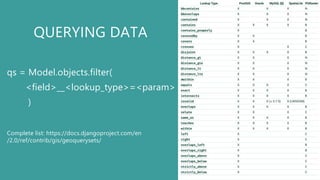
QUERYING DATA
qs = Model.objects.filter(
<field>__<lookup_type>=<param>
)
Complete list: https://docs.djangoproject.com/en
/2.0/ref/contrib/gis/geoquerysets/
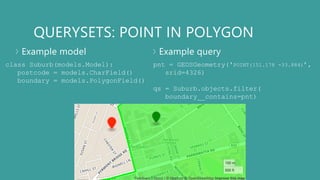
QUERYSETS: POINT IN POLYGON
Example model Example query
class Suburb(models.Model):
postcode = models.CharField()
boundary = models.PolygonField()
pnt = GEOSGeometry('POINT(151.178 -33.884)’,
srid=4326)
qs = Suburb.objects.filter(
boundary__contains=pnt)
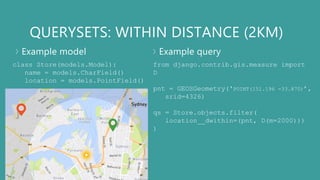
QUERYSETS: WITHIN DISTANCE (2KM)
Example model Example query
class Store(models.Model):
name = models.CharField()
location = models.PointField()
from django.contrib.gis.measure import
D
pnt = GEOSGeometry('POINT(151.196 -33.870)’,
srid=4326)
qs = Store.objects.filter(
location__dwithin=(pnt, D(m=2000)))
)
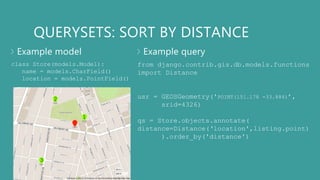
QUERYSETS: SORT BY DISTANCE
Example model Example query
class Store(models.Model):
name = models.CharField()
location = models.PointField()
from django.contrib.gis.db.models.functions
import Distance
usr = GEOSGeometry('POINT(151.178 -33.884)’,
srid=4326)
qs = Store.objects.annotate(
distance=Distance(‘location',listing.point)
).order_by('distance')
1
2
3
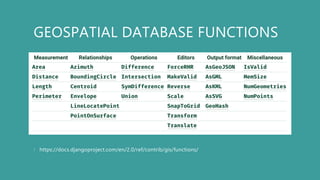
GEOSPATIAL DATABASE FUNCTIONS
https://docs.djangoproject.com/en/2.0/ref/contrib/gis/functions/
4. DISPLAYING GEOSPATIAL DATA
REQUIREMENTS
>Spatial data (already have this!)
>A web mapping library
>Base maps
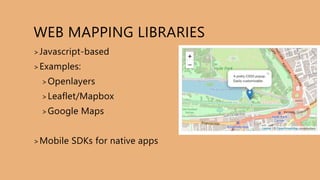
WEB MAPPING LIBRARIES
>Javascript-based
>Examples:
>Openlayers
>Leaflet/Mapbox
>Google Maps
>Mobile SDKs for native apps
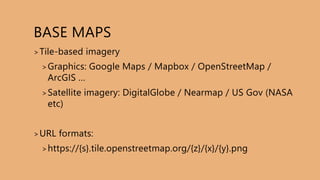
BASE MAPS
>Tile-based imagery
>Graphics: Google Maps / Mapbox / OpenStreetMap /
ArcGIS …
>Satellite imagery: DigitalGlobe / Nearmap / US Gov (NASA
etc)
>URL formats:
>https://{s}.tile.openstreetmap.org/{z}/{x}/{y}.png
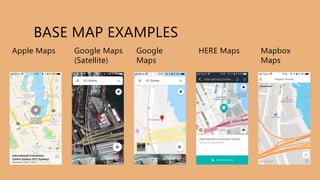
BASE MAP EXAMPLES
Apple Maps Google Maps
(Satellite)
Google
Maps
HERE Maps Mapbox
Maps
SIMPLE EXAMPLE
<!DOCTYPE html>
<html>
<head>
<link rel="stylesheet” href="https://unpkg.com/leaflet
@1.3.3/dist/leaflet.css" />
<script src="https://unpkg.com/leaflet@1.3.3 /dist/leaflet.js"></script>
</head>
<body>
<div id="map" style="width: 600px; height:
400px;"></div>
<script>
var map = L.map('map').setView([-33.8733, 151.1991],
19);
L.tileLayer(
'https://{s}.tile.openstreetmap.org/{z}/{x}/{y}.png’
,{attribution: 'OpenStreetMap contributors’}
).addTo(map);
L.marker([-33.8733, 151.1991]).addTo(map)
.bindPopup('You are here.')
.openPopup();
</script>
</body>
</html>
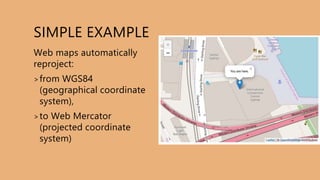
SIMPLE EXAMPLE
Web maps automatically
reproject:
>from WGS84
(geographical coordinate
system),
>to Web Mercator
(projected coordinate
system)
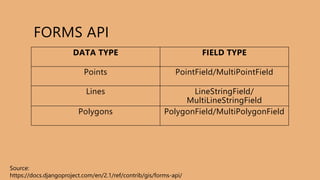
FORMS API
DATA TYPE FIELD TYPE
Points PointField/MultiPointField
Lines LineStringField/
MultiLineStringField
Polygons PolygonField/MultiPolygonField
Source:
https://docs.djangoproject.com/en/2.1/ref/contrib/gis/forms-api/
5. FUTURE DIRECTIONS
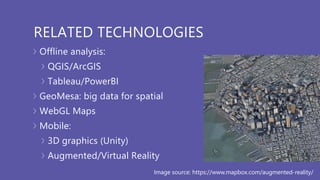
RELATED TECHNOLOGIES
Offline analysis:
QGIS/ArcGIS
Tableau/PowerBI
GeoMesa: big data for spatial
WebGL Maps
Mobile:
3D graphics (Unity)
Augmented/Virtual Reality
Image source: https://www.mapbox.com/augmented-reality/
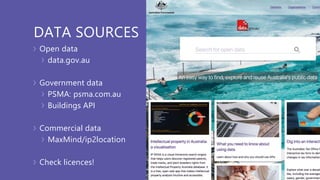
DATA SOURCES
Open data
data.gov.au
Government data
PSMA: psma.com.au
Buildings API
Commercial data
MaxMind/ip2location
Check licences!
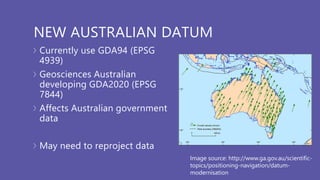
NEW AUSTRALIAN DATUM
Currently use GDA94 (EPSG
4939)
Geosciences Australian
developing GDA2020 (EPSG
7844)
Affects Australian government
data
May need to reproject data
Image source: http://www.ga.gov.au/scientific-
topics/positioning-navigation/datum-
modernisation
KEY TAKEAWAY
POINTS
The official docs are great:
don’t forget to use them!
Make use of existing
libraries/3rd party services:
“don’t roll your own crypto”!
Be careful of:
• coordinate systems
• licences
• coverage
Geospatial analysis is a lot
like statistics: easy to do
something that looks
correct, but has underlying
issues. Question assumptions and
check metadata

A travellers guide to mapping technologies in django

  • 1.
    A TRAVELLER'S GUIDE TOMAPPING TECHNOLOGIES IN DJANGO Anthony I. Joseph DjangoConAU 2018 24 August 2018 anthony.djangoconau@fastmail.com linkedin.com/in/anthony-joseph/ This work is licensed under a Creative Commons Attribution-NonCommercial-NoDerivs 3.0 Australia License.
  • 2.
  • 3.
    TALK OVERVIEW 1. MappingFundamentals 2. Storing Geospatial Data 3. Querying Geospatial Data 4. Displaying Geospatial Data 5. Future Directions 6. Q&A
  • 4.
  • 5.
    THE BASICS Sydney OperaHouse Latitude: -33.8566 Longitude: 151.21507 But what is a co-ordinate?
  • 6.
    A GEOGRAPHIC COORDINATESYSTEM 3D Spherical Surface Latitude/Longitude Angles from a centre point WGS84 World Geodetic System SRID: 4362
  • 7.
    GEOGRAPHIC COORDINATE SYSTEMS Advantages Nodistortions Represent any point Disadvantages Complicated distance/area calculations Display 3D point in 2D media? Image source: https://desktop.arcgis.com/en/arcmap/10.3/guide- books/map-projections/about-geographic-coordinate-systems.htm
  • 8.
    PROJECTED COORDINATE SYSTEMS Examples: WebMercator GDA94 Geocentric Datum of Australia 1994 Advantages: Great for display Great for analysis* Disadvantages: Distorted area/distance/shape Image source: https://www.xkcd.com/977/
  • 9.
    COMMON DATA FORMATS VectorRaster Image Sources: - https://twitter.com/PSMA/status/1031799625831854080/photo/1 - http://www.ga.gov.au/scientific-topics/national-location-information /digital-elevation-data
  • 10.
  • 11.
    COMMON DATA TYPES:(POLY)LINES Data source: https://www.smh.com.au/national/nsw/sydney-s-latte-line exposes-a-city-divided-20180327-p4z6et.html
  • 12.
    COMMON DATA TYPES:POLYGONS Data source: https://www.psma.com.au/products/administrative- boundaries
  • 13.
    COMMON DATA TYPES:MULTI-POLYGONS Data source: https://www.psma.com.au/products/administrative- boundaries
  • 14.
    ANALYTICAL CONCEPTS Geocoding: “130 GeorgeStreet, Sydney”  -33.8599, 151.2090 Reverse Geocoding: -33.8599, 151.2090  “130 George Street, Sydney” “Museum of Contemporary Art” …
  • 15.
    ANALYTICAL CONCEPTS Geolocation IP Latitude/Longitude Autocomplete Use geolocation to suggest address
  • 16.
    ANALYTICAL CONCEPTS Routing: “Opera House” “Museum of Contemporary Art” by walking Transportation modes: Walking Public Transport Cycling Driving/taxi/ridesharing
  • 17.
    SPATIAL ANALYSIS Image source: -https://www.mapbox.com/use-cases/data- visualization/ - https://www.smh.com.au/national/nsw/sydney-s- latte-line-exposes-a-city-divided-20180327- p4z6et.html
  • 18.
    SPATIAL ANALYSIS -ISOCHRONES Image source: https://app.traveltimeplatform.com
  • 19.
  • 20.
    GIS DATA SOURCES Webservices: Web Map Service (WMS) Web Coverage Services (WCS) Open Geospatial Consortium File formats: Well-known text (WKT) Keyhole Markup (KML) GeoJSON ESRI ArcGIS Shapefiles MapInfo TAB files
  • 21.
    DATABASE ENGINES GIS extensionsto database systems OpenGIS® Implementation Standard for Geographic information PostgreSQL + GIS = PostGIS SQLite + GIS = Spatialite …MySQL/MSSQL/OracleDB …MongoDB
  • 22.
  • 23.
    DATABASE FIELDS DATA TYPEFIELD TYPE Points PointField/MultiPointField Lines LineStringField/ MultiLineStringField Polygons PolygonField/MultiPolygonField Source: https://docs.djangoproject.com/en/2.0/ref/contrib/gis/model-api
  • 24.
    MAP PROJECTIONS /SPATIAL REFERENCES Default: WGS84 SRID: 4362 geography=True Improves query performance on distance queries from django.contrib.gis.db import models class Suburb(models.Model): postcode = models.CharField(max_length=4) boundary = models.PolygonField( geography=True, # defaults srid=4326, spatial_index=True, )
  • 25.
    SPATIAL REFERENCE SYSTEMS Dataoften in WGS84 May get data in other reference systems Convert between systems: Reproject – ogr2ogr Check the metadata!
  • 26.
    SPATIAL INDEXES Regular DBIndexes (B-trees) index=True Spatial Indexes (R-tree variants) spatial_index=True Image sources: https://ieftimov.com/postgresql-indexes-btree http://revenant.ca/www/postgis/workshop/indexing.html
  • 27.
  • 28.
    QUERYING DATA qs =Model.objects.filter( <field>__<lookup_type>=<param> ) Complete list: https://docs.djangoproject.com/en /2.0/ref/contrib/gis/geoquerysets/
  • 29.
    QUERYSETS: POINT INPOLYGON Example model Example query class Suburb(models.Model): postcode = models.CharField() boundary = models.PolygonField() pnt = GEOSGeometry('POINT(151.178 -33.884)’, srid=4326) qs = Suburb.objects.filter( boundary__contains=pnt)
  • 30.
    QUERYSETS: WITHIN DISTANCE(2KM) Example model Example query class Store(models.Model): name = models.CharField() location = models.PointField() from django.contrib.gis.measure import D pnt = GEOSGeometry('POINT(151.196 -33.870)’, srid=4326) qs = Store.objects.filter( location__dwithin=(pnt, D(m=2000))) )
  • 31.
    QUERYSETS: SORT BYDISTANCE Example model Example query class Store(models.Model): name = models.CharField() location = models.PointField() from django.contrib.gis.db.models.functions import Distance usr = GEOSGeometry('POINT(151.178 -33.884)’, srid=4326) qs = Store.objects.annotate( distance=Distance(‘location',listing.point) ).order_by('distance') 1 2 3
  • 32.
  • 33.
  • 34.
    REQUIREMENTS >Spatial data (alreadyhave this!) >A web mapping library >Base maps
  • 35.
  • 36.
    BASE MAPS >Tile-based imagery >Graphics:Google Maps / Mapbox / OpenStreetMap / ArcGIS … >Satellite imagery: DigitalGlobe / Nearmap / US Gov (NASA etc) >URL formats: >https://{s}.tile.openstreetmap.org/{z}/{x}/{y}.png
  • 37.
    BASE MAP EXAMPLES AppleMaps Google Maps (Satellite) Google Maps HERE Maps Mapbox Maps
  • 38.
    SIMPLE EXAMPLE <!DOCTYPE html> <html> <head> <linkrel="stylesheet” href="https://unpkg.com/leaflet @1.3.3/dist/leaflet.css" /> <script src="https://unpkg.com/leaflet@1.3.3 /dist/leaflet.js"></script> </head> <body> <div id="map" style="width: 600px; height: 400px;"></div> <script> var map = L.map('map').setView([-33.8733, 151.1991], 19); L.tileLayer( 'https://{s}.tile.openstreetmap.org/{z}/{x}/{y}.png’ ,{attribution: 'OpenStreetMap contributors’} ).addTo(map); L.marker([-33.8733, 151.1991]).addTo(map) .bindPopup('You are here.') .openPopup(); </script> </body> </html>
  • 39.
    SIMPLE EXAMPLE Web mapsautomatically reproject: >from WGS84 (geographical coordinate system), >to Web Mercator (projected coordinate system)
  • 40.
    FORMS API DATA TYPEFIELD TYPE Points PointField/MultiPointField Lines LineStringField/ MultiLineStringField Polygons PolygonField/MultiPolygonField Source: https://docs.djangoproject.com/en/2.1/ref/contrib/gis/forms-api/
  • 41.
  • 42.
    RELATED TECHNOLOGIES Offline analysis: QGIS/ArcGIS Tableau/PowerBI GeoMesa:big data for spatial WebGL Maps Mobile: 3D graphics (Unity) Augmented/Virtual Reality Image source: https://www.mapbox.com/augmented-reality/
  • 43.
    DATA SOURCES Open data data.gov.au Governmentdata PSMA: psma.com.au Buildings API Commercial data MaxMind/ip2location Check licences!
  • 44.
    NEW AUSTRALIAN DATUM Currentlyuse GDA94 (EPSG 4939) Geosciences Australian developing GDA2020 (EPSG 7844) Affects Australian government data May need to reproject data Image source: http://www.ga.gov.au/scientific- topics/positioning-navigation/datum- modernisation
  • 45.
    KEY TAKEAWAY POINTS The officialdocs are great: don’t forget to use them! Make use of existing libraries/3rd party services: “don’t roll your own crypto”! Be careful of: • coordinate systems • licences • coverage Geospatial analysis is a lot like statistics: easy to do something that looks correct, but has underlying issues. Question assumptions and check metadata