Comparing Geospatial Implementation
in MongoDB, Postgres, and Elastic
Percona Live Online
12-13 May 2021
Antonios Giannopoulos
Senior Database Administrator
Pedro Albuquerque
Staff Database Engineer
Alex Cercel
Principal Database Engineer
Agenda
● Definitions
● Proximity search
● Proximity search with filters
● Proximity search with ordering
● Area search
● Best practices
● Benchmark
Dataset
We modified the NY restaurants dataset (https://bit.ly/3xwdNU8)
● Name
● Location
● Area
● Price range*
● Cuisines*
● Rating*
● Amenities*
*Randomly generated
MongoDB - GeoJSON
● Supports GeoJSON and legacy coordinate pairs [<lon>,<lat>]
● Point
● LineString
● Polygon
● MultiPoint
● MultiLineString
● MultiPolygon
● GeometryCollection
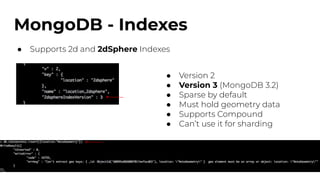
MongoDB - Indexes
● Supports 2d and 2dSphere Indexes
● Version 2
● Version 3 (MongoDB 3.2)
● Sparse by default
● Must hold geometry data
● Supports Compound
● Can’t use it for sharding
MongoDB - Proximity query
● Give me the points of interest near me
● $geowithin
○ $box*
○ $polygon*
○ $center*
○ $centerSphere
● Doesn’t require a 2dsphere
Index
● Results don’t come in
proximity order
● Limit results
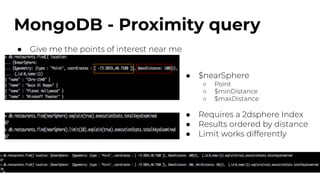
MongoDB - Proximity query
● Give me the points of interest near me
● $nearSphere
○ Point
○ $minDistance
○ $maxDistance
● Requires a 2dsphere Index
● Results ordered by distance
● Limit works differently
MongoDB - Proximity with filters
● Give me specific points of interest near me
● Compound indexes
● Both $geowithin and
$nearSphere support filters
● Index order matters
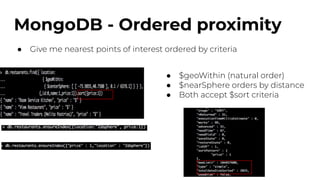
MongoDB - Ordered proximity
● Give me nearest points of interest ordered by criteria
● $geoWithin (natural order)
● $nearSphere orders by distance
● Both accept $sort criteria
MongoDB - Ordered proximity
● Give me nearest points of interest ordered by criteria
● A little trick
● Results come ordered
● But… more keys to access
VS
MongoDB - Ordered proximity
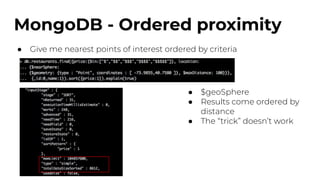
● Give me nearest points of interest ordered by criteria
● $geoSphere
● Results come ordered by
distance
● The “trick” doesn’t work
MongoDB - Ordered proximity
● Give me nearest points of interest ordered by criteria
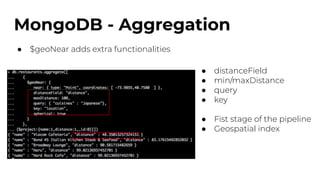
MongoDB - Aggregation
● $geoNear adds extra functionalities
● distanceField
● min/maxDistance
● query
● key
● Fist stage of the pipeline
● Geospatial index
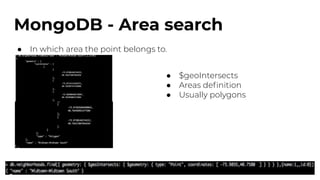
MongoDB - Area search
● In which area the point belongs to.
● $geoIntersects
● Areas definition
● Usually polygons
MongoDB - Moving Points
● Accuracy vs Speed
○ Accuracy requires higher write throughput
○ Speed pushes the changes on regular intervals
● Scale the writes with sharding
● Pick a random(ish) shard key
● Update the active records only (client)
MongoDB - Best Practices
● Always have an Geospacial index in place
● You may need different variations of the Geospacial Index
● $hint as much as possible
● $limit is your friend
● Control the document size (both search and sort)
● Use $geoWithin for ordered results
● Use metadata to avoid $geoIntersects
● Scale with additional secondaries and use tags
● Scale with sharding (divide and conquer vs targeted operations)
● Know your queries (random queries can hurt performance)
MongoDB - Best Practices
1) 2)
3) 4)
PostgreSQL - PostGIS
● Spatial database extension for PostgreSQL
● Extra data types
○ geometry
○ geography
● Additional functions and operators
● Raster map algebra
● Spatial reprojection SQL callable functions for both vector and raster
data
● Import/export support of shape files
PostGIS - Data types
Geometry:
● Older data type
● Cartesian plane
● More support from third party tools
● Operations on it are generally faster
● Need for a lot of spatial processing
Geography:
● Newer data type
● Points on the earth’s surface (latitude/longitude)
● Supports long range distance measurements
● Slower than geometry
● More accurate results
PostGIS - Geometric objects
Supports:
● POINT
● LINESTRING
● POLYGON
● MULTIPOINT
● MULTILINESTRING
● MULTIPOLYGON
● GEOMETRYCOLLECTION
● CURVES
● POLYHEDRALSURFACE
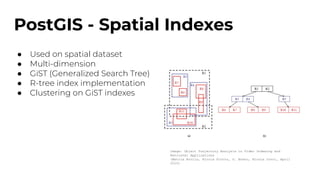
PostGIS - Spatial Indexes
● Used on spatial dataset
● Multi-dimension
● GiST (Generalized Search Tree)
● R-tree index implementation
● Clustering on GiST indexes
Image: Object Trajectory Analysis in Video Indexing and
Retrieval Applications
(Mattia Broilo, Nicola Piotto, G. Boato, Nicola Conci, April
2010)
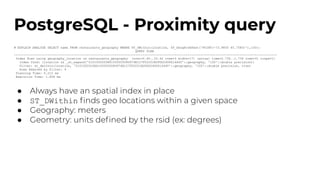
PostgreSQL - Proximity query
# EXPLAIN ANALYZE SELECT name FROM restaurants_geography WHERE ST_DWithin(location, ST_GeogFromText('POINT(-73.9855 40.7580)'),100);
QUERY PLAN
---------------------------------------------------------------------------------------------------------------------------------------------
Index Scan using geography_location on restaurants_geography (cost=0.40..33.42 rows=3 width=17) (actual time=0.734..1.736 rows=31 loops=1)
Index Cond: (location && _st_expand('0101000020E6100000508D976E127F52C01B2FDD2406614440'::geography, '100'::double precision))
Filter: st_dwithin(location, '0101000020E6100000508D976E127F52C01B2FDD2406614440'::geography, '100'::double precision, true)
Rows Removed by Filter: 9
Planning Time: 0.212 ms
Execution Time: 1.858 ms
● Always have an spatial index in place
● ST_DWithin finds geo locations within a given space
● Geography: meters
● Geometry: units defined by the rsid (ex: degrees)
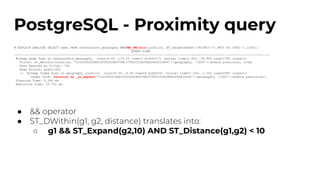
PostgreSQL - Proximity query
# EXPLAIN ANALYZE SELECT name FROM restaurants_geography WHERE
ST_DWithin(location, ST_GeogFromText('POINT(-73.9855 40.7580)'),1000);
QUERY PLAN
-----------------------------------------------------------------------------------------------------------------------------------------
Bitmap Heap Scan on restaurants_geography (cost=4.43..119.10 rows=3 width=17) (actual time=1.924..18.900 rows=1782 loops=1)
Filter: st_dwithin(location, '0101000020E6100000508D976E127F52C01B2FDD2406614440'::geography, '1000'::double precision, true)
Rows Removed by Filter: 765
Heap Blocks: exact=303
-> Bitmap Index Scan on geography_location (cost=0.00..4.43 rows=4 width=0) (actual time=1.200..1.202 rows=2547 loops=1)
Index Cond: (
location && _st_expand('0101000020E6100000508D976E127F52C01B2FDD2406614440'::geography, '1000'::double precision))
Planning Time: 0.284 ms
Execution Time: 22.761 ms
● && operator
● ST_DWithin(g1, g2, distance) translates into:
○ g1 && ST_Expand(g2,10) AND ST_Distance(g1,g2) < 10
PostgreSQL - Proximity query
with ordered results
# SELECT name, ST_Distance(location, ref_geog) AS distance FROM restaurants_geography CROSS JOIN (SELECT ST_GeogFromText('POINT(-73.9855 40.7580)') AS ref_geog)
AS r WHERE ST_DWithin(location, ref_geog, 100) ORDER BY ST_Distance(location, ref_geog) limit 15;
name | distance
-----------------------------------------+-------------
Cbre-1540 | 40.39000116
Buca Di Beppo | 40.39000116
Planet Hollywood | 40.39000116
Minskoff Theater | 46.50344181
Best Buy Theater | 48.41508544
Refresh Cafe | 48.41508544
Viacom Cafeteria | 48.41508544
Viacom Executive Dining Room | 48.41508544
Junior"S Restaurant | 48.41508544
Starbucks Coffee | 68.38420071
Nuchas | 79.01362202
Bond 45 Italian Kitchen Steak & Seafood | 83.16301778
Cookie Party(@Toy ""R"" Us) | 88.45480111
Scoops R Us | 88.45480111
Lyceum Theatre | 88.93144242
# CLUSTER geography_location ON restaurants_geography;
CLUSTER
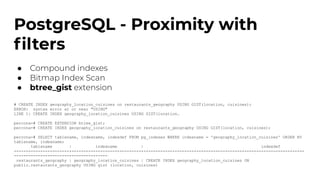
PostgreSQL - Proximity with
filters
● Compound indexes
● Bitmap Index Scan
● btree_gist extension
# CREATE INDEX geography_location_cuisines on restaurants_geography USING GIST(location, cuisines);
ERROR: syntax error at or near "USING"
LINE 1: CREATE INDEX geography_location_cuisines USING GIST(location…
percona=# CREATE EXTENSION btree_gist;
percona=# CREATE INDEX geography_location_cuisines on restaurants_geography USING GIST(location, cuisines);
percona=# SELECT tablename, indexname, indexdef FROM pg_indexes WHERE indexname = 'geography_location_cuisines' ORDER BY
tablename, indexname;
tablename | indexname | indexdef
-----------------------+-----------------------------+-------------------------------------------------------------------
---------------------------------------
restaurants_geography | geography_location_cuisines | CREATE INDEX geography_location_cuisines ON
public.restaurants_geography USING gist (location, cuisines)
PostgreSQL - Proximity with
filters
GiST INDEX ON location
EXPLAIN ANALYZE SELECT name FROM restaurants_geography WHERE ST_DWithin(location, ST_GeogFromText('POINT(-73.9855 40.7580)'),100) and cuisines = 'Japanese';
QUERY PLAN
------------------------------------------------------------------------------------------------------------------------------------------------------------------
----------
Index Scan using geog_location on restaurants_geography (cost=0.40..33.42 rows=1 width=17) (actual time=0.794..1.261 rows=5 loops=1)
Index Cond: (location && _st_expand('0101000020E6100000508D976E127F52C01B2FDD2406614440'::geography, '100'::double precision))
Filter: (((cuisines)::text = 'Japanese'::text) AND st_dwithin(location, '0101000020E6100000508D976E127F52C01B2FDD2406614440'::geography, '100'::double
precision, true))
Rows Removed by Filter: 35
Planning Time: 0.239 ms
Execution Time: 1.328 ms
GiST INDEX ON location, cuisines
EXPLAIN ANALYZE SELECT name FROM restaurants_geography WHERE ST_DWithin(location, ST_GeogFromText('POINT(-73.9855 40.7580)'),100) and cuisines = 'Japanese';
QUERY PLAN
------------------------------------------------------------------------------------------------------------------------------------------------------------------
------------
Index Scan using geog_location_cuisines on restaurants_geography (cost=0.40..33.42 rows=1 width=17) (actual time=0.741..1.065 rows=5 loops=1)
Index Cond: ((location && _st_expand('0101000020E6100000508D976E127F52C01B2FDD2406614440'::geography, '100'::double precision)) AND ((cuisines)::text =
'Japanese'::text))
Filter: st_dwithin(location, '0101000020E6100000508D976E127F52C01B2FDD2406614440'::geography, '100'::double precision, true)
Planning Time: 0.388 ms
Execution Time: 1.134 ms
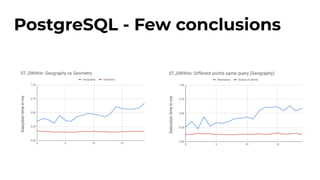
PostgreSQL - Few conclusions
Elasticsearch - Geo Field Types:
● geo_point - data types which support lon/latitude pairs;
● geo_shape - more advanced fields which support points, lines, circles,
polygons, multi-polygons;
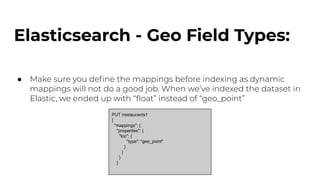
Elasticsearch - Geo Field Types:
● Make sure you define the mappings before indexing as dynamic
mappings will not do a good job. When we’ve indexed the dataset in
Elastic, we ended up with “float” instead of “geo_point”
PUT /restaurants1
{
"mappings": {
"properties": {
"loc": {
"type": "geo_point"
}
}
}
}
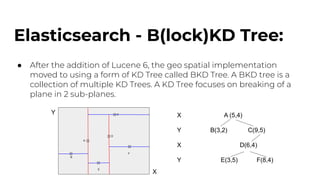
Elasticsearch - B(lock)KD Tree:
● After the addition of Lucene 6, the geo spatial implementation
moved to using a form of KD Tree called BKD Tree. A BKD tree is a
collection of multiple KD Trees. A KD Tree focuses on breaking of a
plane in 2 sub-planes.
A
B
C
D
E
F
Y
X
X A (5,4)
Y B(3,2) C(9,5)
X D(6,4)
Y E(3,5) F(8,4)
Elasticsearch - Geo Queries:
● geo_bounding_box query.
● geo_distance query.
● geo_polygon query. *Deprecated in 7.12*
● geo_shape query.
Elasticsearch - Proximity query:
● Give me the points of interest near me
- All common filters will be cached
- The distance can be specified in large nr
of units but it defaults to meters.
- By default, displays the top 10 results but we
had 31 answers in this case
- I only have 1 shard but would tell you how
many it hit
- “Hits.total.value” = number of matches
- It took 42ms initially, then 5-6 with caching
Elasticsearch - Proximity with filters
● Give me the points of interest near me
- We’re no longer interested in match_all
but on documents with the term
Japanese
- The filter remained, of course, the same
- From 31, we now have 5 hits
- From 42ms, this took 14ms
initially because we are limiting
the amount of documents that it
needs to return
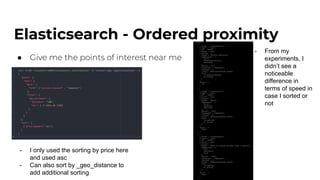
Elasticsearch - Ordered proximity
● Give me the points of interest near me
- I only used the sorting by price here
and used asc
- Can also sort by _geo_distance to
add additional sorting
- From my
experiments, I
didn’t see a
noticeable
difference in
terms of speed in
case I sorted or
not
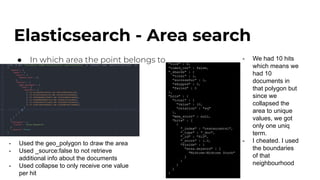
Elasticsearch - Area search
● In which area the point belongs to
- Used the geo_polygon to draw the area
- Used _source:false to not retrieve
additional info about the documents
- Used collapse to only receive one value
per hit
- We had 10 hits
which means we
had 10
documents in
that polygon but
since we
collapsed the
area to unique
values, we got
only one uniq
term.
- I cheated. I used
the boundaries
of that
neighbourhood
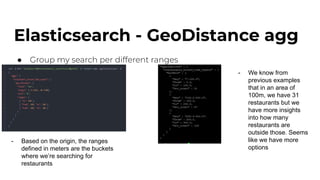
Elasticsearch - GeoDistance agg
● Group my search per different ranges
- Based on the origin, the ranges
defined in meters are the buckets
where we’re searching for
restaurants
- We know from
previous examples
that in an area of
100m, we have 31
restaurants but we
have more insights
into how many
restaurants are
outside those. Seems
like we have more
options
Elasticsearch - Geo Aggregation
● Elasticsearch allows a hefty amount of options for aggregating data:
○ Bucket aggregations
■ Geodistance, Geohash & Geotile grid aggregations
○ Metrics aggregations
■ Geobounds, Geocentroid & Geoline(useful for maps)
aggregations
Closing remarks/Thought
● Data structures used by Postgres and ES are more suitable for heavy Geo
Workload than MongoDB
● All three databases supports a rich command set. PostGIS looks to have
the richest command set
● ES works out of the box, MongoDB needs indexes to be deployed and
Postgres requires the extension to be installed
● All three provide, various scaling mechanisms for geospatial workloads
● If we had to choose one… it would be...
- Thank you!!! -
- Q&A -

Comparing Geospatial Implementation in MongoDB, Postgres, and Elastic

  • 1.
    Comparing Geospatial Implementation inMongoDB, Postgres, and Elastic Percona Live Online 12-13 May 2021
  • 2.
    Antonios Giannopoulos Senior DatabaseAdministrator Pedro Albuquerque Staff Database Engineer Alex Cercel Principal Database Engineer
  • 3.
    Agenda ● Definitions ● Proximitysearch ● Proximity search with filters ● Proximity search with ordering ● Area search ● Best practices ● Benchmark
  • 4.
    Dataset We modified theNY restaurants dataset (https://bit.ly/3xwdNU8) ● Name ● Location ● Area ● Price range* ● Cuisines* ● Rating* ● Amenities* *Randomly generated
  • 5.
    MongoDB - GeoJSON ●Supports GeoJSON and legacy coordinate pairs [<lon>,<lat>] ● Point ● LineString ● Polygon ● MultiPoint ● MultiLineString ● MultiPolygon ● GeometryCollection
  • 6.
    MongoDB - Indexes ●Supports 2d and 2dSphere Indexes ● Version 2 ● Version 3 (MongoDB 3.2) ● Sparse by default ● Must hold geometry data ● Supports Compound ● Can’t use it for sharding
  • 7.
    MongoDB - Proximityquery ● Give me the points of interest near me ● $geowithin ○ $box* ○ $polygon* ○ $center* ○ $centerSphere ● Doesn’t require a 2dsphere Index ● Results don’t come in proximity order ● Limit results
  • 8.
    MongoDB - Proximityquery ● Give me the points of interest near me ● $nearSphere ○ Point ○ $minDistance ○ $maxDistance ● Requires a 2dsphere Index ● Results ordered by distance ● Limit works differently
  • 9.
    MongoDB - Proximitywith filters ● Give me specific points of interest near me ● Compound indexes ● Both $geowithin and $nearSphere support filters ● Index order matters
  • 10.
    MongoDB - Orderedproximity ● Give me nearest points of interest ordered by criteria ● $geoWithin (natural order) ● $nearSphere orders by distance ● Both accept $sort criteria
  • 11.
    MongoDB - Orderedproximity ● Give me nearest points of interest ordered by criteria ● A little trick ● Results come ordered ● But… more keys to access VS
  • 12.
    MongoDB - Orderedproximity ● Give me nearest points of interest ordered by criteria ● $geoSphere ● Results come ordered by distance ● The “trick” doesn’t work
  • 13.
    MongoDB - Orderedproximity ● Give me nearest points of interest ordered by criteria
  • 14.
    MongoDB - Aggregation ●$geoNear adds extra functionalities ● distanceField ● min/maxDistance ● query ● key ● Fist stage of the pipeline ● Geospatial index
  • 15.
    MongoDB - Areasearch ● In which area the point belongs to. ● $geoIntersects ● Areas definition ● Usually polygons
  • 16.
    MongoDB - MovingPoints ● Accuracy vs Speed ○ Accuracy requires higher write throughput ○ Speed pushes the changes on regular intervals ● Scale the writes with sharding ● Pick a random(ish) shard key ● Update the active records only (client)
  • 17.
    MongoDB - BestPractices ● Always have an Geospacial index in place ● You may need different variations of the Geospacial Index ● $hint as much as possible ● $limit is your friend ● Control the document size (both search and sort) ● Use $geoWithin for ordered results ● Use metadata to avoid $geoIntersects ● Scale with additional secondaries and use tags ● Scale with sharding (divide and conquer vs targeted operations) ● Know your queries (random queries can hurt performance)
  • 18.
    MongoDB - BestPractices 1) 2) 3) 4)
  • 19.
    PostgreSQL - PostGIS ●Spatial database extension for PostgreSQL ● Extra data types ○ geometry ○ geography ● Additional functions and operators ● Raster map algebra ● Spatial reprojection SQL callable functions for both vector and raster data ● Import/export support of shape files
  • 20.
    PostGIS - Datatypes Geometry: ● Older data type ● Cartesian plane ● More support from third party tools ● Operations on it are generally faster ● Need for a lot of spatial processing Geography: ● Newer data type ● Points on the earth’s surface (latitude/longitude) ● Supports long range distance measurements ● Slower than geometry ● More accurate results
  • 21.
    PostGIS - Geometricobjects Supports: ● POINT ● LINESTRING ● POLYGON ● MULTIPOINT ● MULTILINESTRING ● MULTIPOLYGON ● GEOMETRYCOLLECTION ● CURVES ● POLYHEDRALSURFACE
  • 22.
    PostGIS - SpatialIndexes ● Used on spatial dataset ● Multi-dimension ● GiST (Generalized Search Tree) ● R-tree index implementation ● Clustering on GiST indexes Image: Object Trajectory Analysis in Video Indexing and Retrieval Applications (Mattia Broilo, Nicola Piotto, G. Boato, Nicola Conci, April 2010)
  • 23.
    PostgreSQL - Proximityquery # EXPLAIN ANALYZE SELECT name FROM restaurants_geography WHERE ST_DWithin(location, ST_GeogFromText('POINT(-73.9855 40.7580)'),100); QUERY PLAN --------------------------------------------------------------------------------------------------------------------------------------------- Index Scan using geography_location on restaurants_geography (cost=0.40..33.42 rows=3 width=17) (actual time=0.734..1.736 rows=31 loops=1) Index Cond: (location && _st_expand('0101000020E6100000508D976E127F52C01B2FDD2406614440'::geography, '100'::double precision)) Filter: st_dwithin(location, '0101000020E6100000508D976E127F52C01B2FDD2406614440'::geography, '100'::double precision, true) Rows Removed by Filter: 9 Planning Time: 0.212 ms Execution Time: 1.858 ms ● Always have an spatial index in place ● ST_DWithin finds geo locations within a given space ● Geography: meters ● Geometry: units defined by the rsid (ex: degrees)
  • 24.
    PostgreSQL - Proximityquery # EXPLAIN ANALYZE SELECT name FROM restaurants_geography WHERE ST_DWithin(location, ST_GeogFromText('POINT(-73.9855 40.7580)'),1000); QUERY PLAN ----------------------------------------------------------------------------------------------------------------------------------------- Bitmap Heap Scan on restaurants_geography (cost=4.43..119.10 rows=3 width=17) (actual time=1.924..18.900 rows=1782 loops=1) Filter: st_dwithin(location, '0101000020E6100000508D976E127F52C01B2FDD2406614440'::geography, '1000'::double precision, true) Rows Removed by Filter: 765 Heap Blocks: exact=303 -> Bitmap Index Scan on geography_location (cost=0.00..4.43 rows=4 width=0) (actual time=1.200..1.202 rows=2547 loops=1) Index Cond: ( location && _st_expand('0101000020E6100000508D976E127F52C01B2FDD2406614440'::geography, '1000'::double precision)) Planning Time: 0.284 ms Execution Time: 22.761 ms ● && operator ● ST_DWithin(g1, g2, distance) translates into: ○ g1 && ST_Expand(g2,10) AND ST_Distance(g1,g2) < 10
  • 25.
    PostgreSQL - Proximityquery with ordered results # SELECT name, ST_Distance(location, ref_geog) AS distance FROM restaurants_geography CROSS JOIN (SELECT ST_GeogFromText('POINT(-73.9855 40.7580)') AS ref_geog) AS r WHERE ST_DWithin(location, ref_geog, 100) ORDER BY ST_Distance(location, ref_geog) limit 15; name | distance -----------------------------------------+------------- Cbre-1540 | 40.39000116 Buca Di Beppo | 40.39000116 Planet Hollywood | 40.39000116 Minskoff Theater | 46.50344181 Best Buy Theater | 48.41508544 Refresh Cafe | 48.41508544 Viacom Cafeteria | 48.41508544 Viacom Executive Dining Room | 48.41508544 Junior"S Restaurant | 48.41508544 Starbucks Coffee | 68.38420071 Nuchas | 79.01362202 Bond 45 Italian Kitchen Steak & Seafood | 83.16301778 Cookie Party(@Toy ""R"" Us) | 88.45480111 Scoops R Us | 88.45480111 Lyceum Theatre | 88.93144242 # CLUSTER geography_location ON restaurants_geography; CLUSTER
  • 26.
    PostgreSQL - Proximitywith filters ● Compound indexes ● Bitmap Index Scan ● btree_gist extension # CREATE INDEX geography_location_cuisines on restaurants_geography USING GIST(location, cuisines); ERROR: syntax error at or near "USING" LINE 1: CREATE INDEX geography_location_cuisines USING GIST(location… percona=# CREATE EXTENSION btree_gist; percona=# CREATE INDEX geography_location_cuisines on restaurants_geography USING GIST(location, cuisines); percona=# SELECT tablename, indexname, indexdef FROM pg_indexes WHERE indexname = 'geography_location_cuisines' ORDER BY tablename, indexname; tablename | indexname | indexdef -----------------------+-----------------------------+------------------------------------------------------------------- --------------------------------------- restaurants_geography | geography_location_cuisines | CREATE INDEX geography_location_cuisines ON public.restaurants_geography USING gist (location, cuisines)
  • 27.
    PostgreSQL - Proximitywith filters GiST INDEX ON location EXPLAIN ANALYZE SELECT name FROM restaurants_geography WHERE ST_DWithin(location, ST_GeogFromText('POINT(-73.9855 40.7580)'),100) and cuisines = 'Japanese'; QUERY PLAN ------------------------------------------------------------------------------------------------------------------------------------------------------------------ ---------- Index Scan using geog_location on restaurants_geography (cost=0.40..33.42 rows=1 width=17) (actual time=0.794..1.261 rows=5 loops=1) Index Cond: (location && _st_expand('0101000020E6100000508D976E127F52C01B2FDD2406614440'::geography, '100'::double precision)) Filter: (((cuisines)::text = 'Japanese'::text) AND st_dwithin(location, '0101000020E6100000508D976E127F52C01B2FDD2406614440'::geography, '100'::double precision, true)) Rows Removed by Filter: 35 Planning Time: 0.239 ms Execution Time: 1.328 ms GiST INDEX ON location, cuisines EXPLAIN ANALYZE SELECT name FROM restaurants_geography WHERE ST_DWithin(location, ST_GeogFromText('POINT(-73.9855 40.7580)'),100) and cuisines = 'Japanese'; QUERY PLAN ------------------------------------------------------------------------------------------------------------------------------------------------------------------ ------------ Index Scan using geog_location_cuisines on restaurants_geography (cost=0.40..33.42 rows=1 width=17) (actual time=0.741..1.065 rows=5 loops=1) Index Cond: ((location && _st_expand('0101000020E6100000508D976E127F52C01B2FDD2406614440'::geography, '100'::double precision)) AND ((cuisines)::text = 'Japanese'::text)) Filter: st_dwithin(location, '0101000020E6100000508D976E127F52C01B2FDD2406614440'::geography, '100'::double precision, true) Planning Time: 0.388 ms Execution Time: 1.134 ms
  • 28.
    PostgreSQL - Fewconclusions
  • 29.
    Elasticsearch - GeoField Types: ● geo_point - data types which support lon/latitude pairs; ● geo_shape - more advanced fields which support points, lines, circles, polygons, multi-polygons;
  • 30.
    Elasticsearch - GeoField Types: ● Make sure you define the mappings before indexing as dynamic mappings will not do a good job. When we’ve indexed the dataset in Elastic, we ended up with “float” instead of “geo_point” PUT /restaurants1 { "mappings": { "properties": { "loc": { "type": "geo_point" } } } }
  • 31.
    Elasticsearch - B(lock)KDTree: ● After the addition of Lucene 6, the geo spatial implementation moved to using a form of KD Tree called BKD Tree. A BKD tree is a collection of multiple KD Trees. A KD Tree focuses on breaking of a plane in 2 sub-planes. A B C D E F Y X X A (5,4) Y B(3,2) C(9,5) X D(6,4) Y E(3,5) F(8,4)
  • 32.
    Elasticsearch - GeoQueries: ● geo_bounding_box query. ● geo_distance query. ● geo_polygon query. *Deprecated in 7.12* ● geo_shape query.
  • 33.
    Elasticsearch - Proximityquery: ● Give me the points of interest near me - All common filters will be cached - The distance can be specified in large nr of units but it defaults to meters. - By default, displays the top 10 results but we had 31 answers in this case - I only have 1 shard but would tell you how many it hit - “Hits.total.value” = number of matches - It took 42ms initially, then 5-6 with caching
  • 34.
    Elasticsearch - Proximitywith filters ● Give me the points of interest near me - We’re no longer interested in match_all but on documents with the term Japanese - The filter remained, of course, the same - From 31, we now have 5 hits - From 42ms, this took 14ms initially because we are limiting the amount of documents that it needs to return
  • 35.
    Elasticsearch - Orderedproximity ● Give me the points of interest near me - I only used the sorting by price here and used asc - Can also sort by _geo_distance to add additional sorting - From my experiments, I didn’t see a noticeable difference in terms of speed in case I sorted or not
  • 36.
    Elasticsearch - Areasearch ● In which area the point belongs to - Used the geo_polygon to draw the area - Used _source:false to not retrieve additional info about the documents - Used collapse to only receive one value per hit - We had 10 hits which means we had 10 documents in that polygon but since we collapsed the area to unique values, we got only one uniq term. - I cheated. I used the boundaries of that neighbourhood
  • 37.
    Elasticsearch - GeoDistanceagg ● Group my search per different ranges - Based on the origin, the ranges defined in meters are the buckets where we’re searching for restaurants - We know from previous examples that in an area of 100m, we have 31 restaurants but we have more insights into how many restaurants are outside those. Seems like we have more options
  • 38.
    Elasticsearch - GeoAggregation ● Elasticsearch allows a hefty amount of options for aggregating data: ○ Bucket aggregations ■ Geodistance, Geohash & Geotile grid aggregations ○ Metrics aggregations ■ Geobounds, Geocentroid & Geoline(useful for maps) aggregations
  • 39.
    Closing remarks/Thought ● Datastructures used by Postgres and ES are more suitable for heavy Geo Workload than MongoDB ● All three databases supports a rich command set. PostGIS looks to have the richest command set ● ES works out of the box, MongoDB needs indexes to be deployed and Postgres requires the extension to be installed ● All three provide, various scaling mechanisms for geospatial workloads ● If we had to choose one… it would be...
  • 40.
    - Thank you!!!- - Q&A -