Palo alto URL Web Filtering concept
1. URL Filtering Overview
2. URL Filtering benefits
3. URL Filtering Vendors supported PAN-OS
3. Palo alto URL Categories
4. URL Filtering Profile Actions
5. URL Categorization Resolution Process
6. URL filtering response pages
URL Filtering Overview
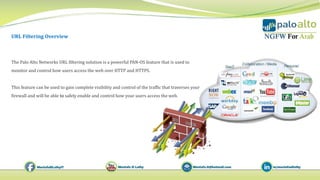
The Palo Alto Networks URL filtering solution is a powerful PAN-OS feature that is used to
monitor and control how users access the web over HTTP and HTTPS.
This feature can be used to gain complete visibility and control of the traffic that traverses your
firewall and will be able to safely enable and control how your users access the web.
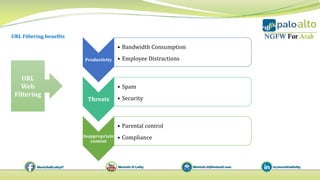
Productivity
• Bandwidth Consumption
• Employee Distractions
Threats
• Spam
• Security
Inappropriate
content
• Parental control
• Compliance
URL
Web
Filtering
URL Filtering benefits
URL Filtering Vendors supported PAN-OS
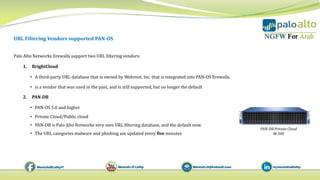
Palo Alto Networks firewalls support two URL filtering vendors:
1. BrightCloud
• A third‐party URL database that is owned by Webroot, Inc. that is integrated into PAN‐OS firewalls.
• is a vendor that was used in the past, and is still supported, but no longer the default
2. PAN‐DB
• PAN-OS 5.0 and higher
• Private Cloud/Public cloud
• PAN-DB is Palo Alto Networks very own URL filtering database, and the default now.
• The URL categories malware and phishing are updated every five minutes
PAN‐DB Private Cloud
M-500
Palo alto URL Categories
You can submit URL categorization change requests using the Palo Alto Networks dedicated web portal
URL categories - rules can contain URL Category Each website defined in the URL filtering database is assigned one of
approximately 84 different URL categories.
There are three additional categories:
• not‐resolved
• private‐ip‐addresses
• Unknown
The policy types that accept URL category as match criteria:
• Authentication
• Decryption (SSL Inspection)
• QoS(Bandwidth Control)
• Security (allow/Deny)
1. Block : Website is blocked and users sees a response page stating the category and reason for block (Customizable )
2. Allow : Site is allowed. No LOG GENERATED
3. Alert: Site is allowed. Log is generated in URL-Filtering log
4. Continue: Website is initially blocked. User sees a page explaining the reason for the block and allowing the user to select
"continue" to proceed to the site. Logged in URL-Filtering
5. Override: IT/Admin may enter a password to temporarily allow access to the site.
URL Filtering Profile Actions
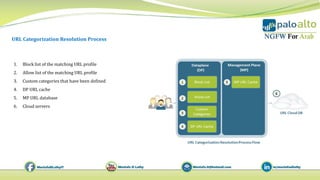
URL Categorization Resolution Process
1. Block list of the matching URL profile
2. Allow list of the matching URL profile
3. Custom categories that have been defined
4. DP URL cache
5. MP URL database
6. Cloud servers
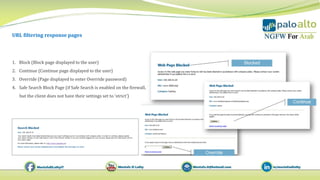
URL filtering response pages
1. Block (Block page displayed to the user)
2. Continue (Continue page displayed to the user)
3. Override (Page displayed to enter Override password)
4. Safe Search Block Page (if Safe Search is enabled on the firewall,
but the client does not have their settings set to ‘strict’)
13 palo alto url web filtering concept

13 palo alto url web filtering concept

  • 1.
    Palo alto URLWeb Filtering concept 1. URL Filtering Overview 2. URL Filtering benefits 3. URL Filtering Vendors supported PAN-OS 3. Palo alto URL Categories 4. URL Filtering Profile Actions 5. URL Categorization Resolution Process 6. URL filtering response pages
  • 2.
    URL Filtering Overview ThePalo Alto Networks URL filtering solution is a powerful PAN-OS feature that is used to monitor and control how users access the web over HTTP and HTTPS. This feature can be used to gain complete visibility and control of the traffic that traverses your firewall and will be able to safely enable and control how your users access the web.
  • 3.
    Productivity • Bandwidth Consumption •Employee Distractions Threats • Spam • Security Inappropriate content • Parental control • Compliance URL Web Filtering URL Filtering benefits
  • 4.
    URL Filtering Vendorssupported PAN-OS Palo Alto Networks firewalls support two URL filtering vendors: 1. BrightCloud • A third‐party URL database that is owned by Webroot, Inc. that is integrated into PAN‐OS firewalls. • is a vendor that was used in the past, and is still supported, but no longer the default 2. PAN‐DB • PAN-OS 5.0 and higher • Private Cloud/Public cloud • PAN-DB is Palo Alto Networks very own URL filtering database, and the default now. • The URL categories malware and phishing are updated every five minutes PAN‐DB Private Cloud M-500
  • 5.
    Palo alto URLCategories You can submit URL categorization change requests using the Palo Alto Networks dedicated web portal URL categories - rules can contain URL Category Each website defined in the URL filtering database is assigned one of approximately 84 different URL categories. There are three additional categories: • not‐resolved • private‐ip‐addresses • Unknown The policy types that accept URL category as match criteria: • Authentication • Decryption (SSL Inspection) • QoS(Bandwidth Control) • Security (allow/Deny)
  • 6.
    1. Block :Website is blocked and users sees a response page stating the category and reason for block (Customizable ) 2. Allow : Site is allowed. No LOG GENERATED 3. Alert: Site is allowed. Log is generated in URL-Filtering log 4. Continue: Website is initially blocked. User sees a page explaining the reason for the block and allowing the user to select "continue" to proceed to the site. Logged in URL-Filtering 5. Override: IT/Admin may enter a password to temporarily allow access to the site. URL Filtering Profile Actions
  • 7.
    URL Categorization ResolutionProcess 1. Block list of the matching URL profile 2. Allow list of the matching URL profile 3. Custom categories that have been defined 4. DP URL cache 5. MP URL database 6. Cloud servers
  • 10.
    URL filtering responsepages 1. Block (Block page displayed to the user) 2. Continue (Continue page displayed to the user) 3. Override (Page displayed to enter Override password) 4. Safe Search Block Page (if Safe Search is enabled on the firewall, but the client does not have their settings set to ‘strict’)