Palo Alto Command Line interface (CLI)
The following topics will be covered in this lesson.
 Initial Access to Palo alto Using CLI
 CLI Modes
 CLI Tools
 CLI Find Command & keyword
Initial Access to Palo alto Using CLI
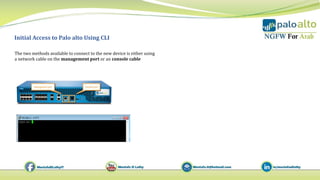
The two methods available to connect to the new device is either using
a network cable on the management port or an console cable
Palo Alto Command Line interface (CLI)
PAN-OS CLI Modes
The CLI has two functional modes: Operation and Configuration
Operation mode
• When your first log in, the PAN-OS CLI opens in Operation mode.
• Represent by the > prompt on the interface
• Involves actions which are executed immediately
• Action do not require commit operation that are executed immediately
PAN-OS CLI Modes
Palo Alto Command Line interface (CLI)
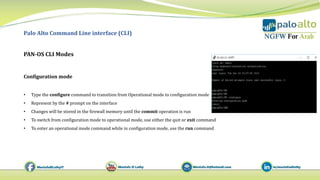
Configuration mode
• Type the configure command to transition from Operational mode to configuration mode
• Represent by the # prompt on the interface
• Changes will be stored in the firewall memory until the commit operation is run
• To switch from configuration mode to operational mode, use either the quit or exit command
• To enter an operational mode command while in configuration mode, use the run command
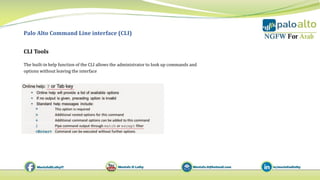
CLI Tools
Palo Alto Command Line interface (CLI)
The built-in help function of the CLI allows the administrator to look up commands and
options without leaving the interface
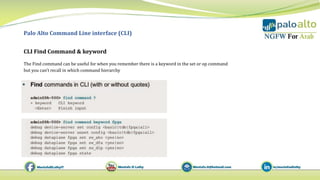
CLI Find Command & keyword
Palo Alto Command Line interface (CLI)
The Find command can be useful for when you remember there is a keyword in the set or op command
but you can’t recall in which command hierarchy
5 initial access to palo alto using cli

5 initial access to palo alto using cli

  • 1.
    Palo Alto CommandLine interface (CLI) The following topics will be covered in this lesson.  Initial Access to Palo alto Using CLI  CLI Modes  CLI Tools  CLI Find Command & keyword
  • 2.
    Initial Access toPalo alto Using CLI The two methods available to connect to the new device is either using a network cable on the management port or an console cable
  • 3.
    Palo Alto CommandLine interface (CLI) PAN-OS CLI Modes The CLI has two functional modes: Operation and Configuration Operation mode • When your first log in, the PAN-OS CLI opens in Operation mode. • Represent by the > prompt on the interface • Involves actions which are executed immediately • Action do not require commit operation that are executed immediately
  • 4.
    PAN-OS CLI Modes PaloAlto Command Line interface (CLI) Configuration mode • Type the configure command to transition from Operational mode to configuration mode • Represent by the # prompt on the interface • Changes will be stored in the firewall memory until the commit operation is run • To switch from configuration mode to operational mode, use either the quit or exit command • To enter an operational mode command while in configuration mode, use the run command
  • 5.
    CLI Tools Palo AltoCommand Line interface (CLI) The built-in help function of the CLI allows the administrator to look up commands and options without leaving the interface
  • 6.
    CLI Find Command& keyword Palo Alto Command Line interface (CLI) The Find command can be useful for when you remember there is a keyword in the set or op command but you can’t recall in which command hierarchy