A Better Way to 
Locate Online Jobs
   Boolean Search
                    Mark W. Biersdorf
                     MSR Solutions
                     July 17, 2012
Advanced Searches

Most job programs have an 
advanced search option
  – Check boxes 
  – Fill in fields such as:
     • “All of these words,” “This exact phrase,” 
       “None of these words,” “Any of these 
       words”
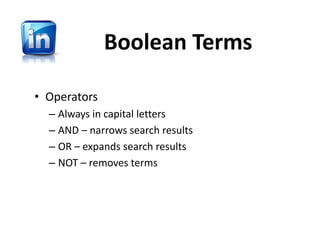
LinkedIn Adv. Search

• Try different words
• Delete words that 
  don’t apply
• Narrow Search
Boolean Search
Why Boolean Search?

• More tools than “advanced search”
• Get higher quality, more accurate,  
  search results
• Can use the same string in other 
  programs and not just LinkedIn
Boolean Works Almost 
            Anywhere
•   Universal terms
•   Twitter 
•   LinkedIn 
•   TwitJobSearch & Others
•   Google
Search Concepts
• A search is a process. Start with words or 
  terms that have meaning to you.
• Read the results of the search.  Some jobs will 
  be inappropriate to your needs.  Alter the 
  search.
• For example, “IT Manager” search brings up 
  Nurses.  Remove them from the search and try 
  again.
Search Concepts
• Searches are meant to be revised, never done 
  once
• Think like the hiring company; job titles like 
  “Controller” may be listed as “CPA”
• Start with a broad search, narrow it down
• The odds of you getting your first search 
  correct are very low.  Keep trying!
Boolean Terms

• Operators
  – Always in capital letters
  – AND – narrows search results 
  – OR – expands search results
  – NOT – removes terms
Boolean Symbols

•   Parentheses – ( ) – Around terms with Operators
•   Quotations – “ “ – Two or more words in phrase
•   Minus – “‐” – Used to delete term from search
•   Plus – “+” – Used to add term to search
•   Tilde – “~” – Searches for synonyms
Trial Advanced 
     Search
TwitJobSearch
• Great site for 
  building and 
  testing search 
  strings
• Cut and paste 
  results into 
  LinkedIn
Define Job Terms
Define the terms you want to use in 
your search.  
  – Looking for an IT senior manager or 
    director position
  – Interested in tech teams, business 
    relationship manager, projects
  – Chicago or Milwaukee
Write String
•   Start with basics – i.e., IT Manager Director
•   Type string, search, alter, search
•   Goal is to get 70‐80% accurate string
•   Expand string with basic terms:  
    – "IT" (manager OR director) AND (Chicago OR 
      Milwaukee) ‐Sales ‐fitness ‐ merger ‐accountant ‐
      chain ‐voice ‐developer
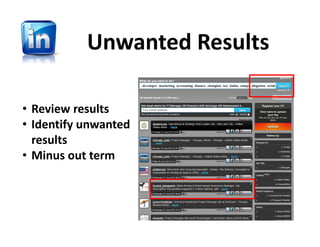
Unwanted Results

• Review results
• Identify unwanted 
  results
• Minus out term
Final Results
• Final:
  – "IT" (manager OR director) AND (Chicago OR 
    Milwaukee) ‐Sales ‐fitness ‐ merger ‐accountant ‐
    chain ‐voice –developer
• Ready for LinkedIn
LinkedIn Results


       • Save search string
Email Alerts with Results
• Name search
• Select email alert schedule
• Search string results mailed to you daily
Search String Alerts
Set up Multiple Searches
Email Alert Message
Questions?

Boolean Search