Basic Boolean Searching
and Selecting Key Words
2
3
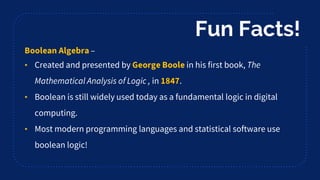
–
• Created and presented by in his first book,
in .
• Boolean is still widely used today as a fundamental logic in digital
computing.
• Most modern programming languages and statistical software use
boolean logic!
Fun Facts!
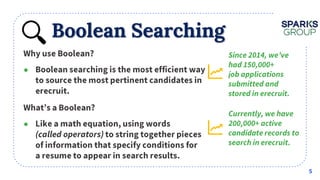
Boolean Searching
●
5
●
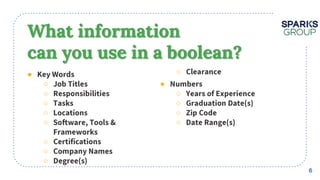
What information
can you use in a boolean?
●
○
○
○
○
○
○
○
○
○
●
○
○
○
○
6
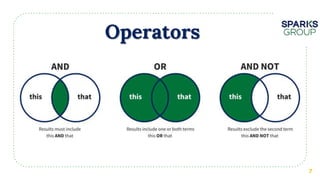
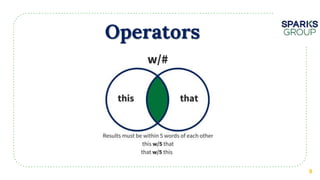
Operators
7
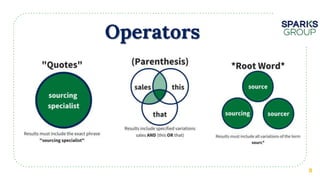
Operators
8
Operators
9
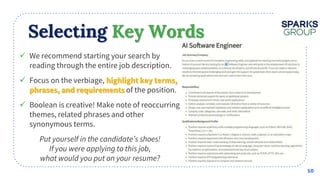
Selecting Key Words
 We recommend starting your search by
reading through the entire job description.
 Focus on the verbiage,
of the position.
 Boolean is creative! Make note of reoccurring
themes, related phrases and other
synonymous terms.
10
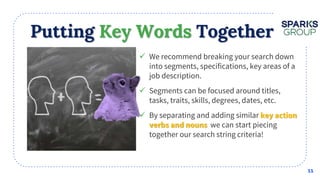
Putting Key Words Together
 We recommend breaking your search down
into segments, specifications, key areas of a
job description.
 Segments can be focused around titles,
tasks, traits, skills, degrees, dates, etc.
 By separating and adding similar
we can start piecing
together our search string criteria!
11
“
12
Focus on Keywords!
•
•
•
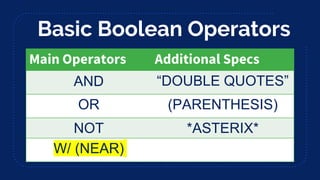
Basic Boolean Operators
AND “DOUBLE QUOTES”
OR (PARENTHESIS)
NOT *ASTERIX*
W/ (NEAR)
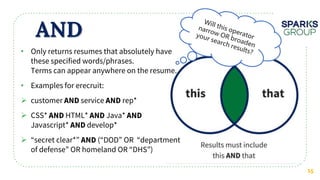
AND
15
• Only returns resumes that absolutely have
these specified words/phrases.
Terms can appear anywhere on the resume.
• Examples for erecruit:
 customer service rep*
 CSS* HTML* Java*
Javascript* develop*
 “secret clear*” (“DOD” OR “department
of defense” OR homeland OR “DHS”)
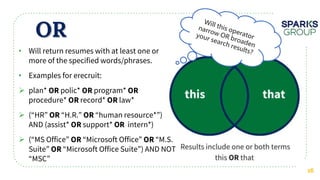
OR
16
• Will return resumes with at least one or
more of the specified words/phrases.
• Examples for erecruit:
 plan* polic* program*
procedure* record* law*
 (“HR” “H.R.” “human resource*”)
AND (assist* support* intern*)
 (“MS Office” “Microsoft Office” “M.S.
Suite” “Microsoft Office Suite”) AND NOT
“MSC”
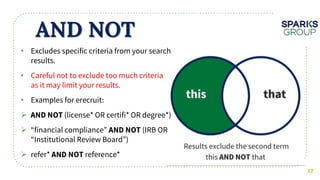
AND NOT
17
• Excludes specific criteria from your search
results.
• Careful not to exclude too much criteria
as it may limit your results.
• Examples for erecruit:
 (license* OR certifi* OR degree*)
 “financial compliance” (IRB OR
“Institutional Review Board”)
 refer* reference*
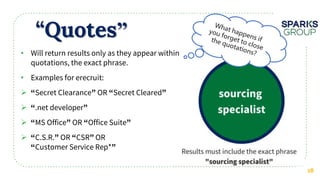
“Quotes”
18
• Will return results only as they appear within
quotations, the exact phrase.
• Examples for erecruit:
 Secret Clearance OR Secret Cleared
 .net developer
 MS Office OR Office Suite
 C.S.R. OR CSR OR
Customer Service Rep*
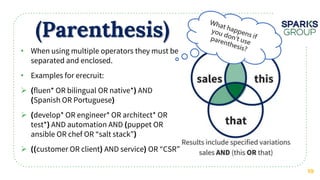
(Parenthesis)
19
• When using multiple operators they must be
separated and enclosed.
• Examples for erecruit:
 fluen* OR bilingual OR native* AND
Spanish OR Portuguese
 develop* OR engineer* OR architect* OR
test* AND automation AND puppet OR
ansible OR chef OR “salt stack”
 customer OR client AND service OR “CSR”
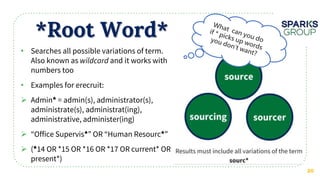
*Root Word*
20
• Searches all possible variations of term.
Also known as and it works with
numbers too
• Examples for erecruit:
 Admin = admin(s), administrator(s),
administrate(s), administrat(ing),
administrative, administer(ing)
 “Office Supervis ” OR “Human Resourc ”
 ( 14 OR *15 OR *16 OR *17 OR current* OR
present*)
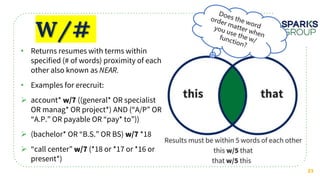
W/#
21
• Returns resumes with terms within
specified (# of words) proximity of each
other also known as
• Examples for erecruit:
 account* ((general* OR specialist
OR manag* OR project*) AND (“A/P” OR
“A.P.” OR payable OR “pay* to”))
 (bachelor* OR “B.S.” OR BS) *18
 “call center” (*18 or *17 or *16 or
present*)
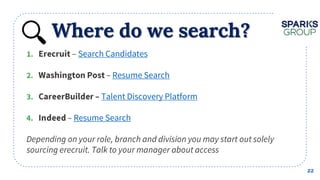
Where do we search?
22
– Search Candidates
– Resume Search
Talent Discovery Platform
– Resume Search
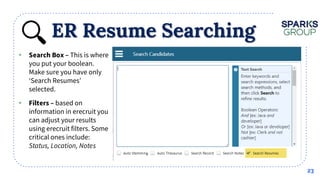
ER Resume Searching
23
• This is where
you put your boolean.
Make sure you have only
‘Search Resumes’
selected.
• based on
information in erecruit you
can adjust your results
using erecruit filters. Some
critical ones include:
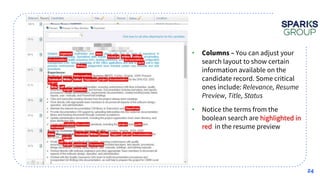
24
• You can adjust your
search layout to show certain
information available on the
candidate record. Some critical
ones include:
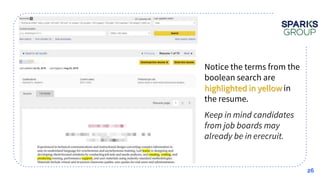
• Notice the terms from the
boolean search are highlighted in
red in the resume preview
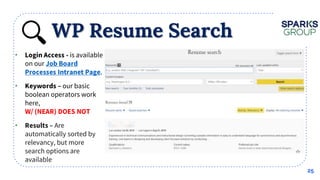
WP Resume Search
25
• is available
on our
.
• our basic
boolean operators work
here,
• Are
automatically sorted by
relevancy, but more
search options are
available
26
• Notice the terms from the
boolean search are
highlighted in yellow in
the resume.
•
CB Resume Search
27
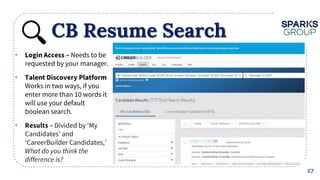
• Needs to be
requested by your manager.
•
Works in two ways, if you
enter more than 10 words it
will use your default
boolean search.
• Divided by ‘My
Candidates’ and
‘CareerBuilder Candidates,’
CB Resume Search
28
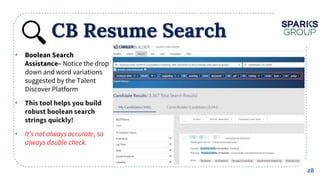
•
Notice the drop
down and word variations
suggested by the Talent
Discover Platform
•
•
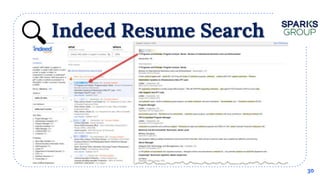
Indeed Resume Search
29
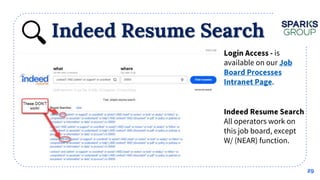
• is
available on our
.
•
All operators work on
this job board, except
W/ (NEAR) function.
Indeed Resume Search
30
How to Improve?
31

Basic Boolean & Keyword Searching

  • 1.
    Basic Boolean Searching andSelecting Key Words
  • 2.
  • 3.
  • 4.
    – • Created andpresented by in his first book, in . • Boolean is still widely used today as a fundamental logic in digital computing. • Most modern programming languages and statistical software use boolean logic! Fun Facts!
  • 5.
  • 6.
    What information can youuse in a boolean? ● ○ ○ ○ ○ ○ ○ ○ ○ ○ ● ○ ○ ○ ○ 6
  • 7.
  • 8.
  • 9.
  • 10.
    Selecting Key Words We recommend starting your search by reading through the entire job description.  Focus on the verbiage, of the position.  Boolean is creative! Make note of reoccurring themes, related phrases and other synonymous terms. 10
  • 11.
    Putting Key WordsTogether  We recommend breaking your search down into segments, specifications, key areas of a job description.  Segments can be focused around titles, tasks, traits, skills, degrees, dates, etc.  By separating and adding similar we can start piecing together our search string criteria! 11
  • 12.
  • 13.
  • 14.
    Basic Boolean Operators AND“DOUBLE QUOTES” OR (PARENTHESIS) NOT *ASTERIX* W/ (NEAR)
  • 15.
    AND 15 • Only returnsresumes that absolutely have these specified words/phrases. Terms can appear anywhere on the resume. • Examples for erecruit:  customer service rep*  CSS* HTML* Java* Javascript* develop*  “secret clear*” (“DOD” OR “department of defense” OR homeland OR “DHS”)
  • 16.
    OR 16 • Will returnresumes with at least one or more of the specified words/phrases. • Examples for erecruit:  plan* polic* program* procedure* record* law*  (“HR” “H.R.” “human resource*”) AND (assist* support* intern*)  (“MS Office” “Microsoft Office” “M.S. Suite” “Microsoft Office Suite”) AND NOT “MSC”
  • 17.
    AND NOT 17 • Excludesspecific criteria from your search results. • Careful not to exclude too much criteria as it may limit your results. • Examples for erecruit:  (license* OR certifi* OR degree*)  “financial compliance” (IRB OR “Institutional Review Board”)  refer* reference*
  • 18.
    “Quotes” 18 • Will returnresults only as they appear within quotations, the exact phrase. • Examples for erecruit:  Secret Clearance OR Secret Cleared  .net developer  MS Office OR Office Suite  C.S.R. OR CSR OR Customer Service Rep*
  • 19.
    (Parenthesis) 19 • When usingmultiple operators they must be separated and enclosed. • Examples for erecruit:  fluen* OR bilingual OR native* AND Spanish OR Portuguese  develop* OR engineer* OR architect* OR test* AND automation AND puppet OR ansible OR chef OR “salt stack”  customer OR client AND service OR “CSR”
  • 20.
    *Root Word* 20 • Searchesall possible variations of term. Also known as and it works with numbers too • Examples for erecruit:  Admin = admin(s), administrator(s), administrate(s), administrat(ing), administrative, administer(ing)  “Office Supervis ” OR “Human Resourc ”  ( 14 OR *15 OR *16 OR *17 OR current* OR present*)
  • 21.
    W/# 21 • Returns resumeswith terms within specified (# of words) proximity of each other also known as • Examples for erecruit:  account* ((general* OR specialist OR manag* OR project*) AND (“A/P” OR “A.P.” OR payable OR “pay* to”))  (bachelor* OR “B.S.” OR BS) *18  “call center” (*18 or *17 or *16 or present*)
  • 22.
    Where do wesearch? 22 – Search Candidates – Resume Search Talent Discovery Platform – Resume Search
  • 23.
    ER Resume Searching 23 •This is where you put your boolean. Make sure you have only ‘Search Resumes’ selected. • based on information in erecruit you can adjust your results using erecruit filters. Some critical ones include:
  • 24.
    24 • You canadjust your search layout to show certain information available on the candidate record. Some critical ones include: • Notice the terms from the boolean search are highlighted in red in the resume preview
  • 25.
    WP Resume Search 25 •is available on our . • our basic boolean operators work here, • Are automatically sorted by relevancy, but more search options are available
  • 26.
    26 • Notice theterms from the boolean search are highlighted in yellow in the resume. •
  • 27.
    CB Resume Search 27 •Needs to be requested by your manager. • Works in two ways, if you enter more than 10 words it will use your default boolean search. • Divided by ‘My Candidates’ and ‘CareerBuilder Candidates,’
  • 28.
    CB Resume Search 28 • Noticethe drop down and word variations suggested by the Talent Discover Platform • •
  • 29.
    Indeed Resume Search 29 •is available on our . • All operators work on this job board, except W/ (NEAR) function.
  • 30.
  • 31.

Editor's Notes

  • #3 By using operators/logic to connect your key search criteria, to bring back the most relevant candidates fastest Why do we use boolean searching? How large and vast our system is, covering a large variety of candidates across industries, needs, levels of experience. Some are contract work, direct hire, IT, accounting and finance Jobs are becoming more complex and integrated, higher level roles require more specified experiences, skill and abilities. Staffing needs change day to day, we need to have pipelines built out and ready to go with our most qualified and ready to go candidates So what is the best way to combine all of those specifics in a search? Pull back the most accurate people quickly and precisely? Boolean!
  • #4 Source: BlackBelt Boolean http://s4587.pcdn.co/wp-content/uploads/2015/12/Yoda-Think-Before-You-Search.jpg Open Discussion. Has anyone here used boolean before, what for? SAS and data searching efforts, searching for scholarly articles, accurate data, know accurate sources of information. What is Boolean and what is it primarily used for? What’s the difference between searching and sourcing? Recruiting? Google Searching? What are benefits of using boolean?
  • #5 Boolean logic is over 170 years old! Design Science - Uses True/False Logic, like computers coding 1 OR 0. IF/THEN. Used in many software systems today, very relevant. Sources: https://www.britannica.com/biography/George-Boole
  • #6 Why do we use boolean searching? How large and vast our system is, covering a large variety of candidates across industries, needs, levels of experience. Some are contract work, direct hire, IT, accounting and finance Jobs are becoming more complex and integrated, higher level roles require more specified experiences, skill and abilities. Staffing needs change day to day, we need to have pipelines built out and ready to go with our most qualified and ready to go candidates So what is the best way to combine all of those specifics in a search? Pull back the most accurate people quickly and precisely? By using operators to connect your key search criteria
  • #7 What kind of information can you put in a boolean search? i.e. a position’s responsibilities/requirements. What are some factors that may effect a boolean search? Available information Verbiage on resume
  • #11 Put yourself in the candidate’s shoes. If you were qualified for this job, what words and phrases would you likely use in your resume? Based on prior similar searches, try and pick up on the use of certain language in different resumes. Are there trends with key words and different levels of experience? What words OR phrases do you NOT want to see on resumes? Consider what you read in the job description, what the client shared with you about this position, what you know about the client culture/environment and your prior searching experience. Source: Glossary Tech on Sparks Group Jobs Portal
  • #12 It doesn’t need to be complicated. By further sorting verbs and nouns we can start to build out more complex search strings.
  • #13 Video of Connecting Key Words
  • #14 Discuss using the operators and connecting key words
  • #15 Introduction to the main operators, discuss functions
  • #16 What happens if the words appear more than once? What happens if you use too many AND terms, too many must haves, How can you help expand your criteria while still narrowing in on key criteria
  • #17 What happens if the words appear more than once? What happens if you use too many AND terms, too many must haves, How can you help expand your criteria while still narrowing in on key criteria
  • #18 What happens if the words appear more than once? What happens if you use too many AND terms, too many must haves, How can you help expand your criteria while still narrowing in on key criteria
  • #19 What happens if the words appear more than once? What happens if you use too many AND terms, too many must haves, How can you help expand your criteria while still narrowing in on key criteria
  • #20 What happens if the words appear more than once? What happens if you use too many AND terms, too many must haves, How can you help expand your criteria while still narrowing in on key criteria
  • #21 What happens if the words appear more than once? What happens if you use too many AND terms, too many must haves, How can you help expand your criteria while still narrowing in on key criteria
  • #22 What happens if the words appear more than once? What happens if you use too many AND terms, too many must haves, How can you help expand your criteria while still narrowing in on key criteria
  • #23 Why do we use boolean searching? How large and vast our system is, covering a large variety of candidates across industries, needs, levels of experience. Some are contract work, direct hire, IT, accounting and finance Jobs are becoming more complex and integrated, higher level roles require more specified experiences, skill and abilities. Staffing needs change day to day, we need to have pipelines built out and ready to go with our most qualified and ready to go candidates However, there are ways to search CareerBuilder through erecruit. You may learn more about this in erecruit training. Google XRAY Tools to use when searching public social sites like LinkedIn, Facebook, Google+, GitHub
  • #24 Why do we use boolean searching? How large and vast our system is, covering a large variety of candidates across industries, needs, levels of experience. Some are contract work, direct hire, IT, accounting and finance Jobs are becoming more complex and integrated, higher level roles require more specified experiences, skill and abilities. Staffing needs change day to day, we need to have pipelines built out and ready to go with our most qualified and ready to go candidates Google XRAY Tools to use when searching public social sites like LinkedIn, Facebook, Google+, GitHub
  • #26 Why do we use boolean searching? How large and vast our system is, covering a large variety of candidates across industries, needs, levels of experience. Some are contract work, direct hire, IT, accounting and finance Jobs are becoming more complex and integrated, higher level roles require more specified experiences, skill and abilities. Staffing needs change day to day, we need to have pipelines built out and ready to go with our most qualified and ready to go candidates Google XRAY Tools to use when searching public social sites like LinkedIn, Facebook, Google+, GitHub
  • #28 Why do we use boolean searching? How large and vast our system is, covering a large variety of candidates across industries, needs, levels of experience. Some are contract work, direct hire, IT, accounting and finance Jobs are becoming more complex and integrated, higher level roles require more specified experiences, skill and abilities. Staffing needs change day to day, we need to have pipelines built out and ready to go with our most qualified and ready to go candidates Google XRAY Tools to use when searching public social sites like LinkedIn, Facebook, Google+, GitHub
  • #29 Why do we use boolean searching? How large and vast our system is, covering a large variety of candidates across industries, needs, levels of experience. Some are contract work, direct hire, IT, accounting and finance Jobs are becoming more complex and integrated, higher level roles require more specified experiences, skill and abilities. Staffing needs change day to day, we need to have pipelines built out and ready to go with our most qualified and ready to go candidates Google XRAY Tools to use when searching public social sites like LinkedIn, Facebook, Google+, GitHub
  • #30 Why do we use boolean searching? How large and vast our system is, covering a large variety of candidates across industries, needs, levels of experience. Some are contract work, direct hire, IT, accounting and finance Jobs are becoming more complex and integrated, higher level roles require more specified experiences, skill and abilities. Staffing needs change day to day, we need to have pipelines built out and ready to go with our most qualified and ready to go candidates Google XRAY Tools to use when searching public social sites like LinkedIn, Facebook, Google+, GitHub
  • #31 Why do we use boolean searching? How large and vast our system is, covering a large variety of candidates across industries, needs, levels of experience. Some are contract work, direct hire, IT, accounting and finance Jobs are becoming more complex and integrated, higher level roles require more specified experiences, skill and abilities. Staffing needs change day to day, we need to have pipelines built out and ready to go with our most qualified and ready to go candidates Google XRAY Tools to use when searching public social sites like LinkedIn, Facebook, Google+, GitHub
  • #32 Keep writing boolean! Why do we use boolean searching? How large and vast our system is, covering a large variety of candidates across industries, needs, levels of experience. Some are contract work, direct hire, IT, accounting and finance Jobs are becoming more complex and integrated, higher level roles require more specified experiences, skill and abilities. Staffing needs change day to day, we need to have pipelines built out and ready to go with our most qualified and ready to go candidates Google XRAY Tools to use when searching public social sites like LinkedIn, Facebook, Google+, GitHub https://www.sourcecon.com/the-wonderful-world-of-search-engines/ https://recruitingsocial.com/2018/08/sourcing-passive-candidates/ ‘Boolean query syntax’ aka ‘search operators’ searching involves: Phrase searching Proximity searching Field searching (staff OR employee OR corporate OR recruit*) w/15 ((train* OR teach* OR educat* OR consult* OR support* OR develop*) and (boolean OR “resume search*” OR “sourc* method*”)) AND NOT (engineer OR director)