Ansible - Automation for Everyone!
Introduction about Ansible Core
Hideki Saito
Software Maintenance Engineer/Tower Support Team
2017.06
INSERT DESIGNATOR, IF NEEDED2
Who am I
• Hideki Saito <hsaito@redhat.com>
• Software Maintenance Engineer / Red Hat
• Work for Ansible Tower Support Team
• I love Ansible, OpenStack and Beer :)
• Twitter: @saito_hideki
INSERT DESIGNATOR, IF NEEDED3
Agenda
• Ansible Core Introduction
• Demo’s
• Let’s play with Ansible Core
• Getting Started
• Ad-Hoc command
• Playbooks
• Ansible Tower by Red Hat
INSERT DESIGNATOR, IF NEEDED4
Motivation and Proposition
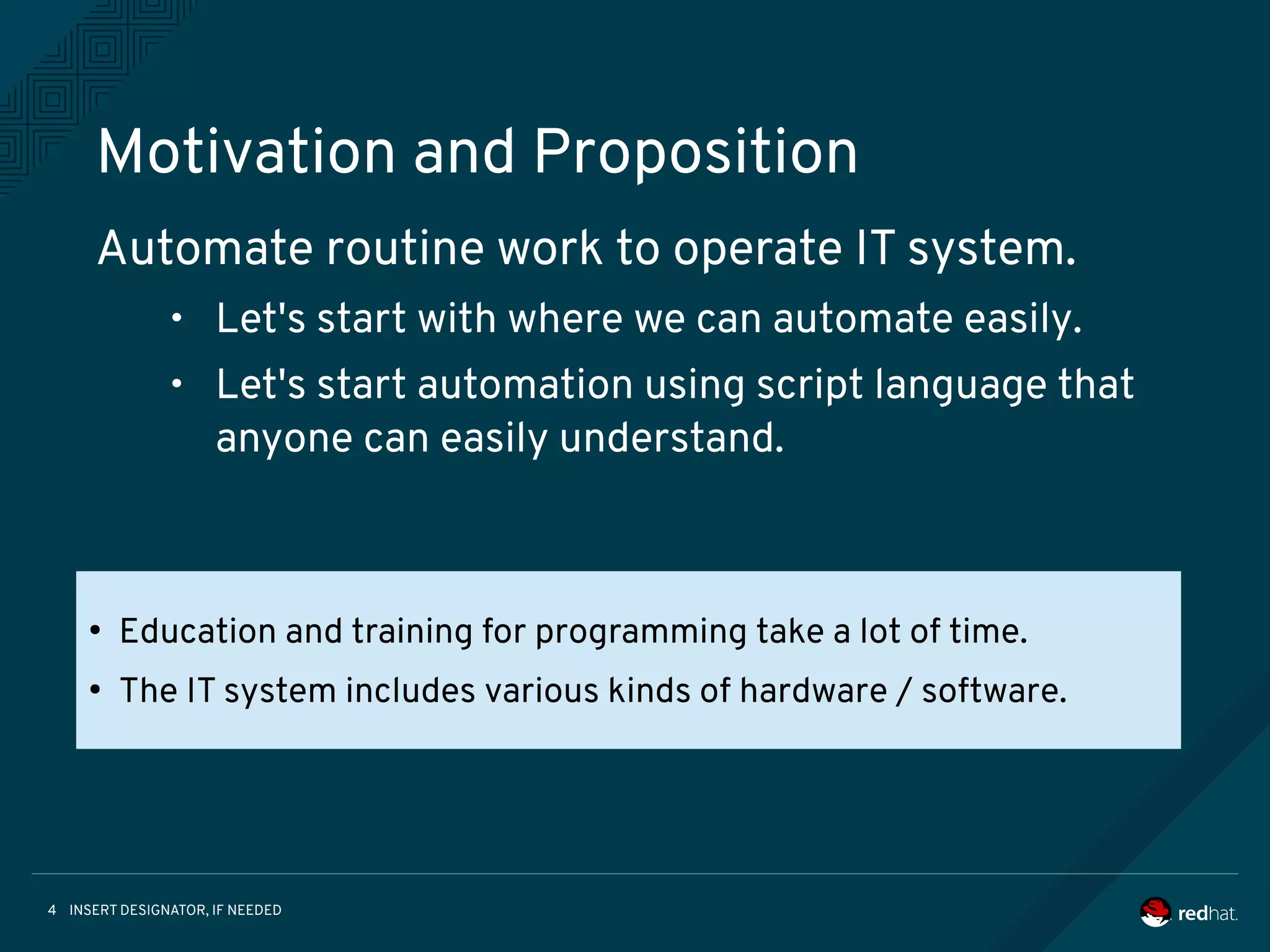
Automate routine work to operate IT system.
• Let's start with where we can automate easily.
• Let's start automation using script language that
anyone can easily understand.
●
Education and training for programming take a lot of time.
●
The IT system includes various kinds of hardware / software.
INSERT DESIGNATOR, IF NEEDED5
AUTOMATION FOR EVERYONE
• Ansible is an IT automation tool
• Goals are simplicity and ease-of-use
• Managing target via SSH transportation
• Management steps is written by YAML
• New release is provided approximately
every 2 months
INSERT DESIGNATOR, IF NEEDED6
Introduce following components of
Ansible Core:
Ansible Core
Ansible Core is command-line IT automation Tool and libraries
1. Command Line Tools
2. Playbooks
3. Inventory
4. Modules
5. Plugins
INSERT DESIGNATOR, IF NEEDED7
COMMAND LINE TOOLS
Ansible Core contains some command line tools. Following 2 commands are
able to control your target hosts.
[Usage] ansible %Target% -i %Inventory% -m %Module%
$ ansible www -i inventory -m ping
[Usage] ansible %Target% -i %Inventory% -a %Ad-Hoc Command%
$ ansible www -i inventory -a “/sbin/reboot”
[Usage] ansible %Target% -i %Inventory% -m %Module%
$ ansible www -i inventory -m ping
[Usage] ansible %Target% -i %Inventory% -a %Ad-Hoc Command%
$ ansible www -i inventory -a “/sbin/reboot”
[Usage] ansible-playbook -i %Inventory% %Playbook%
$ ansible-playbook -i inventory playbook.yml
[Usage] ansible-playbook -i %Inventory% %Playbook%
$ ansible-playbook -i inventory playbook.yml
1. ansible command
2. ansible-playbook command
INSERT DESIGNATOR, IF NEEDED8
COMMAND MECHANISM
Target Hostmodule
Inventory
Executable
Python Code
Executable
Python Code
Executable
Python Code
ansible
(1)
(2)
(3)
(4)
(5)
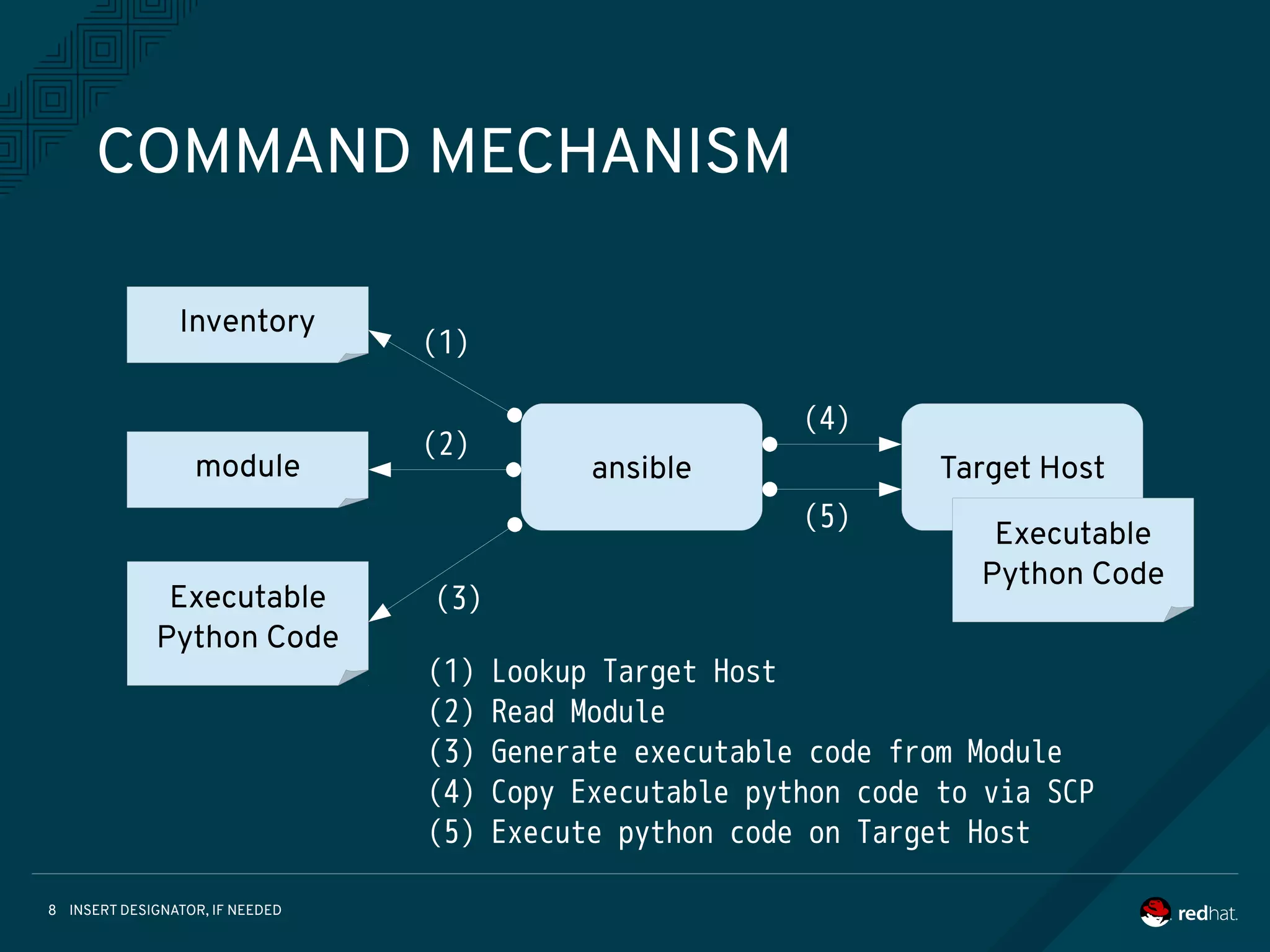
(1) Lookup Target Host
(2) Read Module
(3) Generate executable code from Module
(4) Copy Executable python code to via SCP
(5) Execute python code on Target Host
INSERT DESIGNATOR, IF NEEDED9
PLAYBOOKS
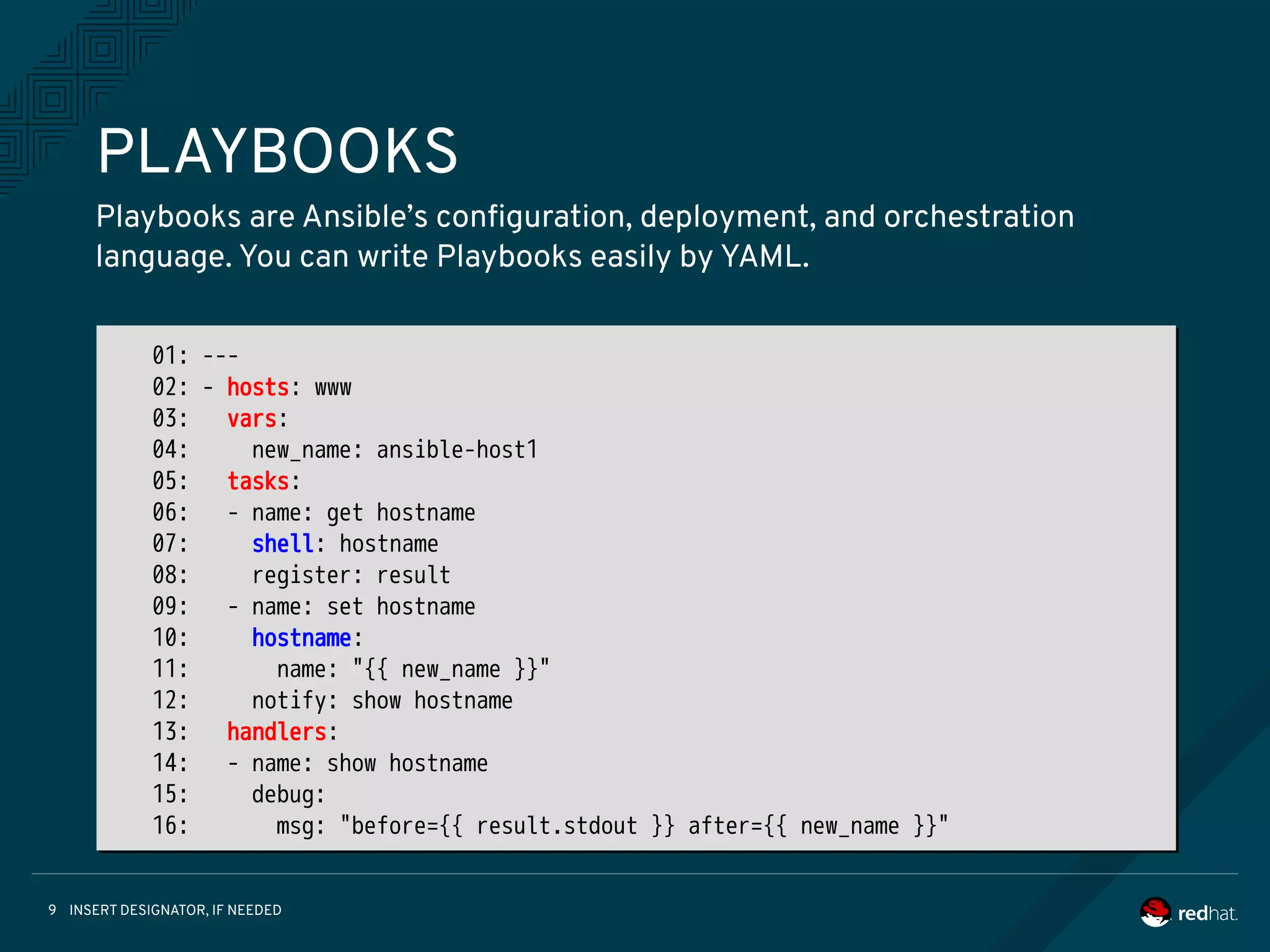
Playbooks are Ansible’s configuration, deployment, and orchestration
language. You can write Playbooks easily by YAML.
01: ---
02: - hosts: www
03: vars:
04: new_name: ansible-host1
05: tasks:
06: - name: get hostname
07: shell: hostname
08: register: result
09: - name: set hostname
10: hostname:
11: name: "{{ new_name }}"
12: notify: show hostname
13: handlers:
14: - name: show hostname
15: debug:
16: msg: "before={{ result.stdout }} after={{ new_name }}"
INSERT DESIGNATOR, IF NEEDED10
INVENTORY (STATIC)
Ansible is able to working against multiple system at the same time.
You can select portions of systems listed in the inventory at running time.
01: [localhost]
02: 127.0.0.1
03:
04: [staging]
05: 192.168.0.1
06: 192.168.0.2
07:
08: [production]
09: www1.example.com
10: www2.example.com
11:
12: [vars:local]
13: ansible_connection=local
01: [localhost]
02: 127.0.0.1
03:
04: [staging]
05: 192.168.0.1
06: 192.168.0.2
07:
08: [production]
09: www1.example.com
10: www2.example.com
11:
12: [vars:local]
13: ansible_connection=local
INSERT DESIGNATOR, IF NEEDED11
INVENTORY (DYNAMIC)
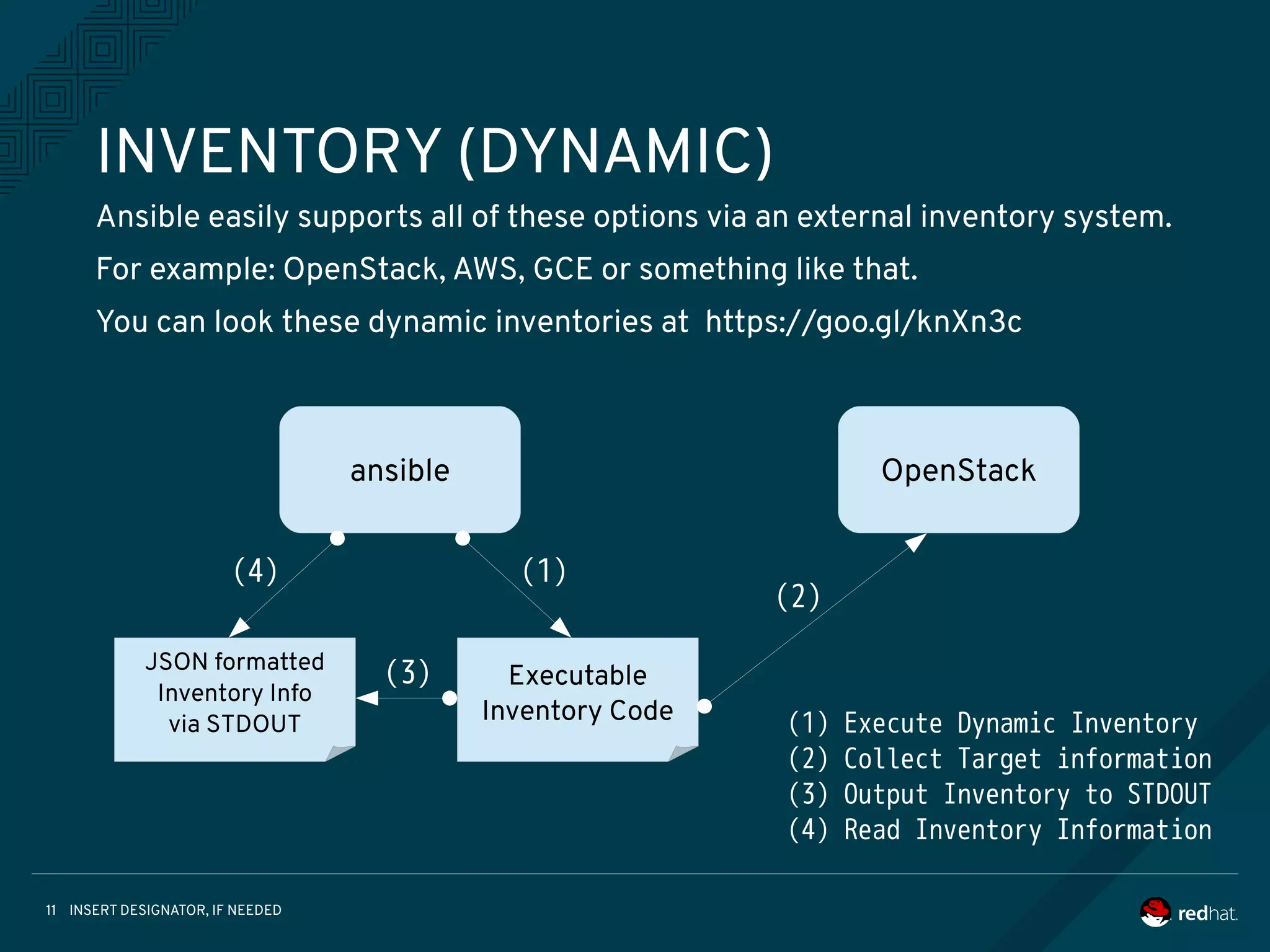
Ansible easily supports all of these options via an external inventory system.
For example: OpenStack, AWS, GCE or something like that.
You can look these dynamic inventories at https://goo.gl/knXn3c
ansible
Executable
Inventory Code
JSON formatted
Inventory Info
via STDOUT
OpenStack
(1)
(2)
(3)
(4)
(1) Execute Dynamic Inventory
(2) Collect Target information
(3) Output Inventory to STDOUT
(4) Read Inventory Information
INSERT DESIGNATOR, IF NEEDED12
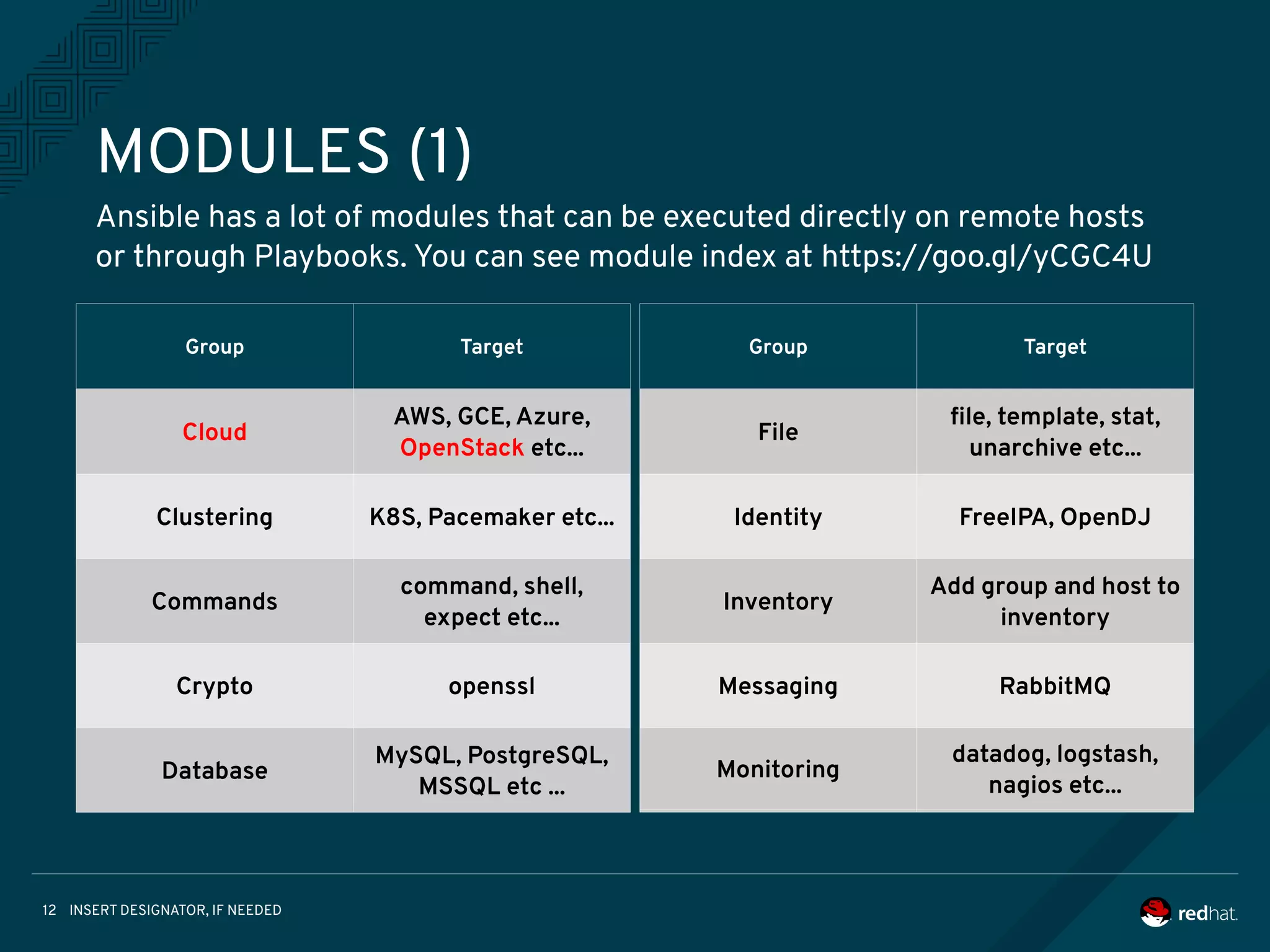
MODULES (1)
Ansible has a lot of modules that can be executed directly on remote hosts
or through Playbooks. You can see module index at https://goo.gl/yCGC4U
Group Target
Cloud
AWS, GCE, Azure,
OpenStack etc...
Clustering
Commands
Crypto
Database
Group Target
Cloud
AWS, GCE, Azure,
OpenStack etc...
Clustering K8S, Pacemaker etc...
Commands
command, shell,
expect etc...
Crypto openssl
Database
MySQL, PostgreSQL,
MSSQL etc ...
Group Target
Cloud
AWS, GCE, Azure,
OpenStack etc...
Clustering
Commands
Crypto
Database
Group Target
File
file, template, stat,
unarchive etc...
Identity FreeIPA, OpenDJ
Inventory
Add group and host to
inventory
Messaging RabbitMQ
Monitoring
datadog, logstash,
nagios etc...
INSERT DESIGNATOR, IF NEEDED13
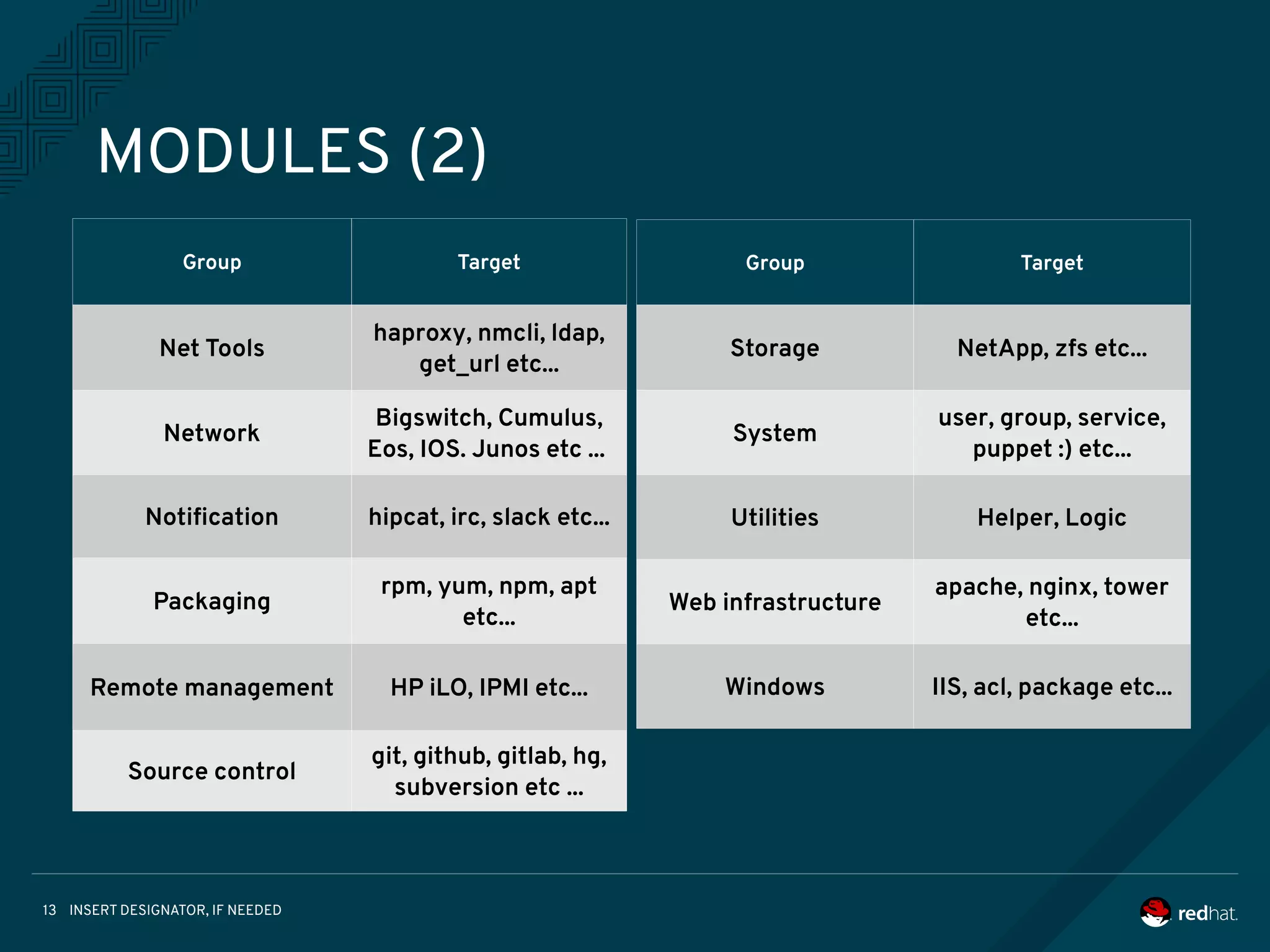
MODULES (2)
Group Target
Net Tools
haproxy, nmcli, ldap,
get_url etc...
Network
Bigswitch, Cumulus,
Eos, IOS. Junos etc ...
Notification hipcat, irc, slack etc...
Packaging
rpm, yum, npm, apt
etc...
Remote management HP iLO, IPMI etc...
Source control
git, github, gitlab, hg,
subversion etc ...
Group Target
Storage NetApp, zfs etc...
System
user, group, service,
puppet :) etc...
Utilities Helper, Logic
Web infrastructure
apache, nginx, tower
etc...
Windows IIS, acl, package etc...
INSERT DESIGNATOR, IF NEEDED14
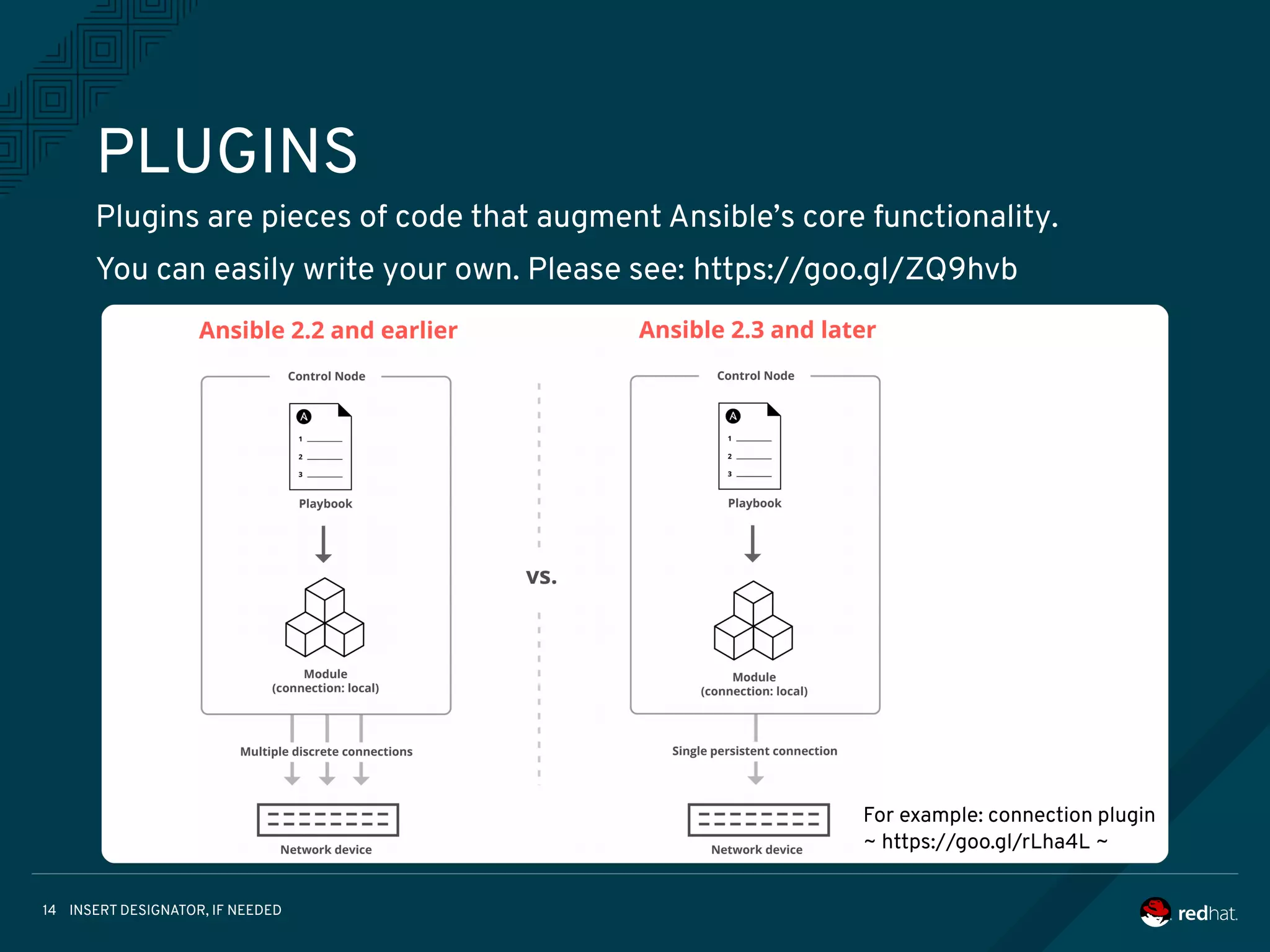
PLUGINS
Plugins are pieces of code that augment Ansible’s core functionality.
You can easily write your own. Please see: https://goo.gl/ZQ9hvb
For example: connection plugin
~ https://goo.gl/rLha4L ~
INSERT DESIGNATOR, IF NEEDED15
DEMO’S
• Getting Started
• Installation
• Ad-Hoc command
• Playbooks
INSERT DESIGNATOR, IF NEEDED16
Simple can be harder than complex. You have to work hard
to get your thinking clean to make it simple.
But it’s worth it in the end because once you get there, you
can move mountains.
~ Steve Jobs ~
INSERT DESIGNATOR, IF NEEDED17
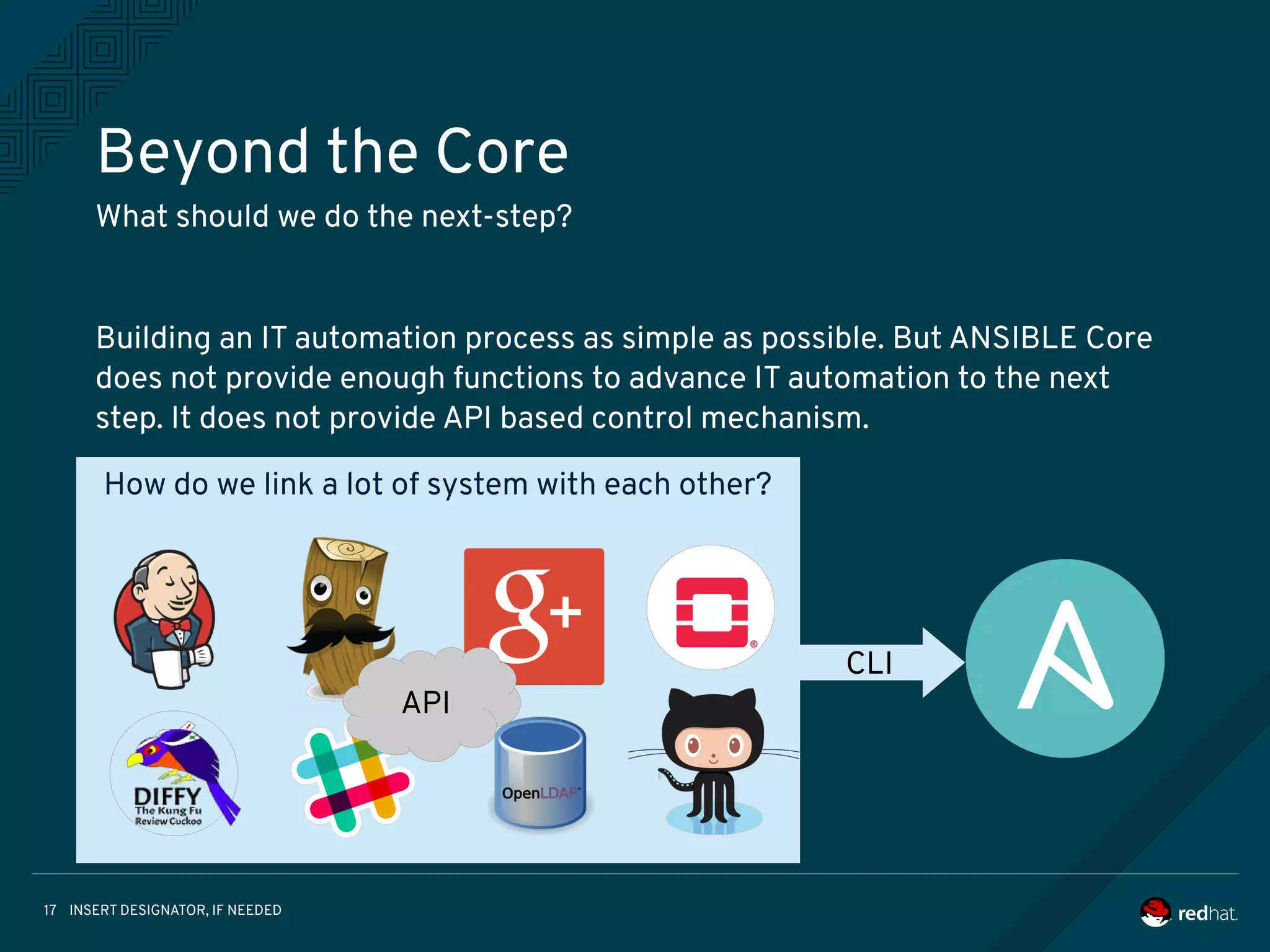
How do we link a lot of system with each other?
Beyond the Core
What should we do the next-step?
Building an IT automation process as simple as possible. But ANSIBLE Core
does not provide enough functions to advance IT automation to the next
step. It does not provide API based control mechanism.
API
CLI
INSERT DESIGNATOR, IF NEEDED18
Introduce following Tower functions:
Ansible Tower by Red Hat
Ansible Tower is a web-based solution that is It’s designed to be the hub for
all of your automation tasks.
1. Overview
2. Job Template / Work-flow /Callback
3. Web based Dashboard
4. RESTful API
5. Isolation, Consolidation and
Cooperation
INSERT DESIGNATOR, IF NEEDED19
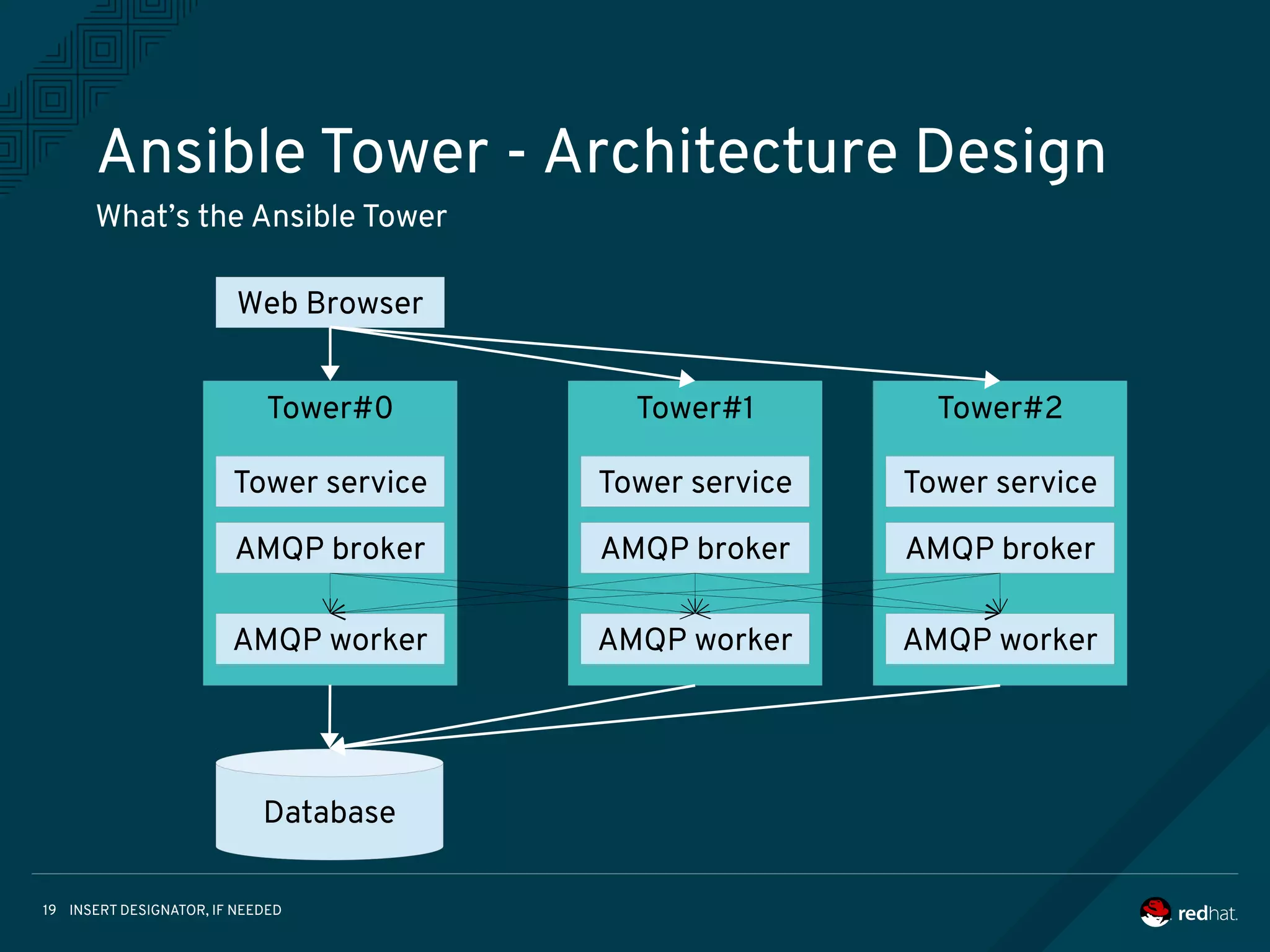
Tower#0
Ansible Tower - Architecture Design
What’s the Ansible Tower
Web Browser
Tower service
Database
AMQP broker
AMQP worker
Tower#1
Tower service
AMQP broker
AMQP worker
Tower#2
Tower service
AMQP broker
AMQP worker
INSERT DESIGNATOR, IF NEEDED20
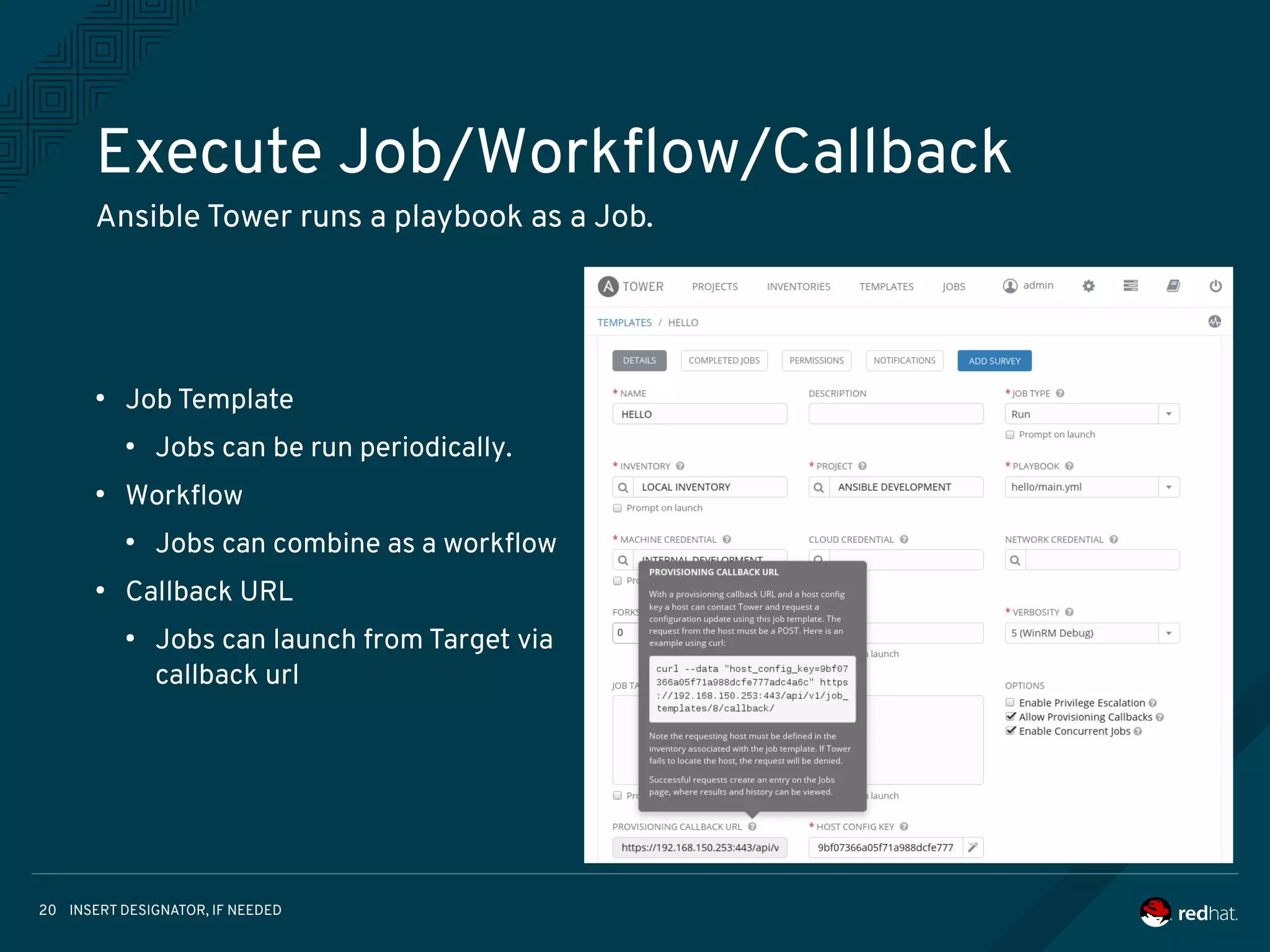
Execute Job/Workflow/Callback
Ansible Tower runs a playbook as a Job.
●
Job Template
●
Jobs can be run periodically.
●
Workflow
●
Jobs can combine as a workflow
●
Callback URL
●
Jobs can launch from Target via
callback url
INSERT DESIGNATOR, IF NEEDED21
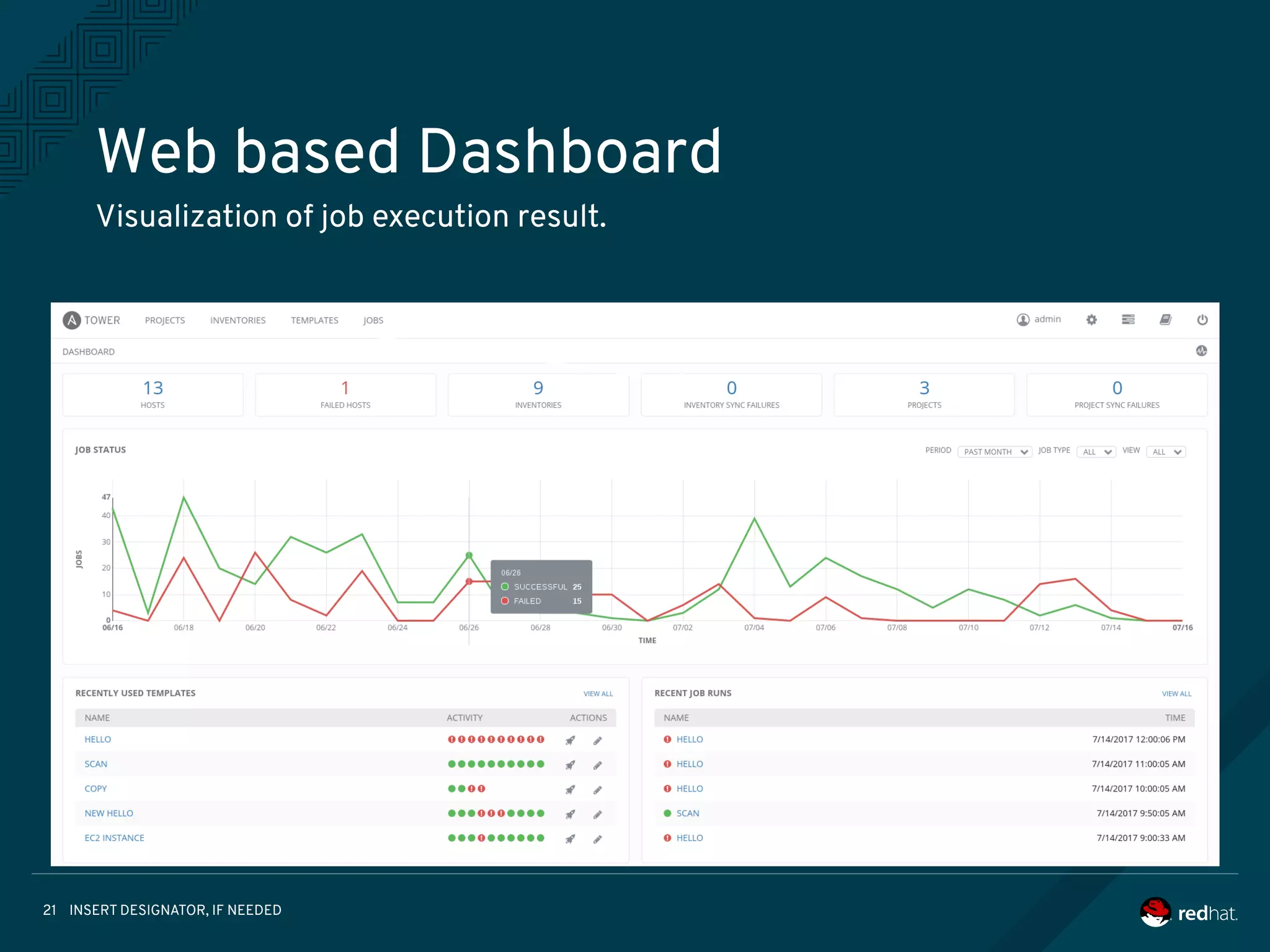
Web based Dashboard
Visualization of job execution result.
INSERT DESIGNATOR, IF NEEDED22
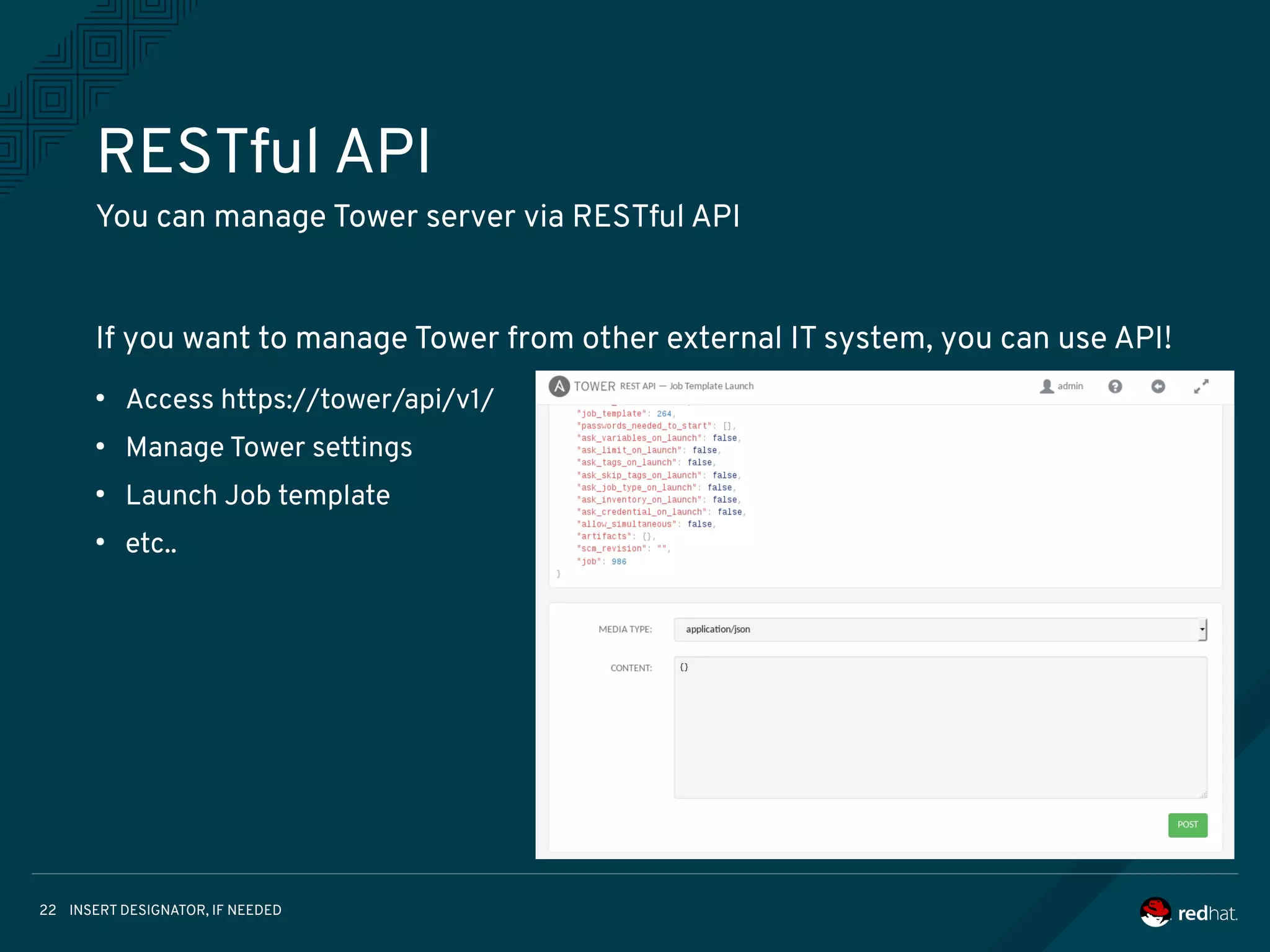
RESTful API
You can manage Tower server via RESTful API
If you want to manage Tower from other external IT system, you can use API!
●
Access https://tower/api/v1/
●
Manage Tower settings
●
Launch Job template
●
etc..
INSERT DESIGNATOR, IF NEEDED23
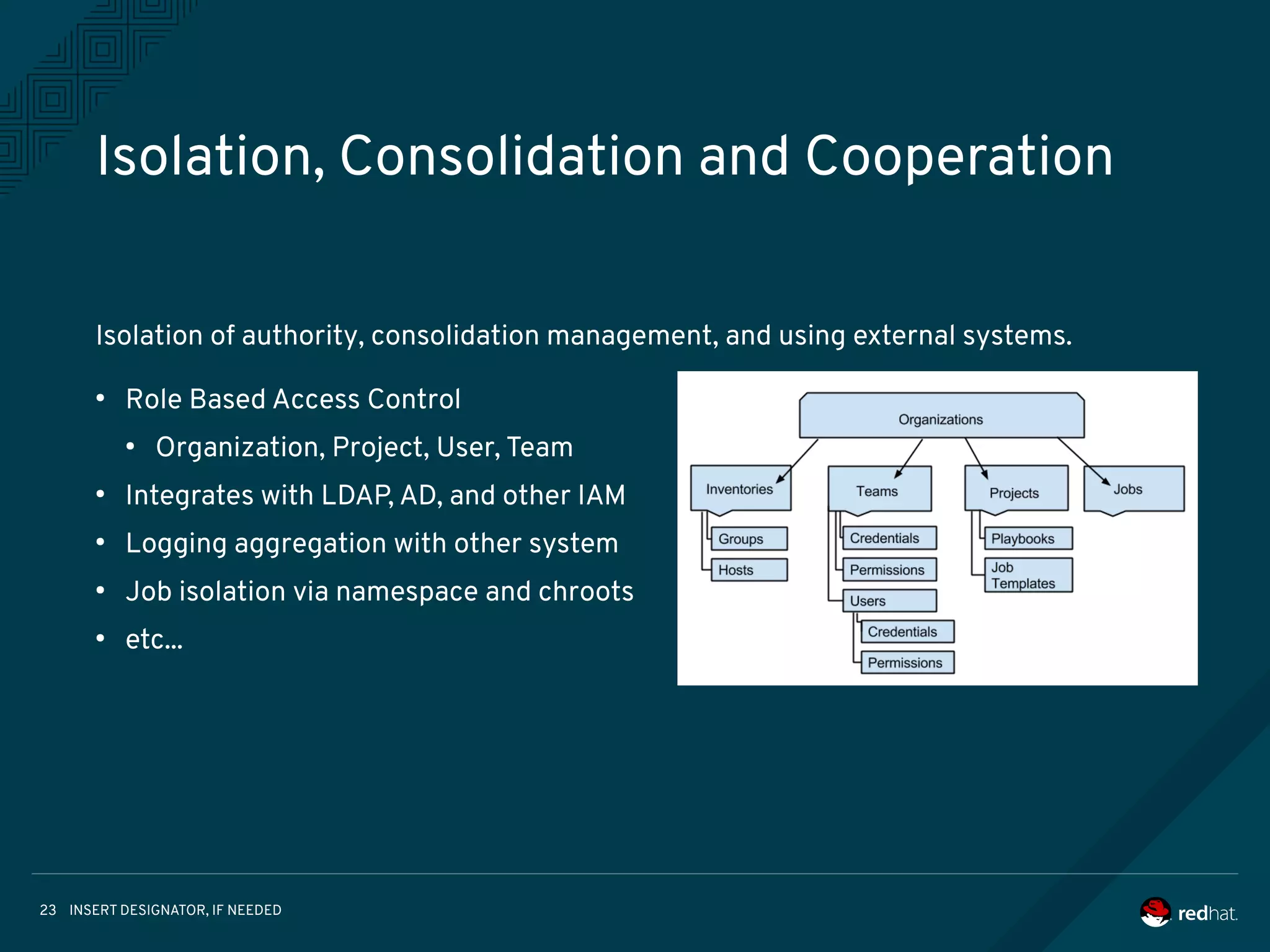
Isolation, Consolidation and Cooperation
Isolation of authority, consolidation management, and using external systems.
●
Role Based Access Control
●
Organization, Project, User, Team
●
Integrates with LDAP, AD, and other IAM
●
Logging aggregation with other system
●
Job isolation via namespace and chroots
●
etc...
INSERT DESIGNATOR, IF NEEDED24
If you want to proceed to the next step,
I believe Ansible Core and Tower will help you.
THANK YOU
plus.google.com/+RedHat
linkedin.com/company/red-hat
youtube.com/user/RedHatVideos
facebook.com/redhatinc
twitter.com/RedHatNews

Ansible nice-pdf-copy-for-pres

  • 1.
    Ansible - Automationfor Everyone! Introduction about Ansible Core Hideki Saito Software Maintenance Engineer/Tower Support Team 2017.06
  • 2.
    INSERT DESIGNATOR, IFNEEDED2 Who am I • Hideki Saito <hsaito@redhat.com> • Software Maintenance Engineer / Red Hat • Work for Ansible Tower Support Team • I love Ansible, OpenStack and Beer :) • Twitter: @saito_hideki
  • 3.
    INSERT DESIGNATOR, IFNEEDED3 Agenda • Ansible Core Introduction • Demo’s • Let’s play with Ansible Core • Getting Started • Ad-Hoc command • Playbooks • Ansible Tower by Red Hat
  • 4.
    INSERT DESIGNATOR, IFNEEDED4 Motivation and Proposition Automate routine work to operate IT system. • Let's start with where we can automate easily. • Let's start automation using script language that anyone can easily understand. ● Education and training for programming take a lot of time. ● The IT system includes various kinds of hardware / software.
  • 5.
    INSERT DESIGNATOR, IFNEEDED5 AUTOMATION FOR EVERYONE • Ansible is an IT automation tool • Goals are simplicity and ease-of-use • Managing target via SSH transportation • Management steps is written by YAML • New release is provided approximately every 2 months
  • 6.
    INSERT DESIGNATOR, IFNEEDED6 Introduce following components of Ansible Core: Ansible Core Ansible Core is command-line IT automation Tool and libraries 1. Command Line Tools 2. Playbooks 3. Inventory 4. Modules 5. Plugins
  • 7.
    INSERT DESIGNATOR, IFNEEDED7 COMMAND LINE TOOLS Ansible Core contains some command line tools. Following 2 commands are able to control your target hosts. [Usage] ansible %Target% -i %Inventory% -m %Module% $ ansible www -i inventory -m ping [Usage] ansible %Target% -i %Inventory% -a %Ad-Hoc Command% $ ansible www -i inventory -a “/sbin/reboot” [Usage] ansible %Target% -i %Inventory% -m %Module% $ ansible www -i inventory -m ping [Usage] ansible %Target% -i %Inventory% -a %Ad-Hoc Command% $ ansible www -i inventory -a “/sbin/reboot” [Usage] ansible-playbook -i %Inventory% %Playbook% $ ansible-playbook -i inventory playbook.yml [Usage] ansible-playbook -i %Inventory% %Playbook% $ ansible-playbook -i inventory playbook.yml 1. ansible command 2. ansible-playbook command
  • 8.
    INSERT DESIGNATOR, IFNEEDED8 COMMAND MECHANISM Target Hostmodule Inventory Executable Python Code Executable Python Code Executable Python Code ansible (1) (2) (3) (4) (5) (1) Lookup Target Host (2) Read Module (3) Generate executable code from Module (4) Copy Executable python code to via SCP (5) Execute python code on Target Host
  • 9.
    INSERT DESIGNATOR, IFNEEDED9 PLAYBOOKS Playbooks are Ansible’s configuration, deployment, and orchestration language. You can write Playbooks easily by YAML. 01: --- 02: - hosts: www 03: vars: 04: new_name: ansible-host1 05: tasks: 06: - name: get hostname 07: shell: hostname 08: register: result 09: - name: set hostname 10: hostname: 11: name: "{{ new_name }}" 12: notify: show hostname 13: handlers: 14: - name: show hostname 15: debug: 16: msg: "before={{ result.stdout }} after={{ new_name }}"
  • 10.
    INSERT DESIGNATOR, IFNEEDED10 INVENTORY (STATIC) Ansible is able to working against multiple system at the same time. You can select portions of systems listed in the inventory at running time. 01: [localhost] 02: 127.0.0.1 03: 04: [staging] 05: 192.168.0.1 06: 192.168.0.2 07: 08: [production] 09: www1.example.com 10: www2.example.com 11: 12: [vars:local] 13: ansible_connection=local 01: [localhost] 02: 127.0.0.1 03: 04: [staging] 05: 192.168.0.1 06: 192.168.0.2 07: 08: [production] 09: www1.example.com 10: www2.example.com 11: 12: [vars:local] 13: ansible_connection=local
  • 11.
    INSERT DESIGNATOR, IFNEEDED11 INVENTORY (DYNAMIC) Ansible easily supports all of these options via an external inventory system. For example: OpenStack, AWS, GCE or something like that. You can look these dynamic inventories at https://goo.gl/knXn3c ansible Executable Inventory Code JSON formatted Inventory Info via STDOUT OpenStack (1) (2) (3) (4) (1) Execute Dynamic Inventory (2) Collect Target information (3) Output Inventory to STDOUT (4) Read Inventory Information
  • 12.
    INSERT DESIGNATOR, IFNEEDED12 MODULES (1) Ansible has a lot of modules that can be executed directly on remote hosts or through Playbooks. You can see module index at https://goo.gl/yCGC4U Group Target Cloud AWS, GCE, Azure, OpenStack etc... Clustering Commands Crypto Database Group Target Cloud AWS, GCE, Azure, OpenStack etc... Clustering K8S, Pacemaker etc... Commands command, shell, expect etc... Crypto openssl Database MySQL, PostgreSQL, MSSQL etc ... Group Target Cloud AWS, GCE, Azure, OpenStack etc... Clustering Commands Crypto Database Group Target File file, template, stat, unarchive etc... Identity FreeIPA, OpenDJ Inventory Add group and host to inventory Messaging RabbitMQ Monitoring datadog, logstash, nagios etc...
  • 13.
    INSERT DESIGNATOR, IFNEEDED13 MODULES (2) Group Target Net Tools haproxy, nmcli, ldap, get_url etc... Network Bigswitch, Cumulus, Eos, IOS. Junos etc ... Notification hipcat, irc, slack etc... Packaging rpm, yum, npm, apt etc... Remote management HP iLO, IPMI etc... Source control git, github, gitlab, hg, subversion etc ... Group Target Storage NetApp, zfs etc... System user, group, service, puppet :) etc... Utilities Helper, Logic Web infrastructure apache, nginx, tower etc... Windows IIS, acl, package etc...
  • 14.
    INSERT DESIGNATOR, IFNEEDED14 PLUGINS Plugins are pieces of code that augment Ansible’s core functionality. You can easily write your own. Please see: https://goo.gl/ZQ9hvb For example: connection plugin ~ https://goo.gl/rLha4L ~
  • 15.
    INSERT DESIGNATOR, IFNEEDED15 DEMO’S • Getting Started • Installation • Ad-Hoc command • Playbooks
  • 16.
    INSERT DESIGNATOR, IFNEEDED16 Simple can be harder than complex. You have to work hard to get your thinking clean to make it simple. But it’s worth it in the end because once you get there, you can move mountains. ~ Steve Jobs ~
  • 17.
    INSERT DESIGNATOR, IFNEEDED17 How do we link a lot of system with each other? Beyond the Core What should we do the next-step? Building an IT automation process as simple as possible. But ANSIBLE Core does not provide enough functions to advance IT automation to the next step. It does not provide API based control mechanism. API CLI
  • 18.
    INSERT DESIGNATOR, IFNEEDED18 Introduce following Tower functions: Ansible Tower by Red Hat Ansible Tower is a web-based solution that is It’s designed to be the hub for all of your automation tasks. 1. Overview 2. Job Template / Work-flow /Callback 3. Web based Dashboard 4. RESTful API 5. Isolation, Consolidation and Cooperation
  • 19.
    INSERT DESIGNATOR, IFNEEDED19 Tower#0 Ansible Tower - Architecture Design What’s the Ansible Tower Web Browser Tower service Database AMQP broker AMQP worker Tower#1 Tower service AMQP broker AMQP worker Tower#2 Tower service AMQP broker AMQP worker
  • 20.
    INSERT DESIGNATOR, IFNEEDED20 Execute Job/Workflow/Callback Ansible Tower runs a playbook as a Job. ● Job Template ● Jobs can be run periodically. ● Workflow ● Jobs can combine as a workflow ● Callback URL ● Jobs can launch from Target via callback url
  • 21.
    INSERT DESIGNATOR, IFNEEDED21 Web based Dashboard Visualization of job execution result.
  • 22.
    INSERT DESIGNATOR, IFNEEDED22 RESTful API You can manage Tower server via RESTful API If you want to manage Tower from other external IT system, you can use API! ● Access https://tower/api/v1/ ● Manage Tower settings ● Launch Job template ● etc..
  • 23.
    INSERT DESIGNATOR, IFNEEDED23 Isolation, Consolidation and Cooperation Isolation of authority, consolidation management, and using external systems. ● Role Based Access Control ● Organization, Project, User, Team ● Integrates with LDAP, AD, and other IAM ● Logging aggregation with other system ● Job isolation via namespace and chroots ● etc...
  • 24.
    INSERT DESIGNATOR, IFNEEDED24 If you want to proceed to the next step, I believe Ansible Core and Tower will help you.
  • 25.