1
CI/CD ON PURE AWS
Andriy Trubitsyn, solution architect at EPAM
December 7, 2018
SPEAKER
• SA at EPAM microservice accelerator and
EPAM delivery platform
• Passionate microservices approach
• Especially in AWS
ANDRIY
TRUBITSYN
EPAM Systems, Solution
Architect
3
CI/CD ON PURE AWS. WHY ?
Native integration with AWS services
Relatively New AWS services to assess
Verify CI/CD scaling on demand
CI/CD as a service
4
AWS CODE* SERVICES
5
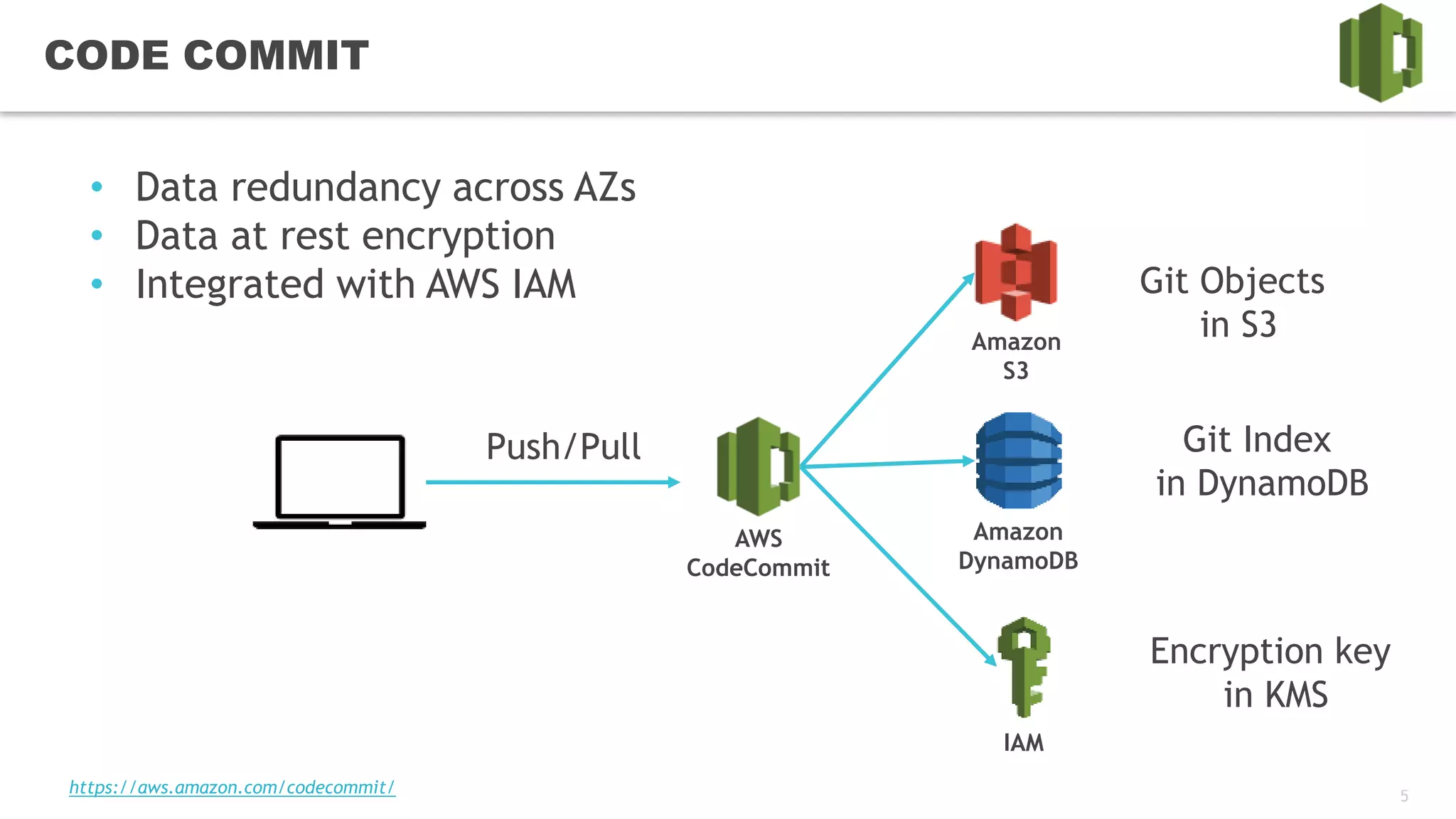
CODE COMMIT
AWS
CodeCommit
Amazon
S3
Git Objects
in S3
• Data redundancy across AZs
• Data at rest encryption
• Integrated with AWS IAM
Amazon
DynamoDB
IAM
Git Index
in DynamoDB
Encryption key
in KMS
Push/Pull
https://aws.amazon.com/codecommit/
6
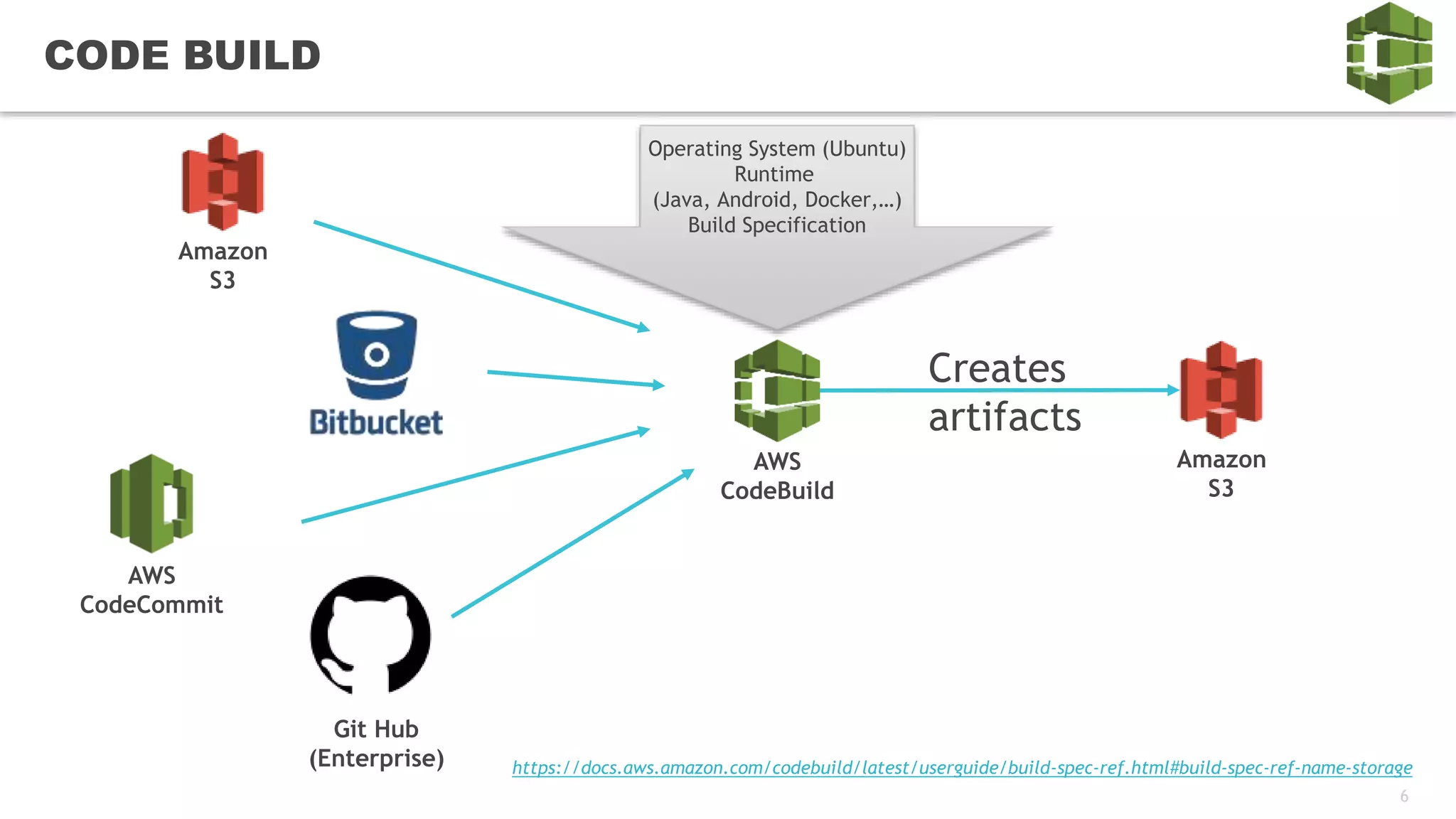
CODE BUILD
https://docs.aws.amazon.com/codebuild/latest/userguide/build-spec-ref.html#build-spec-ref-name-storage
Amazon
S3
AWS
CodeCommit
Git Hub
(Enterprise)
AWS
CodeBuild
Operating System (Ubuntu)
Runtime
(Java, Android, Docker,…)
Build Specification
Amazon
S3
Creates
artifacts
7
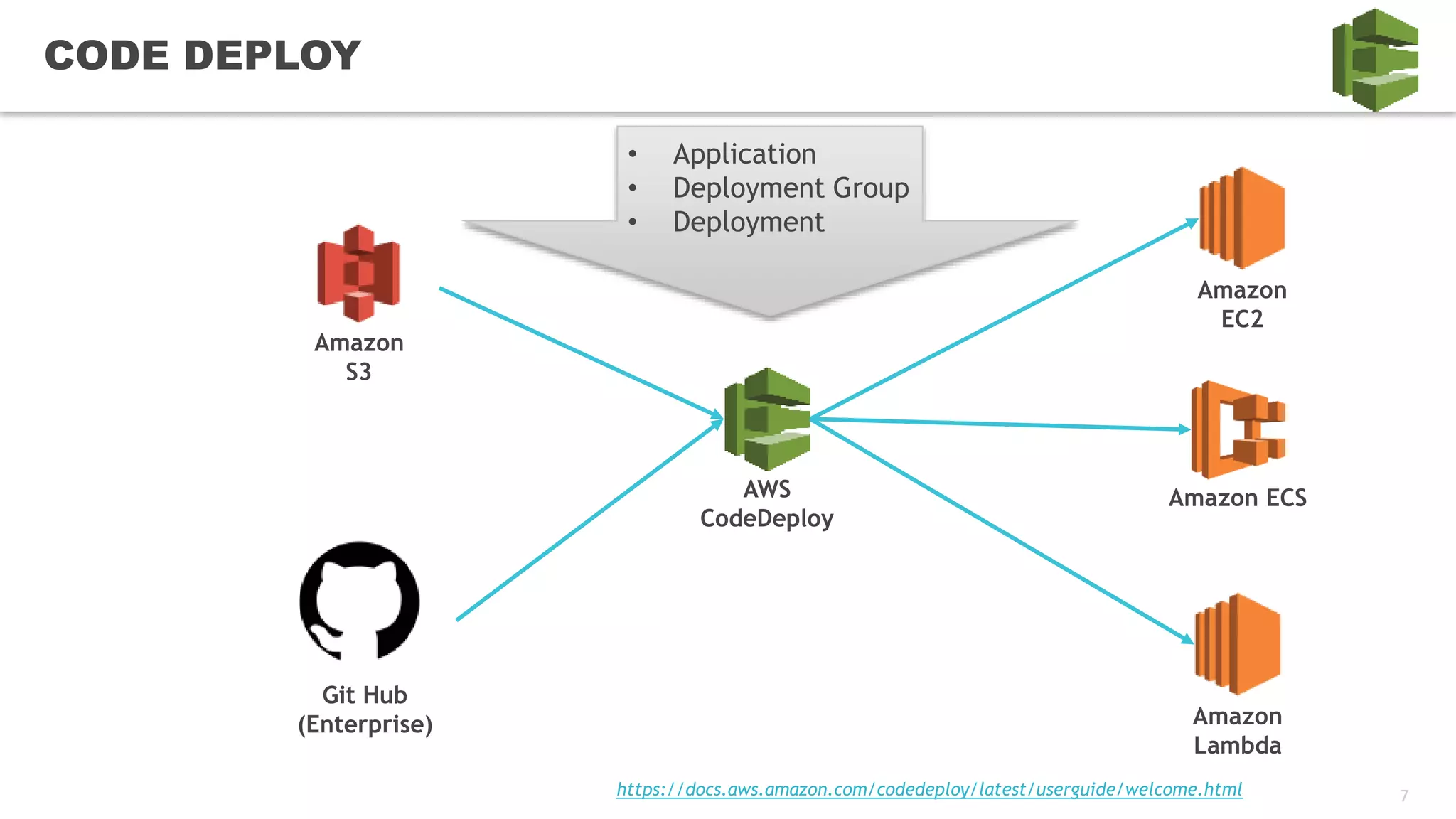
CODE DEPLOY
Amazon
S3
AWS
CodeDeploy
• Application
• Deployment Group
• Deployment
Git Hub
(Enterprise)
Amazon
EC2
Amazon
Lambda
https://docs.aws.amazon.com/codedeploy/latest/userguide/welcome.html
Amazon ECS
8
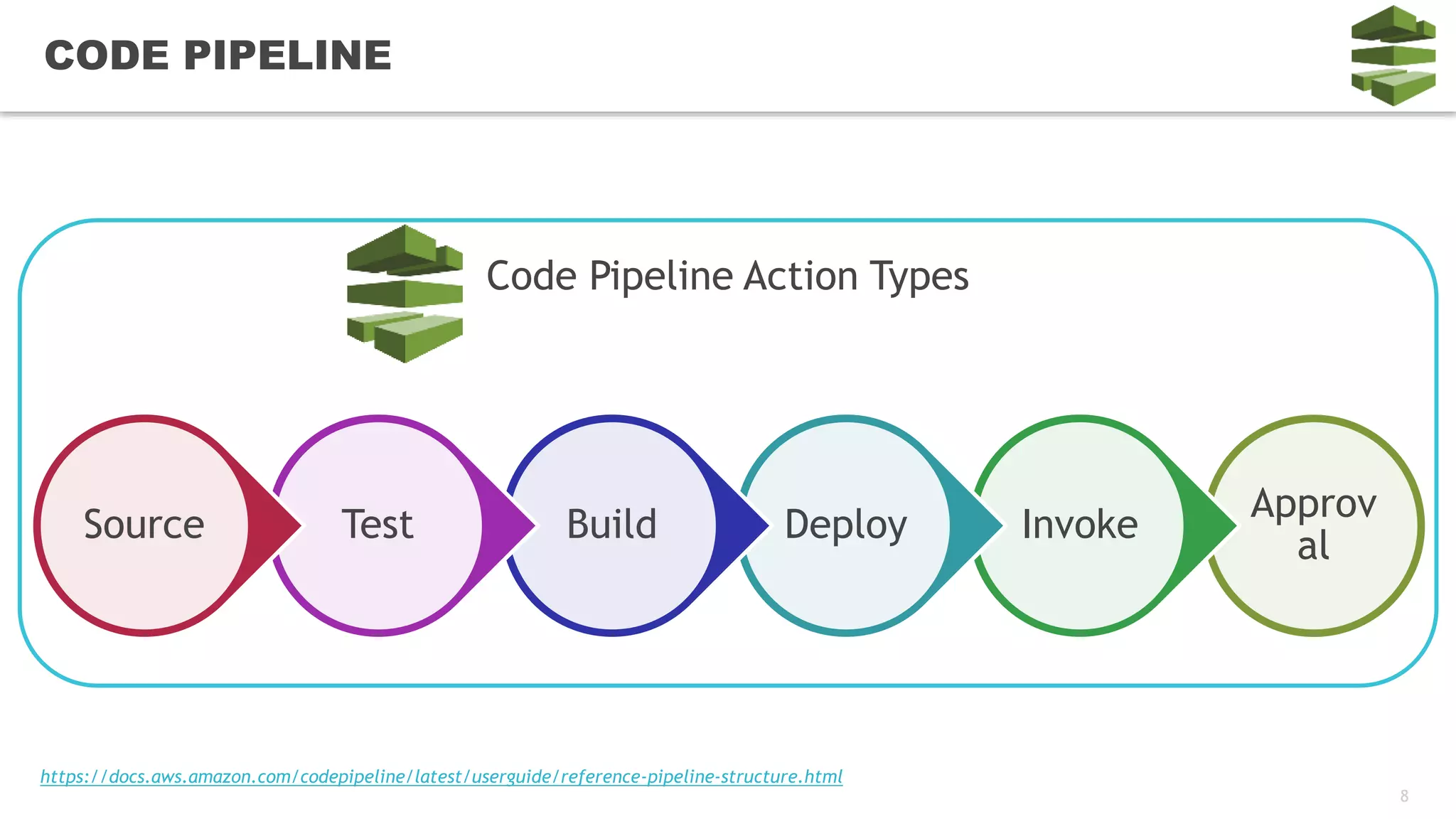
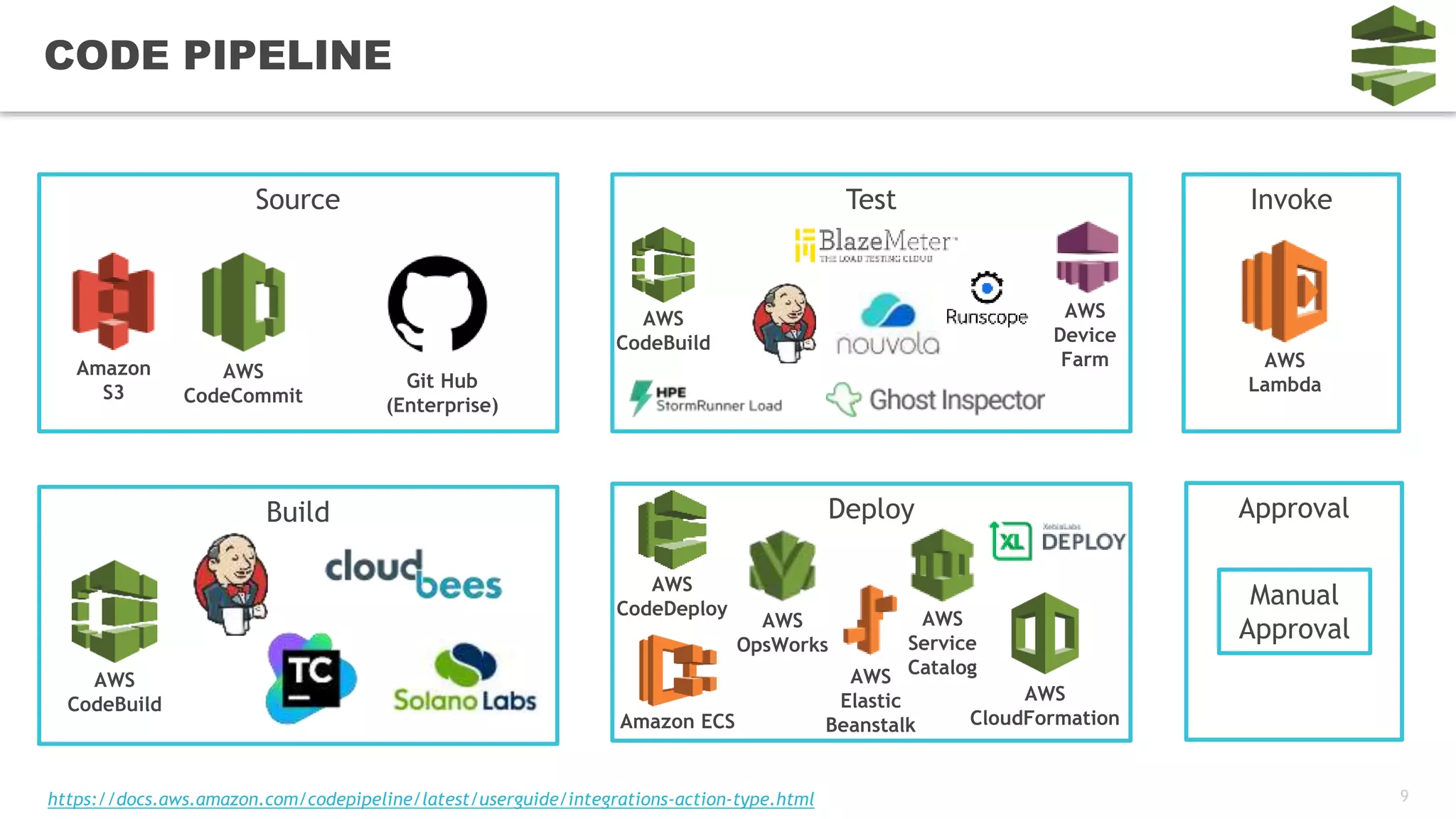
CODE PIPELINE
Approv
al
InvokeDeployBuildTestSource
Code Pipeline Action Types
https://docs.aws.amazon.com/codepipeline/latest/userguide/reference-pipeline-structure.html
9
CODE PIPELINE
Source
Amazon
S3
Git Hub
(Enterprise)
AWS
CodeCommit
Build
AWS
CodeBuild
Test
AWS
CodeBuild
Deploy
AWS
CodeDeploy
Amazon ECS
AWS
Elastic
Beanstalk
AWS
CloudFormation
Invoke
Approval
AWS
Lambda
Manual
Approval
AWS
Device
Farm
AWS
OpsWorks
AWS
Service
Catalog
https://docs.aws.amazon.com/codepipeline/latest/userguide/integrations-action-type.html
10
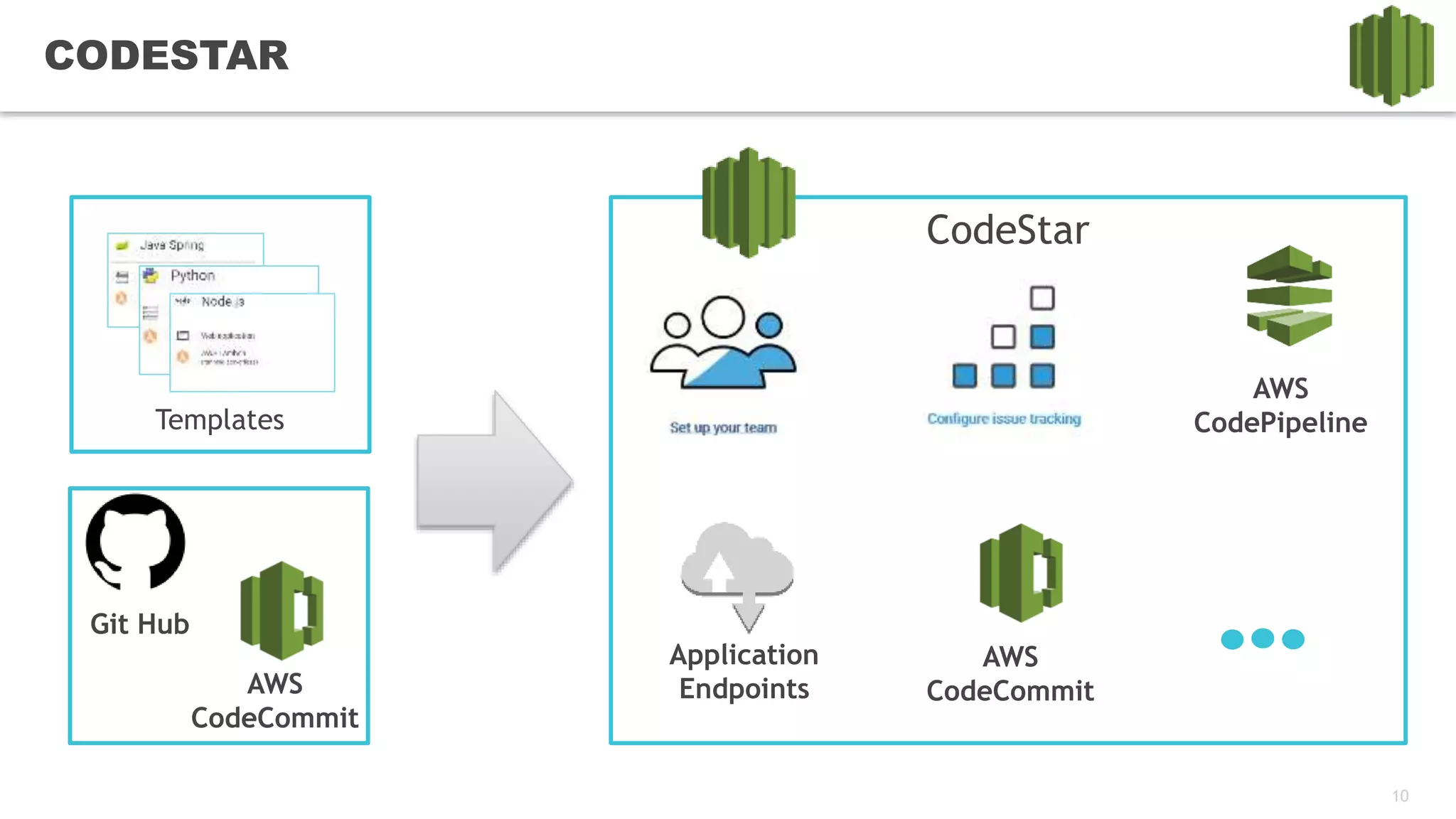
CODESTAR
Templates
Git Hub
AWS
CodeCommit
CodeStar
AWS
CodePipeline
AWS
CodeCommit
Application
Endpoints
11
CodeStar
DEMO
12
CI/CD
LIVE DEMO
13
CI/CD PIPELINE
CONSTRUCTION
14
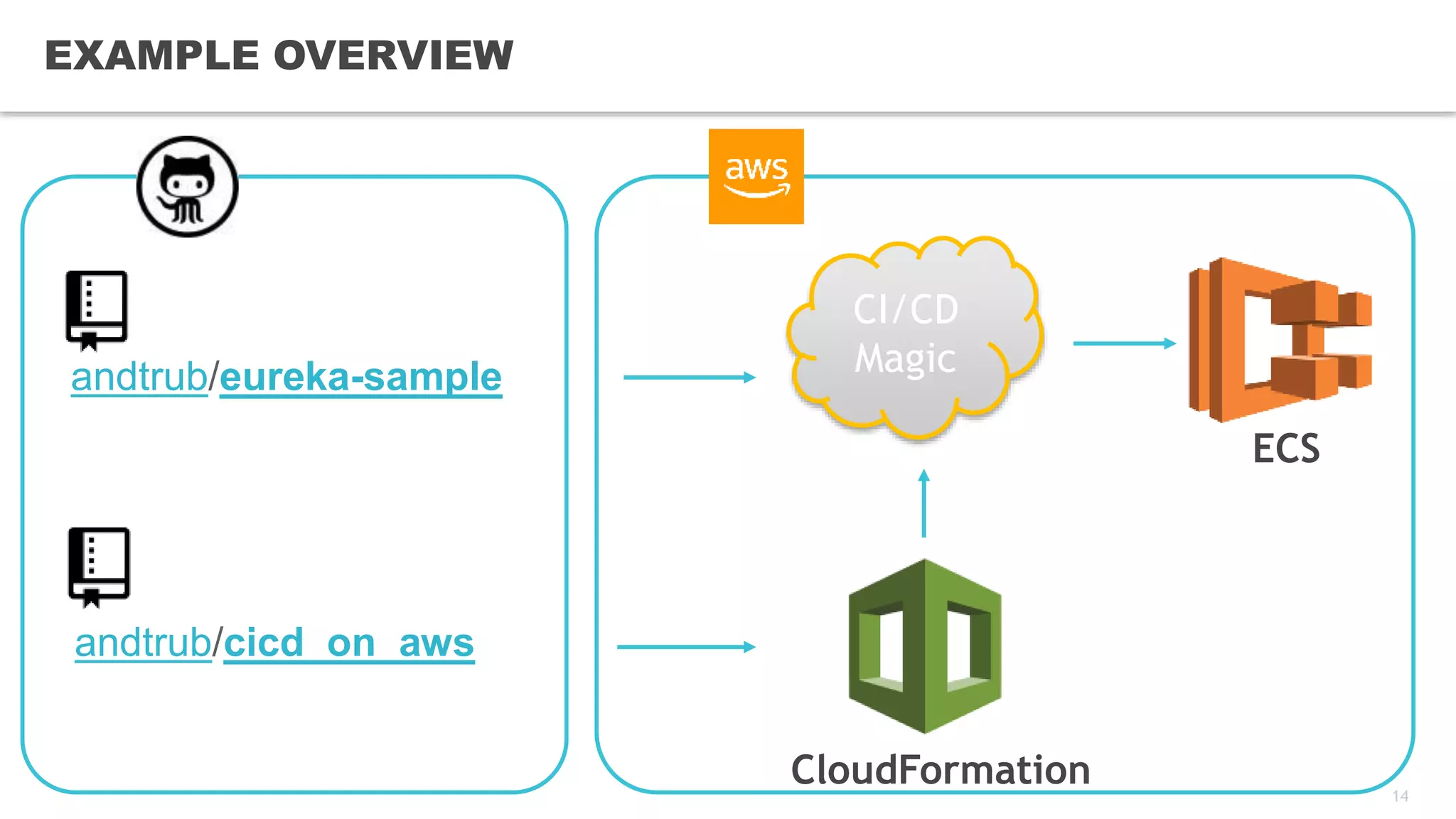
EXAMPLE OVERVIEW
CloudFormation
ECS
andtrub/eureka-sample
andtrub/cicd_on_aws
CI/CD
Magic
15
CI/CD: PULL SOURCES
{
"Name": "Source",
"Actions": [
{
"InputArtifacts": [],
"Name": "Source",
"ActionTypeId": {
"Category": "Source",
"Owner": "AWS",
"Version": "1",
"Provider": "CodeCommit"
},
"OutputArtifacts": [{
"Name": "MyApp"
}
],
"Configuration": {
"BranchName": {
"Ref": "RepositoryBranch"
},
"RepositoryName": {
"Ref": "RepositoryName"
}
},
"RunOrder": 1
}
]
}
16
CI/CD: BUILD, TEST AND ANALYZE
{
"Name": "TestBuildAndAnalyze",
"Actions": [
{
"InputArtifacts": [
{
"Name": "MyApp"
}
],
"Name": "UnitTests",
"ActionTypeId": {
"Category": "Build",
"Owner": "AWS",
"Version": "1",
"Provider": "CodeBuild"
},
"OutputArtifacts": [
{
"Name": "MyAppBuild"
}
],
"Configuration": {
"ProjectName": {
"Ref": "CodeBuildCompileAndTest"
}
},
"RunOrder": 1
},
{
"InputArtifacts": [
{
"Name": "MyApp"
}
],
"Name": "RunSonarCheck",
"ActionTypeId": {
"Category": "Build",
"Owner": "AWS",
"Version": "1",
"Provider": "CodeBuild"
},
"OutputArtifacts": [
{
"Name": "MyAppBuild2"
}
],
"Configuration": {
"ProjectName": {
"Ref": "SonarCheck"
}
},
"RunOrder": 1
}
]
}
17
CI/CD: CODEBUILD
"SonarCheck": {
"Type": "AWS::CodeBuild::Project",
"Properties": {
"Name": "SonarCheck",
"Description": "Sonar static code analysis",
"ServiceRole": {
"Fn::GetAtt": [
"CodeBuildRole",
"Arn"
]
},
"Artifacts": {
"Type": "CODEPIPELINE"
},
"Environment": {
"Type": "linuxContainer",
"ComputeType": "BUILD_GENERAL1_SMALL",
"Image": "aws/codebuild/java:openjdk-8"
},
"Source": {
"BuildSpec": "buildspec-sonar.yml",
"Type": "CODEPIPELINE"
},
"TimeoutInMinutes": 10
}
},
"CodeBuildCompileAndTest": {
"Type": "AWS::CodeBuild::Project",
"Properties": {
"Name": "CodeBuildCompileAndTest",
"Description": "Build Eureka",
"ServiceRole": {
"Fn::GetAtt": [
"CodeBuildRole",
"Arn"
]
},
"Artifacts": {
"Type": "CODEPIPELINE"
},
"Environment": {
"Type": "linuxContainer",
"ComputeType": "BUILD_GENERAL1_SMALL",
"Image": "aws/codebuild/java:openjdk-8"
},
"Source": {
"BuildSpec": "buildspec-test.yml",
"Type": "CODEPIPELINE"
},
"TimeoutInMinutes": 10
}
}
18
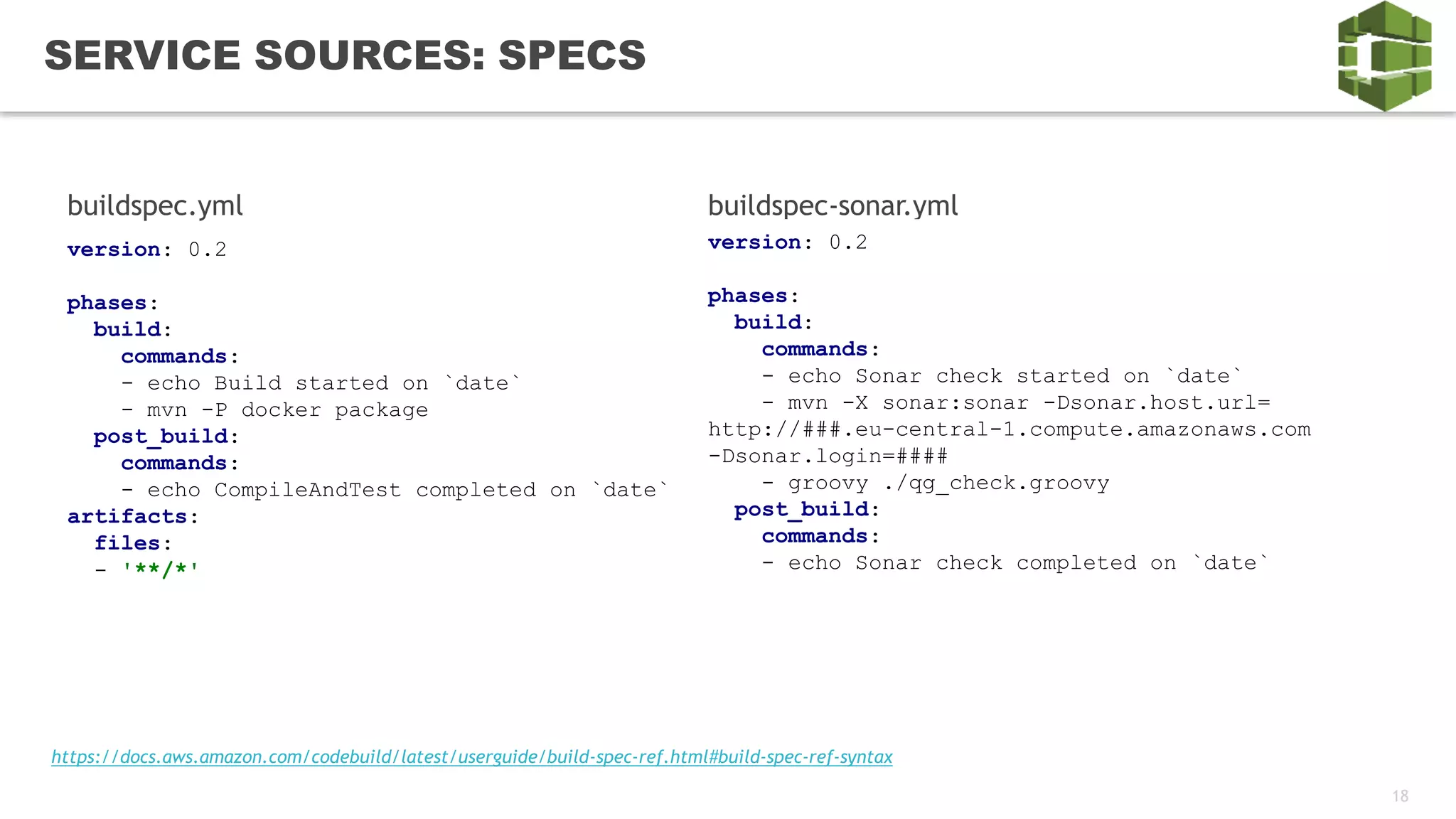
SERVICE SOURCES: SPECS
version: 0.2
phases:
build:
commands:
- echo Build started on `date`
- mvn -P docker package
post_build:
commands:
- echo CompileAndTest completed on `date`
artifacts:
files:
- '**/*'
buildspec.yml buildspec-sonar.yml
version: 0.2
phases:
build:
commands:
- echo Sonar check started on `date`
- mvn -X sonar:sonar -Dsonar.host.url=
http://###.eu-central-1.compute.amazonaws.com
-Dsonar.login=####
- groovy ./qg_check.groovy
post_build:
commands:
- echo Sonar check completed on `date`
https://docs.aws.amazon.com/codebuild/latest/userguide/build-spec-ref.html#build-spec-ref-syntax
19
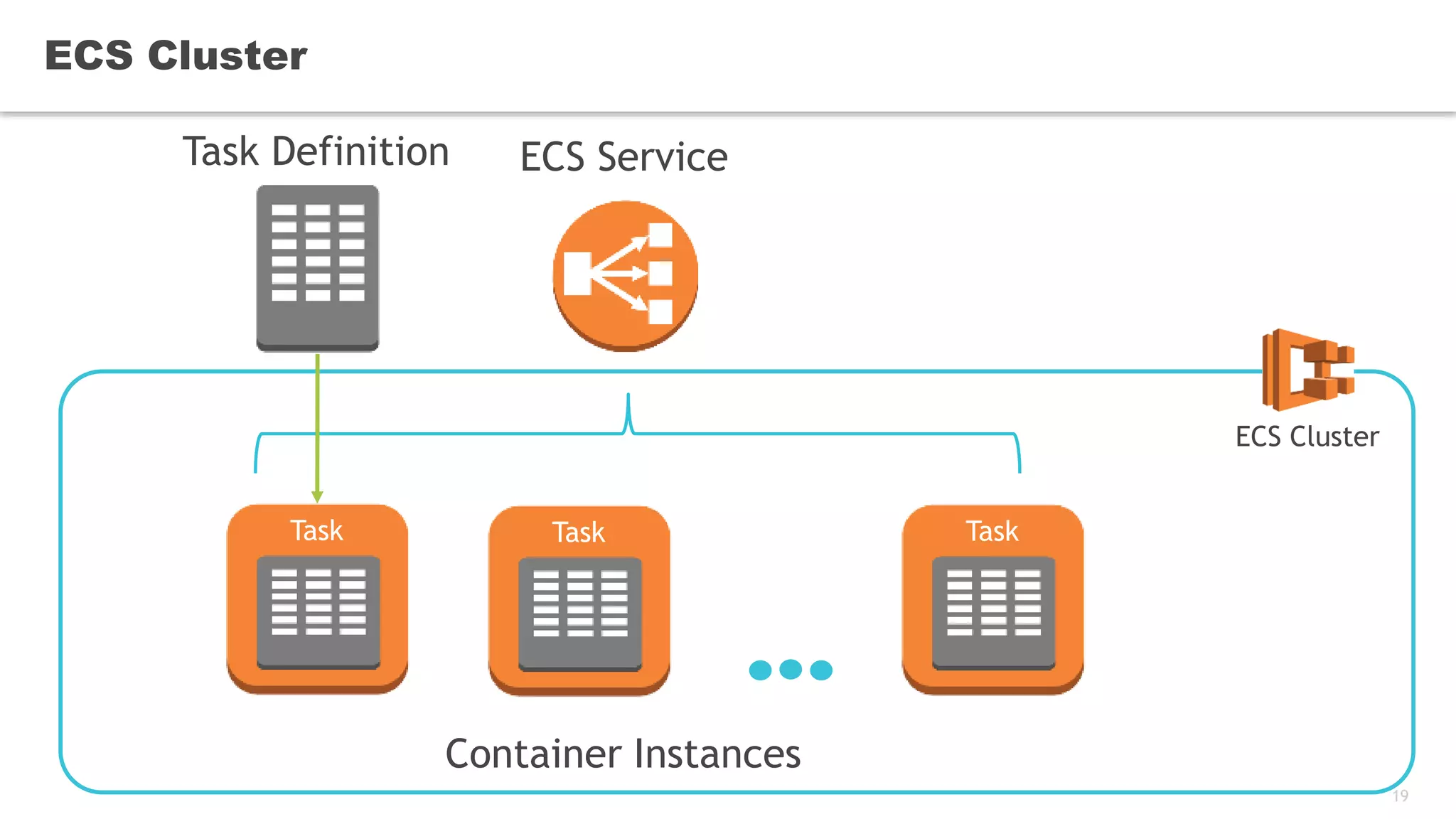
ECS Cluster
Task Definition ECS Service
ECS Cluster
Container Instances
Task Task Task
20
CI/CD: DEPLOY IMAGE
{
"Name": "DeployDockerContainerToDEV",
"Actions": [
{
"InputArtifacts": [{
"Name": "MyAppDocker"
}
],
"Name": "DeployDockerContainer",
"ActionTypeId": {
"Category": "Deploy",
"Owner": "AWS",
"Version": "1",
"Provider": "ECS"
},
"OutputArtifacts": [],
"Configuration": {
"ClusterName": {
"Ref": "ECSClusterDEV"
},
"ServiceName": {
"Ref": "EurekaService“ },
"FileName": "Eureka.json"
},
"RunOrder": 1
}
]},
"EurekaService": {
"Type": "AWS::ECS::Service",
"Properties": {
"LaunchType": "FARGATE",
"NetworkConfiguration": {
"AwsvpcConfiguration": {
"Subnets": [
"subnet-3ccd5154"
],
"SecurityGroups": [
"sg-06d1c96e"
],
"AssignPublicIp": "ENABLED"
}
},
"Cluster": {
"Ref": "ECSClusterDEV"
},
"DesiredCount": 1,
"TaskDefinition": {
"Ref": "EurekaTaskDefinition"
}
}
},
21
CI/CD: TASK DEFINITION
"EurekaTaskDefinition": {
"Type": "AWS::ECS::TaskDefinition",
"Properties": {
"NetworkMode": "awsvpc",
"Cpu": 256,
"Memory": 1024,
"Family": "eureka-fargate-task-definition",
"ExecutionRoleArn":
"arn:aws:iam::##:role/ecsTaskExecutionRole",
"RequiresCompatibilities": [ "FARGATE" ],
"ContainerDefinitions": [
{
"Name": "eureka",
"Image": “##.dkr.ecr.eu-central-
1.amazonaws.com/eureka:latest",
"PortMappings": [
{
"ContainerPort": 8761,
"HostPort": 8761,
"Protocol": "tcp"
}
]
}
]
}
22
CI/CD: MANUAL APPROVAL
"Name": "ManualApproval",
"Actions": [
{
"Name": "ManualApprovalToDeployToQA",
"ActionTypeId": {
"Category": "Approval",
"Owner": "AWS",
"Version": "1",
"Provider": "Manual"
},
"InputArtifacts": [],
"OutputArtifacts": [],
"RunOrder": 1
}
]
23
TIME FOR MANUAL
APPROVAL
24
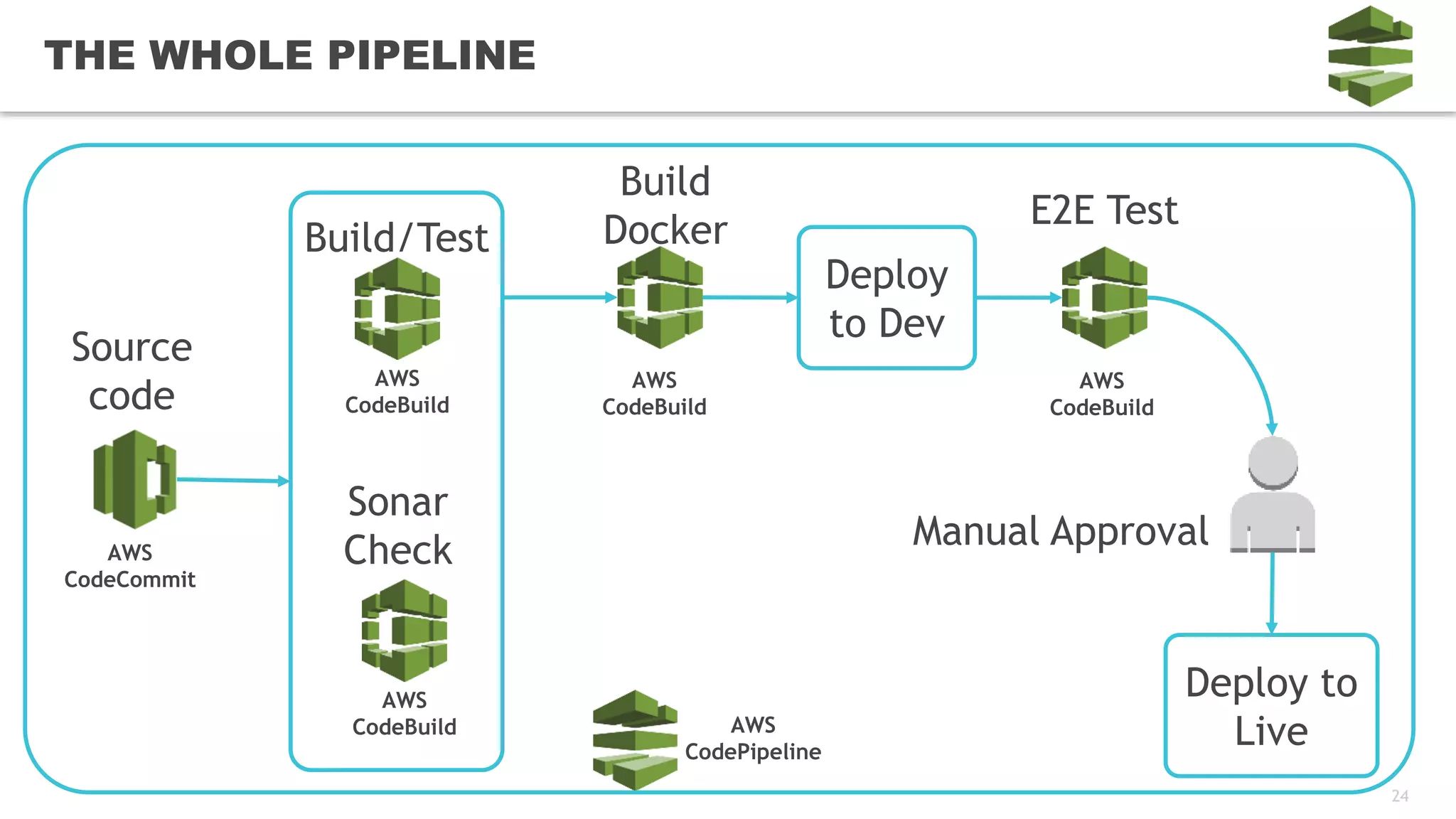
THE WHOLE PIPELINE
AWS
CodePipeline
AWS
CodeCommit
Source
code
AWS
CodeBuild
AWS
CodeBuild
Build/Test
Sonar
Check
AWS
CodeBuild
Build
Docker
Deploy
to Dev
AWS
CodeBuild
E2E Test
Deploy to
Live
Manual Approval
25
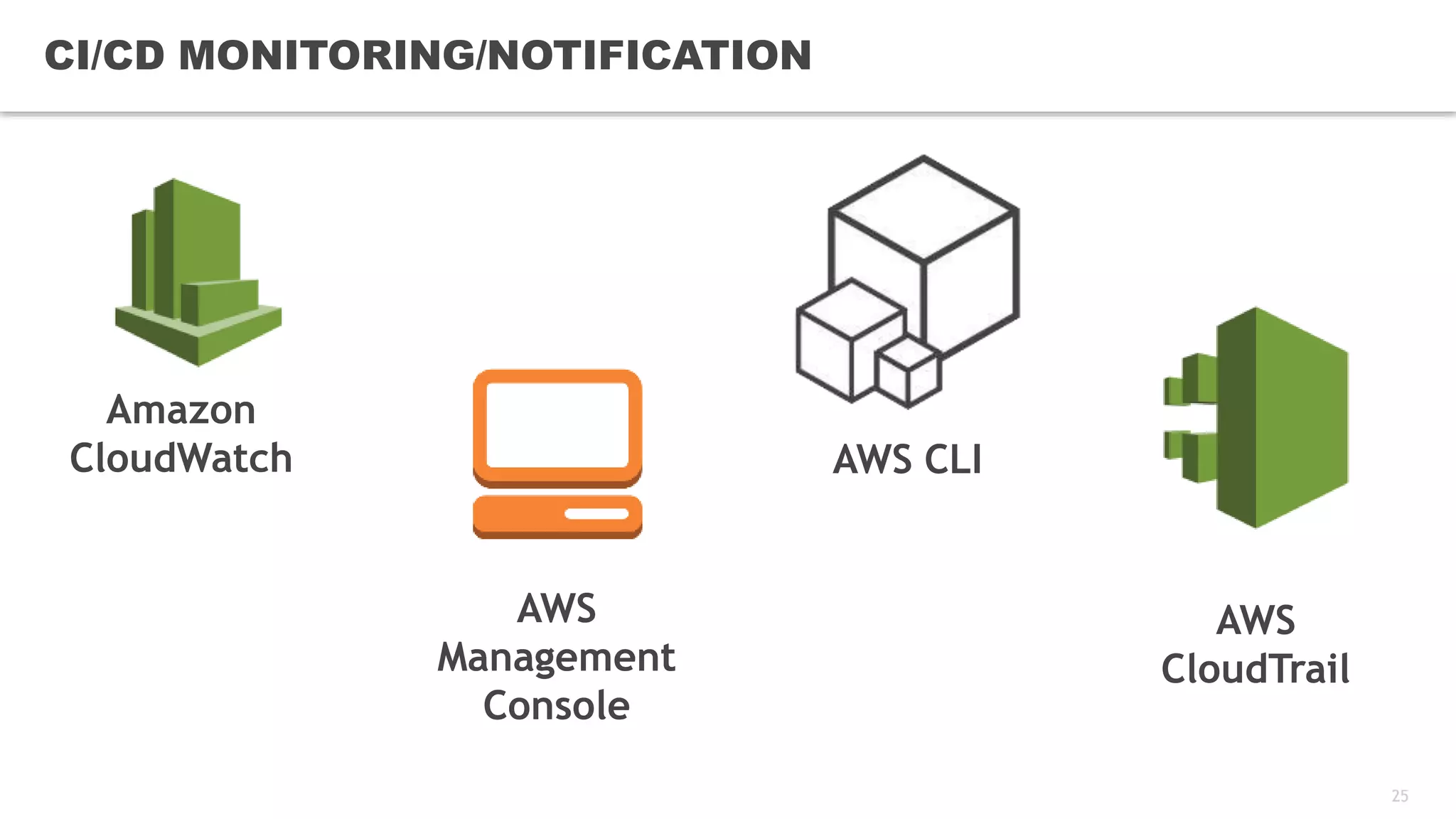
CI/CD MONITORING/NOTIFICATION
Amazon
CloudWatch
AWS
CloudTrail
AWS
Management
Console
AWS CLI
26
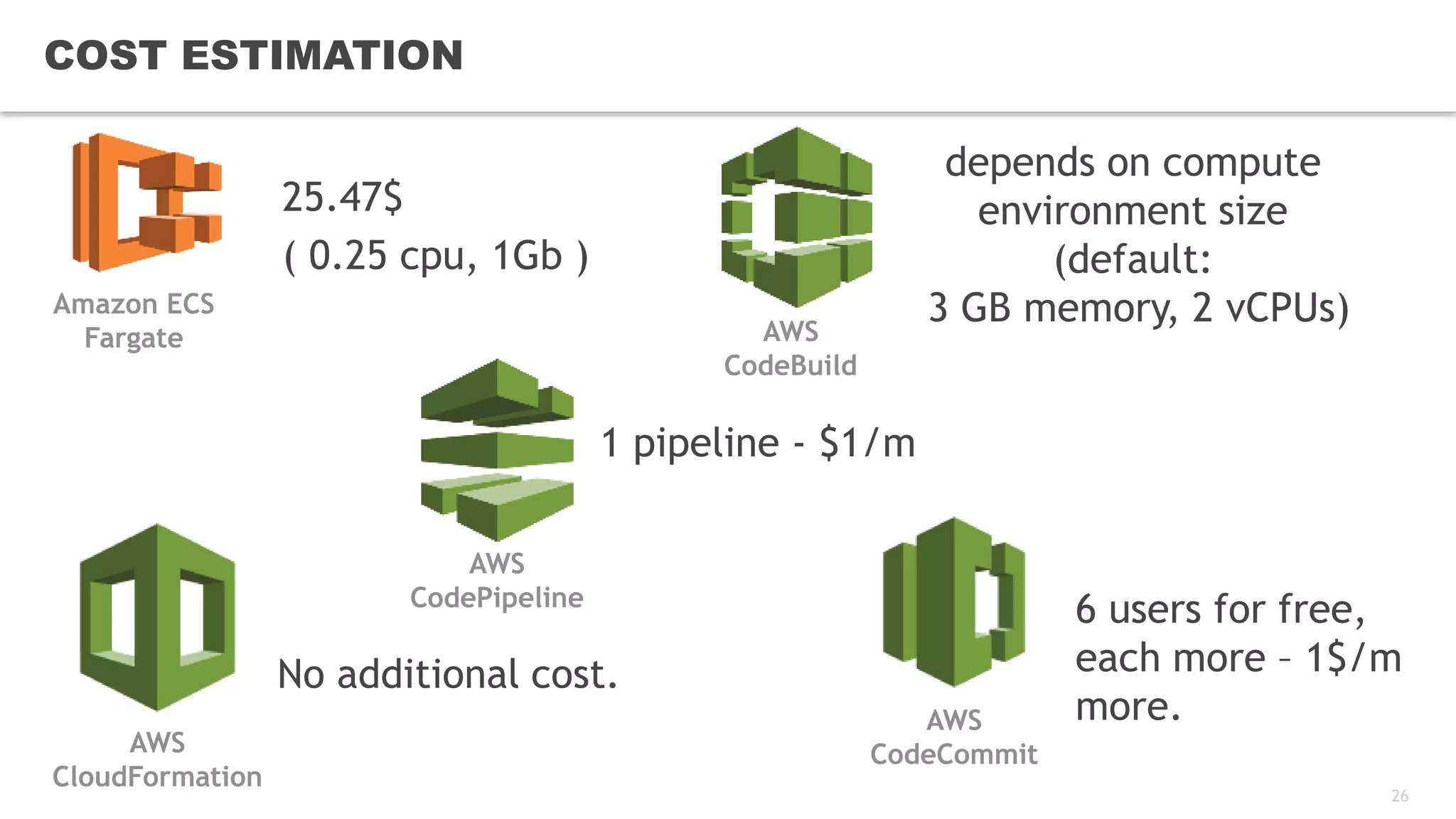
COST ESTIMATION
25.47$
( 0.25 cpu, 1Gb )
1 pipeline - $1/m
AWS
CodePipeline
depends on compute
environment size
(default:
3 GB memory, 2 vCPUs)AWS
CodeBuild
6 users for free,
each more – 1$/m
more.AWS
CodeCommit
Amazon ECS
Fargate
No additional cost.
AWS
CloudFormation
27
CHECK CI/CD Pipeline
LIVE DEMO
28
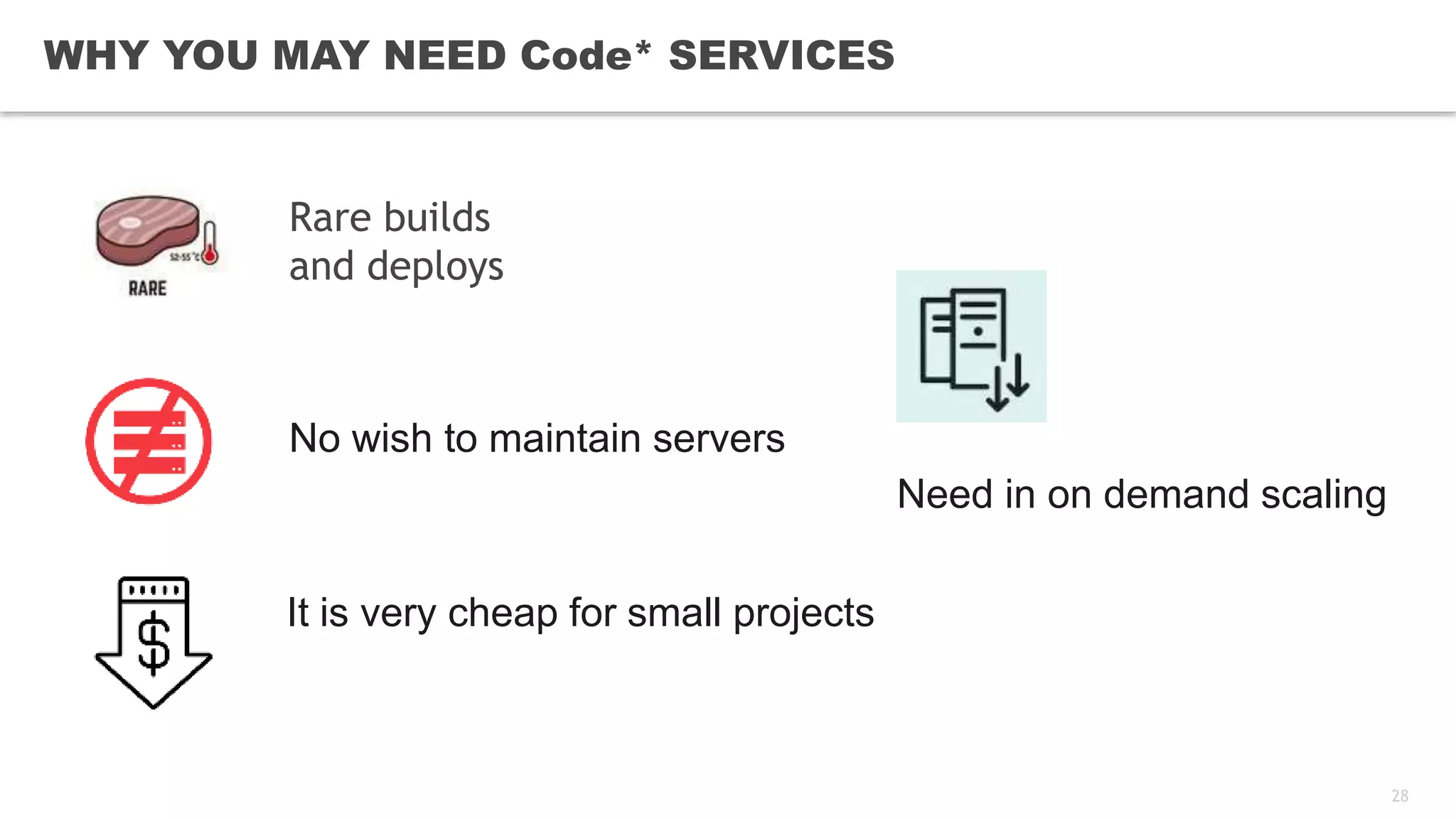
WHY YOU MAY NEED Code* SERVICES
Rare builds
and deploys
No wish to maintain servers
Need in on demand scaling
It is very cheap for small projects
29
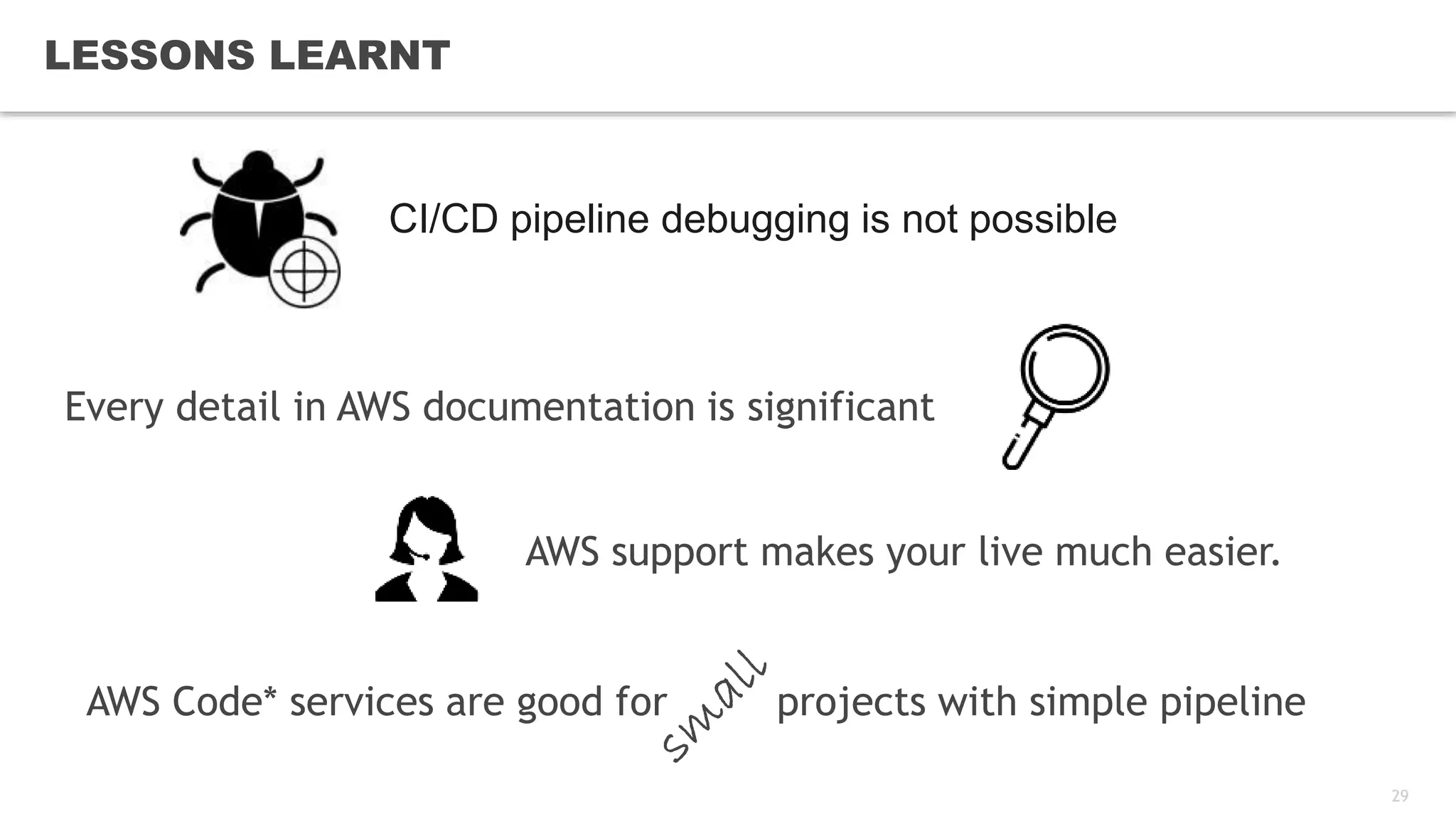
LESSONS LEARNT
AWS Code* services are good for projects with simple pipeline
CI/CD pipeline debugging is not possible
AWS support makes your live much easier.
Every detail in AWS documentation is significant
30
CONTACT ME
Andriy_Trubitsyn@epam.com
trubitsynandrey
andtrub
REFERENCES
https://aws.amazon.com/codestar
https://aws.amazon.com/codecommit
https://aws.amazon.com/codebuild
https://aws.amazon.com/codedeploy
https://aws.amazon.com/codepipeline
SOURCE CODE
https://github.com/andtrub/cicd_on_aws
https://github.com/andtrub/eureka-sample

CI/CD on pure AWS

Editor's Notes

  • #4 In EPAM Code* services are not so popular as good old Jenkins for CI and CD. IT requires you to be constantly learning. I have tried many Amazon services but not these. I decided to create a PoC to get familiar with them Amazon is saying about scaling resources on demand and this was another point to check. EPAM is building EDP (EPAM Delivery Platform) which includes CI/CD as an integral part of it. We suggest EDP as a service for our clients as well. And I need to know an efficient way to construct CI/CD for EDP in AWS. Code* services could help me understand what to build and how to build in cloud. That’s why I started this PoC. If you have a product in a cloud definitely you use some self-managed services like RDS, ES, EC etc. I was interested how Code* services are integrated with other Amazon services
  • #6 CodeCommit is a first fully-managed service in Code* services family to store source code Your sourcecode is encrypted at rest CodeCommit works with pull requests, sends notifications, you can go through code and edit it
  • #7 CodeBuild is a full managed service to build artifacts. It can pull artifacts from different sources, see the diagram This service takes a command or a script and executes it. There is a way to setup environment for your script – image, cpu & ram, env variables, parameters for (password, etc, from KMS) You can use CodeBuild for many purposes like run tests, build artifacts include docker images,
  • #8 Create Application to deploy onto EC2/On-Prem, ECS or AWS Lambda. Not required for ECS and EKS. (ECS is supported by CodePipeline, for EKS use lambda function via CodeBuild) Create Deployment group with type = In-Place, Blue/Green. Choose when reroute traffic, when terminate old instances, success conditions of deployment, how many instances to deploy at a step. Create deployment from S3 or GitHub artifacts
  • #9 CodePipeline is a service which assembles CodeCommit, CodeBuild, CodeDeploy into pipelines Invoke – for lambda function only There are several action types you can set. Discuss them. What it means , what it is for. Each step has input artifacts and output artifacts. On each step you can choose a provider you need. The next slide
  • #10 1) This slide describes possible sources for each action https://docs.aws.amazon.com/codepipeline/latest/userguide/integrations-action-type.html 2) CodePipeline can deploy to many things it is like an improved version of CodeDeploy 3) There are some limitations like: A pipeline must contain at least two stages, he first stage of a pipeline must contain at least one source action, All stage names within a pipeline must be unique, etc.
  • #11 1)  CodeStar is a unified user interface, enabling you to easily manage your software development activities in one place. 2) In a few click you can create a bunch of connected and integrated stuff like CodeCommit with initial commit, CodeBuild, CodePipeline, 3) Extensions (two of them for now) is very important for future integration 3) You will have dashboard…. LIVE SHORT DEMO – 5 minutes?
  • #12 Show precreated CodeStar and quickly go through it
  • #13 Run my CI/CD
  • #14 Let’s discuss CI/CD I started
  • #15 I have a service to deploy I have a CF to create pipeline and all required Code*services and integrate them My pipeline does magic and a sample service appears in ECS Let’s discuss every CI/CD step in details
  • #16 CodeCommit is manually created repo before CodePipeline uses existing CodeCommit repo Category and Provider Repo name and branch Output artifact
  • #17 Two steps are done by two CodeBuild in parallel: Test and Sonar verification Input and Output artifacts RunOrder ( sequence or parallel) Configurations are dedicated resources with many details This is cool but most build related part is in source code.
  • #18 1) CloudBuild resources 2) Build spec yml files which do all work
  • #19 There is a predefined structure for buildspec files. You can have many of them. Show buildspec files in repo Artifacts - '**/*’ to uploads to S3
  • #20 ECS Service: ECS Cluster ECS Task Definition Desired Count Task Definition:1 Image CPU & Memory Port mapping Env variables
  • #21 Deploy from CodePipleine ( not CodeDeploy) Need to create a service and a taskdefinition
  • #22 IN task definition we can configure docker image Cpu & Memory, port mapping
  • #23 Category Provider
  • #24 Just click manual approval and go ahead
  • #25 The whole view Describe this diagram
  • #26 https://docs.aws.amazon.com/codepipeline/latest/userguide/monitoring.html https://aws.amazon.com/about-aws/whats-new/2017/09/aws-codepipeline-now-provides-notifications-on-pipeline-stage-and-action-status-changes/ https://docs.aws.amazon.com/codepipeline/latest/userguide/detect-state-changes-cloudwatch-events.html Amazon CloudWatch Events — Use Amazon CloudWatch Events to detect and react to pipeline execution state changes (for example, send an Amazon SNS notification or invoke a Lambda function). AWS CloudTrail — Use CloudTrail to capture API calls made by or on behalf of AWS CodePipeline in your AWS account and deliver the log files to an Amazon S3 bucket. You can choose to have CloudWatch publish Amazon SNS notifications when new log files are delivered so you can take quick action. Console and CLI — You can use the AWS CodePipeline console and CLI to view details about the status of a pipeline or a particular pipeline execution.
  • #27 Costs Since costs can vary widely in using certain AWS services and other tools, I’ve provided a cost breakdown and some sample scenarios to give you an idea of what your monthly spend might look like. The AWS Cost Calculator can assist in establishing cost projections. CloudFormation – No additional cost CodeCommit – If you’re using on small project of less than six users, there’s no additional cost. See AWS CodeCommit Pricing for more information. CodeDeploy – No additional cost CodePipeline – $1 a month per pipeline unless you’re using it as part of the free tier. For more information, see AWS CodePipeline pricing. EC2 – Approximately $15/month if you’re running once t1.micro instance 24/7. See AWS EC2 Pricing for more information. IAM – No additional cost SNS – Considering you probably won’t have over 1 million Amazon SNS requests for this particular solution, there’s no cost. For more information, see AWS SNS Pricing. So, for this particular sample solution, you’ll spend around $16/month iff you run the EC2 instance for an entire month. If you just run it once and terminate it, you’ll spend a little over $1.
  • #28 Just click manual approval and