Question 3: How did you use media technologies in the
construction and research, planning and evaluation stages?
CAMERA
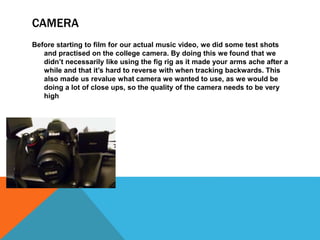
Before starting to film for our actual music video, we did some test shots
and practised on the college camera. By doing this we found that we
didn’t necessarily like using the fig rig as it made your arms ache after a
while and that it’s hard to reverse with when tracking backwards. This
also made us revalue what camera we wanted to use, as we would be
doing a lot of close ups, so the quality of the camera needs to be very
high
CAMERA
•When it came to filming we used all we had been learning into practice. We took
some test shots before hand on a JVC camera and on a Nikon D5100, to see
which camera we preferred. In the end we decided on the Nikon as it was much
lighter to carry and had a better quality than the JVC. We shot from different
ranges of angles both high and low, also different shots, such as mid, long and
close ups and we also used tracking several times. To make some of our shots
straight, we used a tripod, we relied on the tripod as a handle for a lot of our
shots, it was never just left on a stand. The only time this happened was when
we did the couple scene and the purple scene as the camera didn’t need to be
moved, as the couple scene would later be edited into a jump cut and the purple
scene was static as we had a moving background, we did this by putting up a big
sheet of purple bed sheets and had someone using a newspaper to fan it.
I also used my phone camera to
take behind the scenes
images and videos, I also
used this to keep in touch
with teachers on social
media. My phone came in
handy as we also used it for
the weather forecast, to let
us know if it was safe to film
outside. Also my phone kept
me connected with my
group.
CAMERA
BLOGGING
Throughout the whole course I
used blogger to represent all my
research and planning, by using
blogger I was able to use other
apps and software to present
my work. Some of these were
Prezi, Emaze, Thinglink, slid.es
and powtoon. These are just
nicer ways of presenting my
work instead of having simply
text and a picture, I think these
made my work look more
aesthetically pleasing and it was
more interactive.
INTERNET
I used YouTube as a main source of
finding inspiration for our music video,
this also helped me using final cut pro
and Photoshop much more
confidently. I also use websites related
to music such as Noisey, soundcloud
and vimeo, to find artists and music
videos under the rnb genre, noisey
helped specifically as it is a music
blog that shares and reviews
upcoming and known artists. YouTube
helped me find my synergy and artist
style as it would recommend videos
under the same genre I was looking for
and it also helped us find what would
inspire our purple base track.
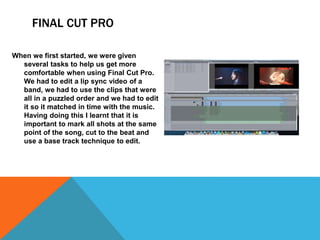
FINAL CUT PRO
When we first started, we were given
several tasks to help us get more
comfortable when using Final Cut Pro.
We had to edit a lip sync video of a
band, we had to use the clips that were
all in a puzzled order and we had to edit
it so it matched in time with the music.
Having doing this I learnt that it is
important to mark all shots at the same
point of the song, cut to the beat and
use a base track technique to edit.
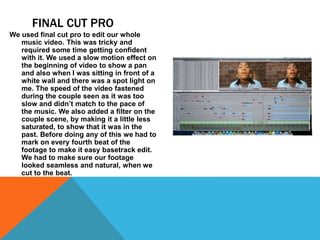
FINAL CUT PRO
We used final cut pro to edit our whole
music video. This was tricky and
required some time getting confident
with it. We used a slow motion effect on
the beginning of video to show a pan
and also when I was sitting in front of a
white wall and there was a spot light on
me. The speed of the video fastened
during the couple seen as it was too
slow and didn’t match to the pace of
the music. We also added a filter on the
couple scene, by making it a little less
saturated, to show that it was in the
past. Before doing any of this we had to
mark on every fourth beat of the
footage to make it easy basetrack edit.
We had to make sure our footage
looked seamless and natural, when we
cut to the beat.
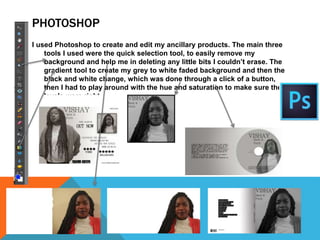
PHOTOSHOP
I used Photoshop to create and edit my ancillary products. The main three
tools I used were the quick selection tool, to easily remove my
background and help me in deleting any little bits I couldn’t erase. The
gradient tool to create my grey to white faded background and then the
black and white change, which was done through a click of a button,
then I had to play around with the hue and saturation to make sure the
levels were right.
THAANNK YOUUUUUU!!

Evaluation question 3

  • 1.
    Question 3: Howdid you use media technologies in the construction and research, planning and evaluation stages?
  • 2.
    CAMERA Before starting tofilm for our actual music video, we did some test shots and practised on the college camera. By doing this we found that we didn’t necessarily like using the fig rig as it made your arms ache after a while and that it’s hard to reverse with when tracking backwards. This also made us revalue what camera we wanted to use, as we would be doing a lot of close ups, so the quality of the camera needs to be very high
  • 3.
    CAMERA •When it cameto filming we used all we had been learning into practice. We took some test shots before hand on a JVC camera and on a Nikon D5100, to see which camera we preferred. In the end we decided on the Nikon as it was much lighter to carry and had a better quality than the JVC. We shot from different ranges of angles both high and low, also different shots, such as mid, long and close ups and we also used tracking several times. To make some of our shots straight, we used a tripod, we relied on the tripod as a handle for a lot of our shots, it was never just left on a stand. The only time this happened was when we did the couple scene and the purple scene as the camera didn’t need to be moved, as the couple scene would later be edited into a jump cut and the purple scene was static as we had a moving background, we did this by putting up a big sheet of purple bed sheets and had someone using a newspaper to fan it.
  • 4.
    I also usedmy phone camera to take behind the scenes images and videos, I also used this to keep in touch with teachers on social media. My phone came in handy as we also used it for the weather forecast, to let us know if it was safe to film outside. Also my phone kept me connected with my group. CAMERA
  • 5.
    BLOGGING Throughout the wholecourse I used blogger to represent all my research and planning, by using blogger I was able to use other apps and software to present my work. Some of these were Prezi, Emaze, Thinglink, slid.es and powtoon. These are just nicer ways of presenting my work instead of having simply text and a picture, I think these made my work look more aesthetically pleasing and it was more interactive.
  • 6.
    INTERNET I used YouTubeas a main source of finding inspiration for our music video, this also helped me using final cut pro and Photoshop much more confidently. I also use websites related to music such as Noisey, soundcloud and vimeo, to find artists and music videos under the rnb genre, noisey helped specifically as it is a music blog that shares and reviews upcoming and known artists. YouTube helped me find my synergy and artist style as it would recommend videos under the same genre I was looking for and it also helped us find what would inspire our purple base track.
  • 7.
    FINAL CUT PRO Whenwe first started, we were given several tasks to help us get more comfortable when using Final Cut Pro. We had to edit a lip sync video of a band, we had to use the clips that were all in a puzzled order and we had to edit it so it matched in time with the music. Having doing this I learnt that it is important to mark all shots at the same point of the song, cut to the beat and use a base track technique to edit.
  • 8.
    FINAL CUT PRO Weused final cut pro to edit our whole music video. This was tricky and required some time getting confident with it. We used a slow motion effect on the beginning of video to show a pan and also when I was sitting in front of a white wall and there was a spot light on me. The speed of the video fastened during the couple seen as it was too slow and didn’t match to the pace of the music. We also added a filter on the couple scene, by making it a little less saturated, to show that it was in the past. Before doing any of this we had to mark on every fourth beat of the footage to make it easy basetrack edit. We had to make sure our footage looked seamless and natural, when we cut to the beat.
  • 9.
    PHOTOSHOP I used Photoshopto create and edit my ancillary products. The main three tools I used were the quick selection tool, to easily remove my background and help me in deleting any little bits I couldn’t erase. The gradient tool to create my grey to white faded background and then the black and white change, which was done through a click of a button, then I had to play around with the hue and saturation to make sure the levels were right.
  • 10.