Networking
Introduction
In the world of computers, networking is the practice of interfacing two or more computing
device with each other for the purpose of sharing data. Computer networks are built with a
combination of hardware and software.
 A network can be defined as a group of computers and other devices
connected in some ways so as to be able to exchange data.
 Each of the devices on the network can be thought of as a node; each
node has a unique address.
 Addresses are numeric quantities that are easy for computers to work
with, but not for humans to remember.
 Some networks also provide names that humans can more easily
remember than numbers.
Motivation
What truly motivates the people in this project is the knowledge that, just as they
themselves benefit from using the networking, their own work can benefit other
people, potentially worldwide.
 Using computer measurement and control across a network allows for possibilities of
operation in remote or otherwise inaccessible locations, and it allows for
measurement and control of multiple locations from a single location. To take
advantage of those possibilities, you need to have a basic familiarity with
networked computers.
 You need to learn about basic concepts of network addressing and how to
determine addresses. When you are finished with this unit you should be able to
use a program (LabVIEW) to perform measurements and control across a network
and you will learn about URLs, and IP addresses, and how to determine them. In
addition, you will learn about some basic network concepts (servers, etc.
 99% of my business comes from networking
 Use Context To Start Conversations
 Your Network As A Source of Knowledge and advise
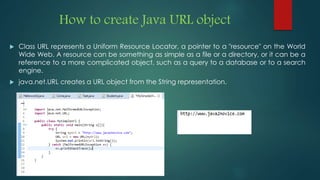
How to create Java URL object
 Class URL represents a Uniform Resource Locator, a pointer to a "resource" on the World
Wide Web. A resource can be something as simple as a file or a directory, or it can be a
reference to a more complicated object, such as a query to a database or to a search
engine.
 java.net.URL creates a URL object from the String representation.
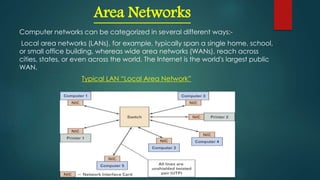
Area Networks
Computer networks can be categorized in several different ways:-
Local area networks (LANs), for example, typically span a single home, school,
or small office building, whereas wide area networks (WANs), reach across
cities, states, or even across the world. The Internet is the world's largest public
WAN.
Typical LAN “Local Area Network”
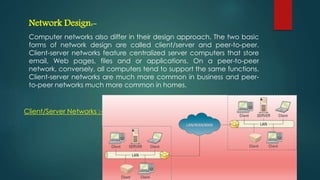
Network Design:-
Computer networks also differ in their design approach. The two basic
forms of network design are called client/server and peer-to-peer.
Client-server networks feature centralized server computers that store
email, Web pages, files and or applications. On a peer-to-peer
network, conversely, all computers tend to support the same functions.
Client-server networks are much more common in business and peer-
to-peer networks much more common in homes.
Client/Server Networks :-
Creating A Server To Serve Clients
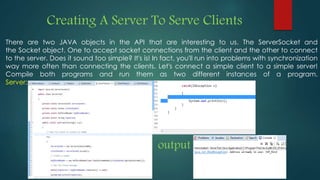
There are two JAVA objects in the API that are interesting to us. The ServerSocket and
the Socket object. One to accept socket connections from the client and the other to connect
to the server. Does it sound too simple? It's is! In fact, you'll run into problems with synchronization
way more often than connecting the clients. Let's connect a simple client to a simple server!
Compile both programs and run them as two different instances of a program.
Server:
output
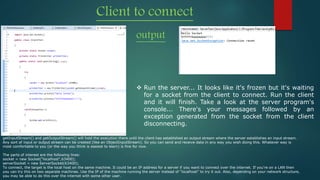
Client to connect
output
 Run the server... It looks like it's frozen but it's waiting
for a socket from the client to connect. Run the client
and it will finish. Take a look at the server program's
console... There's your messages followed by an
exception generated from the socket from the client
disconnecting.
getInputStream() and getOutputStream() will hold the execution there until the client has established an output stream where the server establishes an input stream.
Any sort of input or output stream can be created (like an ObjectInputStream). So you can send and receive data in any way you wish doing this. Whatever way is
most comfortable to you (or the way you think is easiest to learn) is fine for now.
The parts of interest are the following lines:
socket = new Socket("localhost",63400);
serverSocket = new ServerSocket(63400);
To connect, the target is the local host on the same machine. It could be an IP address for a server if you want to connect over the internet. If you're on a LAN then
you can try this on two separate machines. Use the IP of the machine running the server instead of "localhost" to try it out. Also, depending on your network structure,
you may be able to do this over the internet with some other user.
Tools
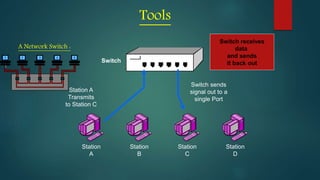
Station
A
Station
B
Station
C
Station
D
Switch
Station A
Transmits
to Station C
Switch sends
signal out to a
single Port
Switch receives
data
and sends
it back out
A Network Switch :
Routers
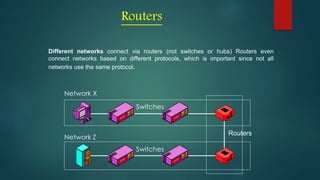
Different networks connect via routers (not switches or hubs) Routers even
connect networks based on different protocols, which is important since not all
networks use the same protocol.
Network X
Network Z
Switches
Routers
Switches
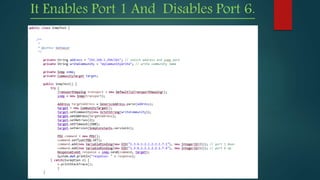
It Enables Port 1 And Disables Port 6.
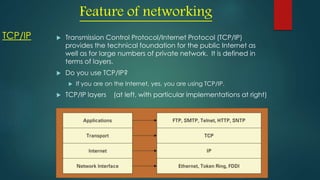
TCP/IP  Transmission Control Protocol/Internet Protocol (TCP/IP)
provides the technical foundation for the public Internet as
well as for large numbers of private network. It is defined in
terms of layers.
 Do you use TCP/IP?
 If you are on the Internet, yes, you are using TCP/IP.
 TCP/IP layers (at left, with particular implementations at right)
Feature of networking
Wireless networking
 Wireless fidelity (wi-fi) – a means of linking computers into a
wireless local area network (WLAN)
 Also referred to as 802.11
 Wi-Fi has evolved through various standards, the most common
of which have been:
 802.11b, with 11 Mbps bandwidth
 802.11g, with 54 Mbps bandwidth
 802.11n, with 100 - 200 Mbps bandwidth
How to get my machine or local host IP address in
Java?
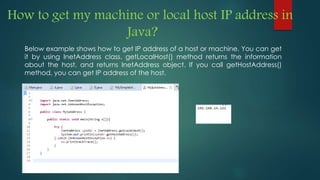
Below example shows how to get IP address of a host or machine. You can get
it by using InetAddress class. getLocalHost() method returns the information
about the host, and returns InetAddress object. If you call getHostAddress()
method, you can get IP address of the host.
Limitation Of Current System
 Security Issues: One of the major drawbacks of computer networks is the security issues
involved. If a computer is a standalone, physical access becomes necessary for any kind
of data theft. However, if a computer is on a network, a computer hacker can get
unauthorized access by using different tools. In case of big organizations, various network
security software are used to prevent the theft of any confidential and classified data.
 Rapid Spread of Computer Viruses: If any computer system in a network gets affected by
computer virus, there is a possible threat of other systems getting affected too. Viruses get
spread on a network easily because of the interconnectivity of workstations. Such spread
can be dangerous if the computers have important database which can get corrupted
by the virus.
 Expensive Set Up: The initial set up cost of a computer network can be high depending on
the number of computers to be connected. Costly devices like routers, switches, hubs,
etc., can add up to the bills of a person trying to install a computer network. He will also
have to buy NICs (Network Interface Cards) for each of the workstations, in case they are
not inbuilt.
 Dependency on the Main File Server: In case the main File Server of a computer network
breaks down, the system becomes useless. In case of big networks, the File Server should
be a powerful computer, which often makes it expensive.
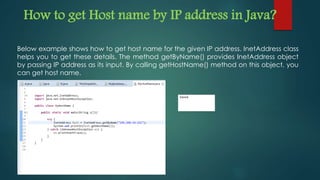
How to get Host name by IP address in Java?
Below example shows how to get host name for the given IP address. InetAddress class
helps you to get these details. The method getByName() provides InetAddress object
by passing IP address as its input. By calling getHostName() method on this object, you
can get host name.
Conclusion
Computer communication, it seems, will become a much more useful networking tool when
large numbers of people with similar interests acquire access to the technology.
Advantages of Computer Networking:
 Easy Communication and Speed
 Ability to Share Files, Data and Information
 Sharing Hardware
 Sharing Software
 Security
 Speed
Disadvantages of Computer Networking:
 Breakdowns and Possible Loss of Resources
 Expensive to Build
 Security Threats
 Bandwidth Issues
Networking slide

Networking slide

  • 1.
  • 2.
    Introduction In the worldof computers, networking is the practice of interfacing two or more computing device with each other for the purpose of sharing data. Computer networks are built with a combination of hardware and software.  A network can be defined as a group of computers and other devices connected in some ways so as to be able to exchange data.  Each of the devices on the network can be thought of as a node; each node has a unique address.  Addresses are numeric quantities that are easy for computers to work with, but not for humans to remember.  Some networks also provide names that humans can more easily remember than numbers.
  • 3.
    Motivation What truly motivatesthe people in this project is the knowledge that, just as they themselves benefit from using the networking, their own work can benefit other people, potentially worldwide.  Using computer measurement and control across a network allows for possibilities of operation in remote or otherwise inaccessible locations, and it allows for measurement and control of multiple locations from a single location. To take advantage of those possibilities, you need to have a basic familiarity with networked computers.  You need to learn about basic concepts of network addressing and how to determine addresses. When you are finished with this unit you should be able to use a program (LabVIEW) to perform measurements and control across a network and you will learn about URLs, and IP addresses, and how to determine them. In addition, you will learn about some basic network concepts (servers, etc.  99% of my business comes from networking  Use Context To Start Conversations  Your Network As A Source of Knowledge and advise
  • 4.
    How to createJava URL object  Class URL represents a Uniform Resource Locator, a pointer to a "resource" on the World Wide Web. A resource can be something as simple as a file or a directory, or it can be a reference to a more complicated object, such as a query to a database or to a search engine.  java.net.URL creates a URL object from the String representation.
  • 5.
    Area Networks Computer networkscan be categorized in several different ways:- Local area networks (LANs), for example, typically span a single home, school, or small office building, whereas wide area networks (WANs), reach across cities, states, or even across the world. The Internet is the world's largest public WAN. Typical LAN “Local Area Network”
  • 6.
    Network Design:- Computer networksalso differ in their design approach. The two basic forms of network design are called client/server and peer-to-peer. Client-server networks feature centralized server computers that store email, Web pages, files and or applications. On a peer-to-peer network, conversely, all computers tend to support the same functions. Client-server networks are much more common in business and peer- to-peer networks much more common in homes. Client/Server Networks :-
  • 7.
    Creating A ServerTo Serve Clients There are two JAVA objects in the API that are interesting to us. The ServerSocket and the Socket object. One to accept socket connections from the client and the other to connect to the server. Does it sound too simple? It's is! In fact, you'll run into problems with synchronization way more often than connecting the clients. Let's connect a simple client to a simple server! Compile both programs and run them as two different instances of a program. Server: output
  • 8.
    Client to connect output Run the server... It looks like it's frozen but it's waiting for a socket from the client to connect. Run the client and it will finish. Take a look at the server program's console... There's your messages followed by an exception generated from the socket from the client disconnecting. getInputStream() and getOutputStream() will hold the execution there until the client has established an output stream where the server establishes an input stream. Any sort of input or output stream can be created (like an ObjectInputStream). So you can send and receive data in any way you wish doing this. Whatever way is most comfortable to you (or the way you think is easiest to learn) is fine for now. The parts of interest are the following lines: socket = new Socket("localhost",63400); serverSocket = new ServerSocket(63400); To connect, the target is the local host on the same machine. It could be an IP address for a server if you want to connect over the internet. If you're on a LAN then you can try this on two separate machines. Use the IP of the machine running the server instead of "localhost" to try it out. Also, depending on your network structure, you may be able to do this over the internet with some other user.
  • 9.
    Tools Station A Station B Station C Station D Switch Station A Transmits to StationC Switch sends signal out to a single Port Switch receives data and sends it back out A Network Switch :
  • 10.
    Routers Different networks connectvia routers (not switches or hubs) Routers even connect networks based on different protocols, which is important since not all networks use the same protocol. Network X Network Z Switches Routers Switches
  • 11.
    It Enables Port1 And Disables Port 6.
  • 12.
    TCP/IP  TransmissionControl Protocol/Internet Protocol (TCP/IP) provides the technical foundation for the public Internet as well as for large numbers of private network. It is defined in terms of layers.  Do you use TCP/IP?  If you are on the Internet, yes, you are using TCP/IP.  TCP/IP layers (at left, with particular implementations at right) Feature of networking
  • 13.
    Wireless networking  Wirelessfidelity (wi-fi) – a means of linking computers into a wireless local area network (WLAN)  Also referred to as 802.11  Wi-Fi has evolved through various standards, the most common of which have been:  802.11b, with 11 Mbps bandwidth  802.11g, with 54 Mbps bandwidth  802.11n, with 100 - 200 Mbps bandwidth
  • 14.
    How to getmy machine or local host IP address in Java? Below example shows how to get IP address of a host or machine. You can get it by using InetAddress class. getLocalHost() method returns the information about the host, and returns InetAddress object. If you call getHostAddress() method, you can get IP address of the host.
  • 15.
    Limitation Of CurrentSystem  Security Issues: One of the major drawbacks of computer networks is the security issues involved. If a computer is a standalone, physical access becomes necessary for any kind of data theft. However, if a computer is on a network, a computer hacker can get unauthorized access by using different tools. In case of big organizations, various network security software are used to prevent the theft of any confidential and classified data.  Rapid Spread of Computer Viruses: If any computer system in a network gets affected by computer virus, there is a possible threat of other systems getting affected too. Viruses get spread on a network easily because of the interconnectivity of workstations. Such spread can be dangerous if the computers have important database which can get corrupted by the virus.  Expensive Set Up: The initial set up cost of a computer network can be high depending on the number of computers to be connected. Costly devices like routers, switches, hubs, etc., can add up to the bills of a person trying to install a computer network. He will also have to buy NICs (Network Interface Cards) for each of the workstations, in case they are not inbuilt.  Dependency on the Main File Server: In case the main File Server of a computer network breaks down, the system becomes useless. In case of big networks, the File Server should be a powerful computer, which often makes it expensive.
  • 16.
    How to getHost name by IP address in Java? Below example shows how to get host name for the given IP address. InetAddress class helps you to get these details. The method getByName() provides InetAddress object by passing IP address as its input. By calling getHostName() method on this object, you can get host name.
  • 17.
    Conclusion Computer communication, itseems, will become a much more useful networking tool when large numbers of people with similar interests acquire access to the technology. Advantages of Computer Networking:  Easy Communication and Speed  Ability to Share Files, Data and Information  Sharing Hardware  Sharing Software  Security  Speed Disadvantages of Computer Networking:  Breakdowns and Possible Loss of Resources  Expensive to Build  Security Threats  Bandwidth Issues