John Readey
2018 ESIP Summer Meeting
HDF Kita Lab:
JupyterLab + HDF Service
1
• The HDF Group is providing a hosted JupyterLab environment at
https://hdflab.hdfgroup.org
• Open to anyone (you just need to register with The HDF Group)
• Provides access to HDF Kita Server (aka HSDS) – HDF data on S3
• Comes with sample notebooks, tutorials, datasets
• There is a small subscription fee ($10/month)
• ESIP attendees get a free 90 day trial
2HDF Kita Lab
HDF Kita Lab
Kubernetes
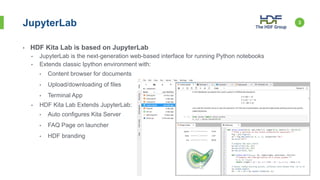
• HDF Kita Lab is based on JupyterLab
• JupyterLab is the next-generation web-based interface for running Python notebooks
• Extends classic Ipython environment with:
• Content browser for documents
• Upload/downloading of files
• Terminal App
• HDF Kita Lab Extends JupyterLab:
• Auto configures Kita Server
• FAQ Page on launcher
• HDF branding
3JupyterLab
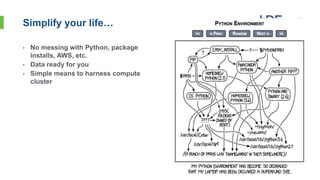
• No messing with Python, package
installs, AWS, etc.
• Data ready for you
• Simple means to harness compute
cluster
4Simplify your life…
• HDF Kita Lab runs on AWS in a Kubernetes cluster
• Cluster can scale to handle different number of users
• Each user gets:
• 1 CPU Core (2.5GHz Xeon)
• 8 GB RAM
• 10 GB Disk
• 100 GB S3 Storage
• Access to HDF Kita Server
• Ability to read/write HDF data stored on S3
• User environment configured for commonly used Python Packages for
HDF users:
• H5py(d), pandas, h5netcdf, xarray, bokeh, dask
• HDF Kita Command Line tools:
• Hsinfo, hsls, hsget, hsload, etc.
5Features
• JupyterLab and Kita Server both runs as a set of Docker containers
• Kubernetes transparently manages running these containers across multiple
machines
6Kubernetes Platform
AWS
Kubernetes
JupyterHub HDF Kita Server (HSDS)
{Containers
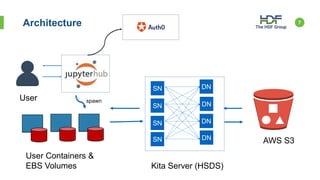
7Architecture
AWS S3
Kita Server (HSDS)
User
SN
SN
SN
SN
DN
DN
DN
DN
User Containers &
EBS Volumes
spawn
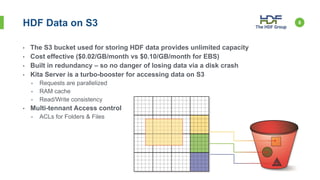
• The S3 bucket used for storing HDF data provides unlimited capacity
• Cost effective ($0.02/GB/month vs $0.10/GB/month for EBS)
• Built in redundancy – so no danger of losing data via a disk crash
• Kita Server is a turbo-booster for accessing data on S3
• Requests are parallelized
• RAM cache
• Read/Write consistency
• Multi-tennant Access control
• ACLs for Folders & Files
8HDF Data on S3
• Each EBS Volume is an island…
• You can’t directly share your EBS data with others in JupyterLab
• HDF content in S3 can be shared with any Kita Lab user
• For each folder or file you can:
• Make it private (no one else can read or write)
• Make publically readable (anyone can read)
• Share with just who you want
• Use the hsacl tool to manage permissions
• We’ve seeded the /shared folder will some content to play with:
• NASA NCEP3 dataset (100GB)
• NASA Terra dataset (50GB)
• Daily Stock Market (150MB)
• More coming!
9Data Sharing
• Additional samples/data sets/tutorials
• Custom extensions
• File browser for Kita Server content
• HDF Viewer
• Bring in other JupyterLab extensions as they become stable
• Collaboration tools
• Github integratation
10Future Directions

HDF Kita Lab: JupyterLab + HDF Service

  • 1.
    John Readey 2018 ESIPSummer Meeting HDF Kita Lab: JupyterLab + HDF Service 1
  • 2.
    • The HDFGroup is providing a hosted JupyterLab environment at https://hdflab.hdfgroup.org • Open to anyone (you just need to register with The HDF Group) • Provides access to HDF Kita Server (aka HSDS) – HDF data on S3 • Comes with sample notebooks, tutorials, datasets • There is a small subscription fee ($10/month) • ESIP attendees get a free 90 day trial 2HDF Kita Lab HDF Kita Lab Kubernetes
  • 3.
    • HDF KitaLab is based on JupyterLab • JupyterLab is the next-generation web-based interface for running Python notebooks • Extends classic Ipython environment with: • Content browser for documents • Upload/downloading of files • Terminal App • HDF Kita Lab Extends JupyterLab: • Auto configures Kita Server • FAQ Page on launcher • HDF branding 3JupyterLab
  • 4.
    • No messingwith Python, package installs, AWS, etc. • Data ready for you • Simple means to harness compute cluster 4Simplify your life…
  • 5.
    • HDF KitaLab runs on AWS in a Kubernetes cluster • Cluster can scale to handle different number of users • Each user gets: • 1 CPU Core (2.5GHz Xeon) • 8 GB RAM • 10 GB Disk • 100 GB S3 Storage • Access to HDF Kita Server • Ability to read/write HDF data stored on S3 • User environment configured for commonly used Python Packages for HDF users: • H5py(d), pandas, h5netcdf, xarray, bokeh, dask • HDF Kita Command Line tools: • Hsinfo, hsls, hsget, hsload, etc. 5Features
  • 6.
    • JupyterLab andKita Server both runs as a set of Docker containers • Kubernetes transparently manages running these containers across multiple machines 6Kubernetes Platform AWS Kubernetes JupyterHub HDF Kita Server (HSDS) {Containers
  • 7.
    7Architecture AWS S3 Kita Server(HSDS) User SN SN SN SN DN DN DN DN User Containers & EBS Volumes spawn
  • 8.
    • The S3bucket used for storing HDF data provides unlimited capacity • Cost effective ($0.02/GB/month vs $0.10/GB/month for EBS) • Built in redundancy – so no danger of losing data via a disk crash • Kita Server is a turbo-booster for accessing data on S3 • Requests are parallelized • RAM cache • Read/Write consistency • Multi-tennant Access control • ACLs for Folders & Files 8HDF Data on S3
  • 9.
    • Each EBSVolume is an island… • You can’t directly share your EBS data with others in JupyterLab • HDF content in S3 can be shared with any Kita Lab user • For each folder or file you can: • Make it private (no one else can read or write) • Make publically readable (anyone can read) • Share with just who you want • Use the hsacl tool to manage permissions • We’ve seeded the /shared folder will some content to play with: • NASA NCEP3 dataset (100GB) • NASA Terra dataset (50GB) • Daily Stock Market (150MB) • More coming! 9Data Sharing
  • 10.
    • Additional samples/datasets/tutorials • Custom extensions • File browser for Kita Server content • HDF Viewer • Bring in other JupyterLab extensions as they become stable • Collaboration tools • Github integratation 10Future Directions