BECs and Beyond: Investigating
and Defending Office 365
January 19, 2019
©2018 FireEye | Private & Confidential
Roadmap
2
◆Introduction
◆Office 365 in Practice
◆Business Email Compromise
◆Nation State Actors
◆Bonus Time
◆Conclusion
©2018 FireEye | Private & Confidential
Introduction
Doug Bienstock - @DoughSec
3
◆Principal Consultant – 4.5 years with Mandiant
◆Incident Response and Red Team leader
◆Love/hate relationship with Office 365
◆Lifelong Green Bay Packers fan
©2018 FireEye | Private & Confidential
Introduction
Josh Madeley - @MadeleyJosh
4
◆Principal Consultant – 3 years with Mandiant
◆Incident Repsonse Lead
◆Office 365 Connoisseur
◆Canadian
Microsoft Office 365
©2018 FireEye | Private & Confidential
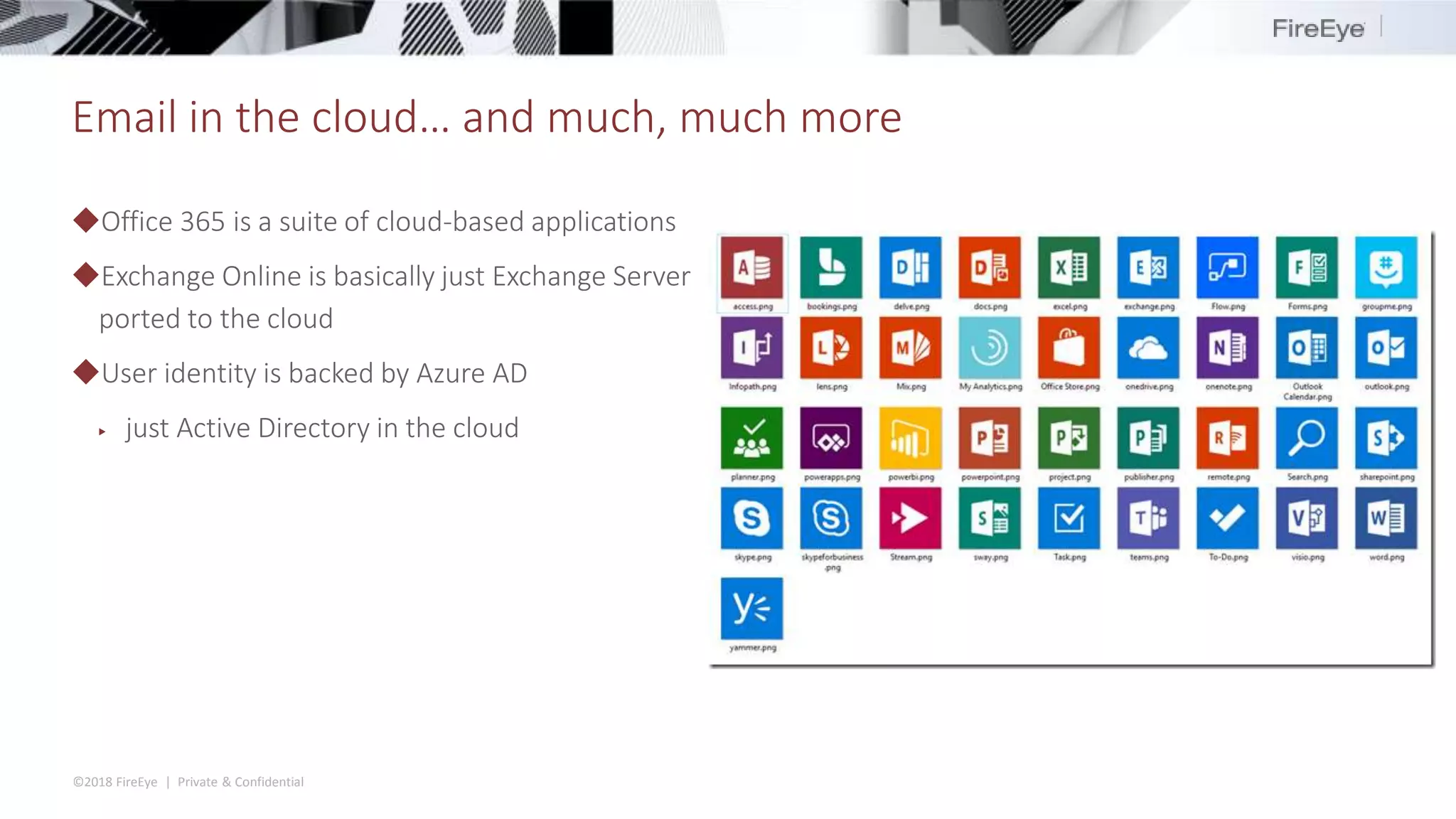
Email in the cloud… and much, much more
◆Office 365 is a suite of cloud-based applications
◆Exchange Online is basically just Exchange Server
ported to the cloud
◆User identity is backed by Azure AD
▶ just Active Directory in the cloud
©2018 FireEye | Private & Confidential
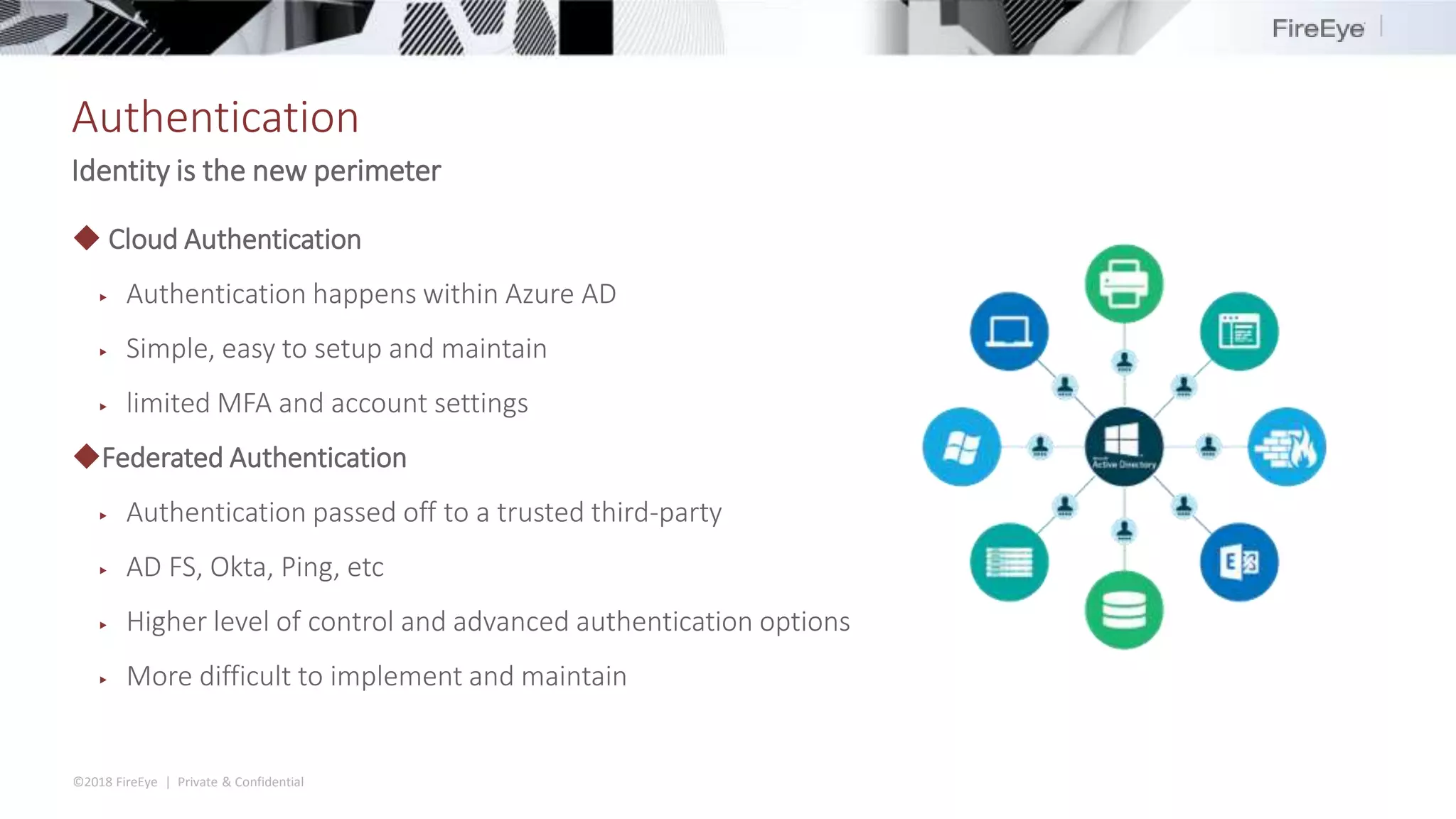
Authentication
Identity is the new perimeter
◆ Cloud Authentication
▶ Authentication happens within Azure AD
▶ Simple, easy to setup and maintain
▶ limited MFA and account settings
◆Federated Authentication
▶ Authentication passed off to a trusted third-party
▶ AD FS, Okta, Ping, etc
▶ Higher level of control and advanced authentication options
▶ More difficult to implement and maintain
©2018 FireEye | Private & Confidential
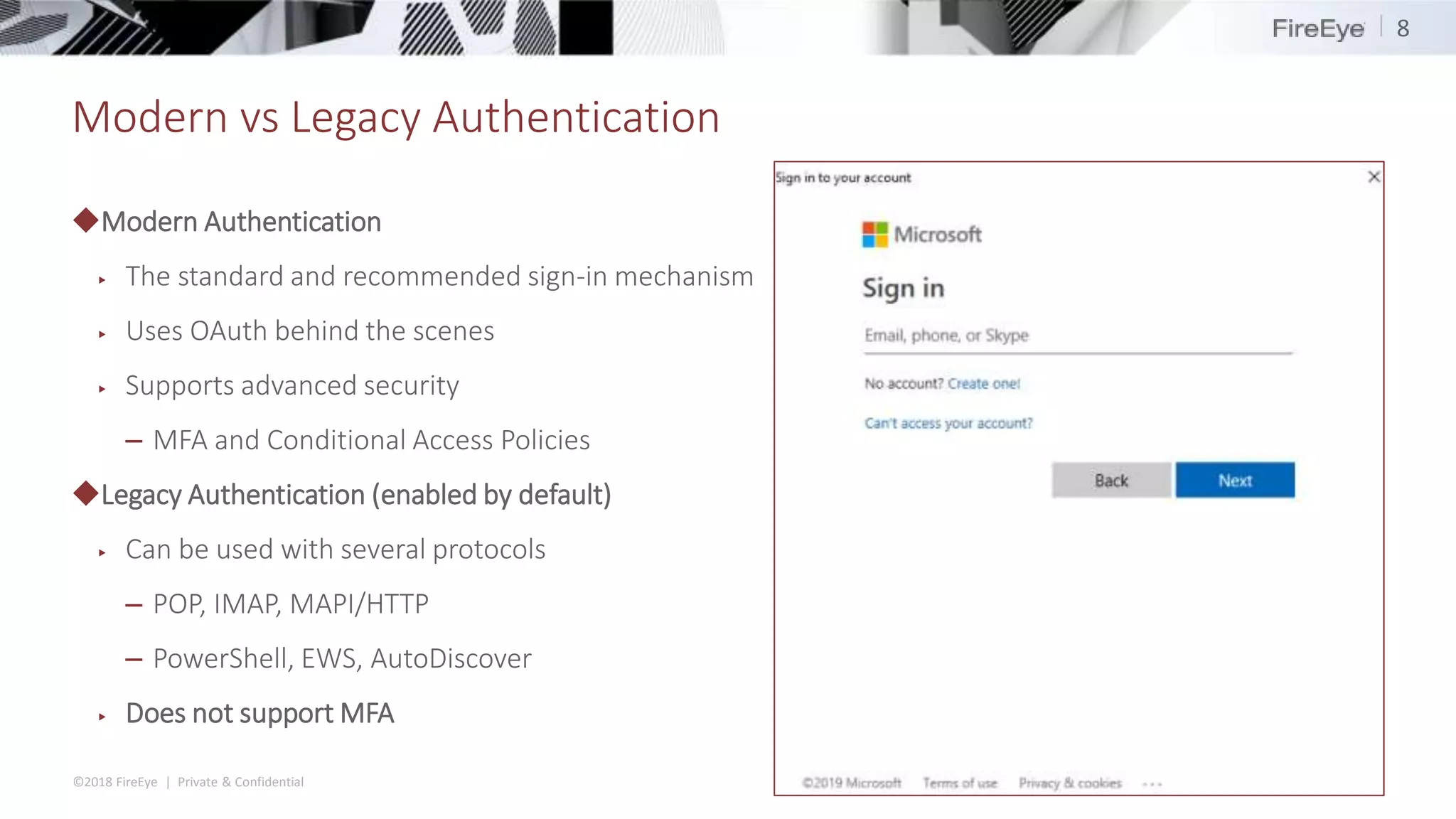
Modern vs Legacy Authentication
◆Modern Authentication
▶ The standard and recommended sign-in mechanism
▶ Uses OAuth behind the scenes
▶ Supports advanced security
– MFA and Conditional Access Policies
◆Legacy Authentication (enabled by default)
▶ Can be used with several protocols
– POP, IMAP, MAPI/HTTP
– PowerShell, EWS, AutoDiscover
▶ Does not support MFA
8
©2018 FireEye | Private & Confidential
Core Logs
◆Three main official log sources
▶ Unified Audit Log
▶ Mailbox Audit Log
▶ Admin Audit Log
 Bonus (sometimes)
▶ Azure AD Audit logs
◆Extras
▶ Mail trace
▶ Security & Compliance reports
▶ Activities API
©2018 FireEye | Private & Confidential
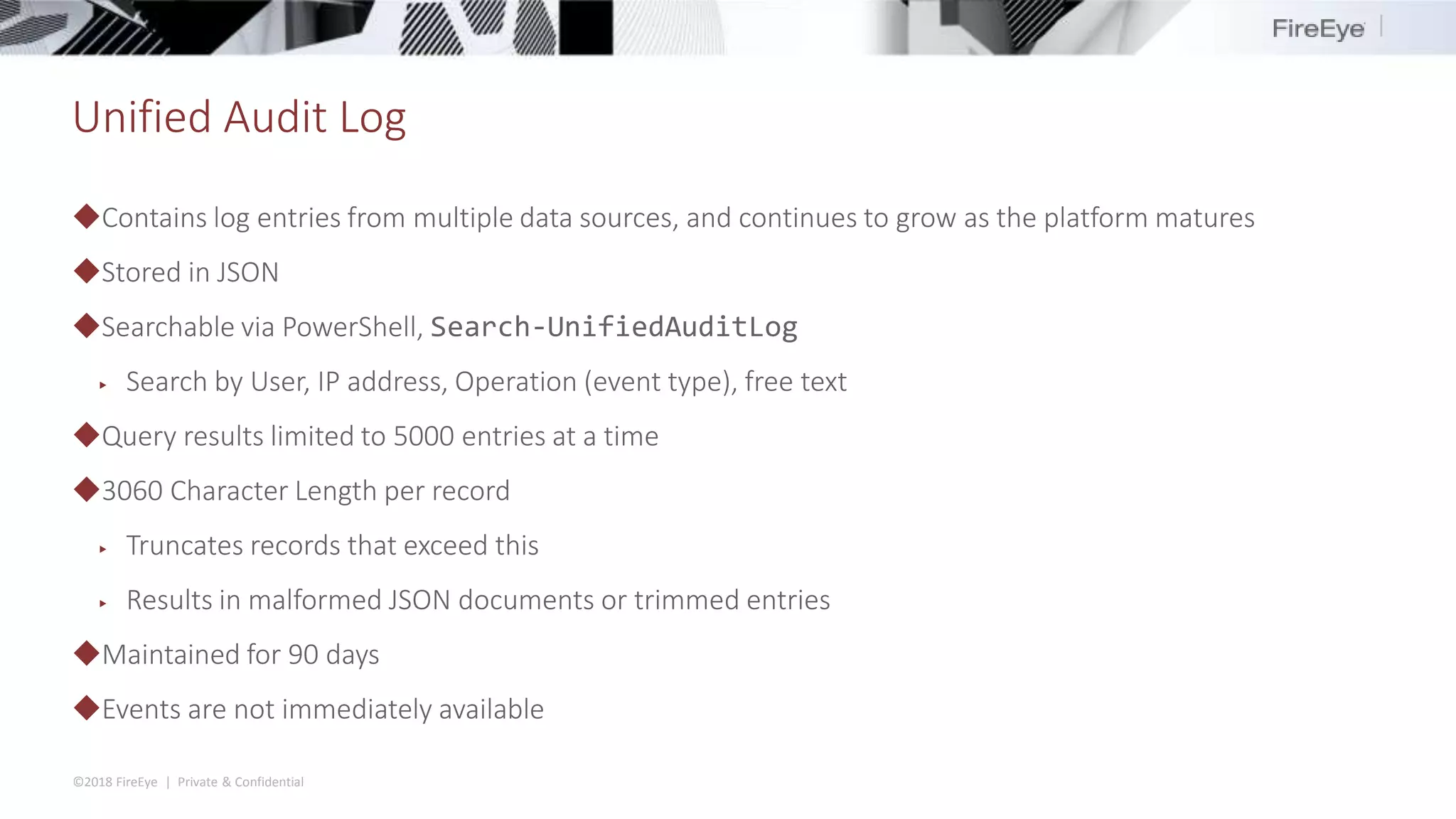
Unified Audit Log
◆Contains log entries from multiple data sources, and continues to grow as the platform matures
◆Stored in JSON
◆Searchable via PowerShell, Search-UnifiedAuditLog
▶ Search by User, IP address, Operation (event type), free text
◆Query results limited to 5000 entries at a time
◆3060 Character Length per record
▶ Truncates records that exceed this
▶ Results in malformed JSON documents or trimmed entries
◆Maintained for 90 days
◆Events are not immediately available
©2018 FireEye | Private & Confidential
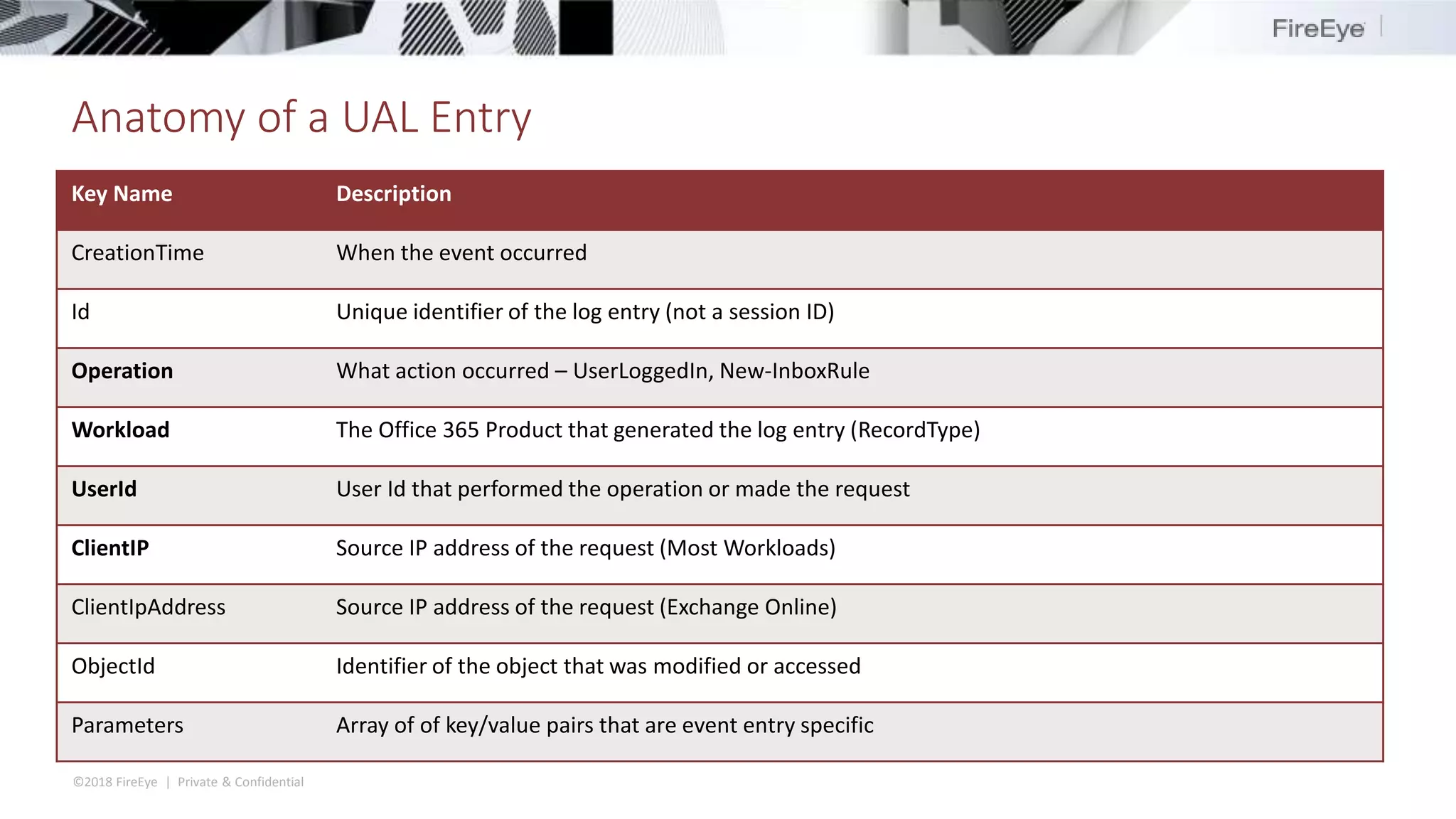
Anatomy of a UAL Entry
Key Name Description
CreationTime When the event occurred
Id Unique identifier of the log entry (not a session ID)
Operation What action occurred – UserLoggedIn, New-InboxRule
Workload The Office 365 Product that generated the log entry (RecordType)
UserId User Id that performed the operation or made the request
ClientIP Source IP address of the request (Most Workloads)
ClientIpAddress Source IP address of the request (Exchange Online)
ObjectId Identifier of the object that was modified or accessed
Parameters Array of of key/value pairs that are event entry specific
©2018 FireEye | Private & Confidential
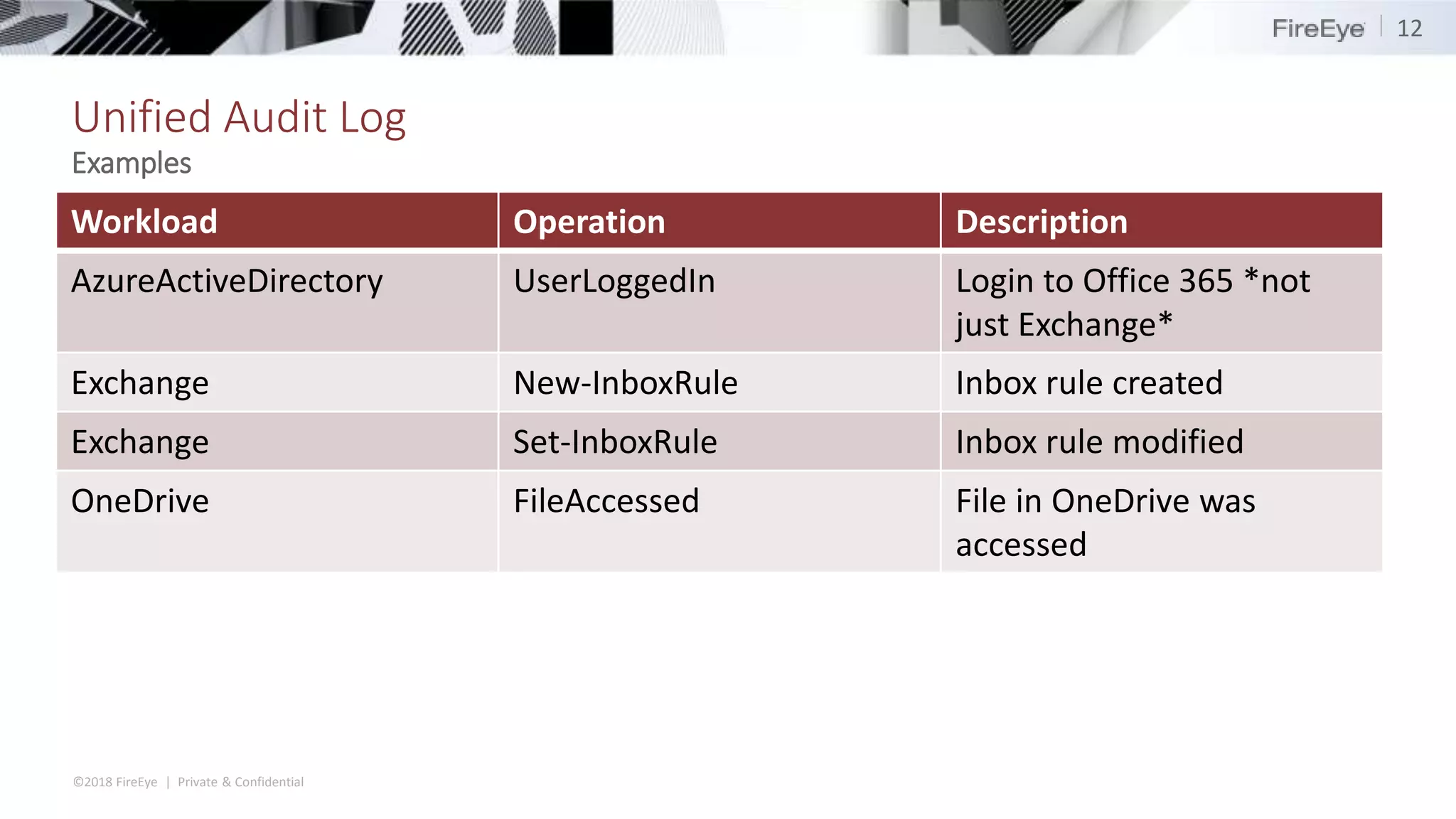
Unified Audit Log
Workload Operation Description
AzureActiveDirectory UserLoggedIn Login to Office 365 *not
just Exchange*
Exchange New-InboxRule Inbox rule created
Exchange Set-InboxRule Inbox rule modified
OneDrive FileAccessed File in OneDrive was
accessed
12
Examples
©2018 FireEye | Private & Confidential
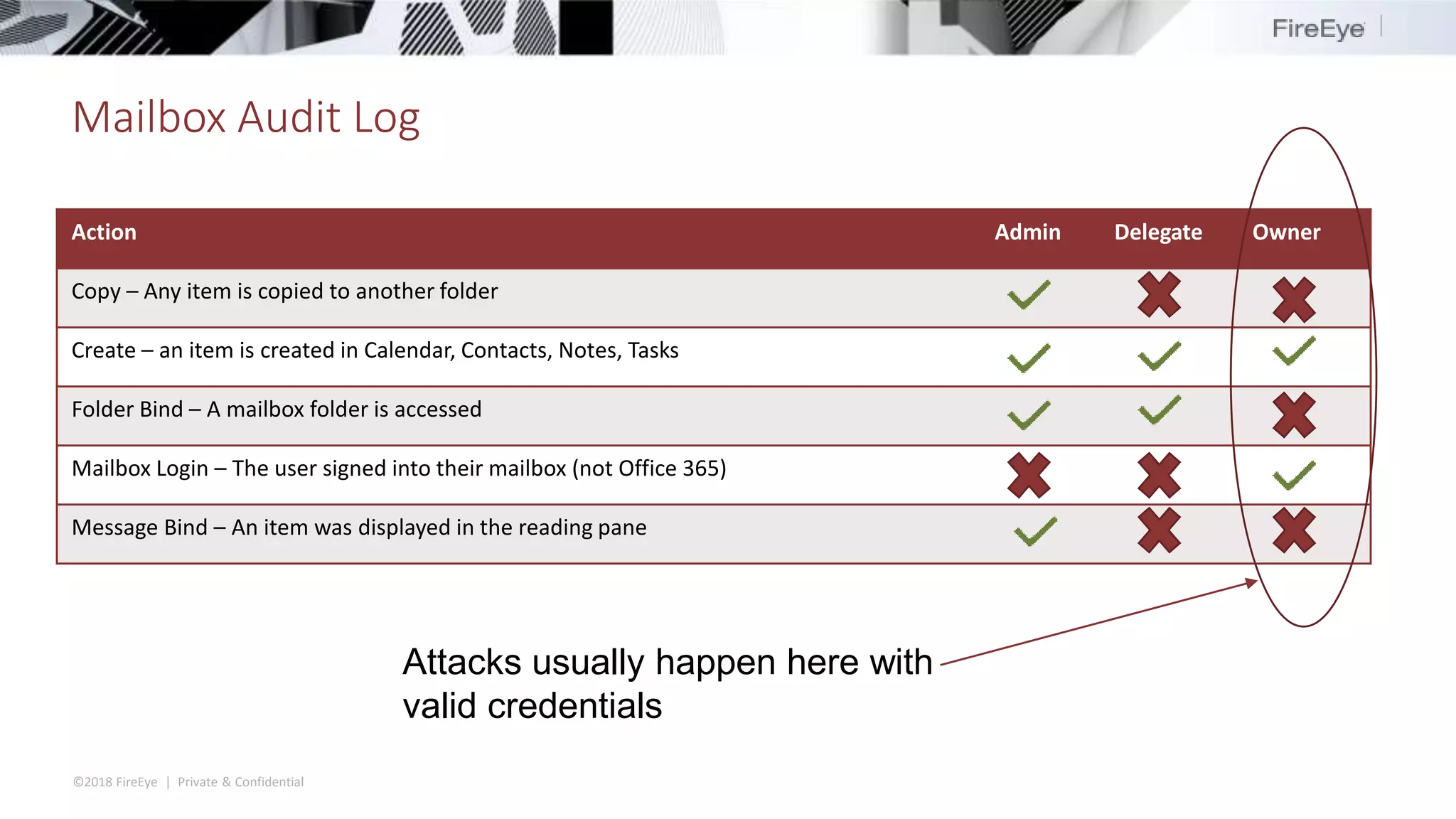
Mailbox Audit Log
Action Admin Delegate Owner
Copy – Any item is copied to another folder
Create – an item is created in Calendar, Contacts, Notes, Tasks
Folder Bind – A mailbox folder is accessed
Mailbox Login – The user signed into their mailbox (not Office 365)
Message Bind – An item was displayed in the reading pane
Attacks usually happen here with
valid credentials
©2018 FireEye | Private & Confidential
Admin Audit Logs
◆Records actions taken by administrators based on Exchange Online PowerShell cmdlets
▶ Most admin interfaces (even the WebUI) are wrappers for PowerShell cmdlets
◆Returns results as PowerShell objects via Search-AdminAuditLog
◆Retains events for 90 days
◆Some (not all) events get sent to the Unified Audit Log
Case Study:
Business Email Compromise
©2018 FireEye | Private & Confidential
BEC defined
◆Business Email Compromise (BEC) – Fraud where an attacker gains access to a mailbox of an employee
with access to company finances and tricks them or uses them to trick others into wiring money to
attacker-controlled accounts.
◆Has cost companies over $12 Billion
◆Mechanism of deception can vary between cases
▶ CEO/CFO impersonation
▶ Vendor impersonation
◆Tend to follow a set playbook
©2018 FireEye | Private & Confidential
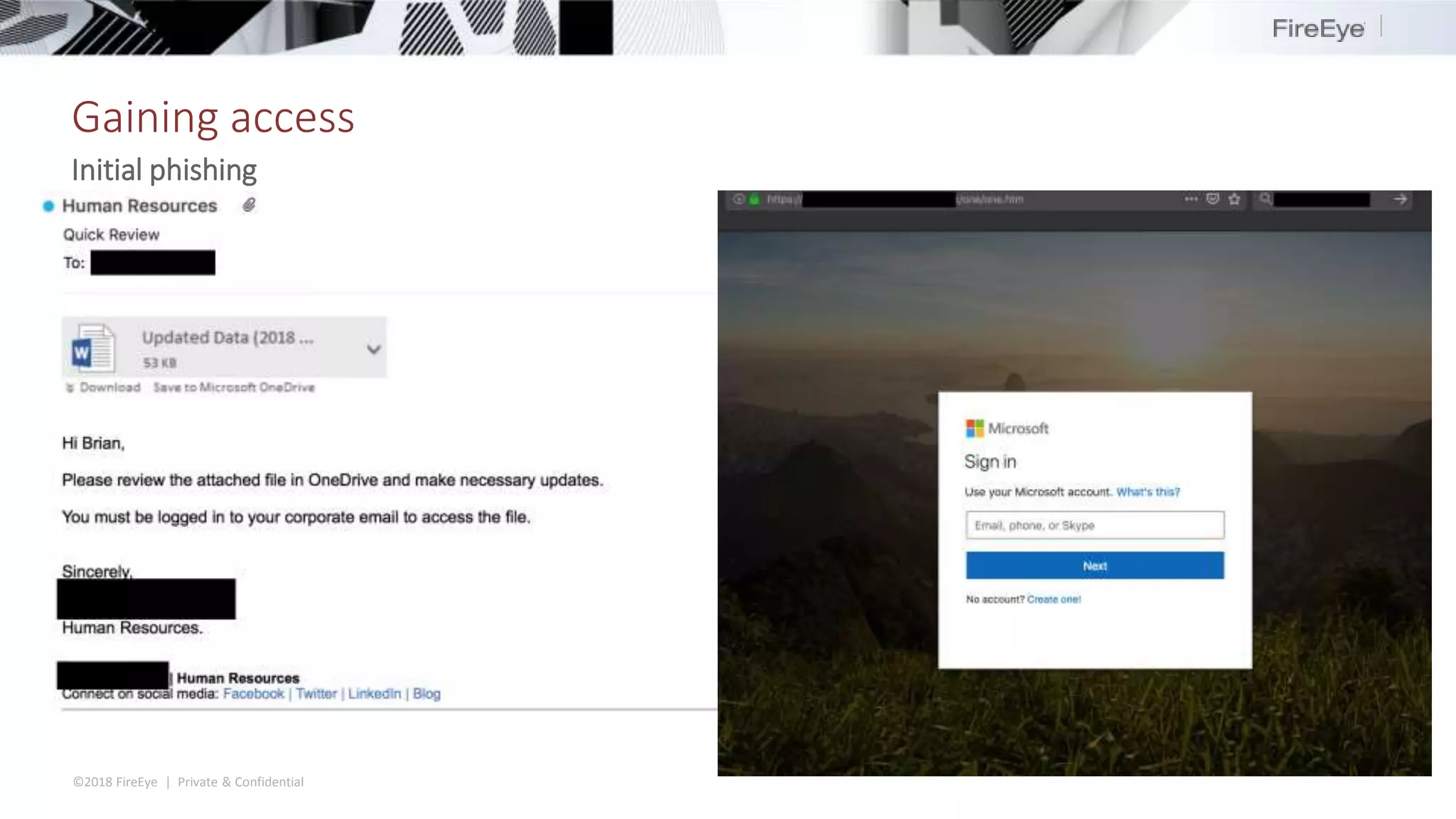
Gaining access
Initial phishing
©2018 FireEye | Private & Confidential
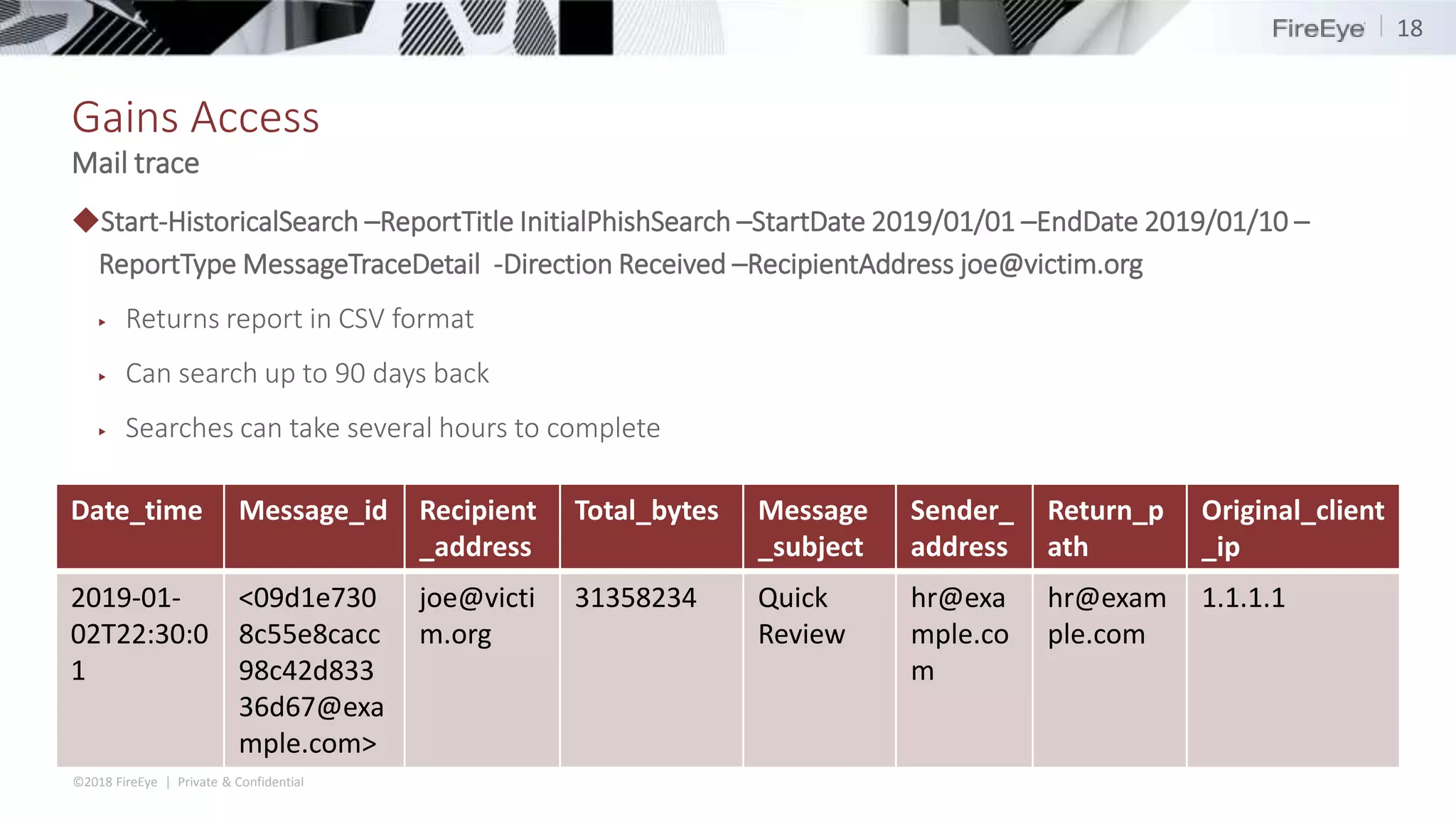
Gains Access
◆Start-HistoricalSearch –ReportTitle InitialPhishSearch –StartDate 2019/01/01 –EndDate 2019/01/10 –
ReportType MessageTraceDetail -Direction Received –RecipientAddress joe@victim.org
▶ Returns report in CSV format
▶ Can search up to 90 days back
▶ Searches can take several hours to complete
18
Mail trace
Date_time Message_id Recipient
_address
Total_bytes Message
_subject
Sender_
address
Return_p
ath
Original_client
_ip
2019-01-
02T22:30:0
1
<09d1e730
8c55e8cacc
98c42d833
36d67@exa
mple.com>
joe@victi
m.org
31358234 Quick
Review
hr@exa
mple.co
m
hr@exam
ple.com
1.1.1.1
©2018 FireEye | Private & Confidential
Gaining access
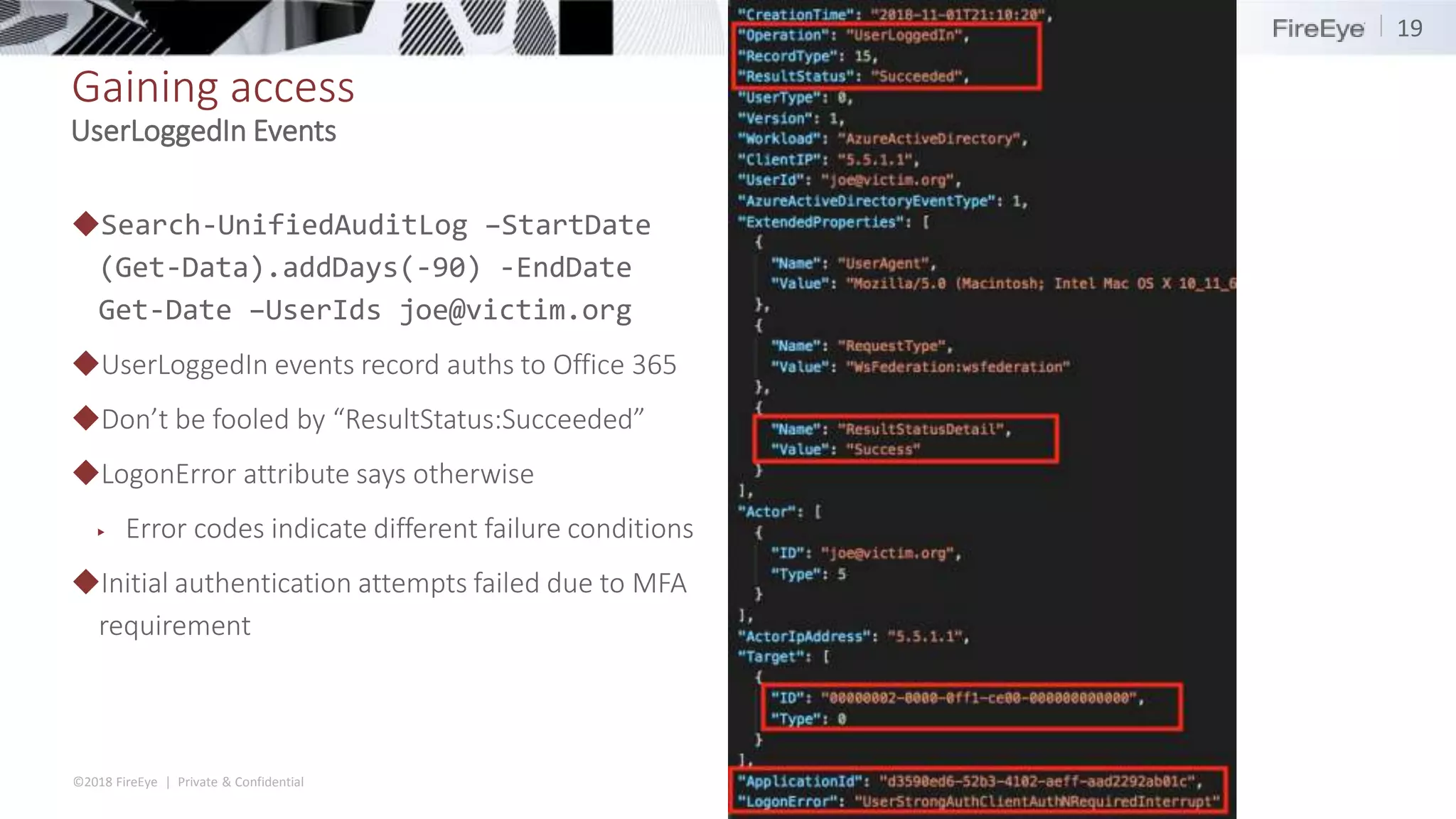
◆Search-UnifiedAuditLog –StartDate
(Get-Data).addDays(-90) -EndDate
Get-Date –UserIds joe@victim.org
◆UserLoggedIn events record auths to Office 365
◆Don’t be fooled by “ResultStatus:Succeeded”
◆LogonError attribute says otherwise
▶ Error codes indicate different failure conditions
◆Initial authentication attempts failed due to MFA
requirement
19
UserLoggedIn Events
©2018 FireEye | Private & Confidential
Sidetrack...
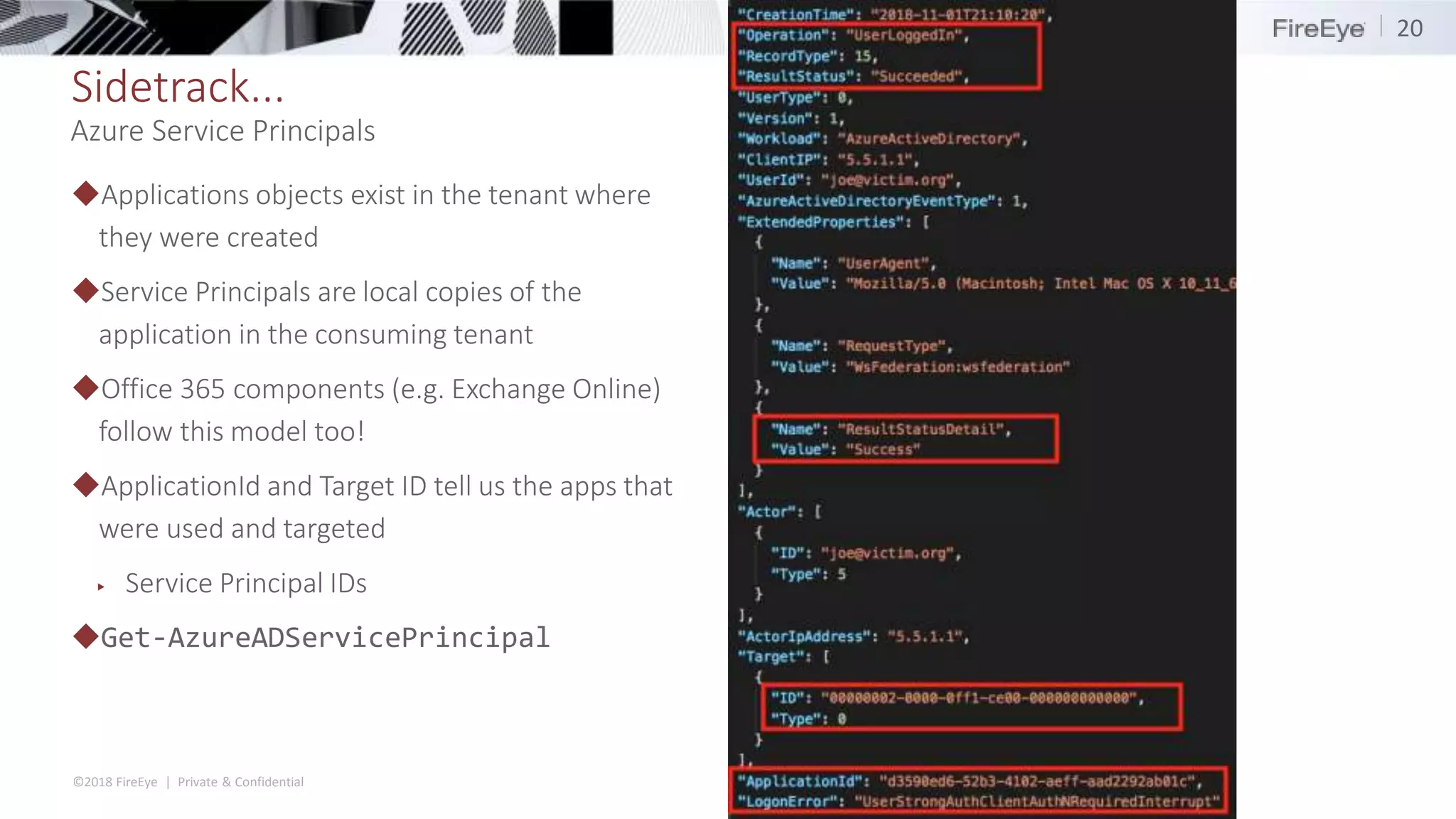
◆Applications objects exist in the tenant where
they were created
◆Service Principals are local copies of the
application in the consuming tenant
◆Office 365 components (e.g. Exchange Online)
follow this model too!
◆ApplicationId and Target ID tell us the apps that
were used and targeted
▶ Service Principal IDs
◆Get-AzureADServicePrincipal
20
Azure Service Principals
©2018 FireEye | Private & Confidential
Sidetrack..
◆A single interactive logon may generate several login events in the audit log
◆Accessing each component of Office 365 (exchange, azure, sharepoint) is a unique authentication
◆Logging in to portal.office.com generates at least 6 login events:
1. 12:00:00 - Office 365 Portal application targeting Azure Active Directory
2. 12:00:20 - Office Suite UX application targeting Azure Active Directory
3. 12:00:25 - Exchange Online application targeting Exchange Online
4. 12:00:25 - Office 365 Shell targeting "Unknown"
5. 12:00:27- Office 365 Shell targeting a hidden application
6. 12:00:27 - Office 365 Shell targeting Sharepoint Online
21
Service Principals
©2018 FireEye | Private & Confidential
Gaining access
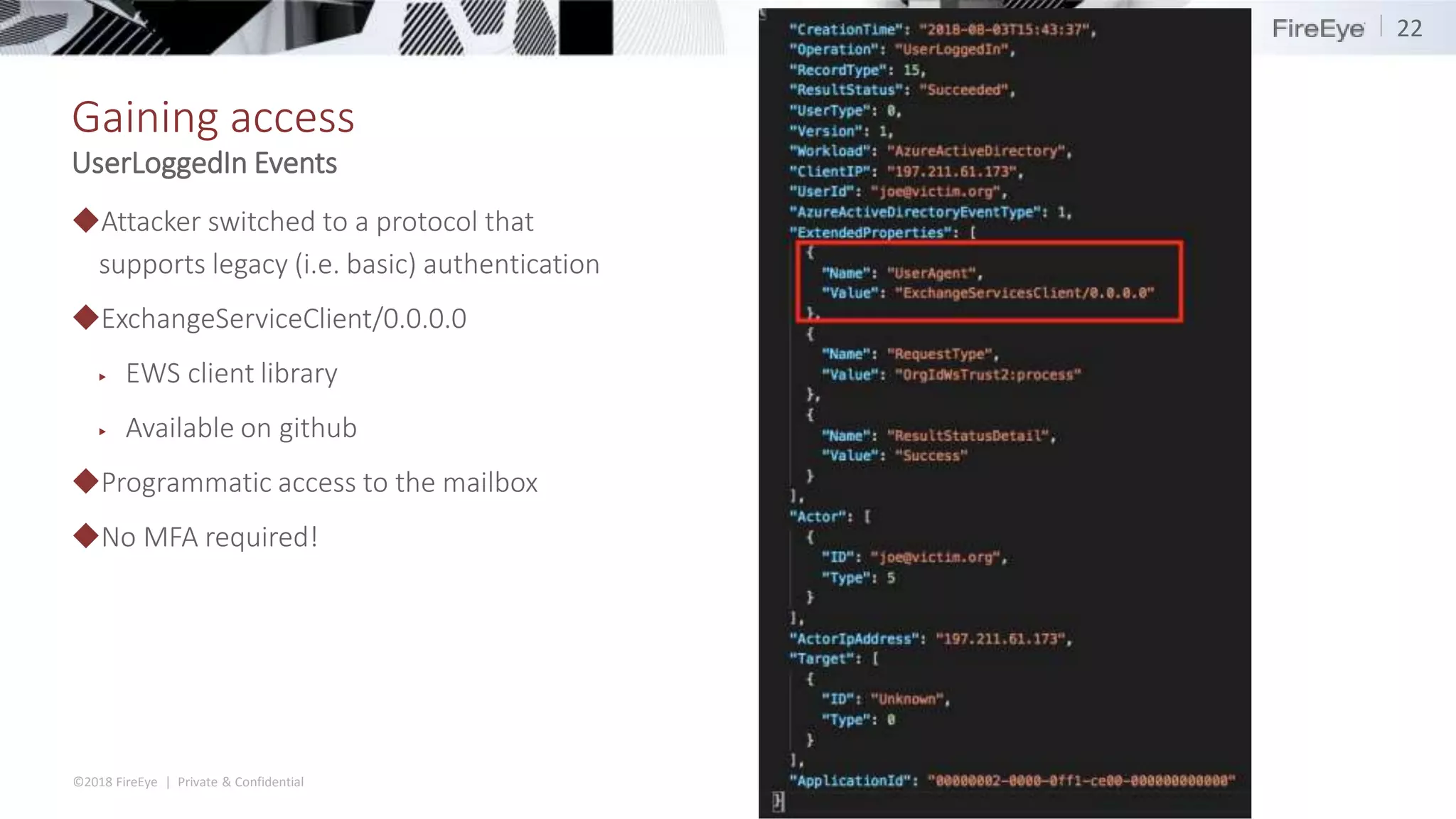
◆Attacker switched to a protocol that
supports legacy (i.e. basic) authentication
◆ExchangeServiceClient/0.0.0.0
▶ EWS client library
▶ Available on github
◆Programmatic access to the mailbox
◆No MFA required!
22
UserLoggedIn Events
©2018 FireEye | Private & Confidential
Remain undetected
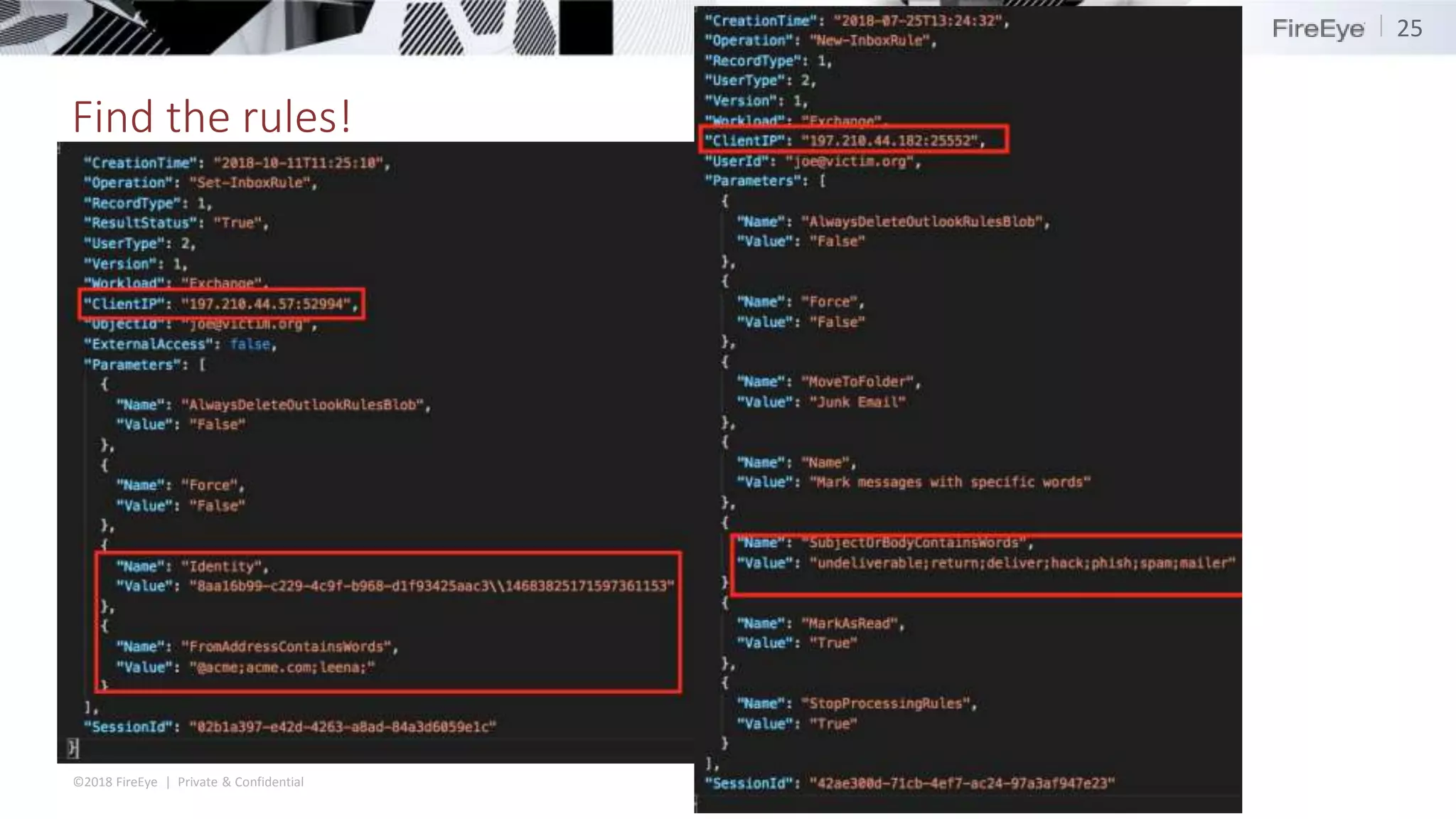
◆Created two inbox rules to keep fraud attempt hidden
▶ Rule #1: hide any signs of compromise detection
– Match messages with “phish”, “hack”, “undeliverable”, “spam” and move them to trash
▶ Rule #2: hide any legitimate communications from spoofed vendor
– The real vendor is going to wonder why they aren’t getting paid
– move any messages from the real vendor to the trash
©2018 FireEye | Private & Confidential
Find the rules!
◆Searching the Unified Audit Log for Inbox rules is not fun for two main reasons
1. IP addresses for some events have the TCP port appended to them <IP>:<port>
▶ Search-UnifiedAuditLog -IpAddress 1.1.1.1
▶ 1.1.1.1:10596
▶ Searching for inbox rules by an attacker IP address is impossible because of this
2. When an inbox rule is modified, you cannot identify the rule that was modified
▶ Only the changed conditions are recorded
◆Search-UnifiedAuditLog -Operation New-InboxRule, Set-InboxRule
24
©2018 FireEye | Private & Confidential
Find the rules!
25
©2018 FireEye | Private & Confidential
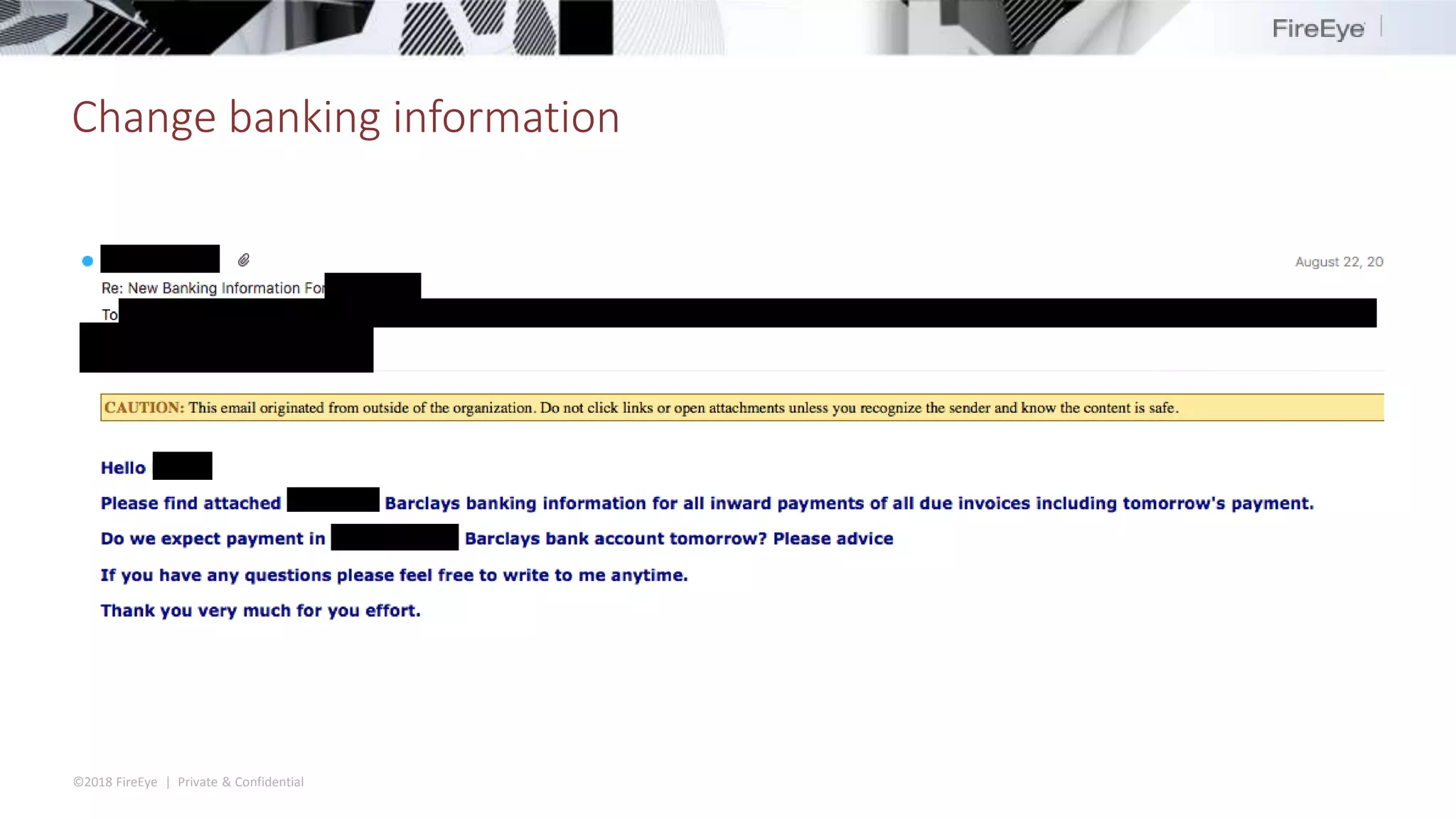
Change banking information
Case Study: APT
Intrusion
©2018 FireEye | Private & Confidential
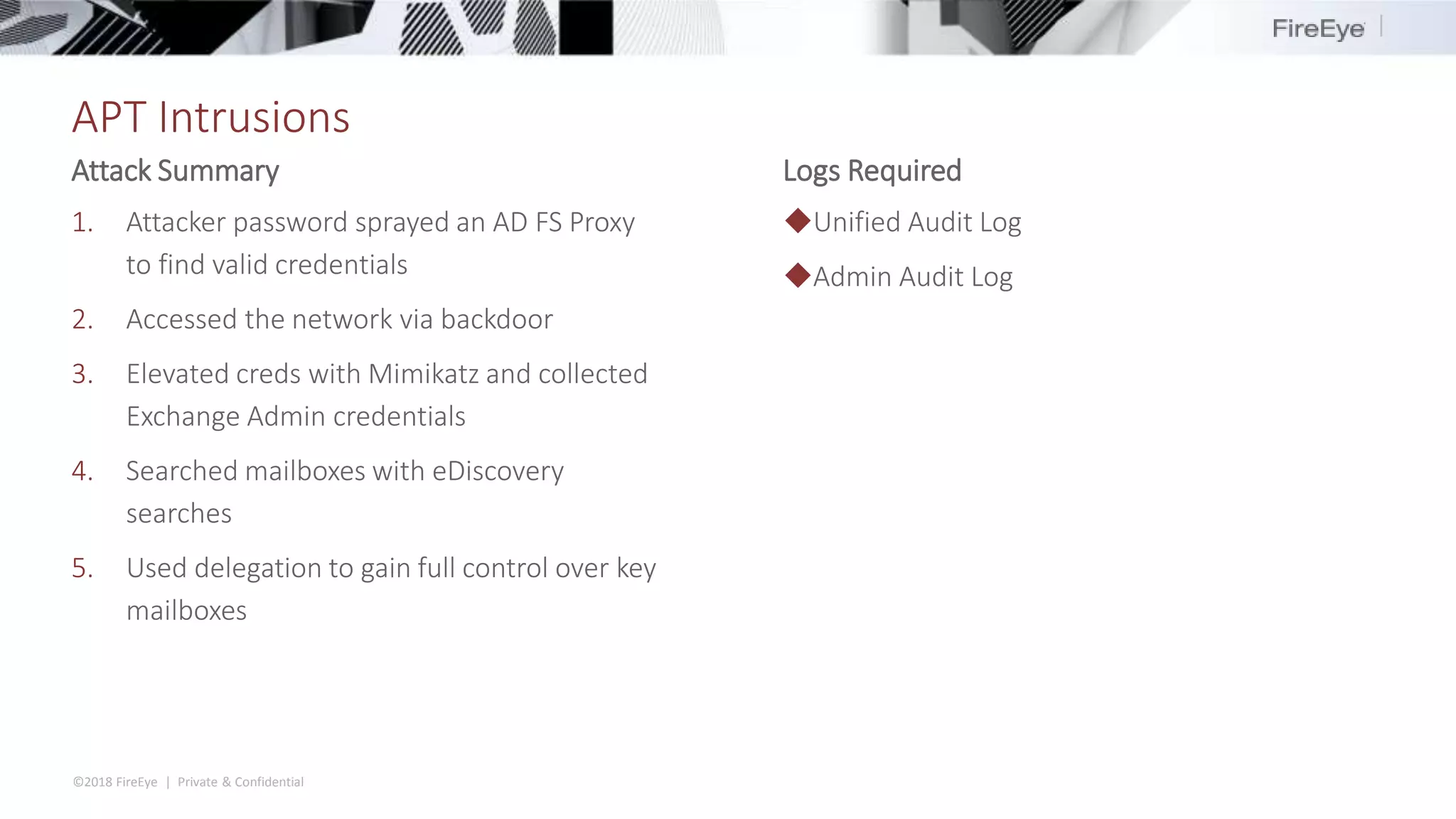
APT Intrusions
1. Attacker password sprayed an AD FS Proxy
to find valid credentials
2. Accessed the network via backdoor
3. Elevated creds with Mimikatz and collected
Exchange Admin credentials
4. Searched mailboxes with eDiscovery
searches
5. Used delegation to gain full control over key
mailboxes
◆Unified Audit Log
◆Admin Audit Log
Attack Summary Logs Required
©2018 FireEye | Private & Confidential
Password sprays and AD FS
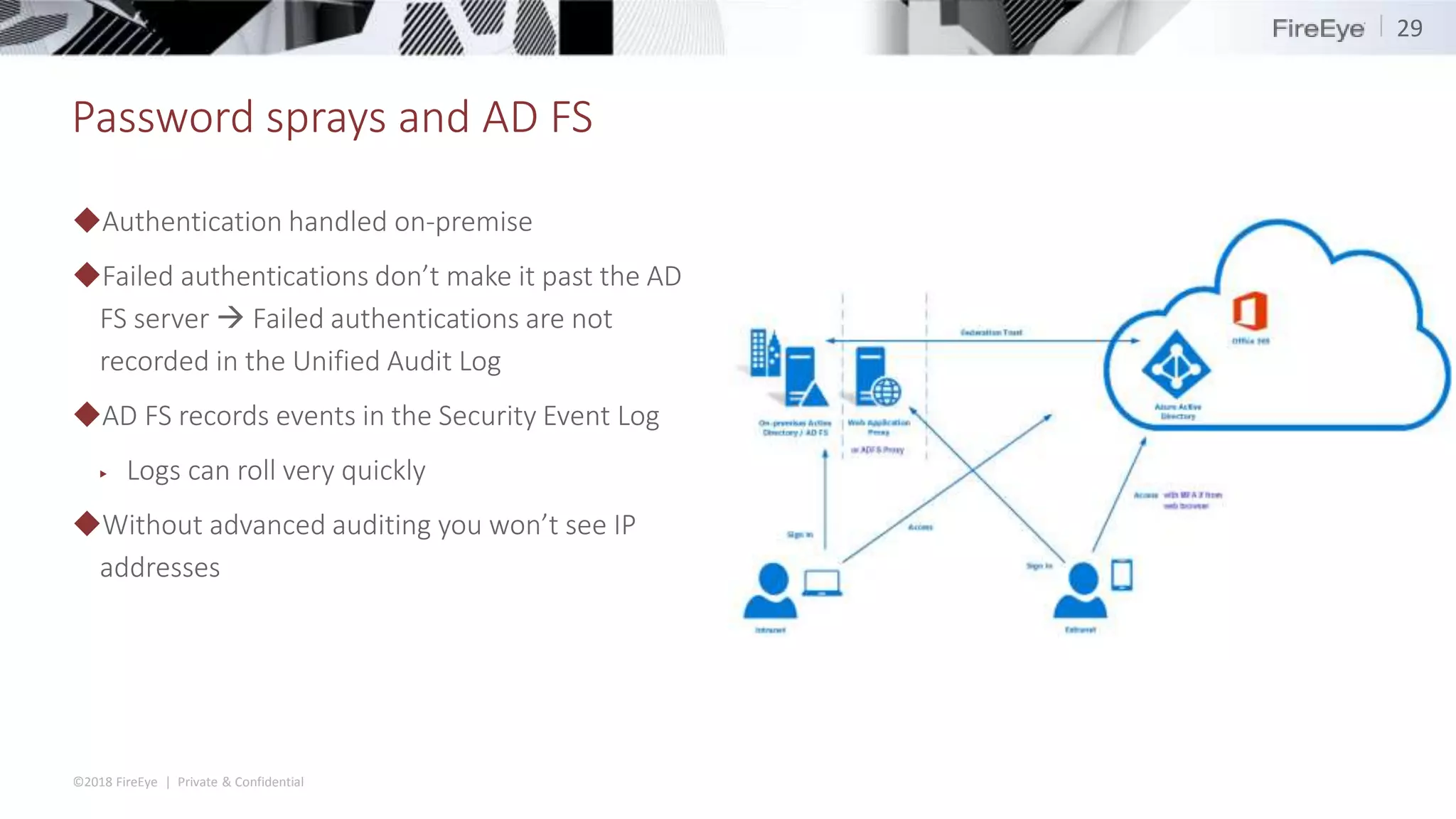
◆Authentication handled on-premise
◆Failed authentications don’t make it past the AD
FS server  Failed authentications are not
recorded in the Unified Audit Log
◆AD FS records events in the Security Event Log
▶ Logs can roll very quickly
◆Without advanced auditing you won’t see IP
addresses
29
©2018 FireEye | Private & Confidential
Password sprays and AD FS
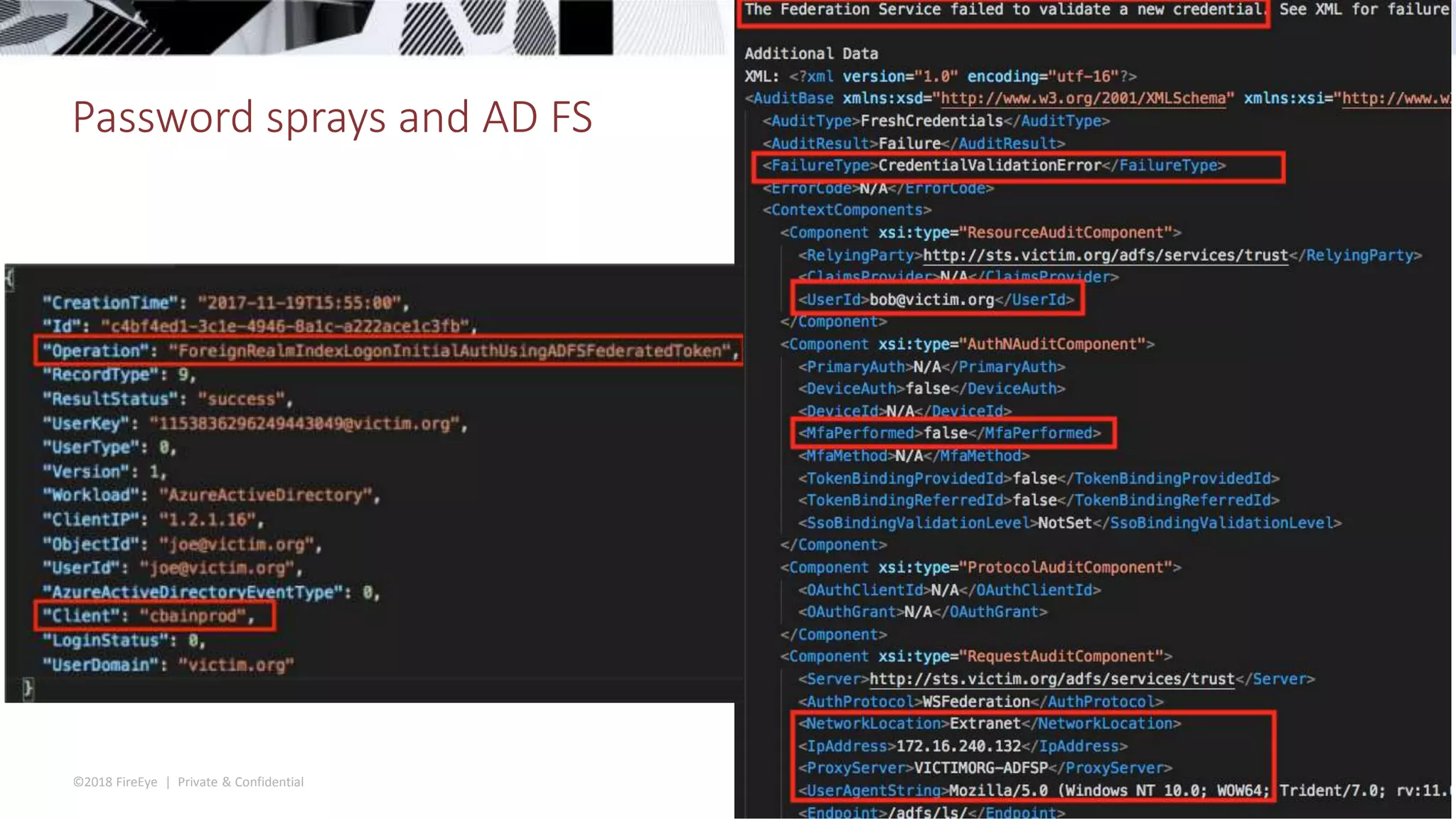
30
©2018 FireEye | Private & Confidential
Attacker logs in
◆The victim used Conditional Access Policies to restrict logins from non-US IP addresses
◆Initial sign-in by the attacker occured from a US-based IP address
▶ Maps to a virtual private network provider
◆Subsequent logins are recorded from a Netherlands-based IP address
▶ Access tokens are refreshed at least once an hour, sometimes generating log events
▶ Access policies are only checked at the initial authentication, not on subsequent refreshes
◆“Remember me” gives attacker access for 90 days or until password is changed
31
©2018 FireEye | Private & Confidential
What is eDiscovery
◆Process of identifying and delivering electronic information that can be used as evidence in legal cases.
◆Search for content in:
▶ Exchange Online mailboxes
▶ Office 365 Groups
▶ Microsoft Teams
▶ SharePoint Online (the file contents, OneNote, Word, Excel, etc)
▶ OneDrive for Business sites
▶ Skype for Business conversations.
©2018 FireEye | Private & Confidential
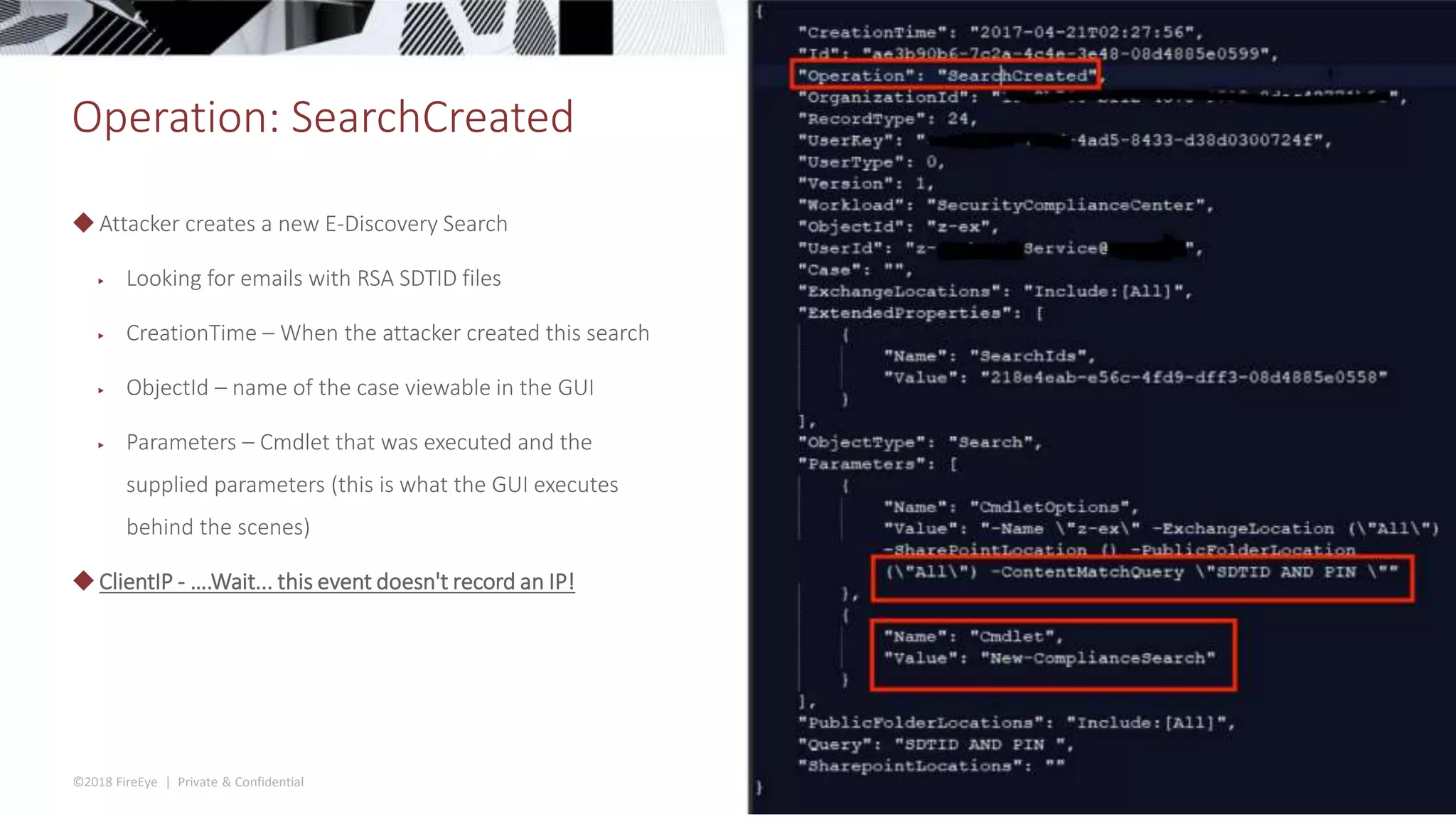
Operation: SearchCreated
◆Attacker creates a new E-Discovery Search
▶ Looking for emails with RSA SDTID files
▶ CreationTime – When the attacker created this search
▶ ObjectId – name of the case viewable in the GUI
▶ Parameters – Cmdlet that was executed and the
supplied parameters (this is what the GUI executes
behind the scenes)
◆ClientIP - ….Wait... this event doesn't record an IP!
©2018 FireEye | Private & Confidential
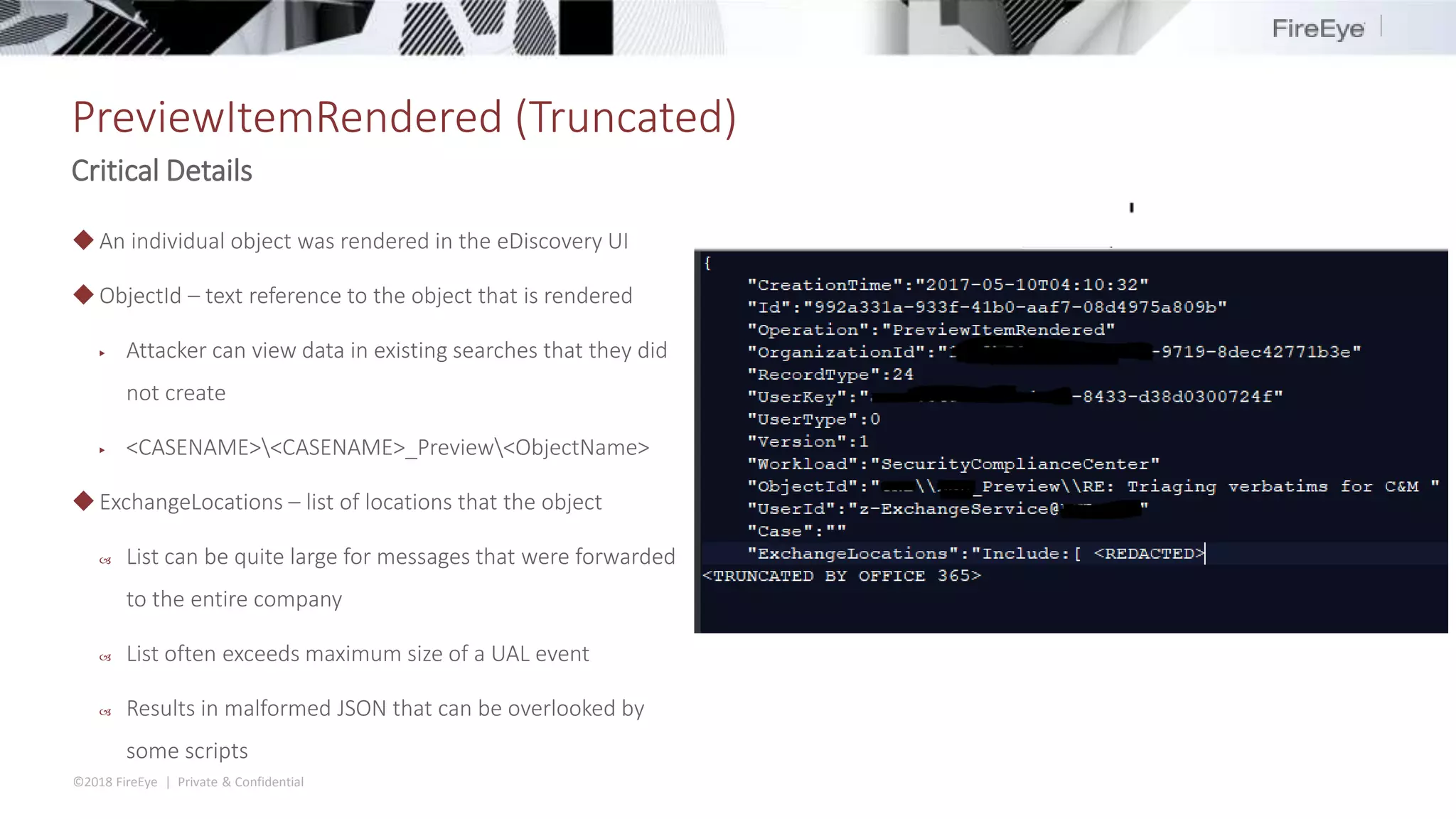
PreviewItemRendered (Truncated)
Critical Details
◆An individual object was rendered in the eDiscovery UI
◆ObjectId – text reference to the object that is rendered
▶ Attacker can view data in existing searches that they did
not create
▶ <CASENAME><CASENAME>_Preview<ObjectName>
◆ExchangeLocations – list of locations that the object
 List can be quite large for messages that were forwarded
to the entire company
 List often exceeds maximum size of a UAL event
 Results in malformed JSON that can be overlooked by
some scripts
©2018 FireEye | Private & Confidential
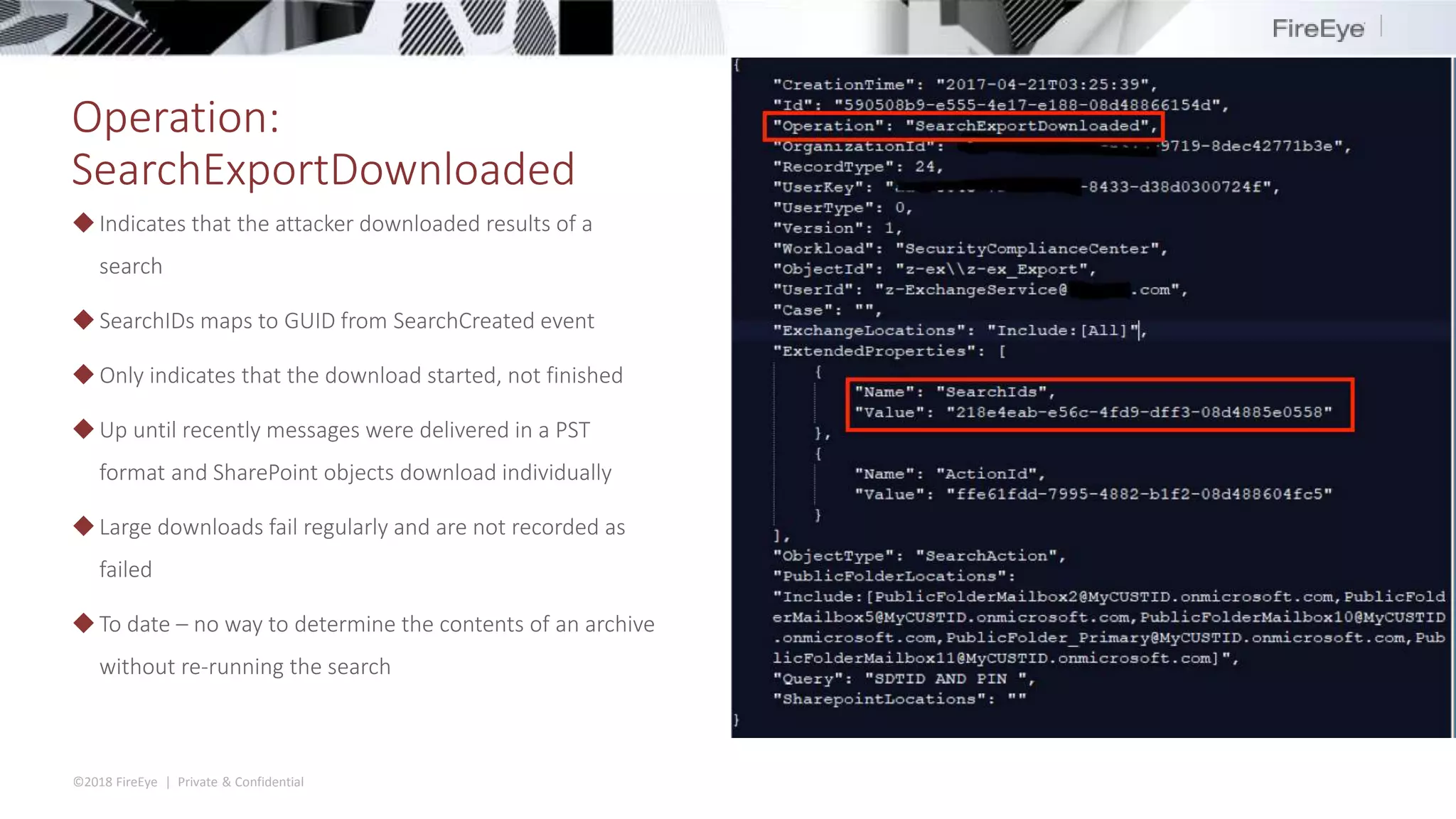
Operation:
SearchExportDownloaded
◆Indicates that the attacker downloaded results of a
search
◆ SearchIDs maps to GUID from SearchCreated event
◆ Only indicates that the download started, not finished
◆Up until recently messages were delivered in a PST
format and SharePoint objects download individually
◆Large downloads fail regularly and are not recorded as
failed
◆To date – no way to determine the contents of an archive
without re-running the search
©2018 FireEye | Private & Confidential
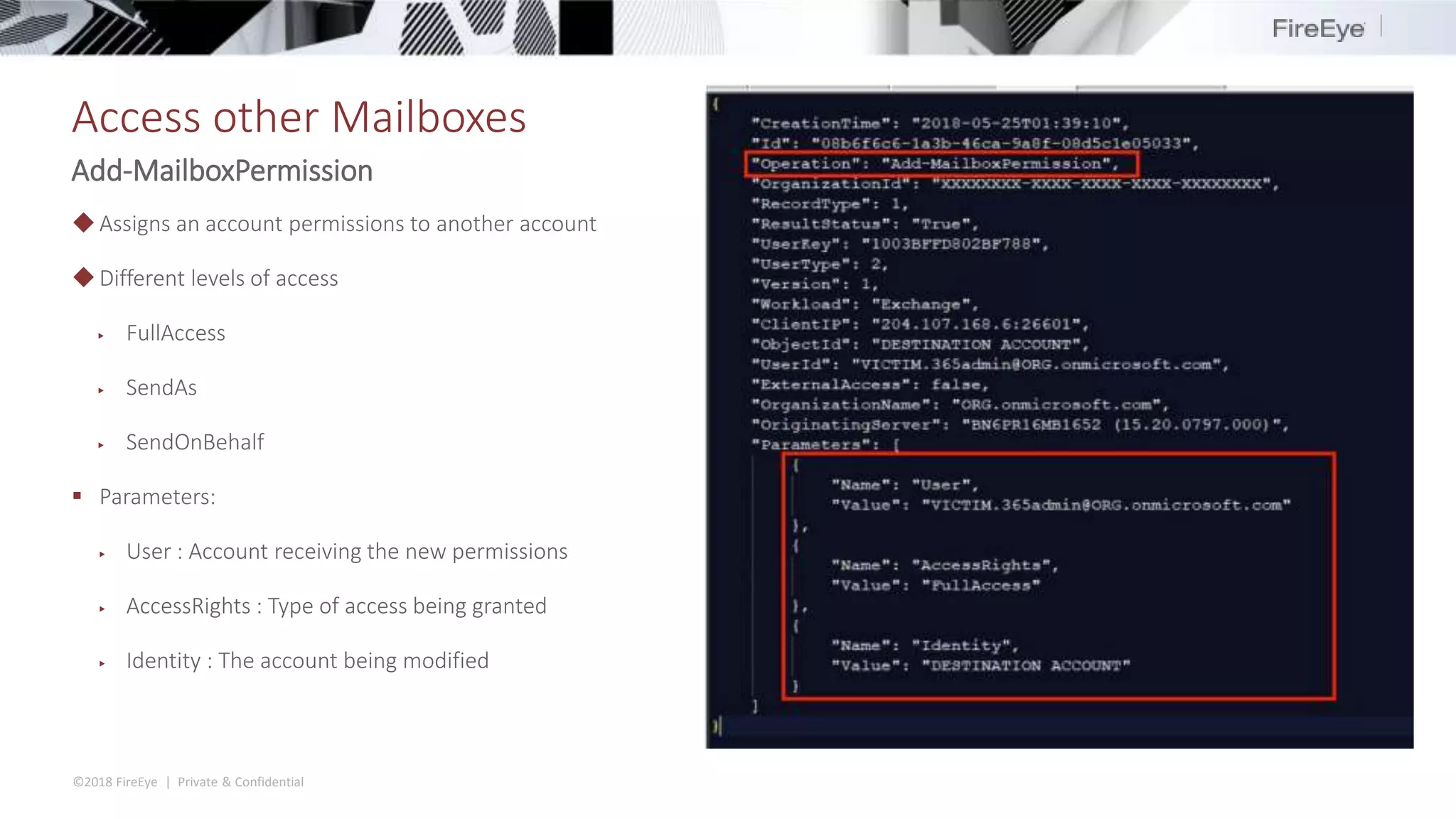
Access other Mailboxes
Add-MailboxPermission
◆Assigns an account permissions to another account
◆Different levels of access
▶ FullAccess
▶ SendAs
▶ SendOnBehalf
 Parameters:
▶ User : Account receiving the new permissions
▶ AccessRights : Type of access being granted
▶ Identity : The account being modified
Bonus Time: Alternative Access
©2018 FireEye | Private & Confidential
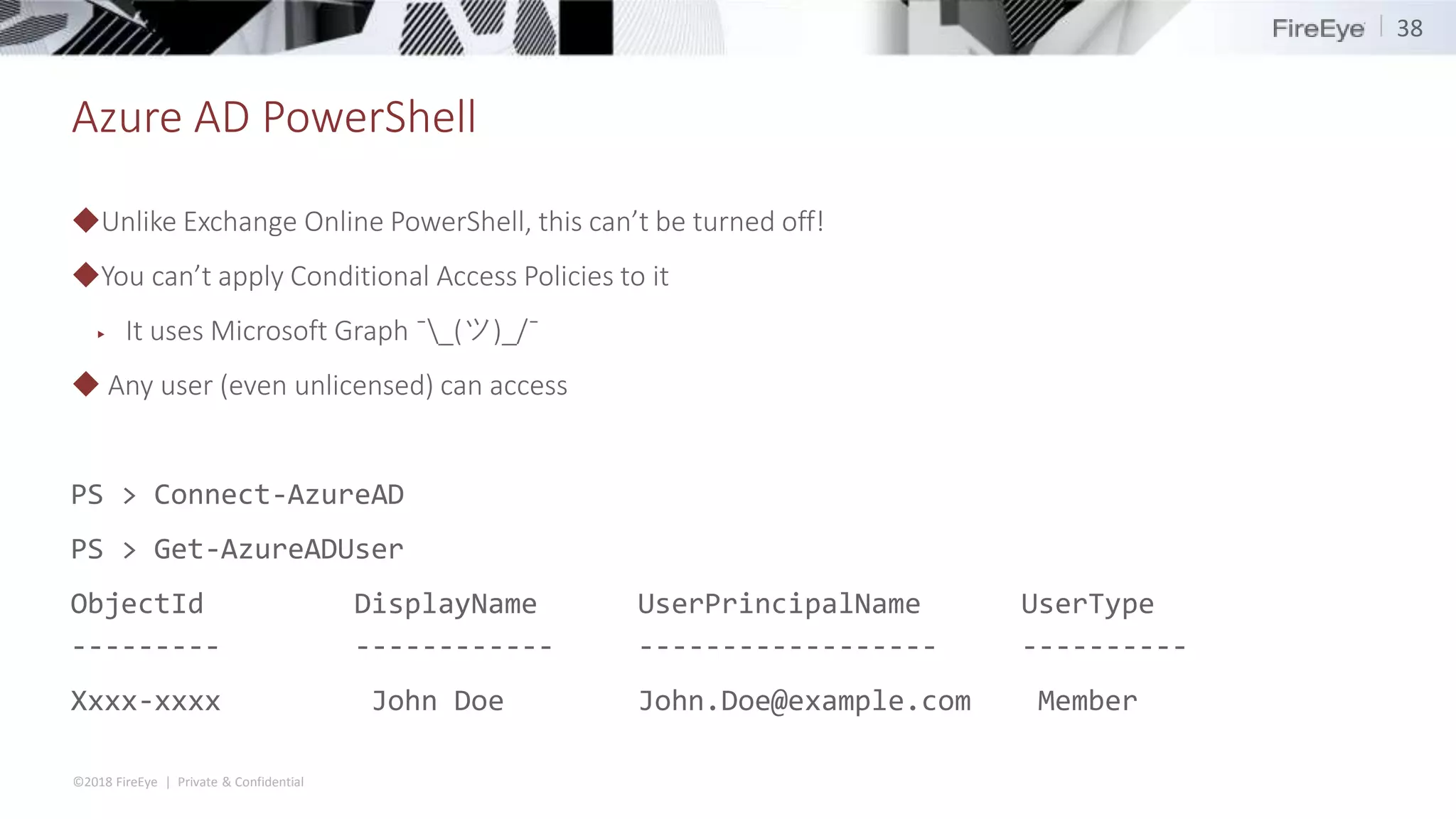
Azure AD PowerShell
◆Unlike Exchange Online PowerShell, this can’t be turned off!
◆You can’t apply Conditional Access Policies to it
▶ It uses Microsoft Graph ¯_(ツ)_/¯
◆ Any user (even unlicensed) can access
PS > Connect-AzureAD
PS > Get-AzureADUser
ObjectId DisplayName UserPrincipalName UserType
--------- ------------ ------------------ ----------
Xxxx-xxxx John Doe John.Doe@example.com Member
38
©2018 FireEye | Private & Confidential
OAuth Abuse
39
◆ Cloud service providers allow users to integrate third-party
applications in order to drive synergy and enhance
productivity
▶ G Suite, Office 365, Box
◆ Once installed, the applications can access users’ data on
their behalf at any time
▶ Bypasses MFA requirements by design
▶ Valid for 90 days
Enhance productivity!
©2018 FireEye | Private & Confidential
OAuth Abuse
40
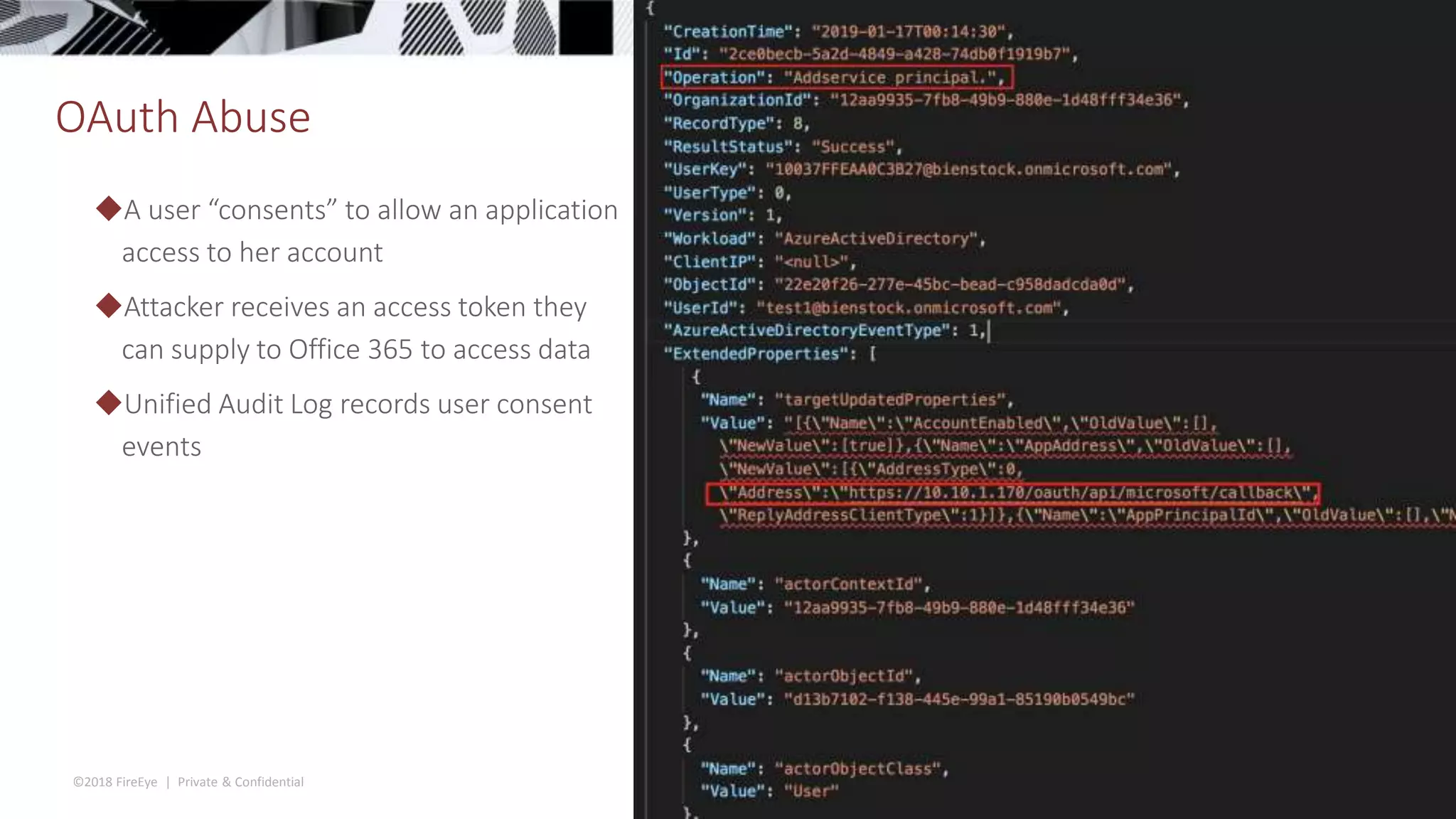
◆A user “consents” to allow an application
access to her account
◆Attacker receives an access token they
can supply to Office 365 to access data
◆Unified Audit Log records user consent
events
Bonus Time: New Logging Features
©2018 FireEye | Private & Confidential
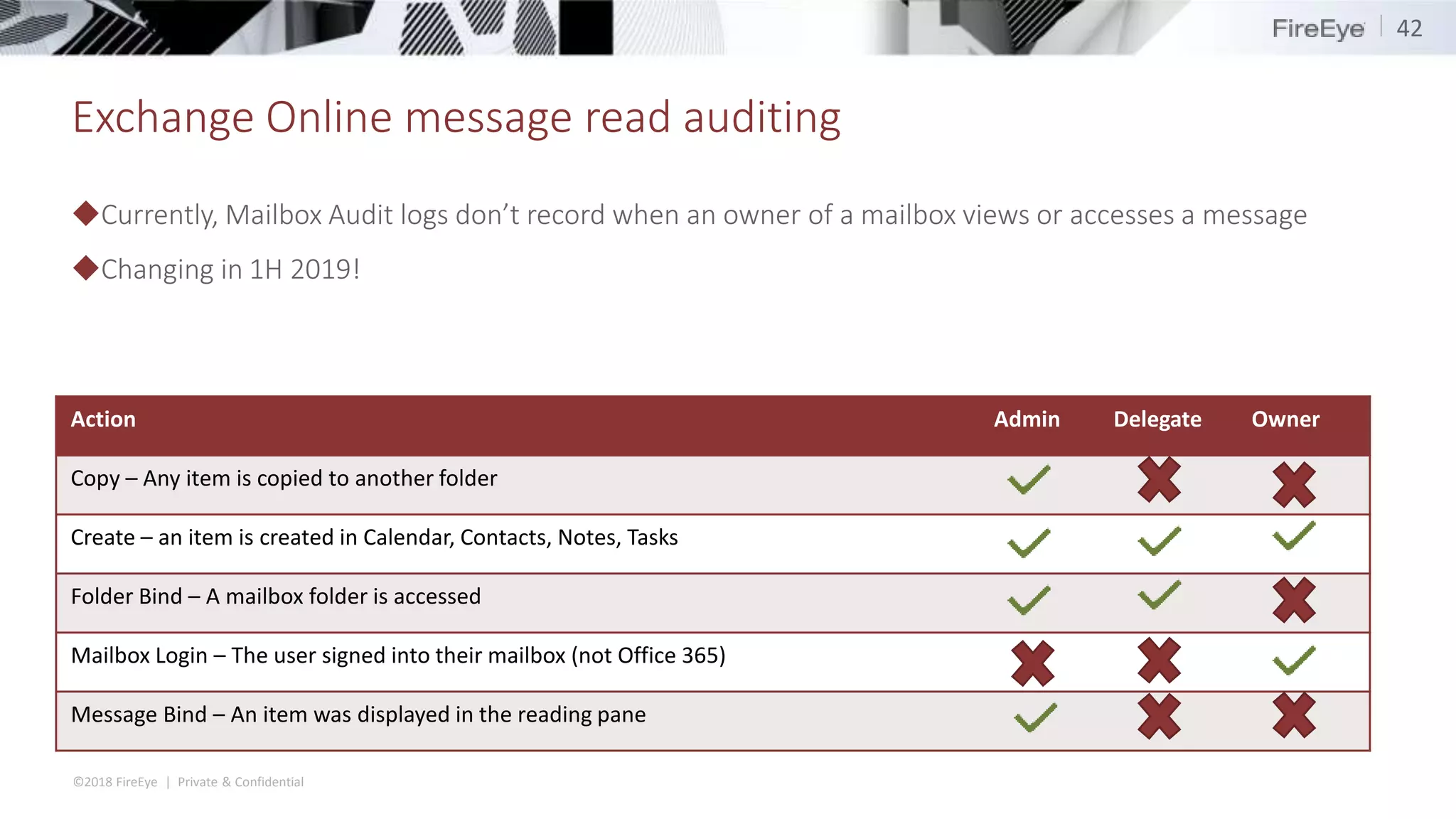
Exchange Online message read auditing
◆Currently, Mailbox Audit logs don’t record when an owner of a mailbox views or accesses a message
◆Changing in 1H 2019!
42
Action Admin Delegate Owner
Copy – Any item is copied to another folder
Create – an item is created in Calendar, Contacts, Notes, Tasks
Folder Bind – A mailbox folder is accessed
Mailbox Login – The user signed into their mailbox (not Office 365)
Message Bind – An item was displayed in the reading pane
©2018 FireEye | Private & Confidential
Exchange Online message read auditing
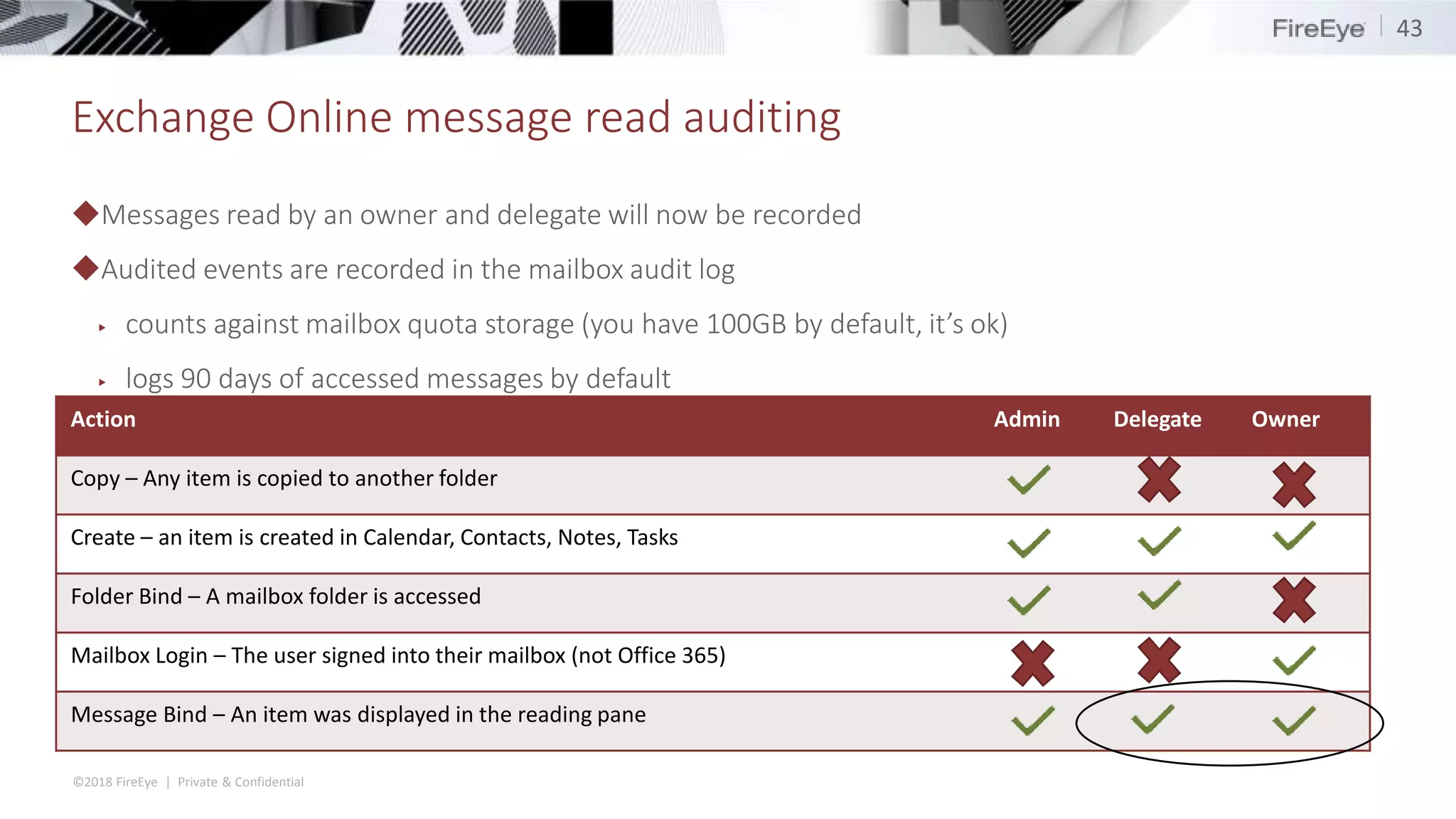
◆Messages read by an owner and delegate will now be recorded
◆Audited events are recorded in the mailbox audit log
▶ counts against mailbox quota storage (you have 100GB by default, it’s ok)
▶ logs 90 days of accessed messages by default
43
Action Admin Delegate Owner
Copy – Any item is copied to another folder
Create – an item is created in Calendar, Contacts, Notes, Tasks
Folder Bind – A mailbox folder is accessed
Mailbox Login – The user signed into their mailbox (not Office 365)
Message Bind – An item was displayed in the reading pane
©2018 FireEye | Private & Confidential
Exchange Online message read auditing
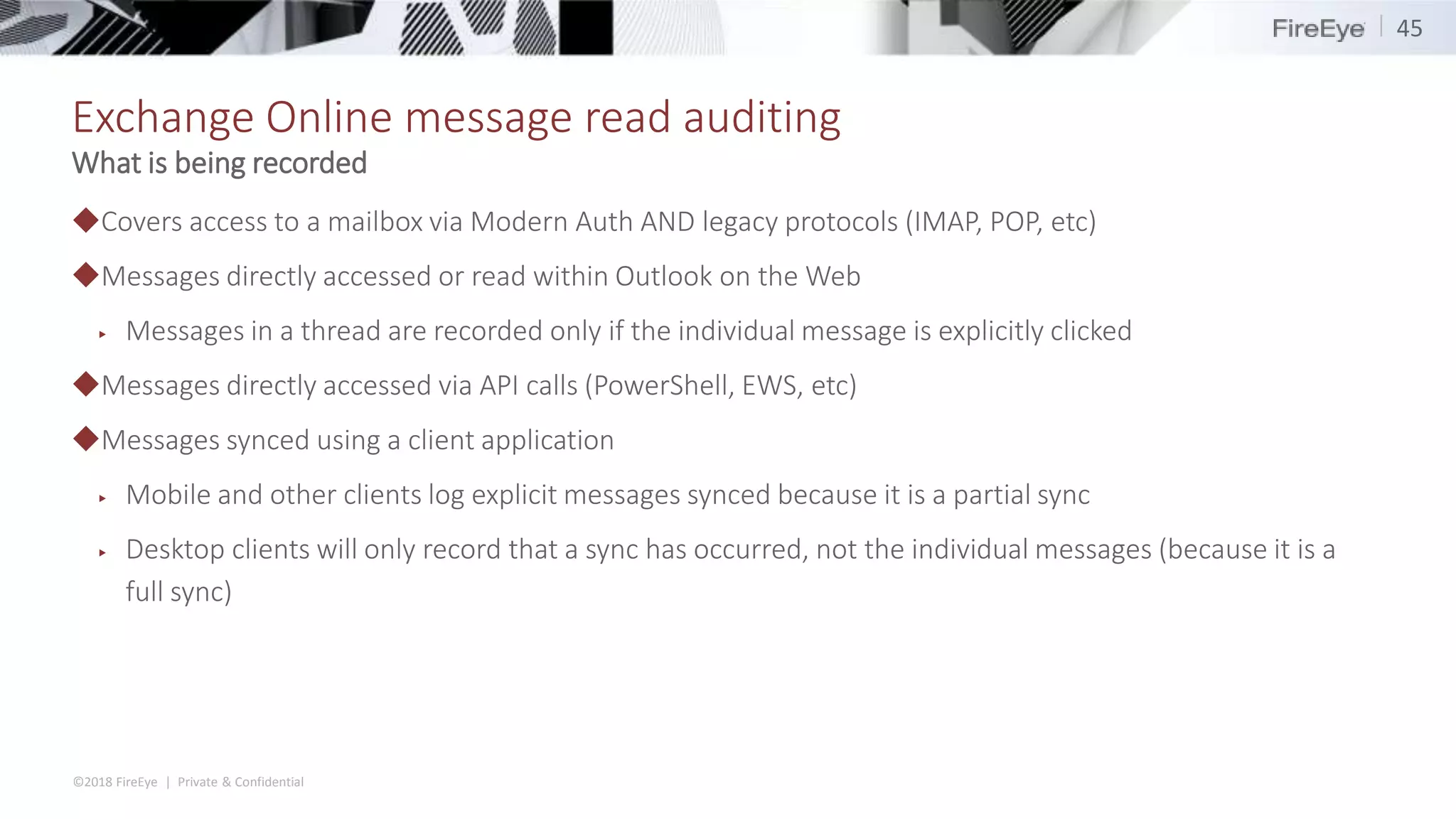
◆Each MailitemsAccessed event will record a 2-minute activity period
◆New events within a period will be generated if
▶ new client IP address
▶ new User Principal Name doing the read/access
▶ New parent mailbox folder
▶ new logon type
▶ new mailbox session ID
▶ new user agent string
44
How does it work
©2018 FireEye | Private & Confidential
Exchange Online message read auditing
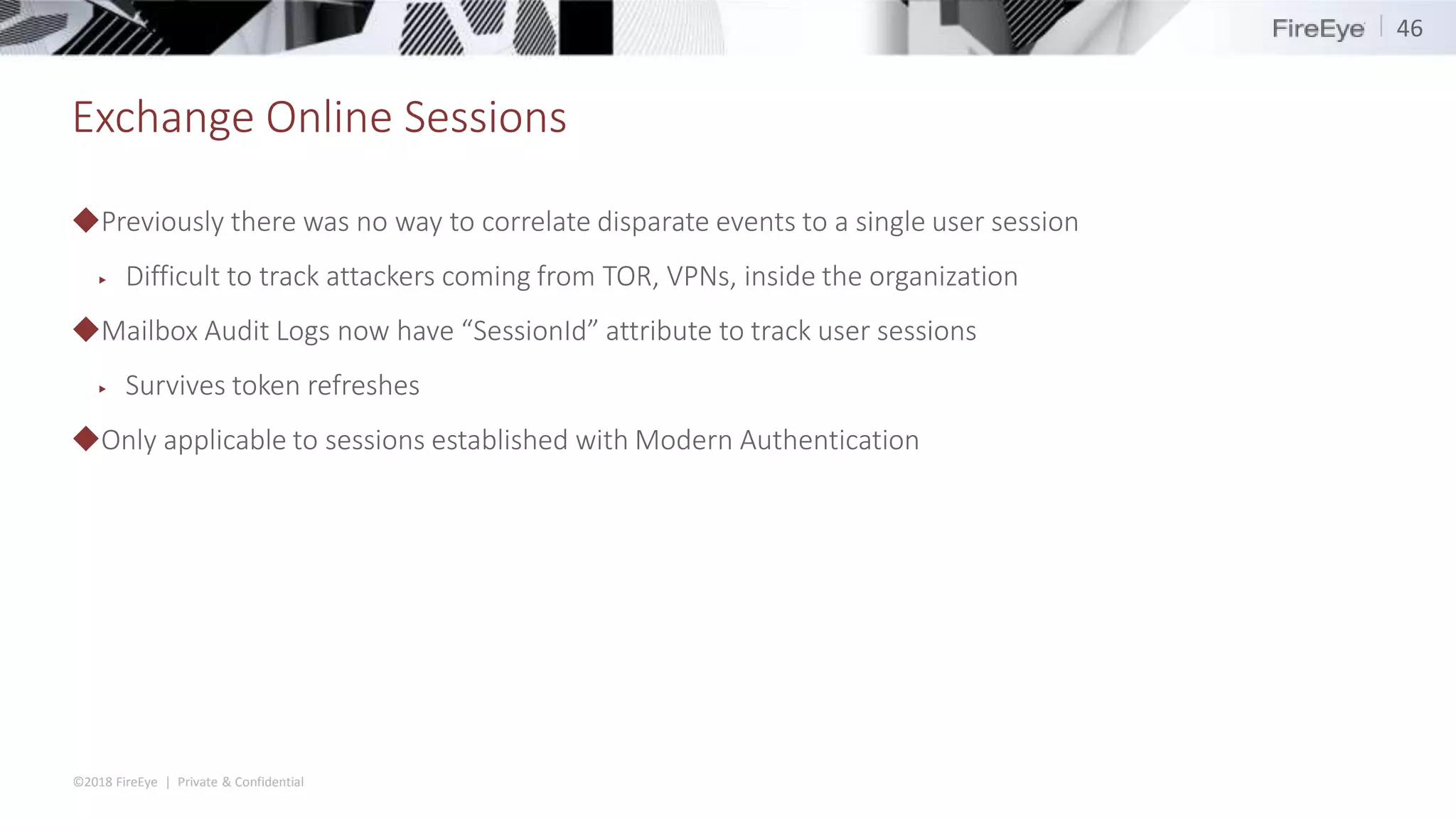
◆Covers access to a mailbox via Modern Auth AND legacy protocols (IMAP, POP, etc)
◆Messages directly accessed or read within Outlook on the Web
▶ Messages in a thread are recorded only if the individual message is explicitly clicked
◆Messages directly accessed via API calls (PowerShell, EWS, etc)
◆Messages synced using a client application
▶ Mobile and other clients log explicit messages synced because it is a partial sync
▶ Desktop clients will only record that a sync has occurred, not the individual messages (because it is a
full sync)
45
What is being recorded
©2018 FireEye | Private & Confidential
Exchange Online Sessions
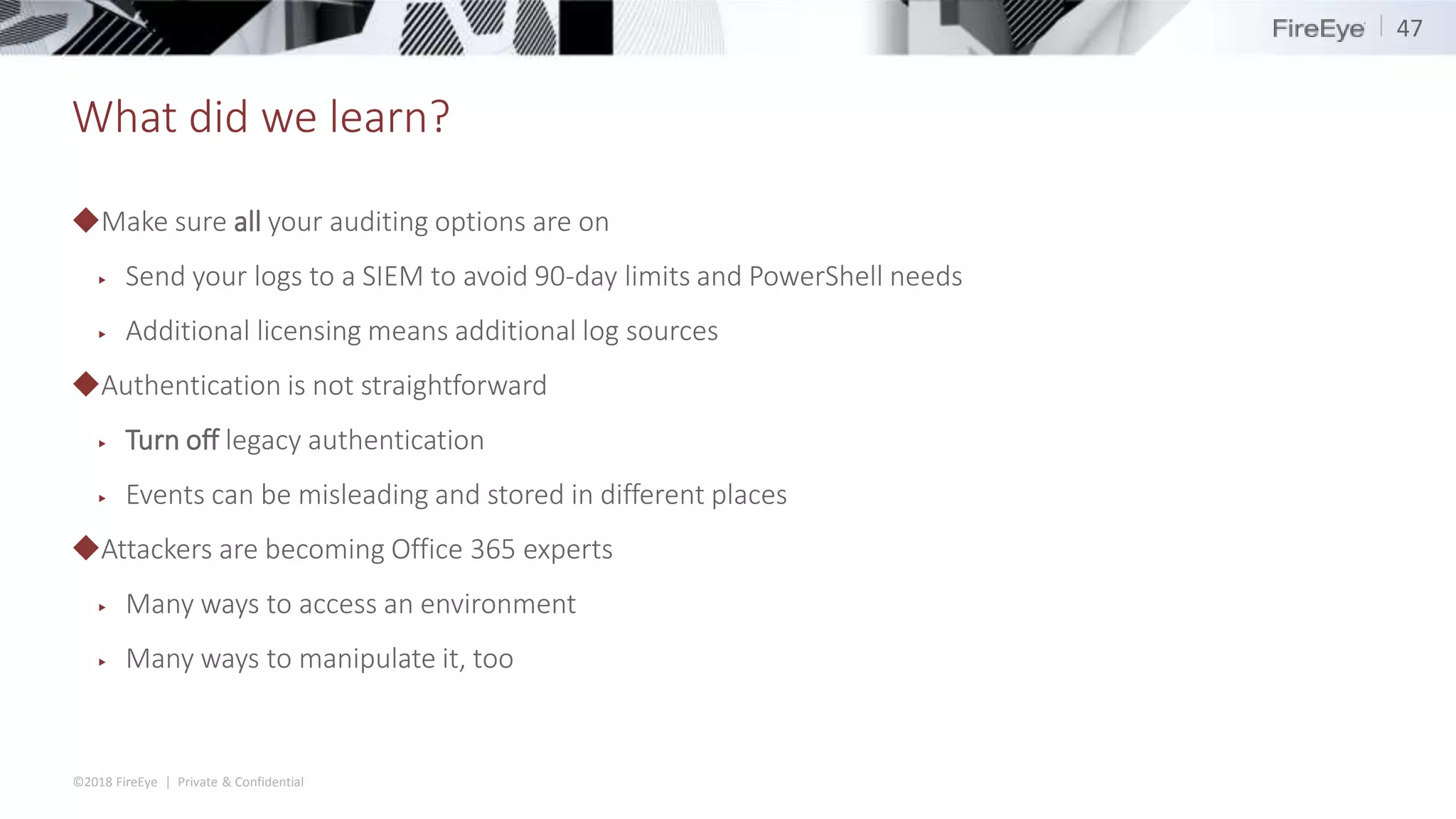
◆Previously there was no way to correlate disparate events to a single user session
▶ Difficult to track attackers coming from TOR, VPNs, inside the organization
◆Mailbox Audit Logs now have “SessionId” attribute to track user sessions
▶ Survives token refreshes
◆Only applicable to sessions established with Modern Authentication
46
©2018 FireEye | Private & Confidential
What did we learn?
◆Make sure all your auditing options are on
▶ Send your logs to a SIEM to avoid 90-day limits and PowerShell needs
▶ Additional licensing means additional log sources
◆Authentication is not straightforward
▶ Turn off legacy authentication
▶ Events can be misleading and stored in different places
◆Attackers are becoming Office 365 experts
▶ Many ways to access an environment
▶ Many ways to manipulate it, too
47
End
48

Shmoocon 2019 - BECS and beyond: Investigating and Defending Office 365

  • 1.
    BECs and Beyond:Investigating and Defending Office 365 January 19, 2019
  • 2.
    ©2018 FireEye |Private & Confidential Roadmap 2 ◆Introduction ◆Office 365 in Practice ◆Business Email Compromise ◆Nation State Actors ◆Bonus Time ◆Conclusion
  • 3.
    ©2018 FireEye |Private & Confidential Introduction Doug Bienstock - @DoughSec 3 ◆Principal Consultant – 4.5 years with Mandiant ◆Incident Response and Red Team leader ◆Love/hate relationship with Office 365 ◆Lifelong Green Bay Packers fan
  • 4.
    ©2018 FireEye |Private & Confidential Introduction Josh Madeley - @MadeleyJosh 4 ◆Principal Consultant – 3 years with Mandiant ◆Incident Repsonse Lead ◆Office 365 Connoisseur ◆Canadian
  • 5.
  • 6.
    ©2018 FireEye |Private & Confidential Email in the cloud… and much, much more ◆Office 365 is a suite of cloud-based applications ◆Exchange Online is basically just Exchange Server ported to the cloud ◆User identity is backed by Azure AD ▶ just Active Directory in the cloud
  • 7.
    ©2018 FireEye |Private & Confidential Authentication Identity is the new perimeter ◆ Cloud Authentication ▶ Authentication happens within Azure AD ▶ Simple, easy to setup and maintain ▶ limited MFA and account settings ◆Federated Authentication ▶ Authentication passed off to a trusted third-party ▶ AD FS, Okta, Ping, etc ▶ Higher level of control and advanced authentication options ▶ More difficult to implement and maintain
  • 8.
    ©2018 FireEye |Private & Confidential Modern vs Legacy Authentication ◆Modern Authentication ▶ The standard and recommended sign-in mechanism ▶ Uses OAuth behind the scenes ▶ Supports advanced security – MFA and Conditional Access Policies ◆Legacy Authentication (enabled by default) ▶ Can be used with several protocols – POP, IMAP, MAPI/HTTP – PowerShell, EWS, AutoDiscover ▶ Does not support MFA 8
  • 9.
    ©2018 FireEye |Private & Confidential Core Logs ◆Three main official log sources ▶ Unified Audit Log ▶ Mailbox Audit Log ▶ Admin Audit Log  Bonus (sometimes) ▶ Azure AD Audit logs ◆Extras ▶ Mail trace ▶ Security & Compliance reports ▶ Activities API
  • 10.
    ©2018 FireEye |Private & Confidential Unified Audit Log ◆Contains log entries from multiple data sources, and continues to grow as the platform matures ◆Stored in JSON ◆Searchable via PowerShell, Search-UnifiedAuditLog ▶ Search by User, IP address, Operation (event type), free text ◆Query results limited to 5000 entries at a time ◆3060 Character Length per record ▶ Truncates records that exceed this ▶ Results in malformed JSON documents or trimmed entries ◆Maintained for 90 days ◆Events are not immediately available
  • 11.
    ©2018 FireEye |Private & Confidential Anatomy of a UAL Entry Key Name Description CreationTime When the event occurred Id Unique identifier of the log entry (not a session ID) Operation What action occurred – UserLoggedIn, New-InboxRule Workload The Office 365 Product that generated the log entry (RecordType) UserId User Id that performed the operation or made the request ClientIP Source IP address of the request (Most Workloads) ClientIpAddress Source IP address of the request (Exchange Online) ObjectId Identifier of the object that was modified or accessed Parameters Array of of key/value pairs that are event entry specific
  • 12.
    ©2018 FireEye |Private & Confidential Unified Audit Log Workload Operation Description AzureActiveDirectory UserLoggedIn Login to Office 365 *not just Exchange* Exchange New-InboxRule Inbox rule created Exchange Set-InboxRule Inbox rule modified OneDrive FileAccessed File in OneDrive was accessed 12 Examples
  • 13.
    ©2018 FireEye |Private & Confidential Mailbox Audit Log Action Admin Delegate Owner Copy – Any item is copied to another folder Create – an item is created in Calendar, Contacts, Notes, Tasks Folder Bind – A mailbox folder is accessed Mailbox Login – The user signed into their mailbox (not Office 365) Message Bind – An item was displayed in the reading pane Attacks usually happen here with valid credentials
  • 14.
    ©2018 FireEye |Private & Confidential Admin Audit Logs ◆Records actions taken by administrators based on Exchange Online PowerShell cmdlets ▶ Most admin interfaces (even the WebUI) are wrappers for PowerShell cmdlets ◆Returns results as PowerShell objects via Search-AdminAuditLog ◆Retains events for 90 days ◆Some (not all) events get sent to the Unified Audit Log
  • 15.
  • 16.
    ©2018 FireEye |Private & Confidential BEC defined ◆Business Email Compromise (BEC) – Fraud where an attacker gains access to a mailbox of an employee with access to company finances and tricks them or uses them to trick others into wiring money to attacker-controlled accounts. ◆Has cost companies over $12 Billion ◆Mechanism of deception can vary between cases ▶ CEO/CFO impersonation ▶ Vendor impersonation ◆Tend to follow a set playbook
  • 17.
    ©2018 FireEye |Private & Confidential Gaining access Initial phishing
  • 18.
    ©2018 FireEye |Private & Confidential Gains Access ◆Start-HistoricalSearch –ReportTitle InitialPhishSearch –StartDate 2019/01/01 –EndDate 2019/01/10 – ReportType MessageTraceDetail -Direction Received –RecipientAddress joe@victim.org ▶ Returns report in CSV format ▶ Can search up to 90 days back ▶ Searches can take several hours to complete 18 Mail trace Date_time Message_id Recipient _address Total_bytes Message _subject Sender_ address Return_p ath Original_client _ip 2019-01- 02T22:30:0 1 <09d1e730 8c55e8cacc 98c42d833 36d67@exa mple.com> joe@victi m.org 31358234 Quick Review hr@exa mple.co m hr@exam ple.com 1.1.1.1
  • 19.
    ©2018 FireEye |Private & Confidential Gaining access ◆Search-UnifiedAuditLog –StartDate (Get-Data).addDays(-90) -EndDate Get-Date –UserIds joe@victim.org ◆UserLoggedIn events record auths to Office 365 ◆Don’t be fooled by “ResultStatus:Succeeded” ◆LogonError attribute says otherwise ▶ Error codes indicate different failure conditions ◆Initial authentication attempts failed due to MFA requirement 19 UserLoggedIn Events
  • 20.
    ©2018 FireEye |Private & Confidential Sidetrack... ◆Applications objects exist in the tenant where they were created ◆Service Principals are local copies of the application in the consuming tenant ◆Office 365 components (e.g. Exchange Online) follow this model too! ◆ApplicationId and Target ID tell us the apps that were used and targeted ▶ Service Principal IDs ◆Get-AzureADServicePrincipal 20 Azure Service Principals
  • 21.
    ©2018 FireEye |Private & Confidential Sidetrack.. ◆A single interactive logon may generate several login events in the audit log ◆Accessing each component of Office 365 (exchange, azure, sharepoint) is a unique authentication ◆Logging in to portal.office.com generates at least 6 login events: 1. 12:00:00 - Office 365 Portal application targeting Azure Active Directory 2. 12:00:20 - Office Suite UX application targeting Azure Active Directory 3. 12:00:25 - Exchange Online application targeting Exchange Online 4. 12:00:25 - Office 365 Shell targeting "Unknown" 5. 12:00:27- Office 365 Shell targeting a hidden application 6. 12:00:27 - Office 365 Shell targeting Sharepoint Online 21 Service Principals
  • 22.
    ©2018 FireEye |Private & Confidential Gaining access ◆Attacker switched to a protocol that supports legacy (i.e. basic) authentication ◆ExchangeServiceClient/0.0.0.0 ▶ EWS client library ▶ Available on github ◆Programmatic access to the mailbox ◆No MFA required! 22 UserLoggedIn Events
  • 23.
    ©2018 FireEye |Private & Confidential Remain undetected ◆Created two inbox rules to keep fraud attempt hidden ▶ Rule #1: hide any signs of compromise detection – Match messages with “phish”, “hack”, “undeliverable”, “spam” and move them to trash ▶ Rule #2: hide any legitimate communications from spoofed vendor – The real vendor is going to wonder why they aren’t getting paid – move any messages from the real vendor to the trash
  • 24.
    ©2018 FireEye |Private & Confidential Find the rules! ◆Searching the Unified Audit Log for Inbox rules is not fun for two main reasons 1. IP addresses for some events have the TCP port appended to them <IP>:<port> ▶ Search-UnifiedAuditLog -IpAddress 1.1.1.1 ▶ 1.1.1.1:10596 ▶ Searching for inbox rules by an attacker IP address is impossible because of this 2. When an inbox rule is modified, you cannot identify the rule that was modified ▶ Only the changed conditions are recorded ◆Search-UnifiedAuditLog -Operation New-InboxRule, Set-InboxRule 24
  • 25.
    ©2018 FireEye |Private & Confidential Find the rules! 25
  • 26.
    ©2018 FireEye |Private & Confidential Change banking information
  • 27.
  • 28.
    ©2018 FireEye |Private & Confidential APT Intrusions 1. Attacker password sprayed an AD FS Proxy to find valid credentials 2. Accessed the network via backdoor 3. Elevated creds with Mimikatz and collected Exchange Admin credentials 4. Searched mailboxes with eDiscovery searches 5. Used delegation to gain full control over key mailboxes ◆Unified Audit Log ◆Admin Audit Log Attack Summary Logs Required
  • 29.
    ©2018 FireEye |Private & Confidential Password sprays and AD FS ◆Authentication handled on-premise ◆Failed authentications don’t make it past the AD FS server  Failed authentications are not recorded in the Unified Audit Log ◆AD FS records events in the Security Event Log ▶ Logs can roll very quickly ◆Without advanced auditing you won’t see IP addresses 29
  • 30.
    ©2018 FireEye |Private & Confidential Password sprays and AD FS 30
  • 31.
    ©2018 FireEye |Private & Confidential Attacker logs in ◆The victim used Conditional Access Policies to restrict logins from non-US IP addresses ◆Initial sign-in by the attacker occured from a US-based IP address ▶ Maps to a virtual private network provider ◆Subsequent logins are recorded from a Netherlands-based IP address ▶ Access tokens are refreshed at least once an hour, sometimes generating log events ▶ Access policies are only checked at the initial authentication, not on subsequent refreshes ◆“Remember me” gives attacker access for 90 days or until password is changed 31
  • 32.
    ©2018 FireEye |Private & Confidential What is eDiscovery ◆Process of identifying and delivering electronic information that can be used as evidence in legal cases. ◆Search for content in: ▶ Exchange Online mailboxes ▶ Office 365 Groups ▶ Microsoft Teams ▶ SharePoint Online (the file contents, OneNote, Word, Excel, etc) ▶ OneDrive for Business sites ▶ Skype for Business conversations.
  • 33.
    ©2018 FireEye |Private & Confidential Operation: SearchCreated ◆Attacker creates a new E-Discovery Search ▶ Looking for emails with RSA SDTID files ▶ CreationTime – When the attacker created this search ▶ ObjectId – name of the case viewable in the GUI ▶ Parameters – Cmdlet that was executed and the supplied parameters (this is what the GUI executes behind the scenes) ◆ClientIP - ….Wait... this event doesn't record an IP!
  • 34.
    ©2018 FireEye |Private & Confidential PreviewItemRendered (Truncated) Critical Details ◆An individual object was rendered in the eDiscovery UI ◆ObjectId – text reference to the object that is rendered ▶ Attacker can view data in existing searches that they did not create ▶ <CASENAME><CASENAME>_Preview<ObjectName> ◆ExchangeLocations – list of locations that the object  List can be quite large for messages that were forwarded to the entire company  List often exceeds maximum size of a UAL event  Results in malformed JSON that can be overlooked by some scripts
  • 35.
    ©2018 FireEye |Private & Confidential Operation: SearchExportDownloaded ◆Indicates that the attacker downloaded results of a search ◆ SearchIDs maps to GUID from SearchCreated event ◆ Only indicates that the download started, not finished ◆Up until recently messages were delivered in a PST format and SharePoint objects download individually ◆Large downloads fail regularly and are not recorded as failed ◆To date – no way to determine the contents of an archive without re-running the search
  • 36.
    ©2018 FireEye |Private & Confidential Access other Mailboxes Add-MailboxPermission ◆Assigns an account permissions to another account ◆Different levels of access ▶ FullAccess ▶ SendAs ▶ SendOnBehalf  Parameters: ▶ User : Account receiving the new permissions ▶ AccessRights : Type of access being granted ▶ Identity : The account being modified
  • 37.
  • 38.
    ©2018 FireEye |Private & Confidential Azure AD PowerShell ◆Unlike Exchange Online PowerShell, this can’t be turned off! ◆You can’t apply Conditional Access Policies to it ▶ It uses Microsoft Graph ¯_(ツ)_/¯ ◆ Any user (even unlicensed) can access PS > Connect-AzureAD PS > Get-AzureADUser ObjectId DisplayName UserPrincipalName UserType --------- ------------ ------------------ ---------- Xxxx-xxxx John Doe John.Doe@example.com Member 38
  • 39.
    ©2018 FireEye |Private & Confidential OAuth Abuse 39 ◆ Cloud service providers allow users to integrate third-party applications in order to drive synergy and enhance productivity ▶ G Suite, Office 365, Box ◆ Once installed, the applications can access users’ data on their behalf at any time ▶ Bypasses MFA requirements by design ▶ Valid for 90 days Enhance productivity!
  • 40.
    ©2018 FireEye |Private & Confidential OAuth Abuse 40 ◆A user “consents” to allow an application access to her account ◆Attacker receives an access token they can supply to Office 365 to access data ◆Unified Audit Log records user consent events
  • 41.
    Bonus Time: NewLogging Features
  • 42.
    ©2018 FireEye |Private & Confidential Exchange Online message read auditing ◆Currently, Mailbox Audit logs don’t record when an owner of a mailbox views or accesses a message ◆Changing in 1H 2019! 42 Action Admin Delegate Owner Copy – Any item is copied to another folder Create – an item is created in Calendar, Contacts, Notes, Tasks Folder Bind – A mailbox folder is accessed Mailbox Login – The user signed into their mailbox (not Office 365) Message Bind – An item was displayed in the reading pane
  • 43.
    ©2018 FireEye |Private & Confidential Exchange Online message read auditing ◆Messages read by an owner and delegate will now be recorded ◆Audited events are recorded in the mailbox audit log ▶ counts against mailbox quota storage (you have 100GB by default, it’s ok) ▶ logs 90 days of accessed messages by default 43 Action Admin Delegate Owner Copy – Any item is copied to another folder Create – an item is created in Calendar, Contacts, Notes, Tasks Folder Bind – A mailbox folder is accessed Mailbox Login – The user signed into their mailbox (not Office 365) Message Bind – An item was displayed in the reading pane
  • 44.
    ©2018 FireEye |Private & Confidential Exchange Online message read auditing ◆Each MailitemsAccessed event will record a 2-minute activity period ◆New events within a period will be generated if ▶ new client IP address ▶ new User Principal Name doing the read/access ▶ New parent mailbox folder ▶ new logon type ▶ new mailbox session ID ▶ new user agent string 44 How does it work
  • 45.
    ©2018 FireEye |Private & Confidential Exchange Online message read auditing ◆Covers access to a mailbox via Modern Auth AND legacy protocols (IMAP, POP, etc) ◆Messages directly accessed or read within Outlook on the Web ▶ Messages in a thread are recorded only if the individual message is explicitly clicked ◆Messages directly accessed via API calls (PowerShell, EWS, etc) ◆Messages synced using a client application ▶ Mobile and other clients log explicit messages synced because it is a partial sync ▶ Desktop clients will only record that a sync has occurred, not the individual messages (because it is a full sync) 45 What is being recorded
  • 46.
    ©2018 FireEye |Private & Confidential Exchange Online Sessions ◆Previously there was no way to correlate disparate events to a single user session ▶ Difficult to track attackers coming from TOR, VPNs, inside the organization ◆Mailbox Audit Logs now have “SessionId” attribute to track user sessions ▶ Survives token refreshes ◆Only applicable to sessions established with Modern Authentication 46
  • 47.
    ©2018 FireEye |Private & Confidential What did we learn? ◆Make sure all your auditing options are on ▶ Send your logs to a SIEM to avoid 90-day limits and PowerShell needs ▶ Additional licensing means additional log sources ◆Authentication is not straightforward ▶ Turn off legacy authentication ▶ Events can be misleading and stored in different places ◆Attackers are becoming Office 365 experts ▶ Many ways to access an environment ▶ Many ways to manipulate it, too 47
  • 48.

Editor's Notes

  • #14 90 day retentions
  • #20 Don’t be fooled by the Browser UA string. This is because modern auth is rendered in a web frame so it uses browser UA
  • #21 - can list out all service prinicpals in the tenant using AzureAD PowerShell Application used is Microsoft Office Target was Exchange Online
  • #31 - Left we see the UAL entry for the first logon. Note the special operation indicated initial logon with an AD FS token - AD FS failures are 1203 in Security log
  • #33 - note there is also a "content search" basically edisco search but without case management
  • #45 - hourly deduping effort. If same mail item is read twice in a one hour period it will not be recorded the second time