Designing	
  Configurable	
  and	
  
Customizable	
  Applica7ons	


UPA	
  CONFERENCE	
  	
  |	
  JUNE	
  2012	


                                                                                Lisa	
  Ba4le	
  
                                                 www.designforcontext.com	
  
                                                                                Laura	
  Chessman	
  
Background	


                          Lisa	
  Ba4le	
  	
                  Laura	
  Chessman	


2	
     UPA	
  Conference	
  	
  |	
  June	
  6,	
  2012	
  
CONFIGURATION	


                                                               CUSTOMIZATION	


                                                                         PERSONALIZATION	
  

3	
     UPA	
  Conference	
  	
  |	
  June	
  6,	
  2012	
  
Who	
  is	
  configuring	
  the	
  applicaRon?	


         End	
  User	


         OrganizaRon/Client	


4	
     UPA	
  Conference	
  	
  |	
  June	
  6,	
  2012	
  
End	
  User
                                                                         	
     OrganizaRon	
  /	
  Client


    Appearance	


    Layouts	


    Info	
  displays	


    NavigaRon	


    InteracRons	


    Permissions	
  

5	
     UPA	
  Conference	
  	
  |	
  June	
  6,	
  2012	
  
What	
  other	
  categories	
  are	
  there?	


6	
     UPA	
  Conference	
  	
  |	
  June	
  6,	
  2012	
  
End	
  User
                                                                             	
         OrganizaRon	
  /	
  Client


    Appearance	
                                               Color	
  themes   	
  
                                                                Fonts/sizes 	
  

    Layouts	


    Info	
  displays	


    NavigaRon	


    InteracRons	


    Permissions	
  

7	
     UPA	
  Conference	
  	
  |	
  June	
  6,	
  2012	
  
Appearance	
                                                                                              End	
  User


                                                                                      n  User	
  preferences	
  	
  
                                                                                        for	
  colors	
  and	
  fonts	
  
                                                                                        are	
  common	
  

        Color	
  theme	
                                         Color	
  theme	
     n  Makes	
  a	
  product	
  
                                                                                        “feel”	
  more	
  usable	
  
                                                                                      n  Accessibility	
  
                                                                                        requirement	
  for	
  font	
  
                                                                                        size,	
  high	
  contrast	


8	
       UPA	
  Conference	
  	
  |	
  June	
  6,	
  2012	
  
COLOR	
  THEME	


9	
      UPA	
  Conference	
  	
  |	
  June	
  6,	
  2012	
  
COLOR	
  THEME	


10	
   UPA	
  Conference	
  	
  |	
  June	
  6,	
  2012	
  
COLOR	
  THEME	


11	
   UPA	
  Conference	
  	
  |	
  June	
  6,	
  2012	
  
APPEARANCE	
  

  Design	
  ConsideraRons	
                                                                                    End	
  User


                         n  When	
  users	
  can	
  choose	
  whether	
  to	
  use	
  a	
  product,	
  
                                  color	
  themes	
  are	
  a	
  good	
  way	
  to	
  make	
  it	
  personal.	
  	
  
                                  If	
  it	
  is	
  super	
  easy	
  to	
  do.	
  
                         n  Allow	
  users	
  to	
  control	
  the	
  font	
  size	
  of	
  text	
  content.	
  	
  
                                  Important	
  for	
  readability	
  and	
  accessibility.	
  

                         n  Decide	
  which	
  UI	
  elements	
  should	
  be	
  changeable.	
  	
  
                                  Some	
  (e.g.	
  icons,	
  color	
  symbols,	
  controls)	
  usually	
  should	
  not.	
  

                         n  Prevent	
  disastrous	
  combinaRons.	
  	
  
                                  Ensure	
  changes	
  don’t	
  interfere	
  with	
  icons	
  or	
  color	
  symbols.	


                         n  Provide	
  a	
  “Reset”	
  opRon.	


12	
   UPA	
  Conference	
  	
  |	
  June	
  6,	
  2012	
  
End	
  User
                                                                        	
      OrganizaRon	
  /	
  Client


  Appearance	
                                                                 CondiRonal	
  branding  	
  
                                                                                 White	
  labeling	
  

  Layouts	


  Info	
  displays	


  NavigaRon	


  InteracRons	


  Permissions	
  

13	
   UPA	
  Conference	
  	
  |	
  June	
  6,	
  2012	
  
Appearance	
                                                                                OrganizaRon	
  /	
  Client


                                                                                      n  CondiRonal	
  branding	
  
                                                                                         (changes	
  based	
  on	
  
                                                                                         data,	
  user	
  a4ributes,	
  
                                                                                         domain,	
  etc.)	
  
   CondiRonal	
  branding	
                                   White	
  labeling	
  
                                                                                      n  So`ware	
  as	
  a	
  service	
  
                                                                                         is	
  o`en	
  re-­‐branded	
  
                                                                                         with	
  the	
  client’s	
  
                                                                                         brand	


14	
   UPA	
  Conference	
  	
  |	
  June	
  6,	
  2012	
  
CONDITIONAL	
  BRANDING	


15	
   UPA	
  Conference	
  	
  |	
  June	
  6,	
  2012	
  
CONDITIONAL	
  BRANDING	


16	
   UPA	
  Conference	
  	
  |	
  June	
  6,	
  2012	
  
WHITE	
  LABELING	


17	
   UPA	
  Conference	
  	
  |	
  June	
  6,	
  2012	
  
APPEARANCE	
  

  Design	
  ConsideraRons	
                                                                OrganizaRon	
  /	
  Client


                         n  Provide	
  a	
  (limited)	
  range	
  of	
  standard	
  skins	
  that	
  
                                  accommodate	
  most	
  needs.	
  	
  
                                  Customiza@on	
  beyond	
  that	
  is	
  charged	
  to	
  the	
  client.	
  

                         n  For	
  standard	
  skins,	
  make	
  them	
  all	
  equally	
  good,	
  
                                  and	
  test	
  with	
  all	
  of	
  them.	
  
                         n  Layout	
  changes	
  can	
  lead	
  to	
  unpredictable	
  
                                  results!	


18	
   UPA	
  Conference	
  	
  |	
  June	
  6,	
  2012	
  
End	
  User
                                                                               	
         OrganizaRon	
  /	
  Client


  Appearance	


  Layouts	
                                                   Screens,	
  portlets,	
  
                                                              resizing,	
  defaults


  Info	
  displays	


  NavigaRon	


  InteracRons	


  Permissions	
  

19	
   UPA	
  Conference	
  	
  |	
  June	
  6,	
  2012	
  
Layouts	
                                                                                                        End	
  User


                                                                                        n  Make	
  changes	
  to	
  
                                                                                           accommodate	
  
                                                                                           different	
  work	
  styles	
  

   One	
  Rme	
  setup	
                                      Flexible	
  changes	
     n  One	
  Rme	
  setup	
  

                                                                                        n  On	
  the	
  fly	
  changes	


                                                                                        n  SupporRng	
  different	
  
                                                                                           devices	
  and	
  work	
  
                                                                                           setups	
  	
  
   MulRple	
  monitors	
                                      MulRple	
  monitors	


20	
   UPA	
  Conference	
  	
  |	
  June	
  6,	
  2012	
  
LAYOUT	
  SETUP	


21	
   UPA	
  Conference	
  	
  |	
  June	
  6,	
  2012	
  
LAYOUT	
  SETUP	


22	
   UPA	
  Conference	
  	
  |	
  June	
  6,	
  2012	
  
23	
   UPA	
  Conference	
  	
  |	
  June	
  6,	
  2012	
  
LAYOUT	
  SETUP	


24	
   UPA	
  Conference	
  	
  |	
  June	
  6,	
  2012	
  
LAYOUT	
  ON-­‐THE-­‐FLY	
  CHANGES	


25	
   UPA	
  Conference	
  	
  |	
  June	
  6,	
  2012	
  
LAYOUT	
  ON-­‐THE-­‐FLY	
  CHANGES	


26	
   UPA	
  Conference	
  	
  |	
  June	
  6,	
  2012	
  
LAYOUT	
  ON-­‐THE-­‐FLY	
  CHANGES	


27	
   UPA	
  Conference	
  	
  |	
  June	
  6,	
  2012	
  
LAYOUT	
  ON-­‐THE-­‐FLY	
  CHANGES	


28	
   UPA	
  Conference	
  	
  |	
  June	
  6,	
  2012	
  
MULTIPLE	
  MONITORS	


Monitor	
  1	
                                                  Monitor	
  2	


  29	
   UPA	
  Conference	
  	
  |	
  June	
  6,	
  2012	
  
MULTIPLE	
  MONITORS	


30	
   UPA	
  Conference	
  	
  |	
  June	
  6,	
  2012	
  
LAYOUTS	
  

  Design	
  ConsideraRons	
                                                                                       End	
  User


                         n  Infrequent	
  users	
  won’t	
  bother.	
  Best	
  used	
  for:	
  
                                       •  Frequent	
  users	
  
                                       •  Dense	
  informaRon	
  displays	
  
                                       •  Different	
  tasks/quesRons	
  requiring	
  different	
  informaRon	
  
                                       •  Highly	
  individual	
  differences	
  in	
  work	
  pracRce	
  

                         n  Remember	
  the	
  way	
  the	
  user	
  le`	
  it	
  (within	
  session).	
  

                         n  Design	
  alternaRve	
  views	
  for	
  different	
  display	
  sizes.	
  

                         n  Graceful	
  degradaRon	
  when	
  things	
  don’t	
  fit.	
  

                         n  Easy	
  to	
  revert	
  to	
  their	
  saved	
  or	
  standard	
  layout.	
  

                         n  Make	
  it	
  difficult	
  for	
  users	
  to	
  “lose”	
  informaRon,	
  
                                  gadgets,	
  or	
  funcRonality	
  
31	
   UPA	
  Conference	
  	
  |	
  June	
  6,	
  2012	


End	
  User
                                                                        	
      OrganizaRon	
  /	
  Client


  Appearance	
  

                                                                               Device-­‐based	
  and	
  role-­‐
  Layouts	
                                                                       based	
  variaRons     	


  Info	
  displays	


  NavigaRon	


  InteracRons	


  Permissions	
  

32	
   UPA	
  Conference	
  	
  |	
  June	
  6,	
  2012	
  
Layouts	
                                                                                     OrganizaRon	
  /	
  Client


                                                                                        n  Device	
  appropriate	


                                                                                        n  OpRmizing	
  to	
  meet	
  
                                                                                          performance	
  goals	
  
   Context-­‐driven	
                                         Flexible	
  layouts	
       for	
  a	
  specific	
  task	


   Block	
  management	


33	
   UPA	
  Conference	
  	
  |	
  June	
  6,	
  2012	
  
DEVICE-­‐APPROPRIATE	
  LAYOUT	


                                                                                                                                                         Desktop	
  widget	
  	
  
                                                                                                                                                         for	
  quick	
  Rme	
  entry	


                                                   Web-­‐based	
  app	
  includes	
  reporRng	
  features	


  Mobile	
  app	
  for	
  Rme	
  
   tracking	
  on	
  the	
  go	
                                                                                Widgets	
  embedded	
  inside	
  3rd	
  party	
  web	
  apps


34	
   UPA	
  Conference	
  	
  |	
  June	
  6,	
  2012	
  
LAYOUT	
  OPTIONS	


35	
   UPA	
  Conference	
  	
  |	
  June	
  6,	
  2012	
  
36	
   UPA	
  Conference	
  	
  |	
  June	
  6,	
  2012	
  
LAYOUT	
  OPTIONS	


37	
   UPA	
  Conference	
  	
  |	
  June	
  6,	
  2012	
  
LAYOUT	
  OPTIONS	


38	
   UPA	
  Conference	
  	
  |	
  June	
  6,	
  2012	
  
LAYOUT	
  OPTIONS	


39	
   UPA	
  Conference	
  	
  |	
  June	
  6,	
  2012	
  
LAYOUT	
  

  Design	
  ConsideraRons	
                                                                 OrganizaRon	
  /	
  Client


                         n  Giving	
  structured	
  opRons	
  will	
  encourage	
  
                                  selecRon	
  of	
  user	
  friendly	
  layouts	
  
                                  This	
  requires	
  more	
  knowledge	
  of	
  users	
  and	
  their	
  tasks	
  

                         n  Giving	
  more	
  flexible	
  opRons	
  provides	
  
                                  organizaRons	
  with	
  greater	
  freedom	
  but	
  bigger	
  
                                  risks	


40	
   UPA	
  Conference	
  	
  |	
  June	
  6,	
  2012	
  
End	
  User
                                                                                	
            OrganizaRon	
  /	
  Client


  Appearance	


  Layouts	


  Info	
  displays	
                                          Tables,	
  filters,	
  user-­‐
                                                                 defined	
  fields     	
  

  NavigaRon	


  InteracRons	


  Permissions	
  

41	
   UPA	
  Conference	
  	
  |	
  June	
  6,	
  2012	
  
InformaRon	
  Displays	
                                                                              End	
  User


                                                                            n  Add/remove	
  
                                                                               columns	
  from	
  tables	
  
                                                                            n  Filter	
  or	
  sort	
  to	
  focus	
  
   Tables	
                                                   Filters	
        on	
  a	
  subset	
  of	
  data	
  
                                                                            n  Change	
  display	
  
                                                                               formats	
  
                                                                            n  Add	
  fields	


   Advanced	
  sorRng	


42	
   UPA	
  Conference	
  	
  |	
  June	
  6,	
  2012	
  
INFORMATION	
  DISPLAYS	
  -­‐	
  TABLES	


43	
   UPA	
  Conference	
  	
  |	
  June	
  6,	
  2012	
  
INFORMATION	
  DISPLAYS	
  -­‐	
  TABLES	


44	
   UPA	
  Conference	
  	
  |	
  June	
  6,	
  2012	
  
INFORMATION	
  DISPLAYS	
  -­‐	
  FILTERS	
  

                                                              Find	
  and	
  select	
  
                                                              types	
  of	
  data	
  to	
  
                                                              display	
  in	
  the	
  
                                                              interface	
  and	
  to	
  
                                                              receive	
  as	
  reports	
  
                                                              via	
  email.	


45	
   UPA	
  Conference	
  	
  |	
  June	
  6,	
  2012	
  
INFORMATION	
  DISPLAYS	
  -­‐	
  FILTERS	


                                                              Supervisor	
  can	
  choose	
  
                                                              which	
  machines(s)	
  to	
  
                                                              focus	
  on.	
  Data	
  and	
  
                                                              alerts	
  related	
  to	
  other	
  
                                                              machines	
  are	
  hidden	
  
                                                              from	
  view.	
  Supports	
  
                                                              scenarios	
  where	
  
                                                              supervisors	
  frequently	
  
                                                              need	
  to	
  shi`	
  their	
  
                                                              responsibiliRes	
  to	
  
                                                              different	
  machines.	


46	
   UPA	
  Conference	
  	
  |	
  June	
  6,	
  2012	
  
INFORMATION	
  DISPLAYS	
  -­‐	
  FILTERS	
  

                                                              Users	
  can	
  save	
  
                                                              filter	
  sets	
  that	
  can	
  
                                                              be	
  used	
  in	
  a	
  
                                                              variety	
  of	
  reports	


                                                              When	
  user	
  has	
  
                                                              relevant	
  filter	
  sets	
  that	
  
                                                              can	
  be	
  applied	
  to	
  a	
  
                                                              parRcular	
  report	
  view,	
  
                                                              the	
  sets	
  are	
  available	
  
                                                              for	
  selecRon	


47	
   UPA	
  Conference	
  	
  |	
  June	
  6,	
  2012	
  
INFORMATION	
  DISPLAYS	
  -­‐	
  FILTERS	
  
                                                              Within	
  a	
  user’s	
  session,	
  
                                                              filters	
  and	
  sorRng	
  is	
  
                                                              remembered	
  for	
  	
  lists.	


48	
   UPA	
  Conference	
  	
  |	
  June	
  6,	
  2012	
  
INFORMATION	
  DISPLAYS	
  –	
  ADVANCED	
  SORTING	


49	
   UPA	
  Conference	
  	
  |	
  June	
  6,	
  2012	
  
INFO	
  DISPLAYS	
  

  Design	
  ConsideraRons	
                                                                                           End	
  User


                         n  Provide	
  sensible	
  defaults	
  to	
  address	
  majority	
  needs.	
  

                         n  Allow	
  users	
  to	
  add/remove/filter/change	
  when:	
  
                              •  There	
  are	
  large	
  volumes	
  of	
  informaRon	
  but	
  some	
  users	
  only	
  need	
  a	
  
                                 subset.	
  
                              •  Individuals	
  have	
  strongly	
  held	
  conflicRng	
  preferences	
  	
  
                                 (e.g.	
  date/Rme	
  formats	
  wanRng	
  to	
  see	
  informaRon	
  in	
  a	
  glass	
  as	
  
                                 “half	
  full”	
  and	
  some	
  as	
  “half	
  empty.”).	


                         n  Prevent	
  removal	
  of	
  criRcal	
  informaRon.	
  

                         n  Unlimited	
  flexibility	
  leads	
  to	
  unreadable	
  displays.	
  

                         n  Too	
  many	
  opRons	
  can	
  be	
  overwhelming.	


50	
   UPA	
  Conference	
  	
  |	
  June	
  6,	
  2012	
  
End	
  User
                                                                        	
       OrganizaRon	
  /	
  Client


  Appearance	


  Layouts	
  

                                                                               Client-­‐defined	
  fields,	
  data-­‐
  Info	
  displays	
                                                           and	
  context-­‐driven	
  displays 	


  NavigaRon	


  InteracRons	


  Permissions	
  

51	
   UPA	
  Conference	
  	
  |	
  June	
  6,	
  2012	
  
InformaRon	
  Displays	
                                                                           OrganizaRon	
  /	
  Client


                                                                                             n  Data	
  opRons	
  that	
  
                                                                                               are	
  appropriate	
  for	
  
                                                                                               that	
  organizaRon	
  
   Client-­‐defined	
  fields	
                                 Client-­‐defined	
  fields	
     n  Reduce	
  and	
  simplify	
  
                                                                                               by	
  showing	
  context	
  
                                                                                               appropriate	
  opRons	
  
                                                                                             n  Put	
  most	
  frequent	
  
                                                                                               opRons	
  for	
  specific	
  
                                                                                               user	
  tasks	
  up	
  front	
  
   Client-­‐defined	
  labels	
                                Role-­‐based	
  displays	


52	
   UPA	
  Conference	
  	
  |	
  June	
  6,	
  2012	
  
CLIENT-­‐DEFINED	
  FIELDS	


 A`er	
  o with	
  
 Screen	
  rganizaRon	
  
 adds	
  custom	
  fields	
  
 generic,	
  out-­‐of-­‐
 to	
  the	
  d fields	
  
 the-­‐box	
  isplay	


53	
   UPA	
  Conference	
  	
  |	
  June	
  6,	
  2012	
  
CLIENT-­‐DEFINED	
  FIELDS	


54	
   UPA	
  Conference	
  	
  |	
  June	
  6,	
  2012	
  
CLIENT-­‐DEFINED	
  LABELS	


55	
   UPA	
  Conference	
  	
  |	
  June	
  6,	
  2012	
  
CLIENT-­‐DEFINED	
  LABELS	


56	
   UPA	
  Conference	
  	
  |	
  June	
  6,	
  2012	
  
ROLE-­‐BASED	
  DISPLAYS	
  
                                                              End	
  user’s	
  view	
  v f	
  a	
  
                                                              Administrator’s	
  oiew	
  of	
  
                                                              content	
  item	
  
                                                              the	
  same	
  content	
  item	


57	
   UPA	
  Conference	
  	
  |	
  June	
  6,	
  2012	
  
ROLE-­‐BASED	
  DISPLAYS	


58	
   UPA	
  Conference	
  	
  |	
  June	
  6,	
  2012	
  
SEARCH	


59	
   UPA	
  Conference	
  	
  |	
  June	
  6,	
  2012	
  
SEARCH	


60	
   UPA	
  Conference	
  	
  |	
  June	
  6,	
  2012	
  
SEARCH	


61	
   UPA	
  Conference	
  	
  |	
  June	
  6,	
  2012	
  
INFO	
  DISPLAYS	
  

  Design	
  ConsideraRons	
                                                                          OrganizaRon	
  /	
  Client


                         n  Provide	
  templates	
  (e.g.	
  industry-­‐specific	
  defaults)
                                                                                            	
  
                                  to	
  reduce	
  the	
  amount	
  of	
  rework	
  for	
  each	
  client.	
  
                         n  Support	
  the	
  person	
  doing	
  the	
  configuraRon.	
  

                                       •  Provide	
  training,	
  instrucRons,	
  wizards…	


                                       •  ValidaRon	
  

                                       •  Enforce	
  minimum/max	
  sizes	
  

                                       •  Enforce	
  spacing	
  and	
  alignment	
  between	
  items	
  

                         n  Beware	
  of	
  logical	
  dependencies	
  on	
  data	
  that	
  
                                  might	
  not	
  be	
  available.	


62	
   UPA	
  Conference	
  	
  |	
  June	
  6,	
  2012	
  
INFO	
  DISPLAYS	
  

  Design	
  ConsideraRons	
                                                                               OrganizaRon	
  /	
  Client


                         n  Client-­‐defined	
  fields:	
  
                                       •  Consider	
  what	
  opRons	
  to	
  provide	
  for	
  placement,	
  groupings,	


                                       •  For	
  each	
  field,	
  collect	
  tab	
  order,	
  required/opRonal,	
  validaRon	
  
                                          rules	
  

                                       •  Allow	
  clients	
  to	
  define	
  new	
  data/field	
  types?	
  

                         n  Role-­‐based	
  views:	


                                       •  Do	
  really	
  thorough	
  analysis.	
  Avoid	
  removing	
  access	
  to	
  info	
  that	
  
                                          people	
  might	
  need	
  for	
  their	
  jobs.	
  

                                       •  Ensure	
  that	
  users	
  with	
  mulRple	
  roles	
  within	
  the	
  system	
  have	
  
                                          appropriate	
  access	


63	
   UPA	
  Conference	
  	
  |	
  June	
  6,	
  2012	
  
End	
  User
                                                                                 	
               OrganizaRon	
  /	
  Client


  Appearance	


  Layouts	


  Info	
  displays	


  NavigaRon	
                                                   Recent,	
  frequent,	


                                                              user-­‐defined	
  categories  	
  

  InteracRons	


  Permissions	
  

64	
   UPA	
  Conference	
  	
  |	
  June	
  6,	
  2012	
  
NavigaRon	
                                                                                                   End	
  User


                                                                                       n  Personalized	
  lists	
  of	
  
                                                                                          recently	
  used	
  items	
  
                                                                                       n  Users	
  choosing	
  to	
  
   Recently	
  used	
                                         Frequently	
  used	
        configure	
  their	
  own	
  
                                                                                          menus	
  
                                                                                       n  Saving	
  users	
  search	
  
                                                                                          criteria	
  
                                                                                       n  User	
  defined	
  
                                                                                          categories	
  
   Saved	
  searches	
                                        User	
  categories	


65	
   UPA	
  Conference	
  	
  |	
  June	
  6,	
  2012	
  
NAVIGATION	
  -­‐	
  	
  RECENTLY	
  USED	


66	
   UPA	
  Conference	
  	
  |	
  June	
  6,	
  2012	
  
NAVIGATION	
  -­‐	
  	
  FREQUENTLY	
  USED	


67	
   UPA	
  Conference	
  	
  |	
  June	
  6,	
  2012	
  
NAVIGATION	
  -­‐	
  	
  SAVED	
  SEARCHES	


68	
   UPA	
  Conference	
  	
  |	
  June	
  6,	
  2012	
  
NAVIGATION	
  –	
  USER	
  CREATED	
  CONTENT	


69	
   UPA	
  Conference	
  	
  |	
  June	
  6,	
  2012	
  
NAVIGATION	
  –	
  USER	
  CREATED	
  CONTENT	


70	
   UPA	
  Conference	
  	
  |	
  June	
  6,	
  2012	
  
NAVIGATION	
  

  Design	
  ConsideraRons	
                                                                       End	
  User


                         n  CauRon:	
  User-­‐configured	
  navigaRon	
  is	
  
                                  someRmes	
  a	
  band-­‐aid	
  for	
  bad	
  design.	
  
                         n  AdapRve	
  menus	
  get	
  mixed	
  reviews.	
  

                         n  Users	
  don’t	
  want	
  to	
  save	
  a	
  search	
  unRl	
  they	
  
                                  know	
  it	
  gets	
  the	
  results	
  they	
  need.	
  
                         n  Users	
  expect	
  to	
  define	
  categories	
  for	
  their	
  own	
  
                                  content.	


71	
   UPA	
  Conference	
  	
  |	
  June	
  6,	
  2012	
  
End	
  User
                                                                        	
      OrganizaRon	
  /	
  Client


  Appearance	


  Layouts	


  Info	
  displays	
  

                                                                               Modular,	
  context-­‐driven	
    	
  
  NavigaRon	
                                                                  &	
  role-­‐based	
  navigaRon	


  InteracRons	


  Permissions	
  

72	
   UPA	
  Conference	
  	
  |	
  June	
  6,	
  2012	
  
NavigaRon	
                                                                           OrganizaRon	
  /	
  Client


                                                                                 n  An	
  organizaRon	
  or	
  
                                                                                   client	
  o`en	
  needs	
  its	
  
                                                                                   own	
  terminology	
  
                                                                                   and	
  business	
  rules	
  
   Modular	
                                                  Role-­‐based	
       reflected	
  in	
  the	
  
                                                                                   navigaRon	
  
                                                                                 n  OrganizaRons,	
  
                                                                                   clients	
  or	
  roles	
  may	
  
                                                                                   be	
  given	
  access	
  to	
  
                                                                                   some	
  modules	
  but	
  
                                                                                   not	
  all	


73	
   UPA	
  Conference	
  	
  |	
  June	
  6,	
  2012	
  
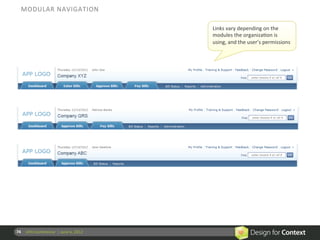
MODULAR	
  NAVIGATION	
  

                                                              Links	
  vary	
  depending	
  on	
  the	
  
                                                              modules	
  the	
  organizaRon	
  is	
  
                                                              using,	
  and	
  the	
  user’s	
  permissions	


74	
   UPA	
  Conference	
  	
  |	
  June	
  6,	
  2012	
  
ROLE-­‐BASED	
  NAVIGATION	


              End	
  user’s	
  navigaRon	
  menus	


                                                                                                 Site	
  administrators	
  get	
  
              If	
  the	
  user	
  also	
  has	
  site	
  administraRon	
  responsibiliRes	
     access	
  to	
  a	
  
                                                                                                 “responsibiliRes”	
  area	


              NavigaRon	
  inside	
  the	
  administrator’s	
  “responsibiliRes”	
  area	
  
                                                                                                 Links	
  vary	
  depending	
  on	
  
                                                                                                 the	
  user’s	
  permissions	


75	
   UPA	
  Conference	
  	
  |	
  June	
  6,	
  2012	
  
NAVIGATION	
  

  Design	
  ConsideraRons	
                                                        OrganizaRon	
  /	
  Client


                         n  Role-­‐based	
  nav	
  can	
  greatly	
  simplify	
  the	
  UI	
  for	
  some	
  
                                  roles.	
  
                         n  Role-­‐based	
  nav	
  is	
  challenging	
  when	
  a	
  user	
  can	
  have	
  
                                  mulRple	
  roles.	
  
                         n  Validate	
  for	
  dependencies	
  between	
  modules/	
  
                                  products/features	
  when	
  turning	
  nav	
  items	
  on-­‐off.	
  
                         n  When	
  renaming	
  navigaRon/menus,	
  keep	
  help	
  text	
  
                                  and	
  manuals	
  in	
  synch	
  with	
  the	
  UI.	
  	
  
                                  CauRon:	
  This	
  also	
  creates	
  headaches	
  for	
  help	
  desk.	
  
                         n  LocalizaRon	
  of	
  menus	
  is	
  common.	
  
76	
   UPA	
  Conference	
  	
  |	
  June	
  6,	
  2012	


End	
  User
                                                                               	
         OrganizaRon	
  /	
  Client


  Appearance	


  Layouts	


  Info	
  displays	


  NavigaRon	
  

                                                              Custom	
  keystrokes,	
  
  InteracRons	
  
                                                               autocorrect,	
  prefs


  Permissions	
  

77	
   UPA	
  Conference	
  	
  |	
  June	
  6,	
  2012	
  
InteracRons	
                                                                                           End	
  User


                                                                                   n  Defining	
  quick	
  access
                                                                                                                	
  
                                                                                     to	
  common	
  acRons	
  	
  
                                                                                   n  Personalized	
  
   Custom	
  keystrokes	
                                     Auto-­‐correct	
       dicRonaries	
  and	
  type	
  
                                                                                     ahead	
  suggesRons	
  
                                                                                   n  Seqng	
  preferences	
  
                                                                                     for	
  how	
  users	
  work	
  
                                                                                     with	
  their	
  own	
  
                                                                                     systems	
  
   Preferences	
                                              NoRficaRons	
  
                                                                                   n  NoRficaRon	
  and	
  
                                                                                     alerts	
  opRons	
  
78	
   UPA	
  Conference	
  	
  |	
  June	
  6,	
  2012	
  
INTERACTIONS	
  –	
  CUSTOM	
  KEYSTROKES	


79	
   UPA	
  Conference	
  	
  |	
  June	
  6,	
  2012	
  
INTERACTIONS	
  –	
  NOTIFICATIONS	


80	
   UPA	
  Conference	
  	
  |	
  June	
  6,	
  2012	
  
INTERACTIONS	
  –	
  NOTIFICATIONS	


81	
   UPA	
  Conference	
  	
  |	
  June	
  6,	
  2012	
  
INTERACTIONS	
  –	
  PREFERENCES	


82	
   UPA	
  Conference	
  	
  |	
  June	
  6,	
  2012	
  
INTERACTIONS	
  –	
  AUTOCORRECT	


83	
   UPA	
  Conference	
  	
  |	
  June	
  6,	
  2012	
  
INTERACTIONS	
  

  Design	
  ConsideraRons	
                                                                                          End	
  User


                         n  Generally	
  these	
  are	
  complex	
  opRons	
  for	
  power	
  
                                  users.	
  	
  
                                  Make	
  sure	
  the	
  out	
  of	
  the	
  box	
  solu@on	
  works	
  for	
  the	
  
                                  majority	
  of	
  users.	
  

                         n  PersonalizaRon	
  allows	
  for	
  a	
  custom	
  feel	
  without	
  
                                  user	
  effort,	
  but	
  ensures	
  that	
  people	
  aren’t	
  stuck	
  
                                  with	
  what	
  the	
  system	
  remembers	
  about	
  them	
  
                         n  Email	
  noRficaRon	
  and	
  system	
  alerts	
  can	
  be	
  
                                  distracRng	
  and	
  irritaRng.	
  
                                  Let	
  user	
  iden@fy	
  when,	
  if	
  and	
  how	
  these	
  occur	


84	
   UPA	
  Conference	
  	
  |	
  June	
  6,	
  2012	
  
End	
  User
                                                                        	
      OrganizaRon	
  /	
  Client


  Appearance	


  Layouts	


  Info	
  displays	


  NavigaRon	
  

                                                                               NoRficaRons,	
  rouRng,	
  
  InteracRons	
  
                                                                               client-­‐defined	
  biz	
  rules


  Permissions	
  

85	
   UPA	
  Conference	
  	
  |	
  June	
  6,	
  2012	
  
InteracRons	
                                                                    OrganizaRon	
  /	
  Client


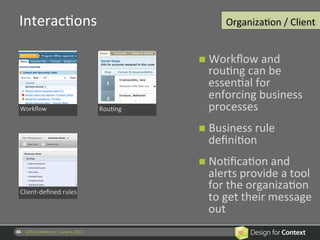
                                                                           n  Workflow	
  and	
  
                                                                             rouRng	
  can	
  be	
  
                                                                             essenRal	
  for	
  
                                                                             enforcing	
  business	
  
   Workflow	
                                                  RouRng	
       processes	
  
                                                                           n  Business	
  rule	
  
                                                                             definiRon	
  	
  
                                                                           n  NoRficaRon	
  and	
  
                                                                             alerts	
  provide	
  a	
  tool	
  
   Client-­‐defined	
  rules	
  
                                                                             for	
  the	
  organizaRon	
  
                                                                             to	
  get	
  their	
  message	
  
                                                                             out	
  
86	
   UPA	
  Conference	
  	
  |	
  June	
  6,	
  2012	
  
INTERACTIONS	
  –	
  WORKFLOW	


My	
  to	
  dos	
  and	
  
suggested	
  
next	
  acRon	
  
are	
  based	
  on	
  
workflow	
  rules       	


  87	
   UPA	
  Conference	
  	
  |	
  June	
  6,	
  2012	
  
INTERACTIONS	
  –	
  ROUTING	


88	
   UPA	
  Conference	
  	
  |	
  June	
  6,	
  2012	
  
INTERACTIONS	
  –	
  RULES	


89	
   UPA	
  Conference	
  	
  |	
  June	
  6,	
  2012	
  
INTERACTIONS	
  

  Design	
  ConsideraRons	
                                                                       OrganizaRon	
  /	
  Client


                         n  Use	
  noRficaRons	
  and	
  alerts	
  sparingly	
  for	
  the	
  
                                  biggest	
  impact	
  
                                  Don’t	
  inunda@ng	
  people	
  with	
  messaging	
  if	
  you	
  want	
  them	
  
                                  to	
  pay	
  aIen@on	
  to	
  the	
  big	
  stuff	
  

                         n  You	
  can	
  eliminate	
  unnecessary	
  decisions	
  and	
  
                                  steps	
  (and	
  reduce	
  errors)	
  by	
  introducing	
  
                                  workflow,	
  rouRng,	
  and	
  business	
  rules.	
  
                         n  Map	
  out	
  the	
  different	
  workflow	
  and	
  rouRng	
  
                                  possibiliRes	
  that	
  could	
  be	
  encountered.	
  
                                  Ensure	
  there	
  are	
  ways	
  to	
  get	
  out	
  of	
  the	
  defined	
  path	
  for	
  
                                  excep@ons	
  scenarios	
  (when	
  appropriate)	


90	
   UPA	
  Conference	
  	
  |	
  June	
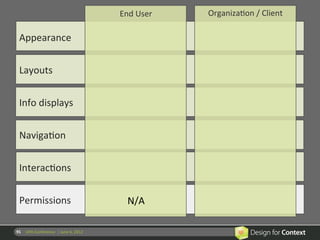
  6,	
  2012	
  
End	
  User
                                                                        	
     OrganizaRon	
  /	
  Client


  Appearance	


  Layouts	


  Info	
  displays	


  NavigaRon	


  InteracRons	


  Permissions	
                                                  N/A	
  

91	
   UPA	
  Conference	
  	
  |	
  June	
  6,	
  2012	
  
End	
  User
                                                                        	
       OrganizaRon	
  /	
  Client


  Appearance	


  Layouts	


  Info	
  displays	


  NavigaRon	


  InteracRons	
  

                                                                               Seqng	
  user	
  permissions	
  
  Permissions	
                                                                         and	
  roles


92	
   UPA	
  Conference	
  	
  |	
  June	
  6,	
  2012	
  
What	
  other	
  examples	
  of	
  configuraRon	
  and	
  
  customizaRon?	


93	
   UPA	
  Conference	
  	
  |	
  June	
  6,	
  2012	
  
Is	
  configuraRon	
  right	
  for	
  your	
  product?	
  

                         n  What	
  value	
  would	
  configuraRon	
  opRons	
  bring	
  to	
  
                                  the	
  product?	
  	
  
                         n  What	
  value	
  to	
  your	
  users?	
  

                         n  How	
  broad	
  is	
  the	
  need	
  across	
  your	
  user	
  base?	
  

                         n  Would	
  this	
  help	
  in	
  sales	
  and	
  markeRng?	
  

                         n  How	
  much	
  would	
  it	
  cost	
  to	
  implement?	
  

                         n  What	
  is	
  the	
  cost	
  of	
  not	
  implemenRng	
  it?	
  	
  
                                  Would	
  not	
  implemenRng	
  result	
  in	
  significant	
  
                                  customizaRon	
  costs?	
  
94	
   UPA	
  Conference	
  	
  |	
  June	
  6,	
  2012	
  
When	
  designing	
  for	
  configuraRon,	
  consider:	
  

                         n  Can	
  users	
  configure	
  themselves	
  into	
  a	
  corner?	
  	
  
                                       •  Make	
  important	
  or	
  necessary	
  informaRon	
  not	
  available	
  

                                       •  Create	
  a	
  clu4ered	
  informaRon	
  environment	
  so	
  that	
  relevant	
  cues	
  
                                          are	
  unseen	
  

                         n  Should	
  you	
  be	
  offering	
  a	
  limited	
  set	
  of	
  structured	
  
                                  opRons	
  or	
  significant	
  flexibility?	
  
                         n  How	
  will	
  users	
  understand	
  and	
  preview	
  the	
  effect	
  
                                  of	
  configuraRon	
  opRons?	


95	
   UPA	
  Conference	
  	
  |	
  June	
  6,	
  2012	
  
How	
  would	
  you	
  decide	
  which	
  features	
  to	
  
  make	
  configurable	
  or	
  customizable?	


96	
   UPA	
  Conference	
  	
  |	
  June	
  6,	
  2012	
  
Thank	
  you!	


LISA	
  BATTLE	
                                LAURA	
  CHESSMAN	
  
lisa@designforcontext.com	
                     laura@designforcontext.com	


                                                               Lisa	
  Ba4le	
  
                                www.designforcontext.com	
  
                                                               Laura	
  Chessman	
  

Designing Configurable and Customizable Applications

  • 1.
    Designing  Configurable  and   Customizable  Applica7ons   UPA  CONFERENCE    |  JUNE  2012     Lisa  Ba4le   www.designforcontext.com   Laura  Chessman  
  • 2.
    Background   Lisa  Ba4le     Laura  Chessman   2   UPA  Conference    |  June  6,  2012  
  • 3.
    CONFIGURATION         CUSTOMIZATION   PERSONALIZATION   3   UPA  Conference    |  June  6,  2012  
  • 4.
    Who  is  configuring  the  applicaRon?         End  User     OrganizaRon/Client       4   UPA  Conference    |  June  6,  2012  
  • 5.
    End  User   OrganizaRon  /  Client   Appearance   Layouts   Info  displays   NavigaRon   InteracRons   Permissions   5   UPA  Conference    |  June  6,  2012  
  • 6.
    What  other  categories  are  there?   6   UPA  Conference    |  June  6,  2012  
  • 7.
    End  User   OrganizaRon  /  Client   Appearance   Color  themes   Fonts/sizes   Layouts   Info  displays   NavigaRon   InteracRons   Permissions   7   UPA  Conference    |  June  6,  2012  
  • 8.
    Appearance   End  User   n  User  preferences     for  colors  and  fonts   are  common   Color  theme   Color  theme   n  Makes  a  product   “feel”  more  usable   n  Accessibility   requirement  for  font   size,  high  contrast   8   UPA  Conference    |  June  6,  2012  
  • 9.
    COLOR  THEME   9   UPA  Conference    |  June  6,  2012  
  • 10.
    COLOR  THEME   10   UPA  Conference    |  June  6,  2012  
  • 11.
    COLOR  THEME   11   UPA  Conference    |  June  6,  2012  
  • 12.
    APPEARANCE   Design  ConsideraRons   End  User   n  When  users  can  choose  whether  to  use  a  product,   color  themes  are  a  good  way  to  make  it  personal.     If  it  is  super  easy  to  do.   n  Allow  users  to  control  the  font  size  of  text  content.     Important  for  readability  and  accessibility.   n  Decide  which  UI  elements  should  be  changeable.     Some  (e.g.  icons,  color  symbols,  controls)  usually  should  not.   n  Prevent  disastrous  combinaRons.     Ensure  changes  don’t  interfere  with  icons  or  color  symbols.     n  Provide  a  “Reset”  opRon.     12   UPA  Conference    |  June  6,  2012  
  • 13.
    End  User   OrganizaRon  /  Client   Appearance   CondiRonal  branding   White  labeling   Layouts   Info  displays   NavigaRon   InteracRons   Permissions   13   UPA  Conference    |  June  6,  2012  
  • 14.
    Appearance   OrganizaRon  /  Client   n  CondiRonal  branding   (changes  based  on   data,  user  a4ributes,   domain,  etc.)   CondiRonal  branding   White  labeling   n  So`ware  as  a  service   is  o`en  re-­‐branded   with  the  client’s   brand   14   UPA  Conference    |  June  6,  2012  
  • 15.
    CONDITIONAL  BRANDING   15   UPA  Conference    |  June  6,  2012  
  • 16.
    CONDITIONAL  BRANDING   16   UPA  Conference    |  June  6,  2012  
  • 17.
    WHITE  LABELING   17   UPA  Conference    |  June  6,  2012  
  • 18.
    APPEARANCE   Design  ConsideraRons   OrganizaRon  /  Client   n  Provide  a  (limited)  range  of  standard  skins  that   accommodate  most  needs.     Customiza@on  beyond  that  is  charged  to  the  client.   n  For  standard  skins,  make  them  all  equally  good,   and  test  with  all  of  them.   n  Layout  changes  can  lead  to  unpredictable   results!       18   UPA  Conference    |  June  6,  2012  
  • 19.
    End  User   OrganizaRon  /  Client   Appearance   Layouts   Screens,  portlets,   resizing,  defaults   Info  displays   NavigaRon   InteracRons   Permissions   19   UPA  Conference    |  June  6,  2012  
  • 20.
    Layouts   End  User   n  Make  changes  to   accommodate   different  work  styles   One  Rme  setup   Flexible  changes   n  One  Rme  setup   n  On  the  fly  changes     n  SupporRng  different   devices  and  work   setups     MulRple  monitors   MulRple  monitors   20   UPA  Conference    |  June  6,  2012  
  • 21.
    LAYOUT  SETUP   21   UPA  Conference    |  June  6,  2012  
  • 22.
    LAYOUT  SETUP   22   UPA  Conference    |  June  6,  2012  
  • 23.
    23   UPA  Conference    |  June  6,  2012  
  • 24.
    LAYOUT  SETUP   24   UPA  Conference    |  June  6,  2012  
  • 25.
    LAYOUT  ON-­‐THE-­‐FLY  CHANGES   25   UPA  Conference    |  June  6,  2012  
  • 26.
    LAYOUT  ON-­‐THE-­‐FLY  CHANGES   26   UPA  Conference    |  June  6,  2012  
  • 27.
    LAYOUT  ON-­‐THE-­‐FLY  CHANGES   27   UPA  Conference    |  June  6,  2012  
  • 28.
    LAYOUT  ON-­‐THE-­‐FLY  CHANGES   28   UPA  Conference    |  June  6,  2012  
  • 29.
    MULTIPLE  MONITORS   Monitor  1   Monitor  2   29   UPA  Conference    |  June  6,  2012  
  • 30.
    MULTIPLE  MONITORS   30   UPA  Conference    |  June  6,  2012  
  • 31.
    LAYOUTS   Design  ConsideraRons   End  User   n  Infrequent  users  won’t  bother.  Best  used  for:   •  Frequent  users   •  Dense  informaRon  displays   •  Different  tasks/quesRons  requiring  different  informaRon   •  Highly  individual  differences  in  work  pracRce   n  Remember  the  way  the  user  le`  it  (within  session).   n  Design  alternaRve  views  for  different  display  sizes.   n  Graceful  degradaRon  when  things  don’t  fit.   n  Easy  to  revert  to  their  saved  or  standard  layout.   n  Make  it  difficult  for  users  to  “lose”  informaRon,   gadgets,  or  funcRonality   31   UPA  Conference    |  June  6,  2012    
  • 32.
    End  User   OrganizaRon  /  Client   Appearance   Device-­‐based  and  role-­‐ Layouts   based  variaRons   Info  displays   NavigaRon   InteracRons   Permissions   32   UPA  Conference    |  June  6,  2012  
  • 33.
    Layouts   OrganizaRon  /  Client   n  Device  appropriate     n  OpRmizing  to  meet   performance  goals   Context-­‐driven   Flexible  layouts   for  a  specific  task   Block  management   33   UPA  Conference    |  June  6,  2012  
  • 34.
    DEVICE-­‐APPROPRIATE  LAYOUT   Desktop  widget     for  quick  Rme  entry   Web-­‐based  app  includes  reporRng  features   Mobile  app  for  Rme   tracking  on  the  go   Widgets  embedded  inside  3rd  party  web  apps   34   UPA  Conference    |  June  6,  2012  
  • 35.
    LAYOUT  OPTIONS   35   UPA  Conference    |  June  6,  2012  
  • 36.
    36   UPA  Conference    |  June  6,  2012  
  • 37.
    LAYOUT  OPTIONS   37   UPA  Conference    |  June  6,  2012  
  • 38.
    LAYOUT  OPTIONS   38   UPA  Conference    |  June  6,  2012  
  • 39.
    LAYOUT  OPTIONS   39   UPA  Conference    |  June  6,  2012  
  • 40.
    LAYOUT   Design  ConsideraRons   OrganizaRon  /  Client   n  Giving  structured  opRons  will  encourage   selecRon  of  user  friendly  layouts   This  requires  more  knowledge  of  users  and  their  tasks   n  Giving  more  flexible  opRons  provides   organizaRons  with  greater  freedom  but  bigger   risks       40   UPA  Conference    |  June  6,  2012  
  • 41.
    End  User   OrganizaRon  /  Client   Appearance   Layouts   Info  displays   Tables,  filters,  user-­‐ defined  fields   NavigaRon   InteracRons   Permissions   41   UPA  Conference    |  June  6,  2012  
  • 42.
    InformaRon  Displays   End  User   n  Add/remove   columns  from  tables   n  Filter  or  sort  to  focus   Tables   Filters   on  a  subset  of  data   n  Change  display   formats   n  Add  fields   Advanced  sorRng   42   UPA  Conference    |  June  6,  2012  
  • 43.
    INFORMATION  DISPLAYS  -­‐  TABLES   43   UPA  Conference    |  June  6,  2012  
  • 44.
    INFORMATION  DISPLAYS  -­‐  TABLES   44   UPA  Conference    |  June  6,  2012  
  • 45.
    INFORMATION  DISPLAYS  -­‐  FILTERS   Find  and  select   types  of  data  to   display  in  the   interface  and  to   receive  as  reports   via  email.   45   UPA  Conference    |  June  6,  2012  
  • 46.
    INFORMATION  DISPLAYS  -­‐  FILTERS   Supervisor  can  choose   which  machines(s)  to   focus  on.  Data  and   alerts  related  to  other   machines  are  hidden   from  view.  Supports   scenarios  where   supervisors  frequently   need  to  shi`  their   responsibiliRes  to   different  machines.   46   UPA  Conference    |  June  6,  2012  
  • 47.
    INFORMATION  DISPLAYS  -­‐  FILTERS   Users  can  save   filter  sets  that  can   be  used  in  a   variety  of  reports   When  user  has   relevant  filter  sets  that   can  be  applied  to  a   parRcular  report  view,   the  sets  are  available   for  selecRon   47   UPA  Conference    |  June  6,  2012  
  • 48.
    INFORMATION  DISPLAYS  -­‐  FILTERS   Within  a  user’s  session,   filters  and  sorRng  is   remembered  for    lists.   48   UPA  Conference    |  June  6,  2012  
  • 49.
    INFORMATION  DISPLAYS  –  ADVANCED  SORTING   49   UPA  Conference    |  June  6,  2012  
  • 50.
    INFO  DISPLAYS   Design  ConsideraRons   End  User   n  Provide  sensible  defaults  to  address  majority  needs.   n  Allow  users  to  add/remove/filter/change  when:   •  There  are  large  volumes  of  informaRon  but  some  users  only  need  a   subset.   •  Individuals  have  strongly  held  conflicRng  preferences     (e.g.  date/Rme  formats  wanRng  to  see  informaRon  in  a  glass  as   “half  full”  and  some  as  “half  empty.”).     n  Prevent  removal  of  criRcal  informaRon.   n  Unlimited  flexibility  leads  to  unreadable  displays.   n  Too  many  opRons  can  be  overwhelming.       50   UPA  Conference    |  June  6,  2012  
  • 51.
    End  User   OrganizaRon  /  Client   Appearance   Layouts   Client-­‐defined  fields,  data-­‐ Info  displays   and  context-­‐driven  displays   NavigaRon   InteracRons   Permissions   51   UPA  Conference    |  June  6,  2012  
  • 52.
    InformaRon  Displays   OrganizaRon  /  Client   n  Data  opRons  that   are  appropriate  for   that  organizaRon   Client-­‐defined  fields   Client-­‐defined  fields   n  Reduce  and  simplify   by  showing  context   appropriate  opRons   n  Put  most  frequent   opRons  for  specific   user  tasks  up  front   Client-­‐defined  labels   Role-­‐based  displays   52   UPA  Conference    |  June  6,  2012  
  • 53.
    CLIENT-­‐DEFINED  FIELDS   A`er  o with   Screen  rganizaRon   adds  custom  fields   generic,  out-­‐of-­‐ to  the  d fields   the-­‐box  isplay   53   UPA  Conference    |  June  6,  2012  
  • 54.
    CLIENT-­‐DEFINED  FIELDS   54   UPA  Conference    |  June  6,  2012  
  • 55.
    CLIENT-­‐DEFINED  LABELS   55   UPA  Conference    |  June  6,  2012  
  • 56.
    CLIENT-­‐DEFINED  LABELS   56   UPA  Conference    |  June  6,  2012  
  • 57.
    ROLE-­‐BASED  DISPLAYS   End  user’s  view  v f  a   Administrator’s  oiew  of   content  item   the  same  content  item   57   UPA  Conference    |  June  6,  2012  
  • 58.
    ROLE-­‐BASED  DISPLAYS   58   UPA  Conference    |  June  6,  2012  
  • 59.
    SEARCH   59  UPA  Conference    |  June  6,  2012  
  • 60.
    SEARCH   60  UPA  Conference    |  June  6,  2012  
  • 61.
    SEARCH   61  UPA  Conference    |  June  6,  2012  
  • 62.
    INFO  DISPLAYS   Design  ConsideraRons   OrganizaRon  /  Client   n  Provide  templates  (e.g.  industry-­‐specific  defaults)   to  reduce  the  amount  of  rework  for  each  client.   n  Support  the  person  doing  the  configuraRon.   •  Provide  training,  instrucRons,  wizards…     •  ValidaRon   •  Enforce  minimum/max  sizes   •  Enforce  spacing  and  alignment  between  items   n  Beware  of  logical  dependencies  on  data  that   might  not  be  available.     62   UPA  Conference    |  June  6,  2012  
  • 63.
    INFO  DISPLAYS   Design  ConsideraRons   OrganizaRon  /  Client   n  Client-­‐defined  fields:   •  Consider  what  opRons  to  provide  for  placement,  groupings,     •  For  each  field,  collect  tab  order,  required/opRonal,  validaRon   rules   •  Allow  clients  to  define  new  data/field  types?   n  Role-­‐based  views:     •  Do  really  thorough  analysis.  Avoid  removing  access  to  info  that   people  might  need  for  their  jobs.   •  Ensure  that  users  with  mulRple  roles  within  the  system  have   appropriate  access     63   UPA  Conference    |  June  6,  2012  
  • 64.
    End  User   OrganizaRon  /  Client   Appearance   Layouts   Info  displays   NavigaRon   Recent,  frequent,     user-­‐defined  categories   InteracRons   Permissions   64   UPA  Conference    |  June  6,  2012  
  • 65.
    NavigaRon   End  User   n  Personalized  lists  of   recently  used  items   n  Users  choosing  to   Recently  used   Frequently  used   configure  their  own   menus   n  Saving  users  search   criteria   n  User  defined   categories   Saved  searches   User  categories   65   UPA  Conference    |  June  6,  2012  
  • 66.
    NAVIGATION  -­‐    RECENTLY  USED   66   UPA  Conference    |  June  6,  2012  
  • 67.
    NAVIGATION  -­‐    FREQUENTLY  USED   67   UPA  Conference    |  June  6,  2012  
  • 68.
    NAVIGATION  -­‐    SAVED  SEARCHES   68   UPA  Conference    |  June  6,  2012  
  • 69.
    NAVIGATION  –  USER  CREATED  CONTENT   69   UPA  Conference    |  June  6,  2012  
  • 70.
    NAVIGATION  –  USER  CREATED  CONTENT   70   UPA  Conference    |  June  6,  2012  
  • 71.
    NAVIGATION   Design  ConsideraRons   End  User   n  CauRon:  User-­‐configured  navigaRon  is   someRmes  a  band-­‐aid  for  bad  design.   n  AdapRve  menus  get  mixed  reviews.   n  Users  don’t  want  to  save  a  search  unRl  they   know  it  gets  the  results  they  need.   n  Users  expect  to  define  categories  for  their  own   content.       71   UPA  Conference    |  June  6,  2012  
  • 72.
    End  User   OrganizaRon  /  Client   Appearance   Layouts   Info  displays   Modular,  context-­‐driven     NavigaRon   &  role-­‐based  navigaRon   InteracRons   Permissions   72   UPA  Conference    |  June  6,  2012  
  • 73.
    NavigaRon   OrganizaRon  /  Client   n  An  organizaRon  or   client  o`en  needs  its   own  terminology   and  business  rules   Modular   Role-­‐based   reflected  in  the   navigaRon   n  OrganizaRons,   clients  or  roles  may   be  given  access  to   some  modules  but   not  all   73   UPA  Conference    |  June  6,  2012  
  • 74.
    MODULAR  NAVIGATION   Links  vary  depending  on  the   modules  the  organizaRon  is   using,  and  the  user’s  permissions   74   UPA  Conference    |  June  6,  2012  
  • 75.
    ROLE-­‐BASED  NAVIGATION   End  user’s  navigaRon  menus   Site  administrators  get   If  the  user  also  has  site  administraRon  responsibiliRes   access  to  a   “responsibiliRes”  area   NavigaRon  inside  the  administrator’s  “responsibiliRes”  area   Links  vary  depending  on   the  user’s  permissions   75   UPA  Conference    |  June  6,  2012  
  • 76.
    NAVIGATION   Design  ConsideraRons   OrganizaRon  /  Client   n  Role-­‐based  nav  can  greatly  simplify  the  UI  for  some   roles.   n  Role-­‐based  nav  is  challenging  when  a  user  can  have   mulRple  roles.   n  Validate  for  dependencies  between  modules/   products/features  when  turning  nav  items  on-­‐off.   n  When  renaming  navigaRon/menus,  keep  help  text   and  manuals  in  synch  with  the  UI.     CauRon:  This  also  creates  headaches  for  help  desk.   n  LocalizaRon  of  menus  is  common.   76   UPA  Conference    |  June  6,  2012    
  • 77.
    End  User   OrganizaRon  /  Client   Appearance   Layouts   Info  displays   NavigaRon   Custom  keystrokes,   InteracRons   autocorrect,  prefs   Permissions   77   UPA  Conference    |  June  6,  2012  
  • 78.
    InteracRons   End  User   n  Defining  quick  access   to  common  acRons     n  Personalized   Custom  keystrokes   Auto-­‐correct   dicRonaries  and  type   ahead  suggesRons   n  Seqng  preferences   for  how  users  work   with  their  own   systems   Preferences   NoRficaRons   n  NoRficaRon  and   alerts  opRons   78   UPA  Conference    |  June  6,  2012  
  • 79.
    INTERACTIONS  –  CUSTOM  KEYSTROKES   79   UPA  Conference    |  June  6,  2012  
  • 80.
    INTERACTIONS  –  NOTIFICATIONS   80   UPA  Conference    |  June  6,  2012  
  • 81.
    INTERACTIONS  –  NOTIFICATIONS   81   UPA  Conference    |  June  6,  2012  
  • 82.
    INTERACTIONS  –  PREFERENCES   82   UPA  Conference    |  June  6,  2012  
  • 83.
    INTERACTIONS  –  AUTOCORRECT   83   UPA  Conference    |  June  6,  2012  
  • 84.
    INTERACTIONS   Design  ConsideraRons   End  User   n  Generally  these  are  complex  opRons  for  power   users.     Make  sure  the  out  of  the  box  solu@on  works  for  the   majority  of  users.   n  PersonalizaRon  allows  for  a  custom  feel  without   user  effort,  but  ensures  that  people  aren’t  stuck   with  what  the  system  remembers  about  them   n  Email  noRficaRon  and  system  alerts  can  be   distracRng  and  irritaRng.   Let  user  iden@fy  when,  if  and  how  these  occur       84   UPA  Conference    |  June  6,  2012  
  • 85.
    End  User   OrganizaRon  /  Client   Appearance   Layouts   Info  displays   NavigaRon   NoRficaRons,  rouRng,   InteracRons   client-­‐defined  biz  rules   Permissions   85   UPA  Conference    |  June  6,  2012  
  • 86.
    InteracRons   OrganizaRon  /  Client   n  Workflow  and   rouRng  can  be   essenRal  for   enforcing  business   Workflow   RouRng   processes   n  Business  rule   definiRon     n  NoRficaRon  and   alerts  provide  a  tool   Client-­‐defined  rules   for  the  organizaRon   to  get  their  message   out   86   UPA  Conference    |  June  6,  2012  
  • 87.
    INTERACTIONS  –  WORKFLOW   My  to  dos  and   suggested   next  acRon   are  based  on   workflow  rules   87   UPA  Conference    |  June  6,  2012  
  • 88.
    INTERACTIONS  –  ROUTING   88   UPA  Conference    |  June  6,  2012  
  • 89.
    INTERACTIONS  –  RULES   89   UPA  Conference    |  June  6,  2012  
  • 90.
    INTERACTIONS   Design  ConsideraRons   OrganizaRon  /  Client   n  Use  noRficaRons  and  alerts  sparingly  for  the   biggest  impact   Don’t  inunda@ng  people  with  messaging  if  you  want  them   to  pay  aIen@on  to  the  big  stuff   n  You  can  eliminate  unnecessary  decisions  and   steps  (and  reduce  errors)  by  introducing   workflow,  rouRng,  and  business  rules.   n  Map  out  the  different  workflow  and  rouRng   possibiliRes  that  could  be  encountered.   Ensure  there  are  ways  to  get  out  of  the  defined  path  for   excep@ons  scenarios  (when  appropriate)     90   UPA  Conference    |  June  6,  2012  
  • 91.
    End  User   OrganizaRon  /  Client   Appearance   Layouts   Info  displays   NavigaRon   InteracRons   Permissions   N/A   91   UPA  Conference    |  June  6,  2012  
  • 92.
    End  User   OrganizaRon  /  Client   Appearance   Layouts   Info  displays   NavigaRon   InteracRons   Seqng  user  permissions   Permissions   and  roles   92   UPA  Conference    |  June  6,  2012  
  • 93.
    What  other  examples  of  configuraRon  and   customizaRon?   93   UPA  Conference    |  June  6,  2012  
  • 94.
    Is  configuraRon  right  for  your  product?   n  What  value  would  configuraRon  opRons  bring  to   the  product?     n  What  value  to  your  users?   n  How  broad  is  the  need  across  your  user  base?   n  Would  this  help  in  sales  and  markeRng?   n  How  much  would  it  cost  to  implement?   n  What  is  the  cost  of  not  implemenRng  it?     Would  not  implemenRng  result  in  significant   customizaRon  costs?   94   UPA  Conference    |  June  6,  2012  
  • 95.
    When  designing  for  configuraRon,  consider:   n  Can  users  configure  themselves  into  a  corner?     •  Make  important  or  necessary  informaRon  not  available   •  Create  a  clu4ered  informaRon  environment  so  that  relevant  cues   are  unseen   n  Should  you  be  offering  a  limited  set  of  structured   opRons  or  significant  flexibility?   n  How  will  users  understand  and  preview  the  effect   of  configuraRon  opRons?   95   UPA  Conference    |  June  6,  2012  
  • 96.
    How  would  you  decide  which  features  to   make  configurable  or  customizable?   96   UPA  Conference    |  June  6,  2012  
  • 97.
    Thank  you!   LISA  BATTLE   LAURA  CHESSMAN   lisa@designforcontext.com   laura@designforcontext.com   Lisa  Ba4le   www.designforcontext.com   Laura  Chessman