A Guide for CSULB Graduate
Degree Candidates
Role of the Thesis and Dissertation Office
We’re here to help you prepare
your manuscript according to
the University Guidelines Manual
and the formatting style guide
approved by your department.
Please call or email us whenever
you have questions or problems
regarding your manuscript.
Electronic Submission—Fast and Easy
Students submit their manuscripts
via a website set up by ProQuest, the
database company that has
maintained electronic theses and
dissertations for CSULB since 2008.
 You can submit documents and
revisions any time from anywhere
 You save time and money since no
printing of documents is needed
Submission Process—Get Ready!
Have your signature page fully
signed with all signatures
AND
Have your manuscript formatted
to the best of your ability and
complete in one PDF file
Submission Process—On Your Mark!
Deliver your signature
page to the Thesis Office
by 5 p.m. of deadline date
AND
The Thesis Office will
email you the Internet
address to use to upload
your PDF manuscript
Submission Process—Get Set!
BEFORE you go online to
create your online account:
 Have the text of your
abstract, supplementary
files (such as music or other
large data files), and the
names of your thesis
committee members
AND
 Check the wording of your
manuscript title and your
name as it appears on your
title page—match the title
and your name in your
online account exactly as
they appear in your PDF
Submission Process—Go!
You must upload your PDF
within a week of the date
that the email is sent
AND
A fee of $95 is required
for Open Access
Publishing at the time of
upload
AND
Make a note of your User
Name and Password so
you can access the PDFs
with revisions
Revision Process—First Evaluation
 Formatters read through PDFs on
a first-come, first-served basis
as they are uploaded.
 Corrections are added to the
PDF.
 The student is emailed when
read-through is done.
 The annotated PDF can be
downloaded from the ProQuest
website
Revision Process—First Corrections
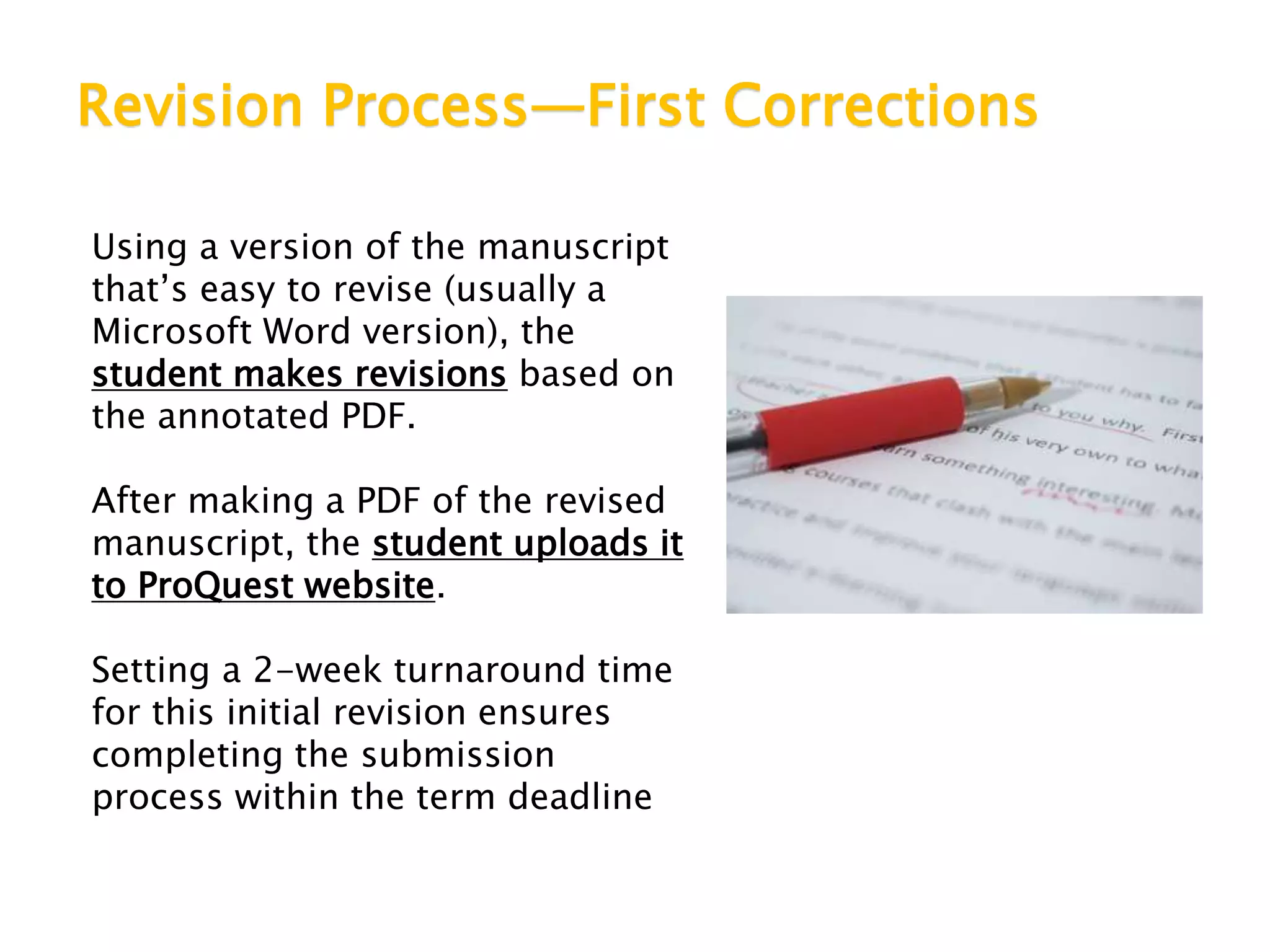
Using a version of the manuscript
that’s easy to revise (usually a
Microsoft Word version), the
student makes revisions based on
the annotated PDF.
After making a PDF of the revised
manuscript, the student uploads it
to ProQuest website.
Setting a 2-week turnaround time
for this initial revision ensures
completing the submission
process within the term deadline
Revision Process—Second Corrections
Formatters read through revised
PDF and contact the student within
a week. Here are the possibilities:
 Second correction—Another PDF
is uploaded with notes about
corrections needed
 Additional corrections—More
revisions may be asked for to
comply with formatting rules
 Cleared pending—Email is sent
with list of a few (15 or fewer)
corrections still needed
 Cleared—No further corrections
needed
Clearance Letter
 Once the formatting of a student’s PDF
manuscript is cleared, meaning there are
no more corrections needed, the Thesis
Office releases the PDF for publication on
the ProQuest database.
 The student will receive a clearance letter
email from the Thesis Office to confirm
that the submission process is complete.
• A copy of the email is also sent to the student’s
committee chair, the department graduate
advisor and Enrollment Services.
University Guidelines Versus
Departmental Style Manuals
The formatting rules in the
CSULB University Guidelines
Manual ALWAYS take precedence
over the style guide (APA, MLA,
Chicago, etc.) or other citation
format styles (IEEE, GSA, etc.)
required by your department
Thesis Office Web Pages
 University Guidelines Manual
 Mini-Manuscript (samples of formatting for all pages of document)
 Templates for signature page, title page and much more
 PowerPoints about formatting rules
 Go to http://csulb.libguides.com/thesisformat or click through
from University Library home page: http://www.csulb.edu/library
Signature Page NOT in PDF
Create your signature page as
a separate document for the
committee members and
college designee to sign.
Do not include a signature
page as part of the PDF that
you upload to ProQuest
 More information about the signature page is available in the PowerPoint
about University Guidelines Manual rules for front pages
Title Page Comes First
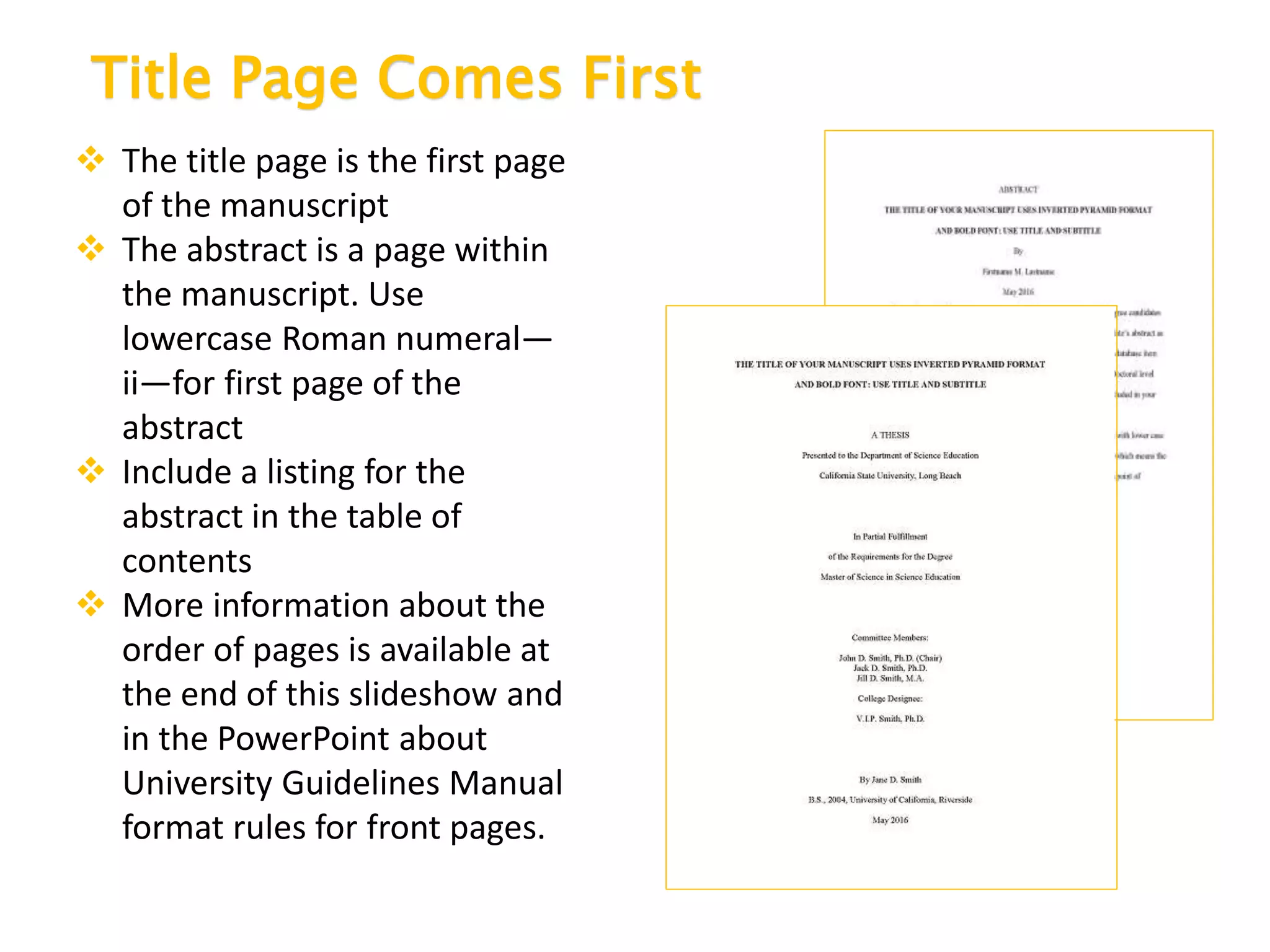
 The title page is the first page
of the manuscript
 The abstract is a page within
the manuscript. Use
lowercase Roman numeral—
ii—for first page of the
abstract
 Include a listing for the
abstract in the table of
contents
 More information about the
order of pages is available at
the end of this slideshow and
in the PowerPoint about
University Guidelines Manual
format rules for front pages.
Streamlined Table of Contents
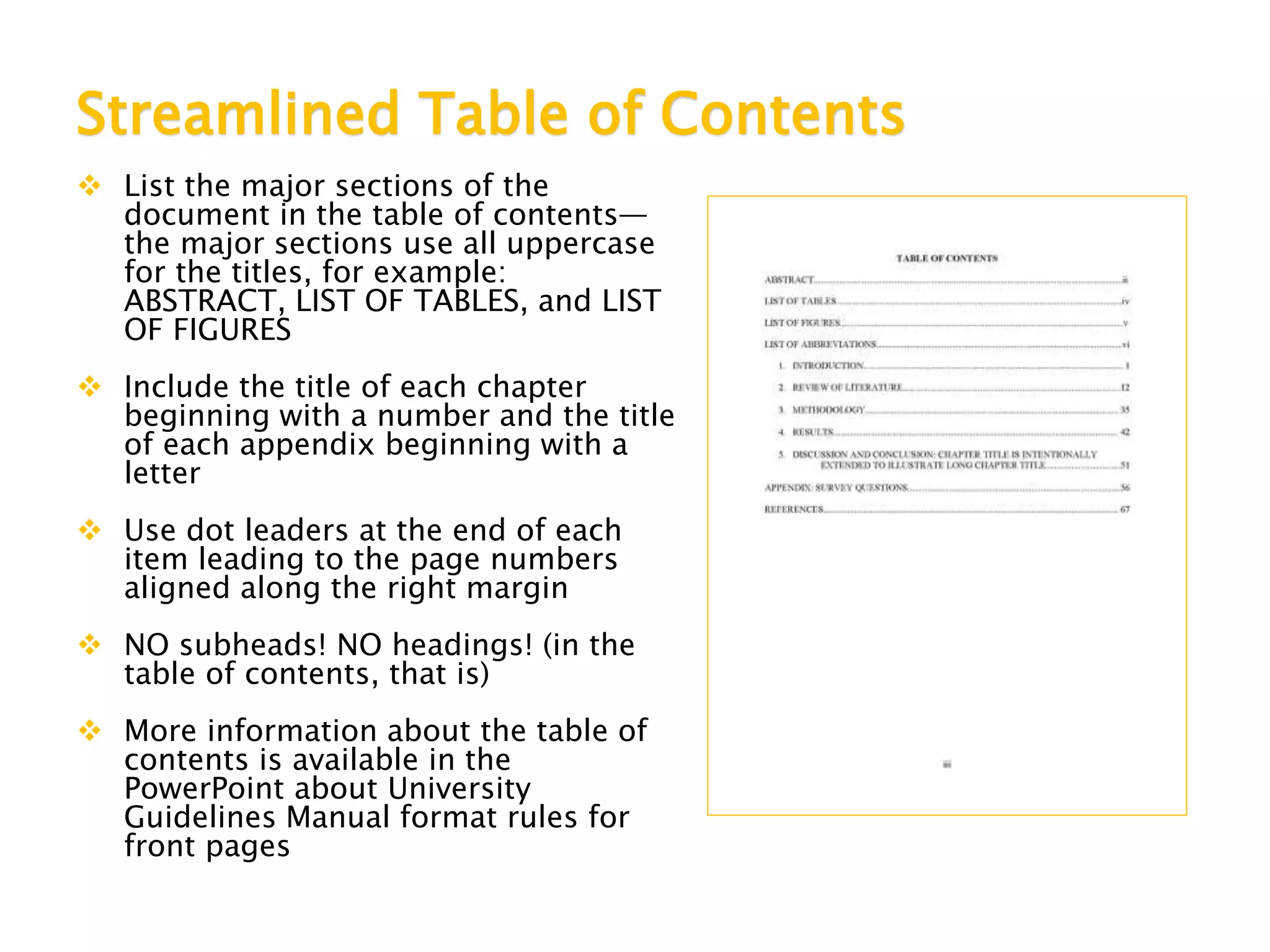
 List the major sections of the
document in the table of contents—
the major sections use all uppercase
for the titles, for example:
ABSTRACT, LIST OF TABLES, and LIST
OF FIGURES
 Include the title of each chapter
beginning with a number and the title
of each appendix beginning with a
letter
 Use dot leaders at the end of each
item leading to the page numbers
aligned along the right margin
 NO subheads! NO headings! (in the
table of contents, that is)
 More information about the table of
contents is available in the
PowerPoint about University
Guidelines Manual format rules for
front pages
Font Requirements
Font Style
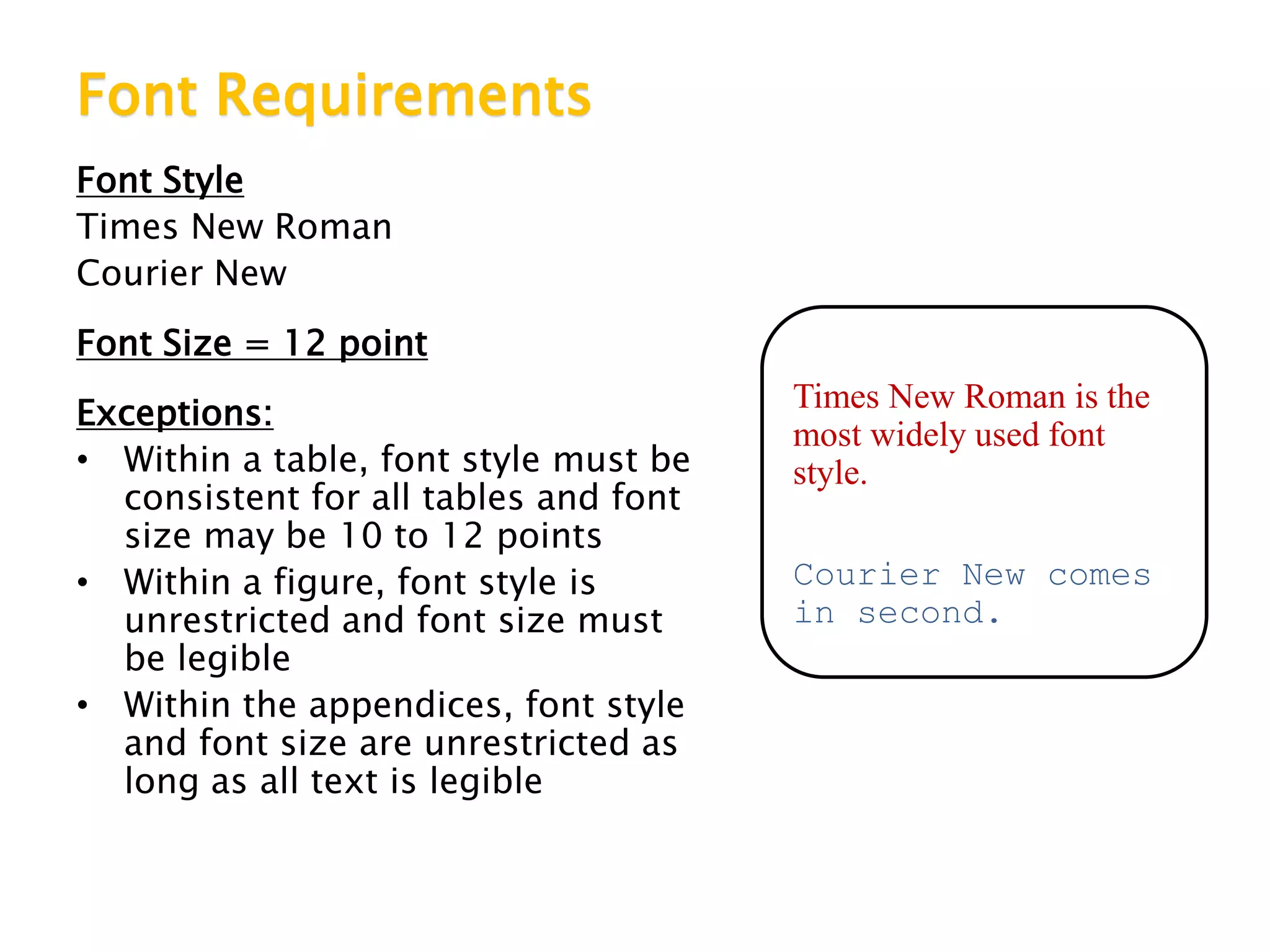
Times New Roman
Courier New
Font Size = 12 point
Exceptions:
• Within a table, font style must be
consistent for all tables and font
size may be 10 to 12 points
• Within a figure, font style is
unrestricted and font size must
be legible
• Within the appendices, font style
and font size are unrestricted as
long as all text is legible
Times New Roman is the
most widely used font
style.
Courier New comes
in second.
Margin Requirements
Use 1 inch for ALL
margins—top, right,
left and bottom.
Titles, Subheads and Captions
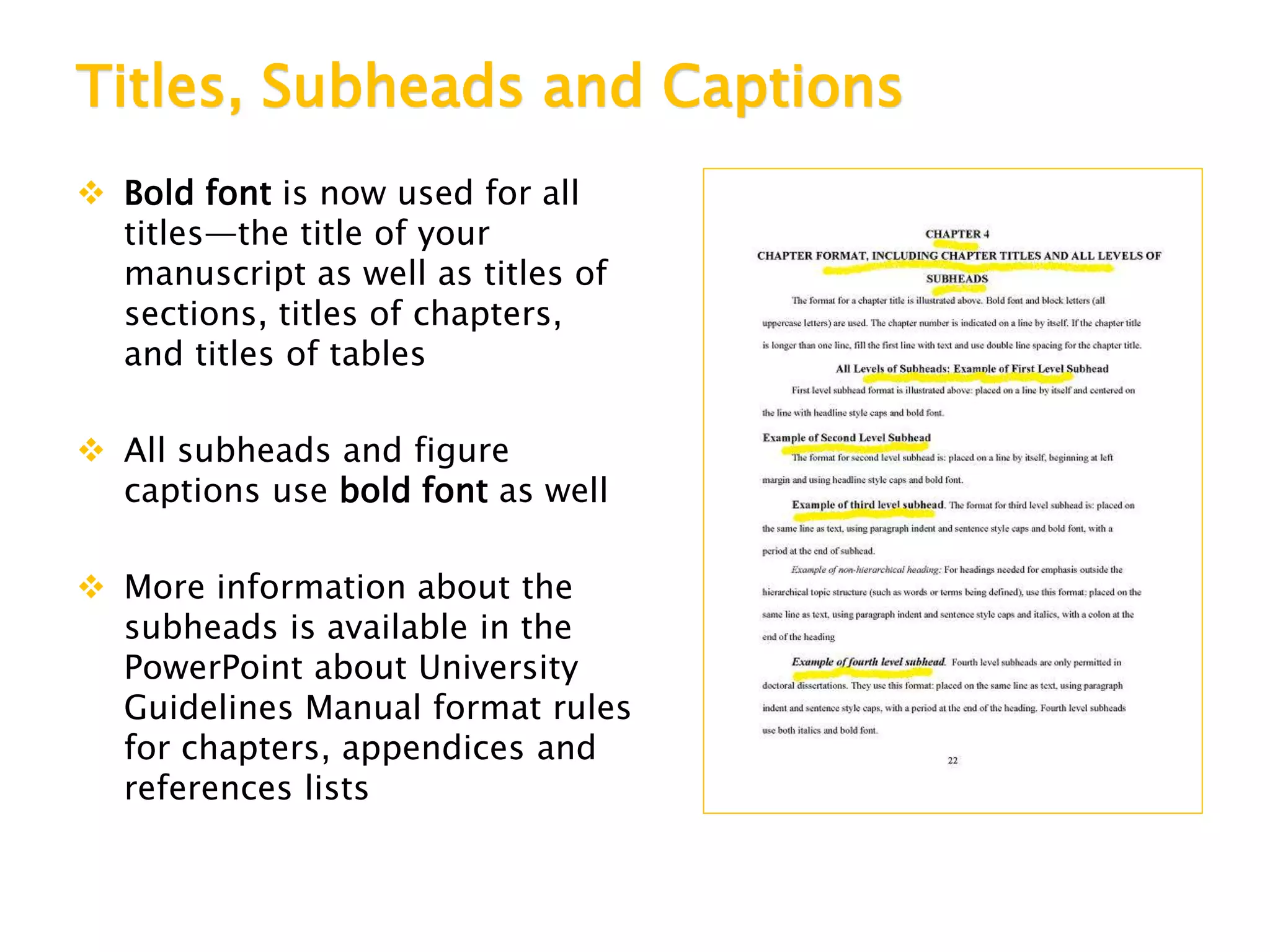
 Bold font is now used for all
titles—the title of your
manuscript as well as titles of
sections, titles of chapters,
and titles of tables
 All subheads and figure
captions use bold font as well
 More information about the
subheads is available in the
PowerPoint about University
Guidelines Manual format rules
for chapters, appendices and
references lists
Paragraph Format Requirements
Text should be formatted as paragraphs
with consistent indentation for the first line
and left justification only.
It is recommended that, if bullet point lists and
numbered items are used in the text, they should be
used sparingly.
If bullet point lists or numbered lists are used, the default
indentation in Microsoft Word should be used; that is, numbered
or bulleted lines are indented one quarter inch and other lines are
indented one half inch so that the bullets or numbers stand out
from other lines.
Uniform Double Line Spacing Requirements
Spacing between lines of
text should be uniform with
no extra blank space
between paragraphs or
before and after titles and
subheads.
For instance, the line
spacing between these
sentences is not uniform.
To create uniform double
line spacing, select text
above and below the gap in
the text.
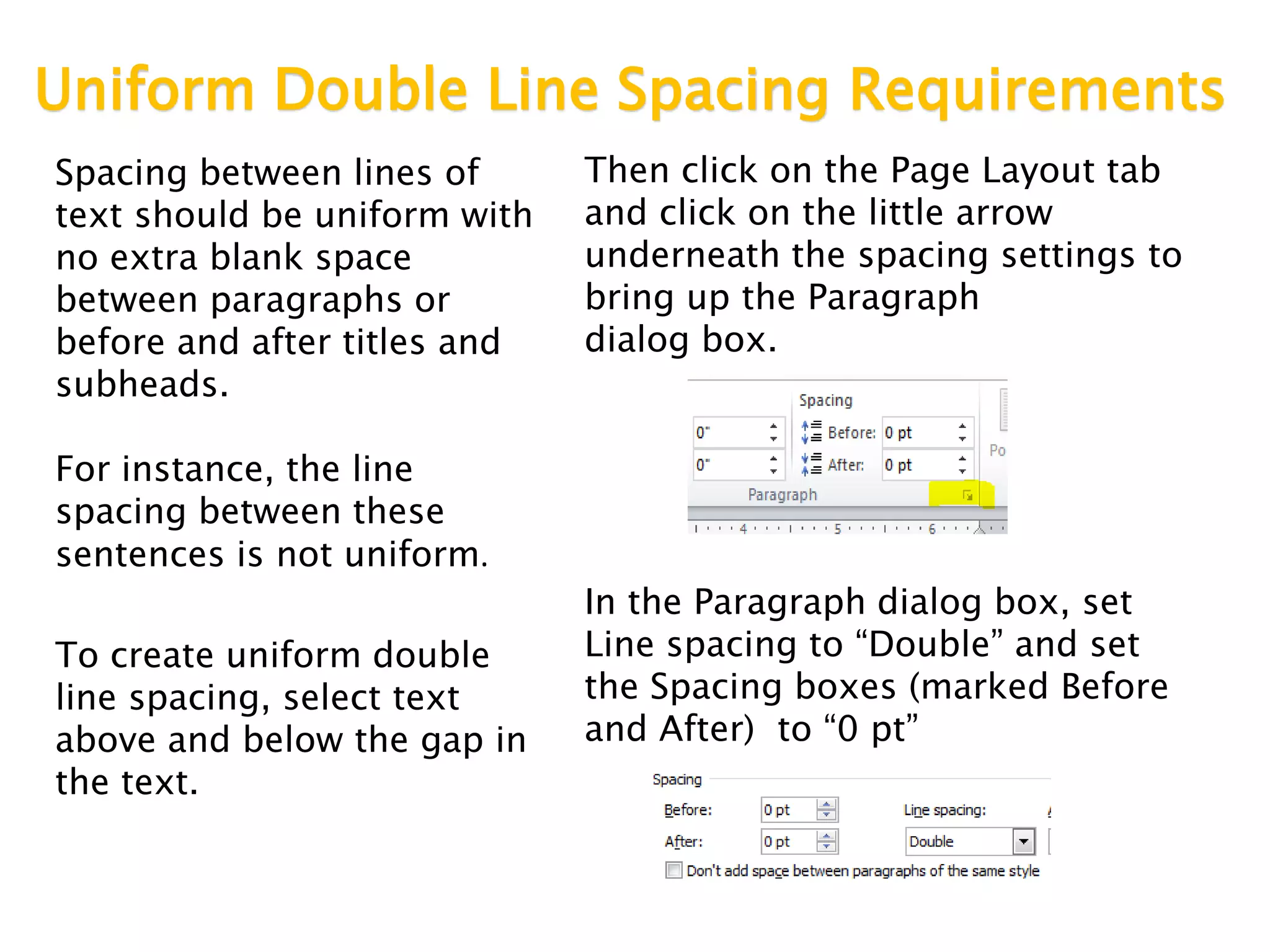
Then click on the Page Layout tab
and click on the little arrow
underneath the spacing settings to
bring up the Paragraph
dialog box.
In the Paragraph dialog box, set
Line spacing to “Double” and set
the Spacing boxes (marked Before
and After) to “0 pt”
Spacing Within Text Requirements
Within the text of the
abstract, acknowledge-
ments and all chapters,
spacing at the end of
sentences and after
colons can be one space
or two spaces. The
spacing used should be
consistent throughout
the text.
Page Number Placement Requirements
Page numbers are centered at
the bottom of the page and
positioned between .75 inch
and 1 inch from bottom of
page
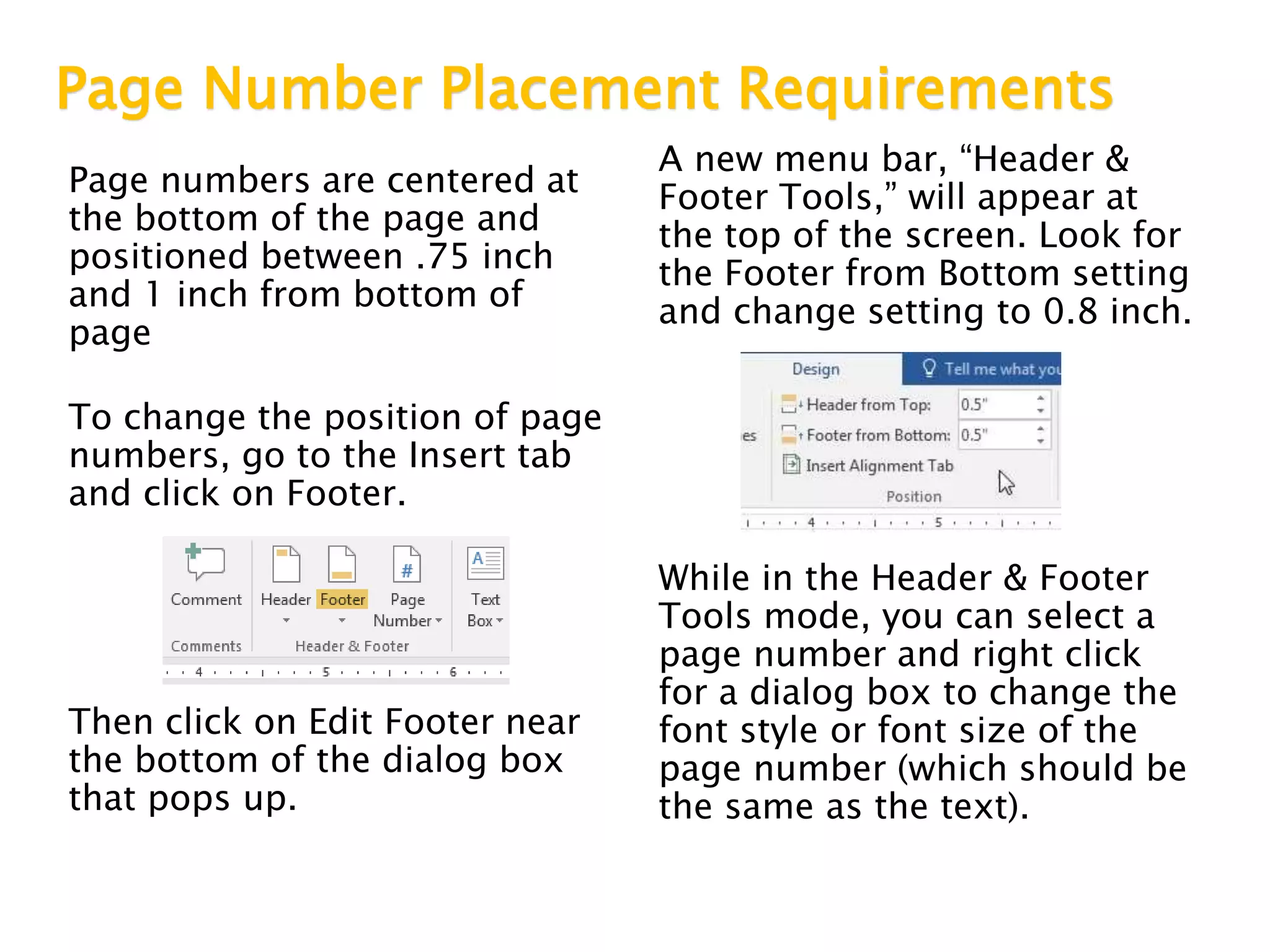
To change the position of page
numbers, go to the Insert tab
and click on Footer.
Then click on Edit Footer near
the bottom of the dialog box
that pops up.
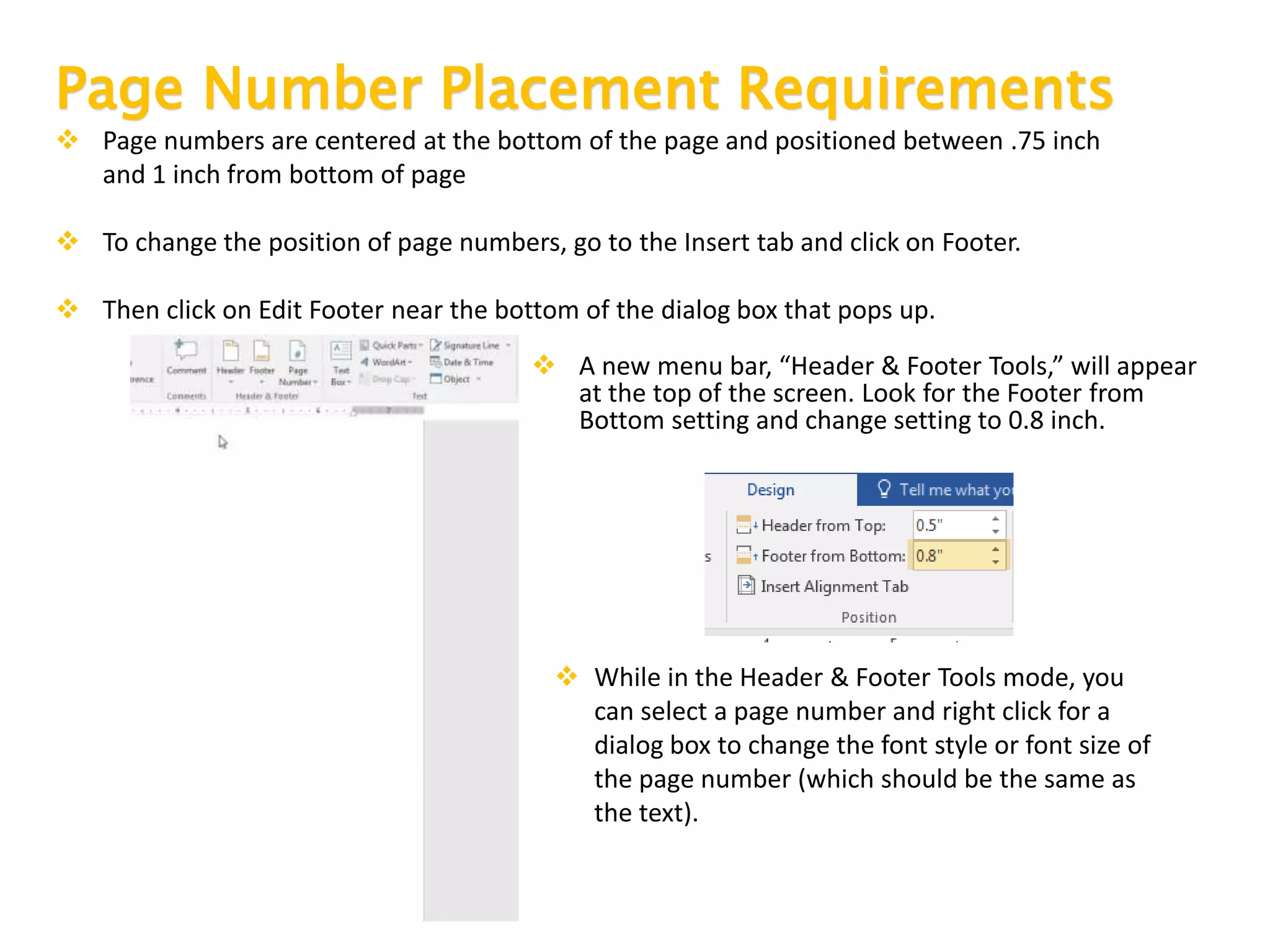
A new menu bar, “Header &
Footer Tools,” will appear at
the top of the screen. Look for
the Footer from Bottom setting
and change setting to 0.8 inch.
While in the Header & Footer
Tools mode, you can select a
page number and right click
for a dialog box to change the
font style or font size of the
page number (which should be
the same as the text).
Page Number Placement Requirements
 Page numbers are centered at the bottom of the page and positioned between .75 inch
and 1 inch from bottom of page
 To change the position of page numbers, go to the Insert tab and click on Footer.
 Then click on Edit Footer near the bottom of the dialog box that pops up.
 A new menu bar, “Header & Footer Tools,” will appear
at the top of the screen. Look for the Footer from
Bottom setting and change setting to 0.8 inch.
 While in the Header & Footer Tools mode, you
can select a page number and right click for a
dialog box to change the font style or font size of
the page number (which should be the same as
the text).
Order of Elements and Page Numbers Required
Title Page— NO PAGE NUMBER
Copyright Page (optional)—NO PAGE NUMBER
Abstract—Use lowercase Roman numerals (begin with ii) for page numbers
Acknowledgements (optional)—Use lowercase Roman numerals for page
numbers
Table of Contents— Use lowercase Roman numerals for page numbers
List of Tables, List of Figures, List of Works, and so on (as
needed)—Use lowercase Roman numerals for page numbers
Chapters—Use Arabic numerals for page numbers from here to the end of the
manuscript (Chapter 1 starts with page 1)
Appendices (optional)—Each one begins with a title page. Use title page
with APPENDIX and its title for one. If there are two or more appendices, begin
with a title page with APPENDICES centered on the page followed by title page for
APPENDIX A
References List or Bibliography—Begins with a title page with REFERENCES
or BIBLIOGRAPHY or WORKS CITED centered on page
Much, Much More!
 These are only the fundamental
formatting rules that must be used in
your manuscript. There are specific
rules for every section of the
document.
 Be sure to go online and check out the
other PowerPoint slideshows with
formatting rules.
 Don’t forget the Mini-Manuscript,
templates and the University
Guidelines Manual itself. All of them
can be accessed from:
www.csulb.edu/thesis
Contact us any time. We’ll get back to you by the
next business day!

2017 version of new rules powerpoint for submission and essential rules

  • 1.
    A Guide forCSULB Graduate Degree Candidates
  • 2.
    Role of theThesis and Dissertation Office We’re here to help you prepare your manuscript according to the University Guidelines Manual and the formatting style guide approved by your department. Please call or email us whenever you have questions or problems regarding your manuscript.
  • 3.
    Electronic Submission—Fast andEasy Students submit their manuscripts via a website set up by ProQuest, the database company that has maintained electronic theses and dissertations for CSULB since 2008.  You can submit documents and revisions any time from anywhere  You save time and money since no printing of documents is needed
  • 4.
    Submission Process—Get Ready! Haveyour signature page fully signed with all signatures AND Have your manuscript formatted to the best of your ability and complete in one PDF file
  • 5.
    Submission Process—On YourMark! Deliver your signature page to the Thesis Office by 5 p.m. of deadline date AND The Thesis Office will email you the Internet address to use to upload your PDF manuscript
  • 6.
    Submission Process—Get Set! BEFOREyou go online to create your online account:  Have the text of your abstract, supplementary files (such as music or other large data files), and the names of your thesis committee members AND  Check the wording of your manuscript title and your name as it appears on your title page—match the title and your name in your online account exactly as they appear in your PDF
  • 7.
    Submission Process—Go! You mustupload your PDF within a week of the date that the email is sent AND A fee of $95 is required for Open Access Publishing at the time of upload AND Make a note of your User Name and Password so you can access the PDFs with revisions
  • 8.
    Revision Process—First Evaluation Formatters read through PDFs on a first-come, first-served basis as they are uploaded.  Corrections are added to the PDF.  The student is emailed when read-through is done.  The annotated PDF can be downloaded from the ProQuest website
  • 9.
    Revision Process—First Corrections Usinga version of the manuscript that’s easy to revise (usually a Microsoft Word version), the student makes revisions based on the annotated PDF. After making a PDF of the revised manuscript, the student uploads it to ProQuest website. Setting a 2-week turnaround time for this initial revision ensures completing the submission process within the term deadline
  • 10.
    Revision Process—Second Corrections Formattersread through revised PDF and contact the student within a week. Here are the possibilities:  Second correction—Another PDF is uploaded with notes about corrections needed  Additional corrections—More revisions may be asked for to comply with formatting rules  Cleared pending—Email is sent with list of a few (15 or fewer) corrections still needed  Cleared—No further corrections needed
  • 11.
    Clearance Letter  Oncethe formatting of a student’s PDF manuscript is cleared, meaning there are no more corrections needed, the Thesis Office releases the PDF for publication on the ProQuest database.  The student will receive a clearance letter email from the Thesis Office to confirm that the submission process is complete. • A copy of the email is also sent to the student’s committee chair, the department graduate advisor and Enrollment Services.
  • 13.
    University Guidelines Versus DepartmentalStyle Manuals The formatting rules in the CSULB University Guidelines Manual ALWAYS take precedence over the style guide (APA, MLA, Chicago, etc.) or other citation format styles (IEEE, GSA, etc.) required by your department
  • 14.
    Thesis Office WebPages  University Guidelines Manual  Mini-Manuscript (samples of formatting for all pages of document)  Templates for signature page, title page and much more  PowerPoints about formatting rules  Go to http://csulb.libguides.com/thesisformat or click through from University Library home page: http://www.csulb.edu/library
  • 15.
    Signature Page NOTin PDF Create your signature page as a separate document for the committee members and college designee to sign. Do not include a signature page as part of the PDF that you upload to ProQuest  More information about the signature page is available in the PowerPoint about University Guidelines Manual rules for front pages
  • 16.
    Title Page ComesFirst  The title page is the first page of the manuscript  The abstract is a page within the manuscript. Use lowercase Roman numeral— ii—for first page of the abstract  Include a listing for the abstract in the table of contents  More information about the order of pages is available at the end of this slideshow and in the PowerPoint about University Guidelines Manual format rules for front pages.
  • 17.
    Streamlined Table ofContents  List the major sections of the document in the table of contents— the major sections use all uppercase for the titles, for example: ABSTRACT, LIST OF TABLES, and LIST OF FIGURES  Include the title of each chapter beginning with a number and the title of each appendix beginning with a letter  Use dot leaders at the end of each item leading to the page numbers aligned along the right margin  NO subheads! NO headings! (in the table of contents, that is)  More information about the table of contents is available in the PowerPoint about University Guidelines Manual format rules for front pages
  • 18.
    Font Requirements Font Style TimesNew Roman Courier New Font Size = 12 point Exceptions: • Within a table, font style must be consistent for all tables and font size may be 10 to 12 points • Within a figure, font style is unrestricted and font size must be legible • Within the appendices, font style and font size are unrestricted as long as all text is legible Times New Roman is the most widely used font style. Courier New comes in second.
  • 19.
    Margin Requirements Use 1inch for ALL margins—top, right, left and bottom.
  • 20.
    Titles, Subheads andCaptions  Bold font is now used for all titles—the title of your manuscript as well as titles of sections, titles of chapters, and titles of tables  All subheads and figure captions use bold font as well  More information about the subheads is available in the PowerPoint about University Guidelines Manual format rules for chapters, appendices and references lists
  • 21.
    Paragraph Format Requirements Textshould be formatted as paragraphs with consistent indentation for the first line and left justification only. It is recommended that, if bullet point lists and numbered items are used in the text, they should be used sparingly. If bullet point lists or numbered lists are used, the default indentation in Microsoft Word should be used; that is, numbered or bulleted lines are indented one quarter inch and other lines are indented one half inch so that the bullets or numbers stand out from other lines.
  • 22.
    Uniform Double LineSpacing Requirements Spacing between lines of text should be uniform with no extra blank space between paragraphs or before and after titles and subheads. For instance, the line spacing between these sentences is not uniform. To create uniform double line spacing, select text above and below the gap in the text. Then click on the Page Layout tab and click on the little arrow underneath the spacing settings to bring up the Paragraph dialog box. In the Paragraph dialog box, set Line spacing to “Double” and set the Spacing boxes (marked Before and After) to “0 pt”
  • 23.
    Spacing Within TextRequirements Within the text of the abstract, acknowledge- ments and all chapters, spacing at the end of sentences and after colons can be one space or two spaces. The spacing used should be consistent throughout the text.
  • 24.
    Page Number PlacementRequirements Page numbers are centered at the bottom of the page and positioned between .75 inch and 1 inch from bottom of page To change the position of page numbers, go to the Insert tab and click on Footer. Then click on Edit Footer near the bottom of the dialog box that pops up. A new menu bar, “Header & Footer Tools,” will appear at the top of the screen. Look for the Footer from Bottom setting and change setting to 0.8 inch. While in the Header & Footer Tools mode, you can select a page number and right click for a dialog box to change the font style or font size of the page number (which should be the same as the text).
  • 25.
    Page Number PlacementRequirements  Page numbers are centered at the bottom of the page and positioned between .75 inch and 1 inch from bottom of page  To change the position of page numbers, go to the Insert tab and click on Footer.  Then click on Edit Footer near the bottom of the dialog box that pops up.  A new menu bar, “Header & Footer Tools,” will appear at the top of the screen. Look for the Footer from Bottom setting and change setting to 0.8 inch.  While in the Header & Footer Tools mode, you can select a page number and right click for a dialog box to change the font style or font size of the page number (which should be the same as the text).
  • 26.
    Order of Elementsand Page Numbers Required Title Page— NO PAGE NUMBER Copyright Page (optional)—NO PAGE NUMBER Abstract—Use lowercase Roman numerals (begin with ii) for page numbers Acknowledgements (optional)—Use lowercase Roman numerals for page numbers Table of Contents— Use lowercase Roman numerals for page numbers List of Tables, List of Figures, List of Works, and so on (as needed)—Use lowercase Roman numerals for page numbers Chapters—Use Arabic numerals for page numbers from here to the end of the manuscript (Chapter 1 starts with page 1) Appendices (optional)—Each one begins with a title page. Use title page with APPENDIX and its title for one. If there are two or more appendices, begin with a title page with APPENDICES centered on the page followed by title page for APPENDIX A References List or Bibliography—Begins with a title page with REFERENCES or BIBLIOGRAPHY or WORKS CITED centered on page
  • 27.
    Much, Much More! These are only the fundamental formatting rules that must be used in your manuscript. There are specific rules for every section of the document.  Be sure to go online and check out the other PowerPoint slideshows with formatting rules.  Don’t forget the Mini-Manuscript, templates and the University Guidelines Manual itself. All of them can be accessed from: www.csulb.edu/thesis
  • 29.
    Contact us anytime. We’ll get back to you by the next business day!

Editor's Notes

  • #11 Should we revise the wording here so that students don’t think they will only have 2 corrections?
  • #26 This slide has the same text as the previous slide, but with different graphics. The video on this slide will disappear after it’s done playing and the image behind it will remain. Keep the slide you like more. 