OKIKI, O. Chris (Ph.D)
Head, Automation Unit
University of Lagos Library
University of Lagos
Akoka, Lagos
chrisokiki2009@yahoo.com
 What are online databases?
Online databases are Web-based electronic
indexes that enable you to locate and
retrieve articles in magazines, journals and
newspapers.
 Each database has its own search interface
and capabilities. Many of the basic search
concepts and features are similar:
 Keyword searching
 Limiters
 Boolean operators
 What are some common searching problems
and solutions?
 Where can you find more assistance for some
of the library’s databases?
 Keyword searching is the easiest search method, but may be less
precise.
 Databases collect, sort and present information according to FIELDS (which are
usually found in a dropdown menu), such as:
 Author
 Title of article
 Subject
 Publication name
 To make your search more specific, you may select one or more fields to
do keyword search.
 To expand your search, you may search for keyword(s) in All basic or
Default fields.
 Limiters are database functions that let
you narrow your search results.
 Database limiters may include:
 Scholarly (Peer Reviewed)
 Publication year
 Full text
 Language, etc.
 AND links words or phrases that must both appear in
the same article.
 If you what to focus your search results, use Boolean
operator AND to connect additional word(s)
Example: crime AND youth-- finds both crime and
youth anywhere in the same article.
  OR links synonyms, alternative forms of expression,
acronyms, and so on.
 If you want to expand your search, use Boolean
operator OR to connect additional word(s).
Example: teenager OR adolescent-- finds either teenage
or adolescent in the same article. ETC.
 A commercial service
 Legal, business & medical sources
 Law-related material
 Law review articles (mid-1980s to date)
 Legal news
 Laws, regulations & court opinions
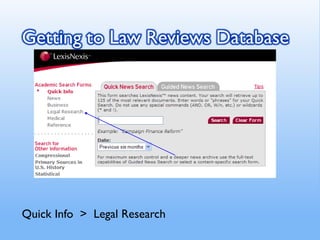
Quick Info > Legal Research
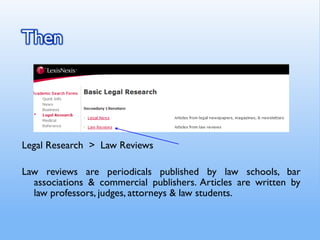
Legal Research > Law Reviews
Law reviews are periodicals published by law schools, bar
associations & commercial publishers. Articles are written by
law professors, judges, attorneys & law students.
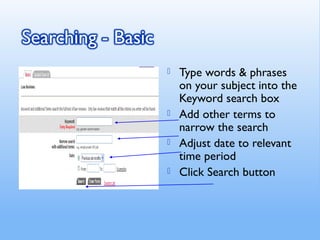
 Type words & phrases
on your subject into the
Keyword search box
 Add other terms to
narrow the search
 Adjust date to relevant
time period
 Click Search button
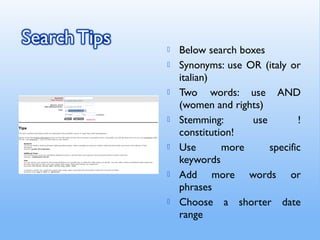
 Below search boxes
 Synonyms: use OR (italy or
italian)
 Two words: use AND
(women and rights)
 Stemming: use !
constitution!
 Use more specific
keywords
 Add more words or
phrases
 Choose a shorter date
range
 Check for spelling errors
 Use less specific, more general terms
 Increase date range
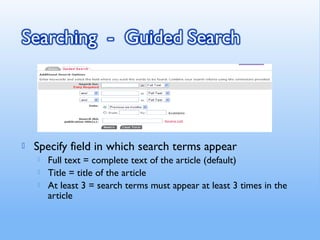
 Specify field in which search terms appear
 Full text = complete text of the article (default)
 Title = title of the article
 At least 3 = search terms must appear at least 3 times in the
article
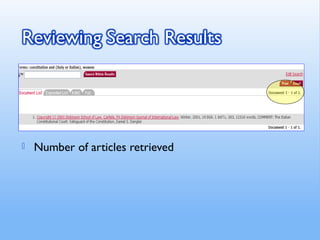
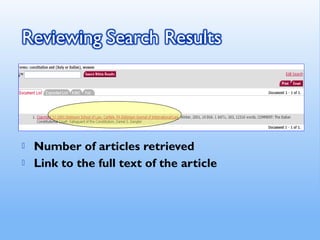
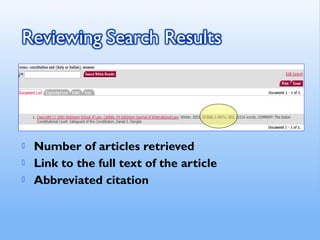
 Number of articles retrieved
 Link to the full text of the article
 Number of articles retrieved
 Link to the full text of the article
 Abbreviated citation
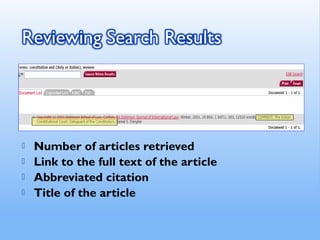
 Number of articles retrieved
 Link to the full text of the article
 Abbreviated citation
 Title of the article
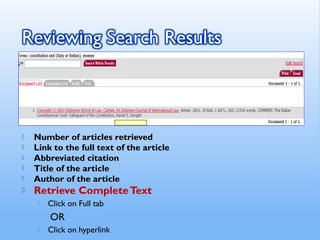
 Number of articles retrieved
 Link to the full text of the article
 Abbreviated citation
 Title of the article
 Author of the article
 Retrieve CompleteText
 Click on Full tab
OR
 Click on hyperlink
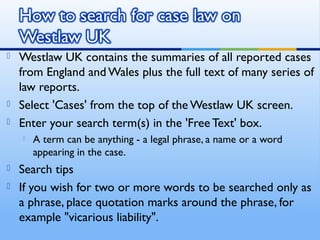
 Westlaw UK contains the summaries of all reported cases
from England and Wales plus the full text of many series of
law reports.
 Select 'Cases' from the top of the Westlaw UK screen.
 Enter your search term(s) in the 'Free Text' box.
 A term can be anything - a legal phrase, a name or a word
appearing in the case.
 Search tips
 If you wish for two or more words to be searched only as
a phrase, place quotation marks around the phrase, for
example "vicarious liability".
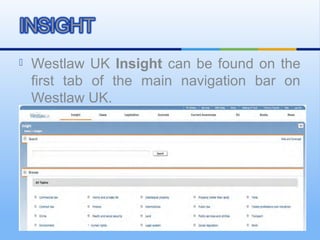
 Westlaw UK Insight can be found on the
first tab of the main navigation bar on
Westlaw UK.
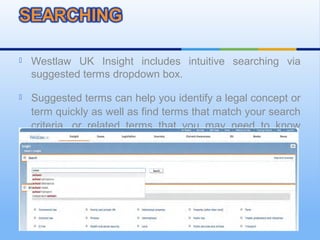
 Westlaw UK Insight includes intuitive searching via
suggested terms dropdown box.
 Suggested terms can help you identify a legal concept or
term quickly as well as find terms that match your search
criteria, or related terms that you may need to know
about.
INSIGHT
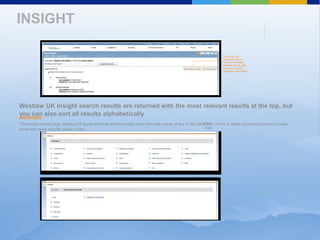
Westlaw UK Insight search results are returned with the most relevant results at the top, but
you can also sort all results alphabetically.
BROWSING
The Insight home page displays 24 top-level fields which broadly cover the main areas of law in the UK. Click on the to these top-level topics to browse
down into more specific areas of law.
icon
next
You have the
options to Show
Terms in Context,
allowing you to see
how your search
applies to each topic
 BROWSING
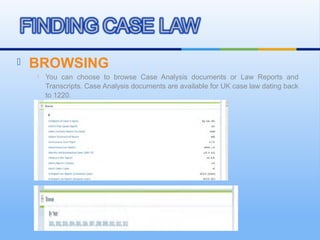
 You can choose to browse Case Analysis documents or Law Reports and
Transcripts. Case Analysis documents are available for UK case law dating back
to 1220.
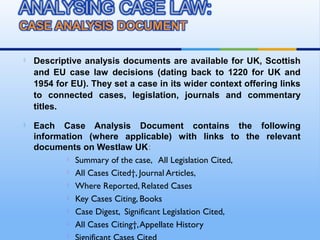
 Descriptive analysis documents are available for UK, Scottish
and EU case law decisions (dating back to 1220 for UK and
1954 for EU). They set a case in its wider context offering links
to connected cases, legislation, journals and commentary
titles.
 Each Case Analysis Document contains the following
information (where applicable) with links to the relevant
documents on Westlaw UK:
 Summary of the case, All Legislation Cited,
 All Cases Cited†, Journal Articles,
 Where Reported, Related Cases
 Key Cases Citing, Books
 Case Digest, Significant Legislation Cited,
 All Cases Citing†,Appellate History

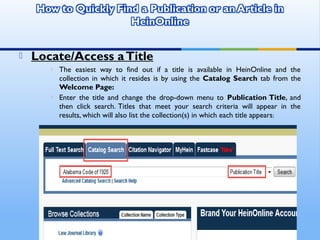
 Locate/Access aTitle
 The easiest way to find out if a title is available in HeinOnline and the
collection in which it resides is by using the Catalog Search tab from the
Welcome Page:
 Enter the title and change the drop-down menu to Publication Title, and
then click search. Titles that meet your search criteria will appear in the
results, which will also list the collection(s) in which each title appears:
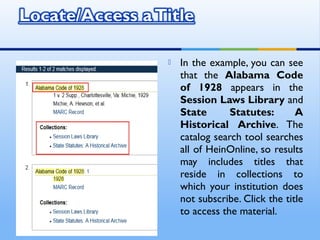
 In the example, you can see
that the Alabama Code
of 1928 appears in the
Session Laws Library and
State Statutes: A
Historical Archive. The
catalog search tool searches
all of HeinOnline, so results
may includes titles that
reside in collections to
which your institution does
not subscribe. Click the title
to access the material.
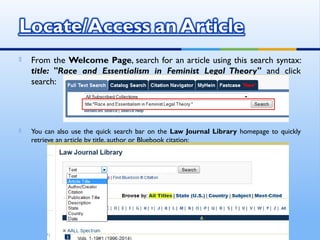
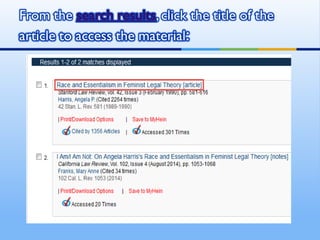
 From the Welcome Page, search for an article using this search syntax:
title: "Race and Essentialism in Feminist Legal Theory" and click
search:
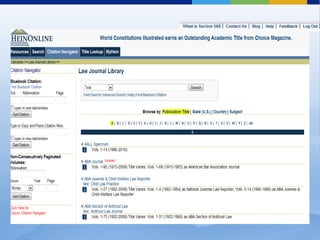
 You can also use the quick search bar on the Law Journal Library homepage to quickly
retrieve an article by title, author or Bluebook citation:
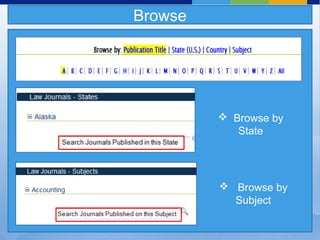
 Browse by
State
 Browse by
Subject
Browse
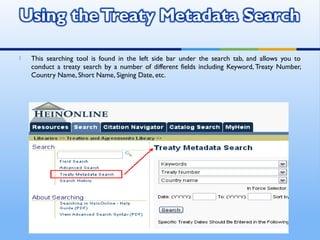
 This searching tool is found in the left side bar under the search tab, and allows you to
conduct a treaty search by a number of different fields including Keyword, Treaty Number,
Country Name, Short Name, Signing Date, etc.
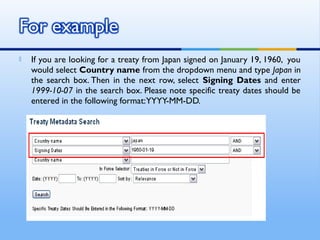
 If you are looking for a treaty from Japan signed on January 19, 1960,  you
would select Country name from the dropdown menu and type Japan in
the search box. Then in the next row, select Signing Dates and enter
1999-10-07 in the search box. Please note specific treaty dates should be
entered in the following format:YYYY-MM-DD.
THANKS YOU

Using specialized databases for legal research

  • 1.
    OKIKI, O. Chris(Ph.D) Head, Automation Unit University of Lagos Library University of Lagos Akoka, Lagos chrisokiki2009@yahoo.com
  • 2.
     What areonline databases? Online databases are Web-based electronic indexes that enable you to locate and retrieve articles in magazines, journals and newspapers.
  • 3.
     Each databasehas its own search interface and capabilities. Many of the basic search concepts and features are similar:  Keyword searching  Limiters  Boolean operators  What are some common searching problems and solutions?  Where can you find more assistance for some of the library’s databases?
  • 4.
     Keyword searchingis the easiest search method, but may be less precise.  Databases collect, sort and present information according to FIELDS (which are usually found in a dropdown menu), such as:  Author  Title of article  Subject  Publication name  To make your search more specific, you may select one or more fields to do keyword search.  To expand your search, you may search for keyword(s) in All basic or Default fields.
  • 5.
     Limiters aredatabase functions that let you narrow your search results.  Database limiters may include:  Scholarly (Peer Reviewed)  Publication year  Full text  Language, etc.
  • 6.
     AND linkswords or phrases that must both appear in the same article.  If you what to focus your search results, use Boolean operator AND to connect additional word(s) Example: crime AND youth-- finds both crime and youth anywhere in the same article.   OR links synonyms, alternative forms of expression, acronyms, and so on.  If you want to expand your search, use Boolean operator OR to connect additional word(s). Example: teenager OR adolescent-- finds either teenage or adolescent in the same article. ETC.
  • 7.
     A commercialservice  Legal, business & medical sources  Law-related material  Law review articles (mid-1980s to date)  Legal news  Laws, regulations & court opinions
  • 8.
    Quick Info >Legal Research
  • 9.
    Legal Research >Law Reviews Law reviews are periodicals published by law schools, bar associations & commercial publishers. Articles are written by law professors, judges, attorneys & law students.
  • 10.
     Type words& phrases on your subject into the Keyword search box  Add other terms to narrow the search  Adjust date to relevant time period  Click Search button
  • 11.
     Below searchboxes  Synonyms: use OR (italy or italian)  Two words: use AND (women and rights)  Stemming: use ! constitution!  Use more specific keywords  Add more words or phrases  Choose a shorter date range
  • 12.
     Check forspelling errors  Use less specific, more general terms  Increase date range
  • 13.
     Specify fieldin which search terms appear  Full text = complete text of the article (default)  Title = title of the article  At least 3 = search terms must appear at least 3 times in the article
  • 14.
     Number ofarticles retrieved
  • 15.
     Number ofarticles retrieved  Link to the full text of the article
  • 16.
     Number ofarticles retrieved  Link to the full text of the article  Abbreviated citation
  • 17.
     Number ofarticles retrieved  Link to the full text of the article  Abbreviated citation  Title of the article
  • 18.
     Number ofarticles retrieved  Link to the full text of the article  Abbreviated citation  Title of the article  Author of the article  Retrieve CompleteText  Click on Full tab OR  Click on hyperlink
  • 19.
     Westlaw UKcontains the summaries of all reported cases from England and Wales plus the full text of many series of law reports.  Select 'Cases' from the top of the Westlaw UK screen.  Enter your search term(s) in the 'Free Text' box.  A term can be anything - a legal phrase, a name or a word appearing in the case.  Search tips  If you wish for two or more words to be searched only as a phrase, place quotation marks around the phrase, for example "vicarious liability".
  • 20.
     Westlaw UKInsight can be found on the first tab of the main navigation bar on Westlaw UK.
  • 21.
     Westlaw UKInsight includes intuitive searching via suggested terms dropdown box.  Suggested terms can help you identify a legal concept or term quickly as well as find terms that match your search criteria, or related terms that you may need to know about.
  • 22.
    INSIGHT Westlaw UK Insightsearch results are returned with the most relevant results at the top, but you can also sort all results alphabetically. BROWSING The Insight home page displays 24 top-level fields which broadly cover the main areas of law in the UK. Click on the to these top-level topics to browse down into more specific areas of law. icon next You have the options to Show Terms in Context, allowing you to see how your search applies to each topic
  • 23.
     BROWSING  Youcan choose to browse Case Analysis documents or Law Reports and Transcripts. Case Analysis documents are available for UK case law dating back to 1220.
  • 24.
     Descriptive analysisdocuments are available for UK, Scottish and EU case law decisions (dating back to 1220 for UK and 1954 for EU). They set a case in its wider context offering links to connected cases, legislation, journals and commentary titles.  Each Case Analysis Document contains the following information (where applicable) with links to the relevant documents on Westlaw UK:  Summary of the case, All Legislation Cited,  All Cases Cited†, Journal Articles,  Where Reported, Related Cases  Key Cases Citing, Books  Case Digest, Significant Legislation Cited,  All Cases Citing†,Appellate History 
  • 25.
     Locate/Access aTitle The easiest way to find out if a title is available in HeinOnline and the collection in which it resides is by using the Catalog Search tab from the Welcome Page:  Enter the title and change the drop-down menu to Publication Title, and then click search. Titles that meet your search criteria will appear in the results, which will also list the collection(s) in which each title appears:
  • 26.
     In theexample, you can see that the Alabama Code of 1928 appears in the Session Laws Library and State Statutes: A Historical Archive. The catalog search tool searches all of HeinOnline, so results may includes titles that reside in collections to which your institution does not subscribe. Click the title to access the material.
  • 27.
     From theWelcome Page, search for an article using this search syntax: title: "Race and Essentialism in Feminist Legal Theory" and click search:  You can also use the quick search bar on the Law Journal Library homepage to quickly retrieve an article by title, author or Bluebook citation:
  • 30.
     Browse by State Browse by Subject Browse
  • 31.
     This searchingtool is found in the left side bar under the search tab, and allows you to conduct a treaty search by a number of different fields including Keyword, Treaty Number, Country Name, Short Name, Signing Date, etc.
  • 32.
     If youare looking for a treaty from Japan signed on January 19, 1960,  you would select Country name from the dropdown menu and type Japan in the search box. Then in the next row, select Signing Dates and enter 1999-10-07 in the search box. Please note specific treaty dates should be entered in the following format:YYYY-MM-DD.
  • 33.

Editor's Notes

  • #30 The landing page is basically divided up into three sections. Your citation navigator, your search box and browse. Also, from this page you can use the tabs to navigate the left panel, and you also have access to Help, Blog, etc.
  • #31 In the Browse feature, you can browse by publication title, state (published in) the country (published in) or by the subject or area of law that the journal covers, for example ‘American Bankruptcy Law Journal’. Alaska has 1 journal and it’s published by Duke Law School.