
A Phing fairy tale
Stephan Hochdörfer, bitExpert AG
A Phing fairy tale

 About me

  Stephan Hochdörfer

  Head of IT at bitExpert AG, Germany

  enjoying PHP since 1999

  S.Hochdoerfer@bitExpert.de

  @shochdoerfer
A Phing fairy tale

 Disclaimer


                    Warning:
          You will see a hell lot of XML.
A Phing fairy tale

 What is Phing?
A Phing fairy tale

 What is Phing?


      It is a PHP project build system or
       build tool based on Apache Ant.
A Phing fairy tale

 What is Phing?


       Domain Specific Language for an
           project build system.
A Phing fairy tale

 What is Phing?


   Enables one button push automation.
A Phing fairy tale

 Project build system?
A Phing fairy tale

 Project build system?


  Automation of non-development tasks
A Phing fairy tale

 Project build system?


       Automate absolutely everything.
A Phing fairy tale

 Project build system?


       If you use Phing, only use Phing.
A Phing fairy tale

 Why Phing?
A Phing fairy tale

 Why Phing?


     Runs everywhere where PHP runs.
A Phing fairy tale

 Why Phing?


     No additional depencendies needed
               (e.g. Java, …).
A Phing fairy tale

 Why Phing?


             More than 120 predefined
              tasks to choose from.
A Phing fairy tale

 Why Phing?


            Easy to extend by writing
              custom tasks in PHP.
A Phing fairy tale

 How to install Phing?
A Phing fairy tale

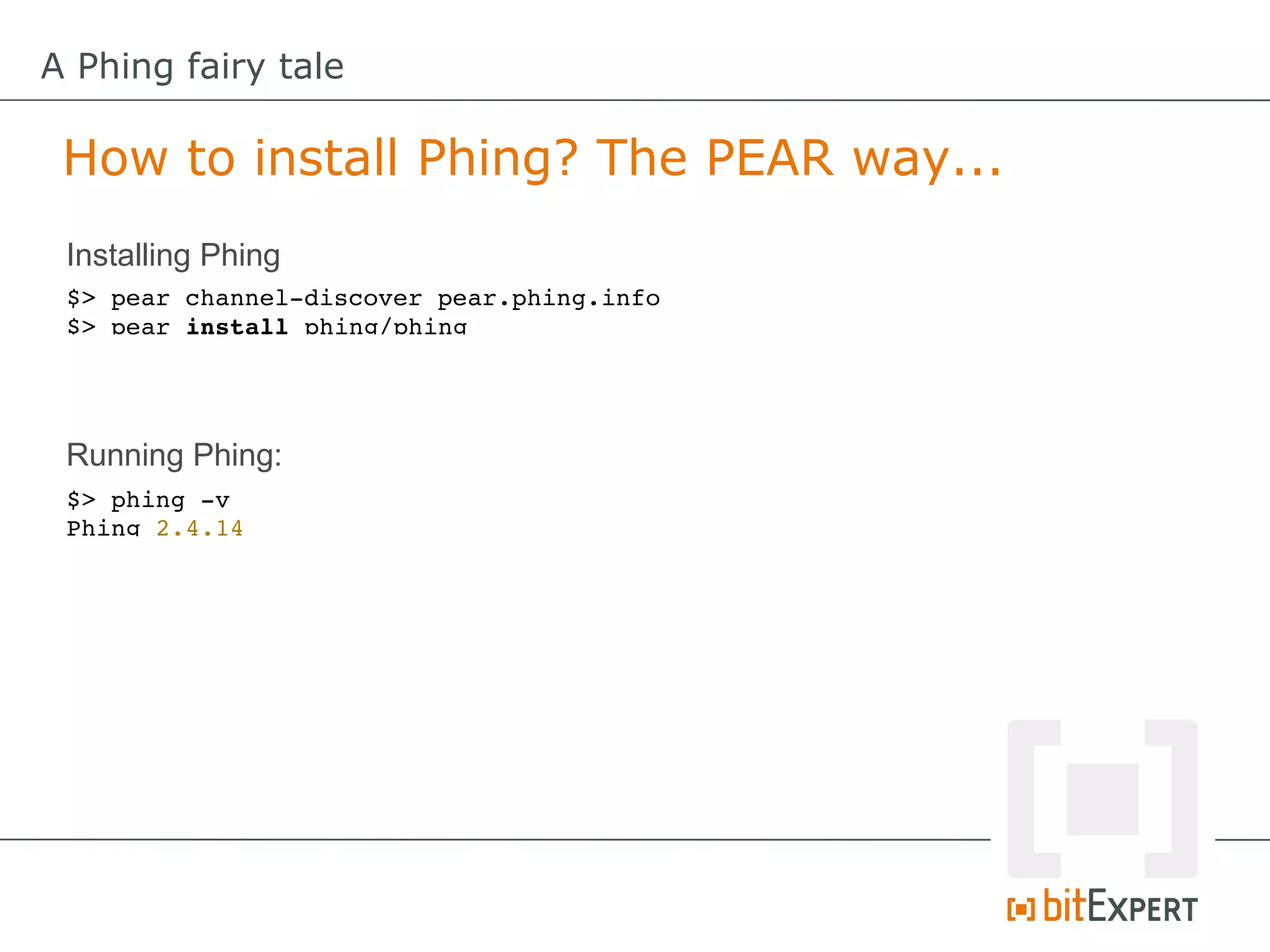
 How to install Phing? The PEAR way...
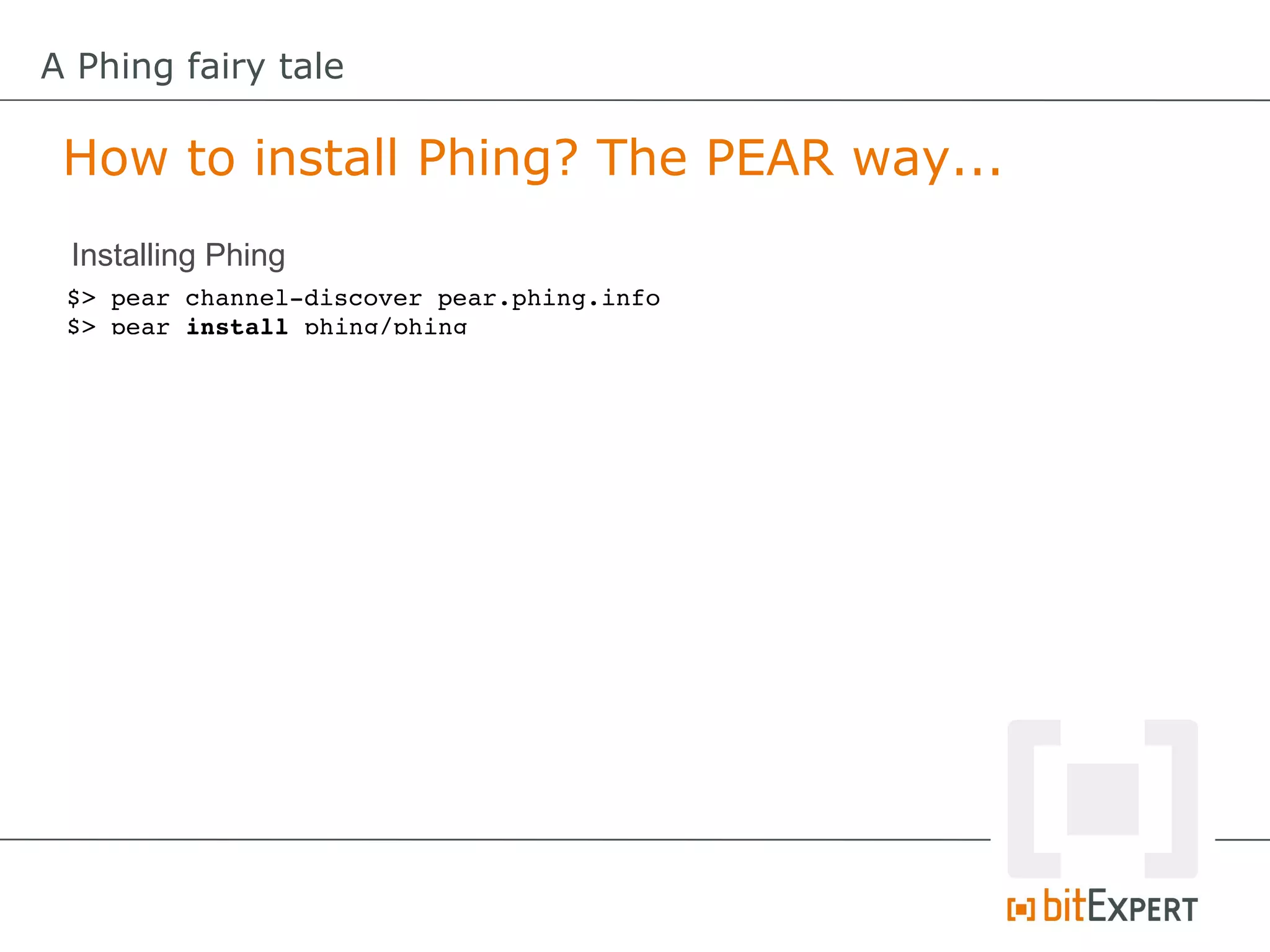
 Installing Phing
 $> pear channel­discover pear.phing.info
 $> pear install phing/phing
A Phing fairy tale

 How to install Phing? The PEAR way...
 Installing Phing
 $> pear channel­discover pear.phing.info
 $> pear install phing/phing


 Running Phing:
 $> phing ­v
 Phing 2.4.14
A Phing fairy tale

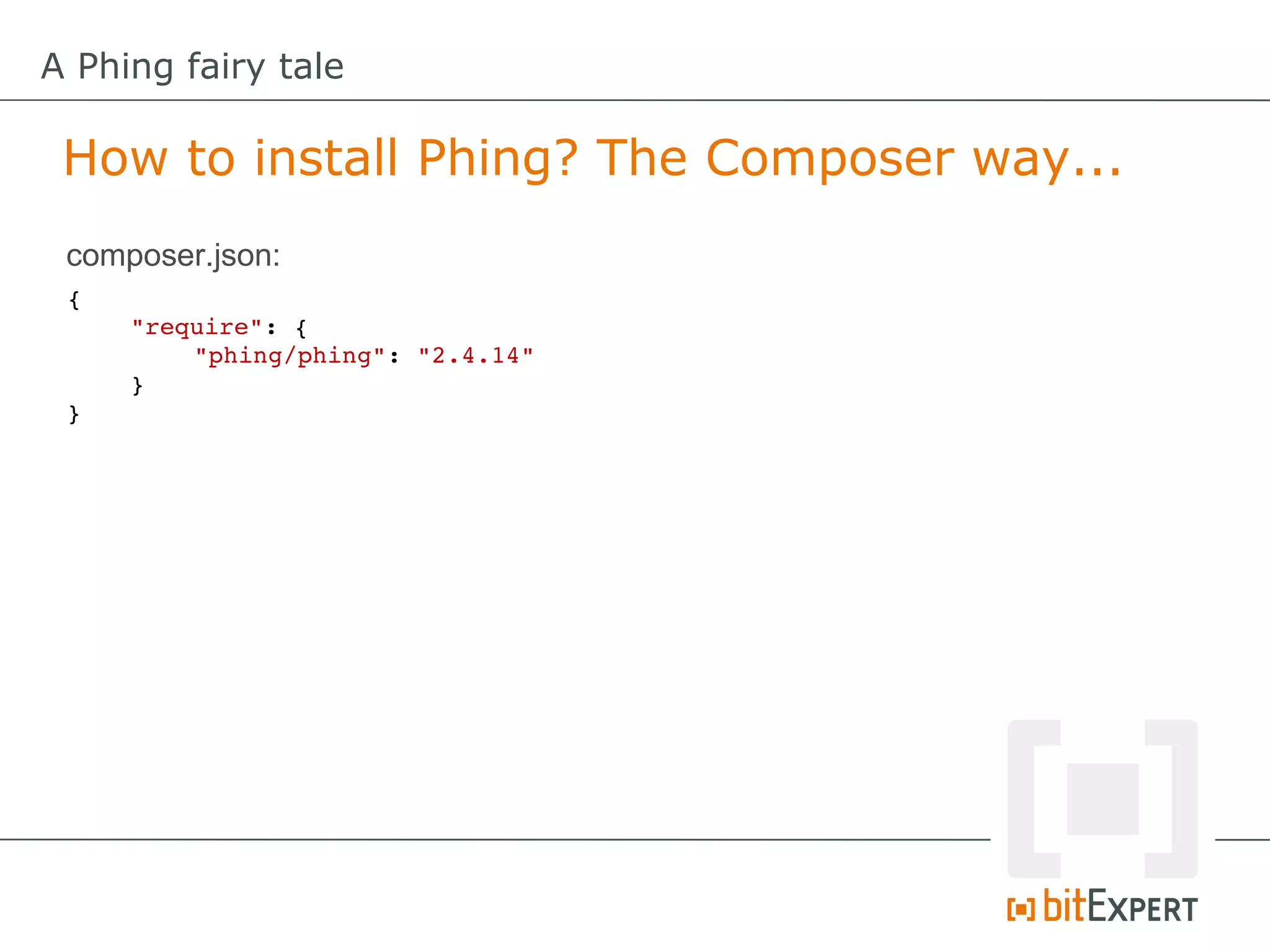
 How to install Phing? The Composer way...
 composer.json:
 {
     "require": {
         "phing/phing": "2.4.14"
     }
 }
A Phing fairy tale

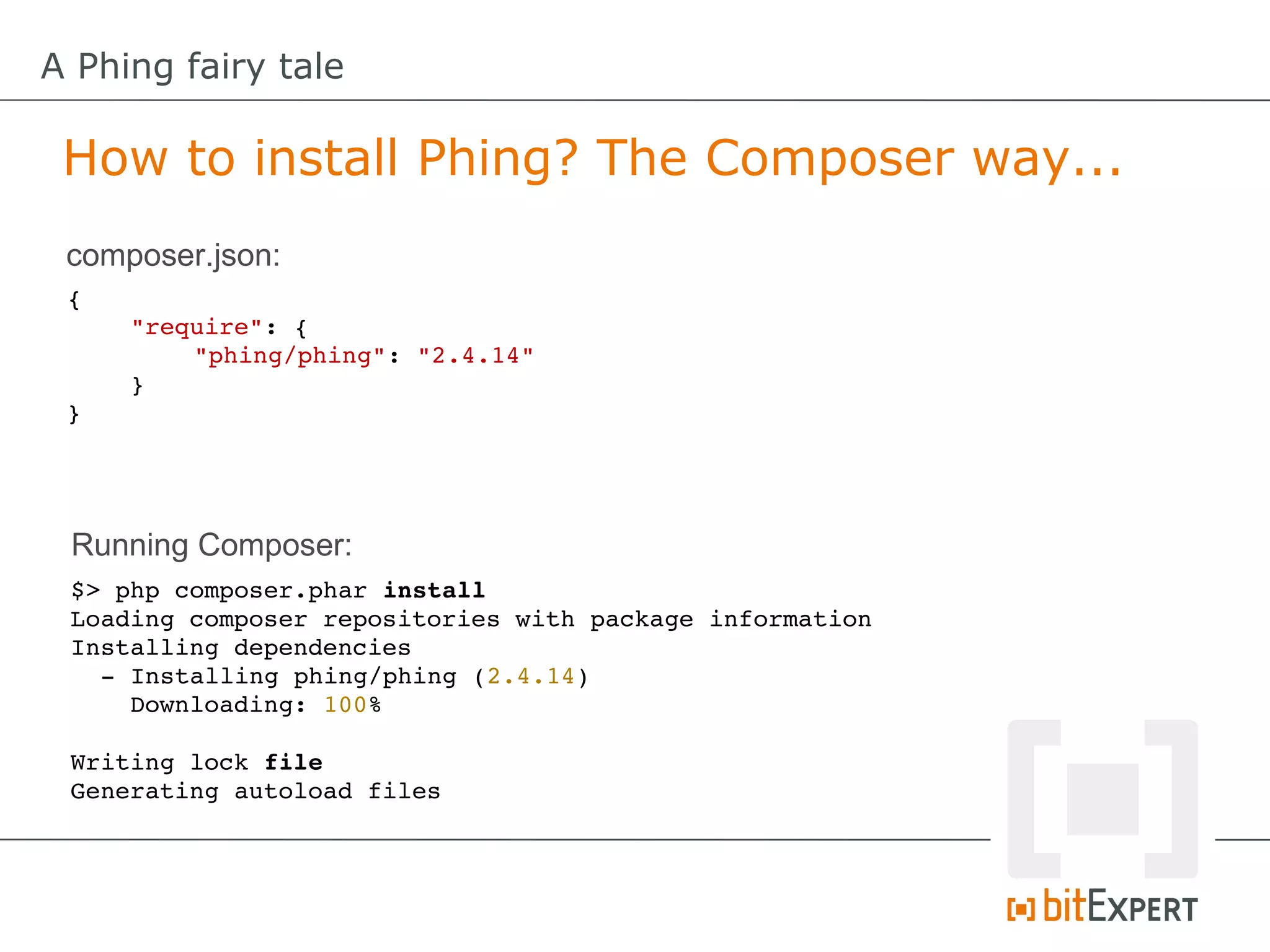
 How to install Phing? The Composer way...
 composer.json:
 {
     "require": {
         "phing/phing": "2.4.14"
     }
 }


 Running Composer:
 $> php composer.phar install
 Loading composer repositories with package information
 Installing dependencies
   ­ Installing phing/phing (2.4.14)
     Downloading: 100%         

 Writing lock file
 Generating autoload files
A Phing fairy tale

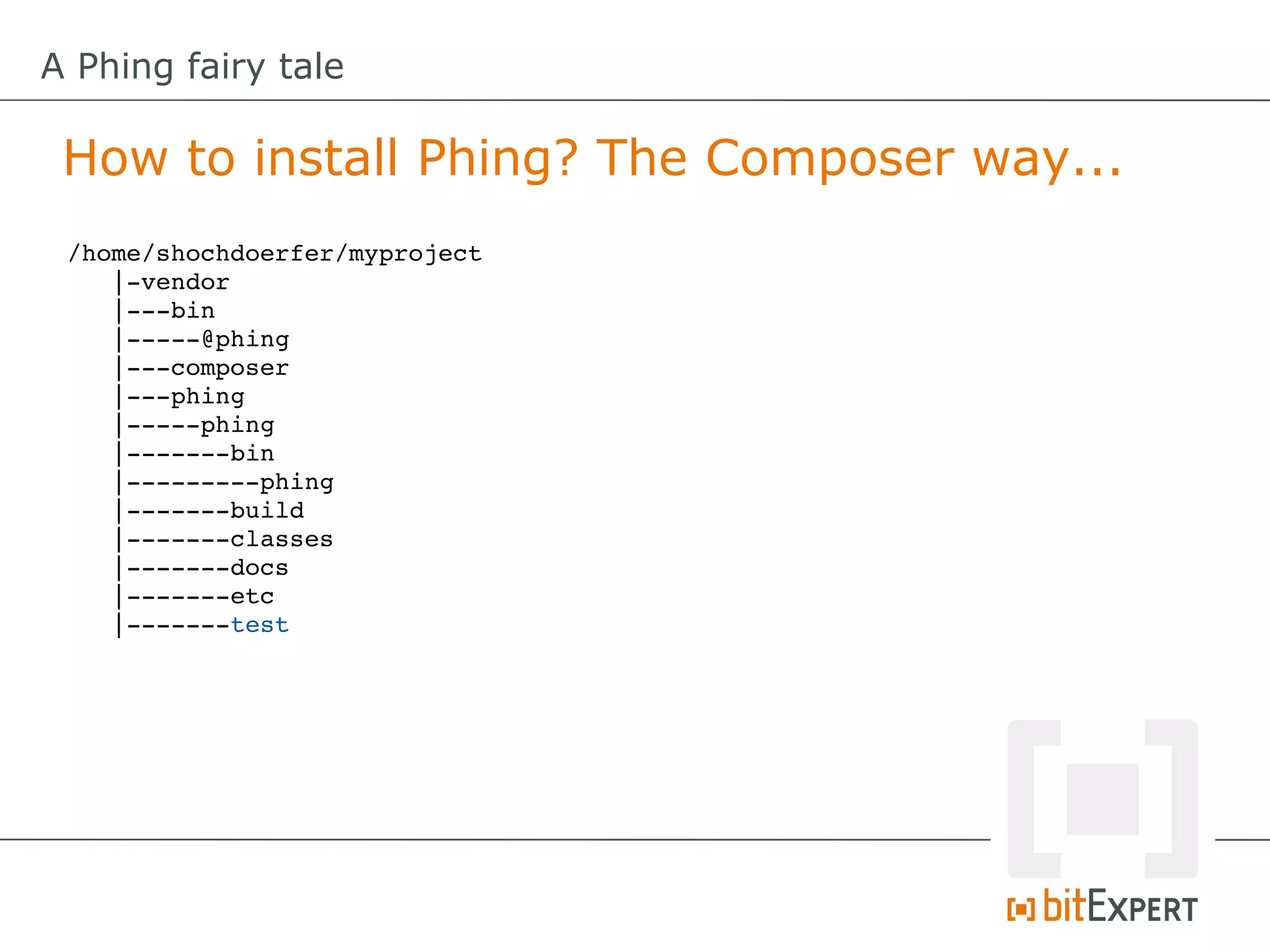
 How to install Phing? The Composer way...
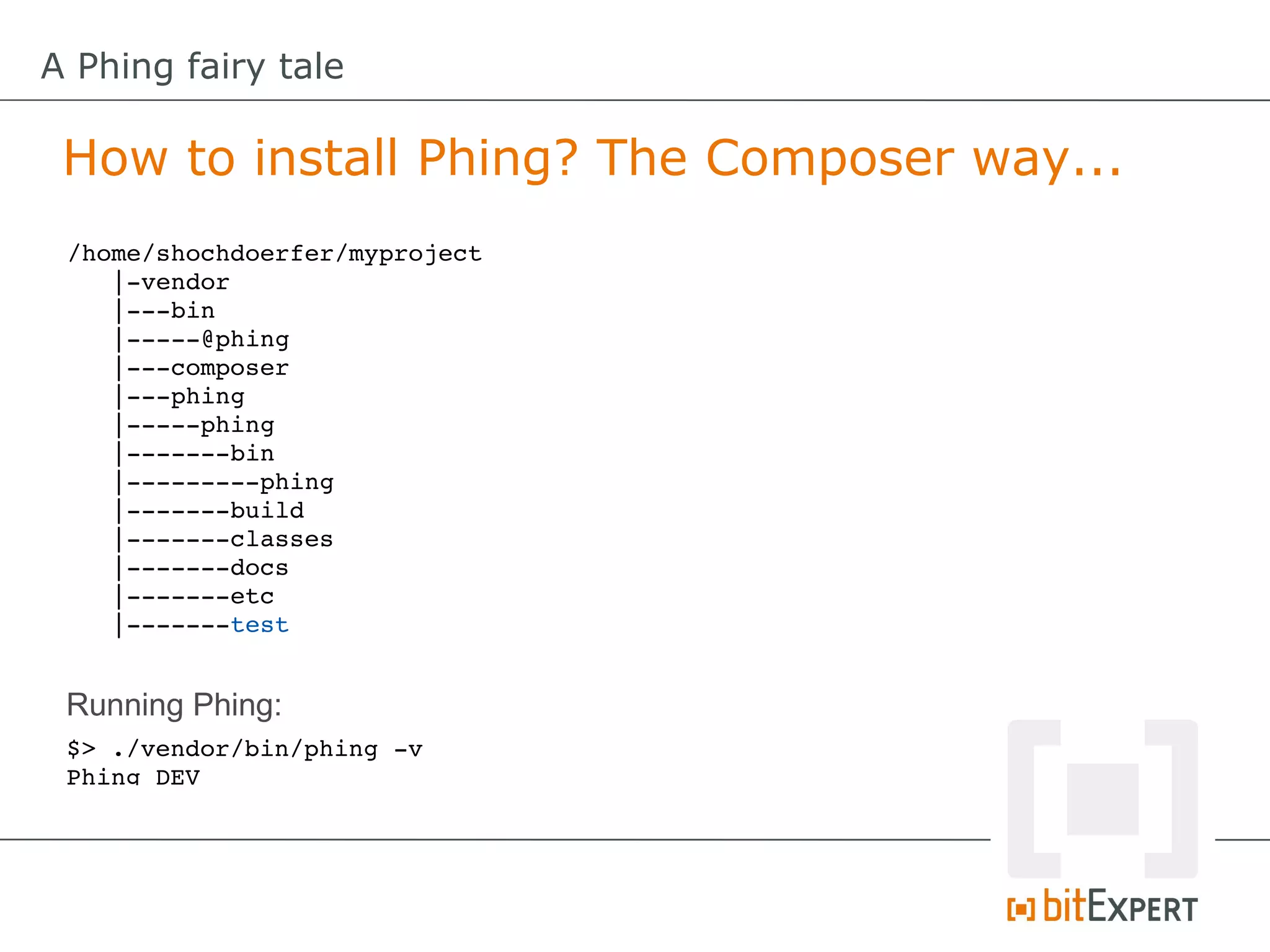
 /home/shochdoerfer/myproject
    |­vendor
    |­­­bin
    |­­­­­@phing
    |­­­composer
    |­­­phing
    |­­­­­phing
    |­­­­­­­bin
    |­­­­­­­­­phing
    |­­­­­­­build
    |­­­­­­­classes
    |­­­­­­­docs
    |­­­­­­­etc
    |­­­­­­­test
A Phing fairy tale

 How to install Phing? The Composer way...
 /home/shochdoerfer/myproject
    |­vendor
    |­­­bin
    |­­­­­@phing
    |­­­composer
    |­­­phing
    |­­­­­phing
    |­­­­­­­bin
    |­­­­­­­­­phing
    |­­­­­­­build
    |­­­­­­­classes
    |­­­­­­­docs
    |­­­­­­­etc
    |­­­­­­­test


 Running Phing:
 $> ./vendor/bin/phing ­v
 Phing DEV
A Phing fairy tale

 Phing Basics
A Phing fairy tale

 Phing Basics


       Project, Target, Task, Properties
A Phing fairy tale

 Phing Basics: Project


           Root node of a build file
        containing one or more targets.
A Phing fairy tale

 Phing Basics: Target


                A group of tasks that
                  run as an entity.
A Phing fairy tale

 Phing Basics: Task


            Custom piece of code to
           perform a specific function.
A Phing fairy tale

 Phing Basics: Properties


         Properties (Variables) help to
             customize execution.
A Phing fairy tale

 Phing Basics: Built-In Properties


          e.g. host.os, line.separator,
         phing.version, php.version, …
A Phing fairy tale

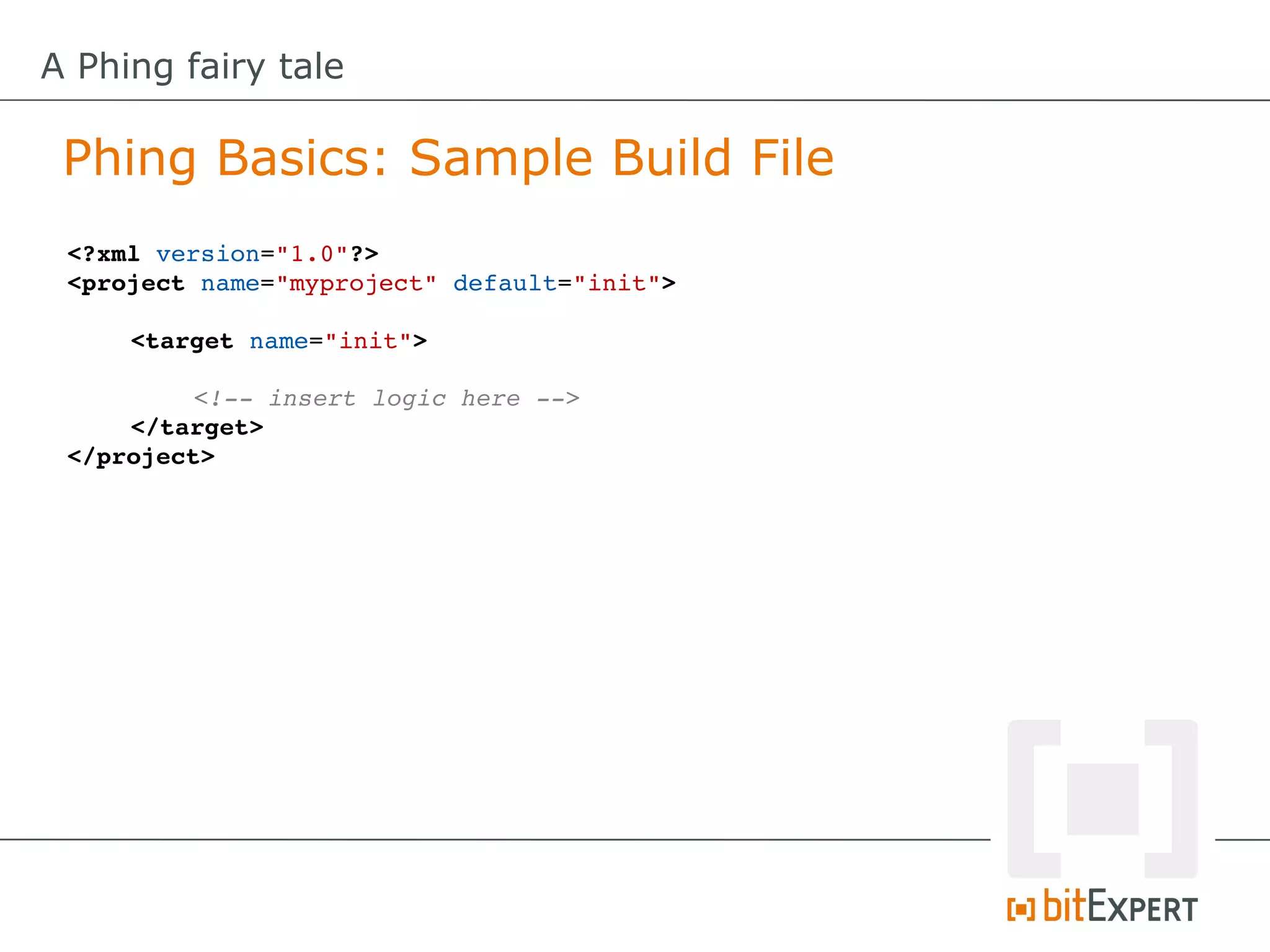
 Phing Basics: Sample Build File
 <?xml version="1.0"?>
 <project name="myproject" default="init">

     <target name="init">

          <!­­ insert logic here ­­>
     </target>
 </project>
A Phing fairy tale

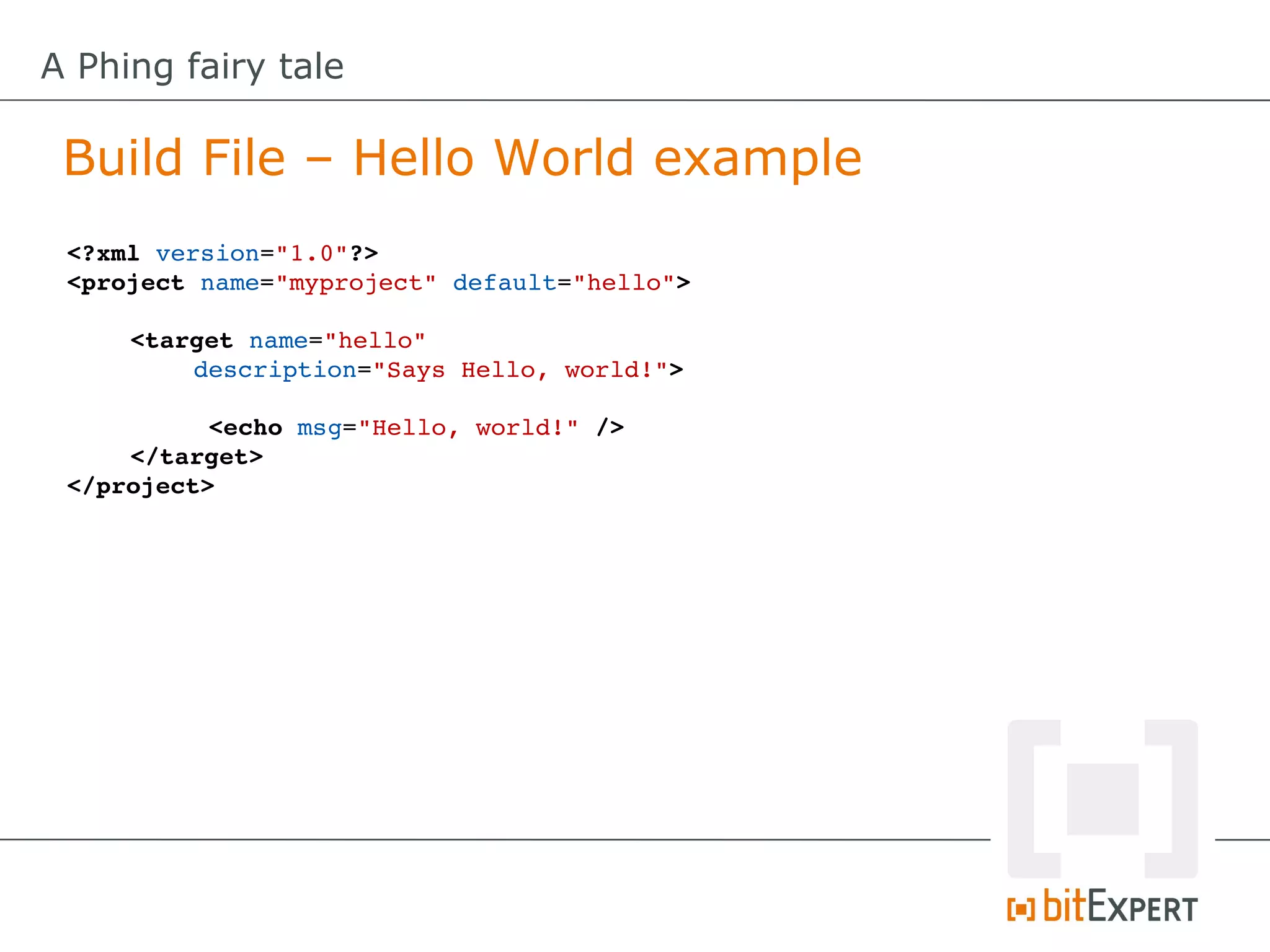
 Build File – Hello World example
 <?xml version="1.0"?>
 <project name="myproject" default="hello">

     <target name="hello" 
         description="Says Hello, world!">

           <echo msg="Hello, world!" />
     </target>
 </project>
A Phing fairy tale

 Build File – Hello World example
 <?xml version="1.0"?>
 <project name="myproject" default="hello">

     <target name="hello" 
         description="Says Hello, world!">

           <echo msg="Hello, world!" />
     </target>
 </project>


 $> phing
 Buildfile: /home/shochdoerfer/build.xml

 myproject > hello:

      [echo] Hello, world!

 BUILD FINISHED

 Total time: 0.0595 seconds
A Phing fairy tale

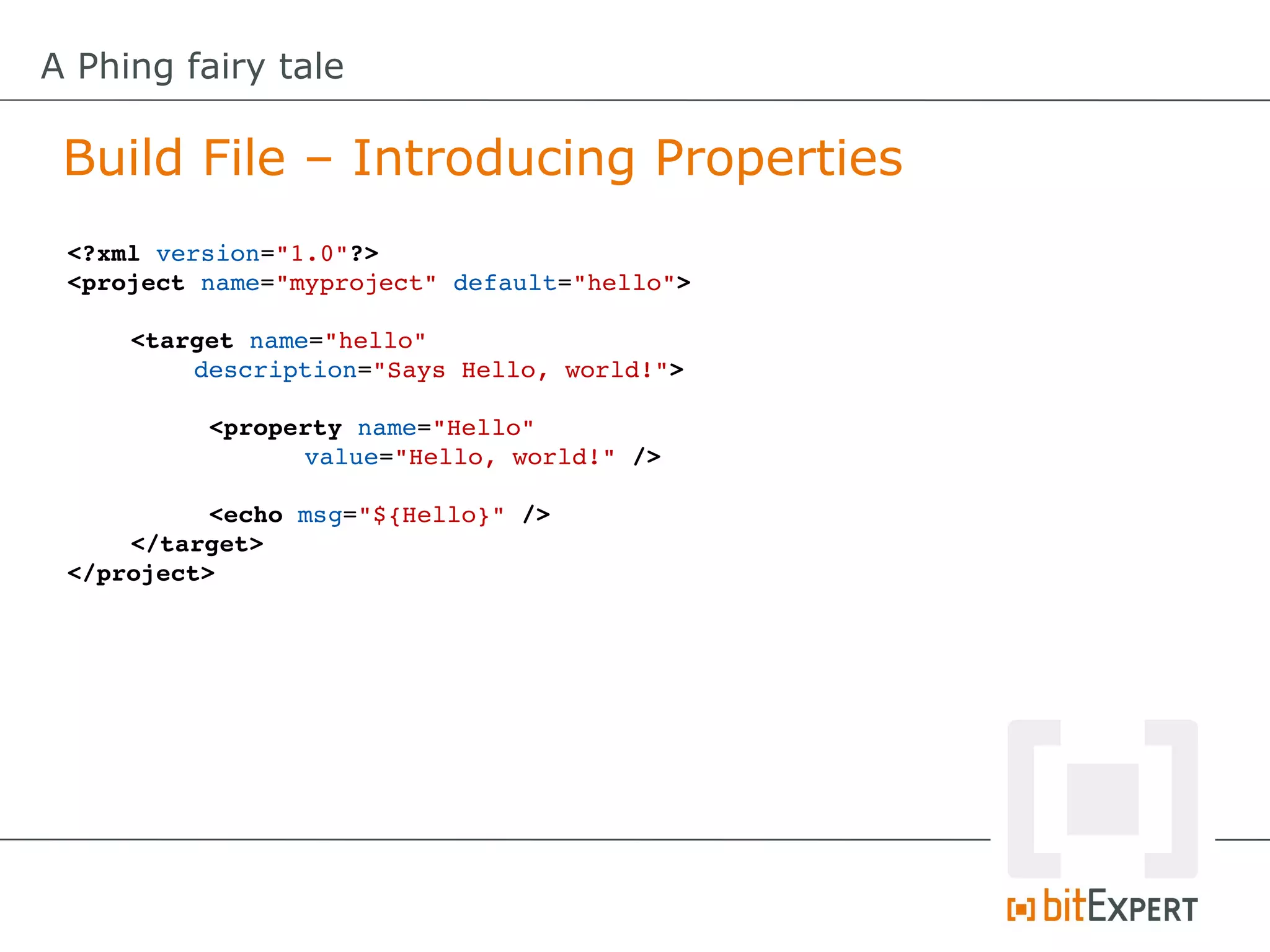
 Build File – Introducing Properties
 <?xml version="1.0"?>
 <project name="myproject" default="hello">

     <target name="hello" 
         description="Says Hello, world!">

           <property name="Hello" 
                 value="Hello, world!" />

           <echo msg="${Hello}" />
     </target>
 </project>
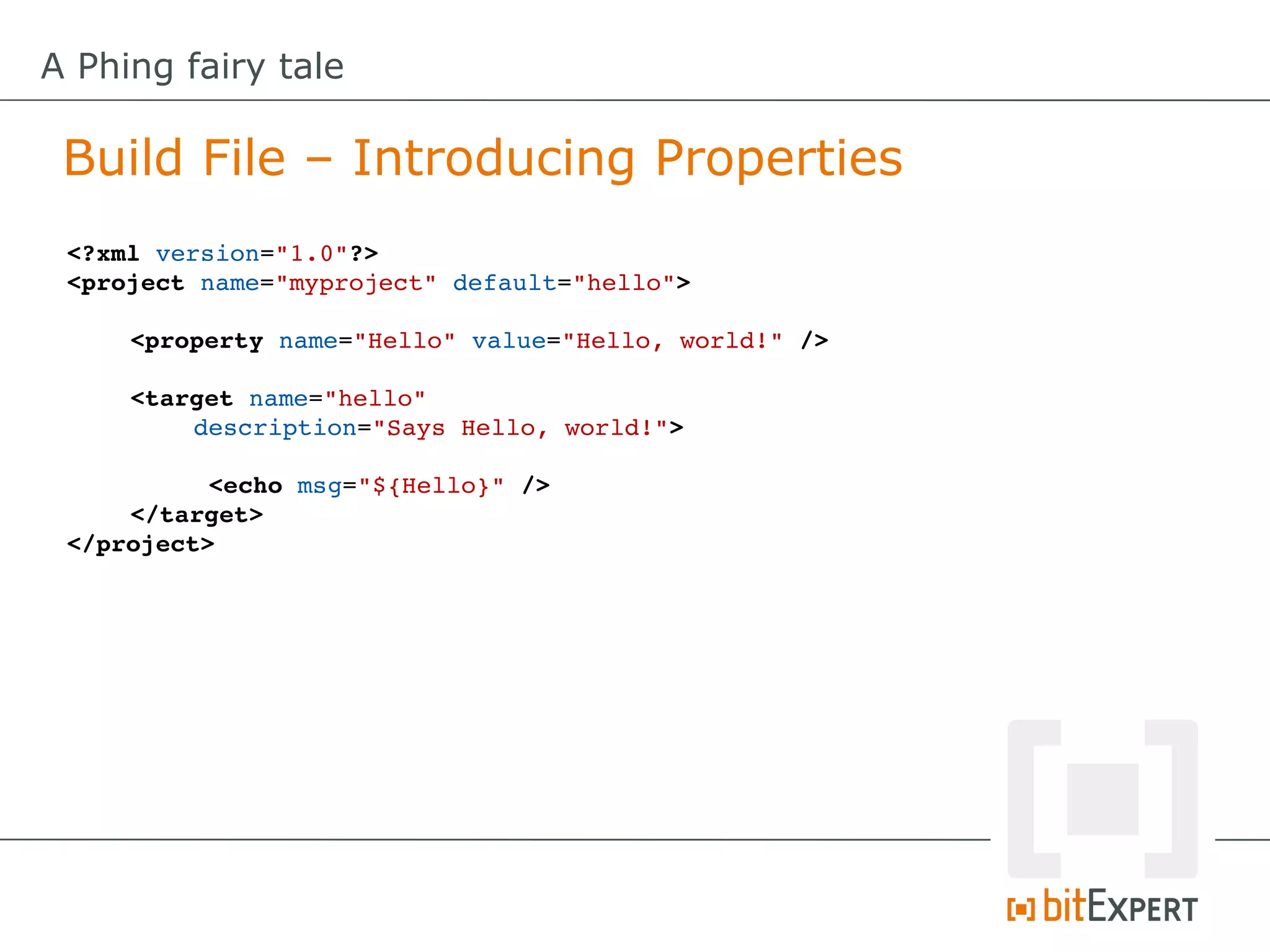
A Phing fairy tale

 Build File – Introducing Properties
 <?xml version="1.0"?>
 <project name="myproject" default="hello">

     <property name="Hello" value="Hello, world!" />
      
     <target name="hello" 
         description="Says Hello, world!">

           <echo msg="${Hello}" />
     </target>
 </project>
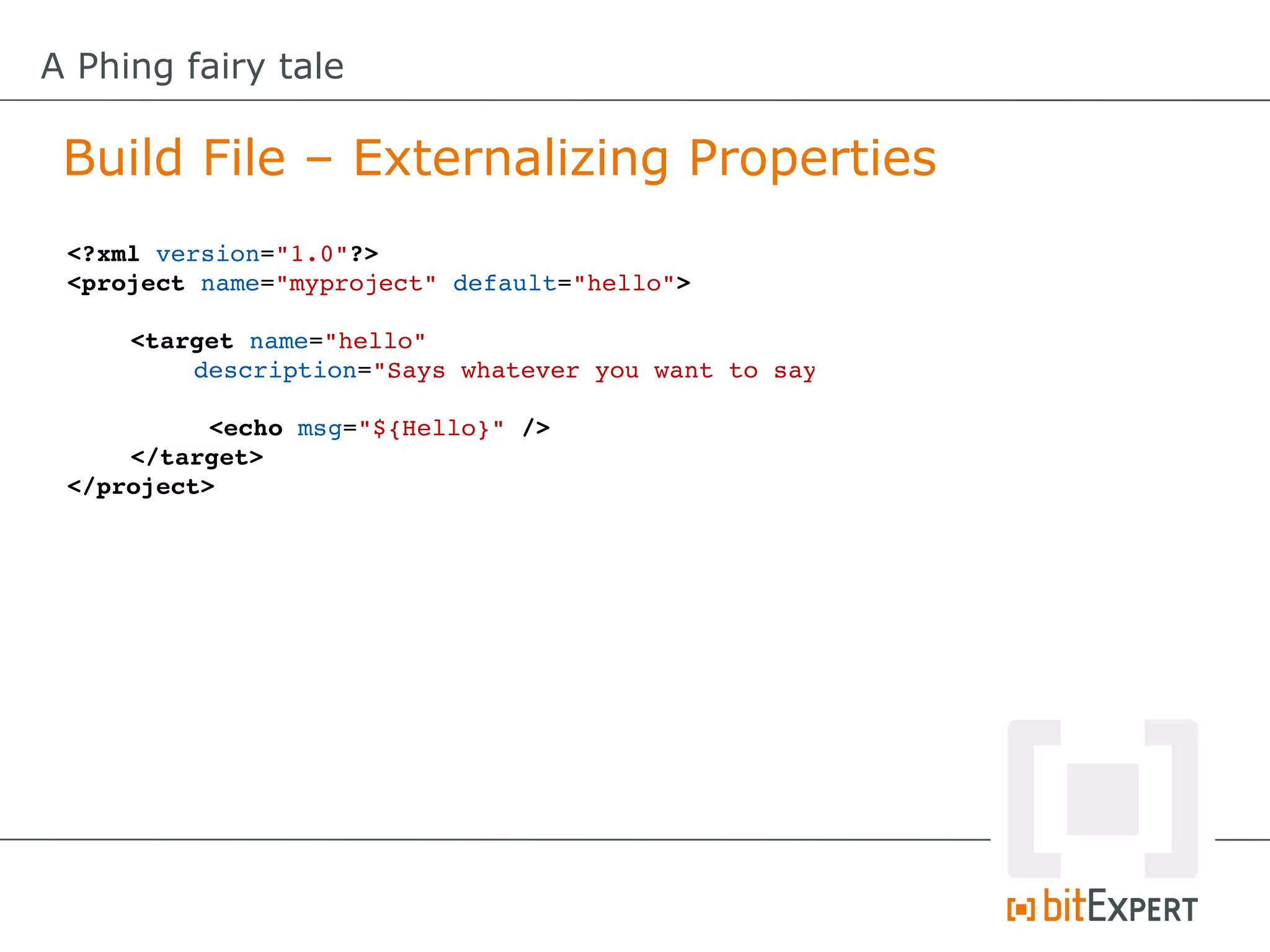
A Phing fairy tale

 Build File – Externalizing Properties
 <?xml version="1.0"?>
 <project name="myproject" default="hello">

     <target name="hello" 
         description="Says whatever you want to say"

           <echo msg="${Hello}" />
     </target>
 </project>
A Phing fairy tale

 Build File – Externalizing Properties (CLI)
 <?xml version="1.0"?>
 <project name="myproject" default="hello">

     <target name="hello" 
         description="Says whatever you want to say"

           <echo msg="${Hello}" />
     </target>
 </project>


 $> phing ­DHello="Hello from CLI"
 Buildfile: /tmp/build.xml

 myproject > hello:

      [echo] Hello from CLI

 BUILD FINISHED

 Total time: 0.0599 seconds
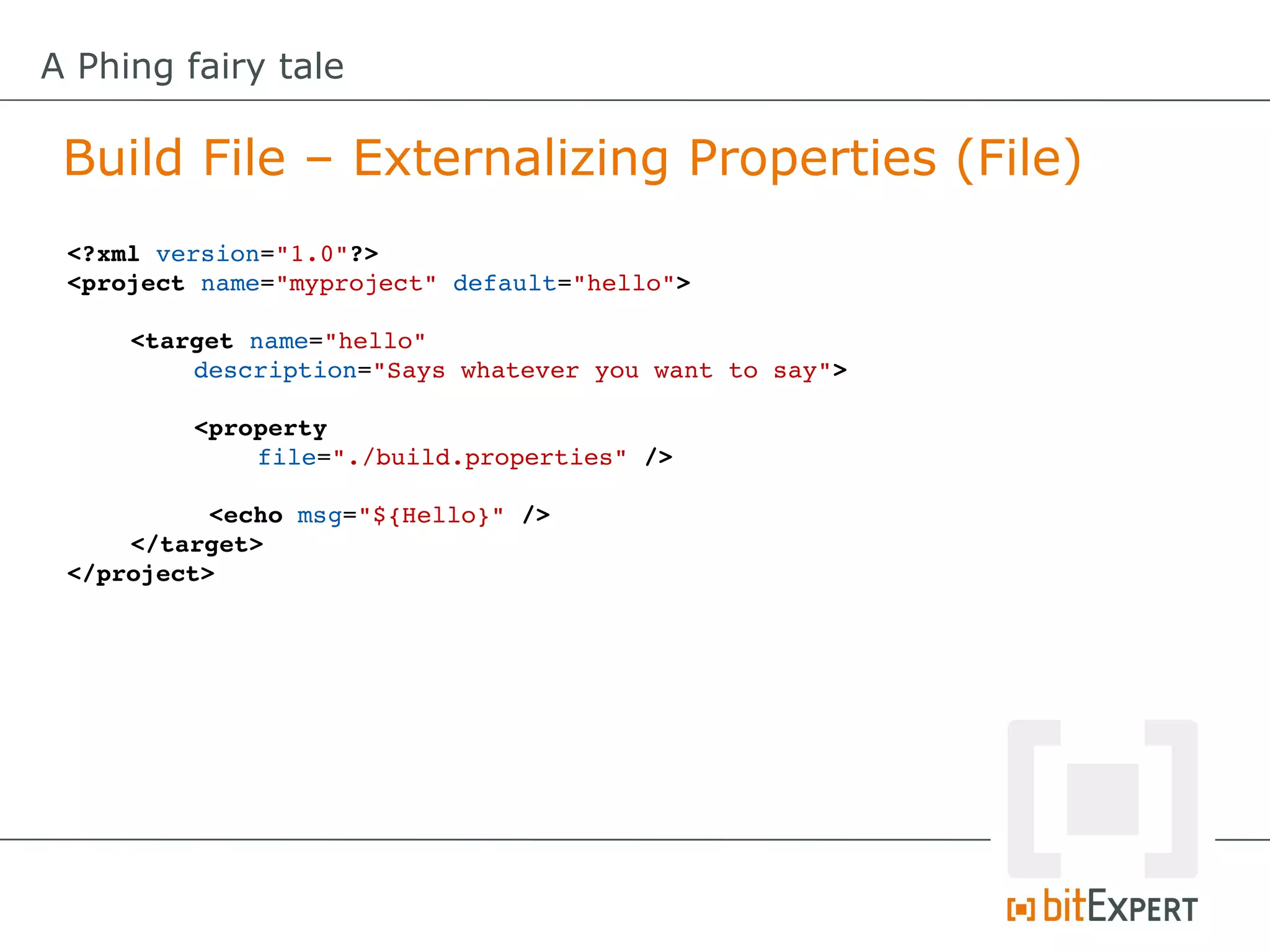
A Phing fairy tale

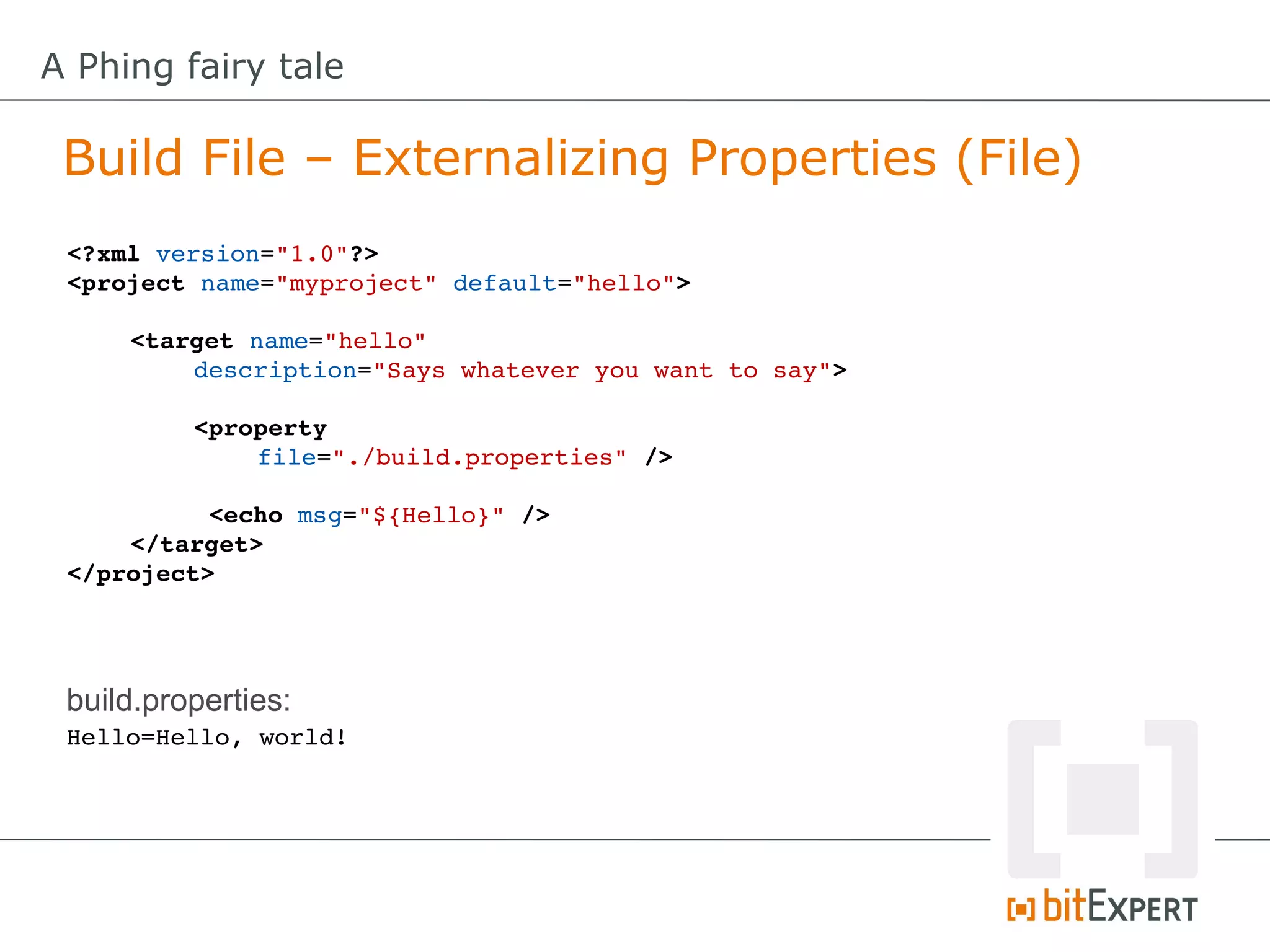
 Build File – Externalizing Properties (File)
 <?xml version="1.0"?>
 <project name="myproject" default="hello">

     <target name="hello" 
         description="Says whatever you want to say">

         <property
             file="./build.properties" />

           <echo msg="${Hello}" />
     </target>
 </project>
A Phing fairy tale

 Build File – Externalizing Properties (File)
 <?xml version="1.0"?>
 <project name="myproject" default="hello">

     <target name="hello" 
         description="Says whatever you want to say">

          <property
              file="./build.properties" />

           <echo msg="${Hello}" />
     </target>
 </project>


 build.properties:
 Hello=Hello, world!
A Phing fairy tale

 Build File – Externalizing Properties (File)
 $> phing
 Buildfile: /home/shochdoerfer/build.xml

 myproject > hello:

  [property] Loading /home/shochdoerfer/build.properties
      [echo] Hello, world!

 BUILD FINISHED

 Total time: 0.0601 seconds
A Phing fairy tale

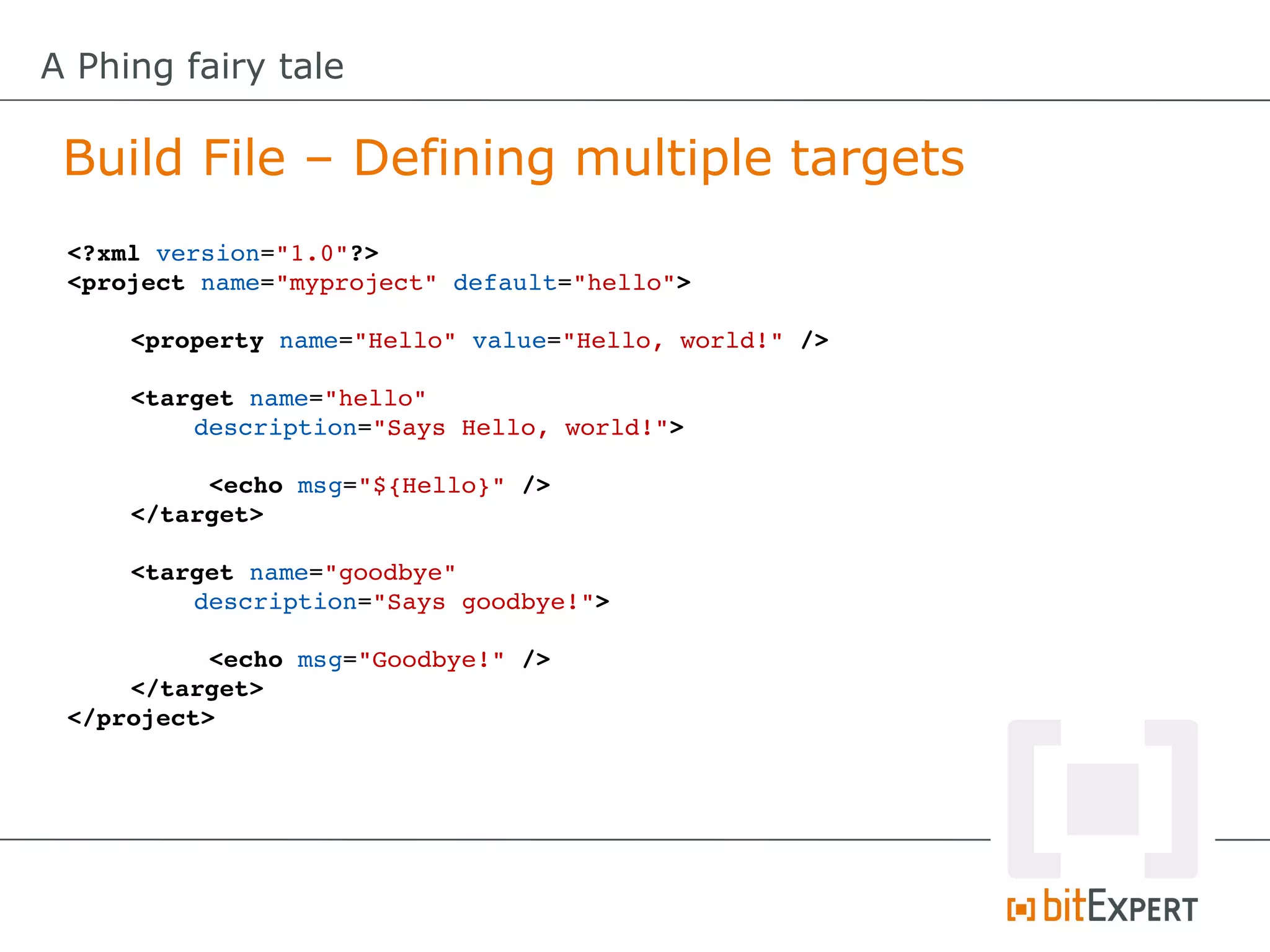
 Build File – Defining multiple targets
 <?xml version="1.0"?>
 <project name="myproject" default="hello">

     <property name="Hello" value="Hello, world!" />
      
     <target name="hello" 
         description="Says Hello, world!">

          <echo msg="${Hello}" />
     </target>

     <target name="goodbye" 
         description="Says goodbye!">

           <echo msg="Goodbye!" />
     </target>
 </project>
A Phing fairy tale

 Build File – Defining multiple targets
 $> phing hello
 Buildfile: /tmp/build.xml

 myproject > hello:

      [echo] Hello, world!

 BUILD FINISHED

 Total time: 0.0612 seconds
A Phing fairy tale

 Build File – Defining multiple targets
 $> phing hello
 Buildfile: /tmp/build.xml

 myproject > hello:

      [echo] Hello, world!

 BUILD FINISHED

 Total time: 0.0612 seconds

 $> phing goodbye
 Buildfile: /tmp/build.xml

 myproject > goodbye:

      [echo] Goodbye!

 BUILD FINISHED

 Total time: 0.0619 seconds
A Phing fairy tale

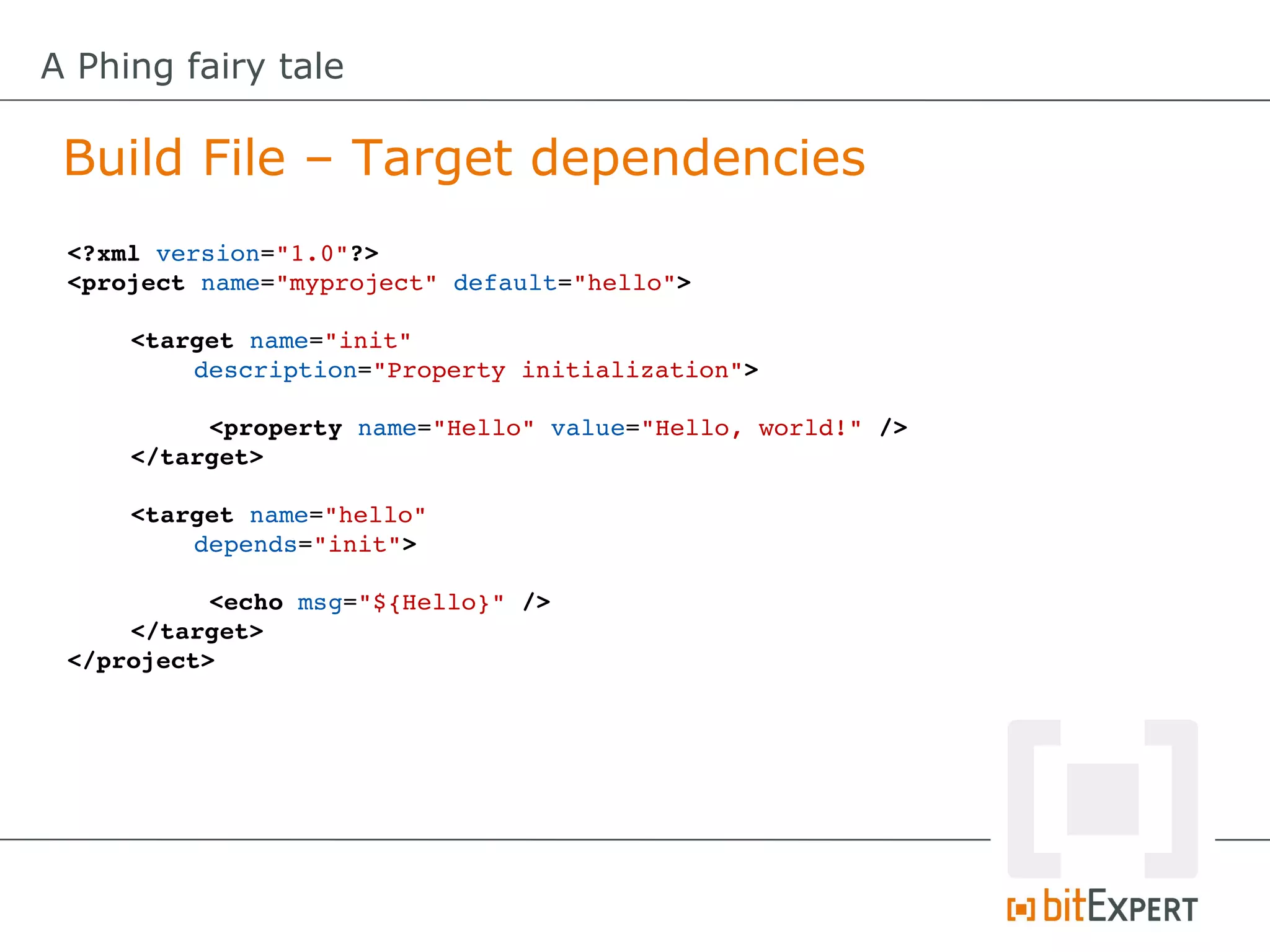
 Build File – Target dependencies
 <?xml version="1.0"?>
 <project name="myproject" default="hello">

     <target name="init" 
         description="Property initialization">

          <property name="Hello" value="Hello, world!" />
     </target>

     <target name="hello" 
         depends="init">

           <echo msg="${Hello}" />
     </target>
 </project>
A Phing fairy tale

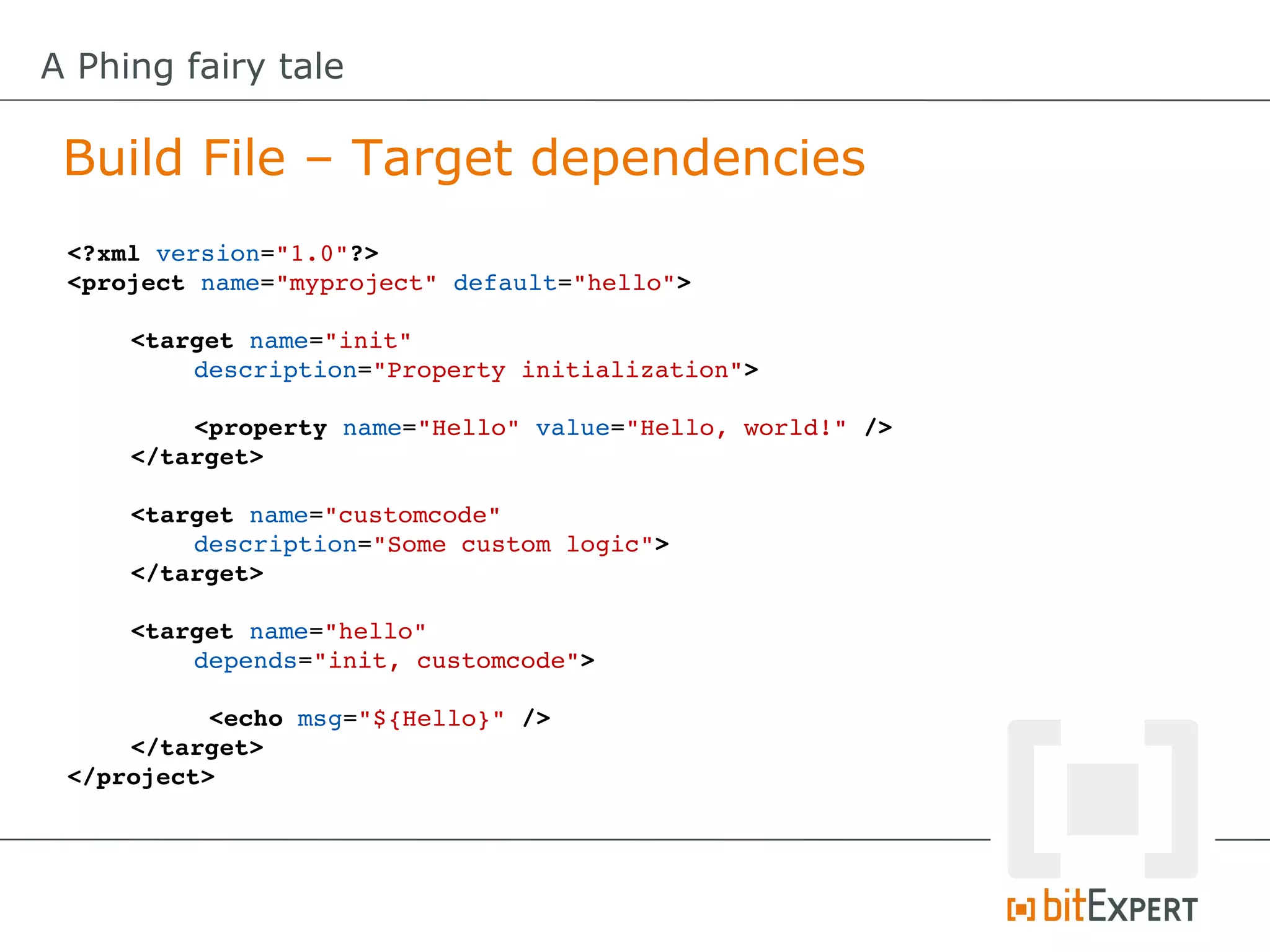
 Build File – Target dependencies
 <?xml version="1.0"?>
 <project name="myproject" default="hello">

     <target name="init" 
         description="Property initialization">

         <property name="Hello" value="Hello, world!" />
     </target>

     <target name="customcode" 
         description="Some custom logic">
     </target>

     <target name="hello" 
         depends="init, customcode">

           <echo msg="${Hello}" />
     </target>
 </project>
A Phing fairy tale

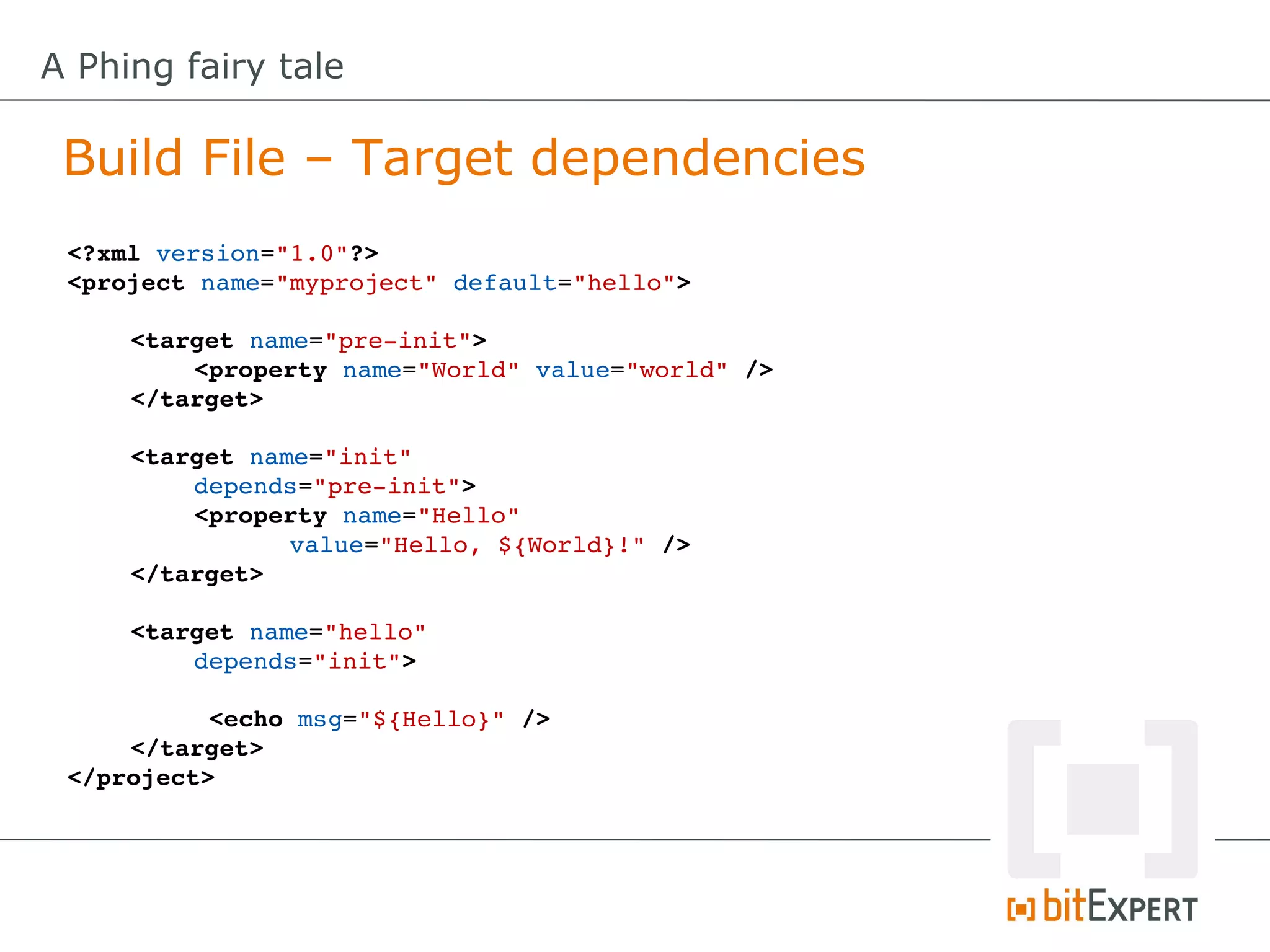
 Build File – Target dependencies
 <?xml version="1.0"?>
 <project name="myproject" default="hello">

     <target name="pre­init">
         <property name="World" value="world" />
     </target>

     <target name="init" 
          depends="pre­init">
          <property name="Hello" 
                value="Hello, ${World}!" />
     </target>

     <target name="hello" 
         depends="init">

           <echo msg="${Hello}" />
     </target>
 </project>
A Phing fairy tale

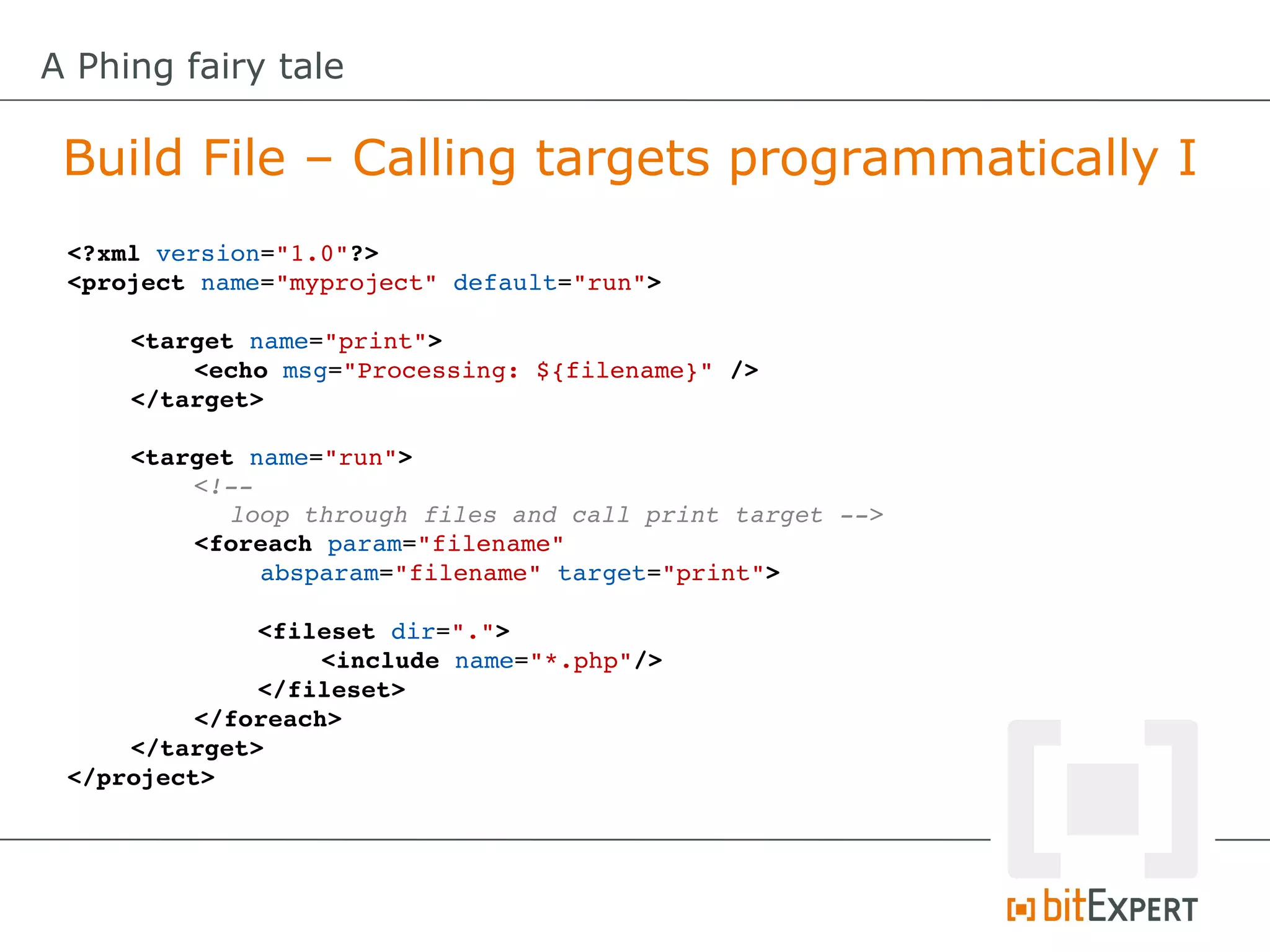
 Build File – Calling targets programmatically I
 <?xml version="1.0"?>
 <project name="myproject" default="run">

     <target name="print">
         <echo msg="Processing: ${filename}" />
     </target>

     <target name="run">
          <!­­ 
            loop through files and call print target ­­>
          <foreach param="filename" 
              absparam="filename" target="print">

              <fileset dir=".">
                   <include name="*.php"/>
              </fileset>
          </foreach>
     </target>
 </project>
A Phing fairy tale

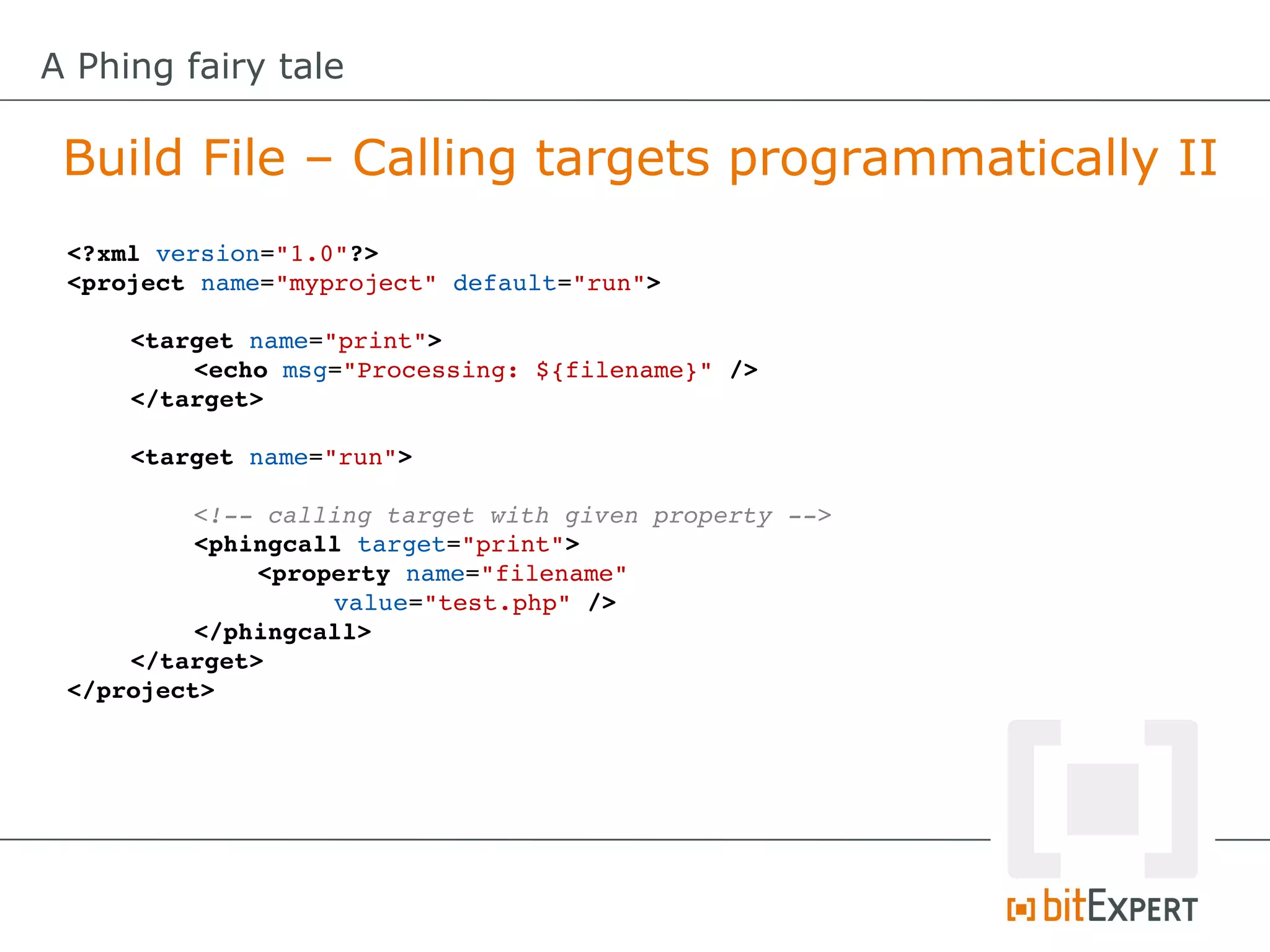
 Build File – Calling targets programmatically II
 <?xml version="1.0"?>
 <project name="myproject" default="run">

     <target name="print">
         <echo msg="Processing: ${filename}" />
     </target>

     <target name="run">

          <!­­ calling target with given property ­­>
          <phingcall target="print">
              <property name="filename" 
                   value="test.php" />
          </phingcall>
     </target>
 </project>
A Phing fairy tale

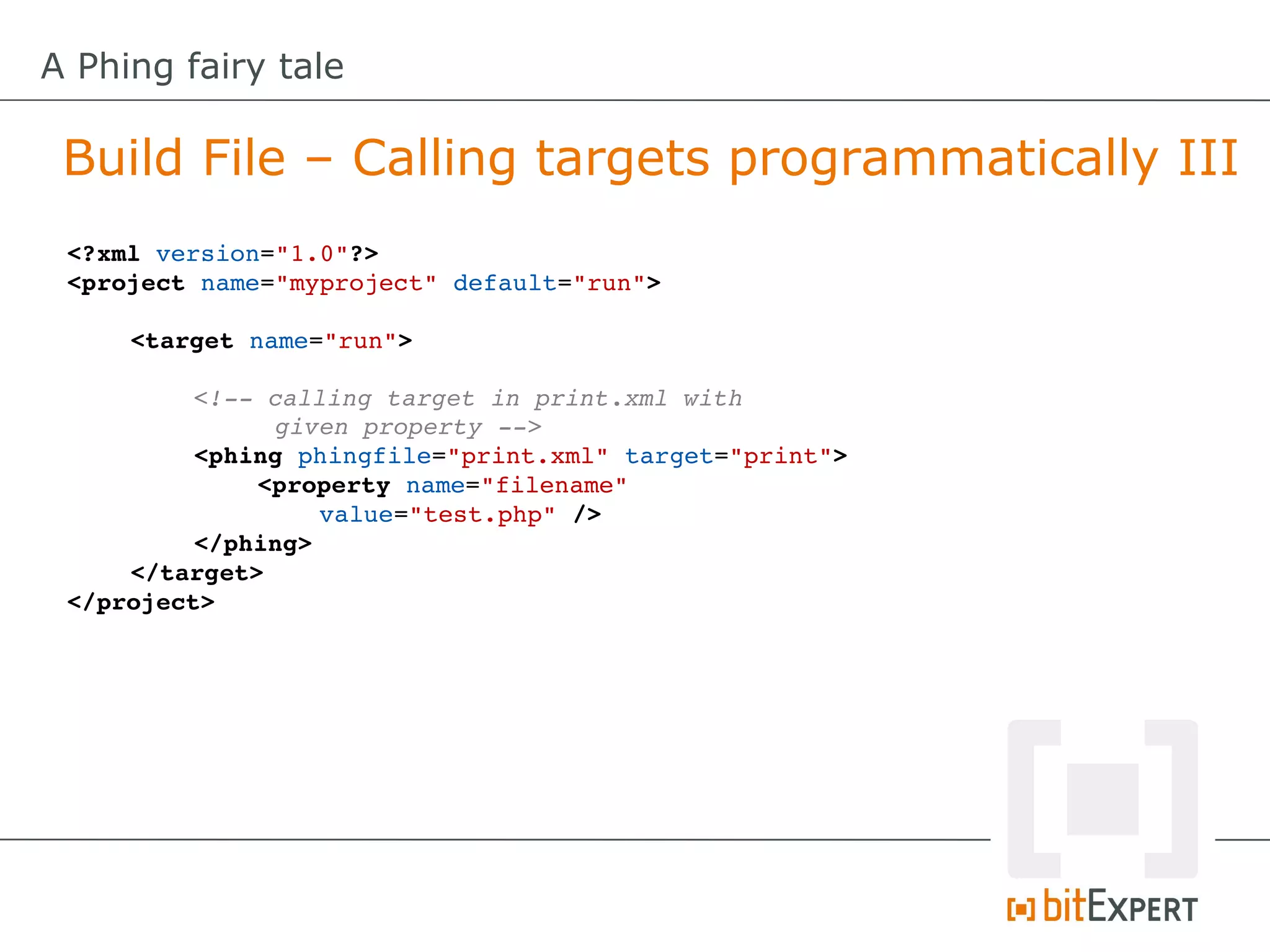
 Build File – Calling targets programmatically III
 <?xml version="1.0"?>
 <project name="myproject" default="run">

     <target name="run">

          <!­­ calling target in print.xml with 
               given property ­­>
          <phing phingfile="print.xml" target="print">
              <property name="filename" 
                  value="test.php" />
          </phing>
     </target>
 </project>
A Phing fairy tale

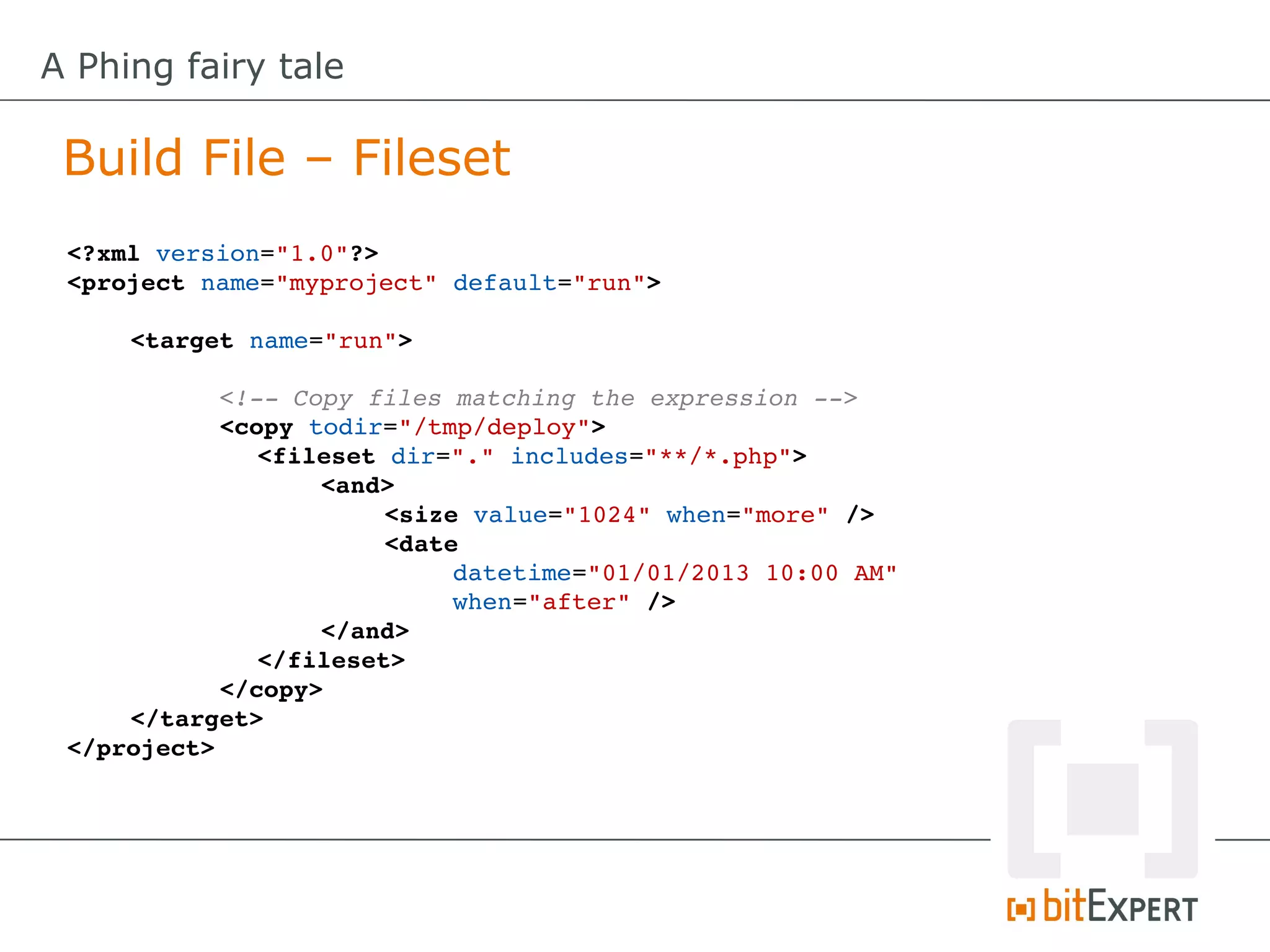
 Build File – Fileset
 <?xml version="1.0"?>
 <project name="myproject" default="run">

     <target name="run">

           <!­­ Copy files matching the expression ­­>
           <copy todir="/tmp/deploy">
              <fileset dir="." includes="**/*.php">
                  <and>
                       <size value="1024" when="more" />
                       <date 
                           datetime="01/01/2013 10:00 AM" 
                           when="after" />
                  </and>
              </fileset>
           </copy>
     </target>
 </project>
A Phing fairy tale

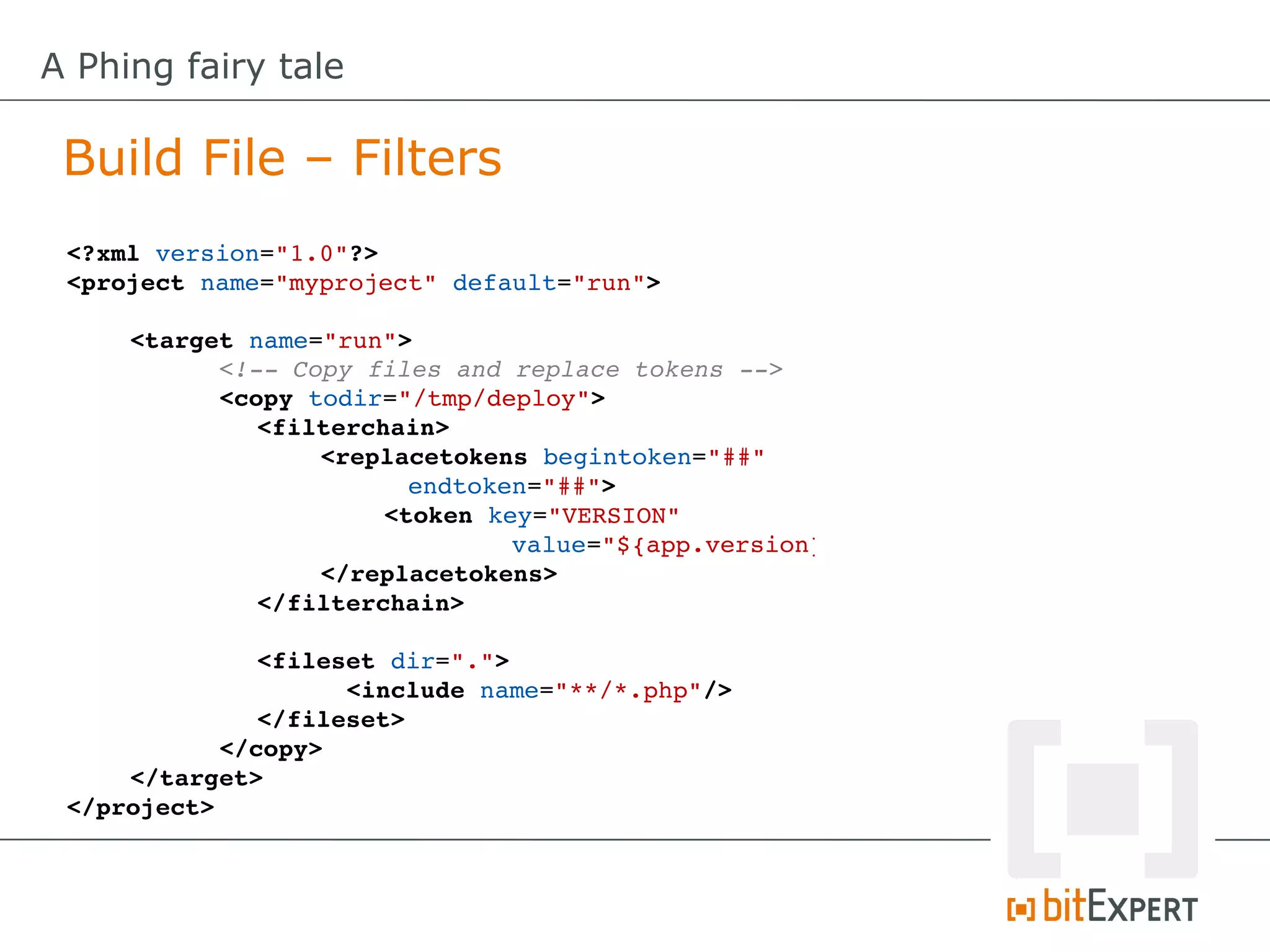
 Build File – Filters
 <?xml version="1.0"?>
 <project name="myproject" default="run">

     <target name="run">
           <!­­ Copy files and replace tokens ­­>
           <copy todir="/tmp/deploy">
              <filterchain>
                  <replacetokens begintoken="##"
                        endtoken="##">
                       <token key="VERSION" 
                               value="${app.version}"
                  </replacetokens>
              </filterchain>

              <fileset dir=".">
                    <include name="**/*.php"/>
              </fileset>
           </copy>
     </target>
 </project>
A Phing fairy tale

 Phing – What can it do for me?
A Phing fairy tale

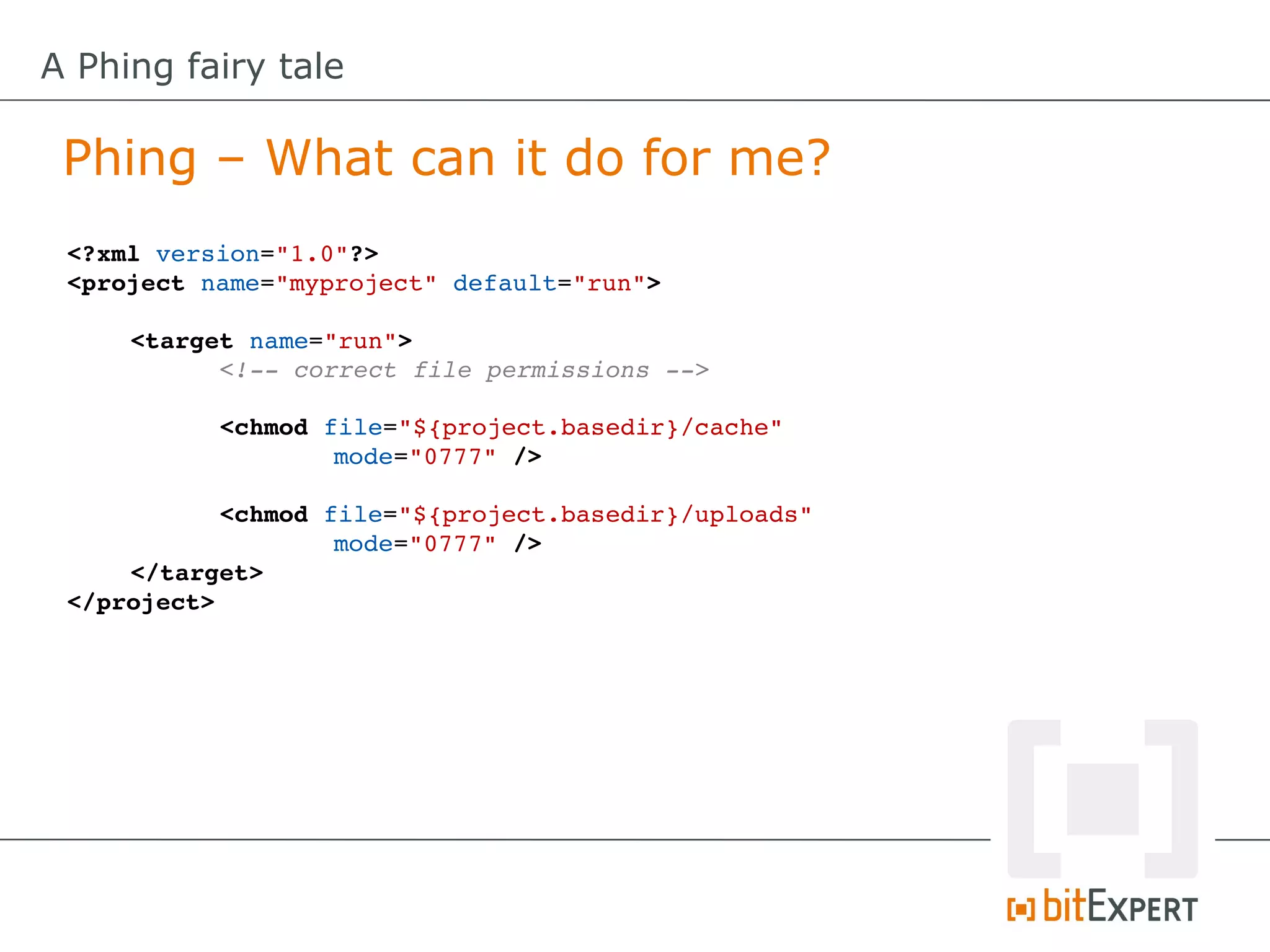
 Phing – What can it do for me?
 <?xml version="1.0"?>
 <project name="myproject" default="run">

     <target name="run">
           <!­­ correct file permissions ­­>
           
           <chmod file="${project.basedir}/cache" 
                   mode="0777" />
           
           <chmod file="${project.basedir}/uploads" 
                   mode="0777" />
     </target>
 </project>
A Phing fairy tale

 Phing – What can it do for me?
 <?xml version="1.0"?>
 <project name="myproject" default="run">

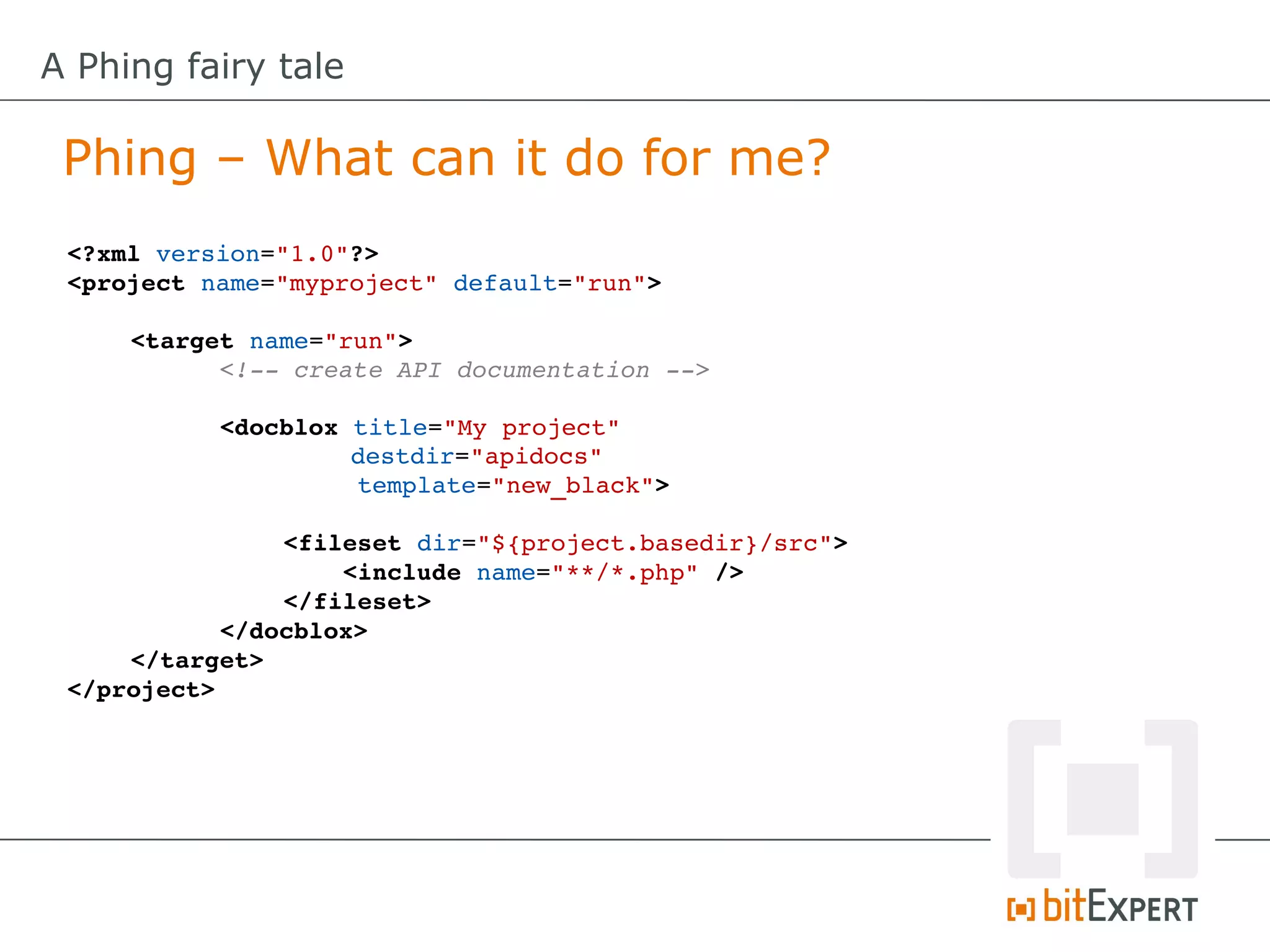
     <target name="run">
           <!­­ create API documentation ­­>
           
           <docblox title="My project"
                     destdir="apidocs"
                     template="new_black">

                <fileset dir="${project.basedir}/src">
                    <include name="**/*.php" />
                </fileset>
           </docblox>
     </target>
 </project>
A Phing fairy tale

 Phing – What can it do for me?
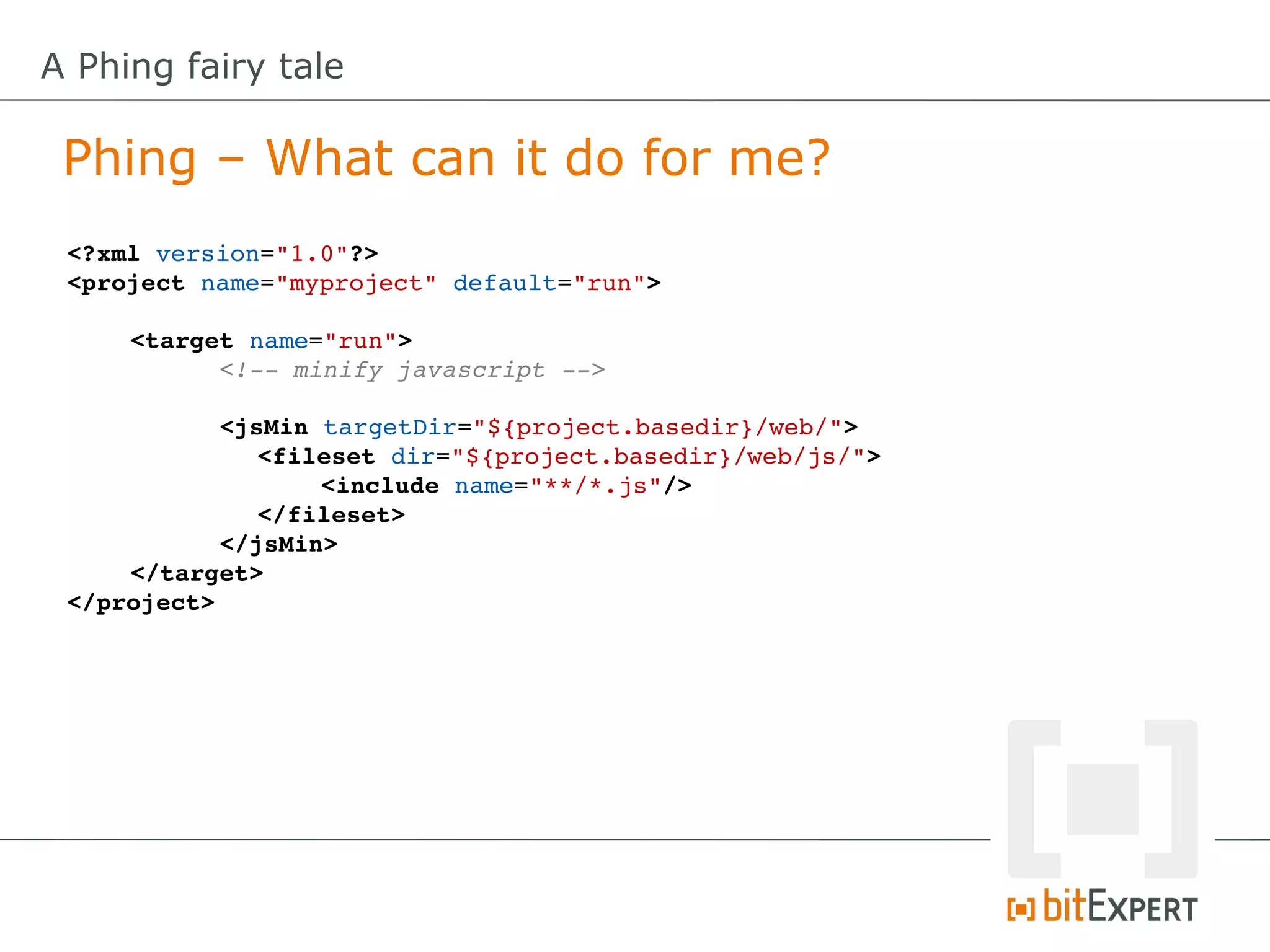
 <?xml version="1.0"?>
 <project name="myproject" default="run">

     <target name="run">
           <!­­ minify javascript ­­>

           <jsMin targetDir="${project.basedir}/web/">
              <fileset dir="${project.basedir}/web/js/">
                  <include name="**/*.js"/>
              </fileset>
           </jsMin>
     </target>
 </project>
A Phing fairy tale

 Phing – What can it do for me?
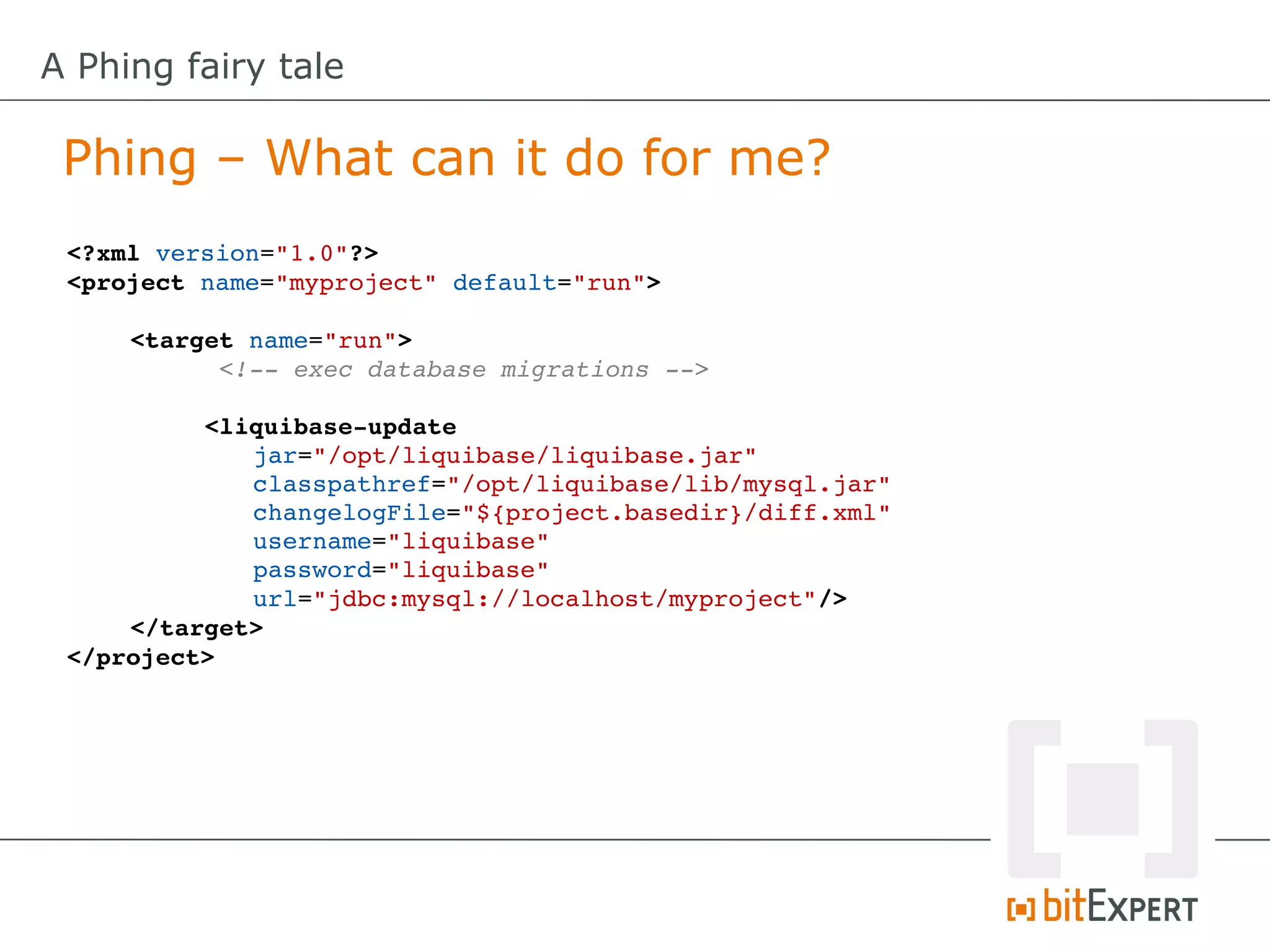
 <?xml version="1.0"?>
 <project name="myproject" default="run">

     <target name="run">
           <!­­ exec database migrations ­­>

          <liquibase­update
              jar="/opt/liquibase/liquibase.jar"
              classpathref="/opt/liquibase/lib/mysql.jar"
              changelogFile="${project.basedir}/diff.xml"
              username="liquibase"
              password="liquibase"
              url="jdbc:mysql://localhost/myproject"/>
     </target>
 </project>
A Phing fairy tale

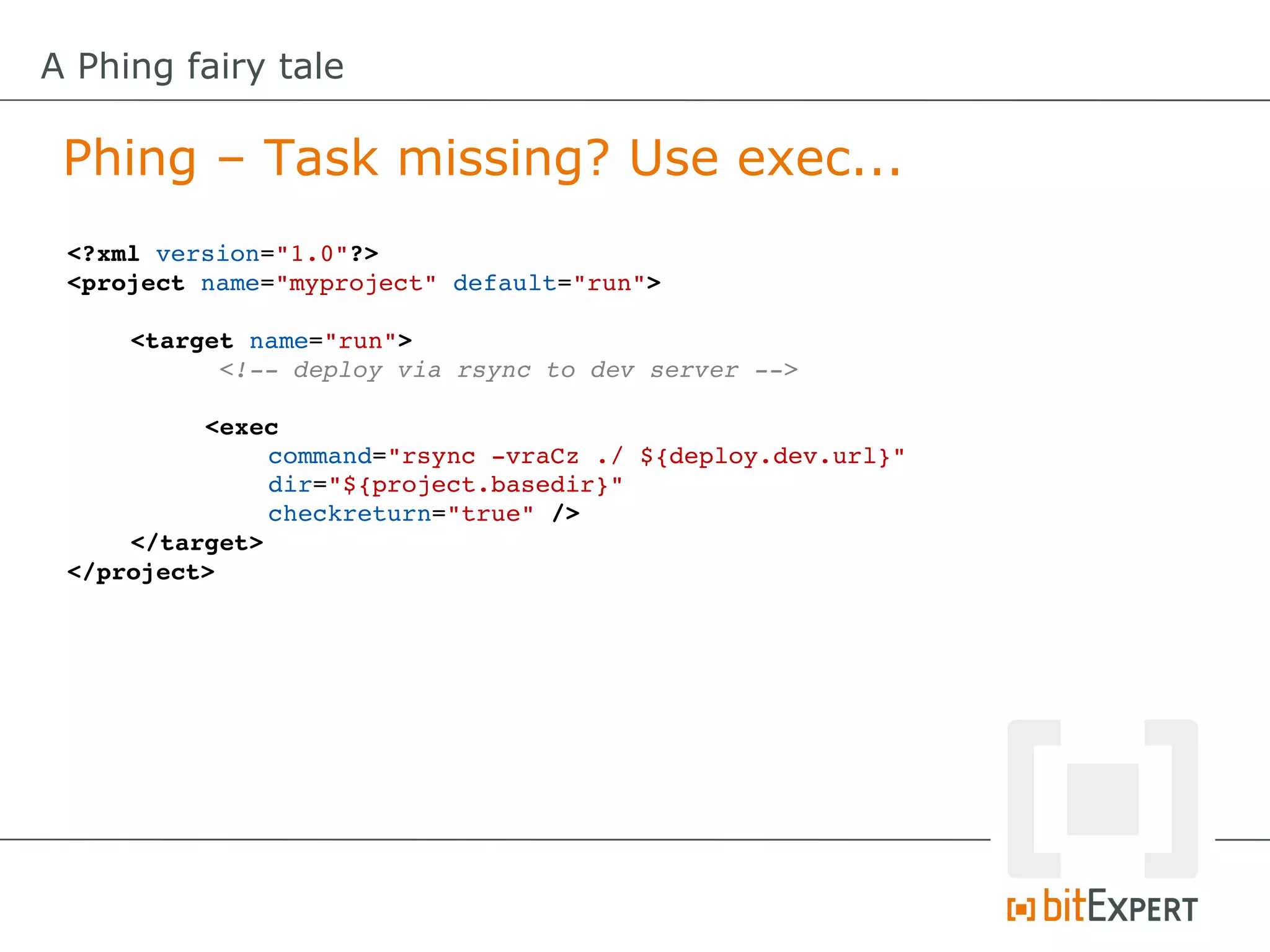
 Phing – Task missing? Use exec...
 <?xml version="1.0"?>
 <project name="myproject" default="run">

     <target name="run">
           <!­­ deploy via rsync to dev server ­­>

          <exec
               command="rsync ­vraCz ./ ${deploy.dev.url}"
               dir="${project.basedir}"
               checkreturn="true" />
     </target>
 </project>
A Phing fairy tale

 Build File – Advanced usage
A Phing fairy tale

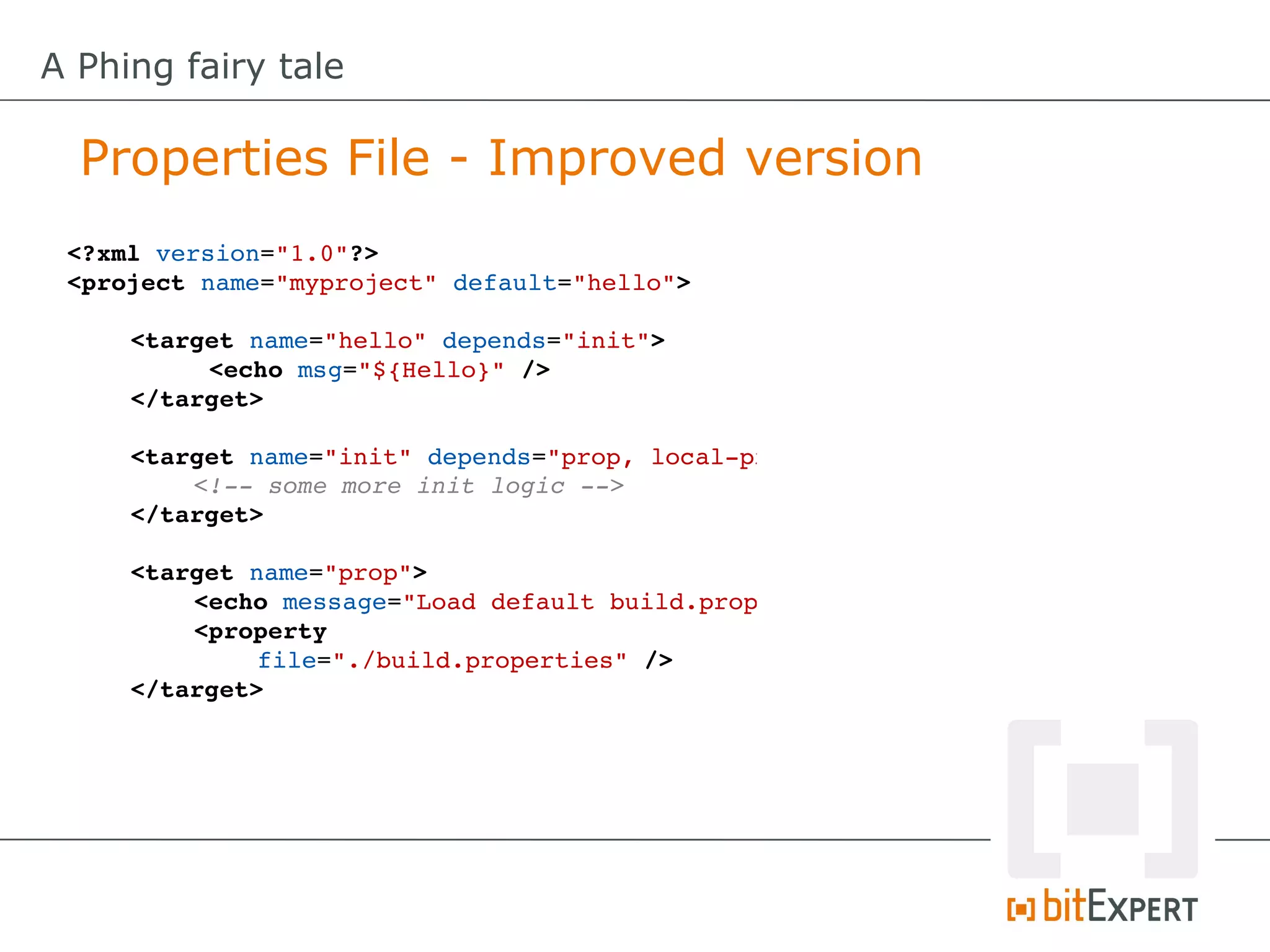
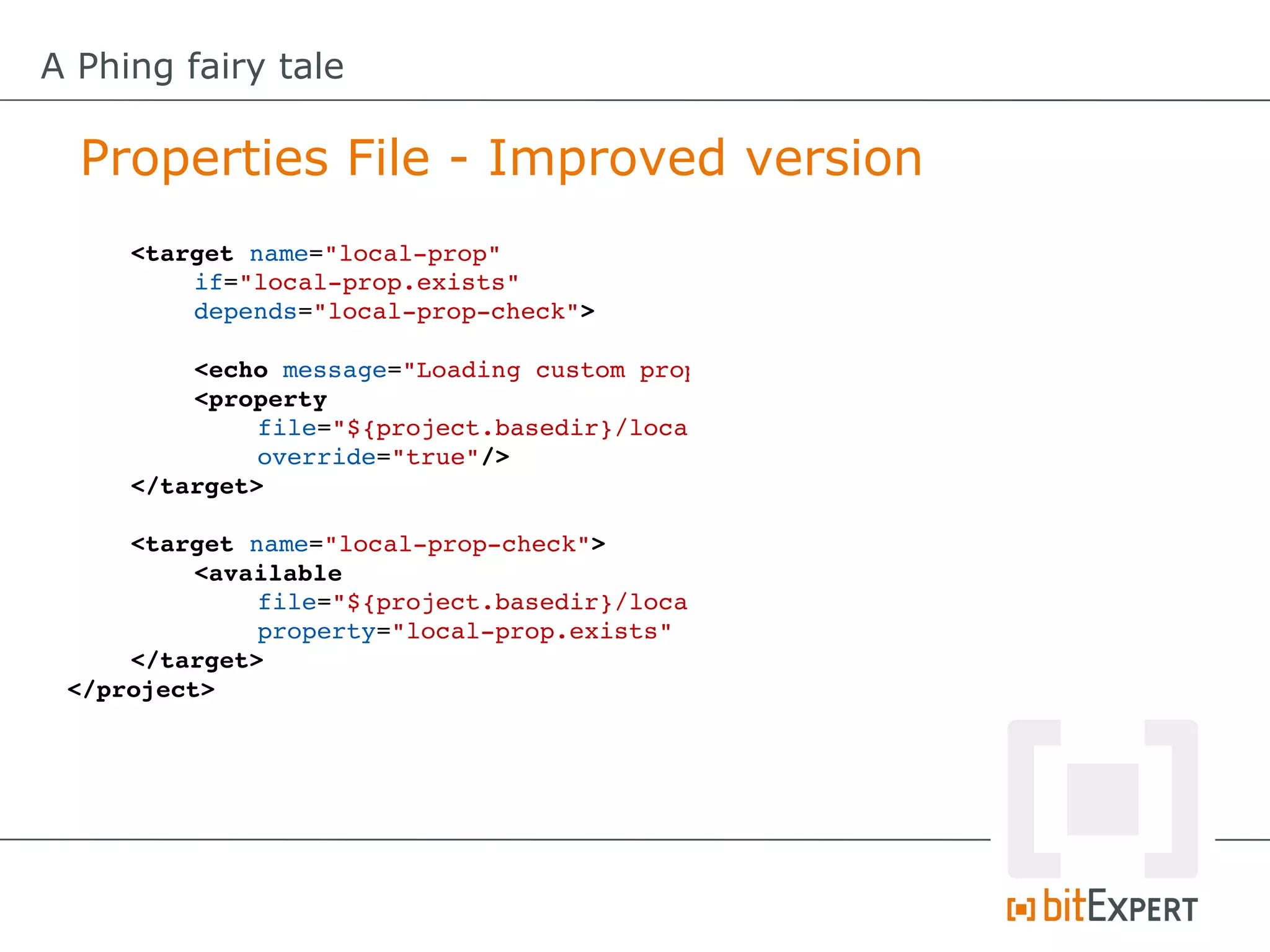
  Properties File - Improved version
 <?xml version="1.0"?>
 <project name="myproject" default="hello">

     <target name="hello" depends="init">
          <echo msg="${Hello}" />
     </target>

     <target name="init" depends="prop, local­prop"
         <!­­ some more init logic ­­>
     </target>

     <target name="prop">
         <echo message="Load default build.properties"
         <property
              file="./build.properties" />
     </target>
A Phing fairy tale

  Properties File - Improved version
     <target name="local­prop"
         if="local­prop.exists"
         depends="local­prop­check">

         <echo message="Loading custom properties!"
         <property
              file="${project.basedir}/local.properties"
              override="true"/>
     </target>

     <target name="local­prop­check">
          <available
              file="${project.basedir}/local.properties"
              property="local­prop.exists" />
     </target>
 </project>
A Phing fairy tale

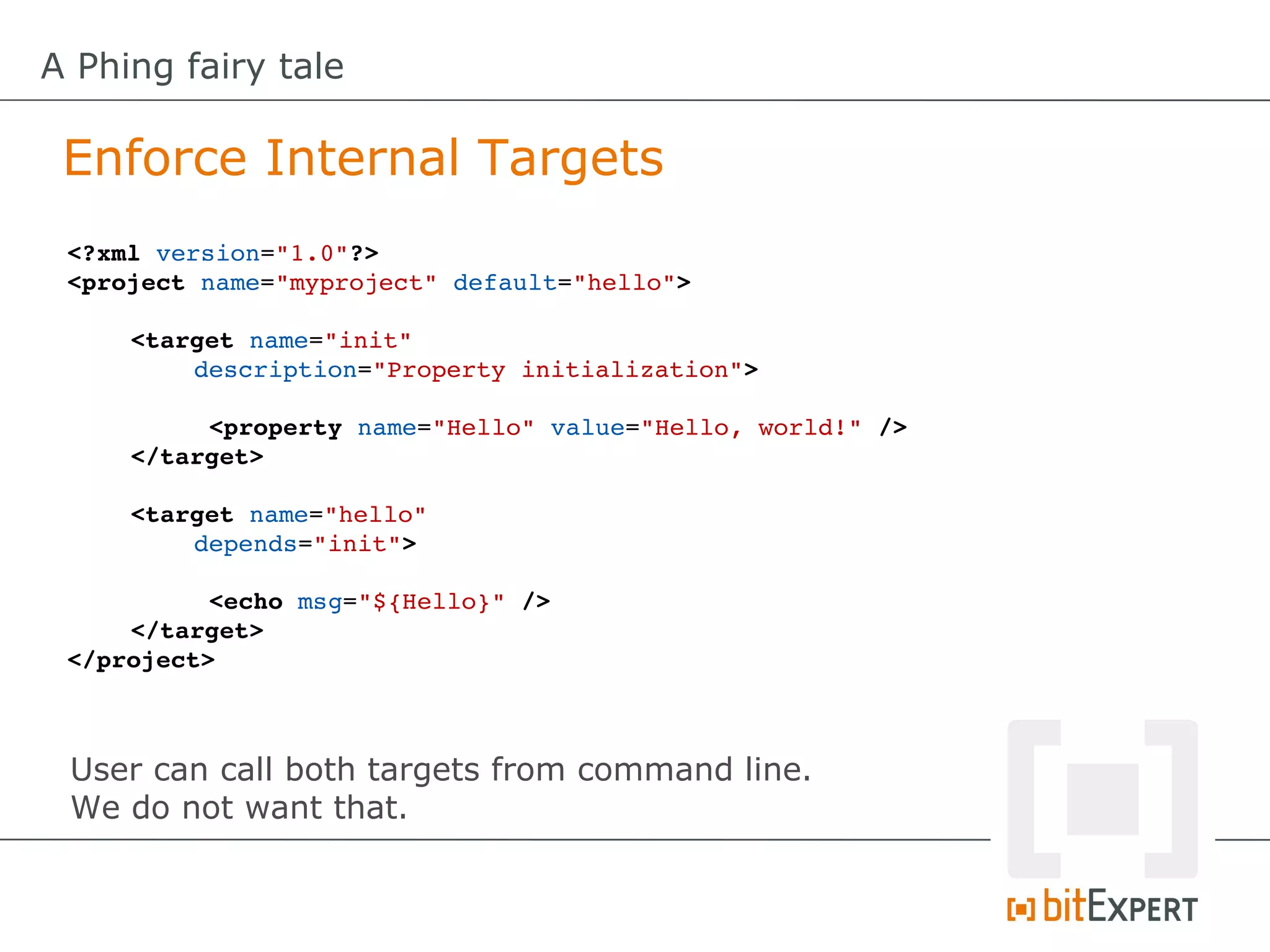
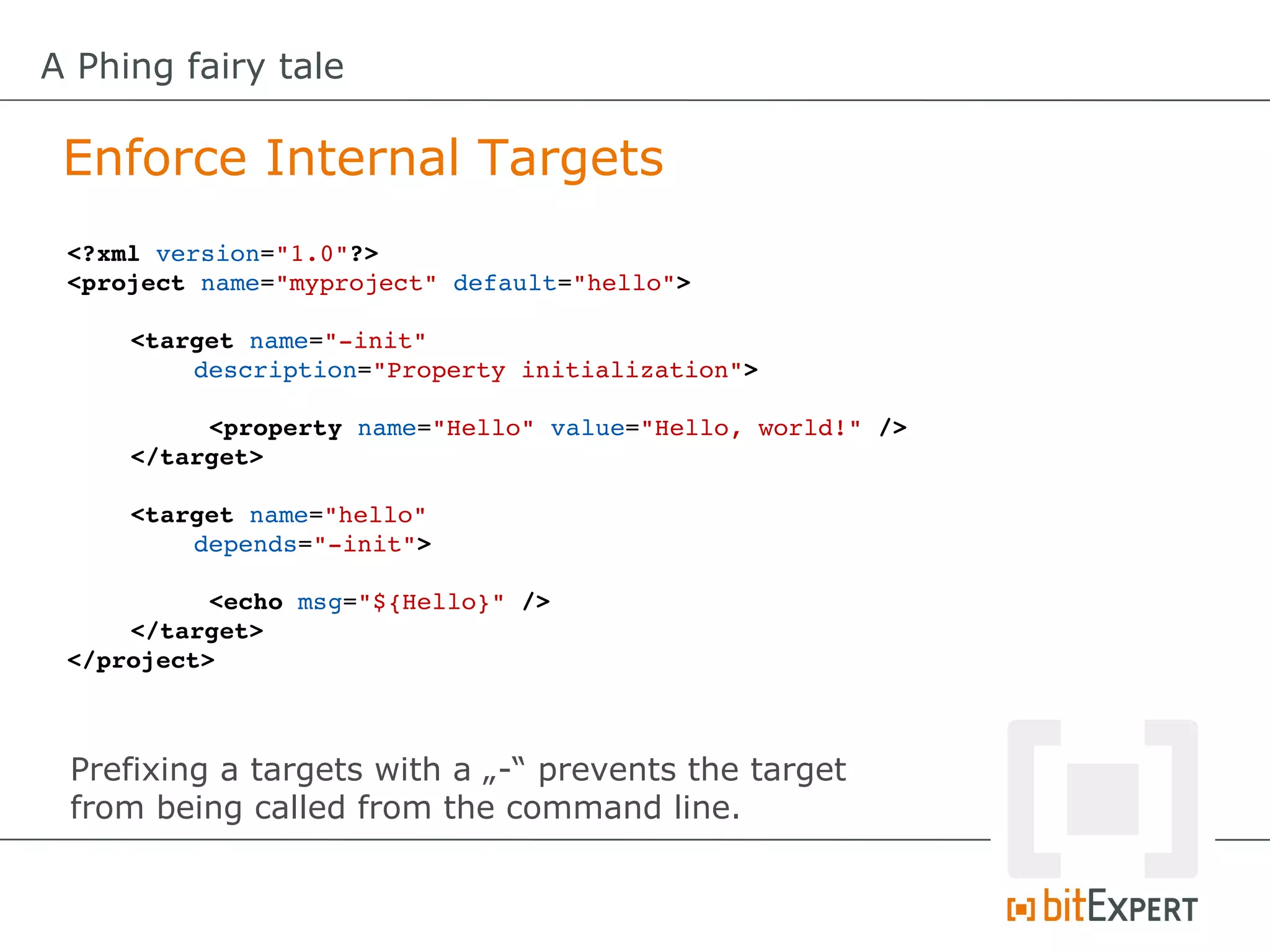
 Enforce Internal Targets
 <?xml version="1.0"?>
 <project name="myproject" default="hello">

     <target name="init" 
         description="Property initialization">

          <property name="Hello" value="Hello, world!" />
     </target>

     <target name="hello" 
         depends="init">

           <echo msg="${Hello}" />
     </target>
 </project>


 User can call both targets from command line.
 We do not want that.
A Phing fairy tale

 Enforce Internal Targets
 <?xml version="1.0"?>
 <project name="myproject" default="hello">

     <target name="­init" 
         description="Property initialization">

          <property name="Hello" value="Hello, world!" />
     </target>

     <target name="hello" 
         depends="­init">

           <echo msg="${Hello}" />
     </target>
 </project>


 Prefixing a targets with a „-“ prevents the target
 from being called from the command line.
A Phing fairy tale

 Custom Task (Adhoc definition)
 <?xml version="1.0"?>
 <project name="myproject" default="hello">
     <target name="init"> 
          <adhoc­task name="mytask"><![CDATA[
          class MyTask extends Task {
              /**
               * (non­PHPdoc)
               * @see Task::main()
               */
              public function main() {
                   // Custom code here...
              }
          }
          ]]></adhoc­task>
     </target>

     <target name="hello" 
         depends="init">

           <mytask />
     </target>
 </project>
A Phing fairy tale

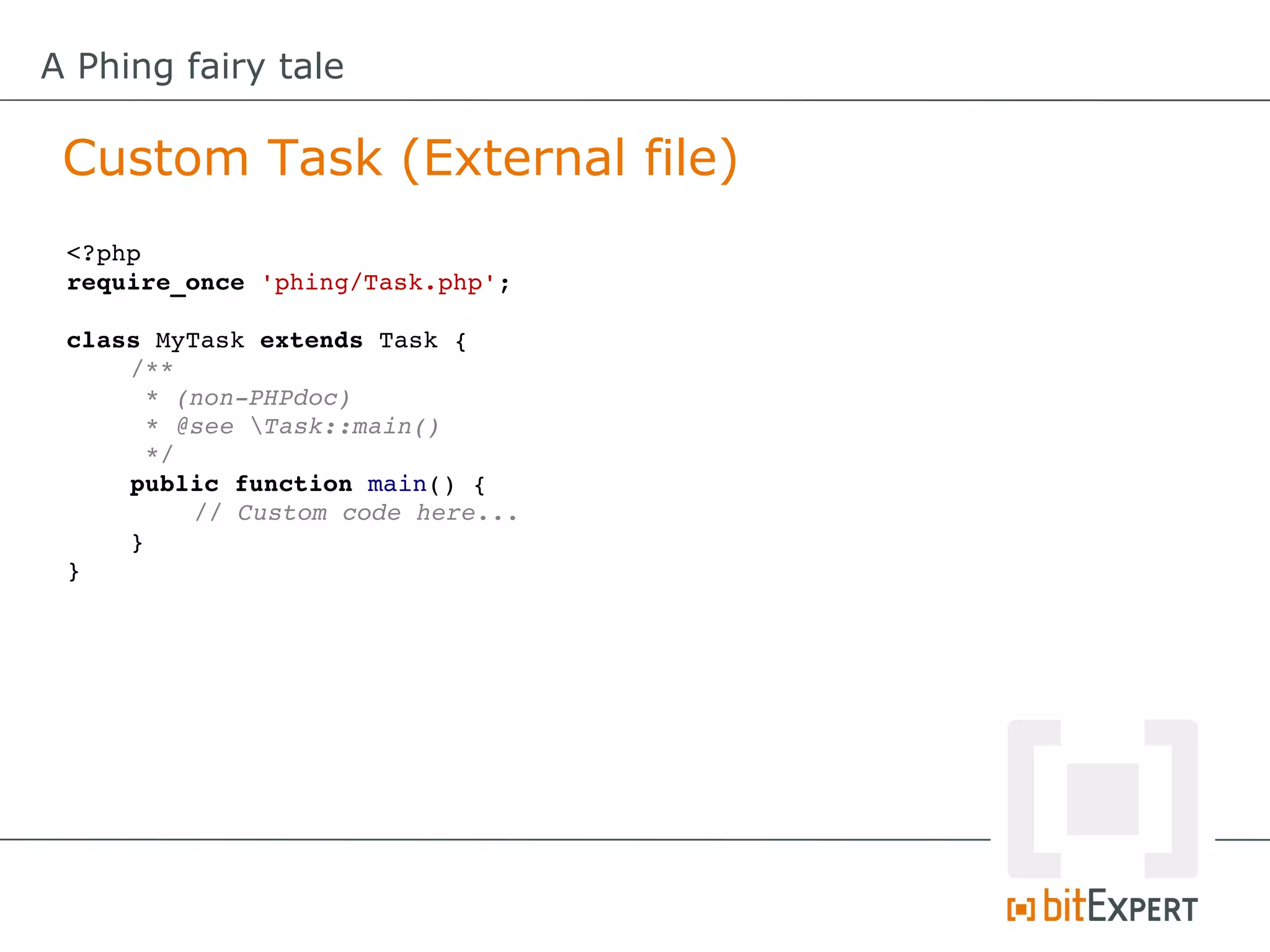
 Custom Task (External file)
 <?php
 require_once 'phing/Task.php';

 class MyTask extends Task {
     /**
      * (non­PHPdoc)
      * @see Task::main()
      */
     public function main() {
          // Custom code here...
     }
 }
A Phing fairy tale

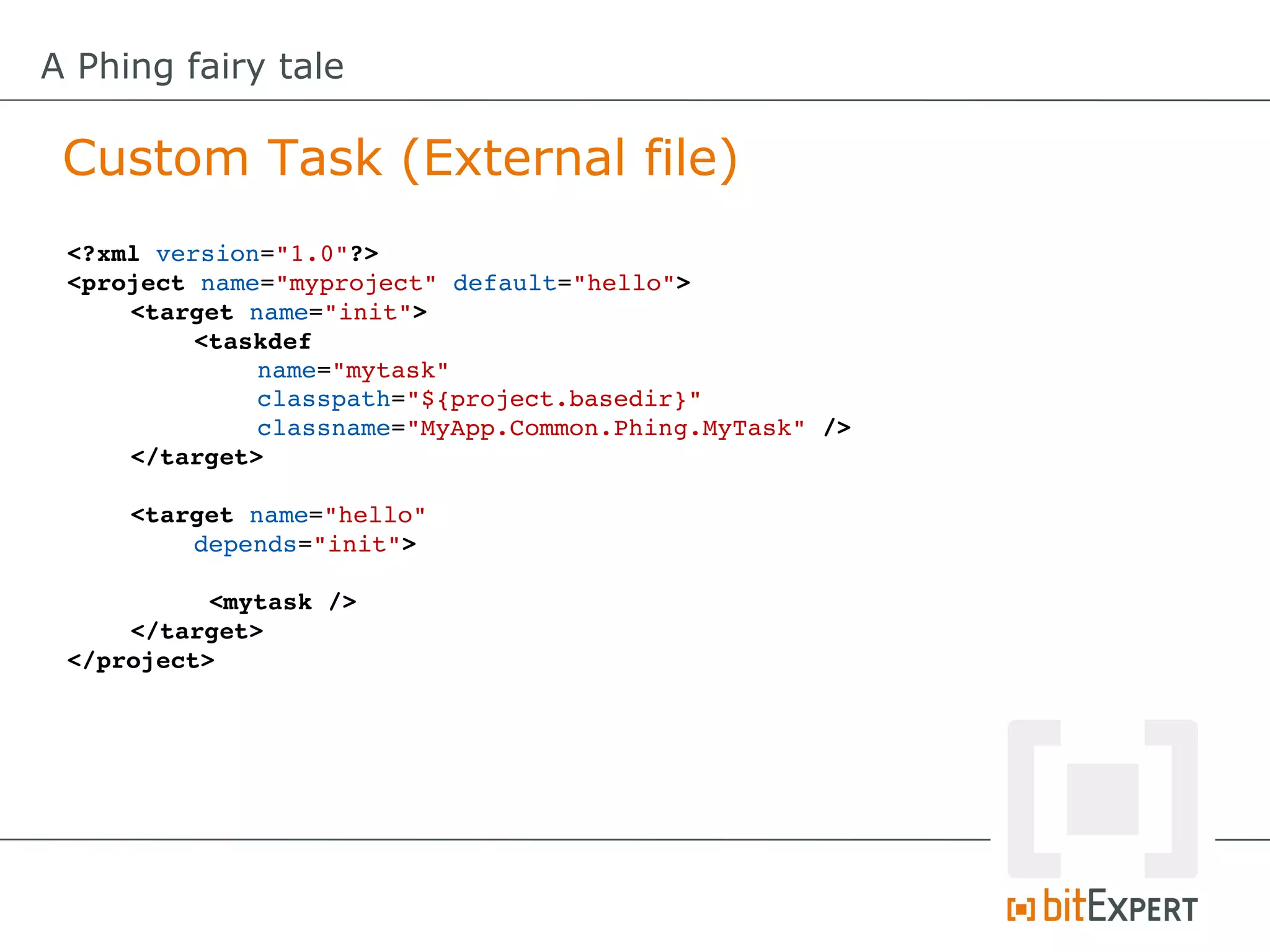
 Custom Task (External file)
 <?xml version="1.0"?>
 <project name="myproject" default="hello">
     <target name="init"> 
          <taskdef
              name="mytask"
              classpath="${project.basedir}"
              classname="MyApp.Common.Phing.MyTask" />
     </target>

     <target name="hello" 
         depends="init">

           <mytask />
     </target>
 </project>
A Phing fairy tale

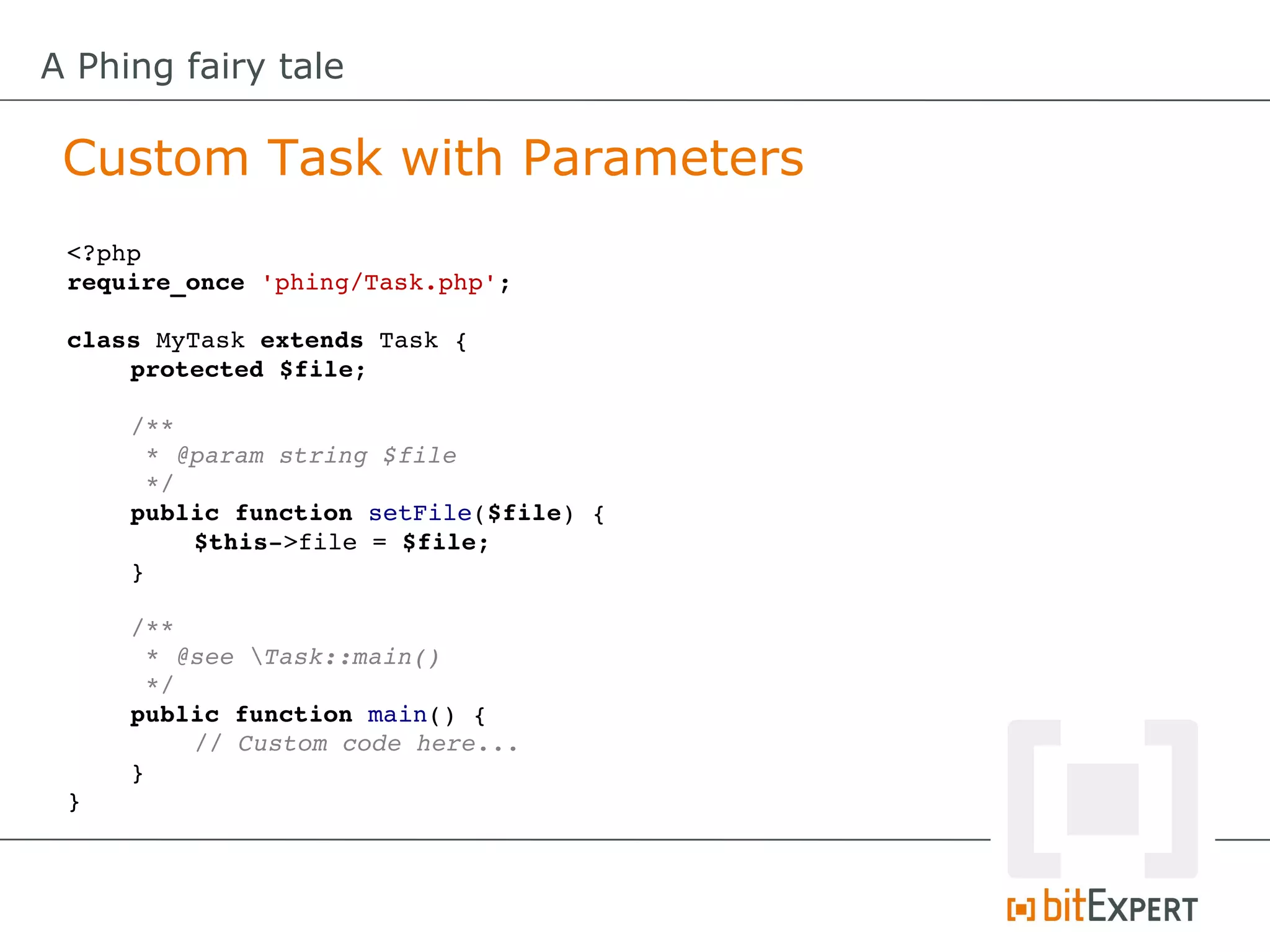
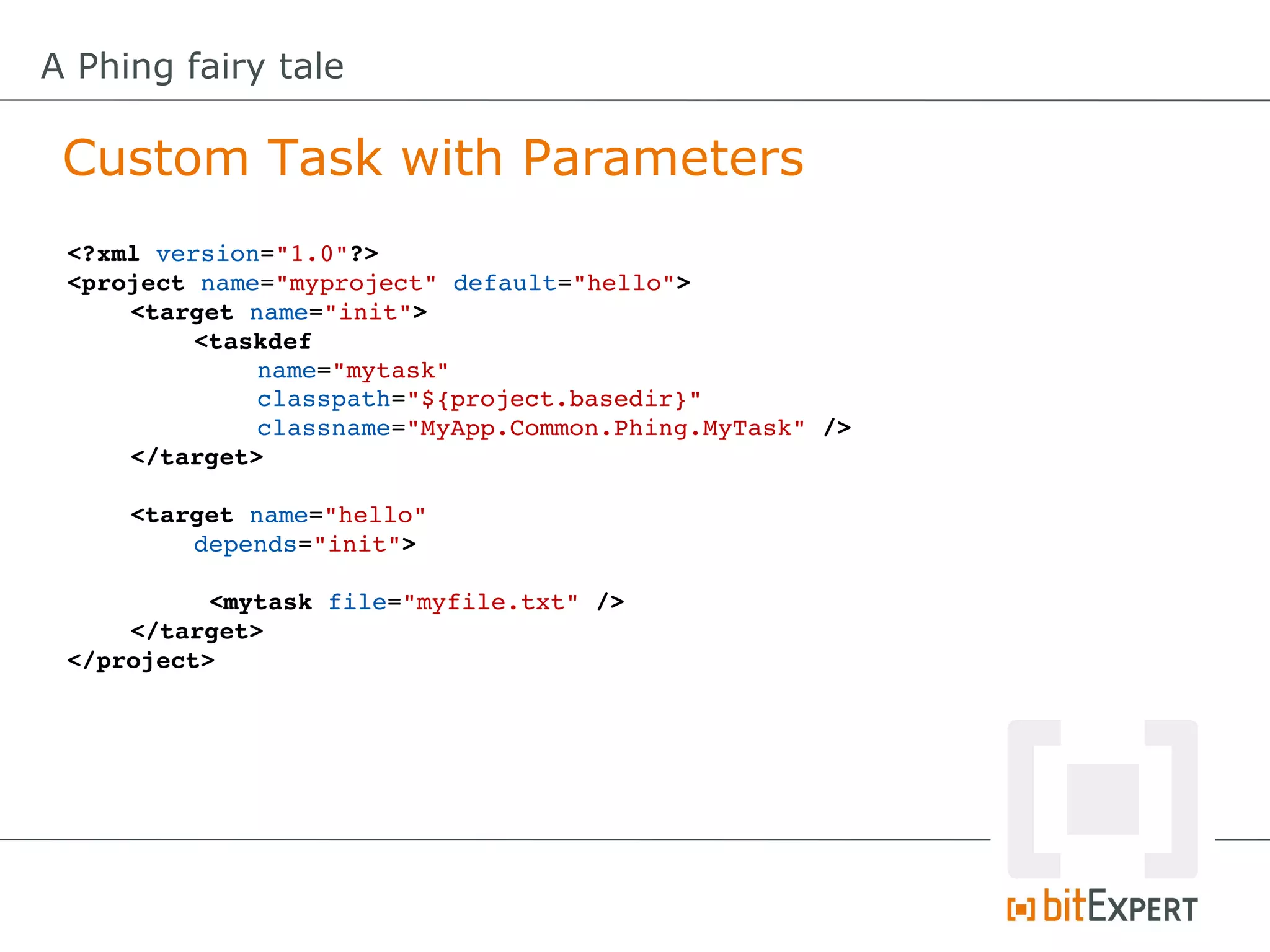
 Custom Task with Parameters
 <?php
 require_once 'phing/Task.php';

 class MyTask extends Task {
     protected $file;

     /**
      * @param string $file
      */
     public function setFile($file) {
         $this­>file = $file;
     }

     /**
      * @see Task::main()
      */
     public function main() {
         // Custom code here...
     }
 }
A Phing fairy tale

 Custom Task with Parameters
 <?xml version="1.0"?>
 <project name="myproject" default="hello">
     <target name="init"> 
          <taskdef
              name="mytask"
              classpath="${project.basedir}"
              classname="MyApp.Common.Phing.MyTask" />
     </target>

     <target name="hello" 
         depends="init">

           <mytask file="myfile.txt" />
     </target>
 </project>
A Phing fairy tale

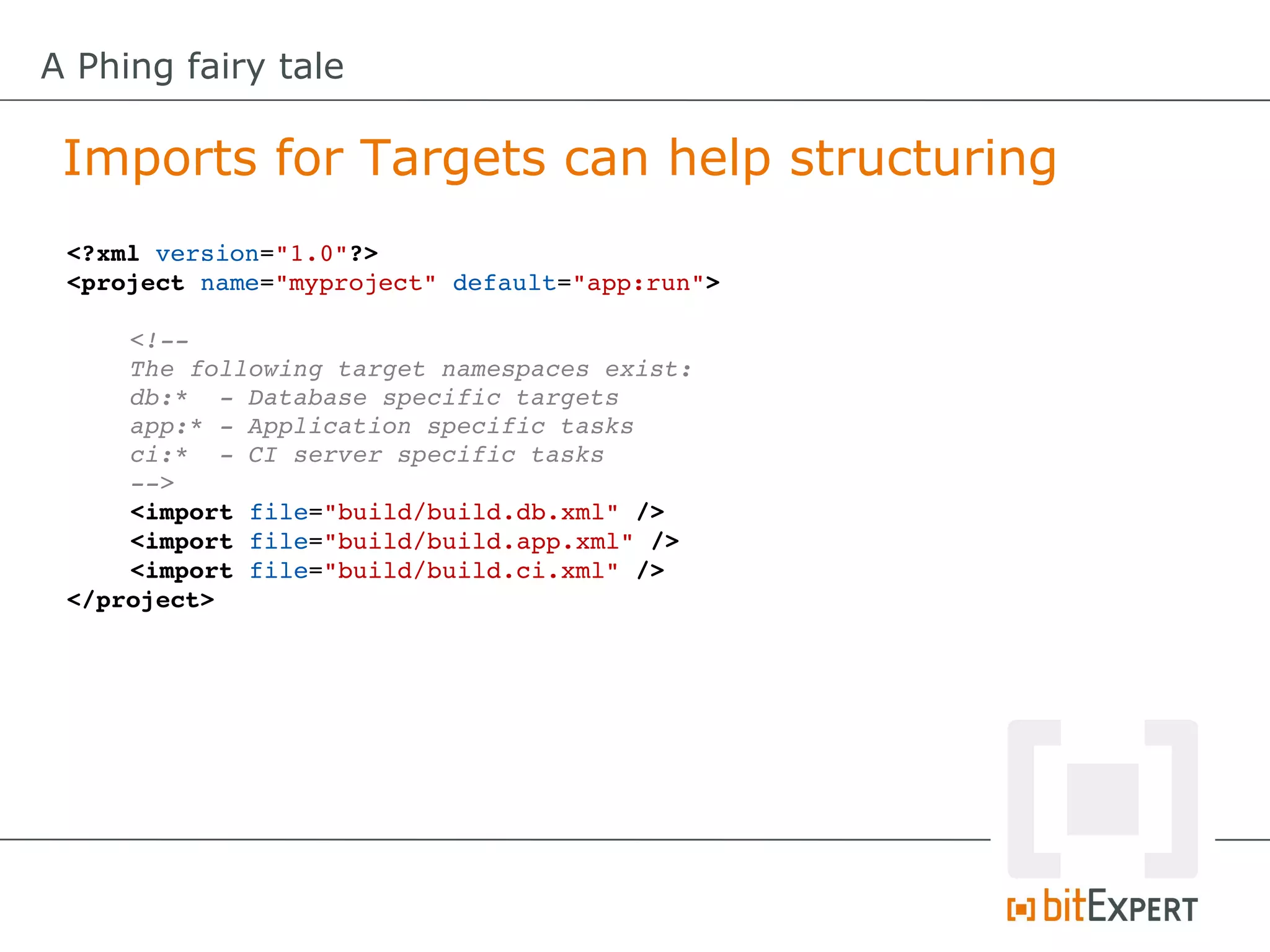
 Imports for Targets can help structuring
 <?xml version="1.0"?>
 <project name="myproject" default="app:run">

     <!­­
     The following target namespaces exist:
     db:*  ­ Database specific targets
     app:* ­ Application specific tasks
     ci:*  ­ CI server specific tasks
     ­­>
     <import file="build/build.db.xml" />
     <import file="build/build.app.xml" />
     <import file="build/build.ci.xml" />
 </project>
A Phing fairy tale

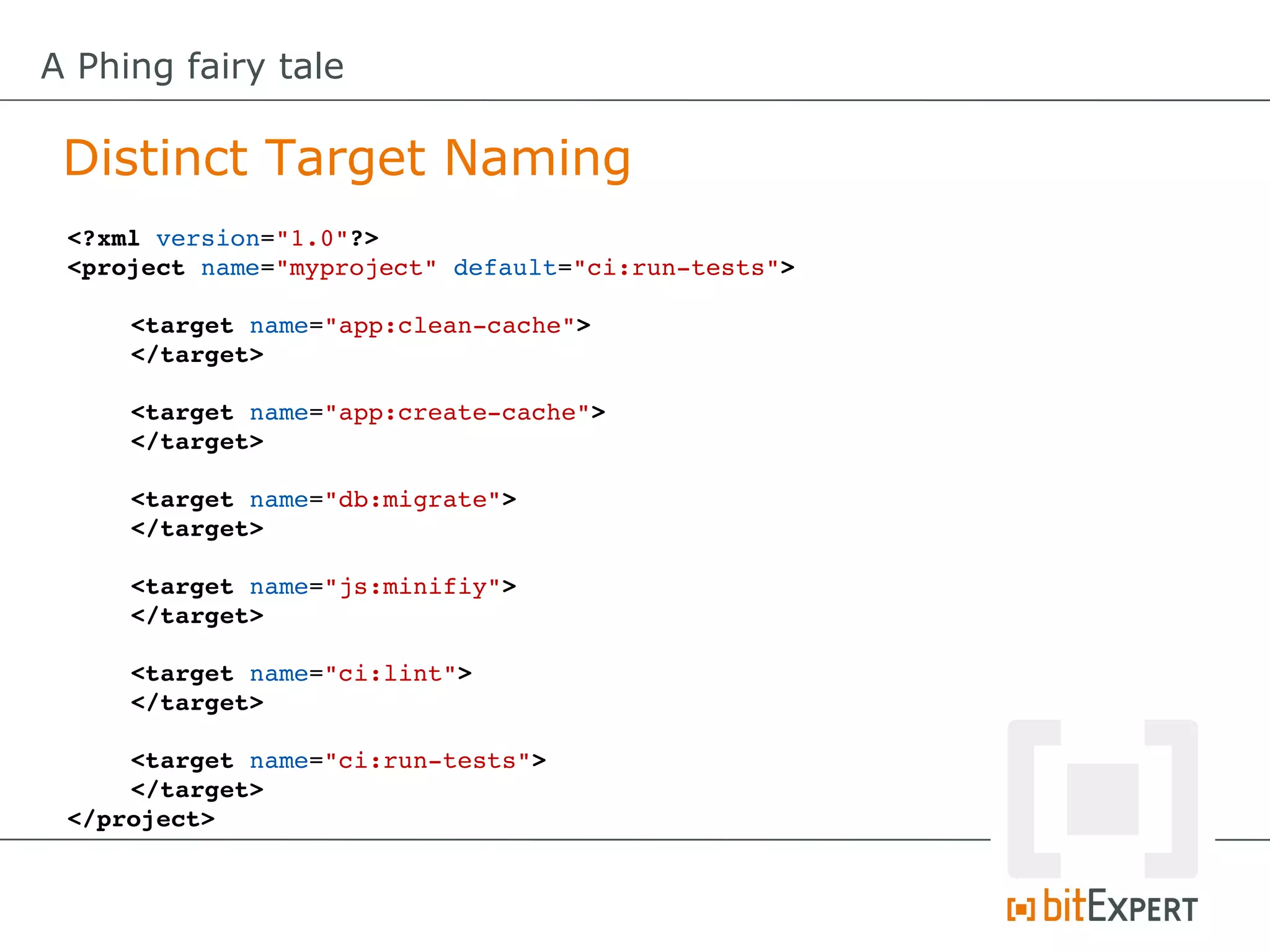
 Distinct Target Naming
 <?xml version="1.0"?>
 <project name="myproject" default="ci:run­tests">

     <target name="app:clean­cache">
     </target>

     <target name="app:create­cache">
     </target>

     <target name="db:migrate">
     </target>

     <target name="js:minifiy">
     </target>

     <target name="ci:lint">
     </target>

     <target name="ci:run­tests">
     </target>
 </project>
A Phing fairy tale

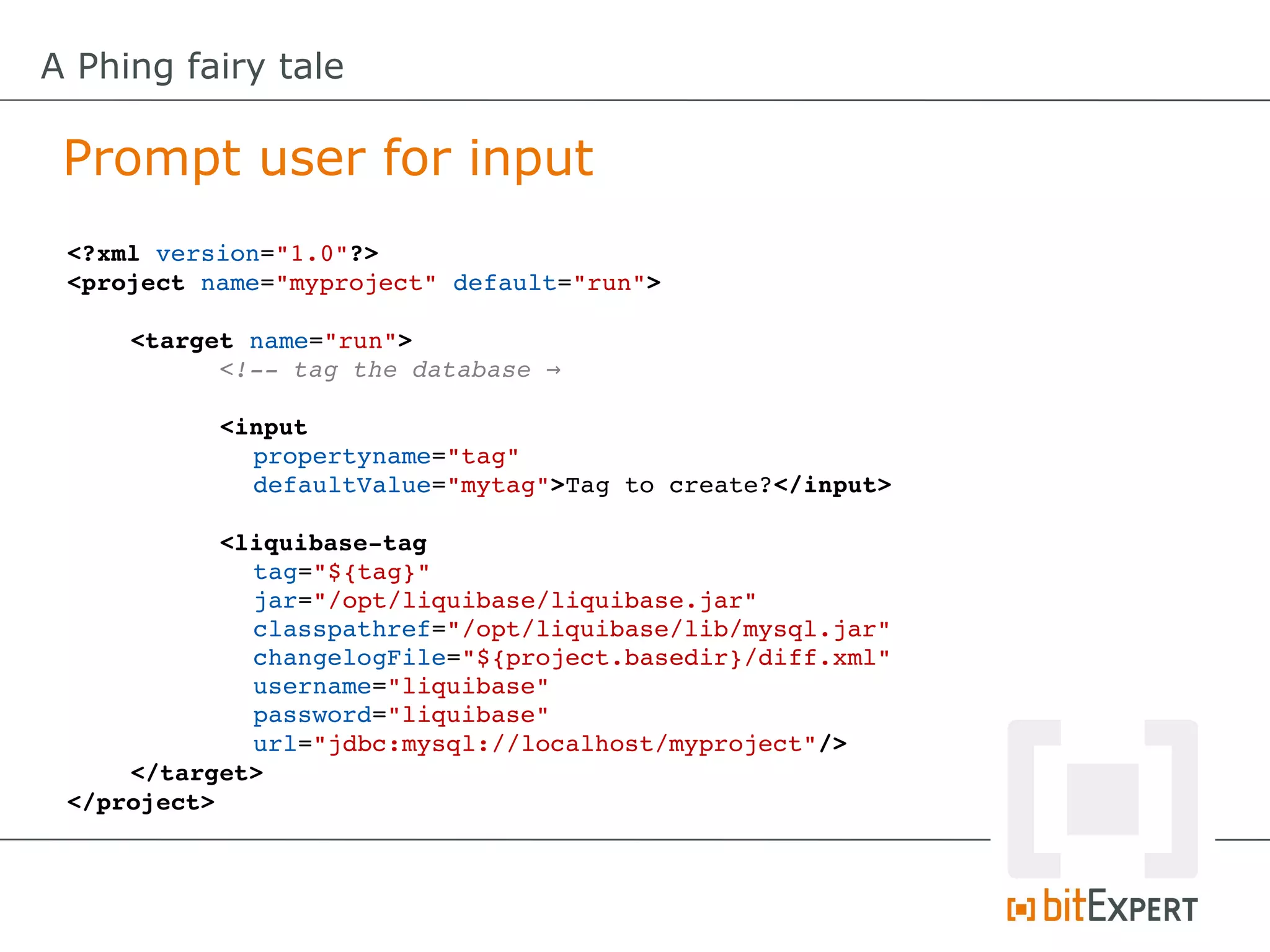
 Prompt user for input
 <?xml version="1.0"?>
 <project name="myproject" default="run">

     <target name="run">
           <!­­ tag the database →

           <input
             propertyname="tag"
             defaultValue="mytag">Tag to create?</input>

           <liquibase­tag
              tag="${tag}"
              jar="/opt/liquibase/liquibase.jar"
              classpathref="/opt/liquibase/lib/mysql.jar"
              changelogFile="${project.basedir}/diff.xml"
              username="liquibase"
              password="liquibase"
              url="jdbc:mysql://localhost/myproject"/>
     </target>
 </project>
A Phing fairy tale

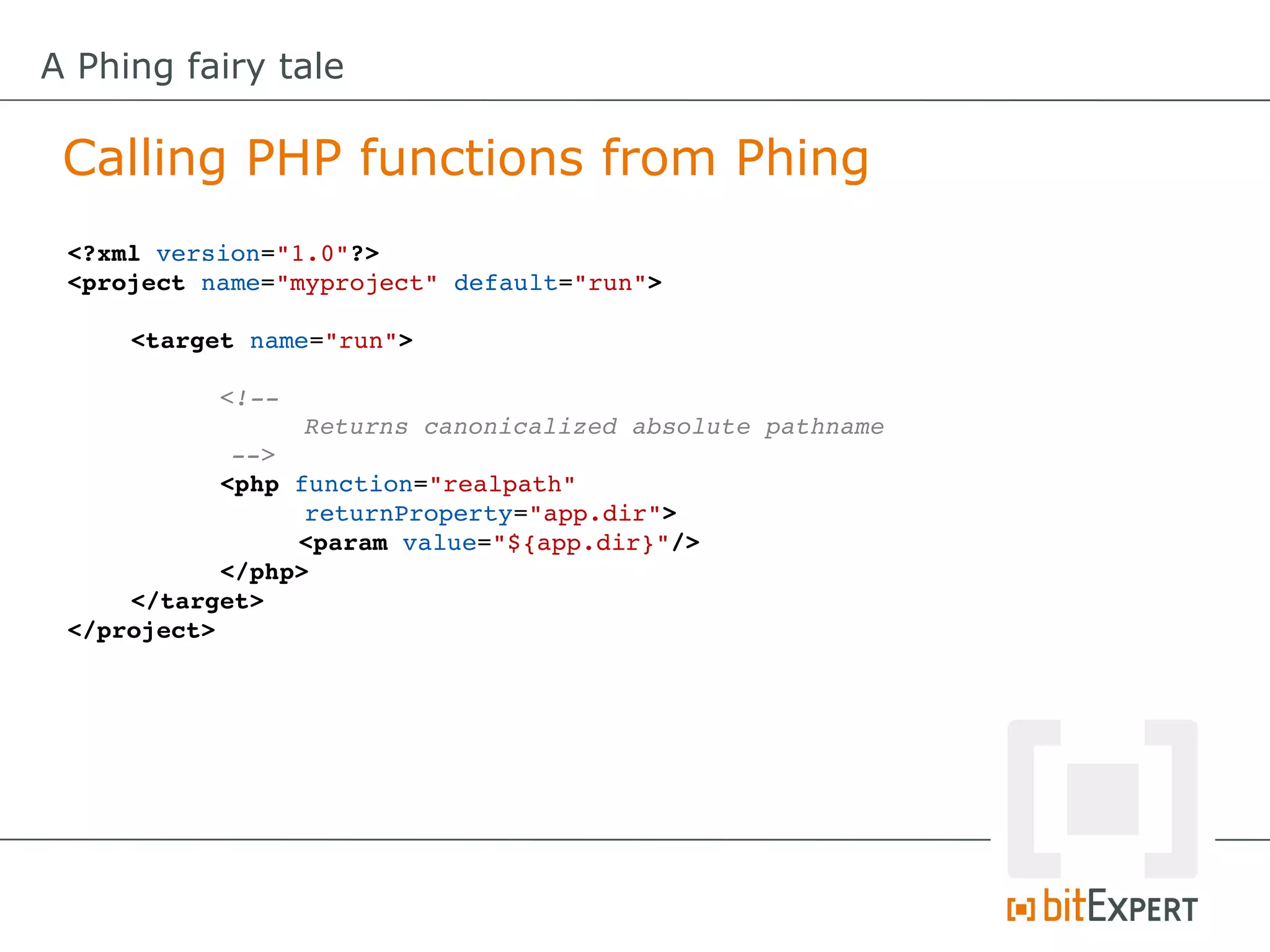
 Calling PHP functions from Phing
 <?xml version="1.0"?>
 <project name="myproject" default="run">

     <target name="run">

           <!­­ 
                 Returns canonicalized absolute pathname 
            ­­>
           <php function="realpath" 
                 returnProperty="app.dir">
                 <param value="${app.dir}"/>
           </php>
     </target>
 </project>
A Phing fairy tale

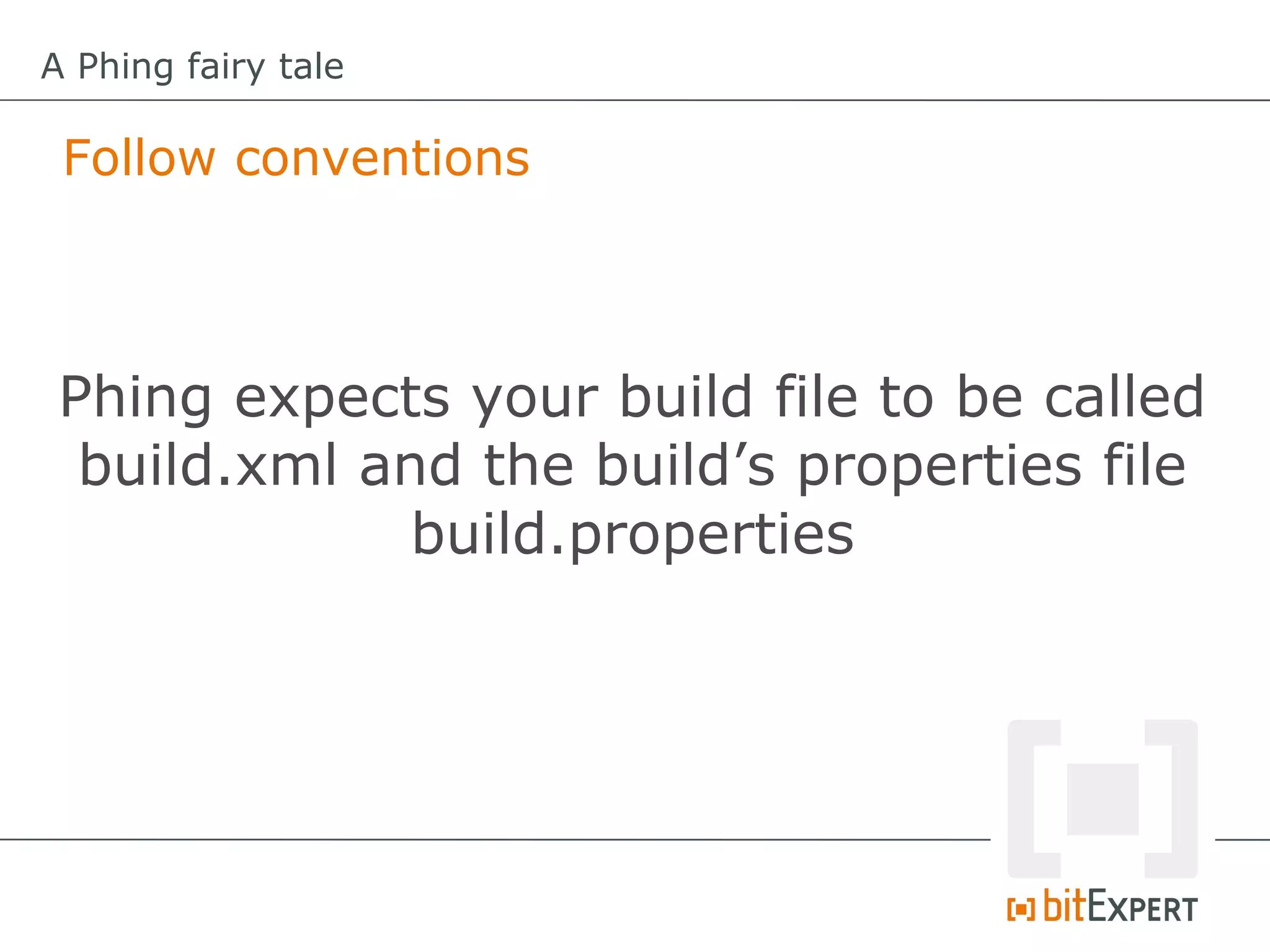
 Follow conventions


 Phing expects your build file to be called
  build.xml and the build’s properties file
              build.properties
A Phing fairy tale

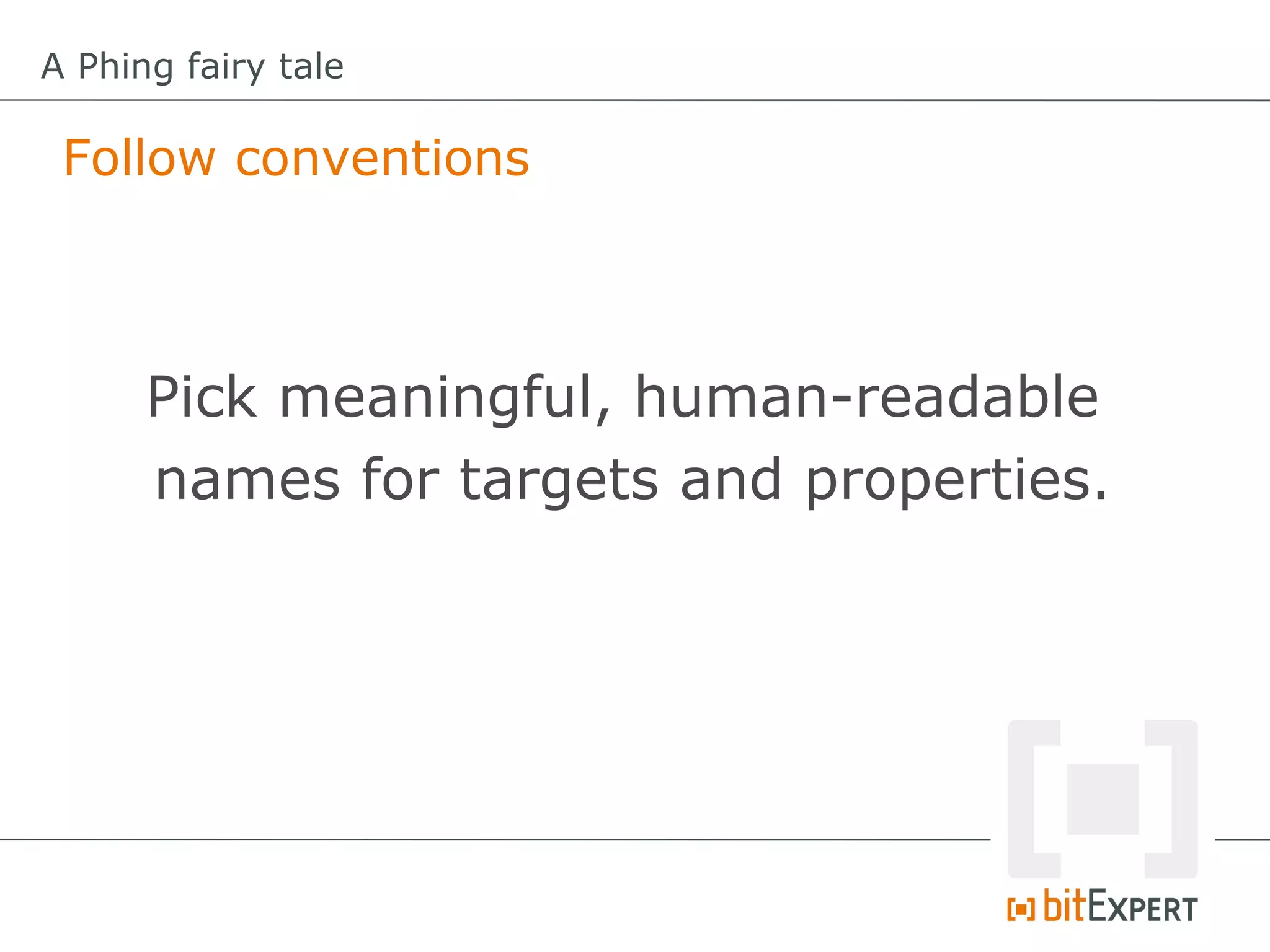
 Follow conventions


      Pick meaningful, human-readable
      names for targets and properties.
A Phing fairy tale

 Follow conventions


         Make build files self-contained.
Thank you!
http://joind.in/7949

A Phing fairy tale - ConFoo13

  • 1.
    A Phing fairytale Stephan Hochdörfer, bitExpert AG
  • 2.
    A Phing fairytale About me  Stephan Hochdörfer  Head of IT at bitExpert AG, Germany  enjoying PHP since 1999  S.Hochdoerfer@bitExpert.de  @shochdoerfer
  • 3.
    A Phing fairytale Disclaimer Warning: You will see a hell lot of XML.
  • 4.
    A Phing fairytale What is Phing?
  • 5.
    A Phing fairytale What is Phing? It is a PHP project build system or build tool based on Apache Ant.
  • 6.
    A Phing fairytale What is Phing? Domain Specific Language for an project build system.
  • 7.
    A Phing fairytale What is Phing? Enables one button push automation.
  • 8.
    A Phing fairytale Project build system?
  • 9.
    A Phing fairytale Project build system? Automation of non-development tasks
  • 10.
    A Phing fairytale Project build system? Automate absolutely everything.
  • 11.
    A Phing fairytale Project build system? If you use Phing, only use Phing.
  • 12.
    A Phing fairytale Why Phing?
  • 13.
    A Phing fairytale Why Phing? Runs everywhere where PHP runs.
  • 14.
    A Phing fairytale Why Phing? No additional depencendies needed (e.g. Java, …).
  • 15.
    A Phing fairytale Why Phing? More than 120 predefined tasks to choose from.
  • 16.
    A Phing fairytale Why Phing? Easy to extend by writing custom tasks in PHP.
  • 17.
    A Phing fairytale How to install Phing?
  • 18.
    A Phing fairytale How to install Phing? The PEAR way... Installing Phing $> pear channel­discover pear.phing.info $> pear install phing/phing
  • 19.
    A Phing fairytale How to install Phing? The PEAR way... Installing Phing $> pear channel­discover pear.phing.info $> pear install phing/phing Running Phing: $> phing ­v Phing 2.4.14
  • 20.
    A Phing fairytale How to install Phing? The Composer way... composer.json: { "require": { "phing/phing": "2.4.14" } }
  • 21.
    A Phing fairytale How to install Phing? The Composer way... composer.json: { "require": { "phing/phing": "2.4.14" } } Running Composer: $> php composer.phar install Loading composer repositories with package information Installing dependencies   ­ Installing phing/phing (2.4.14)     Downloading: 100%          Writing lock file Generating autoload files
  • 22.
    A Phing fairytale How to install Phing? The Composer way... /home/shochdoerfer/myproject    |­vendor    |­­­bin    |­­­­­@phing    |­­­composer    |­­­phing    |­­­­­phing    |­­­­­­­bin    |­­­­­­­­­phing    |­­­­­­­build    |­­­­­­­classes    |­­­­­­­docs    |­­­­­­­etc    |­­­­­­­test
  • 23.
    A Phing fairytale How to install Phing? The Composer way... /home/shochdoerfer/myproject    |­vendor    |­­­bin    |­­­­­@phing    |­­­composer    |­­­phing    |­­­­­phing    |­­­­­­­bin    |­­­­­­­­­phing    |­­­­­­­build    |­­­­­­­classes    |­­­­­­­docs    |­­­­­­­etc    |­­­­­­­test Running Phing: $> ./vendor/bin/phing ­v Phing DEV
  • 24.
    A Phing fairytale Phing Basics
  • 25.
    A Phing fairytale Phing Basics Project, Target, Task, Properties
  • 26.
    A Phing fairytale Phing Basics: Project Root node of a build file containing one or more targets.
  • 27.
    A Phing fairytale Phing Basics: Target A group of tasks that run as an entity.
  • 28.
    A Phing fairytale Phing Basics: Task Custom piece of code to perform a specific function.
  • 29.
    A Phing fairytale Phing Basics: Properties Properties (Variables) help to customize execution.
  • 30.
    A Phing fairytale Phing Basics: Built-In Properties e.g. host.os, line.separator, phing.version, php.version, …
  • 31.
    A Phing fairytale Phing Basics: Sample Build File <?xml version="1.0"?> <project name="myproject" default="init"> <target name="init"> <!­­ insert logic here ­­> </target> </project>
  • 32.
    A Phing fairytale Build File – Hello World example <?xml version="1.0"?> <project name="myproject" default="hello"> <target name="hello"  description="Says Hello, world!">  <echo msg="Hello, world!" /> </target> </project>
  • 33.
    A Phing fairytale Build File – Hello World example <?xml version="1.0"?> <project name="myproject" default="hello"> <target name="hello"  description="Says Hello, world!">  <echo msg="Hello, world!" /> </target> </project> $> phing Buildfile: /home/shochdoerfer/build.xml myproject > hello:      [echo] Hello, world! BUILD FINISHED Total time: 0.0595 seconds
  • 34.
    A Phing fairytale Build File – Introducing Properties <?xml version="1.0"?> <project name="myproject" default="hello"> <target name="hello"  description="Says Hello, world!">  <property name="Hello"                  value="Hello, world!" />  <echo msg="${Hello}" /> </target> </project>
  • 35.
    A Phing fairytale Build File – Introducing Properties <?xml version="1.0"?> <project name="myproject" default="hello"> <property name="Hello" value="Hello, world!" />   <target name="hello"  description="Says Hello, world!">  <echo msg="${Hello}" /> </target> </project>
  • 36.
    A Phing fairytale Build File – Externalizing Properties <?xml version="1.0"?> <project name="myproject" default="hello"> <target name="hello"  description="Says whatever you want to say"  <echo msg="${Hello}" /> </target> </project>
  • 37.
    A Phing fairytale Build File – Externalizing Properties (CLI) <?xml version="1.0"?> <project name="myproject" default="hello"> <target name="hello"  description="Says whatever you want to say"  <echo msg="${Hello}" /> </target> </project> $> phing ­DHello="Hello from CLI" Buildfile: /tmp/build.xml myproject > hello:      [echo] Hello from CLI BUILD FINISHED Total time: 0.0599 seconds
  • 38.
    A Phing fairytale Build File – Externalizing Properties (File) <?xml version="1.0"?> <project name="myproject" default="hello"> <target name="hello"  description="Says whatever you want to say"> <property file="./build.properties" />  <echo msg="${Hello}" /> </target> </project>
  • 39.
    A Phing fairytale Build File – Externalizing Properties (File) <?xml version="1.0"?> <project name="myproject" default="hello"> <target name="hello"  description="Says whatever you want to say"> <property file="./build.properties" />  <echo msg="${Hello}" /> </target> </project> build.properties: Hello=Hello, world!
  • 40.
    A Phing fairytale Build File – Externalizing Properties (File) $> phing Buildfile: /home/shochdoerfer/build.xml myproject > hello:  [property] Loading /home/shochdoerfer/build.properties      [echo] Hello, world! BUILD FINISHED Total time: 0.0601 seconds
  • 41.
    A Phing fairytale Build File – Defining multiple targets <?xml version="1.0"?> <project name="myproject" default="hello"> <property name="Hello" value="Hello, world!" />   <target name="hello"  description="Says Hello, world!">  <echo msg="${Hello}" /> </target> <target name="goodbye"  description="Says goodbye!">  <echo msg="Goodbye!" /> </target> </project>
  • 42.
    A Phing fairytale Build File – Defining multiple targets $> phing hello Buildfile: /tmp/build.xml myproject > hello:      [echo] Hello, world! BUILD FINISHED Total time: 0.0612 seconds
  • 43.
    A Phing fairytale Build File – Defining multiple targets $> phing hello Buildfile: /tmp/build.xml myproject > hello:      [echo] Hello, world! BUILD FINISHED Total time: 0.0612 seconds $> phing goodbye Buildfile: /tmp/build.xml myproject > goodbye:      [echo] Goodbye! BUILD FINISHED Total time: 0.0619 seconds
  • 44.
    A Phing fairytale Build File – Target dependencies <?xml version="1.0"?> <project name="myproject" default="hello"> <target name="init"  description="Property initialization">  <property name="Hello" value="Hello, world!" /> </target> <target name="hello"  depends="init">  <echo msg="${Hello}" /> </target> </project>
  • 45.
    A Phing fairytale Build File – Target dependencies <?xml version="1.0"?> <project name="myproject" default="hello"> <target name="init"  description="Property initialization"> <property name="Hello" value="Hello, world!" /> </target> <target name="customcode"  description="Some custom logic"> </target> <target name="hello"  depends="init, customcode">  <echo msg="${Hello}" /> </target> </project>
  • 46.
    A Phing fairytale Build File – Target dependencies <?xml version="1.0"?> <project name="myproject" default="hello"> <target name="pre­init"> <property name="World" value="world" /> </target> <target name="init"  depends="pre­init"> <property name="Hello"                 value="Hello, ${World}!" /> </target> <target name="hello"  depends="init">  <echo msg="${Hello}" /> </target> </project>
  • 47.
    A Phing fairytale Build File – Calling targets programmatically I <?xml version="1.0"?> <project name="myproject" default="run"> <target name="print"> <echo msg="Processing: ${filename}" /> </target> <target name="run"> <!­­             loop through files and call print target ­­> <foreach param="filename"               absparam="filename" target="print"> <fileset dir="."> <include name="*.php"/> </fileset> </foreach> </target> </project>
  • 48.
    A Phing fairytale Build File – Calling targets programmatically II <?xml version="1.0"?> <project name="myproject" default="run"> <target name="print"> <echo msg="Processing: ${filename}" /> </target> <target name="run"> <!­­ calling target with given property ­­> <phingcall target="print"> <property name="filename"                    value="test.php" /> </phingcall> </target> </project>
  • 49.
    A Phing fairytale Build File – Calling targets programmatically III <?xml version="1.0"?> <project name="myproject" default="run"> <target name="run"> <!­­ calling target in print.xml with                given property ­­> <phing phingfile="print.xml" target="print"> <property name="filename"                   value="test.php" /> </phing> </target> </project>
  • 50.
    A Phing fairytale Build File – Fileset <?xml version="1.0"?> <project name="myproject" default="run"> <target name="run">       <!­­ Copy files matching the expression ­­>       <copy todir="/tmp/deploy"> <fileset dir="." includes="**/*.php"> <and> <size value="1024" when="more" /> <date                            datetime="01/01/2013 10:00 AM"                            when="after" /> </and> </fileset>       </copy> </target> </project>
  • 51.
    A Phing fairytale Build File – Filters <?xml version="1.0"?> <project name="myproject" default="run"> <target name="run">       <!­­ Copy files and replace tokens ­­>       <copy todir="/tmp/deploy"> <filterchain> <replacetokens begintoken="##"                        endtoken="##"> <token key="VERSION"                                value="${app.version}" </replacetokens> </filterchain> <fileset dir=".">       <include name="**/*.php"/> </fileset>       </copy> </target> </project>
  • 52.
    A Phing fairytale Phing – What can it do for me?
  • 53.
    A Phing fairytale Phing – What can it do for me? <?xml version="1.0"?> <project name="myproject" default="run"> <target name="run">       <!­­ correct file permissions ­­>              <chmod file="${project.basedir}/cache"                    mode="0777" />              <chmod file="${project.basedir}/uploads"                    mode="0777" /> </target> </project>
  • 54.
    A Phing fairytale Phing – What can it do for me? <?xml version="1.0"?> <project name="myproject" default="run"> <target name="run">       <!­­ create API documentation ­­>              <docblox title="My project"               destdir="apidocs"            template="new_black">       <fileset dir="${project.basedir}/src">           <include name="**/*.php" />       </fileset>       </docblox> </target> </project>
  • 55.
    A Phing fairytale Phing – What can it do for me? <?xml version="1.0"?> <project name="myproject" default="run"> <target name="run">       <!­­ minify javascript ­­>       <jsMin targetDir="${project.basedir}/web/"> <fileset dir="${project.basedir}/web/js/"> <include name="**/*.js"/> </fileset>       </jsMin> </target> </project>
  • 56.
    A Phing fairytale Phing – What can it do for me? <?xml version="1.0"?> <project name="myproject" default="run"> <target name="run">       <!­­ exec database migrations ­­>      <liquibase­update     jar="/opt/liquibase/liquibase.jar"     classpathref="/opt/liquibase/lib/mysql.jar"     changelogFile="${project.basedir}/diff.xml"     username="liquibase"     password="liquibase"     url="jdbc:mysql://localhost/myproject"/> </target> </project>
  • 57.
    A Phing fairytale Phing – Task missing? Use exec... <?xml version="1.0"?> <project name="myproject" default="run"> <target name="run">       <!­­ deploy via rsync to dev server ­­>      <exec      command="rsync ­vraCz ./ ${deploy.dev.url}"      dir="${project.basedir}"      checkreturn="true" /> </target> </project>
  • 58.
    A Phing fairytale Build File – Advanced usage
  • 59.
    A Phing fairytale Properties File - Improved version <?xml version="1.0"?> <project name="myproject" default="hello"> <target name="hello" depends="init">  <echo msg="${Hello}" /> </target> <target name="init" depends="prop, local­prop" <!­­ some more init logic ­­> </target> <target name="prop"> <echo message="Load default build.properties" <property file="./build.properties" /> </target>
  • 60.
    A Phing fairytale Properties File - Improved version <target name="local­prop" if="local­prop.exists" depends="local­prop­check"> <echo message="Loading custom properties!" <property file="${project.basedir}/local.properties" override="true"/> </target> <target name="local­prop­check"> <available file="${project.basedir}/local.properties" property="local­prop.exists" /> </target> </project>
  • 61.
    A Phing fairytale Enforce Internal Targets <?xml version="1.0"?> <project name="myproject" default="hello"> <target name="init"  description="Property initialization">  <property name="Hello" value="Hello, world!" /> </target> <target name="hello"  depends="init">  <echo msg="${Hello}" /> </target> </project> User can call both targets from command line. We do not want that.
  • 62.
    A Phing fairytale Enforce Internal Targets <?xml version="1.0"?> <project name="myproject" default="hello"> <target name="­init"  description="Property initialization">  <property name="Hello" value="Hello, world!" /> </target> <target name="hello"  depends="­init">  <echo msg="${Hello}" /> </target> </project> Prefixing a targets with a „-“ prevents the target from being called from the command line.
  • 63.
    A Phing fairytale Custom Task (Adhoc definition) <?xml version="1.0"?> <project name="myproject" default="hello"> <target name="init">  <adhoc­task name="mytask"><![CDATA[ class MyTask extends Task { /**  * (non­PHPdoc)  * @see Task::main()  */ public function main() { // Custom code here... } } ]]></adhoc­task> </target> <target name="hello"  depends="init">  <mytask /> </target> </project>
  • 64.
    A Phing fairytale Custom Task (External file) <?php require_once 'phing/Task.php'; class MyTask extends Task { /**  * (non­PHPdoc)  * @see Task::main()  */ public function main() { // Custom code here... } }
  • 65.
    A Phing fairytale Custom Task (External file) <?xml version="1.0"?> <project name="myproject" default="hello"> <target name="init">  <taskdef name="mytask" classpath="${project.basedir}" classname="MyApp.Common.Phing.MyTask" /> </target> <target name="hello"  depends="init">  <mytask /> </target> </project>
  • 66.
    A Phing fairytale Custom Task with Parameters <?php require_once 'phing/Task.php'; class MyTask extends Task { protected $file; /**  * @param string $file  */ public function setFile($file) { $this­>file = $file; } /**  * @see Task::main()  */ public function main() { // Custom code here... } }
  • 67.
    A Phing fairytale Custom Task with Parameters <?xml version="1.0"?> <project name="myproject" default="hello"> <target name="init">  <taskdef name="mytask" classpath="${project.basedir}" classname="MyApp.Common.Phing.MyTask" /> </target> <target name="hello"  depends="init">  <mytask file="myfile.txt" /> </target> </project>
  • 68.
    A Phing fairytale Imports for Targets can help structuring <?xml version="1.0"?> <project name="myproject" default="app:run"> <!­­ The following target namespaces exist: db:*  ­ Database specific targets app:* ­ Application specific tasks ci:*  ­ CI server specific tasks ­­> <import file="build/build.db.xml" /> <import file="build/build.app.xml" /> <import file="build/build.ci.xml" /> </project>
  • 69.
    A Phing fairytale Distinct Target Naming <?xml version="1.0"?> <project name="myproject" default="ci:run­tests"> <target name="app:clean­cache"> </target> <target name="app:create­cache"> </target> <target name="db:migrate"> </target> <target name="js:minifiy"> </target> <target name="ci:lint"> </target> <target name="ci:run­tests"> </target> </project>
  • 70.
    A Phing fairytale Prompt user for input <?xml version="1.0"?> <project name="myproject" default="run"> <target name="run">       <!­­ tag the database →       <input     propertyname="tag"     defaultValue="mytag">Tag to create?</input>       <liquibase­tag     tag="${tag}"     jar="/opt/liquibase/liquibase.jar"     classpathref="/opt/liquibase/lib/mysql.jar"     changelogFile="${project.basedir}/diff.xml"     username="liquibase"     password="liquibase"     url="jdbc:mysql://localhost/myproject"/> </target> </project>
  • 71.
    A Phing fairytale Calling PHP functions from Phing <?xml version="1.0"?> <project name="myproject" default="run"> <target name="run">       <!­­                  Returns canonicalized absolute pathname             ­­>       <php function="realpath"                  returnProperty="app.dir">        <param value="${app.dir}"/>       </php> </target> </project>
  • 72.
    A Phing fairytale Follow conventions Phing expects your build file to be called build.xml and the build’s properties file build.properties
  • 73.
    A Phing fairytale Follow conventions Pick meaningful, human-readable names for targets and properties.
  • 74.
    A Phing fairytale Follow conventions Make build files self-contained.
  • 75.
  • 76.