Sasin Prabu
     26.12.11
Contents
Servers
 Web server
     Apache Tomcat
 Application Server
     Weblogic server
Shared Hosting & Dedicated Hosting
 Admin Server
 Managed Server
   Entry level configuration
   Multi server configuration
   Enterprise server configuration
     SSL
 Back up Server
Web Server
 A web server is a specialized type of file server. Its job is to retrieve files
  from the server’s hard drive, format the files for the Web browser, and
  send them out via the network. Web servers are designed to do a great
  job of sending static content out to a large number of users. The pages
  delivered by the server are expected to be the same for everyone who
  visits the server.
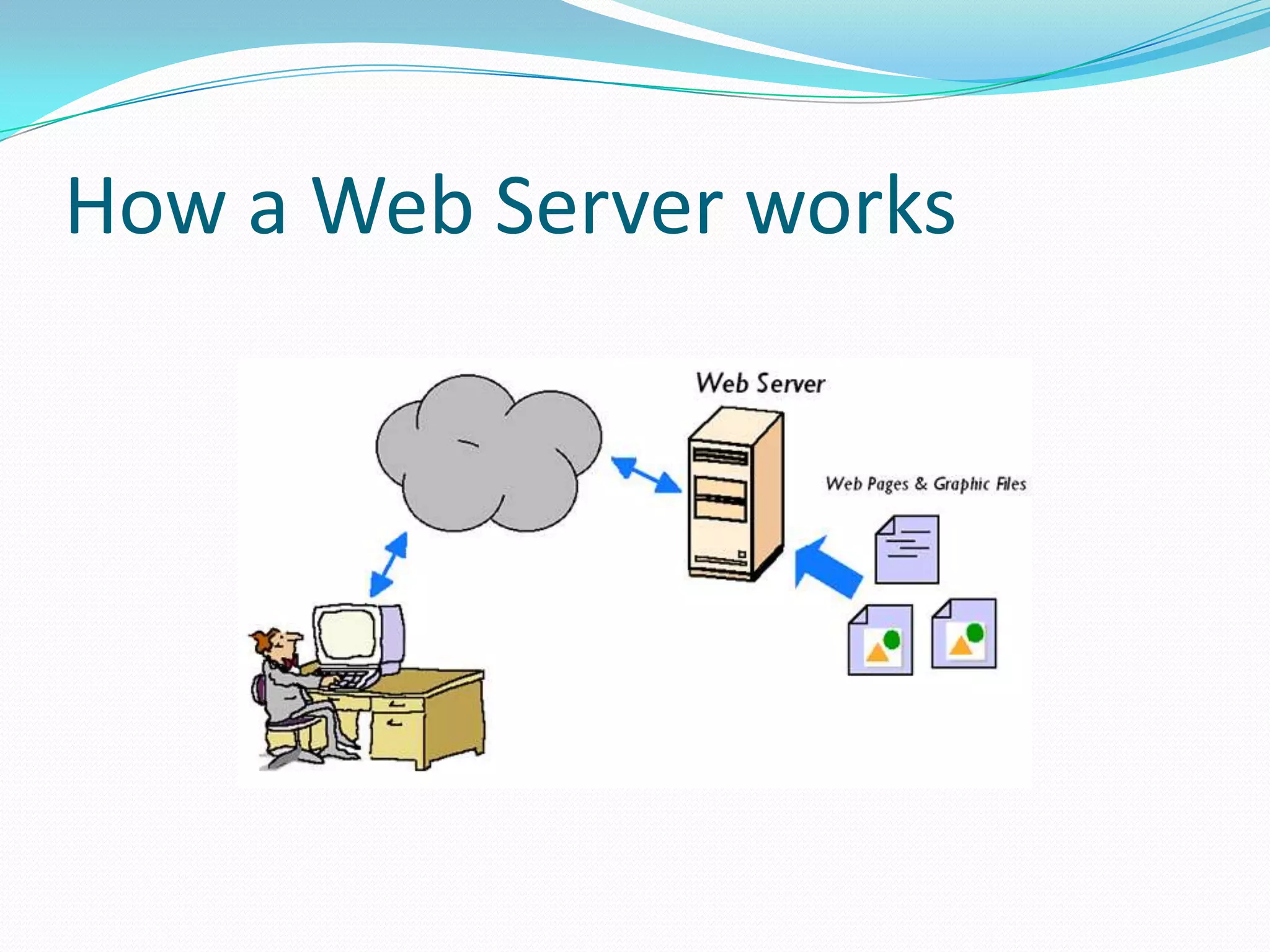
 The function of a typical Web server is shown below. The user requests
  a web page. The Web Server finds the web page file in a local directory
  and sends it back out to the user. When graphic files are requested, the
  same thing happens. The Web Server finds the requested graphic files
  and sends them back to the user.
 The Web Server standards were originally designed to publish static
  documents on the Internet. There was a limited capability for accessing
  dynamic content, but this was never intended to support high volume,
  highly interactive Web applications.
How a Web Server works
Apache Tomcat is a Web server
 Tomcat is an open source web server developed by
 Apache Group. Apache Tomcat is the servlet container
 that is used in the official Reference Implementation
 for the Java Servlet and Java Server Pages(JSP)
 technologies. The Java Servlet and Java Server Pages
 specifications are developed by Sun under the Java
 Community Process. Web Servers like Apache Tomcat
 support only web components.
Application Server
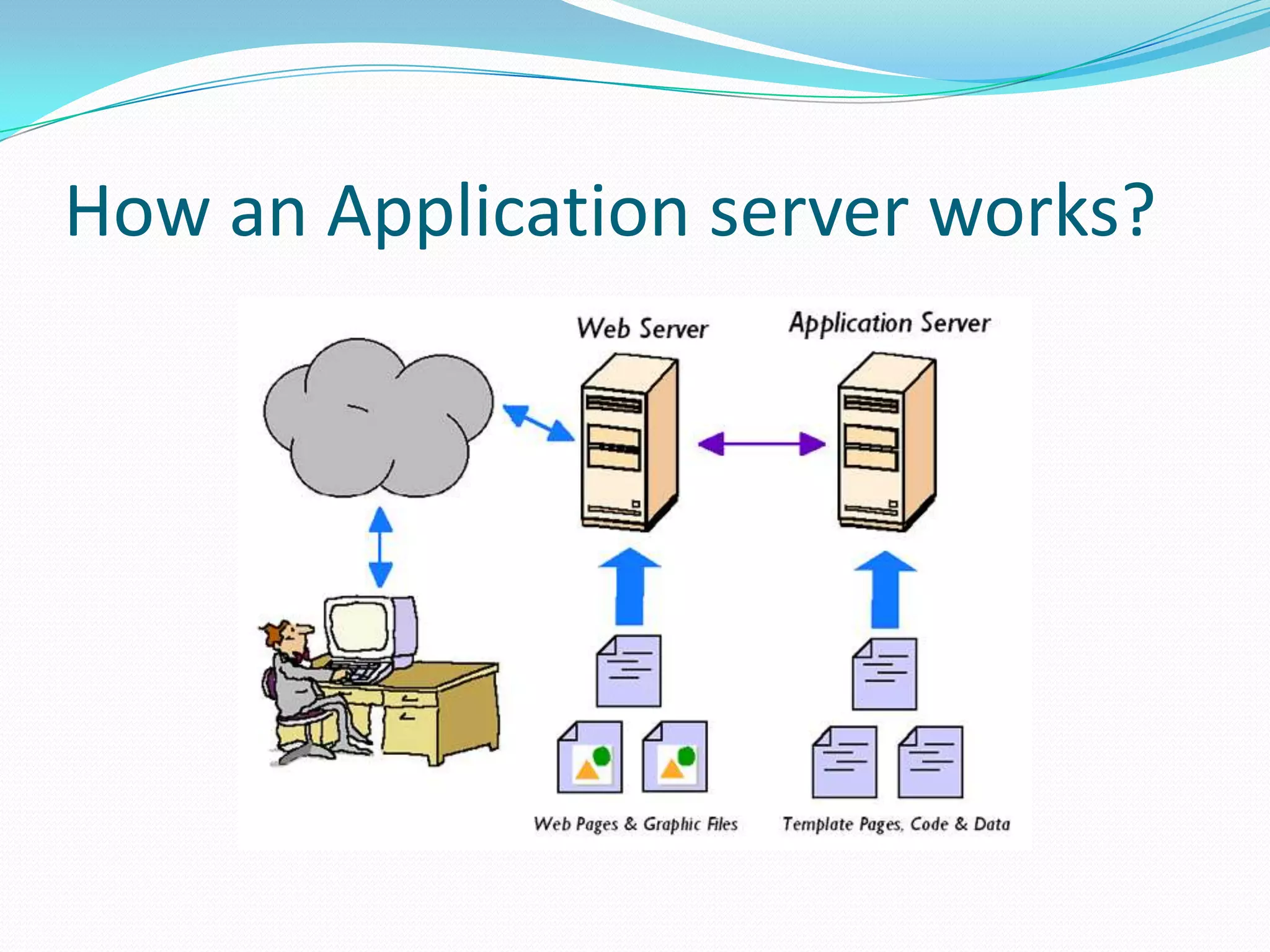
 Application servers are designed specifically to extend
 web servers to support dynamic content. The
 application server software “hooks in” to the web
 server software and automatically intercepts any user
 requests for dynamic content. The web server still
 sends out static web pages and graphic files–Just like
 before. But now, the application server can create
 dynamic content by mixing data with templates,
 running programs, or by accessing databases.
How an Application server works?
Weblogic is an Application server
 Its a Java Application server by BEA.
  Unlike normal Webserver(like Apache, Tomcat..) which
  just handles HTTP type request, the application server
  handles business logic to application programs through
  any number of protocols
 One can do much more than server static files with web
  logic application server. They contain tools to deploy and
  manage java programming environment including JSP,
  servlets and EJB (Enterprise Java beans, creates Business
  Logic). As an application server weblogic also provides you
  a "managed" environment including transactions,
  connection pools etc.
Shared Hosting and Dedicated
hosting
 Shared hosting, sometimes called shared services or virtual
  hosting, is simply when multiple web sites share the same server,
  thus reducing the cost for everyone. The only real problem with
  shared hosting is if the host has put too many sites on one server.

 Dedicated Hosting comes in various configurations
  depending on your requirement. All servers will at least
  be managed at hardware layer. This allows maximum optimized
  performance. This server is not shared with anybody and entire
  server's resources are exclusively available to drive your business
  applications.
 For instance, We will see Dedicated Hosting in WebLogic server.
  In the coming slides.
Admin Server
 Administration Server Can be only one for a Domain,
 which works like a Central Configuration/Monitoring
 controller for the entire domain. AdminServer helps us
 to Migrate Servers and Services within the domain.
 AdminServer helps us to Deploy Applications within
 the domain…targeted to ManagedServers/Clusters or
 targeted to AdminServer itself.
Managed Servers
 Managed Servers are similar to the Administration
  Servers, except few differences. Like Managed Servers
  will not have Administration Console Application
  (consoleapp) deployed in it.
 The benefit of using Dedicated hosting is that your
  website or application performance will not be effected
  by high traffic websites that would have been sharing
  your servers bandwidth. Moreover, it is more flexible
  than shared hosting, as webmasters have full control
  over the server, including choice of operating system,
  hardware.
How Managed Servers interacts with Admin
Server?

 The Administration Server stores the master copy of the domain
  configuration, which contains all the configuration for all managed
  servers in the domain including other resource configurations like
  DataSource, JMS resources, WLDF , mail Session…etc configurations as
  part of the “config.xml” file.
 If AdminServer is already started then while startup operation of
  Managed Server, it connects to the Administration Server to
  synchronize the configuration and in case of any modifications in the
  “config.xml” it collects those changes from the AdminServer.
 If AdminServer is not already running and if we will try to start
  Managed Servers (in MSI Mode) then Managed Servers get the Cached
  Configuration file which is provided by the NodeManager with the
  name of “msi-config.xml”.

 The types of configurations are as follows:
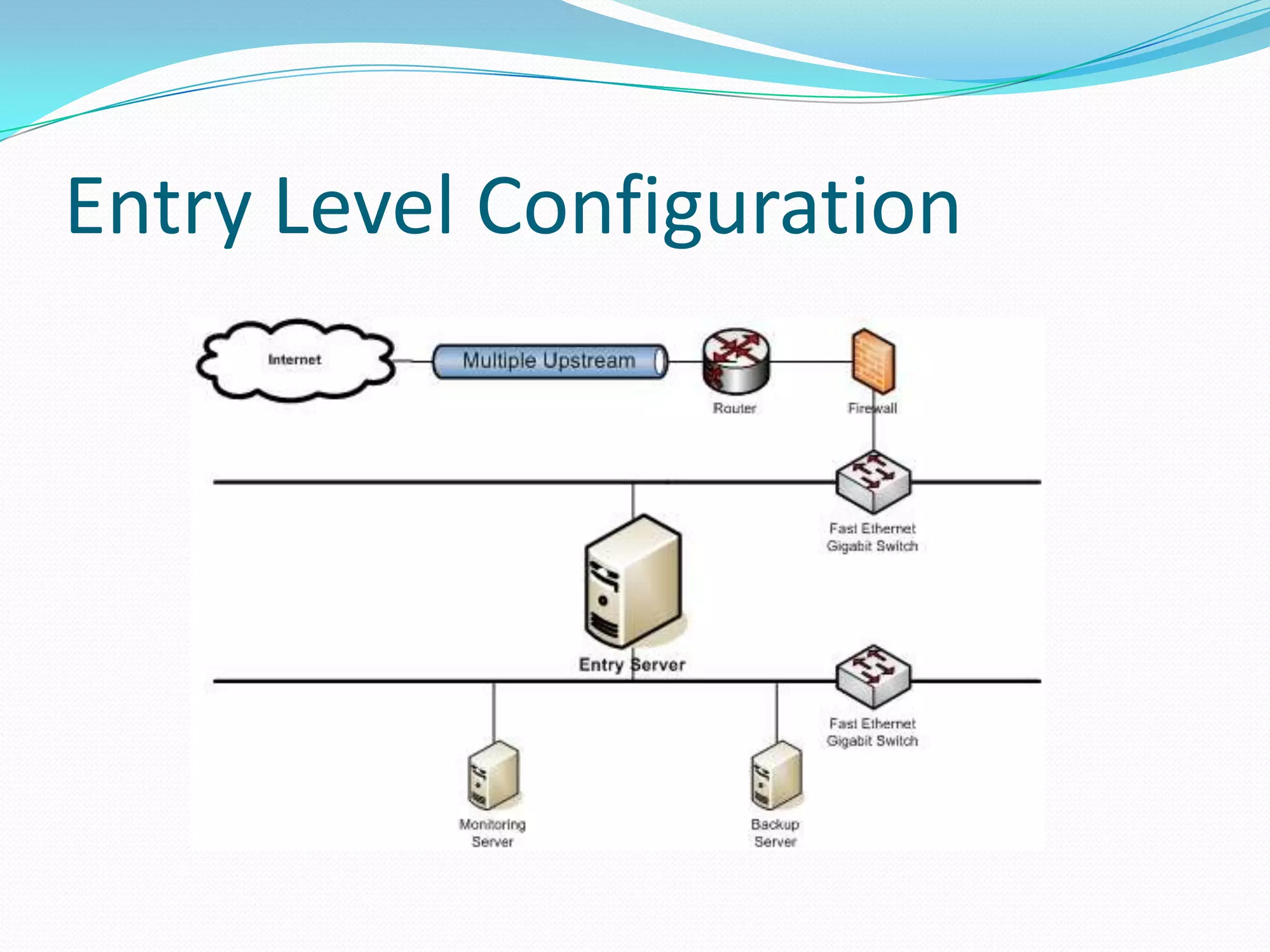
Entry Level Configuration
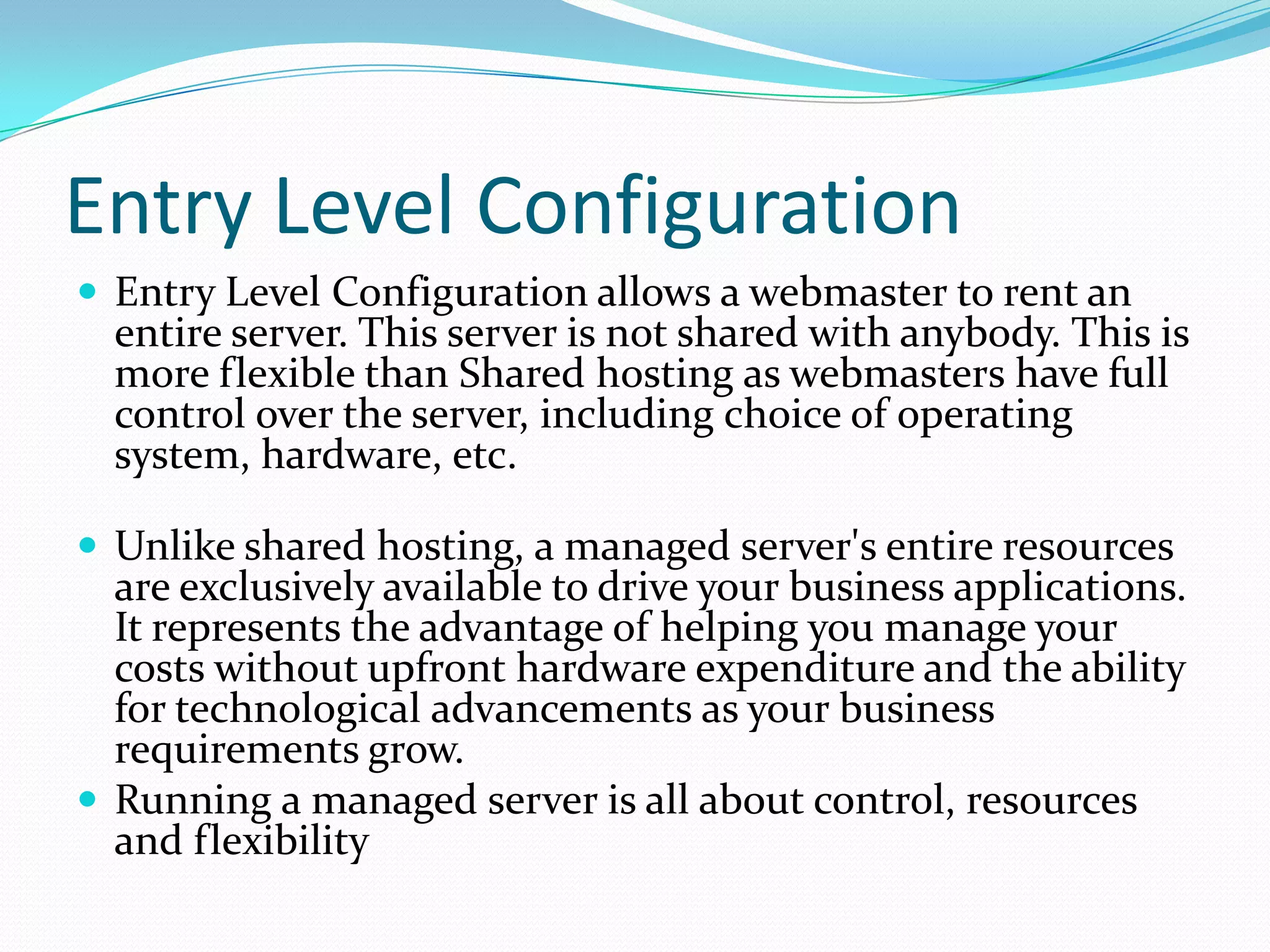
 Entry Level Configuration allows a webmaster to rent an
  entire server. This server is not shared with anybody. This is
  more flexible than Shared hosting as webmasters have full
  control over the server, including choice of operating
  system, hardware, etc.

 Unlike shared hosting, a managed server's entire resources
  are exclusively available to drive your business applications.
  It represents the advantage of helping you manage your
  costs without upfront hardware expenditure and the ability
  for technological advancements as your business
  requirements grow.
 Running a managed server is all about control, resources
  and flexibility
Entry Level Configuration
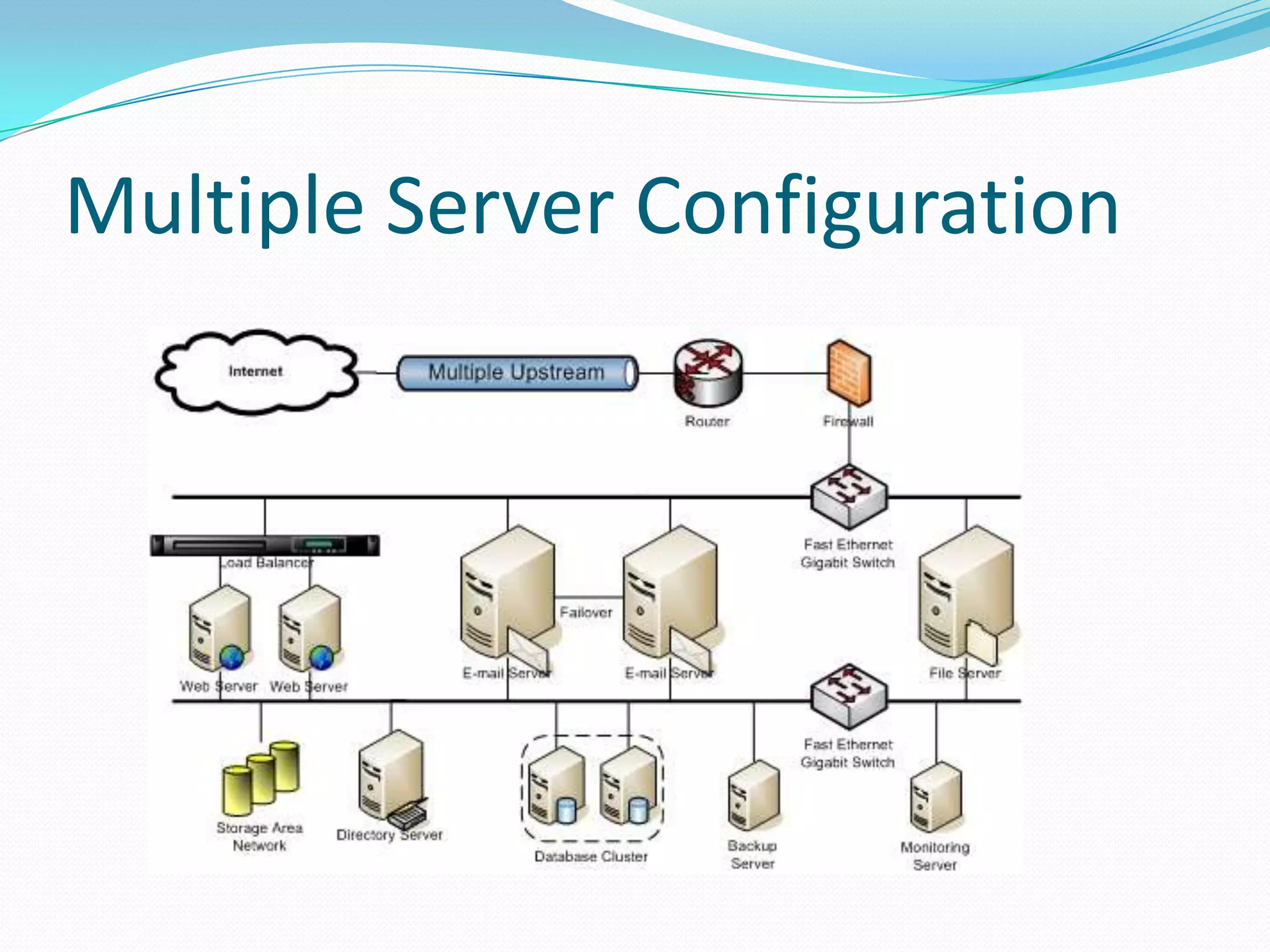
Multiple Server Configuration
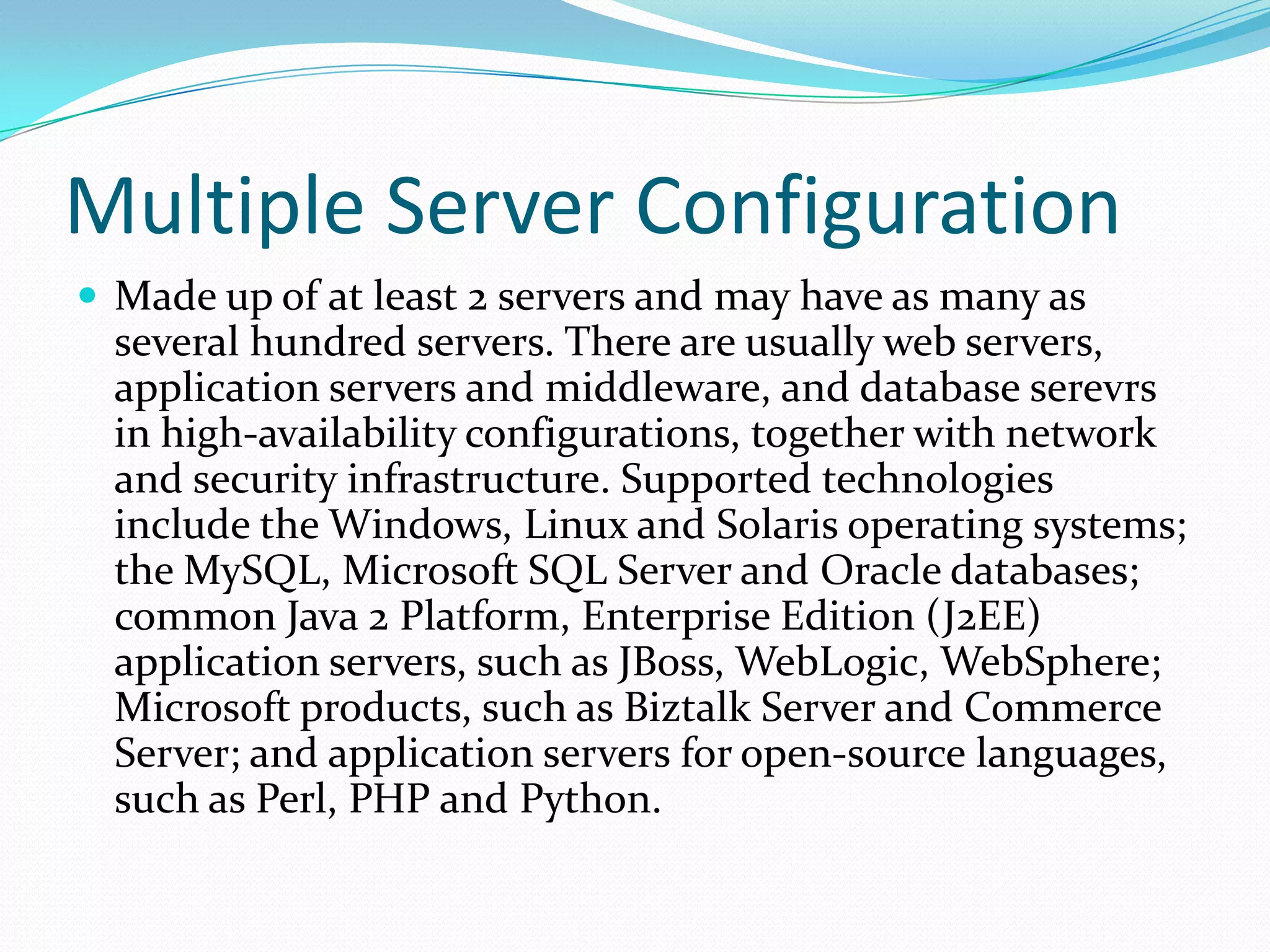
 Made up of at least 2 servers and may have as many as
  several hundred servers. There are usually web servers,
  application servers and middleware, and database serevrs
  in high-availability configurations, together with network
  and security infrastructure. Supported technologies
  include the Windows, Linux and Solaris operating systems;
  the MySQL, Microsoft SQL Server and Oracle databases;
  common Java 2 Platform, Enterprise Edition (J2EE)
  application servers, such as JBoss, WebLogic, WebSphere;
  Microsoft products, such as Biztalk Server and Commerce
  Server; and application servers for open-source languages,
  such as Perl, PHP and Python.
Multiple Server Configuration
Enterprise Server Configuration
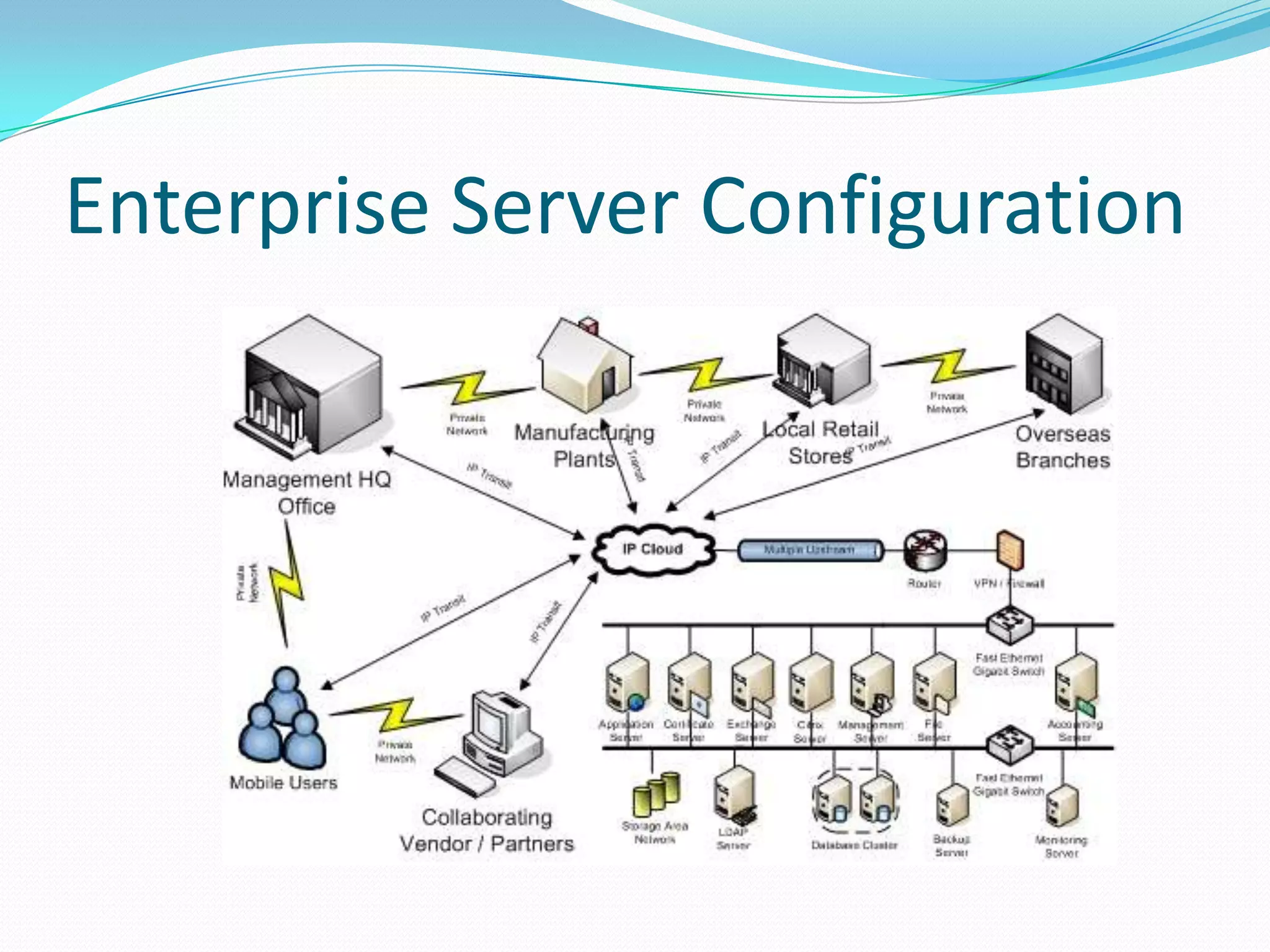
 This is operational support for enterprise applications,
  such as customer relationship management, enterprise
  resource planning (ERP) and sales-force automation.
  These configurations are typically made up of at least 6
  servers and may be very large. They may be managed
  in conjunction with a system integrator or other
  external service provider.
Enterprise Server Configuration
SSL
What is SSL?
 Secure Sockets Layer (SSL) is a global standard security technology developed
  by Netscape in 1994. SSL creates an encrypted link between a web server and
  a web browser to ensure that all data transmitted remains private and secure.
  Millions of consumers recognize the "golden padlock" which appears in their
  browser to indicate they are viewing a secure webpage.

Why do I need SSL?
 Gain competitive advantage by appearing more trusted and more legitimate.
 Provide assurance to your customers that their data cannot be tampered with
  or forged.
 Ensure that your customer's data is transmitted securely.

SSL and HTTPS
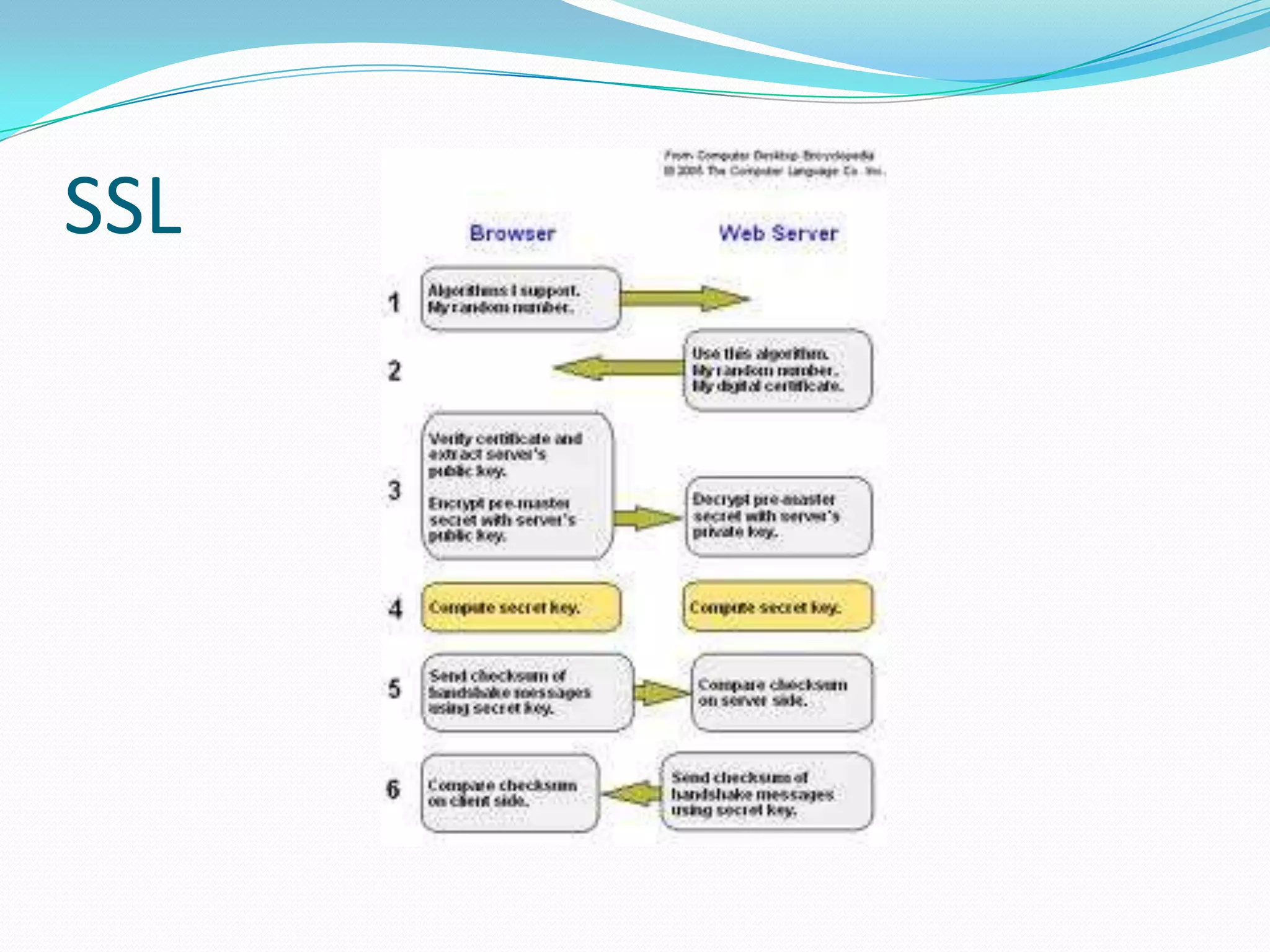
 An SSL session is started by sending a request to the Web server with an
  HTTPS prefix in the URL, which causes port number 443 to be placed into the
  packets. Port 443 is the number assigned to the SSL application on the server
SSL
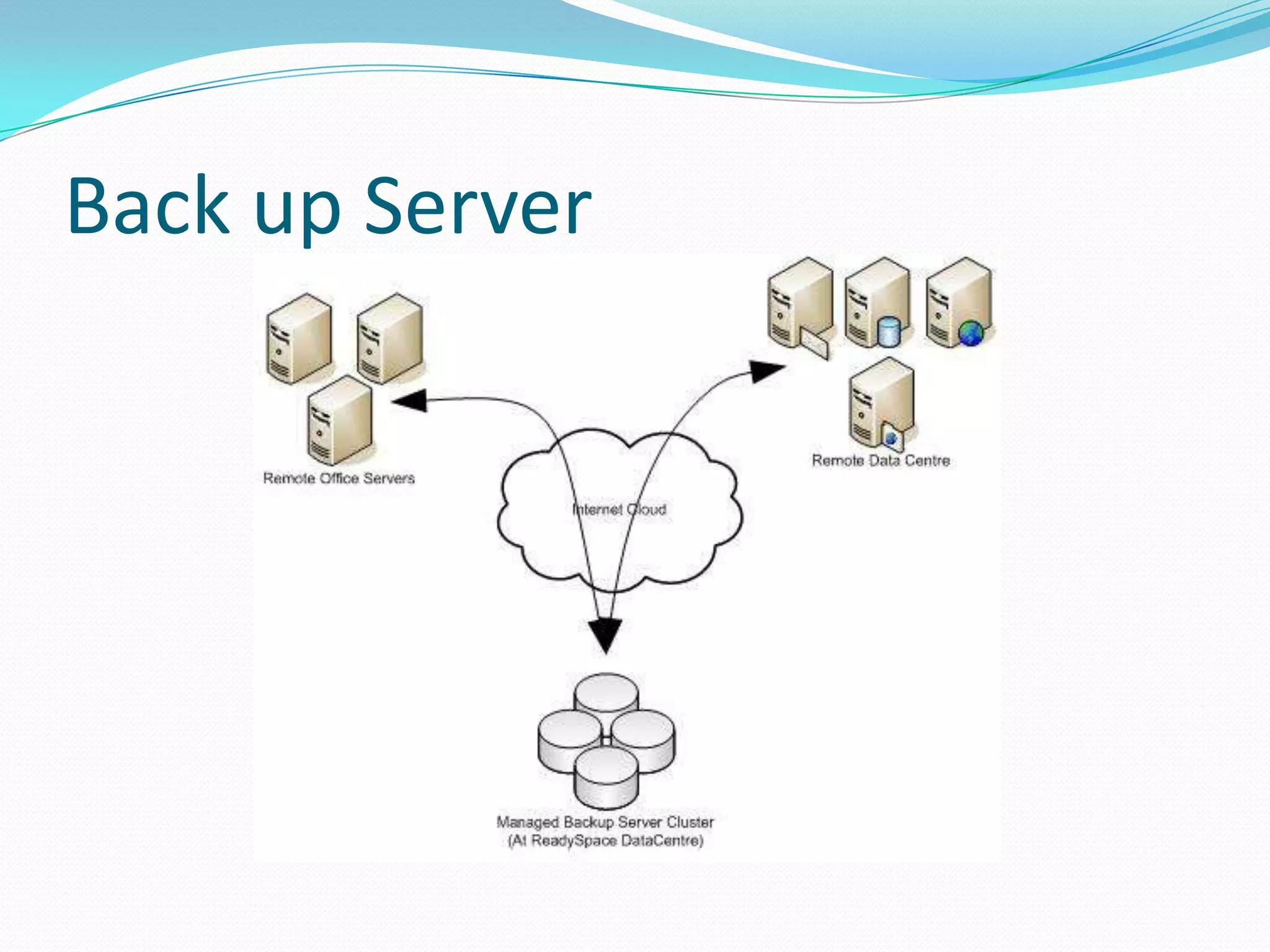
Back up Server
 This is a Hosted Continuous Data Protection solution
 to backup your server contents. The solution enables
 disk-based data protection, disaster recovery and bare
 metal restore for servers and workstations running
 Linux and Windows systems/ It is the first high
 performance backup and restoration product for
 MySQL and the only software to offer True Granular
 Restore for MySQL.
Back up Server
Enjoy Learning the Technologies.....

Presentation about servers

  • 1.
    Sasin Prabu 26.12.11
  • 2.
    Contents Servers  Web server Apache Tomcat  Application Server Weblogic server Shared Hosting & Dedicated Hosting  Admin Server  Managed Server Entry level configuration Multi server configuration Enterprise server configuration SSL  Back up Server
  • 3.
    Web Server  Aweb server is a specialized type of file server. Its job is to retrieve files from the server’s hard drive, format the files for the Web browser, and send them out via the network. Web servers are designed to do a great job of sending static content out to a large number of users. The pages delivered by the server are expected to be the same for everyone who visits the server.  The function of a typical Web server is shown below. The user requests a web page. The Web Server finds the web page file in a local directory and sends it back out to the user. When graphic files are requested, the same thing happens. The Web Server finds the requested graphic files and sends them back to the user.  The Web Server standards were originally designed to publish static documents on the Internet. There was a limited capability for accessing dynamic content, but this was never intended to support high volume, highly interactive Web applications.
  • 4.
    How a WebServer works
  • 5.
    Apache Tomcat isa Web server  Tomcat is an open source web server developed by Apache Group. Apache Tomcat is the servlet container that is used in the official Reference Implementation for the Java Servlet and Java Server Pages(JSP) technologies. The Java Servlet and Java Server Pages specifications are developed by Sun under the Java Community Process. Web Servers like Apache Tomcat support only web components.
  • 6.
    Application Server  Applicationservers are designed specifically to extend web servers to support dynamic content. The application server software “hooks in” to the web server software and automatically intercepts any user requests for dynamic content. The web server still sends out static web pages and graphic files–Just like before. But now, the application server can create dynamic content by mixing data with templates, running programs, or by accessing databases.
  • 7.
    How an Applicationserver works?
  • 8.
    Weblogic is anApplication server  Its a Java Application server by BEA. Unlike normal Webserver(like Apache, Tomcat..) which just handles HTTP type request, the application server handles business logic to application programs through any number of protocols  One can do much more than server static files with web logic application server. They contain tools to deploy and manage java programming environment including JSP, servlets and EJB (Enterprise Java beans, creates Business Logic). As an application server weblogic also provides you a "managed" environment including transactions, connection pools etc.
  • 9.
    Shared Hosting andDedicated hosting  Shared hosting, sometimes called shared services or virtual hosting, is simply when multiple web sites share the same server, thus reducing the cost for everyone. The only real problem with shared hosting is if the host has put too many sites on one server.  Dedicated Hosting comes in various configurations depending on your requirement. All servers will at least be managed at hardware layer. This allows maximum optimized performance. This server is not shared with anybody and entire server's resources are exclusively available to drive your business applications.  For instance, We will see Dedicated Hosting in WebLogic server. In the coming slides.
  • 10.
    Admin Server AdministrationServer Can be only one for a Domain, which works like a Central Configuration/Monitoring controller for the entire domain. AdminServer helps us to Migrate Servers and Services within the domain. AdminServer helps us to Deploy Applications within the domain…targeted to ManagedServers/Clusters or targeted to AdminServer itself.
  • 11.
    Managed Servers  ManagedServers are similar to the Administration Servers, except few differences. Like Managed Servers will not have Administration Console Application (consoleapp) deployed in it.  The benefit of using Dedicated hosting is that your website or application performance will not be effected by high traffic websites that would have been sharing your servers bandwidth. Moreover, it is more flexible than shared hosting, as webmasters have full control over the server, including choice of operating system, hardware.
  • 12.
    How Managed Serversinteracts with Admin Server?  The Administration Server stores the master copy of the domain configuration, which contains all the configuration for all managed servers in the domain including other resource configurations like DataSource, JMS resources, WLDF , mail Session…etc configurations as part of the “config.xml” file.  If AdminServer is already started then while startup operation of Managed Server, it connects to the Administration Server to synchronize the configuration and in case of any modifications in the “config.xml” it collects those changes from the AdminServer.  If AdminServer is not already running and if we will try to start Managed Servers (in MSI Mode) then Managed Servers get the Cached Configuration file which is provided by the NodeManager with the name of “msi-config.xml”.  The types of configurations are as follows:
  • 13.
    Entry Level Configuration Entry Level Configuration allows a webmaster to rent an entire server. This server is not shared with anybody. This is more flexible than Shared hosting as webmasters have full control over the server, including choice of operating system, hardware, etc.  Unlike shared hosting, a managed server's entire resources are exclusively available to drive your business applications. It represents the advantage of helping you manage your costs without upfront hardware expenditure and the ability for technological advancements as your business requirements grow.  Running a managed server is all about control, resources and flexibility
  • 14.
  • 15.
    Multiple Server Configuration Made up of at least 2 servers and may have as many as several hundred servers. There are usually web servers, application servers and middleware, and database serevrs in high-availability configurations, together with network and security infrastructure. Supported technologies include the Windows, Linux and Solaris operating systems; the MySQL, Microsoft SQL Server and Oracle databases; common Java 2 Platform, Enterprise Edition (J2EE) application servers, such as JBoss, WebLogic, WebSphere; Microsoft products, such as Biztalk Server and Commerce Server; and application servers for open-source languages, such as Perl, PHP and Python.
  • 16.
  • 17.
    Enterprise Server Configuration This is operational support for enterprise applications, such as customer relationship management, enterprise resource planning (ERP) and sales-force automation. These configurations are typically made up of at least 6 servers and may be very large. They may be managed in conjunction with a system integrator or other external service provider.
  • 18.
  • 19.
    SSL What is SSL? Secure Sockets Layer (SSL) is a global standard security technology developed by Netscape in 1994. SSL creates an encrypted link between a web server and a web browser to ensure that all data transmitted remains private and secure. Millions of consumers recognize the "golden padlock" which appears in their browser to indicate they are viewing a secure webpage. Why do I need SSL?  Gain competitive advantage by appearing more trusted and more legitimate.  Provide assurance to your customers that their data cannot be tampered with or forged.  Ensure that your customer's data is transmitted securely. SSL and HTTPS  An SSL session is started by sending a request to the Web server with an HTTPS prefix in the URL, which causes port number 443 to be placed into the packets. Port 443 is the number assigned to the SSL application on the server
  • 20.
  • 21.
    Back up Server This is a Hosted Continuous Data Protection solution to backup your server contents. The solution enables disk-based data protection, disaster recovery and bare metal restore for servers and workstations running Linux and Windows systems/ It is the first high performance backup and restoration product for MySQL and the only software to offer True Granular Restore for MySQL.
  • 22.
  • 23.
    Enjoy Learning theTechnologies.....