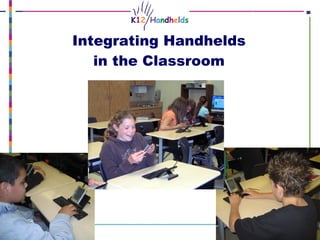
Integrating Handhelds into the Classroom

Loading...

Flash Player 9 (or above) is needed to view presentations.
We have detected that you do not have it on your computer. To install it, go here.

2 comments

Comments 1 - 2 of 2 previous next Post a comment

  • + kfasimpaur Karen F 11 months ago
    Mobile technology is definitely changing, but that’s somewhat the nature of technology. One of the things we try to do in all of our mobile implementations is to use (and create) content that cross-platform. Things like ebooks, mini-movies, and podcasts, for example, can be used on handhelds (Palm and PPC), laptops, cell phones, and even game machines like PSPs.

    This year, we are doing several projects with the new mini-laptops. These laptops are in the $300-400 price range and are quite powerful. At this low price, these devices are a logical choice for schools. We have seen some great results with kids using these, especially in one-to-one programs.
  • + guesta7c8a5 guesta7c8a5 11 months ago
    I hear palm is going out of business in the non phone pda market. What will students do once palm platform is gone or no longer supports? What pda do you see students using next other than the Palm platform here?
    Curious Teacher in Texas
    JM
Post a comment
Embed Video
Edit your comment Cancel

2 Favorites

Integrating Handhelds into the Classroom - Presentation Transcript

  1. Integrating Handhelds in the Classroom
  2. Welcome
    • Introductions
    • Agenda
      • Tips for you as a handheld user
      • Tips for using handhelds with kids
      • Best educational programs for handhelds
    • Questions, requests
  3. Tips for you
    • Use your Palm for fun stuff (as well as for school)
    • Get good at Graffiti
    • Sync and use Palm desktop
    • Use your menus
    • Use the 5-way navigator
    • Write in the first letter to search a list
    • Use command bar
    • Use ShortCuts
  4. Troubleshooting
    • Categories
    • Resets
      • Soft
      • Warm
      • Power
      • Hard
    • HotSync manager
  5. Tips for using handhelds with kids
    • Start with your curriculum objectives (not the technology or the software)
    • Make kids responsible for handing out devices, charging, and syncing
    • Project your handheld screen
    • File management
    • Beaming to your handheld and to the desktop
    • Paperless grading
  6. 101 Great Educational Uses for Your Handheld Computer
  7. Curriculum areas that lend themselves to handheld use
    • Writing
    • Reading
    • Vocabulary/spelling
    • Math practice
    • Summarizing and notetaking
    • Research
    • Differentiating instruction in any topic
  8. Best free applications for education
    • Docs to Go
    • Ebooks
      • Mobipocket
      • eEreader
      • etc.
    • Quizzler
    • Plucker
    • Graphic organizers
    • MathAce
    • Dropairs
    • TCPMP (requires SD cards)
  9. Documents to Go
    • Overview : Word, Excel, and PowerPoint on your handheld
    • Classroom applications : Writing, summarizing/outlining, presenting, providing study guides or notes
  10. Ebooks
    • Overview : Books on the handheld
    • Classroom applications : Reading, research, practice
    • Multiple formats
      • Mobipocket
      • eReader (also called Palm Reader)
      • … .and more
  11. More on Ebooks
    • Sites with free ebooks:
        • www.manybooks.net
        • www.memoware.com
    • Remember which format you download; suggested formats:
        • Mobipocket
        • eReader
        • Plucker
  12. Quizzler
    • Overview : Multiple choice/true-false quizzes and flash cards
    • Classroom applications : Formal assessment or practice/studying
  13. Web Clipping (Plucker)
    • Overview : Download specific web pages (doesn’t require wireless; not “live” Internet access)
    • Classroom applications : Research, reading, literature, etc.
  14. Graphic Organizers (Inspiration, PiCoMap, Idea Pad)
    • Overview : Concept (or mind) maps
    • Classroom applications : Pre-writing, brainstorming, notetaking, outlining
  15. Math Practice (MathAce)
    • Overview : Basic addition, subtraction, multiplication, and division practice
    • Classroom applications : Math practice, timed tests
  16. Dropairs
    • Overview : Match pairs of dropping tiles
    • Classroom applications : Math practice, time, money, geography, and more
  17. Multimedia (TCPMP)
    • Overview : Audio and video * requires an SD card
    • Classroom applications : Podcasts, audio books, instructional video, sight words, etc.
  18. More on Multimedia
    • Sites with free content:
      • iTunes
      • TeacherTube
      • Next Vista
    • Use MP3 for audio and MPG for video
    • Use Zamzar to convert
    • K12 Handhelds
    • email: karen@k12handhelds.com
    • web: www.k12handhelds.com
    • phone: 800-679-2226
    • Thank you!

+ Karen FKaren F, 2 years ago

custom

1025 views, 2 favs, 3 embeds more stats

This presentation tells about some ways to integrat more

More info about this document

© All Rights Reserved

Go to text version

  • Total Views 1025
    • 1002 on SlideShare
    • 23 from embeds
  • Comments 2
  • Favorites 2
  • Downloads 0
Most viewed embeds
  • 21 views on http://www.k12handhelds.com
  • 1 views on http://64.233.169.132
  • 1 views on http://michellebolstad.edublogs.org

more

All embeds
  • 21 views on http://www.k12handhelds.com
  • 1 views on http://64.233.169.132
  • 1 views on http://michellebolstad.edublogs.org

less

Flagged as inappropriate Flag as inappropriate
Flag as inappropriate

Select your reason for flagging this presentation as inappropriate. If needed, use the feedback form to let us know more details.

Cancel
File a copyright complaint
Having problems? Go to our helpdesk?

Categories