Speed Up
Wordpress
Make Readers
Happy and Your
Site Green


Jason Grigsby • http://cloudour.com/blog • Twitter: @grigs • Slides at http://slideshare.net/grigs

We’ve remade the Internet in our image.
Obese
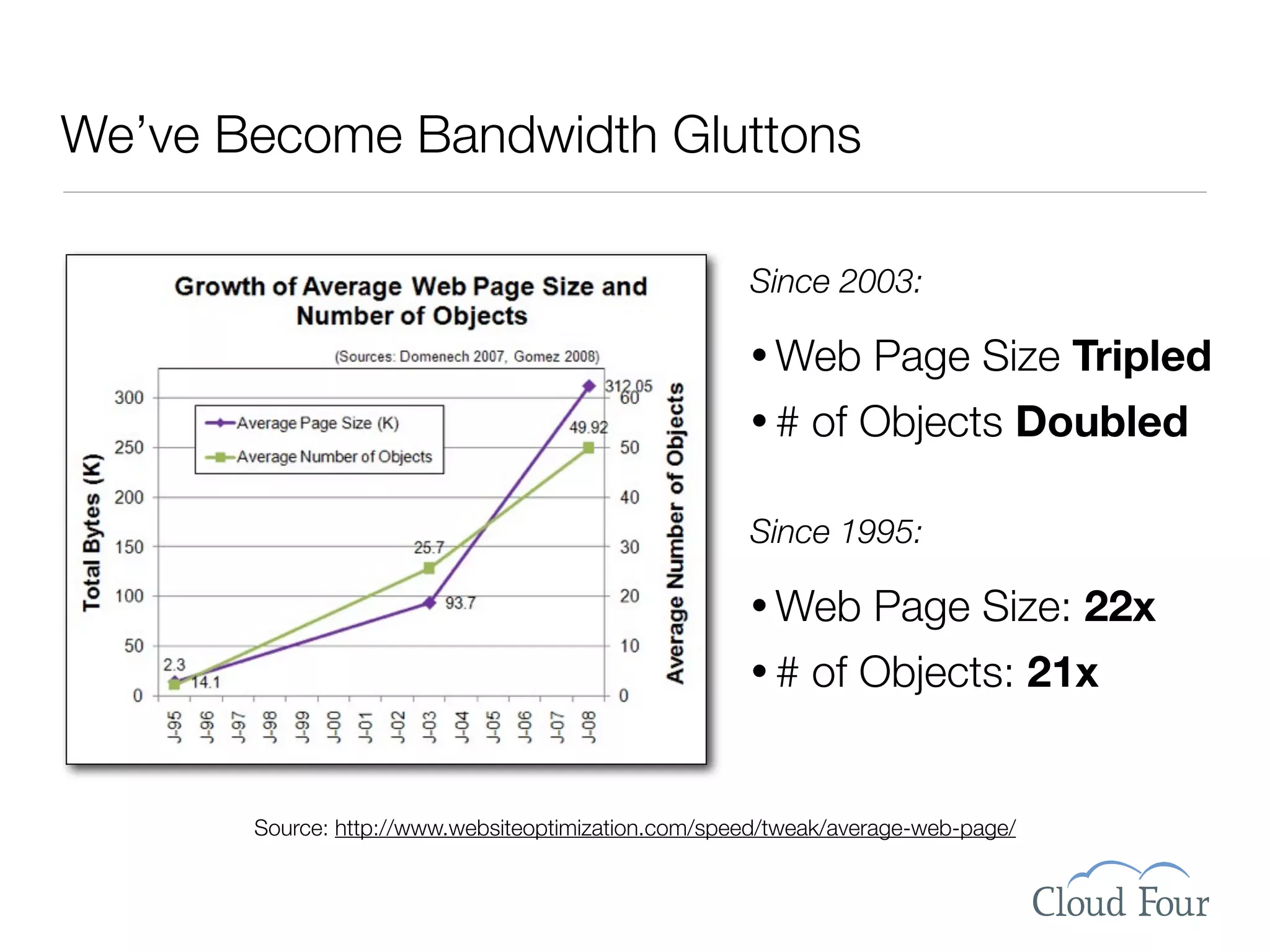
We’ve Become Bandwidth Gluttons

                                                     Since 2003:

                                                     • Web       Page Size Tripled
                                                     •#    of Objects Doubled

                                                     Since 1995:

                                                     • Web       Page Size: 22x
                                                     •#    of Objects: 21x


       Source: http://www.websiteoptimization.com/speed/tweak/average-web-page/
I blame WordPress.
Ok, maybe that’s a bit much.
But there are just so many cool plugins.
            Who can resist?

    Just one more little bite plugin.
Broadband & 4G = What, Me Worry?


        Source: http://www.websiteoptimization.com/bw/0708
Speed = Success


Shackel’s Acceptability Paradigm
      Source: Speed Up Your Site by Andrew King, p. 6.
Web Speed = Perception


                             Flickr: Uploaded October 15, 2006 by mattlogelin

September 19 • DevGroup NW   Jason Grigsby • http://userfirstweb.com
Web Speed = Perception
                             Qu ality
    U sab ility


                                ed ibility
                              Cr
               Serv ice
                                    Flickr: Uploaded October 15, 2006 by mattlogelin

September 19 • DevGroup NW          Jason Grigsby • http://userfirstweb.com
Optimizing for Flow
                             0.1 seconds —
                             Viewed as
                             Instantaneous
                             1.0 seconds —
                             Moving Freely
                             10 seconds —
                             Retain Focus on Task

                                      Flickr: Uploaded August 7, 2007 by .Hessam

September 19 • DevGroup NW         Jason Grigsby • http://userfirstweb.com
Flickr: Uploaded November 7, 2005 by Tracy O

September 19 • DevGroup NW   Jason Grigsby • http://userfirstweb.com
• Ecommerce
                              Bailout Rates
                             • Bandwidth
                              Charges


                                               Flickr: Uploaded November 7, 2005 by Tracy O

September 19 • DevGroup NW                    Jason Grigsby • http://userfirstweb.com
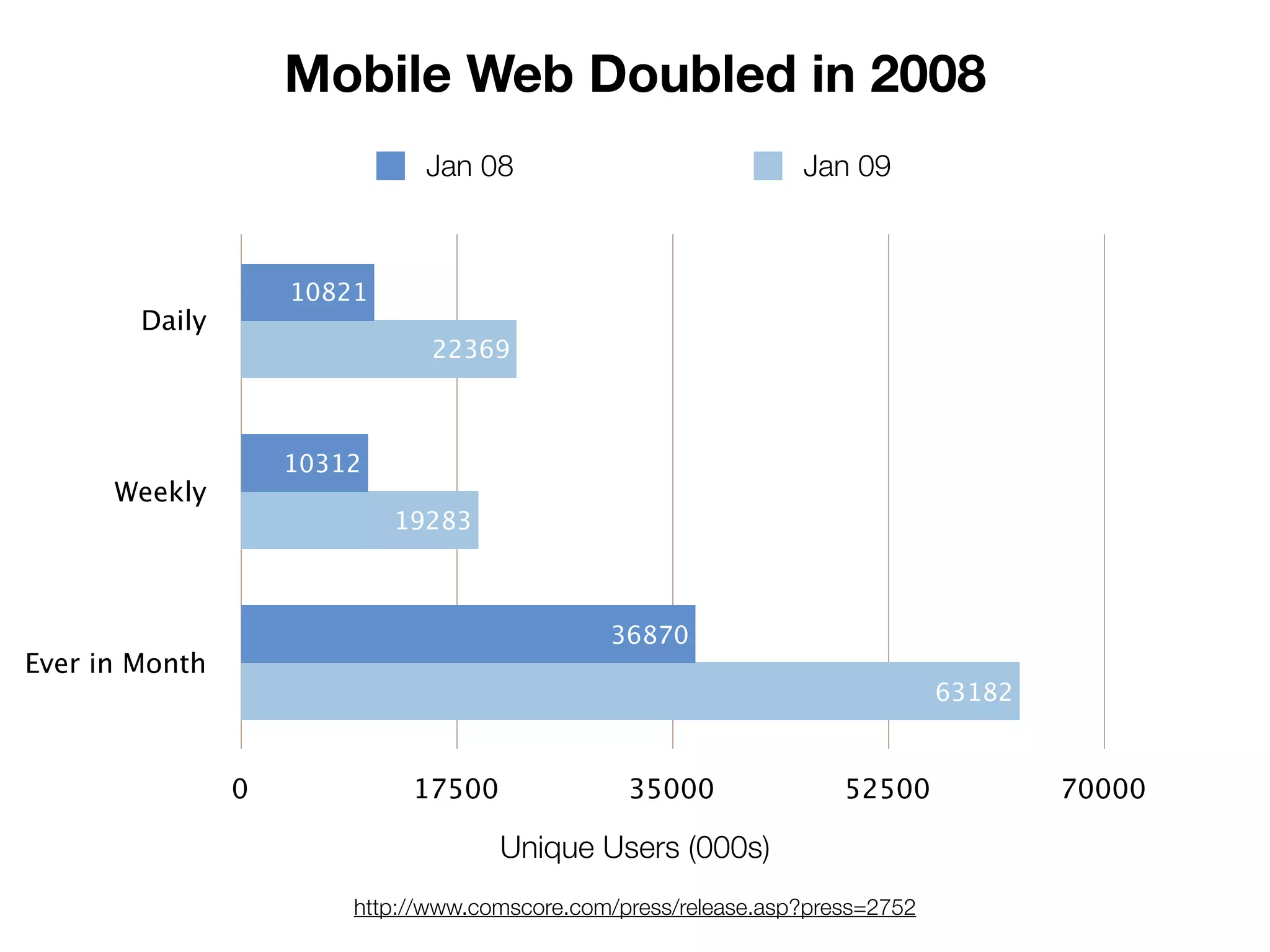
Mobile Web Doubled in 2008
                              Jan 08                             Jan 09


                    10821
        Daily
                               22369


                    10312
      Weekly
                            19283


                                               36870
Ever in Month
                                                                               63182


                0            17500               35000               52500             70000

                                     Unique Users (000s)
                        http://www.comscore.com/press/release.asp?press=2752
Slow Sites = Environmental Impact


    Flickr photo by Pingnews: http://www.flickr.com/photos/pingnews/370061022/
Storage Networking World 2007
http://www.flickr.com/photos/13244105@N00/29463820/
Prep Work: Get Measurement Tools
Firebug for Firefox
          http://getfirebug.com

YSlow Firebug Plugin from Yahoo
    http://developer.yahoo.com/yslow/

        Google Page Speed
http://code.google.com/speed/page-speed/
YSlow Firebug Plugin
http://developer.yahoo.com/yslow/
Our Guinea Pig
Step 1: Server vs. Client Performance
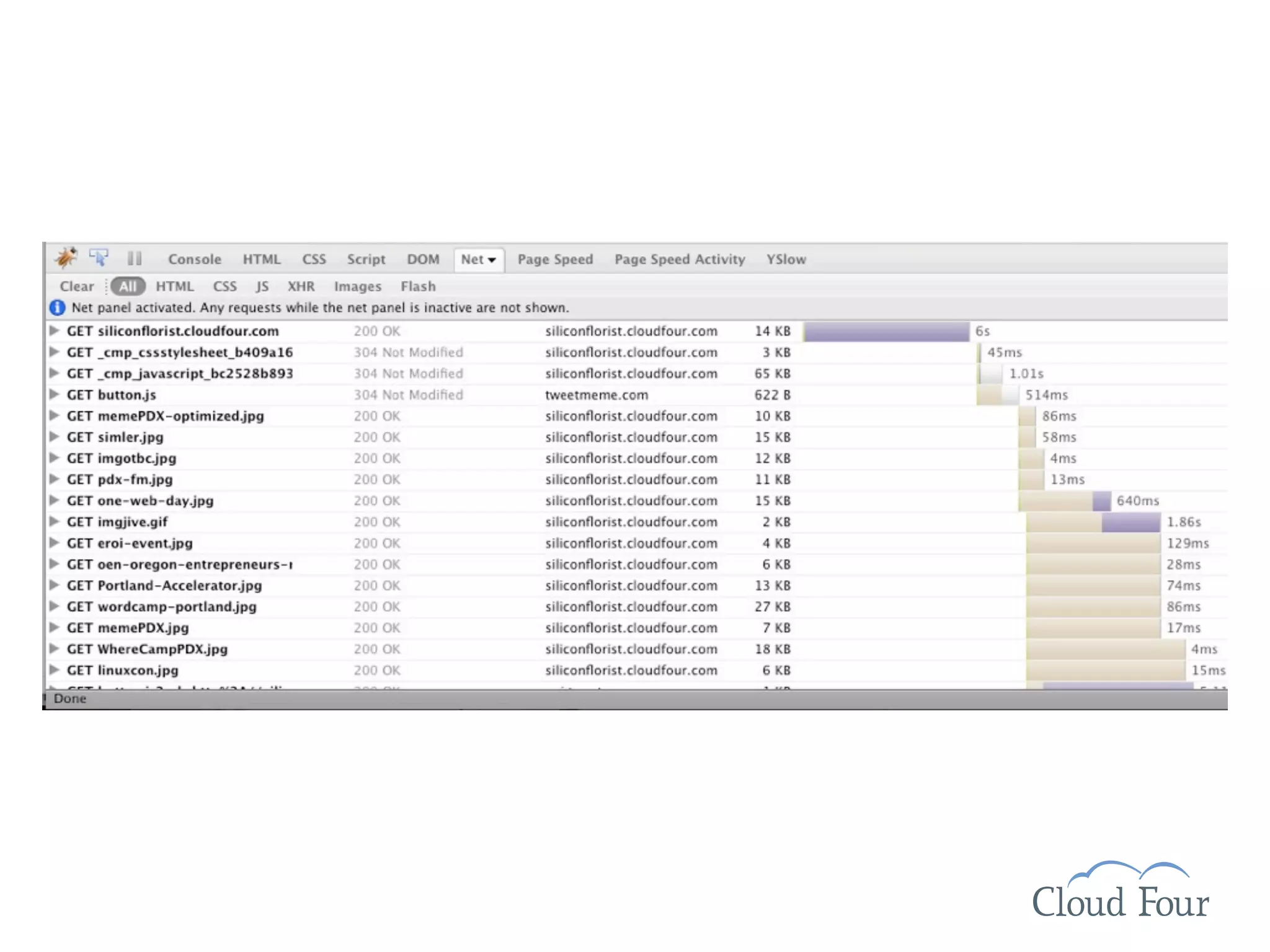
How long does it take for the
  HTML file to download?

 Look at network graph
Server Solutions

                 SQL Monitor
    http://wordpress.org/extend/plugins/sqlmon/

              WP Super Cache
http://wordpress.org/extend/plugins/wp-super-cache/

            Find a New Web Host
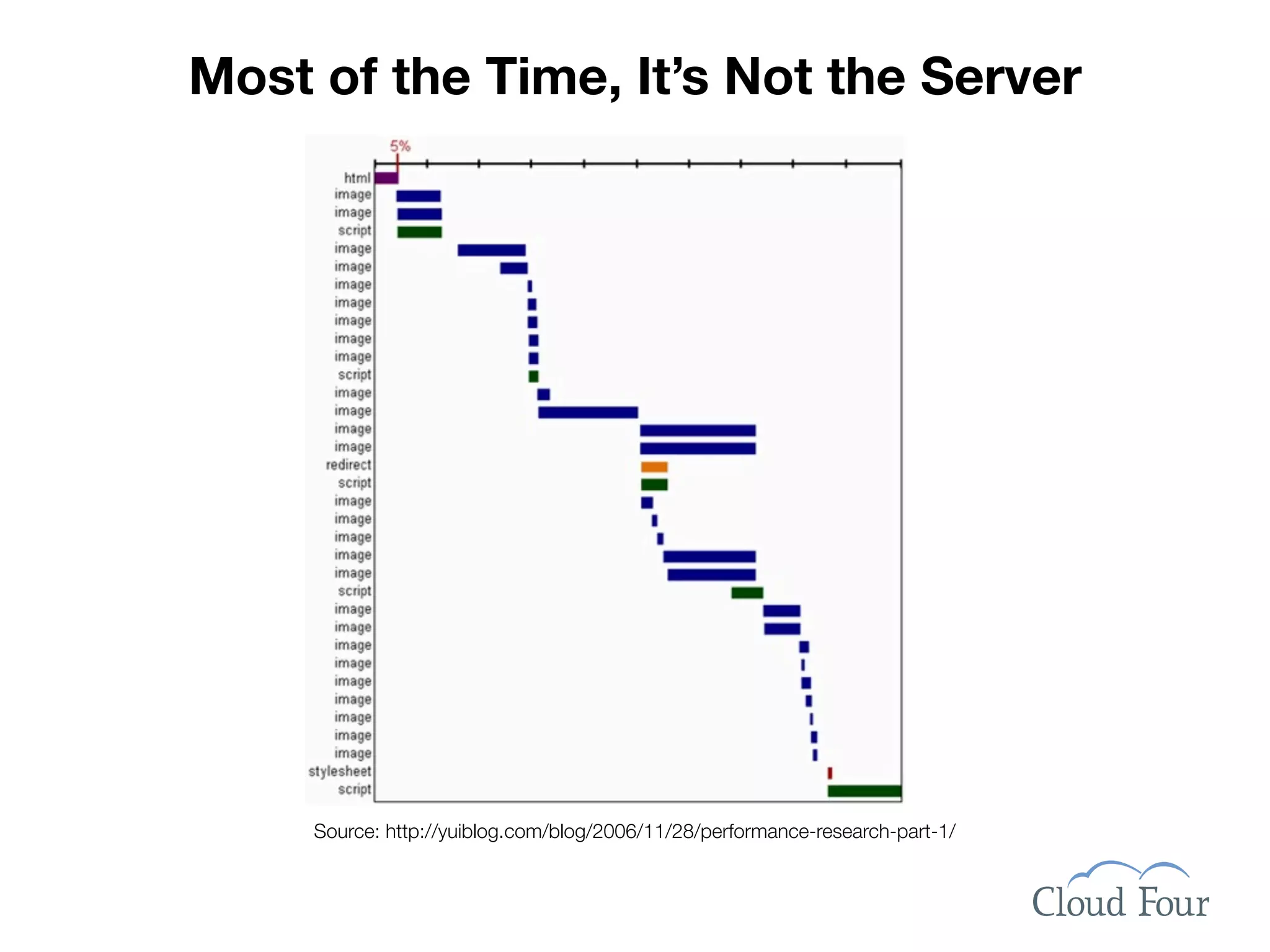
Most of the Time, It’s Not the Server


     Source: http://yuiblog.com/blog/2006/11/28/performance-research-part-1/
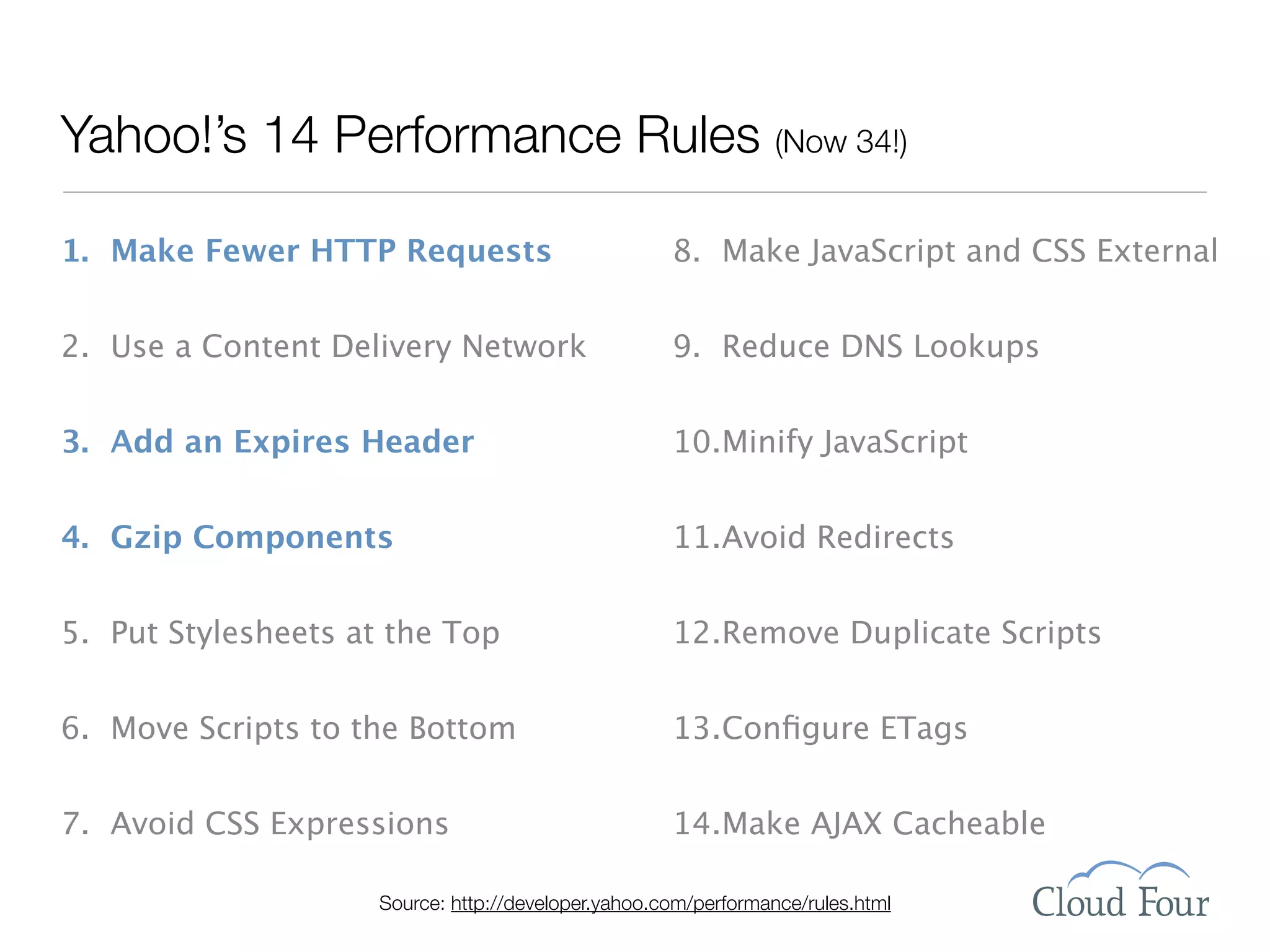
Yahoo!’s 14 Performance Rules (Now 34!)

1. Make Fewer HTTP Requests                          8. Make JavaScript and CSS External


2. Use a Content Delivery Network                    9. Reduce DNS Lookups


3. Add an Expires Header                             10.Minify JavaScript


4. Gzip Components                                   11.Avoid Redirects


5. Put Stylesheets at the Top                        12.Remove Duplicate Scripts


6. Move Scripts to the Bottom                        13.Configure ETags


7. Avoid CSS Expressions                             14.Make AJAX Cacheable

                     Source: http://developer.yahoo.com/performance/rules.html
Step 2: Take a Benchmark Measurement
Step 3: GZIP Like Your Life Depended on It
Flickr photo by amaneiro:
  http://www.flickr.com/
    photos/amaneiro/
       2396649106/


      GZIP is compression. If you do nothing else. DO THIS.
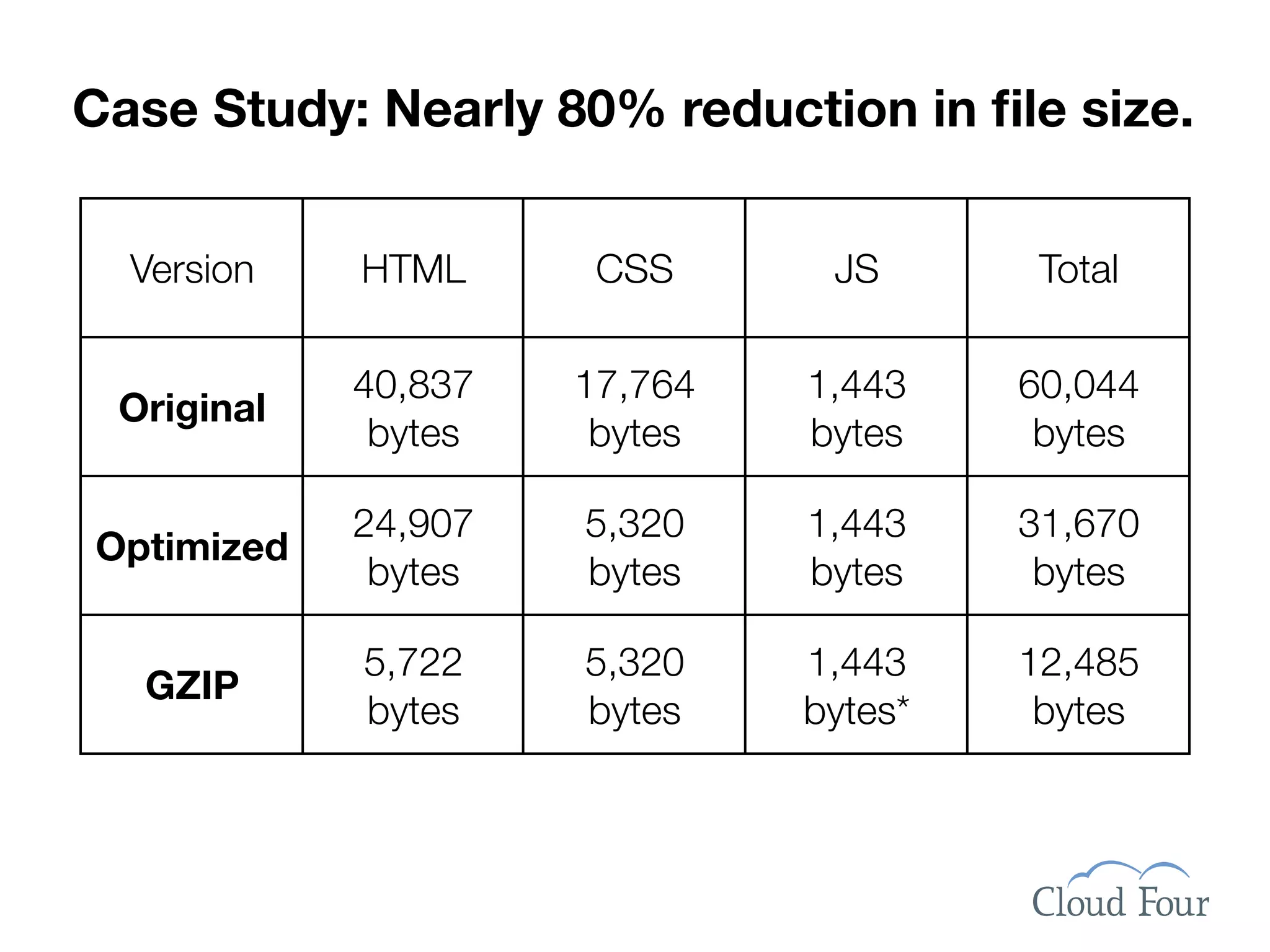
Case Study: Nearly 80% reduction in file size.


  Version   HTML      CSS      JS       Total

            40,837   17,764   1,443    60,044
 Original
             bytes    bytes   bytes     bytes

            24,907   5,320    1,443    31,670
Optimized
             bytes   bytes    bytes     bytes

            5,722    5,320    1,443    12,485
  GZIP
            bytes    bytes    bytes*    bytes
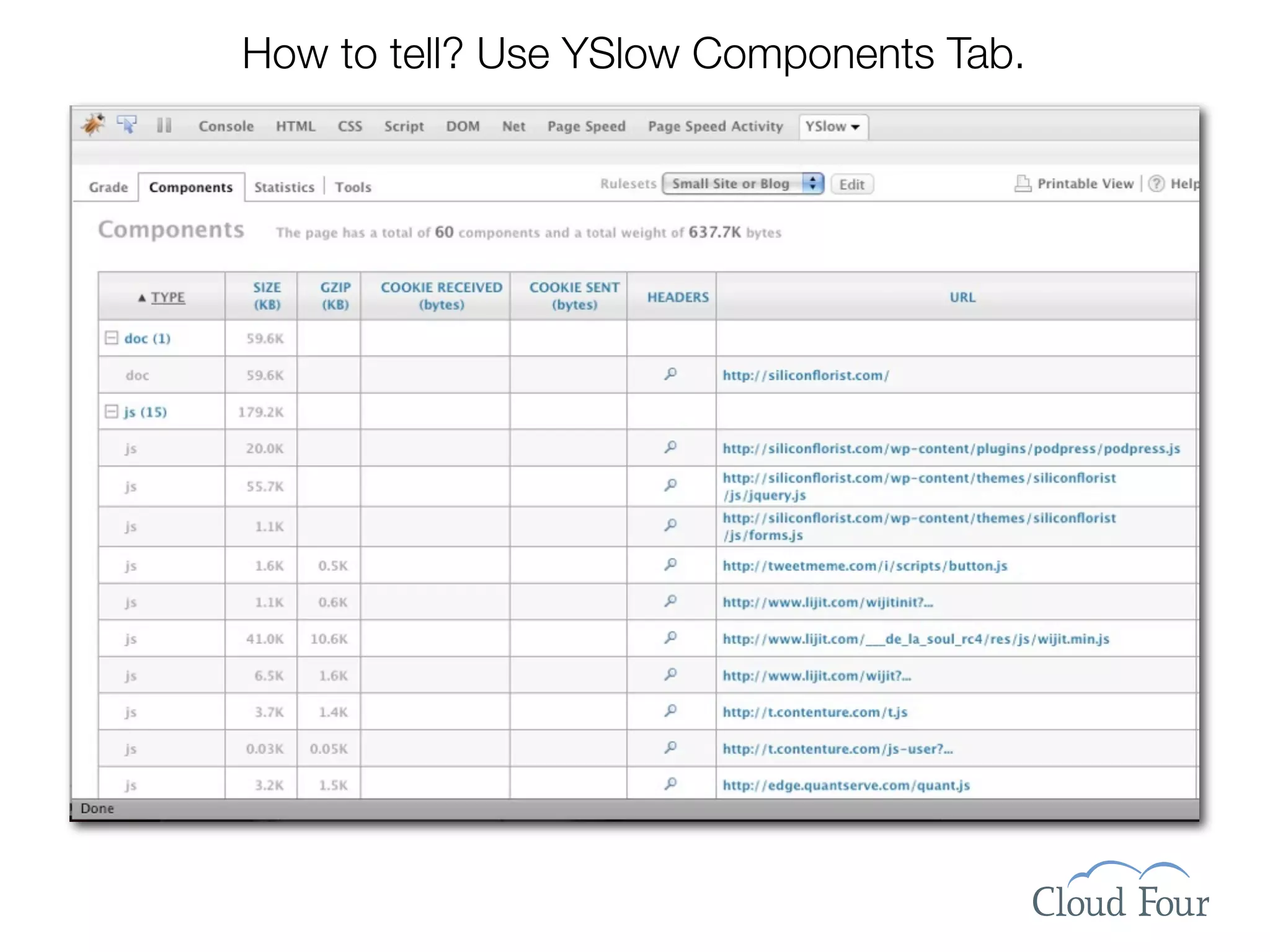
How to tell? Use YSlow Components Tab.
Add three lines to .htaccess & save the world?


<IfModule mod_deflate.c>
AddOutputFilterByType DEFLATE text/html text/plain text/xml text/
css application/javascript application/x-javascript application/x-
httpd-php application/rss+xml application/atom_xml
</IfModule>
Step 4: Tell Browsers to Cache Everything
Aggressively Encourage Caching
•Goal #1: No HTTP HEAD Requests.

•Add Expires header. Put it far into the future.

•Develop naming conventions for versioning of
 files. Update filename when file is modified.

                  e.g., logo20090523.png

•Keep files under 25k for mobile devices.

•Configure or remove ETags from files.

•Watch your logs to make sure caching works.

    Flickr photo by John Wardell (Netinho): http://www.flickr.com/photo_zoom.gne?id=760902403&size=l
Add these lines to .htaccess
   <IfModule mod_expires.c>
     ExpiresActive on
     ExpiresByType image/gif "access plus 1 month"
     ExpiresByType image/jpeg "access plus 1 month"
     ExpiresByType image/png "access plus 1 month"
     ExpiresByType text/css "access plus 1 month"
     ExpiresByType application/javascript "access plus 1 month"
     ExpiresByType application/x-javascript "access plus 1 month"
     ExpiresByType application/x-icon "access plus 1 year"
   </IfModule>

If your server does not have mod_expires, alternatively use:

  <FilesMatch ".(ico|jpg|jpeg|png|gif|js|css)$">
     Header set Expires "Sun, 22 Apr 2018 01:10:54 GMT"
     Header set Cache-Control "max-age=315360000"
     Header unset Pragma
  </FilesMatch>
Step 5: Reduce the Number of Files
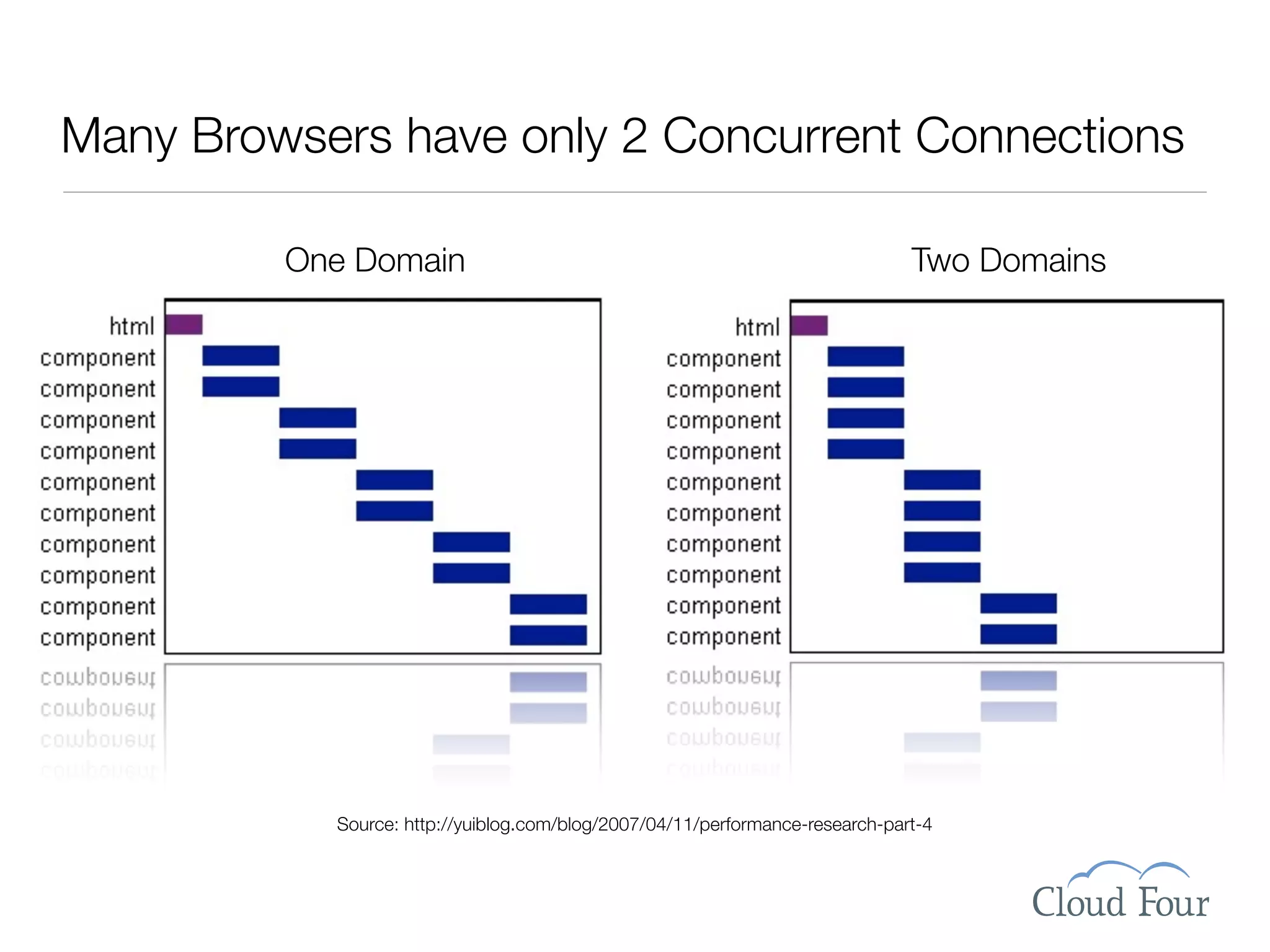
Many Browsers have only 2 Concurrent Connections

         One Domain                                                           Two Domains


           Source: http://yuiblog.com/blog/2007/04/11/performance-research-part-4
WP’s Biggest Performance Challenge:
Problem solved in WP2.8? Not exactly.


            @lyzadanger
Install PHP Speedy WP


http://aciddrop.com/2009/02/02/php-speedy-wp-052-bug-fix/
Step 6: Images with Correct Size & Format
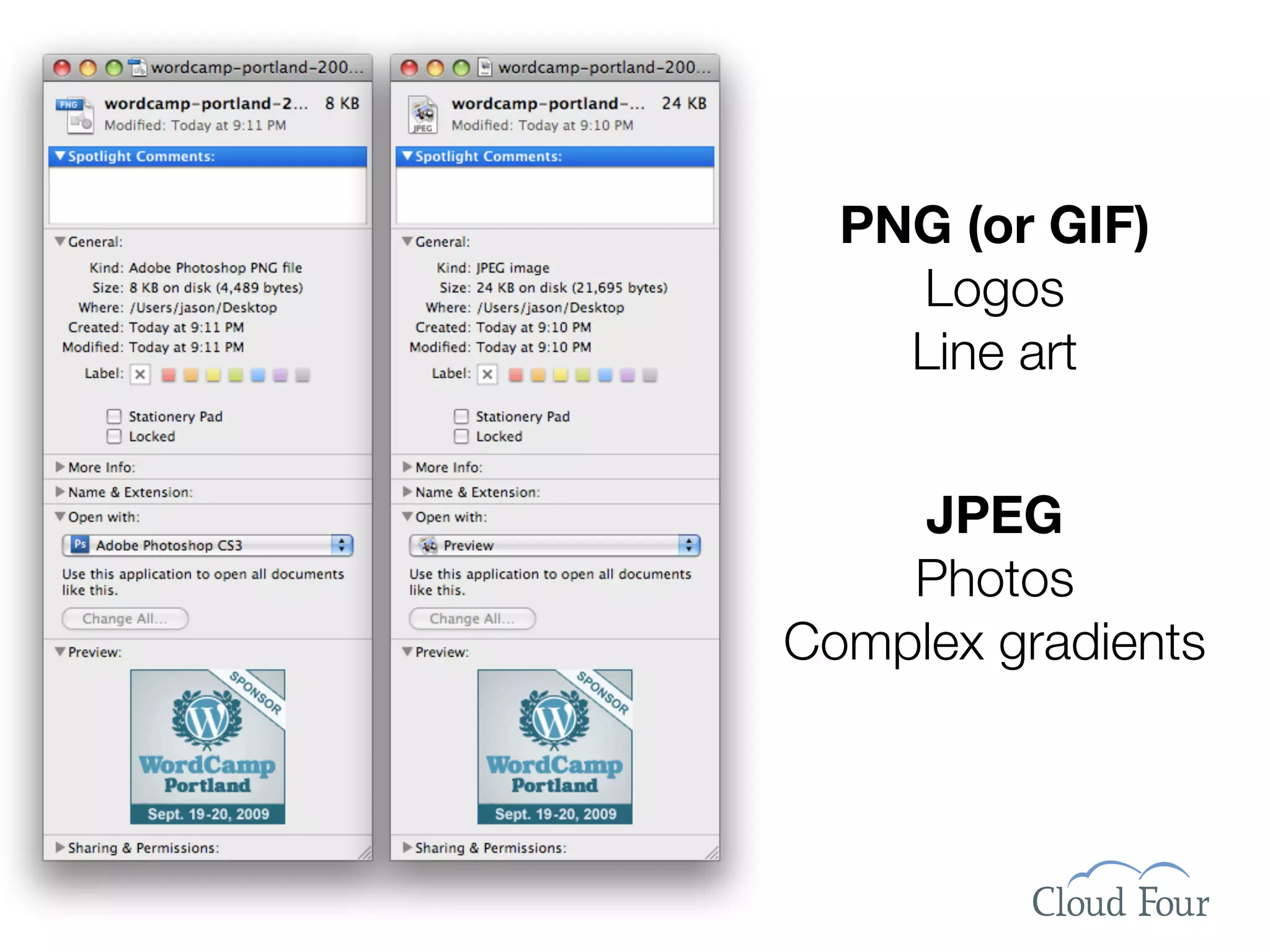
PNG (or GIF)
    Logos
    Line art


    JPEG
    Photos
Complex gradients
Resize Images to Fit the Usage


                         211x157
                           11k


618x460, 50.7k
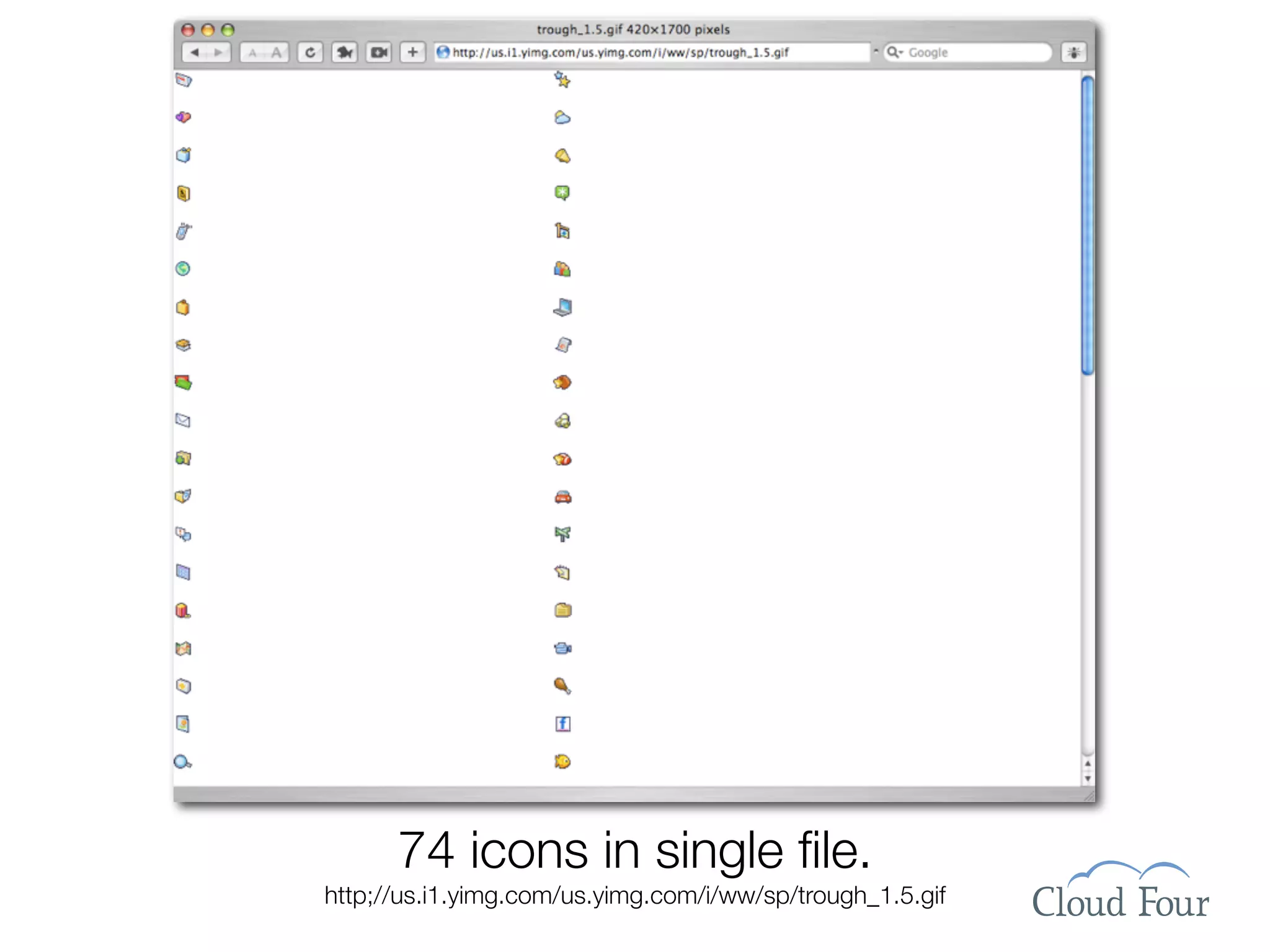
Bonus: CSS Sprites
74 icons in single file.
http;//us.i1.yimg.com/us.yimg.com/i/ww/sp/trough_1.5.gif
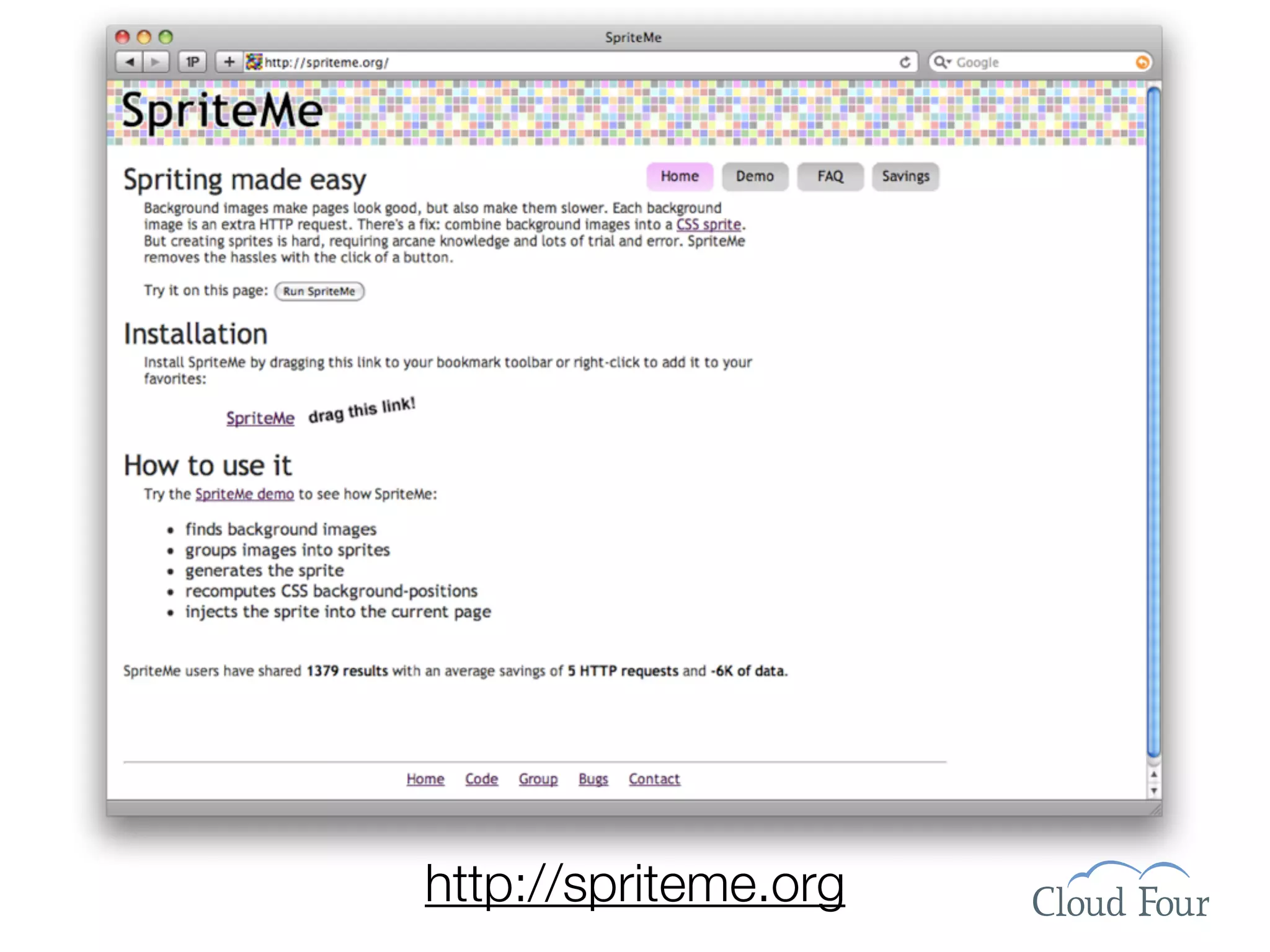
http://spriteme.org
The End Result
Speed Up
Wordpress
Make Readers
Happy and Your
Site Green


Thank You!
Jason Grigsby • http://cloudour.com/blog • Twitter: @grigs • Slides at http://slideshare.net/grigs

Speed Up Wordpress Wordcamp Pdx 2009

  • 1.
    Speed Up Wordpress Make Readers Happyand Your Site Green Jason Grigsby • http://cloudour.com/blog • Twitter: @grigs • Slides at http://slideshare.net/grigs
  • 2.
    We’ve remade theInternet in our image.
  • 3.
  • 4.
    We’ve Become BandwidthGluttons Since 2003: • Web Page Size Tripled •# of Objects Doubled Since 1995: • Web Page Size: 22x •# of Objects: 21x Source: http://www.websiteoptimization.com/speed/tweak/average-web-page/
  • 5.
  • 6.
    Ok, maybe that’sa bit much.
  • 7.
    But there arejust so many cool plugins. Who can resist? Just one more little bite plugin.
  • 8.
    Broadband & 4G= What, Me Worry? Source: http://www.websiteoptimization.com/bw/0708
  • 9.
    Speed = Success Shackel’sAcceptability Paradigm Source: Speed Up Your Site by Andrew King, p. 6.
  • 10.
    Web Speed =Perception Flickr: Uploaded October 15, 2006 by mattlogelin September 19 • DevGroup NW Jason Grigsby • http://userfirstweb.com
  • 11.
    Web Speed =Perception Qu ality U sab ility ed ibility Cr Serv ice Flickr: Uploaded October 15, 2006 by mattlogelin September 19 • DevGroup NW Jason Grigsby • http://userfirstweb.com
  • 12.
    Optimizing for Flow 0.1 seconds — Viewed as Instantaneous 1.0 seconds — Moving Freely 10 seconds — Retain Focus on Task Flickr: Uploaded August 7, 2007 by .Hessam September 19 • DevGroup NW Jason Grigsby • http://userfirstweb.com
  • 13.
    Flickr: Uploaded November7, 2005 by Tracy O September 19 • DevGroup NW Jason Grigsby • http://userfirstweb.com
  • 14.
    • Ecommerce Bailout Rates • Bandwidth Charges Flickr: Uploaded November 7, 2005 by Tracy O September 19 • DevGroup NW Jason Grigsby • http://userfirstweb.com
  • 16.
    Mobile Web Doubledin 2008 Jan 08 Jan 09 10821 Daily 22369 10312 Weekly 19283 36870 Ever in Month 63182 0 17500 35000 52500 70000 Unique Users (000s) http://www.comscore.com/press/release.asp?press=2752
  • 17.
    Slow Sites =Environmental Impact Flickr photo by Pingnews: http://www.flickr.com/photos/pingnews/370061022/
  • 18.
  • 19.
  • 21.
    Prep Work: GetMeasurement Tools
  • 22.
    Firebug for Firefox http://getfirebug.com YSlow Firebug Plugin from Yahoo http://developer.yahoo.com/yslow/ Google Page Speed http://code.google.com/speed/page-speed/
  • 23.
  • 24.
  • 25.
    Step 1: Servervs. Client Performance
  • 26.
    How long doesit take for the HTML file to download? Look at network graph
  • 28.
    Server Solutions SQL Monitor http://wordpress.org/extend/plugins/sqlmon/ WP Super Cache http://wordpress.org/extend/plugins/wp-super-cache/ Find a New Web Host
  • 29.
    Most of theTime, It’s Not the Server Source: http://yuiblog.com/blog/2006/11/28/performance-research-part-1/
  • 30.
    Yahoo!’s 14 PerformanceRules (Now 34!) 1. Make Fewer HTTP Requests 8. Make JavaScript and CSS External 2. Use a Content Delivery Network 9. Reduce DNS Lookups 3. Add an Expires Header 10.Minify JavaScript 4. Gzip Components 11.Avoid Redirects 5. Put Stylesheets at the Top 12.Remove Duplicate Scripts 6. Move Scripts to the Bottom 13.Configure ETags 7. Avoid CSS Expressions 14.Make AJAX Cacheable Source: http://developer.yahoo.com/performance/rules.html
  • 31.
    Step 2: Takea Benchmark Measurement
  • 32.
    Step 3: GZIPLike Your Life Depended on It
  • 33.
    Flickr photo byamaneiro: http://www.flickr.com/ photos/amaneiro/ 2396649106/ GZIP is compression. If you do nothing else. DO THIS.
  • 34.
    Case Study: Nearly80% reduction in file size. Version HTML CSS JS Total 40,837 17,764 1,443 60,044 Original bytes bytes bytes bytes 24,907 5,320 1,443 31,670 Optimized bytes bytes bytes bytes 5,722 5,320 1,443 12,485 GZIP bytes bytes bytes* bytes
  • 35.
    How to tell?Use YSlow Components Tab.
  • 36.
    Add three linesto .htaccess & save the world? <IfModule mod_deflate.c> AddOutputFilterByType DEFLATE text/html text/plain text/xml text/ css application/javascript application/x-javascript application/x- httpd-php application/rss+xml application/atom_xml </IfModule>
  • 37.
    Step 4: TellBrowsers to Cache Everything
  • 38.
    Aggressively Encourage Caching •Goal#1: No HTTP HEAD Requests. •Add Expires header. Put it far into the future. •Develop naming conventions for versioning of files. Update filename when file is modified. e.g., logo20090523.png •Keep files under 25k for mobile devices. •Configure or remove ETags from files. •Watch your logs to make sure caching works. Flickr photo by John Wardell (Netinho): http://www.flickr.com/photo_zoom.gne?id=760902403&size=l
  • 39.
    Add these linesto .htaccess <IfModule mod_expires.c> ExpiresActive on ExpiresByType image/gif "access plus 1 month" ExpiresByType image/jpeg "access plus 1 month" ExpiresByType image/png "access plus 1 month" ExpiresByType text/css "access plus 1 month" ExpiresByType application/javascript "access plus 1 month" ExpiresByType application/x-javascript "access plus 1 month" ExpiresByType application/x-icon "access plus 1 year" </IfModule> If your server does not have mod_expires, alternatively use: <FilesMatch ".(ico|jpg|jpeg|png|gif|js|css)$"> Header set Expires "Sun, 22 Apr 2018 01:10:54 GMT" Header set Cache-Control "max-age=315360000" Header unset Pragma </FilesMatch>
  • 40.
    Step 5: Reducethe Number of Files
  • 41.
    Many Browsers haveonly 2 Concurrent Connections One Domain Two Domains Source: http://yuiblog.com/blog/2007/04/11/performance-research-part-4
  • 42.
  • 44.
    Problem solved inWP2.8? Not exactly. @lyzadanger
  • 45.
    Install PHP SpeedyWP http://aciddrop.com/2009/02/02/php-speedy-wp-052-bug-fix/
  • 46.
    Step 6: Imageswith Correct Size & Format
  • 47.
    PNG (or GIF) Logos Line art JPEG Photos Complex gradients
  • 48.
    Resize Images toFit the Usage 211x157 11k 618x460, 50.7k
  • 49.
  • 50.
    74 icons insingle file. http;//us.i1.yimg.com/us.yimg.com/i/ww/sp/trough_1.5.gif
  • 51.
  • 52.
  • 54.
    Speed Up Wordpress Make Readers Happyand Your Site Green Thank You! Jason Grigsby • http://cloudour.com/blog • Twitter: @grigs • Slides at http://slideshare.net/grigs