IMS LTI and SAML / SSO
       DRAFT - 01
                           Charles Severance, Ph.D.
                   IMS Global Learning Consortium (IMS GLC)

                                       http://www.imsglobal.org/
                                       http://www.dr-chuck.com/

© Copyright 2012 IMS Global Learning Consortium
All Rights Reserved.                                               1
Thanks to

• Keith Hazelton, University of Wisconsin
• Scott Fullerton, University of Wisconsin


© Copyright 2012 IMS Global Learning Consortium
All Rights Reserved.                              2
Problem Statement

• We need a way to align IMS Learning Tools
       Interoperability and (SAML)


© Copyright 2012 IMS Global Learning Consortium
All Rights Reserved.                              3
Use Cases

• When a LMS is protected using an SSO and launches an
  external tool using LTI, we to communicate the SSO
  identity to the external tool
• This enables the external tool to connect the user_id
  value from LTI with an SSO identity
• This allows the user to connect directly to the
  external tool and log in using their SSO

© Copyright 2012 IMS Global Learning Consortium
All Rights Reserved.                                      4
Scenario

• We have three LMS's at three schools, one
  protected using SAML, one protected using CAS,
  and one that has no SSO
• They all connect to an external tool that is
  capable of LTI, CAS, and SAML and has
  relationships with the appropriate SAMLE IDP and
  CAS Server
© Copyright 2012 IMS Global Learning Consortium
All Rights Reserved.                                 5
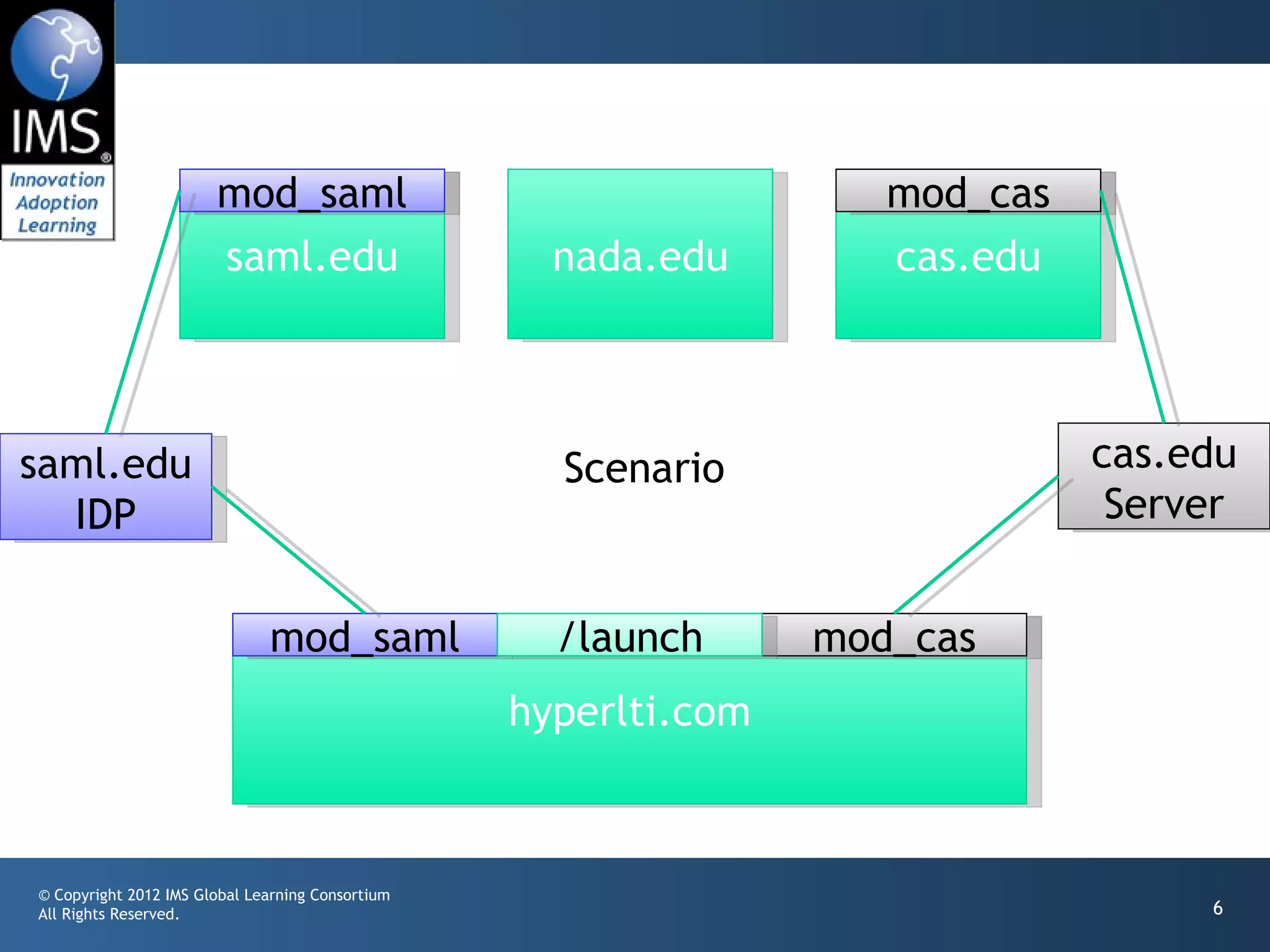
mod_saml                                     mod_cas
                       saml.edu                     nada.edu        cas.edu


saml.edu                                            Scenario                  cas.edu
  IDP                                                                          Server


                              mod_saml              /launch      mod_cas
                                                  hyperlti.com


© Copyright 2012 IMS Global Learning Consortium
All Rights Reserved.                                                               6
Essential Design Concept

• The LTI Launch is completely normal providing the
  normal within-LMS data like user_id, role,
  context_id, etc.
• If the LMS is protected using an SSO and the
  current user is logged in through the SSO, we add
  the type of SSO (SAML, CAS, etc) and the identity
  provider for the SSO.
© Copyright 2012 IMS Global Learning Consortium
All Rights Reserved.                                  7
Essential Design Concept (cont)

• The LTI launch does *not* include the SSO identity
       as there is no way to do this reliably.


© Copyright 2012 IMS Global Learning Consortium
All Rights Reserved.                                    8
Design For External Tool

• The external tool has an unprotected LTI launch
       URL to receive LTI requests (/launch)
• The external tool has SSO-protected URLs for all
       the identity providers and SSO types it has a
       relationship with (/cas_edu, /saml_edu)


© Copyright 2012 IMS Global Learning Consortium
All Rights Reserved.                                   9
Design for External Tool

• If the LTI launch code receives a launch with an SSO
       type and Identity provider that it is capable of
       handling, it sets up the LTI data (user, course, role,
       etc) in the session and forwards to the appropriate
       SSO-protected url on its own server
• Since the user is already signed on via the SSO, they
       simply fall through with REMOTE_USER properly set

© Copyright 2012 IMS Global Learning Consortium
All Rights Reserved.                                            10
Design for External Tool

• Under the SSO-protected URL, the code knows the
       LTI user course, and role as well as the Identity
       provider and enterprise identity.
• The tool can link all of these together within its
       data structures.


© Copyright 2012 IMS Global Learning Consortium
All Rights Reserved.                                       11
External Tool Design

• From that point forward, the tool can identify the
       user either via an LTI launch through user_id or
       through a direct login to an SSO-protected URL
       that provides REMOTE_USER


© Copyright 2012 IMS Global Learning Consortium
All Rights Reserved.                                      12
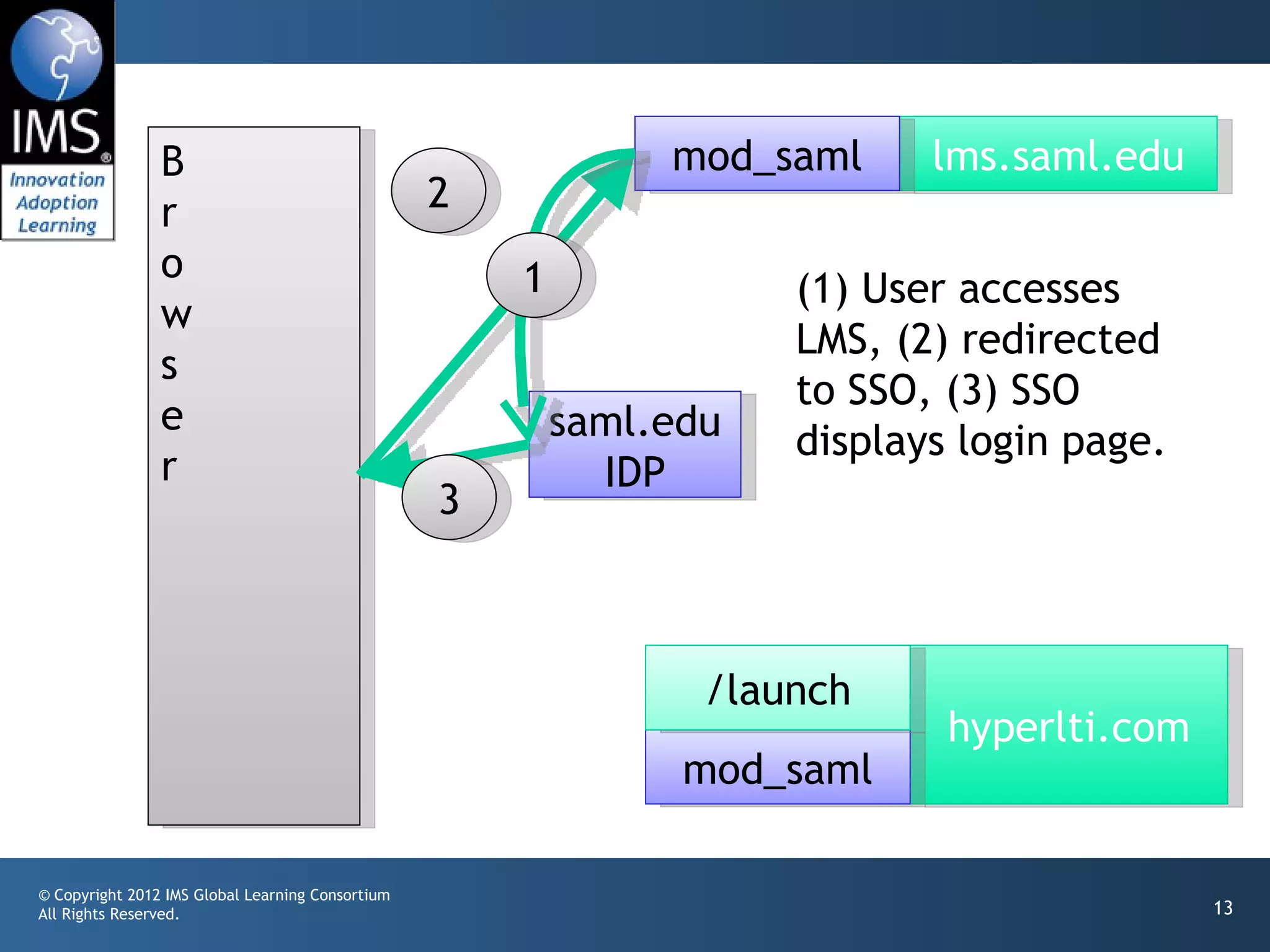
B                                              mod_saml     lms.saml.edu
                r                                 2
                o                                     1              (1) User accesses
                w
                                                                     LMS, (2) redirected
                s
                                                                     to SSO, (3) SSO
                e                                         saml.edu   displays login page.
                r                                           IDP
                                                  3


                                                                 /launch
                                                                             hyperlti.com
                                                                mod_saml

© Copyright 2012 IMS Global Learning Consortium
All Rights Reserved.                                                                        13
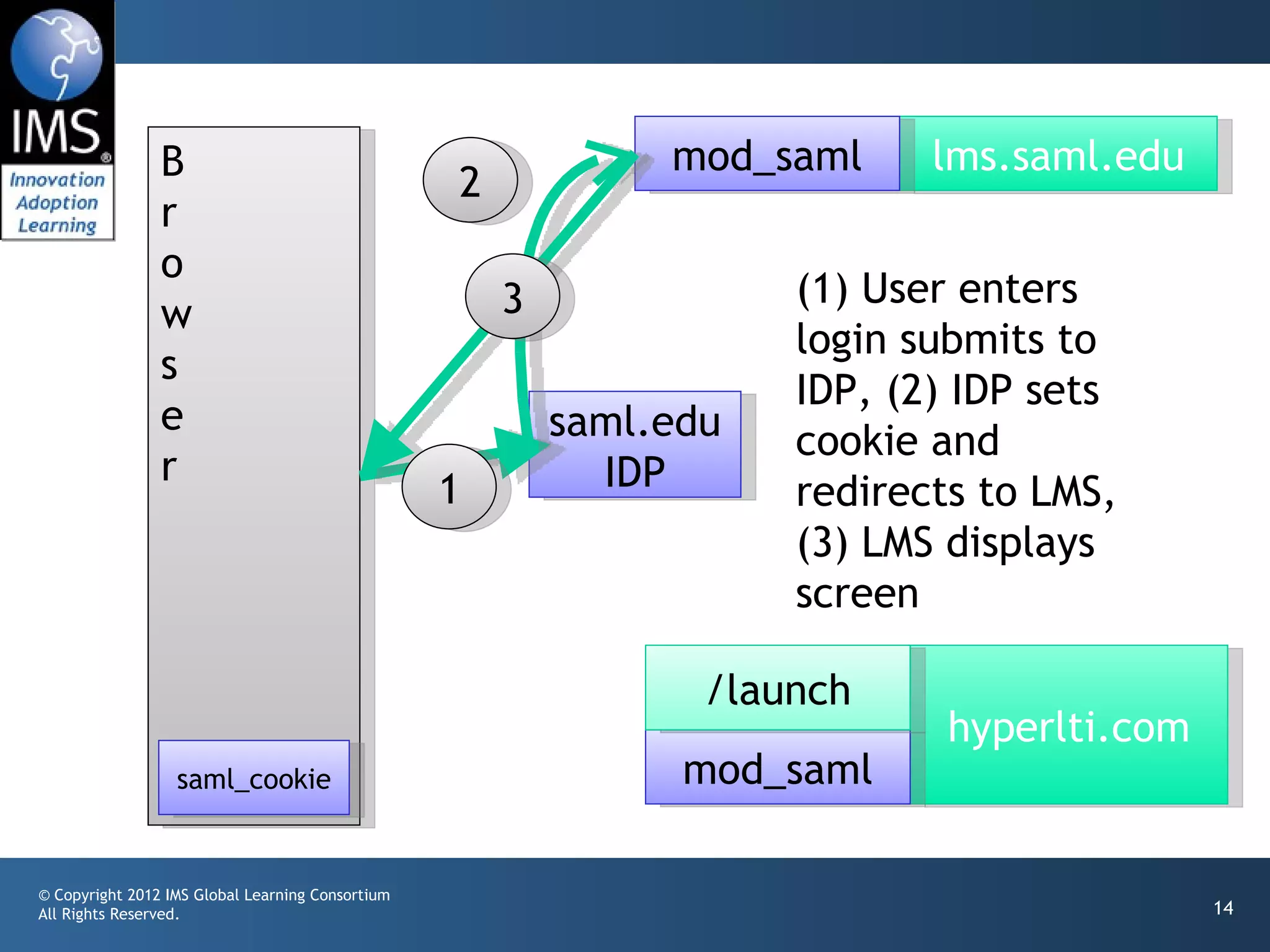
B                                              mod_saml     lms.saml.edu
                                                  2
                r
                o
                                                      3              (1) User enters
                w
                                                                     login submits to
                s
                                                                     IDP, (2) IDP sets
                e                                         saml.edu   cookie and
                r                                           IDP
                                                  1                  redirects to LMS,
                                                                     (3) LMS displays
                                                                     screen

                                                                 /launch
                                                                             hyperlti.com
                  saml_cookie                                   mod_saml

© Copyright 2012 IMS Global Learning Consortium
All Rights Reserved.                                                                        14
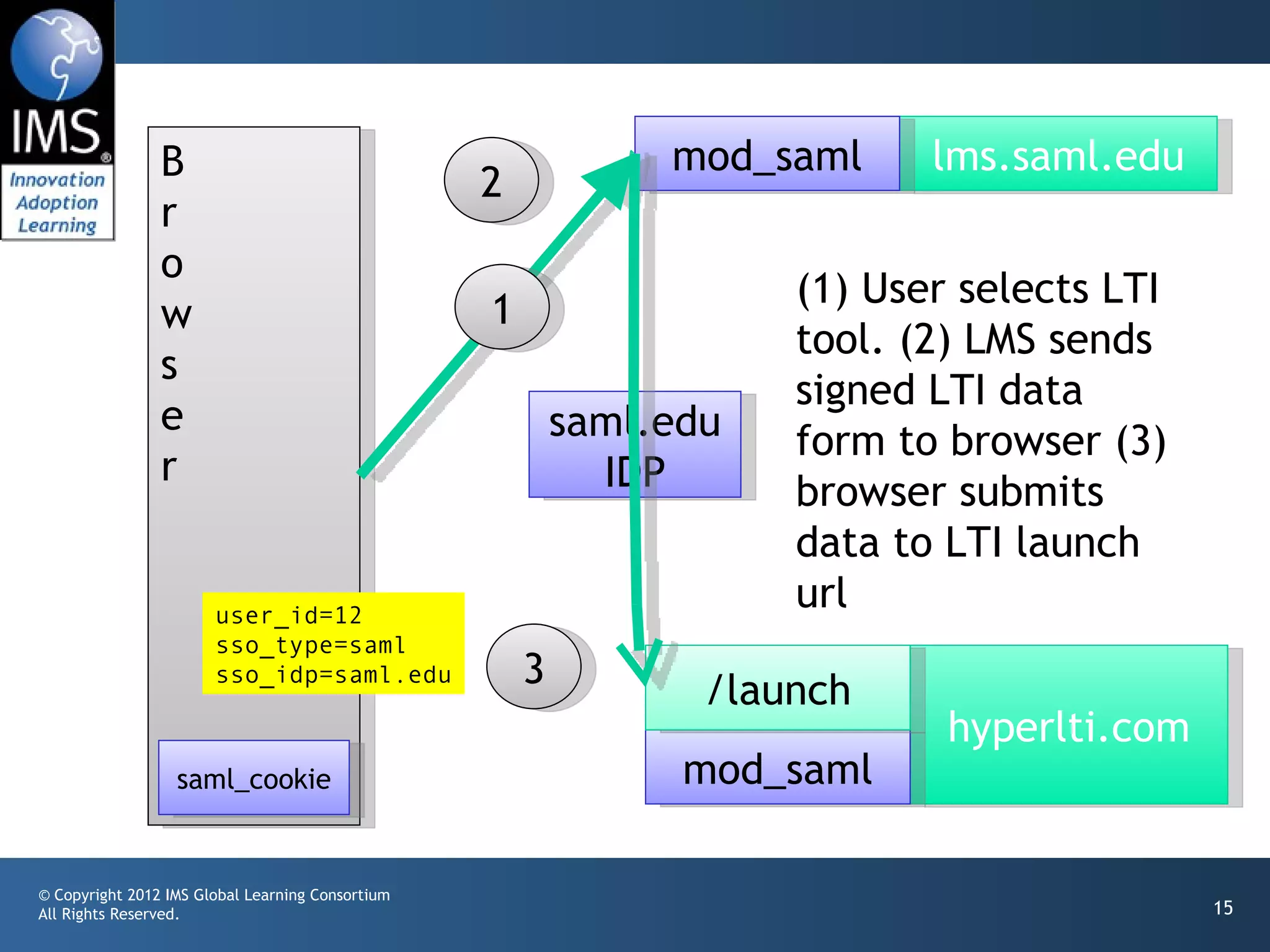
B                                              mod_saml     lms.saml.edu
                                                  2
                r
                o
                                                  1                  (1) User selects LTI
                w
                                                                     tool. (2) LMS sends
                s
                                                                     signed LTI data
                e                                         saml.edu   form to browser (3)
                r                                           IDP      browser submits
                                                                     data to LTI launch
                       user_id=12
                                                                     url
                       sso_type=saml
                       sso_idp=saml.edu               3          /launch
                                                                             hyperlti.com
                  saml_cookie                                   mod_saml

© Copyright 2012 IMS Global Learning Consortium
All Rights Reserved.                                                                        15
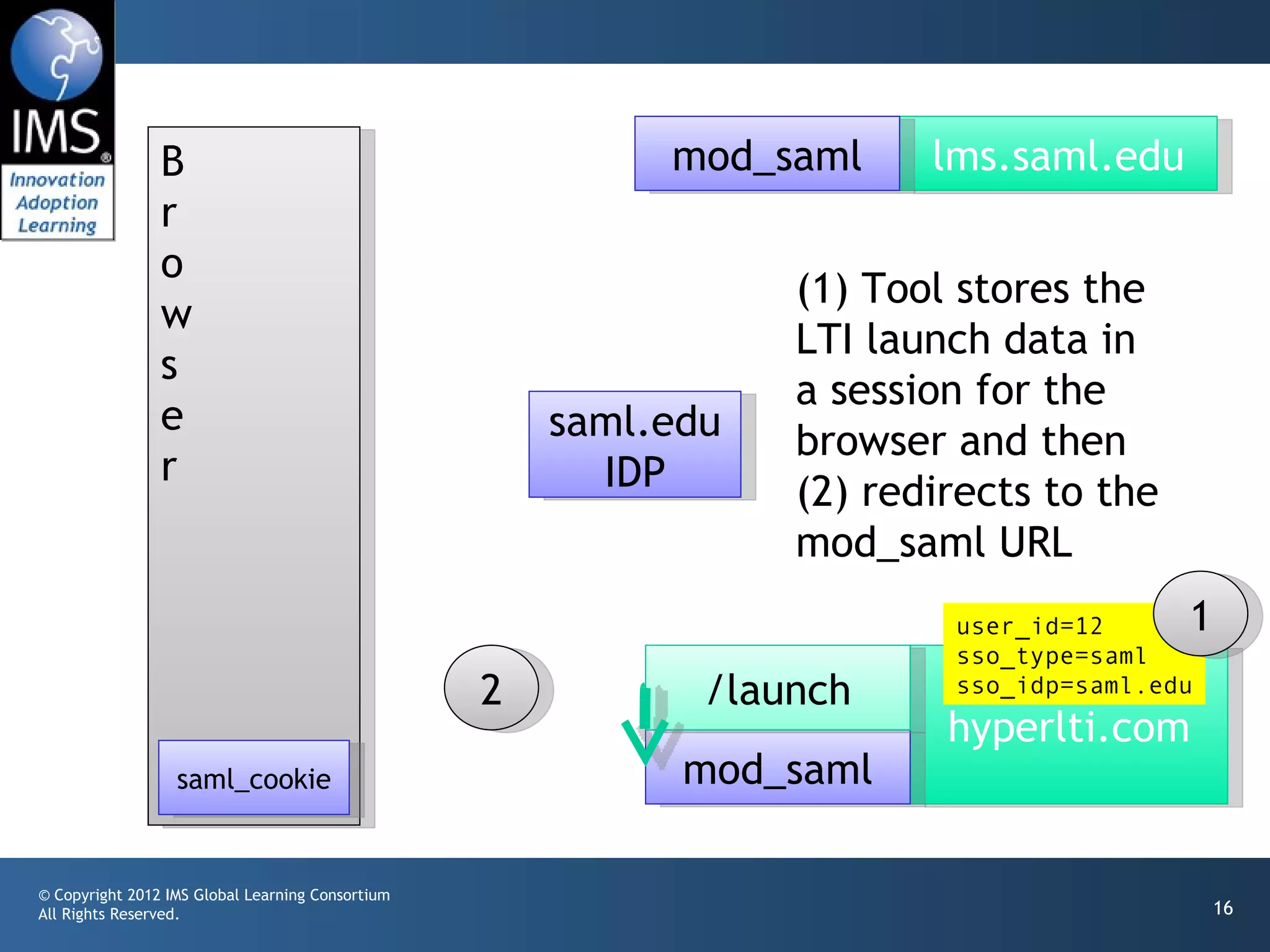
B                                          mod_saml     lms.saml.edu
                r
                o
                                                                 (1) Tool stores the
                w
                                                                 LTI launch data in
                s
                                                                 a session for the
                e                                     saml.edu   browser and then
                r                                       IDP      (2) redirects to the
                                                                 mod_saml URL
                                                                         user_id=12     1
                                                                         sso_type=saml
                                                  2          /launch     sso_idp=saml.edu
                                                                         hyperlti.com
                  saml_cookie                               mod_saml

© Copyright 2012 IMS Global Learning Consortium
All Rights Reserved.                                                                        16
B                                          mod_saml    lms.saml.edu
                r
                o
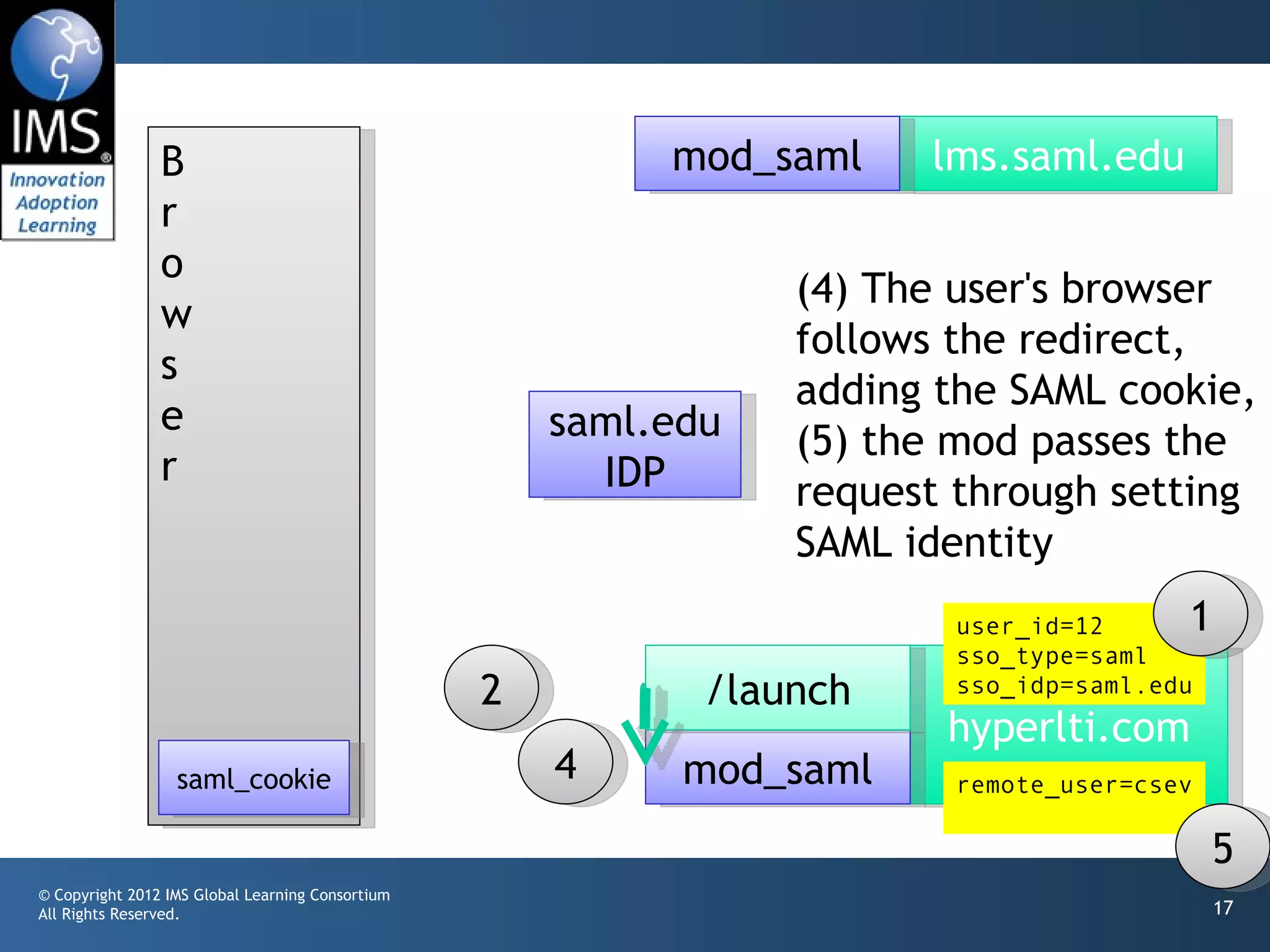
                                                                 (4) The user's browser
                w
                                                                 follows the redirect,
                s
                                                                 adding the SAML cookie,
                e                                     saml.edu   (5) the mod passes the
                r                                       IDP      request through setting
                                                                 SAML identity
                                                                        user_id=12     1
                                                                        sso_type=saml
                                                  2          /launch    sso_idp=saml.edu
                                                                        hyperlti.com
                  saml_cookie                         4     mod_saml    remote_user=csev

                                                                                           5
© Copyright 2012 IMS Global Learning Consortium
All Rights Reserved.                                                                       17
B                                          mod_saml     lms.saml.edu
                r
                o
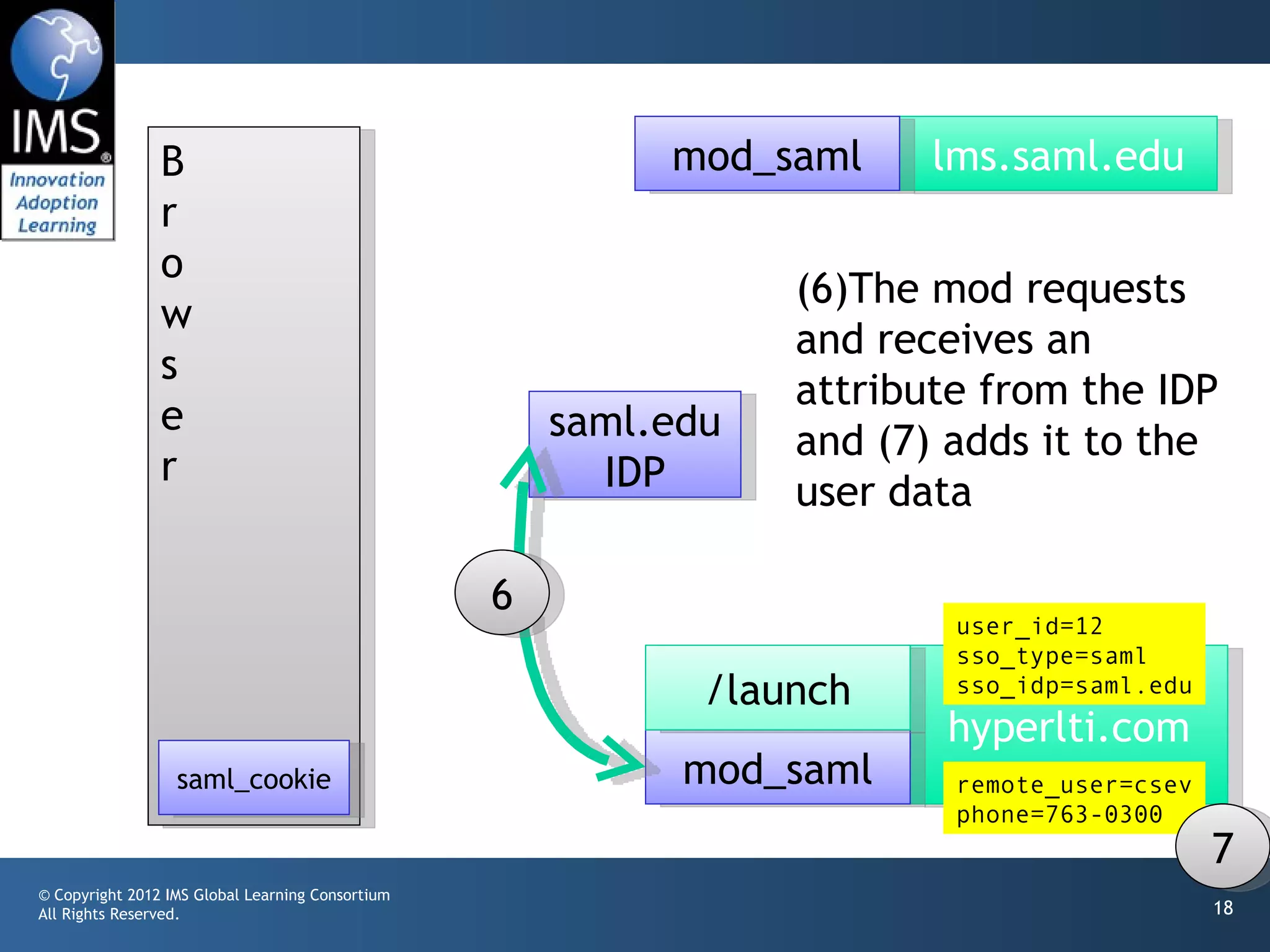
                                                                 (6)The mod requests
                w
                                                                 and receives an
                s
                                                                 attribute from the IDP
                e                                     saml.edu   and (7) adds it to the
                r                                       IDP      user data

                                                  6
                                                                         user_id=12
                                                                         sso_type=saml
                                                             /launch     sso_idp=saml.edu
                                                                        hyperlti.com
                  saml_cookie                               mod_saml     remote_user=csev
                                                                         phone=763-0300
                                                                                            7
© Copyright 2012 IMS Global Learning Consortium
All Rights Reserved.                                                                        18
B                                          mod_saml     lms.saml.edu
                r
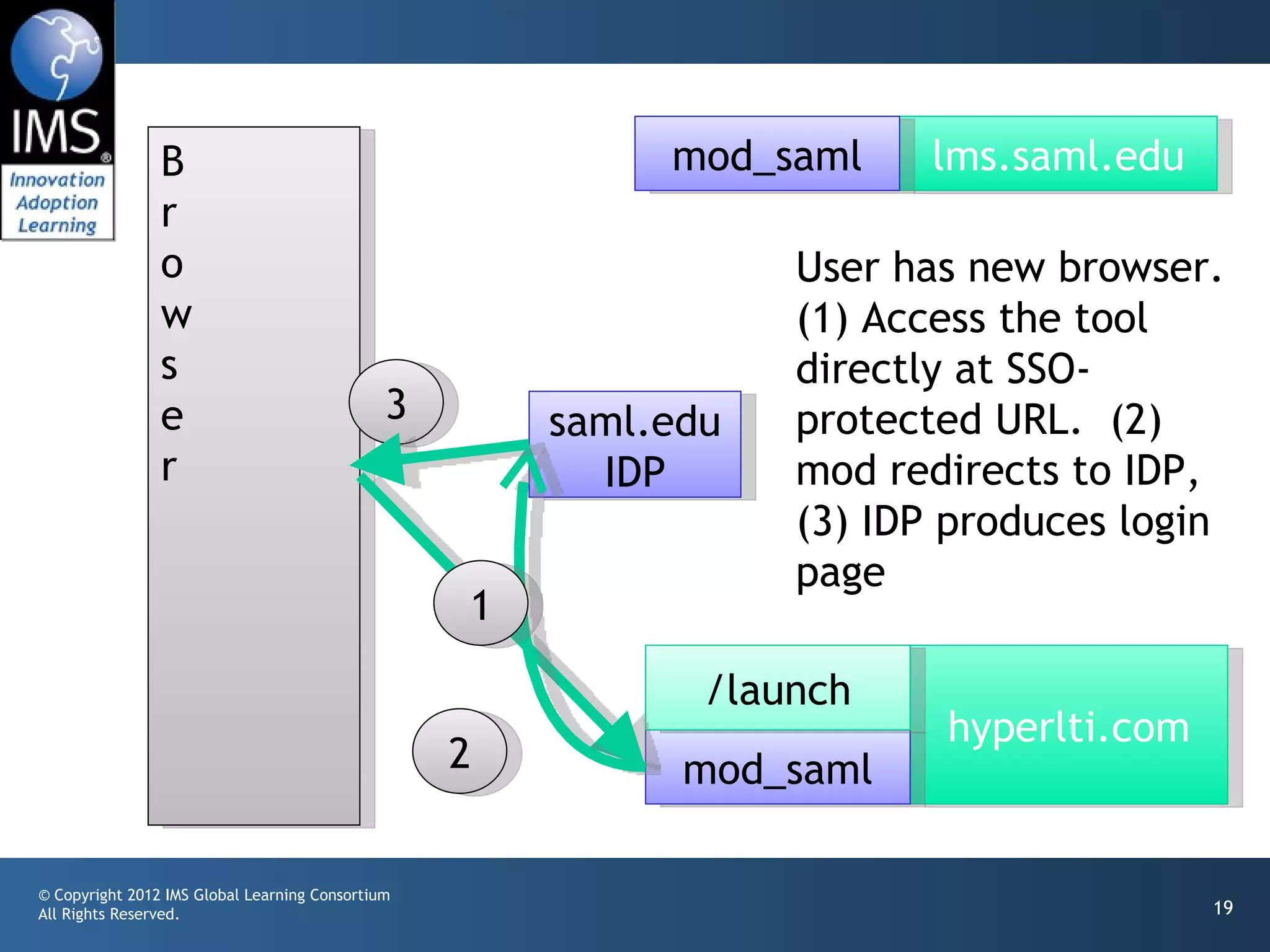
                o                                                User has new browser.
                w                                                (1) Access the tool
                s                                                directly at SSO-
                e                             3       saml.edu   protected URL. (2)
                r                                       IDP      mod redirects to IDP,
                                                                 (3) IDP produces login
                                                                 page
                                                  1

                                                             /launch
                                                                        hyperlti.com
                                                  2         mod_saml

© Copyright 2012 IMS Global Learning Consortium
All Rights Reserved.                                                                   19
B                                          mod_saml     lms.saml.edu
                r
                o
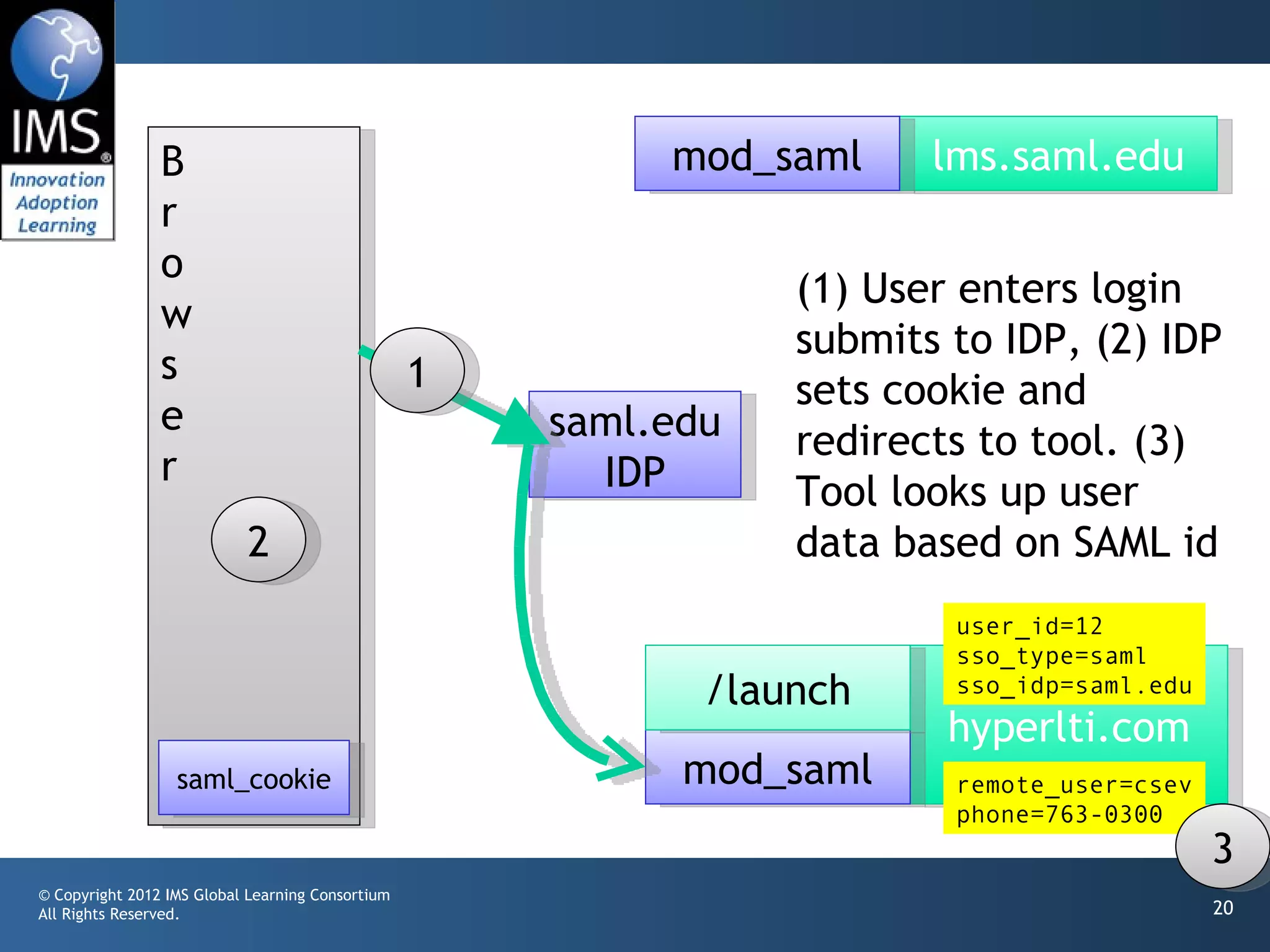
                                                                 (1) User enters login
                w
                                                                 submits to IDP, (2) IDP
                s                                 1              sets cookie and
                e                                     saml.edu   redirects to tool. (3)
                r                                       IDP      Tool looks up user
                           2                                     data based on SAML id
                                                                         user_id=12
                                                                         sso_type=saml
                                                             /launch     sso_idp=saml.edu
                                                                         hyperlti.com
                  saml_cookie                               mod_saml     remote_user=csev
                                                                         phone=763-0300
                                                                                            3
© Copyright 2012 IMS Global Learning Consortium
All Rights Reserved.                                                                        20
Notes

• This extends easily to multiple types of SSO
       providers and multiple identity providers per SSO.
• This carefully avoids the LMS forwarding the SSO
       identity, but instead provides a mechanism for the
       tool to "add" the SSO identity to a session through
       a redirect

© Copyright 2012 IMS Global Learning Consortium
All Rights Reserved.                                         21
Questions / Comments

• This is a draft – comments welcome


© Copyright 2012 IMS Global Learning Consortium
All Rights Reserved.                              22

Connecting IMS LTI and SAML (Draft)

  • 1.
    IMS LTI andSAML / SSO DRAFT - 01 Charles Severance, Ph.D. IMS Global Learning Consortium (IMS GLC) http://www.imsglobal.org/ http://www.dr-chuck.com/ © Copyright 2012 IMS Global Learning Consortium All Rights Reserved. 1
  • 2.
    Thanks to • KeithHazelton, University of Wisconsin • Scott Fullerton, University of Wisconsin © Copyright 2012 IMS Global Learning Consortium All Rights Reserved. 2
  • 3.
    Problem Statement • Weneed a way to align IMS Learning Tools Interoperability and (SAML) © Copyright 2012 IMS Global Learning Consortium All Rights Reserved. 3
  • 4.
    Use Cases • Whena LMS is protected using an SSO and launches an external tool using LTI, we to communicate the SSO identity to the external tool • This enables the external tool to connect the user_id value from LTI with an SSO identity • This allows the user to connect directly to the external tool and log in using their SSO © Copyright 2012 IMS Global Learning Consortium All Rights Reserved. 4
  • 5.
    Scenario • We havethree LMS's at three schools, one protected using SAML, one protected using CAS, and one that has no SSO • They all connect to an external tool that is capable of LTI, CAS, and SAML and has relationships with the appropriate SAMLE IDP and CAS Server © Copyright 2012 IMS Global Learning Consortium All Rights Reserved. 5
  • 6.
    mod_saml mod_cas saml.edu nada.edu cas.edu saml.edu Scenario cas.edu IDP Server mod_saml /launch mod_cas hyperlti.com © Copyright 2012 IMS Global Learning Consortium All Rights Reserved. 6
  • 7.
    Essential Design Concept •The LTI Launch is completely normal providing the normal within-LMS data like user_id, role, context_id, etc. • If the LMS is protected using an SSO and the current user is logged in through the SSO, we add the type of SSO (SAML, CAS, etc) and the identity provider for the SSO. © Copyright 2012 IMS Global Learning Consortium All Rights Reserved. 7
  • 8.
    Essential Design Concept(cont) • The LTI launch does *not* include the SSO identity as there is no way to do this reliably. © Copyright 2012 IMS Global Learning Consortium All Rights Reserved. 8
  • 9.
    Design For ExternalTool • The external tool has an unprotected LTI launch URL to receive LTI requests (/launch) • The external tool has SSO-protected URLs for all the identity providers and SSO types it has a relationship with (/cas_edu, /saml_edu) © Copyright 2012 IMS Global Learning Consortium All Rights Reserved. 9
  • 10.
    Design for ExternalTool • If the LTI launch code receives a launch with an SSO type and Identity provider that it is capable of handling, it sets up the LTI data (user, course, role, etc) in the session and forwards to the appropriate SSO-protected url on its own server • Since the user is already signed on via the SSO, they simply fall through with REMOTE_USER properly set © Copyright 2012 IMS Global Learning Consortium All Rights Reserved. 10
  • 11.
    Design for ExternalTool • Under the SSO-protected URL, the code knows the LTI user course, and role as well as the Identity provider and enterprise identity. • The tool can link all of these together within its data structures. © Copyright 2012 IMS Global Learning Consortium All Rights Reserved. 11
  • 12.
    External Tool Design •From that point forward, the tool can identify the user either via an LTI launch through user_id or through a direct login to an SSO-protected URL that provides REMOTE_USER © Copyright 2012 IMS Global Learning Consortium All Rights Reserved. 12
  • 13.
    B mod_saml lms.saml.edu r 2 o 1 (1) User accesses w LMS, (2) redirected s to SSO, (3) SSO e saml.edu displays login page. r IDP 3 /launch hyperlti.com mod_saml © Copyright 2012 IMS Global Learning Consortium All Rights Reserved. 13
  • 14.
    B mod_saml lms.saml.edu 2 r o 3 (1) User enters w login submits to s IDP, (2) IDP sets e saml.edu cookie and r IDP 1 redirects to LMS, (3) LMS displays screen /launch hyperlti.com saml_cookie mod_saml © Copyright 2012 IMS Global Learning Consortium All Rights Reserved. 14
  • 15.
    B mod_saml lms.saml.edu 2 r o 1 (1) User selects LTI w tool. (2) LMS sends s signed LTI data e saml.edu form to browser (3) r IDP browser submits data to LTI launch user_id=12 url sso_type=saml sso_idp=saml.edu 3 /launch hyperlti.com saml_cookie mod_saml © Copyright 2012 IMS Global Learning Consortium All Rights Reserved. 15
  • 16.
    B mod_saml lms.saml.edu r o (1) Tool stores the w LTI launch data in s a session for the e saml.edu browser and then r IDP (2) redirects to the mod_saml URL user_id=12 1 sso_type=saml 2 /launch sso_idp=saml.edu hyperlti.com saml_cookie mod_saml © Copyright 2012 IMS Global Learning Consortium All Rights Reserved. 16
  • 17.
    B mod_saml lms.saml.edu r o (4) The user's browser w follows the redirect, s adding the SAML cookie, e saml.edu (5) the mod passes the r IDP request through setting SAML identity user_id=12 1 sso_type=saml 2 /launch sso_idp=saml.edu hyperlti.com saml_cookie 4 mod_saml remote_user=csev 5 © Copyright 2012 IMS Global Learning Consortium All Rights Reserved. 17
  • 18.
    B mod_saml lms.saml.edu r o (6)The mod requests w and receives an s attribute from the IDP e saml.edu and (7) adds it to the r IDP user data 6 user_id=12 sso_type=saml /launch sso_idp=saml.edu hyperlti.com saml_cookie mod_saml remote_user=csev phone=763-0300 7 © Copyright 2012 IMS Global Learning Consortium All Rights Reserved. 18
  • 19.
    B mod_saml lms.saml.edu r o User has new browser. w (1) Access the tool s directly at SSO- e 3 saml.edu protected URL. (2) r IDP mod redirects to IDP, (3) IDP produces login page 1 /launch hyperlti.com 2 mod_saml © Copyright 2012 IMS Global Learning Consortium All Rights Reserved. 19
  • 20.
    B mod_saml lms.saml.edu r o (1) User enters login w submits to IDP, (2) IDP s 1 sets cookie and e saml.edu redirects to tool. (3) r IDP Tool looks up user 2 data based on SAML id user_id=12 sso_type=saml /launch sso_idp=saml.edu hyperlti.com saml_cookie mod_saml remote_user=csev phone=763-0300 3 © Copyright 2012 IMS Global Learning Consortium All Rights Reserved. 20
  • 21.
    Notes • This extendseasily to multiple types of SSO providers and multiple identity providers per SSO. • This carefully avoids the LMS forwarding the SSO identity, but instead provides a mechanism for the tool to "add" the SSO identity to a session through a redirect © Copyright 2012 IMS Global Learning Consortium All Rights Reserved. 21
  • 22.
    Questions / Comments •This is a draft – comments welcome © Copyright 2012 IMS Global Learning Consortium All Rights Reserved. 22