Oracle10g Data Guard
      Overview
Objectives

•   Explain the benefits of Data Guard and why we
    might use it
•   Describe the basic components of Oracle Data
    Guard
Benefits of Oracle Data Guard
•   Configure the system to meet business protection
    and recovery requirements
•   Continuous service through a disaster or crippling
    data failure
•   Complete data protection against corruptions and
    data loss
•   Reduce overhead on primary systems by
    offloading:
    – adhoc queries
    – reporting
    – backups
•   Centralized management (Data Guard Broker, Data
    Guard Manager via Enterprise Manager)
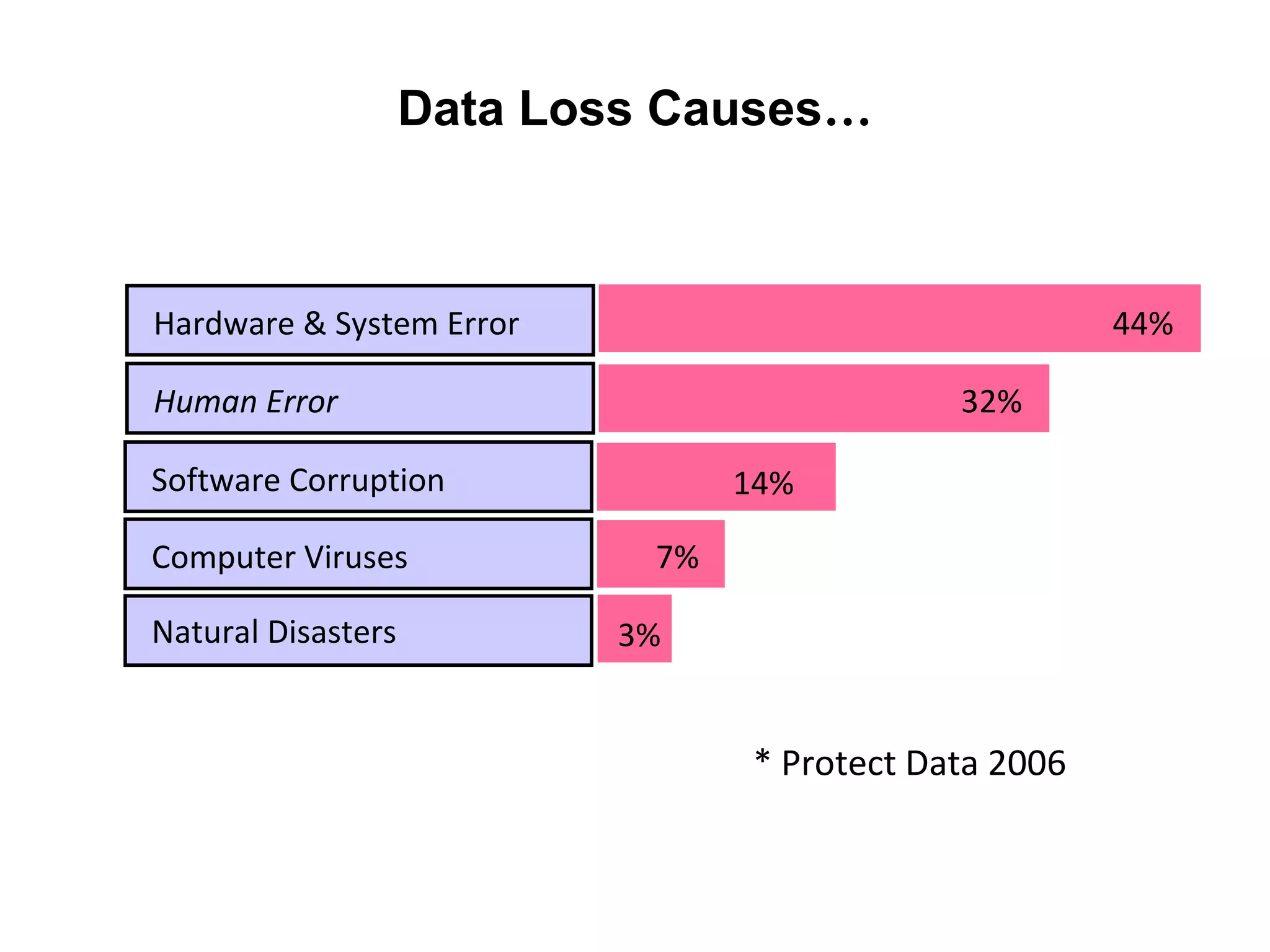
Data Loss Causes…


Hardware & System Error                                 44%

Human Error                                   32%

Software Corruption               14%

Computer Viruses             7%

Natural Disasters          3%


                                  * Protect Data 2006
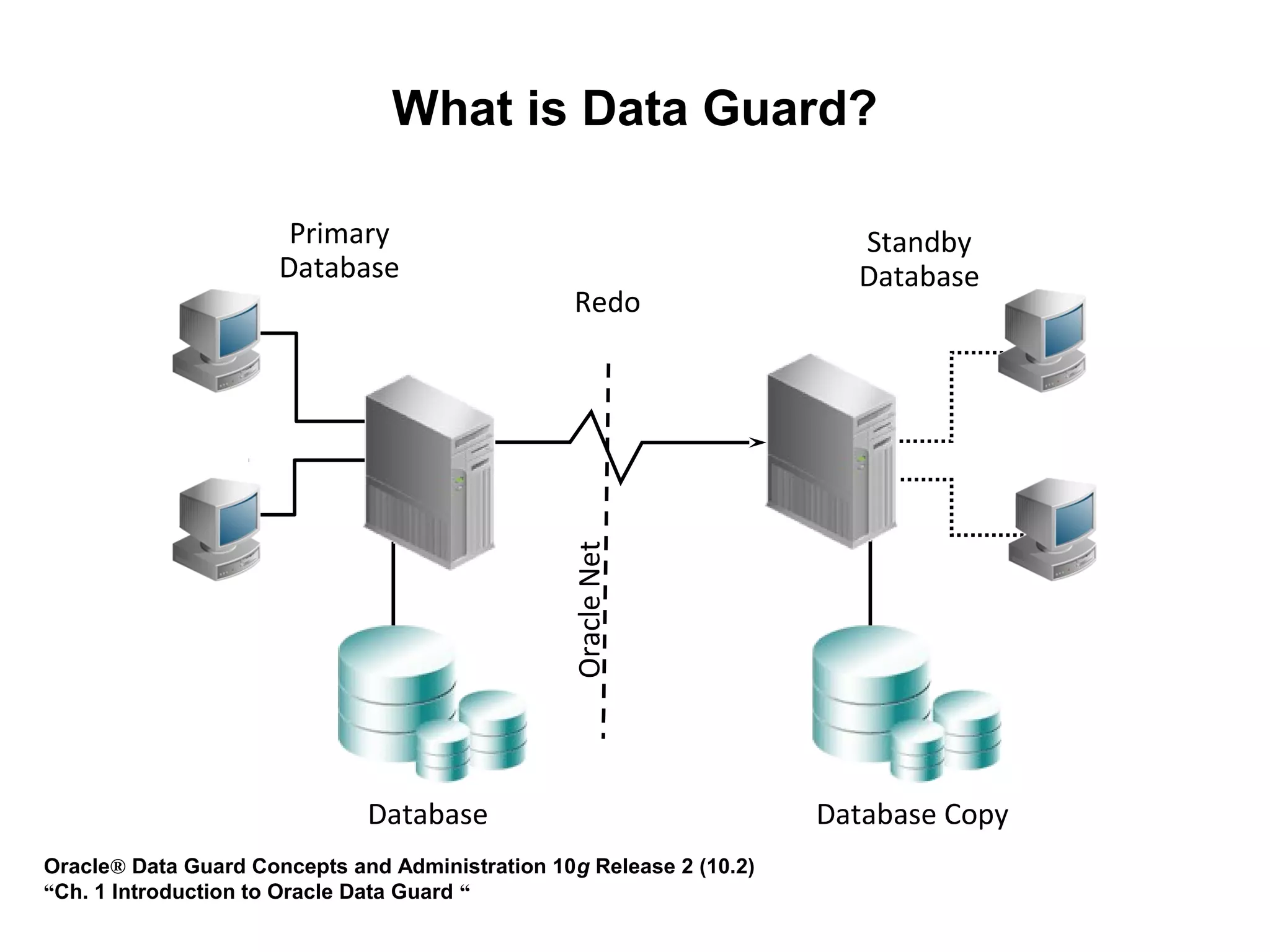
What is Data Guard?

                       Primary                                          Standby
                      Database                                          Database
                                                  Redo


                                                 Oracle Net


                              Database                                Database Copy
Oracle® Data Guard Concepts and Administration 10g Release 2 (10.2)
“Ch. 1 Introduction to Oracle Data Guard “
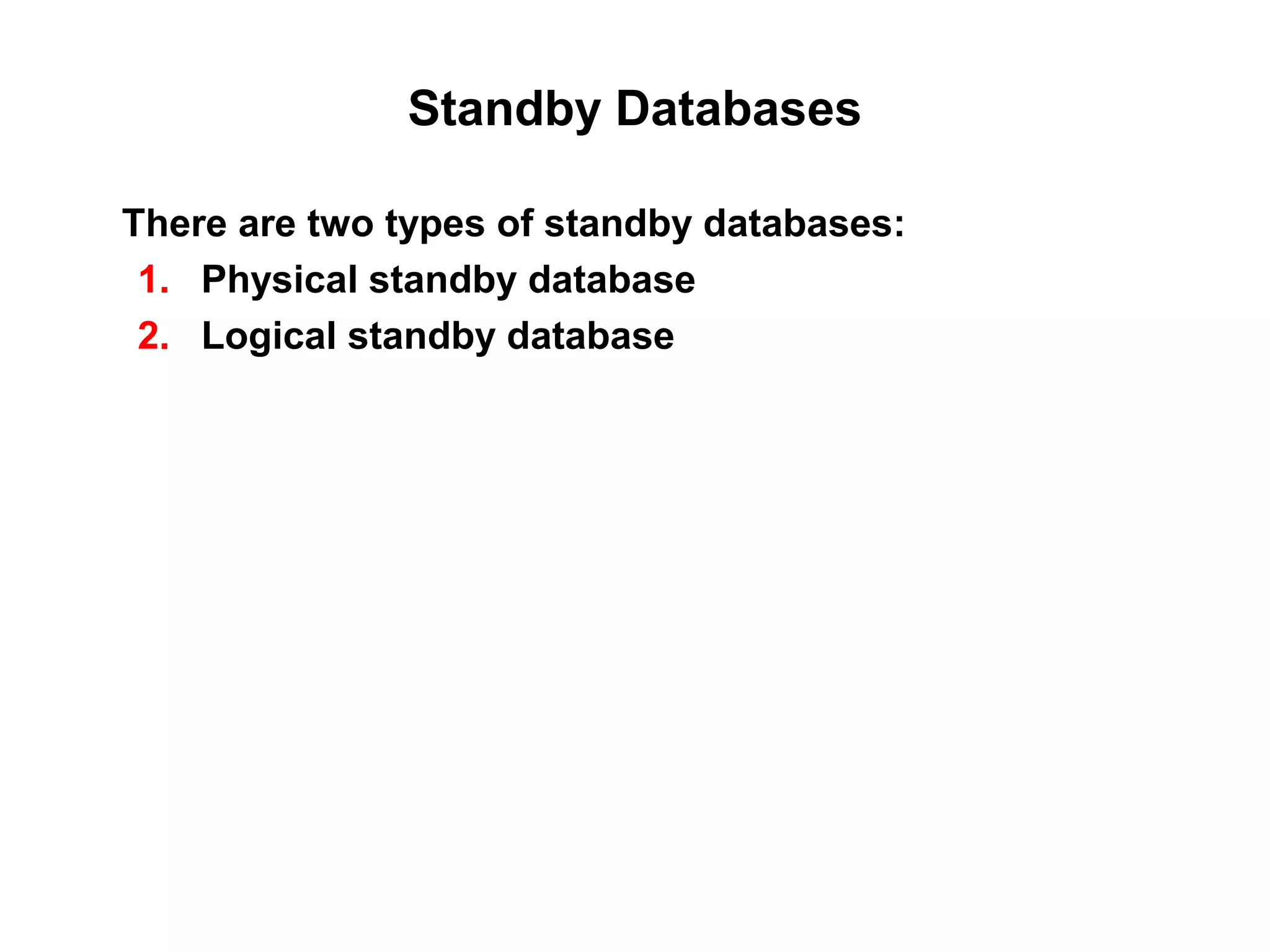
Standby Databases

There are two types of standby databases:
 1. Physical standby database
 2. Logical standby database
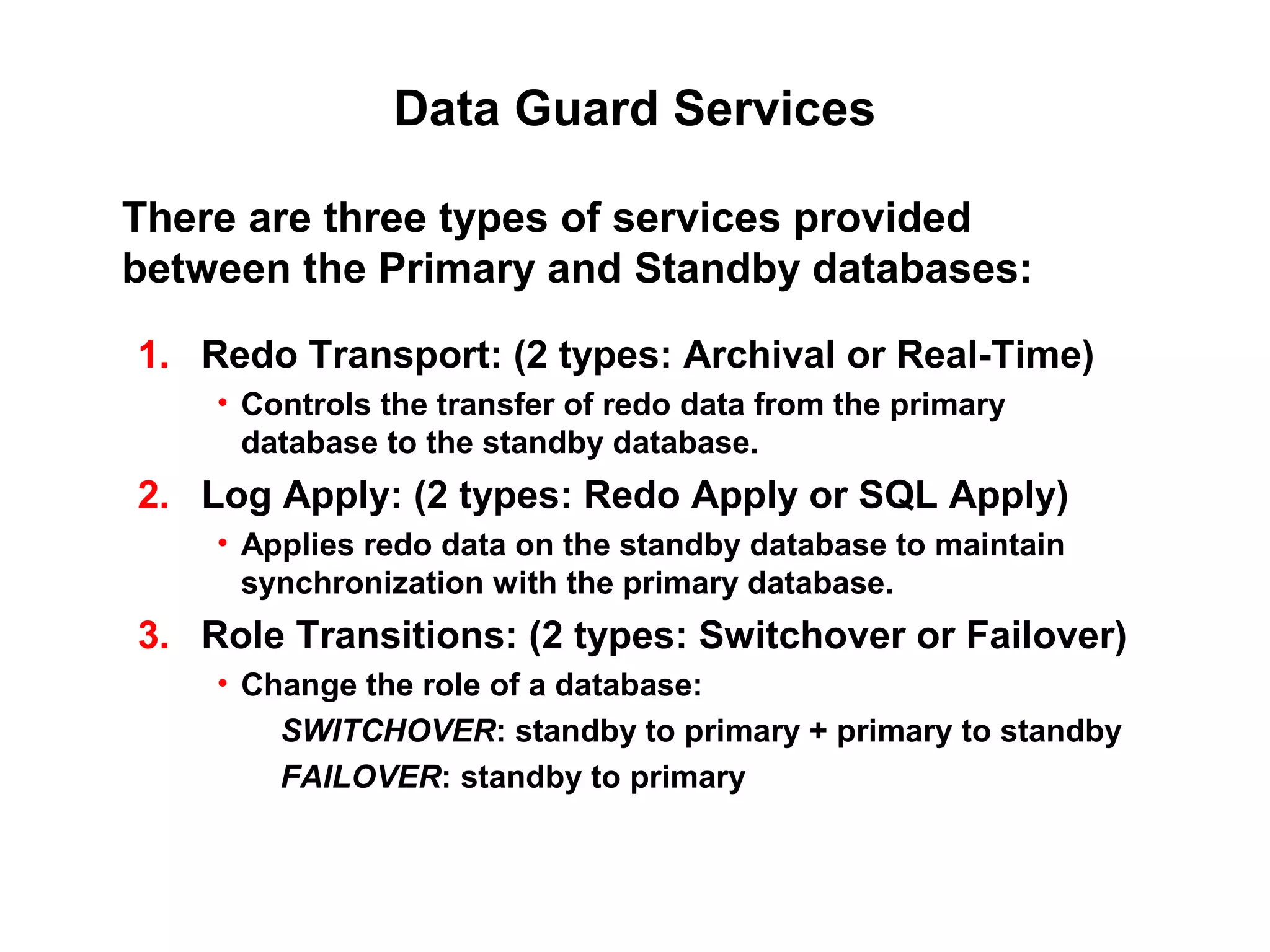
Data Guard Services

There are three types of services provided
between the Primary and Standby databases:

1. Redo Transport: (2 types: Archival or Real-Time)
    • Controls the transfer of redo data from the primary
      database to the standby database.
2. Log Apply: (2 types: Redo Apply or SQL Apply)
    • Applies redo data on the standby database to maintain
      synchronization with the primary database.
3. Role Transitions: (2 types: Switchover or Failover)
    • Change the role of a database:
        SWITCHOVER: standby to primary + primary to standby
        FAILOVER: standby to primary
Data Guard Services
               Redo Transport
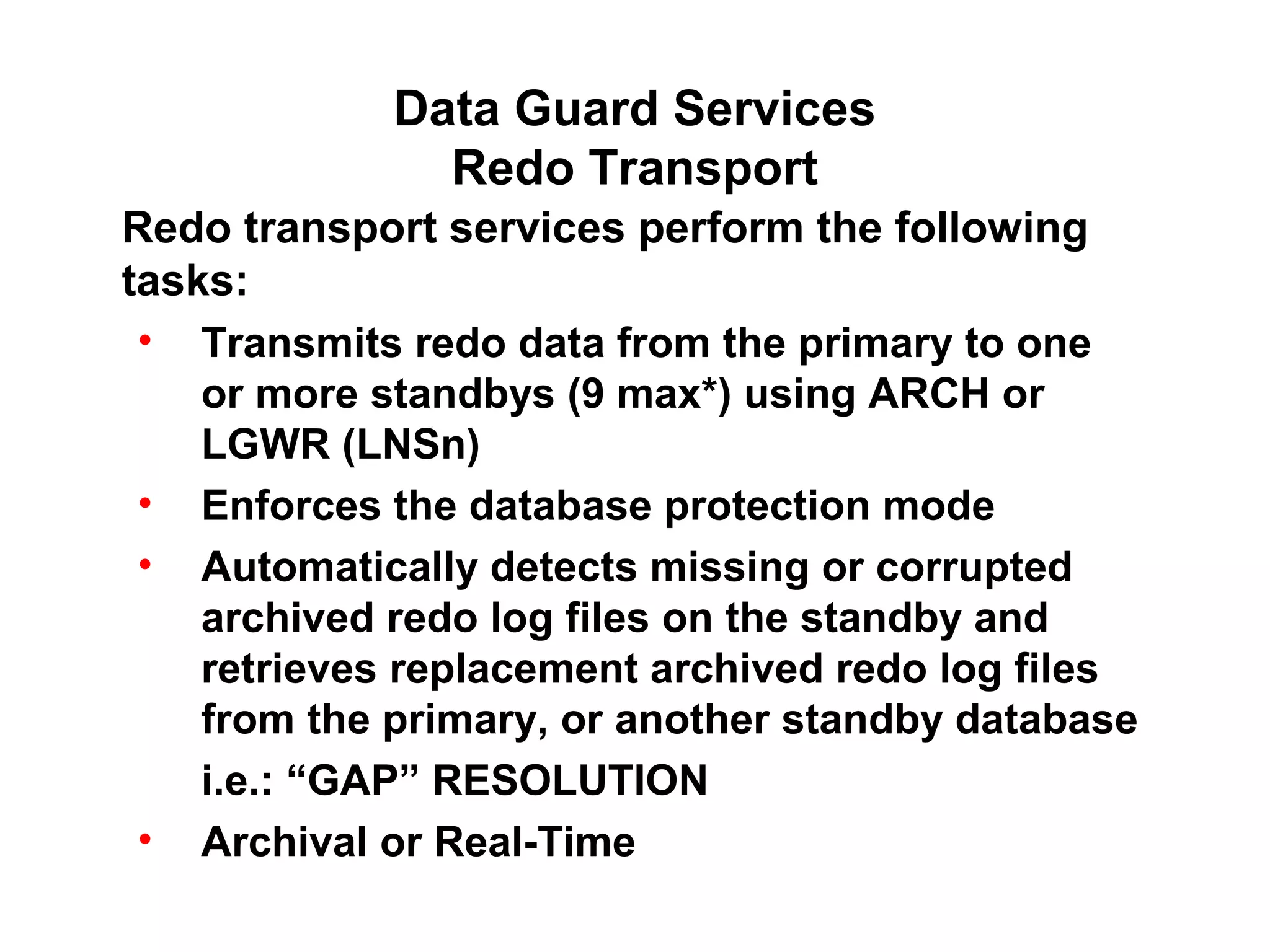
Redo transport services perform the following
tasks:
 • Transmits redo data from the primary to one
    or more standbys (9 max*) using ARCH or
    LGWR (LNSn)
 • Enforces the database protection mode
 • Automatically detects missing or corrupted
    archived redo log files on the standby and
    retrieves replacement archived redo log files
    from the primary, or another standby database
    i.e.: “GAP” RESOLUTION
 • Archival or Real-Time
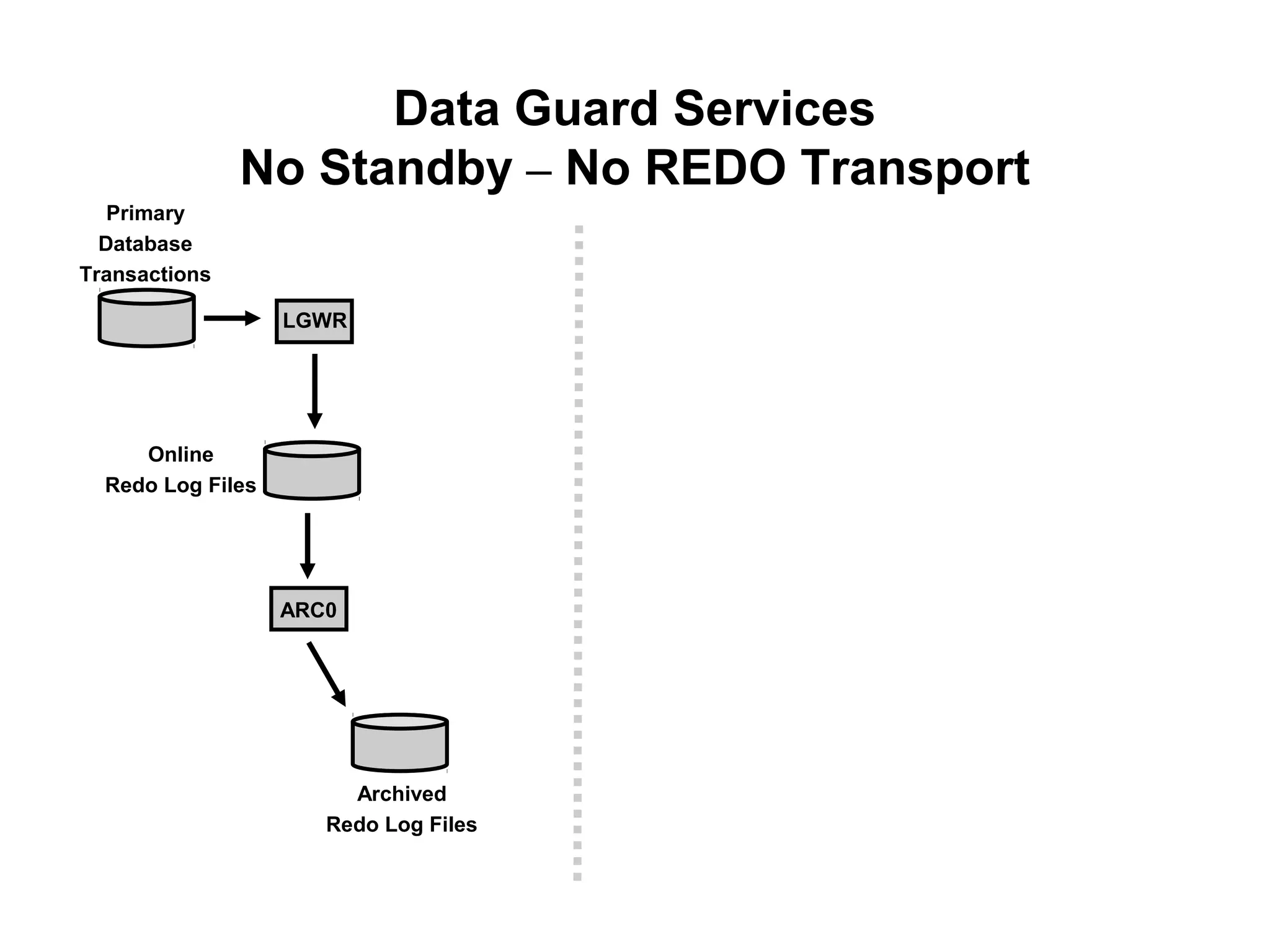
Data Guard Services
               No Standby – No REDO Transport
   Primary
  Database
Transactions

                   LGWR


     Online
  Redo Log Files


                   ARC0


                        Archived
                      Redo Log Files
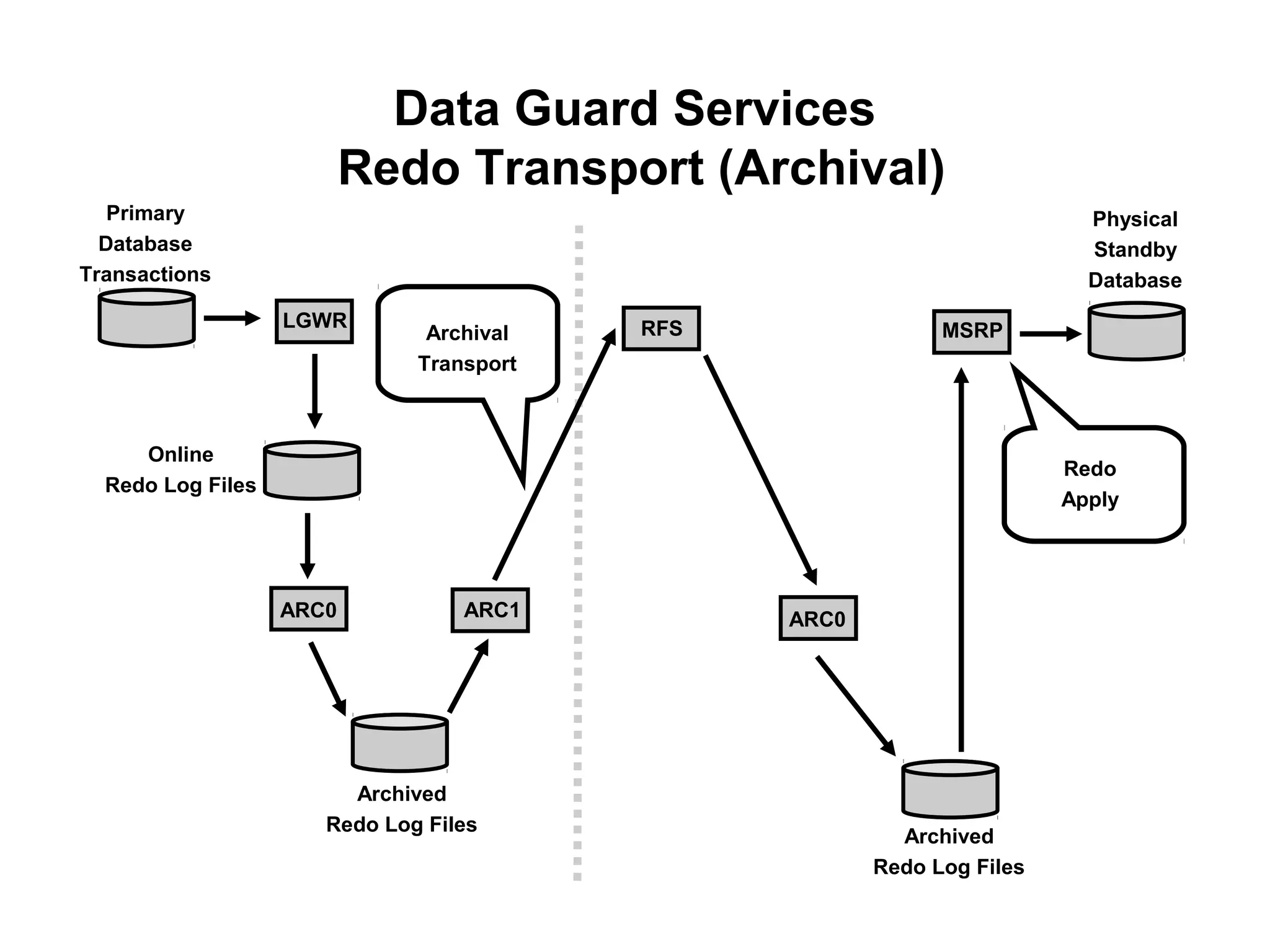
Data Guard Services
                          Redo Transport (Archival)
   Primary                                                                Physical
  Database                                                                Standby
Transactions                                                              Database
                   LGWR                   RFS                MSRP
                               Archival
                              Transport


     Online
                                                                        Redo
  Redo Log Files
                                                                        Apply


                   ARC0           ARC1          ARC0


                        Archived
                      Redo Log Files
                                                         Archived
                                                       Redo Log Files
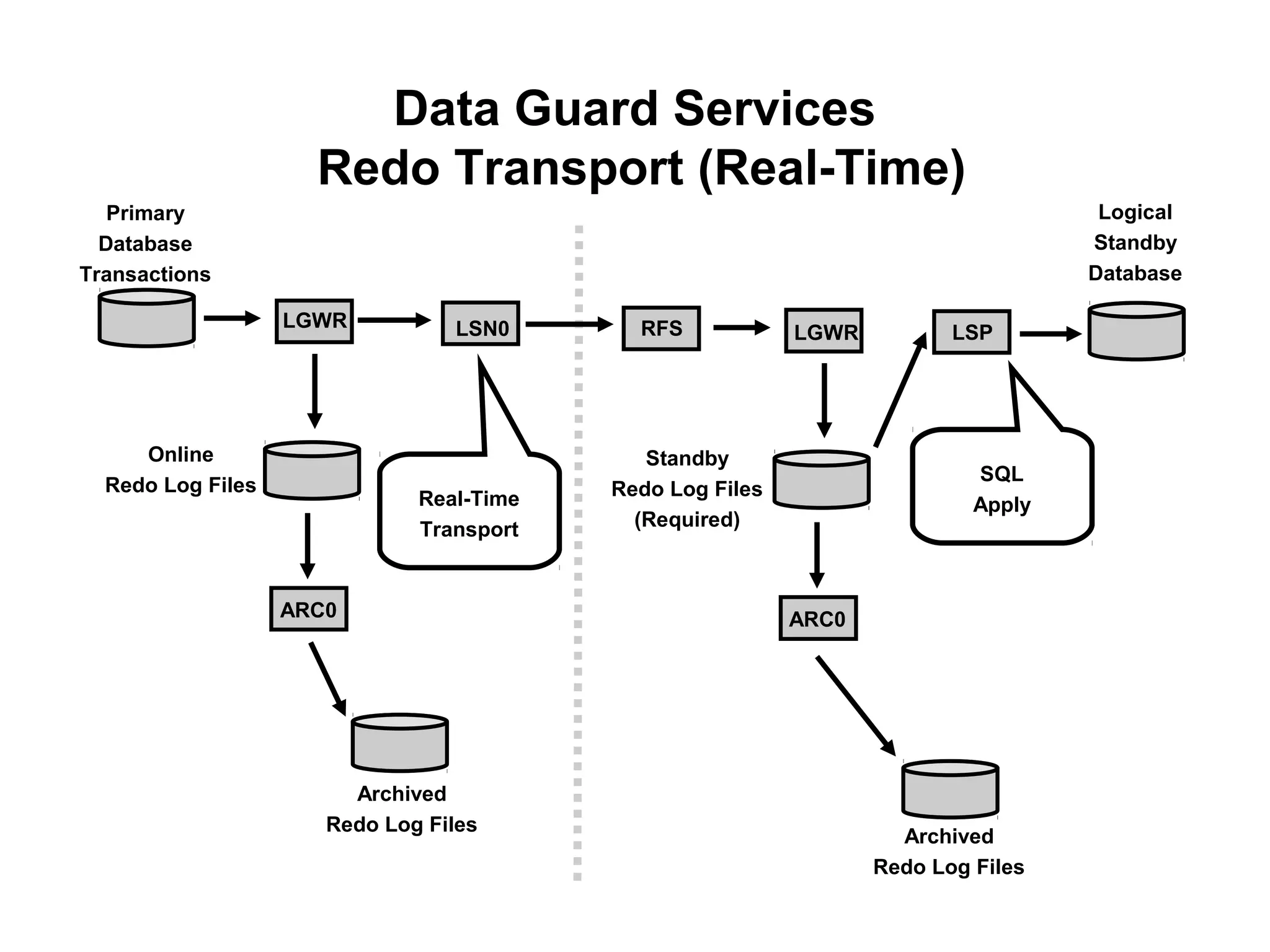
Data Guard Services
                     Redo Transport (Real-Time)
   Primary                                                                          Logical
  Database                                                                         Standby
Transactions                                                                       Database

                   LGWR          LSN0       RFS            LGWR          LSP


     Online                                  Standby
                                                                           SQL
  Redo Log Files                          Redo Log Files
                              Real-Time                                    Apply
                              Transport     (Required)


                   ARC0                                    ARC0


                        Archived
                      Redo Log Files
                                                                    Archived
                                                                  Redo Log Files
Data Guard Services
          Redo Transport Configuration
Redo transport is configured via parameters:
LOG_ARCHIVE_DEST_n (n = { 1..10 })
 •  One destination must be LOCAL and must be MANDATORY.
    This destination, usually n = 1, is always archived first when
    using ARCH for redo transport
 •  Destination n = 10 is the default FLASHBACK RECOVERY
    area.

LOG_ARCHIVE_DEST_STATE_n
 •  Allows one to ENABLE, DEFER, or RESET a specific
    destination

STANDBY_ARCHIVE_DEST (standby only)
 •  If no LOG_ARCHIVE_DEST_n locations specified then
    provides default location for archived redo logs
Data Guard Services
                Log Apply (Redo Apply)
For physical standby databases, Data Guard uses Redo Apply
technology, which applies redo data on the standby database
using standard recovery techniques of an Oracle database.

I.e. Block-for-block, byte-for-byte, bit-for-bit identical to primary.
Data Guard Services
                Log Apply (SQL Apply)
For logical standby databases, Data Guard uses SQL Apply
technology, which transforms the received redo data into SQL
statements and then executes the generated SQL statements on
the logical standby database.

I.e. Use Log Mining to extract the redo, transform the redo into SQL
statements, then execute the SQL statements against the logical
standby.
Role Transitions
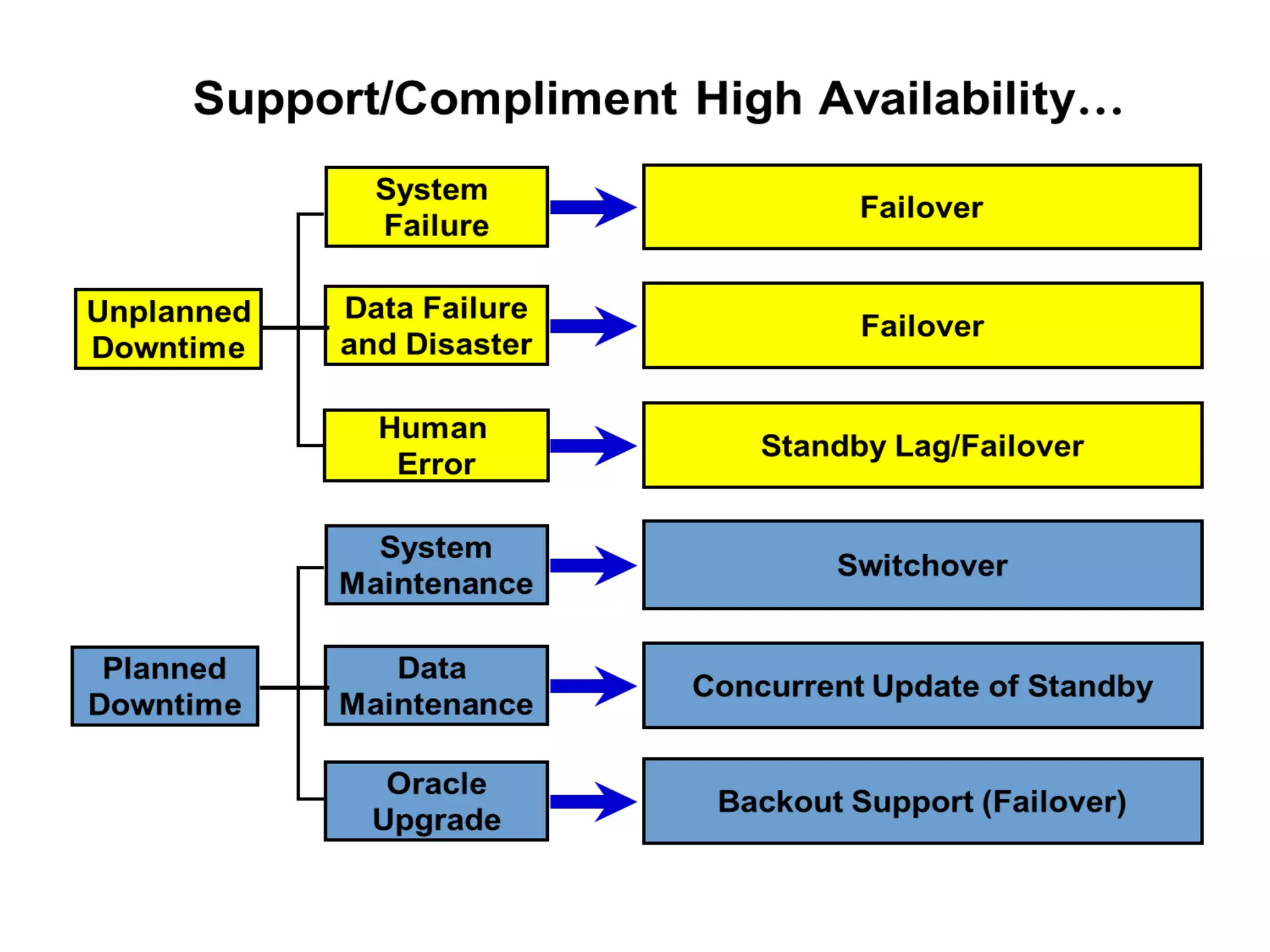
               Switchover and Failover

•   Not automatically invoked (but can be…)
•   Switchover
    – Planned role reversal
    – Used for OS or hardware maintenance
•   Failover
    – Unplanned role reversal
    – Use in an emergency
    – Minimal or zero data loss depending on choice of
      data protection mode
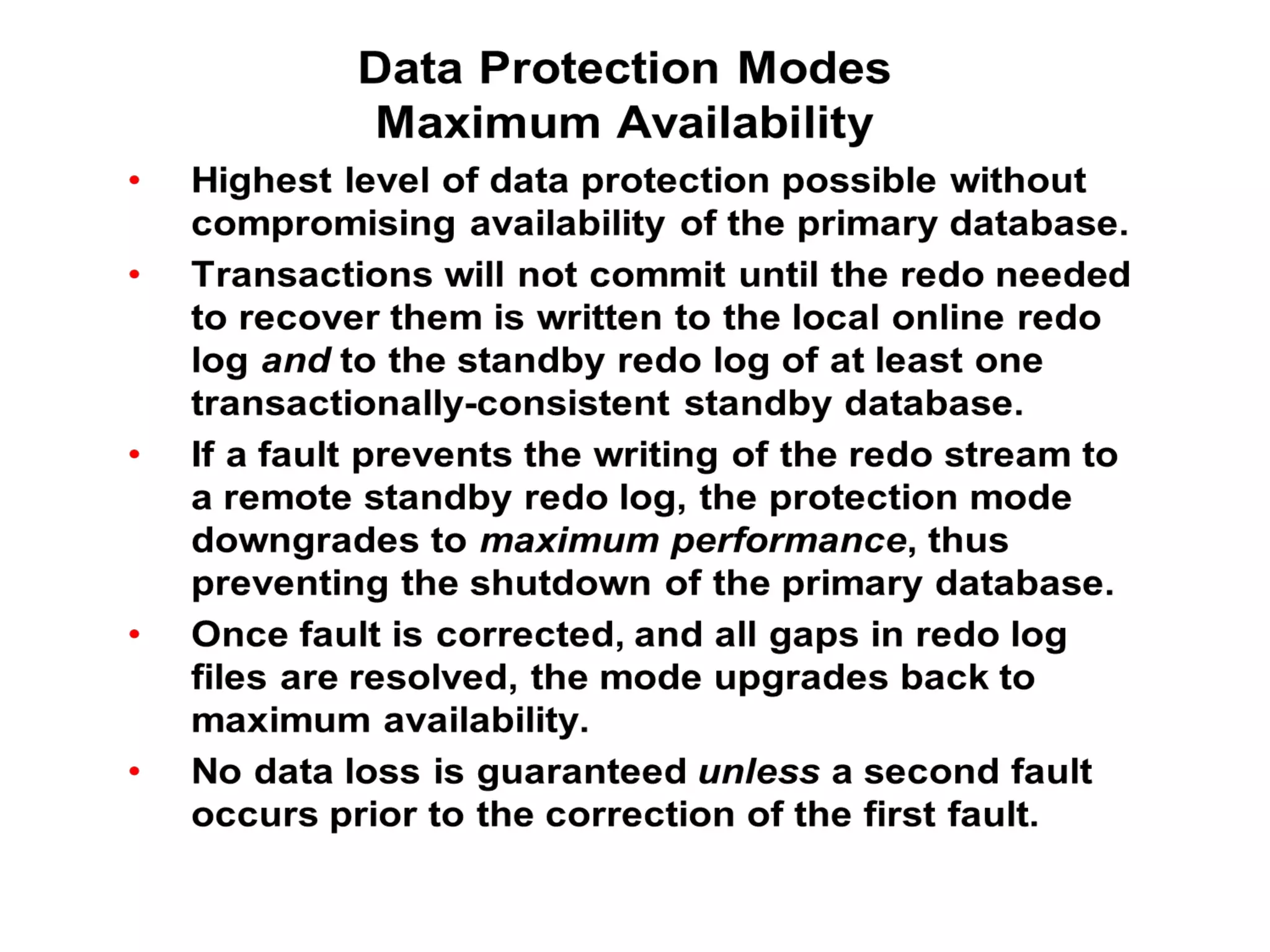
Data Protection Modes
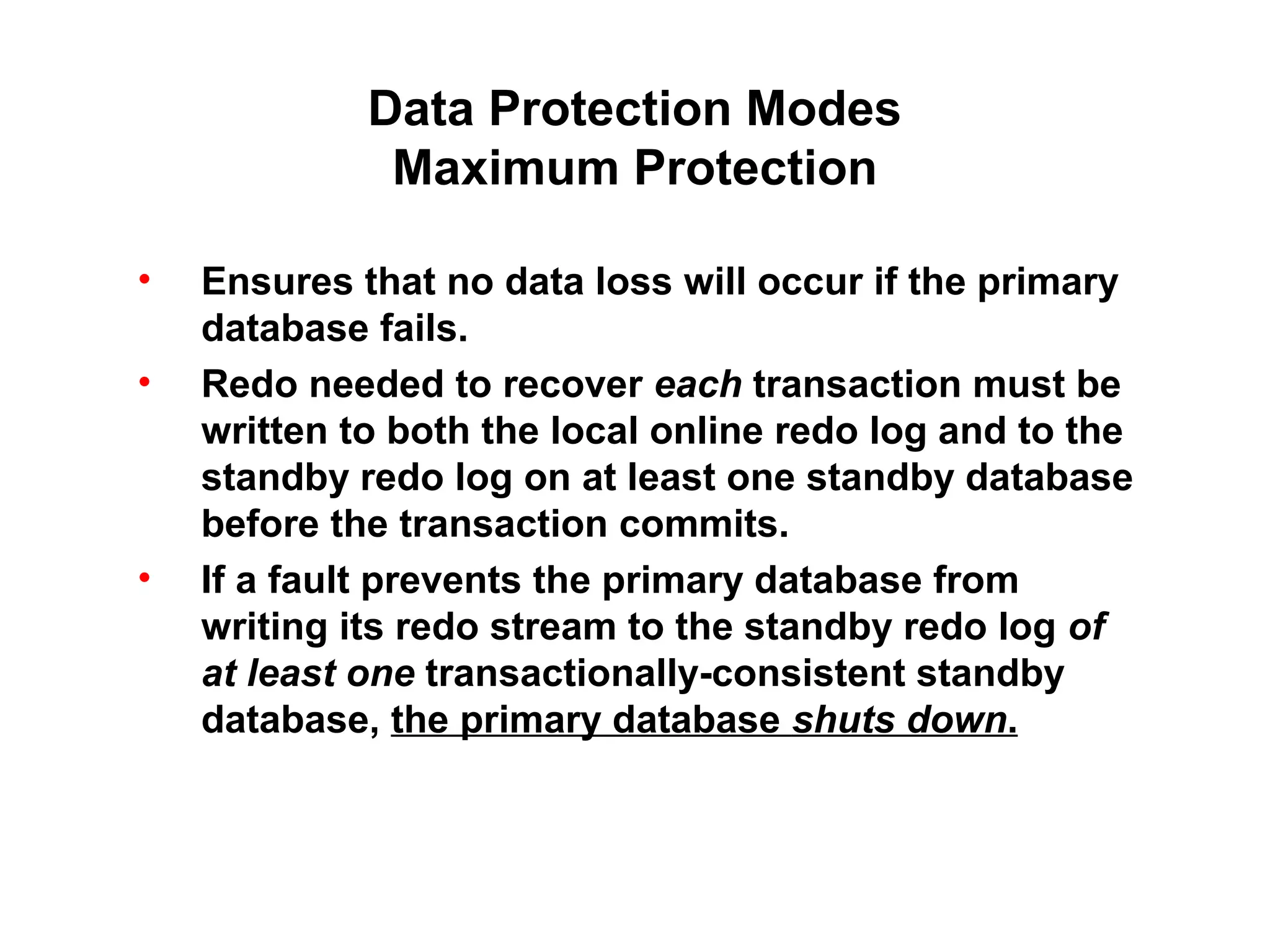
              Maximum Protection

•   Ensures that no data loss will occur if the primary
    database fails.
•   Redo needed to recover each transaction must be
    written to both the local online redo log and to the
    standby redo log on at least one standby database
    before the transaction commits.
•   If a fault prevents the primary database from
    writing its redo stream to the standby redo log of
    at least one transactionally-consistent standby
    database, the primary database shuts down.
Data Protection Modes
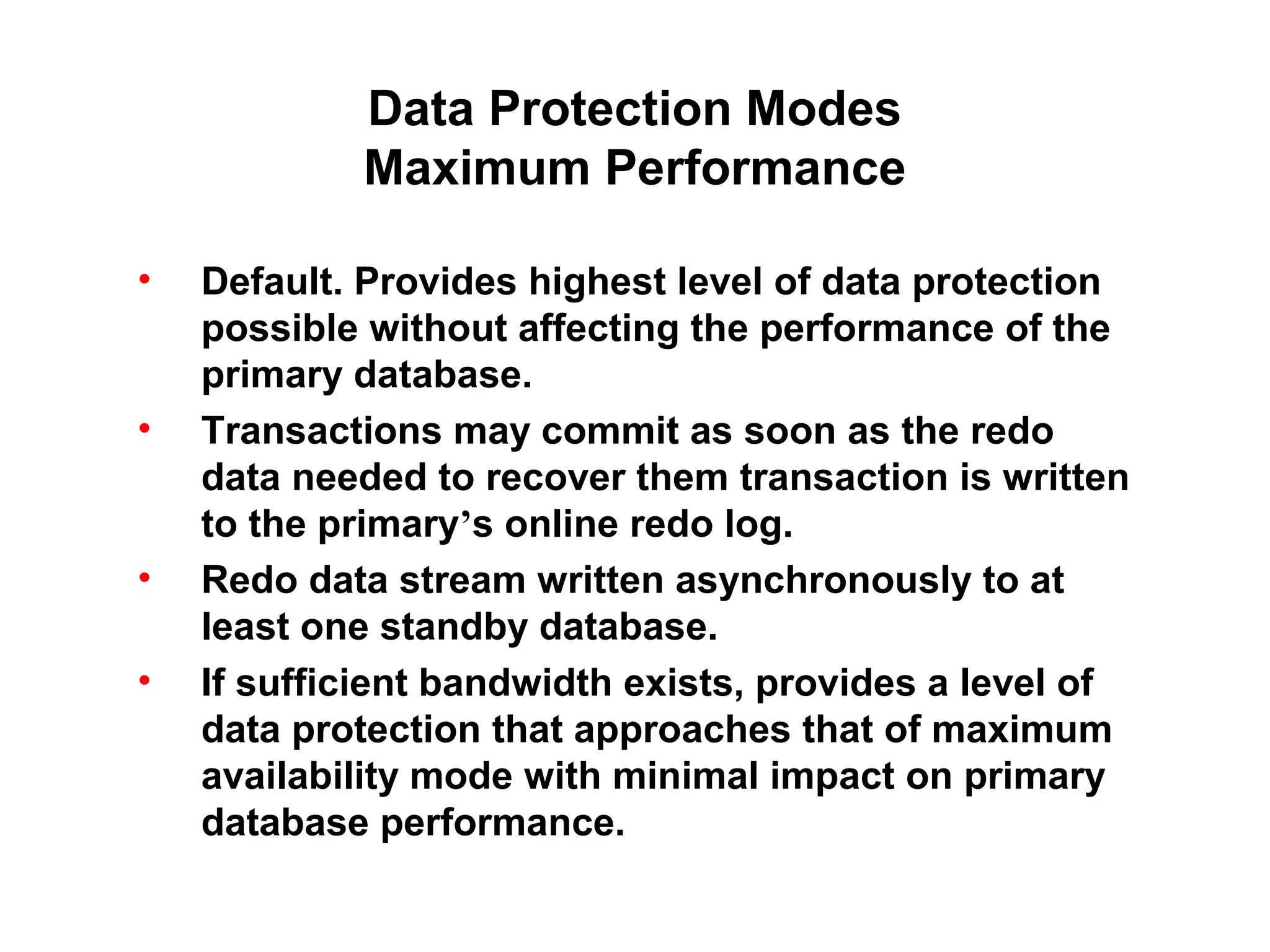
            Maximum Performance

•   Default. Provides highest level of data protection
    possible without affecting the performance of the
    primary database.
•   Transactions may commit as soon as the redo
    data needed to recover them transaction is written
    to the primary’s online redo log.
•   Redo data stream written asynchronously to at
    least one standby database.
•   If sufficient bandwidth exists, provides a level of
    data protection that approaches that of maximum
    availability mode with minimal impact on primary
    database performance.
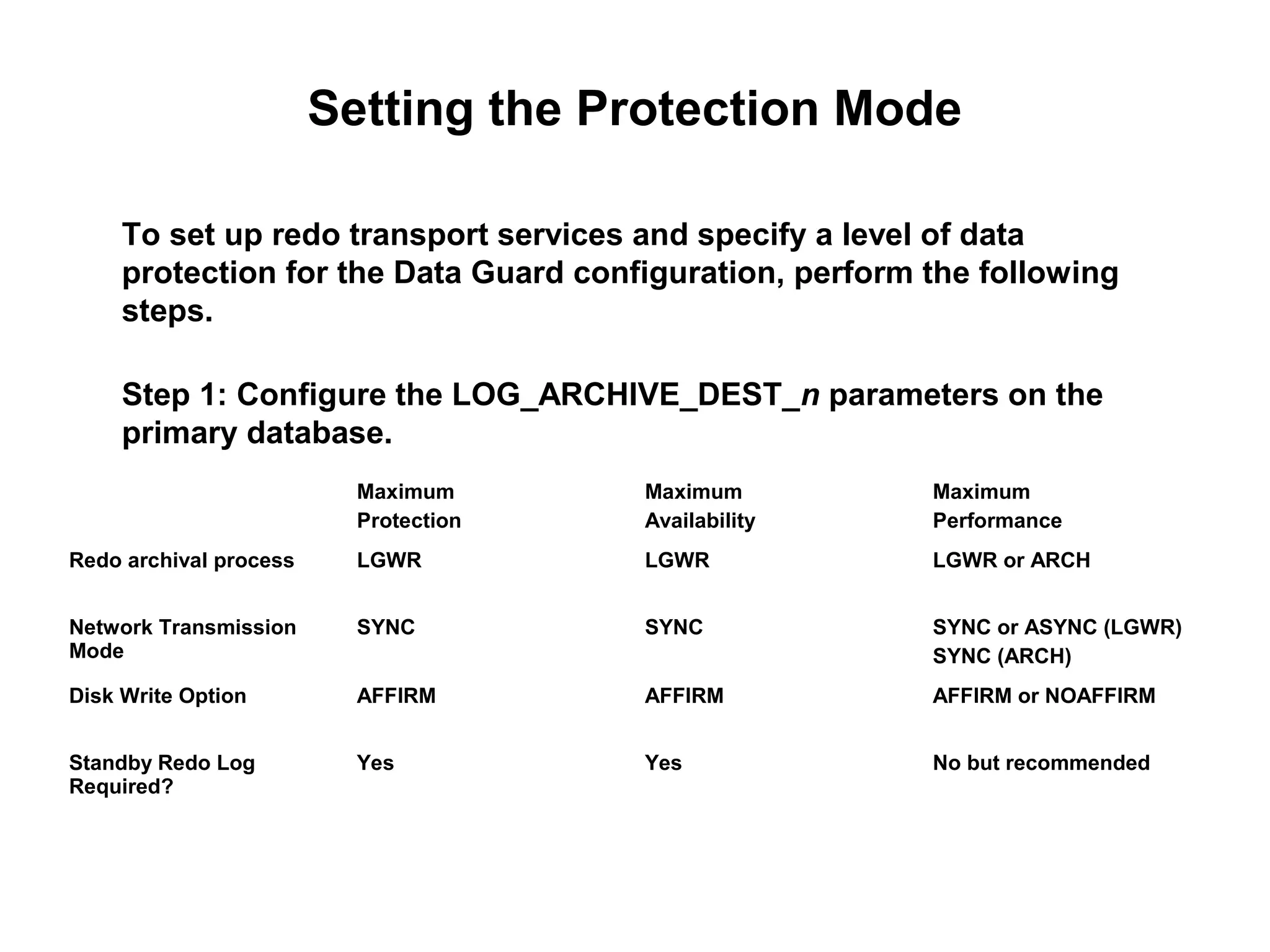
Setting the Protection Mode

     To set up redo transport services and specify a level of data
     protection for the Data Guard configuration, perform the following
     steps.

     Step 1: Configure the LOG_ARCHIVE_DEST_n parameters on the
     primary database.
                          Maximum      Maximum            Maximum
                          Protection   Availability       Performance
Redo archival process     LGWR         LGWR               LGWR or ARCH


Network Transmission      SYNC         SYNC               SYNC or ASYNC (LGWR)
Mode                                                      SYNC (ARCH)
Disk Write Option         AFFIRM       AFFIRM             AFFIRM or NOAFFIRM


Standby Redo Log          Yes          Yes                No but recommended
Required?
Setting the Protection Mode

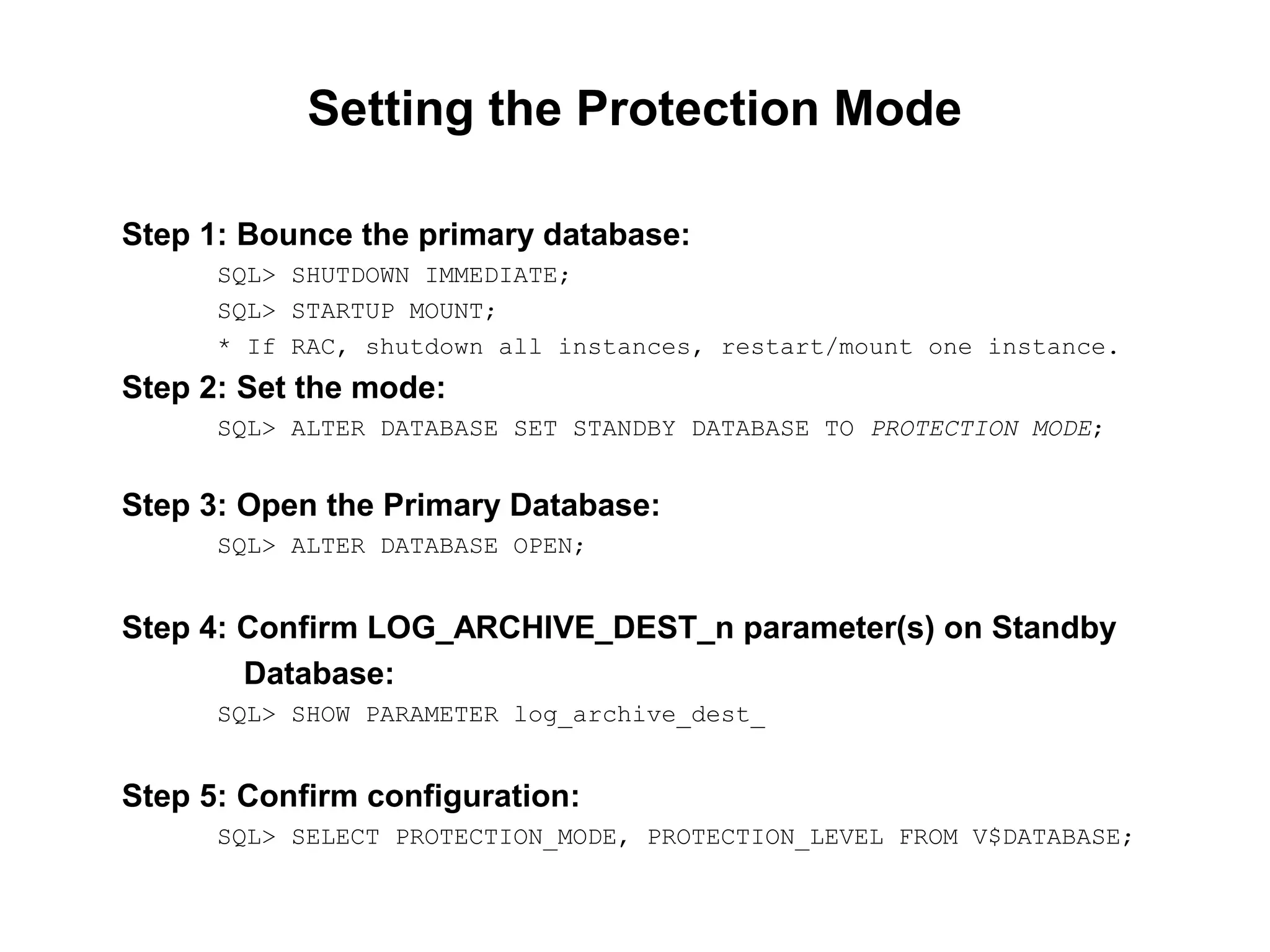
Step 1: Bounce the primary database:
      SQL> SHUTDOWN IMMEDIATE;
      SQL> STARTUP MOUNT;
      * If RAC, shutdown all instances, restart/mount one instance.
Step 2: Set the mode:
      SQL> ALTER DATABASE SET STANDBY DATABASE TO PROTECTION MODE;


Step 3: Open the Primary Database:
      SQL> ALTER DATABASE OPEN;


Step 4: Confirm LOG_ARCHIVE_DEST_n parameter(s) on Standby
        Database:
      SQL> SHOW PARAMETER log_archive_dest_


Step 5: Confirm configuration:
      SQL> SELECT PROTECTION_MODE, PROTECTION_LEVEL FROM V$DATABASE;
Summary


In this lesson you should have learned:
 • Benefits of Data Guard and why we might use it
 • Basic components of Oracle Data Guard

Oracle dataguard overview

  • 1.
  • 2.
    Objectives • Explain the benefits of Data Guard and why we might use it • Describe the basic components of Oracle Data Guard
  • 3.
    Benefits of OracleData Guard • Configure the system to meet business protection and recovery requirements • Continuous service through a disaster or crippling data failure • Complete data protection against corruptions and data loss • Reduce overhead on primary systems by offloading: – adhoc queries – reporting – backups • Centralized management (Data Guard Broker, Data Guard Manager via Enterprise Manager)
  • 4.
    Data Loss Causes… Hardware& System Error 44% Human Error 32% Software Corruption 14% Computer Viruses 7% Natural Disasters 3% * Protect Data 2006
  • 5.
    What is DataGuard? Primary Standby Database Database Redo Oracle Net Database Database Copy Oracle® Data Guard Concepts and Administration 10g Release 2 (10.2) “Ch. 1 Introduction to Oracle Data Guard “
  • 7.
    Standby Databases There aretwo types of standby databases: 1. Physical standby database 2. Logical standby database
  • 8.
    Data Guard Services Thereare three types of services provided between the Primary and Standby databases: 1. Redo Transport: (2 types: Archival or Real-Time) • Controls the transfer of redo data from the primary database to the standby database. 2. Log Apply: (2 types: Redo Apply or SQL Apply) • Applies redo data on the standby database to maintain synchronization with the primary database. 3. Role Transitions: (2 types: Switchover or Failover) • Change the role of a database: SWITCHOVER: standby to primary + primary to standby FAILOVER: standby to primary
  • 9.
    Data Guard Services Redo Transport Redo transport services perform the following tasks: • Transmits redo data from the primary to one or more standbys (9 max*) using ARCH or LGWR (LNSn) • Enforces the database protection mode • Automatically detects missing or corrupted archived redo log files on the standby and retrieves replacement archived redo log files from the primary, or another standby database i.e.: “GAP” RESOLUTION • Archival or Real-Time
  • 10.
    Data Guard Services No Standby – No REDO Transport Primary Database Transactions LGWR Online Redo Log Files ARC0 Archived Redo Log Files
  • 11.
    Data Guard Services Redo Transport (Archival) Primary Physical Database Standby Transactions Database LGWR RFS MSRP Archival Transport Online Redo Redo Log Files Apply ARC0 ARC1 ARC0 Archived Redo Log Files Archived Redo Log Files
  • 12.
    Data Guard Services Redo Transport (Real-Time) Primary Logical Database Standby Transactions Database LGWR LSN0 RFS LGWR LSP Online Standby SQL Redo Log Files Redo Log Files Real-Time Apply Transport (Required) ARC0 ARC0 Archived Redo Log Files Archived Redo Log Files
  • 13.
    Data Guard Services Redo Transport Configuration Redo transport is configured via parameters: LOG_ARCHIVE_DEST_n (n = { 1..10 }) • One destination must be LOCAL and must be MANDATORY. This destination, usually n = 1, is always archived first when using ARCH for redo transport • Destination n = 10 is the default FLASHBACK RECOVERY area. LOG_ARCHIVE_DEST_STATE_n • Allows one to ENABLE, DEFER, or RESET a specific destination STANDBY_ARCHIVE_DEST (standby only) • If no LOG_ARCHIVE_DEST_n locations specified then provides default location for archived redo logs
  • 14.
    Data Guard Services Log Apply (Redo Apply) For physical standby databases, Data Guard uses Redo Apply technology, which applies redo data on the standby database using standard recovery techniques of an Oracle database. I.e. Block-for-block, byte-for-byte, bit-for-bit identical to primary.
  • 15.
    Data Guard Services Log Apply (SQL Apply) For logical standby databases, Data Guard uses SQL Apply technology, which transforms the received redo data into SQL statements and then executes the generated SQL statements on the logical standby database. I.e. Use Log Mining to extract the redo, transform the redo into SQL statements, then execute the SQL statements against the logical standby.
  • 16.
    Role Transitions Switchover and Failover • Not automatically invoked (but can be…) • Switchover – Planned role reversal – Used for OS or hardware maintenance • Failover – Unplanned role reversal – Use in an emergency – Minimal or zero data loss depending on choice of data protection mode
  • 17.
    Data Protection Modes Maximum Protection • Ensures that no data loss will occur if the primary database fails. • Redo needed to recover each transaction must be written to both the local online redo log and to the standby redo log on at least one standby database before the transaction commits. • If a fault prevents the primary database from writing its redo stream to the standby redo log of at least one transactionally-consistent standby database, the primary database shuts down.
  • 19.
    Data Protection Modes Maximum Performance • Default. Provides highest level of data protection possible without affecting the performance of the primary database. • Transactions may commit as soon as the redo data needed to recover them transaction is written to the primary’s online redo log. • Redo data stream written asynchronously to at least one standby database. • If sufficient bandwidth exists, provides a level of data protection that approaches that of maximum availability mode with minimal impact on primary database performance.
  • 20.
    Setting the ProtectionMode To set up redo transport services and specify a level of data protection for the Data Guard configuration, perform the following steps. Step 1: Configure the LOG_ARCHIVE_DEST_n parameters on the primary database. Maximum Maximum Maximum Protection Availability Performance Redo archival process LGWR LGWR LGWR or ARCH Network Transmission SYNC SYNC SYNC or ASYNC (LGWR) Mode SYNC (ARCH) Disk Write Option AFFIRM AFFIRM AFFIRM or NOAFFIRM Standby Redo Log Yes Yes No but recommended Required?
  • 21.
    Setting the ProtectionMode Step 1: Bounce the primary database: SQL> SHUTDOWN IMMEDIATE; SQL> STARTUP MOUNT; * If RAC, shutdown all instances, restart/mount one instance. Step 2: Set the mode: SQL> ALTER DATABASE SET STANDBY DATABASE TO PROTECTION MODE; Step 3: Open the Primary Database: SQL> ALTER DATABASE OPEN; Step 4: Confirm LOG_ARCHIVE_DEST_n parameter(s) on Standby Database: SQL> SHOW PARAMETER log_archive_dest_ Step 5: Confirm configuration: SQL> SELECT PROTECTION_MODE, PROTECTION_LEVEL FROM V$DATABASE;
  • 22.
    Summary In this lessonyou should have learned: • Benefits of Data Guard and why we might use it • Basic components of Oracle Data Guard