Requirements & Drupal: Planning for Successful               September 13, 2012

Projects

R.J. Townsend, Manager, Drupal Solutions - NavigationArts
Jon Riekse, Director of Business Analysis - NavigationArts
NavigationArts: Market Position
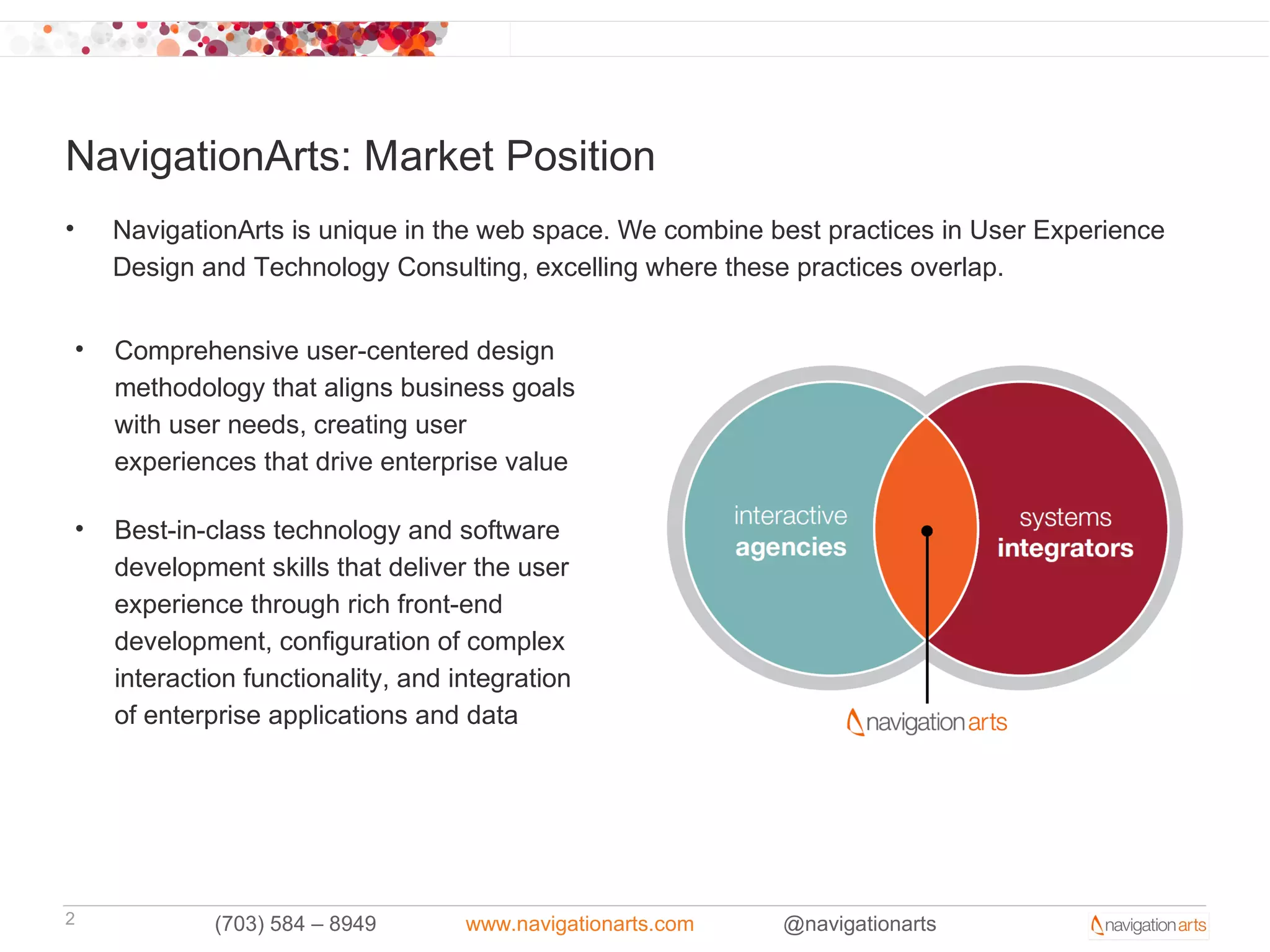
•       NavigationArts is unique in the web space. We combine best practices in User Experience
        Design and Technology Consulting, excelling where these practices overlap.

    •   Comprehensive user-centered design
        methodology that aligns business goals
        with user needs, creating user
        experiences that drive enterprise value

    •   Best-in-class technology and software
        development skills that deliver the user
        experience through rich front-end
        development, configuration of complex
        interaction functionality, and integration
        of enterprise applications and data


2                (703) 584 – 8949       www.navigationarts.com   @navigationarts
Agenda
• Requirements Overview

• Requirement Types & Samples

• Translating Requirements to Specification / Development

• Requirement Activities

• Drupal Requirements

• The Business Analyst & Drupal

• Functional Re-use

• Requirements & Contributing back to the Open Source Community


3         (703) 584 – 8949   www.navigationarts.com   @navigationarts
Requirements: What are they good for?

S


4     (703) 584 – 8949   www.navigationarts.com   @navigationarts
Requirements: The Case Against
• We don’t have the time or budget to document requirements

• Seems like too much paperwork, let’s build something already!

• Our project is too small to necessitate requirements

• Our project is too large to necessitate requirements (we will never know
  everything until we start developing)

• We use agile

• We like to change our minds


5         (703) 584 – 8949   www.navigationarts.com   @navigationarts
Requirements: The Case For
• Taking planning seriously, adding some formality, mitigating risk – meeting
  the formality of your clients/stakeholders

• Doesn’t assume we are all talking about the same thing or speaking
  the same language, leaves a paper trail (and not just a cluttered inbox)

• Describing and agreeing to the end state before it’s done (for clients or your
  internal business teams), documenting scope for budget/resources

• Agreement to the outcome - how do we know when we’re done?

• Managing change - being on the same page as your project
  sponsors/clients


6          (703) 584 – 8949   www.navigationarts.com   @navigationarts
Requirements Overview
• A requirement is a description of what the website will do.

• A requirement can consist of a text description or a visual representation
  (annotated wireframe, design, model, diagram) – whatever it takes to get
  the point across.

• A requirements document is a collection of consistent requirements – can
  describe the same thing a few different ways to ensure understanding

• The goal of requirements is to describe as precisely as possible what is to
  be built, giving more attention to the most complex aspects, where the
  highest level or risk can occur (using your time wisely)

• Defines the boundaries of the website/system. Helps avoid scope creep.


7         (703) 584 – 8949   www.navigationarts.com   @navigationarts
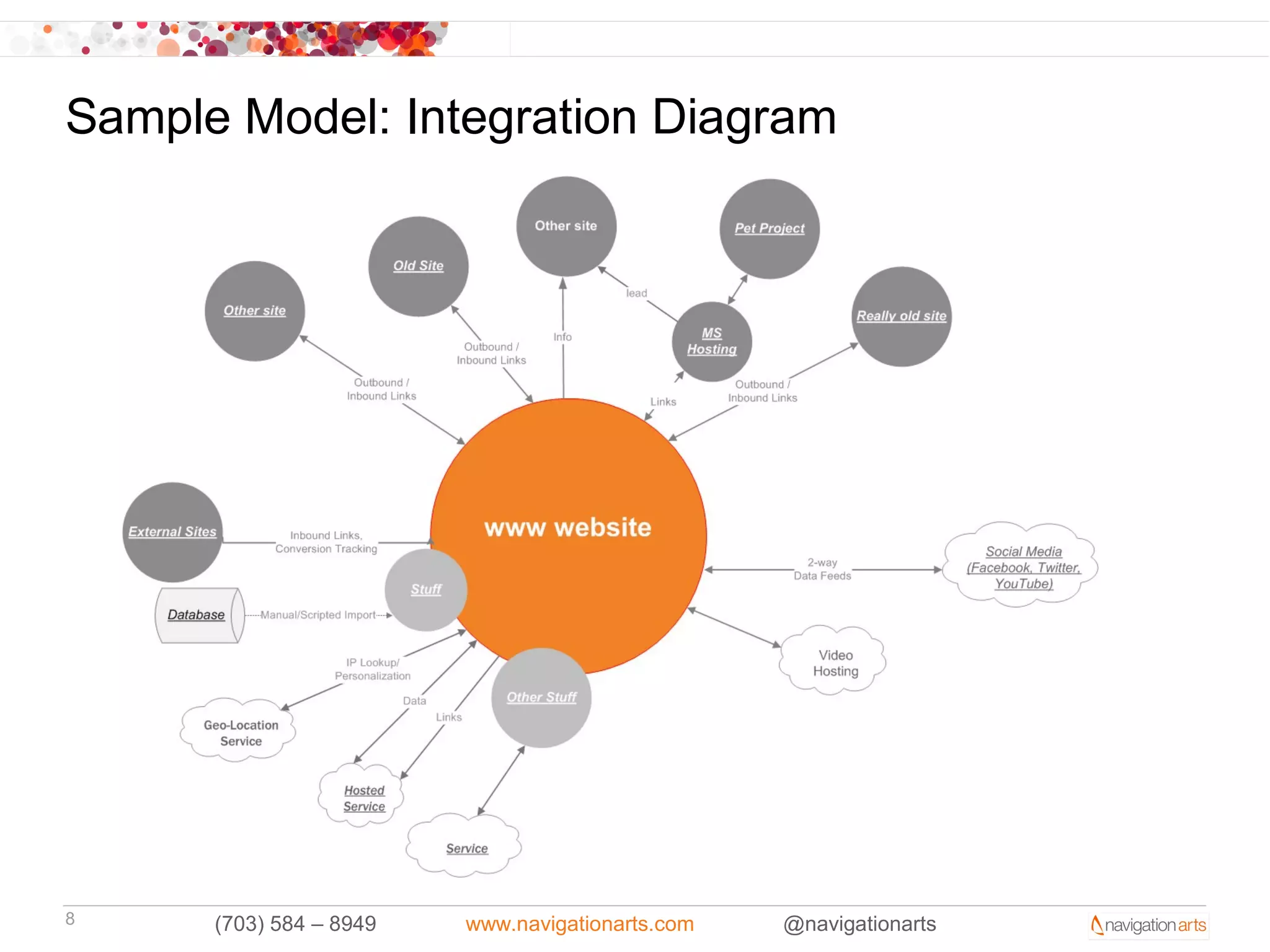
Sample Model: Integration Diagram


8     (703) 584 – 8949   www.navigationarts.com   @navigationarts
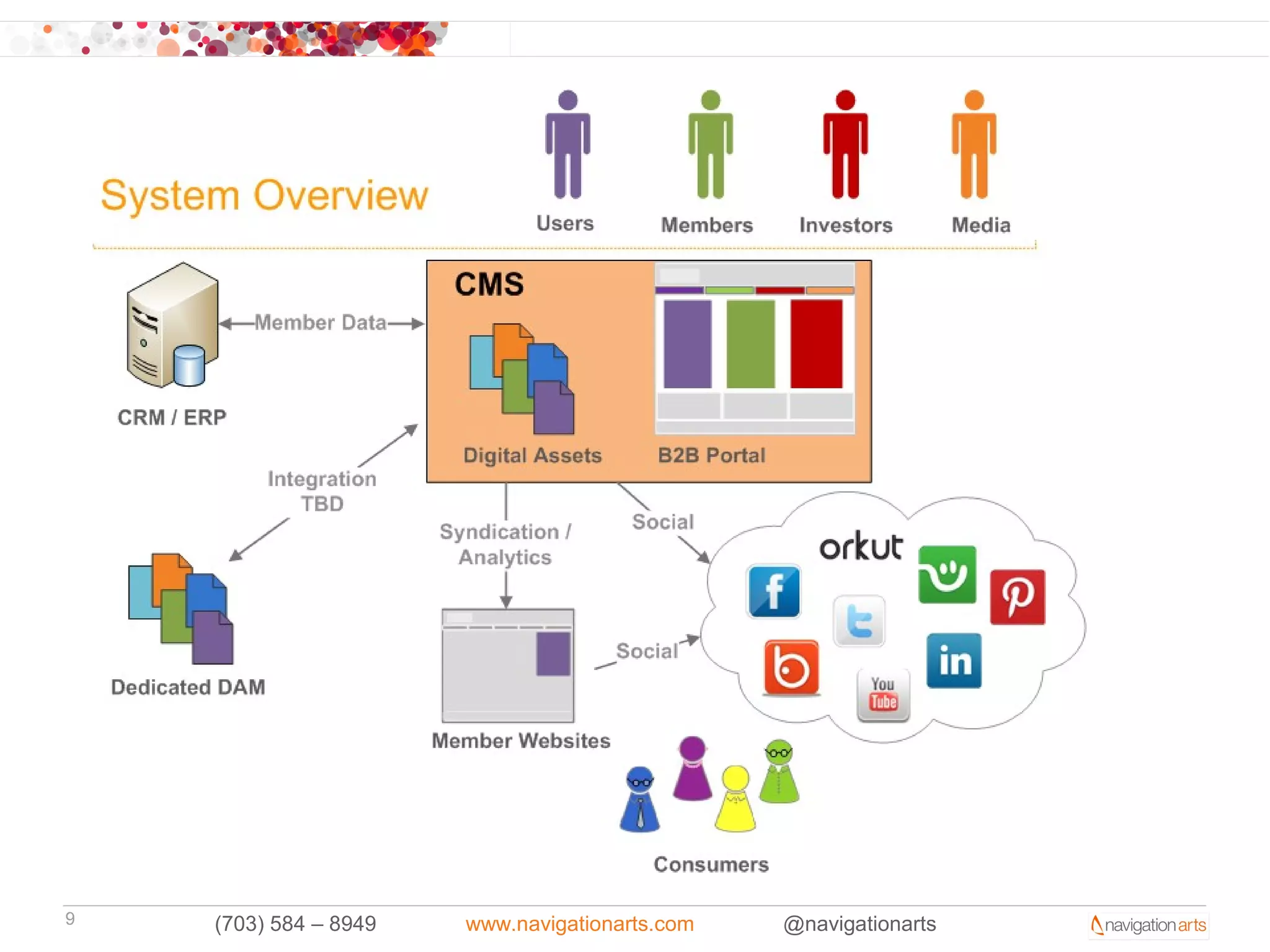
9   (703) 584 – 8949   www.navigationarts.com   @navigationarts
Warning: Abstraction Ahead
•    Talking abstract concepts about an abstract
     system – using language

•    A picture is worth…a lot

•    Know your audience, and your risks

•    Avoid documenting the documentation – when you have
     documentation to reference other documentation you are starting
     down a slippery slope

•    Use common sense, trust your intuition over the ‘correct’ way to
     document requirements

•    Keep it grounded, at the end of the day if it doesn’t make the product
     better it wasn’t worth it. Quality Assurance starts with this work.
10     (703) 584 – 8949   www.navigationarts.com   @navigationarts
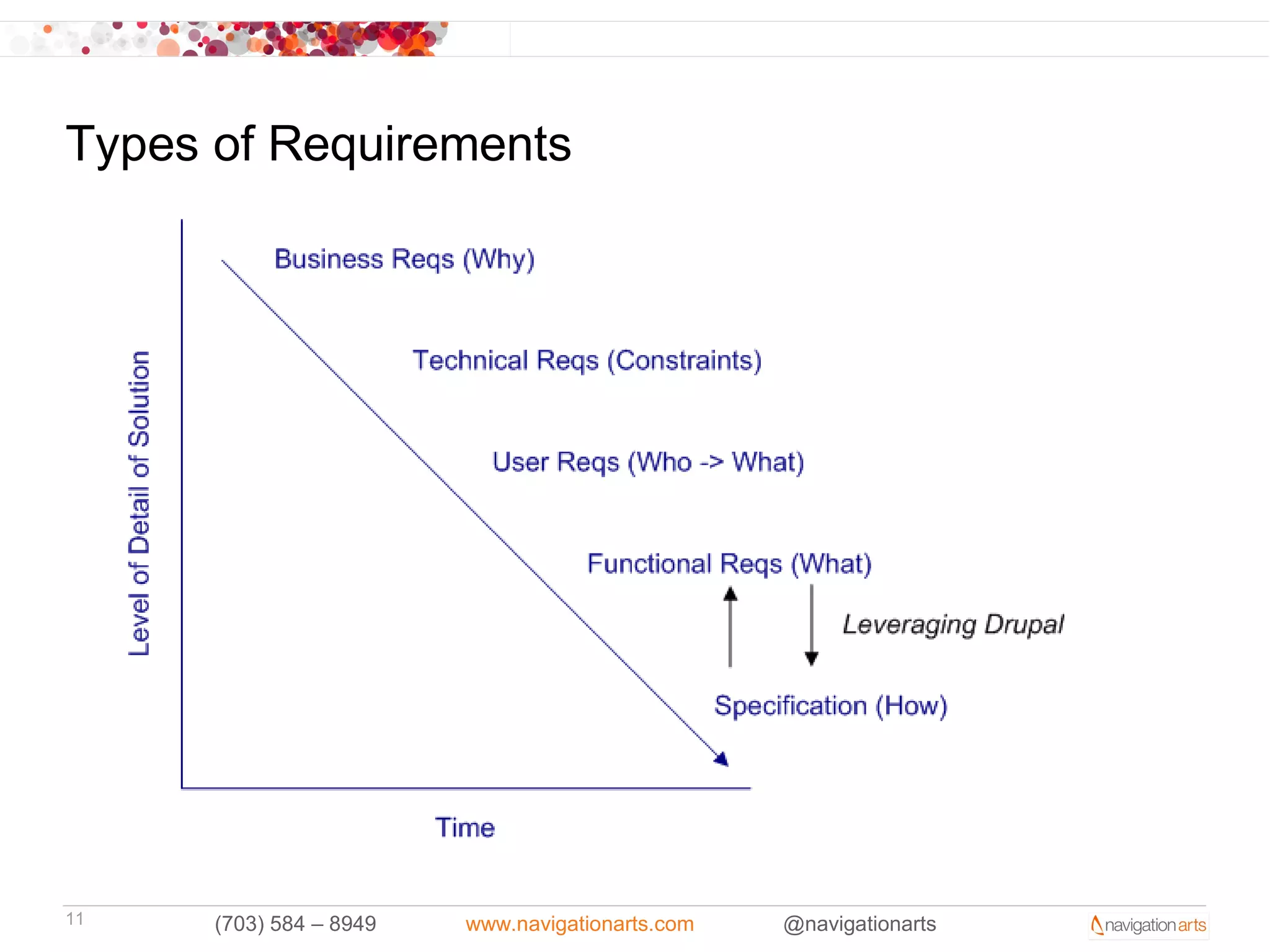
Types of Requirements


11    (703) 584 – 8949   www.navigationarts.com   @navigationarts
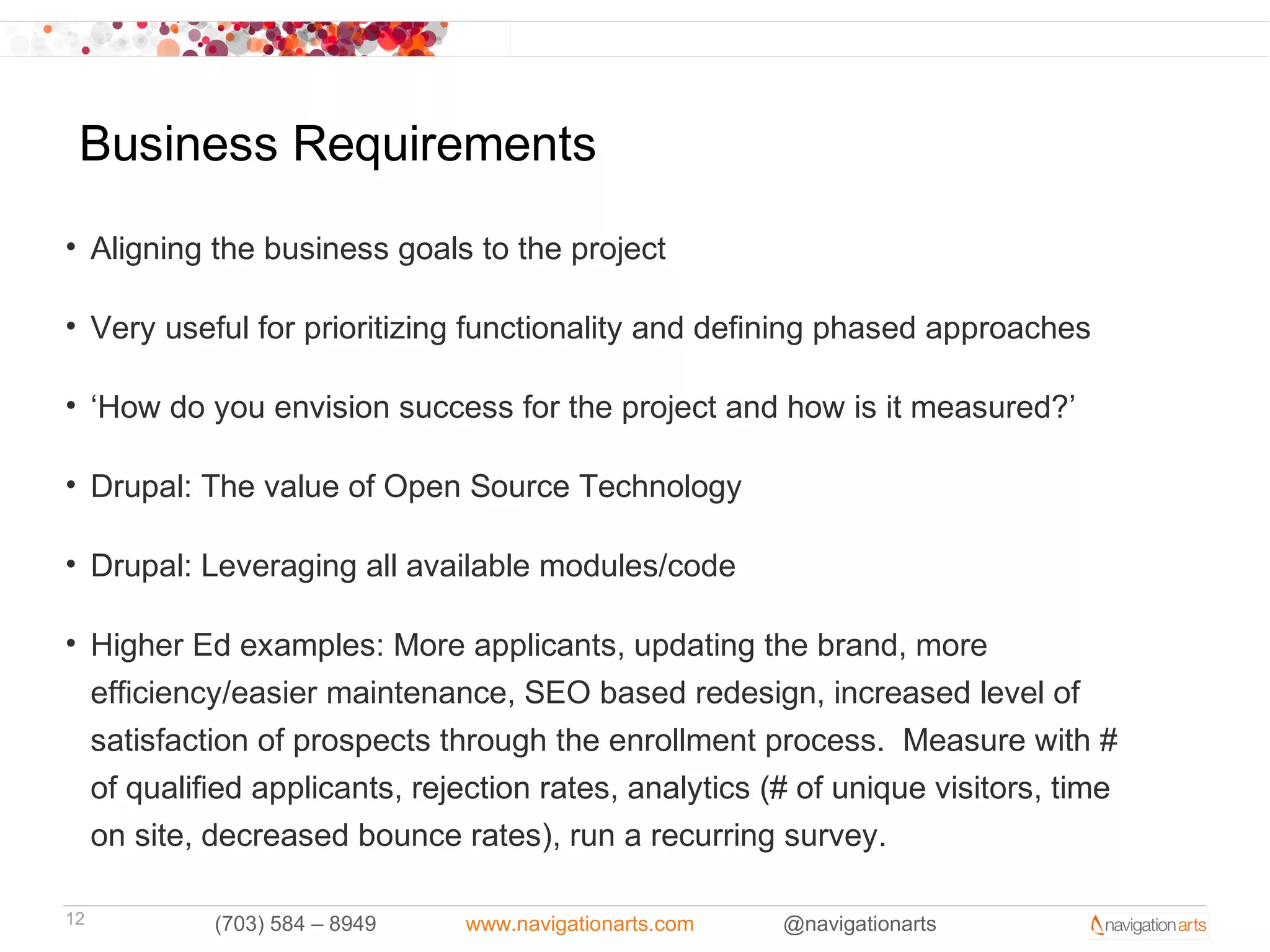
Business Requirements
• Aligning the business goals to the project

• Very useful for prioritizing functionality and defining phased approaches

• ‘How do you envision success for the project and how is it measured?’

• Drupal: The value of Open Source Technology

• Drupal: Leveraging all available modules/code

• Higher Ed examples: More applicants, updating the brand, more
  efficiency/easier maintenance, SEO based redesign, increased level of
  satisfaction of prospects through the enrollment process. Measure with #
  of qualified applicants, rejection rates, analytics (# of unique visitors, time
  on site, decreased bounce rates), run a recurring survey.

12         (703) 584 – 8949   www.navigationarts.com   @navigationarts
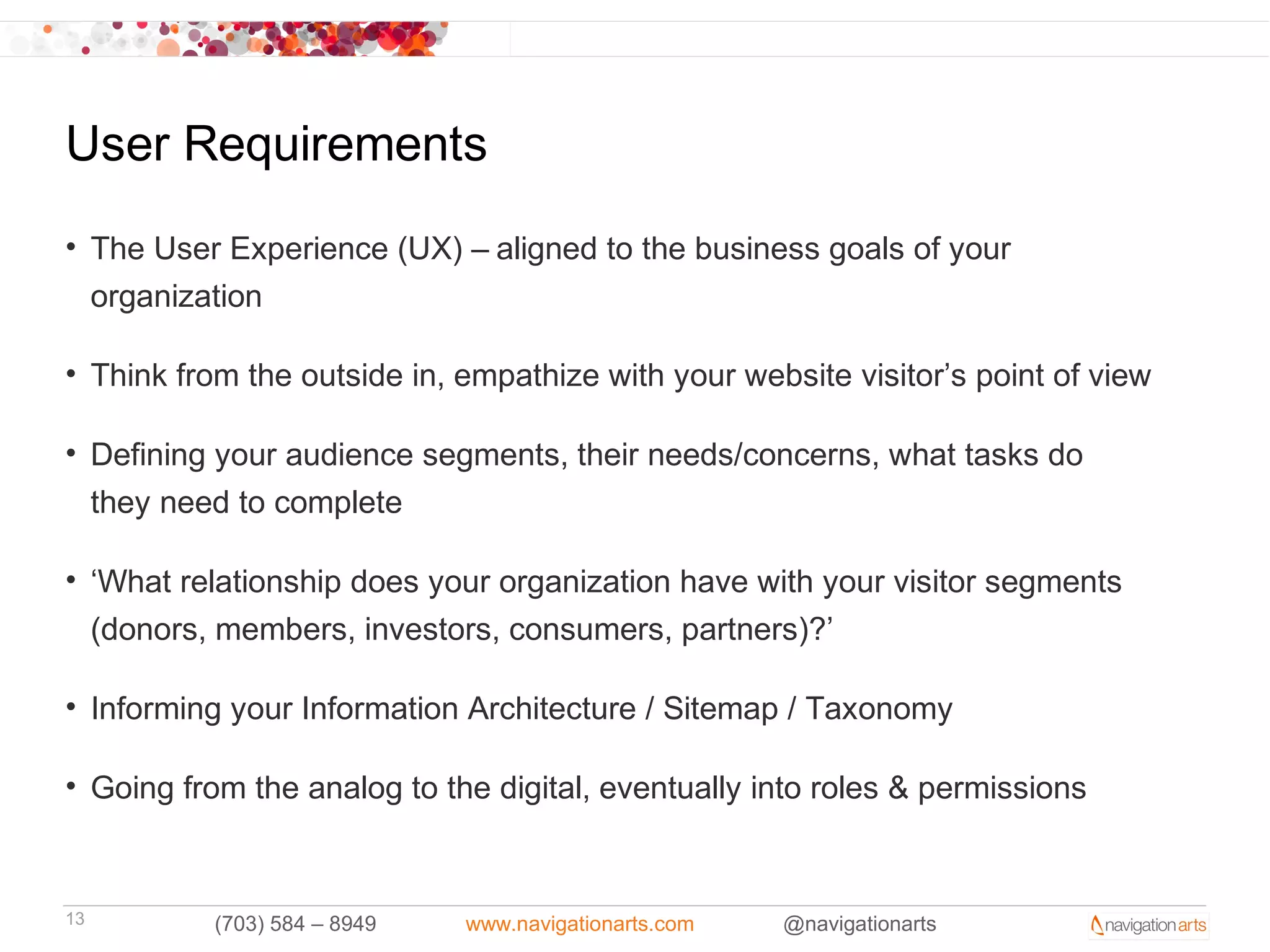
User Requirements
• The User Experience (UX) – aligned to the business goals of your
  organization

• Think from the outside in, empathize with your website visitor’s point of view

• Defining your audience segments, their needs/concerns, what tasks do
  they need to complete

• ‘What relationship does your organization have with your visitor segments
  (donors, members, investors, consumers, partners)?’

• Informing your Information Architecture / Sitemap / Taxonomy

• Going from the analog to the digital, eventually into roles & permissions


13         (703) 584 – 8949   www.navigationarts.com   @navigationarts
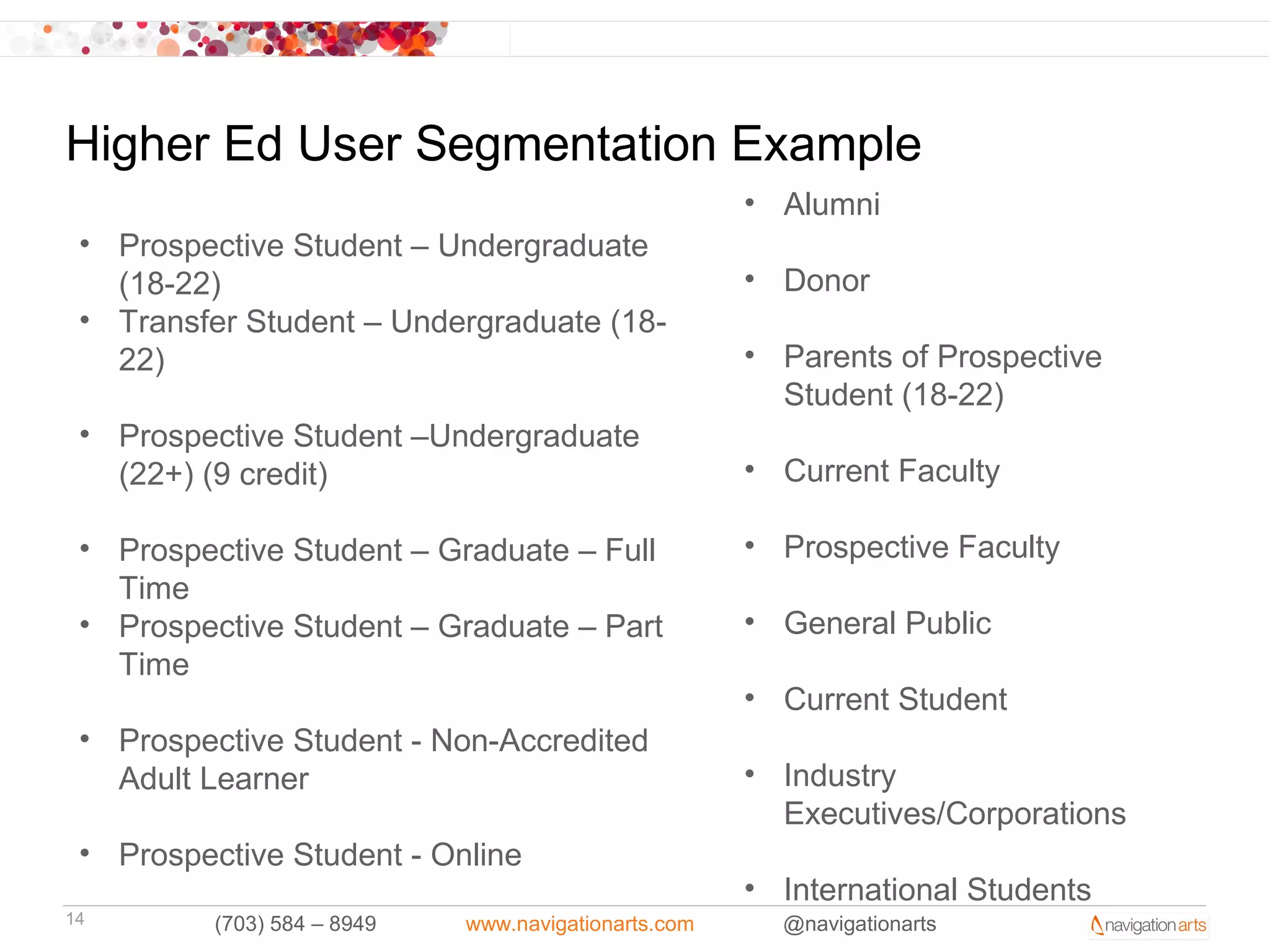
Higher Ed User Segmentation Example
                                                      • Alumni
 • Prospective Student – Undergraduate
   (18-22)                                            • Donor
 • Transfer Student – Undergraduate (18-
   22)                                                • Parents of Prospective
                                                        Student (18-22)
 • Prospective Student –Undergraduate
   (22+) (9 credit)                                   • Current Faculty

 • Prospective Student – Graduate – Full              • Prospective Faculty
   Time
 • Prospective Student – Graduate – Part              • General Public
   Time
                                                      • Current Student
 • Prospective Student - Non-Accredited
   Adult Learner                                      • Industry
                                                        Executives/Corporations
 • Prospective Student - Online
                                                      • International Students
14        (703) 584 – 8949   www.navigationarts.com     @navigationarts
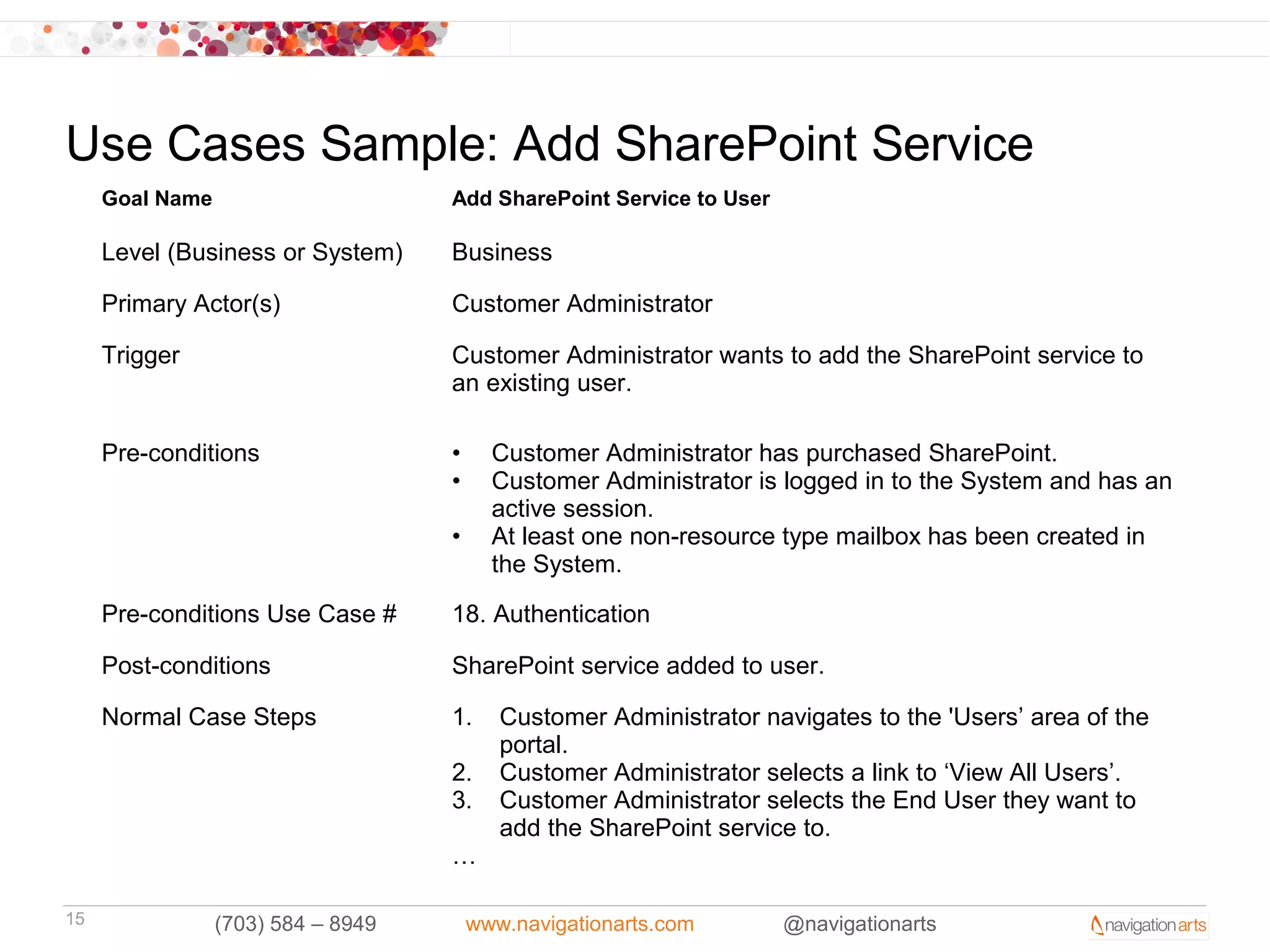
Use Cases Sample: Add SharePoint Service
     Goal Name                      Add SharePoint Service to User

     Level (Business or System)     Business

     Primary Actor(s)               Customer Administrator

     Trigger                        Customer Administrator wants to add the SharePoint service to
                                    an existing user.

     Pre-conditions                 •     Customer Administrator has purchased SharePoint.
                                    •     Customer Administrator is logged in to the System and has an
                                          active session.
                                    •     At least one non-resource type mailbox has been created in
                                          the System.

     Pre-conditions Use Case #      18. Authentication

     Post-conditions                SharePoint service added to user.

     Normal Case Steps              1.     Customer Administrator navigates to the 'Users’ area of the
                                           portal.
                                    2.     Customer Administrator selects a link to ‘View All Users’.
                                    3.     Customer Administrator selects the End User they want to
                                           add the SharePoint service to.
                                    …

15               (703) 584 – 8949       www.navigationarts.com       @navigationarts
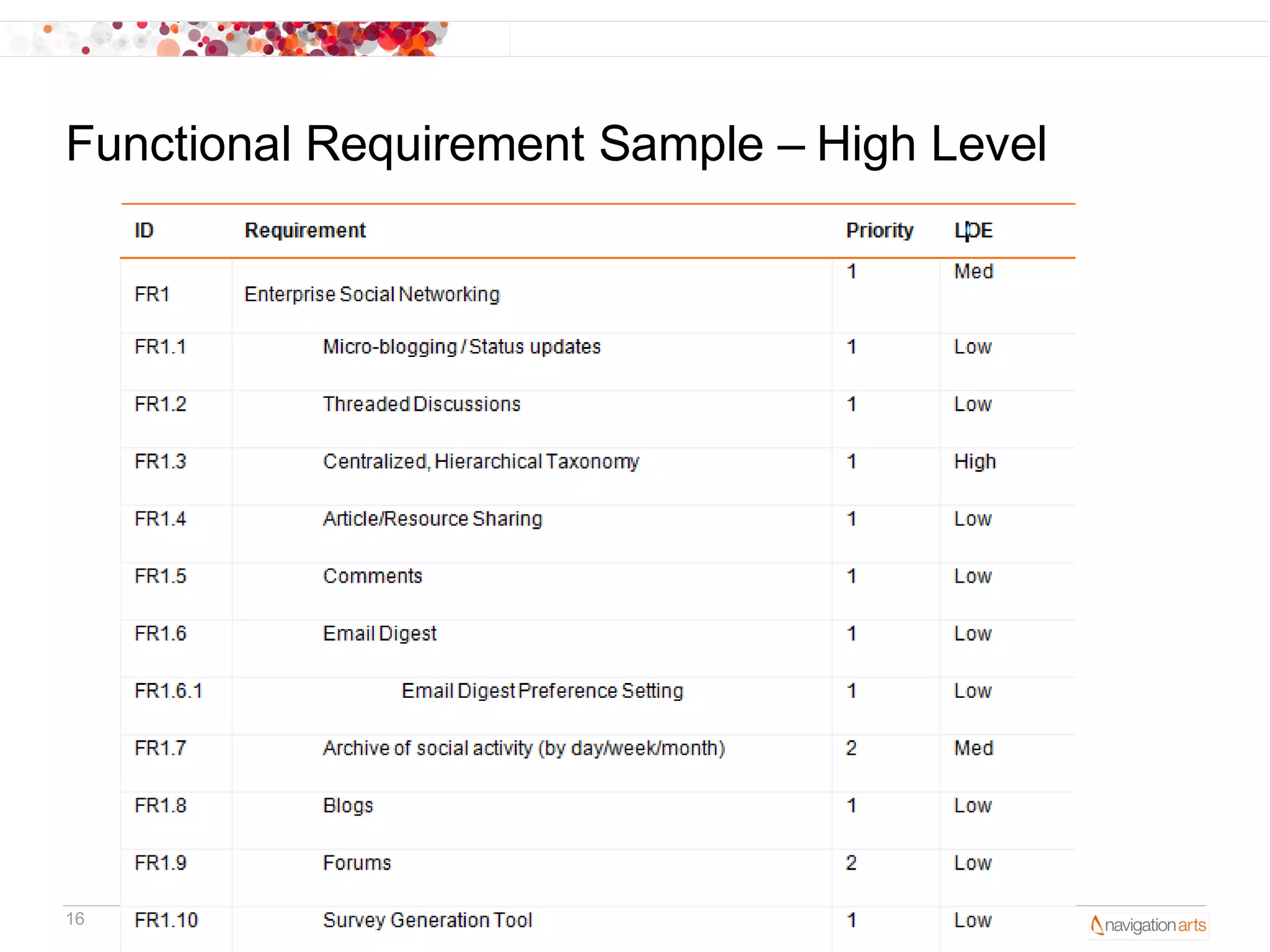
Functional Requirement Sample – High Level


16    (703) 584 – 8949   www.navigationarts.com   @navigationarts
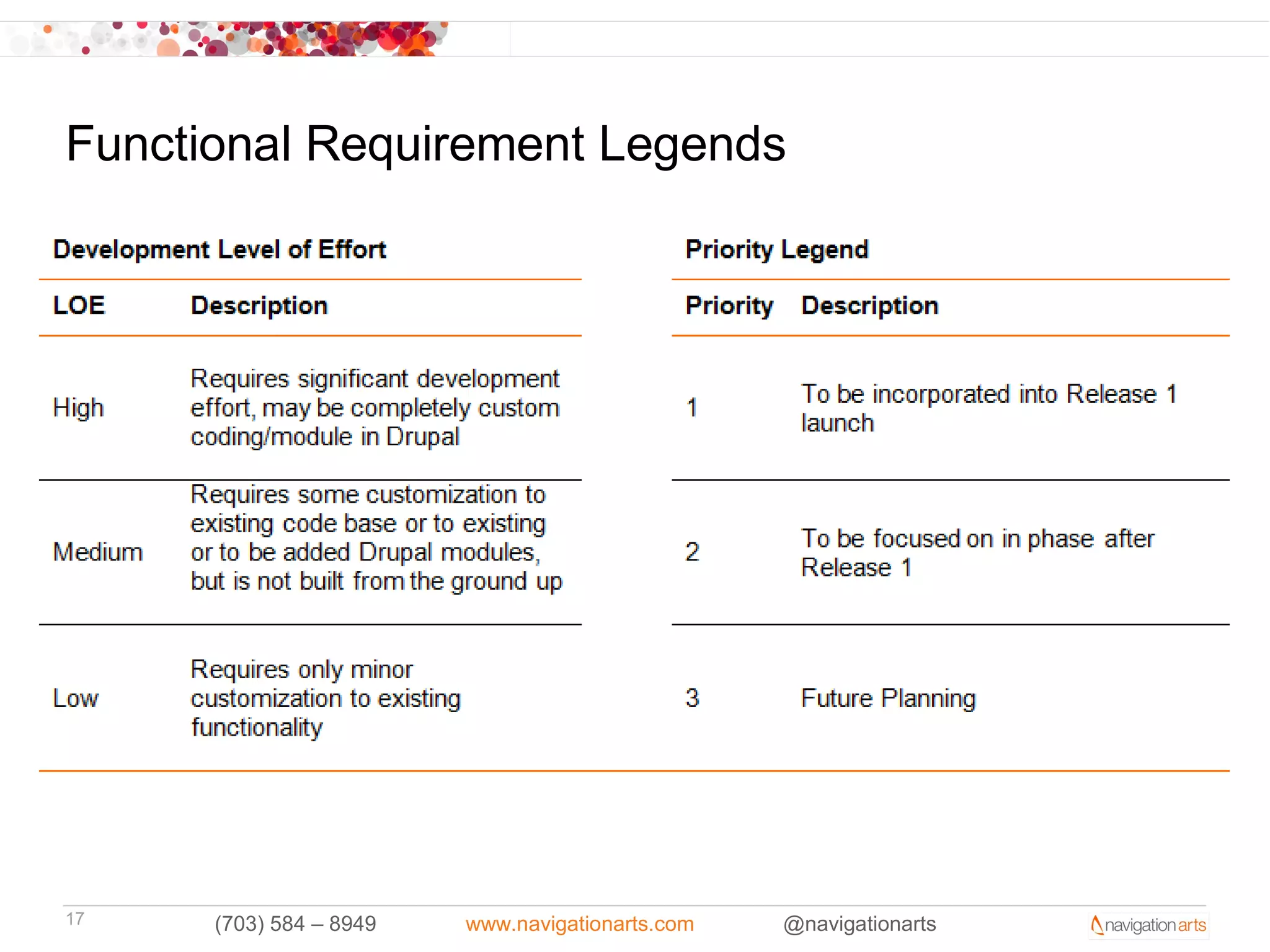
Functional Requirement Legends


17    (703) 584 – 8949   www.navigationarts.com   @navigationarts
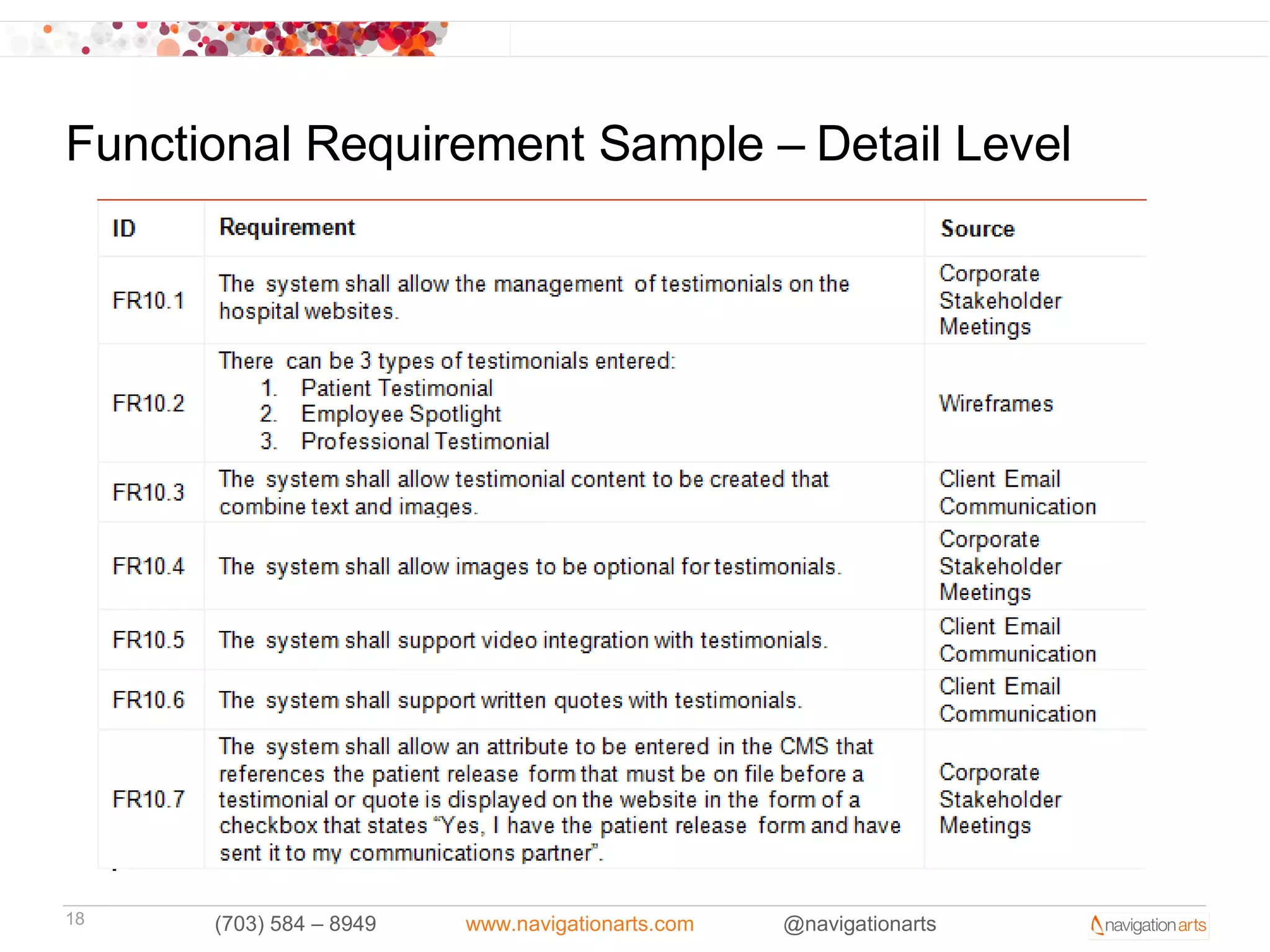
Functional Requirement Sample – Detail Level


18    (703) 584 – 8949   www.navigationarts.com   @navigationarts
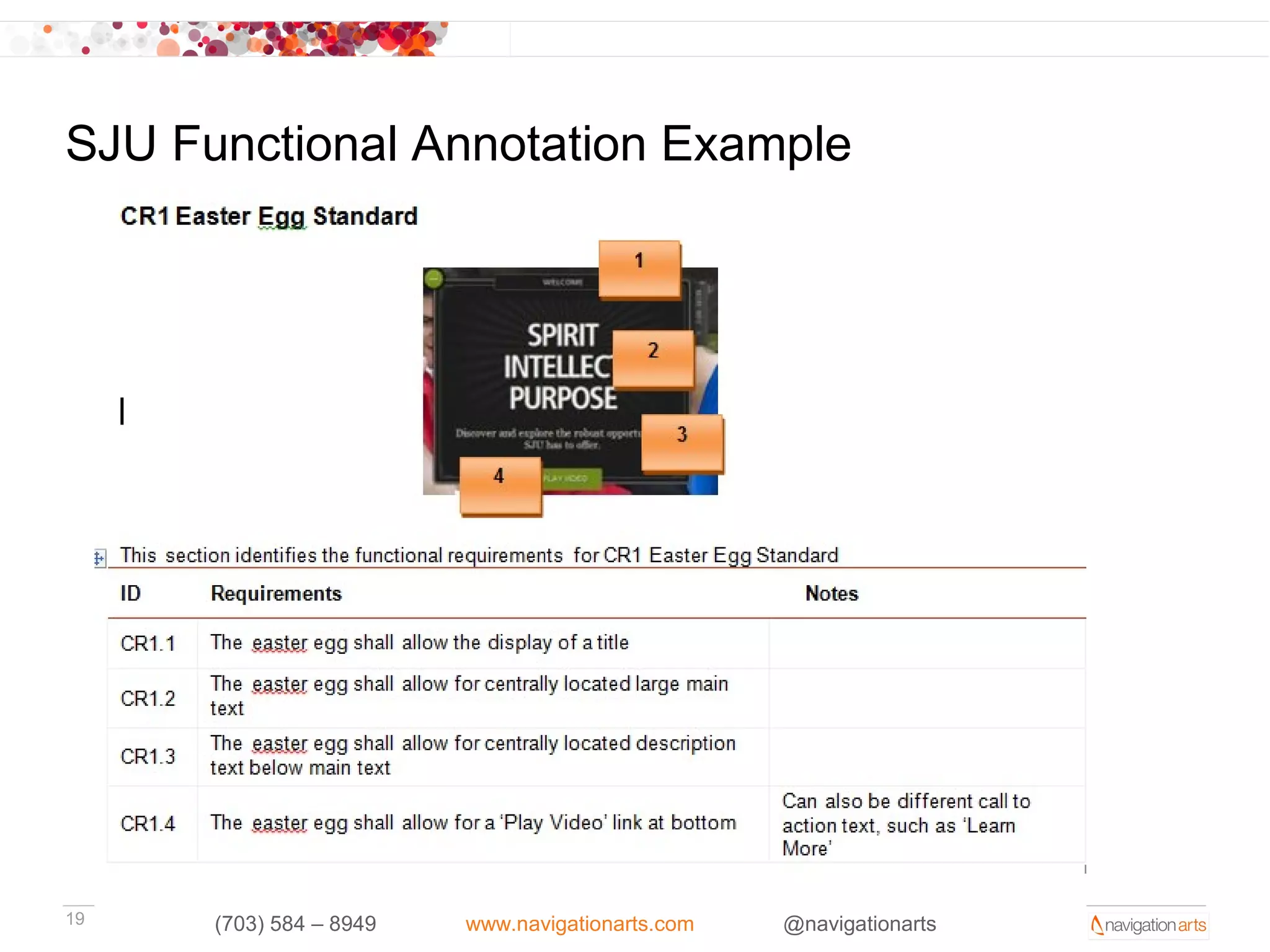
SJU Functional Annotation Example


19    (703) 584 – 8949   www.navigationarts.com   @navigationarts
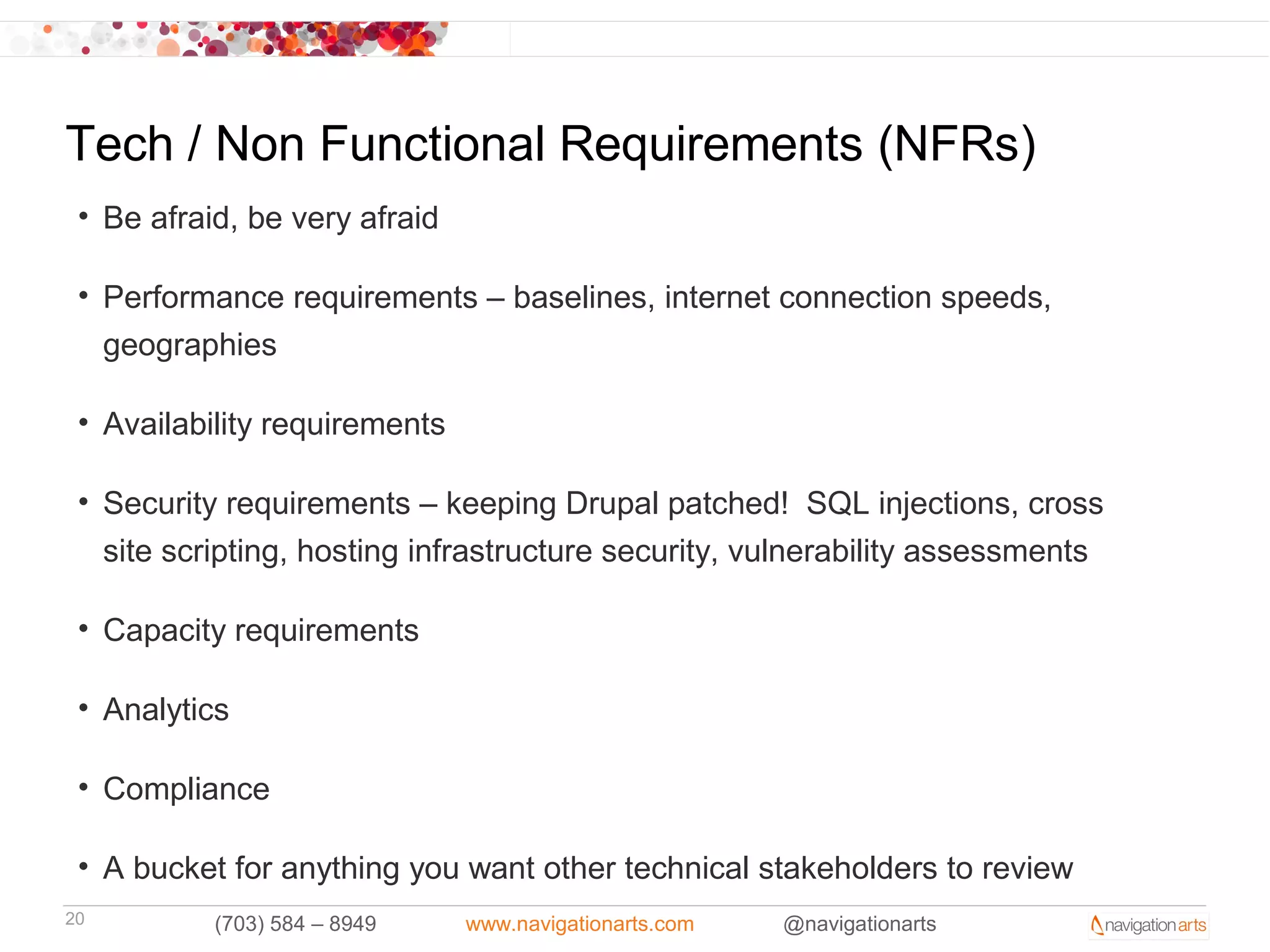
Tech / Non Functional Requirements (NFRs)
 • Be afraid, be very afraid

 • Performance requirements – baselines, internet connection speeds,
   geographies

 • Availability requirements

 • Security requirements – keeping Drupal patched! SQL injections, cross
   site scripting, hosting infrastructure security, vulnerability assessments

 • Capacity requirements

 • Analytics

 • Compliance

 • A bucket for anything you want other technical stakeholders to review
20         (703) 584 – 8949    www.navigationarts.com   @navigationarts
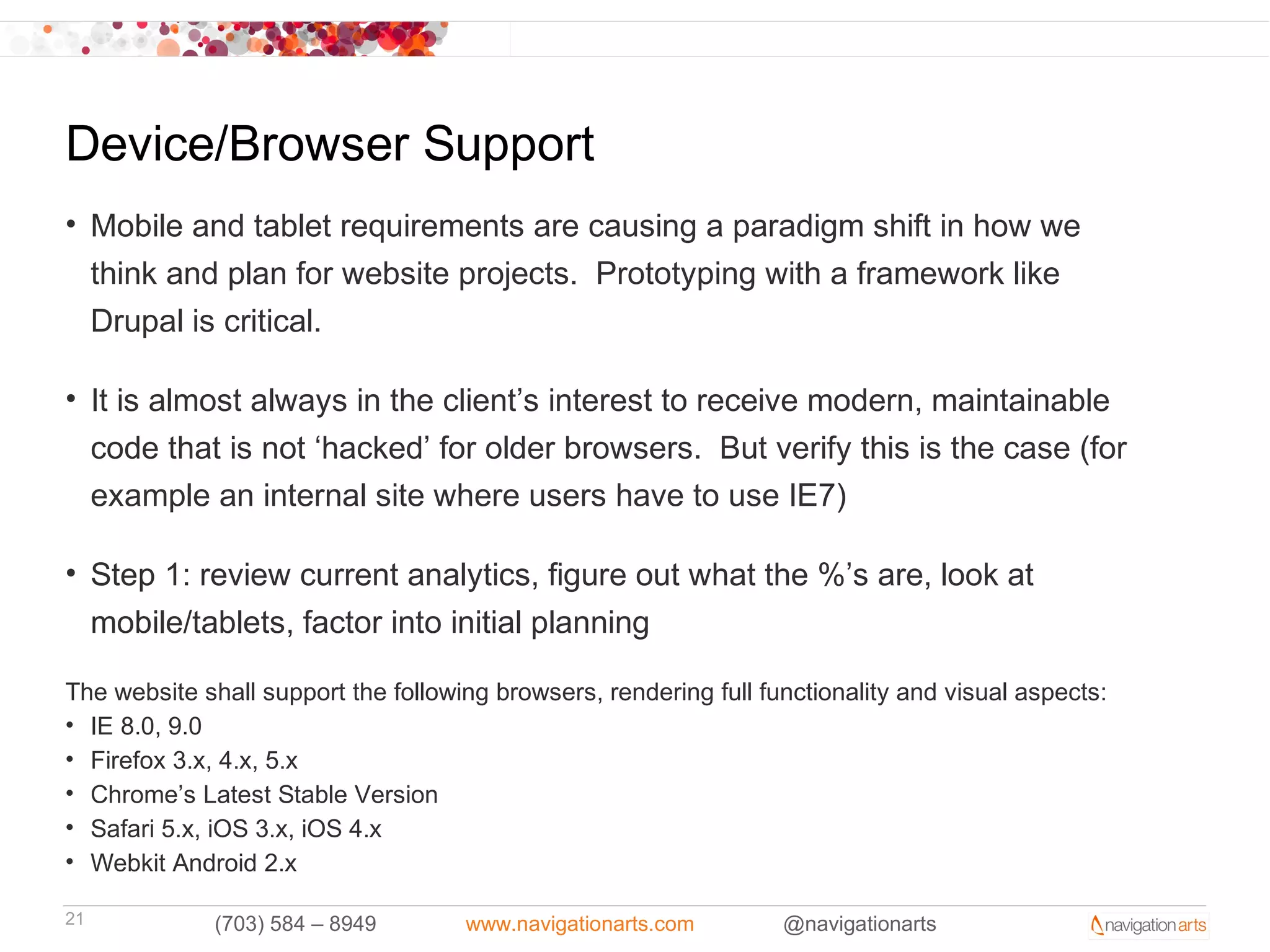
Device/Browser Support
• Mobile and tablet requirements are causing a paradigm shift in how we
  think and plan for website projects. Prototyping with a framework like
  Drupal is critical.

• It is almost always in the client’s interest to receive modern, maintainable
  code that is not ‘hacked’ for older browsers. But verify this is the case (for
  example an internal site where users have to use IE7)

• Step 1: review current analytics, figure out what the %’s are, look at
  mobile/tablets, factor into initial planning

The website shall support the following browsers, rendering full functionality and visual aspects:
• IE 8.0, 9.0
• Firefox 3.x, 4.x, 5.x
• Chrome’s Latest Stable Version
• Safari 5.x, iOS 3.x, iOS 4.x
• Webkit Android 2.x

21            (703) 584 – 8949       www.navigationarts.com        @navigationarts
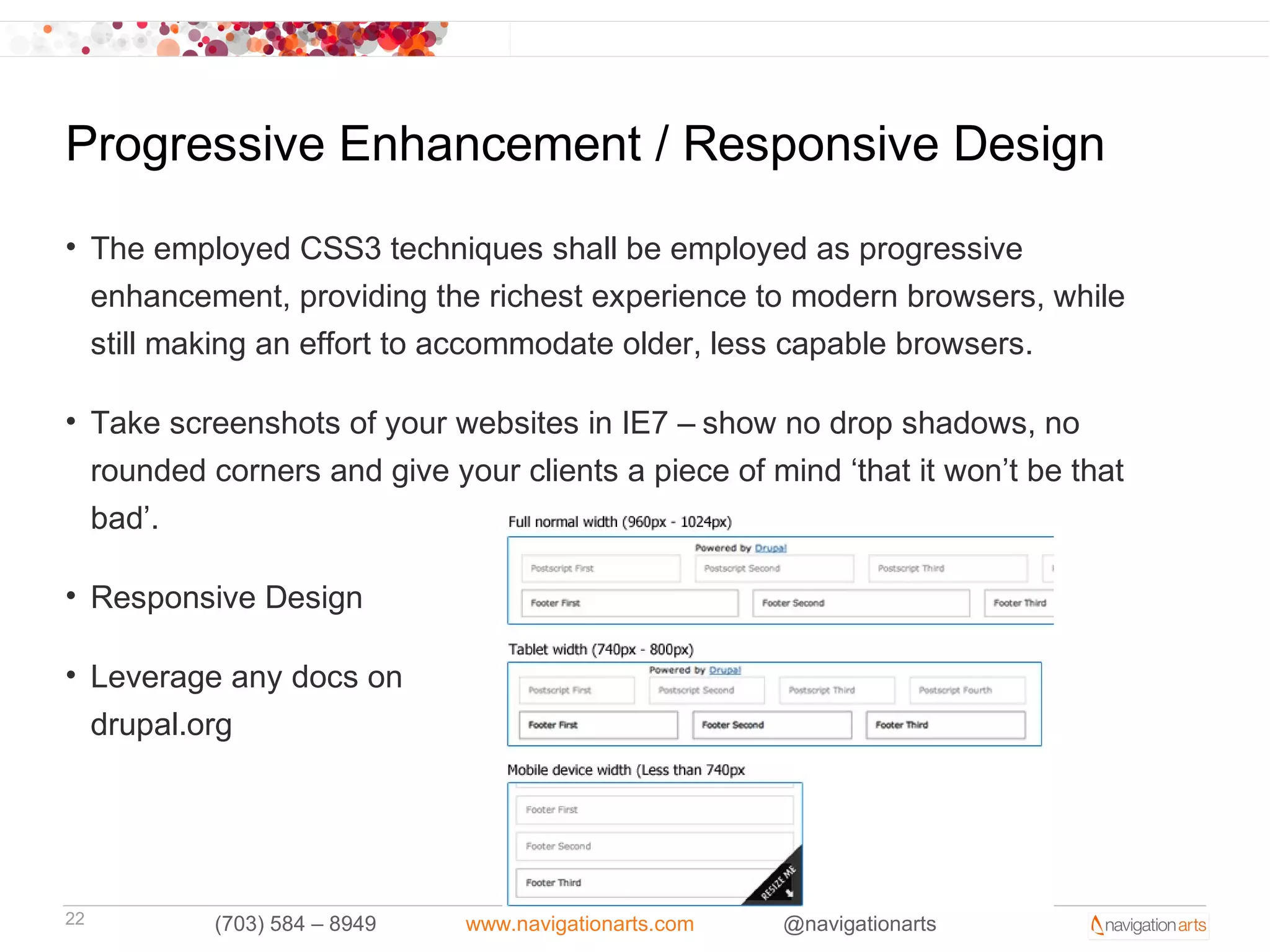
Progressive Enhancement / Responsive Design
• The employed CSS3 techniques shall be employed as progressive
  enhancement, providing the richest experience to modern browsers, while
  still making an effort to accommodate older, less capable browsers.

• Take screenshots of your websites in IE7 – show no drop shadows, no
  rounded corners and give your clients a piece of mind ‘that it won’t be that
  bad’.

• Responsive Design

• Leverage any docs on
  drupal.org


22         (703) 584 – 8949   www.navigationarts.com   @navigationarts
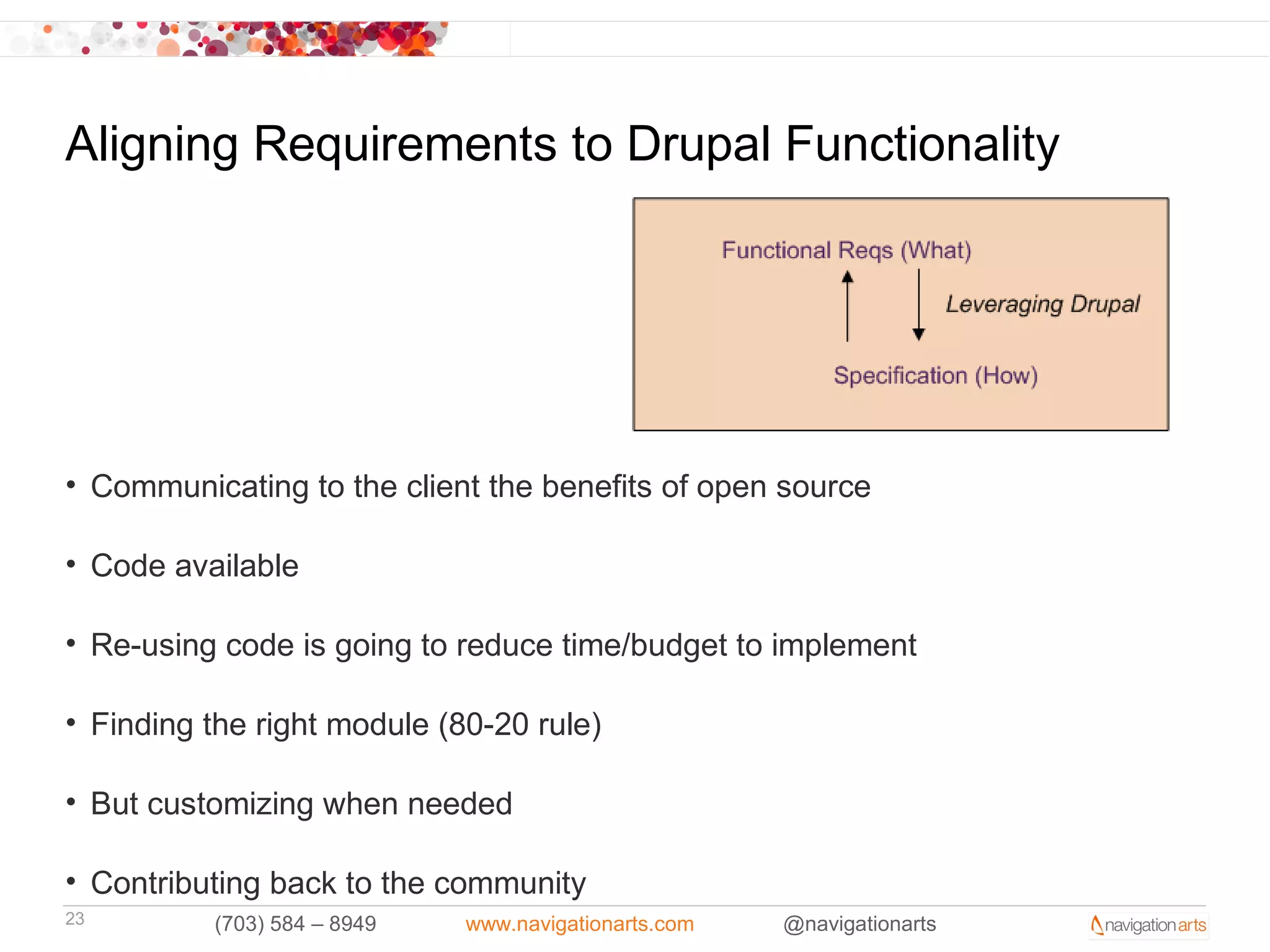
Aligning Requirements to Drupal Functionality


• Communicating to the client the benefits of open source

• Code available

• Re-using code is going to reduce time/budget to implement

• Finding the right module (80-20 rule)

• But customizing when needed

• Contributing back to the community
23        (703) 584 – 8949   www.navigationarts.com   @navigationarts
Translating Requirements to Specification / Dev

• Requires a thorough understanding of the client, documentation (SOW,
  wireframes, functional req’s, etc), and how Drupal works

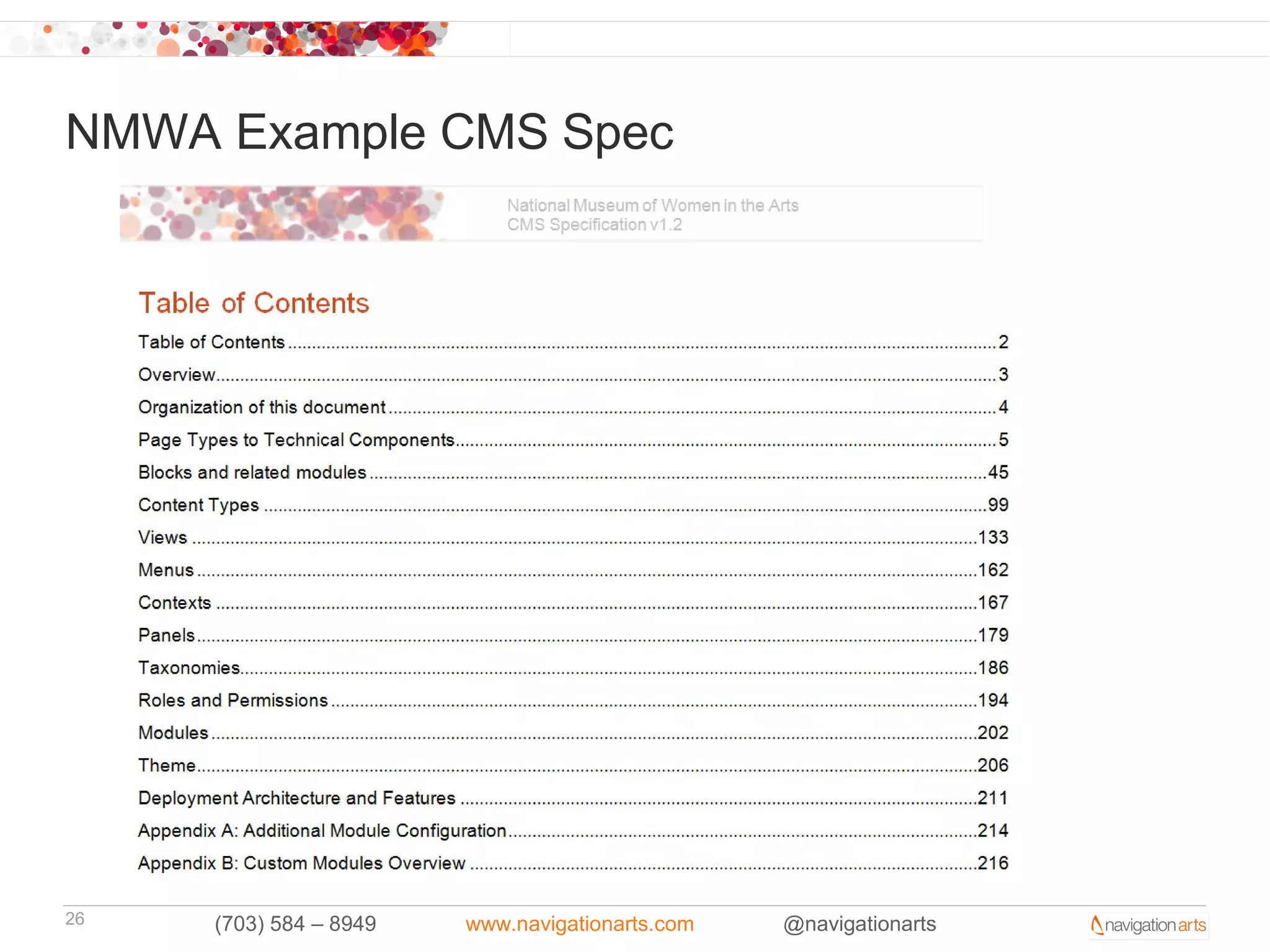
• CMS spec maps out requirements to modules / technical components

• Most, if not all, of your spec document / dev plan should be determined by
  the time requirements are approved

• Your spec document should provide framework for how the site will be built

• CMS Spec compliments photoshop design files and requirements
  document


24        (703) 584 – 8949   www.navigationarts.com   @navigationarts
Translating Requirements to Specification / Dev

• Our CMS spec documents usually include the following:


     List of all content types, fields, views, contexts, panels, blocks, theme, etc.,
     naming conventions for each, and required config settings (pathauto, etc)


     Deployment architecture


     Required modules (core, contrib, custom, features) and high-level config
     settings for each

     Naming conventions


     Our CMS spec is used in conjunction with PSD files and requirements
     docs; it does not live by itself.
25            (703) 584 – 8949   www.navigationarts.com   @navigationarts
NMWA Example CMS Spec


26   (703) 584 – 8949   www.navigationarts.com   @navigationarts
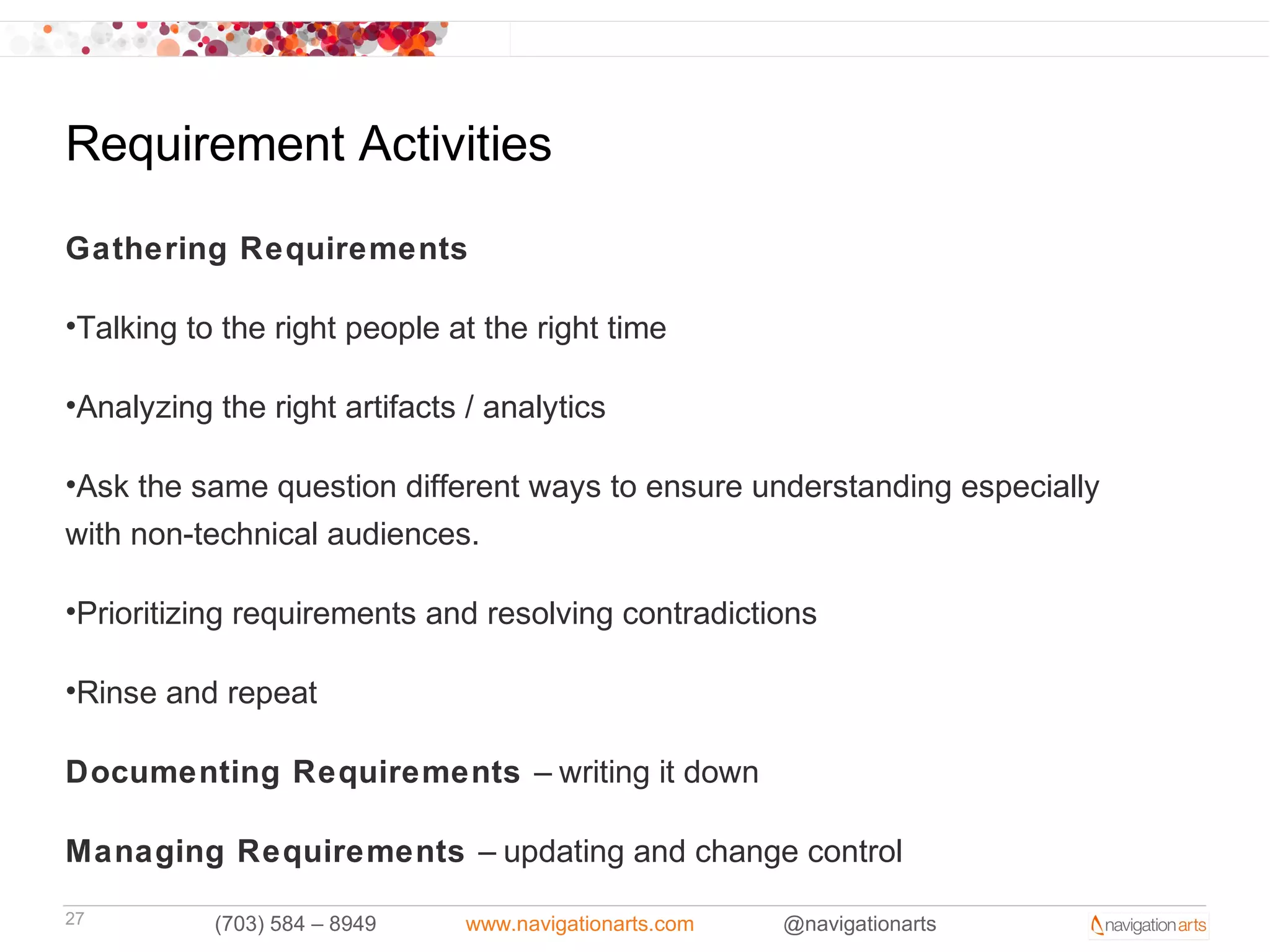
Requirement Activities

Gathering Requirements

•Talking to the right people at the right time

•Analyzing the right artifacts / analytics

•Ask the same question different ways to ensure understanding especially
with non-technical audiences.

•Prioritizing requirements and resolving contradictions

•Rinse and repeat

Documenting Requirements – writing it down

Managing Requirements – updating and change control
27         (703) 584 – 8949    www.navigationarts.com   @navigationarts
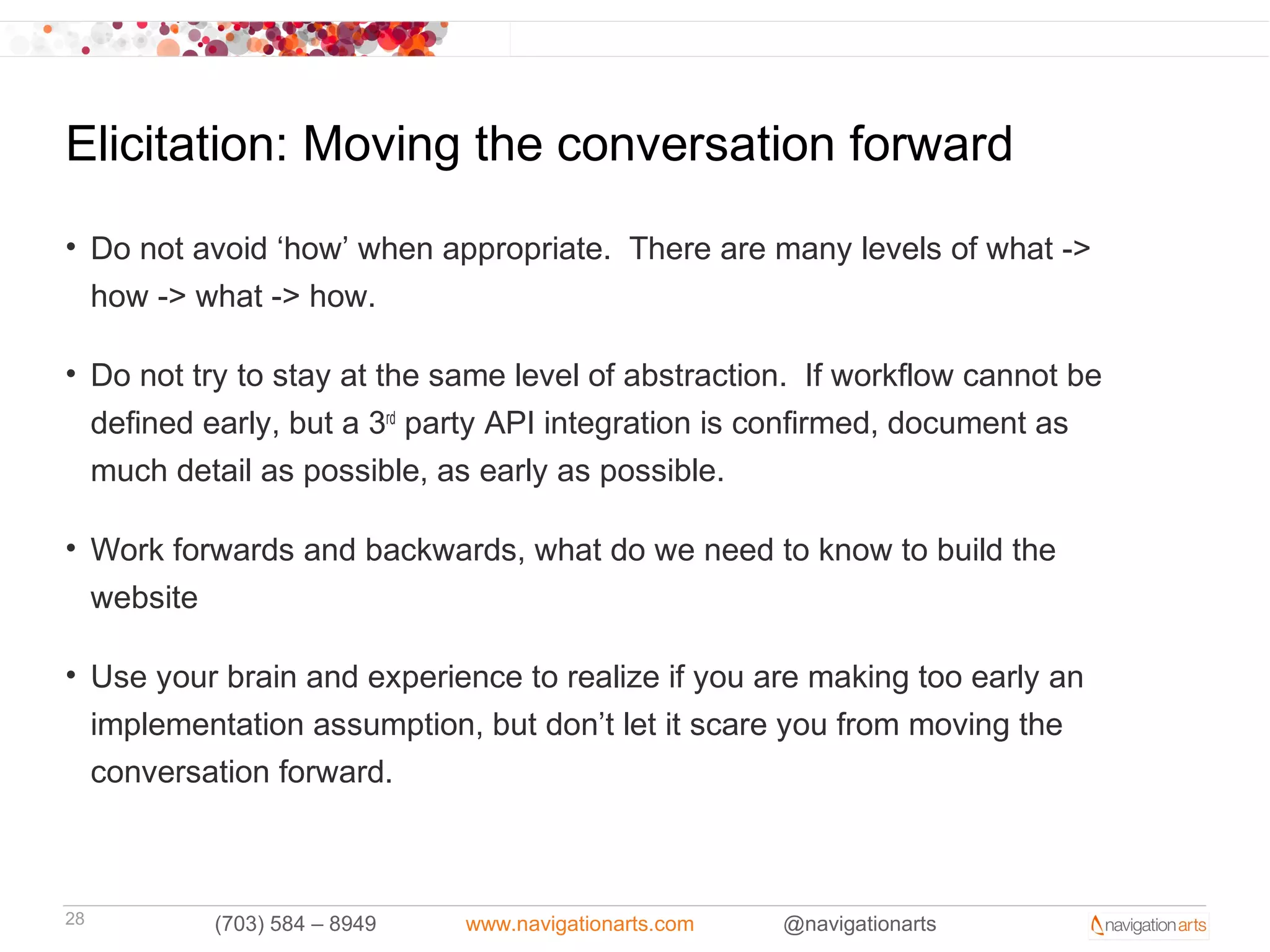
Elicitation: Moving the conversation forward
• Do not avoid ‘how’ when appropriate. There are many levels of what ->
  how -> what -> how.

• Do not try to stay at the same level of abstraction. If workflow cannot be
  defined early, but a 3rd party API integration is confirmed, document as
  much detail as possible, as early as possible.

• Work forwards and backwards, what do we need to know to build the
  website

• Use your brain and experience to realize if you are making too early an
  implementation assumption, but don’t let it scare you from moving the
  conversation forward.


28        (703) 584 – 8949   www.navigationarts.com   @navigationarts
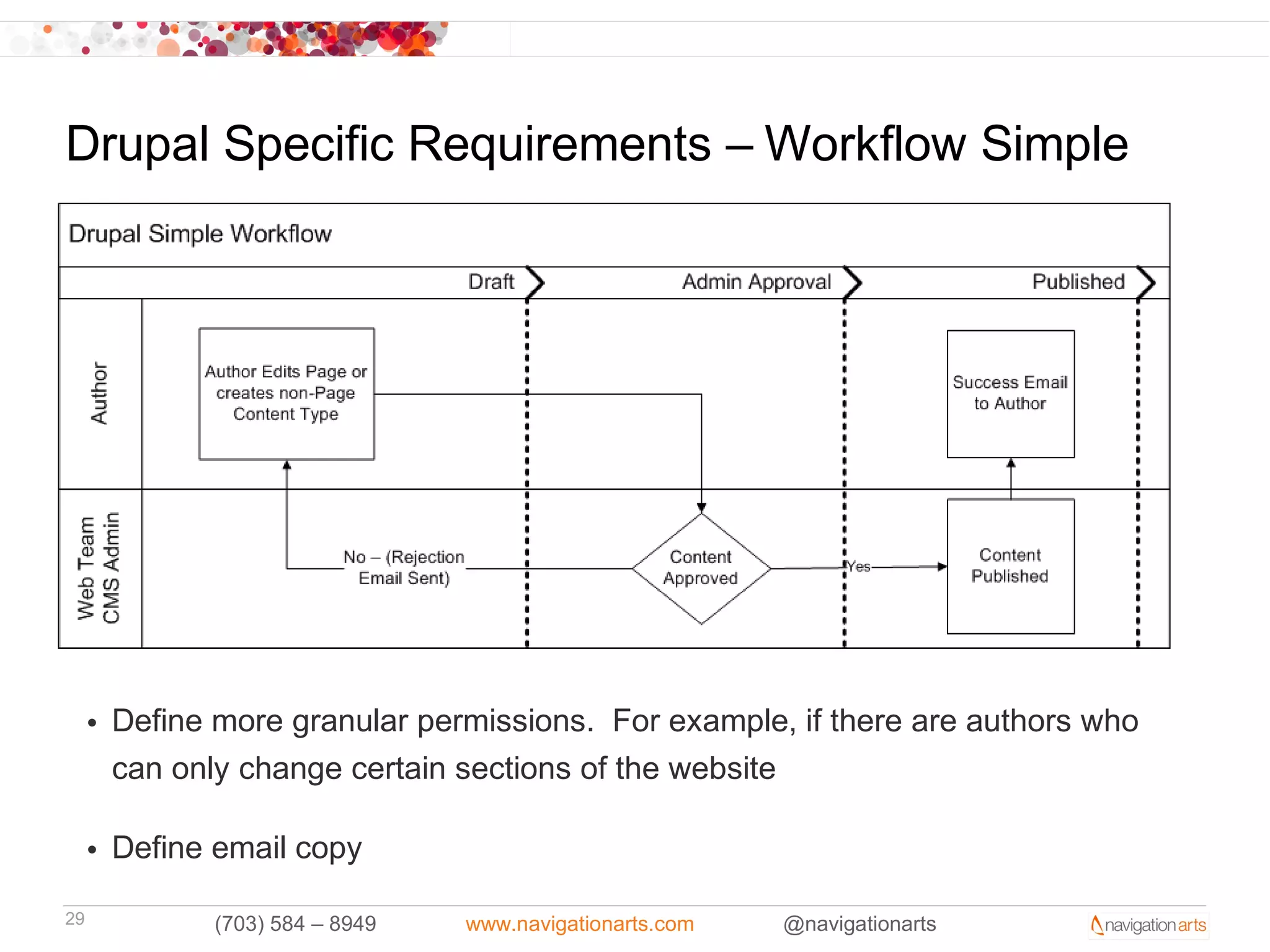
Drupal Specific Requirements – Workflow Simple


     • Define more granular permissions. For example, if there are authors who
       can only change certain sections of the website

     • Define email copy

29           (703) 584 – 8949   www.navigationarts.com   @navigationarts
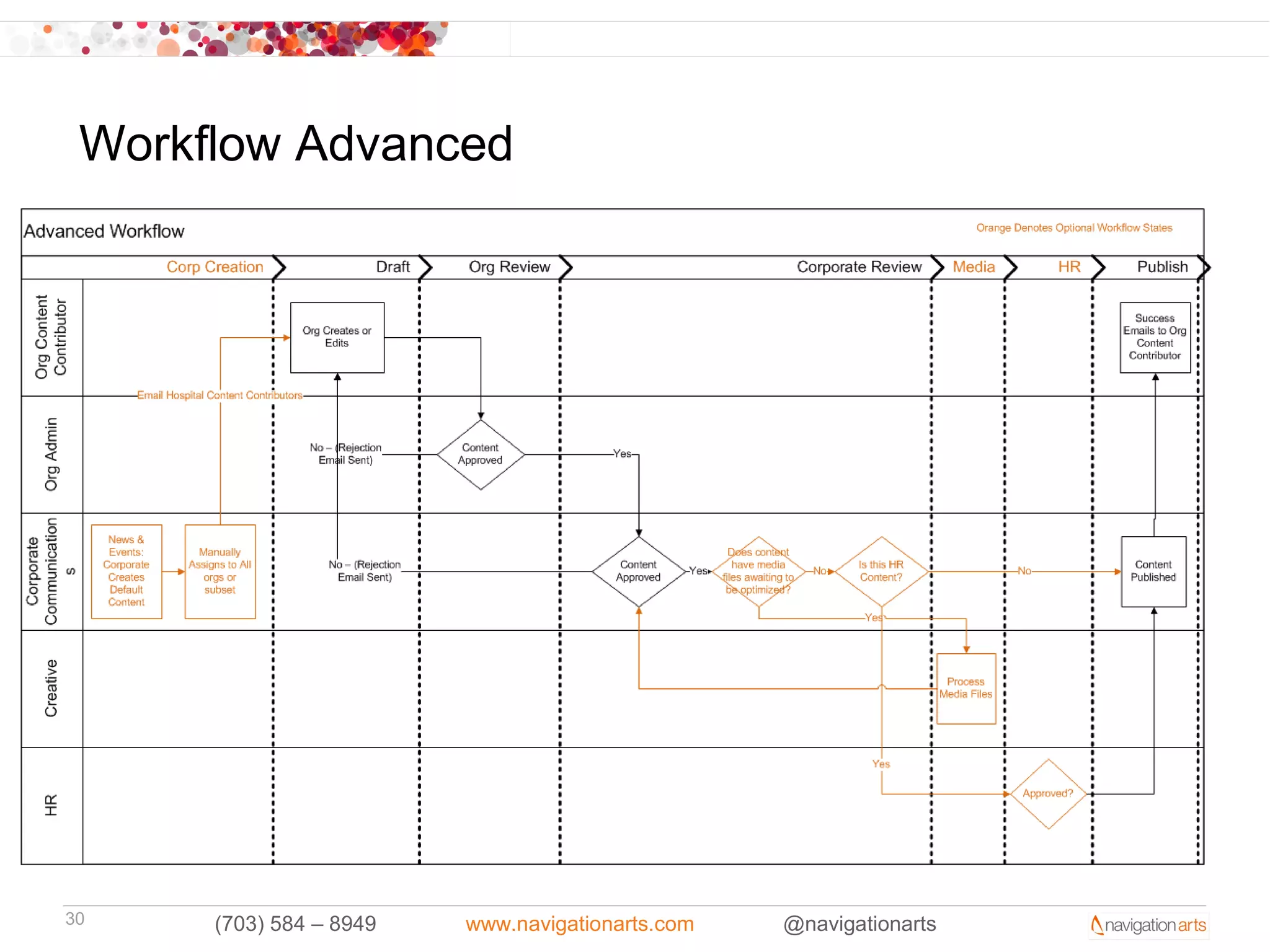
Workflow Advanced


30    (703) 584 – 8949   www.navigationarts.com   @navigationarts
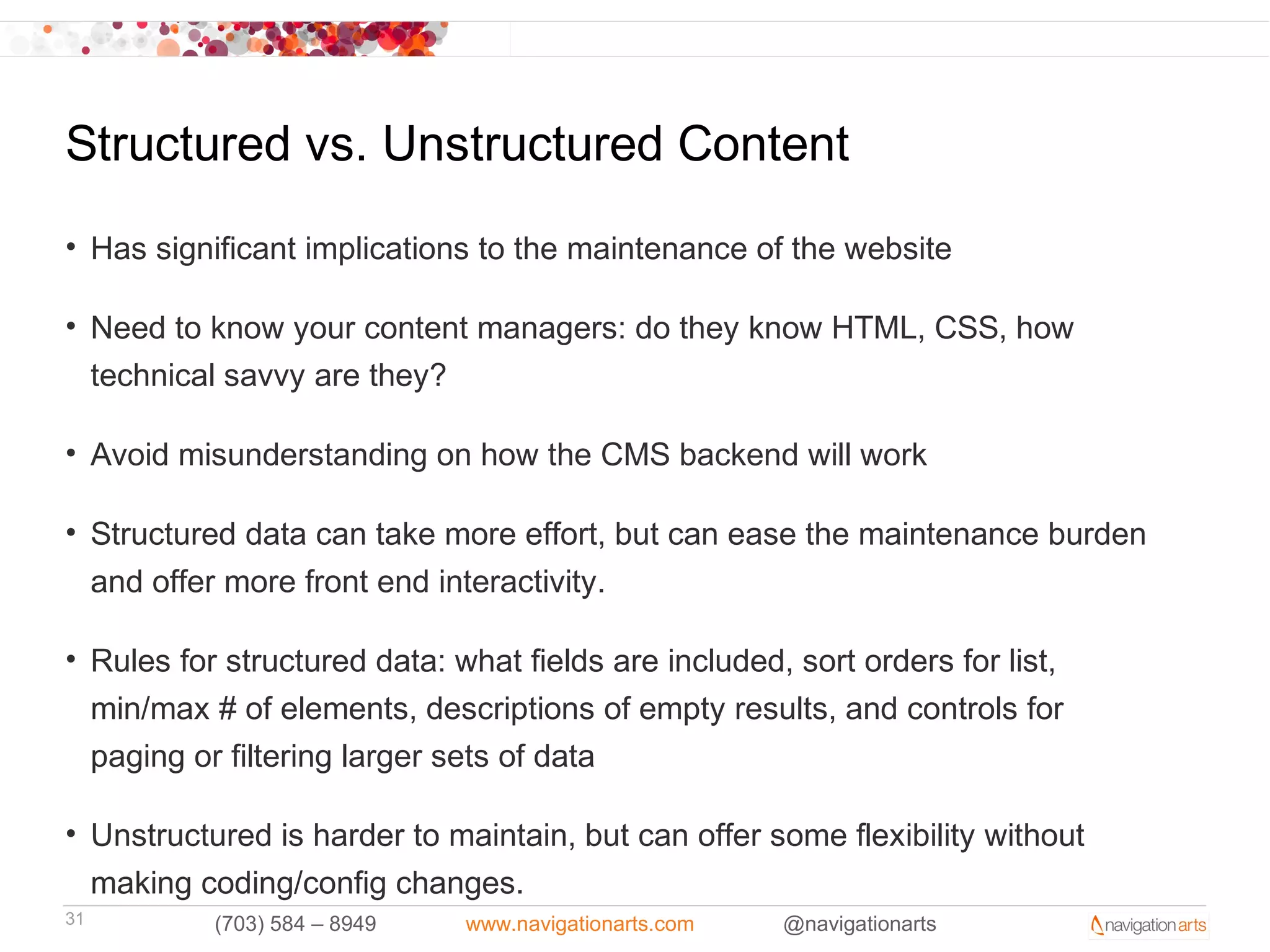
Structured vs. Unstructured Content
• Has significant implications to the maintenance of the website

• Need to know your content managers: do they know HTML, CSS, how
  technical savvy are they?

• Avoid misunderstanding on how the CMS backend will work

• Structured data can take more effort, but can ease the maintenance burden
  and offer more front end interactivity.

• Rules for structured data: what fields are included, sort orders for list,
  min/max # of elements, descriptions of empty results, and controls for
  paging or filtering larger sets of data

• Unstructured is harder to maintain, but can offer some flexibility without
  making coding/config changes.
31         (703) 584 – 8949   www.navigationarts.com   @navigationarts
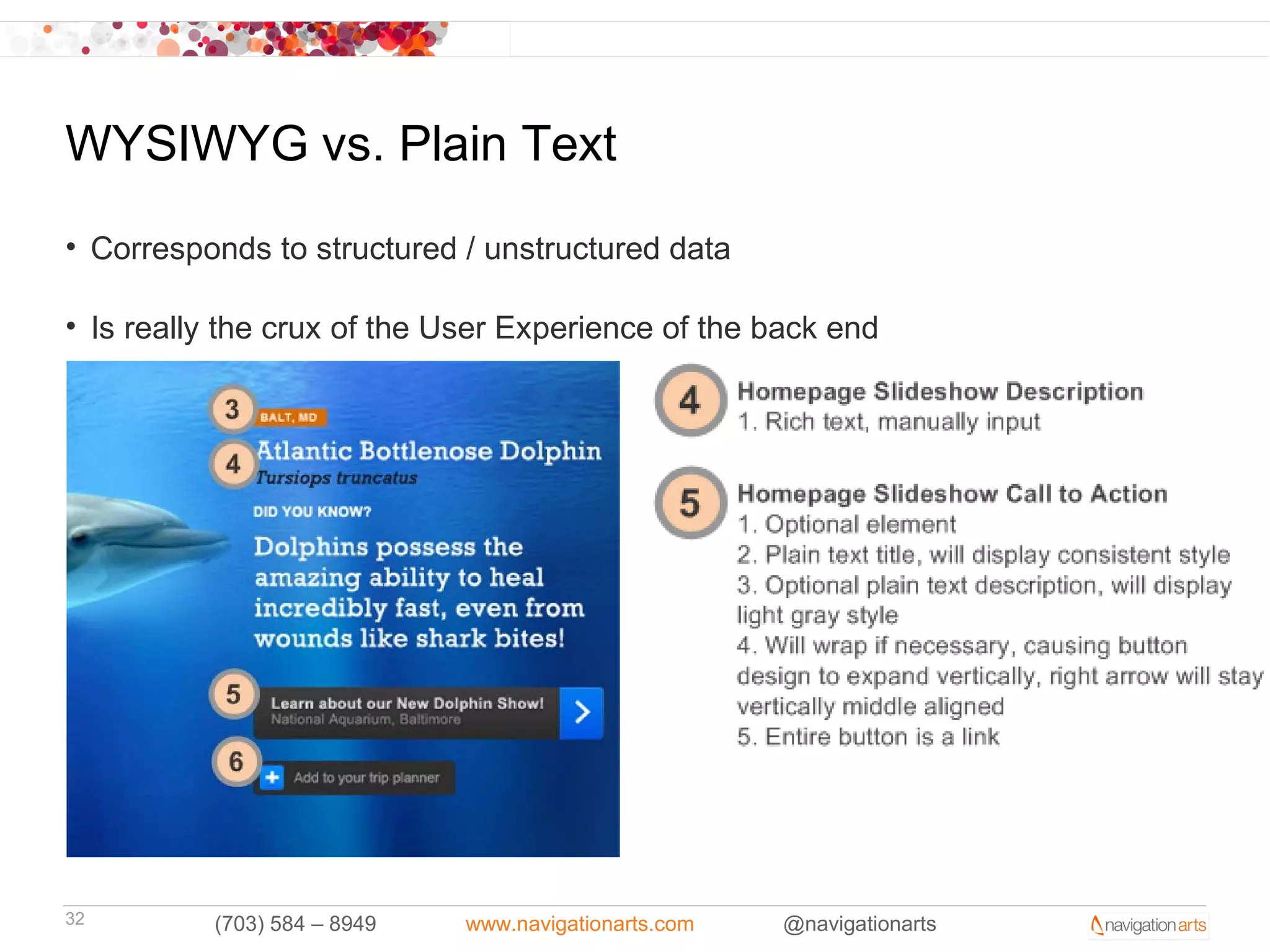
WYSIWYG vs. Plain Text
• Corresponds to structured / unstructured data

• Is really the crux of the User Experience of the back end


32        (703) 584 – 8949   www.navigationarts.com   @navigationarts
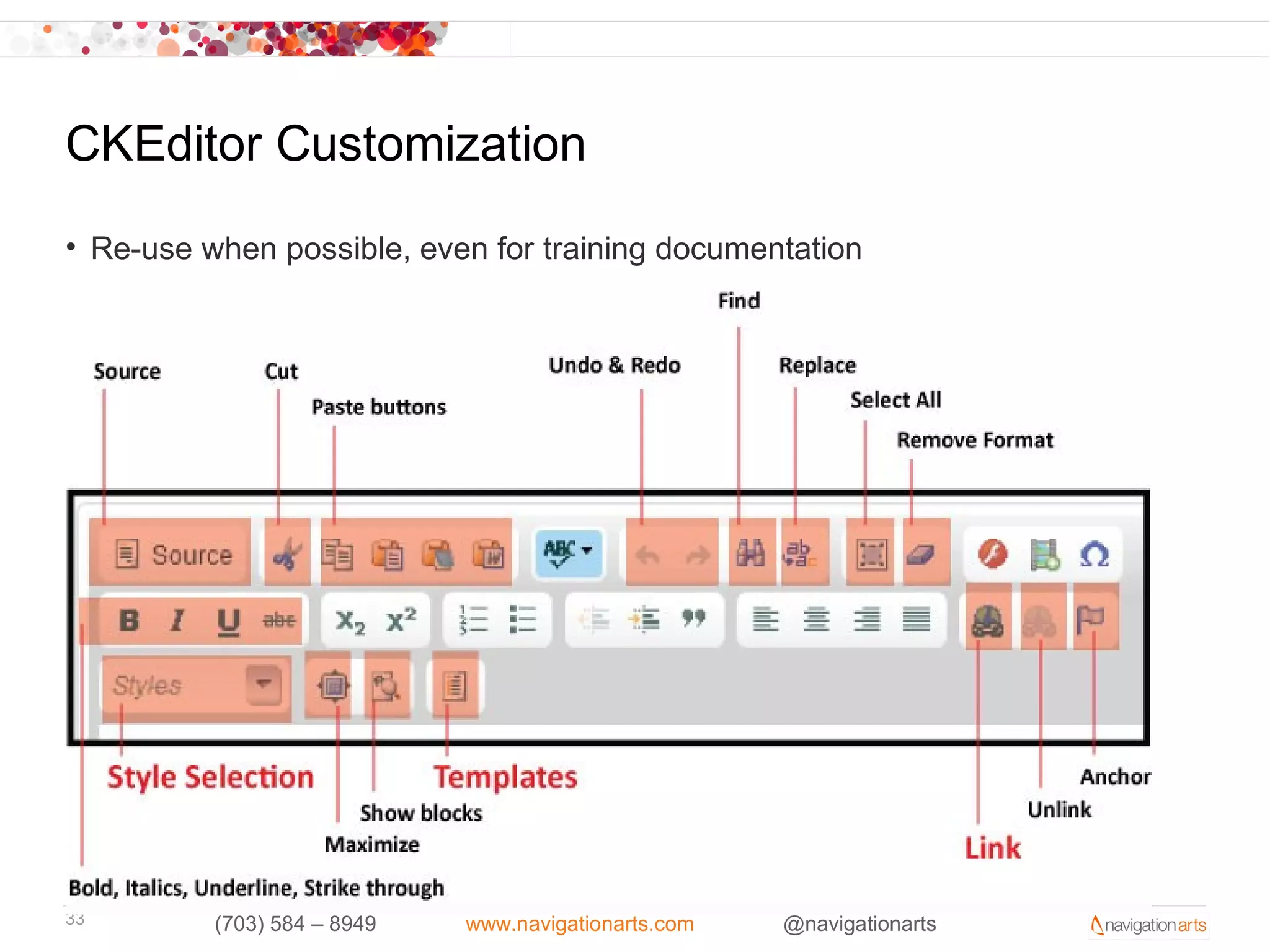
CKEditor Customization
• Re-use when possible, even for training documentation


33        (703) 584 – 8949   www.navigationarts.com   @navigationarts
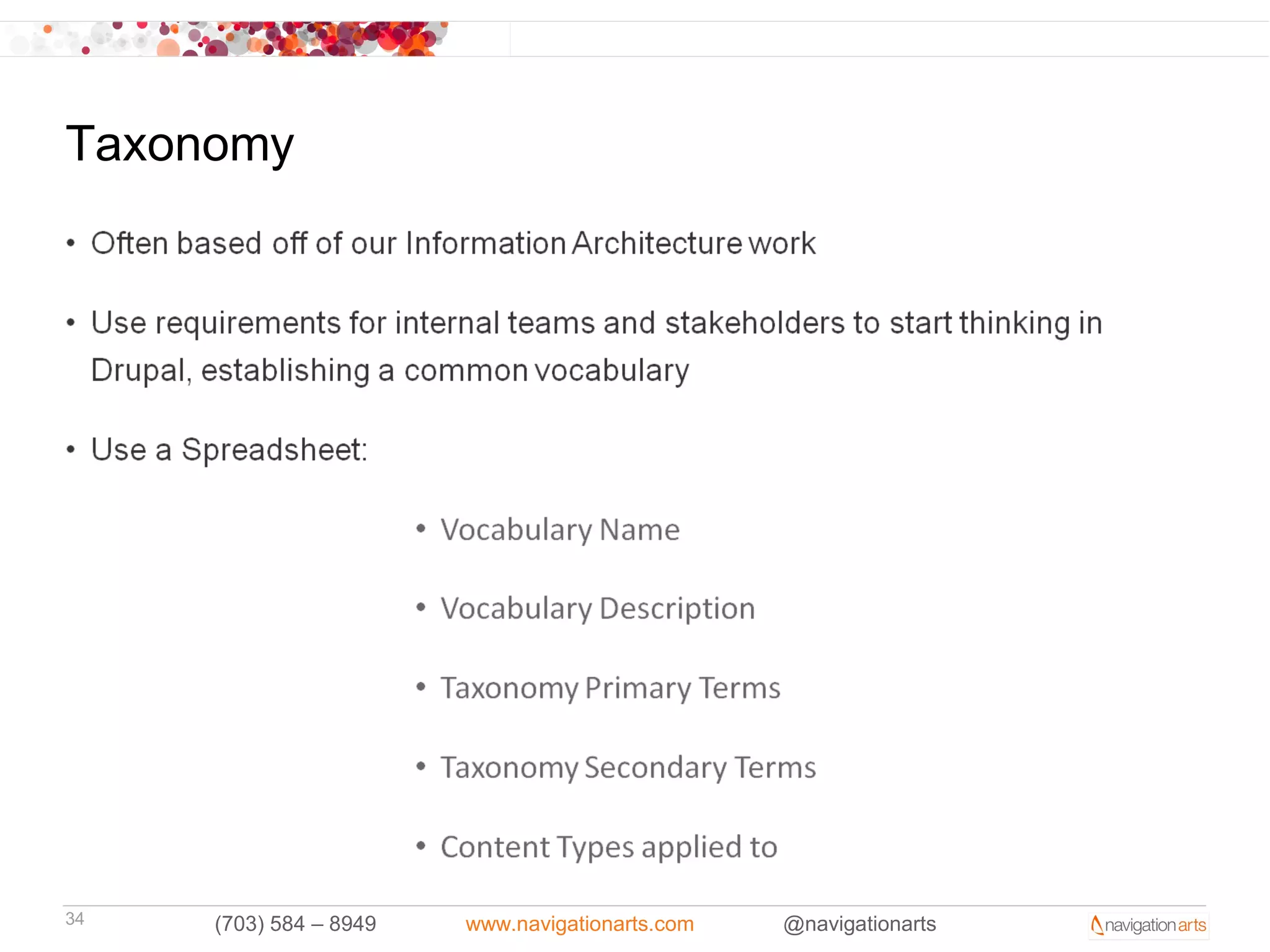
Taxonomy


34   (703) 584 – 8949   www.navigationarts.com   @navigationarts
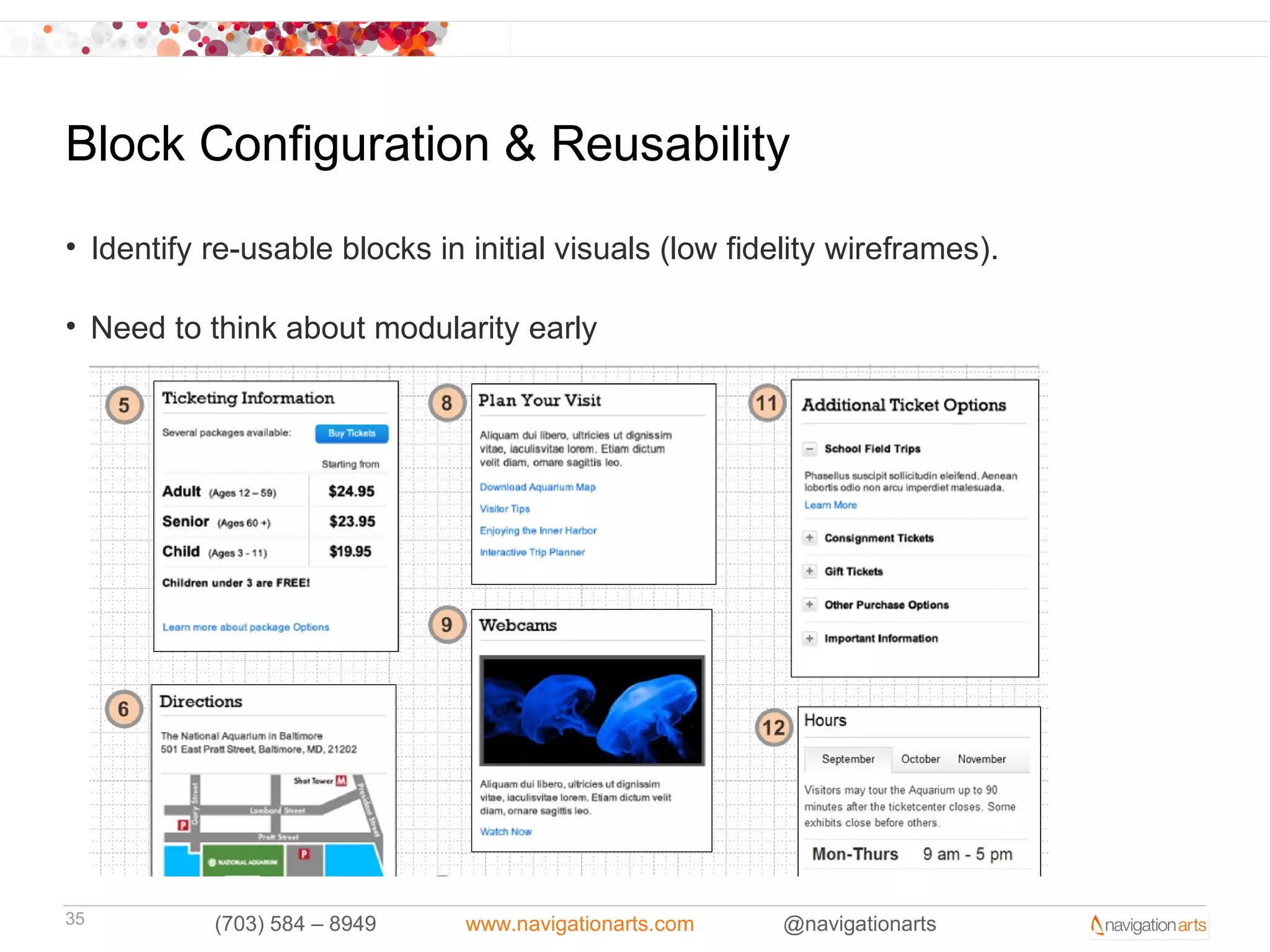
Block Configuration & Reusability
• Identify re-usable blocks in initial visuals (low fidelity wireframes).

• Need to think about modularity early


35         (703) 584 – 8949    www.navigationarts.com   @navigationarts
D6 to D7 Migrations
• Functional Analysis: what has to stay, what has to be added, what is
  deprecated.

• Content type inventory

• Custom module inventory

• Functional to D7 module mapping

• Content migration strategy


36        (703) 584 – 8949     www.navigationarts.com   @navigationarts
The Business Analyst & Drupal

• Strategic: creatively figure out how to help projects succeed. Strategy and
  ideation is fun – but this has to be grounded in technical reality

• Helps to have a development background (and to know Drupal, even from a
  power user standpoint)

• Helps to be an extrovert, likes to communicate and explain technical
  concepts to non-technical people

• Has to be flexible!!

• Runs logic/system interference with the business stakeholders for the
  development lead and resources

• Is often a system thinking vs. purely visual thinkers – likes to think about
  patterns
37         (703) 584 – 8949   www.navigationarts.com   @navigationarts
Functional Reuse for Client Services

• The BA and Drupal Lead should know what the development teams are
  working on

• They should connect the dots between various projects

• Help put reusable functionality in front of other clients

• Be familiar with the technical LOE

• Always talk with the developers post-mortem, what worked, what took too
  much time, what was abstracted for reuse

• Don’t reinvent the wheel

• Establish a functional library in your organization if you are dealing with
  multiple projects, establish process for updating
38         (703) 584 – 8949   www.navigationarts.com   @navigationarts
Contributing Back

• Requirements & Contributing back to the Open Source Community

• Visual examples

• The community can contribute with documentation and examples, not just
  code.

• Requirements section on Drupal.org?


39        (703) 584 – 8949   www.navigationarts.com   @navigationarts
Q&A
• Open Floor


Connect with NavArts
Call:    (703) 584 – 8949
Tweet:   @navigationarts
Email:   sales@navigationarts.com
Visit:   www.navigationarts.com


40        (703) 584 – 8949   www.navigationarts.com   @navigationarts

Requirements & Drupal: Planning for Successful Projects

  • 1.
    Requirements & Drupal:Planning for Successful September 13, 2012 Projects R.J. Townsend, Manager, Drupal Solutions - NavigationArts Jon Riekse, Director of Business Analysis - NavigationArts
  • 2.
    NavigationArts: Market Position • NavigationArts is unique in the web space. We combine best practices in User Experience Design and Technology Consulting, excelling where these practices overlap. • Comprehensive user-centered design methodology that aligns business goals with user needs, creating user experiences that drive enterprise value • Best-in-class technology and software development skills that deliver the user experience through rich front-end development, configuration of complex interaction functionality, and integration of enterprise applications and data 2 (703) 584 – 8949 www.navigationarts.com @navigationarts
  • 3.
    Agenda • Requirements Overview •Requirement Types & Samples • Translating Requirements to Specification / Development • Requirement Activities • Drupal Requirements • The Business Analyst & Drupal • Functional Re-use • Requirements & Contributing back to the Open Source Community 3 (703) 584 – 8949 www.navigationarts.com @navigationarts
  • 4.
    Requirements: What arethey good for? S 4 (703) 584 – 8949 www.navigationarts.com @navigationarts
  • 5.
    Requirements: The CaseAgainst • We don’t have the time or budget to document requirements • Seems like too much paperwork, let’s build something already! • Our project is too small to necessitate requirements • Our project is too large to necessitate requirements (we will never know everything until we start developing) • We use agile • We like to change our minds 5 (703) 584 – 8949 www.navigationarts.com @navigationarts
  • 6.
    Requirements: The CaseFor • Taking planning seriously, adding some formality, mitigating risk – meeting the formality of your clients/stakeholders • Doesn’t assume we are all talking about the same thing or speaking the same language, leaves a paper trail (and not just a cluttered inbox) • Describing and agreeing to the end state before it’s done (for clients or your internal business teams), documenting scope for budget/resources • Agreement to the outcome - how do we know when we’re done? • Managing change - being on the same page as your project sponsors/clients 6 (703) 584 – 8949 www.navigationarts.com @navigationarts
  • 7.
    Requirements Overview • Arequirement is a description of what the website will do. • A requirement can consist of a text description or a visual representation (annotated wireframe, design, model, diagram) – whatever it takes to get the point across. • A requirements document is a collection of consistent requirements – can describe the same thing a few different ways to ensure understanding • The goal of requirements is to describe as precisely as possible what is to be built, giving more attention to the most complex aspects, where the highest level or risk can occur (using your time wisely) • Defines the boundaries of the website/system. Helps avoid scope creep. 7 (703) 584 – 8949 www.navigationarts.com @navigationarts
  • 8.
    Sample Model: IntegrationDiagram 8 (703) 584 – 8949 www.navigationarts.com @navigationarts
  • 9.
    9 (703) 584 – 8949 www.navigationarts.com @navigationarts
  • 10.
    Warning: Abstraction Ahead • Talking abstract concepts about an abstract system – using language • A picture is worth…a lot • Know your audience, and your risks • Avoid documenting the documentation – when you have documentation to reference other documentation you are starting down a slippery slope • Use common sense, trust your intuition over the ‘correct’ way to document requirements • Keep it grounded, at the end of the day if it doesn’t make the product better it wasn’t worth it. Quality Assurance starts with this work. 10 (703) 584 – 8949 www.navigationarts.com @navigationarts
  • 11.
    Types of Requirements 11 (703) 584 – 8949 www.navigationarts.com @navigationarts
  • 12.
    Business Requirements • Aligningthe business goals to the project • Very useful for prioritizing functionality and defining phased approaches • ‘How do you envision success for the project and how is it measured?’ • Drupal: The value of Open Source Technology • Drupal: Leveraging all available modules/code • Higher Ed examples: More applicants, updating the brand, more efficiency/easier maintenance, SEO based redesign, increased level of satisfaction of prospects through the enrollment process. Measure with # of qualified applicants, rejection rates, analytics (# of unique visitors, time on site, decreased bounce rates), run a recurring survey. 12 (703) 584 – 8949 www.navigationarts.com @navigationarts
  • 13.
    User Requirements • TheUser Experience (UX) – aligned to the business goals of your organization • Think from the outside in, empathize with your website visitor’s point of view • Defining your audience segments, their needs/concerns, what tasks do they need to complete • ‘What relationship does your organization have with your visitor segments (donors, members, investors, consumers, partners)?’ • Informing your Information Architecture / Sitemap / Taxonomy • Going from the analog to the digital, eventually into roles & permissions 13 (703) 584 – 8949 www.navigationarts.com @navigationarts
  • 14.
    Higher Ed UserSegmentation Example • Alumni • Prospective Student – Undergraduate (18-22) • Donor • Transfer Student – Undergraduate (18- 22) • Parents of Prospective Student (18-22) • Prospective Student –Undergraduate (22+) (9 credit) • Current Faculty • Prospective Student – Graduate – Full • Prospective Faculty Time • Prospective Student – Graduate – Part • General Public Time • Current Student • Prospective Student - Non-Accredited Adult Learner • Industry Executives/Corporations • Prospective Student - Online • International Students 14 (703) 584 – 8949 www.navigationarts.com @navigationarts
  • 15.
    Use Cases Sample:Add SharePoint Service Goal Name Add SharePoint Service to User Level (Business or System) Business Primary Actor(s) Customer Administrator Trigger Customer Administrator wants to add the SharePoint service to an existing user. Pre-conditions • Customer Administrator has purchased SharePoint. • Customer Administrator is logged in to the System and has an active session. • At least one non-resource type mailbox has been created in the System. Pre-conditions Use Case # 18. Authentication Post-conditions SharePoint service added to user. Normal Case Steps 1. Customer Administrator navigates to the 'Users’ area of the portal. 2. Customer Administrator selects a link to ‘View All Users’. 3. Customer Administrator selects the End User they want to add the SharePoint service to. … 15 (703) 584 – 8949 www.navigationarts.com @navigationarts
  • 16.
    Functional Requirement Sample– High Level 16 (703) 584 – 8949 www.navigationarts.com @navigationarts
  • 17.
    Functional Requirement Legends 17 (703) 584 – 8949 www.navigationarts.com @navigationarts
  • 18.
    Functional Requirement Sample– Detail Level 18 (703) 584 – 8949 www.navigationarts.com @navigationarts
  • 19.
    SJU Functional AnnotationExample 19 (703) 584 – 8949 www.navigationarts.com @navigationarts
  • 20.
    Tech / NonFunctional Requirements (NFRs) • Be afraid, be very afraid • Performance requirements – baselines, internet connection speeds, geographies • Availability requirements • Security requirements – keeping Drupal patched! SQL injections, cross site scripting, hosting infrastructure security, vulnerability assessments • Capacity requirements • Analytics • Compliance • A bucket for anything you want other technical stakeholders to review 20 (703) 584 – 8949 www.navigationarts.com @navigationarts
  • 21.
    Device/Browser Support • Mobileand tablet requirements are causing a paradigm shift in how we think and plan for website projects. Prototyping with a framework like Drupal is critical. • It is almost always in the client’s interest to receive modern, maintainable code that is not ‘hacked’ for older browsers. But verify this is the case (for example an internal site where users have to use IE7) • Step 1: review current analytics, figure out what the %’s are, look at mobile/tablets, factor into initial planning The website shall support the following browsers, rendering full functionality and visual aspects: • IE 8.0, 9.0 • Firefox 3.x, 4.x, 5.x • Chrome’s Latest Stable Version • Safari 5.x, iOS 3.x, iOS 4.x • Webkit Android 2.x 21 (703) 584 – 8949 www.navigationarts.com @navigationarts
  • 22.
    Progressive Enhancement /Responsive Design • The employed CSS3 techniques shall be employed as progressive enhancement, providing the richest experience to modern browsers, while still making an effort to accommodate older, less capable browsers. • Take screenshots of your websites in IE7 – show no drop shadows, no rounded corners and give your clients a piece of mind ‘that it won’t be that bad’. • Responsive Design • Leverage any docs on drupal.org 22 (703) 584 – 8949 www.navigationarts.com @navigationarts
  • 23.
    Aligning Requirements toDrupal Functionality • Communicating to the client the benefits of open source • Code available • Re-using code is going to reduce time/budget to implement • Finding the right module (80-20 rule) • But customizing when needed • Contributing back to the community 23 (703) 584 – 8949 www.navigationarts.com @navigationarts
  • 24.
    Translating Requirements toSpecification / Dev • Requires a thorough understanding of the client, documentation (SOW, wireframes, functional req’s, etc), and how Drupal works • CMS spec maps out requirements to modules / technical components • Most, if not all, of your spec document / dev plan should be determined by the time requirements are approved • Your spec document should provide framework for how the site will be built • CMS Spec compliments photoshop design files and requirements document 24 (703) 584 – 8949 www.navigationarts.com @navigationarts
  • 25.
    Translating Requirements toSpecification / Dev • Our CMS spec documents usually include the following: List of all content types, fields, views, contexts, panels, blocks, theme, etc., naming conventions for each, and required config settings (pathauto, etc) Deployment architecture Required modules (core, contrib, custom, features) and high-level config settings for each Naming conventions Our CMS spec is used in conjunction with PSD files and requirements docs; it does not live by itself. 25 (703) 584 – 8949 www.navigationarts.com @navigationarts
  • 26.
    NMWA Example CMSSpec 26 (703) 584 – 8949 www.navigationarts.com @navigationarts
  • 27.
    Requirement Activities Gathering Requirements •Talkingto the right people at the right time •Analyzing the right artifacts / analytics •Ask the same question different ways to ensure understanding especially with non-technical audiences. •Prioritizing requirements and resolving contradictions •Rinse and repeat Documenting Requirements – writing it down Managing Requirements – updating and change control 27 (703) 584 – 8949 www.navigationarts.com @navigationarts
  • 28.
    Elicitation: Moving theconversation forward • Do not avoid ‘how’ when appropriate. There are many levels of what -> how -> what -> how. • Do not try to stay at the same level of abstraction. If workflow cannot be defined early, but a 3rd party API integration is confirmed, document as much detail as possible, as early as possible. • Work forwards and backwards, what do we need to know to build the website • Use your brain and experience to realize if you are making too early an implementation assumption, but don’t let it scare you from moving the conversation forward. 28 (703) 584 – 8949 www.navigationarts.com @navigationarts
  • 29.
    Drupal Specific Requirements– Workflow Simple • Define more granular permissions. For example, if there are authors who can only change certain sections of the website • Define email copy 29 (703) 584 – 8949 www.navigationarts.com @navigationarts
  • 30.
    Workflow Advanced 30 (703) 584 – 8949 www.navigationarts.com @navigationarts
  • 31.
    Structured vs. UnstructuredContent • Has significant implications to the maintenance of the website • Need to know your content managers: do they know HTML, CSS, how technical savvy are they? • Avoid misunderstanding on how the CMS backend will work • Structured data can take more effort, but can ease the maintenance burden and offer more front end interactivity. • Rules for structured data: what fields are included, sort orders for list, min/max # of elements, descriptions of empty results, and controls for paging or filtering larger sets of data • Unstructured is harder to maintain, but can offer some flexibility without making coding/config changes. 31 (703) 584 – 8949 www.navigationarts.com @navigationarts
  • 32.
    WYSIWYG vs. PlainText • Corresponds to structured / unstructured data • Is really the crux of the User Experience of the back end 32 (703) 584 – 8949 www.navigationarts.com @navigationarts
  • 33.
    CKEditor Customization • Re-usewhen possible, even for training documentation 33 (703) 584 – 8949 www.navigationarts.com @navigationarts
  • 34.
    Taxonomy 34 (703) 584 – 8949 www.navigationarts.com @navigationarts
  • 35.
    Block Configuration &Reusability • Identify re-usable blocks in initial visuals (low fidelity wireframes). • Need to think about modularity early 35 (703) 584 – 8949 www.navigationarts.com @navigationarts
  • 36.
    D6 to D7Migrations • Functional Analysis: what has to stay, what has to be added, what is deprecated. • Content type inventory • Custom module inventory • Functional to D7 module mapping • Content migration strategy 36 (703) 584 – 8949 www.navigationarts.com @navigationarts
  • 37.
    The Business Analyst& Drupal • Strategic: creatively figure out how to help projects succeed. Strategy and ideation is fun – but this has to be grounded in technical reality • Helps to have a development background (and to know Drupal, even from a power user standpoint) • Helps to be an extrovert, likes to communicate and explain technical concepts to non-technical people • Has to be flexible!! • Runs logic/system interference with the business stakeholders for the development lead and resources • Is often a system thinking vs. purely visual thinkers – likes to think about patterns 37 (703) 584 – 8949 www.navigationarts.com @navigationarts
  • 38.
    Functional Reuse forClient Services • The BA and Drupal Lead should know what the development teams are working on • They should connect the dots between various projects • Help put reusable functionality in front of other clients • Be familiar with the technical LOE • Always talk with the developers post-mortem, what worked, what took too much time, what was abstracted for reuse • Don’t reinvent the wheel • Establish a functional library in your organization if you are dealing with multiple projects, establish process for updating 38 (703) 584 – 8949 www.navigationarts.com @navigationarts
  • 39.
    Contributing Back • Requirements& Contributing back to the Open Source Community • Visual examples • The community can contribute with documentation and examples, not just code. • Requirements section on Drupal.org? 39 (703) 584 – 8949 www.navigationarts.com @navigationarts
  • 40.
    Q&A • Open Floor Connectwith NavArts Call: (703) 584 – 8949 Tweet: @navigationarts Email: sales@navigationarts.com Visit: www.navigationarts.com 40 (703) 584 – 8949 www.navigationarts.com @navigationarts